SE423 · Annotated SlidesChapter 9 — Change Management
Chapter 9 · Annotated slides

Change Management

Integrated change control and the CCB, plan-driven vs. agile change, the types and costs of maintenance, Lehman’s laws, roll-out and migration (flash-cut, parallel, staged, back-out), and how to recover a project in trouble. No past paper had a question on this deck alone, but the scope statement as a change-control baseline, crashing/fast-tracking and the “feature shipped without testing” case all lead back here.

Slide text Instructor’s marks (from the original PDF) Study notes Highlight: key words Tips, tricks & traps Seen again elsewhere How it can come up

Change Management

SE423: Software Project Management
1
Exam weight Low
  1. Change control → maintenance → roll-out & migration → project recovery.

Outline

  • Change Control
  • Software Maintenance
  • Other Aspects
  • Summary
2
Exam weight Low
  1. Four parts. The most testable: CCB, types of maintenance, migration strategies, recovery approaches.

Change Control

3

Software Change

  • Software change is inevitable
    • New requirements emerge when the software is under development or being used
    • The business environment changes
    • Errors must be repaired, Risks mitigated
    • New equipment must be accommodated
    • The performance or reliability may have to be improved
  • A key problem for organizations is implementing and managing change to their current projects and legacy systems①
4
Exam weight Low
  1. Sources of change: new requirements, business changes, errors/risks, new equipment, performance needs.
  2. The real problem isn’t avoiding change; it’s managing it.

Integrated Change Control

  • Integrated Change Control is a process concerned with project change requests
  • The process is carried out from project inception through completion
  • All changes must be carefully controlled to maintain the integrity and consistency of the project plan①
    • Change control encompasses review, evaluation, approval/rejection, and managing and coordinating approved changes
5
Exam weight Medium
  1. Integrated change control runs for the WHOLE project, not just at the end.
  2. Goal: keep the plan consistent: one change touches scope, schedule, cost and quality together.
🎯 How this can come up · 1 question
True / False

Integrated change control is performed only during the execution phase.

Integrated Change Control

  • Recognizes that projects will often require changes to the established project plan
  • All changes must be carefully controlled to maintain the integrity and consistency of the project plan
  • Integrated change control encompasses all aspects of change to the project:
    • Reviewing and approving requested changes
    • Managing the changes when they actually occur
    • Controlling elements of the project management plan (scope, cost, budget, schedule, and quality) in response to changes
    • Controlling changes to requirements, design, code and documentation.①
6
Exam weight Low
  1. Four parts: review/approve requests, manage changes when they occur, control plan elements, control product artifacts.

Change or Configuration Control

Configuration Management Plan

  • Change & Version control
    • Items:
      • Code (source for product)
      • Documents: requirements, design, test plans, user guides
      • Plans and databases (MS project, etc.)
      • Scripts for testing
      • Scripts for infrastructure
      • Software development plan and other process documents①
7
Exam weight Medium
  1. Configuration items are not only code: documents, plans, test scripts, infrastructure scripts, process docs.
Exam trap“Version control = source code only” ✗. Requirements, test plans and MS Project files are configuration items too.
🎯 How this can come up · 1 question
MCQ

Which is NOT listed as an item under change & version control?

Integrated Change Control

  • In some projects, the Integrated Change Control process includes a change control board (CCB)
  • The CCB is a formally chartered group responsible for reviewing, evaluating, approving, delaying, or rejecting changes to the project, and for recording and communicating such decisions①
  • Note that changes have a potentially greater impact in CPM scheduling:
    • Changes on the critical path have greatest impact while those off the critical path have less
  • Changes in CCM scheduling require adjustments to buffers
    • The same responses to change are needed, but the impact to the schedule may be less severe than in CPM②
8
Exam weight High
  1. CCB: review, evaluate, approve, DELAY or reject, then record and communicate the decision.
  2. Critical-path changes hurt most in CPM; in CCM the buffers absorb some of the impact.
🎯 How this can come up · 2 questions
MCQ

A formally chartered group that reviews, evaluates, approves, delays or rejects project changes is the:

True / False

A change to an activity off the critical path has the greatest impact on a CPM schedule.

Change Control

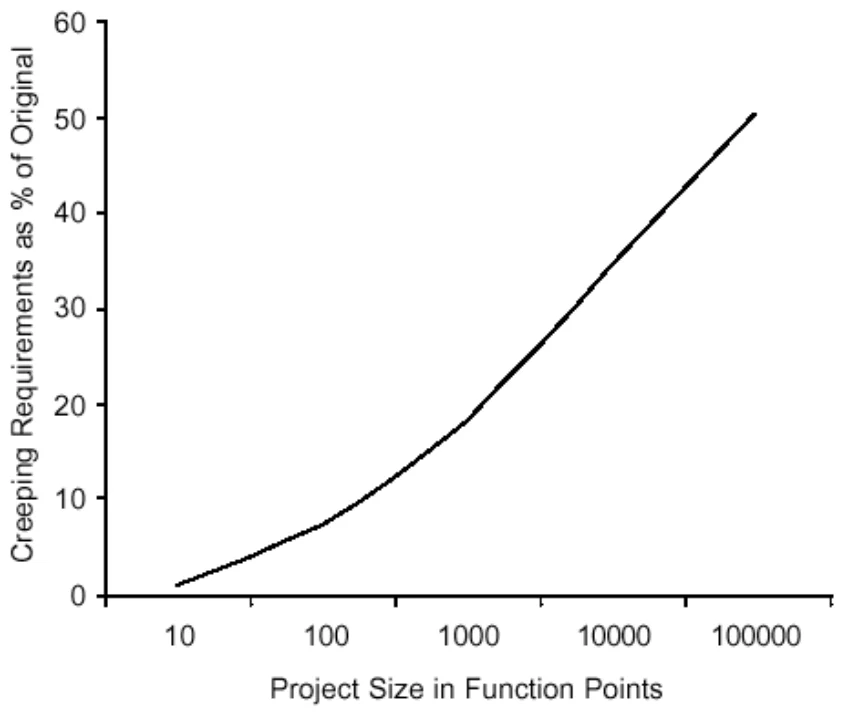
  • Average project has 25% requirements change
  • Overly detailed specs. or prolonged requirements phase are not the answer
  • Sources of change
  • Change control is a process
  • Change Control Board (CCB)
    • Structure, process, triage①
Graph: % requirements change grows with project size in function points
9
Exam weight Medium
  1. Average project: ~25% of requirements change. Bigger projects (more FP) change more.
  2. Over-detailed specs don’t prevent change; a change PROCESS does.
🎯 How this can come up · 1 question
MCQ

On average, how much of a project’s requirements change?

Control the Change – I

  1. Need for change is recognized
  2. Change request is submitted as a “request for change” (RFC) or engineering change order (ECO)
  3. Developer or PM team evaluates: impact and desirability
  4. Change report is generated
  5. Change control authority (CCB) makes a decision to either:①
    • a) Deny request: change request is denied, user is informed
    • b) Proceed

If change is approved:

  • 1. Request is queued for action; ECO generated
  • 2. Individuals assigned to configuration objects
  • 3. Objects checked out and change made
  • 4. Change audited
  • 5. Baseline established
  • 6. If it is a Software Configuration Item (SCI): perform SQA and testing activities
  • 7. Check-in the changed objects②
10
Exam weight Medium
  1. Request → evaluate impact → report → CCB decides. Order matters: impact analysis comes BEFORE the decision.
  2. After approval: check-out → change → audit → new baseline → test (SCI) → check-in.
Memory trickRFC in, impact out, CCB decides, baseline updated.
🎯 How this can come up · 2 questions
MCQ

In the change control process, what happens immediately before the CCB decision?

True / False

When the CCB denies a change request, the user who requested it is informed.

Control the Change – II

For Software Configuration Items (SCI)

  1. Promote SCI for inclusion in next release
  2. Rebuild appropriate version a) Include all changes in release b) Review/audit the change c) Perform Verification and Validation [testing activities]
  3. Distribute new version①
11
Exam weight Low
  1. Promote → rebuild (include changes, audit, V&V) → distribute.

Control the Change – III

  • Use a change management system (COTS) and a change tracking system.
  • Ideal if they are integrated: aka Comprehensive Software Change Management
    • SCM (Source code management)
    • Issue/defect tracking software①
12
Exam weight Low
  1. Best practice: source control (e.g., Git) integrated with issue tracking (e.g., Jira).

Agile Perspective (Integrated change control)

  • The agile change control process is not controlled by a change review board and the project manager
    • Product changes are owned and managed by the customer
    • Process changes are owned by the team
    • The project manager facilitates collaborative discussion of changes between the customer and the team①

☛ Integrated Change Control

maps to ‘continuous backlog management’

in an agile project

13
Exam weight High
  1. Agile: no CCB. Customer owns PRODUCT changes, team owns PROCESS changes, PM facilitates.
  2. Integrated change control in agile = continuous backlog management.
Exam trapProduct changes are owned by the CUSTOMER, process changes by the TEAM. Easy to swap in a T/F.
🎯 How this can come up · 2 questions
MCQ

In an agile project, integrated change control maps to:

True / False

In agile, process changes are owned by the customer.

Integrated Change Control Comparison

Plan-driven vs. adaptive change control

  • Approach: formal and structured | informal and flexible
  • Change management plan: well-defined and documented | limited or no plan
  • CCB: formal, with defined roles | informal, with flexible roles
  • Change request process: strict procedures | flexible procedures
  • Impact analysis: thorough and detailed | limited or none
  • Implementation: after CCB approval | quickly and frequently
  • Documented changes: well documented and tracked | may not be documented or tracked
  • Communication: formal, structured plan | informal, flexible plan
  • Management approach: predictability and control | flexibility and adaptability
  • Applicability: well-defined requirements, stable environment | changing requirements, uncertain environment①
14
Exam weight Medium
  1. Left = plan-driven, right = adaptive. Any row can become a T/F by swapping the sides.
🎯 How this can come up · 2 questions
MCQ

Which describes change control in a plan-driven methodology?

Scenario

Requirements are unclear and the market changes monthly. Which change-control style fits?

Change During Development

  • Sometimes change occurs during development that necessitates changes in scope
    • Approval of CCB (Change Control Board) and
    • Requires extensive planning
    • May require more time/resources (project triangle)①
  • Plan-driven methodologies may or may not have this built in (i.e. Spiral) or may be specifically built to resist change (i.e. Waterfall)②
  • Agile Methodologies embrace change
    • Scrum allows for change to the Product Backlog at any time, but manages risk by freezing the current Sprint Backlog
  • Stakeholder Communication IS KEY
15
Exam weight High
  1. A scope change needs CCB approval, planning and maybe more time/resources: the triangle moves.
  2. Spiral builds change in; Waterfall resists it; Scrum allows product-backlog changes but freezes the sprint backlog.
🎯 How this can come up · 2 questions
MCQ

How does Scrum manage the risk of change?

True / False

Waterfall is specifically built to embrace change.

Software Change Strategies

  • Software maintenance
    • Changes are made in response to changed requirements but the fundamental software structure is stable
  • Architectural transformation
    • The architecture of the system is modified generally from a centralized architecture to a distributed architecture
  • Software re-engineering
    • No new functionality is added to the system but it is restructured and reorganized to facilitate future changes①
  • These strategies may be applied separately or together
16
Exam weight Medium
  1. Maintenance: structure stays. Architectural transformation: centralized → distributed. Re-engineering: NO new functionality, just restructure.
Exam trapRe-engineering adds no new functionality. It only restructures for future change.
🎯 How this can come up · 1 question
MCQ

Restructuring a system without adding functionality, to make future change easier, is:

Lehman’s Laws

  • Continuing change: a program must change or become progressively less useful
  • Increasing complexity: as a program changes, its structure becomes more complex; extra resources are required
  • Large program evolution: system attributes (e.g., size, time between releases) are ~invariant for each release
  • Organizational stability: a program’s rate of development is ~constant
  • Conservation of familiarity: the incremental change in each release is ~constant
  • Continuing growth: functionality has to continually increase to maintain user satisfaction
  • Declining quality: quality appears to decline unless the system is adapted to a changing environment
  • Feedback system: evolution processes involve feedback systems for product improvement①
17
Exam weight Medium
  1. Rebuilt from the table on the slide. The three that come up most: continuing change, increasing complexity, declining quality.
Memory trickLehman in one line: software must change, change makes it complex, and without adapting it decays.
🎯 How this can come up · 2 questions
MCQ

“As a program changes, its structure becomes more complex” is Lehman’s law of:

MCQ

Which Lehman law says a program must change or become progressively less useful?

Applicability of Lehman’s Laws

  • This has not yet been established
  • They are generally applicable to large, tailored systems developed by large organizations
  • It is not clear how they should be modified for
    • Shrink-wrapped software products
    • Systems that incorporate a significant number of COTS components
    • Small organizations
    • Medium sized systems①
18
Exam weight Low
  1. Lehman’s laws fit large, tailored systems. Unclear for shrink-wrapped products, COTS-heavy systems and small orgs.

Software Maintenance

19

Software Maintenance

  • Modifying a program after it has been put into use
  • Maintenance does not normally involve major changes to the system’s architecture
  • Changes are implemented by modifying existing components and adding new components to the system①
20
Exam weight Low
  1. Maintenance = changing a program AFTER delivery, normally without major architecture changes.

Maintenance is Inevitable

  • The system requirements are likely to change while the system is being developed because the environment is changing. Therefore a delivered system won't meet its requirements!
  • Systems are tightly coupled with their environment. When a system is installed in an environment it changes that environment and therefore changes the system requirements.①
  • Systems MUST be maintained therefore if they are to remain useful in an environment
21
Exam weight Low
  1. (The slide title says “Inventible”: it means inevitable.)
  2. Installing a system changes its environment, which changes the requirements.

Types of Maintenance

  • Maintenance to repair software faults
    • Changing a system to correct deficiencies in the way meets its requirements ( Corrective Maintenance )①
  • Maintenance to adapt software to a different operating environment
    • Changing a system so that it operates in a different environment (computer, OS, etc.) from its initial implementation ( Adaptive Maintenance )②
  • Maintenance to add to or modify the system’s functionality
    • Modifying the system to satisfy new requirements ( Perfective Maintenance )③
22
Exam weight High
  1. Corrective = fix faults.
  2. Adaptive = new environment (OS, hardware, platform).
  3. Perfective = new or changed functionality.
Memory trickC-A-P: Correct it, Adapt it, Perfect it.
Exam trapPorting to a new OS is ADAPTIVE, not perfective. Adding a feature is PERFECTIVE.
🎯 How this can come up · 3 questions
MCQ

Updating an app so it runs on a new version of the operating system is:

MCQ

Adding a new report requested by users is:

Scenario

A bank’s app crashes when a balance is negative. The team patches the calculation. Which type of maintenance is this?

Distribution of Maintenance Efforts

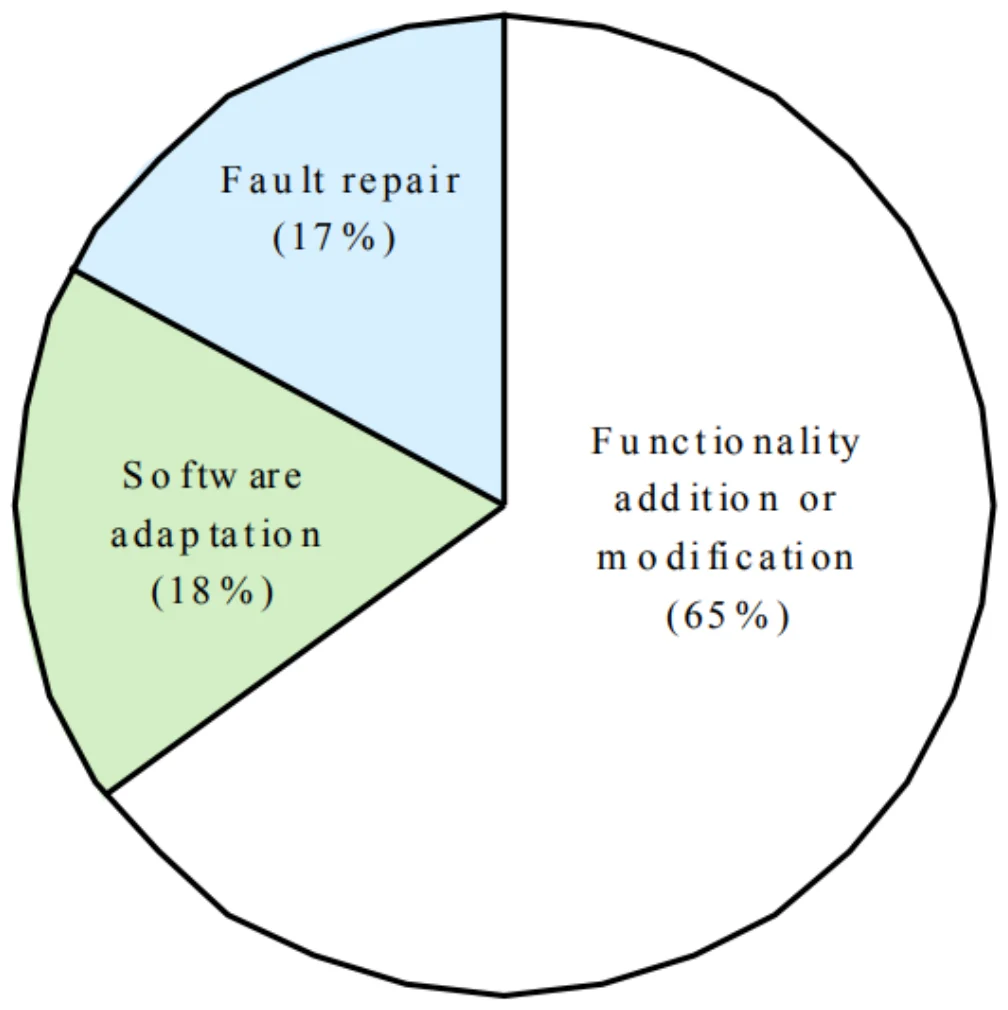
Pie chart: functionality addition or modification 65%, software adaptation 18%, fault repair 17%
23
Exam weight High
  1. Most maintenance effort (65%) is PERFECTIVE: adding or modifying functionality. Fault repair is only 17%, adaptation 18%.
Exam trapMost maintenance is NOT bug fixing. Perfective work dominates at 65%.
🎯 How this can come up · 2 questions
MCQ

According to the chart, most maintenance effort goes to:

True / False

Fault repair takes the largest share of maintenance effort.

Maintenance Cost

  • Usually greater than development costs (2* to 100* depending on the application)
  • Affected by both technical and non-technical factors
  • Increases as software is maintained. Maintenance corrupts the software structure so makes further maintenance more difficult.
  • Ageing software can have high support costs (e.g. old languages, compilers etc.)①
24
Exam weight Medium
  1. Maintenance often costs 2× to 100× development, and it grows because each change degrades the structure.
🎯 How this can come up · 1 question
True / False

Software maintenance costs are usually lower than development costs.

Maintenance Cost Factors

  • Team stability
    • Maintenance costs are reduced if the same staff are involved with them for some time
  • Contractual responsibility
    • The developers of a system may have no contractual responsibility for maintenance so there is no incentive to design for future change
  • Staff skills
    • Maintenance staff are often inexperienced and have limited domain knowledge
  • Program age and structure
    • As programs age, their structure is degraded and they become harder to understand and change①
25
Exam weight Medium
  1. Four cost factors: team stability, contractual responsibility, staff skills, program age/structure.
  2. No maintenance contract → no incentive to design for change.
🎯 How this can come up · 1 question
MCQ

Why can a lack of contractual responsibility for maintenance raise maintenance costs?

Evolutionary Software

  • Rather than think of separate development and maintenance phases, evolutionary software is software that is designed so that it can continuously evolve throughout its lifetime YES, but how/much?①
26
Exam weight Low
  1. Evolutionary software: no split between development and maintenance; it evolves for its whole life.

Maintenance Prediction

  • Maintenance prediction is concerned with assessing which parts of the system may cause problems and have high maintenance costs
    • Change acceptance depends on the maintainability of the components affected by the change
    • Implementing changes degrades the system and reduces its maintainability
    • Maintenance costs depend on the number of changes and costs of change depend on maintainability①
27
Exam weight Low
  1. A cycle: changes degrade the system → lower maintainability → each change costs more.

Maintenance Prediction

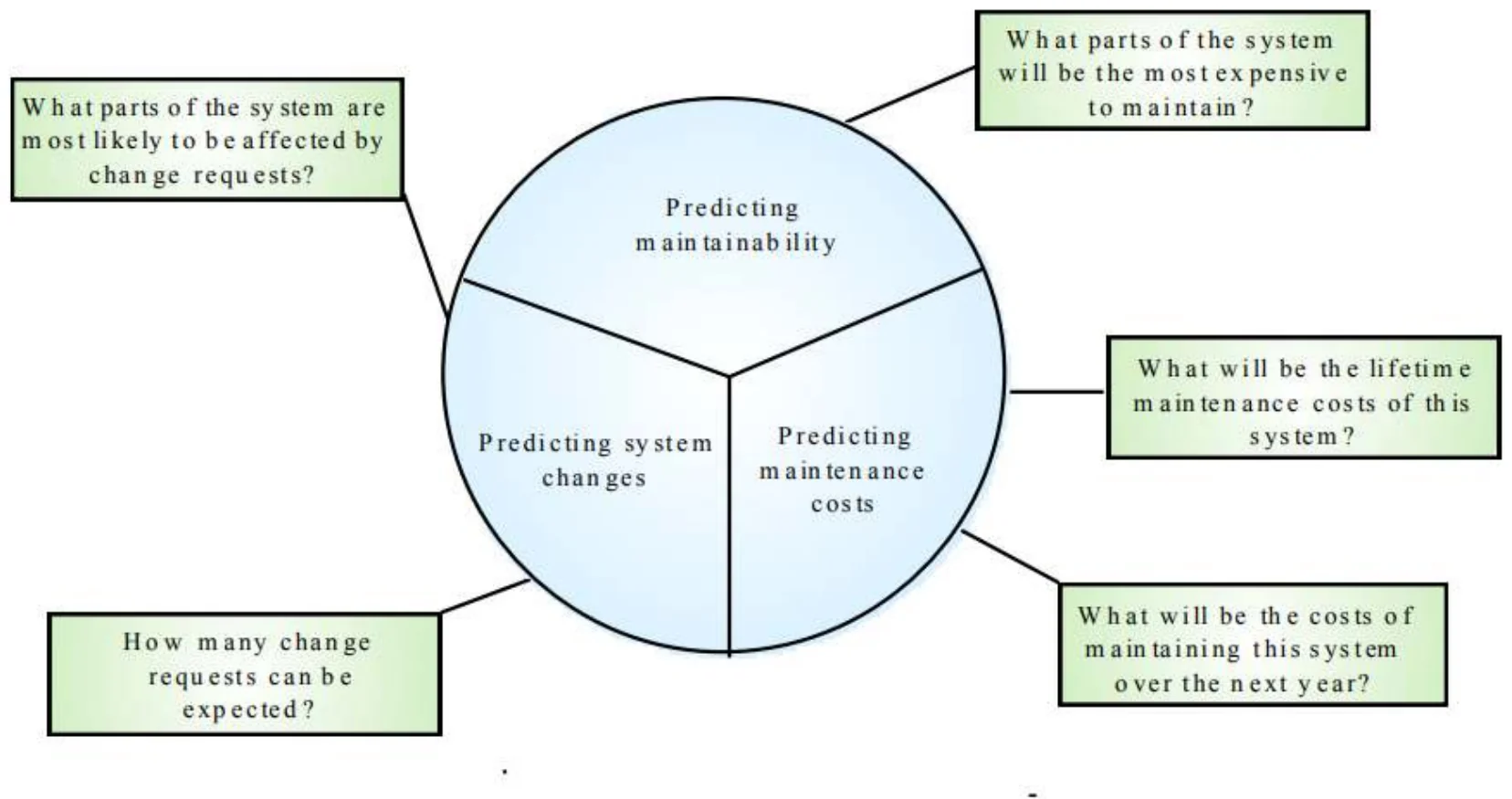
Predicting maintainability, system changes and maintenance costs, with the questions each answers
28
Exam weight Low
  1. Three predictions: maintainability (which parts are expensive?), changes (how many requests?), costs (lifetime and next-year cost).

Change Prediction

  • Predicting the number of changes requires an understanding of the relationships between a system and its environment
  • Tightly coupled systems require changes whenever the environment is changed
  • Factors influencing this relationship are
    • Number and complexity of system interfaces
    • Number of inherently volatile system requirements
    • The business processes where the system is used①
29
Exam weight Low
  1. More interfaces + more volatile requirements + business processes = more changes.

Complexity Metrics

  • Predictions of maintainability can be made by assessing the complexity of system components
  • Studies have shown that most maintenance effort is spent on a relatively small number of system components
  • Complexity depends on
    • Complexity of control structures
    • Complexity of data structures
    • Procedure and module size①
30
Exam weight Low
  1. Most maintenance effort hits a FEW complex components. Complexity = control structures, data structures, size.

Process Metrics

  • Process measurements may be used to assess maintainability
    • Number of requests for corrective maintenance
    • Average time required for impact analysis
    • Average time taken to implement a change request
    • Number of outstanding change requests①
  • If any or all of these is increasing, this may indicate a decline in maintainability
31
Exam weight Medium
  1. Process metrics for maintainability: corrective requests, impact-analysis time, time per change, outstanding requests. Rising = declining maintainability.
🎯 How this can come up · 1 question
MCQ

Which process metric suggests declining maintainability when it increases?

Architecture Evolution

  • There is a need to convert many legacy systems from a centralized architecture to a client-server architecture
  • Change drivers
    • Hardware costs. Servers are cheaper than mainframes
    • User interface expectations. Users expect graphical user interfaces (CLI->GUI)
    • Distributed access to systems. Users wish to access the system from different, geographically separated, computers①
32
Exam weight Low
  1. Drivers: cheaper servers than mainframes, GUI expectations, distributed access.

Distribution Factors

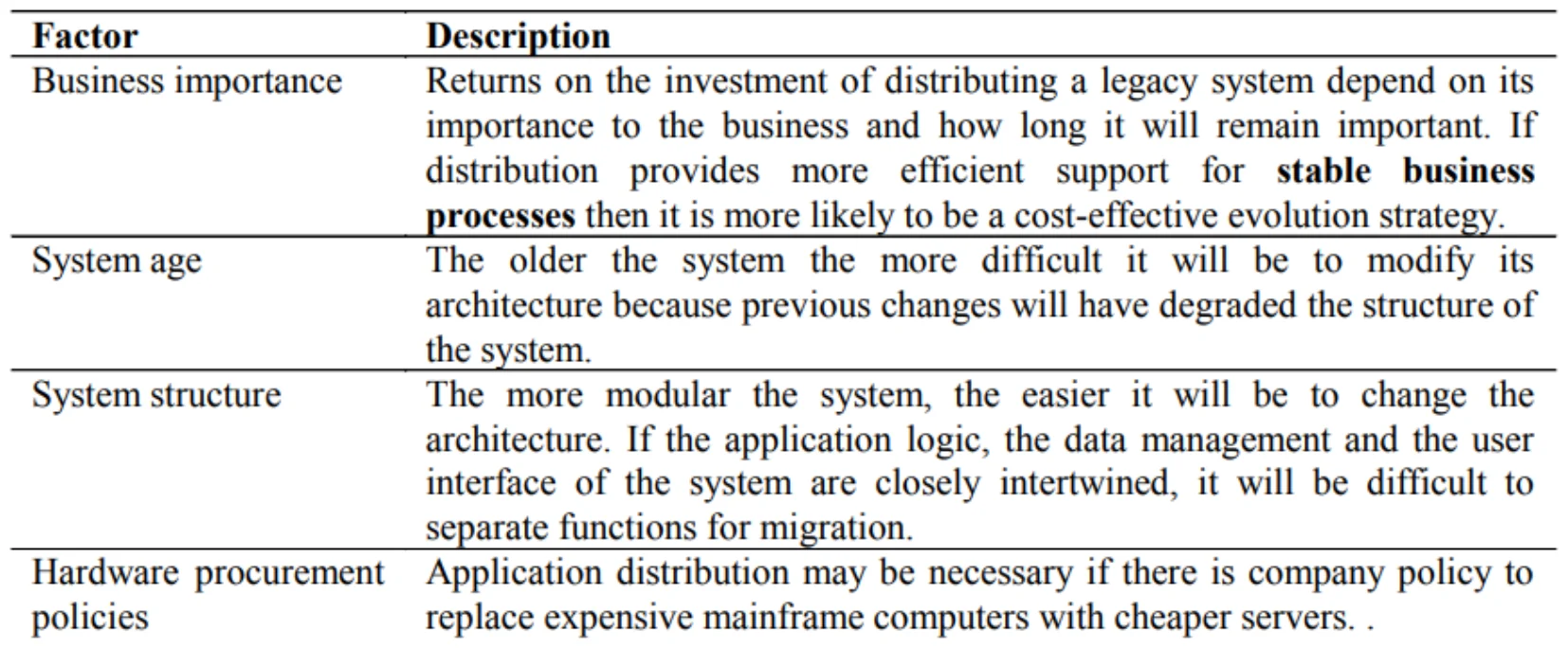
Table: business importance, system age, system structure, hardware procurement policies
33
Exam weight Low
  1. Distribution factors: business importance, system age, system structure (modular = easier), hardware procurement policy.

Legacy System Structure

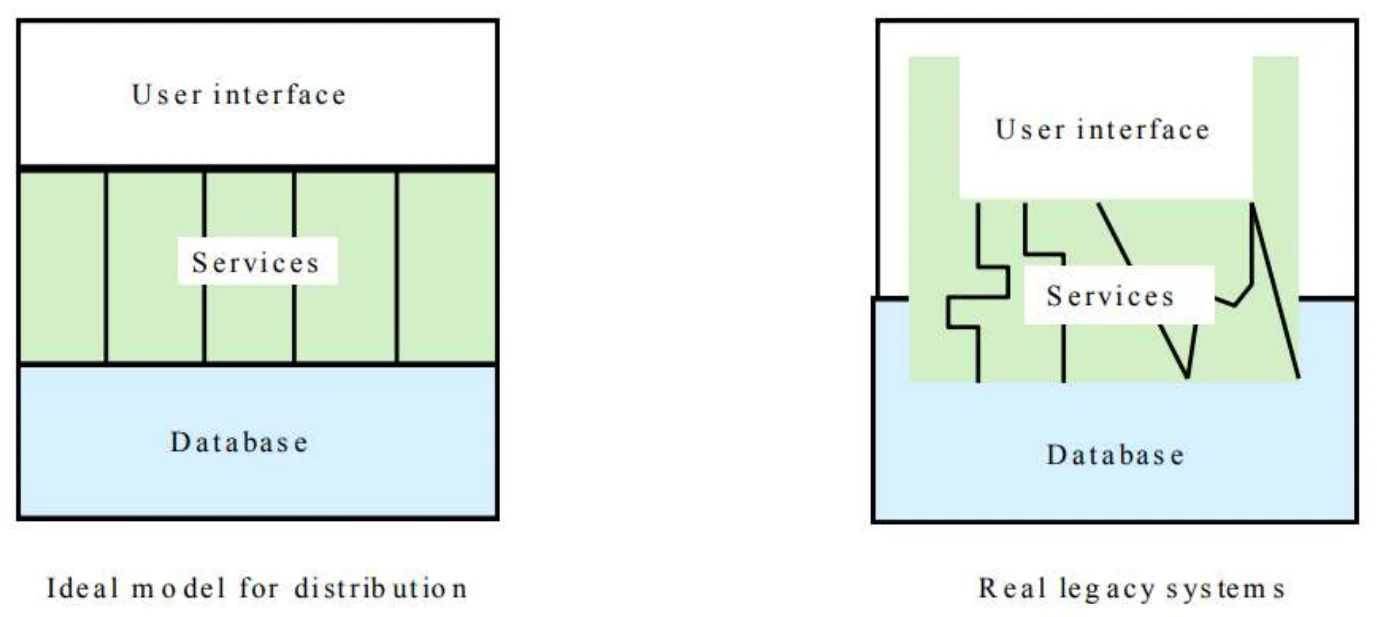
  • Ideally, for distribution, there should be a clear separation between the user interface, the system services and the system data management
  • In practice, these are usually intermingled in older legacy systems①
Ideal model for distribution vs. real legacy systems with intermingled UI, services and database
34
Exam weight Low
  1. Ideal: separate UI, services, data. Legacy: tangled, so distribution is hard.

Key Points

  • The costs of software change usually exceed the costs of software development
  • Factors influencing maintenance costs include staff stability, the nature of the development contract, skill shortages and degraded system structure
  • Architectural evolution is concerned with evolving centralized to distributed architectures
  • A distributed user interface can be supported using screen management middleware①
35
Exam weight Low
  1. Summary of part 2. The first bullet is the most quotable.

Other Aspects

36

Other Aspects

  • Roll-Out
    • Release Check-List
  • Training
    • More than just end-users
      • Users, systems ops, maintenance developers, sales
  • Documentation
    • Many types: End-user, sales & marketing, operations, design
  • Migration
    • Moving users from existing system to your new one
  • Maintenance and Support

We’ll discuss each of these ...①

37
Exam weight Low
  1. Five closing activities: roll-out, training, documentation, migration, maintenance & support.

Rollout

  • Create a “Release Checklist”
    • Avoid activities falling through the cracks
    • Activities by Group:
      • Engineering, QA, Documentation, Operations
    • Possibly sign-off signatures
  • Roll-out: Must have a plan for the process
    • Often on a given day (ex: a Sat.) plan
    • Must be a very detailed①
38
Exam weight Low
  1. Release checklist = nothing falls through the cracks; activities by group, maybe signed off.
  2. The professor underlined “plan” in red: roll-out needs a very detailed plan.

Shipping Details

  • Packaging (if commercial product)
  • Marketing collateral
  • Security mechanisms (if commercial product)
  • Licensing
    • Plan
    • Mechanism①
39
Exam weight Low
  1. For commercial products: packaging, marketing, security, licensing (plan + mechanism).

Installation

  • Scripts
  • Uninstall (if not Web-based)
  • If you need to install your software (as on PCs):
    • Don’t underestimate:
      • Time this takes to develop
      • Importance of a “first impression”
  • Or, if “custom” software you’re reselling
    • Installation at site is often a① “mini-project”
40
Exam weight Low
  1. Installers take longer to build than expected and are the user’s first impression.

Training

  • Often more than just end-users
    • Users
    • Sales & Marketing staff
    • System operators
    • Maintenance engineers (possibly)
    • Sales engineers (possibly)
    • (Technical) Support staff①
41
Exam weight Medium
  1. Train users, sales/marketing, operators, maintenance and sales engineers, support staff.
🎯 How this can come up · 1 question
True / False

Training for a new system is needed only for end-users.

Documentation

  • Must be ready by ship-date
  • Final user documentation
    • On-line help
  • Updates to other
    • Operations documentation
    • Development documentation
    • Sales and marketing material
    • Web site
    • Test reports
    • Release notes①
42
Exam weight Low
  1. Documentation ships WITH the product: user help, ops, dev docs, marketing, test reports, release notes.

Migration

Migration is the process of moving from the old application/system to the

new

  • Migration Plan
  • Back-out Plan
  • Data Conversion①
43
Exam weight Medium
  1. Migration = moving from the old system to the new. Three parts: migration plan, back-out plan, data conversion.
🎯 How this can come up · 1 question
MCQ

Which is one of the three parts of migration on the slide?

Migration Plan

  • Includes
    • Description of environment (computers, DBs, interfaces)
    • Description of existing data needed
    • Description of operational constraints (ex: when can we move to the new system? Weekends only? Last week of month only?)
    • List of affected organizations and contacts
    • Plan of steps to be taken
  • Does it require a service interruption?
    • If so, when does this happen? A weekend?
  • Training?
  • Is there a help-desk?
    • If so, do they have “scripts” or new material?①
44
Exam weight Low
  1. Migration plan: environment, data, operational constraints (when can we switch?), affected orgs, steps; plus downtime, training, help desk.

Migration Strategies

  • Communication with customers is crucial
    • Importance of 2-way communication
    • What is happening, when, and why
    • “Why” should remind them of the benefits
    • Not too much detail or too little
    • Where do customers go for more information?
  • Minimize intrusiveness
  • Find-out about customer’s key dates
    • When does the system absolutely need to be stable?
    • Know about their important deadline dates
    • They must buy-into the approach!①
45
Exam weight Low
  1. Two-way communication: what, when, why (benefits). Know the customer’s key dates.

Migration Strategies

  • Considerations:
    • Level of business disruption
    • Degree of latitude in “production” date
    • How much internal opposition to system is there?
      • If higher, perhaps a longer ‘adjustment’ period
    • Your comfort level of system quality
      • If questionable, may want to mitigate risk①
46
Exam weight Low
  1. Choose a strategy by disruption, date flexibility, internal opposition (high → longer adjustment) and confidence in quality (low → mitigate risk).

Migration Strategies

  1. Flash-Cut migration: straight move from old system to new
    • A. Immediate Replacement
      • Fastest approach
      • Still want a back-out plan
      • Requires strong planning and testing①
    • B. Parallel Operation
      • Mitigates risk
      • Parallel to either existing manual or system process
      • Cut occurs once new system “burned-in”
  2. Staged migration
    • Replace one part of existing system at a time②
47
Exam weight High
  1. Immediate replacement = fastest, riskiest. Parallel = safest but costly (run both). Staged = one part at a time.
  2. Even the fastest cut still needs a back-out plan.
Memory trickFlash = fast, Parallel = safe, Staged = step-by-step.
Exam trapParallel operation MITIGATES risk; it is not the fastest. Immediate replacement is the fastest.
🎯 How this can come up · 3 questions
MCQ

Which migration strategy runs the old and new systems side by side until the new one is “burned in”?

MCQ

Which migration approach is fastest?

Scenario

A hospital is replacing its patient-records system and can’t afford any outage. Which migration strategy, and why?

Flash-Cut

  • Immediate Replacement
    • Ex: new corporate-wide calendar system
  • Requires very careful planning & testing
  • Still try to get some users to “try” it first if possible
  • Develop a back-out plan①
48
Exam weight Low
  1. Flash-cut example: a new company-wide calendar. Pilot with a few users first if possible.

Cutover

  • Criteria: What conditions must be met prior?
  • Responsibility: Who decides?
  • Operations: Who ‘owns’ it once it’s live?
  • Rehearsals: Sometimes used.①
49
Exam weight Low
  1. Cutover questions: conditions, who decides, who owns it live, rehearse?

Back-Out Plan

  • Especially important for “conversions”
    • Customers already have expectations and needs as defined by their existing system
    • Must be able to restore customer’s service ASAP
  • May mean running both simultaneously “just in case”
  • Leave it in place for awhile (more than a day!)
  • When to fall-back?
    • Mgmt: sooner, Tech: one-more-fix①
    • Set a time limit (ex: 3 hours of start)
  • Data recovery and migration back to old system②
50
Exam weight Medium
  1. Managers want to fall back sooner; techs always want “one more fix”. Hence a time limit (e.g., 3 hours).
  2. Back-out includes recovering data and migrating it back.
TipKeep the old system available for more than a day after cutover.
🎯 How this can come up · 1 question
True / False

A back-out plan should include a time limit for deciding when to fall back.

Data Conversion

  • Most systems need this step
  • Most PMs forget this
  • Impacts both completely new and replacement systems
  • The “data” often more valuable than the “system”

Data Conversion Areas

  • Data Sources:
    • Where does it come from?
    • Do you need to modify data on the way in?
    • Is it accurate?
  • Process Controls:
    • Does it happen all at once?
    • How do you guarantee it’s been done correctly?
  • Completion:
    • How do you handle any ‘exceptions’?
    • Do you make backups? Can you restart?①
51
Exam weight Medium
  1. Data conversion: sources (accuracy, transformation), process controls (verification), completion (exceptions, backups, restart).
🎯 How this can come up · 1 question
True / False

Data conversion is only needed when replacing an existing system.

Parallel Operation

  • Multiple variations of this method
  • An “adoption” period
    • See telephone industry with new area codes
    • Both work for a period of time
  • Strategies
    • Avoid flash-cuts if possible
      • Start with test subjects①
52
Exam weight Low
  1. Example: new area codes where old and new both work for a while.

Concluding Software Projects

  • Seems simple, often isn’t
  • Potential Issues
    • Last-minute change requests
      • “One more feature”
    • Disputes of fulfillment of all requirements
      • Often “interpretation” issues
    • Keeping the team motivated
    • Difficult transition to maintenance①
53
Exam weight Low
  1. Closing problems: “one more feature”, disputes over requirements, motivation, handover to maintenance.

Maintenance Phase

  • Need a support plan and a maintenance plan [should be part of project plan]
  • The “No respect” phase
  • Less “glamorous”
    • Lack of enthusiasm
  • Pressure to make fixes quickly
    • For “production” problems
  • Software can become “hacked” “patchwork” over time
  • Finding a support & test platform can be difficult
    • Often the forgotten child until fixes are needed①
54
Exam weight Low
  1. A support plan and maintenance plan belong in the project plan. Pressure for quick fixes leads to “patchwork” code.

Maintenance Phase

  • Compare to hardware maintenance
    • Not to keep state same; but changes to state
    • Fixes and enhancements
  • Configuration control is very important
    • Fixing the “right” version; tracking branches
  • Project management not always carried over
  • Smaller team
    • Often not a ‘dedicated team’
    • Drawn from developers with other main tasks①
55
Exam weight Low
  1. Software maintenance CHANGES state (unlike hardware). Fix the right version and track branches.

Maintenance Phase

  • Contracts, remember those?
    • Always consider the maintenance phase here
    • Often via a “labor hours” contract
      • Time & materials in a “direct” scenario
    • Otherwise via “maintenance contract”
      • Percentage of software license fee
      • Ex: 20% of original cost per year
  • Corp. budget if internal/IS projects
    • Often annual/monthly “maintenance” allocations①
56
Exam weight Medium
  1. Maintenance contracts: time & materials, or ~20% of the license fee per year.
🎯 How this can come up · 1 question
MCQ

A typical maintenance contract might cost per year:

Project in Trouble

“What if the project cannot meet the schedule?”

  • Level with the sponsor
  • Move some features/requirements to a second phase②
  • Use Resource Leveling Techniques
    • Fast tracking – two activities in parallel
    • Activity shifting – Move start/end dates forward or backward
    • Activity splitting – Break an activity into two or more pieces
    • Activity stretching – Use less of a given resource continuously
    • Resource substitution – Assign a different resource
    • Allocating overtime – Work resources longer①
  • Re-evaluate tasks: effort and need
57
Exam weight High
  1. Six leveling techniques: fast tracking, shifting, splitting, stretching, substitution, overtime.
  2. Also: be honest with the sponsor and defer features to phase 2.
🎯 How this can come up · 2 questions
MCQ

Doing two activities in parallel to recover schedule is:

MCQ

Breaking an activity into two or more pieces is:

Project Recovery

How to save a “drowning project”

  • 3 Approaches
    • Cut the size of the software
    • Increase process productivity
    • Slip the schedule, proceed with damage control
  • Opportunity for decisive leadership action
  • Not a time to ‘just cut corners’
    • Be realistic (not foolish)
  • Timing: politically important
    • Not too early, not “too” late①
58
Exam weight Medium
  1. Three recovery approaches: cut size, raise productivity, slip the schedule with damage control.
  2. Not a time to cut corners; timing is political.
Memory trickRecovery = Size, Speed, Slip.
🎯 How this can come up · 1 question
MCQ

Which is NOT one of the three approaches to saving a drowning project?

Project Recovery

First Steps

  • Assess situation
    • Is there a hard deadline, what’s negotiable, etc.
  • Don’t do what’s been done already
  • Ask team what needs to be done

People Steps

  • Morale; focus; re-assign
    • Restore morale
      • Sacrifice a sacred cow [See note]
        • Dress code, off-site, catered meals, etc.
      • Cleanup personnel problems
    • Focus people’s time
      • Remove non-essential work
    • Reassign tasks and responsibilities①
59
Exam weight Medium
  1. First: assess, don’t repeat what failed, ask the team. People: morale, focus, reassign.

Project Recovery

  • Process Steps
    • Fix classic mistakes
      • Inadequate design, shortchanged activities, etc.?
    • Create “Miniature Milestones”
      • Small (in day(s)), binary, exhaustive
      • Boosts morale: getting things done!
    • Track progress meticulously
    • Recalibrate after a short time
    • Manage risk painstakingly①
60
Exam weight Medium
  1. Mini milestones: small (days), binary (done or not), exhaustive. They boost morale.
🎯 How this can come up · 1 question
MCQ

Miniature milestones in project recovery should be:

Project Recovery

  • Product Steps
    • Stabilize the requirements
    • Raise the bar on change requests
    • Trim the feature set (see feature set control)
      • Determine priorities, cut the low ones
    • “Take out the garbage”
      • Find error-prone modules; re-design
    • Get to a known, stable state & build from there①
61
Exam weight Medium
  1. Product steps: stabilize requirements, fewer changes, trim features, redesign error-prone modules, reach a stable state.

Feature Set Control

  • Minimal Specification
  • Requirements Scrubbing
    • unnecessary or overly complex requirements to be removed.
  • Versioned Development
  • Effective Change Control
  • Feature Cuts①
62
Exam weight Low
  1. Feature set control: minimal spec, scrubbing (remove unnecessary/complex requirements), versioned development, change control, cuts.

Summary

  • The software change management process is the process of managing changes to the project scope, schedule, or budget.
  • The change management process starts with change identification, where a change request is submitted and recorded.
  • The change is then evaluated to determine its impact on the project, including the scope, schedule, budget, and quality.
  • If the change is approved, it is implemented and integrated into the project plan.①
63
Exam weight Medium
  1. The process in one line: identify → record → evaluate impact → approve → implement and integrate.

Summary

  • Finally, the change is monitored and controlled to ensure that it does not have any negative impacts on the project.
  • Change management techniques include developing a change management plan, establishing a change control board, and communicating changes to stakeholders.
  • Change management plans should include the change management process, roles and responsibilities, communication and reporting, and change control procedures.①
64
Exam weight Medium
  1. Change management plan contents: process, roles & responsibilities, communication & reporting, control procedures.
🎯 How this can come up · 1 question
Written

List four things a change management plan should include.

Summary

  • A change control board is responsible for evaluating and approving changes, and ensuring that changes are managed effectively.
  • Communication is critical to change management, and project managers should communicate changes clearly and effectively to stakeholders.
  • Effective change management can help ensure that changes are managed in a controlled and structured manner, minimizing the risk of negative impacts on the project.①
65
Exam weight Medium
  1. Final takeaway: CCB + clear communication = controlled change.
🎯 How this can come up · 1 question
Scenario

Midway through a project the client asks for a new payment feature. Walk through how you handle it.