SE423 · Annotated SlidesChapter 6.2 — Scheduling and Tracking
Chapter 6.2 · Annotated slides

Scheduling and Tracking

WBS, network diagrams, critical path (ES/EF/LS/LF/slack), PERT, Gantt charts, schedule compression and earned value. Each final had a full network-diagram/critical-path question plus Gantt, burn-chart and crashing/fast-tracking questions, so this is the highest-scoring deck.
Slide text Instructor’s marks (from the original PDF) Study notes Highlight: key words Tips, tricks & traps Seen again elsewhere How it can come up

Scheduling and Tracking

SE423: Software Project Management
1
Exam weight Low
  1. Workflow: WBS → sequence (network) → durations → critical path → Gantt → compress → track (EV, velocity, burn-down).

Outline

  • Schedule Development
  • Work Breakdown Structure (WBS)
  • Network Analysis
  • Scheduling Workflow
  • PERT Estimation Technique
  • Project Tracking
2
Exam weight Low
  1. Network analysis and tracking carry the most marks.

Schedule Development

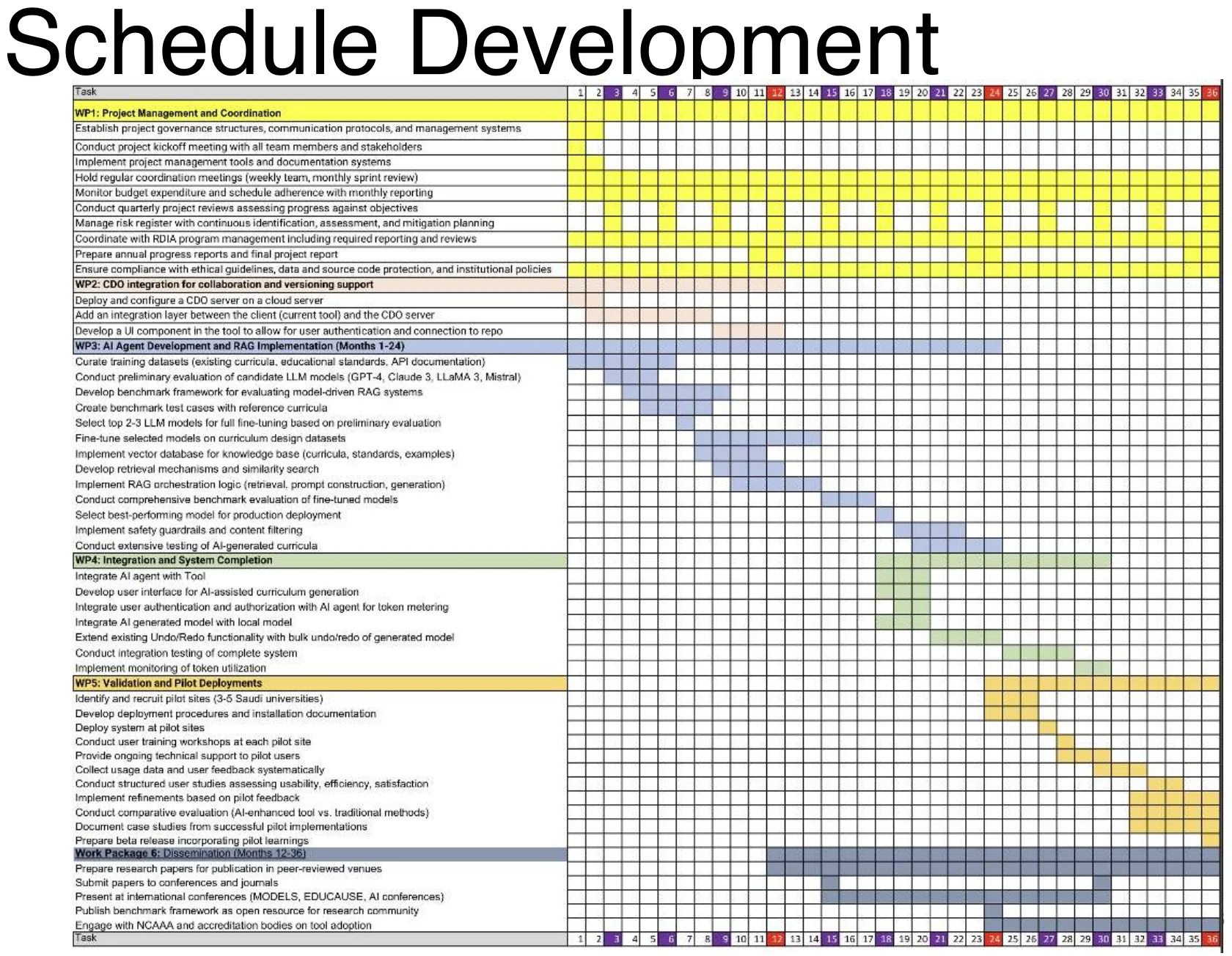
A large project Gantt chart
3
Exam weight Low
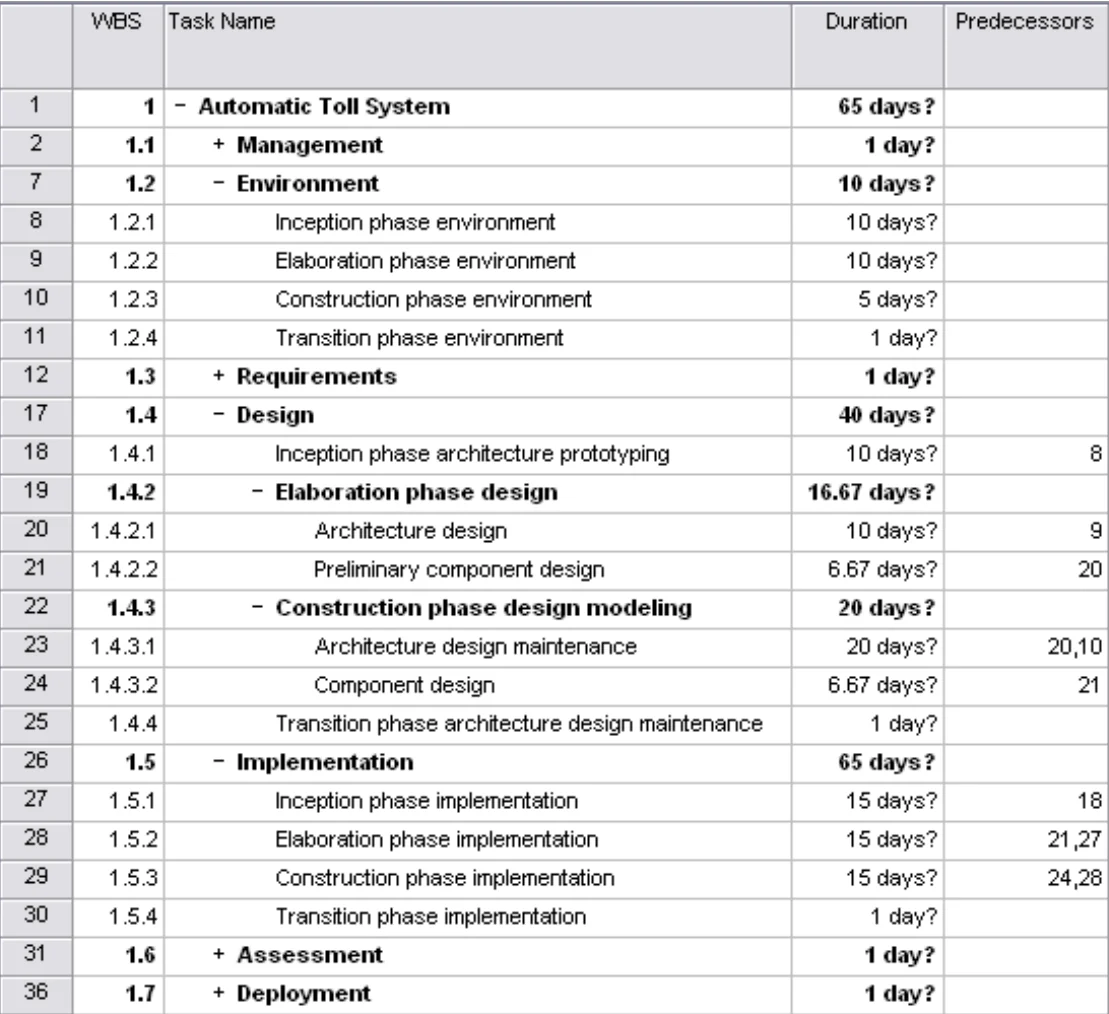
  1. A real schedule: hundreds of WBS rows with bars over time. This is where the chapter ends up.

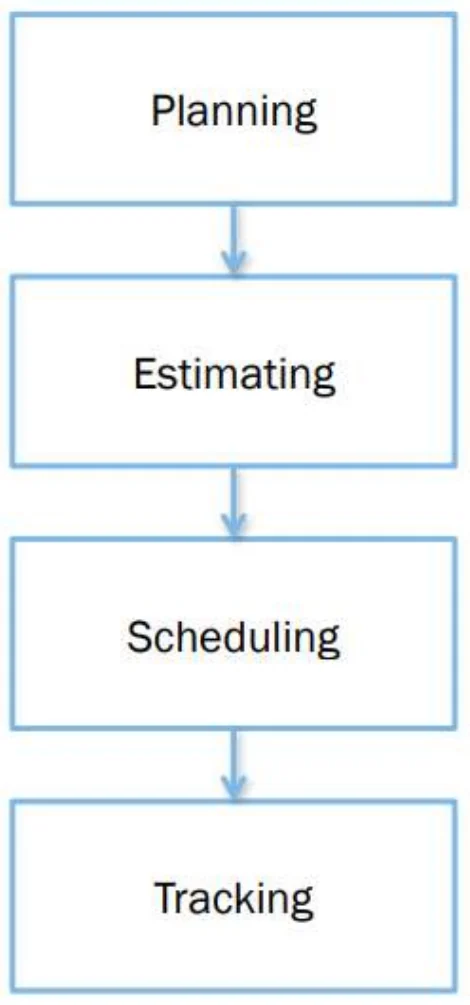
Planning, Estimation, Scheduling, Tracking

  • Plan: Identify activities. No specific start and end dates.
  • Estimating: Determining the size & duration of activities.
  • Scheduling: Adds specific start and end dates, dependencies, and resources.
  • Tracking: Uses monitoring and tools to determine if plans, estimates, and schedules are accurate①
Planning → estimating → scheduling → tracking
4
Exam weight Medium
  1. Plan = what (no dates). Estimate = how big/long. Schedule = dates, dependencies, resources. Track = are we on plan?
🎯 How this can come up · 1 question
MCQ

Which step first adds specific start and end dates?

How to Schedule?

  1. Identify “what” needs to be done: Work Breakdown Structure (WBS)
  2. Identify “how much” (the size): Size estimation techniques
  3. Identify the dependency between tasks
    • Dependency graph, network diagram
  4. Estimate total duration of the work to be done
    • The actual schedule①
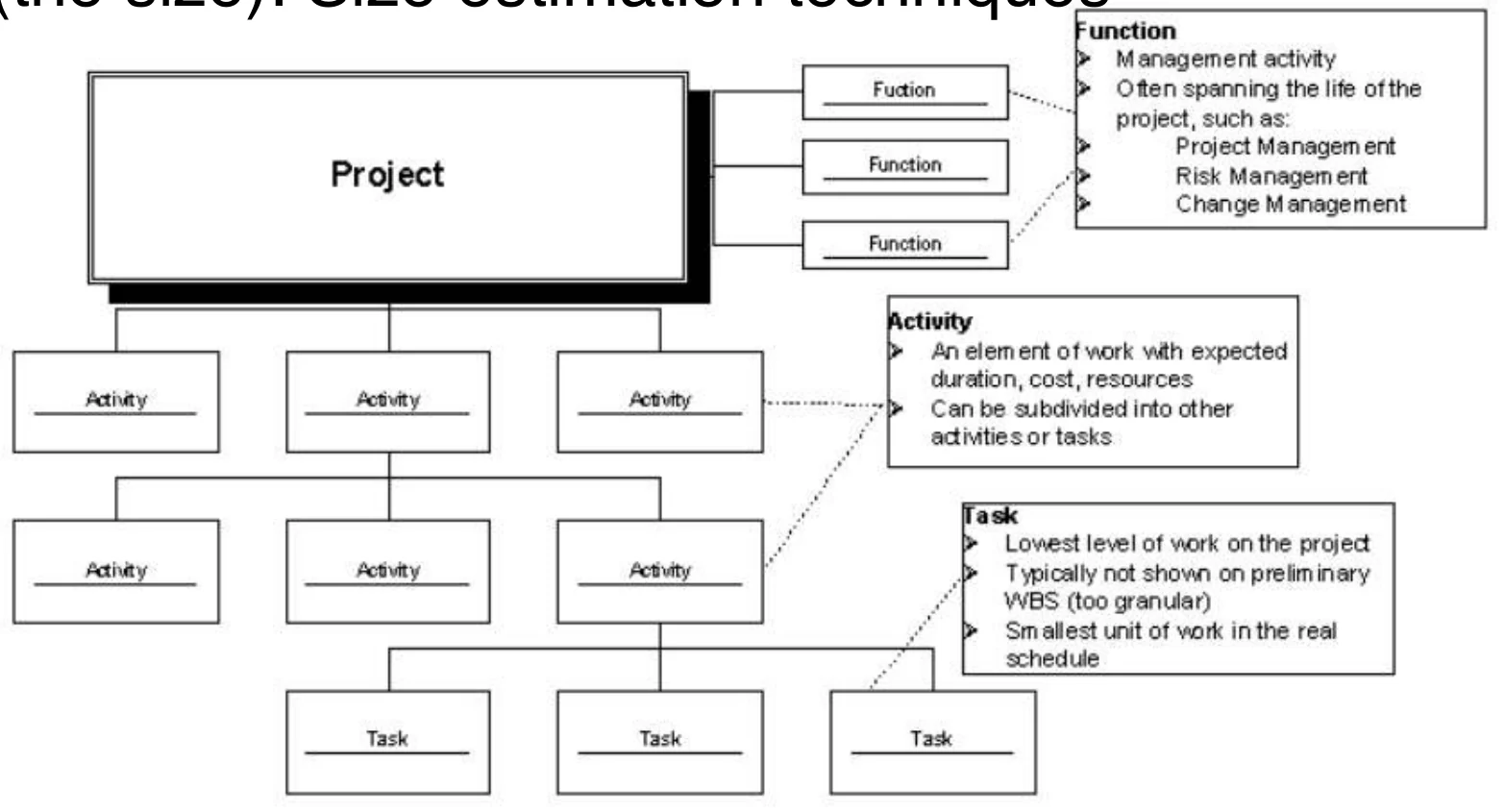
Project broken into functions, activities and tasks
5
Exam weight Low
  1. Four steps: WBS (what) → size (how much) → dependencies (network) → duration (schedule).

Definition

  • Schedule development is the culmination of the other Project Time Management processes we have discussed:
    • Activity definition
    • Activity sequencing
    • Activity resource estimating
    • Activity duration estimating
  • It is an iterative process to determine planned start and finish dates for activities
  • It is a continuous process throughout project, addressing approved changes and risks①
6
Exam weight Low
  1. Schedule development combines activity definition, sequencing, resource and duration estimating. It is iterative and continuous.

Controlling factors in schedule development

  • Project scope statement
    • Scope statement is the source of assumptions and constraints on the project
    • (PMI) “ Assumptions are those documented, schedule-related factors that, for schedule development purposes, are considered to be true, real, or certain.”①
    • (PMI) “ Constraints are factors that will limit the project management team‘s options when performing schedule network analysis.” ex: “only use internal HR”
    • Date constraints (contract dates, market windows, external deliveries) and milestones (deliverable dates) are of greatest importance in schedule development
  • Project management plan (document)
    • Almost any of the many sub-plans (resource management plan, quality assurance plan, etc.) and other elements in the Project Management Plan may exert an influence on schedule development
    • One of the most critical elements for schedule development in the PM Plan is the risk register and risk-associated plans②
7
Exam weight Medium
  1. Assumption = treated as true. Constraint = limits your options (e.g., only internal HR).
  2. The risk register is one of the most critical PM-plan inputs for scheduling.
🎯 How this can come up · 1 question
MCQ

“Only internal HR staff may be used” is an example of a:

Work Breakdown Structure (WBS)

8

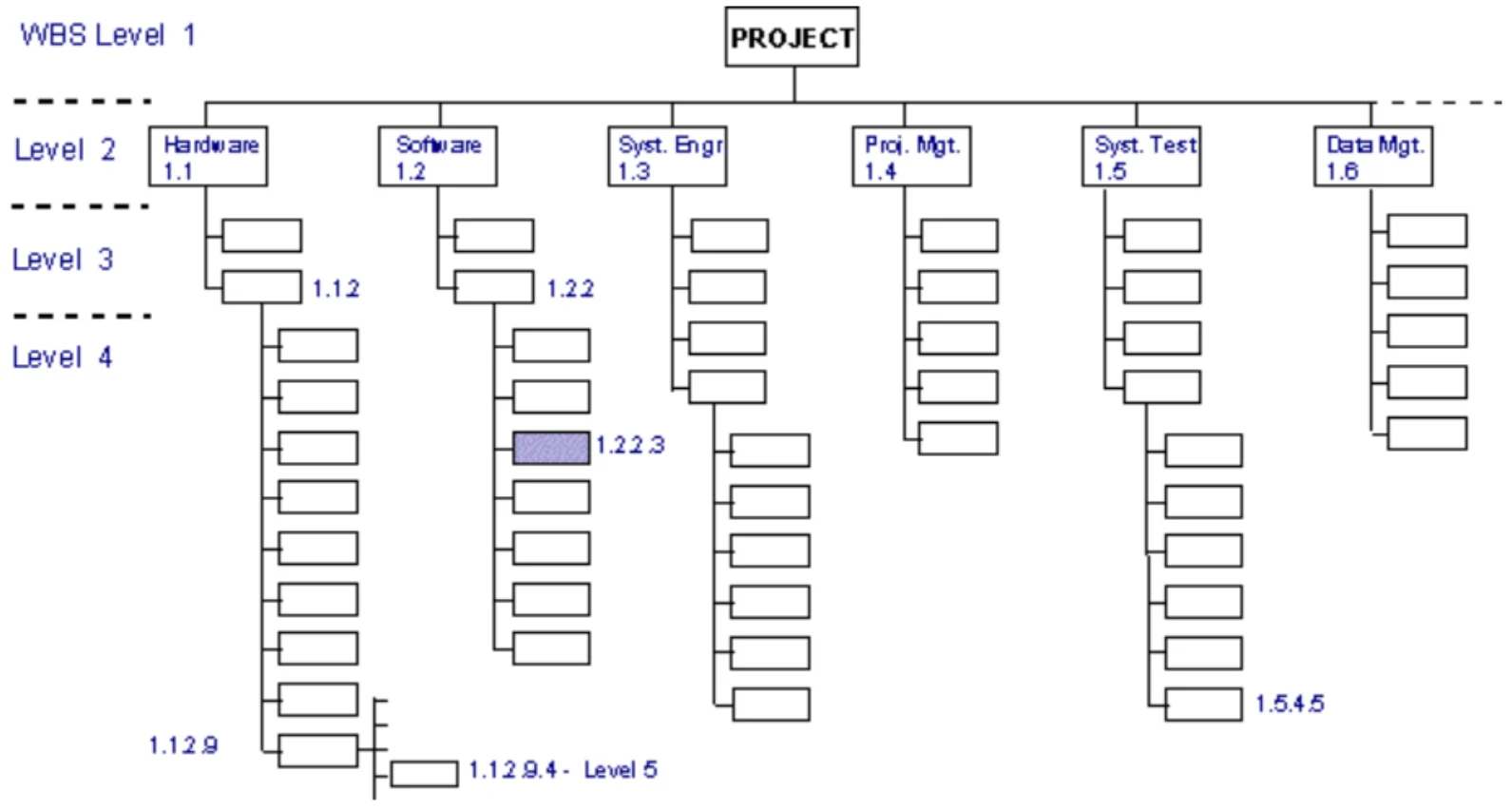
WBS Outline Example

  • 1.0 Retail Web Site
    • 1.0 Project Management
    • 2.0 Requirements Gathering
    • 3.0 Analysis & Design
    • 4.0 Site Software Development
      • 4.1 HTML Design and Creation
      • 4.2 Backend Software
        • 4.2.1 Database Implementation
        • 4.2.2 Middleware Development
        • 4.2.3 Security Subsystems
        • 4.2.4 Catalog Engine
        • 4.2.5 Transaction Processing
      • 4.3 Graphics and Interface
      • 4.4 Content Creation
    • 5.0 Testing and Production①
10
Exam weight Low
  1. Numbering shows the hierarchy: 4.2.3 is under 4.2, which is under 4.0.

WBS Types

  • Process WBS
    • a.k.a Activity-oriented
    • Ex: Requirements, Analysis, Design, Testing
    • Typically used by PM①
  • Product WBS
    • a.k.a. Entity-oriented
    • Ex: Financial engine, Interface system, DB
    • Typically used by engineering manager②
  • Hybrid WBS: both above
    • This is not unusual
    • Ex: Lifecycle phases at high level with component or feature specifics within phases
    • Rationale: processes produce products③
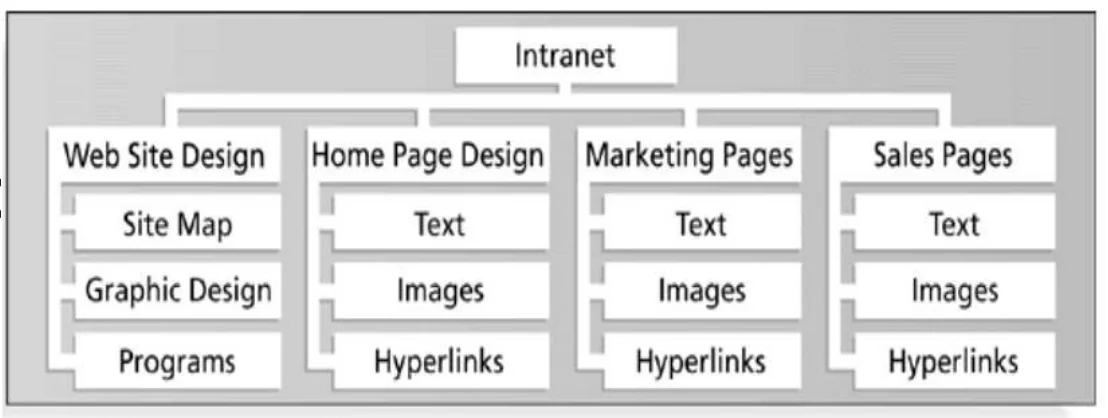
Product WBS for an intranet
11
Exam weight Medium
  1. Process WBS = activities (requirements, design, testing); used by the PM.
  2. Product WBS = things (DB, interface); used by the engineering manager.
  3. Hybrid = phases on top, components inside. Common.
🎯 How this can come up · 1 question
MCQ

A WBS listing “Requirements, Design, Testing” is a:

Process WBS

  • List of Activities, not Things
  • List of items can come from many sources: SOW (statement of work), Proposal, brainstorming, stakeholders, team
  • Describe activities using “bullet language”
    • Meaningful but brief labels
  • All WBS paths do not have to go to the same level
  • Do not plan more detail than you can manage① * SOW: statement of work, Defines contractual obligations and major deliverables
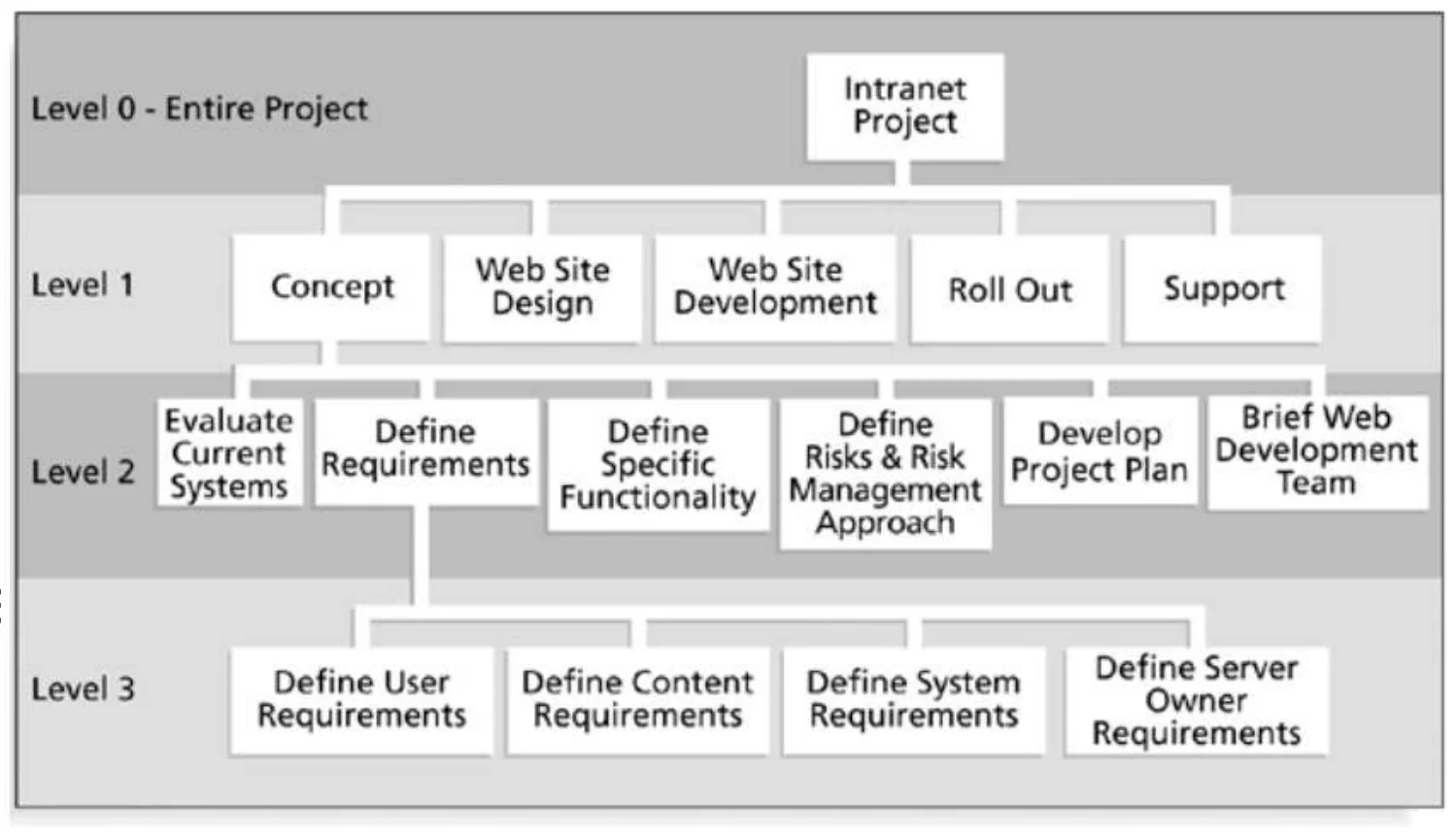
Process WBS for an intranet project
12
Exam weight Low
  1. Process WBS uses short “bullet language”; branches can stop at different depths.

Work Packages (Tasks)

  • Generic term for discrete unit of work with definable end results
  • The “one-to-two” rule
    • Often sized for: 1 or 2 persons for 1 or 2 weeks①
  • Basis for monitoring and reporting progress
    • Can be tied to budget items (charge numbers)
    • Resources (personnel) assigned
  • Ideally shorter rather than longer
    • Longer makes in-progress estimates needed
    • These are more subjective than “done”
    • “4/40” or “8/80” rule ( shortest/longest duration): sizing from 4 to 40 hours to avoid micromanagement, or 8 to 80 max to ensure visibility.
    • Not so small as to micro-manage②
13
Exam weight Medium
  1. Work package = lowest WBS level; basis for tracking.
  2. Size: 1–2 people for 1–2 weeks; or 4–40 / 8–80 hours.
Memory trick8/80: no package under 8 hours (micromanaging) or over 80 hours (invisible).
🎯 How this can come up · 1 question
MCQ

According to the 8/80 rule, a work package should take:

WBS and Methodology

  • PM must map activities to chosen lifecycle
  • Each lifecycle has different sets of activities
  • Common process activities occur for all lifecycle models (waterfall, agile, etc.): Planning, configuration, testing
  • Operations and maintenance phases are not normally in plan (considered post-project)
  • Some models are “straightened” for WBS
    • Spiral and other iterative models -> Linear sequence several times (design Iteration 1 -> Design iteration 2, etc.)
  • Deliverables of tasks vary by methodology (waterfall: requirements doc, for Agile: User sories)①
14
Exam weight Low
  1. Map the WBS to the lifecycle. Iterative models are “straightened” into repeated sequences.

WBS Techniques

  • Top-Down: Start with the overall project goal or deliverable, then break it down into major components and subcomponents.
  • Bottom-Up: Start by identifying detailed tasks or activities, then group them into higher-level categories.
  • Analogy: Use a WBS from a similar past project as a template, adapting it to the current context.
  • Rolling Wave: Plan at a high level initially, then add detail as more information becomes available:
    • 1 st pass: go 1-3 levels deep
    • Gather more requirements or data
    • Add more detail later
  • All WBS Techniques rely upon Expert Judgment① !
15
Exam weight Low
  1. WBS techniques: top-down, bottom-up, analogy, rolling wave (plan 1–3 levels, detail later), brainstorming. All need expert judgment.

WBS Techniques

  • Top-down
    • Start at highest level
    • Systematically develop increasing level of detail
    • Best if
      • The problem is well understood
      • Technology and methodology are not new
      • Project is similar to an earlier project or problem
    • But is also applied in majority of situations①
16
Exam weight Low
  1. Top-down is best when the problem is well understood and technology is not new.

WBS Techniques

  • Bottom-up
    • Start at lowest level tasks
    • Aggregate into summaries and higher levels
    • Cons
      • Time consuming
      • Needs more requirements complete
    • Pros
      • Detailed①
17
Exam weight Low
  1. Bottom-up: detailed, but slow and needs complete requirements.

WBS Techniques

  • Analogy
    • Base WBS upon that of a “similar” project
    • Use a template
    • Pros
      • Based on past actual experience
    • Cons
      • Needs comparable project①
18
Exam weight Low
  1. Analogy: based on real experience, needs a similar project.

WBS Techniques

  • Brainstorming
    • Generate all activities you can think of that need to be done
    • Group them into categories
  • Both Top-down and Brainstorming can be used on the same WBS
  • Remember to get the people who will be doing the work involved (buy-in matters!)①
19
Exam weight Low
  1. Brainstorm activities, then group them. Involve the people doing the work.

WBS basis for many things

  • Network scheduling
  • Costing
  • Risk analysis
  • Organizational structure
  • Control
  • Measurement①
20
Exam weight Low
  1. The WBS feeds scheduling, costing, risk, organization, control and measurement.

WBS Guidelines

  • Should be easy to understand
  • Some companies have corporate standards for these schemes
  • Some top-level items, like Project Mgmt. are in WBS for each project
    • Others vary by project
  • What often hurts most is what’s missing
  • Break down until you can generate accurate time & cost estimates
  • Ensure each element corresponds to a deliverable①
21
Exam weight Low
  1. Missing work hurts most. Decompose until you can estimate accurately.

Network Analysis

22
★ Past exam

Network Analysis

  • Network analysis is the technique that generates the project schedule
  • Network analysis may use several different analysis methods to calculate the early and late start dates for project activities. These methods may be combined and include:
    • Gantt Charts
    • Critical Path Method (CPM)
    • Critical Chain Method (CCM)
    • What-if analysis
    • Resource leveling①
23
Exam weight Medium
  1. Network analysis methods: Gantt, CPM, CCM, what-if, resource leveling.

Network Analysis

  • There are a number of network analysis techniques available – we will concentrate on the Critical Path Method (CPM)
  • The Precedence Diagram Method (PDM) is a graphical network technique that establishes activity sequencing
  • Network analysis may also make use of parallelism in project activities to allow schedule compression①
24
Exam weight Low
  1. PDM = boxes (activities on nodes) with arrows for sequence.
★ Past exam

Network Analysis Terminology

  • Activity. An activity always consumes time and may also consume resources. I use task and activity equivalently
  • Critical. A critical activity or event is one that must be achieved by a certain time, having no latitude (slack or float)
  • Critical path. The critical path is the longest path through a project network. Because it has no slack, all activities on the critical path must be completed as scheduled, or the end date will slip①
  • Events. Beginning and ending points of activities are known as events. An event is a specific point in time
  • Milestone. An event representing a point in a project of special significance. Usually the completion of a major phase of the work. Project reviews are often conducted at milestones②
25
Exam weight High
  1. Critical path = the LONGEST path; zero slack; any delay on it delays the project.
  2. Milestone = a significant event (zero duration), often the end of a phase.
Exam trapThe critical path is the LONGEST path, not the shortest. Its length is the SHORTEST possible project time.
🎯 How this can come up · 1 question
MCQ

The critical path is:

Creating a precedence table

  • A Precedence table documents task durations and interdependencies
  • Include duration estimation of each task
    • Any potentially risky task (technology, skills, dependencies) should include contingency factor
    • Include contingencies to mitigate potential resource shortages
  • Determining task interdependencies
    • Goal is to determine predecessor/successor relations
    • Understanding interdependencies allows proper ordering in scheduling tasks
    • Understanding interdependencies also helps in finding possible parallel tasks, which can shorten schedule
    • Determining task interdependencies must be a team effort to avoid unpleasant surprises①
26
Exam weight Low
  1. Precedence table = task, duration, predecessors. Build it as a team.
★ Past exam

Precedence Network Diagram

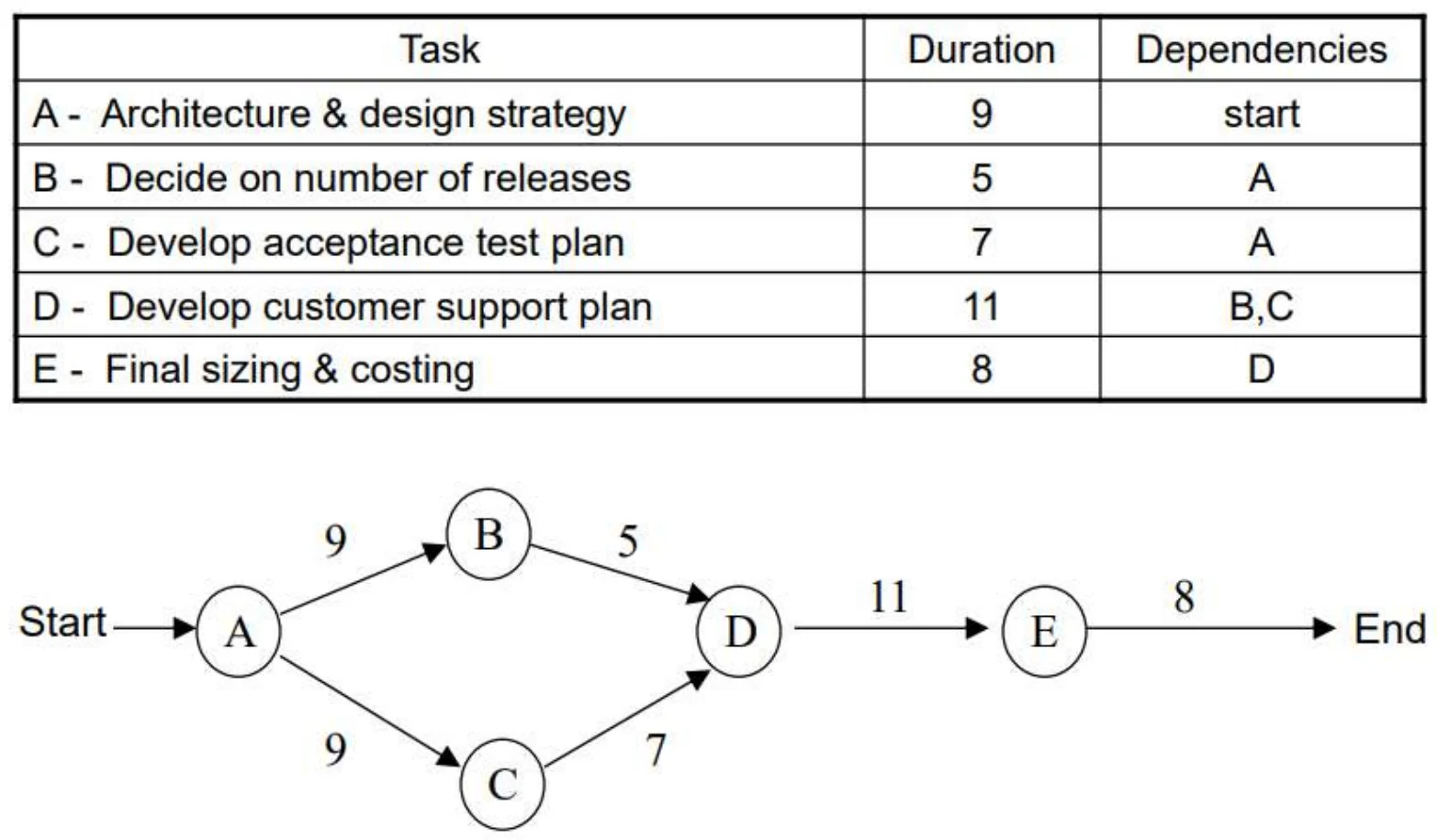
  • A precedence network diagram is a graphic model portraying the sequential relationship between key events in a project.
  • The network diagram clearly and precisely communicates the plan of action to the project team and the client.
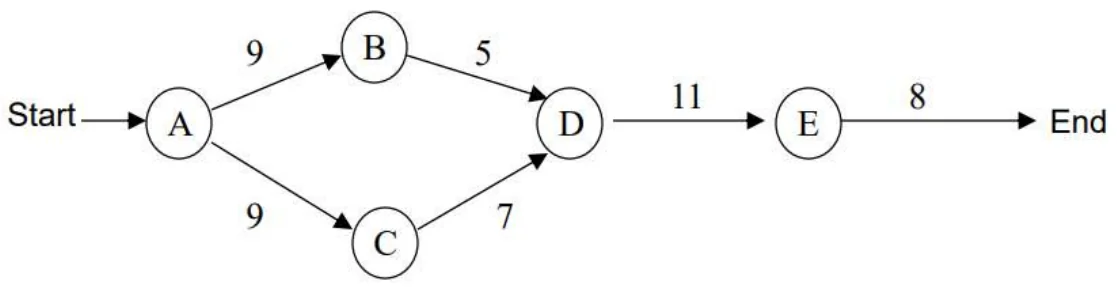
Precedence table A–E and the network diagram Start → A → B, C → D → E → End
28
Exam weight High
  1. Draw: one node per activity, arrows from each predecessor. D has two predecessors (B, C), so two arrows enter D.
TipExam drawing: add Start and End nodes, write duration on each node, and check every activity in the table appears once.
🎯 How this can come up · 1 question
Written

Final 242 network: A5; B(A)5; C(A)7; D(A)9; E(B,D)3; F(E)5; G(F)2; H(C,G)2. Give ES/EF/LS/LF, slack, all paths and the minimum completion time.

PERT Estimation Technique

29

What is a PERT?

Program Evaluation & Review Technique or PERT developed to handle

uncertainty in activity durations

  • Identify the tasks (or activities) required to complete the given project and their dependencies.
  • Estimate durations using three-point estimation: PERT uses optimistic, pessimistic, and most likely time estimates to calculate expected durations using the formula: Expected Time(TE)= (O+4M+P) / 6
  • Construct "network diagram" of the activities and their dependencies, each event (milestone) is represented by a node, arrows represent activities①
30

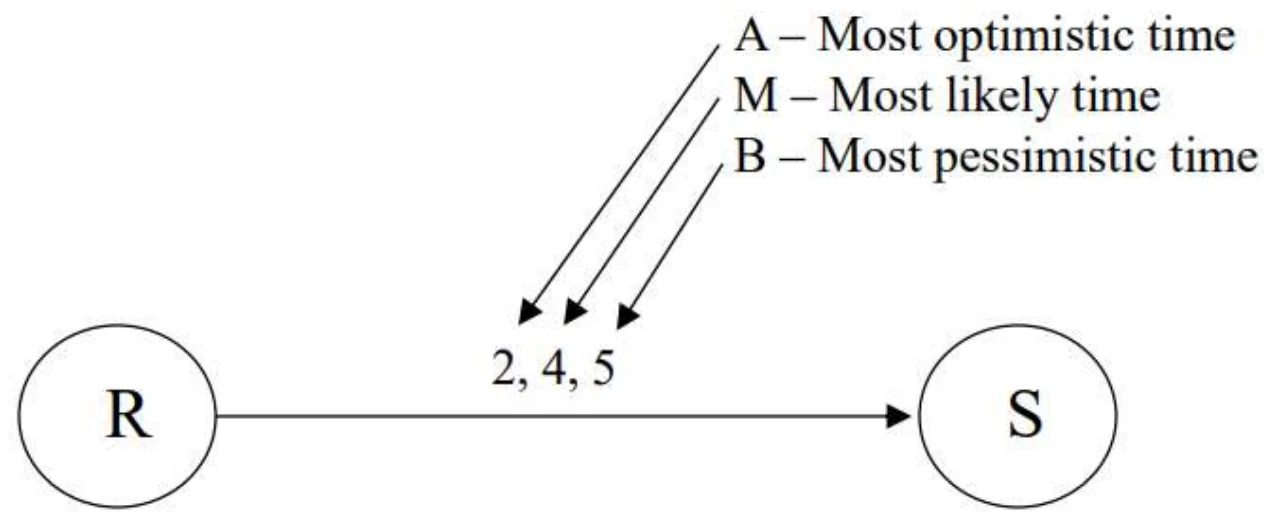
Labels over the formula: optimistic, most likely, pessimistic.
Exam weight Low
  1. PERT handles uncertain durations with TE = (O + 4M + P) / 6.

PERT

  • Expected Time = (a + 4m + b)/6
  • Expected Time = 3.8①
Activity R→S with estimates a=2, m=4, b=5
31
Exam weight Medium
  1. (2 + 4×4 + 5) / 6 = 23/6 ≈ 3.8.
🎯 How this can come up · 1 question
MCQ

O = 3, M = 6, P = 15. Expected time?

PERT Chart

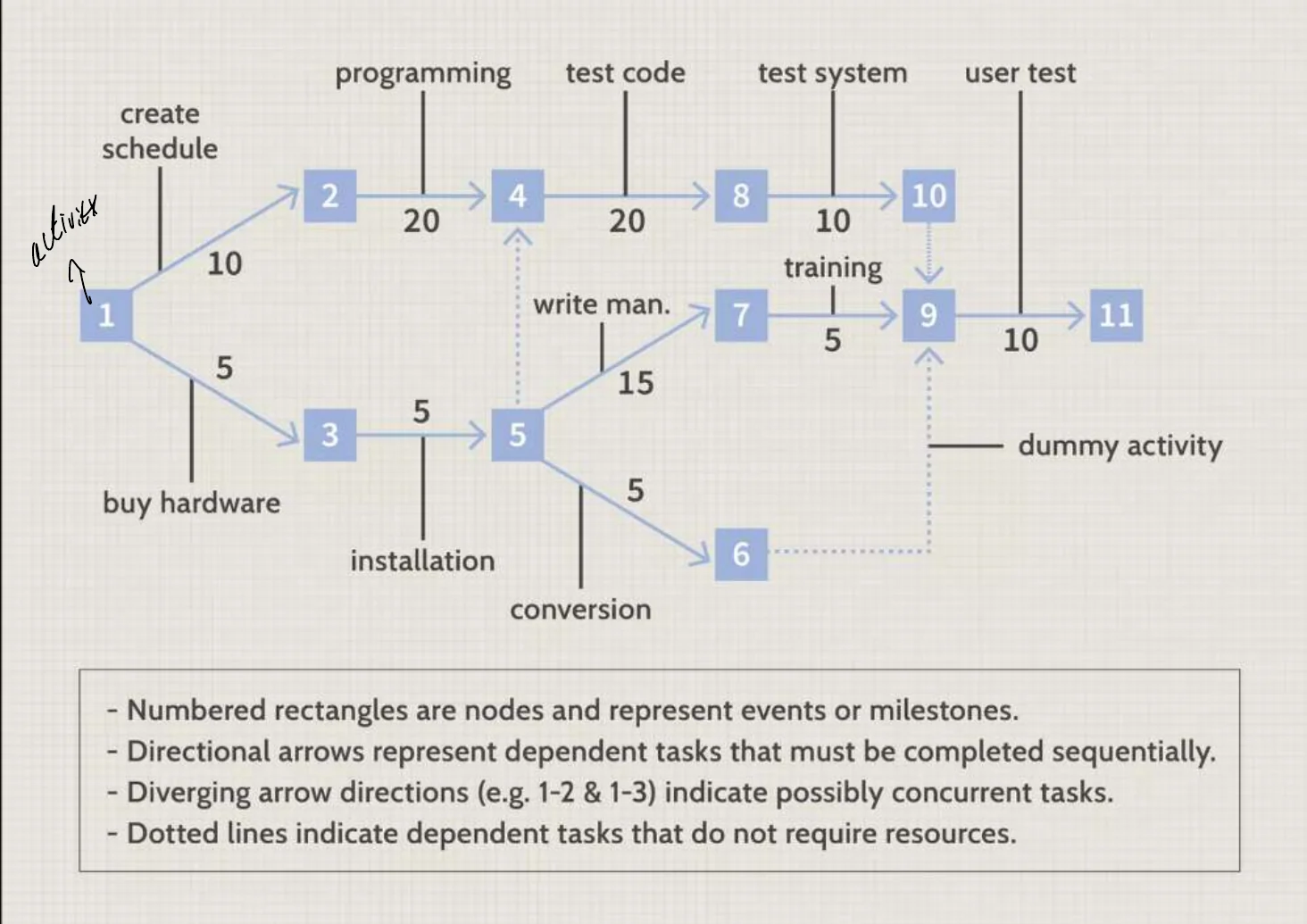
PERT chart with numbered event nodes and durations on arrows
32
Exam weight Low
  1. In PERT charts, nodes are events (milestones) and arrows are activities; dotted arrows are dummy activities.

PERT estimation technique

  • Widely used three-point estimate with PERT (Program Evaluation and Review Technique)
  • Defines three estimate points as:
    • Most likely: estimate that occurs with greatest frequency
    • Optimistic: shortest duration, taken as 10th percentile value
    • Pessimistic: longest duration, taken as 90th percentile value
    • PERT activity duration estimate T_E and its standard deviation (s_E or σ) are calculated according to:

T_E = (E_optimistic + 4·E_most_likely + E_pessimistic) / 6

s_E = (E_pessimistic − E_optimistic) / 6①

  • s_E measures the uncertainty or variability in the estimate.
33
Exam weight Medium
  1. σ = (P − O) / 6. Bigger spread = more uncertainty.
🎯 How this can come up · 1 question
MCQ

O = 4, P = 16. What is the PERT standard deviation?

★ Past exam

Slack Time

  • Slack time, also known as float, is the amount of delay expressed in units of time that could be tolerated in the starting time or completion time of an activity without causing a delay in the completion of the project.
  • Slack time is the difference between the late finish and the early finish (LF-EF)①. If the result is greater than zero, then the activity has a range of time in which it can start and finish without delaying the project completion date.
  • If an activity has zero slack, it determines the project completion date. In other words, all the activities on the critical path must be done on their earliest schedule or the project completion date will suffer.
  • If an activity with total slack greater than zero was delayed beyond its late finish date, it becomes a critical path activity and causes the completion date to be delayed.
  • The sequence of activities that has zero slack is defined as the critical path
  • In general, the critical path is the path that has 0 slack.②
34
Exam weight High
  1. Slack = LF − EF (= LS − ES).
  2. Zero slack ⇒ critical.
★ Past exam

Critical Path Method

  • The critical path method (CPM) focuses on calculating theoretical start and finish dates for every activity in the project.
  • CPM performs these calculation without regard for resource limitations, which can lead to resource over-allocation or inefficient multitasking
  • A forward pass analysis performs schedule calculations that identify the early start and finish dates of activities and the project①
  • A backward pass analysis performs schedule calculations that identify the late start and finish dates of activities and the project, as well as total and free float②
  • Total float (TF) is the amount of time an activity can be delayed without delaying the project as a whole
  • Free float (FF) is the amount of time an activity can be delayed without delaying its successor (dependent) activities
  • Note that total float is global to the project, while free float is local to the neighborhood of the activity③
35
Exam weight High
  1. Forward pass: ES = max(EF of predecessors), EF = ES + duration.
  2. Backward pass: LF = min(LS of successors), LS = LF − duration.
  3. Total float → delays the PROJECT. Free float → delays the NEXT activity.
Memory trickForward = MAX of incoming EFs. Backward = MIN of outgoing LSs.
🎯 How this can come up · 2 questions
Written

Final 242 network: A5; B(A)5; C(A)7; D(A)9; E(B,D)3; F(E)5; G(F)2; H(C,G)2. Give ES/EF/LS/LF, slack, all paths and the minimum completion time.

MCQ

CPM schedules activities without regard to:

Critical Path Method

  • Critical Path Method (CPM) tries to answer the following questions:
    • What is the duration of the project?
    • By how much will the project be delayed if any one of the activities takes N days longer?
    • How long can certain activities be postponed without increasing the total project duration?
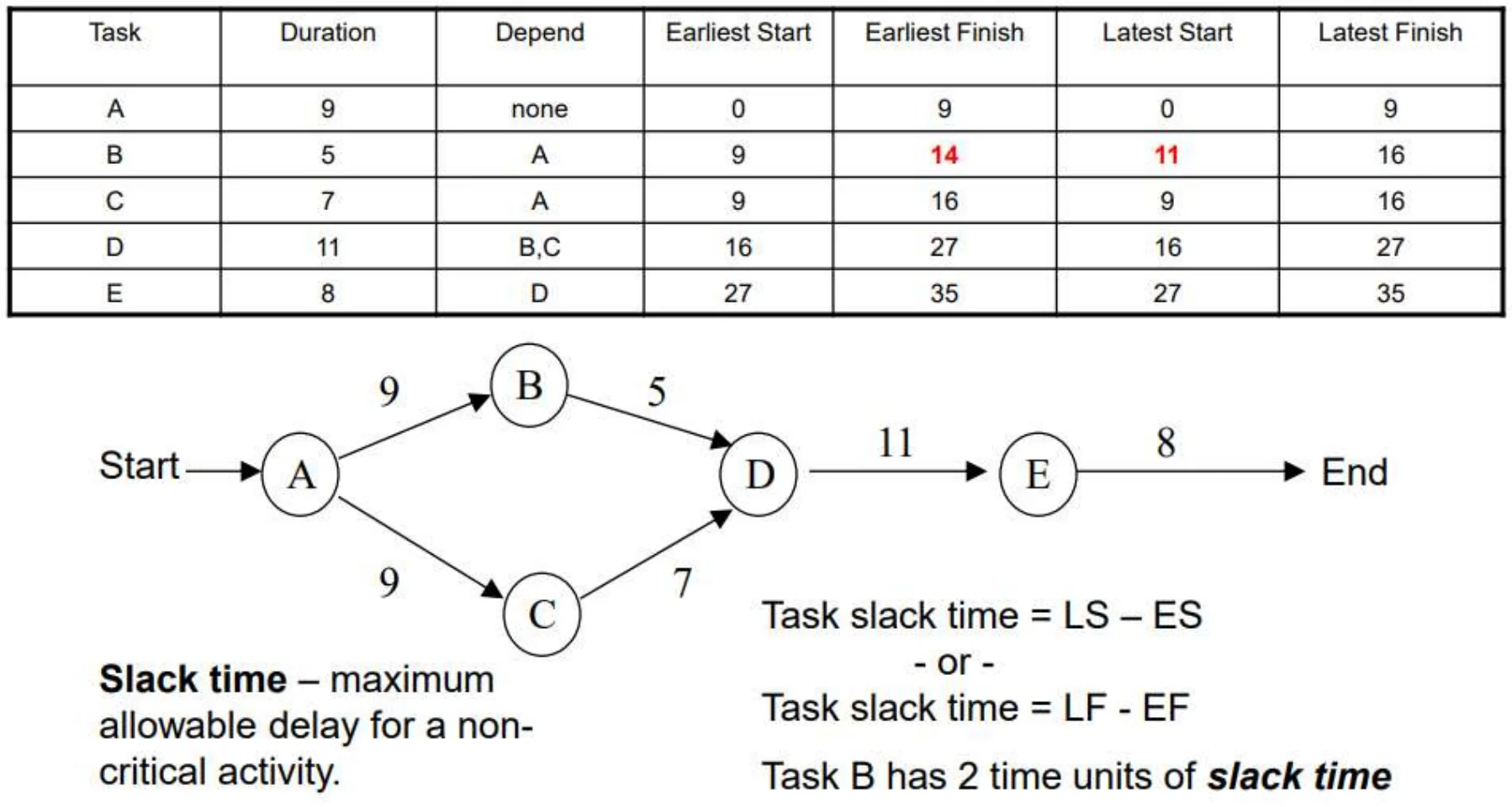
  • Critical Path = A – C – D – E (35 time units)
  • Critical Tasks = A,C,D,E
  • Non-Critical Path = A-B-D-E
  • Non-Critical Tasks = B (only)
Network: A(9) → B(5) and C(9) → D(11) → E(8)
36
Exam weight Medium
  1. A-C-D-E = 9 + 7 + 11 + 8 = 35 (C is 7 in the table on slide 37). A-B-D-E = 33, so only B has slack (2).
★ Past exam

Critical Path Example

(see SE201 for revision)

CPM table with ES, EF, LS, LF and the network; B has 2 units of slack
37
Exam weight High
  1. Read the table: B ES 9 / EF 14 / LS 11 / LF 16 → slack 2. All others 0 → critical path A-C-D-E.
🎯 How this can come up · 1 question
Written

Final 251 network: A6(start); B9(A); C3(B); D4(A); E5(C); F7(C); G6(D,E); H12(F); I6(G); J7(H,I). What is the minimum completion time?

★ Past exam

What is a Gantt chart?

Gantt Chart (named for Henry Laurence Gantt) consists of a table of

A

project task information and a bar chart that graphically displays project schedule, depicting progress in relation to time and often used in planning and tracking a project.

  • Horizontal bar chart format, with bars representing the phases and activities of the WBS
  • Time extends along the horizontal axis
  • Able to show planned and actual progress on tasks as well as task dependencies①
  • Effective communication tool but with limitations
    • Very low information density: lots of wasted space
    • Not very useful for large projects②
38
Exam weight High
  1. Gantt = task table + horizontal bars over time; shows planned vs actual and dependencies.
  2. Limits: low information density, poor for large projects.
★ Past exam

Gantt Chart

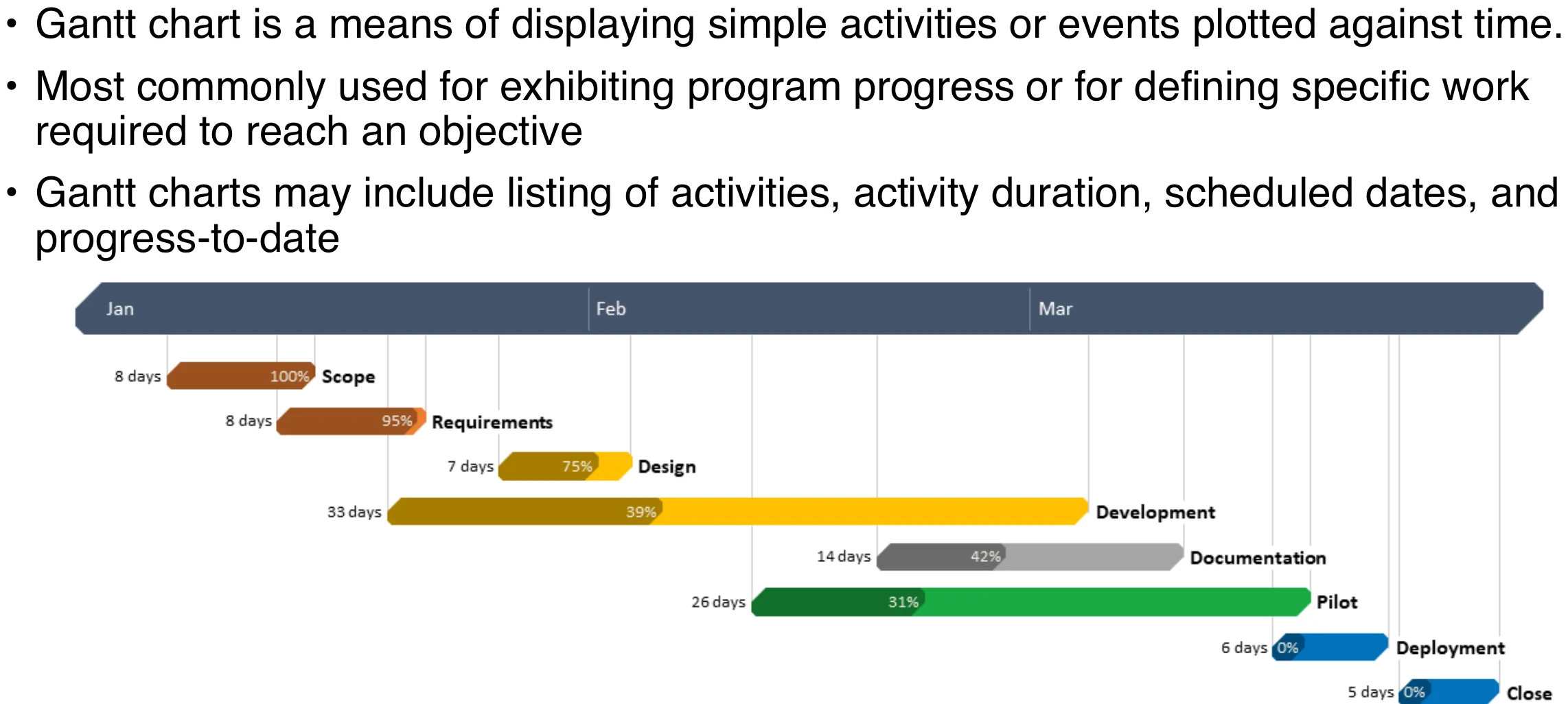
  • Gantt chart is a means of displaying simple activities or events plotted against time.
  • Most commonly used for exhibiting program progress or for defining specific work required to reach an objective
  • Gantt charts may include listing of activities, activity duration, scheduled dates, and progress-to-date①
Gantt chart with phases from scope to close across Jan–Mar
39
Exam weight Medium
  1. Bars = activities; % shown inside = progress.
★ Past exam

Gantt Chart

  • Advantages:
    • Easy to understand
    • Easy to change①
  • Disadvantages:
    • Only a vague description of the project
    • Does not always show interdependency of activities
    • May not show results of an early or late start of an activity②
40
Exam weight High
  1. Advantages: easy to understand, easy to change.
  2. Limitations: vague, doesn’t always show dependencies or the effect of early/late starts.
🎯 How this can come up · 1 question
Written

What is a Gantt chart, what does it show, and give two advantages and two limitations.

Gantt Example

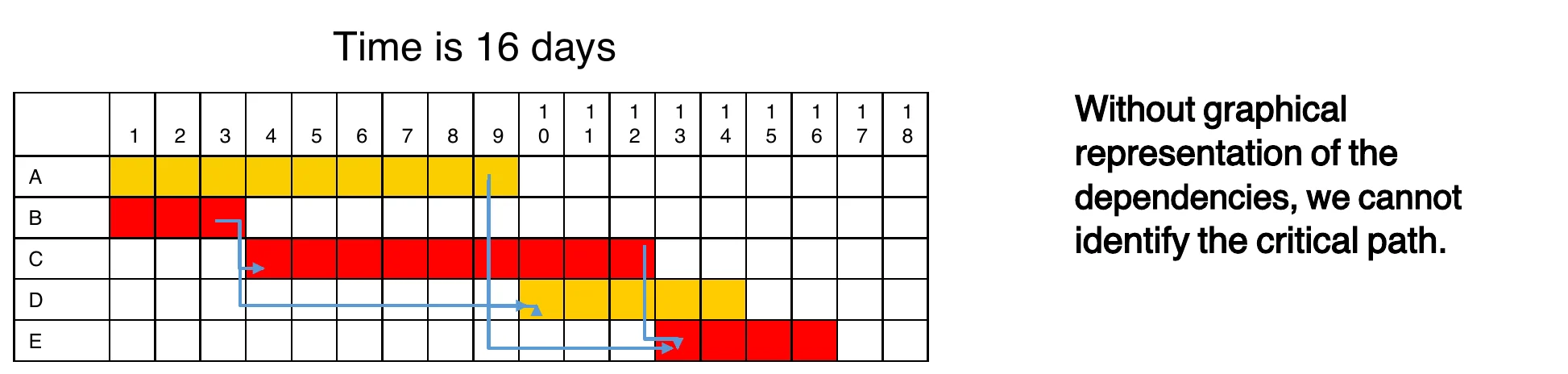
Suppose a project comprises five activities: A, B, C, D, and E. A and B have no preceding activities, but activity C requires that activity B be completed before it can begin. Activity D cannot start until both activities A and B are complete. Activity E requires activities A and C to be completed before it can start. If the activity times are A: 9 days; B: 3 days; C: 9 days; D: 5 days; and E: 4 days, determine the time necessary to complete this project.

Identify those activities which are critical in terms of completing the project in the shortest possible time. [Critical path]①

Gantt grid: 16 days; without a dependency diagram the critical path is not visible
41
Exam weight Medium
  1. Answer: B → C → E = 3 + 9 + 4 = 16 days is critical. A (9) and D have slack.
Exam trapA Gantt alone hides the critical path. Draw the network.
🎯 How this can come up · 1 question
MCQ

In this example, which path is critical?

Critical Chain Method

  • The critical chain method (CCM) is a project management technique that is an improvement of the Critical Path Method as it takes into account the availability of resources.
  • In software engineering projects, CCM can be used to identify and manage critical tasks, reduce project risk, and improve project delivery time.
  • CCM focuses on the resources required for project activities, attempting to keep them leveled throughout the project
  • CCM, assumes that all activities have a statistically-probable range of durations and uses this assumption to create a more flexible and resilient schedule
  • Resources are assigned to the activities using the most likely durations
  • The longest sequence of activities in the project is called the critical chain①
42
Exam weight Medium
  1. CCM improves CPM by considering RESOURCES; uses most-likely durations plus buffers.
Exam trapCPM ignores resources. CCM includes them.
🎯 How this can come up · 1 question
MCQ

How does the Critical Chain Method improve on CPM?

Critical Chain Method

  • Suppose a software development team is tasked with developing a new mobile application.
  • The project timeline is six months, and the team must deliver a functional prototype at the end of the fourth month.
  • To manage the project using CCM, the following steps could be taken:
  1. Identify the critical tasks: The team would begin by identifying the critical tasks that must be completed to deliver the functional prototype on time. These tasks might include developing the user interface, integrating with external APIs, and testing the application.①
43
Exam weight Low
  1. CCM example: mobile app, prototype due in month 4.

Critical Chain Method

  1. Estimate task duration: Once the critical tasks have been identified, the team would estimate the duration of each task, taking into account any potential delays or obstacles that might arise during the development process.
  2. Create a buffer: To account for potential delays and risks, the team would create a buffer at the end of the project timeline. This buffer would be used to ensure that the functional prototype is delivered on time, even if some tasks take longer than expected.
  3. Manage the critical chain: Using CCM, the team would manage the critical chain of tasks by focusing on the critical tasks and ensuring that they are completed on time.① This might involve reallocating resources, adjusting task priorities, or providing additional support to team members as needed.
  4. Monitor progress: Throughout the project, the team would monitor progress and adjust the project plan as needed. This would help to ensure that the project stays on track and that the critical tasks are completed on time.
44
Exam weight Low
  1. Steps: identify critical tasks → estimate → add buffer at the end → manage the chain → monitor.

Critical Chain Method

  • Buffer Types:
    • Project buffer
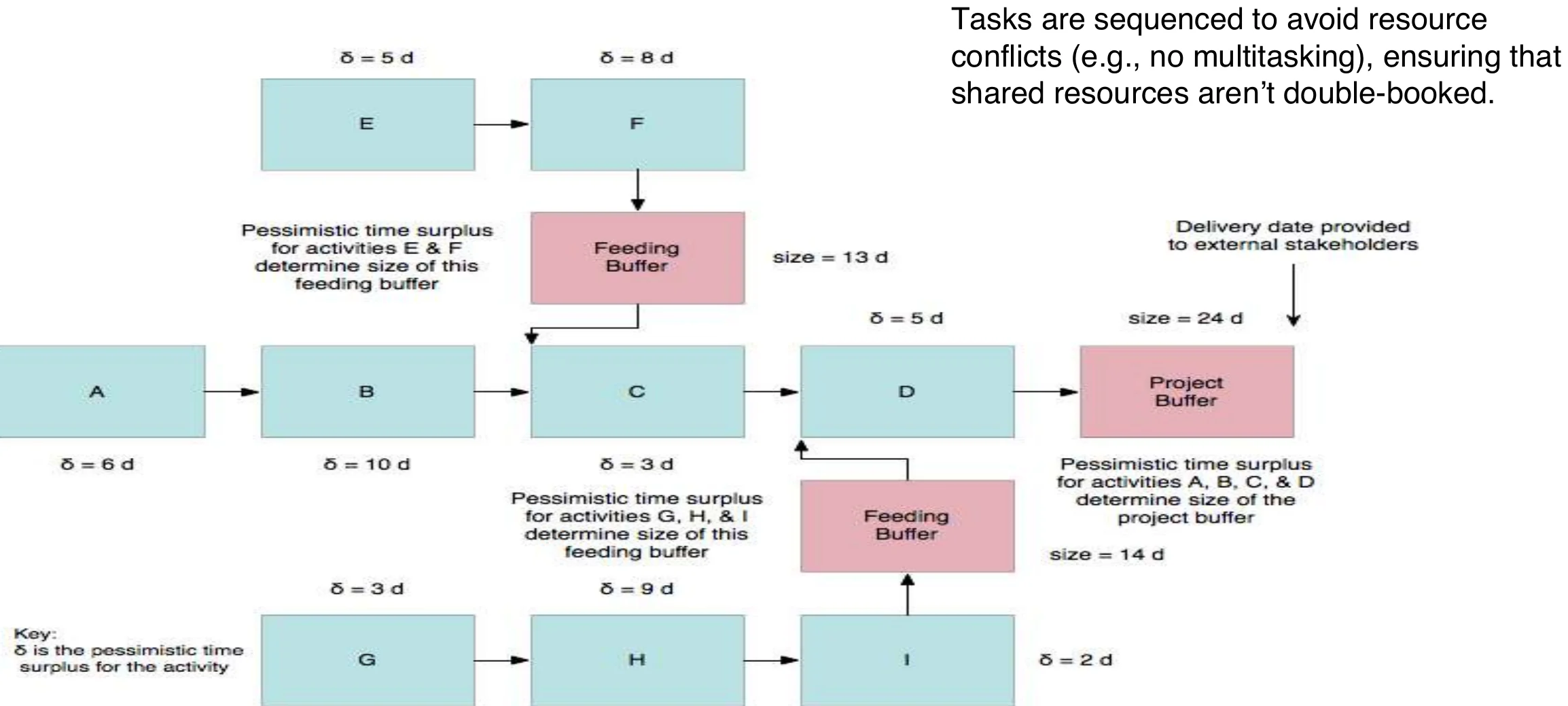
      • Contingency time to the whole project inserted at end of the project.① Any delay in the Longest Path will consume some or all of the buffer.
    • Feeder buffers
      • inserted at the point where non-critical chains feed into the critical chain. This is to ensure that any tasks feeding into the Critical Chain may not delay the Critical Chain.
    • Resource buffers
      • Alerts or placeholders to ensure critical resources are ready when needed.②
45
Exam weight Medium
  1. Project buffer: at the end. Feeder buffer: where non-critical chains join the critical chain.
  2. Resource buffer: alerts so critical resources are ready.
🎯 How this can come up · 1 question
MCQ

A buffer placed where a non-critical chain joins the critical chain is a:

Critical Chain Method

Tasks are sequenced to avoid resource conflicts (e.g., no multitasking), ensuring that shared resources aren’t double-booked.

Critical chain with feeding buffers and project buffer
46
Exam weight Low

    What-if analysis

    • It is a scenario-based analysis of schedule to determine effects of various scenarios on different aspects of the project
      • Example Delay delivery of a critical component by various amounts to determine effect : on schedule; “COTS supplier is unable to provide a critical component at all”

    What-if scenario analysis

    • effectively tests the robustness of the project schedule in response to adverse circumstances
    • Most common technique uses Monte Carlo simulation to generate a population of possible project schedule outcomes
      • Think of executing the same project 10,000 times with the same resources, different boundary conditions, and no memory between executions
    • Very useful in preparing contingency and response plans for project risks①
    47
    Exam weight Low
    1. What-if: test the schedule against scenarios, often with Monte Carlo.

    Resource leveling

    • Resource leveling (smoothing a surface) is applied to a schedule analyzed by CPM
    • Addresses situation where resource availability is constrained by time or amount of the resource available
    • May also be used to keep resource usage at a constant level during certain time periods in the project
    • Resource leveling is needed when resources have been over-allocated or assigned to two or more activities in the same time period
    • May change the critical path① in the schedule model
    48
    Exam weight Low
    1. Resource leveling smooths over-allocation; it may change the critical path.

    Resource leveling

    • Uses a number of different approaches, including:
      • Assign under-allocated resources to multiple tasks to keep them busy
      • Move key resources off of non-critical tasks
      • Delay start of task until required resources are available, possibly using lags
      • Split tasks into two or more subtasks so the subtasks can be assigned to different resources①
    49
    Exam weight Low
    1. Leveling tactics: reassign, move key people off non-critical tasks, delay, split tasks.

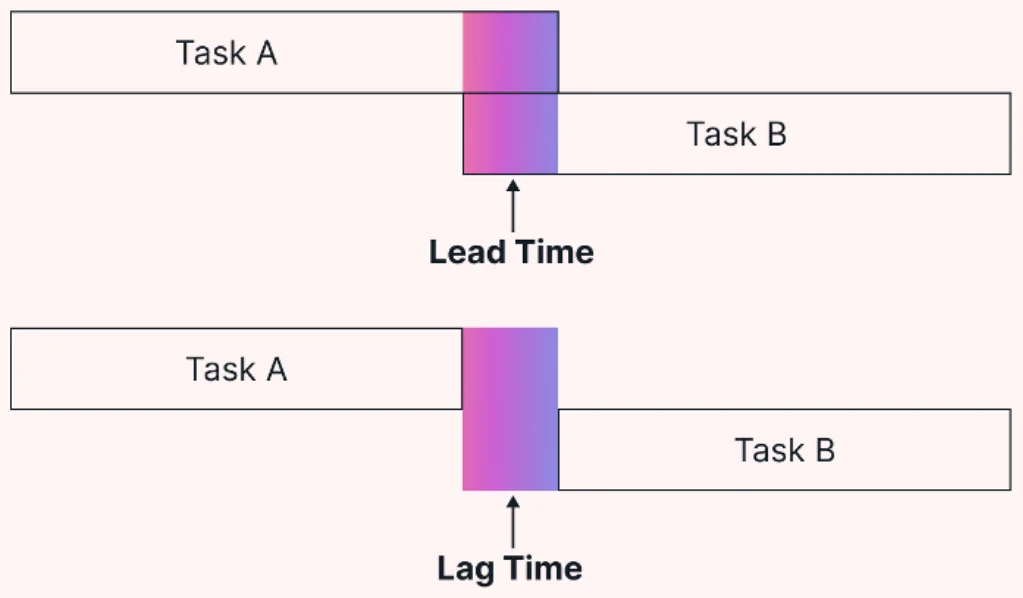
    Applying leads and lags

    • Applying leads and lags allows refinement of a schedule once the major schedule network analysis effort has been completed
    • Use of leads and lags may be used to meet imposed constraints, help in resource leveling, or incorporate contingency reserves into a schedule
    Lead time (overlap) vs lag time (wait) between task A and task B
    50
    Exam weight Medium
    1. Lead = successor starts EARLY (overlap). Lag = forced WAIT between tasks.
    🎯 How this can come up · 1 question
    MCQ

    Waiting 3 days for concrete to dry before the next task is a:

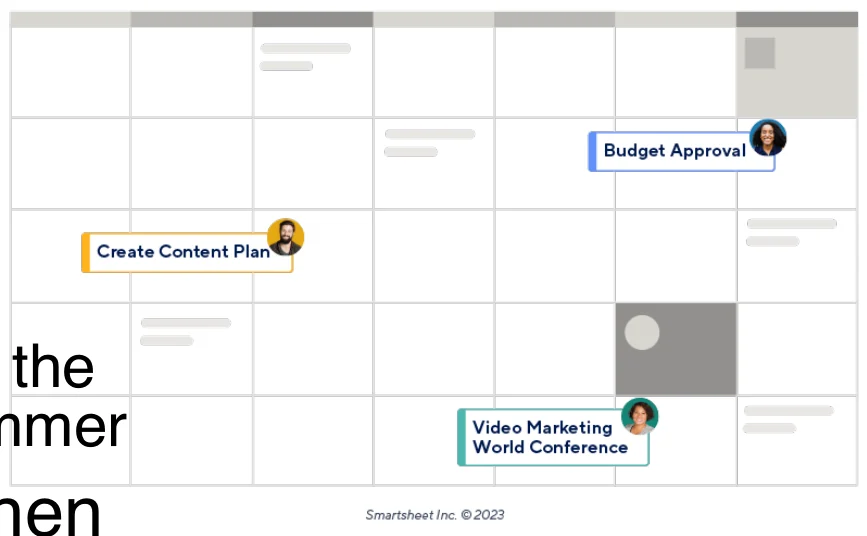
    Calendars

    • Identify days and dates when work can be performed
    • General project calendars govern overall limitations on when project work may be performed
      • Example: Work is performed at a client site, and the client shuts down for three weeks during the summer
    • Resource calendars govern limitations on when particular resources (or resource groups) may perform project work
      • Example: Individual project team member vacation schedules
      • Example: Development team training schedules①
    Calendar view
    51
    Exam weight Low
    1. Project calendars (site shutdowns) vs resource calendars (vacations, training).

    Schedule development output

    • Project schedule network diagrams
      • Show both project network logic (sequencing) as well as critical path schedule activities
      • Usually displayed as an activity-on-node diagram
    • Gantt charts
      • Specialized bar charts format to show activity start and end dates, along with durations
      • Easy to read but limited by low information density
    • Milestone charts
      • ‘Stripped-down’ version of Gantt chart, showing only milestones①
    52

    Circled: network diagrams, Gantt charts, milestone charts.

    Exam weight Low
    1. Outputs: network diagram, Gantt chart, milestone chart (Gantt with only milestones).

    Reducing Project Duration

    • How can you shorten the schedule?
    • Via
      • Reducing scope (or quality)
      • Adding resources
      • Concurrency (perform tasks in parallel)
      • Substitution of activities①
    53

    Next to the items: “less outputs”, “more people”, “lead”.

    Exam weight Low
    1. Shorten by: less scope, more resources, parallel work, substitution.
    ★ Past exam

    Schedule compression

    • Shortens the project schedule without changing the project scope, to meet schedule constraints, imposed dates, or other schedule objectives
    • There are two types of schedule compression, crashing and fast-tracking
    • Crashing. Analyzes cost and schedule trade-offs to get the greatest amount of compression with the least cost:①
      • Add resources to critical path tasks, be more efficient, changing approach used to perform work, work overtime
      • Limit or reduce requirements (scope)
      • Changing the sequence of tasks
    54
    Exam weight High
    1. Crashing = add resources (overtime, people) to CRITICAL tasks → shorter but costs MORE.
    🎯 How this can come up · 1 question
    Written

    How can crashing and fast-tracking affect overall project cost and risk?

    ★ Past exam

    Schedule compression

    • Fast-tracking . Activities that would normally be done sequentially are done in parallel.
      • Fast-tracking can lead to rework and increased risks due to unforeseen dependencies: Involves some risk①
      • Fast-tracking only works when activities can be overlapped to shorten the total duration

    For both schedule compression approaches, you cannot compress more than 25% (According to Boehm)②

    55
    Exam weight High
    1. Fast-tracking = do sequential tasks in PARALLEL → risk of rework.
    2. Boehm: you can’t compress more than ~25%.
    Memory trickCrashing costs MONEY. Fast-tracking costs RISK.
    🎯 How this can come up · 1 question
    MCQ

    Starting coding before design is fully finished is:

    Mythical Man-Month

    • Book: “ The Mythical Man-Month ”
      • Author: Fred Brooks
    • “ The classic book on the human elements of software engineering ”
    • First two chapters are full of terrific insight (and quotes)

    Sample Quotes

    • “Cost varies as product of men and months, progress does not.”: progress does not scale linearly. Adding more people doesn’t necessarily mean faster progress.
    • “Hence the man-month as a unit for measuring the size of job is a dangerous and deceptive myth”: A unit that assumes one person working for a month is equivalent to two people working for half a month①
    56
    Exam weight Low
    1. Effort (man-months) is not progress; people and months aren’t interchangeable.

    Mythical Man-Month

    • Why is software project disaster so common?
    1. Estimation techniques are poor & assume things will go well (a very optimistic ‘unvoiced’ assumption)
    2. Estimation techniques falsely confuse effort with progress, hiding the false assumption that (You can just throw more people at a problem and expect linear acceleration.)
    3. Managers often don’t push back against unrealistic deadlines or vague estimates: Good managers defend the integrity of the schedule, even when it’s unpopular.
    4. Schedule progress is poorly monitored: Without clear metrics, slippage goes unnoticed until it’s too late.
    5. When schedule slippage is recognized, the natural response is to add manpower. Which, is like dousing a fire with gasoline: Brooks’s Law: “Adding manpower to a late software project makes it later.”①
    57
    Exam weight High
    1. Brooks’s Law: adding people to a late project makes it LATER (training plus communication overhead).
    🎯 How this can come up · 1 question
    True / False

    Adding more developers to a late software project will usually make it finish sooner.

    ★ Past exam

    Mythical Man-Month

    • Over-Optimism
      • “All programmers are over-optimists”
      • 1st false assumption: “all will go well” or “each task takes only as long as it ‘ought’ to take”
      • The Fix: Consider the larger probabilities
    • Cost (overhead) of communication (and training)
      • nb_communication_channels = n(n-1)/2, O(n²), n: number of team members①
    • How long does a 12 month project take?
      • 1 person: 12 months
      • 2 persons = 7 months (2 man-months extra)
      • 3 persons = 5 months (3 man-months extra)②
      • Fix: don’t assume adding people will solve the problem
    58
    Exam weight High
    1. Channels = n(n−1)/2. 7 people → 21 (Final 242).
    2. 12-month job: 2 people take 7 months, not 6.
    🎯 How this can come up · 1 question
    MCQ

    Communication channels for 10 team members?

    Mythical Man-Month

    • What is the most mis-scheduled part of process?
      • Testing (the most linear process)
      • delays in earlier phases compress the time available for testing
      • Why is this particularly bad?
        • Occurs late in process and without warning
        • Higher costs:
          • Primary cost: Time and effort to fix bugs.
          • Secondary cost: Rework, missed deadlines, reputational damage, or even system failure if bugs escape into production.
      • Fix: Allocate more test time
        • Understand task dependencies (testing depends on completed, integrated components)①
    59
    Exam weight Low
    1. Testing is the most mis-scheduled phase: earlier delays squeeze it. Fix: give it more time.

    Mythical Man-Month

    Reliance on intuition and guesses

    • What is ‘gutless estimating’? Estimators don’t push back on unrealistic deadlines.
    • Q: “How does a project get to be a year late”?
      • A: “One day at a time”: Missed check-ins ( Regular project reviews or sync points that are skipped, delayed, or done superficially ), Untracked slippage, Quiet scope creep
    • Studies show that:
      • Each task: twice as long as estimated
      • Only 50% of work week was programming
    • Fixes
      • No “fuzzy” milestones: avoid vague goals like “almost done”: use measurable deliverables.
      • Reduce the role of conflict: Encourage honest dialogue between developers and managers.
      • Identify the “true status”: Use metrics, demos, and progress tracking to know where things really stand.①
    60
    Exam weight Low
    1. A project gets a year late one day at a time. Fixes: no fuzzy milestones, honest dialogue, real status.

    Quick Summary of the Scheduling Workflow

    61

    Scheduling Workflow

    • Define activities
      • Use of WBS template helps guide definition process and organize activities
    • Perform activity sequencing
      • Develop schedule framework according to what is logically possible – perform resource allocation later
    • Estimate effort – the total number of labor units ( staff-days) for e.g. each activity
    • Identify resources for each activity
    • Apply calendars to schedule framework①
    62
    Exam weight Low
    1. Workflow part 1: define → sequence → estimate effort → resources → calendars.
    ★ Past exam

    Scheduling Workflow

    • Estimate activity duration based on resources for activity
    • Perform forward pass and backward pass critical path analysis to generate schedule model
    • Perform ‘what-if’ scenario analysis to identify contingency and risk response needs
    • Apply resource leveling to schedule model
    • Apply schedule compression, if needed①
    63
    Exam weight Medium
    1. Part 2: durations → forward/backward pass → what-if → leveling → compression.
    🎯 How this can come up · 1 question
    Written

    Identify three scheduling techniques you would use for a 12-month project and how each helps with delays or overlapping activities (Final 242).

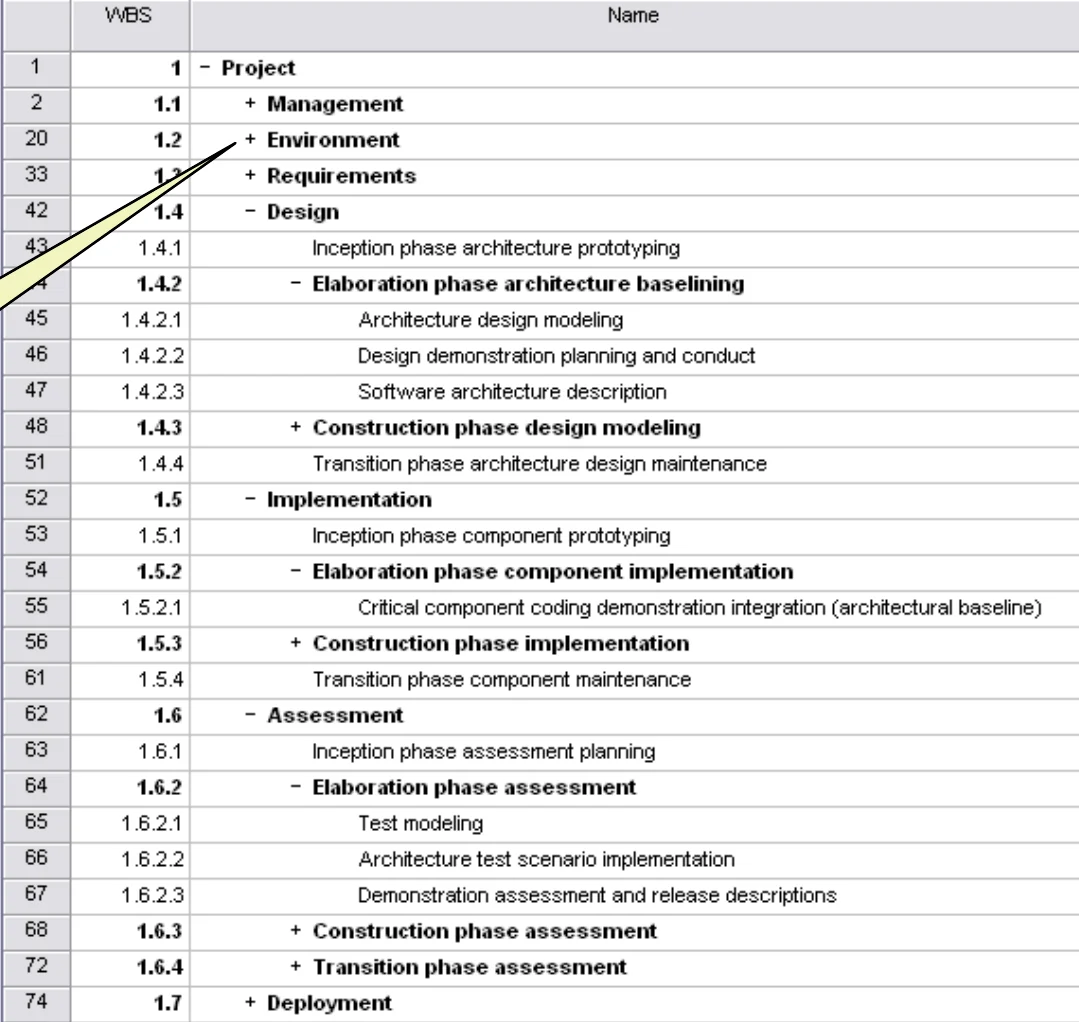
    WBS template

    Component groups with a ‘+’ in front of them are ‘rolled up’ – subcomponents are hidden to reduce clutter

    11/10/2025

    WBS template in a scheduling tool with rolled-up groups
    64
    Exam weight Low
    1. A “+” group is rolled up to hide detail.

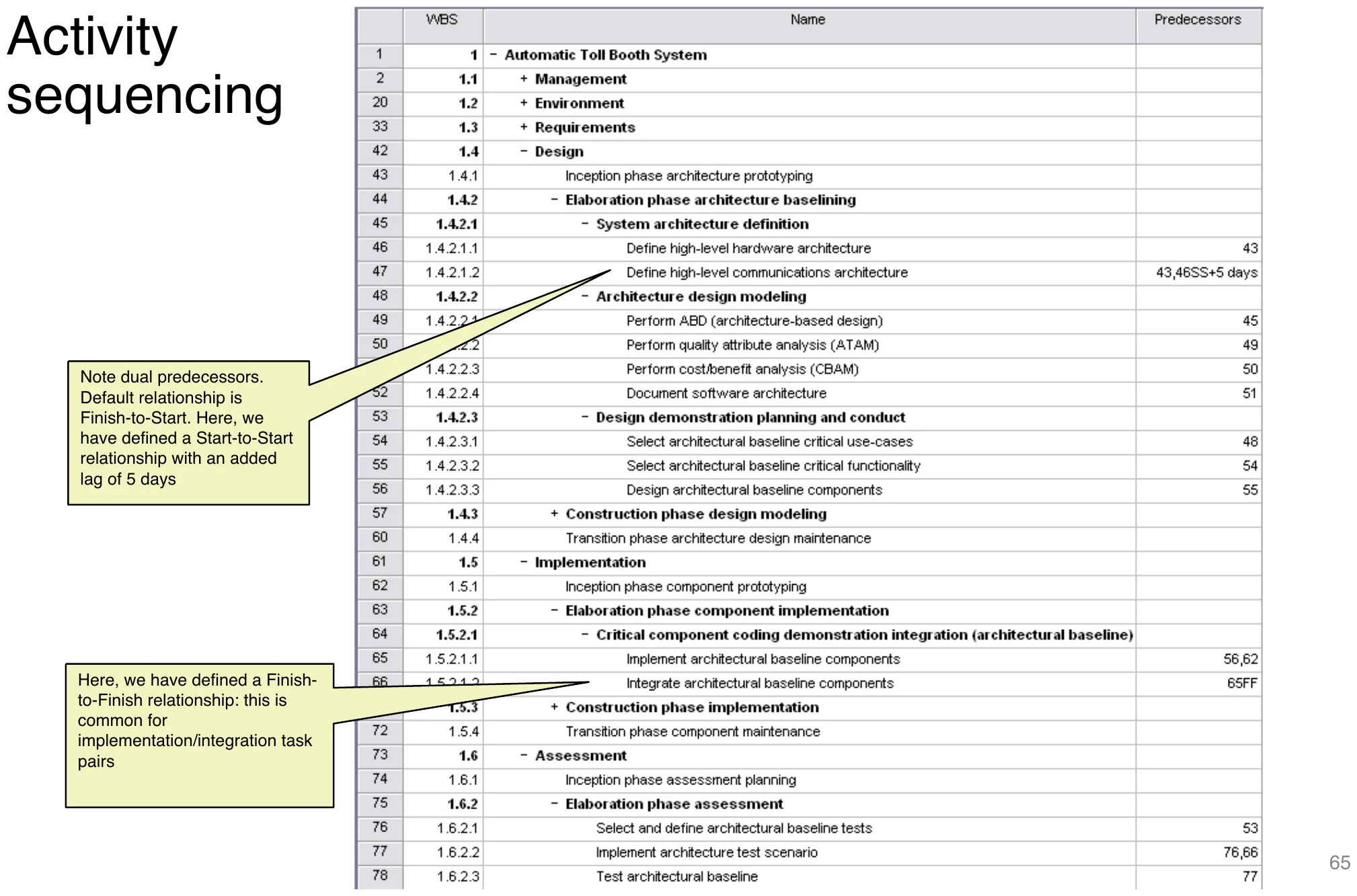
    Activity Sequencing

    Tool view with Start-to-Start lag and Finish-to-Finish relationships
    65
    Exam weight Low
    1. Default dependency = Finish-to-Start. Others: Start-to-Start (with lag), Finish-to-Finish.

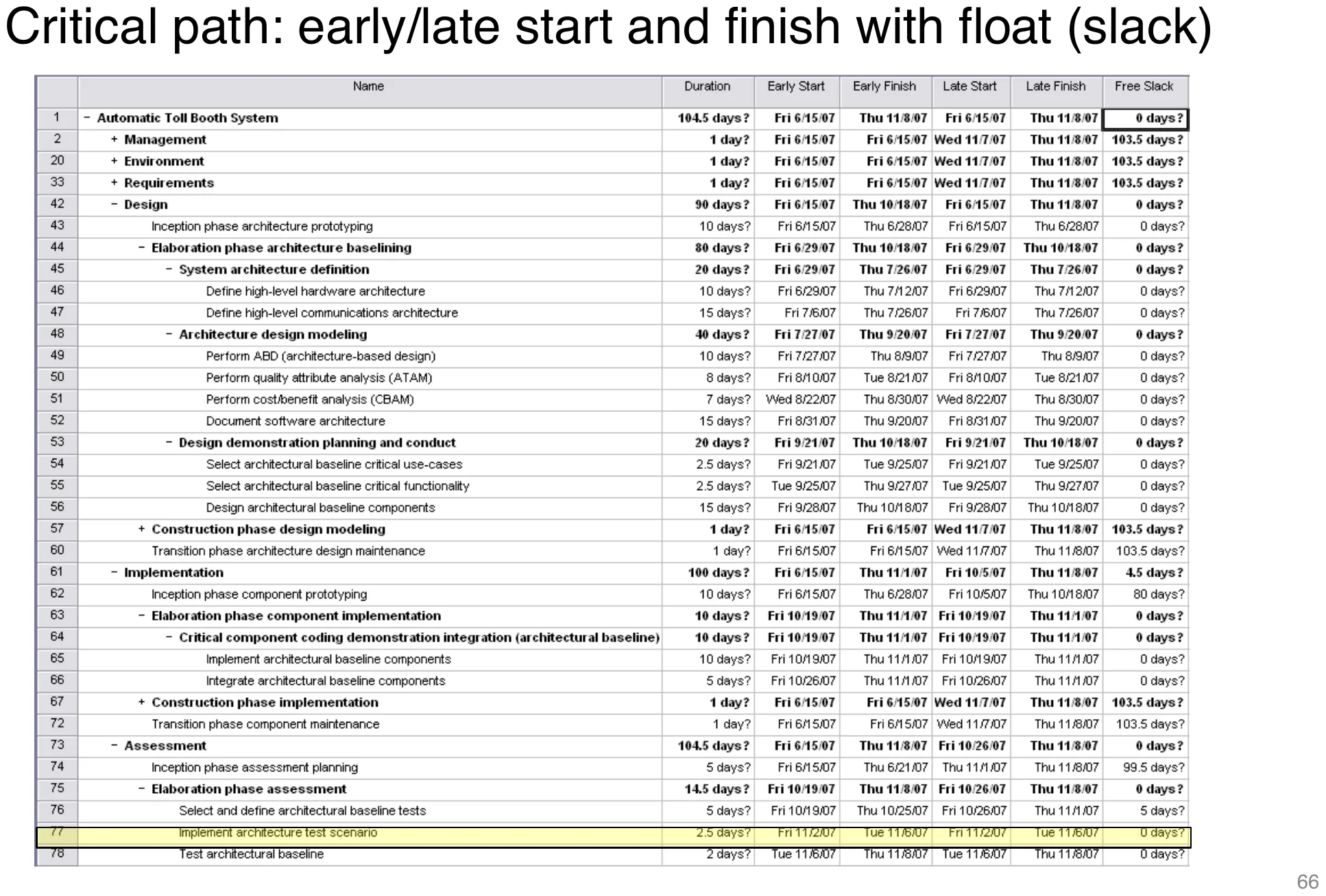
    Critical Path: Early/Late Start and Finish with Float

    Tool table with early/late start/finish and float
    66
    Exam weight Low

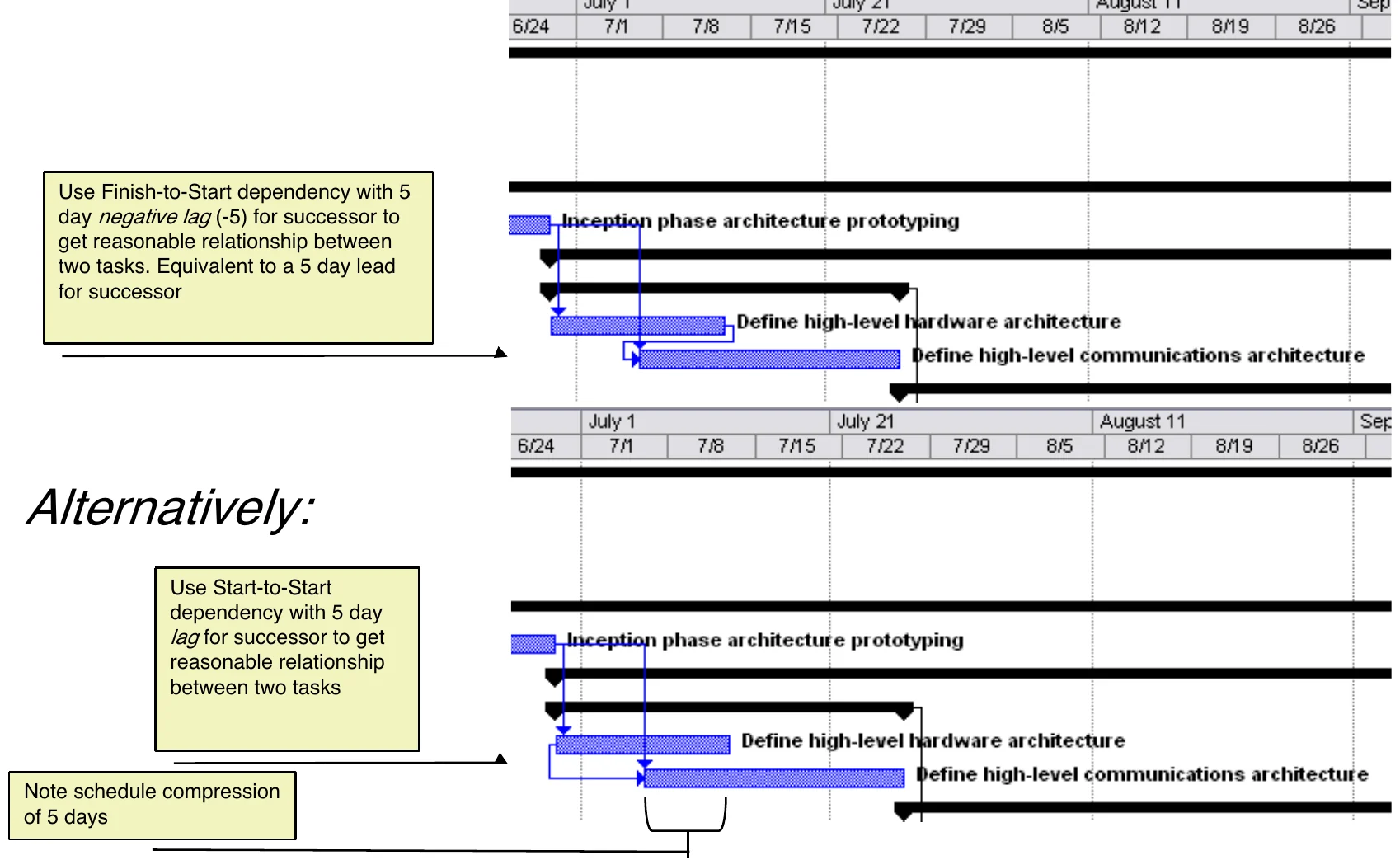
      Schedule Compression

      Compression via a −5 day lag or a Start-to-Start dependency
      67
      Exam weight Low
      1. A negative lag (lead) of 5 days compresses the schedule by 5 days.

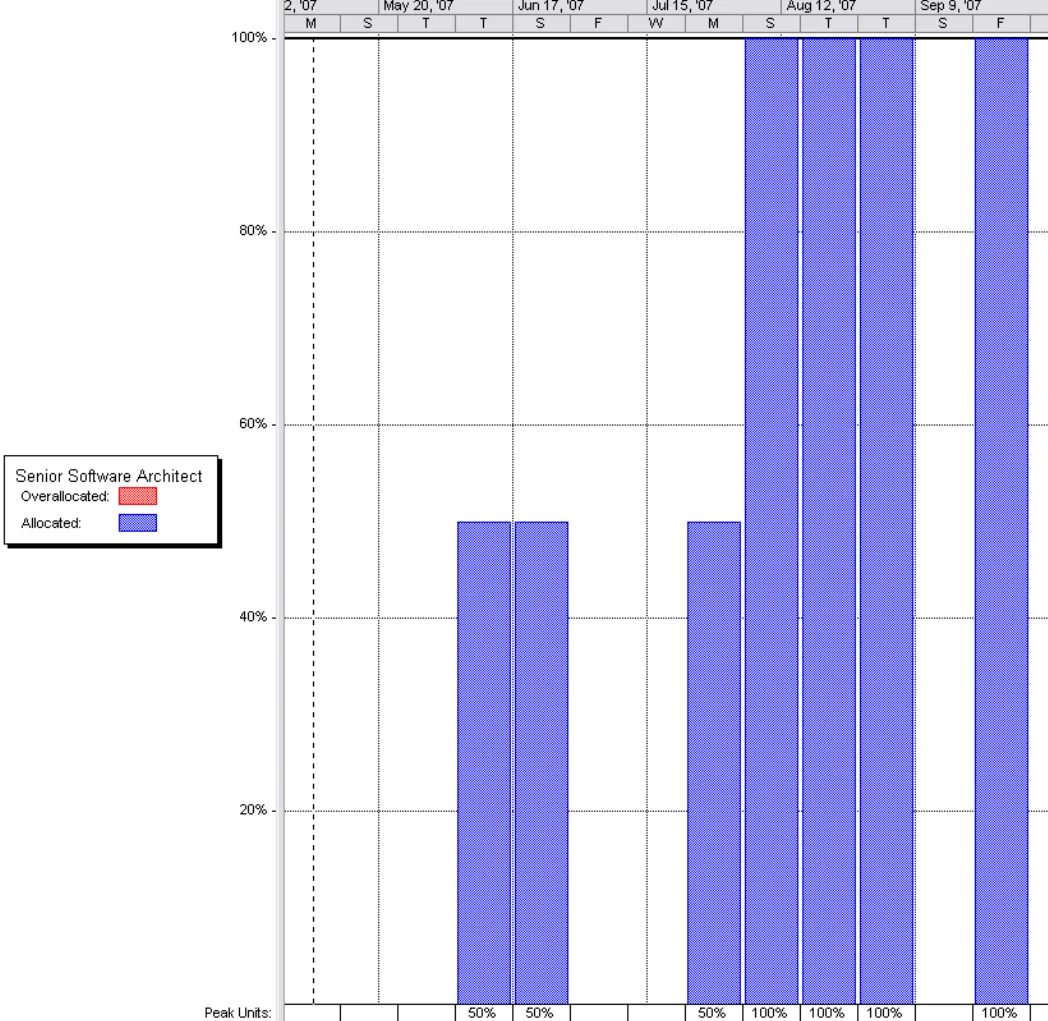
      Determining resource utilization

      • Resource graphs show the utilization of individual resources as a function of time
      • Resource graphs can be used to identify over- and under-utilized resources
      • Resource leveling can be used to balance utilization and/or to shift tasks to lower-cost resources① 11/10/2025
      Resource histogram showing over-allocation
      68
      Exam weight Low
      1. Resource graphs reveal over/under-use; level them.

      Project Tracking

      69

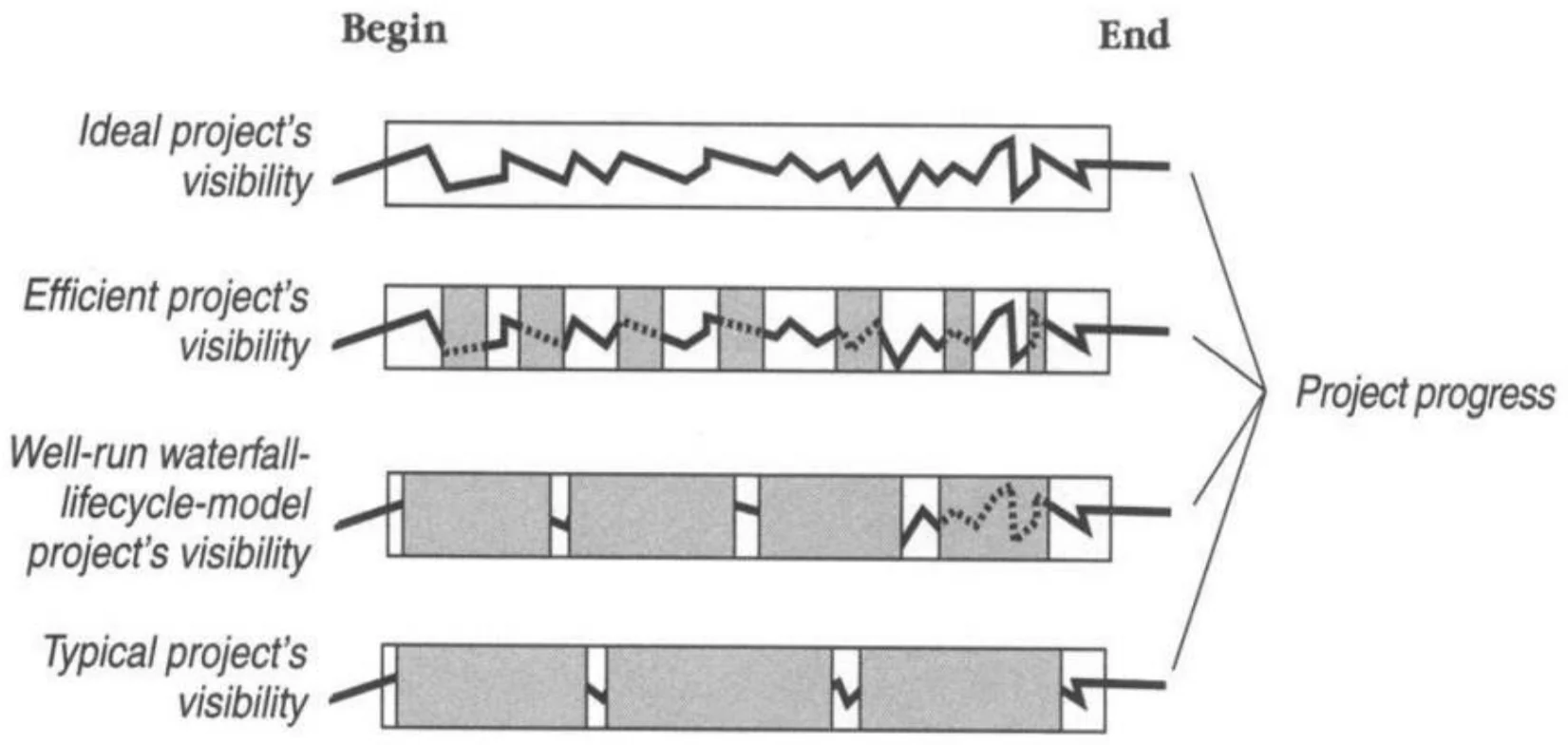
      Tracking and Visibility

      Ideal, efficient, waterfall and typical project visibility
      70
      Exam weight Low

        Percent Complete

        • Illusion of Progress: The early phases (design/specification) are done, which can give a false sense of completion. The reader of the table may get a feeling that around 50% of the project is done, but the most effort-intensive and risk-prone phases, coding and testing, are still underway or not even started: What is the actual percentage?①
        71
        Exam weight Low
        1. Counting tasks completed (2 of 6) is misleading. Weight by effort (next slide).

        Percent Complete

        Task — How complete?

        • Conceptual Design: 200/200
        • Program Specification: 300/300
        • Coding: 150/600
        • Documentation: 10/100
        • User Manual Production: 0/400
        • Testing: 0/500

        660 / 2100 × 100 = 31.4% complete①

        72
        Exam weight Medium
        1. Effort-weighted: 660 of 2,100 hours = 31.4%, not ~50%.
        🎯 How this can come up · 1 question
        MCQ

        Tasks: A 100/100, B 50/200, C 0/200. Percent complete?

        Earned Value

        • EVM is a project control methodology that integrates scope, schedule, and cost.
        • It provides a quantitative basis for measuring project performance.
        • Enables early detection of deviations and supports forecasting.
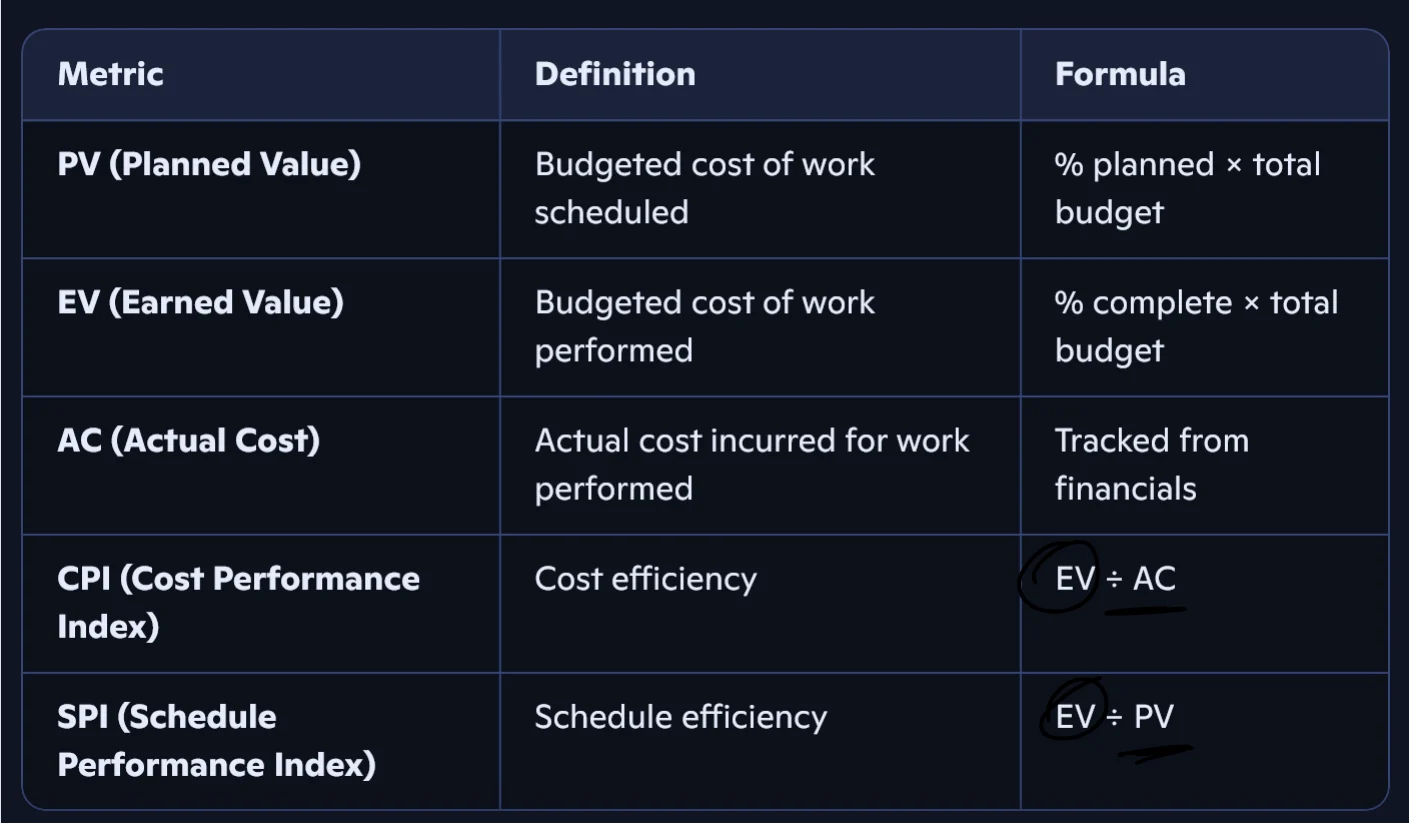
        • Provides a consistent method of project progress and performance Fig. Key EVM Metrics and Definition①
        EVM metrics: PV, EV, AC, CPI = EV/AC, SPI = EV/PV
        73

        “They might give you some values and you need to calculate.”

        Exam weight High
        1. PV = planned budget of scheduled work. EV = budget of work actually done. AC = actual cost.
        2. CPI = EV/AC, SPI = EV/PV. Below 1 = bad (over budget / behind).
        Memory trickEV is always on top: CPI = EV/AC, SPI = EV/PV, CV = EV−AC, SV = EV−PV.
        🎯 How this can come up · 2 questions
        MCQ

        EV = 80, AC = 100, PV = 90. CPI and SPI?

        True / False

        An SPI of 1.2 means the project is behind schedule.

        Using Earned Value Tracking

        Setup :

        1. Establish a WBS to divide the project into manageable components
        2. Identify the activities required under each WBS element
        3. Estimate the effort required for each activity (assign labor hours or cost)
        4. Schedule tasks: start/end dates and resources
        5. Assign planned value to each task

        Execution :

        1. Update the schedule by reporting activity progress (% complete for each task)
        2. Record actual costs on the activities (real expenditures)
        3. Calculate EV metrics: compute EV, PV, AC, CPI, SPI
        4. Analyze the data (variance): CV = EV – AC; SV = EV - PV
        5. Take corrective action: Reallocate resources, adjust scope, revise schedule, etc.①
        74
        Exam weight Low
        1. Setup: WBS → activities → effort → schedule → PV. Execution: % complete → AC → EV metrics → variances → act.

        Earned Value Example

        • Total Budget: 1000 person-hours
        • Task A: Estimated 100 hours
          • Planned Value (PV) = 100
          • Actual Cost (AC) = 120
          • % Complete = 100% → Earned Value (EV) = 100
        • Cost Performance Index: CPI = 100 ÷ 120 = 0.83 → Over budget
        • Schedule Performance Index: SPI = 100 ÷ 100 = 1.0 → On schedule①
        75

        Next to the budget: “100/1000 × budget”; AC 120 circled.

        Exam weight Medium
        1. Task done (EV = 100) but cost 120 → CPI 0.83 over budget; SPI 1.0 on schedule.

        Earned Value Tracking

        • Avoid “fuzzy” milestones:
          • Earned value credit is given only when the task is 100% complete
          • Partially completed tasks are NOT given partial credit (in most software projects)
          • Large tasks can/must be broken into subtasks
        • Size tasks to allow frequent completions (e.g., 8–80 hour rule).
        • Use objective progress measures (e.g., demos, deliverables).
        • Encourage honest reporting and team buy-in.①
        76
        Exam weight Low
        1. Strict EV: credit only for 100%-done tasks. Keep tasks small (8–80 h).

        Project Velocity (PV)

        PV in story weeks = Σ time estimated for the story (all stories completed in the iteration)

        • In Agile (iterative) context: Use story points as effort units.
        • Track velocity to estimate future capacity: Project velocity tells you how many story points you can allocate to the next iteration.
        • Combine EV with burn-down charts for visual tracking.
        • The customer gets to pick stories that equal the project velocity.①
        77
        Exam weight Low
        1. Velocity = points completed per iteration; use it to plan the next one.

        Project Velocity (PV)

        • The metric is calculated by reviewing work the team successfully completed during previous sprints; for example, if the team completed 10 stories during a two-week sprint and each story was worth 3 story points, then the team's velocity is 30 story points per sprint.
        • Generally, velocity remains somewhat constant during a development project, which makes it a useful metric for estimating how long it will take a team to complete a software development project.
        • If the product backlog has 300 story points, and the team is averaging 30 story points per sprint, it can be estimated that team members will require 10 more sprints to complete work. If each sprint lasts two weeks, then the project will last 20 more weeks.①
        78
        Exam weight Medium
        1. 300 points ÷ 30 per sprint = 10 sprints = 20 weeks (2-week sprints).
        🎯 How this can come up · 1 question
        MCQ

        Backlog = 240 points, velocity = 30/sprint, 2-week sprints. Weeks left?

        ★ Past exam

        Burn down chart

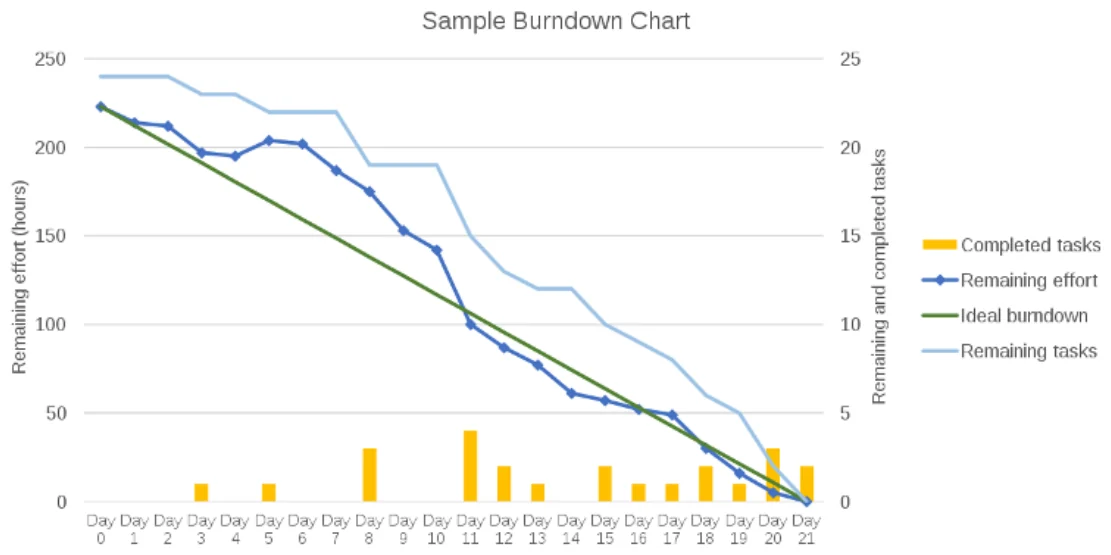
        • A burn down chart is a visual representation that tracks how much work remains in a project or sprint over time.
        • The chart typically starts with a total amount of work to be done and a deadline, and as work is completed, the chart shows the remaining amount of work decreasing.①
        • Burn down charts offer real-time visibility into progress. They:
          • Encourage daily accountability
          • Help forecast completion
          • Reveal early warning signs of slippage
          • Support data-driven retrospectives②
        Sample burndown chart: remaining effort vs days, ideal line vs actual
        79
        Exam weight High
        1. Axes: Y = work remaining (points/hours), X = time (days/sprints).
        2. Actual line above the ideal line = behind schedule; below = ahead.
        🎯 How this can come up · 1 question
        Written

        What does a burndown chart measure and how are its axes labeled? How does it show ahead/behind?

        Summary

        • Planning, Estimating, Scheduling, and Tracking are a continuum
        • Projects need to be partitioned for manageability
          • Work Breakdown Structures are a great way to do this (or stories for agile)
        • Sequencing Tasks & Activities is vital
          • Gantt Charts allow quick reference
          • Network Techniques such as Precedence Network Diagrams, the Critical Path Method, and PERT Charts are useful tools
        • Project Tracking is important for project visibility
          • The Earned Value Technique is a key tool in this
        • The project charter typically includes information such as the project's objectives, scope, timelines, budget, risks, and assumptions. It also identifies the project team members and their roles and responsibilities.①
        80
        Exam weight Low
        1. Plan → estimate → schedule → track is one continuum.