CS331 · Annotated SlidesChapter 7 — Network Layer: Data Transfer
Chapter 7 · Annotated slides

Network Layer: Data Transfer

Network-layer duties, virtual-circuit vs. datagram switching, IPv4 addresses (notation, classes, network/host/broadcast addresses), masks and subnetting, DHCP, ARP, the IPv4 header and fragmentation, and NAT. The subnetting slides have empty practice tables in the PDF; the answers are worked out here in the notes and questions.

Slide text Study notes Highlight: key words Tips, tricks & traps Seen again elsewhere How it can come up

Network Layer: Data Transfer

CS331: Computer Networks · Chapter 7
1
Exam weight Low
  1. Services → packet switching (virtual circuit vs. datagram) → IPv4 addressing → subnetting → DHCP, ARP → IPv4 header, fragmentation → NAT.
  2. Practise subnetting until it’s automatic: it is the biggest calculation topic in the course.
TipSubnet in four lines: block size = 256 - the interesting mask octet · network = the multiple of the block at or below the address · broadcast = next network - 1 · usable = network + 1 to broadcast - 1.

Chapter 7: Outline

  • 7.1 Services
  • 7.2 Packet Switching
  • 7.4 Internet Protocol V4
2
Exam weight Low
  1. 7.1 services · 7.2 packet switching · 7.4 IPv4.

Network layer duties

Duties of the network layer: internetworking, addressing, routing, packetizing, fragmenting
3
Exam weight Medium
  1. Five duties: internetworking, addressing, routing, packetizing, fragmenting.
🎯 How this can come up · 1 question
MCQ

Which is NOT a duty of the network layer in the slides?

Packetizing

The first duty of the network layer is definitely packetizing: encapsulating the payload in a network-layer packet at the source and decapsulating the payload from the network-layer packet at the destination. In other words, one duty of the network layer is to carry a payload from the source to the destination without changing it or using it. The network layer is doing the service of a carrier such as the postal office, which is responsible for delivery of packages from a sender to a receiver without changing or using the contents.①

4
Exam weight Low
  1. Packetizing: wrap the payload in a packet at the source, unwrap at the destination, never change or use it (like the post office).

Routing and forwarding

Routing: Finding the best path (route) by running routing protocols to fill a decision-making table (called routing table).①

Forwarding: The action applied by the router when it receives a packet at one of its interfaces. It will decide from which other interface the packet should be sent.②

5
Exam weight High
  1. Routing = run routing protocols to BUILD the routing table (find best paths).
  2. Forwarding = what the router DOES with each arriving packet: pick the output interface.
Memory trickRouting is planning the trip; forwarding is turning at each junction.
🎯 How this can come up · 1 question
MCQ

Deciding which output interface to send an arriving packet on is:

Packet switching

From the discussion of routing and forwarding in the previous section, we infer that a kind of switching occurs at the network layer. A router, in fact, is a switch that creates a connection between an input port and an output port (or a set of output ports), just as an electrical switch connects the input to the output to let electricity flow.①

6
Exam weight Low
  1. A router is a switch between its input and output ports.

Switching

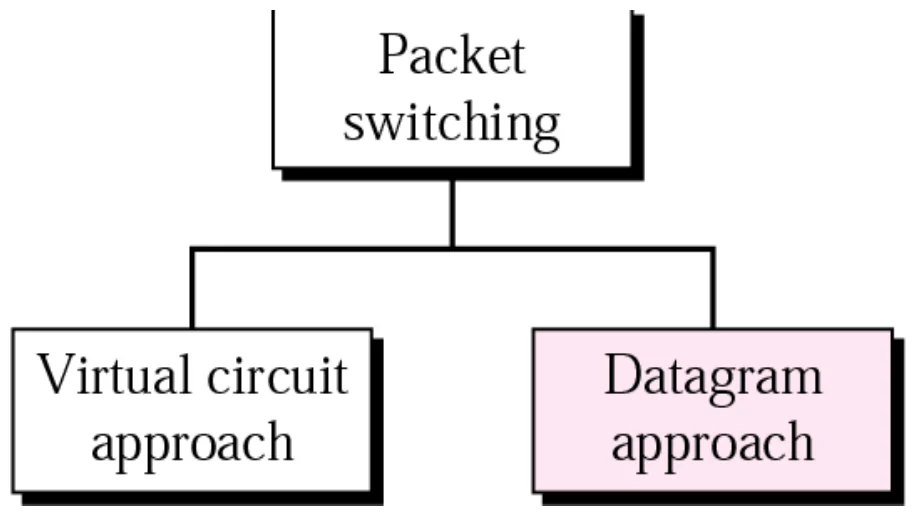
Packet switching: virtual-circuit approach and datagram approach
7
Exam weight Low
  1. Two packet-switching approaches: virtual circuit (connection-oriented) and datagram (connectionless).

Packet switching: virtual-circuit approach

  • In a connection-oriented service (also called the virtual-circuit approach), there is a relationship between all packets belonging to a message.①
  • Before all datagrams in a message can be sent, a virtual connection should be set up to define the path for the datagrams.②
  • After connection setup, the datagrams can all follow the same path.
  • In this type of service, the packet must contain the source and destination addresses and also a flow label, a virtual circuit identifier that defines the virtual path the packet should follow.③
8
Exam weight Low
  1. Virtual circuit: set up a connection first, then every packet follows the SAME path and carries a VC identifier (flow label).

Virtual-circuit setup

Parameters such as buffer, bandwidth and delay requirements are set in every switch along the path during setup.

Connect request → SW1 → SW2 → … → SWn → connect confirm

Question: why is it called a virtual circuit?

Because resources (switches, buffers and lines) are shared by packets from multiple connections.①

Connect request passes switch to switch; connect confirm returns
9
Exam weight Medium
  1. Setup reserves resources in every switch. “Virtual” because the circuit is not dedicated wire: resources are shared.
🎯 How this can come up · 1 question
True / False

A virtual circuit is called virtual because resources are shared by packets of several connections.

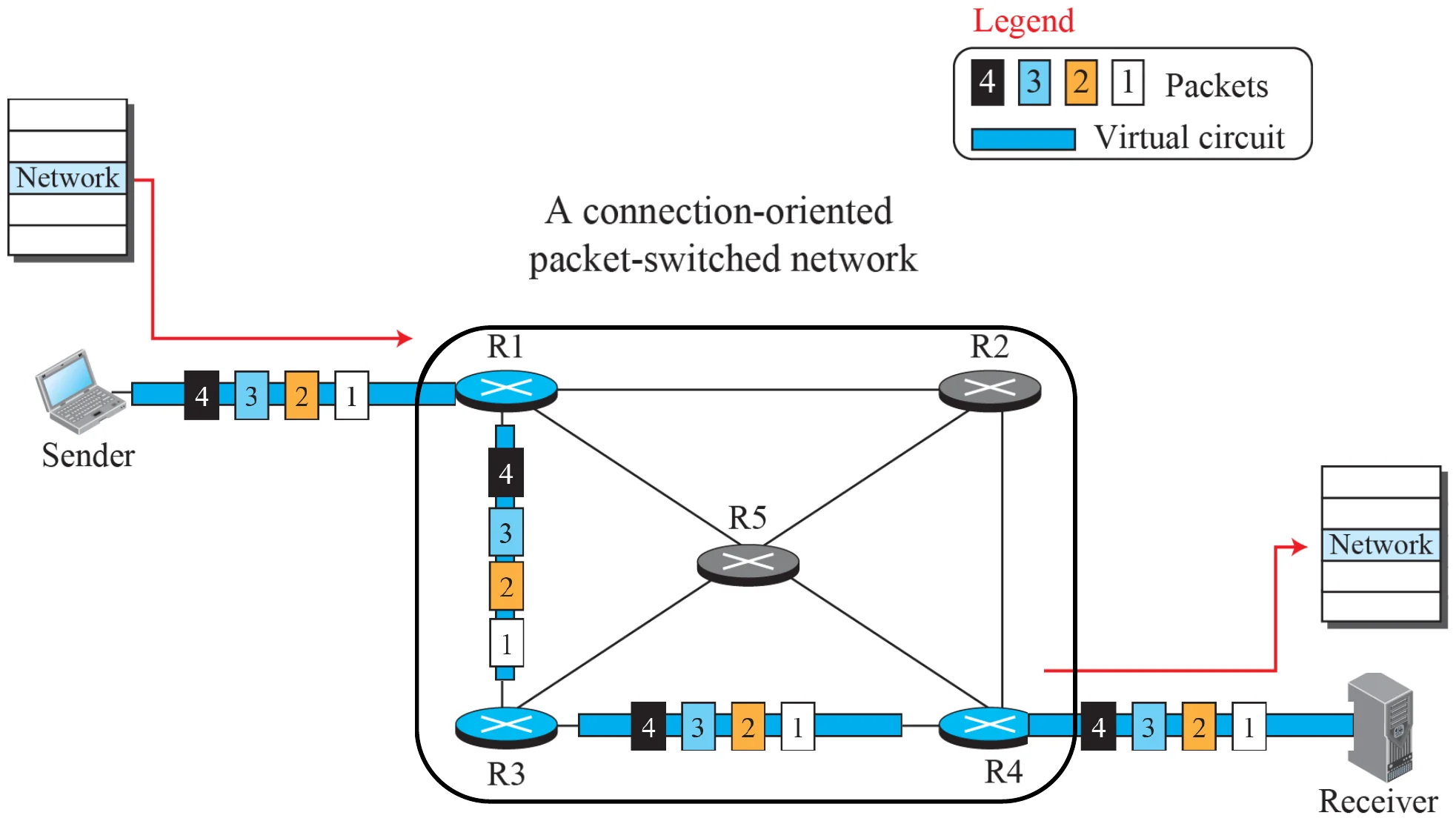
A virtual-circuit packet-switched network

All packets of a message follow the same virtual circuit through R1, R3, R4 and arrive in order
10
Exam weight Low

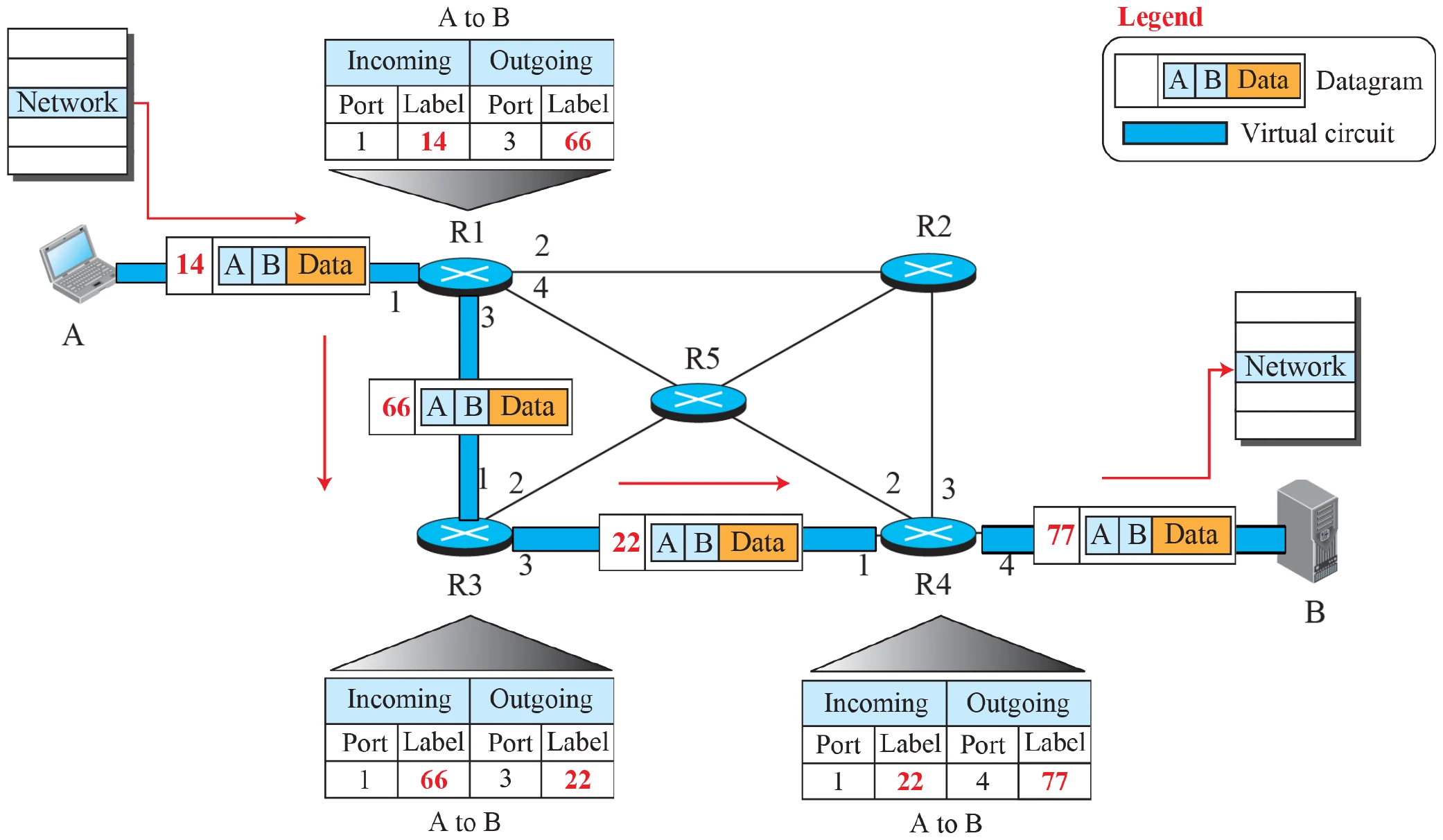
    Flow of one packet in an established virtual circuit

    Each router swaps the incoming label (14, 66, 22, 77) using its table
    11
    Exam weight Low
    1. Each switch maps (incoming port, label) → (outgoing port, new label).

    Delay in a circuit-switched network

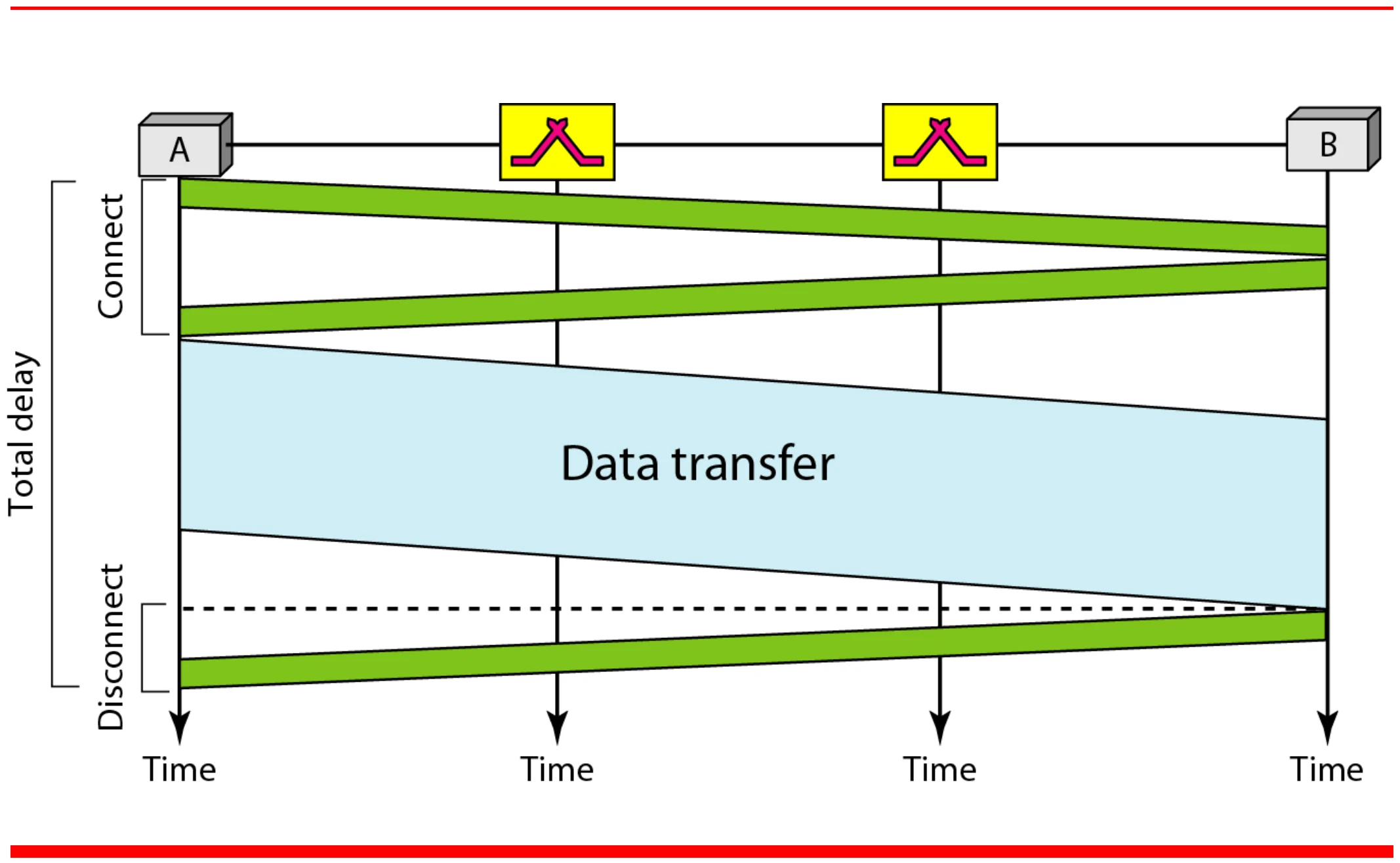
    Connect, data transfer, then disconnect between A and B through two switches
    12
    Exam weight Low
    1. Setup and teardown add delay, but no per-packet routing decisions.

    Packet switching: datagram approach

    When the Internet started, to make it simple, the network layer was designed to provide a connectionless service in which the network-layer protocol treats each packet independently, with each packet having no relationship to any other packet.①

    The idea was that the network layer is only responsible for delivery of packets from the source to the destination. In this approach, the packets in a message may or may not travel the same path to their destination.②

    13
    Exam weight Low
    1. Datagram (connectionless): each packet handled independently; packets may take different paths.

    Note: the Internet is connectionless

    Communication at the network layer

    in the Internet is connectionless.

    14
    Exam weight High
    1. The Internet’s network layer (IP) is CONNECTIONLESS (datagram).
    🎯 How this can come up · 1 question
    MCQ

    Communication at the network layer in the Internet is:

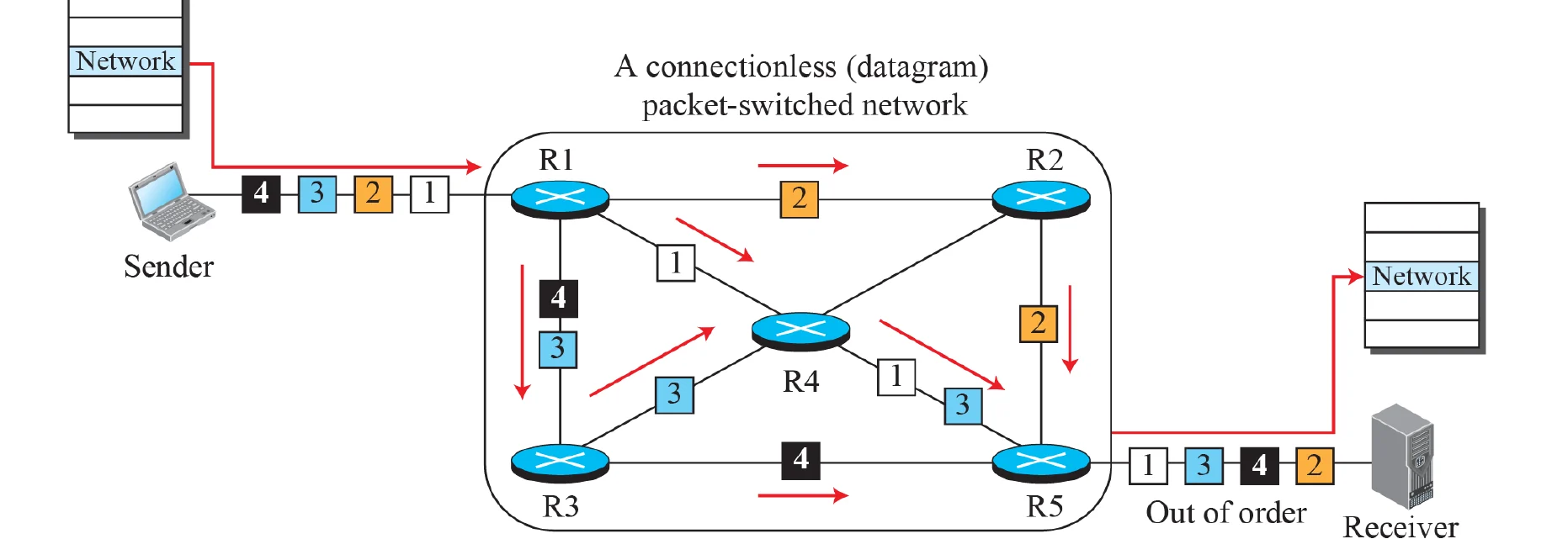
    A connectionless packet-switched network

    Connectionless service: No handshaking, each packet is sent and routed independently and can follow different paths to reach to the destination.①

    The full address of the source and destination must be attached to each packet.

    • No setup delay
    • Packets are not guaranteed to arrive in the order they were sent
    • Robust: If a router crashes only packets inside the router will be lost, other packets can follow other path
    • Used in the Internet②
    Packets 1–4 take different routes and arrive out of order
    15
    Exam weight High
    1. No setup, full addresses in every packet, may arrive out of order, robust (if a router dies, other packets reroute).
    🎯 How this can come up · 2 questions
    Written

    Compare the virtual-circuit and datagram approaches.

    True / False

    In a datagram network, packets are guaranteed to arrive in order.

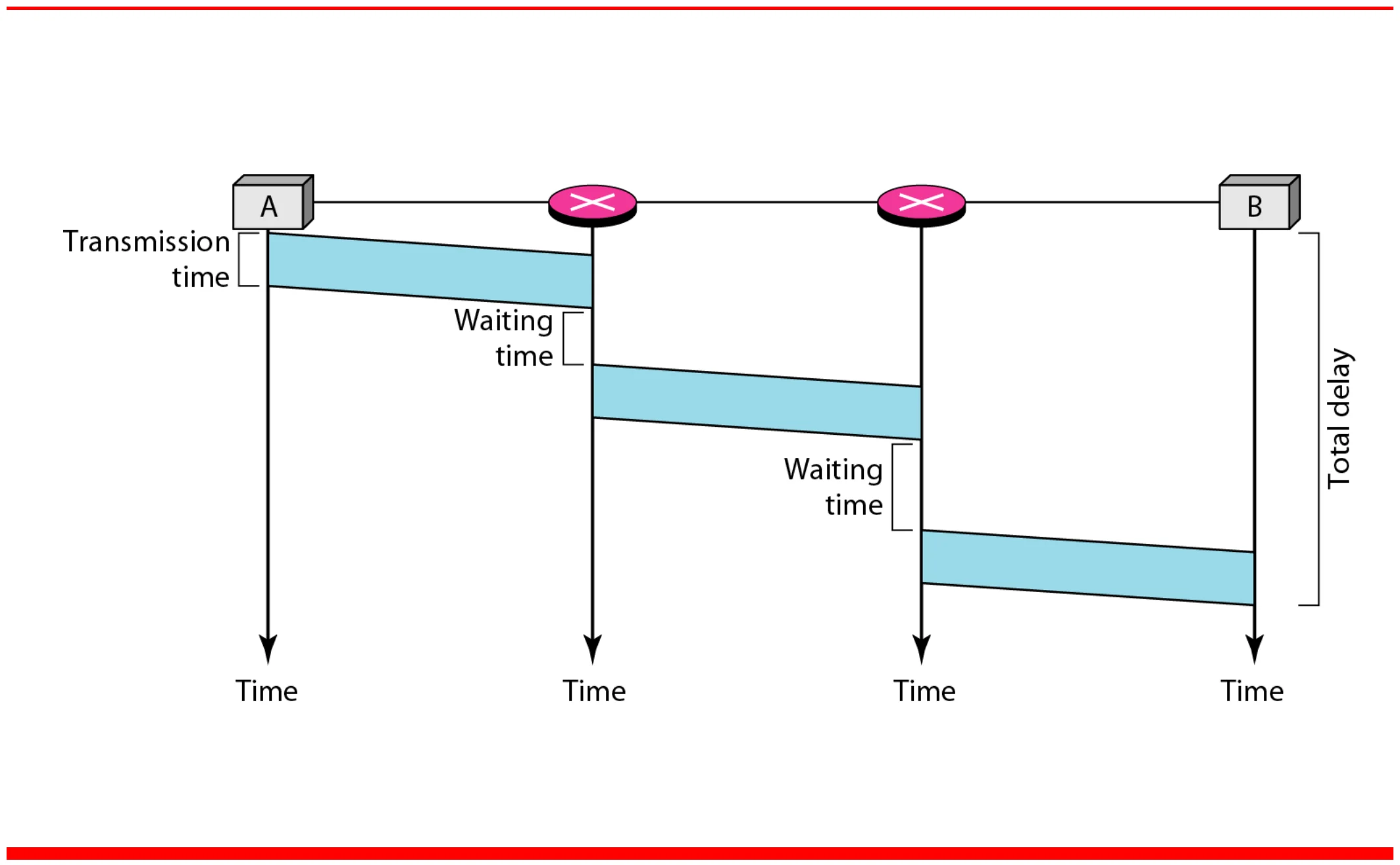
    Delay in a datagram network

    Transmission time plus waiting time at each router, no setup
    16
    Exam weight Low

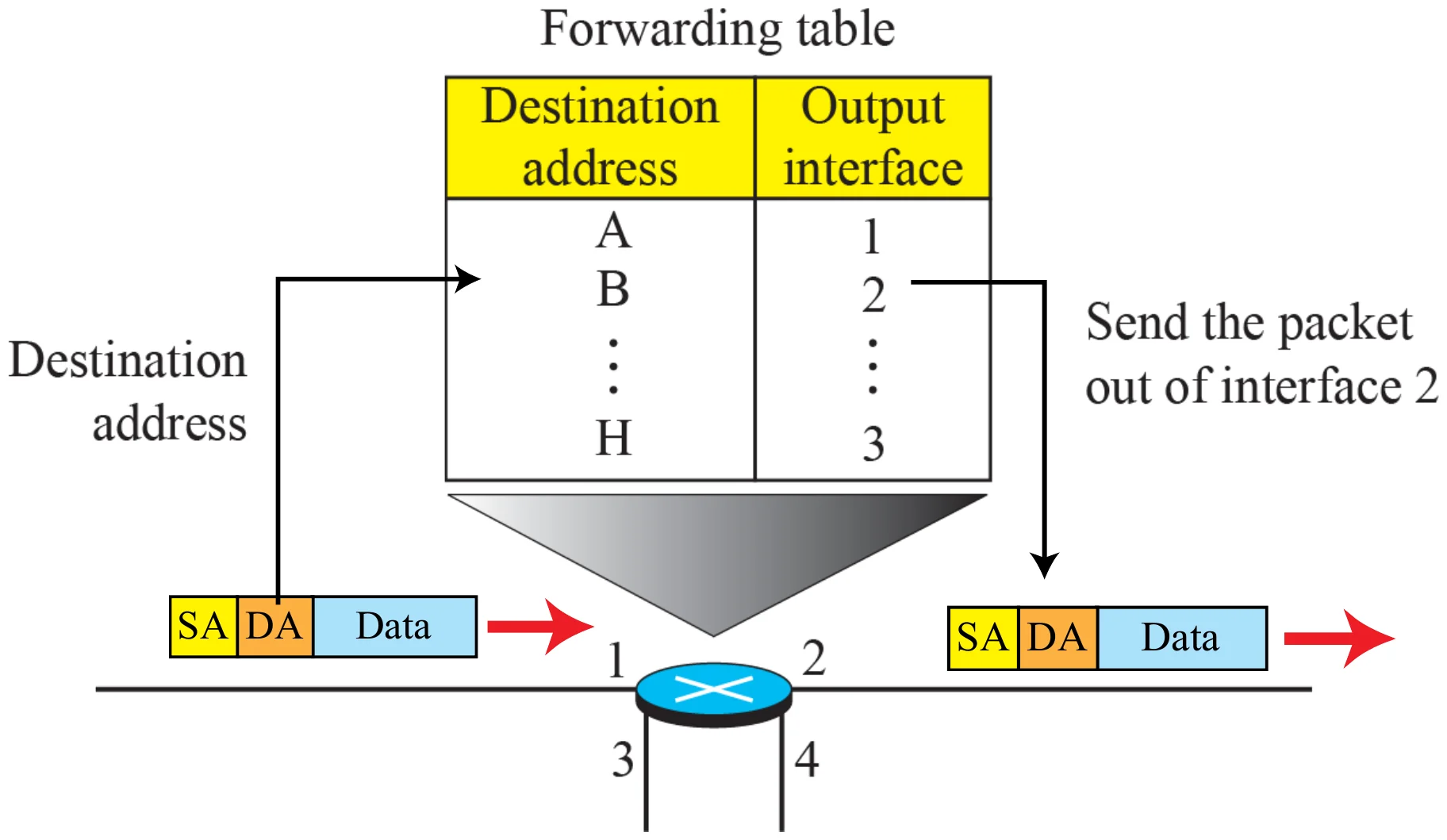
      Forwarding in a connectionless router

      Forwarding table: destination address → output interface; the packet with DA is sent out of interface 2
      17
      Exam weight Low
      1. The router looks only at the destination address.

      Addressing

      • The address in the network layer of the TCP/IP model is called Internet Address or IP address
      • An IP address is a 32-bit address①
      • The IP addresses are unique (each connection has a different address) and universal (must be accepted by any host wants to connect to the internet).②
      • Consists of 4 octets (bytes)
      • Network IP addresses are managed by a nonprofit organization called ICANN (International Corporation for Assigned Names and Numbers) to avoid conflicts.
        • Assigns addresses to regional Authorities which assign numbers to ISPs③
        • Assigns and manages DNS (Domain Name System)④
      18
      Exam weight High
      1. IPv4 address = 32 bits = 4 octets. Unique and universal.
      2. ICANN manages them: ICANN → regional authorities → ISPs.
      🎯 How this can come up · 1 question
      MCQ

      An IPv4 address is:

      Note: the IPv4 address space

      The address space of IPv4 is 2³² or 4,294,967,296.

      19
      Exam weight Low
      1. 2³² ≈ 4.3 billion addresses.

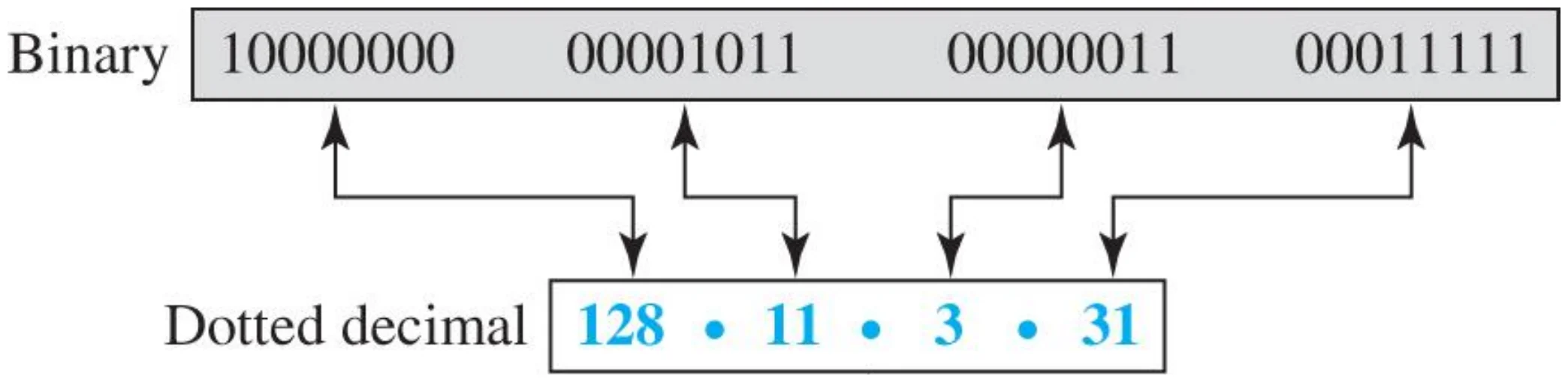
      Different notations in IPv4 addressing

      Binary 10000000 00001011 00000011 00011111 = dotted decimal 128.11.3.31
      20
      Exam weight Low

        Example 1: binary to dotted-decimal

        Change the following IP addresses from binary notation to dotted-decimal notation:

        a. 10000001 00001011 00001011 11101111

        b. 11111001 10011011 11111011 00001111

        Solution: replace each group of 8 bits with its decimal value and add dots:

        a. 129.11.11.239

        b. 249.155.251.15

        21
        Exam weight Medium
        1. Bit weights: 128 64 32 16 8 4 2 1.
        🎯 How this can come up · 1 question
        MCQ

        11000000 10101000 00000001 00001010 in dotted decimal is:

        Example 2: dotted-decimal to binary

        Change the following IP addresses from dotted-decimal notation to binary notation:

        a. 111.56.45.78

        b. 75.45.34.78

        Solution:

        a. 01101111 00111000 00101101 01001110

        b. 01001011 00101101 00100010 01001110

        111 = 64 + 32 + 8 + 4 + 2 + 1 → 01101111

        22
        Exam weight Low
        1. Subtract the biggest weight that fits, write 1, continue.

        Example: find the error

        Find the error, if any, in the IP address 75.45.301.14

        Solution: in dotted-decimal notation each number is ≤ 255; 301 is outside this range.

        23
        Exam weight Medium
        1. Each octet is 0–255. Also watch for leading zeros (045) and more than four octets.
        🎯 How this can come up · 1 question
        MCQ

        Which is a valid IPv4 address?

        Hierarchy in addressing

        • Network + host: the complete IP address
        • Network address: host part set to 0 (the prefix kept, the suffix zeroed)
        • Network (block) ID: identifies the network the host is connected to
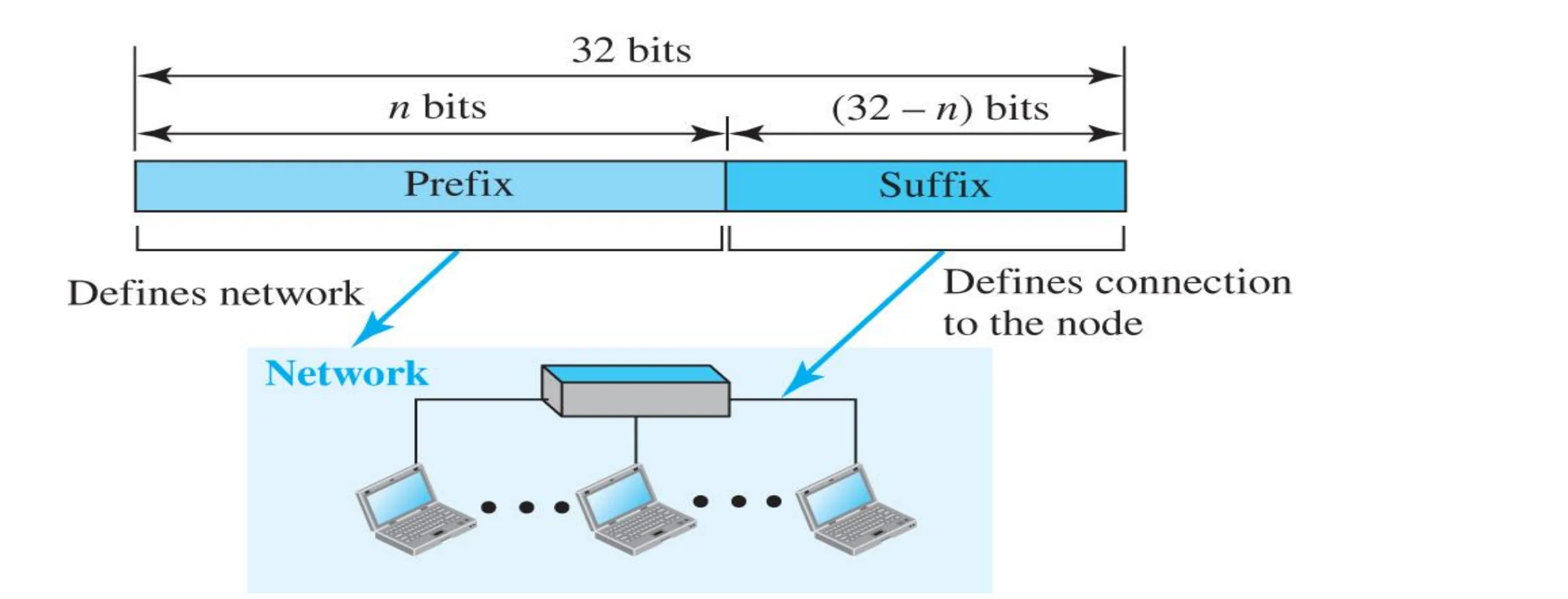
        • Host ID: identifies the interface of the network connection to the host, not the host itself①
        32-bit address: n-bit prefix defines the network, (32 - n)-bit suffix defines the connection to the node
        24
        Exam weight Low
        1. Prefix = network, suffix = host. Network address = host bits all 0.

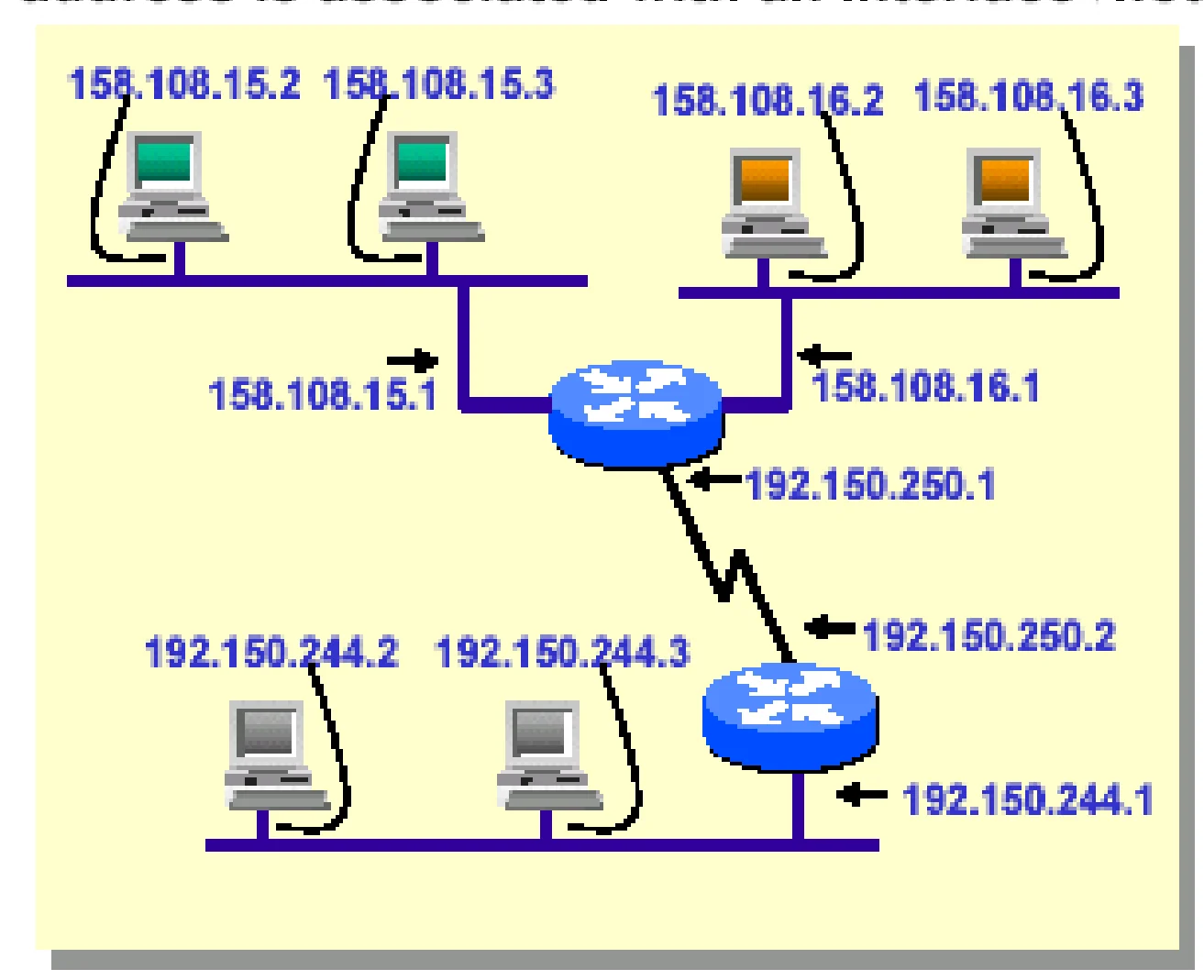
        IP address with a router

        An IP address is associated with an interface, not a machine.①

        A router with interfaces in three networks has three IP addresses
        25
        Exam weight Medium
        1. A router has one IP address PER INTERFACE (one per network it touches).
        🎯 How this can come up · 1 question
        True / False

        A router connected to three networks has three IP addresses.

        Note: five classes

        In classful addressing, the address

        space is divided into five classes: A, B,

        C, D, and E.

        26
        Exam weight Low
        1. Classful: classes A, B, C, D, E.

        Occupation of the address space in classful addressing

        Class A 50%, B 25%, C 12.5%, D 6.25%, E 6.25% of the address space
        27
        Exam weight Low

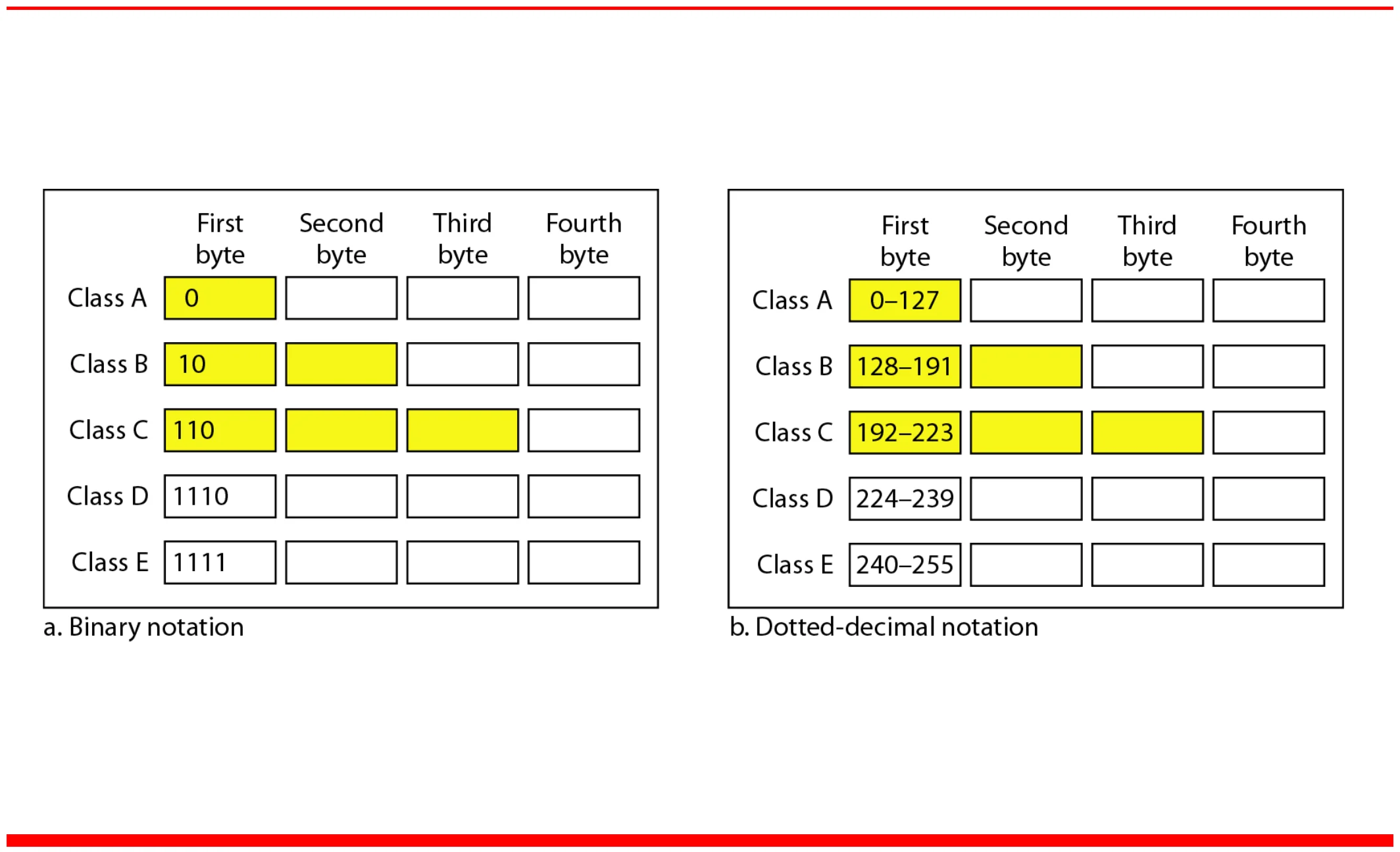
          Finding the classes in binary and dotted-decimal notation

          Binary first bits 0, 10, 110, 1110, 1111; first byte 0–127, 128–191, 192–223, 224–239, 240–255
          28
          Exam weight High
          1. First bits: A 0 · B 10 · C 110 · D 1110 · E 1111.
          2. First byte: A 0–127 · B 128–191 · C 192–223 · D 224–239 · E 240–255.
          Memory trickFirst-byte limits: 127 / 191 / 223 / 239 / 255.
          🎯 How this can come up · 2 questions
          MCQ

          An address starting with 190 is class:

          MCQ

          An address whose first bits are 110 is class:

          Classful Addressing

          • Class A
            • Range in decimal 0 – 127; starts with binary 0
            • 8 bits for the network, 32 - 8 = 24 bits for hosts
            • Addresses per block: 2²⁴ = 16,777,216 - 2 (all-zeros host = network address x.0.0.0, all-ones host = broadcast address x.255.255.255)
            • Valid range 1.x.x.x to 126.x.x.x (126 valid blocks)
            • 0.x.x.x is reserved (0.0.0.0 = default route / a device that doesn’t know its own address yet)
            • The 127 block is reserved for loopback
            • All allocated (large networks)①
          • Class B
            • Starts with binary 10; range 128.x.x.x to 191.x.x.x
            • 2¹⁴ = 16,384 blocks
            • Addresses per block: 2¹⁶ = 65,536 - 2
            • 2 fixed bits (10) + 14 network bits + 16 host bits = 32 bits
            • All allocated (medium networks)②
          29
          Exam weight High
          1. Class A: /8, 126 usable networks, ~16.7 million hosts each. 127 = loopback.
          2. Class B: /16, 16,384 networks, 65,534 hosts each.
          🎯 How this can come up · 2 questions
          MCQ

          The 127.x.x.x block is reserved for:

          MCQ

          How many usable host addresses does one class B block have?

          Classful Addressing

          • Class C
            • Starts with binary 110; range 192.x.x.x to 223.x.x.x
            • 2²¹ = 2,097,152 blocks
            • 3 fixed bits (110) + 21 network bits + 8 host bits = 32 bits
            • Addresses per block: 2⁸ = 256 - 2
            • Nearly all allocated (small networks)①
          • Class D
            • Multicast addresses (one sender sends to a specific group of receivers)
            • First four bits 1110
            • No network/host hierarchy②

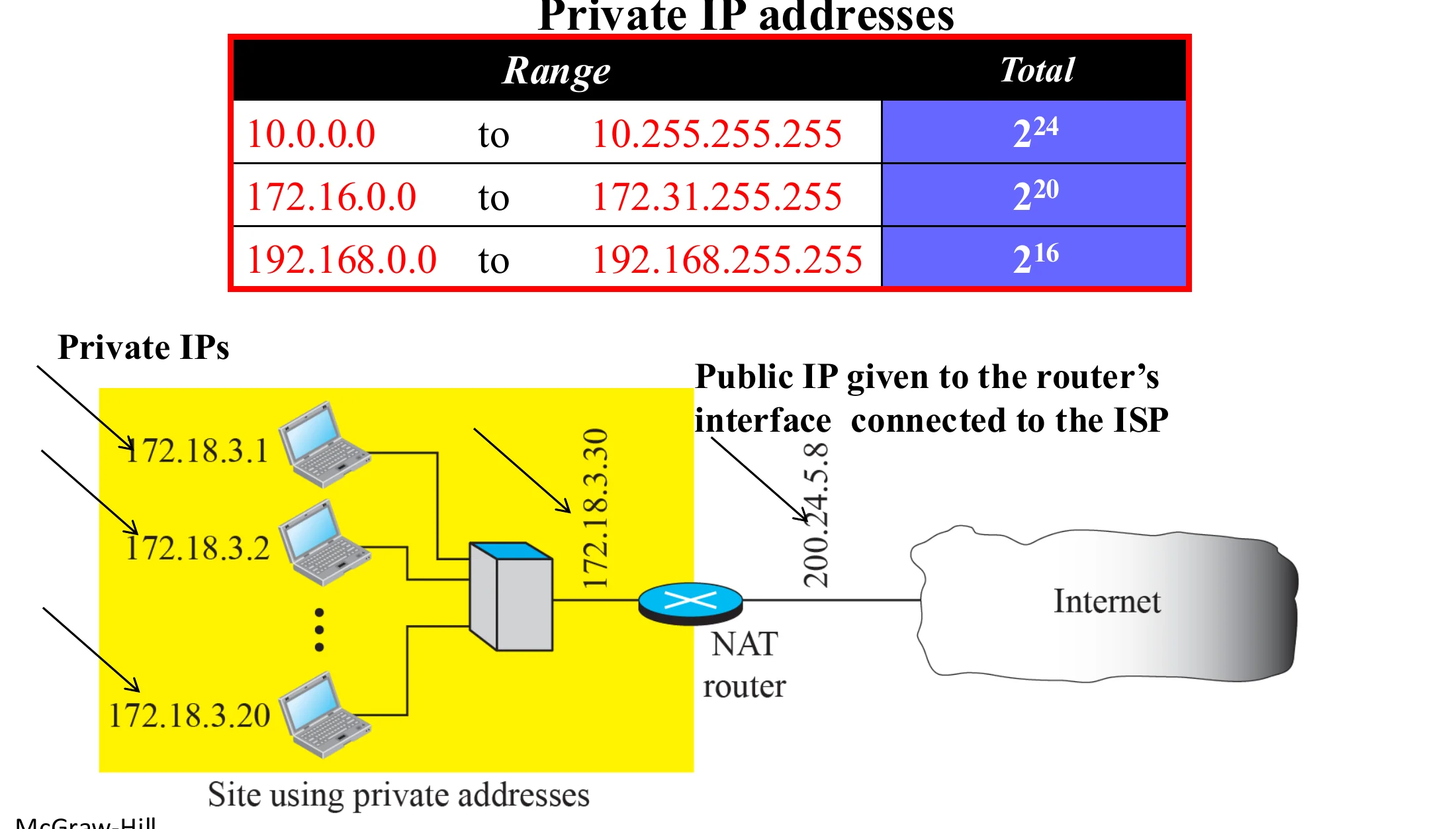
          Private IP addresses are used inside local networks and are not directly routable on the public Internet:

          • 10.0.0.0 to 10.255.255.255 (2²⁴)
          • 172.16.0.0 to 172.31.255.255 (2²⁰)
          • 192.168.0.0 to 192.168.255.255 (2¹⁶)③
          30
          Exam weight High
          1. Class C: /24, 254 hosts. Class D: multicast, no net/host split.
          2. Private ranges: 10/8, 172.16–172.31, 192.168/16. Not routable on the Internet (NAT needed).
          🎯 How this can come up · 2 questions
          MCQ

          Which address is private?

          MCQ

          Class D addresses are used for:

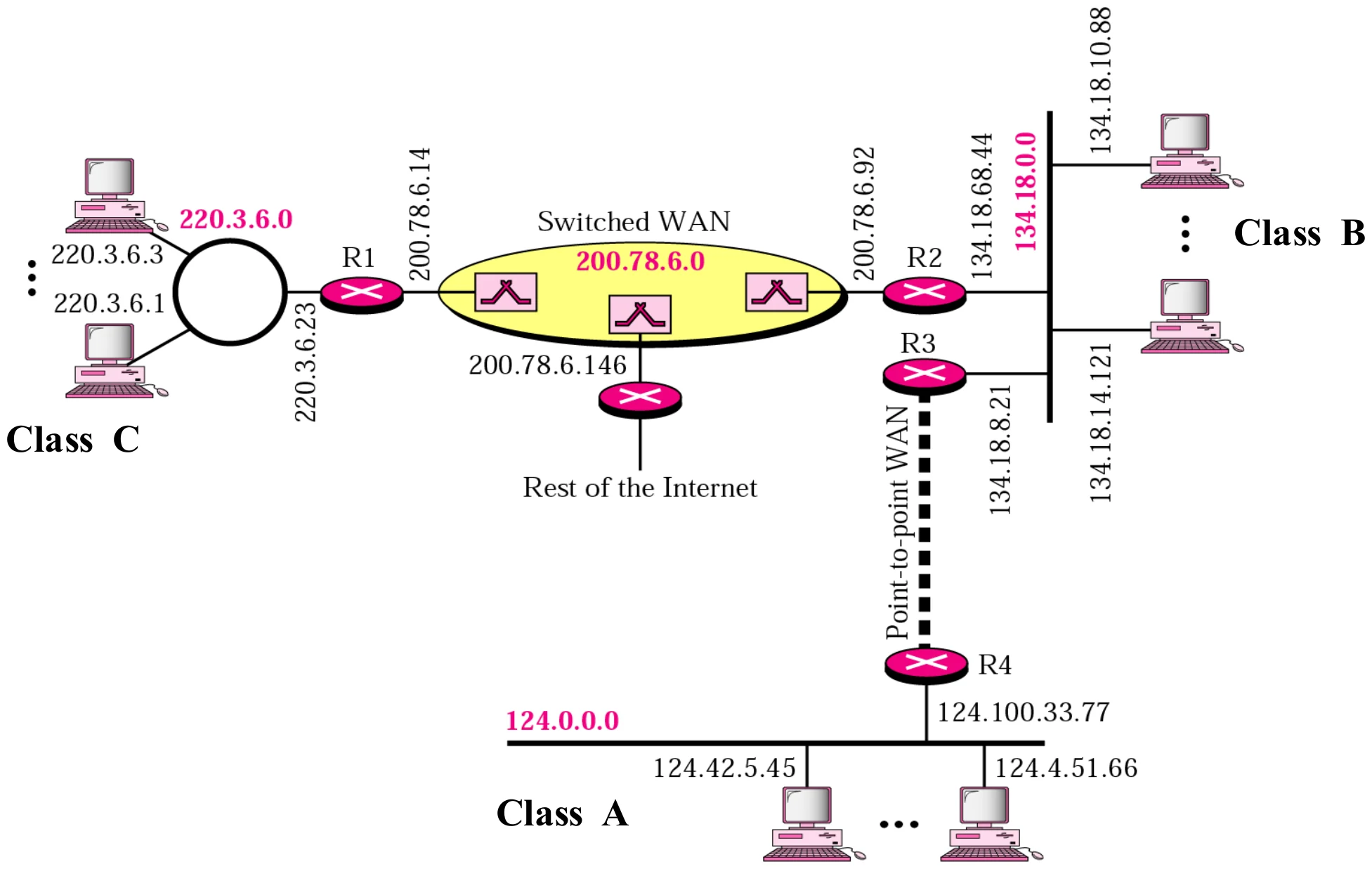
          Sample internet

          A sample internet with class A, B and C networks joined by routers and WANs
          31
          Exam weight Low

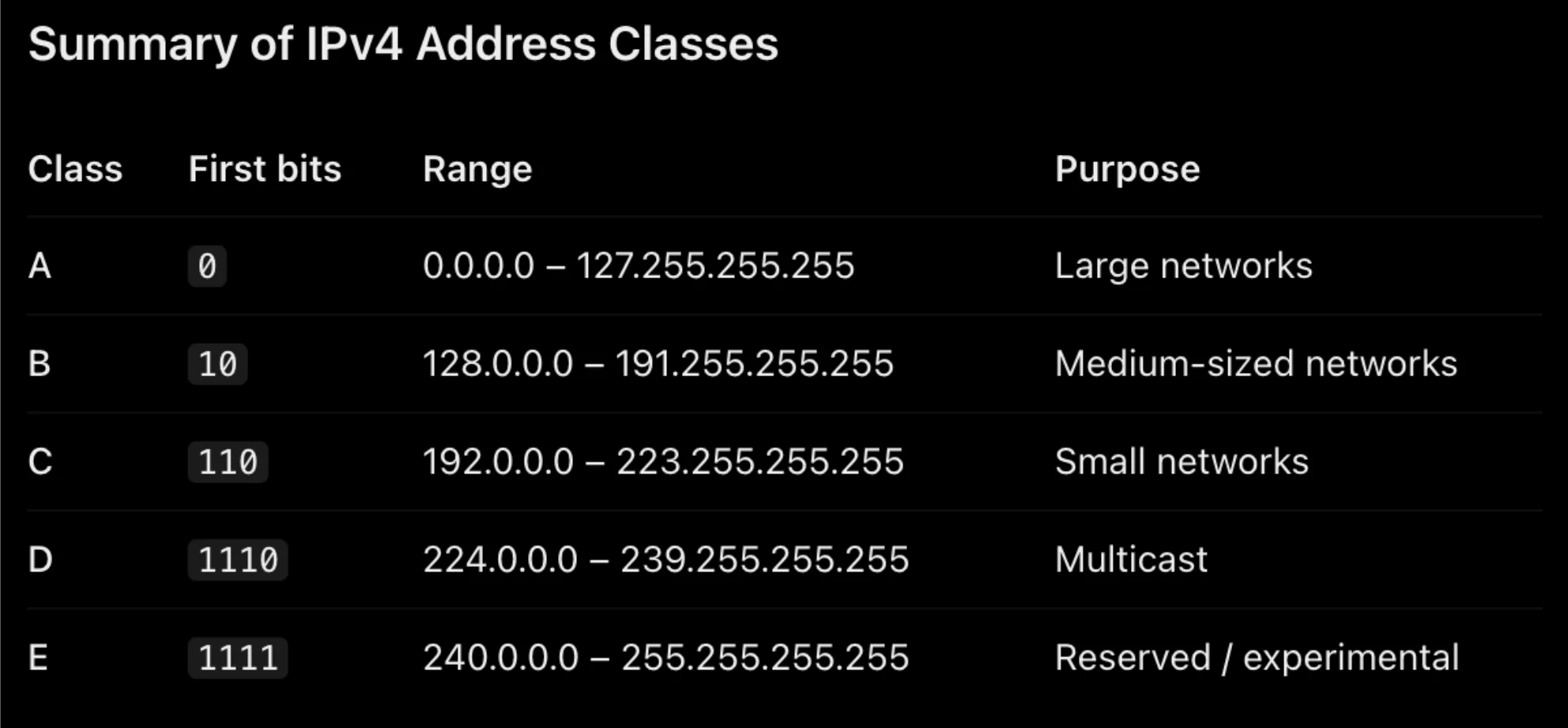
            Summary of IPv4 address classes

            A 0 large networks, B 10 medium, C 110 small, D 1110 multicast, E 1111 reserved/experimental
            32
            Exam weight Low
            1. E (1111, 240–255) is reserved / experimental.

            Find the class of each address:

            Find the class of each address:

            a. 00000001 00001011 00001011 11101111

            b. 11110011 10011011 11111011 00001111

            Solution: a. The first bit is 0; this is a class A address.

            b. The first 4 bits are 1s; this is a class E address.

            33
            Exam weight Low

              Find the class of each address:

              Find the class of each address: a. 227.12.14.87 b. 252.5.15.111 c. 134.11.78.56

              Solution:

              • a. The first byte is 227 (between 224 and 239); the class is D.
              • b. The first byte is 252 (between 240 and 255); the class is E.
              • c. The first byte is 134 (between 128 and 191); the class is B.
              34
              Exam weight Medium
                🎯 How this can come up · 1 question
                MCQ

                The address 227.12.14.87 is class:

                Example: network address (class A)

                The class is A. Only the first byte defines the netid. We can find the network address by replacing the hostid bytes (56.7.91) with 0s. Therefore, the network address is 23.0.0.0.

                35
                Exam weight Low
                1. Class A → keep 1 byte, zero the rest: 23.0.0.0.

                Example: network address (class B)

                The class is B. The first 2 bytes defines the netid. We can find the network address by replacing the hostid bytes (17.85) with 0s. Therefore, the network address is 132.6.0.0.

                36
                Exam weight Medium
                1. Class B → keep 2 bytes: 132.6.0.0.
                🎯 How this can come up · 1 question
                MCQ

                The network address of 201.14.78.65 (classful) is:

                Example: class from a network address

                The class is A because the netid is only 1 byte.

                37
                Exam weight Low
                1. 17.0.0.0 → netid is 1 byte → class A.

                Network, Host, and Broadcast Addresses

                Within each network there are three types of IP addresses:

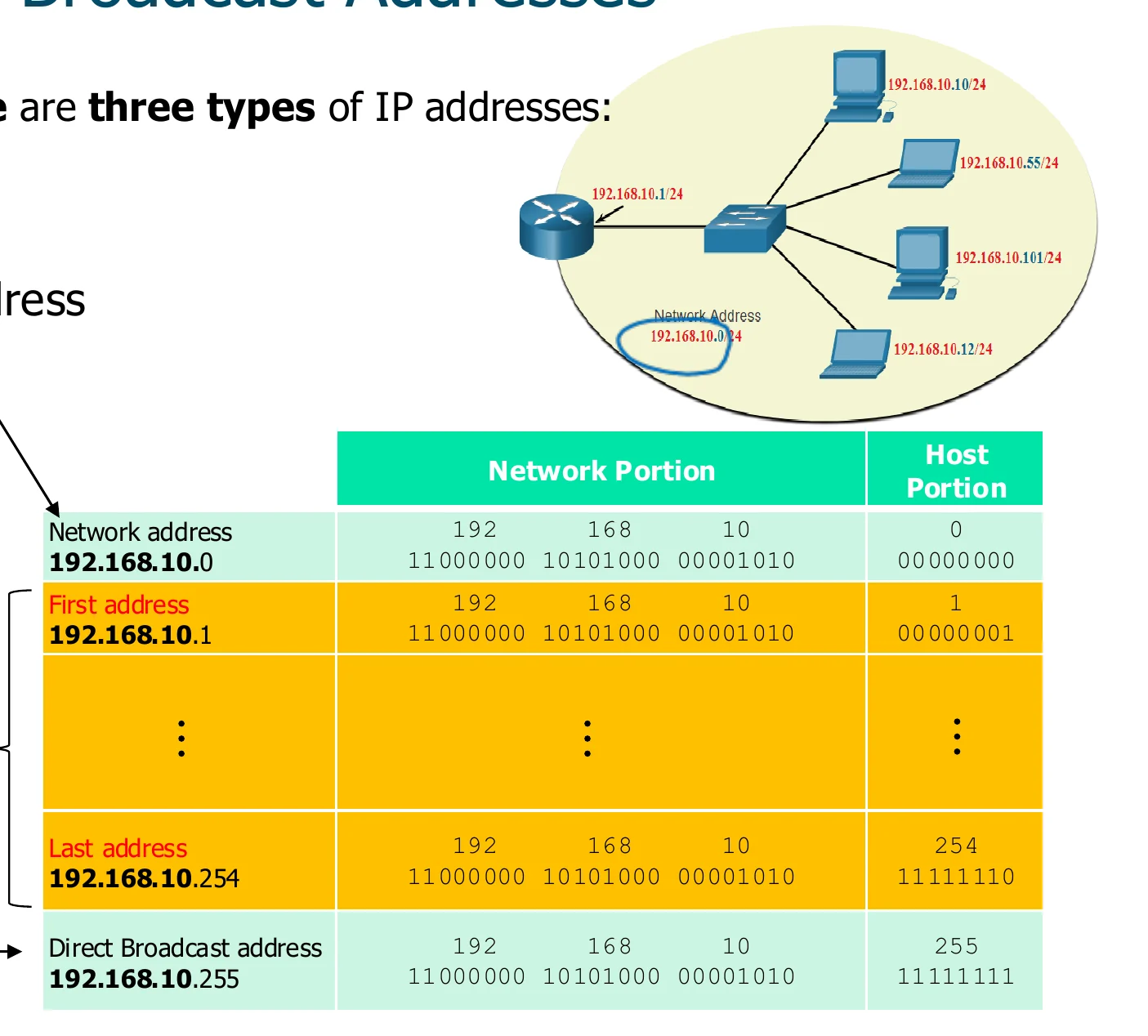
                1. Network address (host portion all 0s): e.g. 192.168.10.0①
                2. Host addresses (usable): first 192.168.10.1 … last 192.168.10.254
                3. Directed broadcast address (host portion all 1s): 192.168.10.255②
                Table for 192.168.10.0/24: network .0, first host .1, last host .254, directed broadcast .255
                38
                Exam weight High
                1. Host bits all 0 → network address. All 1 → directed broadcast. Everything in between is usable.

                Broadcast in IPv4

                • Directed Broadcast address
                  • Broadcast address for a message that is directed to ALL nodes in a specific network different from the source device network①
                  • It has the net id and all ones in binary in the host portion
                  • Will be forwarded by routers
                  • It is usually blocked as it can be used for denial of service attacks②
                39
                Exam weight Low
                1. Directed broadcast = net ID + host all 1s, sent to ANOTHER network. Routers forward it (often blocked: DoS risk).

                Broadcast in IPv4

                • Limited Broadcast Address
                  • Broadcast address for a message to be received by all nodes within the same network as the source device
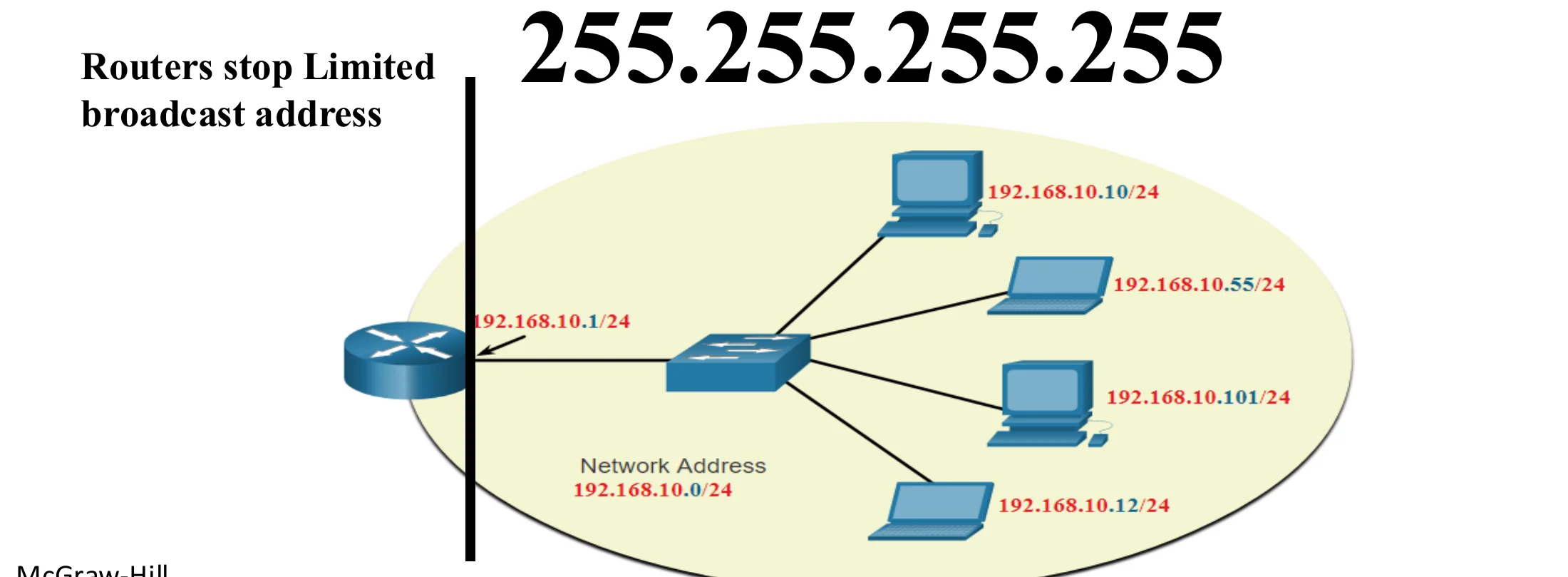
                  • Routers do not forward a message that has limited broadcast address as destination address (Routers isolate broadcast domains)①: 255.255.255.255

                255.255.255.255 reaches every host on the local network 192.168.10.0/24 but stops at the router
                40
                Exam weight High
                1. Limited broadcast 255.255.255.255 = everyone on MY network. Routers never forward it.
                Exam trapDirected broadcast (e.g. 192.168.10.255) CAN cross routers; limited broadcast 255.255.255.255 cannot.
                🎯 How this can come up · 2 questions
                MCQ

                Which broadcast address is never forwarded by routers?

                MCQ

                The directed broadcast address of 192.168.10.0/24 is:

                Note: the network address is assigned

                In classful addressing, the network

                address is the one that is assigned to

                the organization.

                41
                Exam weight Low
                1. In classful addressing, the organization is assigned the NETWORK address (the whole block).

                Subnet Mask

                • Why we need subnet mask?
                • To calculate the network address for a certain IP address
                • Why we need subnet address? See the next two slides
                • What is the difference between subnet mask and default (class) mask?
                • Class (Default) mask is used with classful addressing and subnet mask is used with classless (network address is defined by the mask not by the class)
                • What is the valid length of subnet mask?
                • It should be larger than the default mask of the class of the IP address and smaller than /30.①
                • How to use the subnet mask to find the subnet address?
                • Just do a bitwise AND between the IP address and the subnet mask. If the mask has 255 just write the corresponding number in the IP address as is. If the mask has 0, then write 0. Otherwise, convert both numbers in the mask and the IP to binary and do bitwise AND then convert the result to decimal.②
                42
                Exam weight High
                1. Mask → network address by AND.
                2. Default (class) mask = classful. Subnet mask = classless (the mask, not the class, defines the network).
                3. Valid subnet mask: longer than the class default, at most /30.
                4. Shortcut: mask 255 → copy the octet, mask 0 → write 0, otherwise AND in binary.
                TipMask octets to know by heart: 128 · 192 · 224 · 240 · 248 · 252 · 254 · 255.

                Why network address is needed? Case 1: A device is sending a packet

                • For a sending device, network layer needs the network address for the destination to check if the destination is connected to the same network as the sender or to another network.①
                • If the destination is connected to the same network, then network layer will give the data link layer the packet to deliver it.②
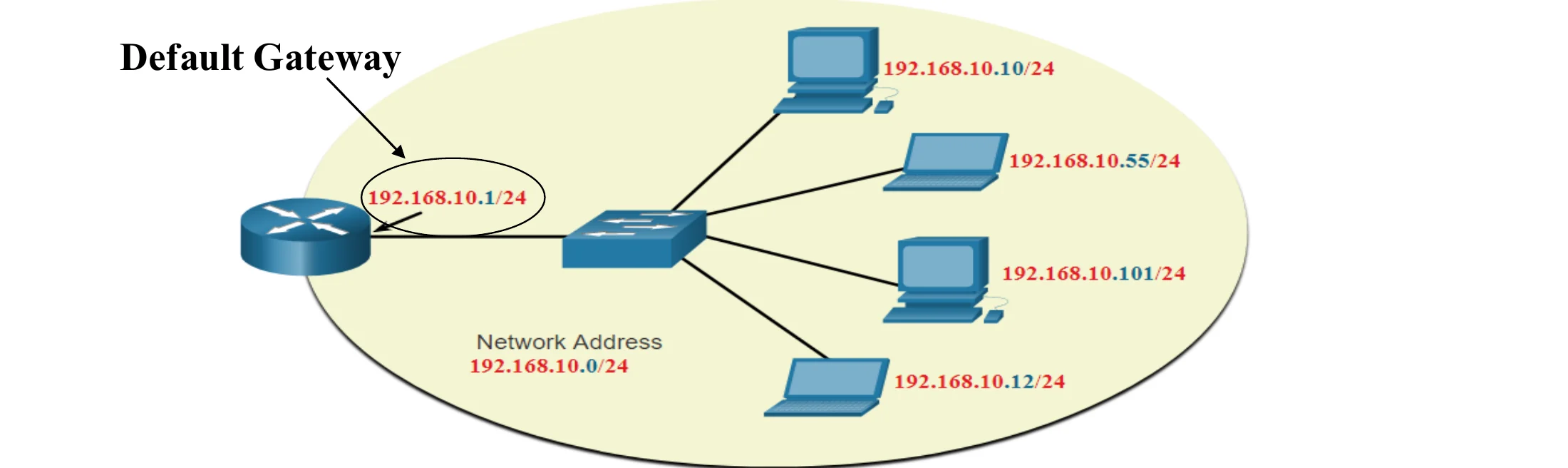
                • If the destination is NOT connected to the same network, then network layer will ask data link layer to send it to a Router to be delivered (The default Gateway).③
                A host on 192.168.10.0/24 with its default gateway router
                43
                Exam weight High
                1. Sender ANDs the destination with its mask: same network → deliver directly; different → send to the default gateway.
                🎯 How this can come up · 1 question
                Scenario

                Host 192.168.10.10/24 sends to 192.168.20.5. What does its network layer do?

                Why network address is needed? Case 2: A router receiving a packet to be forwarded

                • The routing table in routers is mostly arranged by network addresses not by complete (host) addresses.①
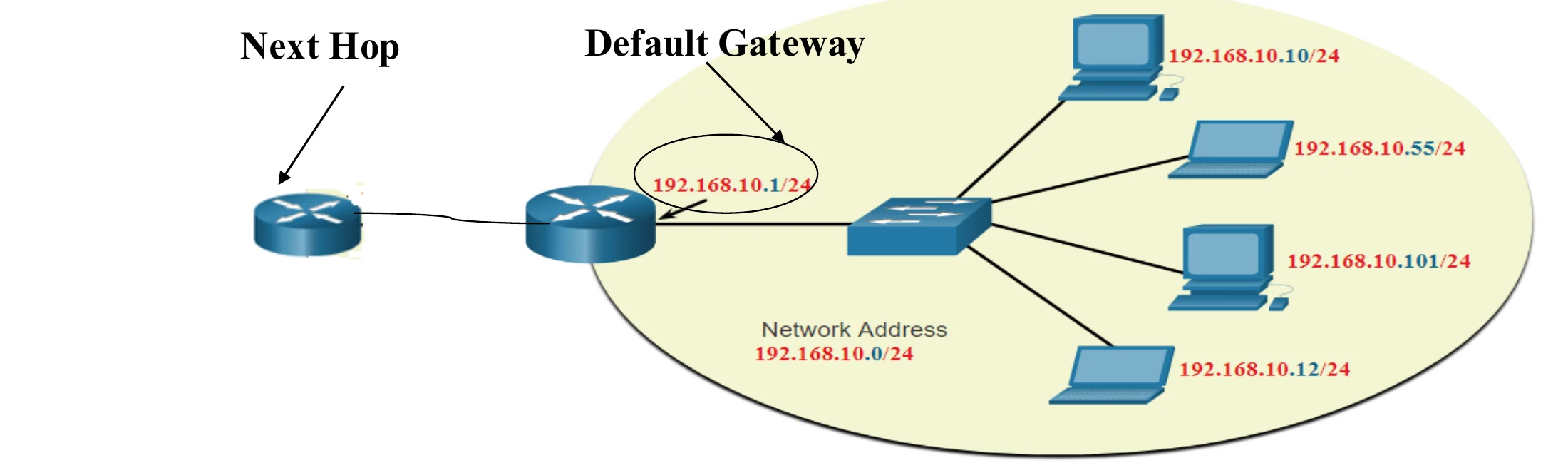
                • Router needs to get the network address of the destination so that it searches for it in the routing table to determine to which next router (next hop) the packet should be forwarded to in order to be delivered to the destination.②
                A router forwarding to the next hop based on the destination network
                44
                Exam weight Low
                1. Routing tables list NETWORKS, so the router needs the destination’s network address to find the next hop.

                Slash notation and classless addressing

                • Classful is NOT used nowadays.
                • Currently, Classless Addressing is used where classes are NOT used any more when addresses are distributed.①
                • This was a solution to the huge need for more addresses and the large shortage of IPv4 addresses.
                • By doing this. IPv4 are properly distributed and saved. ISPs are given a large range of addresses and then can subdivide the addresses into different subnets. (This is called subnetting)②
                • In classless addressing, we refer to the network mask as subnet mask and to Network address as Subnet address③
                byte.byte.byte.byte/n where n is the prefix length; examples 12.24.76.8/8, 23.14.67.92/12, 220.8.24.255/25
                45
                Exam weight Low
                1. Classful is dead: today addresses are classless (CIDR), written /n.
                2. ISPs subdivide blocks into subnets.

                Default classful masks

                • A: 11111111 00000000 00000000 00000000 = 255.0.0.0 = /8
                • B: 11111111 11111111 00000000 00000000 = 255.255.0.0 = /16
                • C: 11111111 11111111 11111111 00000000 = 255.255.255.0 = /24①
                • The mask has ones for all bits that belong to the network ID and zeros for all bits that belong to the host ID.
                • Slash notation counts the ones in the mask: /16 means the network ID is 16 bits.②
                46
                Exam weight Medium
                1. /n = number of 1 bits in the mask.
                🎯 How this can come up · 1 question
                MCQ

                The default mask of a class C address is:

                Converting From Slash to Decimal Notation

                • /12 = 11111111.11110000.00000000.00000000 = 255.240.0.0
                • /18 = 11111111.11111111.11000000.00000000 = 255.255.192.0
                • /26 = 11111111.11111111.11111111.11000000 = 255.255.255.192
                • /30 = 11111111.11111111.11111111.11111100 = 255.255.255.252①
                47
                Exam weight High
                1. Fill whole octets of 255 (8 bits each), then the leftover bits go in the next octet.
                TipMask octets to know by heart: 128 · 192 · 224 · 240 · 248 · 252 · 254 · 255.
                🎯 How this can come up · 2 questions
                MCQ

                /20 in dotted decimal is:

                MCQ

                /27 in dotted decimal is:

                Binary to Decimal Conversion

                • 10000000 = 128
                • 11000000 = 192
                • 11100000 = 224
                • 11110000 = 240
                • 11111000 = 248
                • 11111100 = 252
                • 11111110 = 254
                • 11111111 = 255
                48
                Exam weight Low
                1. Memorize this list.

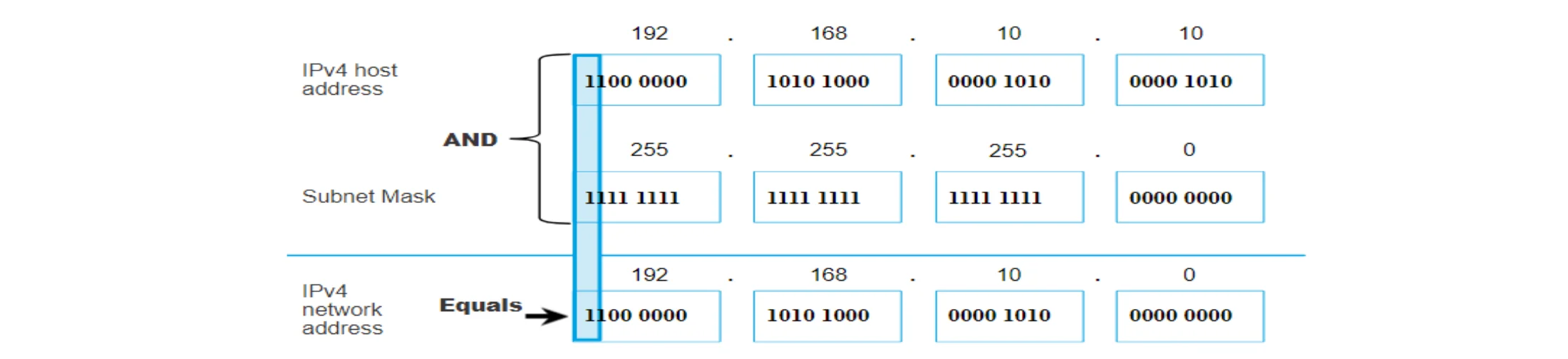
                Determining the Subnet Address: Logical AND with Mask

                • A logical AND Boolean operation is used in determining the subnet address.
                • 1 AND 1 = 1, 0 AND 1 = 0, 1 AND 0 = 0, 0 AND 0 = 0
                • To identify the subnet address, the host IPv4 address is logically ANDed, bit by bit, with the subnet mask to identify the subnet address.①
                192.168.10.10 AND 255.255.255.0 = 192.168.10.0
                49
                Exam weight Low
                1. 1 AND 1 = 1, everything else 0.

                Example: subnet address of 172.16.200.100 /19

                • IP address: 172.16.200.100 → third octet 200 = 11001000
                • Mask /19 = 255.255.224.0 → third octet 224 = 11100000
                • 11001000 AND 11100000 = 11000000 = 192
                • Subnet address: 172.16.192.0①
                50
                Exam weight Medium
                1. Only the octet where the mask is not 255 or 0 needs binary work.

                Example: subnet address of 193.1.2.129 /26

                • IP address: 193.1.2.129 → last octet 129 = 10000001
                • Mask /26 = 255.255.255.192 → last octet 192 = 11000000
                • 10000001 AND 11000000 = 10000000 = 128
                • Subnet address: 193.1.2.128①
                51
                Exam weight Medium

                  Practice: find the subnet addresses

                  • 172.16.200.200 /18 → subnet address ?
                  • 220.1.2.162 mask 255.255.255.252 → subnet address ?
                  52
                  Exam weight High
                  1. 172.16.200.200/18: mask 255.255.192.0; 200 AND 192 = 192 → 172.16.192.0.
                  2. 220.1.2.162/30: 162 AND 252 = 160 → 220.1.2.160.
                  🎯 How this can come up · 2 questions
                  MCQ

                  The subnet address of 172.16.200.200/18 is:

                  MCQ

                  The subnet address of 220.1.2.162 with mask 255.255.255.252 is:

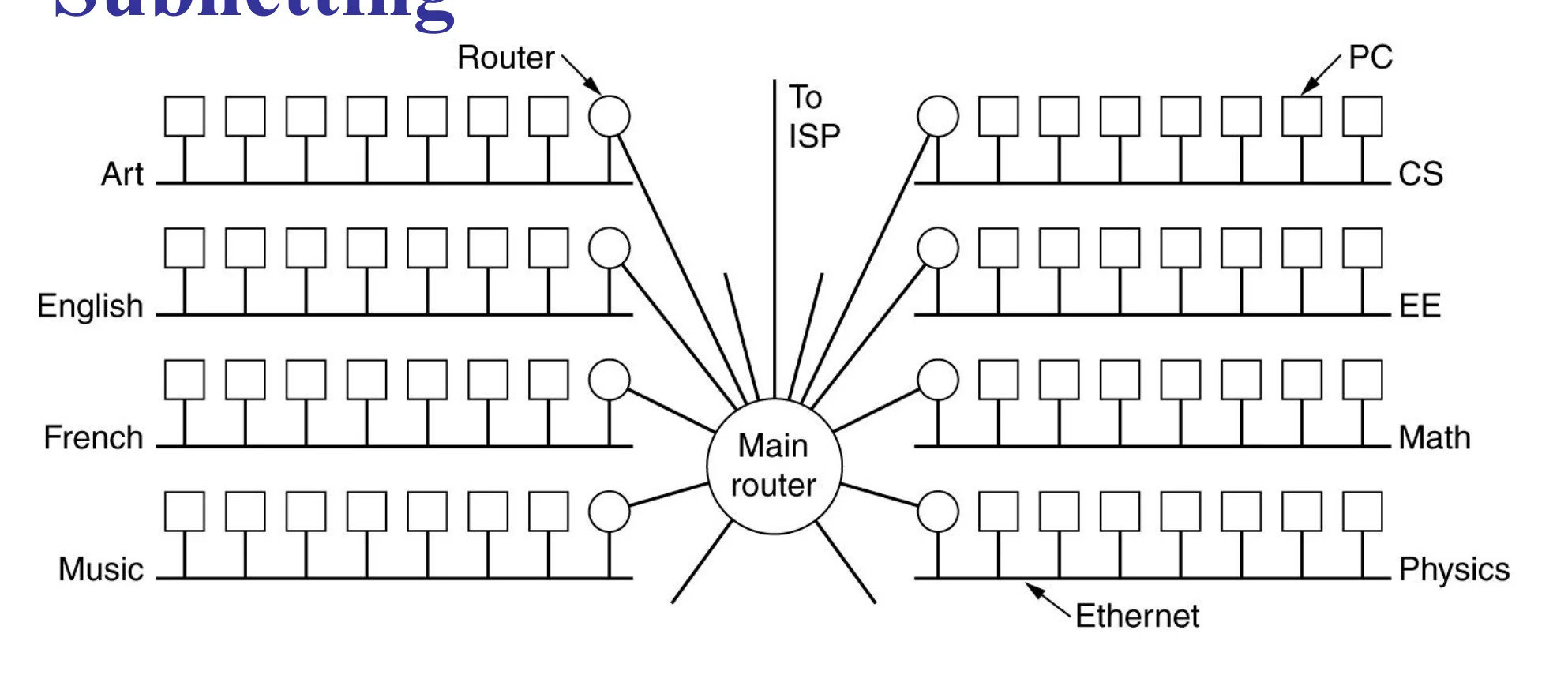
                  Subnetting

                  A campus network: a main router linking LANs for Art, English, French, Music, CS, EE, Math, Physics
                  53
                  Exam weight Low
                  1. One organisation, one block, many departmental LANs → subnetting.

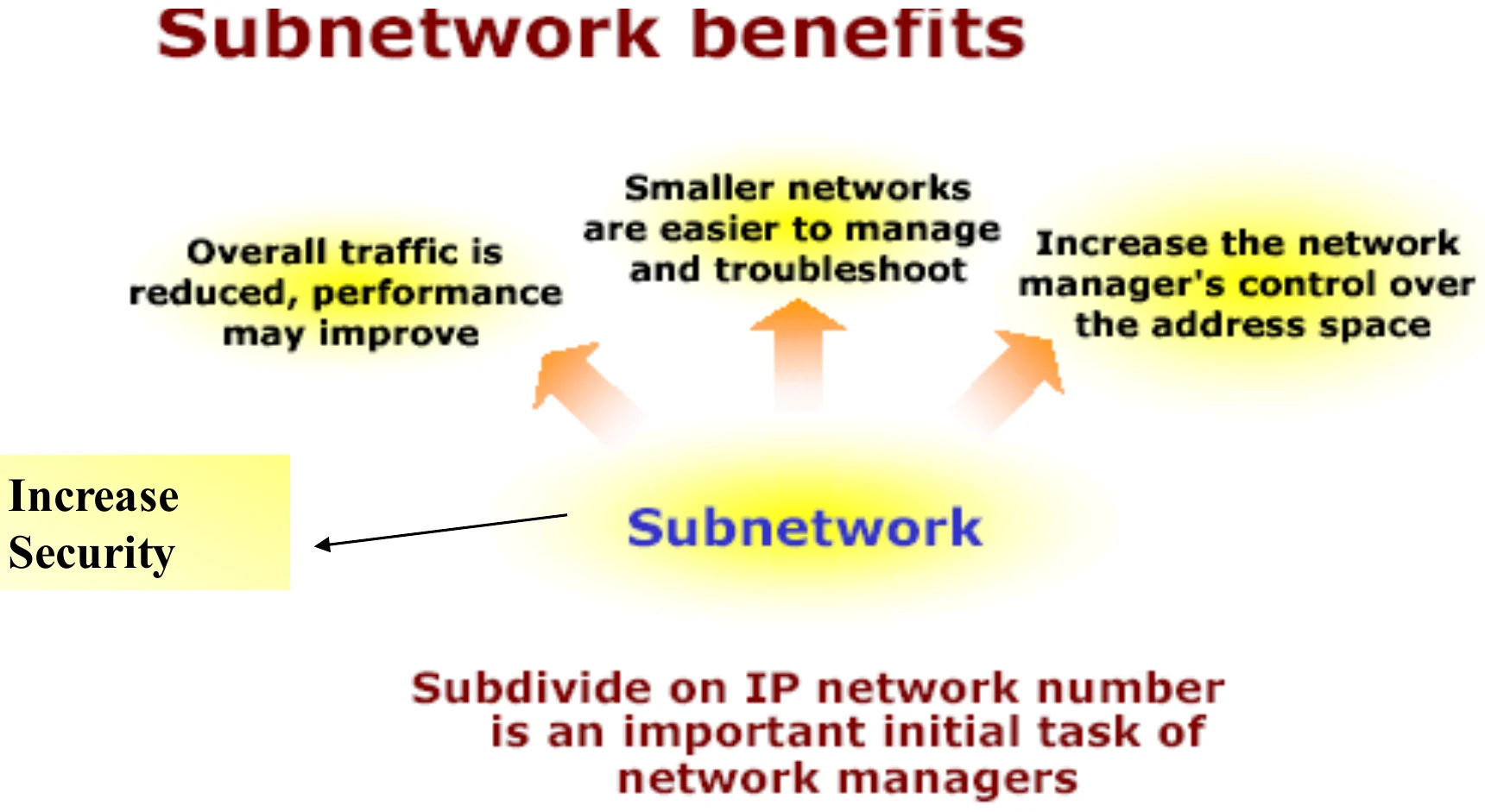
                  Subnetwork benefits

                  Benefits: less overall traffic, smaller networks easier to manage, more control over address space, more security
                  54
                  Exam weight Low
                  1. Benefits: less traffic (smaller broadcast domains), easier management, control over the address space, security.

                  Subnetting

                  • Dividing the network into several smaller groups called (subnets) with each group having its own subnet IP address
                  • Site looks to rest of internet like single network and routers outside the organization route the packet based on the main Network address①
                  • Local routers route within subnetted network using subnet address
                  • Host portion of address partitioned into subnet number (most significant part) and host number (least significant part)②
                  • In this case, IP address will have 3 levels (Main network, subnet, host)
                  • Subnet mask is a 32-bit consists of zeros and ones that indicates which bits of the IP address are subnet number and which are host number
                  • Subnet mask when ANDed with the IP address it gives the subnetwork address③
                  172.16.0.0/22: 22 network bits and 10 host bits = 2¹⁰ - 2 = 1022 hosts
                  55
                  Exam weight High
                  1. Outside the organisation it looks like ONE network; inside, routers use the subnet addresses.
                  2. Three levels: network, subnet, host. Subnet bits are borrowed from the host part.
                  🎯 How this can come up · 1 question
                  MCQ

                  A /22 network has how many usable host addresses?

                  Subnetting steps

                  • Given the desired number of subnets and the original classfull network address
                  1. Subtract 1 from number of needed subnets
                  2. Convert the result of step 1 to binary
                  3. Count number of bits obtained in 2
                  4. To obtain the subnet mask, Add the result in 3 to the default mask for the original network.
                  5. To write the different subnets: position number of the first non-zero bit in the subnet mask
                  6. Write the weight 2 starting from the rightmost octet
                  7. The first subnet is the original network address with the subnet mask
                  8. The next subnet is the original network address after adding the weight, obtained in (2), to the value of the first non-zero octet in original network address from the right
                  9. Keep adding the weight to the last obtained subnet to obtain the next subnet address
                  10. Stop when the result exceeds 255
                  56
                  Exam weight High
                  1. Example: 192.168.1.0/24 into 5 subnets. 5 - 1 = 4 = 100 → 3 bits → /27 (255.255.255.224).
                  2. Weight: the last 1 of the mask sits at 2⁵ = 32 → subnets .0, .32, .64, .96, .128, .160, .192, .224.
                  Memory trickBits needed = smallest n with 2ⁿ ≥ subnets. Block size = 256 - the mask octet.
                  🎯 How this can come up · 1 question
                  MCQ

                  A class C network must be split into 6 subnets. The new mask is:

                  Determining number of subnets and number of hosts per subnet

                  • Given the classful network and the subnet mask:
                  • Number of subnets = 2^(subnet mask length – classful mask length)
                  • Number of hosts per subnet = 2^(32 – subnet mask length) – 2

                  Note: 2 is subtracted because the first address in the block is the network address and the last is the broadcast; they can’t be assigned to hosts.①

                  57
                  Exam weight High
                  1. Subnets = 2^(borrowed bits). Hosts = 2^(host bits) - 2.
                  🎯 How this can come up · 2 questions
                  MCQ

                  A class B network uses mask /20. How many subnets?

                  MCQ

                  How many hosts per subnet with mask /20?

                  Practice table: 192.168.1.0/24 into /27 subnets

                  • 192.168.1.0/27: network .0 · first usable .1 · last usable .30 · broadcast .31
                  • 192.168.1.32/27: network .32 · first .33 · last .62 · broadcast .63
                  • 192.168.1.64/27: .64 · .65 · .94 · .95
                  • 192.168.1.96/27: .96 · .97 · .126 · .127
                  • 192.168.1.128/27: .128 · .129 · .158 · .159
                  • 192.168.1.160/27: .160 · .161 · .190 · .191
                  • 192.168.1.192/27: .192 · .193 · .222 · .223
                  • 192.168.1.224/27: .224 · .225 · .254 · .255
                  58
                  Exam weight High
                  1. The slide’s table is blank in the PDF: these are the answers. Each /27 has 32 addresses, 30 usable.
                  🎯 How this can come up · 2 questions
                  MCQ

                  In 192.168.1.64/27, the broadcast address is:

                  MCQ

                  The first usable host of 192.168.1.160/27 is:

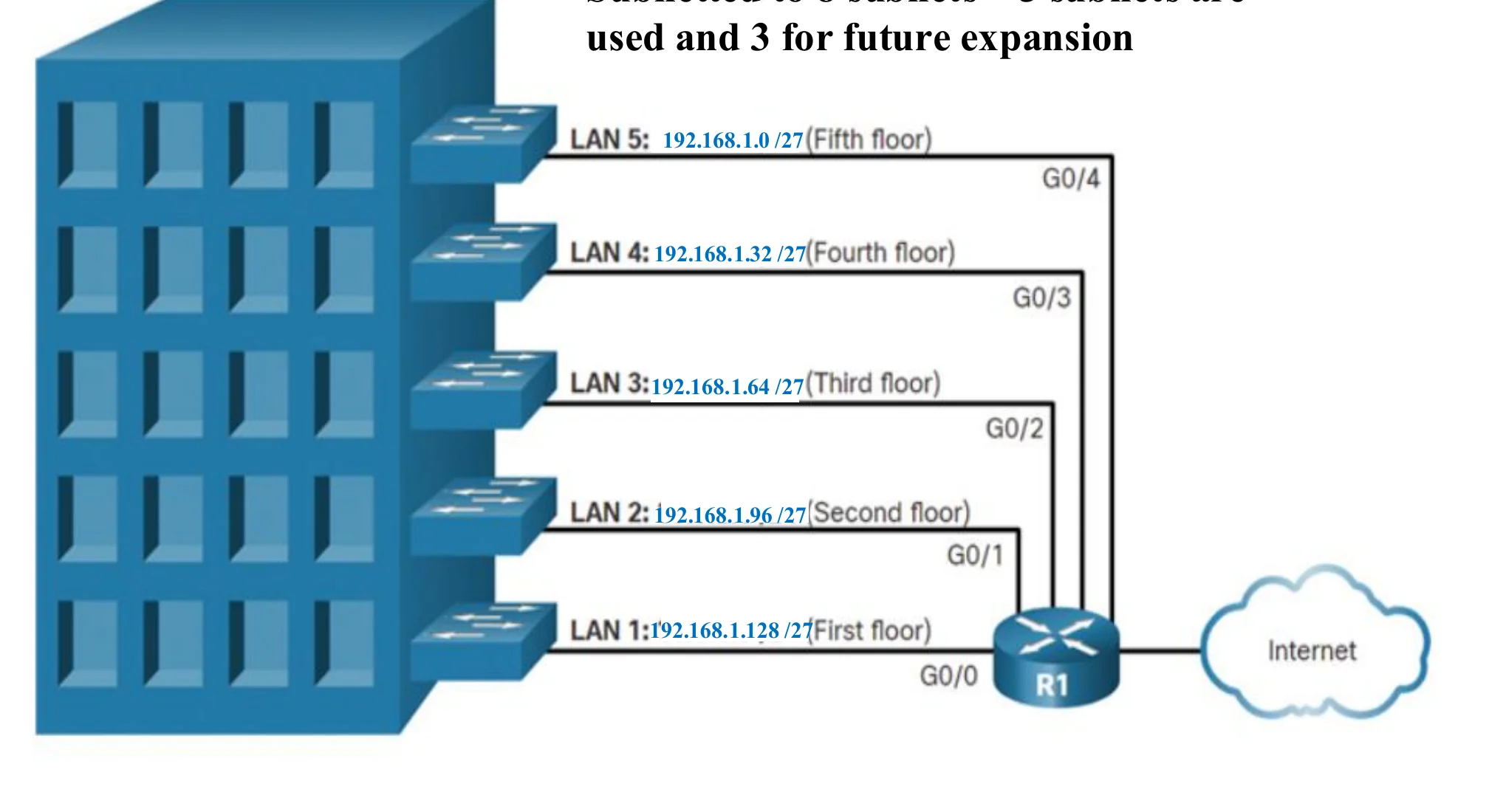
                  192.168.1.0/24 subnetted to 8 subnets: 5 used, 3 for future expansion

                  • LAN 1: 192.168.1.128/27 (first floor)
                  • LAN 2: 192.168.1.96/27 (second floor)
                  • LAN 3: 192.168.1.64/27 (third floor)
                  • LAN 4: 192.168.1.32/27 (fourth floor)
                  • LAN 5: 192.168.1.0/27 (fifth floor)
                  A five-floor building, one /27 LAN per floor, all connected to router R1
                  59
                  Exam weight Low
                  1. One /27 per floor; .160, .192 and .224 are kept for expansion.

                  Practice table (blank in the PDF)

                  60
                  Exam weight Low
                  1. Use the answers on slide 58.

                  A network with three levels of hierarchy (subnetted)

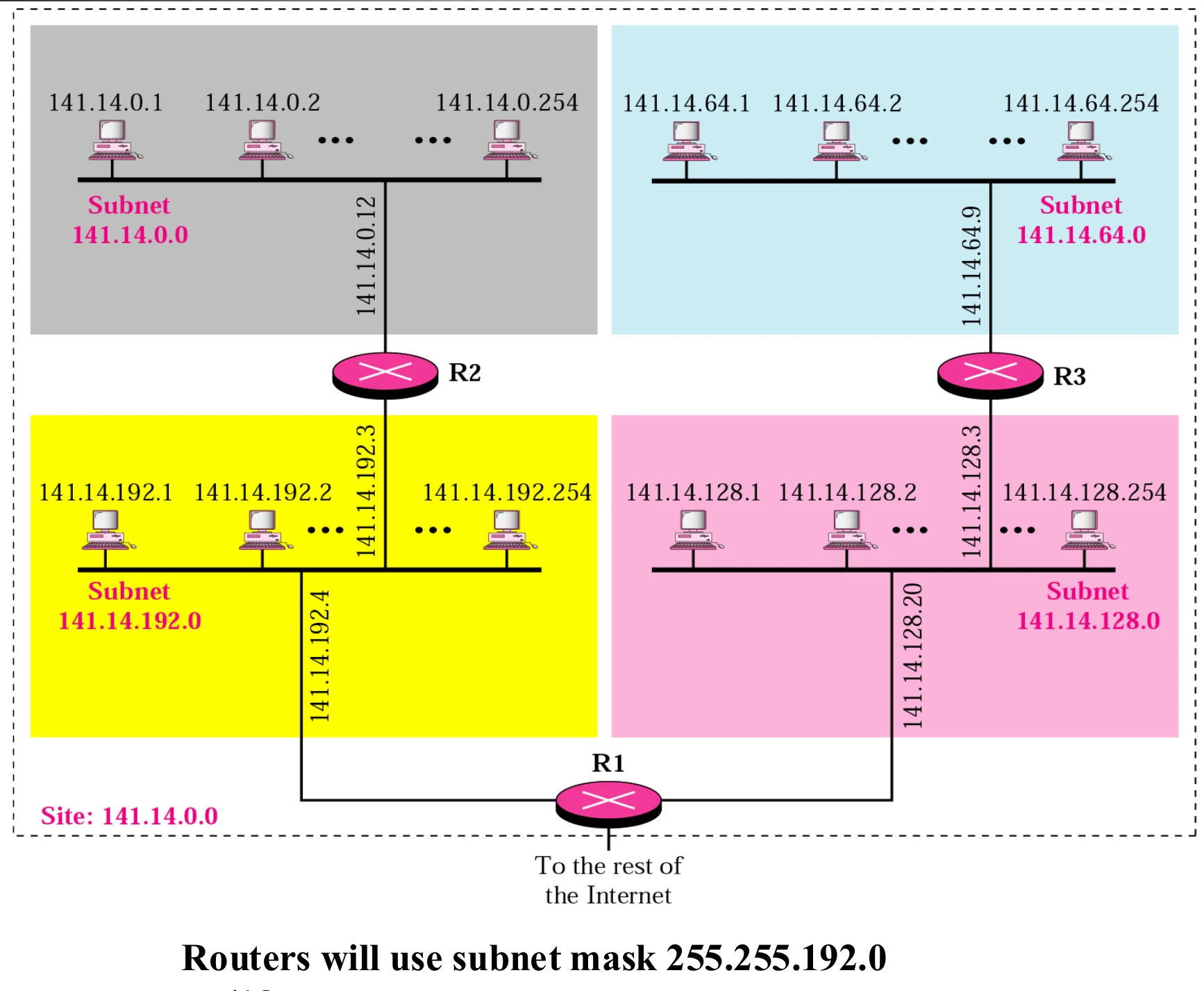
                  Routers inside the site use subnet mask 255.255.192.0 (/18).

                  Site 141.14.0.0 split into subnets 141.14.0.0, .64.0, .128.0, .192.0 joined by routers R1–R3
                  61
                  Exam weight Medium
                  1. 141.14.0.0/16 split into 4 subnets with /18: .0.0, .64.0, .128.0, .192.0.
                  🎯 How this can come up · 1 question
                  MCQ

                  141.14.0.0/16 is split with mask /18. Which is one of the subnet addresses?

                  Obtaining Host IP Address

                  • Once a network administrator in an organization obtained a block of addresses from its ISP, it can then assign individual IP addresses to the host and router interfaces
                  • The follow four IP configurations should be done on any host connected to the network:
                    • IP Address from the correct subnet
                    • Subnet Mask
                    • Default Gateway IP address (Default gateway is a router interface that is connected to the same subnet as the other end devices)
                    • Domain name Server IP address①
                  • The above IP configurations can be assigned to interfaces in two ways:
                    • Manual configuration: IP address is stored manually by the administrator in a configuration file
                      • What about a diskless computer? Or first time booted computer with a disk?
                      • What about if the computer has moved from one subnet to another ?
                    • Solution is using a protocol called Dynamic Host Configuration Protocol (DHCP)②
                  62
                  Exam weight High
                  1. Four settings every host needs: IP address, subnet mask, default gateway, DNS server.
                  2. Manual configuration doesn’t work for diskless, newly booted or moved machines → DHCP.
                  🎯 How this can come up · 1 question
                  MCQ

                  Which is NOT one of the four IP settings a host needs?

                  Example: answer the questions on the next slide

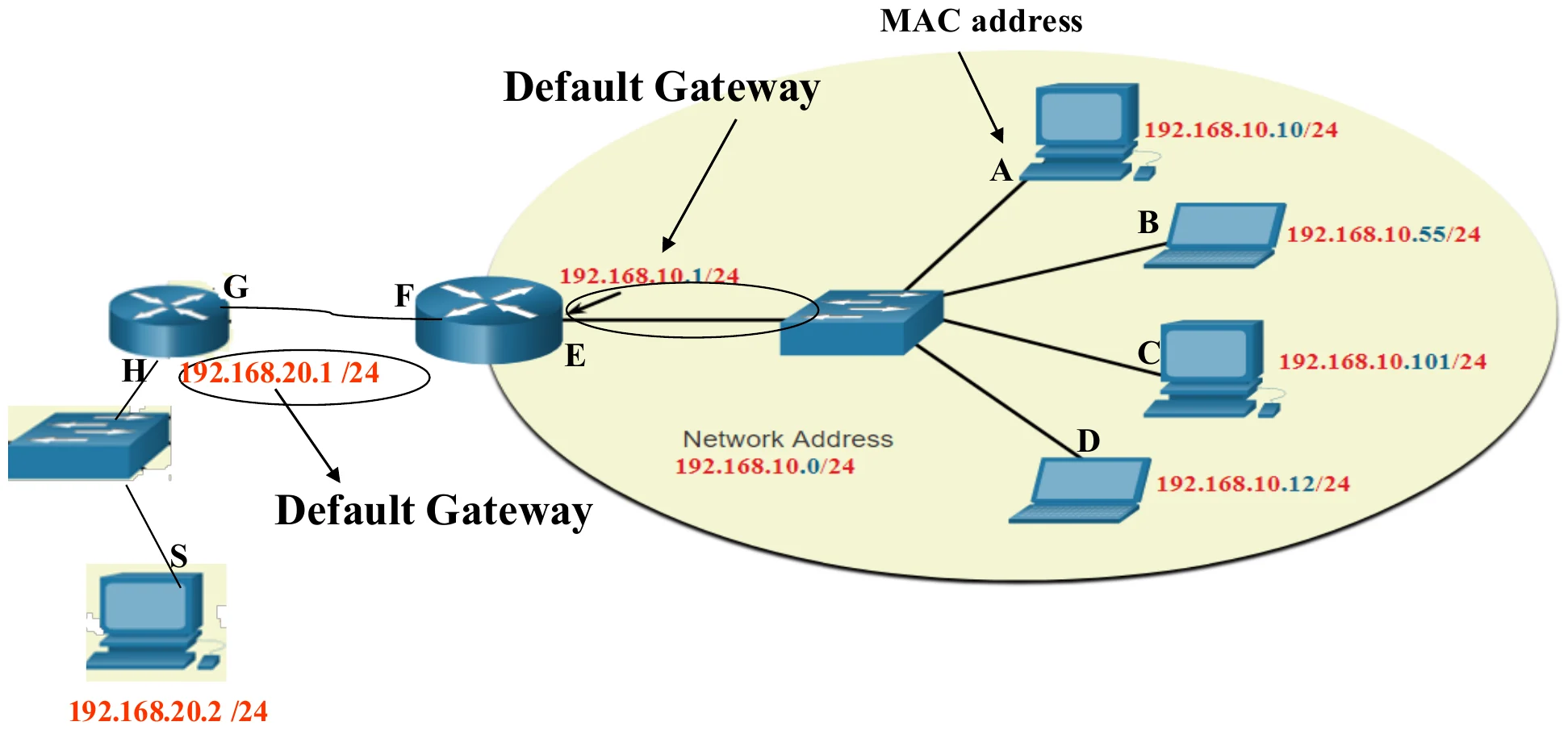
                  Hosts A–D on 192.168.10.0/24 behind router interface 192.168.10.1; host S on 192.168.20.0/24 behind interface 192.168.20.1
                  63
                  Exam weight Low
                  1. Two networks joined by one router: 192.168.10.0/24 (A–D) and 192.168.20.0/24 (S).

                  Questions on the example

                  • What is the default gateway for hosts A, B, C, D? Repeat for host S.
                  • Source and destination IP addresses when A sends a packet to S?
                  • Source and destination IP addresses of the packet received by S?
                  • Source and destination MAC addresses of the frame A sends toward S?
                  • Source and destination MAC addresses when S receives the frame?
                  64
                  Exam weight High
                  1. Gateway for A–D: the router interface on their LAN (192.168.10.1). For S: 192.168.20.1.
                  2. IP: A → S on both sides (unchanged).
                  3. MAC from A: source A’s MAC, destination the router’s 192.168.10.1 interface. At S: source the router’s 192.168.20.1 interface, destination S’s MAC.
                  🎯 How this can come up · 1 question
                  Written

                  In the example, give the source and destination MAC addresses of the frame leaving A, and of the frame arriving at S.

                  Practice: directed broadcast and subnet addresses

                  • Find the directed broadcast address of the subnet that has the IP address 211.56.77.35/29
                  • 172.16.200.200 /18 → subnet address ?
                  • 220.1.2.162 mask 255.255.255.252 → subnet address ?
                  65
                  Exam weight High
                  1. /29 → block 8 → 35 is in 32–39 → network 211.56.77.32, broadcast 211.56.77.39.
                  2. Others: 172.16.192.0 and 220.1.2.160 (see slide 52).
                  🎯 How this can come up · 1 question
                  MCQ

                  The directed broadcast address of 211.56.77.35/29 is:

                  Dynamic Host Configuration Protocol (DHCP)

                  • Dynamic Host Configuration Protocol (DHCP)
                    • Application layer protocol that provide IP address, subnet mask, IP address of a gateway router, and IP address of DNS server dynamically to a host or to a diskless computer①
                    • DHCP server keeps two databases (static IP addresses and dynamic IP database which has unused temporary Addresses (IP address pool))②
                    • Static IP addresses database maps physical addresses (MAC) to permanent IP addresses (used for diskless workstations)
                    • When a host requests an address DHCP will look into the static database first.
                    • If no address match is found, DHCP will select the dynamic IP database. DHCP will assign a Temporary Address: selected address from a pool of free addresses and assign it to the host
                      • Leasing: DHCP server assigns an IP address for a host for a specific period of time in order not to waste IP addresses
                      • After the period expires, host must return the IP address or renew the lease.③
                  66
                  Exam weight High
                  1. DHCP is an APPLICATION-layer protocol that hands out IP, mask, gateway and DNS.
                  2. Static database: MAC → permanent IP (checked first). Dynamic: a pool of temporary addresses, LEASED for a time, then returned or renewed.
                  Exam trapDHCP lives in the application layer even though it configures network-layer settings.
                  🎯 How this can come up · 2 questions
                  MCQ

                  DHCP is a protocol of which layer?

                  True / False

                  A DHCP lease means the address is given for a limited period.

                  ARP: why it is needed

                  Anytime a node has an IP packet to send to another node in a link, it has the IP address of the receiving node.

                  However, the IP address of the next node is not helpful in moving a frame through a link; we need the link-layer address of the next node.

                  This is the time when the Address Resolution Protocol (ARP) becomes helpful.

                  67
                  Exam weight Low
                  1. IP gets the packet to the right NEXT node logically, but the frame needs that node’s MAC address. ARP finds it.

                  Address Resolution Protocol (ARP)

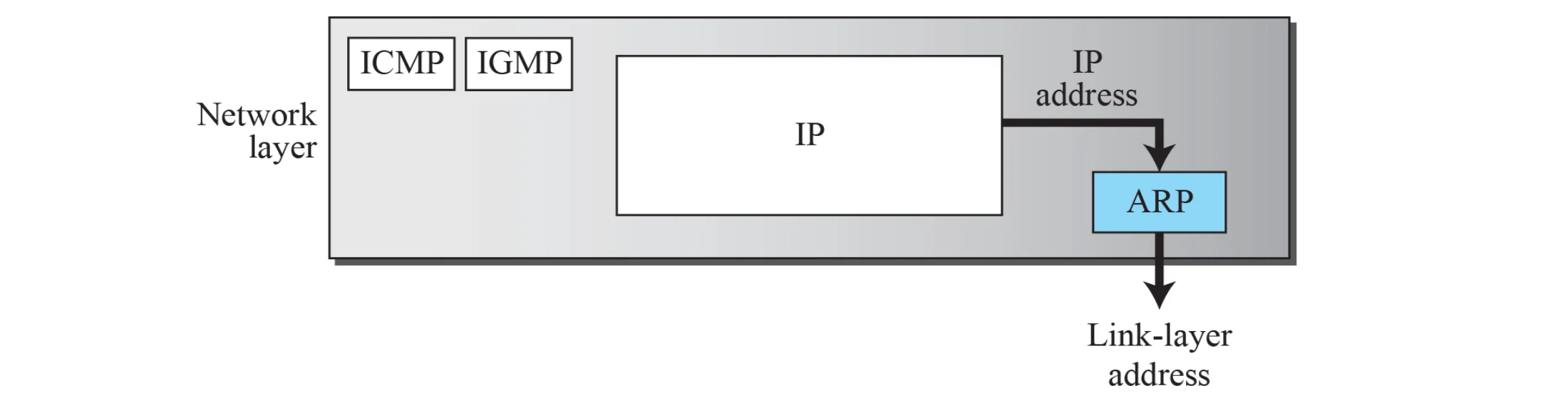
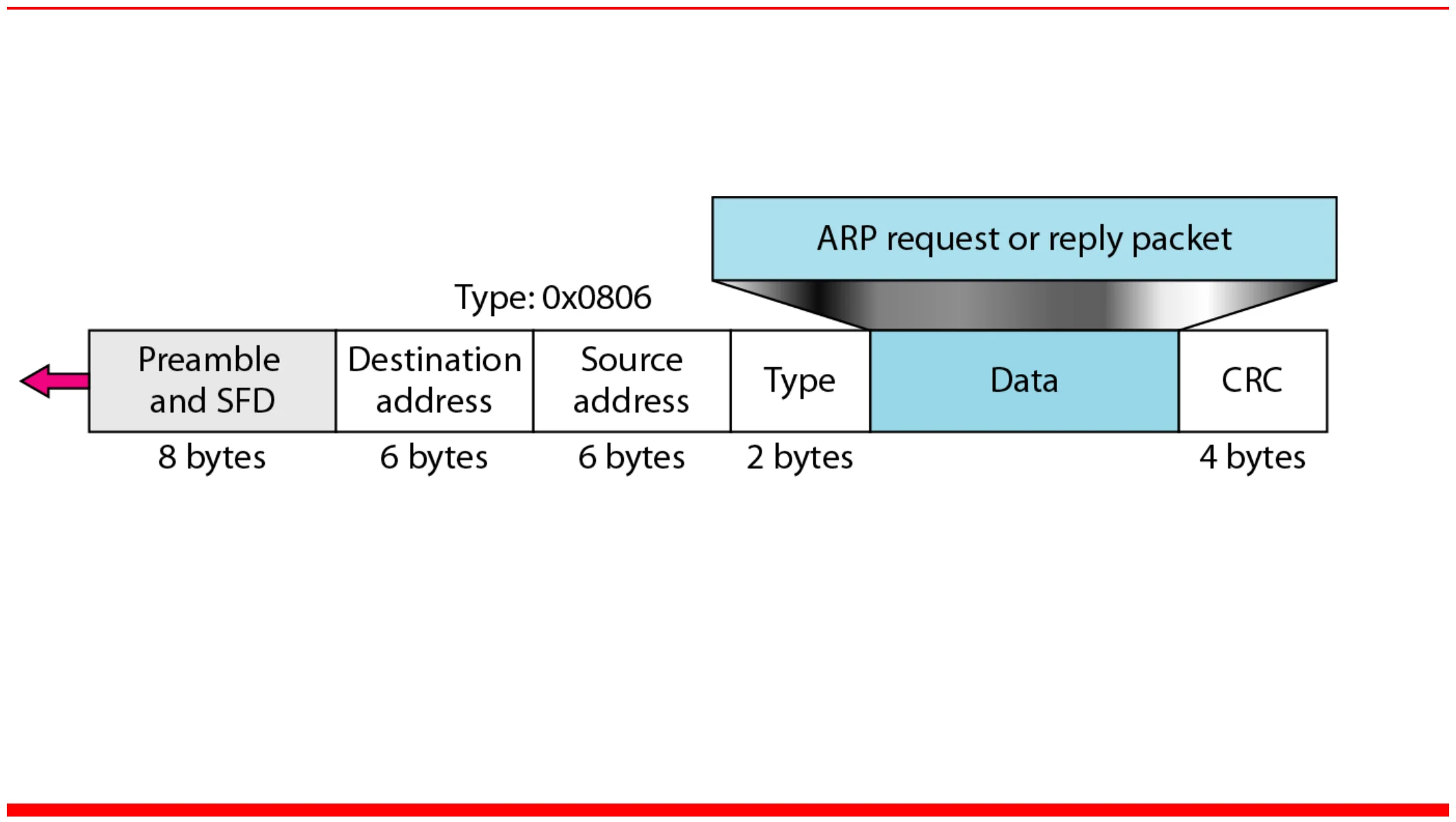
                  • ARP is a network layer protocol that translates between Internet IP address and MAC sublayer (layer-2) address①
                  ARP sits in the network layer beside IP, ICMP and IGMP, turning an IP address into a link-layer address
                  68
                  Exam weight High
                  1. ARP: IP address → MAC address.
                  🎯 How this can come up · 1 question
                  MCQ

                  ARP maps:

                  Note: ARP request and reply

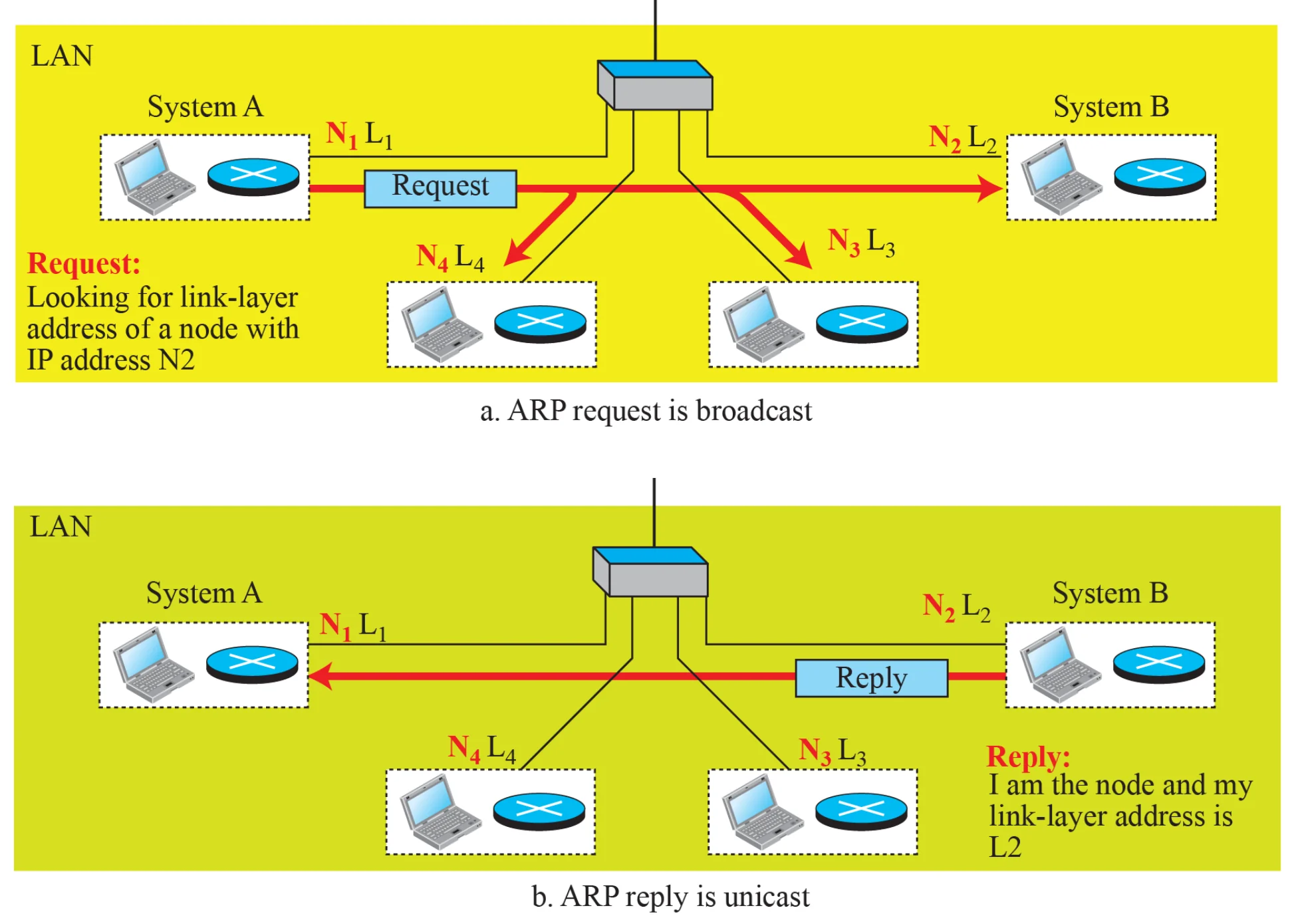
                  An ARP request is broadcast;

                  an ARP reply is unicast.

                  69
                  Exam weight High
                  1. Request = BROADCAST (“who has IP N2?”). Reply = UNICAST (“I do, my MAC is L2”).
                  Memory trickAsk everyone, answer one.
                  🎯 How this can come up · 1 question
                  MCQ

                  An ARP request is sent as a ___ and the reply as a ___.

                  ARP operation

                  a. System A broadcasts a request for N2’s link-layer address. b. System B replies by unicast with L2
                  70
                  Exam weight Low

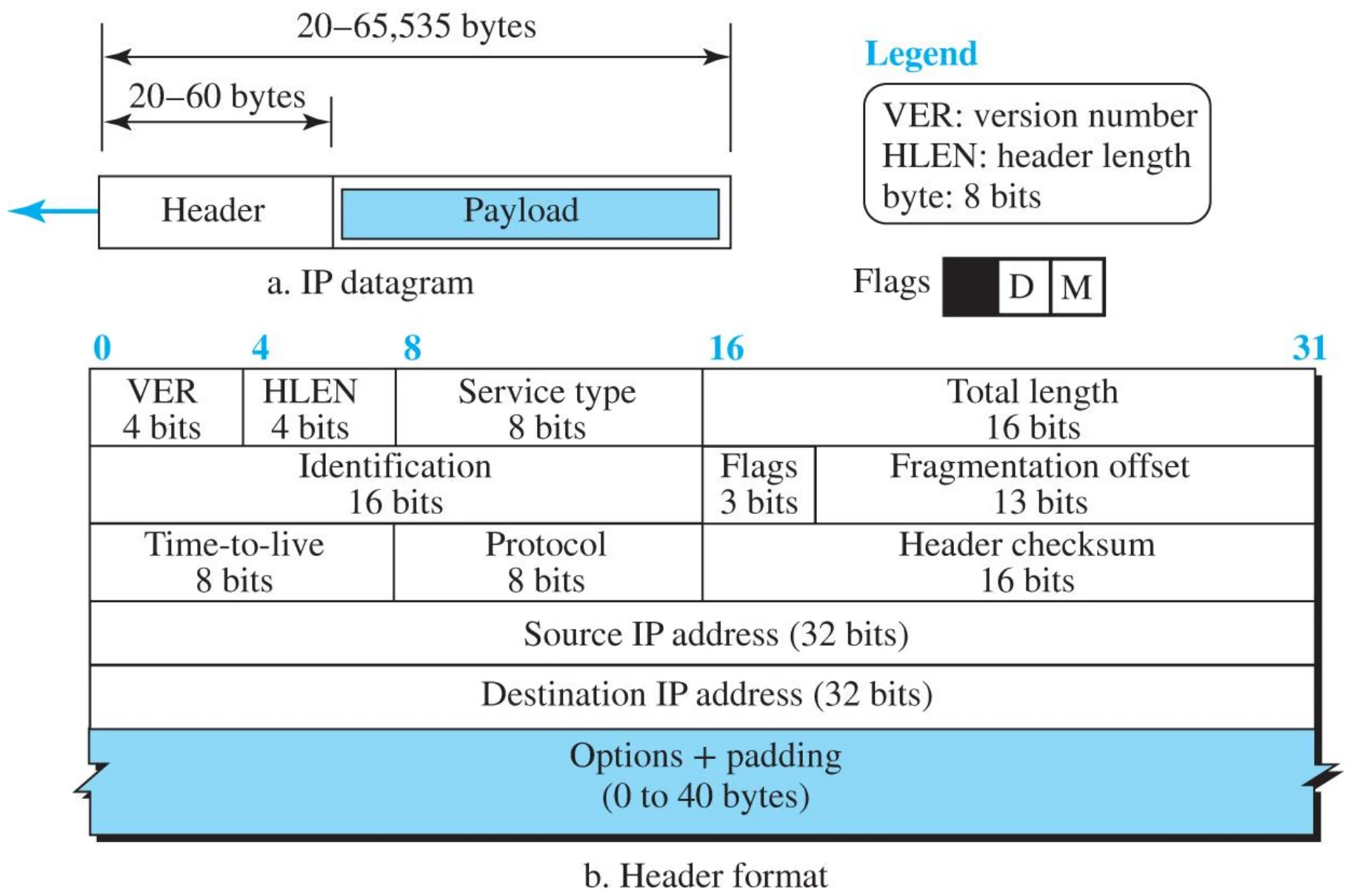
                    IP datagram

                    Header 20–60 bytes plus payload, up to 65,535 bytes; fields VER, HLEN, service type, total length, identification, flags, fragment offset, TTL, protocol, checksum, source, destination, options
                    72
                    Exam weight Low
                    1. Header 20–60 bytes; datagram up to 65,535 bytes.

                    IPv4 datagram fields

                    • Minimum Header length is 20 bytes without options.①
                    • Total length: total length of the packet: header + data. The Maximum = 65535 bytes
                    • Identification, flags, and offset used for fragmentation and reassembly at the destination.②
                    • Packet can be fragmented at any node between the source and the destination but reassembly is done ONLY at the destination node.
                    • Time to Live (TTL) is used to prevent lost packets from circulating between routers forever (loops). This field is set to certain value depending on the device operating system. Each router will decrement this field by one and check the value. If the value is zero the packet will be dropped.③
                    • Protocol: contains a code for what is being carried in the data field. At the destination the network layer will use the Protocol field to deliver the data to the right destination (TCP or UDP or Routing protocols)
                    • Header checksum used for checking if there is error in the header only. The checksum is recomputed at each router between the source and the destination.④
                    73
                    Exam weight High
                    1. Min header 20 bytes; total length ≤ 65,535.
                    2. Fragment anywhere, reassemble ONLY at the destination.
                    3. TTL: each router subtracts 1; 0 → drop (kills loops).
                    4. Protocol field: who gets the payload (TCP 6, UDP 17…). Checksum covers the HEADER only and is recomputed at every router.
                    Exam trapThe IPv4 checksum does not cover the data.
                    🎯 How this can come up · 3 questions
                    MCQ

                    What happens when a router decrements TTL to 0?

                    True / False

                    IPv4 fragments can be reassembled at intermediate routers.

                    MCQ

                    The minimum IPv4 header length is:

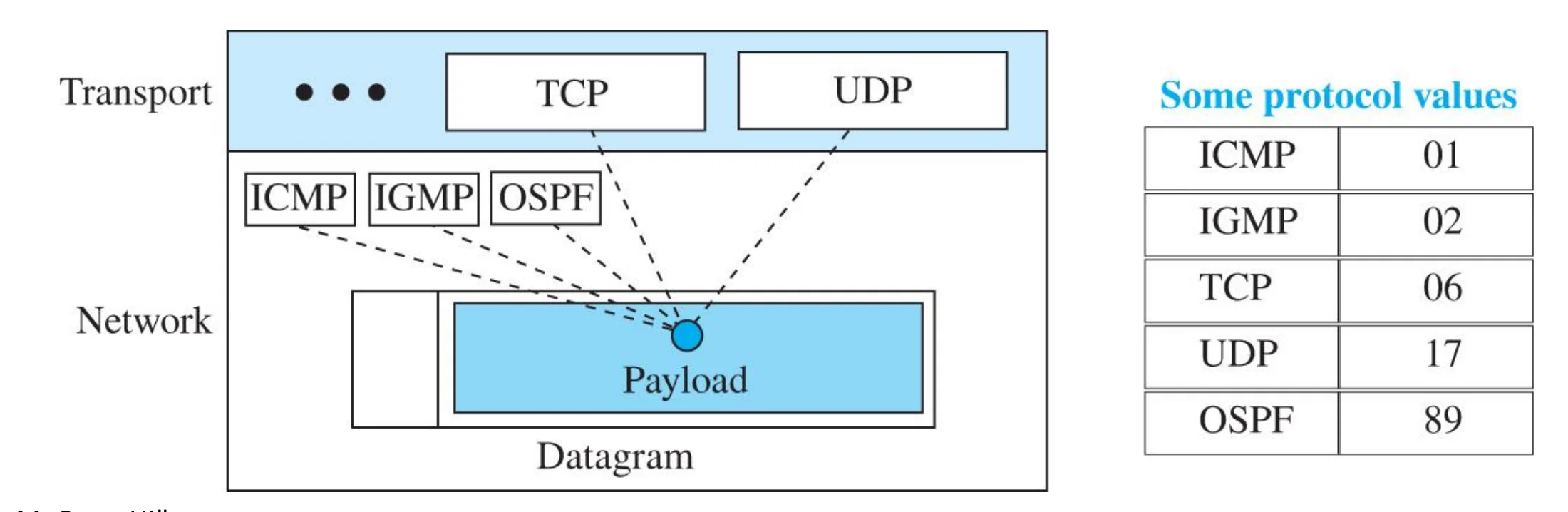
                    The protocol field

                    • Protocol field determines to which of the Transport layer and Network layer protocols) the data in the network packet should be delivered to.
                    • Each protocol is given a value as shown below in the table.
                    • The source will insert the corresponding value in the protocol field
                    • The destination network layer will use the value to deliver the data to the right protocol
                    Protocol values: ICMP 01, IGMP 02, TCP 06, UDP 17, OSPF 89
                    74
                    Exam weight Medium
                    1. ICMP 1, IGMP 2, TCP 6, UDP 17, OSPF 89.
                    🎯 How this can come up · 1 question
                    MCQ

                    The IPv4 protocol value for UDP is:

                    Fragmentation

                    • A datagram can travel through different networks. Each router decapsulates the IP datagram from the frame it receives, processes it, and then encapsulates it in another frame. The format and size of the received frame depend on the protocol used by the physical network through which the frame has just traveled. The format and size of the sent frame depend on the protocol used by the physical network through which the frame is going to travel. For example, if a router connects a LAN to a WAN, it receives a frame in the LAN format and sends a frame in the WAN format.
                    75
                    Exam weight Low
                    1. Each network has its own frame format and size, so a router may have to cut a datagram to fit the next network.

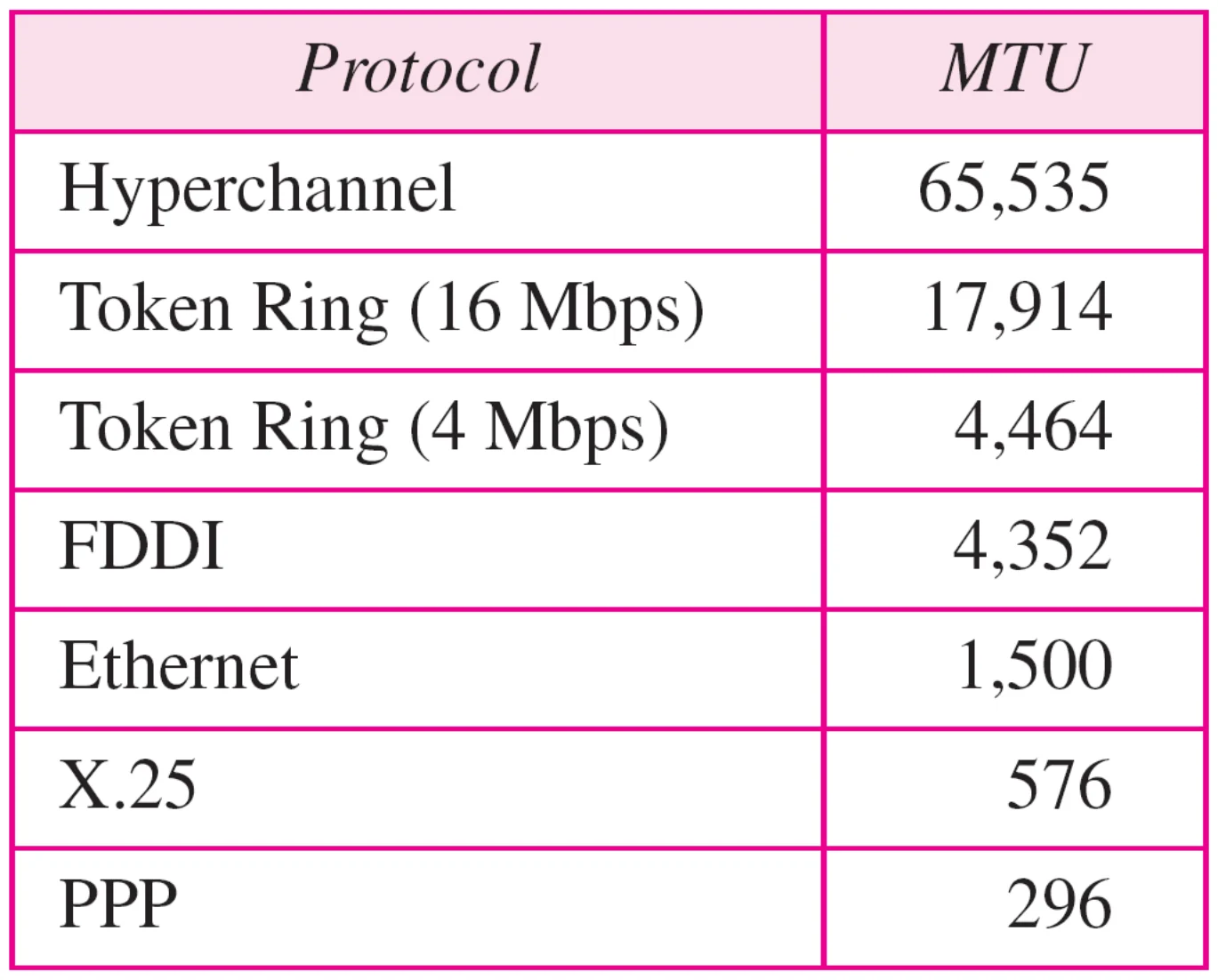
                    MTUs for some networks

                    MTUs: Hyperchannel 65,535; Token Ring 17,914 and 4,464; FDDI 4,352; Ethernet 1,500; X.25 576; PPP 296
                    76
                    Exam weight Medium
                    1. Ethernet MTU = 1500 bytes (= Ethernet’s max data).
                    🎯 How this can come up · 1 question
                    MCQ

                    The MTU of Ethernet is:

                    Maximum Transfer Unit

                    • Each link-layer protocol has its own frame format.
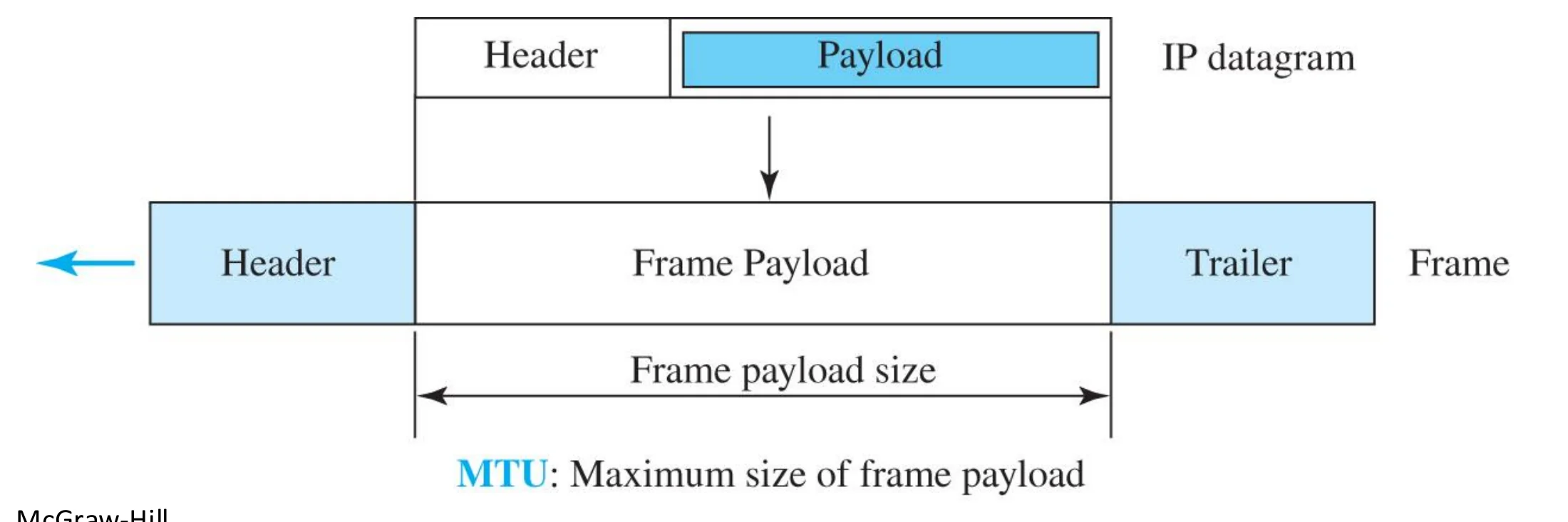
                    • One of the features of each format is the maximum transfer size (MTU) which puts a limit on the maximum data size that can be encapsulated in a frame①
                    • The network layer packet size must be less than the maximum size②
                    The IP datagram must fit in the frame payload; MTU is the maximum frame payload size
                    77
                    Exam weight Low
                    1. MTU = biggest payload a frame can carry. The datagram must be ≤ MTU, or it gets fragmented.

                    Fragmentation

                    A datagram can travel through different networks.

                    Each router decapsulates the IP datagram from the frame it receives, processes it, and then encapsulates it in another frame. The format and size of the sent frame depend on the protocol used by the physical network through which the frame is going to travel. For example, if a router connects a LAN to a WAN, it receives a frame in the LAN format and sends a frame in the WAN format.

                    78
                    Exam weight Low
                    1. Each router re-encapsulates the datagram in the next network’s frame type.

                    Fragmentation and Reassembly

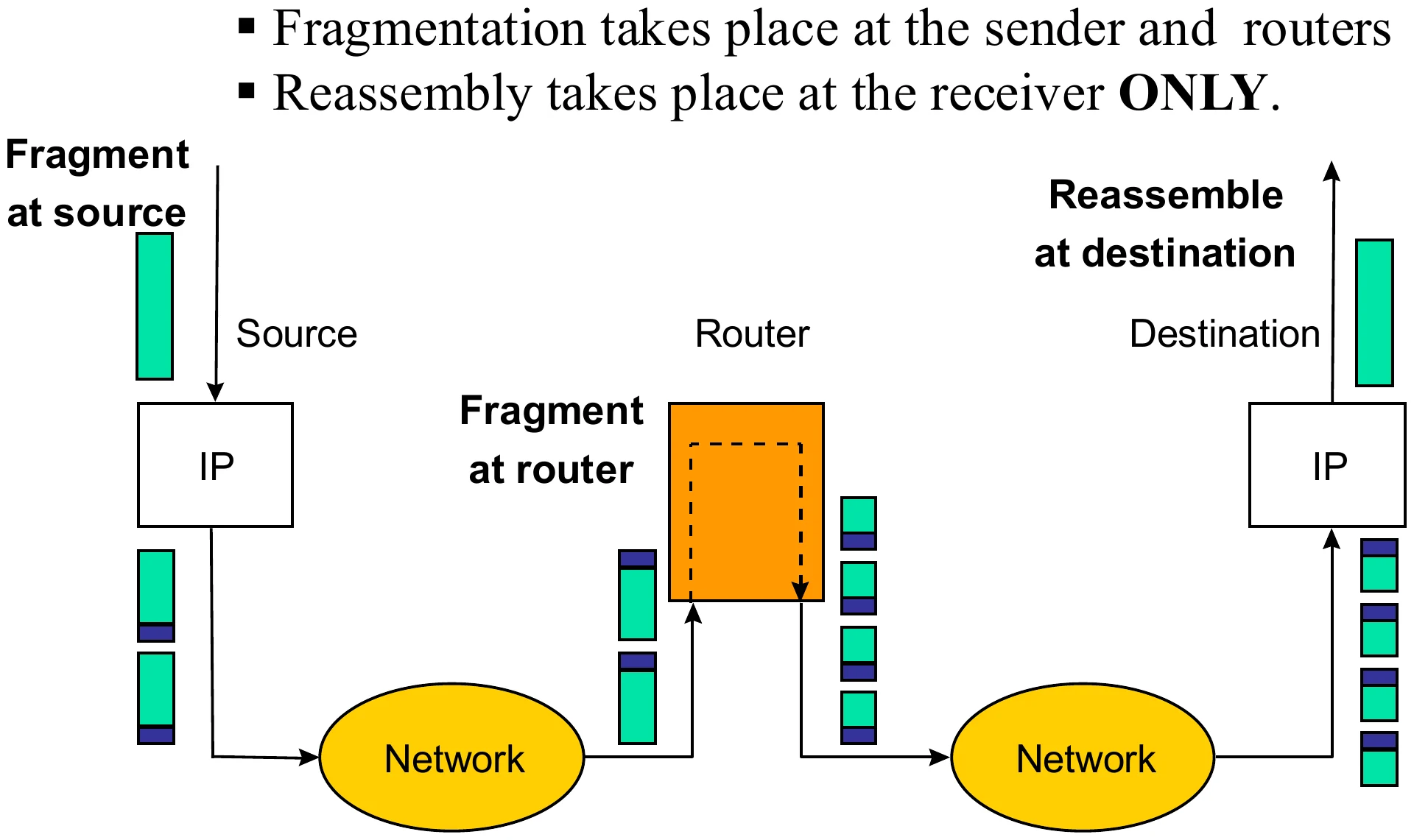
                    • Fragmentation takes place at the sender and routers
                    • Reassembly takes place at the receiver ONLY.①
                    Fragment at the source and at a router; reassemble only at the destination
                    79
                    Exam weight Medium

                      Flags used in fragmentation

                      • D: Do not fragment · M: More fragments
                      • M = 1: the packet is not the last fragment · M = 0: it is the last fragment
                      • D = 1: do not fragment the packet
                      • If a packet with D = 1 reaches a router that must forward it on a link whose MTU is smaller than the packet, the router drops the packet.①
                      Three flag bits: reserved, D, M
                      80
                      Exam weight High
                      1. M = more fragments follow. D = don’t fragment (too big + D = 1 → dropped).
                      🎯 How this can come up · 2 questions
                      MCQ

                      A fragment with M = 0 is:

                      True / False

                      A router fragments a packet even if D = 1 when it is bigger than the MTU.

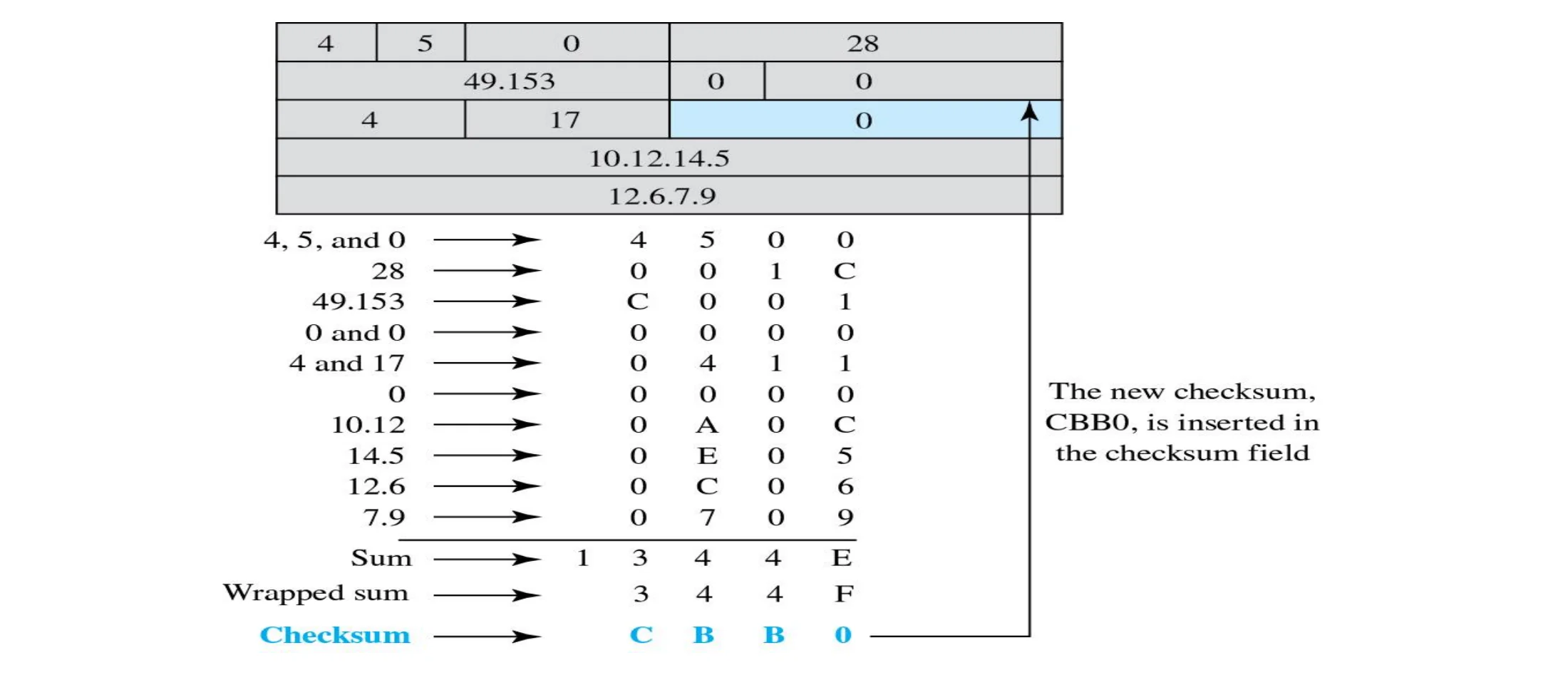
                      Example of checksum calculation

                      • Header checksum used for checking if there is error in the header only.
                      • If it detects error, the packet will be dropped.
                      • The checksum is recomputed at each router between the source and the destination because there are fields in the header that must be updated every time the packet arrives to intermediate node such as (TTL value)
                      The header’s 16-bit words are added; the wrapped sum is complemented to give checksum CBB0
                      81
                      Exam weight Low
                      1. Same one’s-complement checksum as Chapter 3, over the header words only.

                      Network Address Translation (NAT)

                      • NAT: is A technology that can provide the mapping between the private (local) and public (global) IP addresses①
                      • NAT: The technology allows a site to use a set of private addresses for internal communication and a set of global (Public) Internet addresses (at least one) for communication with the rest of the world.②
                      82
                      Exam weight Low

                        Network Address Translation (NAT)

                        • How To save IP addresses;
                          • For business customers and many home users (ADSL), they want to stay connected continuously → each user must have its own IP address → total number of IP number an ISP can provide will not be enough to cover all customers (for example, class B block can support 65536 only)①
                        • Solution is using NAT enabled router②
                        • NAT: is A technology that can provide the mapping between the private (local) and Public (global) IP addresses
                        • NAT: The technology allows a site to use a set of private (local) addresses for internal communication and a set of global (Public) Internet addresses (at least one) for communication with the rest of the world.
                        83
                        Exam weight Low
                        1. Always-on customers each need an address; there aren’t enough. NAT lets many private hosts share one public IP.

                        Private addresses and the NAT router

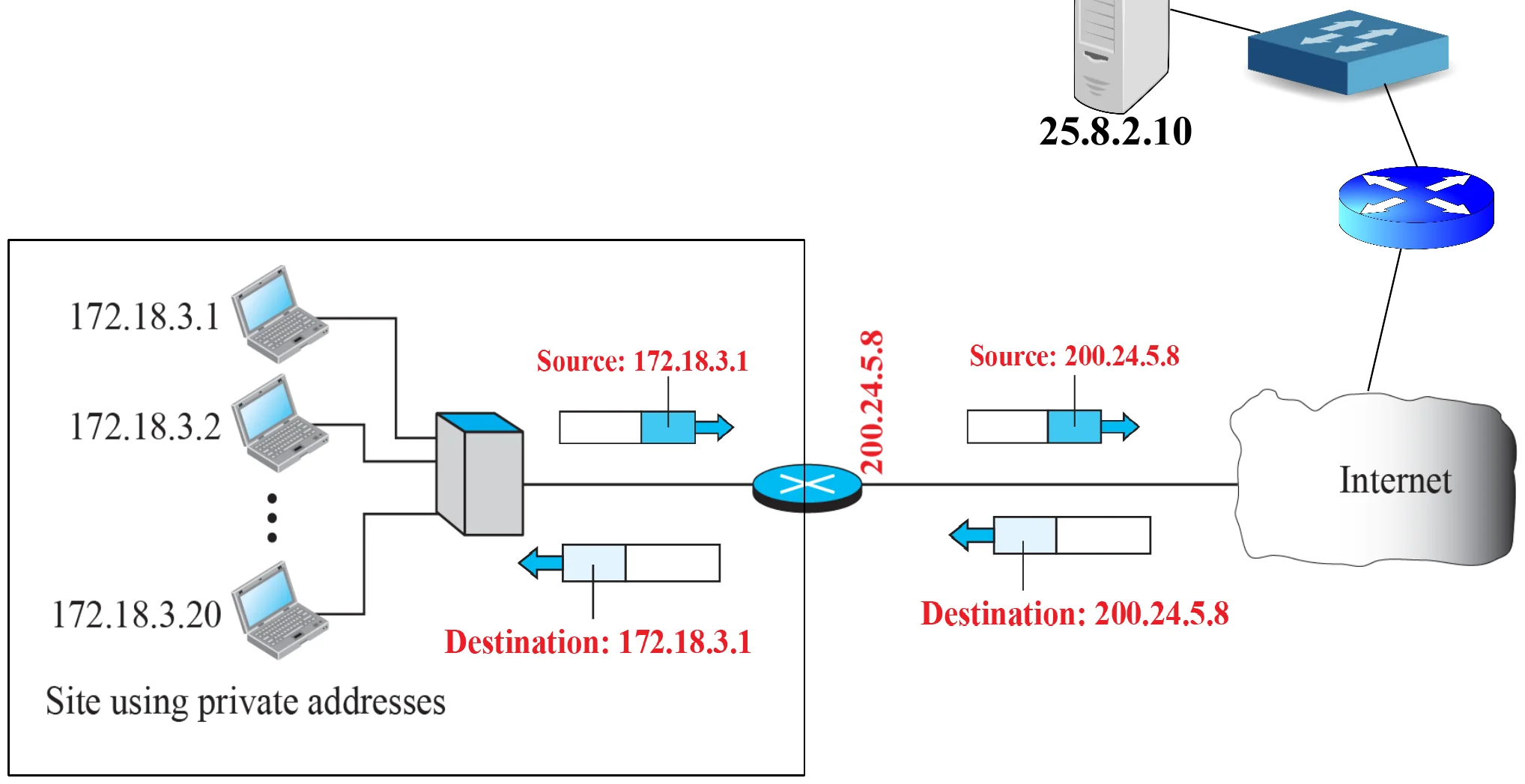
                        • Private ranges: 10.0.0.0 – 10.255.255.255 (2²⁴) · 172.16.0.0 – 172.31.255.255 (2²⁰) · 192.168.0.0 – 192.168.255.255 (2¹⁶)
                        • The site uses private IPs inside; the NAT router has the public IP given by the ISP on its outside interface.
                        Hosts 172.18.3.1–172.18.3.20 behind a NAT router whose public interface is 200.24.5.8
                        84
                        Exam weight Low
                        1. Inside: private 172.18.3.x. Outside: one public 200.24.5.8.

                        Address translation

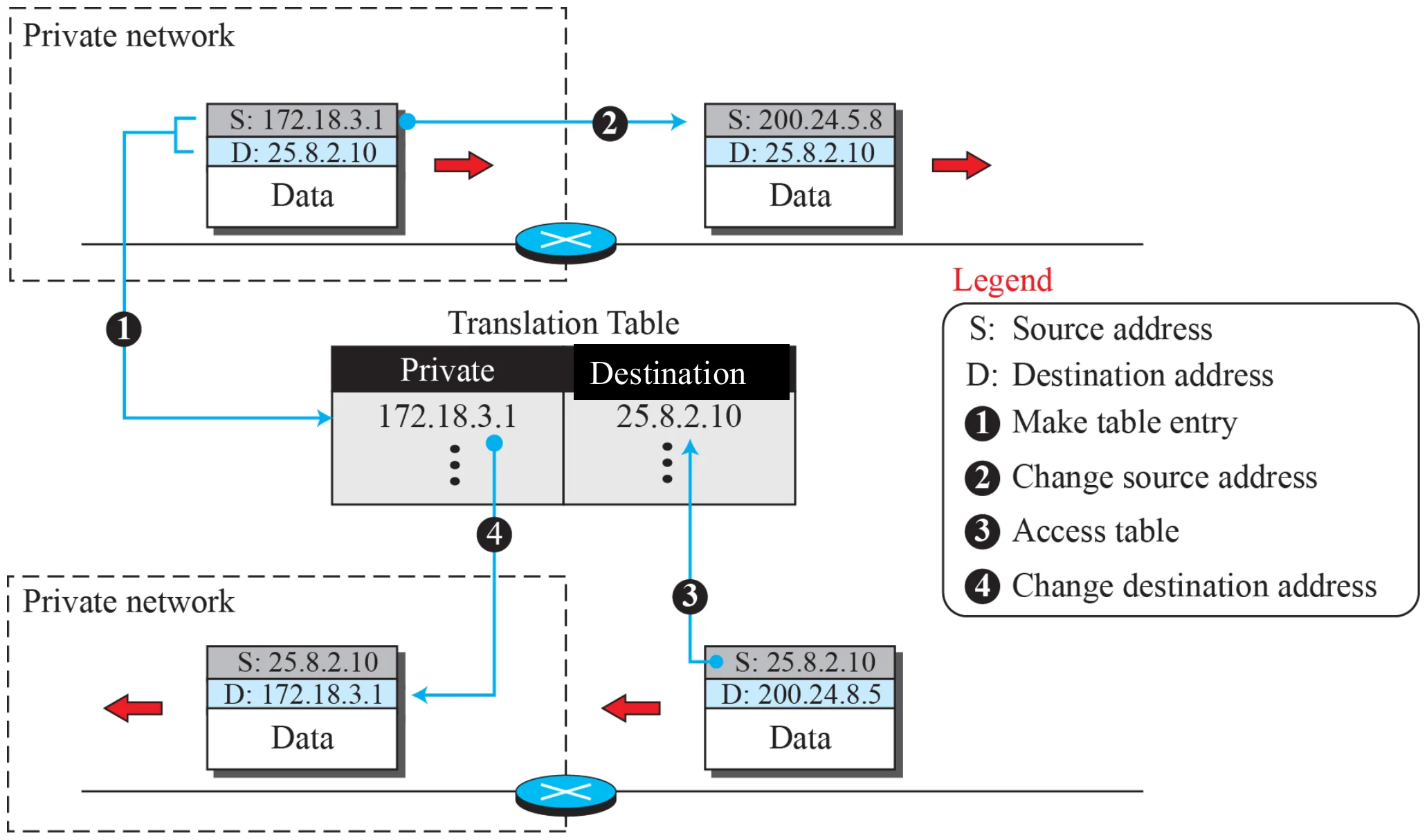
                        Outgoing: source 172.18.3.1 becomes 200.24.5.8. Incoming: destination 200.24.5.8 becomes 172.18.3.1
                        85
                        Exam weight High
                        1. Out: the router rewrites the SOURCE (private → public). In: it rewrites the DESTINATION (public → private).
                        🎯 How this can come up · 1 question
                        MCQ

                        For an outgoing packet, a NAT router changes the:

                        Translation table

                        Outgoing packet creates a table entry private 172.18.3.1 ↔ destination 25.8.2.10; the reply is matched and its destination changed back
                        86
                        Exam weight Low
                        1. The table entry made on the way out tells the router where to send the reply.

                        Network Address Translation (NAT)

                        • How does it work?
                          • A company is connected to the ISP through a router with NAT software (router is called NAT enabled router). The router has a unique IP address given to the company by the ISP
                          • NAT router maintains a translation table that has 65536 entries. Each row has four fields: Private source address, source port number, destination address, NAT port number (should be unique)①
                          • Every machine within a company has a unique IP address selected from the set of private addresses usually (10.x.y.z)②
                          • If a computer inside the company want to connect to a computer outside the network, such as a Web server, the NAT router receives the packet from the computer
                          • NAT will NOT allow more than one host to contact same destination③
                        87
                        Exam weight Low
                        1. Table row: private source address, source port, destination address, NAT port.

                        Advantages of using NAT

                        • No need to be allocated range of global addresses from ISP: just one global IP address is used for all devices → save IP address①
                        • can change addresses of devices in local network without notifying outside world②
                        • can change ISP without changing addresses of devices in local network
                        • Can be used as firewall. A computer on an external network cannot connect to your computer unless your computer has initiated the contact. You can browse the Internet and connect to a site, and even download a file; but somebody else cannot use your IP address to connect to a port on your computer. (Internet routers do not recognize and forward packets with private destination IP addresses.)③
                        88
                        Exam weight High
                        1. NAT advantages: saves public addresses, change inside addresses or ISP freely, acts like a firewall (outsiders can’t start a connection in).
                        🎯 How this can come up · 1 question
                        Written

                        Give three advantages of NAT.