CS331 · Annotated SlidesChapter 8 — Network Layer: Routing of Packets
Chapter 8 · Annotated slides

Network Layer: Routing of Packets

How routers fill their tables: the internet as a weighted graph, static vs. dynamic routing, host-specific, network-specific and default routes, forwarding with masks (longest mask first), distance-vector (Bellman-Ford) vs. link-state (Dijkstra) routing, and autonomous systems with interior (RIP, OSPF, EIGRP) and exterior (BGP) protocols. Rebuilt from the highlighted copy of the deck until a clean one is uploaded, so a few figures show light highlighting.

Slide text Study notes Highlight: key words Tips, tricks & traps Seen again elsewhere How it can come up

Network Layer: Routing of Packets

CS331: Computer Networks · Chapter 8
1
Exam weight Low
  1. Routing vs. forwarding → graph model → static vs. dynamic → table tricks (network-specific, host-specific, default) → forwarding with masks → DV vs. LS → AS, IGP and BGP.

Chapter 8: Outline

  • 8.1 Introduction
  • 8.2 Routing Algorithms
2
Exam weight Low
  1. 8.1 introduction · 8.2 routing algorithms.

Routing (IP routing)

  • Routing Protocol: determines the best path (route) that the packets should follow to arrive to the desired destination①
  • Routing Protocols: A software in the network layer that implements routing algorithms and responsible for:
    • Filling and updating routing tables (by finding the shortest paths (best path) from each source to each destination) This part is called Routing②
    • Deciding which output interface an incoming packet should be transmitted on (by referring to the routing table). This part is called Forwarding③
3
Exam weight High
  1. Routing protocol = software that FILLS the routing table (routing) and uses it to pick the output interface (forwarding).
🎯 How this can come up · 1 question
MCQ

Filling and updating routing tables by finding best paths is called:

8-1 INTRODUCTION

  • Unicast routing in the Internet, with a large number of routers and a huge number of hosts, can be done only by using hierarchical routing: routing in several steps using different routing algorithms.①
4
Exam weight Low
  1. The Internet is too big for one algorithm, so routing is hierarchical (inside each AS, then between ASs: slide 34).

8.1.1 General Idea

  • In unicast routing, a packet is routed, hop by hop, from its source to its destination by the help of forwarding tables.
  • The source host needs no forwarding table because it delivers its packet to the default router in its local network.①
  • The destination host needs no forwarding table either because it receives the packet from its default router in its local network.
  • This means that only the routers that glue together the networks in the internet need forwarding tables.②
5
Exam weight Low
  1. Hosts just send to their default router; only routers need real forwarding tables.

An Internet as a Graph

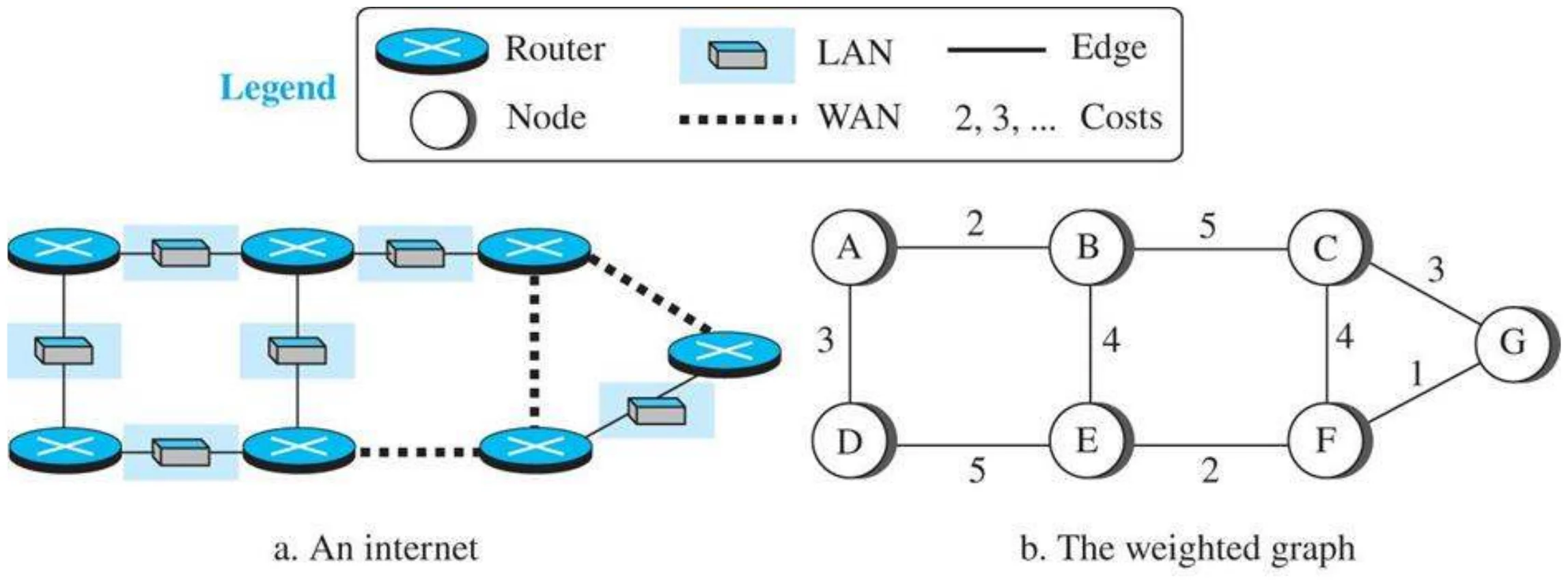
  • To find the best route, an internet can be modeled as a graph.
  • A graph in computer science is a set of nodes and edges (lines) that connect the nodes.
  • To model an internet as a graph, we can think of each router as a node and each network between a pair of routers as an edge.
  • An internet is, in fact, modeled as a weighted graph, in which each edge is associated with a cost.①
6
Exam weight Low
  1. Router = node, network between two routers = edge, each edge has a cost → weighted graph.

An internet and its graphical representation (Figure 8.1)

An internet of routers and LANs, and the same internet as a weighted graph with nodes A–G
7
Exam weight Low
  1. This A–G graph is reused in every DV and LS example below.

Graph representation of a network

  • Graph nodes are routers
  • Graph edges are physical links
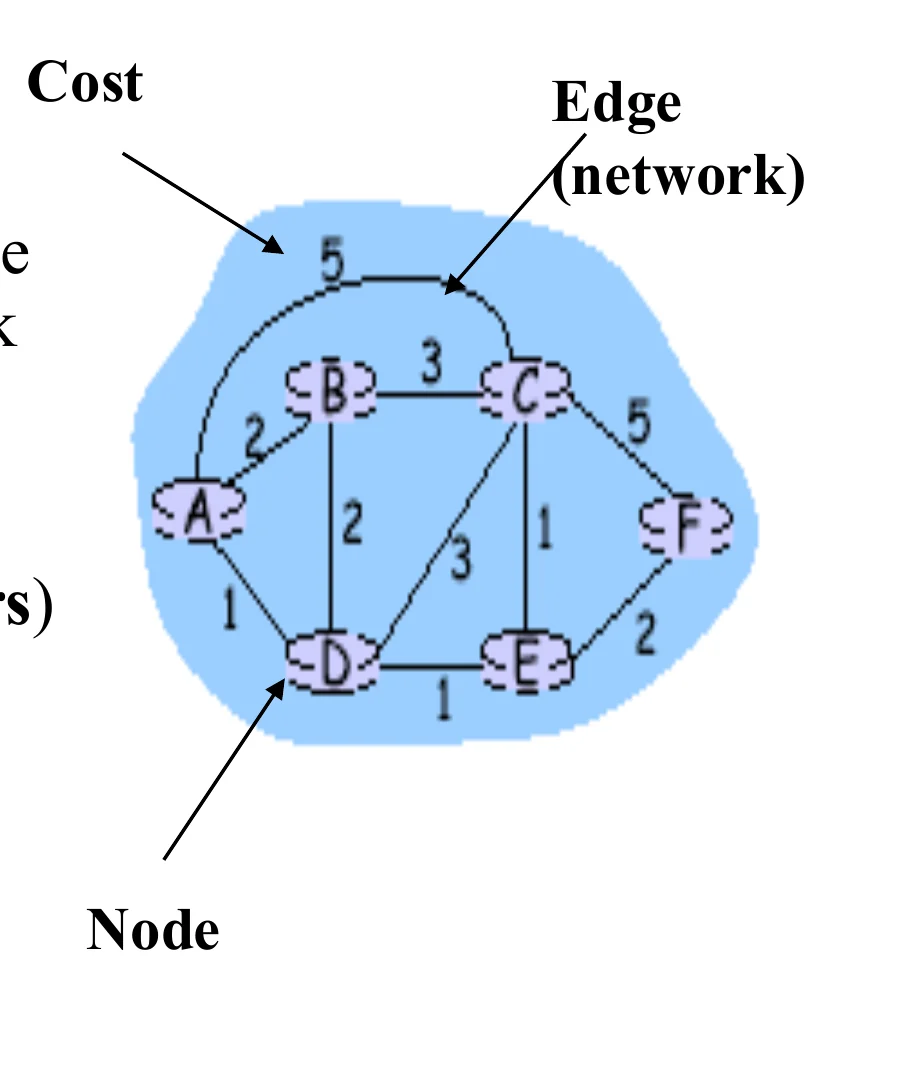
    • Each link has a value which represents the “cost” of sending a packet across the link①
    • The cost is assigned based on a metric
    • Cost metric can be:
      • Number of networks (hops or routers)
      • Geographic distance
      • Link delay
      • Capacity (speed)
      • Reliability
      • Combination of the above②
  • How to select a “good” path???
    • Good path is the one with minimum cost = Total cost from src to dest③
A small weighted graph labelled with node, edge and cost
8
Exam weight Medium
  1. Cost metric: hops, distance, delay, capacity, reliability, or a mix.
  2. Best path = minimum TOTAL cost from source to destination.
🎯 How this can come up · 1 question
MCQ

Which is NOT listed as a possible link cost metric?

Routing Algorithms Classifications

  • Static
    • Routes change slowly over time
    • Shortest paths are precomputed offline by a special computer running the routing algorithm
    • Resulted information is entered manually by the administrator into the routing tables
    • Can not update automatically if there is a change in the network or failure
    • Used in small networks①
  • Dynamic (adaptive)
    • Each router or host learns the state of the network by communicating with its neighbours (routers that are directly connected to each other).
    • Based on the collected information, each node (router) can fill its routing table
    • More complexity is added to the router②
9
Exam weight High
  1. Static: computed offline and typed in by an admin, can’t react to failures, small networks.
  2. Dynamic: routers learn from their neighbours and update automatically, at the cost of router complexity.
Exam trapStatic routes do NOT update automatically after a failure.
🎯 How this can come up · 2 questions
True / False

Static routing updates automatically when a link fails.

Written

Compare static and dynamic routing.

Routing algorithm: dynamic route operation

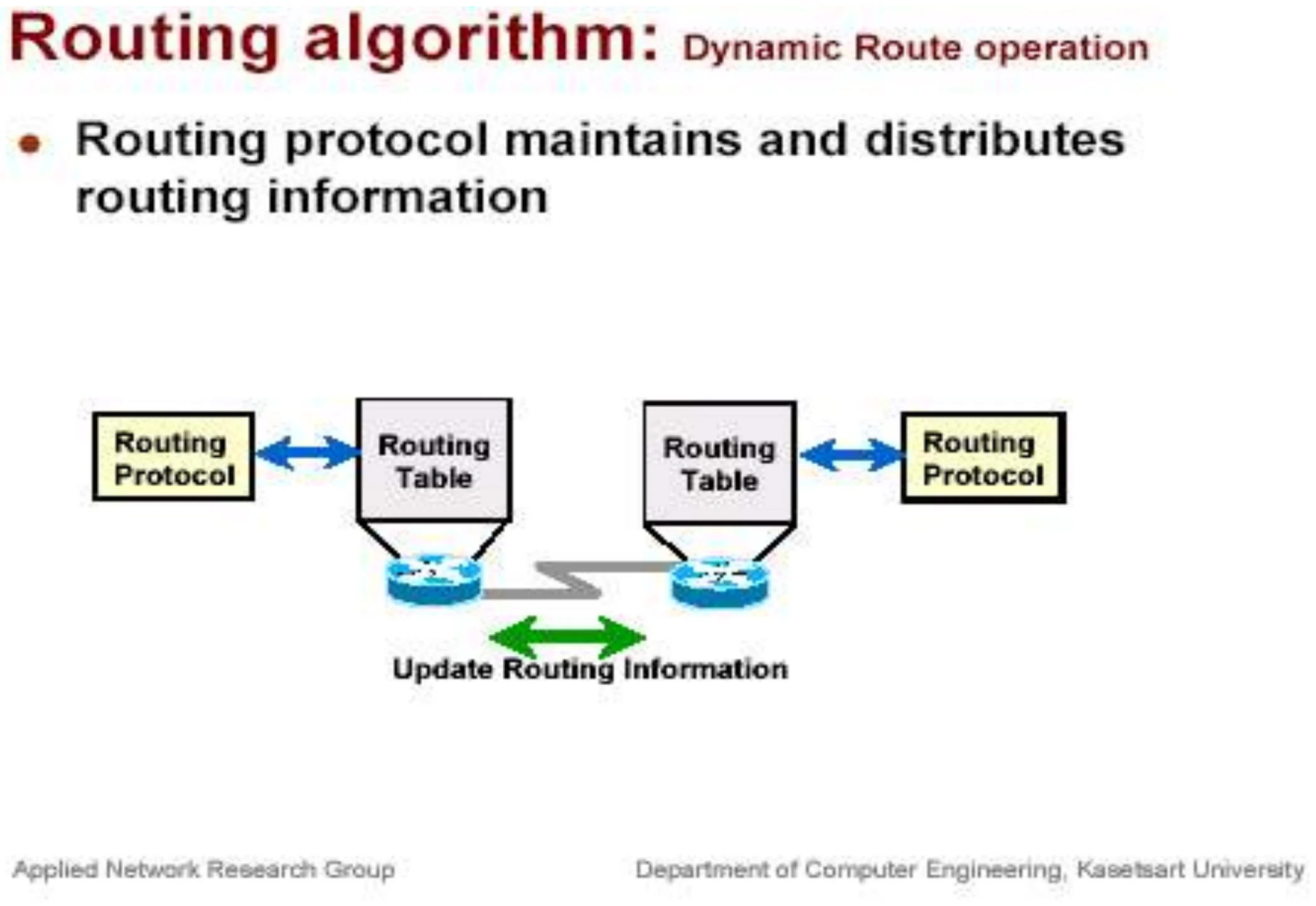
  • Routing protocols maintain and distribute routing information.
Two routers’ routing protocols exchange updates to their routing tables
10
Exam weight Low
  1. Routing protocols on neighbouring routers swap updates to keep tables current.

How to reduce number of entries in the routing table?

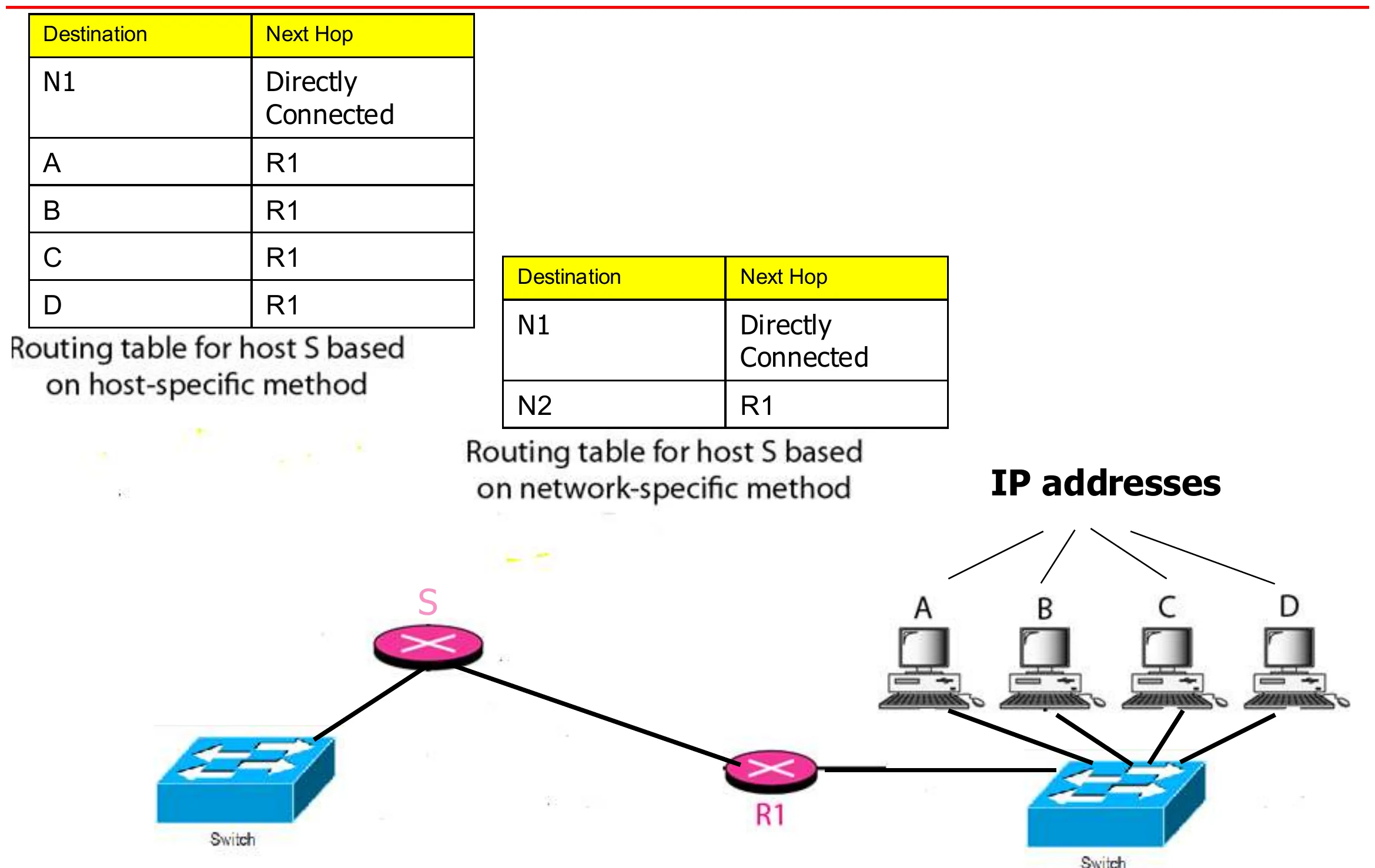
  • Network-Specific routing (Destination Network IP Address is listed in the table)
  • Host Specific Routing (Destination Host IP Address is listed in the table)
  • Default Routing①
11
Exam weight Low
  1. Three ways to keep the table short or specific: network-specific, host-specific and default routes.

Host-specific versus network-specific method

Host-specific table for S lists A, B, C, D via R1; the network-specific table lists only N2 via R1
12
Exam weight Medium
  1. Host-specific: one row per HOST (A, B, C, D via R1). Network-specific: one row for the whole network N2 → much smaller.
🎯 How this can come up · 1 question
MCQ

Listing one entry for a whole destination network instead of each host is:

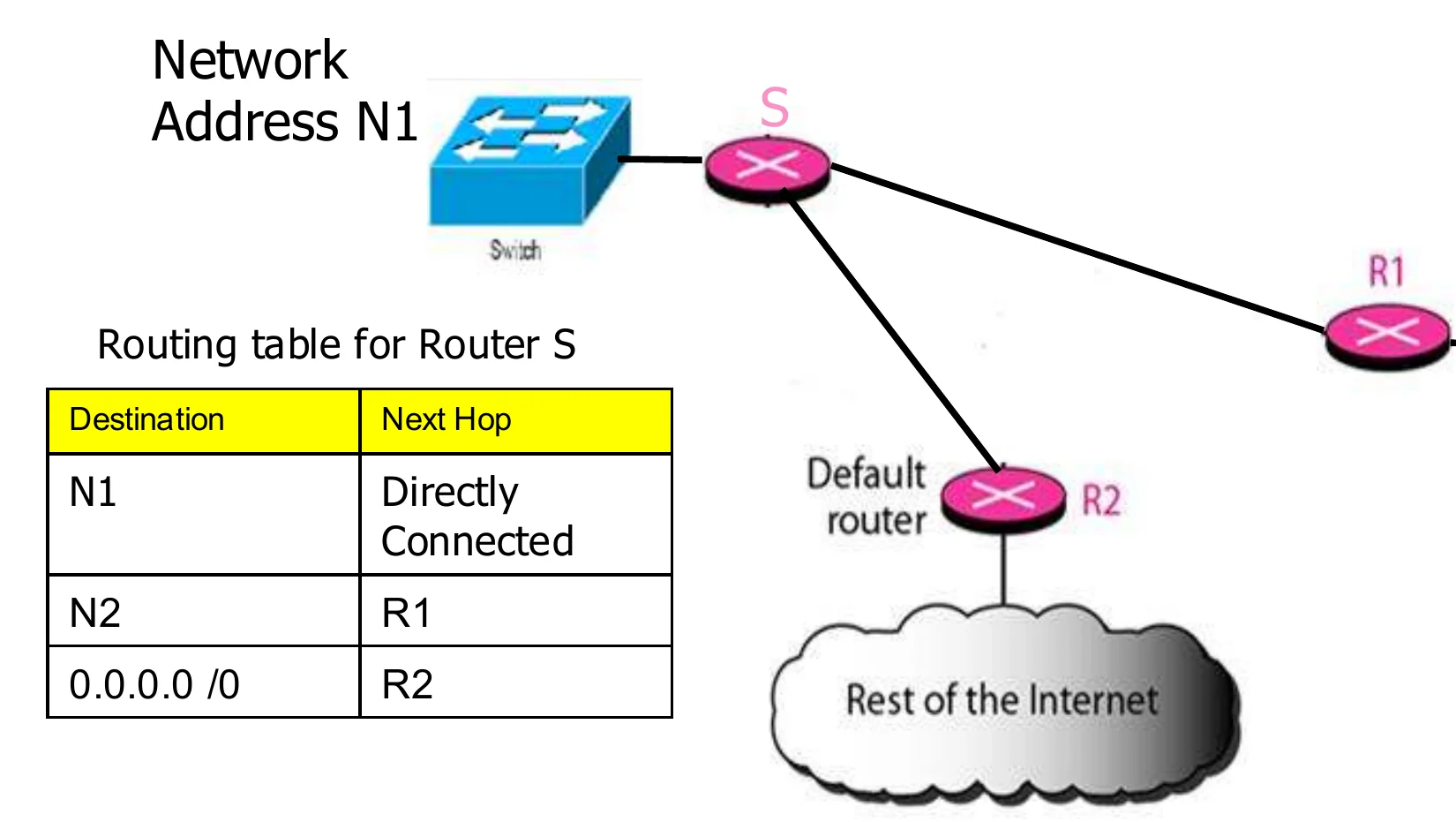
Default Route

  • The default route is used if the destination network address is not found in the routing table
  • 0.0.0.0/0 is the address used for the default route①
  • 0.0.0.0/0 corresponds to any other destination not in the routing table

Routing table for router S: N1 → directly connected · N2 → R1 · 0.0.0.0/0 → R2②

Router S: N1 directly connected, N2 via R1, everything else via default router R2
13
Exam weight High
  1. Default route 0.0.0.0/0 = “everything else”: here, go to R2 (towards the Internet).
🎯 How this can come up · 1 question
MCQ

The default route is written as:

Forwarding of IP packets

We discussed the concept of forwarding at the network layer earlier in this chapter. In this section, we extend the concept to include the role of IP addresses in forwarding. As we discussed before, forwarding means to place the packet in its route to its destination.

14
Exam weight Low
  1. Forwarding = placing the packet on its route using the forwarding table.

Destination Address Forwarding

We first discuss forwarding based on the destination address. This is a traditional approach, which is prevalent today. In this case, forwarding requires a host or a router to have a forwarding table. When a host has a packet to send or when a router has received a packet to be forwarded, it looks at this table to find the next hop to deliver the packet to.

15
Exam weight Low
  1. Destination-address forwarding: look up the destination in the table to find the next hop.

Classful addressing routing table

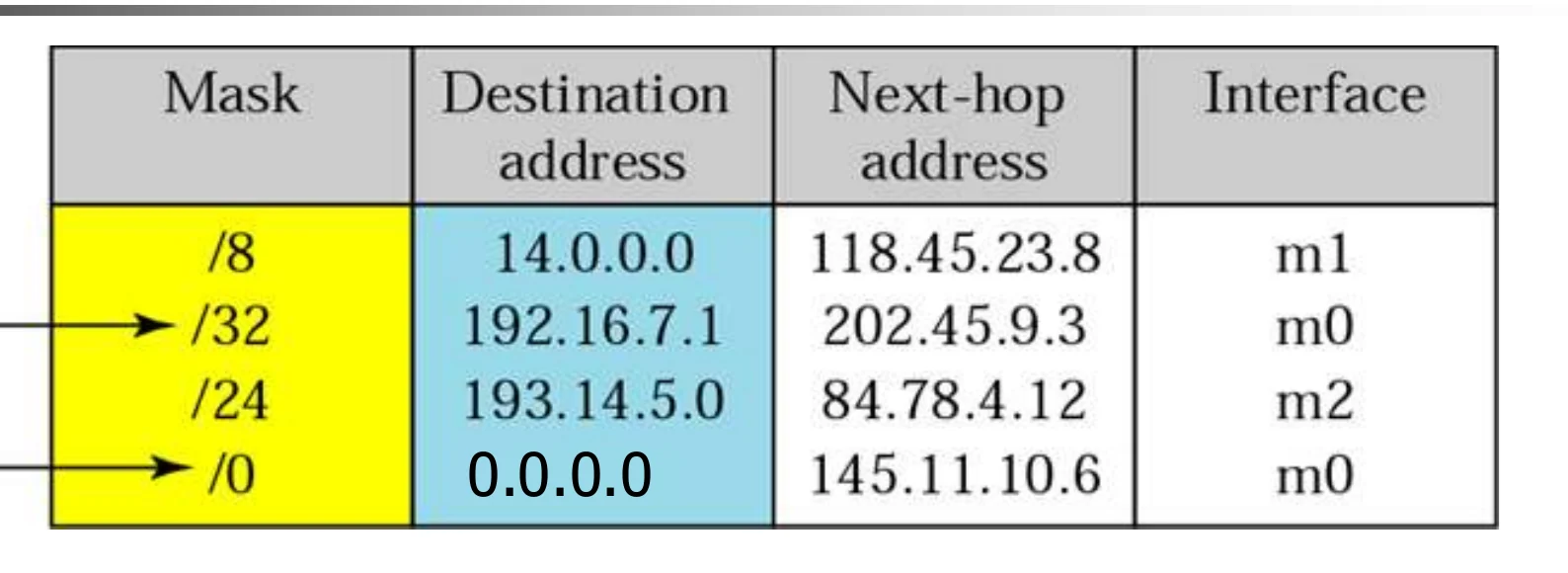
When a packet arrives:

  • Apply the available masks to the destination IP address
  • If a match is found in the destination address column, forward the packet to the next-hop address through the corresponding interface①
  • If no match is found, send the packet through the default interface
  • Otherwise, a “host unreachable” error message is sent back to the sender②
Table rows /8 14.0.0.0, /32 192.16.7.1 (host-specific), /24 193.14.5.0, /0 default; next hops and interfaces m0–m2
16
Exam weight Medium
  1. Try each mask on the destination; the first row that matches wins. /32 = a host-specific row, /0 = default.

Example

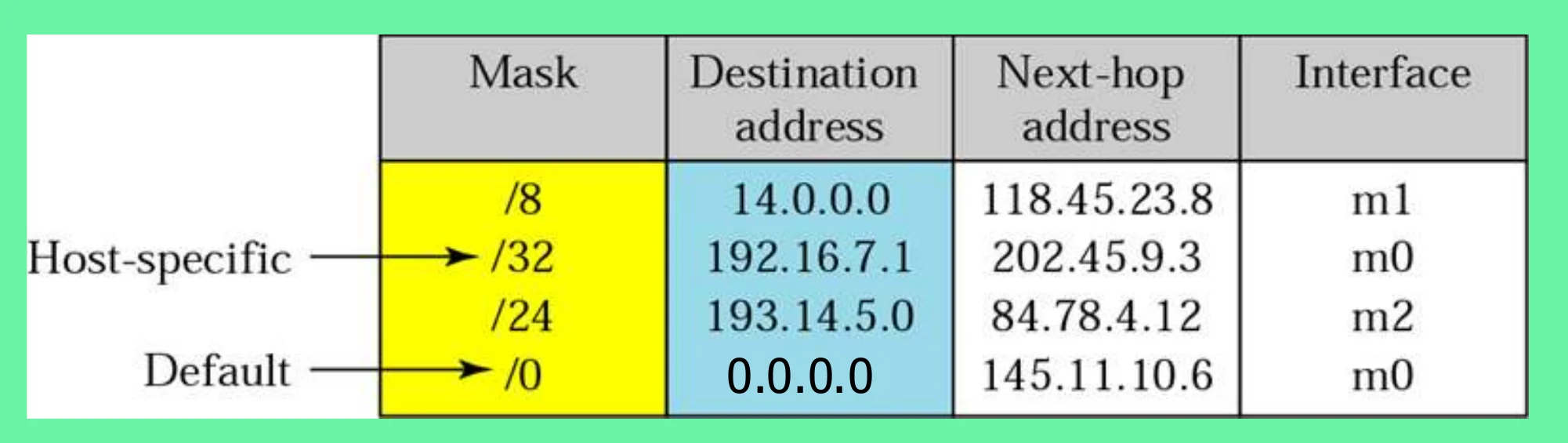
Using the table above, the router receives a packet for destination 193.14.5.22. For each row, the mask is applied to the destination address until a match with the next-hop address is found. In this example, the router sends the packet through interface m2 (network specific).

The same routing table
17
Exam weight Medium
  1. 193.14.5.22 AND /24 = 193.14.5.0 → matches → interface m2 (network specific).
🎯 How this can come up · 1 question
MCQ

Using the table, a packet for 14.5.6.7 leaves through:

Example

Using the table above, the router receives a packet for destination 200.34.12.34. For each row, the mask is applied to the destination address, but no match is found. In this example, the router sends the packet through the default interface m0.

18
Exam weight Low
  1. 200.34.12.34 matches nothing → default → m0.

Example

Using the table above, the router receives a packet for destination 192.16.7.1. For each row, the mask is applied to the destination address until a match with the destination address is found. In this example, the router sends the packet through interface m0 (host specific).

19
Exam weight Medium
  1. 192.16.7.1 matches the /32 row exactly → m0 (host specific).
🎯 How this can come up · 1 question
MCQ

A /32 row in a routing table is a:

Example: router R1’s networks

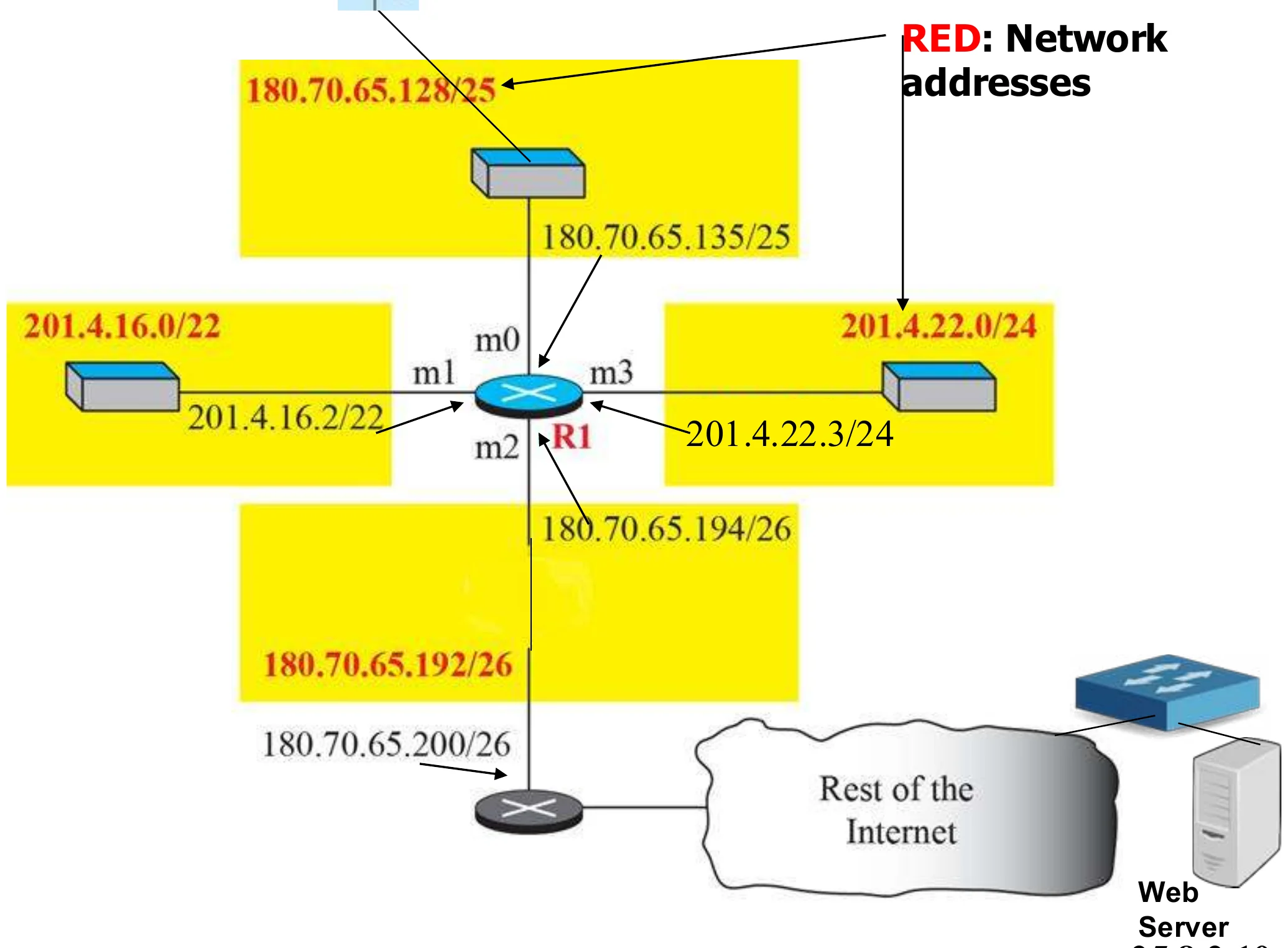
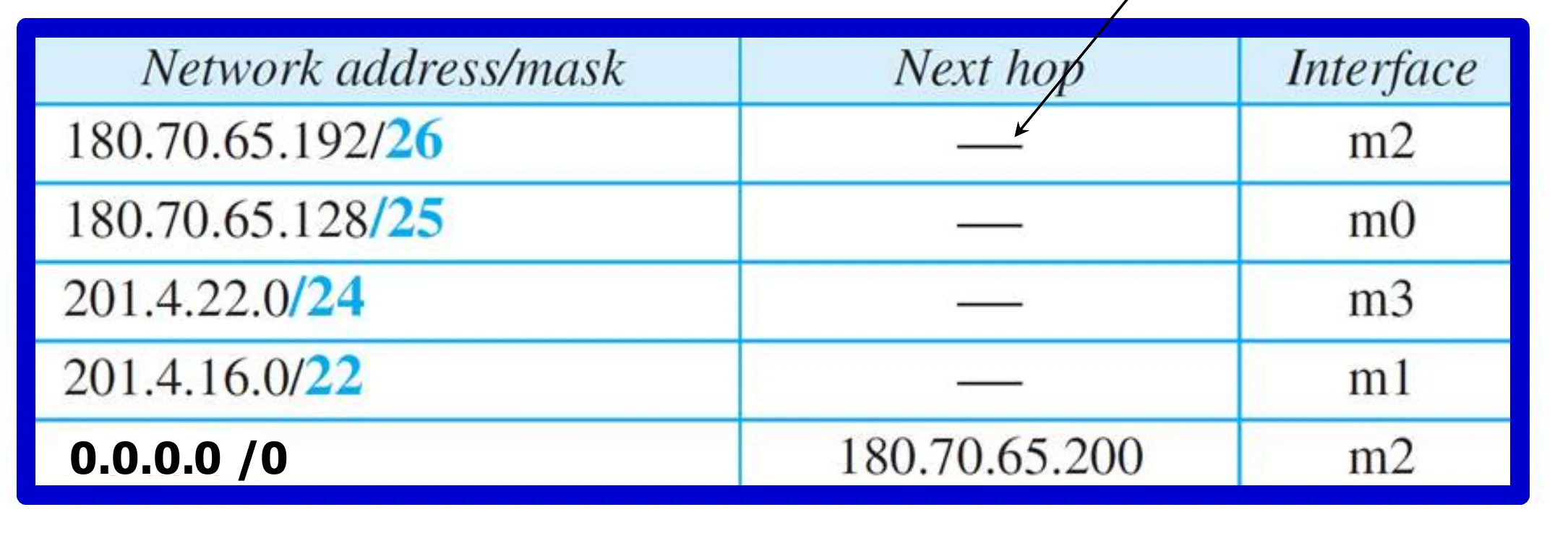
R1 with interfaces m0–m3 to 180.70.65.128/25, 201.4.16.0/22, 201.4.22.0/24, 180.70.65.192/26, and the rest of the Internet via 180.70.65.200
20
Exam weight Low
  1. Four attached networks plus a path to the rest of the Internet through 180.70.65.200.

Forwarding table for router R1

  • 180.70.65.192/26 · next hop – · m2
  • 180.70.65.128/25 · – · m0
  • 201.4.22.0/24 · – · m3
  • 201.4.16.0/22 · – · m1
  • 0.0.0.0/0 · 180.70.65.200 · m2

“–” means a directly connected network①

Forwarding table for router R1
21
Exam weight High
  1. Rows are sorted from the LONGEST mask (/26) to the shortest (/22), with the default (/0) last. Longest match wins.
Memory trickLongest prefix first, default last.

Show the forwarding process if a packet arrives at R1 with the destination address 180.70.65.130.

Solution The router performs the following steps:

  1. The first mask (/26) is applied to the destination address. The result is 180.70.65.128, which does not match the corresponding network address.
  2. The second mask (/25) is applied to the destination address. The result is 180.70.65.128, which matches the corresponding network address. The next-hop address and the interface number m0 are extracted for forwarding the packet
22
Exam weight High
  1. /26 gives .128 (the row wants .192) → no. /25 gives .128 → match → m0.
🎯 How this can come up · 2 questions
MCQ

Using R1’s table, a packet for 201.4.22.35 leaves through:

MCQ

Using R1’s table, a packet for 201.4.18.7 leaves through:

Show the forwarding process if a packet arrives at R1 with the destination address 25.8.2.10.

Solution The router performs the following steps:

1. The first mask (/26) is applied to the destination address. The result is 25.8.2.0, which does not match the corresponding network address.

2. The second mask (/25) is applied to the destination address. The result is 25.8.2.0, which does not match the corresponding network address.

3. The third mask (/24) is applied to the destination address. The result is 25.8.2.0, which does not match the corresponding network address.

4. The fourth mask (/22) is applied to the destination address. The result is 25.8.0.0, which does not match the corresponding network address.

In this example, the router sends the packet to the default route. The next-hop address will be 180.70.65.200 through interface m2.

23
Exam weight High
  1. No mask matches 25.8.2.10 → default route → next hop 180.70.65.200 through m2.
🎯 How this can come up · 1 question
Scenario

R1 receives a packet for 25.8.2.10. Walk through the forwarding steps.

Shortest Path Routing

  • Algorithms used to determine the shortest path between two nodes according to some cost condition.
  • The shortest path is the path with the least cost (the sum of the cost of the links on the path is minimum over all possible paths between the source and destination)①
  • Two main algorithms to find the shortest path between any two nodes
    • Distance Vector (Bellman-Ford Algorithm)
    • Link State – (Dijkstra’s Algorithm)②
24
Exam weight High
  1. Two shortest-path families: distance vector (Bellman-Ford) and link state (Dijkstra).
🎯 How this can come up · 2 questions
MCQ

Link-state routing uses which algorithm?

MCQ

Distance-vector routing is based on:

Distance Vector (DV) Routing

  • Basic idea: each network node maintains a Distance Vector (DV) table containing the distances from itself to ALL possible destination nodes in the domain.①
  • Distances are based on a chosen metric (Metric: usually number of hops, bandwidth, delay)
  • Router transmits its distance vector table to each of its neighbors (directly connected to it) periodically or when there is a change.②
  • A router recalculates its distance vector when:
    • It receives a distance vector table from a neighbor containing different information than before.
    • It discovers that a link to a neighbor has gone down or up (i.e., a topology changes).③
  • Distances to all destinations are computed using information from the received neighbors’ distance vectors.
  • The DV calculation is based on minimizing the cost to each destination.
  • From its DV, a router can directly derive its routing table.
  • Enhanced Interior Gateway Routing Protocol (EIGRP) and Routing Information Protocol (RIP) are examples of distance vector protocols④
25
Exam weight High
  1. Each router keeps distances to ALL destinations and sends that whole vector to its NEIGHBOURS, periodically or on change.
  2. It recalculates when a neighbour’s vector changes or a link goes up/down.
  3. RIP and EIGRP are distance-vector protocols.
Memory trickDV = “tell your NEIGHBOURS about the WHOLE world”. LS = “tell the WHOLE world about your NEIGHBOURS”.
🎯 How this can come up · 1 question
MCQ

Which is a distance-vector protocol?

The first-round distance vectors

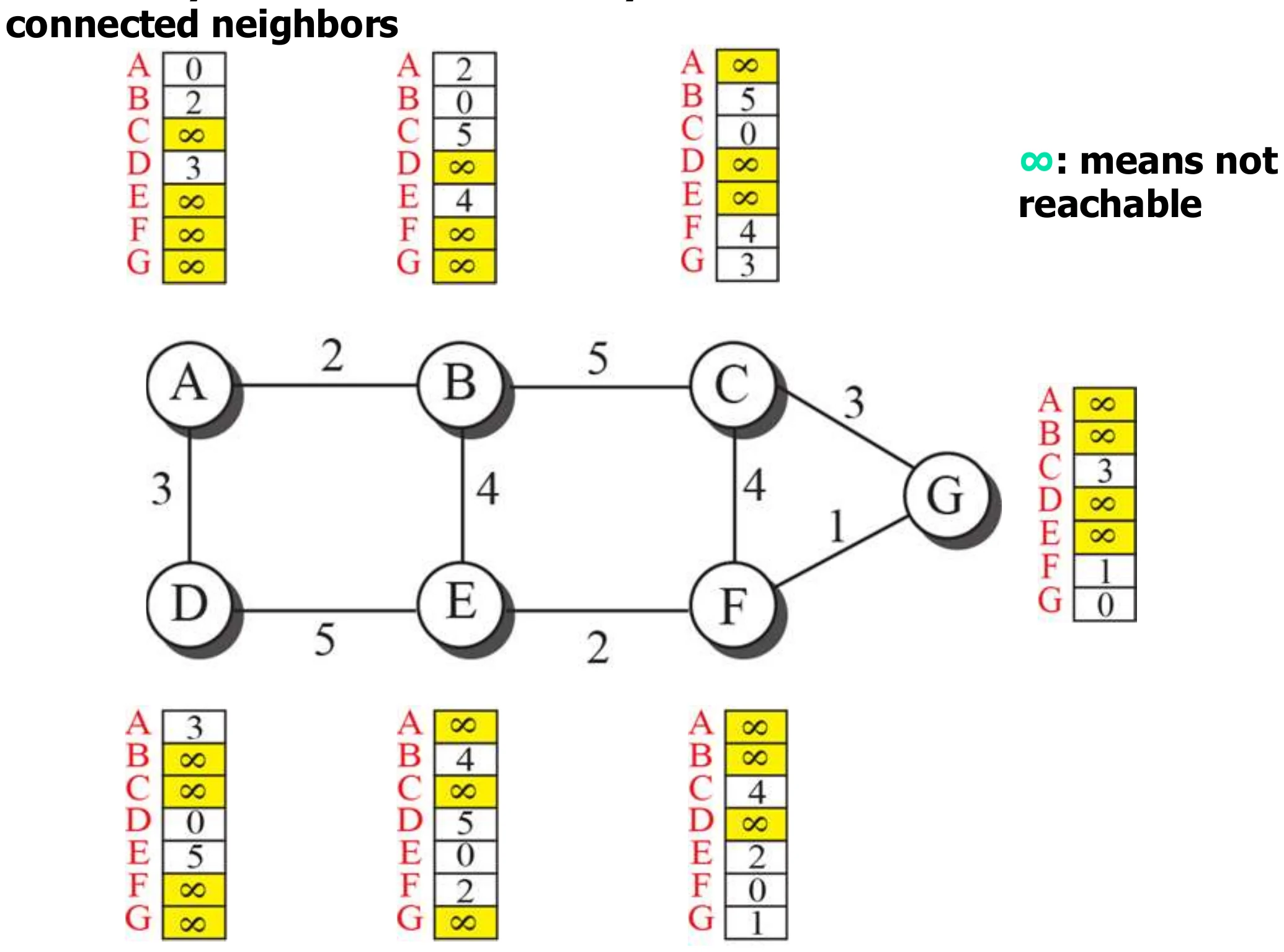
  • In the first round each node knows only the cost to its directly connected neighbours.
  • ∞ means not reachable (yet).
Each node A–G starts with costs to its neighbours only and ∞ elsewhere
26
Exam weight Low
  1. Round 1: only neighbour costs, everything else ∞.

Updating distance vectors (node B)

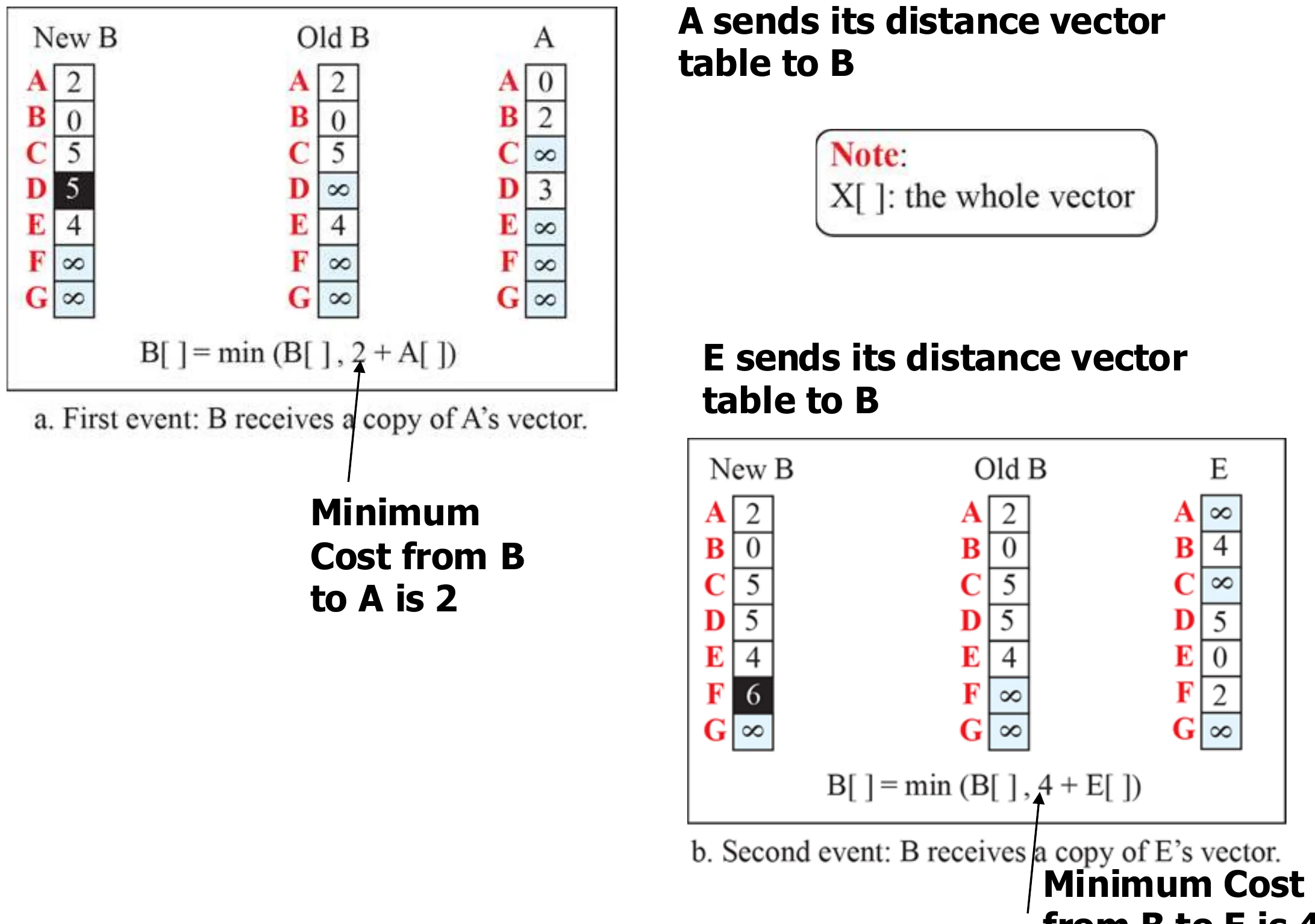
  • A sends its vector to B: B[ ] = min(B[ ], 2 + A[ ]) → B learns D at cost 5.①
  • E sends its vector to B: B[ ] = min(B[ ], 4 + E[ ]) → B learns F at cost 6.②
B combines its old vector with A’s and E’s vectors using the Bellman-Ford rule
27
Exam weight High
  1. Bellman-Ford: new cost to X = min(old cost, cost to neighbour + neighbour’s cost to X).
🎯 How this can come up · 2 questions
MCQ

B–A costs 2 and A’s cost to D is 3. B currently has D at ∞. After A’s update, B’s cost to D is:

Written

State the Bellman-Ford update rule used in distance-vector routing.

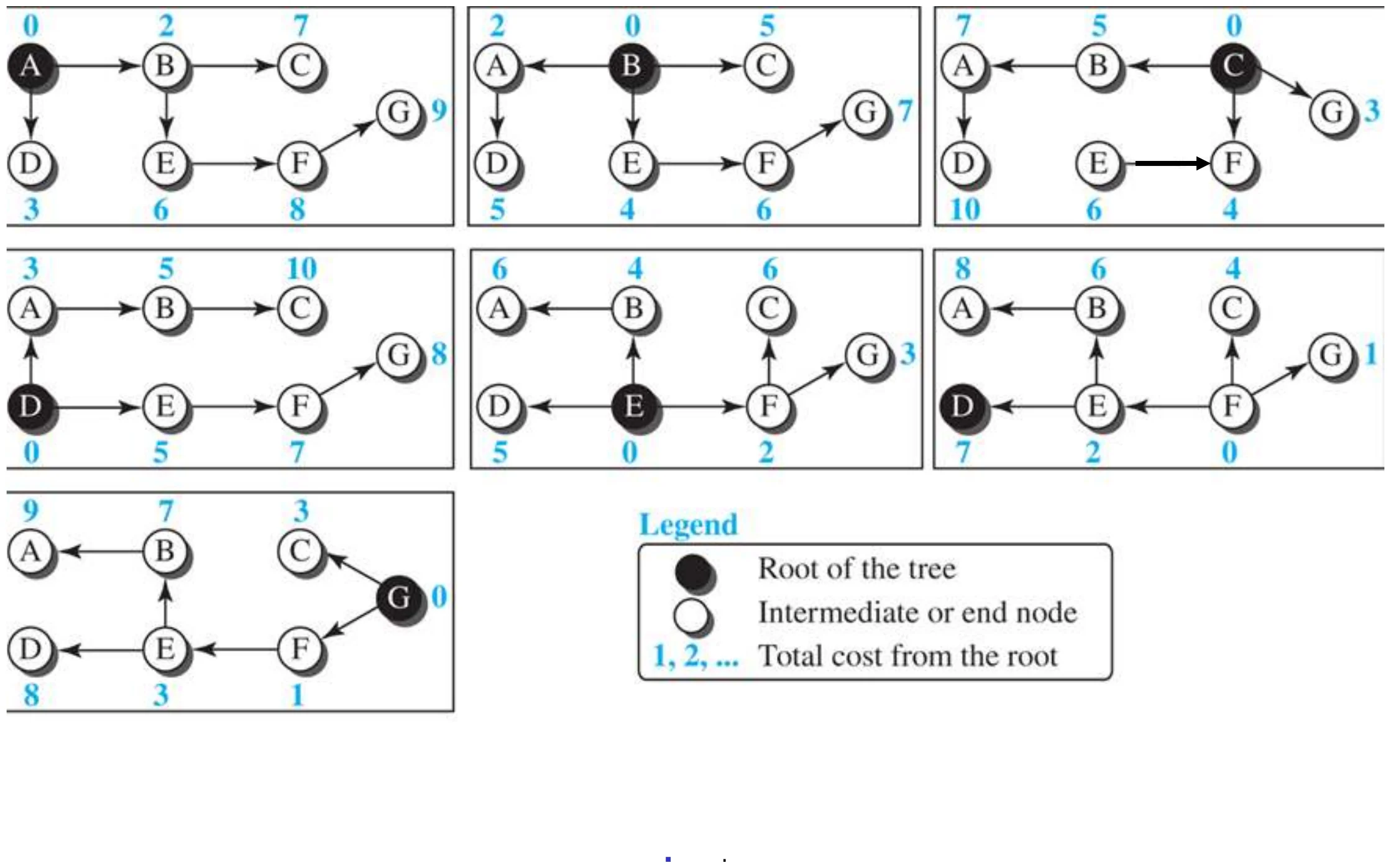
The distance vector corresponding to a tree

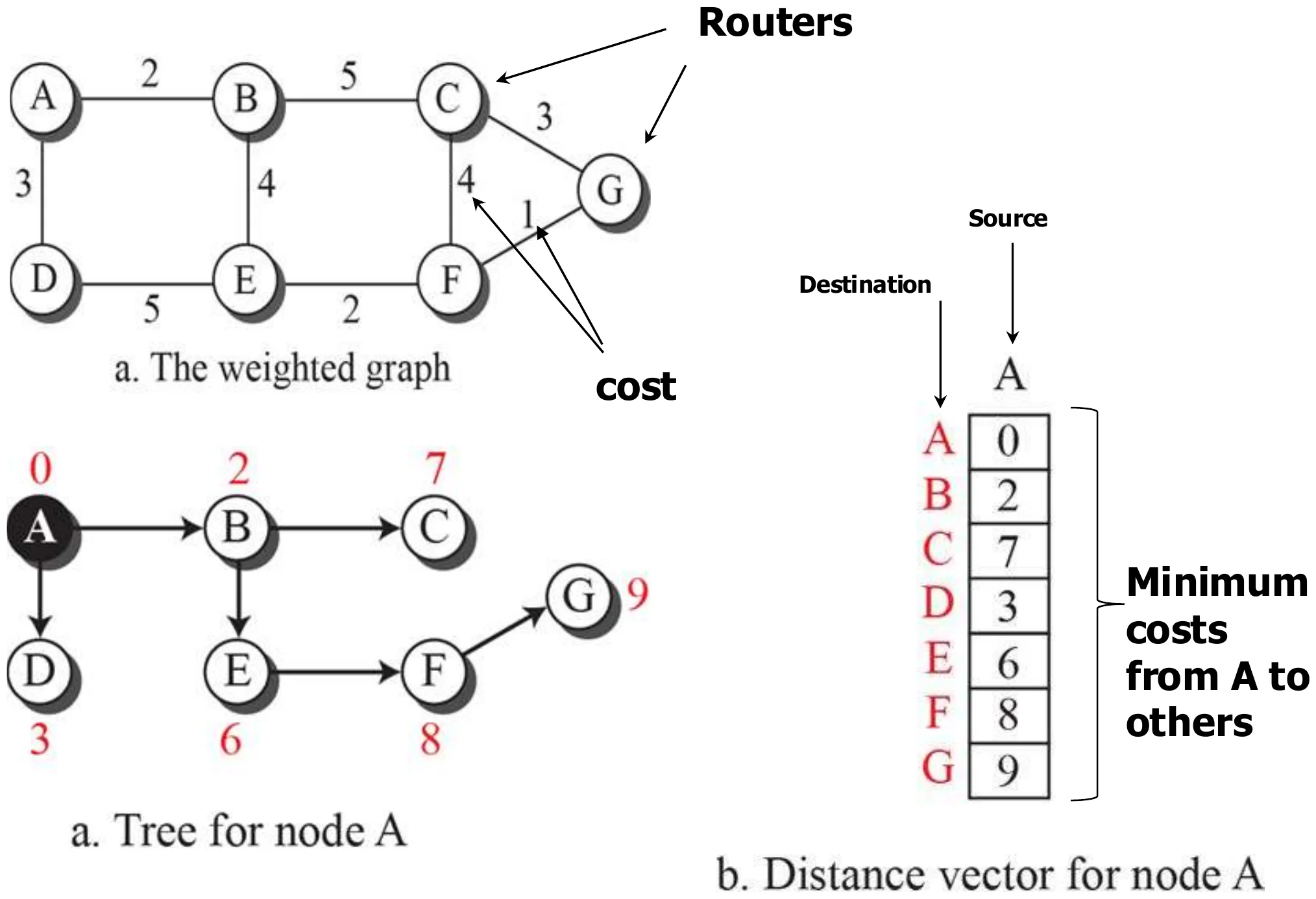
Weighted graph, least-cost tree for node A, and A’s final distance vector: A 0, B 2, C 7, D 3, E 6, F 8, G 9
28
Exam weight Medium
  1. A’s final vector: B 2, C 7, D 3, E 6, F 8, G 9.
🎯 How this can come up · 1 question
MCQ

In the slide’s graph, the least cost from A to G is:

Least-cost trees for nodes for the previous network

The least-cost tree for each of the seven nodes
29
Exam weight Low
  1. Every node ends up with its own least-cost tree.

Link State Routing

  • Each router measures the cost (in either delay, Bandwidth) between itself and its neighbour routers (directly connected)①
  • The router builds a packet containing all these costs.
  • Each router distributes these packets using flooding to ALL other routers in the routing area②
  • Information is then sent when there a change in the link between the router and its neighbours (to reduce traffic)③
  • Each router builds map (database) of the entire network, uses a shortest-path algorithm (usually Dijkstra algorithm) to compute a shortest path between itself and any other node in the area (creates the routing table)
  • OSPF (Open Shortest Path first is an Example)④
30
Exam weight High
  1. LS: measure costs to your neighbours, put them in a packet (LSP), FLOOD it to ALL routers in the area, only on change.
  2. Every router builds the same map (LSDB) and runs Dijkstra itself. OSPF is link state.
🎯 How this can come up · 2 questions
MCQ

Which is a link-state protocol?

True / False

In link-state routing, each router sends its link costs to its neighbours only.

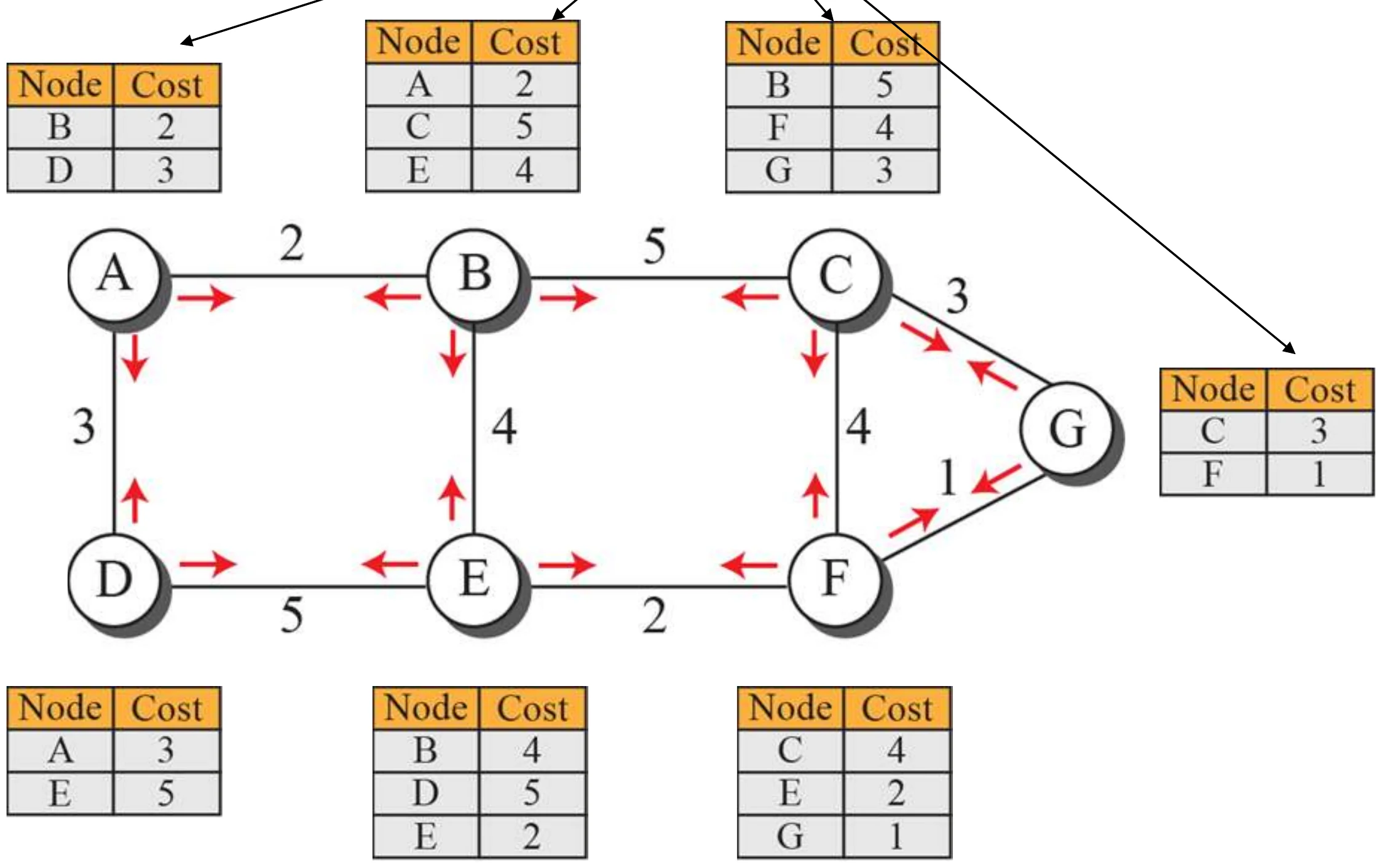
Link-state packets (LSPs) build the LSDB

Each node’s LSP lists its neighbours and costs and is flooded to all others
31
Exam weight Low
  1. An LSP = “my neighbours and their costs”.

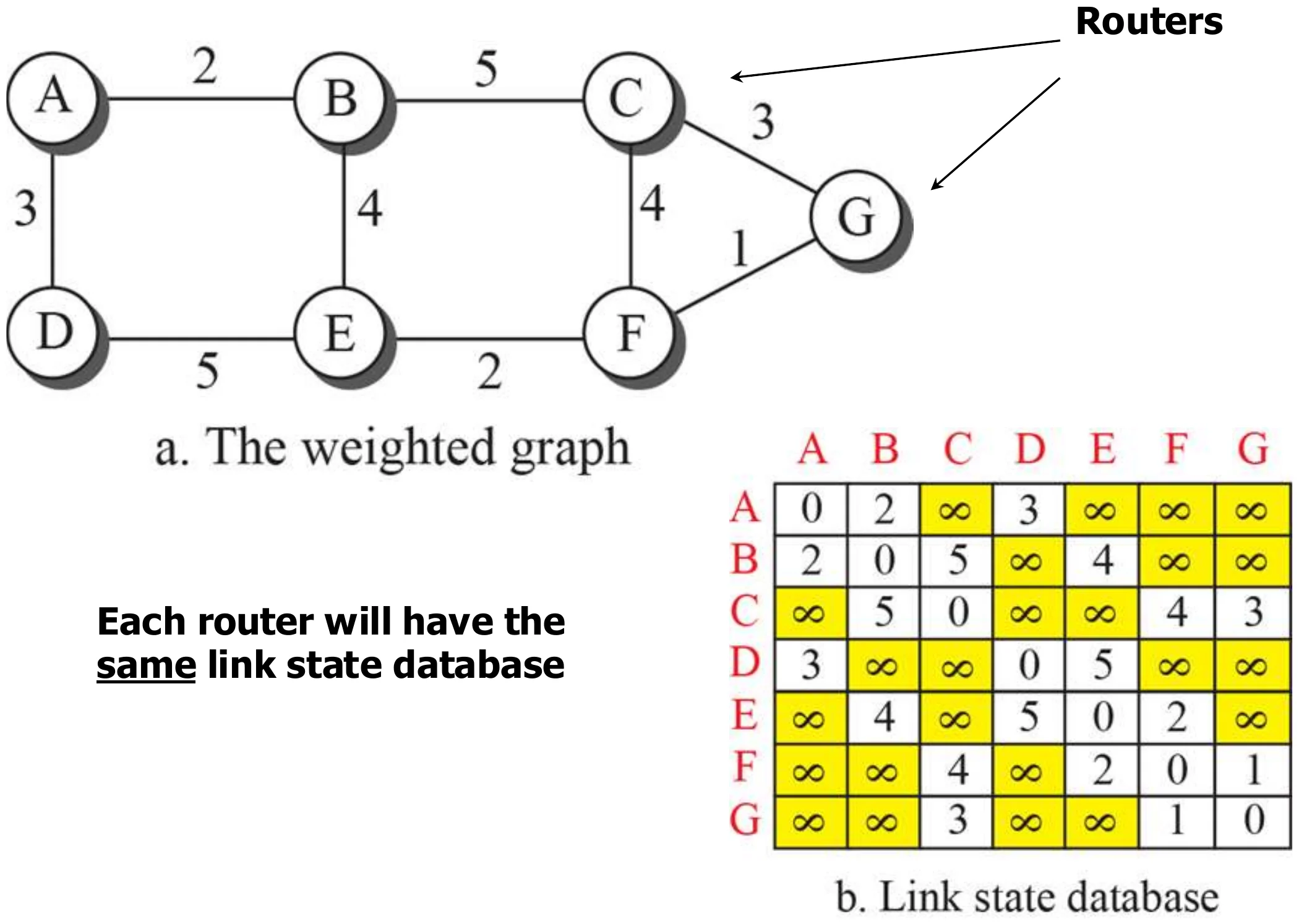
Example of a link-state database (LSDB)

Each router will have the same link-state database.①

The weighted graph and the 7 × 7 link-state database built from the LSPs
32
Exam weight Low
  1. All routers share the same LSDB (the whole map) but each computes its own tree.

Comparison between distance vector and link state

Distance vector routing

  • Each router sends routing information to its neighbours
  • The information sent is an estimate of the path cost to all known destinations in the area
  • Information is sent periodically (every 30 s) by the router’s own timer
  • Reacts to link failure very slowly

Link state routing

  • Each router sends routing information to ALL routers in the area
  • The information sent is the exact cost of the links that connect the router to its neighbours
  • Information is sent when there is a change
  • Reacts to network failure quickly
33
Exam weight High
  1. DV: to neighbours, estimates of everything, periodic, slow to react. LS: to all, exact neighbour costs, on change, fast.
🎯 How this can come up · 2 questions
Written

Compare distance-vector and link-state routing (who receives updates, what is sent, when, and reaction to failure).

MCQ

Which reacts faster to a link failure?

Autonomous systems (AS)

  • On the Internet, Autonomous system (AS) is either a single network or a group of networks that is controlled by a common network administrator①
  • An autonomous system is assigned a globally unique number, sometimes called an Autonomous System Number (ASN).②
  • AS systems are connected by special routers called border routers or gateway routers.
  • Routers in same AS run same routing protocol③ this is called “intra - AS” (interior) routing protocol
  • Routing between autonomous systems is called inter-AS or exterior routing④
  • Gateway routers (border routers) are special routers in AS that run intra- AS” routing protocol and also responsible for routing to destinations outside AS by running inter-AS (exterior) routing protocol with other gateway (boarder) routers⑤
34
Exam weight High
  1. AS = networks under ONE administrator, with a unique AS number.
  2. Inside an AS: intra-AS (interior) routing. Between ASs: inter-AS (exterior).
  3. Border (gateway) routers run both.
🎯 How this can come up · 1 question
MCQ

Routing between autonomous systems is called:

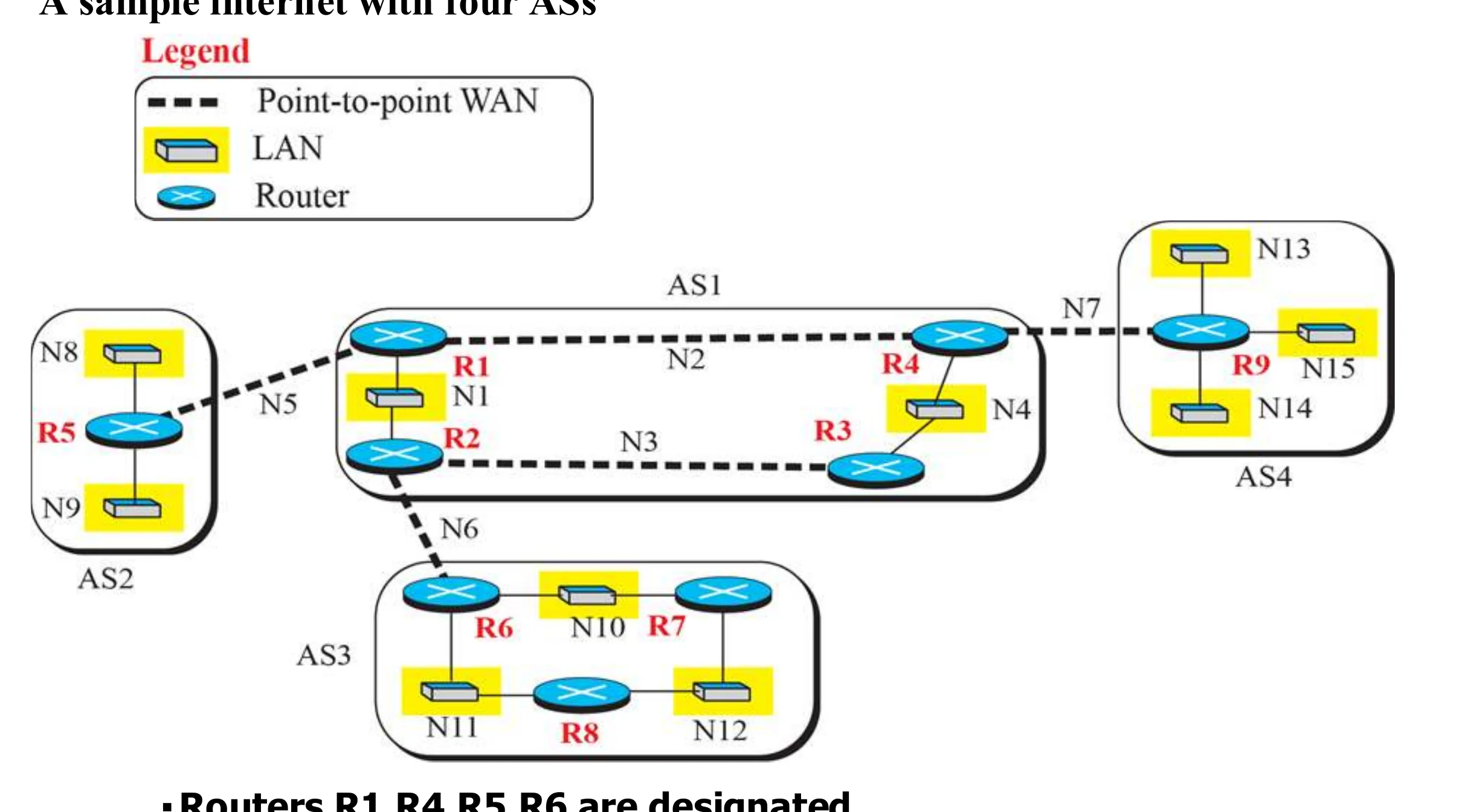
A sample internet with four ASs

  • Routers R1,R4,R5,R6 are designated as border gateway routers
  • These routers run both interior and exterior routing protocols 20.35
AS1 to AS4 joined by point-to-point WANs; R1, R4, R5, R6 are border routers
35
Exam weight Low
  1. R1, R4, R5, R6 are border routers: they run interior AND exterior protocols.

Popular routing protocols

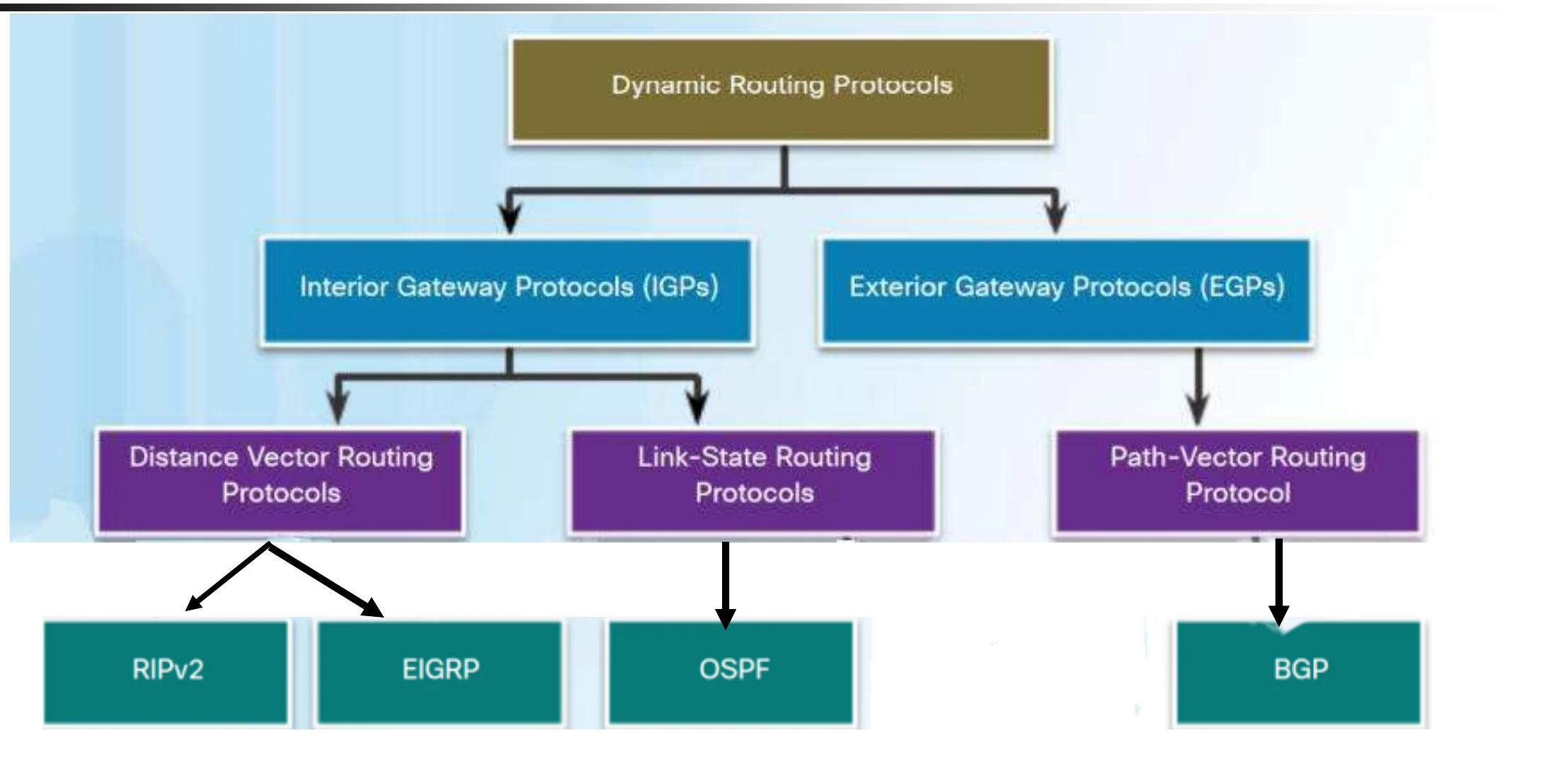
  • Interior routing (RIP, OSPF,EIGRP): between routers inside a single AS①
  • Exterior routing (BGP): between routers connecting several

AS

  • BGP stands for Border Gateway Protocol Routing②
Interior gateway protocols: distance vector (RIPv2, EIGRP), link state (OSPF). Exterior: path vector (BGP)
36
Exam weight High
  1. Interior: RIP, EIGRP (distance vector), OSPF (link state). Exterior: BGP (path vector).
Memory trickOnly one exterior protocol to know: BGP, the B is for Border.
🎯 How this can come up · 2 questions
MCQ

Which protocol routes between autonomous systems?

MCQ

EIGRP is a: