CS331 · Annotated SlidesChapter 4 — Local Area Networks: Ethernet
Chapter 4 · Annotated slides

Local Area Networks: Ethernet

Ethernet from top to bottom: IEEE 802 and its LLC/MAC split, every field of the frame and its size, the 48-bit MAC address and how to tell unicast, multicast and broadcast apart, the four generations from 10 Mbps to 10 Gbps, and why full-duplex switched Ethernet no longer needs CSMA/CD. (On the Slides page this deck is listed as Data Link Layer Part 3.)

Slide text Study notes Highlight: key words Tips, tricks & traps Seen again elsewhere How it can come up

Local Area Network: LANs

CS331: Computer Networks · Chapter 4: Ethernet
1
Exam weight Low
  1. IEEE 802 → frame format → MAC addresses → Ethernet generations → full duplex and switching.
TipFrame fields and sizes: preamble 7 + SFD 1 (physical-layer header) · destination 6 · source 6 · type/length 2 · data 46–1500 · CRC 4.

Chapter 4: Outline

  • 4.1 ETHERNET
2
Exam weight Low
  1. One section: 4.1 Ethernet.

IEEE standards

Ethernet: a LAN data link layer protocol used in bus and star topologies that implements CSMA/CD as its medium access method.①

  • The original (traditional) Ethernet was developed in 1980 by three companies: Digital, Intel, Xerox (DIX).②
  • In 1985, the Computer Society of the IEEE started Project 802 to set standards for intercommunication among equipment from a variety of manufacturers.
    • The current version is called IEEE Ethernet③
3
Exam weight High
  1. Ethernet = a data-link LAN protocol for bus and star, using CSMA/CD.
  2. DIX (1980) → IEEE Project 802 (1985) → today’s IEEE Ethernet.
🎯 How this can come up · 2 questions
MCQ

Which access method does classic Ethernet use?

MCQ

DIX Ethernet was developed by:

Ethernet

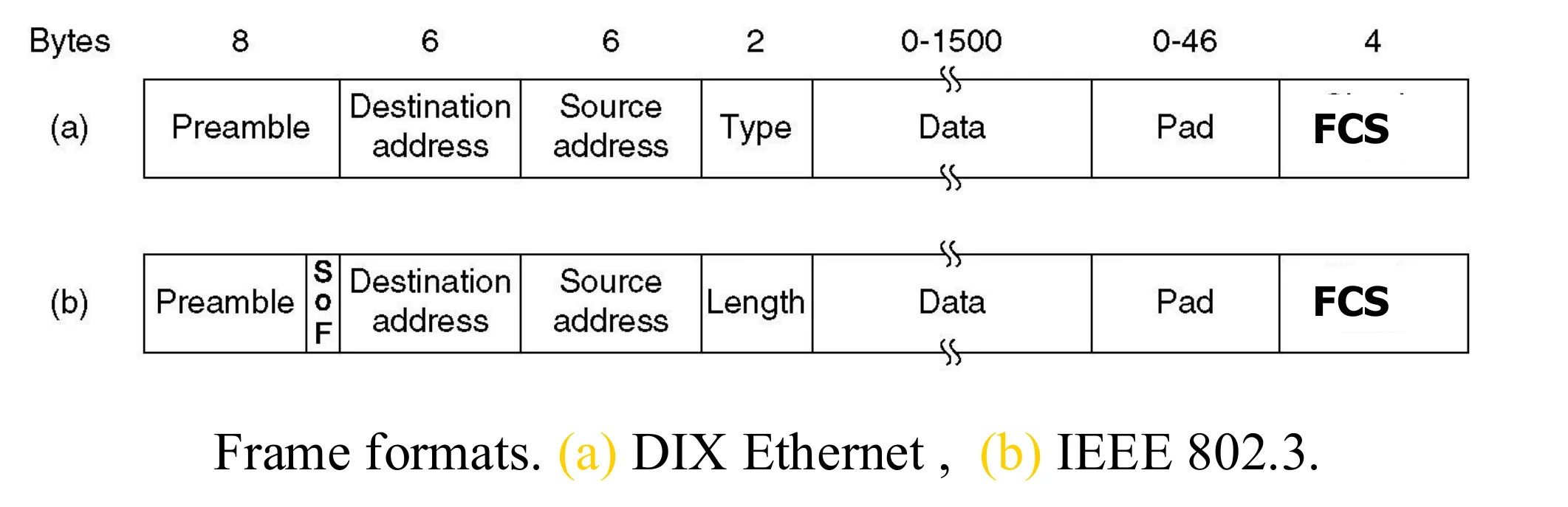
  • Ethernet frame format: (a) DIX Ethernet, (b) IEEE 802.3
DIX frame: preamble 8, destination 6, source 6, type 2, data 0–1500, pad 0–46, FCS 4. IEEE 802.3 frame: preamble with SFD, destination, source, length, data, pad, FCS
4
Exam weight Medium
  1. The only difference: DIX has a TYPE field, IEEE 802.3 has a LENGTH field (and the 8th preamble byte becomes the SFD).
Exam trapDIX → Type. 802.3 → Length. Same 2-byte position.
🎯 How this can come up · 1 question
MCQ

The 2-byte field after the source address in an IEEE 802.3 frame is:

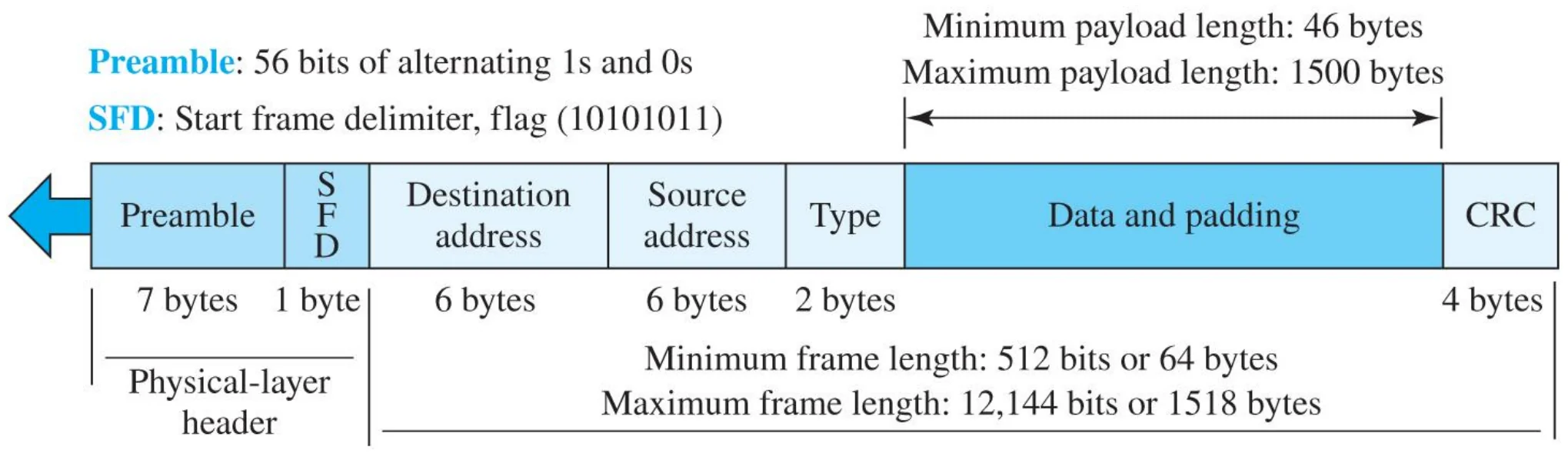
802.3 MAC frame

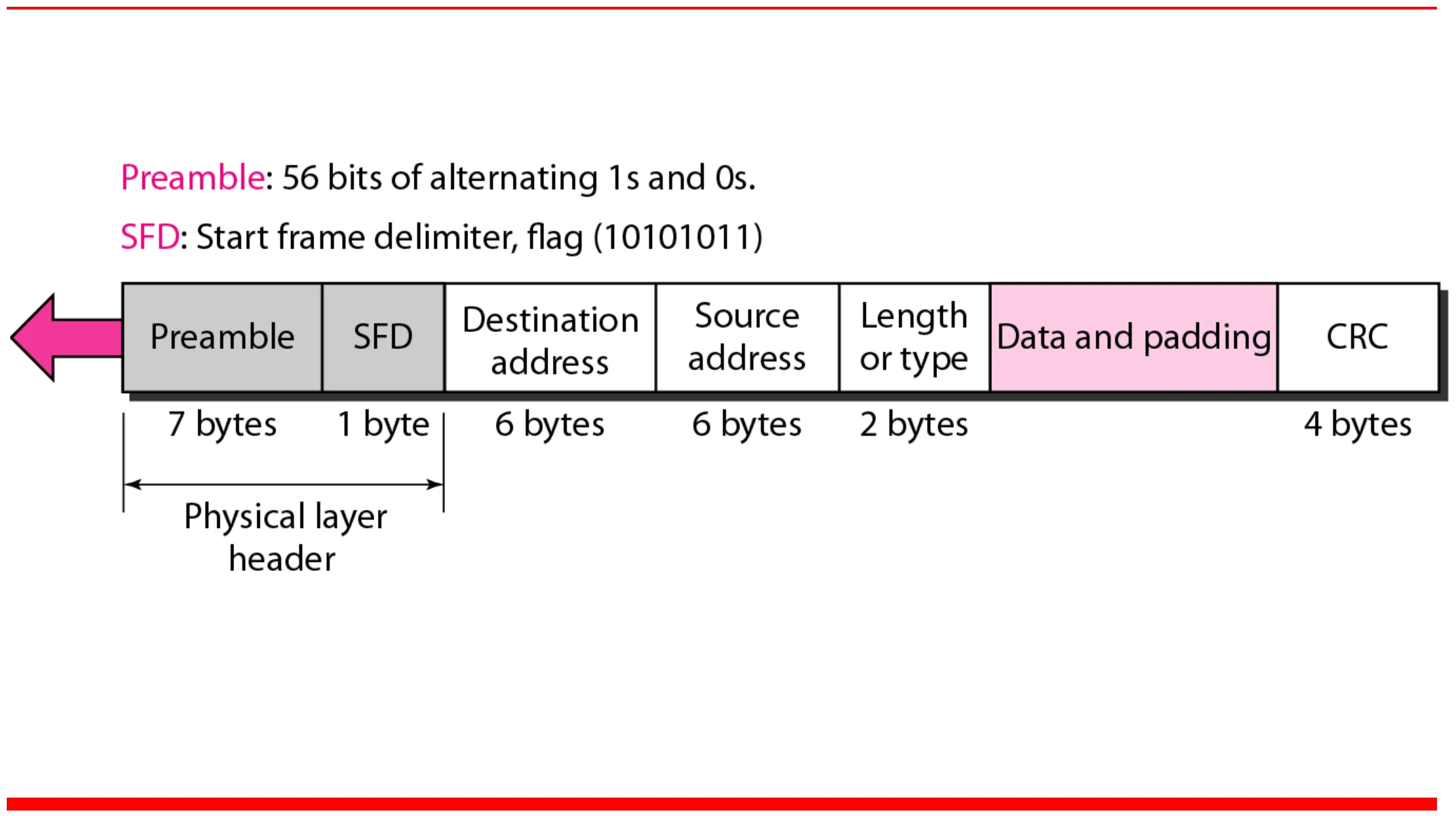
Preamble 7 bytes, SFD 1 byte, destination 6, source 6, length or type 2, data and padding, CRC 4
5
Exam weight High
  1. Preamble (7) + SFD (1) form the physical-layer header; they are not counted in the frame length.
TipFrame fields and sizes: preamble 7 + SFD 1 (physical-layer header) · destination 6 · source 6 · type/length 2 · data 46–1500 · CRC 4.
🎯 How this can come up · 2 questions
MCQ

How long is the CRC field of an Ethernet frame?

MCQ

How long is each Ethernet address field?

IEEE Ethernet

  • In IEEE 802.3 Ethernet Data link layer is split into two sublayers:
    • Bottom part: MAC
      • The subframe is called IEEE 802.3
      • Handles part of framing, MAC addressing, Medium Access control①
      • Specific implementation for each LAN protocol
        • Defines CSMA/CD as the access method for Ethernet LANs and Token passing method for Token Ring.②
    • Top part: LLC (Logical Link Control)
      • The subframe is called IEEE 802.2
      • Handles another part of Framing
      • Provides error and flow control if needed
      • It makes the MAC sublayer transparent
        • Allows interconnectivity between different LANs data link layers③
6
Exam weight High
  1. MAC (bottom) = IEEE 802.3 for Ethernet: framing, MAC addressing, access method. Different for every LAN type (CSMA/CD for Ethernet, token passing for Token Ring).
  2. LLC (top) = IEEE 802.2: error and flow control, and it hides the differences between MACs so different LANs can interconnect.
Memory trick802.3 = MAC for Ethernet. 802.2 = LLC on top, the same for every LAN.
🎯 How this can come up · 2 questions
MCQ

Which IEEE standard is the LLC sublayer?

MCQ

Which sublayer is specific to each LAN technology?

IEEE standard for LANs

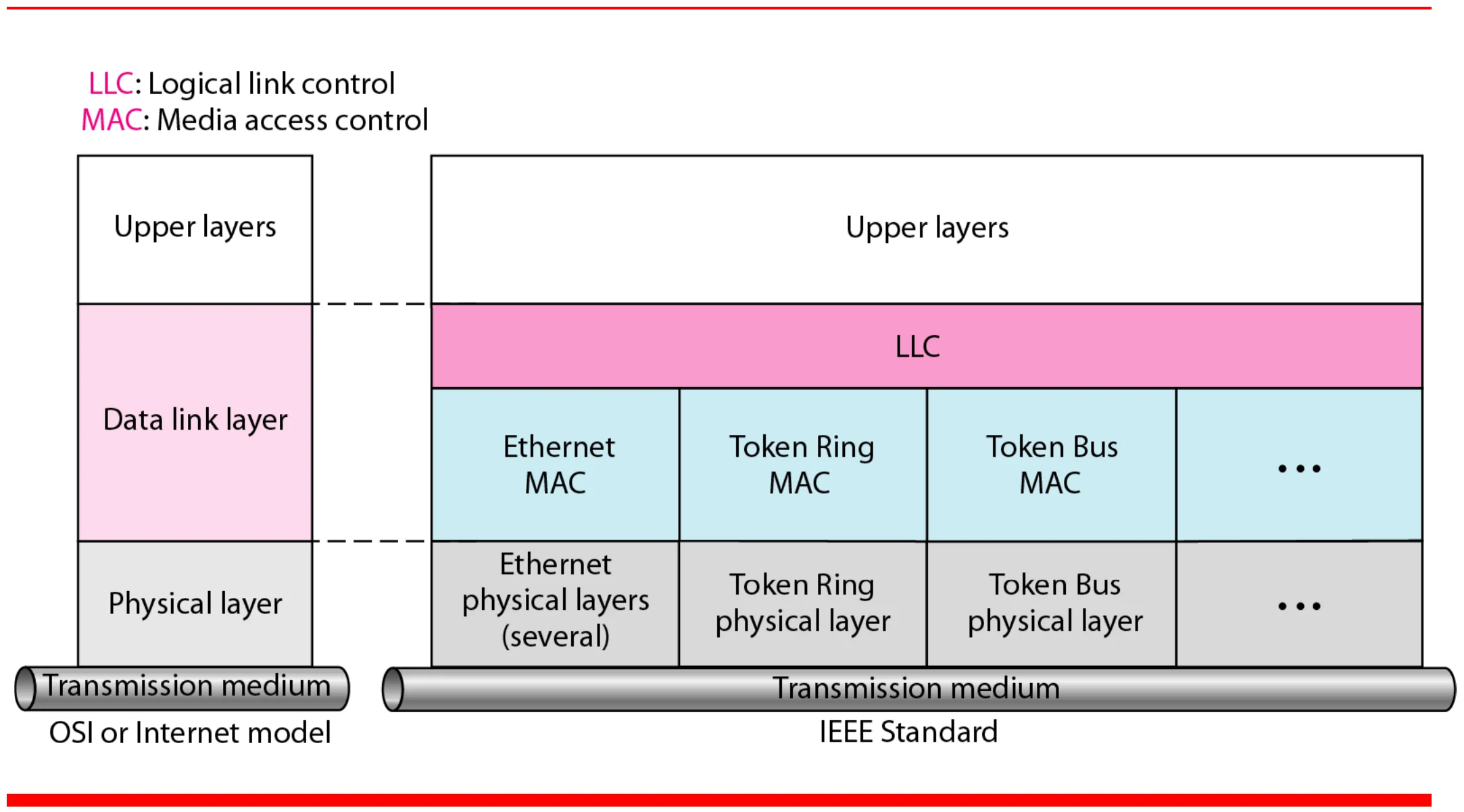
IEEE standard: one LLC above Ethernet MAC, Token Ring MAC and Token Bus MAC, each with its own physical layers
7
Exam weight Low
  1. One LLC, many MACs, each MAC with its own physical layers.

Ethernet Frame

  • Preamble:
    • 8 bytes with pattern 10101010 used to synchronize receiver, sender clock rates.①
    • In IEEE 802.3, eighth byte is start of frame (10101011)
  • Addresses: 6 bytes (explained latter)
  • Type (DIX)
    • Indicates the type of the Network layer protocol being carried in the payload (data) field, mostly IP but others may be supported such as IP (0800), Novell IPX (8137) and AppleTalk (809B), ARP (0806))
    • Allow multiple network layer protocols to be supported on a single machine (multiplexing)②
    • Its value starts at 0600h (=1536 in decimal)
  • Length (IEEE 802.3): number of bytes in the data field.
    • Maximum 1500 bytes (= 05DCh)③
  • CRC: checked at receiver, if error is detected, the frame is discarded④
    • CRC-32
  • Data: carries data encapsulated from the upper-layer protocols
  • Pad: Zeros are added to the data field to make the minimum data length = 46 bytes⑤
8
Exam weight High
  1. Preamble: 10101010 to sync clocks; in 802.3 the 8th byte is the SFD 10101011.
  2. Type (DIX) says which network-layer protocol is inside (0800 = IP, 0806 = ARP). Values start at 0x0600 = 1536.
  3. Length (802.3) is at most 1500 = 0x05DC. So a value ≤ 1500 is a length, ≥ 1536 is a type.
  4. Bad CRC → frame discarded (no correction). Pad up to the 46-byte minimum data.
Memory trickThe two-byte field: ≤ 1500 → length (802.3); ≥ 1536 → type (DIX).
🎯 How this can come up · 3 questions
MCQ

The type value 0x0800 in an Ethernet frame means the payload is:

MCQ

If the data is only 20 bytes, how many pad bytes are added?

True / False

An Ethernet receiver corrects a frame whose CRC check fails.

Ethernet address

  • Six bytes = 48 bits, e.g. 06-01-02-01-2C-4B
  • Flat address, not hierarchical①
  • Burned into the NIC ROM
  • The first three bytes from the left specify the vendor (Cisco 00-00-0C, Juniper 00-05-85); the last 24 bits are created uniquely by the company②
  • The destination address can be:
    • Unicast: second digit from the left is even (one recipient)
    • Multicast: second digit from the left is odd (a group of stations receives the frame, e.g. conferencing applications)③
    • Broadcast: all ones (all stations receive the frame)
  • The source address is always unicast④
9
Exam weight High
  1. MAC = 48 bits, flat, burned into the NIC. First 3 bytes = vendor (OUI).
  2. Look at the SECOND hex digit: even → unicast, odd → multicast. All F → broadcast.
  3. A source address can never be multicast or broadcast.
🎯 How this can come up · 2 questions
MCQ

An Ethernet MAC address is:

True / False

A source MAC address can be a multicast address.

Ethernet address of a desktop PC Ethernet card

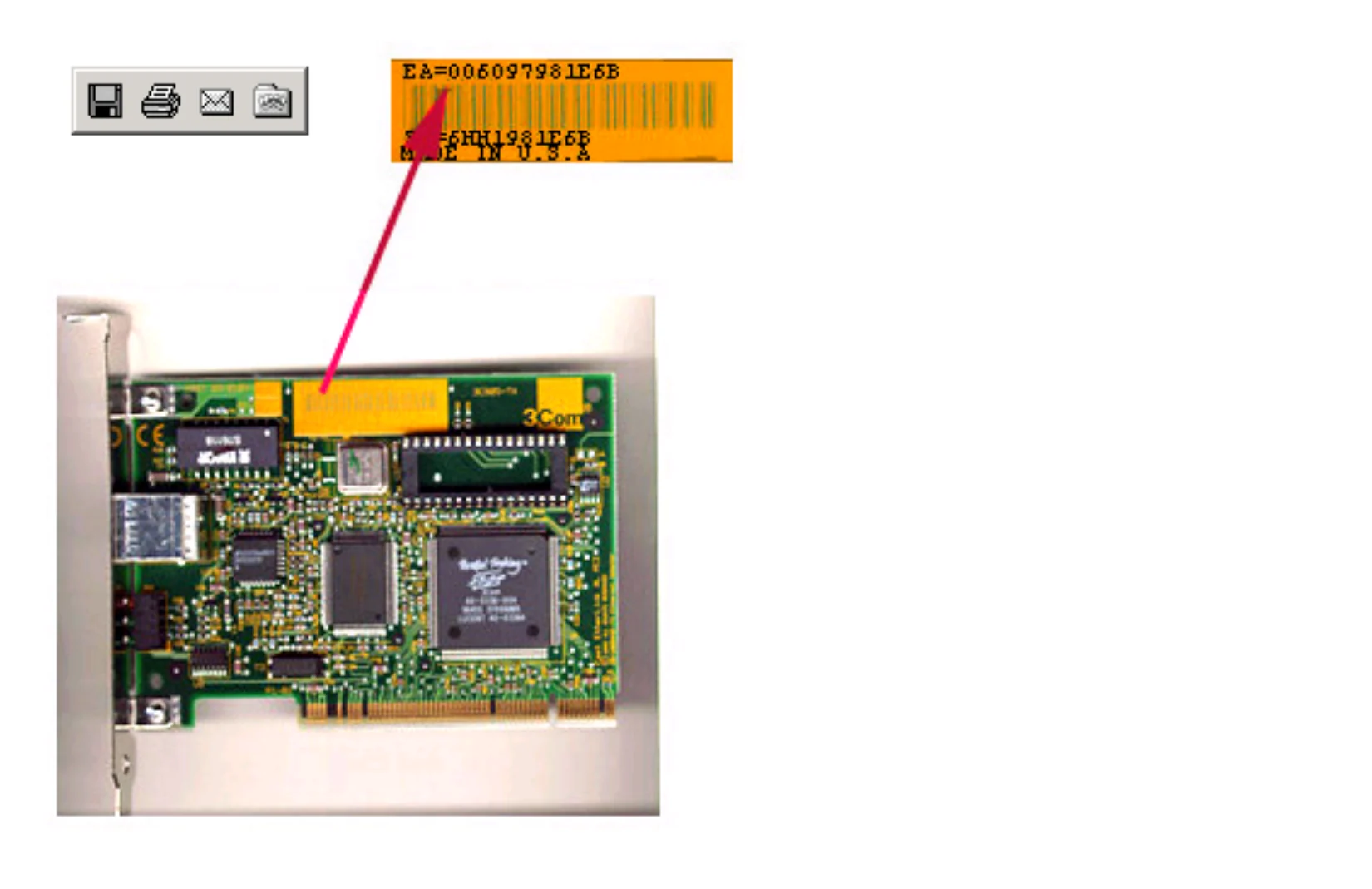
The Ethernet address for the network card shown is 006097981E6B.

A network card with its MAC address printed on a sticker
10
Exam weight Low
  1. The MAC is printed on the card and stored in its ROM. 00-60-97 is the vendor part.

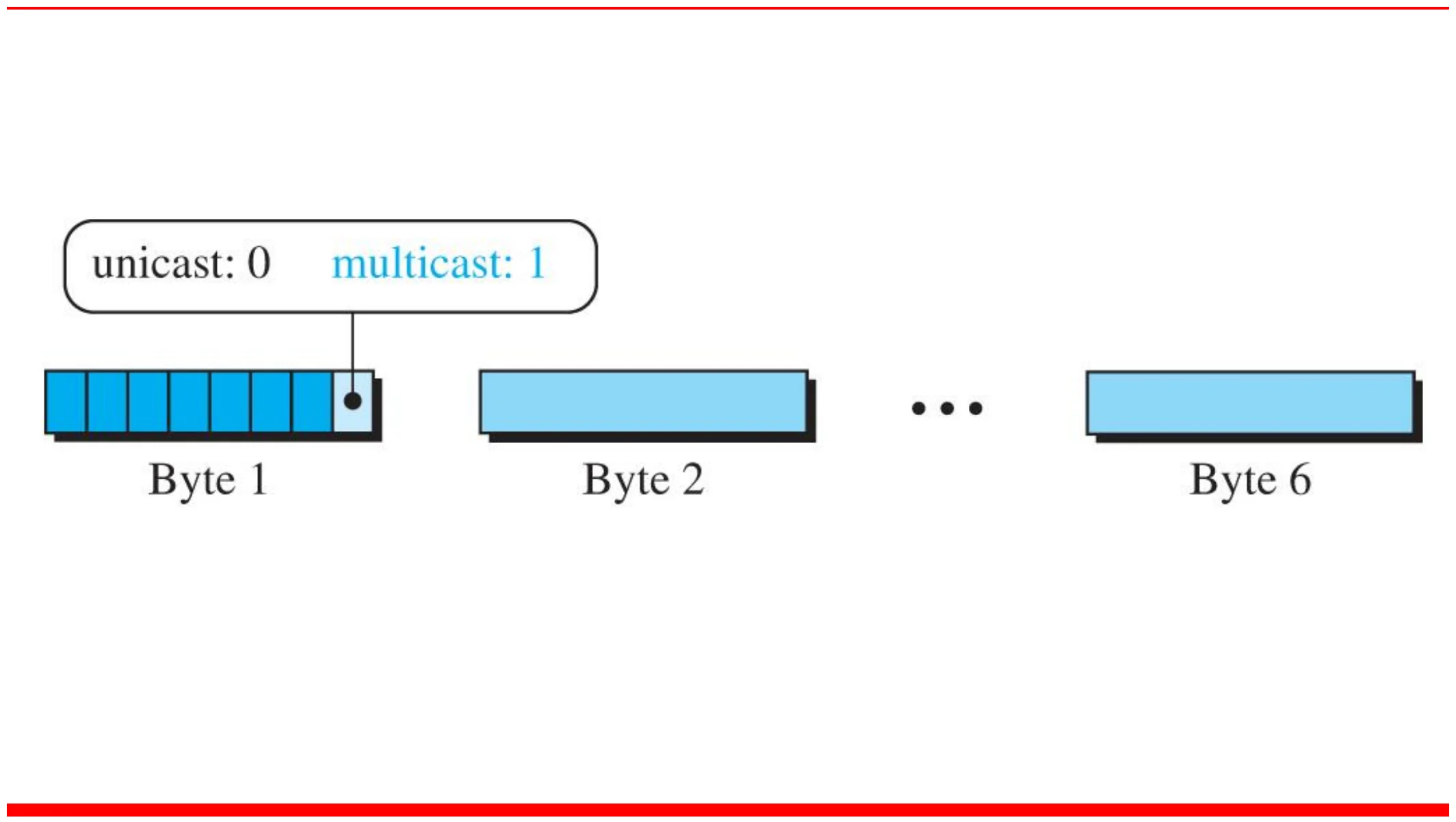
Note: unicast or multicast?

The least significant bit of the first byte

defines the type of address.

If the bit is 0, the address is unicast;

otherwise, it is multicast.

11
Exam weight Low
  1. It is the least significant bit of the FIRST byte: 0 → unicast, 1 → multicast. That bit lives in the second hex digit, which is why “even/odd” works.
Exam trap“Second digit” means the second HEX digit (part of byte 1), not the second byte.

Note: broadcast

The broadcast destination address is a special case of the multicast address in

which all bits are 1s.

12
Exam weight Medium
  1. Broadcast FF:FF:FF:FF:FF:FF is a special multicast (all bits 1, so the multicast bit is 1 too).
🎯 How this can come up · 1 question
True / False

The broadcast address is a special case of a multicast address.

Unicast and multicast addresses

Six address bytes; the last bit of byte 1 is 0 for unicast, 1 for multicast
13
Exam weight Low
  1. The marked bit is the last bit of byte 1.

Example

Define the type of the following destination addresses: a. 4A:30:10:21:10:1A b. 47:20:1B:2E:08:EE c. FF:FF:FF:FF:FF:FF

Solution: look at the second hexadecimal digit from the left. If it is even, the address is unicast. If it is odd, the address is multicast. If all digits are F’s, the address is broadcast.

  • a. Unicast, because A in binary is 1010 (even).
  • b. Multicast, because 7 in binary is 0111 (odd).
  • c. Broadcast, because all digits are F’s.①
14
Exam weight High
  1. Only the second hex digit matters.
🎯 How this can come up · 3 questions
MCQ

The destination address 01:00:5E:00:00:01 is:

MCQ

The destination address 3C:52:82:11:AA:07 is:

MCQ

The destination address 4B:12:00:9A:10:F0 is:

Ethernet frame

Minimum payload 46 bytes, maximum 1500; minimum frame 64 bytes (512 bits), maximum 1518 bytes (12,144 bits)
15
Exam weight Low
  1. Frame length counts destination → CRC (not the preamble/SFD): 6 + 6 + 2 + data + 4.

Note: frame length

Frame length: minimum 64 bytes (512 bits), maximum 1518 bytes (12,144 bits)①

16
Exam weight High
  1. 64 = 18 header/trailer bytes + 46 minimum data. 1518 = 18 + 1500 maximum data.
Memory trick18 bytes of overhead: 6 + 6 + 2 + 4. Add 46 → 64. Add 1500 → 1518.
🎯 How this can come up · 2 questions
MCQ

The minimum Ethernet frame length is:

MCQ

The maximum Ethernet frame length (without preamble) is:

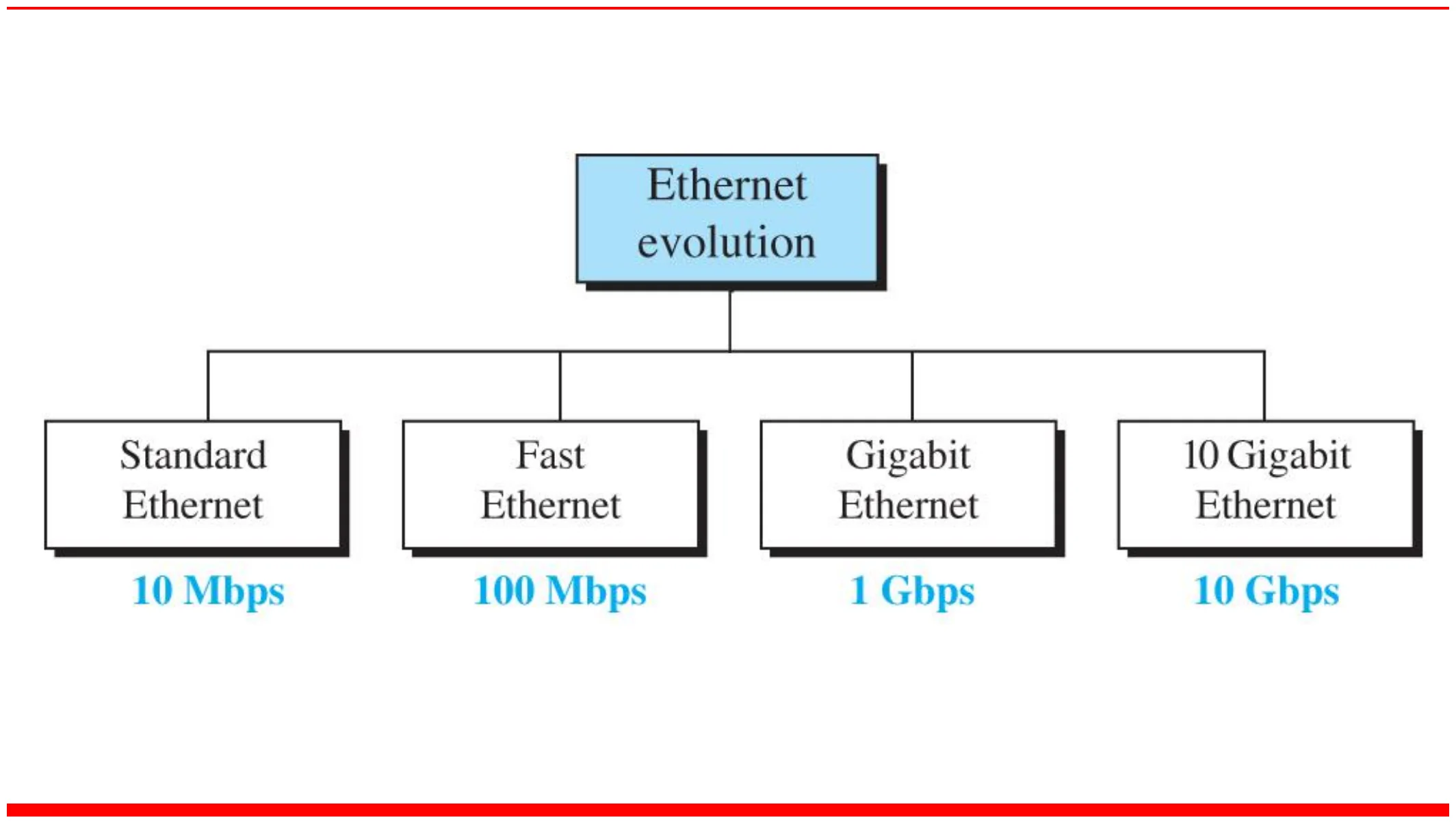
Ethernet evolution through four generations

Standard Ethernet 10 Mbps, Fast Ethernet 100 Mbps, Gigabit Ethernet 1 Gbps, 10 Gigabit Ethernet 10 Gbps
17
Exam weight Medium
  1. Four generations, ×10 each time: 10 Mbps → 100 Mbps → 1 Gbps → 10 Gbps.
🎯 How this can come up · 1 question
MCQ

Fast Ethernet runs at:

Ethernet Standards

  • Fast Ethernet (100 Base T, 100 Base F)
    • Star topology
    • 100 Mbps transmission rate
    • media: twisted pair or fiber optic cable①
  • Gigabit Ethernet (1000 Base T, 1000 Base F)
    • Star topology
    • 1000 Mbps transmission rate
    • media: twisted pair or fiber optic cable
  • 10 Gigabit Ethernet (10gigabit F)
    • Star topology
    • 10000 Mbps transmission rate
    • media: fiber optic cable only②
18
Exam weight Medium
  1. Fast and Gigabit: star, twisted pair or fiber. 10 Gigabit: star, fiber ONLY (in these slides).
🎯 How this can come up · 1 question
True / False

In the slides, 10 Gigabit Ethernet uses only fiber-optic cable.

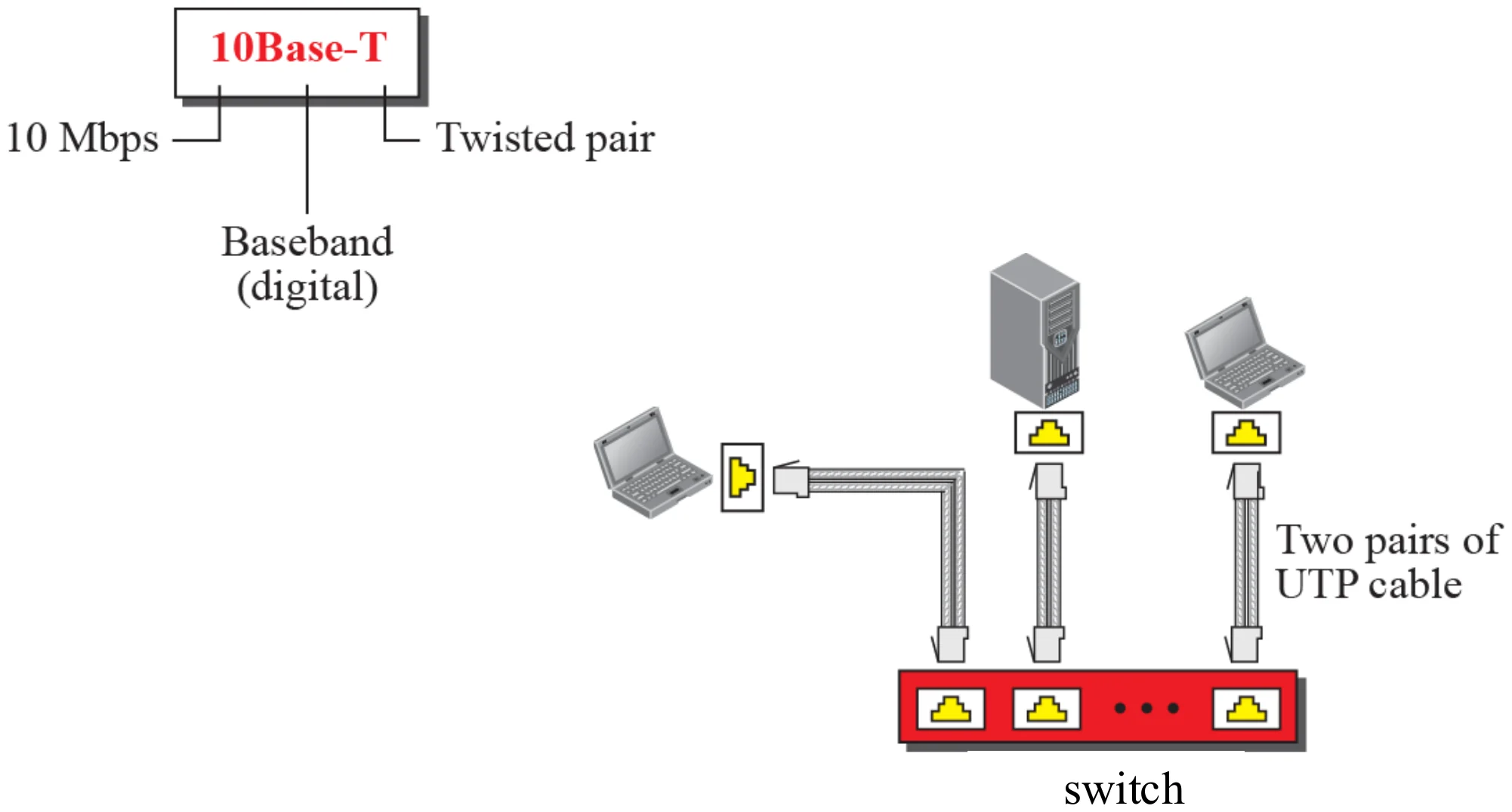
10Base-T implementation

10 Mbps baseband over two pairs of UTP cable to a switch
19
Exam weight Medium
  1. 10Base-T: 10 = 10 Mbps, Base = baseband (digital), T = twisted pair. Two pairs: one to send, one to receive.
Memory trickName = speed + Base(band) + medium: T = twisted pair, F = fiber, X/LX/SX = fiber kinds, CX = copper.
🎯 How this can come up · 1 question
MCQ

In “10Base-T”, the T stands for:

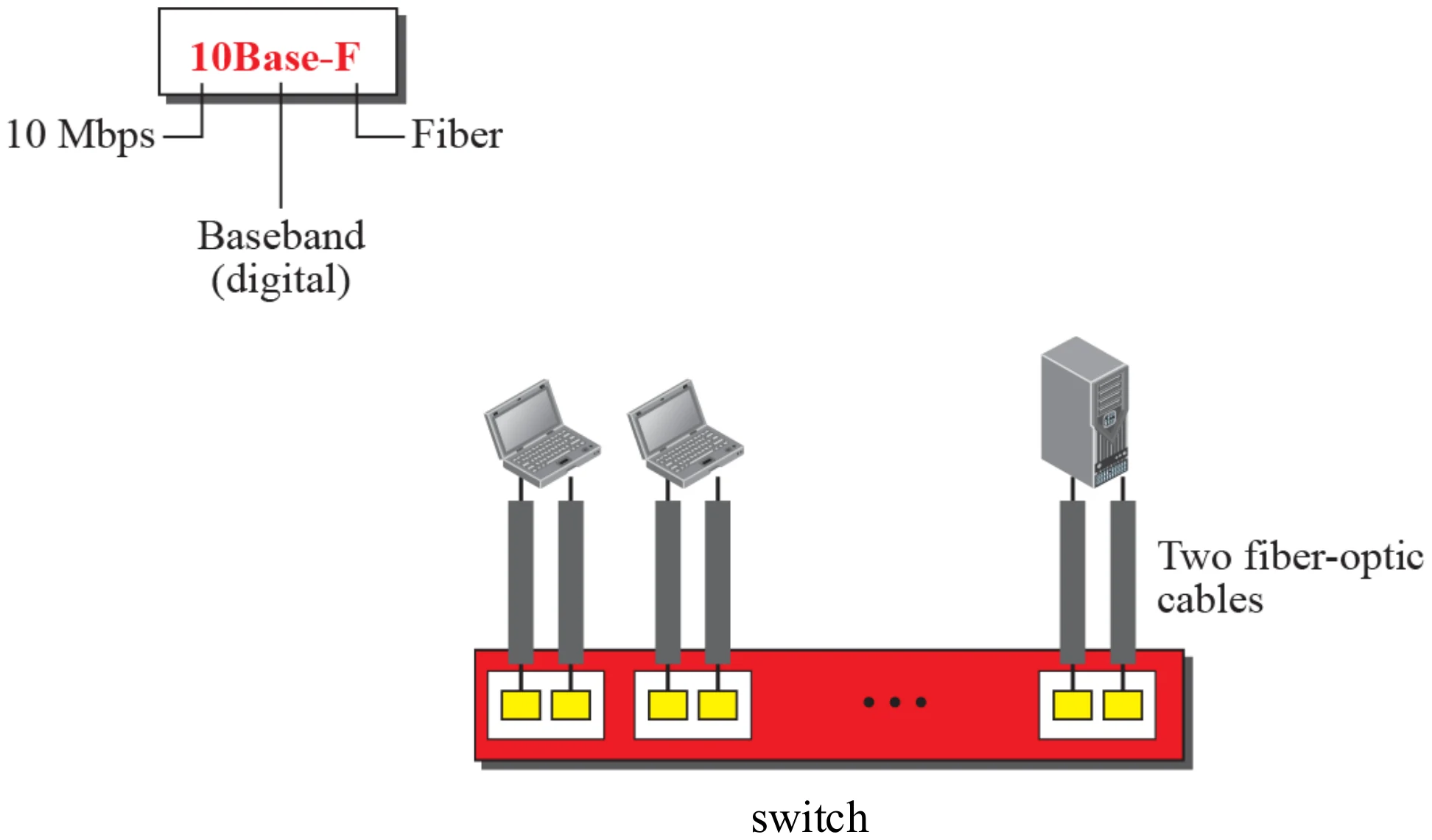
10Base-F implementation

10 Mbps baseband over two fiber-optic cables to a switch
20
Exam weight Low
  1. 10Base-F: two fibers per station.

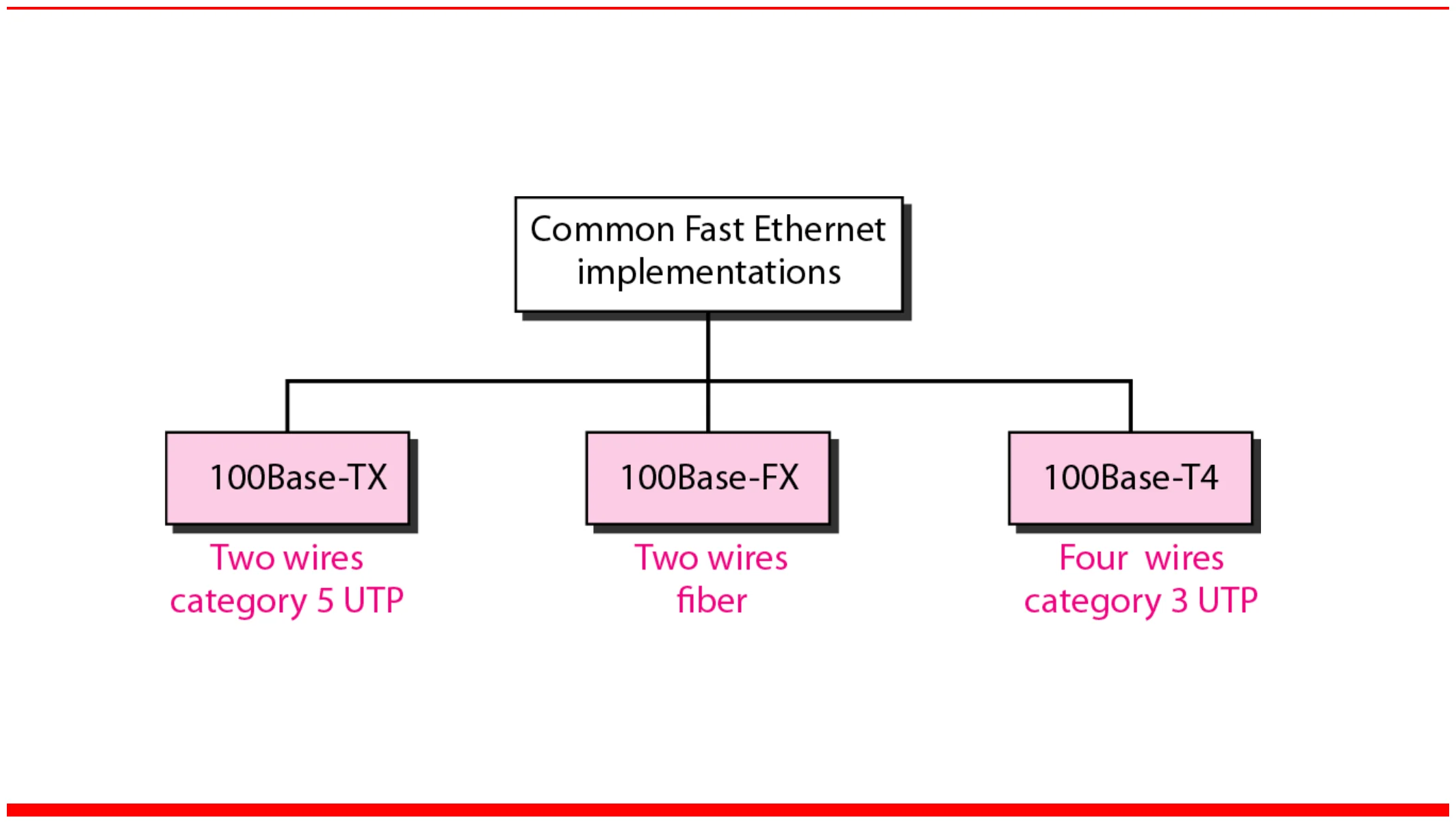
Fast Ethernet implementations

100Base-TX two-wire Cat 5 UTP, 100Base-FX two-wire fiber, 100Base-T4 four-wire Cat 3 UTP
21
Exam weight Low
  1. 100Base-TX (2 pairs Cat 5), 100Base-FX (fiber), 100Base-T4 (4 pairs Cat 3).

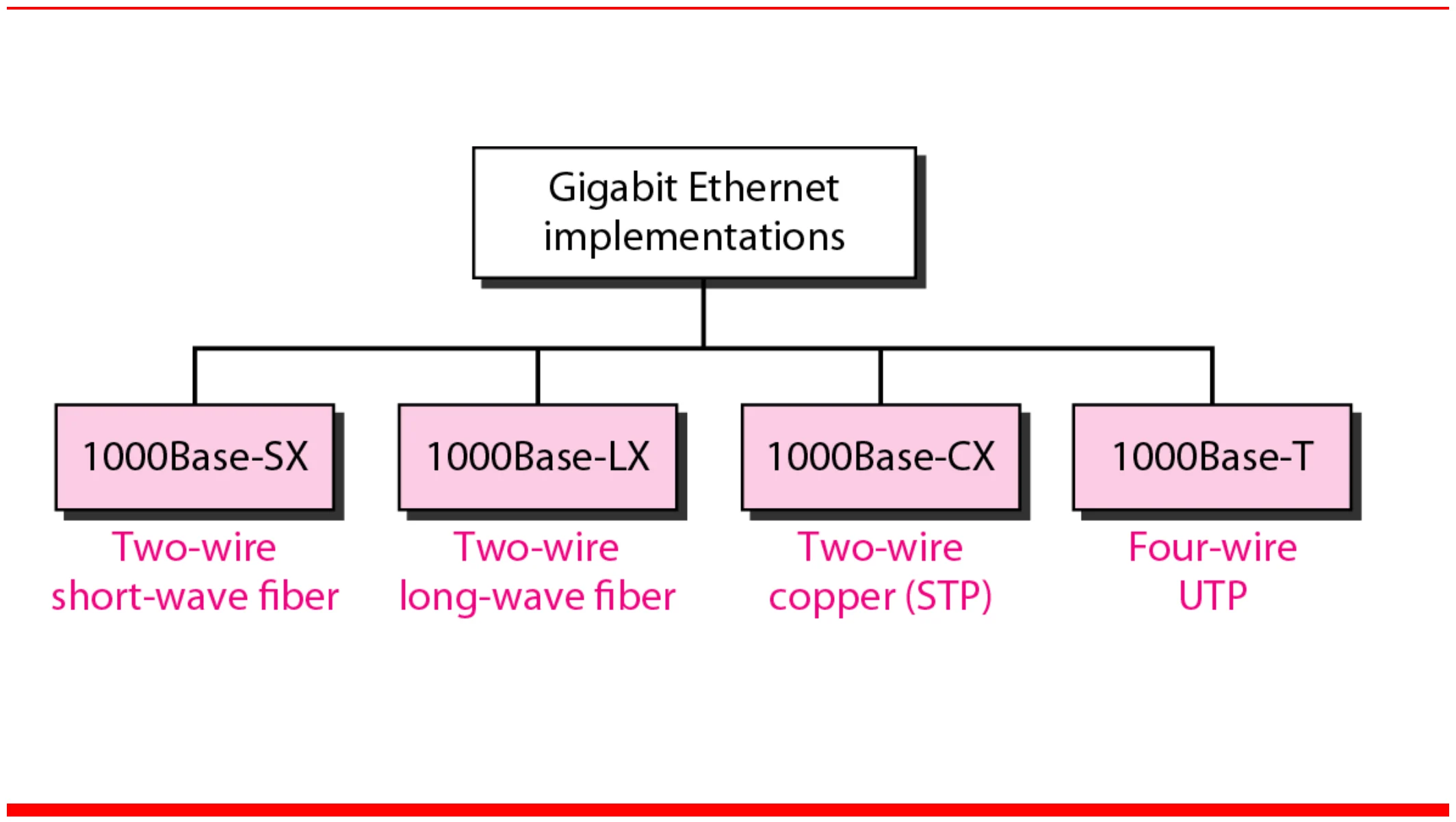
Gigabit Ethernet implementations

1000Base-SX short-wave fiber, 1000Base-LX long-wave fiber, 1000Base-CX copper STP, 1000Base-T four-wire UTP
22
Exam weight Medium
  1. SX = short-wave fiber, LX = long-wave fiber, CX = copper (STP), T = 4-pair UTP.
🎯 How this can come up · 1 question
MCQ

Which Gigabit Ethernet standard uses long-wave fiber?

Full Duplex Operation

  • Traditional Ethernet is half duplex because of CSMA/CD
    • Either transmit or receive, but not both simultaneously①
  • With full duplex, a station can transmit and receive data simultaneously
  • With full duplex, throughput (actual transmission rate) is doubled.
    • 100-Mbps Ethernet in full-duplex mode: the theoretical transfer rate becomes 200 Mbps
    • 1-Gbps Ethernet in full-duplex mode: it becomes 2 Gbps②
  • Changes needed for a computer to operate in full-duplex mode:
  1. Attached stations must have full-duplex NIC cards
  2. Must use two pairs of wire: one pair from host to switch (inbound) and one from switch to host (outbound)
  3. Must use a switch as the central device, not a hub
  4. Devices must be connected point-to-point (dedicated) to the switch③
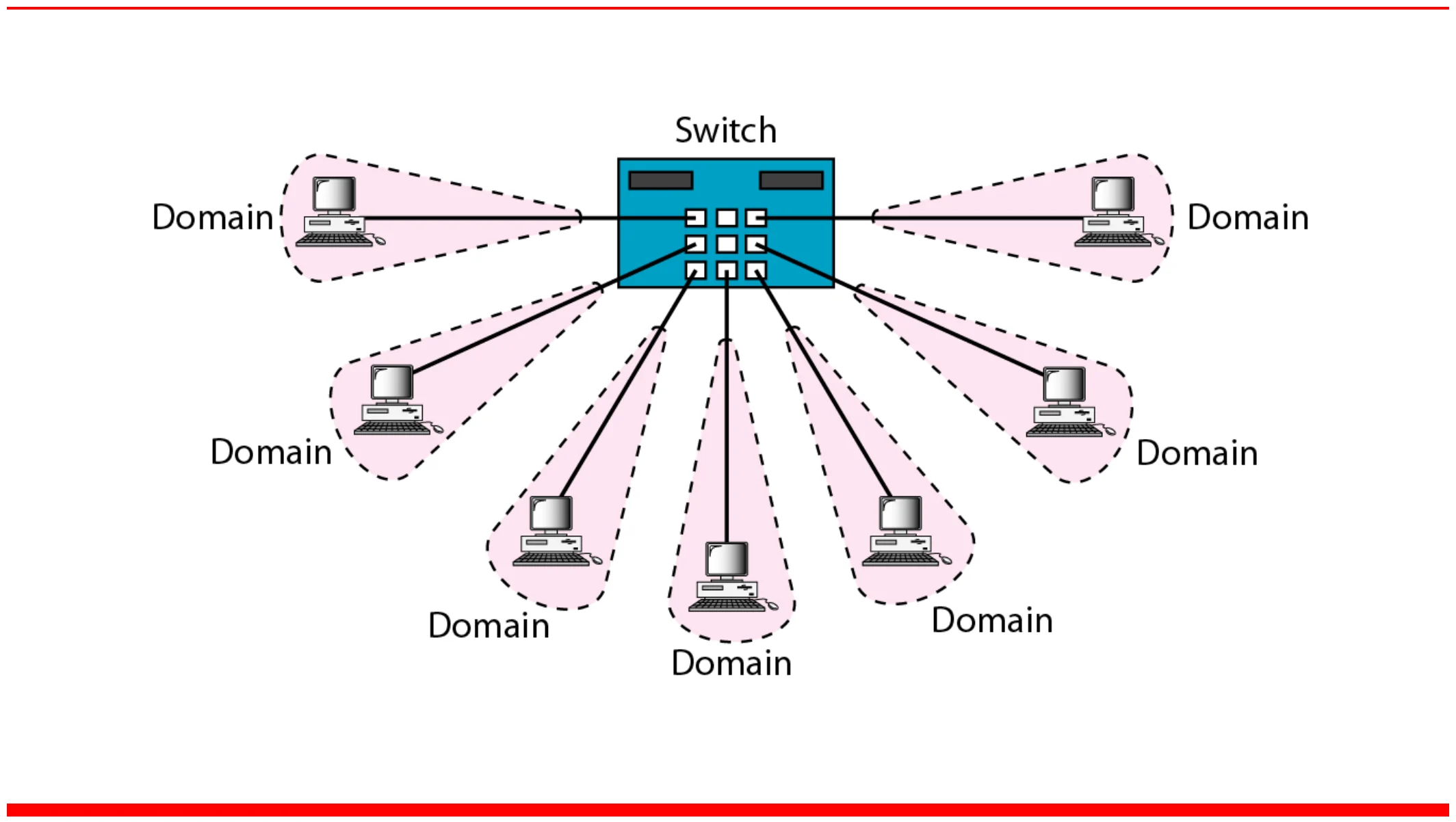
  • Each station is a separate collision domain
    • The CSMA/CD algorithm is no longer needed (no collision)④
23
Exam weight High
  1. Half duplex (classic) → CSMA/CD needed. Full duplex → throughput doubles.
  2. Four requirements: full-duplex NIC, two wire pairs, a SWITCH (not a hub), dedicated point-to-point links.
  3. Each port is its own collision domain → no collisions → no CSMA/CD.
Exam trapA hub can’t do full duplex: it repeats to everyone, so collisions are still possible.
🎯 How this can come up · 3 questions
MCQ

100 Mbps Ethernet in full-duplex mode has a theoretical rate of:

True / False

Full-duplex Ethernet can use a hub as the central device.

Written

List the requirements for Ethernet to run in full-duplex mode, and say what happens to CSMA/CD.

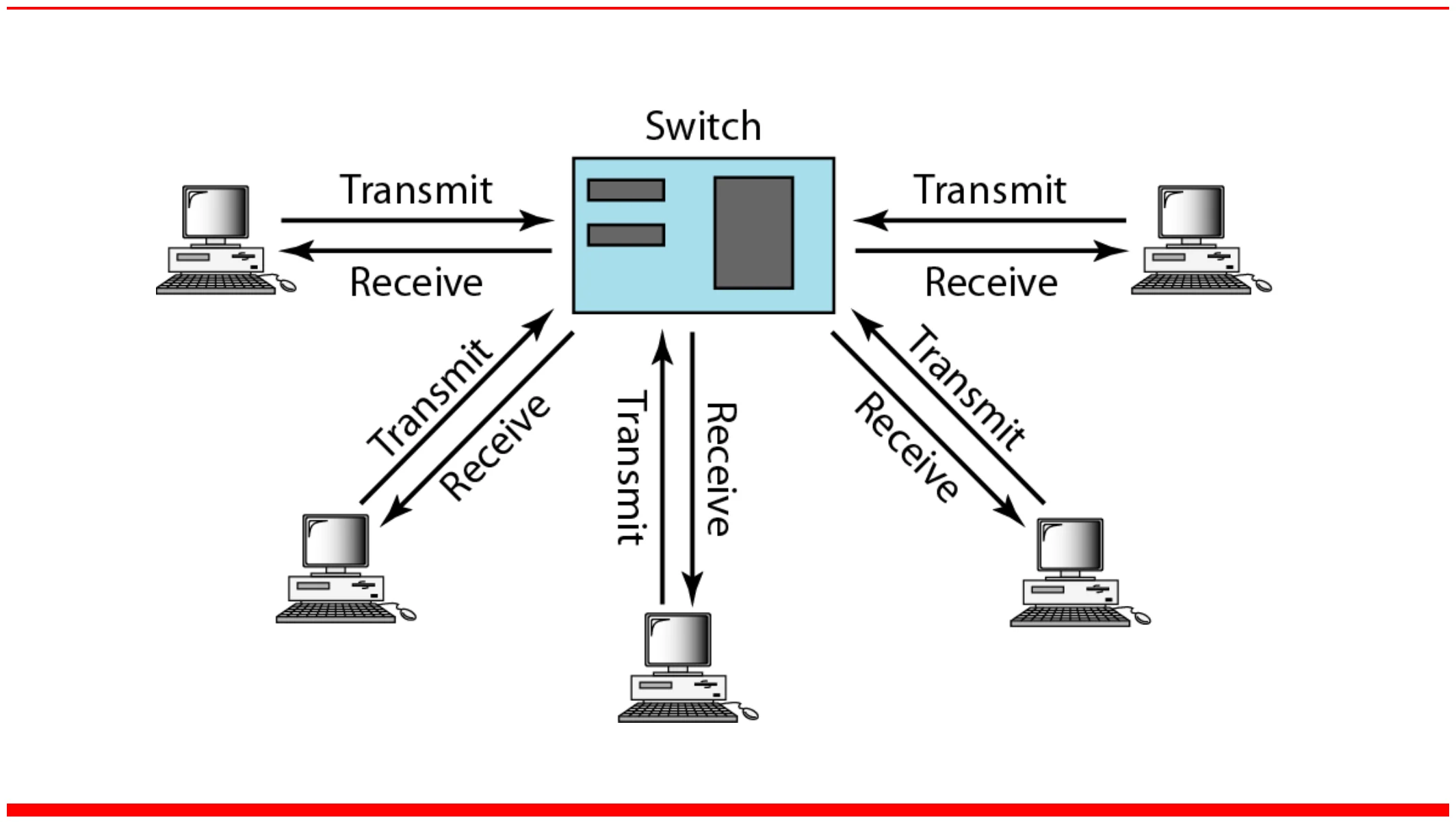
Switched Ethernet

Every station on a switch port is in its own collision domain
25
Exam weight High
  1. Switch = one collision domain per port. (A hub = one big shared collision domain.)
🎯 How this can come up · 1 question
Scenario

An office replaces its 24-port hub with a 24-port switch. How many collision domains are there before and after?