CS331 · Annotated SlidesChapter 1 · Part 1 — Introduction: Data Communications and Networking
Chapter 1 · Part 1 · Annotated slides

Introduction: Data Communications and Networking

What a data communication system is made of, how devices connect (point-to-point or multipoint, simplex to full-duplex), the four topologies and their link formulas, LAN / MAN / WAN, how ISPs build the Internet, and why standards exist. Tutorial 1 was written from this deck, so most of its questions are linked on the slides they come from.
Slide text Study notes Highlight: key words Tips, tricks & traps Seen again elsewhere How it can come up

Introduction

CS331: Computer Networks · Chapter 1, Part 1
1
Exam weight Low
  1. Data communication → networks (connections, topologies) → LAN / MAN / WAN → the Internet and ISPs → standards.
  2. Tutorial 1 covers this whole deck: scenarios, MCQs, true/false, fill-in and link counts.

Chapter 1-Part 1: Outline

  • 1.1 DATA COMMUNICATIONS
  • 1.2 NETWORKS
  • 1.3 NETWORK TYPES
2
Exam weight Low
  1. Three sections: 1.1 data communications, 1.2 networks, 1.3 network types (plus the Internet and standards at the end).
★ Tutorial

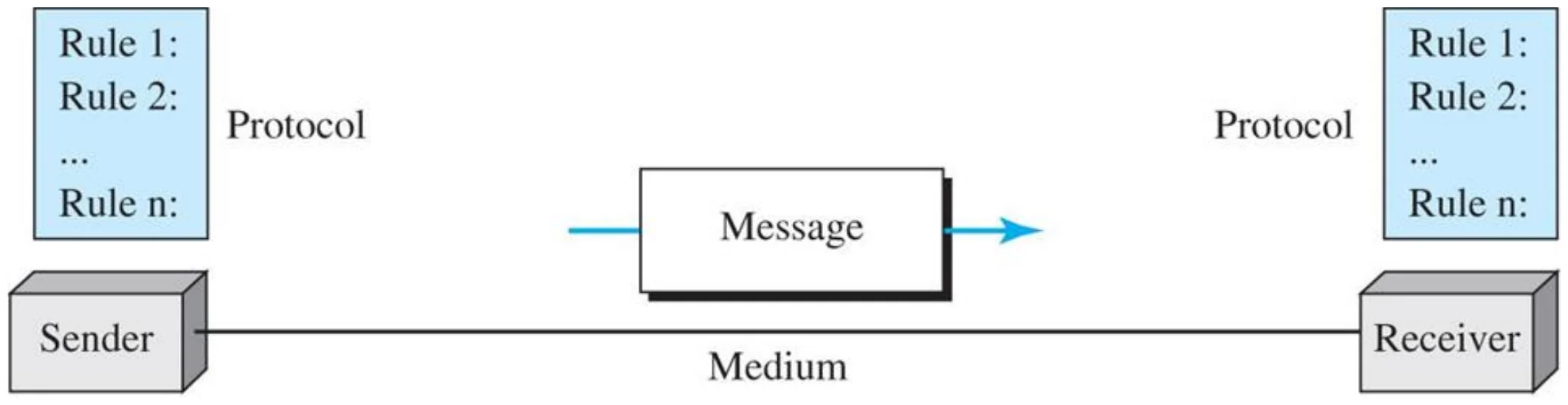
Five components of data communication (Figure 1.1)

Sender and receiver, each with a protocol (rules 1..n), exchange a message over a medium
Message, sender, receiver, transmission medium, protocol.
4
Exam weight High
  1. The 5 components: message, sender, receiver, transmission medium, protocol.
  2. The protocol sits on BOTH sides: sender and receiver must follow the same rules.
Memory trick“My Sister Reads The Paper”: Message, Sender, Receiver, Transmission medium, Protocol.
Exam trapThe medium is the physical path. The protocol is the set of rules. Don’t swap them.
🎯 How this can come up · 3 questions
MCQ

The __________ is the physical path over which a message travels.

MCQ

Which is NOT one of the five components of a data communication system?

Written

List the five components of a data communication system.

1.1.2 Message

  • Information today comes in different forms such as text, numbers, images, audio, and video.①
    • Text is represented as a bit pattern using Unicode.
    • Numbers are represented in binary.
    • Images are represented as bit patterns
    • Audio refers to the recording or broadcasting of sound or music.
    • Video is a series of images displayed in rapid succession.
5
Exam weight Medium
  1. Everything becomes bits: text (Unicode), numbers (binary), images (bit patterns), audio and video (continuous or a series of images).
🎯 How this can come up · 1 question
MCQ

Text is represented in data communication as:

★ Tutorial

1.2 Networks

  • A network is a set of devices (called nodes) connected by communication links.
    • Node can be host (a computer, printer, cell phone) or networking devices (routers, switches, modem, etc...)
    • Link is a communication pathway that transfer data from one device to another
    • Link can be wired or wireless①
  • Type of network connections
    • Point-to-Point: dedicated link between two devices
    • Multipoint: shared link between more than two devices②
  • Distributed system vs. Computer networks
  • A network must be able to meet a certain number of criteria. The most important of these are:
    • Performance
      • Depends on factors such as:
        • # of users, type of transmission medium, capabilities of Network hardware, Network software efficiency
      • Evaluated by:
        • Throughput (amount of data a user can send)
        • Delay (measured in transit time, and response time)
      • To have good performance, we need more throughput and less delay (contradict each other, because when throughput increases, it means more data arrive to the network, this will increase the delay
    • Reliability
      • Measured by:
        • Frequency of failure
        • Time it takes a link to recover from the failure③
    • Security
      • Protecting data from unauthorized users, and damage, applying security policies for recovery from breaches and data losses
6
Exam weight High
  1. Node = any device (host or router/switch). Link = the pathway between nodes.
  2. Point-to-point = a dedicated link for two devices; multipoint = one link shared by more than two.
  3. The 3 criteria: performance (throughput + delay), reliability (failure frequency + recovery time) and security.
Exam trapMore throughput and less delay pull against each other: pushing more data in raises the delay.
Memory trickCriteria = “PRS”: Performance, Reliability, Security.
🎯 How this can come up · 4 questions
MCQ

Frequency of failure and recovery time after a failure measure a network’s:

MCQ

Network performance is evaluated by:

True / False

Increasing throughput usually also increases delay.

Written

List and explain the three criteria of an effective network.

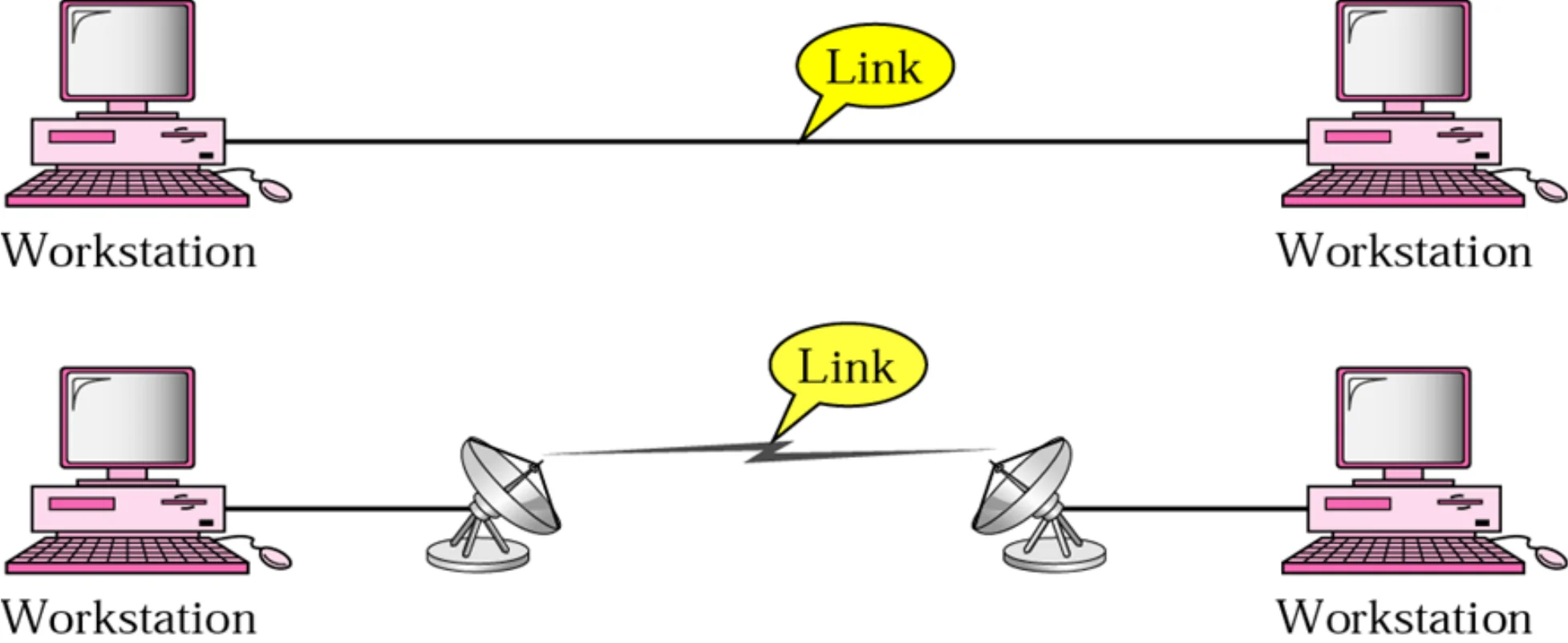
Point-to-point connection (Figure 1.5)

Two workstations joined by a cable link, and two joined by a satellite-dish wireless link
Point-to-point: the whole capacity of the link belongs to the two devices, wired or wireless.
7
Exam weight Medium
  1. Point-to-point: a DEDICATED link between exactly two devices. Wired or wireless both count.
🎯 How this can come up · 1 question
True / False

A point-to-point connection can be wireless.

★ Tutorial

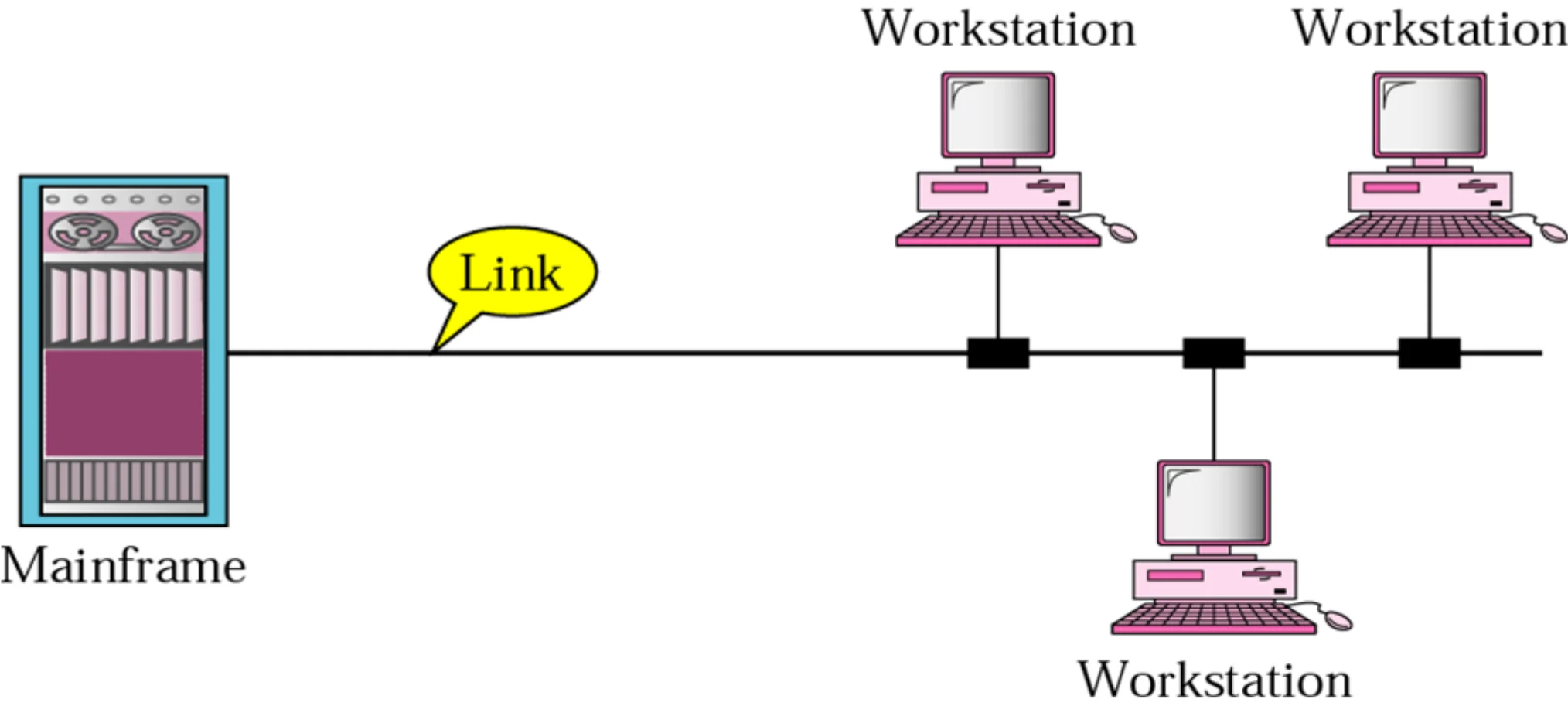
Multipoint connection (shared) (Figure 1.6)

A mainframe and three workstations share one cable link
Multipoint (multidrop): more than two devices share one link.
8
Exam weight High
  1. Multipoint = the link’s capacity is SHARED, in space (all at once) or in time (taking turns).
🎯 How this can come up · 1 question
MCQ

In a __________ connection, more than two devices can share a single link.

★ Tutorial

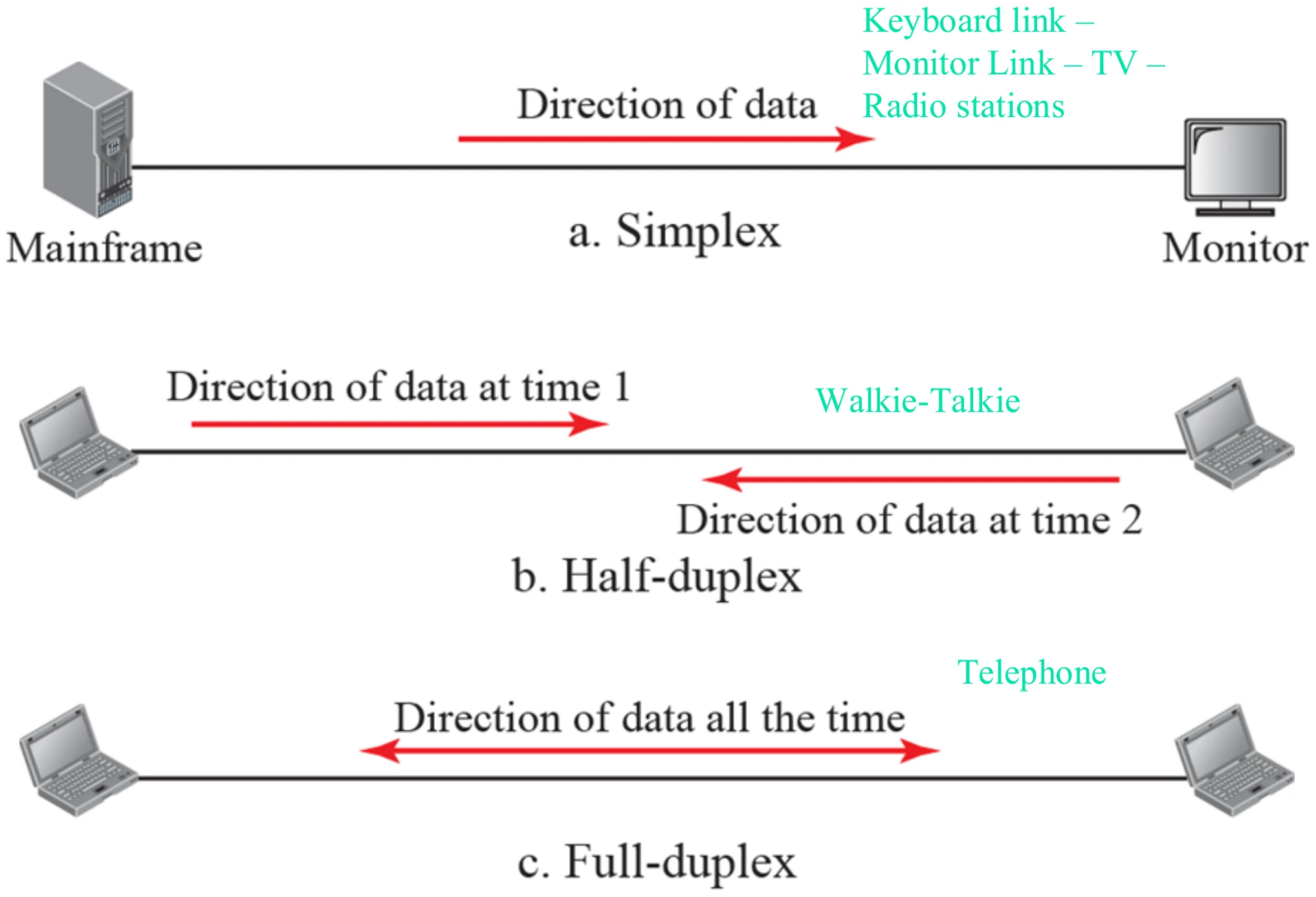
Data flow (direction of data flowing in the link) (Figure 1.2)

Simplex: mainframe to monitor one way. Half-duplex: walkie-talkie, one direction at a time. Full-duplex: telephone, both directions at once
Simplex (keyboard, monitor, TV, radio) · half-duplex (walkie-talkie) · full-duplex (telephone).
9
Exam weight High
  1. Simplex: one direction only, always (keyboard → computer, TV, radio).
  2. Half-duplex: both directions, but one at a time; each side gets the whole channel while sending (walkie-talkie).
  3. Full-duplex: both directions at the same time; the channel capacity is shared by the two directions (telephone).
Memory trickHalf-duplex = “over” on a walkie-talkie. Full-duplex = talking over each other on the phone.
🎯 How this can come up · 4 questions
True / False

In full-duplex transmission, both stations can transmit and receive simultaneously.

MCQ

A walkie-talkie is an example of:

MCQ

In which mode is the channel capacity shared by both directions at all times?

Written

Explain the difference between half-duplex and full-duplex, with a real example of each.

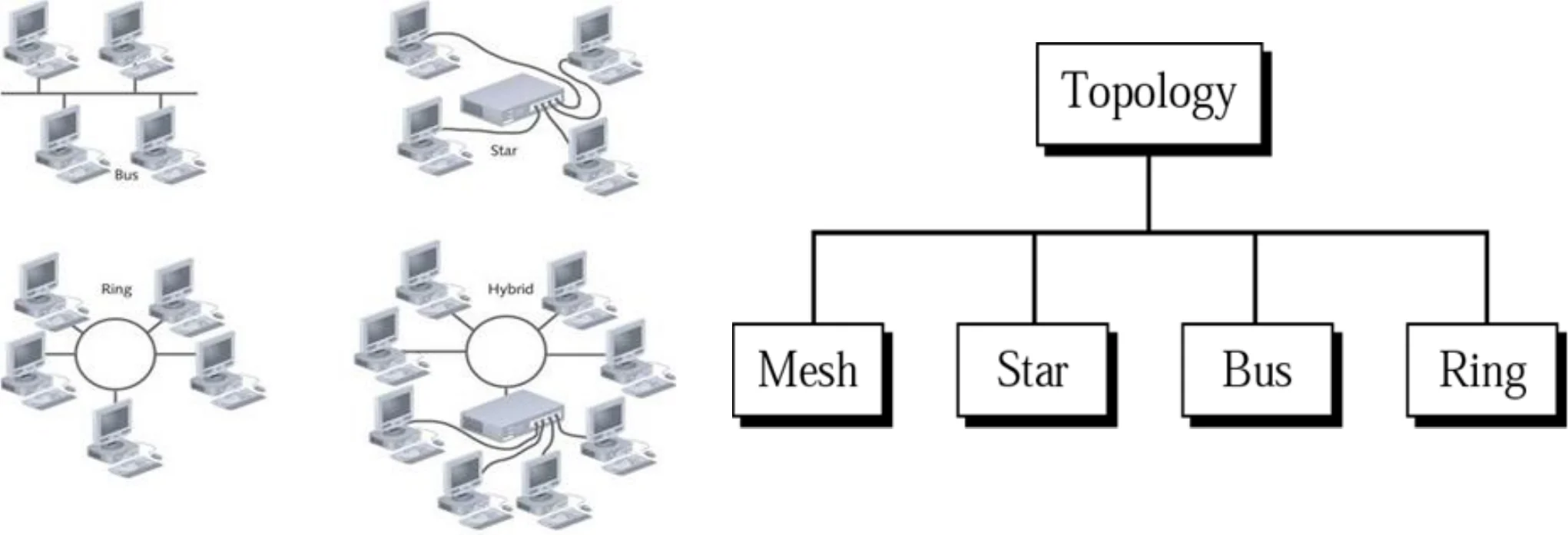
Categories of topology (Figure 1.7)

Topology: The way in which a network is physically built or The way in which devices interconnect across the network①

Topology splits into mesh, star, bus and ring
10
Exam weight Low
  1. Topology = how the network is physically laid out / how devices interconnect.
  2. Four basic ones: mesh, star, bus, ring (plus hybrids).
Memory trickFour topologies: “My Star Bus Rings” (Mesh, Star, Bus, Ring).
★ Tutorial

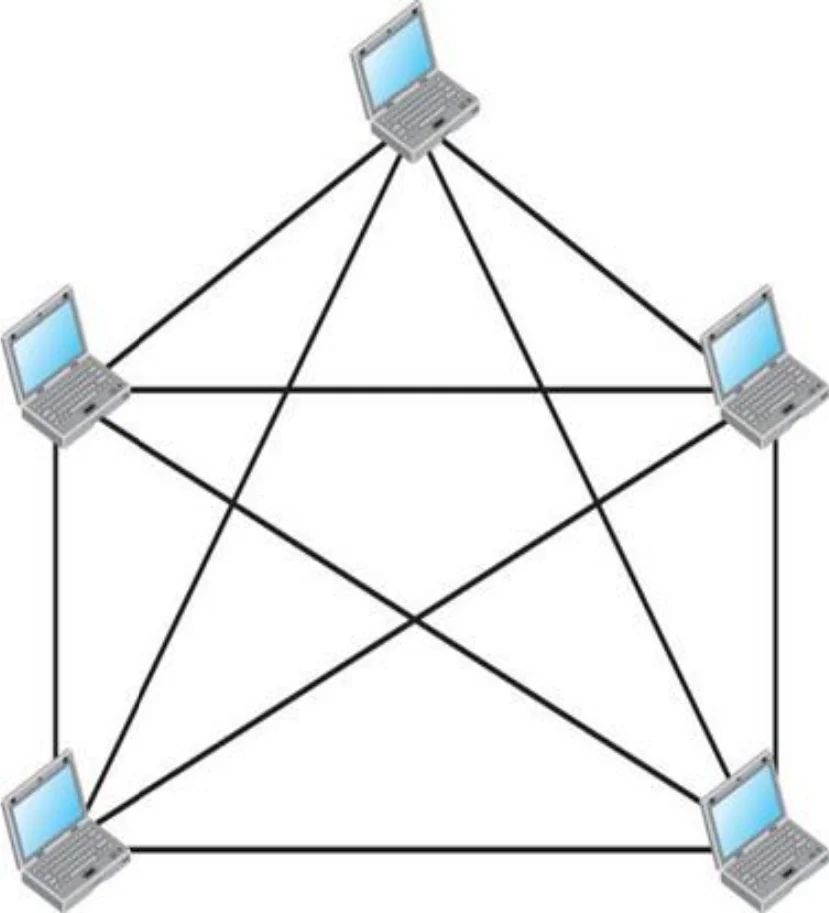
Fully connected mesh topology (for five devices) (Figure 1.8)

  • Dedicated point-to-point link to every other node
  • Number of links = N(N-1)/2①
  • Advantages
    • Dedicated links 🡺 secure, no traffic problems (no congestion)
    • Robust: if one link fails, the network will still work
    • Easy to discover faulty links
  • Disadvantages?
    • Difficult to install & update (too much wiring)
    • Expensive (why?)②
    • Number of Network interface cards (NIC) or Number of I/O ports = (N-1 )per device
    • Number of cables = Number of links
Five devices, each linked directly to the other four
11
Exam weight High
  1. Every device has a dedicated link to every other one. Links = N(N-1)/2; each device needs N-1 ports (NICs).
  2. Expensive because of all the cabling and ports: that is the answer to “why?”.
Memory trickN = 8 → 8 × 7 / 2 = 28 links, 7 ports per device.
Exam trapPorts per device is N-1, not N(N-1)/2.
🎯 How this can come up · 4 questions
MCQ

How many links are needed for a fully connected mesh of 6 devices?

MCQ

In a mesh of 10 devices, how many I/O ports does each device need?

True / False

A mesh topology has no traffic (congestion) problems because each link is dedicated.

Written

A network has 8 devices. How many cable links does a mesh, ring, bus and star need?

★ Tutorial

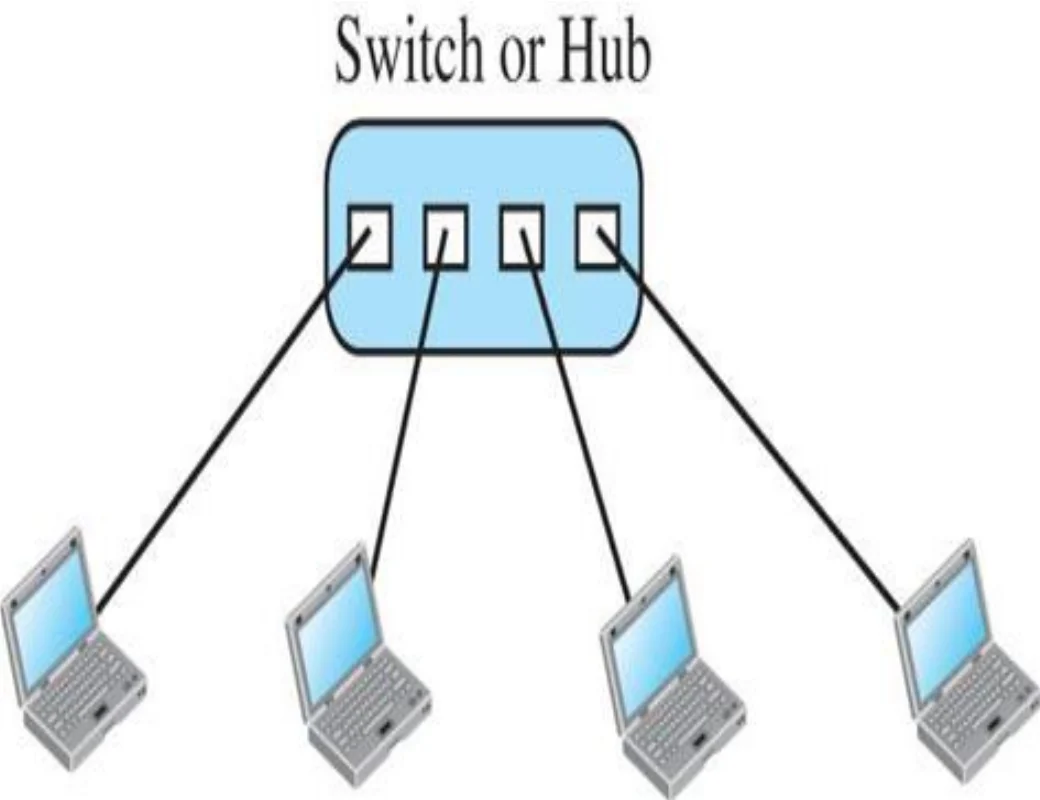
Star topology (Figure 1.9)

  • Dedicated point-to-point link to a central controller only①
  • Number of links = N
  • Advantages
    • Less expensive than mesh
    • Easy to install
    • Easy to add and remove devices
    • Robust
    • Easy to discover faulty links
    • Secure but less than mesh
  • Disadvantages?
    • If the central device failed the whole network will not function②
Four computers each linked to a central switch or hub
12
Exam weight High
  1. Each device links only to the central hub/switch, so devices never talk directly.
  2. Single point of failure: the hub. One cable failing only cuts off one device.
Exam trapRobust ≠ fault-proof: one bad link only takes out its device, but the hub failing takes out everything.
🎯 How this can come up · 2 questions
MCQ

Which topology requires a central controller or hub?

Scenario

A 20-employee office wants every computer connected to one central device, easy to manage and to grow. Which topology, and why?

★ Tutorial

Bus topology (Figure 1.10)

  • Number of links = 1 Main + N droplines①
  • Advantages
    • Easy to install
    • less cabling than mesh and hub
  • Disadvantages?
    • Difficult to isolate fault
    • Difficult to add new devices
    • A break in the bus cable stops all transmission②
Three computers on drop lines tapped into one main cable with cable ends
13
Exam weight High
  1. One long backbone cable; each device hangs off it on a drop line through a tap.
  2. A break in the backbone stops ALL transmission, and faults are hard to isolate.
TipFormulas for N devices: mesh N(N-1)/2 links and N-1 ports each · star N links · ring N links · bus 1 main cable + N drop lines.
🎯 How this can come up · 2 questions
True / False

In a bus topology, one break in the cable can stop all transmissions on the segment.

MCQ

A main cable plus N drop lines describes:

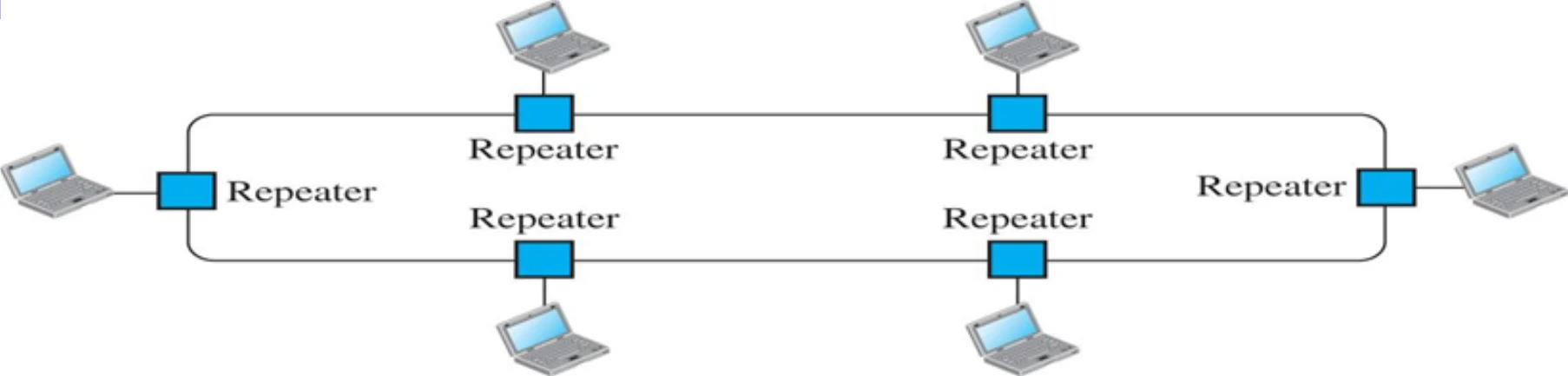
Ring topology (Figure 1.11)

  • Dedicated point-to-point link between a node and the two nodes on either side of it①
  • Number of links = N
  • Advantages
    • Easy to install
    • less cable
    • Easy to add or remove a device
    • Fault isolation is easy
  • Disadvantage?
    • Not robust②
Devices connected in a loop, each through a repeater
14
Exam weight Medium
  1. Each device links to its two neighbours; the signal goes round the ring through each device’s repeater.
  2. Not robust: one broken link or device can break the ring (unless it is a dual ring).
🎯 How this can come up · 2 questions
MCQ

A ring of 12 devices needs how many links?

True / False

Fault isolation is easy in a ring topology.

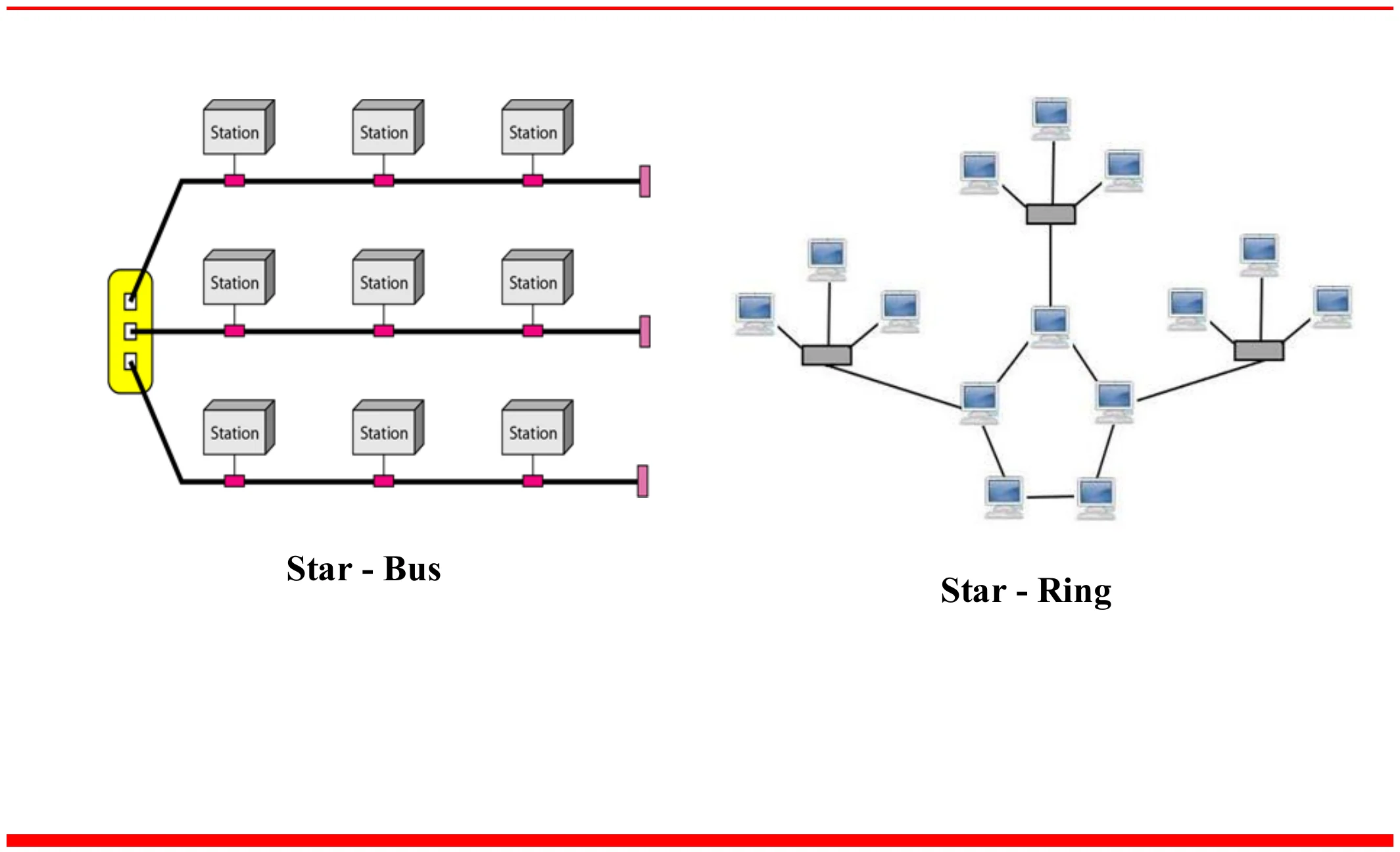
A hybrid topology: a star backbone with bus or ring networks

Star-bus: a central device linking three bus segments. Star-ring: a star of rings
Star-bus (left) and star-ring (right).
15
Exam weight Medium
  1. Hybrid = a mix, e.g. a star backbone with buses or rings hanging off it.
★ Tutorial

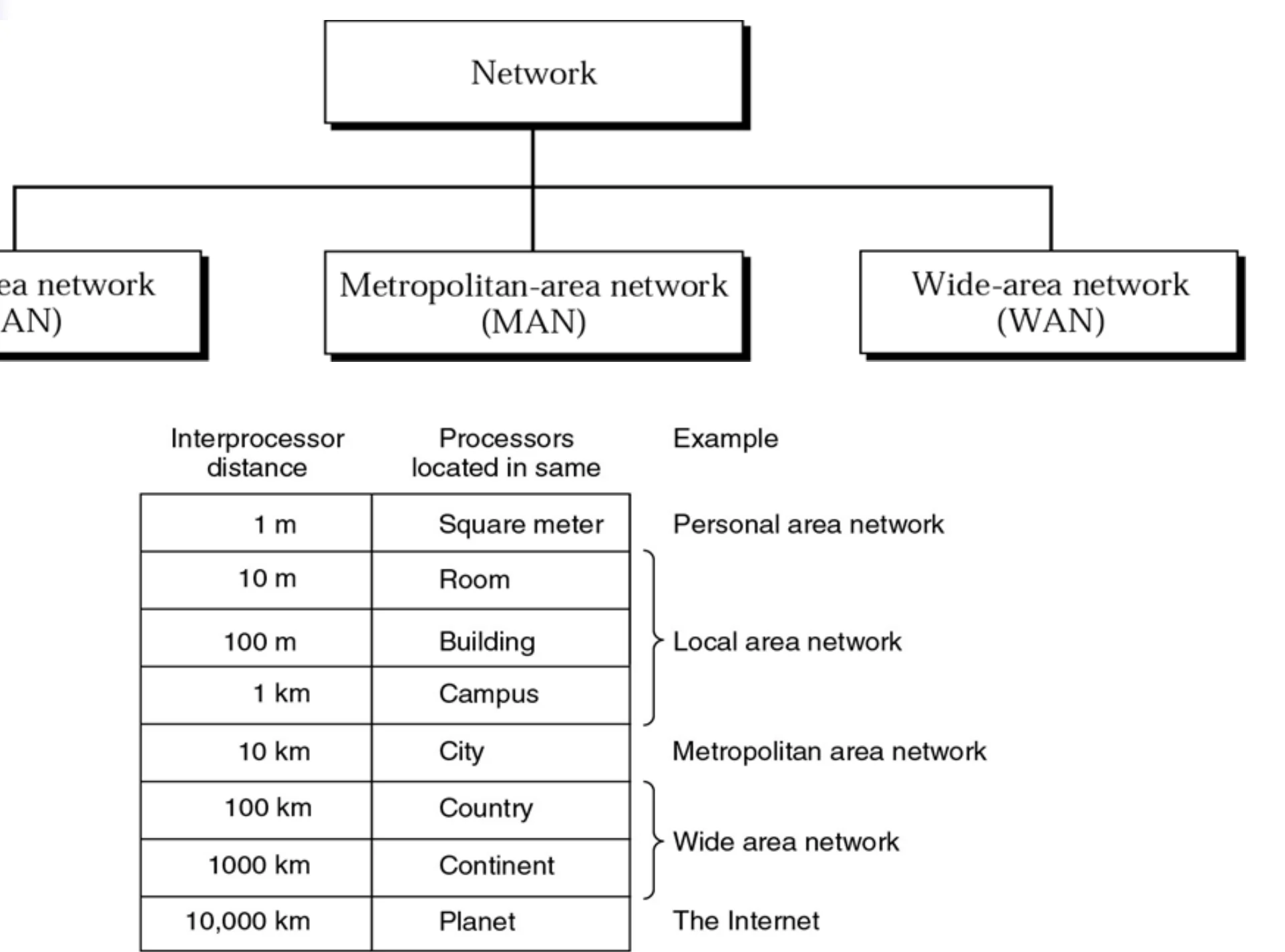
Categories of networks (Figure 1.12)

Network divides into LAN, MAN and WAN; table of interprocessor distance from 1 m (personal area) to 10,000 km (the Internet)
Room / building / campus → LAN · city → MAN · country / continent → WAN · planet → the Internet.
16
Exam weight High
  1. Classified by size: LAN (room → campus, ~1 km), MAN (a city, ~10 km), WAN (country / continent).
  2. A LAN does NOT cover more than about 2 miles: that is the Tutorial 1 trap.
🎯 How this can come up · 2 questions
True / False

A LAN typically covers an area larger than 2 miles in diameter.

MCQ

A network spanning a city is a:

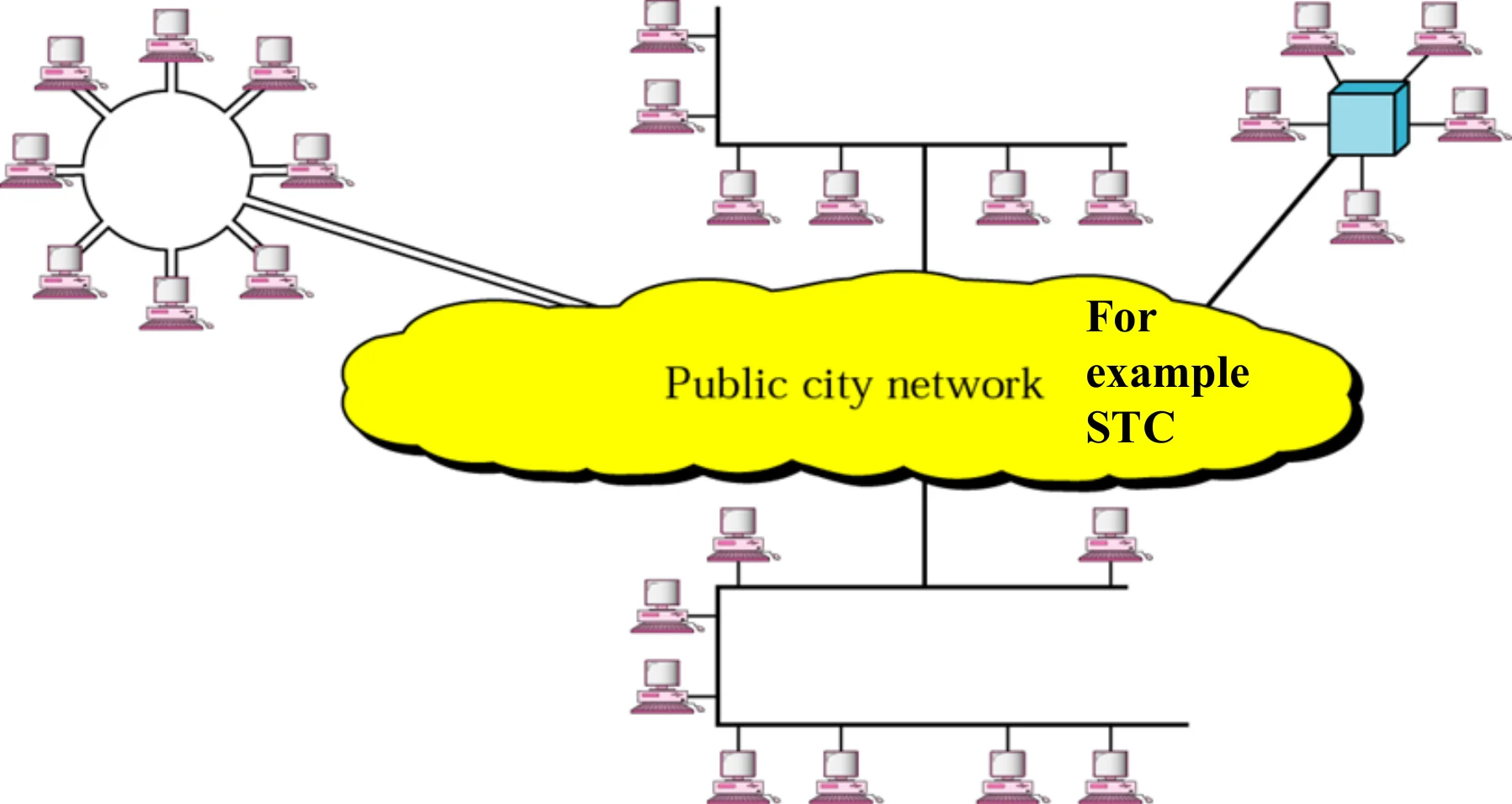
MAN (Figure 1.14)

Several LANs connected through a public city network
18
Exam weight Low
  1. MAN: covers a town or city, often run by a telecom company (the slide’s example: STC).

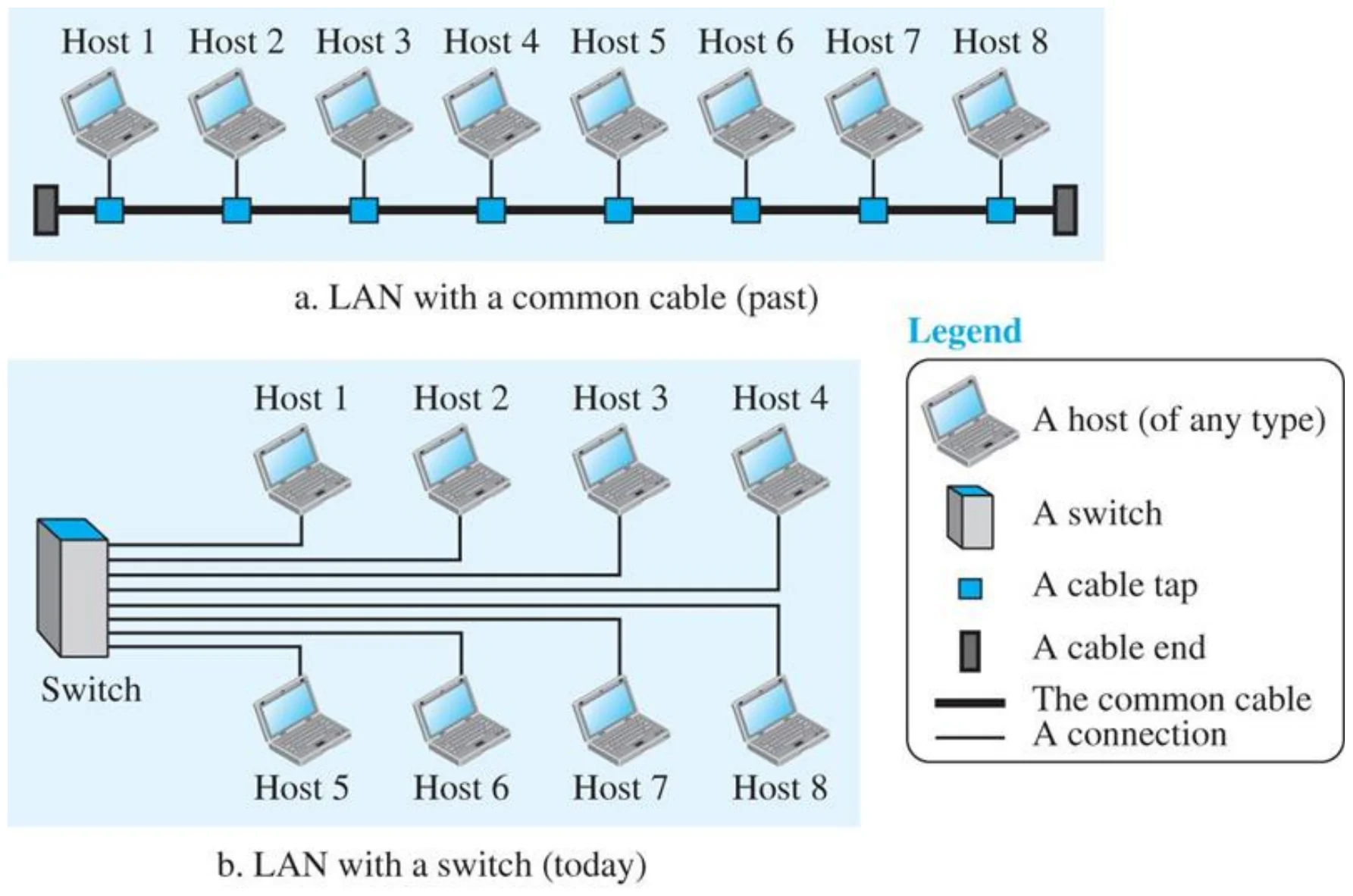
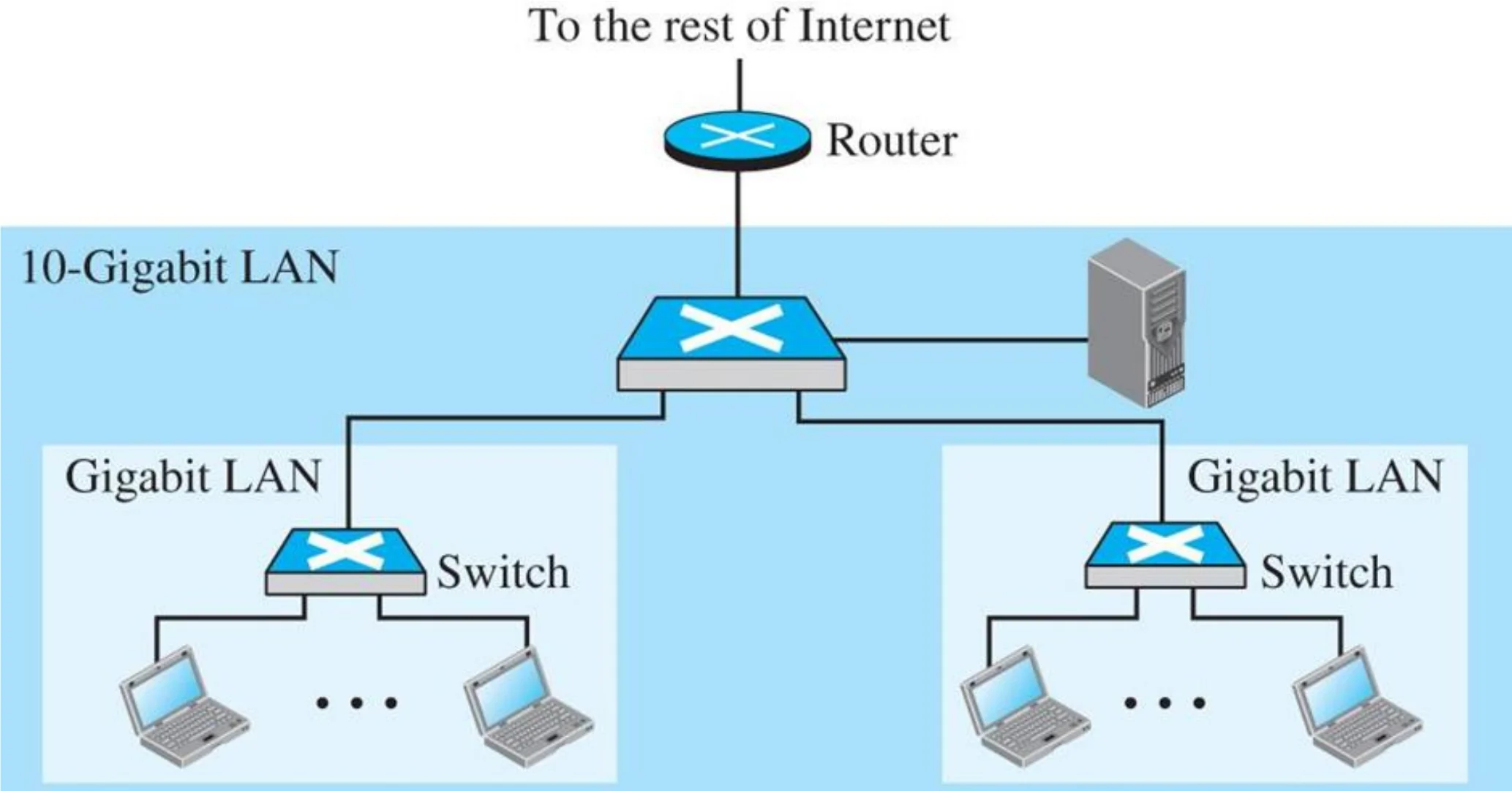
LAN (two buildings) (Figure 1.13)

A 10-Gigabit LAN with a router to the Internet, linking two Gigabit LANs with switches
19
Exam weight Low
  1. LANs are built in layers: switches per building, a faster backbone switch, one router out to the Internet.
★ Tutorial

An internetwork made of two LANs and one WAN (Figure 1.11)

West-coast LAN and east-coast LAN joined by routers R1 and R2 over a point-to-point WAN
20
Exam weight High
  1. Internetwork (an internet, small i) = two or more networks joined by routers.
  2. The Internet (capital I) is one specific, worldwide internet.
🎯 How this can come up · 1 question
True / False

An internet (lowercase i) is the same as the Internet (uppercase I).

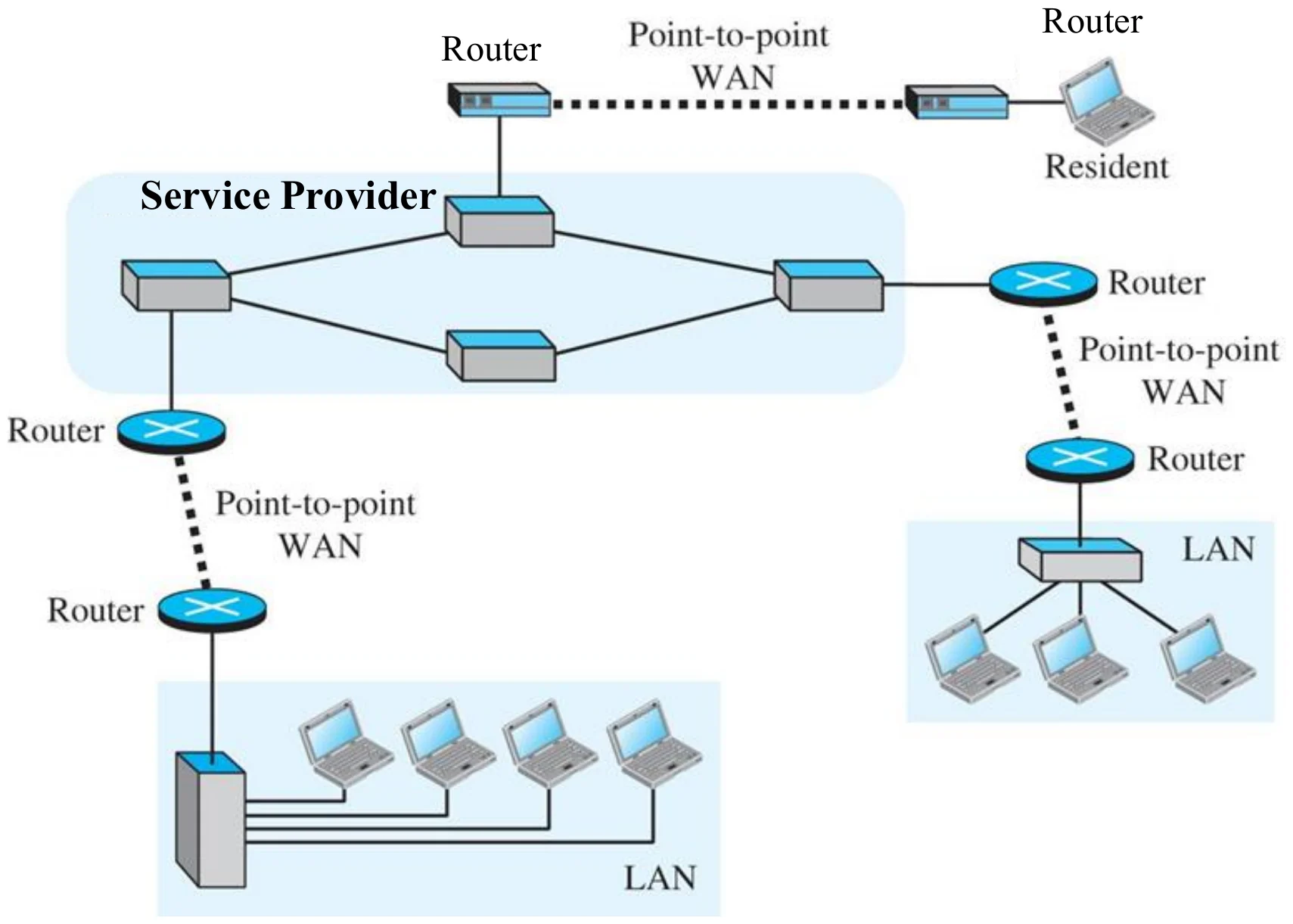
A heterogeneous network made of WANs and LANs

A service provider network with routers, connecting LANs and a resident over point-to-point WANs
21
Exam weight Low
  1. Real networks mix LANs and point-to-point WANs; routers sit at every boundary.
★ Tutorial

WAN (Figure 1.15)

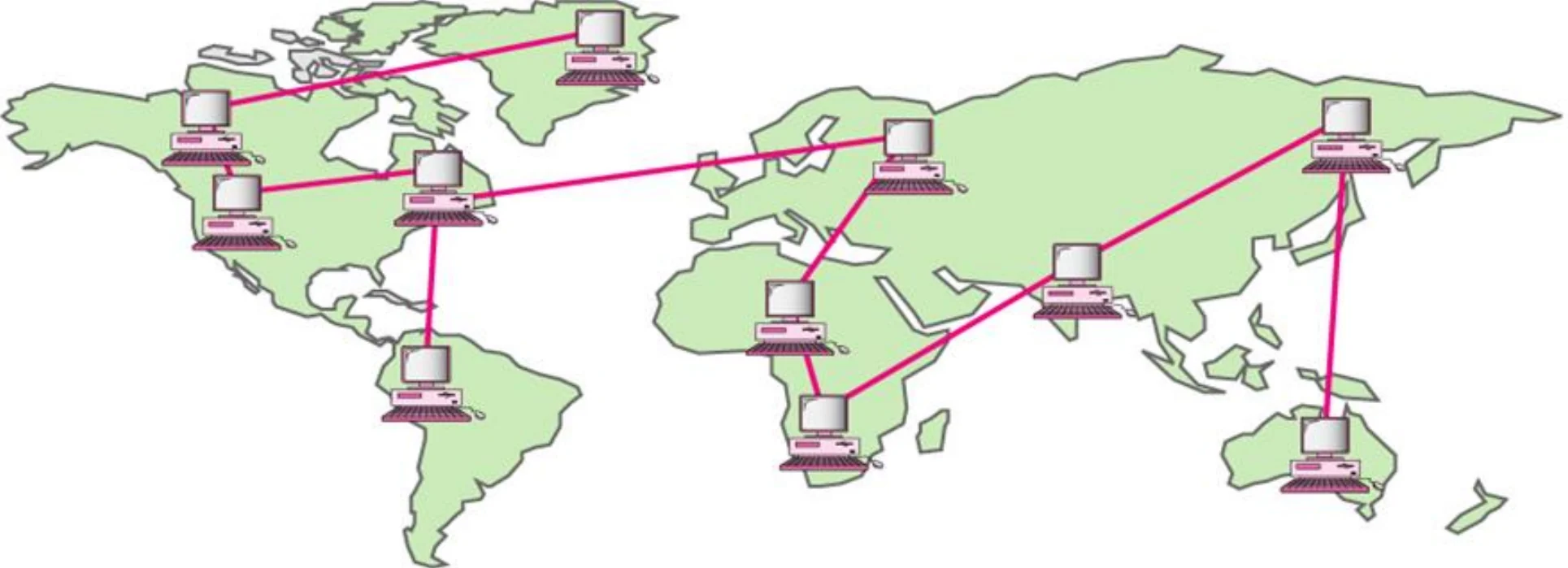
WAN: Provides long-distance transmission of data①

World map with long-distance links between sites
22
Exam weight Medium
  1. WAN: countries and continents. Usually a mesh or hybrid of point-to-point links.
🎯 How this can come up · 1 question
Scenario

A company links its New York headquarters with offices in London, Tokyo and Sydney, needing high-speed, reliable and secure links. What kind of network and topology fit?

★ Tutorial

1.3 The Internet

  • The Internet is a collection of different networks that run TCP/IP protocols suite①
  • It is made of many wide- and local area networks joined by connecting devices and switching stations
  • In order to be considered on the Internet, your host machine should
    • run TCP/IP protocol
    • have Internet address
    • be able to send Internet Protocol (IP) packets to other machines on the Internet②
23
Exam weight High
  1. The Internet = many networks that all run TCP/IP.
  2. To be “on the Internet” a host must run TCP/IP, have an Internet (IP) address, and send IP packets.
🎯 How this can come up · 1 question
MCQ

__________ is the protocol suite of the current Internet.

Internet Service Providers (ISPs)

  • Backbones: International Service providers ( tier-1 ISPs)
    • International coverage
    • Called Internet backbone networks
    • Few number exists①
    • Own links and routers to connect to other networks:
    • Connected directly to other tier-1 ISPs
    • Examples: Sprint, AT&T, LUMEN, etc.
  • Provider networks: National or regional (
    • Gateways to the international Internet
    • Connected to at least one tier-1 ISPs
    • has a regional or national coverage
    • Example: STC, ITC, Mobily②
  • Local ISPs (Tier-3)
    • Taking services from National Providers③
24
Exam weight High
  1. Tier 1 = backbones: international, few of them, own their links, connect directly to each other.
  2. Tier 2 = national/regional providers (STC, Mobily); connect to at least one tier-1.
  3. Tier 3 = local ISPs that buy service from the national providers.
Memory trickTier number goes UP as you get closer to the customer: 1 = global, 2 = national, 3 = local.
🎯 How this can come up · 2 questions
MCQ

STC and Mobily are examples of:

True / False

Tier-1 ISPs connect directly to other tier-1 ISPs.

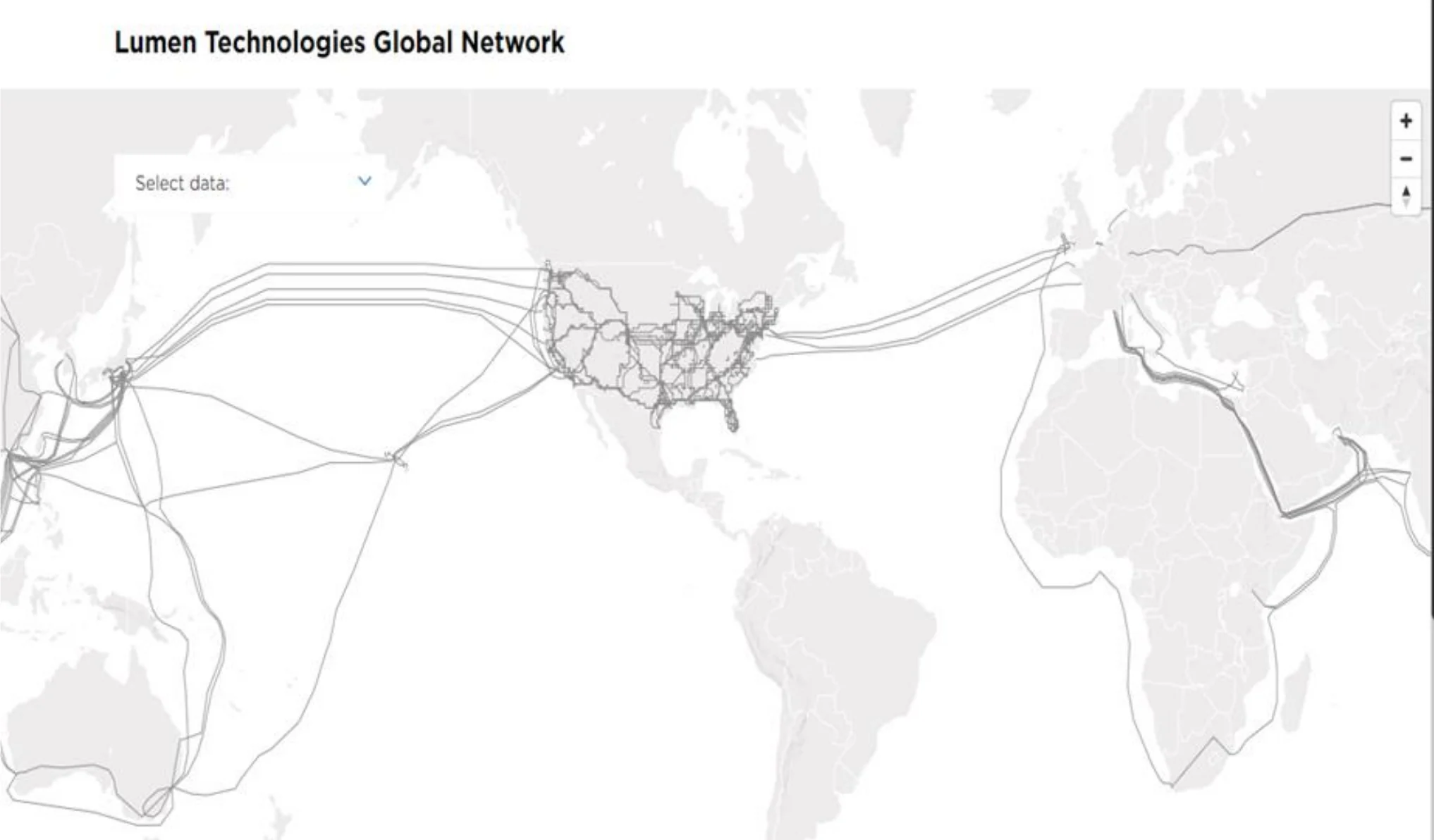
Example: a tier-1 backbone (Lumen)

Map of Lumen Technologies’ global network of undersea and land links
25
Exam weight Low
  1. A tier-1 network owns links on every continent.

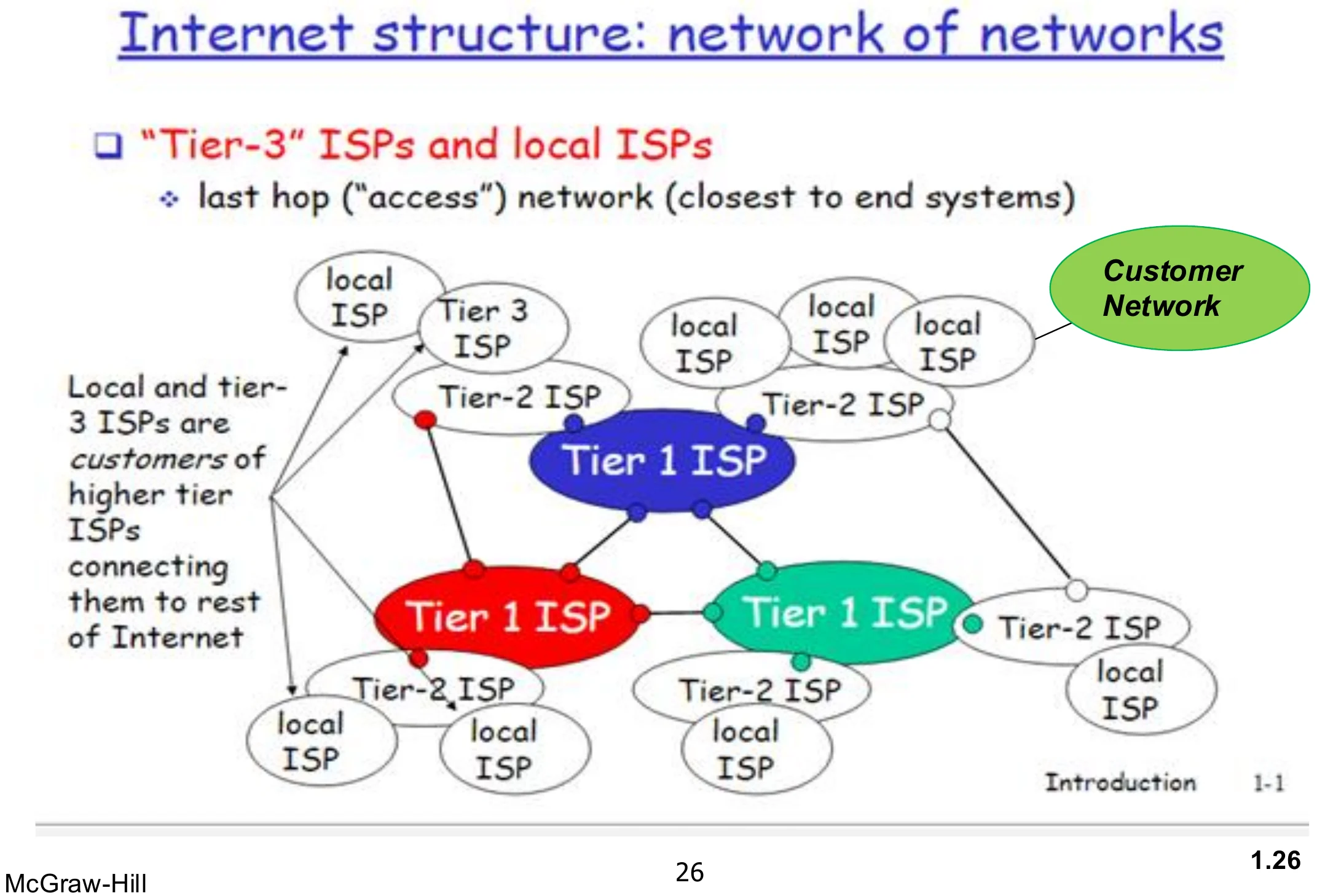
Internet structure: network of networks

Tier-1 ISPs in the centre, tier-2 ISPs around them, local and tier-3 ISPs at the edge with customer networks
26
Exam weight Low
  1. Local and tier-3 ISPs are customers of the higher tiers; the “last hop” to end systems is the access network.

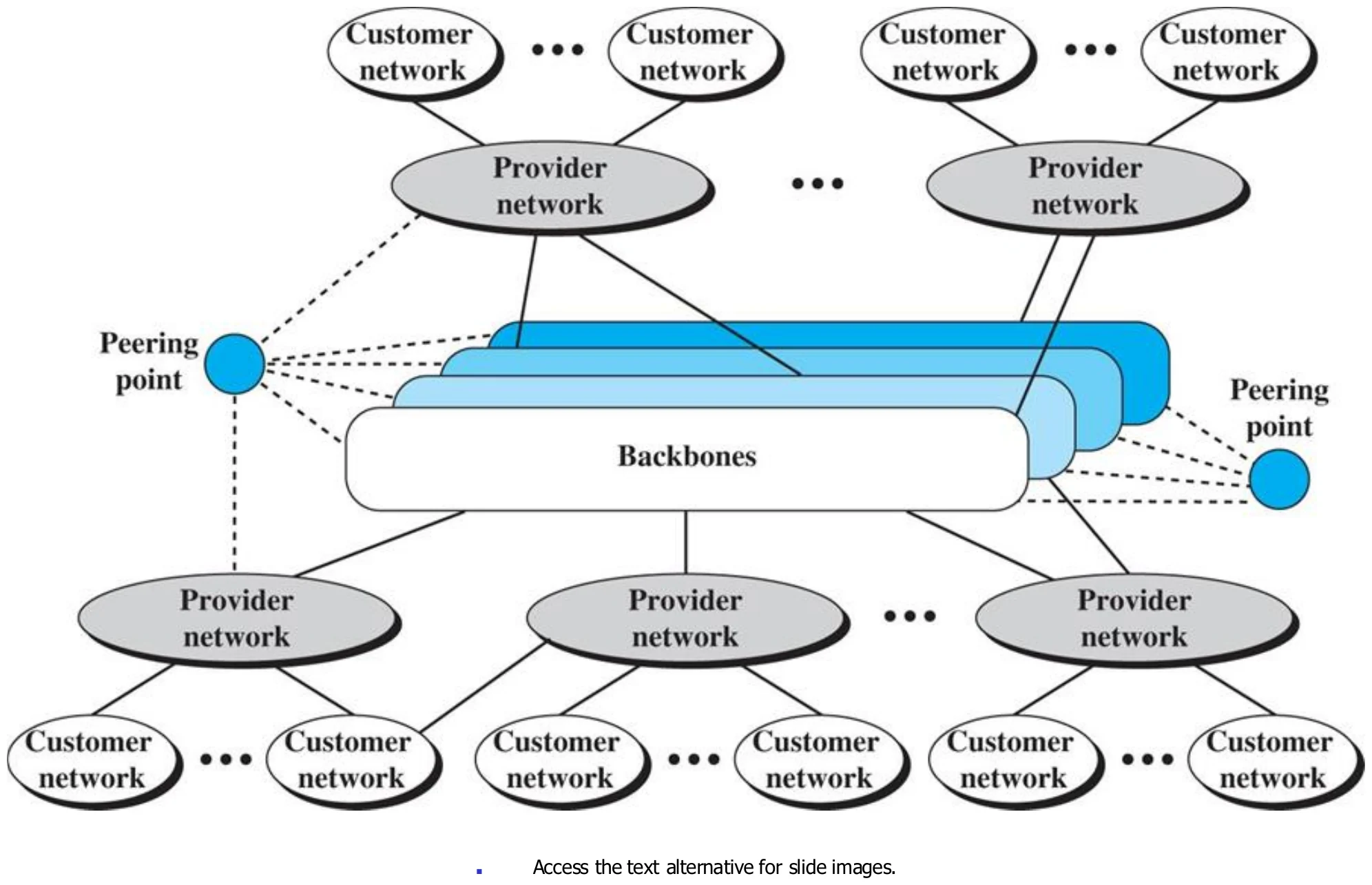
The Internet today (Figure 1.13)

Backbones joined at peering points, provider networks below, customer networks at the bottom
27
Exam weight Low
  1. Backbones in the middle, joined at peering points; provider networks hang off them; customers at the edge.

Methods of ISPs InterConnection

  • Peering is the interconnection of networks, allowing those networks to exchange traffic.①
  • Methods of ISP interconnection (peering):
    • Private Peering Points (Direct Connection)
      • Points at which one ISP is connected to the others and consist of a group of routers (devices that connects networks together)
      • Private Peering Points are owned and operated by ISPs not by a third party telecommunication company
    • Internet Exchange Points (IXP) (Public Peering)
      • is a physical infrastructure through which Internet service providers (ISPs) exchange Internet traffic between their networks
      • A public IXP is managed by a third party and enables any ISP to connect with any other ISP
      • IXP consists of Complex high speed switching networks
      • IXP exchange huge amounts of traffic②
    • Current trend for connecting ISP:
      • International ISPs connect to each other at private peering points
      • National ISPs interconnect using IXP
28
Exam weight High
  1. Private peering: ISPs connect directly; the points are owned and run by the ISPs themselves.
  2. IXP (public peering): a third party runs a high-speed switching network where any ISP can connect.
  3. Today: international ISPs use private peering; national ISPs meet at IXPs.
Exam trapPrivate peering points are run by the ISPs; an IXP is run by a THIRD party.
🎯 How this can come up · 2 questions
MCQ

An Internet Exchange Point (IXP) is managed by:

True / False

National ISPs usually interconnect using IXPs.

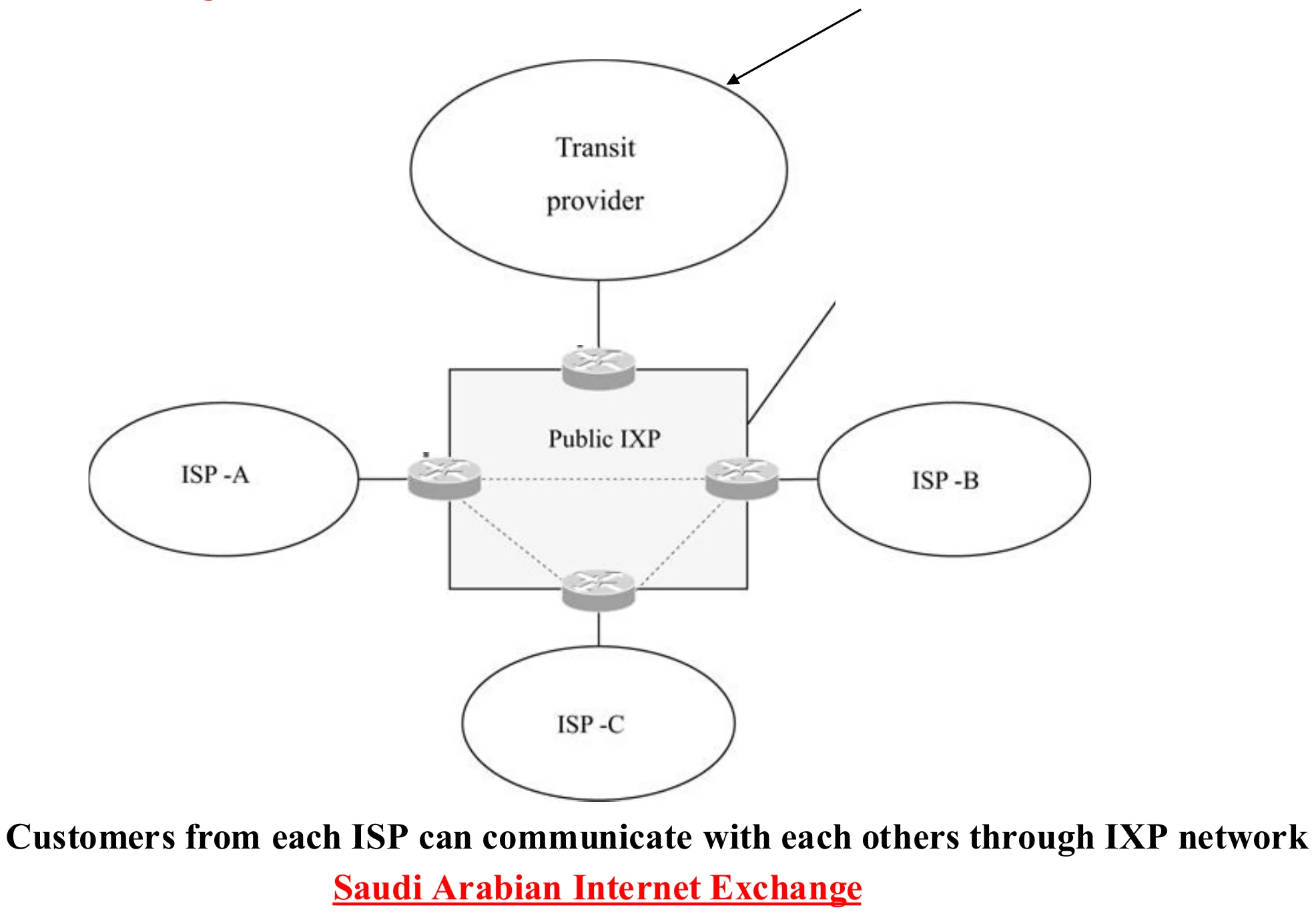
Internet Exchange Points (IXP)

ISP-A, ISP-B and ISP-C each connect to a router in a public IXP, which also links to a transit provider
29
Exam weight Low
  1. Customers of each ISP reach each other through the IXP instead of going abroad. Example: the Saudi Arabian Internet Exchange.
★ Tutorial

1.4 Internet Standards

  • In early 1970s, IBM, Digital Equipment and other vendors developed networking architectures that allow only their own computers to operate in local computer networks
  • Each company network can’t communicate with other company equipments without using a major translation software.①
  • Question: How to allow these different networks communicate with each others easily?
    • Answer: Communicating devices must agree on a protocol or standards
  • Protocol: set of rules controlling the exchange of data between two entities in a system.
    • Entities: application that is capable of sending and receiving information (ex: user applications, email,... etc).
    • Systems: computers, terminals, remote sensors②
30
Exam weight High
  1. Early vendor networks could not talk to each other without translation software, which is why we need standards.
  2. Protocol = a set of rules controlling data exchange between two entities in a system.
Exam trap“A protocol is the structure or format of the data” ✗. That is only syntax, one element of a protocol.
🎯 How this can come up · 2 questions
True / False

A protocol is defined as the structure or format of data.

MCQ

A protocol is best defined as:

★ Tutorial

Internet Standards

  • Standards and protocols specify hardware and software procedures through which computers can correctly and reliably talk to one another
  • Required to allow for interoperability among equipments built by different vendors①
  • Advantages
    • Ensures a large market for equipment and software
    • Provide guidelines to manufacturers, vendors, government agencies.
    • Allows products from different vendors to communicate②

Agreements must be at many levels ...

  • How many volts pulse is a 0 and 1 ?
  • How to determine the end of a message ?
  • How to handle lost messages ?
  • How many bits for different data types ? Integers/Strings, etc.; are ASCII chars ?
  • How machines are identified in a network?
  • How to find the way to reach a machine ?
  • How applications speaks together through the network ?
31
Exam weight Medium
  1. Standards = interoperability: gear from different vendors can work together.
  2. Agreements are needed at many levels: voltages for 0/1, message boundaries, lost messages, addressing, routing, applications. Each turns into a layer later.
🎯 How this can come up · 1 question
Written

Why are standards important in data communications? Give examples.

Standards Organizations

  • International Organization for standardization (ISO)
  • International Telecommunication Union (ITU-T) – UN Agency
  • American National Standards Institute (ANSI)
  • Institute of Electrical and Electronic Engineers (IEEE) – specializes in LAN/MAN standards①
  • World Wide Web Consortium (W3)
32
Exam weight Medium
  1. ISO (international), ITU-T (UN telecom agency), ANSI (US), IEEE (LAN/MAN, e.g. 802.3 Ethernet), W3C (the web).
🎯 How this can come up · 1 question
MCQ

Which organization specializes in LAN/MAN standards?