CS331 · Annotated SlidesChapter 6 — Connecting Devices and Virtual LANs
Chapter 6 · Annotated slides

Connecting Devices and Virtual LANs

Hubs, link-layer switches and routers: which layer each works at, how a switch learns and filters, why loops cause broadcast storms and how spanning tree fixes them, collision vs. broadcast domains, store-and-forward vs. cut-through, and VLANs. Counting collision and broadcast domains in a drawing is the classic question here, so the notes show how to count.

Slide text Study notes Highlight: key words Tips, tricks & traps Seen again elsewhere How it can come up

Connecting Devices and Virtual LANs

CS331: Computer Networks · Chapter 6
1
Exam weight Low
  1. Hub (layer 1) → switch (layer 2) → router (layer 3), then loops and spanning tree, then VLANs.
TipCounting domains: every switch or router PORT starts a new collision domain (a hub port does not). Every router PORT starts a new broadcast domain (switches and hubs do not, unless VLANs are used).

6-1 CONNECTING DEVICES

  • Hosts and networks do not normally operate in isolation. We use connecting devices to connect hosts together to make a network or to connect networks together to make an internet. Connecting devices can operate in different layers of the Internet model. We discuss three kinds of connecting devices: hubs, link-layer switches, and routers.①
2
Exam weight Low
  1. Connecting devices join hosts into a network, or networks into an internet.

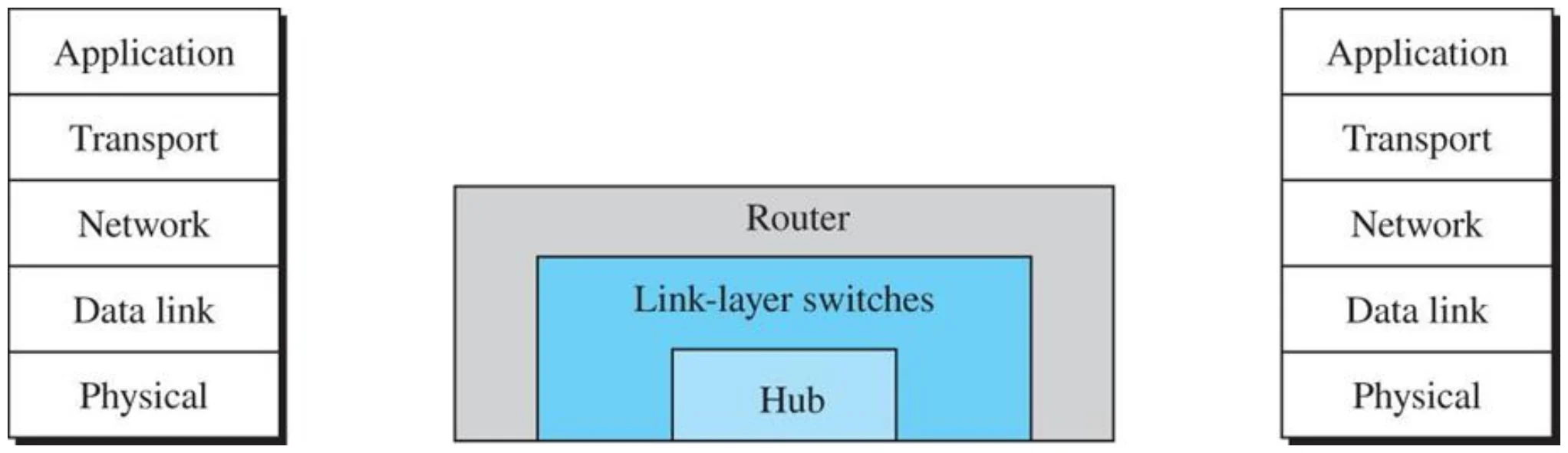
Three categories of connecting devices (Figure 6.1)

A hub spans the physical layer, a link-layer switch the physical and data link layers, a router up to the network layer
3
Exam weight High
  1. Hub = layer 1 · link-layer switch = layers 1–2 · router = layers 1–3.
🎯 How this can come up · 2 questions
MCQ

A link-layer switch operates in which layers?

MCQ

Which device works at the network layer?

Hubs

  • Hub is a physical layer device
  • Operate on bits rather than frames
  • Used to connect stations adapters in a physical star topology but logically bus①
  • Connection to the hub consists of two pairs of twisted pair wire one for transmission and the other for receiving.②
  • Hub receives a bit from an adapter and sends it to all the other adapters without implementing any access method.
  • Does not do filtering (Filtering means the device can check the destination link-layer address of a frame and can decide from which outgoing port the frame should be sent)③
  • Hubs just copy the received bits onto all other links
  • Multiple Hubs can be used to extend the network length
  • For star topology,
    • the maximum length of the connection between a host NIC and the central device is 100 meters
    • the maximum length between any two nodes is 200 m = maximum network length④
A hub and a rack of hubs
4
Exam weight High
  1. Hub = layer 1: works on BITS, copies every bit to every other port, no filtering, no access method.
  2. Physically a star, logically a bus.
  3. Cable host ↔ hub max 100 m, so two hosts can be at most 200 m apart.
Exam trapA hub does not read MAC addresses at all; it only repeats bits.
🎯 How this can come up · 3 questions
MCQ

A hub forwards a received bit to:

MCQ

Topology of hosts connected to a hub:

True / False

A hub performs filtering using MAC addresses.

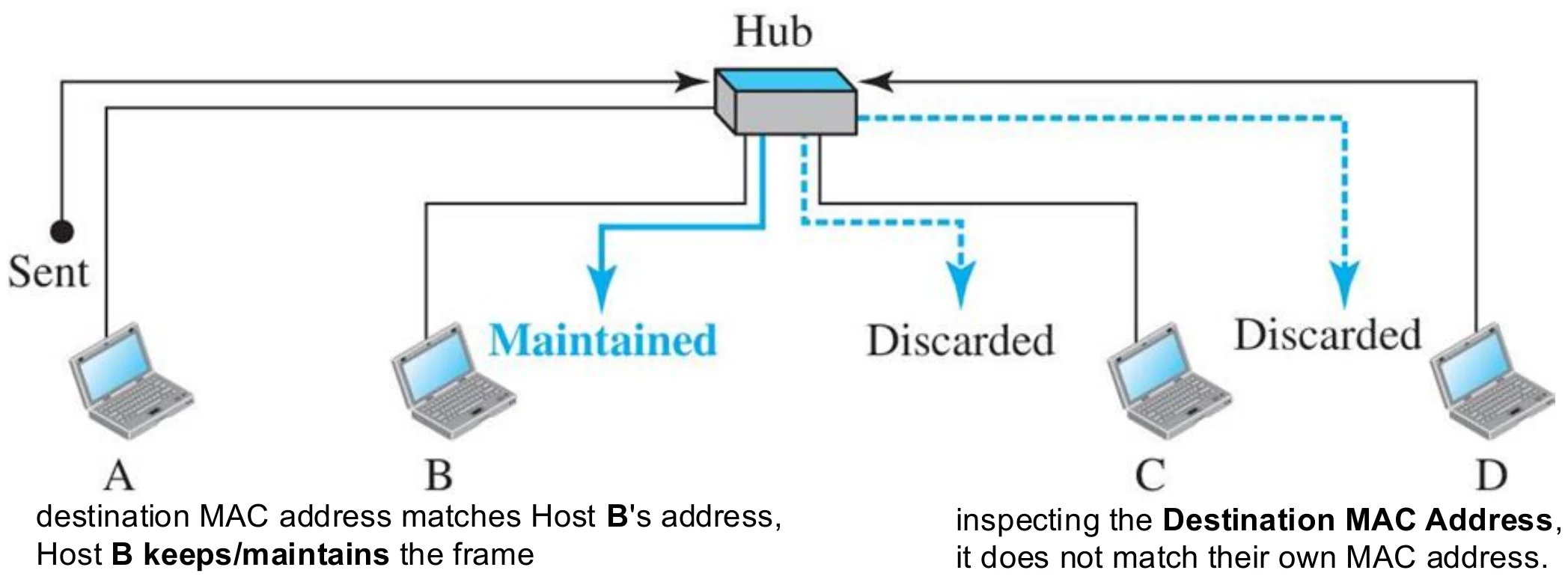
A hub

A sends a frame; the hub repeats it to B, C and D; B keeps it, C and D discard it
5
Exam weight Low
  1. Everyone gets the frame. Each NIC checks the destination MAC: B keeps it, C and D discard it.

Hubs

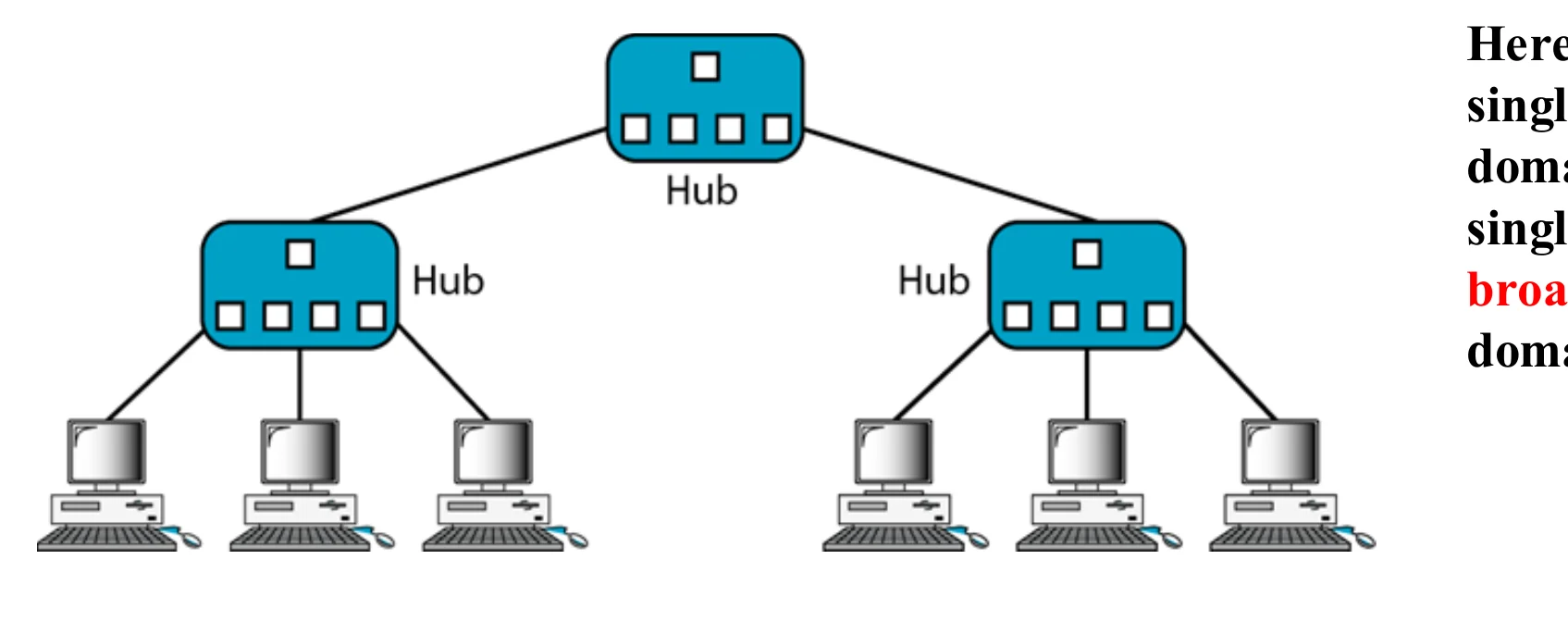
  • The entire hub forms a single collision domain, and a single Broadcast domain①
    • Collision domain: that part of the network (set of devices) when two or more nodes transmit at the same time collision will happen.②
    • Broadcast domain: that part of the network (set of devices) where each device can receive other devices broadcast messages③
6
Exam weight High
  1. Collision domain: the set of devices whose simultaneous SENDING collides.
  2. Broadcast domain: the set of devices that RECEIVE each other’s broadcasts.
  3. A whole hub = 1 collision domain + 1 broadcast domain.
Memory trickCollision = who can crash into each other. Broadcast = who can hear each other’s shouting.
🎯 How this can come up · 2 questions
MCQ

Five PCs are connected to one hub. How many collision domains?

Written

Define collision domain and broadcast domain.

Interconnecting with hubs

  • hub interconnects LAN segments
  • Advantage:
    • Extends max distance between nodes①
  • Disadvantages
    • Individual segment collision domains become one large collision domain → (reduce the performance)②
Three hubs joined by a backbone hub: a single collision domain and a single broadcast domain
7
Exam weight Low
  1. Hubs joined by a hub: longer reach, but ALL the segments become one big collision domain → worse performance.

Link-Layer Switches

A link-layer switch (or switch) is a data link layer device. The switch physical-layer, regenerates the signal it receives.①

As a Data link layer device, the link-layer switch can check the MAC addresses (source and destination) contained in the frame.②

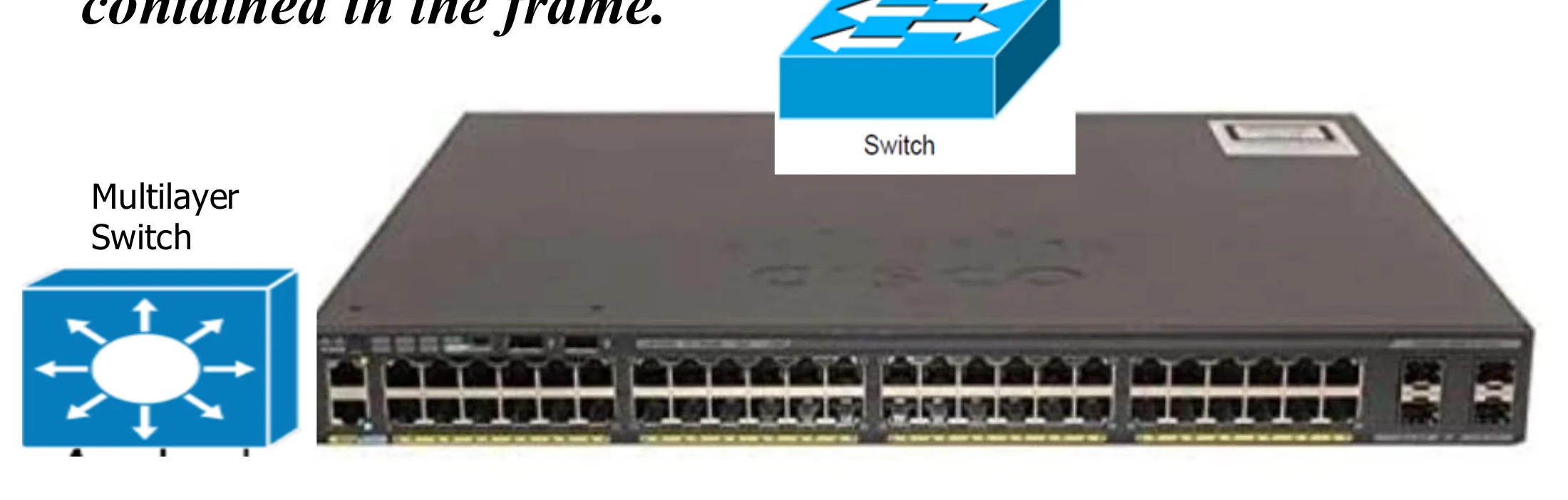
A multilayer switch, a switch icon, and a 48-port switch
8
Exam weight Low
  1. A switch does physical-layer work (regenerates the signal) AND data-link work (reads MAC addresses).

Switches

  • Data link layer device.
  • Deals with Frames
  • Used to divide (segment) the LAN into smaller LANs segments①
  • In case of bus topology or star with Hub, Switch runs CSMA/CD before sending a frame onto the link not like the hub
  • This means each connection to the switch port is separate collision domain.
  • Switch does not send the received frame to all other interfaces like hubs, but it performs filtering which means:
    • Switch forwards the frame through certain port based on its destination MAC address that leads to the destination②
    • This is done by a Switch table (forwarding table) that contains entries for the hosts on the LAN
    • The Switch table is initially empty and filled automatically by learning from frames movements in the network
    • An entry in the switch table consists of: host LAN (MAC) Address, Switch Interface to which the node is connected to, the record creation time③
9
Exam weight High
  1. Switch = layer 2, works on FRAMES. Each port is a separate collision domain.
  2. Filtering: send the frame only out of the port that leads to the destination MAC, using the forwarding (MAC) table.
  3. The table starts EMPTY and fills itself by learning. Entry = MAC address + interface + time.
🎯 How this can come up · 2 questions
MCQ

A switch’s forwarding table is initially:

MCQ

A switch table entry contains:

Switches vs. hubs

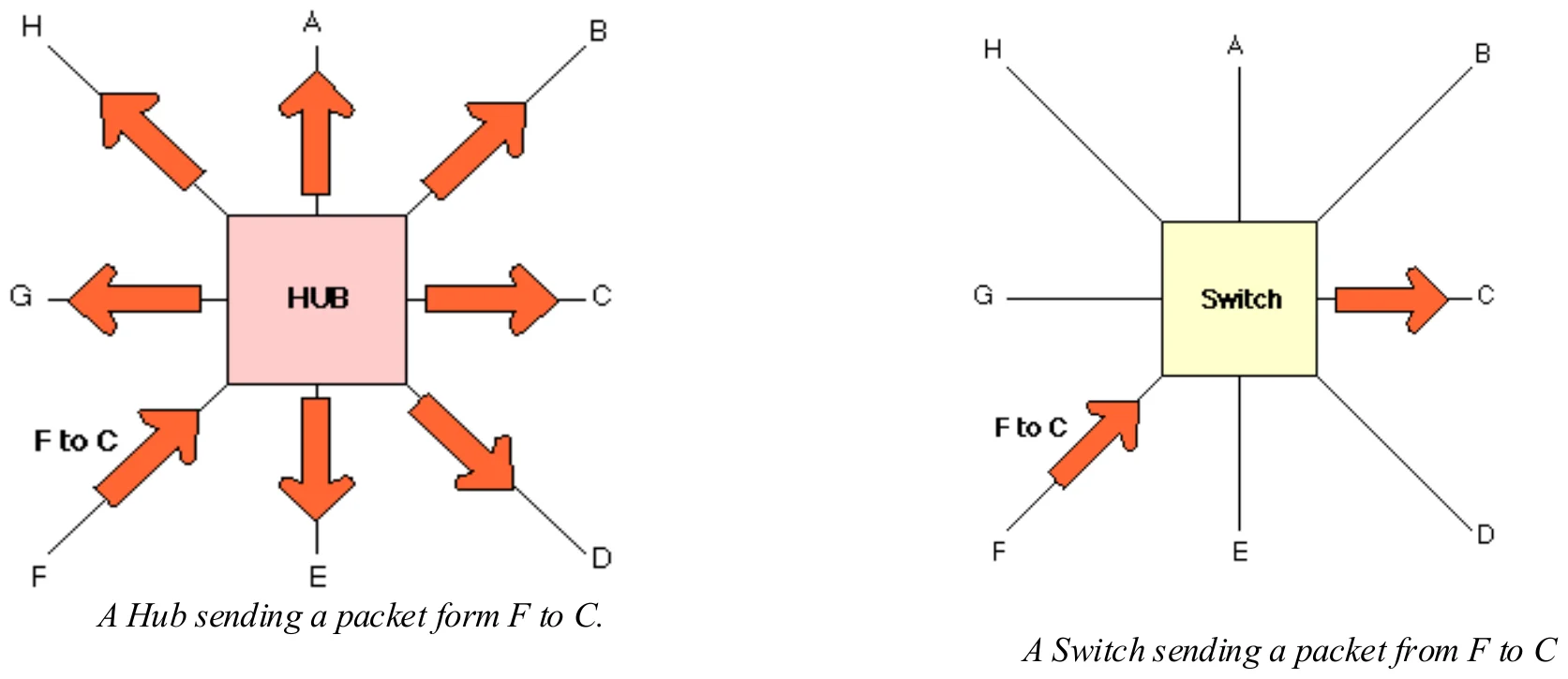
A hub sends a packet from F out to every port; a switch sends it from F only to C
10
Exam weight Low
  1. Hub: F → everyone. Switch: F → only C.

Link-layer switch

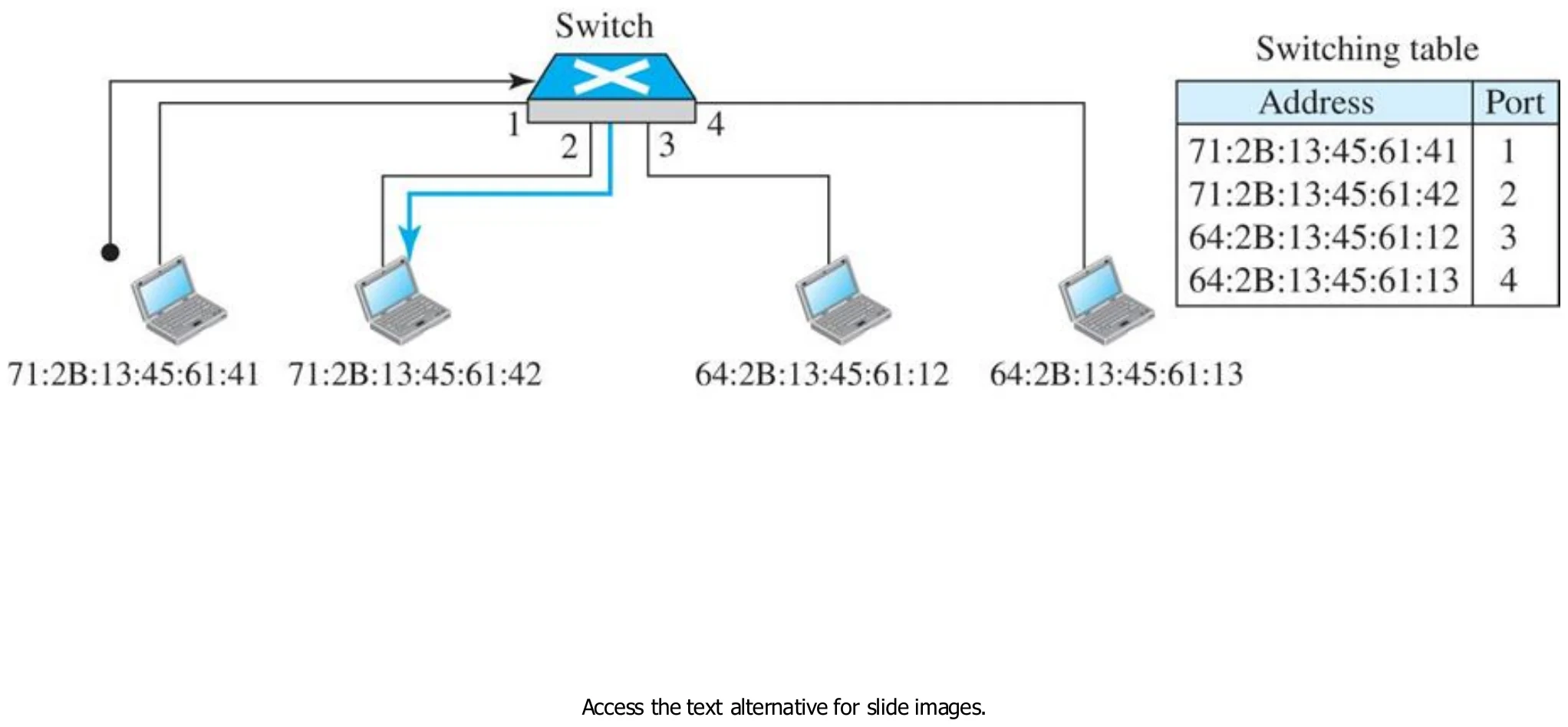
A four-port switch with a switching table mapping four MAC addresses to ports 1–4
11
Exam weight Low
  1. Switching table: MAC address → port.

Switch learning process

  • Learning process
  • When the switch receives a frame, it compares the source address of the frame with each entry in the forwarding table
    • If no match is found, the switch adds the frame’s source address and the interface number on which the frame was received.①
    • If a match is found, the switch updates the interface number if it is different from the one in the table, and also updates the record time②
  • Forwarding process
  • The switch compares the destination address of the frame with each entry in the forwarding table (MAC table)
    • If a match is found, the switch compares the interface the frame arrived on with the interface in the table: if they are different it forwards the frame out of the stored interface; if they are the same it discards (drops) the frame.③
    • If no match is found, the switch floods the frame on all interfaces except the one on which it was received.④
    • If the switch receives a multicast or broadcast frame, it sends it to ALL ports
12
Exam weight High
  1. LEARN from the SOURCE address. FORWARD using the DESTINATION address.
  2. Destination known → forward out of that port (or drop if it’s the same port it came in on). Unknown → flood. Broadcast/multicast → all ports.
Memory trickSource teaches, destination decides.
Exam trapA switch never learns from the destination address.
🎯 How this can come up · 3 questions
MCQ

A switch learns a new table entry from a frame’s:

MCQ

A switch receives a frame whose destination MAC is not in its table. It:

True / False

If the destination is on the same port the frame arrived on, the switch drops the frame.

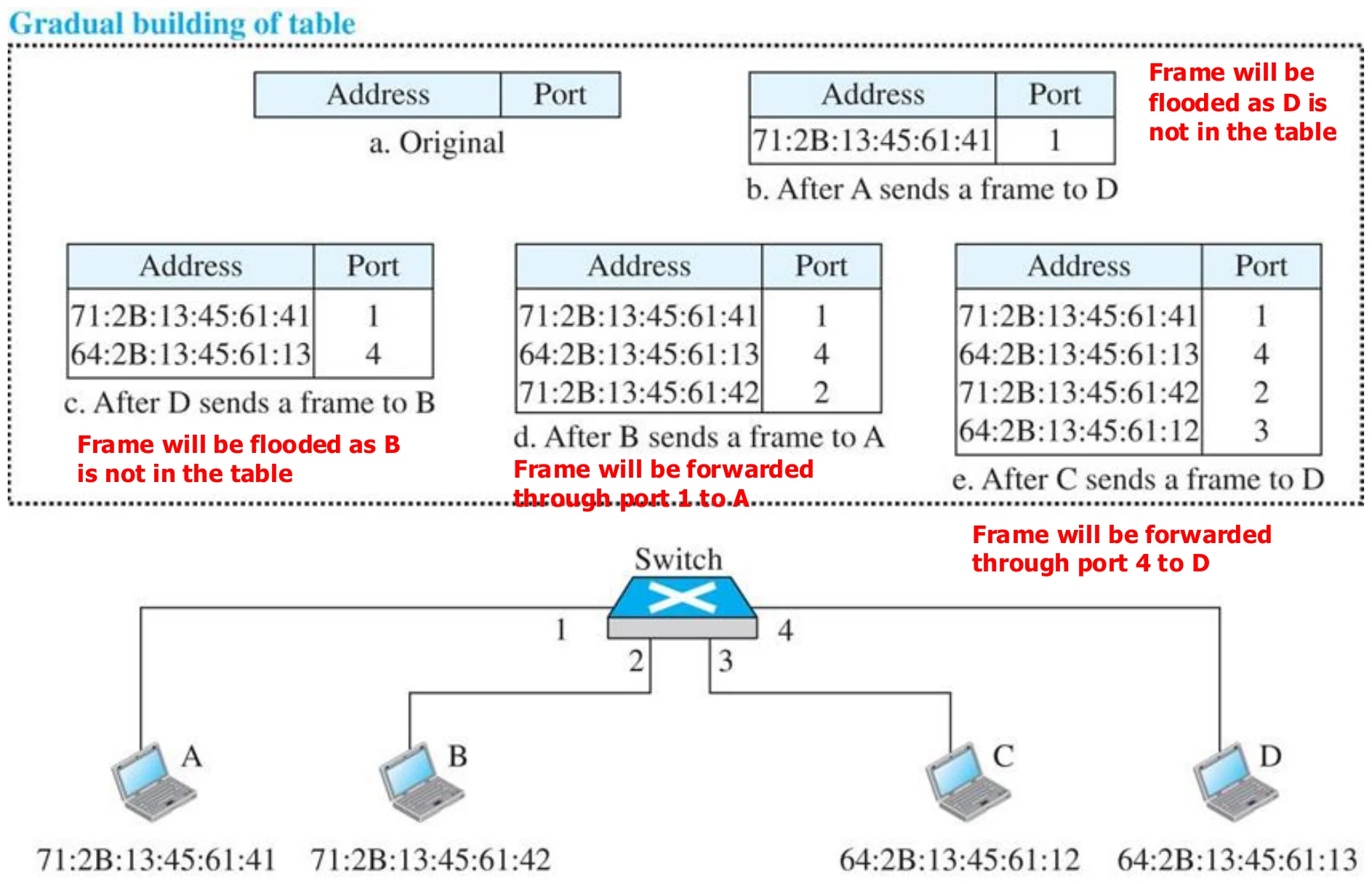
Learning switch (Figure 6.4)

The table grows as A, D and B send: unknown destinations are flooded, known ones are forwarded to one port
13
Exam weight High
  1. a. Empty. b. A → D: learn A on port 1; D unknown → flood. c. D → B: learn D on port 4; flood. d. B → A: learn B; A known → port 1. e. C → D: learn C; D known → port 4.
🎯 How this can come up · 1 question
Scenario

An empty switch has A on port 1, B on port 2, C on port 3, D on port 4. A sends to D, then D sends to A. What does the switch do each time?

Loop problem in a learning switch

  • Switched network is a network where multiple switches are used to connect different LAN parts.
  • In order to have reliable network, multiple switches and links are used to connect different LAN parts (redundancy to increase reliability).①
  • This means that two host can be connected by multiple path.
  • Loop problem happens when there is more than one path between any two hosts, in a switched network.②
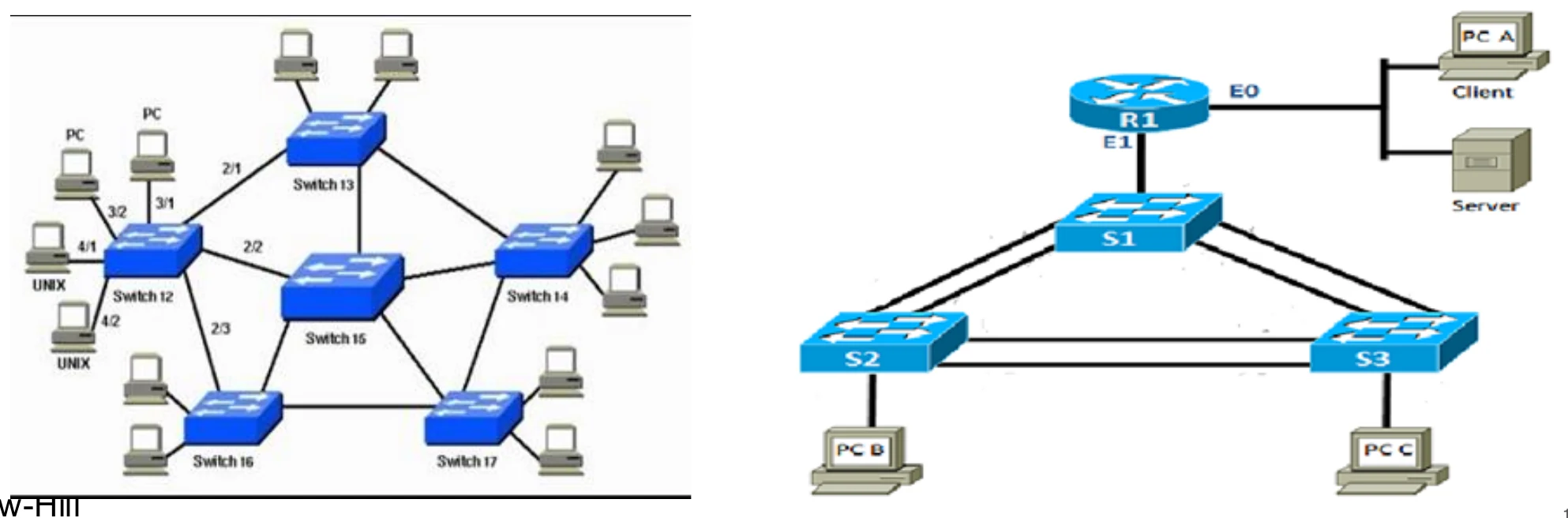
Networks of switches with redundant links
14
Exam weight Low
  1. Redundant links = reliability, but they create LOOPS (two paths between hosts).

Loop problem in a learning switch

  • Loops can cause broadcast storm.①
  • A switch will forward broadcast frame (destination MAC FF-FF-FF-FF-FF-FF) and Multicast frame (source MAC is multicast) through all ports except the one that it came from.
  • Also will do the same if the source MAC address is unicast but is not stored in the forwarding table (Unknown Unicast).
  • If the network has loops, then each switch once receives broadcast, multicast, or unknown unicast will flood the frame through all other ports.
  • This will replicate the same frame in the network continuously.
  • This is called broadcast storm and it will consume all the network resources and then stops the network.②
  • Spanning tree protocol is used to eliminate the loops③
15
Exam weight High
  1. Broadcast, multicast and unknown-unicast frames get flooded; with a loop they go round forever and multiply → broadcast storm → the network dies.
  2. Fix: the spanning tree protocol (STP).
🎯 How this can come up · 2 questions
MCQ

Loops in a switched network cause:

MCQ

Which protocol removes loops from a switched network?

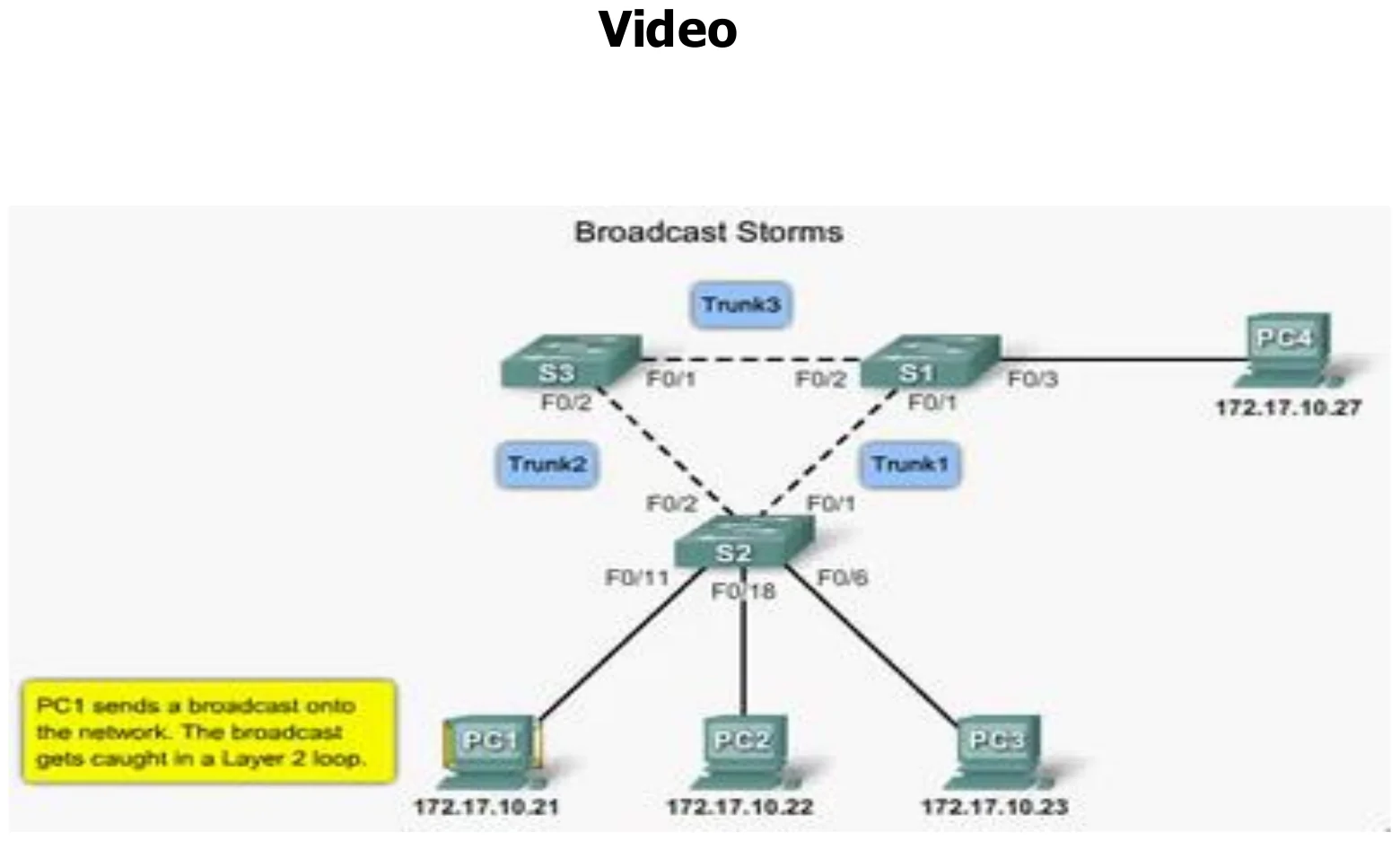
Loop problem in a learning switch: broadcast storm

Packet Tracer: a broadcast from PC1 caught in a loop between three switches
16
Exam weight Low
  1. The same broadcast keeps circling the triangle of switches.

Spanning tree: blocking ports

  • For any connected graph there is a spanning tree that maintains connectivity but contains no closed loops①
  • Loops are logically disabled by the spanning tree algorithm②
  • Some ports will be blocked by spanning tree to eliminate loops
  • Blocked ports do not forward data frames but forward special frames belonging to the spanning tree algorithm
  • Blocked ports will become forwarding ports if any change in the network causes the spanning tree protocol to run again.③
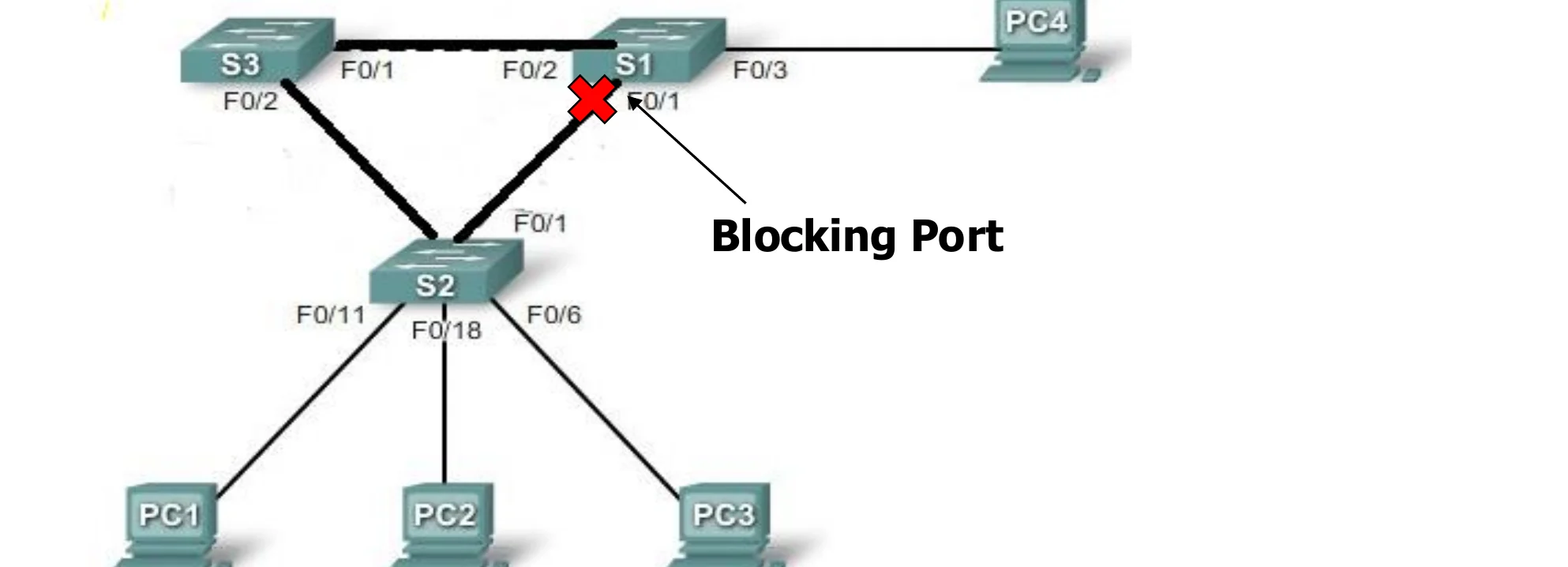
Three switches in a triangle; one port is marked as a blocking port
17
Exam weight High
  1. STP keeps every switch reachable but BLOCKS some ports so no loop is left.
  2. Blocked ports still pass STP’s own frames, and wake up if the topology changes (backup paths).
Exam trapSTP doesn’t remove cables; it logically blocks ports.
🎯 How this can come up · 2 questions
True / False

Ports blocked by spanning tree forward no frames at all.

True / False

A blocked port can become a forwarding port again if the network changes.

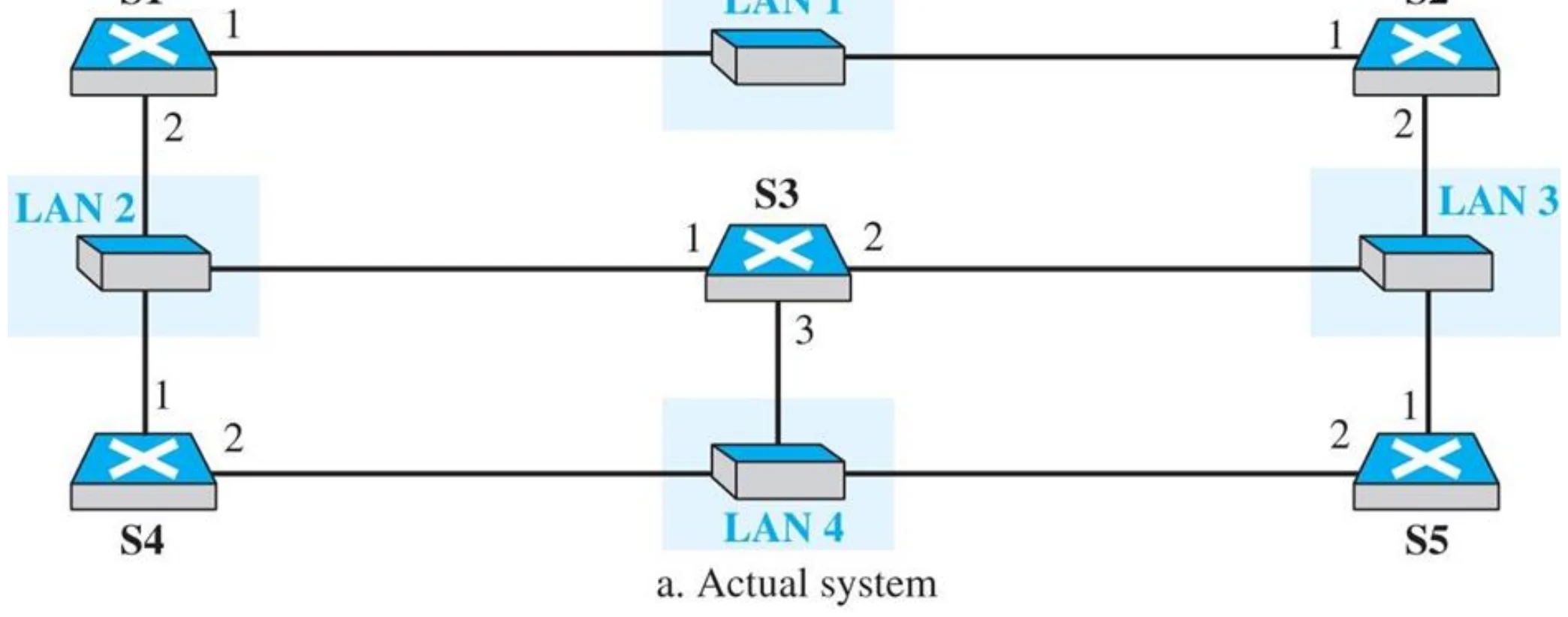
A system of connected LANs and its graph (Part a) (Figure 6.6)

Five switches S1–S5 joining four LANs with redundant paths
18
Exam weight Low

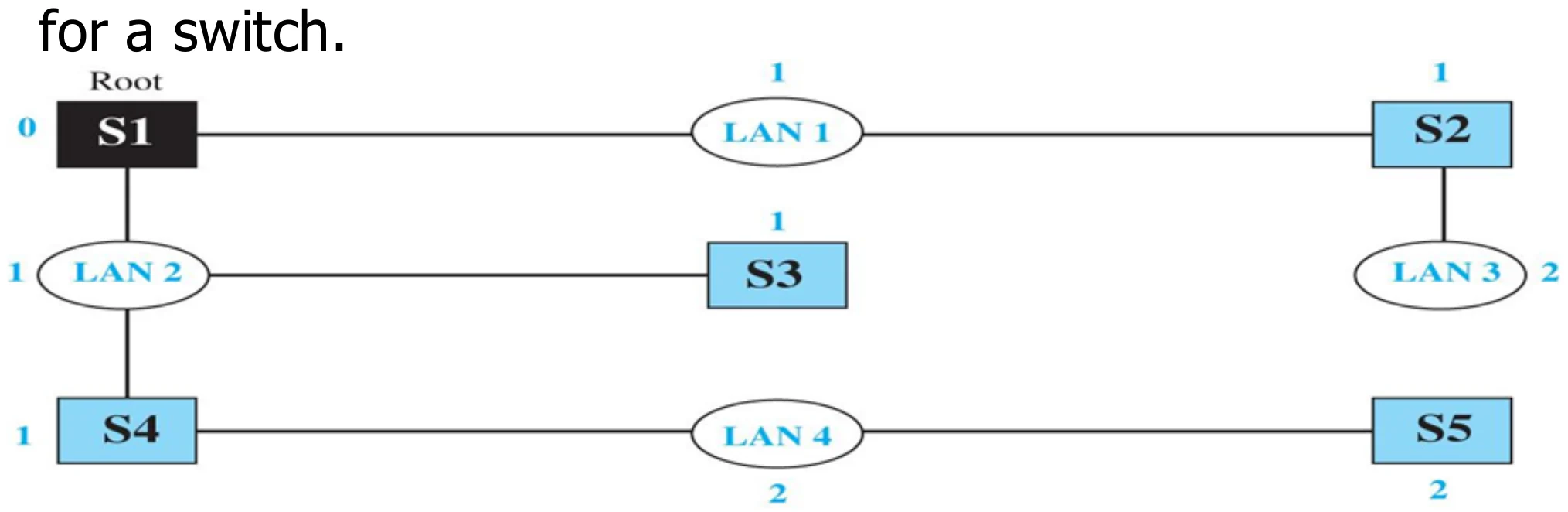
    Finding the shortest path and the spanning tree for a switch. (Figure 6.7)

    Graph with the root S1; costs 1 from switch to LAN and 0 from LAN to switch
    19
    Exam weight Low
    1. Pick a root bridge (S1), then keep the shortest path from every switch to the root.

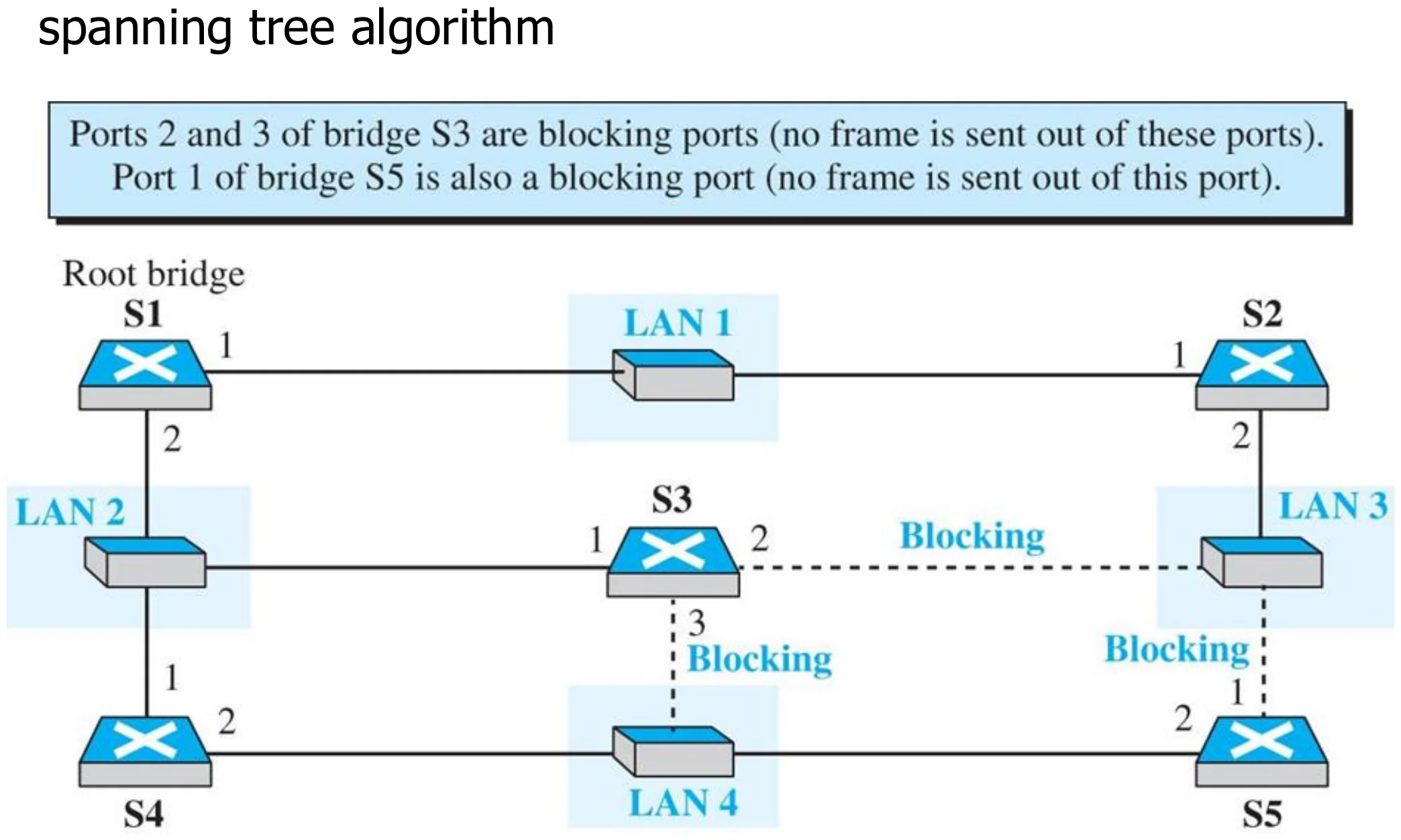
    Forwarding and blocking ports after using spanning tree algorithm (Figure 6.8)

    Ports 2 and 3 of S3 and port 1 of S5 become blocking ports
    20
    Exam weight Low
    1. Blocked: S3 ports 2 and 3, S5 port 1. No frame goes out of them.

    Some switch features

    • Implements CSMA/CD when the medium is shared.
    • switches Isolates collision domains (each LAN segment is a separate collision domain), this reduces the possibility of collisions and results in higher total max throughput (see next slide)①
    • switch forwards a frame with broadcast address to all devices attached to the whole network (single broadcast domain)②
    • Increases performance and security as it isolates the traffic. Switch sends the frame through the port to which the receiving device is connected.
    • Increases geographical coverage
      • No limit on the size of the LANs connected through switches
    • Transparent: installing or removing a switch does not require the stations networking software to be reconfigured.
    • (“ plug-and-play ”): no configuration necessary at installation of switch or when a host is removed from one of the LAN segments③
    21
    Exam weight High
    1. Switch: isolates collision domains, but the whole switched network is still ONE broadcast domain.
    2. Better performance and security (traffic only goes where needed), no size limit, transparent and plug-and-play.
    🎯 How this can come up · 2 questions
    MCQ

    A network of switches with no VLANs forms how many broadcast domains?

    True / False

    A switch isolates broadcast domains.

    Collision domains in a nonswitched and switched network

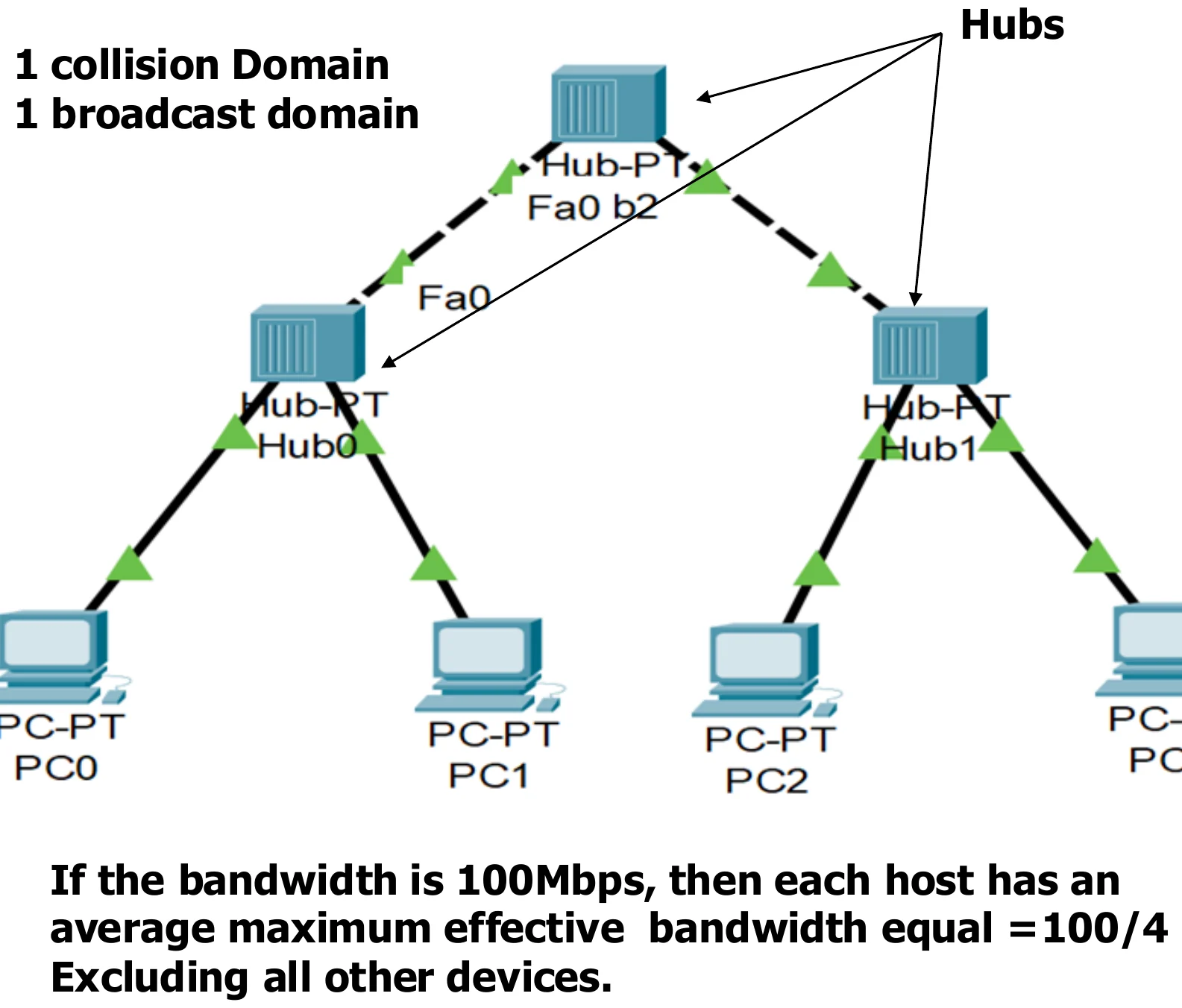
    If the bandwidth is 100Mbps, then each host has an average maximum effective bandwidth equal to 100/4 = 25 Mbps, excluding all other devices.①

    Three hubs and four PCs: 1 collision domain, 1 broadcast domain
    23
    Exam weight Low
    1. Hubs only: 1 collision domain, 1 broadcast domain. 4 hosts share 100 Mbps → 25 Mbps each.

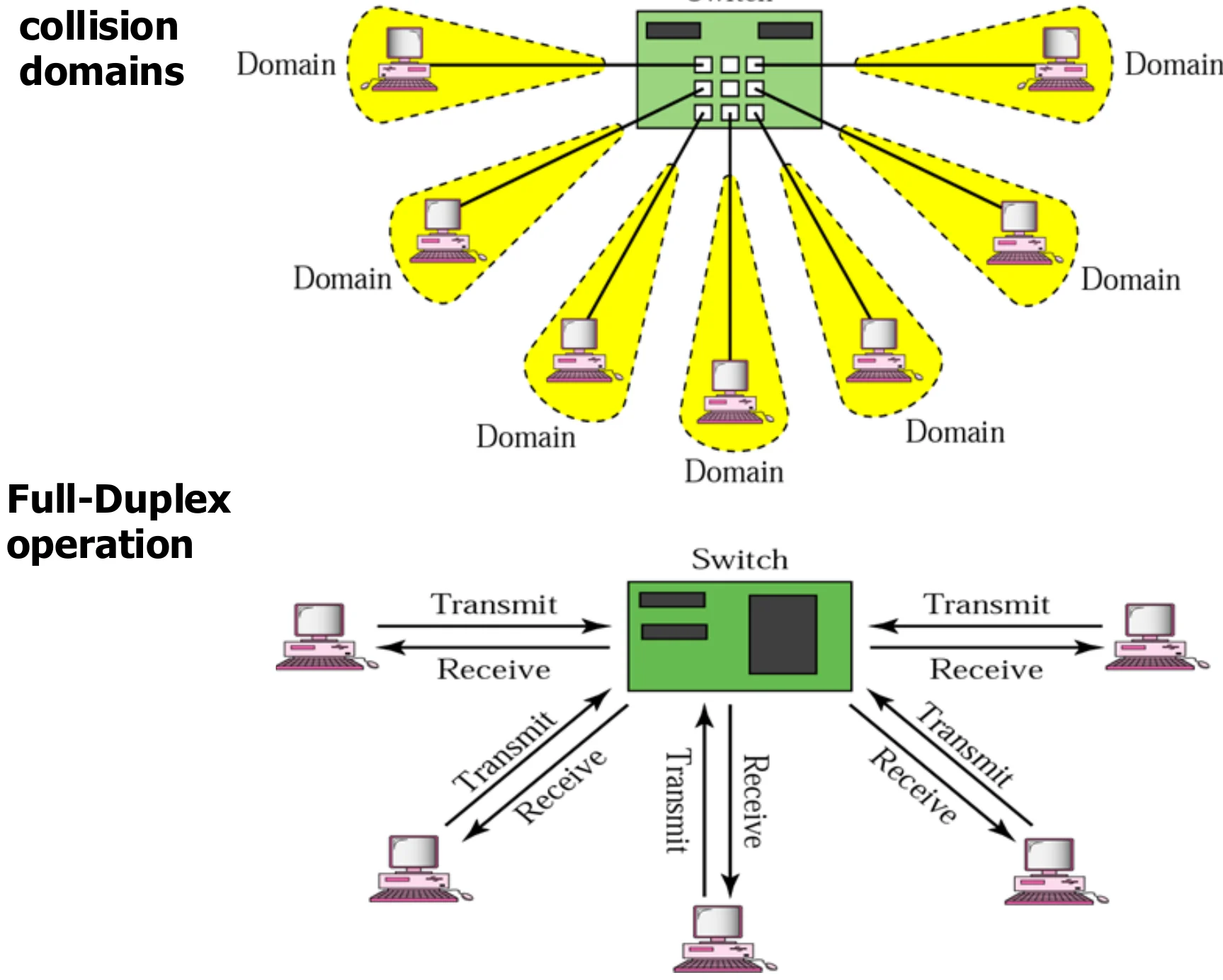
    Collision domains in a switched network

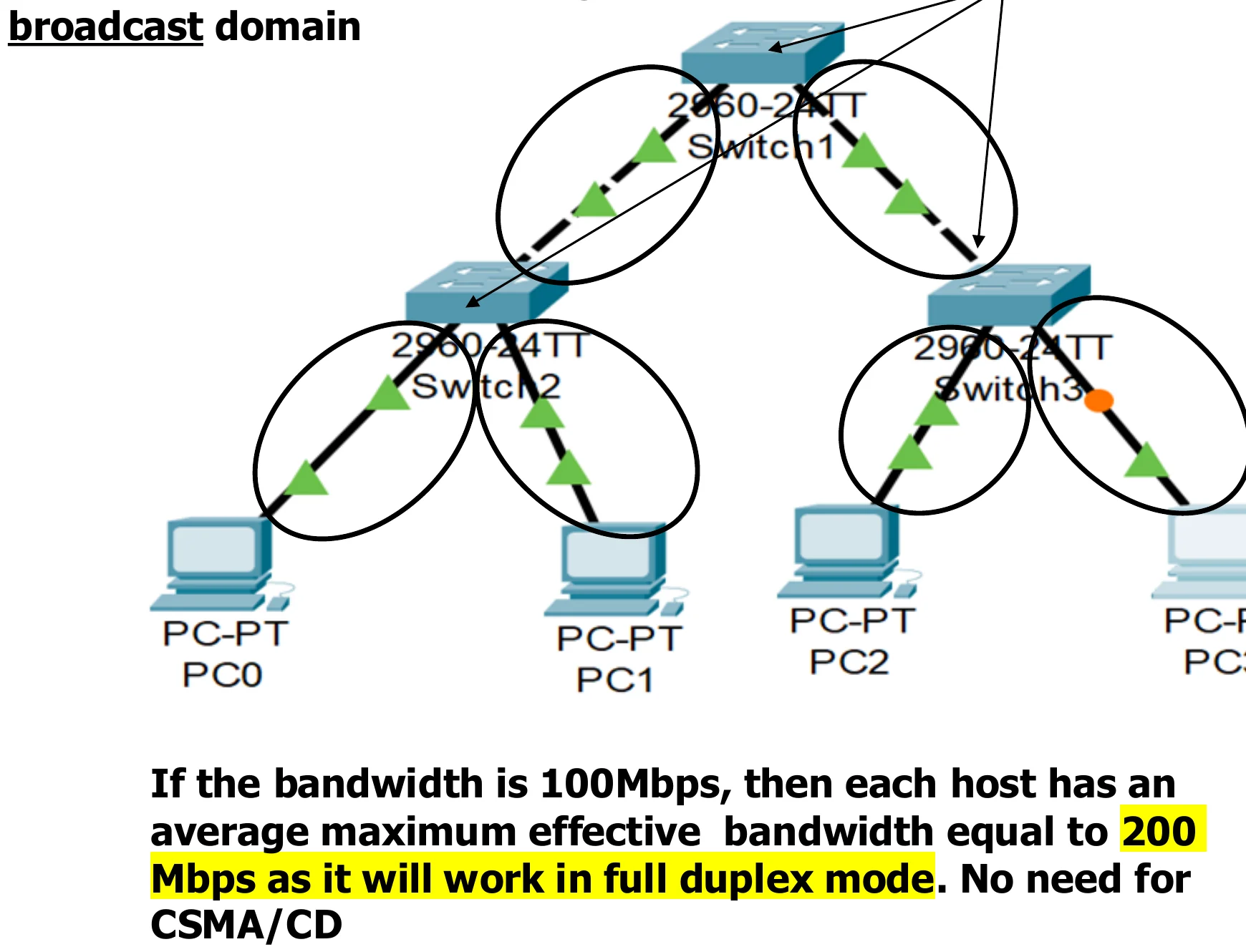
    6 collision domains and a single broadcast domain.①

    If the bandwidth is 100 Mbps, each host has an average maximum effective bandwidth of 200 Mbps, as it works in full-duplex mode. No need for CSMA/CD.②

    Three switches and four PCs: 6 collision domains and a single broadcast domain
    24
    Exam weight High
    1. Count the LINKS between switch ports and devices: 6 links → 6 collision domains. No router → 1 broadcast domain.
    2. Each host gets the full 100 Mbps each way (200 Mbps full duplex).
    🎯 How this can come up · 2 questions
    MCQ

    A hub-based LAN of 4 hosts on 100 Mbps gives each host about:

    MCQ

    The same 4 hosts on full-duplex switches each get up to:

    Some switch features – cont’d

    • Can operates in Full-duplex mode (can send and receive frames at the same time over the same interface)①
    • Performs MAC address recognition and frame forwarding in hardware②
    • Two types:
      • Store-and-forward: switch receives the whole a frame on the input line, buffers it briefly, performs error checking, then routes it to the appropriate output line (similar to bridge). Buffering will cause some delay.③
      • Cut-through: based on the fact that the destination address appears at the beginning of the MAC frame, so once the address is recognized the frame is directly sent to the appropriate output line if the output buffer is empty (no need to buffer it). → no buffering delay → NO ERROR CHECKING④
    25
    Exam weight High
    1. Store-and-forward: receive the whole frame, check errors, then send → reliable but adds delay.
    2. Cut-through: start sending as soon as the destination address is read → fast, but no error checking.
    Memory trickStore-and-forward = Safe but Slow. Cut-through = Quick but Careless.
    🎯 How this can come up · 2 questions
    MCQ

    Which switching type checks the frame for errors before forwarding?

    MCQ

    Cut-through switching starts forwarding after reading the:

    Routers

    • Operates at network layer = deals with packets not frames①
    • Connect LANs and WANs with similar or different protocols together
    • Each router interface has a physical and IP address
    • Routers isolate both collision domains and broadcast domains
    • Each router interface is connected to a separate broadcast domain②
    • Acts like normal stations on a network, but have more than one logical address (IP)
    • Forward packets based on the destination IP address
    • Routers Communicate with each other and exchange routing information
    • Determine best route using routing algorithm by special software installed on them
    • Forward traffic if information on destination is available otherwise discard it (not like a switch)③
    A router and the router icon
    26
    Exam weight High
    1. Router = layer 3, works on PACKETS, each interface has a MAC AND an IP address.
    2. Isolates collision AND broadcast domains: each interface = its own broadcast domain.
    3. Unknown destination → DISCARD (a switch would flood).
    🎯 How this can come up · 2 questions
    MCQ

    Which device isolates both collision and broadcast domains?

    True / False

    A router floods a packet whose destination is not in its routing table.

    Routing example

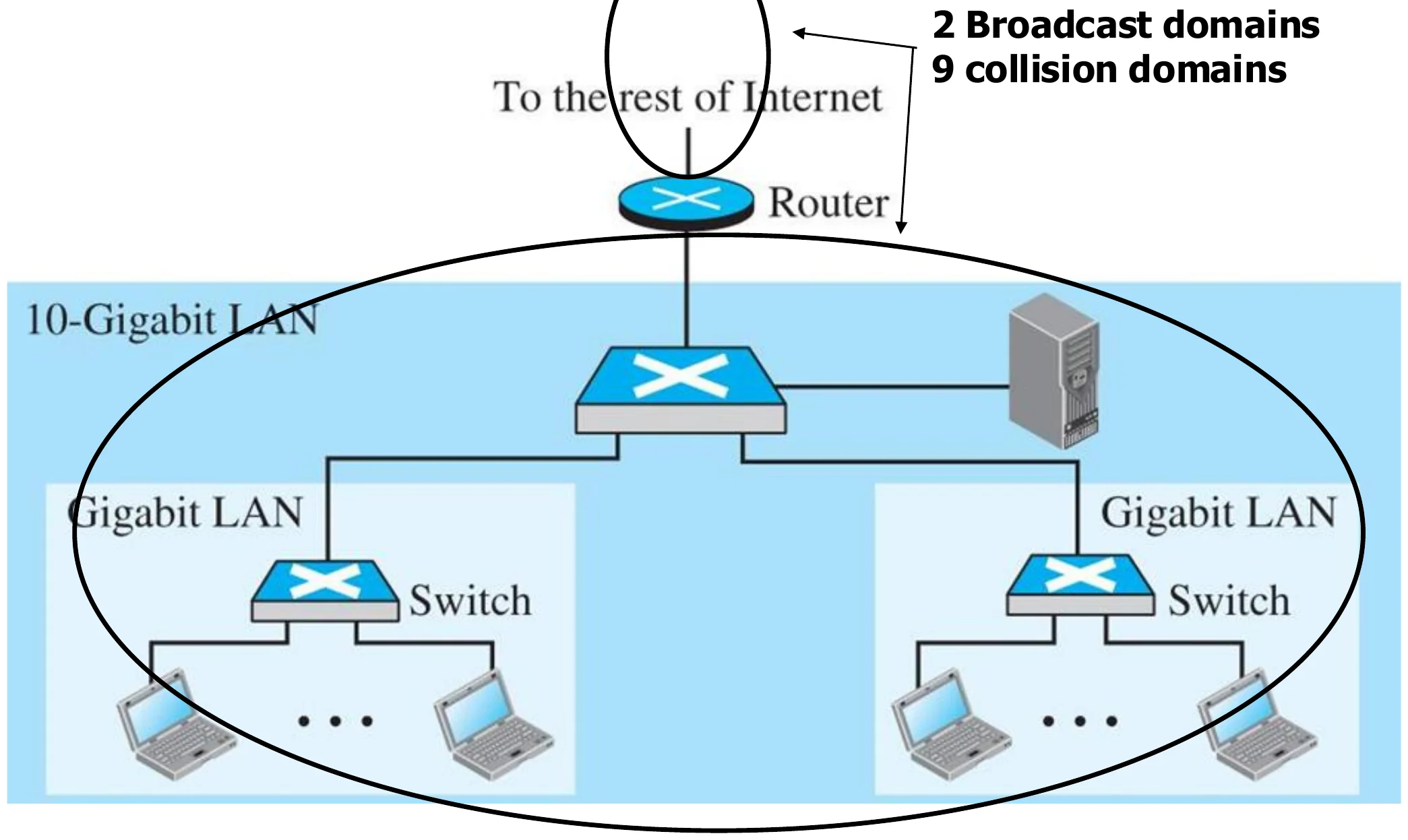
    2 broadcast domains · 9 collision domains

    A router links a 10-Gigabit LAN of switches to the rest of the Internet: 2 broadcast domains, 9 collision domains
    27
    Exam weight Low
    1. Broadcast domains = router interfaces in use (2). Collision domains = every switch/router link (9).

    Typical Organization LAN

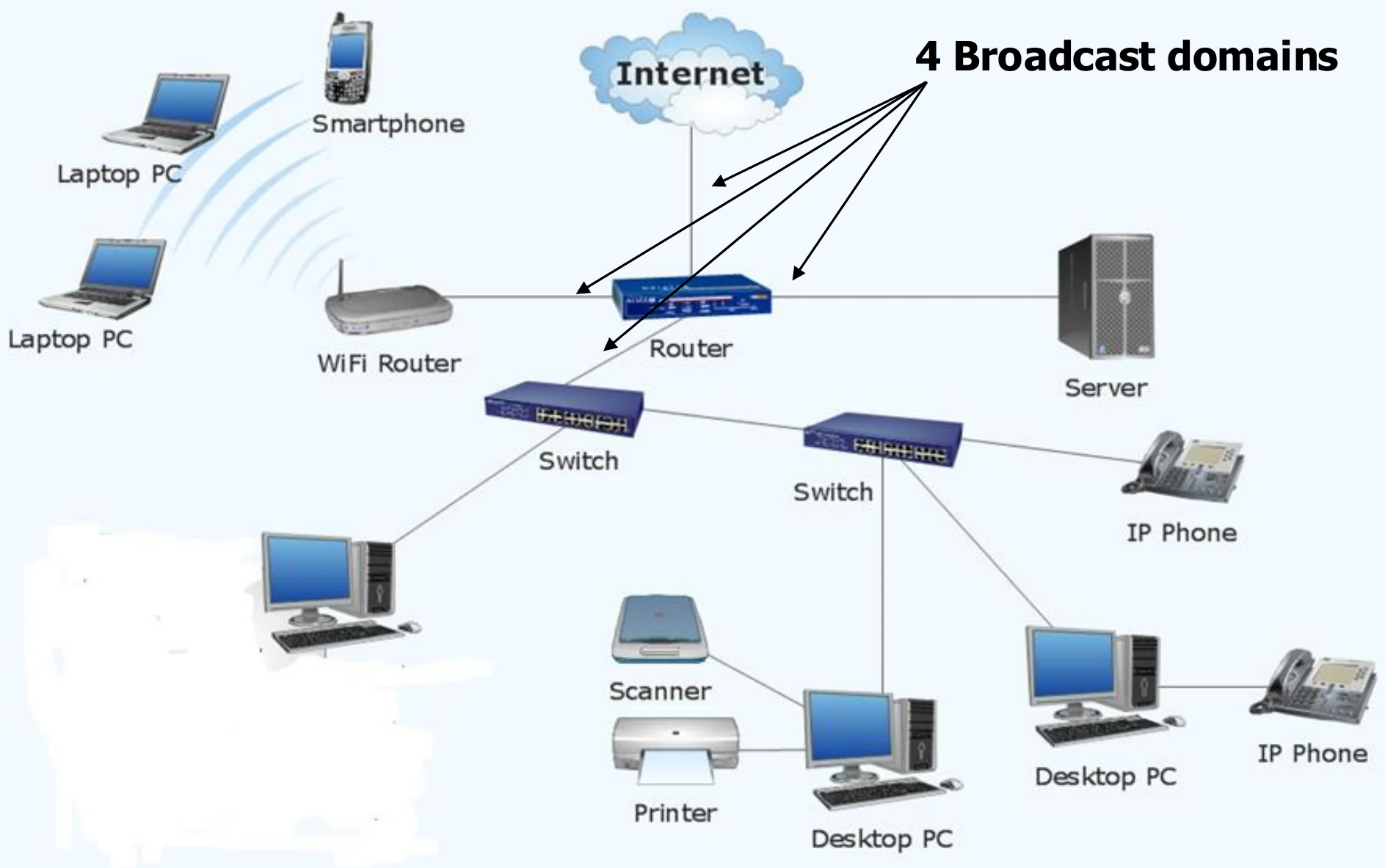
    4 broadcast domains

    An organisation LAN with a router, switches, a WiFi router and devices: 4 broadcast domains
    28
    Exam weight High
    1. Count router interfaces with something behind them: 4 → 4 broadcast domains.
    TipCounting domains: every switch or router PORT starts a new collision domain (a hub port does not). Every router PORT starts a new broadcast domain (switches and hubs do not, unless VLANs are used).
    🎯 How this can come up · 1 question
    Scenario

    A router has 3 interfaces. Interface 1 goes to a switch with 5 PCs, interface 2 to a hub with 4 PCs, interface 3 to the Internet. Count the broadcast and collision domains (ignore the Internet side).

    Comparison between switch and router

    Router

    • Layer 3 device, deals with packets
    • Each interface has an IP address and a MAC address
    • Isolates broadcast and collision domains
    • Drops the packet if the destination address is not in the routing table
    • Forwards packets based on the routing table
    • Needs configuration
    • Does not apply cut-through①

    Switch

    • Layer 2 device, deals with frames
    • Each interface has a MAC address
    • Does not isolate broadcast domains, but isolates collision domains
    • Sends the frame in all directions if the destination MAC is not in the MAC table
    • Forwards frames based on the MAC address table
    • Plug-and-play device
    • Cut-through forwarding②
    29
    Exam weight High
    1. Learn this table: it is the most likely written comparison in the chapter.
    🎯 How this can come up · 1 question
    Written

    Give four differences between a switch and a router.

    Virtual LANs

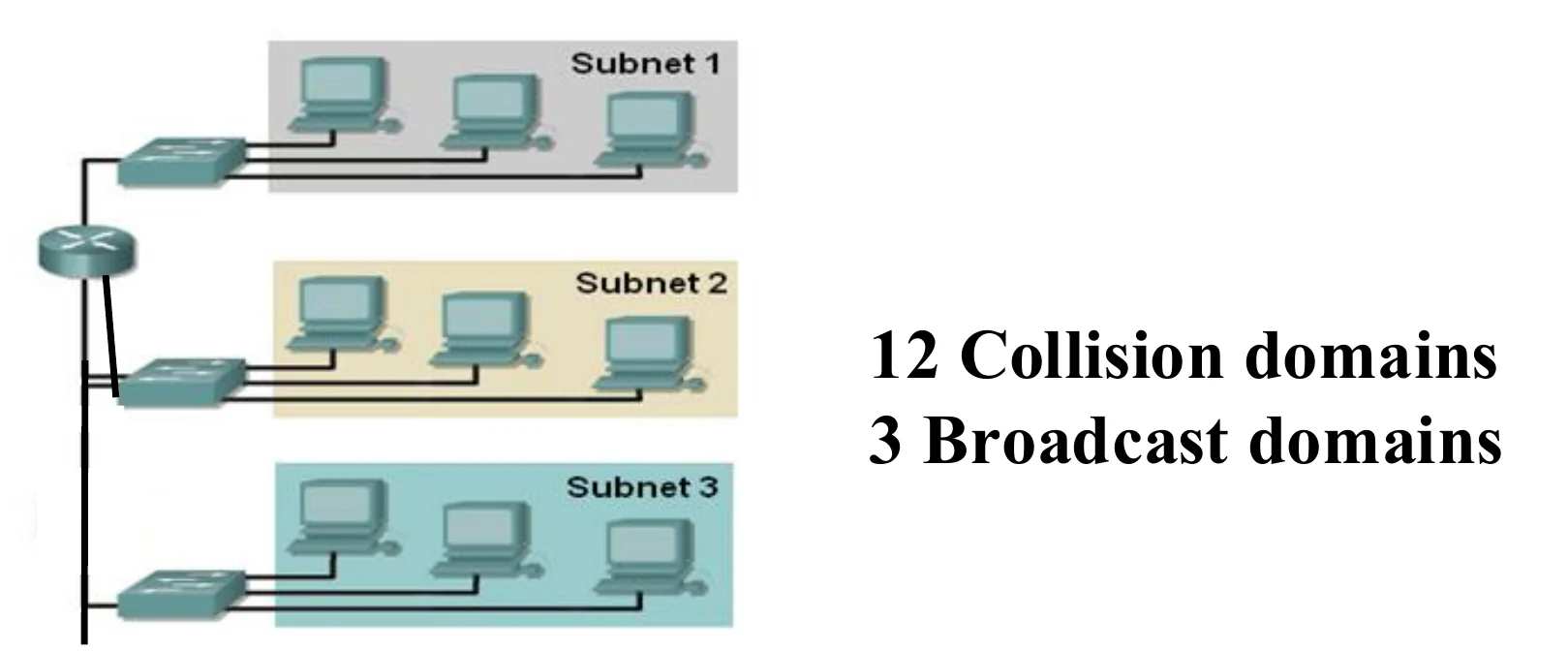
    12 Collision domains 3 Broadcast domains①

    If there is no space in the room to add a user belongs to subnet1, but there is a space in the room where subnet 3 is located. We need to do wiring from the switch in subnet 1 to the room where the user is setting.

    This is sometimes hard and costly to be done.②

    What is the alternative solution??

    VLAN: Virtual (logical) Local Area Network:

    Creating Local Area Network subnets (broadcast domains) by software not by physical wiring③

    Three subnets each on its own switch, joined by a router: 12 collision domains, 3 broadcast domains
    30
    Exam weight Medium
    1. Problem: moving a user to another subnet means new wiring.
    2. VLAN: make broadcast domains (subnets) in SOFTWARE instead of by wiring.
    🎯 How this can come up · 1 question
    MCQ

    A VLAN creates subnets (broadcast domains) by:

    A switch using VLAN software

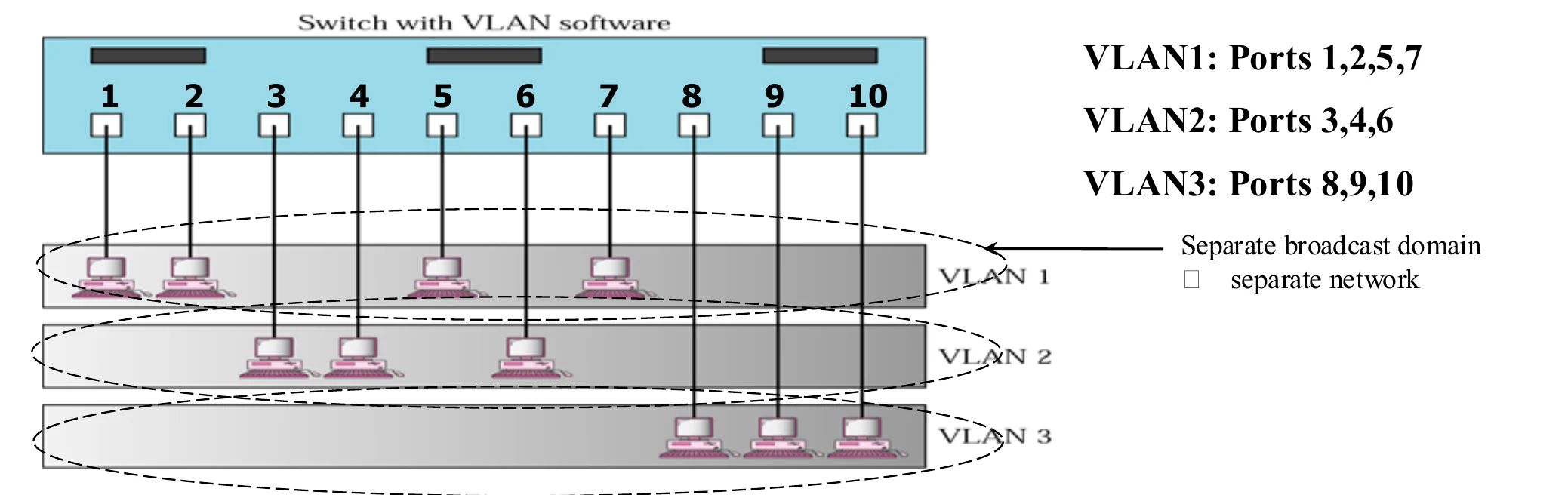
    VLAN1: Ports 1,2,5,7 VLAN2: Ports 3,4,6 VLAN3: Ports 8,9,10

    Separate broadcast domain

    • separate network
    • Using the Virtual LAN technology will allow grouping computers logically instead of physically.①
    • VLAN divides the physical LAN into several Logical LANs called VLANs②
    • Switch maintains a look up table to know to which LAN a machine belongs to.③
    One switch with VLAN software: VLAN1 ports 1, 2, 5, 7; VLAN2 ports 3, 4, 6; VLAN3 ports 8, 9, 10
    31
    Exam weight High
    1. One physical switch, three logical LANs. Each VLAN = its own broadcast domain = its own network.
    🎯 How this can come up · 1 question
    MCQ

    One switch is split into 3 VLANs. How many broadcast domains does it have?

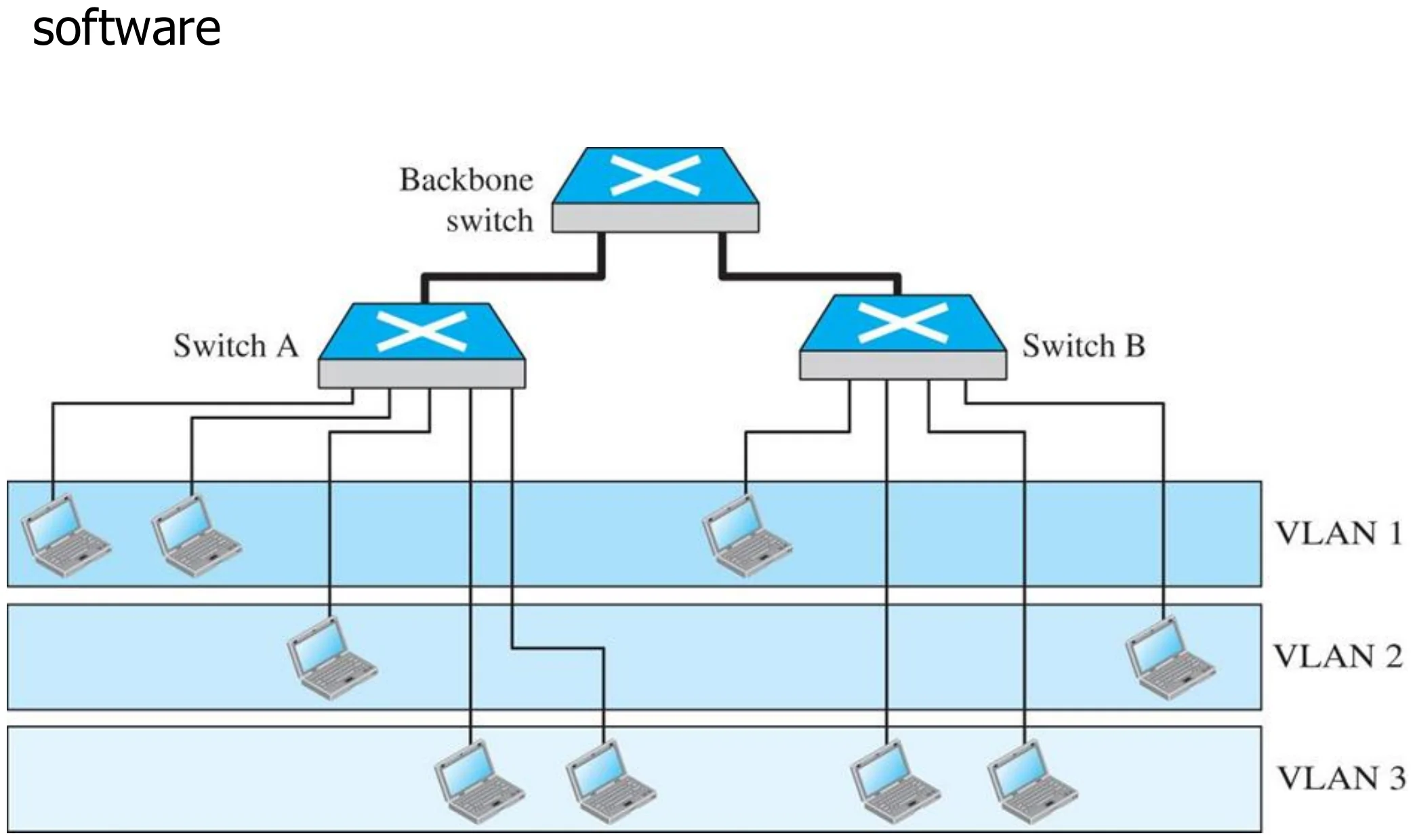
    Two switches in a backbone using VLAN software (Figure 6.12)

    Switch A and switch B on a backbone switch, with VLAN 1, 2 and 3 stretching across both
    32
    Exam weight Low
    1. VLANs can span several switches: members of VLAN 1 can sit on switch A and switch B.

    Note: VLANs create broadcast domains

    VLANs create broadcast domains.

    33
    Exam weight Medium
    1. VLANs = broadcast domains. That one line answers many MCQs.
    🎯 How this can come up · 1 question
    True / False

    VLANs create separate broadcast domains on the same switch.

    Advantages Of VLAN

    :

    • Reduce cost and installation time
      • Instead of physically moving a station to another segment or another switch, it can be moved by software.①
    • Increase security:
      • A group of users needing a high security can be put into a VLAN so that NO users outside the VLAN can communicate with them.
      • Stations belong to the same group can send broadcast messages that will NOT be received by users in others VLAN groups②
    • Creating Virtual Workgroups
      • Stations located at physically different locations can be added easily to the same broadcast domain so that they can send broadcast messages to one another.
        • EXAMPLE: people from different departments working on the same project③
    34
    Exam weight High
    1. VLAN advantages: cheaper moves (software, not wiring), security (broadcasts stay inside the VLAN), virtual workgroups across locations.
    🎯 How this can come up · 1 question
    Written

    Give three advantages of VLANs.