CS331 · Annotated SlidesChapter 3 · Part 1 — Data Link Layer: Framing and Error Control
Chapter 3 · Part 1 · Annotated slides

Data Link Layer: Framing and Error Control

What the data link layer does, how frames are marked off (byte and bit stuffing), single-bit vs. burst errors, and the three detection methods: parity (simple and two-dimensional), CRC and the Internet checksum, then retransmission vs. forward error correction. Tutorial 4 is entirely parity, CRC and checksum calculations; the worked answers are in the questions on each method’s slides.

Slide text Study notes Highlight: key words Tips, tricks & traps Seen again elsewhere How it can come up

Data-Link Layer

CS331: Computer Networks · Chapter 3, Part 1
1
Exam weight Low
  1. DLL services → framing (byte / bit stuffing) → error types → detection: parity, 2D parity, CRC, checksum → correction.
  2. Tutorial 4 = calculations on parity, CRC and checksum. Practise each by hand.

Chapter 3: Outline

  • 3.1INTRODUCTION
  • 3.2DATA LINK CONTROL
  • 3.3MEDIA ACCESS CONTROL
  • 3.4LINK-LAYER ADDRESSING
2
Exam weight Low
  1. This part is 3.1 introduction and 3.2 data link control (framing, error control). Part 2 is 3.3 media access control.

Chapter 3 DLL services

  • Framing/deframing
    • Encapsulate datagram (packet) into frame, adding header, trailer
    • Different protocols have different format for the DLL frame
    • Deframing at the receiver①
  • Addressing
    • In general it is called layer 2 address or data link layer address
    • In LAN, called physical address or MAC address
    • “physical addresses” used in frame headers to identify source, destination②
3
Exam weight Medium
  1. Framing: wrap the packet in a frame with a header AND trailer; the receiver deframes.
  2. Addressing: layer-2 (physical, MAC) addresses in the frame header.

Framing

  • The data-link layer needs to pack bits into frames, so that each frame is distinguishable from another.①
  • Our postal system practices a type of framing. The simple act of inserting a letter into an envelope separates one piece of information from another; the envelope serves as the delimiter.
  • Framing in the data-link layer separates a message from one source to a destination by adding a sender address and a destination address.
  • The destination address defines where the packet is to go; the sender address helps the recipient acknowledge the receipt.②
4
Exam weight Low
  1. Framing = packing bits into frames so the receiver knows where each one starts and ends (like envelopes).
  2. The destination address says where it goes; the sender address lets the receiver acknowledge it.

DLL services

  • Error Control
    • Error detection and correction techniques to provide reliable delivery①
  • Flow control
    • The sender must NOT send frames at a rate faster then the receiver can process them
    • Based on set of procedures that tells that sender how much data it can transmit before it must wait for an acknowledgment from the receiver②
  • Access control
    • Controlling access to a shared medium (shared wire, air)
      • This is called Medium Access Control (MAC) sublayer③
5
Exam weight High
  1. Error control: detect (and sometimes correct) errors.
  2. Flow control: don’t send faster than the receiver can process; wait for acknowledgments.
  3. Access control: who may use a shared medium. That is the MAC sublayer (Part 2).
Exam trapFlow control protects the RECEIVER from being flooded; congestion control (Ch 9) protects the NETWORK.
🎯 How this can come up · 2 questions
MCQ

Making sure the sender does not send faster than the receiver can process is:

MCQ

Controlling access to a shared medium is done by the:

Framing

  • Two types of framing protocols:
    • Character oriented: length of frame is multiple of bytes (multiple of 8)①
    • Bit oriented: length of frame is not multiple of bytes (NOT multiple of 8)②
6
Exam weight Medium
  1. Character (byte) oriented: frame length is a whole number of bytes. Bit oriented: any number of bits.
🎯 How this can come up · 1 question
MCQ

A framing protocol whose frame length need not be a multiple of 8 bits is:

A frame in a character-oriented protocol

  • To separate one frame from another an 8-bit flag is added at the beginning and end of the frame①
  • Flag is protocol dependent usually (01111110)②
Flag, header, variable number of characters, trailer, flag
7
Exam weight Low
  1. A flag byte marks the start and end of every frame.

Byte stuffing and unstuffing

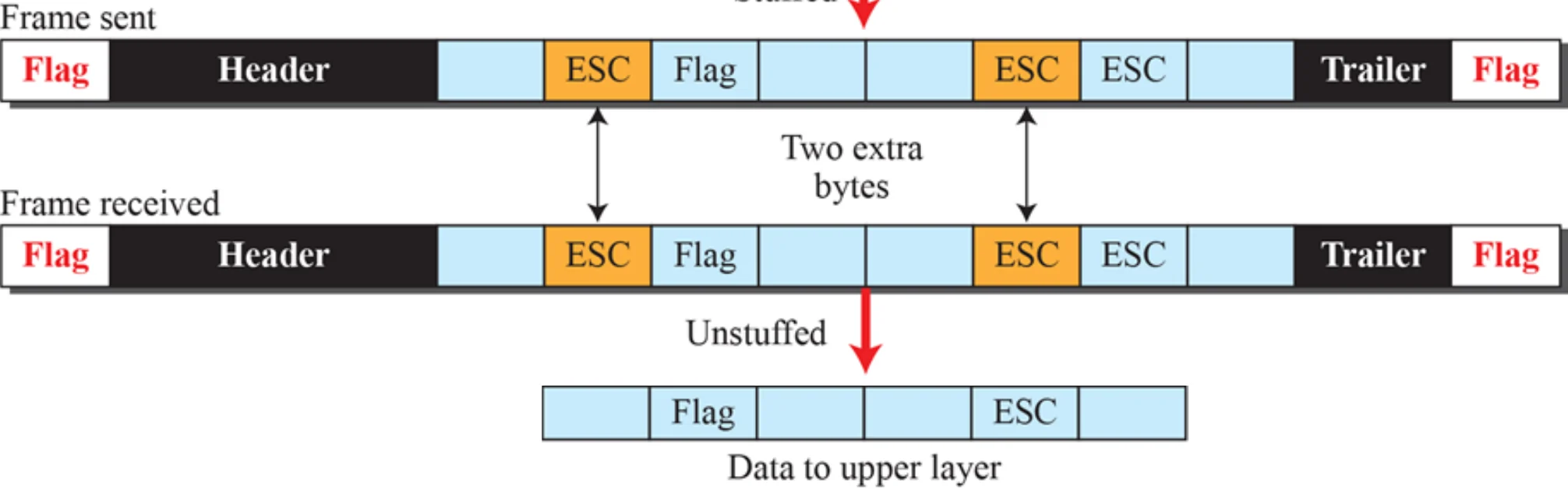
  • If flag appears in the data to be carried by the frame, Byte stuffing is used.
  • Byte stuffing is the process of adding one extra byte (ESC) whenever the flag character in the data. This is done at the Sender①
  • If (ESC) character also appears in the data, it is also preceded by ESC. This is done because ESC may be also sent by the application as part of the message.②
  • At the receiver, each time ESC appears in the data, it is removed and the following next character directly following it is treated as data not as flag.③
An ESC byte is inserted before every flag or ESC byte in the data and removed at the receiver
8
Exam weight High
  1. Problem: the flag pattern can appear inside the data.
  2. Byte stuffing: the sender puts an ESC byte before any flag OR ESC byte in the data. The receiver removes each ESC and treats the next byte as data.
Exam trapESC itself must also be escaped, or the receiver would drop a real ESC byte from the data.
🎯 How this can come up · 2 questions
MCQ

In byte stuffing, the sender adds an extra ESC byte:

True / False

Byte stuffing is done at the receiver.

A frame in a bit-oriented protocol

  • To separate one frame from another an 8-bit flag is added at the beginning and end of the frame
  • Flag is protocol dependent usually (01111110)
Flag 01111110, header, variable number of bits, trailer, flag 01111110
9
Exam weight Low
  1. Bit-oriented frames also use the flag 01111110 at both ends.

Bit stuffing and unstuffing

  • If the flag appears in the data to be carried by the frame, bit stuffing is used.
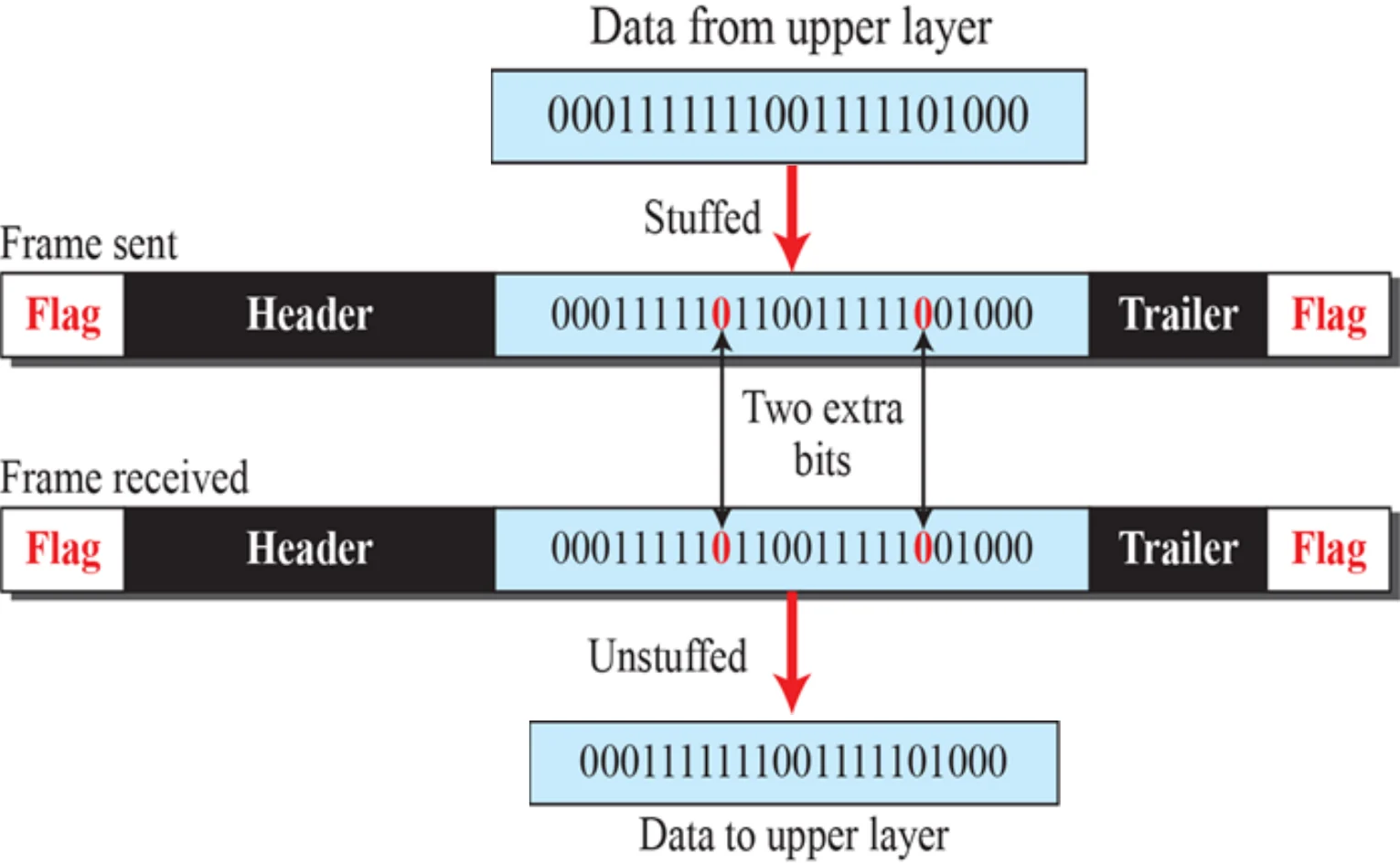
  • Bit stuffing: the sender adds (stuffs) one extra 0 whenever 5 consecutive 1s appear in the data from the upper layer.①
  • The receiver, on seeing a sequence of five 1s, checks the next bit. If it is 0, the bit is simply discarded (unstuffed); if it is 1, it notes that the end of the data has been flagged.②

Sender: 11111 → 111110 · Receiver: 111110 → 11111

Data 0001111111001111101000 is stuffed with two extra 0s after each run of five 1s, then unstuffed at the receiver
10
Exam weight High
  1. After five 1s in a row, the sender always inserts a 0, even if the next bit is already 0. So 01111110 can never appear in the data.
  2. Receiver: five 1s then 0 → drop the 0. Five 1s then 1 → it’s a flag.
Memory trickCount to five 1s, then add a 0. Restart the count after the stuffed 0.
🎯 How this can come up · 3 questions
MCQ

After bit stuffing, the data 0111111 becomes:

MCQ

Bit stuffing inserts a 0 after how many consecutive 1s?

Written

Stuff the bits 0001111111001111101000 for transmission with flag 01111110.

Note: errors happen

Data can be corrupted

during transmission.

Some applications require that

errors be detected and corrected.

11
Exam weight Low
  1. Errors can’t be avoided, so some applications need them detected and corrected.

Types of error

  • Single-bit error
  • Burst error
12
Exam weight Low
  1. Two kinds: single-bit and burst.

Note: single-bit error

In a single-bit error, only 1 bit in the data

unit has changed.

13
Exam weight Low
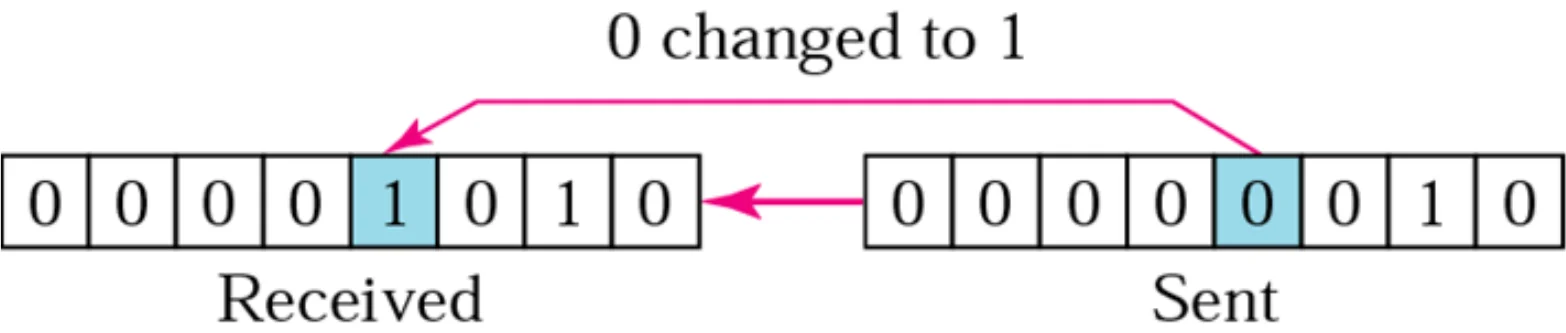
  1. Single-bit: exactly ONE bit of the data unit changed.

Single-bit error

Sent 00000010, received 00001010: one 0 changed to 1
14
Exam weight Low

    Note: burst error

    A burst error means that 2 or more bits

    in the data unit have changed.

    15
    Exam weight Low
    1. Burst: TWO or more bits changed (not necessarily next to each other).

    Burst error of length 5

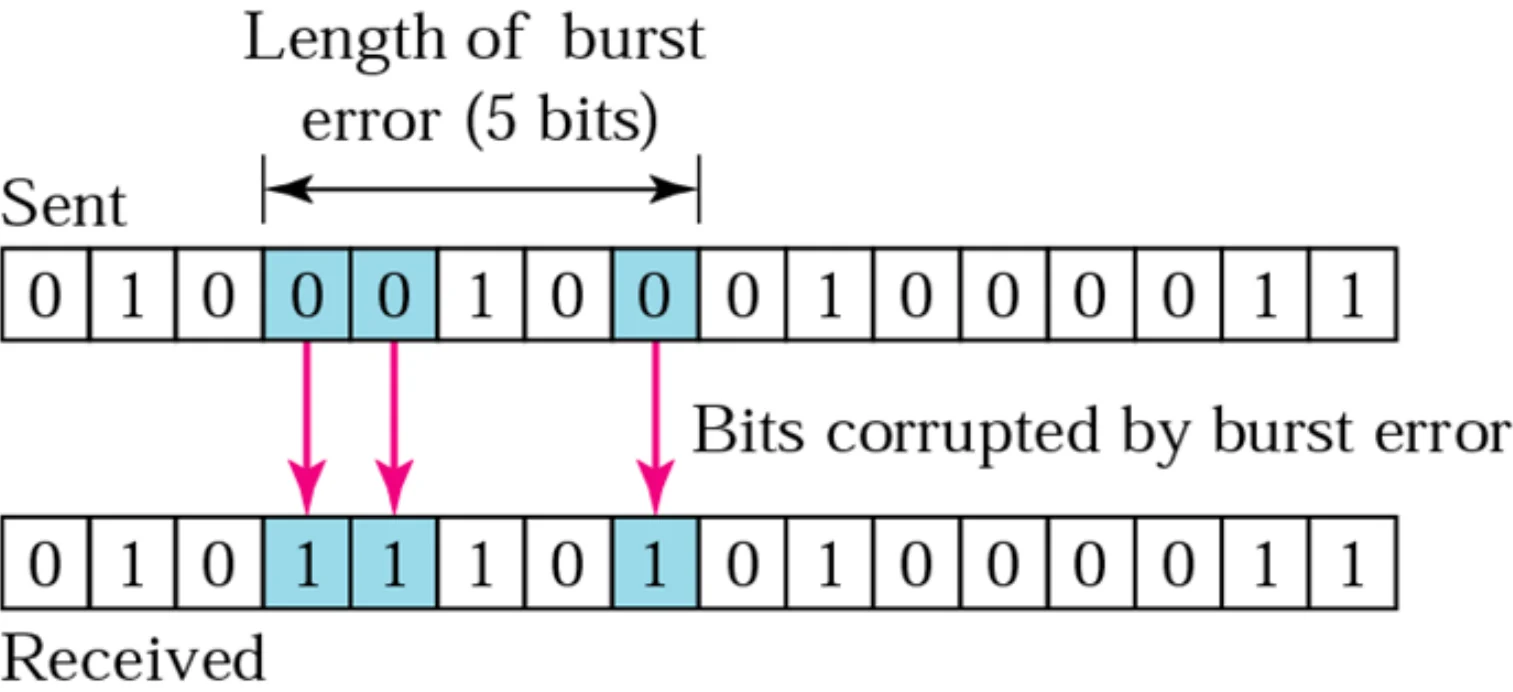
    • Burst error does NOT necessarily mean that the errors occur in consecutive bits①
    • Length of the burst: number of bits from the

    first corrupted bit to the last corrupted bit②

    • Effect of burst error is higher at high data rates③
    Sent and received data with corrupted bits spanning a burst length of 5
    16
    Exam weight High
    1. Burst length = from the first corrupted bit to the last, counting the good bits in between.
    2. The faster the link, the more bits a burst of noise hits.
    Exam trapA burst of length 5 may corrupt only 3 bits: the length counts from first to last bad bit.
    🎯 How this can come up · 2 questions
    True / False

    In a burst error, the corrupted bits must be consecutive.

    MCQ

    Bits 3 and 9 of a frame are corrupted and nothing in between. The burst length is:

    Example

    How many bits are affected by a 2 ms burst error if:

    a) the bandwidth is 1 Kbps b) the bandwidth is 1 Gbps

    Number of affected bits = bandwidth × error duration

    a) 1 × 10³ × 2 × 10⁻³ = 2 bits

    b) 1 × 10⁹ × 2 × 10⁻³ = 2,000,000 bits①

    17
    Exam weight High
    1. Same 2 ms of noise: 2 bits on a slow link, 2 million on a fast one. That is why burst errors are worse at high rates.
    🎯 How this can come up · 1 question
    MCQ

    A 5 ms burst of noise hits a 100 Mbps link. How many bits are affected?

    Note: redundancy

    To detect or correct errors, we need to

    send extra (redundant) bits with data.

    18
    Exam weight Low
    1. Every detection method sends EXTRA (redundant) bits along with the data.

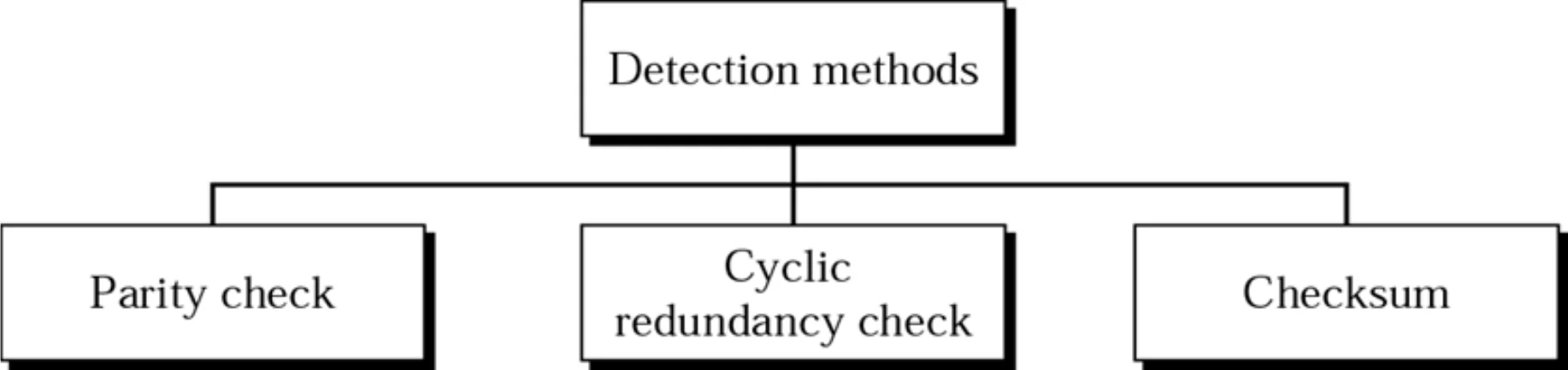
    Detection methods

    Detection methods: parity check, cyclic redundancy check, checksum
    19
    Exam weight Medium
    1. Parity check · CRC · checksum.
    🎯 How this can come up · 1 question
    MCQ

    Which is NOT an error-detection method?

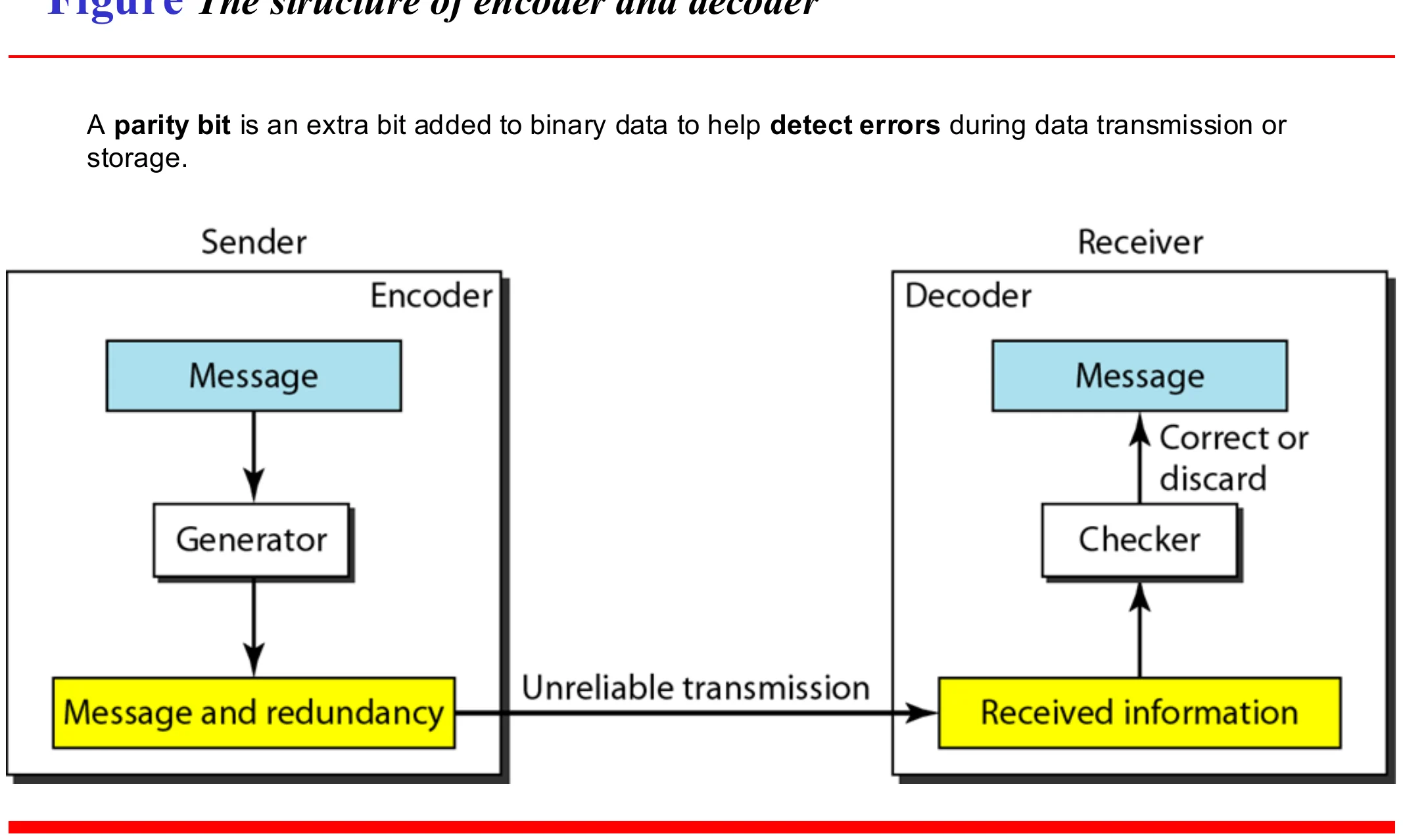
    The structure of encoder and decoder

    A parity bit is an extra bit added to binary data to help detect errors during data transmission or storage.①

    Sender: generator adds redundancy to the message. Receiver: checker decides to accept or discard
    20
    Exam weight Low
    1. Sender: a generator adds redundant bits. Receiver: a checker recomputes them and accepts or discards.

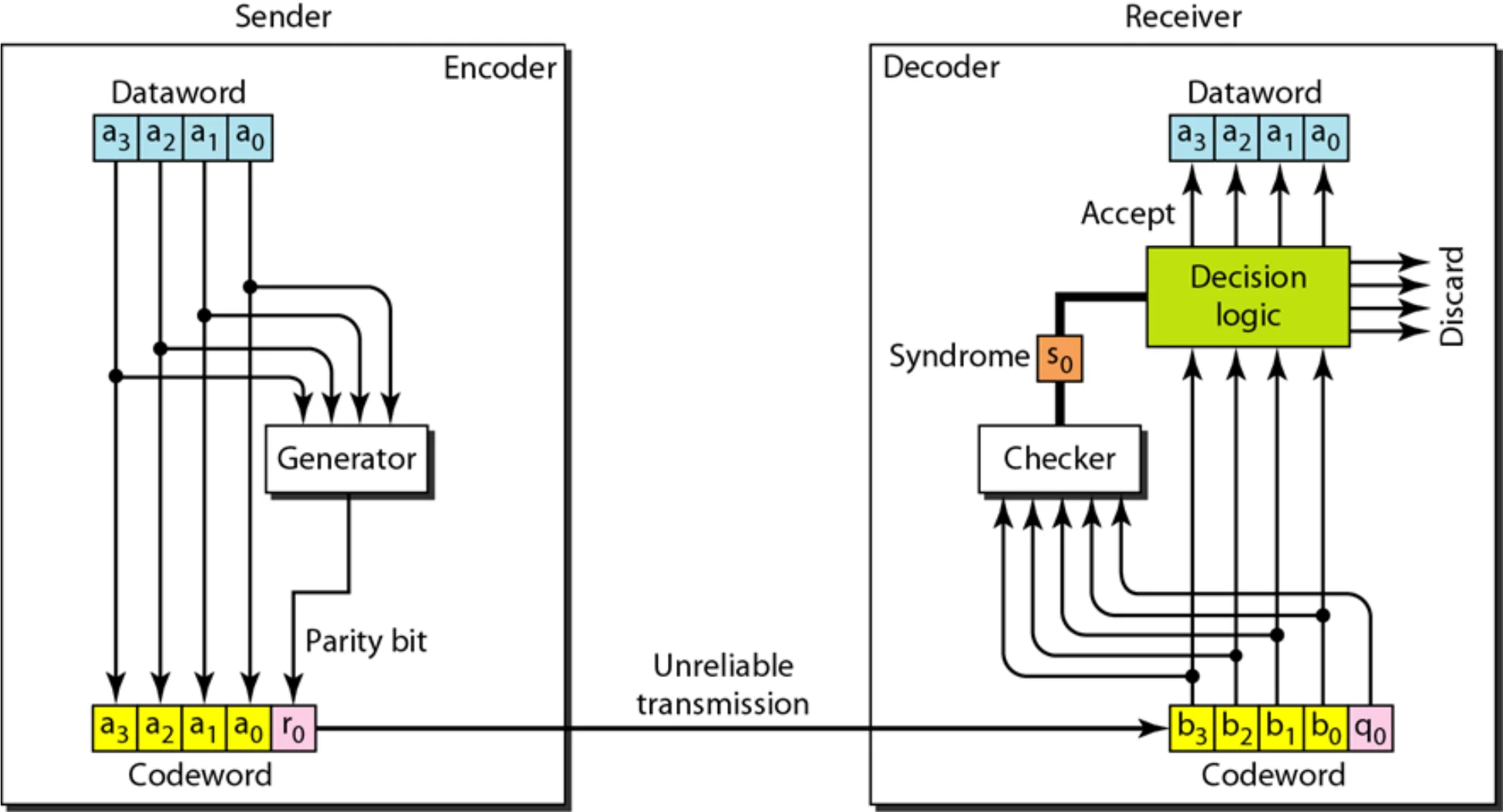
    Encoder and decoder for simple parity-check code

    Dataword a3..a0 plus parity bit r0 makes the codeword; the receiver computes a syndrome and accepts or discards
    21
    Exam weight Low
    1. Receiver computes the syndrome: 0 = accept, 1 = discard.

    Note: parity check

    In parity check, a parity bit is added to

    every data unit so that the total

    number of 1s is even

    (or odd for odd-parity).

    22
    Exam weight Low
    1. Even parity: make the total number of 1s even. Odd parity: make it odd.
    Memory trickEven parity bit = 1 if the data has an ODD number of 1s (so the total becomes even).

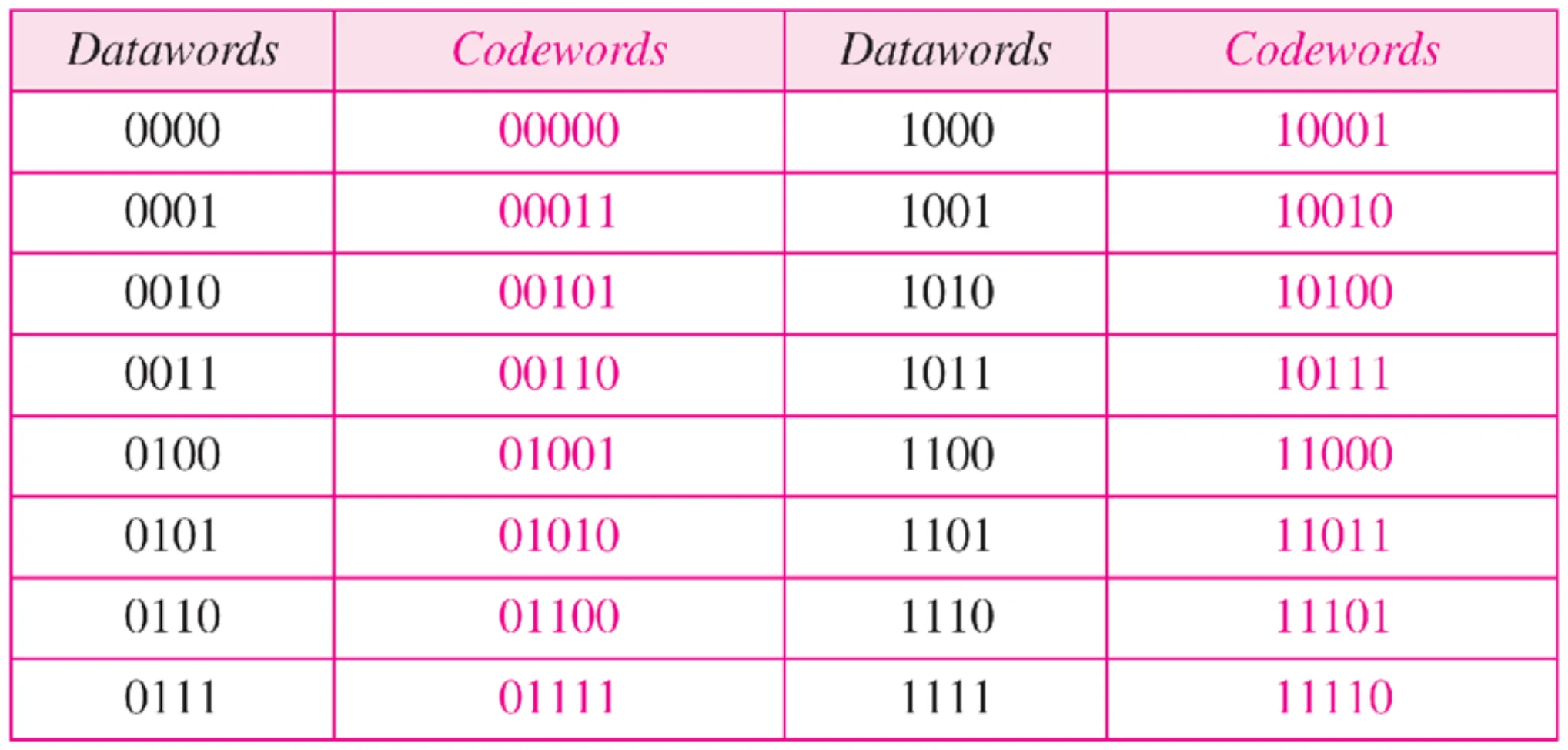
    Table Simple parity-check code C(5, 4)

    C(n,k) = codeword that consists of n-bit for every k – bit data word①

    All 16 four-bit datawords and their five-bit codewords with an even parity bit
    23
    Exam weight Medium
    1. C(5, 4): 4-bit dataword → 5-bit codeword (one parity bit).
    🎯 How this can come up · 1 question
    MCQ

    With even parity, the dataword 1011 becomes:

    ★ Tutorial

    Example 1

    Suppose the sender wants to send the word world. In ASCII the five characters are coded as

    1110111 1101111 1110010 1101100 1100100

    The following shows the actual bits sent in case Even parity is used:

    1110111 0 1101111 0 1110010 0 1101100 0 1100100 1

    24
    Exam weight High
    1. Each 7-bit ASCII character gets one even-parity bit: count the 1s and add 0 or 1 to make the count even.
    🎯 How this can come up · 2 questions
    MCQ

    With even parity, the 7-bit dataword 1111000 becomes:

    MCQ

    With even parity, 1010101 is sent as:

    Example 2

    Now suppose the word world in Example 1 is received by the receiver without being corrupted in transmission.

    11101110 11011110 11100100 11011000 11001001

    The receiver counts the 1s in each character and comes up with even numbers (6, 6, 4, 4, 4). The data are accepted.

    25
    Exam weight Low
    1. Every character has an even number of 1s → accepted.
    ★ Tutorial

    Example 3

    Now suppose the word world in Example 1 is corrupted during transmission.

    11111110 11011110 11101100 11011000 11001001

    The receiver counts the 1s in each character and comes up with even and odd numbers (7, 6, 5, 4, 4). The receiver knows that the data are corrupted, discards them, and asks for retransmission.

    26
    Exam weight Medium
    1. Counts 7 and 5 are odd → corrupted: discard and ask for retransmission.
    🎯 How this can come up · 1 question
    Scenario

    With even parity, the receiver gets 10101010, 11110001 and 00000001. Which are valid, and can it correct the bad ones?

    Note: what simple parity can detect

    Simple parity check can detect all

    single-bit errors. It can detect burst

    errors only if the total number of bits

    changed in each data unit is odd.

    27
    Exam weight High
    1. Detects ALL single-bit errors. Detects a burst only if an ODD number of bits changed.
    Exam trapTwo flipped bits keep the parity the same, so simple parity misses every even number of errors.
    🎯 How this can come up · 2 questions
    True / False

    Simple parity check can detect all burst errors.

    MCQ

    Simple even parity will NOT detect an error when:

    Note: two-dimensional parity

    In two-dimensional parity check, a

    block of bits is divided into rows and a

    redundant row of bits is added to the

    whole block.

    28
    Exam weight Low
    1. 2D parity: arrange the data in rows; add a parity bit to each row AND a parity row for the columns.
    ★ Tutorial

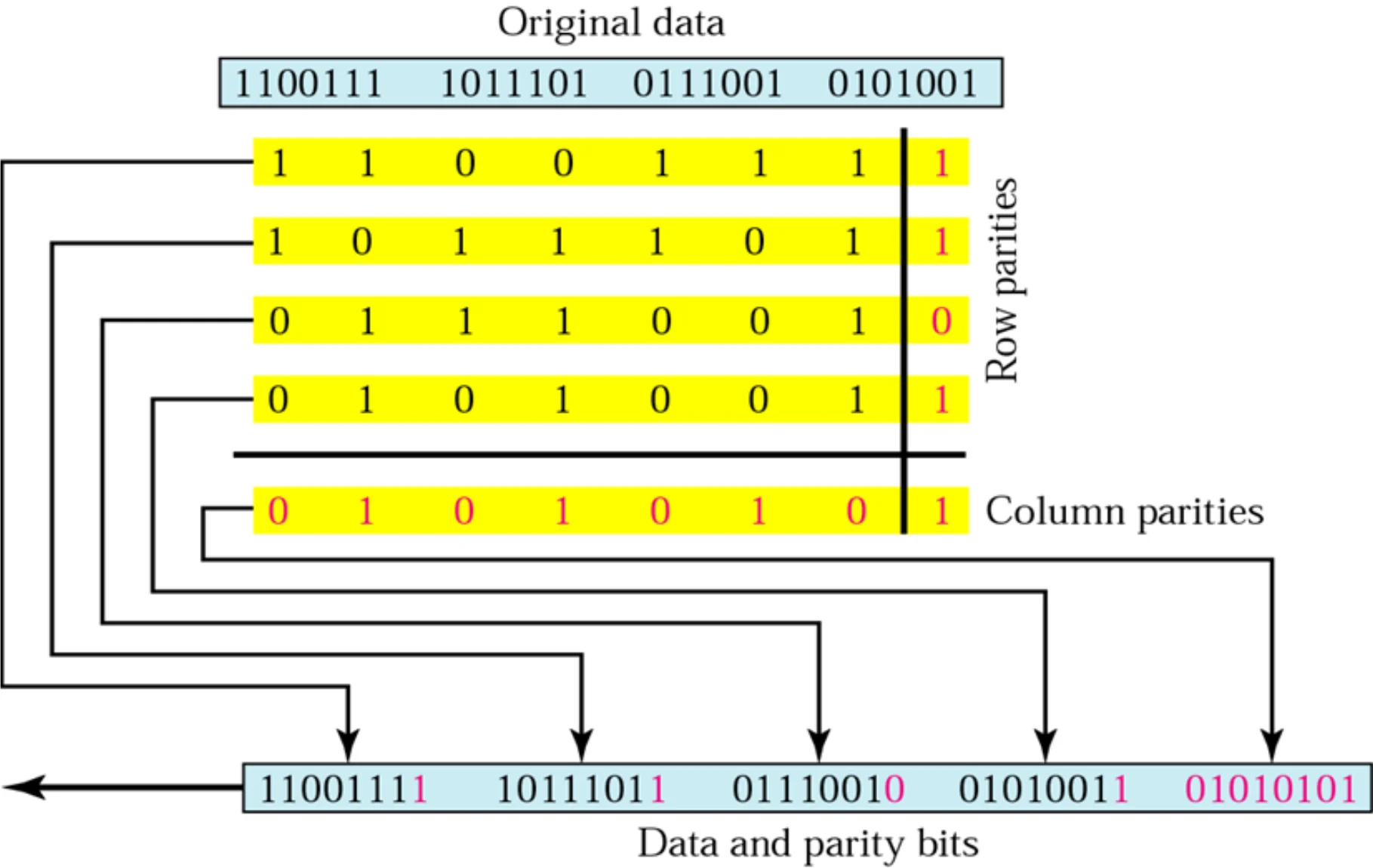
    Two-dimensional parity

    Four 7-bit rows each get a row parity bit; a column-parity row is added; all five rows are sent
    29
    Exam weight High
    1. Row parities catch which row; column parities catch which column. One bad bit = the crossing point, so it can be corrected.
    🎯 How this can come up · 1 question
    Written

    Compute the 2D even parity for the datawords 1010, 0111, 1100, 1001.

    Two-dimensional parity: what it detects

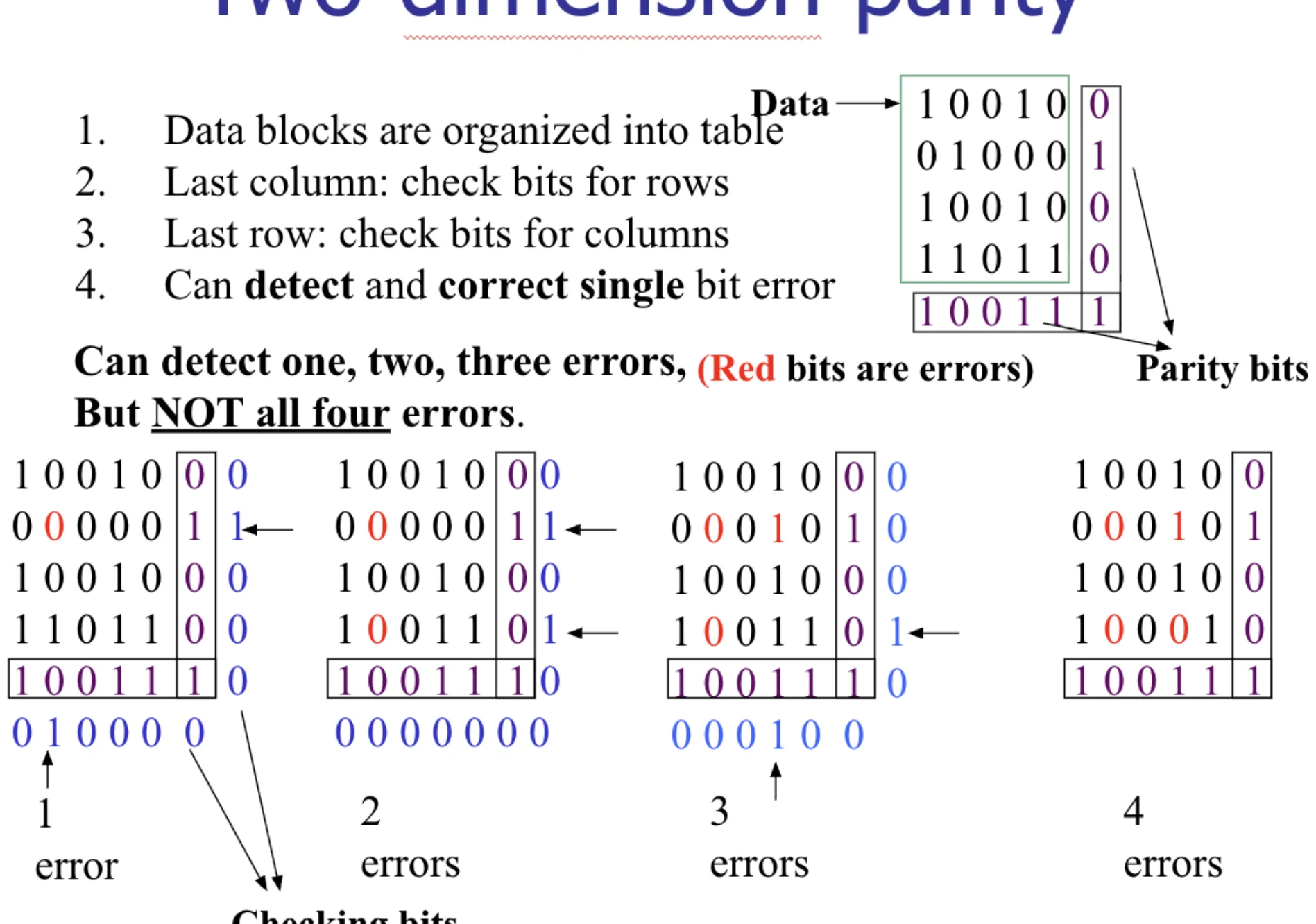
    1. Data blocks are organized into a table
    2. Last column: check bits for rows
    3. Last row: check bits for columns
    4. Can detect and correct single bit error①

    Can detect one, two, three errors (red bits are errors), but NOT all four errors.②

    Examples with 1, 2, 3 and 4 errors; the 4 errors at the corners of a rectangle go undetected
    30
    Exam weight High
    1. 2D parity corrects 1 error and detects 2 or 3.
    2. It misses 4 errors that sit at the corners of a rectangle: every row and column still has even parity.
    🎯 How this can come up · 2 questions
    True / False

    Two-dimensional parity can correct a single-bit error.

    MCQ

    Which error pattern can two-dimensional parity miss?

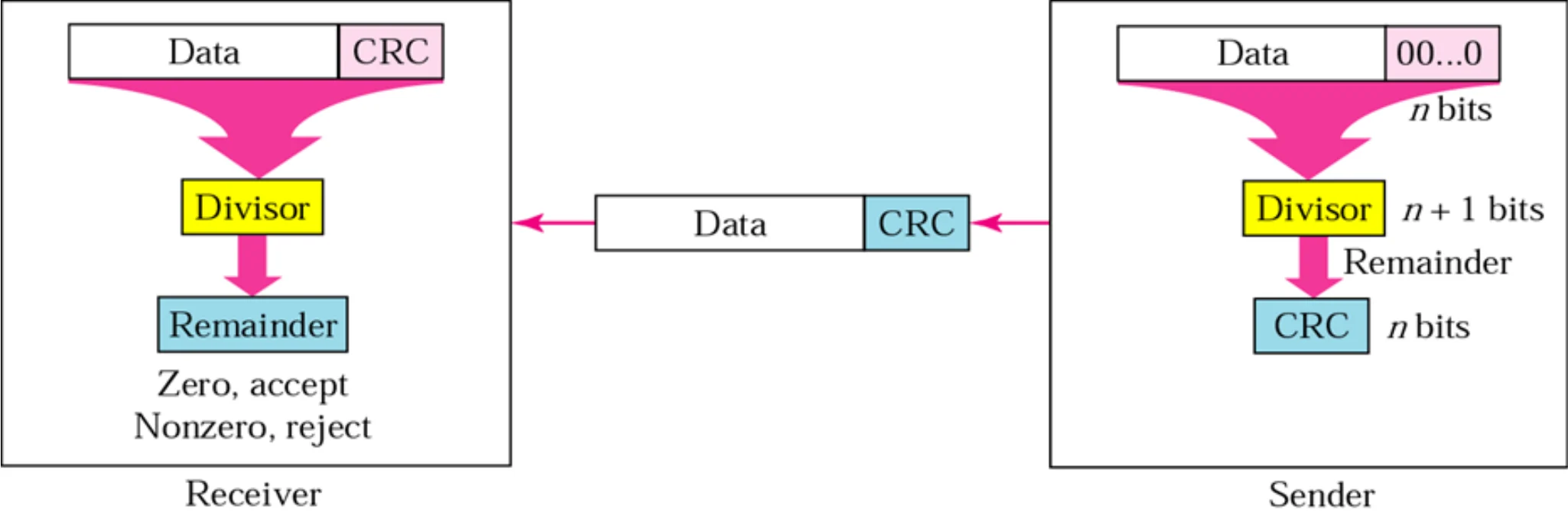
    CRC generator and checker

    Sender appends n zeros, divides by the divisor and sends data + CRC; receiver divides data + CRC: zero remainder accept, nonzero reject
    31
    Exam weight Medium
    1. Sender: append n zeros (n = divisor length - 1), divide, the remainder is the CRC. Send data + CRC.
    2. Receiver: divide data + CRC by the same divisor. Remainder 0 → accept; otherwise reject.

    Note: the generator

    The divisor in a cyclic code is normally

    called the generator polynomial

    or simply the generator.

    Because this divisor is used to generate the CRC bits (the remainder).

    32
    Exam weight Low
    1. The divisor is called the generator (polynomial), because it generates the CRC bits.

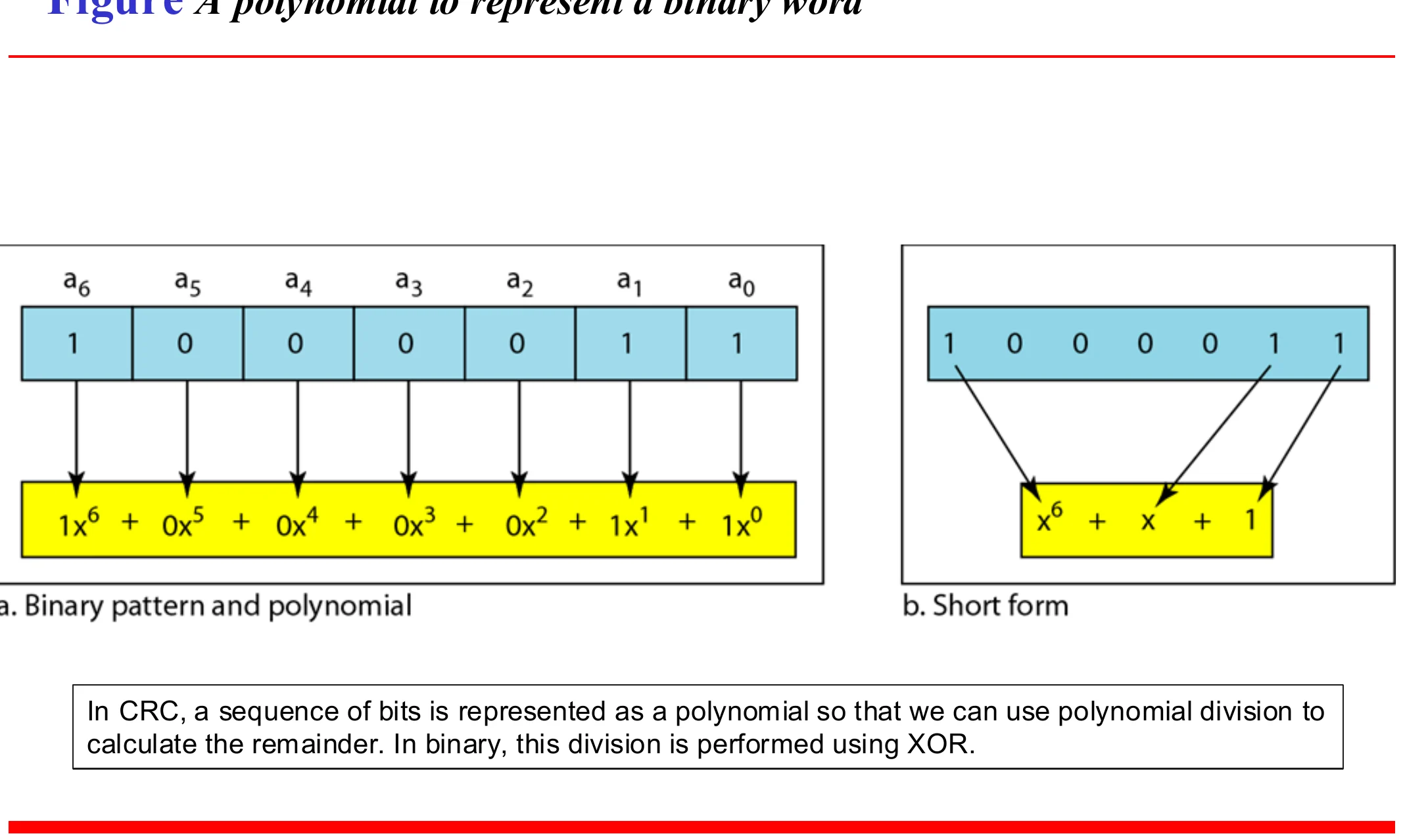
    A polynomial to represent a binary word

    In CRC, a sequence of bits is represented as a polynomial so that we can use polynomial division to calculate the remainder. In binary, this division is performed using XOR.①

    1000011 as x⁶ + x¹ + x⁰, short form x⁶ + x + 1
    33
    Exam weight High
    1. Each 1 bit is a power of x: 1000011 = x⁶ + x + 1.
    2. Division uses XOR, with no carries.
    Memory trickPolynomial → bits: write a 1 for every power present, from the highest down to x⁰. x³ + x + 1 = 1011.
    🎯 How this can come up · 2 questions
    MCQ

    The generator x³ + x + 1 in binary is:

    MCQ

    1000011 as a polynomial is:

    ★ Tutorial

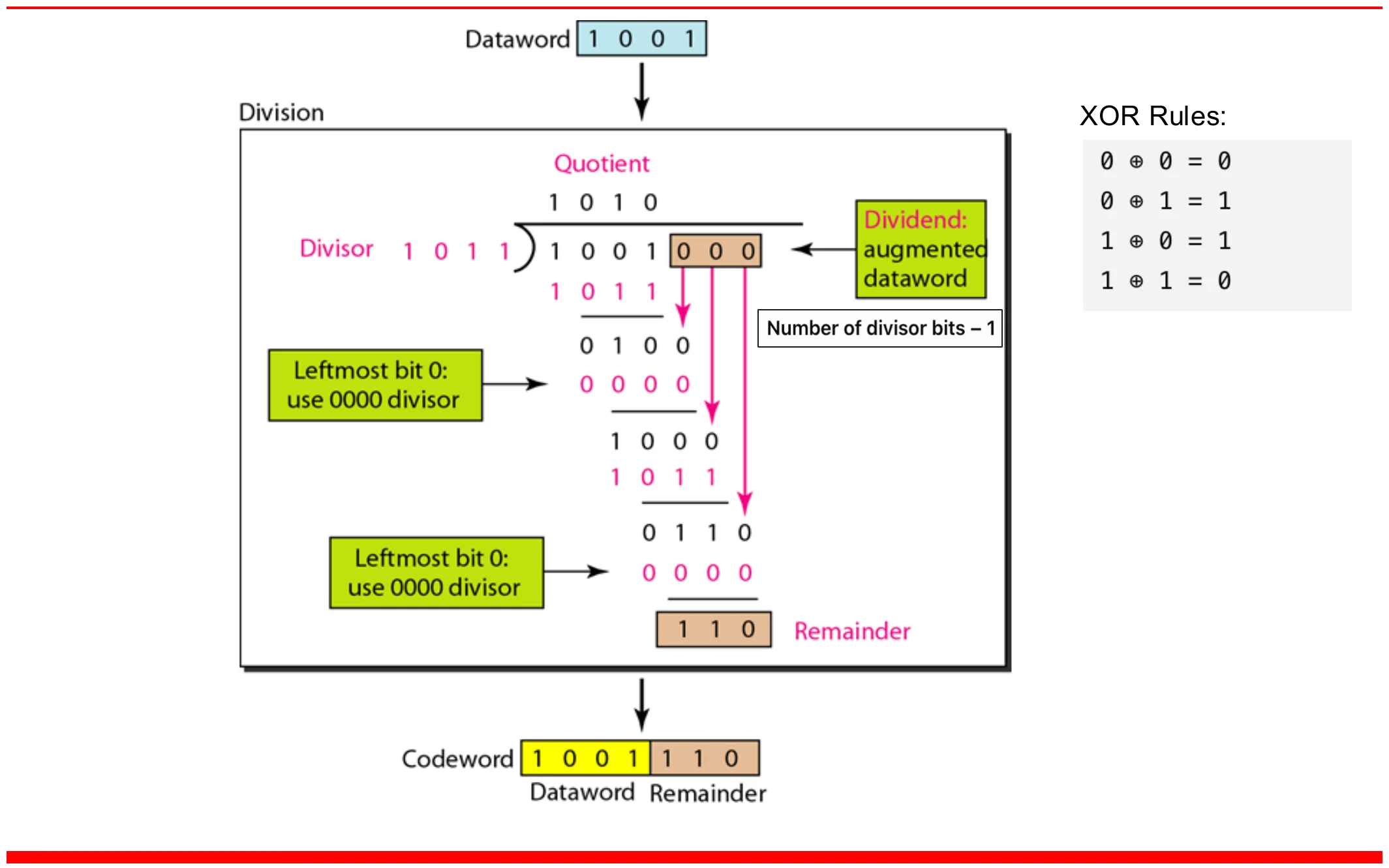
    Division in CRC encoder

    XOR rules: 0 ⊕ 0 = 0 · 0 ⊕ 1 = 1 · 1 ⊕ 0 = 1 · 1 ⊕ 1 = 0

    Dataword 1001 with three zeros appended is divided by 1011; remainder 110 is the CRC; codeword 1001110
    34
    Exam weight High
    1. Dataword 1001 + 000 ÷ 1011 → remainder 110 → codeword 1001110.
    2. When the leftmost bit of the current remainder is 0, divide by 0000 instead (just bring the next bit down).
    🎯 How this can come up · 3 questions
    MCQ

    With generator 1011, the CRC for dataword 11010011 is:

    MCQ

    With generator x³ + x + 1, the frame sent for data 101110 is:

    MCQ

    With generator 1011, the CRC for dataword 1101 is:

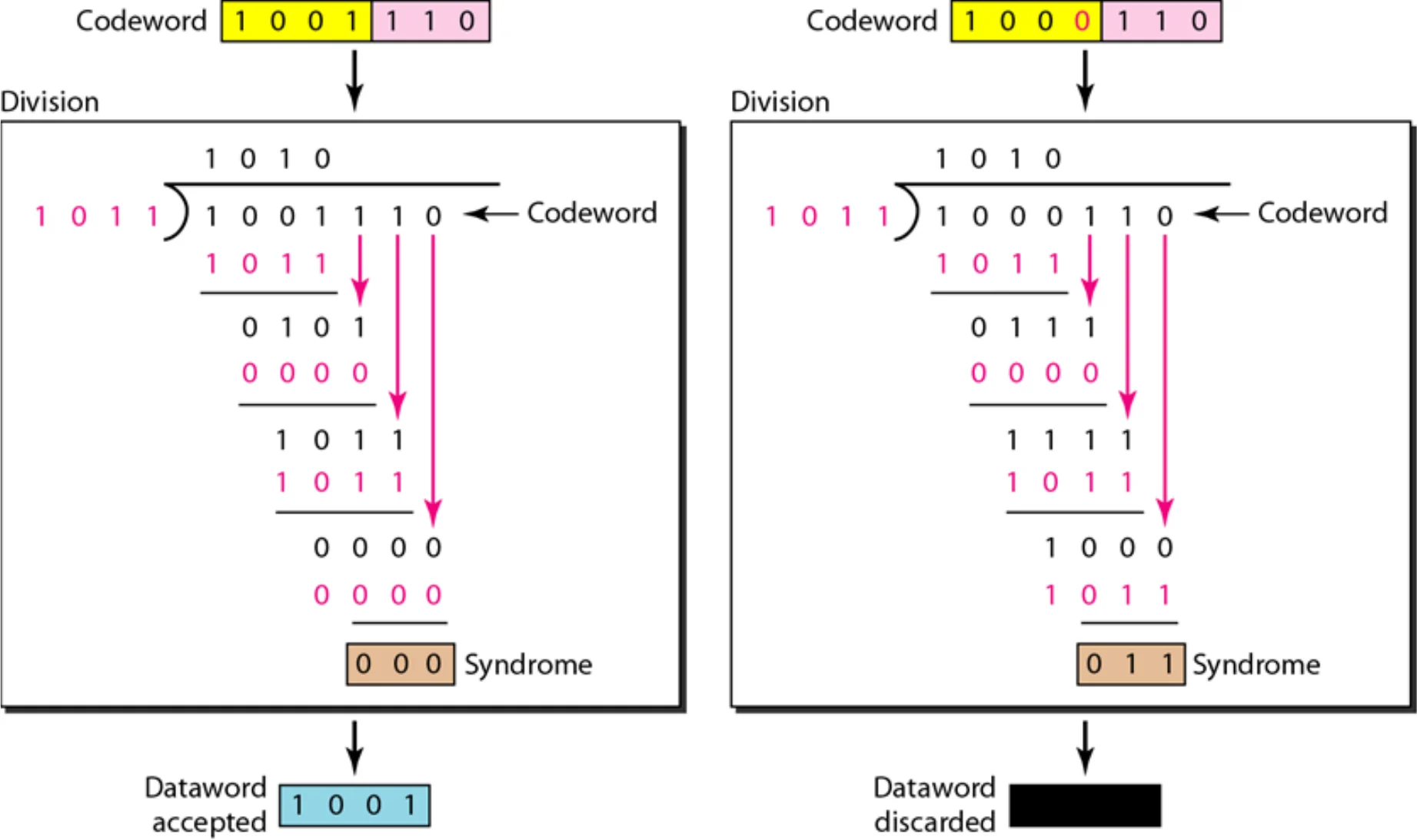
    ★ Tutorial

    Division in the CRC decoder for two cases

    Codeword 1001110 gives syndrome 000 and is accepted; 1000110 gives syndrome 011 and is discarded
    35
    Exam weight High
    1. Remainder (syndrome) 000 → accept. Anything else → discard.
    🎯 How this can come up · 2 questions
    MCQ

    Generator 1011. The receiver gets 11010011101. What happens?

    True / False

    Generator x³ + x + 1: the received frame 101110101 is accepted.

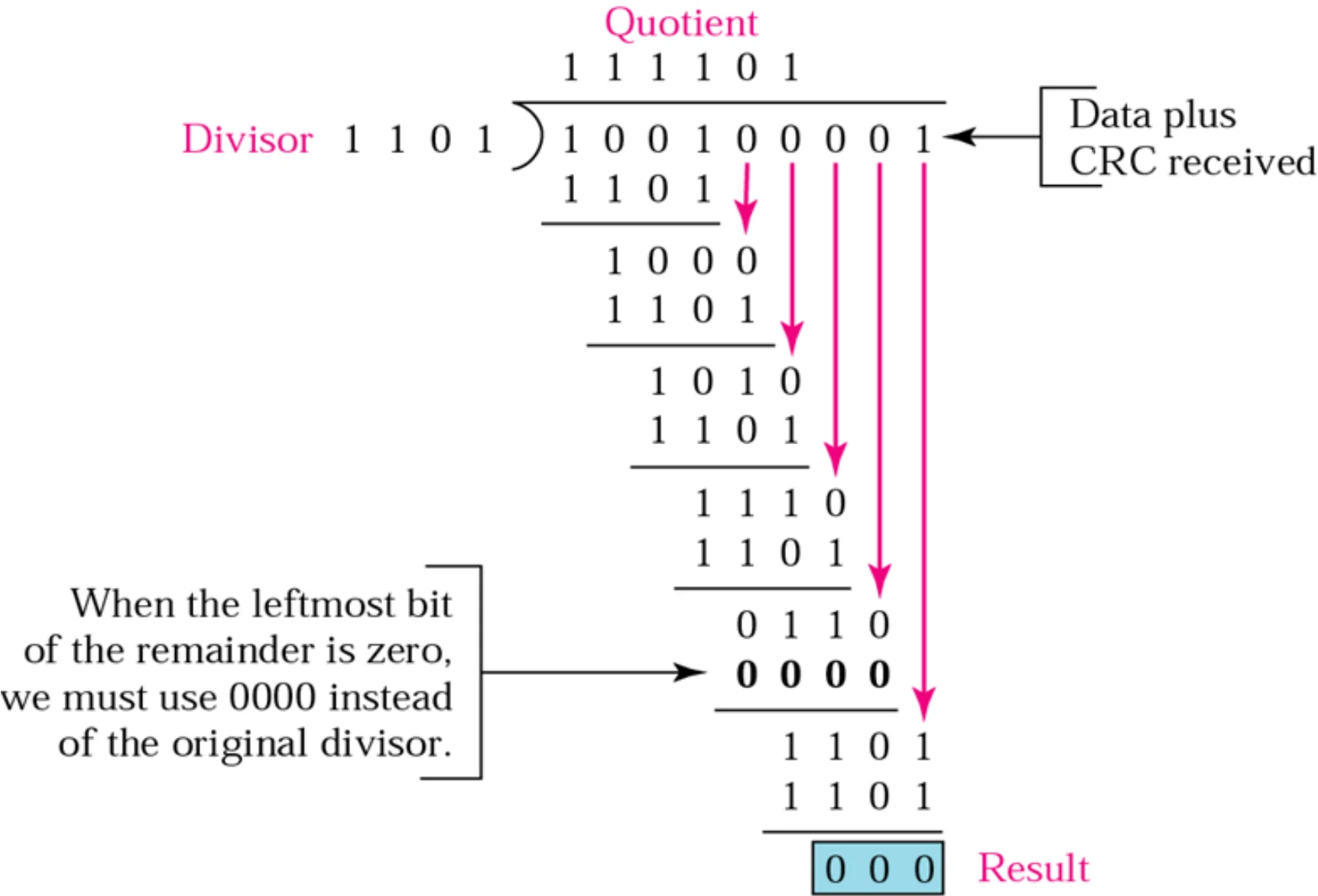
    Binary division in CRC checker

    Data plus CRC 100100001 divided by 1101 leaves remainder 000
    36
    Exam weight Low
    1. A zero remainder means no error detected.

    CRC summary

    Sender: data → append zeros → divide → get CRC → send data + CRC

    Receiver: data + CRC → divide by the same divisor

    • Remainder 0 → no error detected
    • Remainder ≠ 0 → error detected
    37
    Exam weight Medium
    1. Append (divisor length - 1) zeros, not divisor length.
    Exam trapGenerator 1011 has 4 bits → append 3 zeros and the CRC is 3 bits.

    Advantages of Cyclic Codes

    We have seen that cyclic codes have:

    • a very good performance in detecting single-bit errors, double errors, an odd number of errors, and burst errors.①
    • They can easily be implemented in hardware and software. They are especially fast when implemented in hardware.②
    • This has made cyclic codes a good candidate for many networks.
    39
    Exam weight Low
    1. CRC catches single, double, odd-count and burst errors, and is fast in hardware.

    Example

    Find the suitability of the following generators in relation to burst errors of different lengths: a. x⁶ + 1 b. x¹⁸ + x⁷ + x + 1 c. x³² + x²³ + x⁷ + 1

    Solution a. x⁶ + 1 can detect all burst errors with a length less than or equal to 6 bits; 3 out of 100 burst errors with length 7 will not be detected (1/2⁵ = 0.03); 16 out of 1000 burst errors of length 8 or more will not be detected (1/2⁶ = 0.016).

    40
    Exam weight Medium
    1. A generator of degree r catches ALL bursts of length ≤ r.
    2. Length r + 1 slips by with probability 1/2^(r-1); longer ones with 1/2r.
    Memory trickDegree = highest power. x⁶ + 1 → 6 → all bursts up to 6 bits.
    🎯 How this can come up · 1 question
    MCQ

    The generator x¹⁸ + x⁷ + x + 1 detects all burst errors of length up to:

    Example (continued)

    b. x¹⁸ + x⁷ + x + 1 can detect all burst errors with a length less than or equal to 18 bits; 8 out of 1 million burst errors with length 19 will slip by; 4 out of 1 million burst errors of length 20 or more will slip by.

    c. x³² + x²³ + x⁷ + 1 can detect all burst errors with a length less than or equal to 32 bits; 5 out of 10 billion burst errors with length 33 will slip by; 3 out of 10 billion burst errors of length 34 or more will slip by.

    41
    Exam weight Low
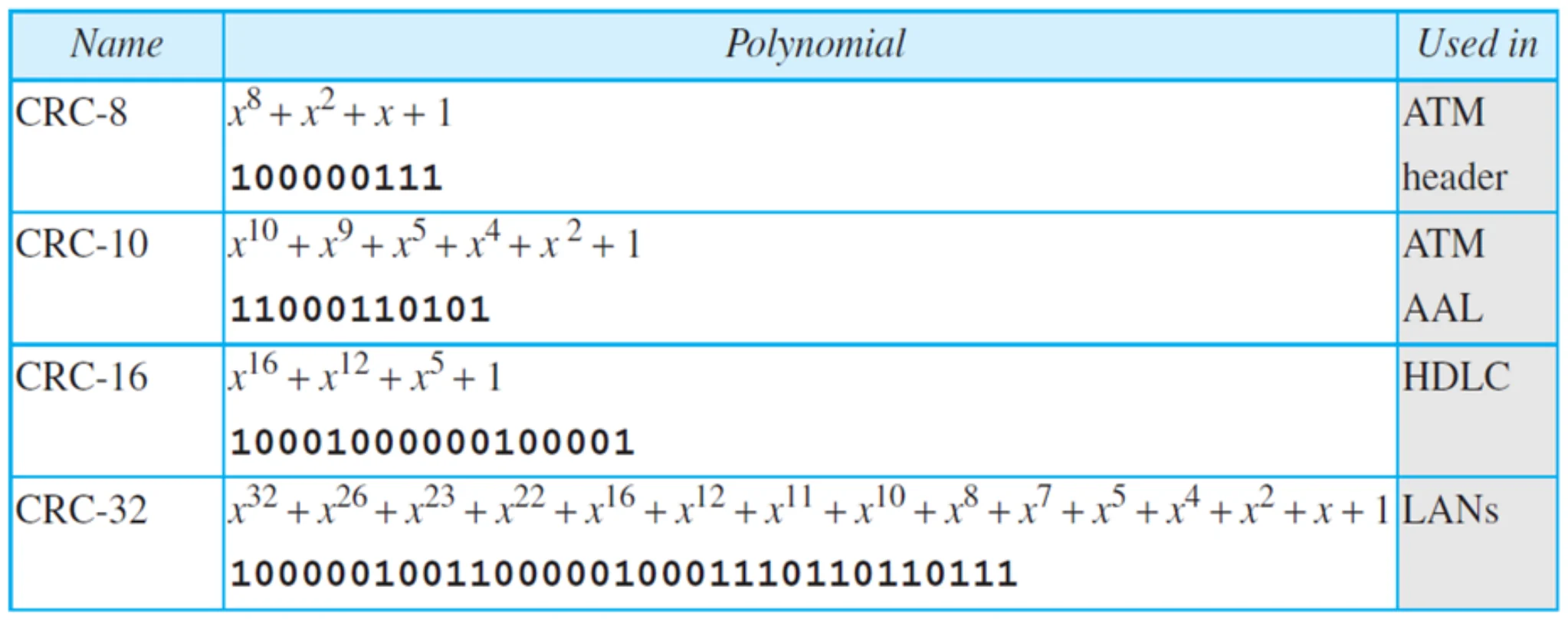
    1. Higher degree → longer bursts caught → that’s why LANs use CRC-32.

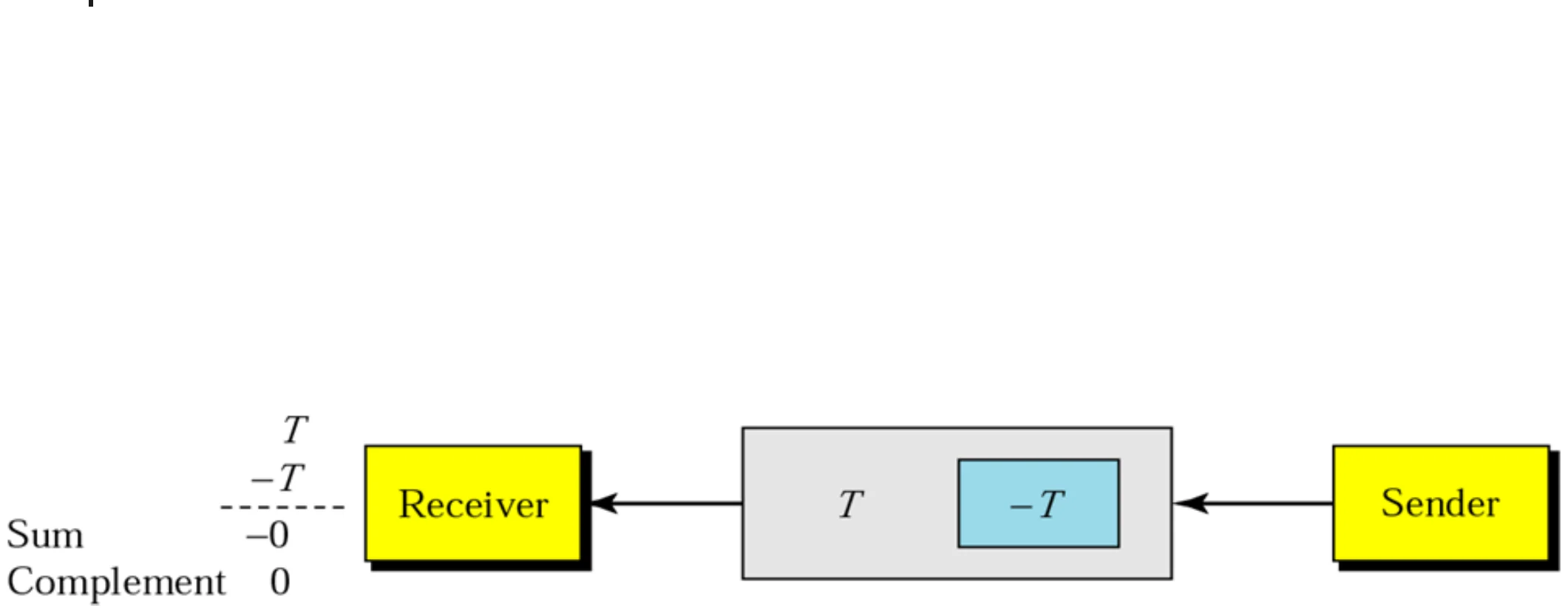
    Data unit and checksum

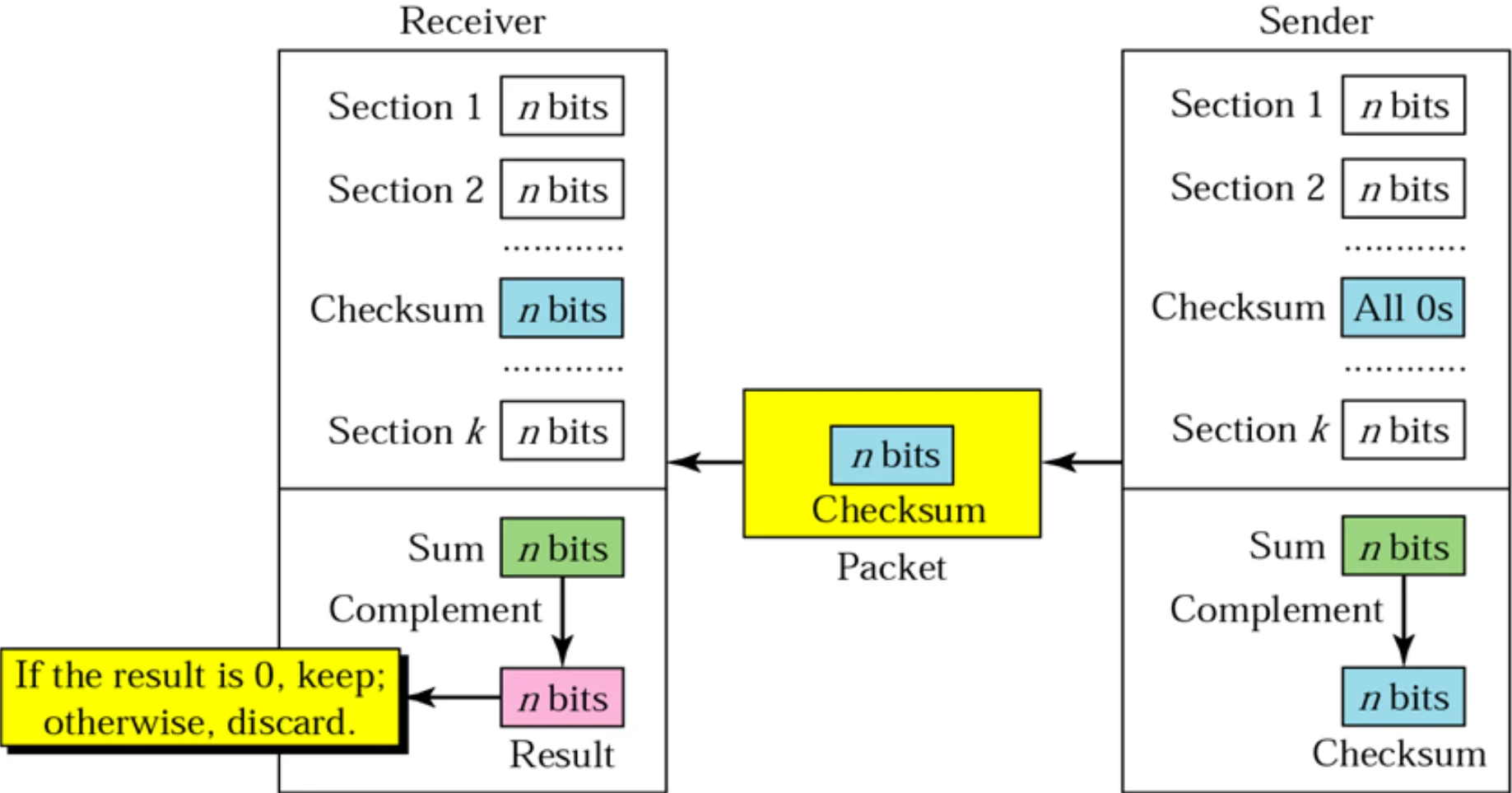
    Sender sends T and -T; receiver adds them: sum -0, complement 0
    43
    Exam weight Low

      Checksum: sender site

      Sender site:

      1. The message is divided into 16-bit words.
      2. The value of the checksum word is set to 0.
      3. All words including the checksum are added using one’s complement addition.
      4. The sum is complemented and becomes the checksum.
      5. The checksum is sent with the data.
      44
      Exam weight Medium
      1. Steps: split into 16-bit words, checksum field = 0, add with one’s complement, complement → checksum.
      Memory trickOne’s complement addition: any carry out of the top bit wraps around and is added back at the bottom.

      Checksum: receiver site

      Receiver site:

      1. The message (including checksum) is divided into 16-bit words.
      2. All words are added using one’s complement addition.
      3. The sum is complemented and becomes the new checksum.
      4. If the value of checksum is 0, the message is accepted; otherwise, it is rejected.
      45
      Exam weight Medium
      1. Receiver: add all words INCLUDING the checksum, complement. 0 → accept, anything else → reject.
      ★ Tutorial

      Example 7

      Suppose the following block of 16 bits is to be sent using a checksum of 8 bits: 10101001 00111001

      The numbers are added using one’s complement:

      10101001 + 00111001 = 11100010 (sum)

      Checksum = complement = 00011101①

      The pattern sent is 10101001 00111001 00011101

      46
      Exam weight High
      1. Complement = flip every bit.
      🎯 How this can come up · 2 questions
      MCQ

      The 8-bit checksum of 10101010, 01010101, 11110000 and 00001111 is:

      MCQ

      Sender words 1100110011001100 and 1010101010101010. The 16-bit checksum is:

      ★ Tutorial

      Example 8

      The receiver receives the pattern sent in Example 7 and there is no error: 10101001 00111001 00011101

      When the receiver adds the three sections, it gets all 1s, which, after complementing, is all 0s and shows that there is no error.

      Sum = 11111111 · Complement = 00000000 means that the pattern is OK.①

      47
      Exam weight Medium
      1. No error → sum all 1s → complement all 0s.
      🎯 How this can come up · 1 question
      True / False

      In Tutorial 4 Q3, the receiver gets checksum 0110010101100101 for the two words. The packet is error-free.

      Example 9

      A burst error of length 5 affects 4 bits: 10101111 11111001 00011101

      When the receiver adds the three sections, it gets:

      10101111 + 11111001 + 00011101 → partial sum 1 11000101 → wrap the carry 1 → sum 11000110

      Complement = 00111001: the pattern is corrupted.①

      48
      Exam weight Low
      1. Nonzero after complementing → corrupted.

      Error correction

      • Retransmission
      • Forward error correction (FEC)
      49
      Exam weight Low
      1. Two ways to fix errors: send it again, or send enough redundancy to fix it on arrival (FEC).

      Error correction 1: retransmission

      • For Wireless applications error detection and retransmission is inefficient:
        • The bit error rate on a wireless link can be very high which would result in large number of retransmissions.①
      • For real-time Multimedia applications, retransmissions create unacceptable delay. The application has to wait until the corrupted packet is retransmitted.②
      50
      Exam weight Medium
      1. Retransmission is bad for wireless (high bit error rate → too many resends) and for real-time multimedia (waiting = delay).
      🎯 How this can come up · 1 question
      MCQ

      Retransmission is a poor fit for real-time multimedia because:

      Error correction 2: forward error correction (FEC)

      Forward error correction (FEC) detects and corrects a limited number of errors in transmitted data without the need for retransmission.①

      • Two-dimensional parity
      • Using the XOR property
        • Add the error detection bits to the datawords to create the codeword blocks
          • XOR all codewords together to create block R: R = C1 ⊕ C2 ⊕ C3 ⊕ … ⊕ Cn
          • Transmit the codewords with the block R
        • To recover any one corrupted block, XOR all the other blocks with R
          • For example, if C2 is missing: C2 = R ⊕ C1 ⊕ C3 ⊕ C4②
      • Burst error correction using chunk interleaving③
      51
      Exam weight High
      1. FEC fixes errors at the receiver with no resend.
      2. XOR trick: send R = XOR of all blocks; any ONE lost block = XOR of R with the rest.
      3. Three FEC methods: 2D parity, XOR, chunk interleaving.
      🎯 How this can come up · 2 questions
      MCQ

      Blocks C1..C4 and R = C1 ⊕ C2 ⊕ C3 ⊕ C4 are sent, and C3 is lost. C3 equals:

      True / False

      Forward error correction needs the sender to retransmit corrupted data.

      Burst Error Correction Chunk Interleaving

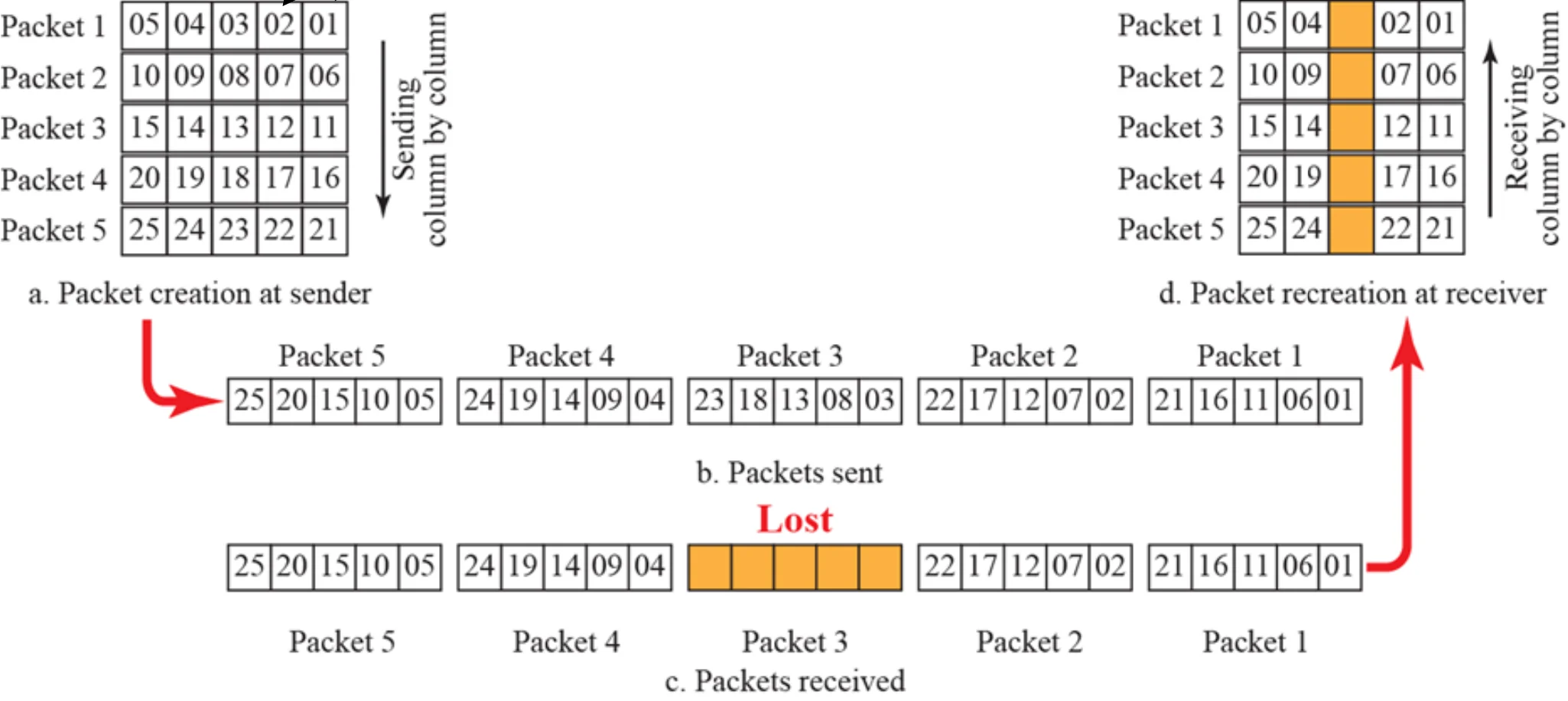
      Another way to achieve FEC in multimedia is to allow some small chunks to be missing at the receiver. We cannot afford to let all the chunks belonging to the same packet be missing; however, we can afford to let one chunk be missing in each packet.

      One chunk is missing from each packet is acceptable in multimedia applications

      52
      Exam weight Low
      1. Interleave: spread each packet’s chunks across several transmitted packets. Losing one packet then costs each original packet only one chunk, which multimedia can tolerate.

      Interleaving

      Five packets of five chunks are sent column by column; when one sent packet is lost, each original packet misses only one chunk
      53
      Exam weight Medium
      1. The lost packet (orange) removes one chunk from each of the five packets instead of a whole packet.
      🎯 How this can come up · 1 question
      Scenario

      A video stream loses one whole packet in a burst. How does chunk interleaving keep the video watchable?