CS331 · Annotated SlidesChapter 9 — Transport Layer
Chapter 9 · Annotated slides

Transport Layer

Process-to-process delivery: port numbers and socket addresses, multiplexing, connectionless vs. connection-oriented service, and the two protocols. TCP gets the detail (sequence and acknowledgment numbers, the three-way handshake, termination, windows); UDP gets the “when is it the right choice” scenarios. Sequence/ACK arithmetic and TCP-or-UDP scenarios are the usual questions.
Slide text Study notes Highlight: key words Tips, tricks & traps Seen again elsewhere How it can come up

Transport Layer

CS331: Computer Networks · Chapter 9
1
Exam weight Low
  1. Duties → ports and sockets → mux/demux → connectionless vs. connection-oriented → TCP (sequence numbers, handshake, ACKs, windows) → UDP and when to use it.

Chapter 9: Outline

  • 9.1 Transport-Layer Services
  • 9.2 Transport-Layer Protocols
  • 9.2 User-Datagram Protocol (UDP)
  • 9.3 Transmission Control Protocol (TCP)
2
Exam weight Low
  1. 9.1 services · 9.2 protocols · UDP · TCP.

9-1 TRANSPORT LAYER SERVICES

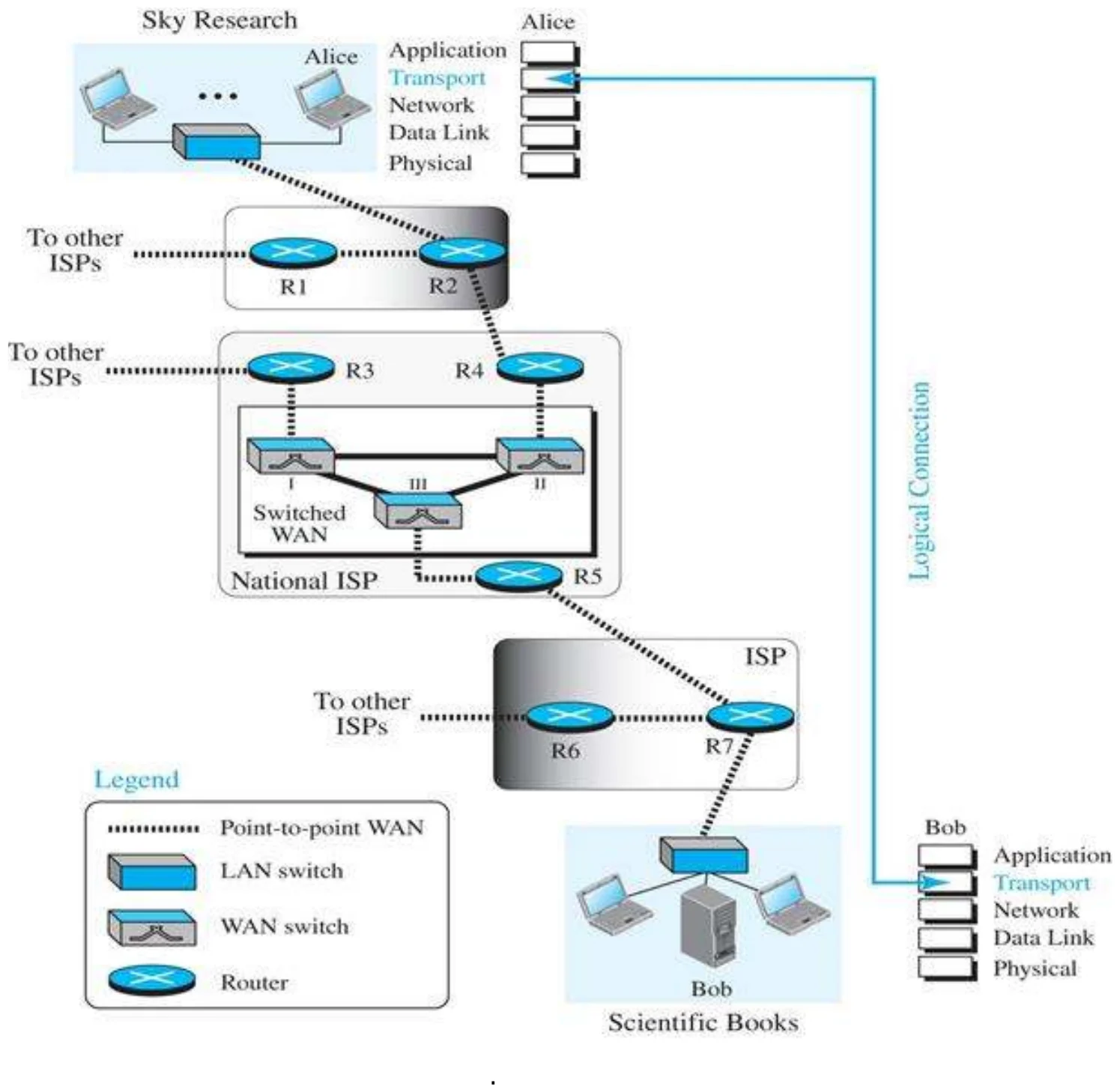
  • The transport layer is located between the application layer and the network layer. It provides a process-to-process communication between two application layers, one at the local host and the other at the remote host.① Communication is provided using a logical connection. Figure 9.1 shows the idea behind this logical connection.②
3
Exam weight Medium
  1. Transport sits between application and network and gives PROCESS-to-process delivery over a logical connection.

Logical connection at the transport layer (Figure 9.1)

Alice’s and Bob’s transport layers talk over a logical connection across many ISPs and routers
4
Exam weight Low
  1. The two transport layers act as if directly connected; the routers in between never look at the transport header.

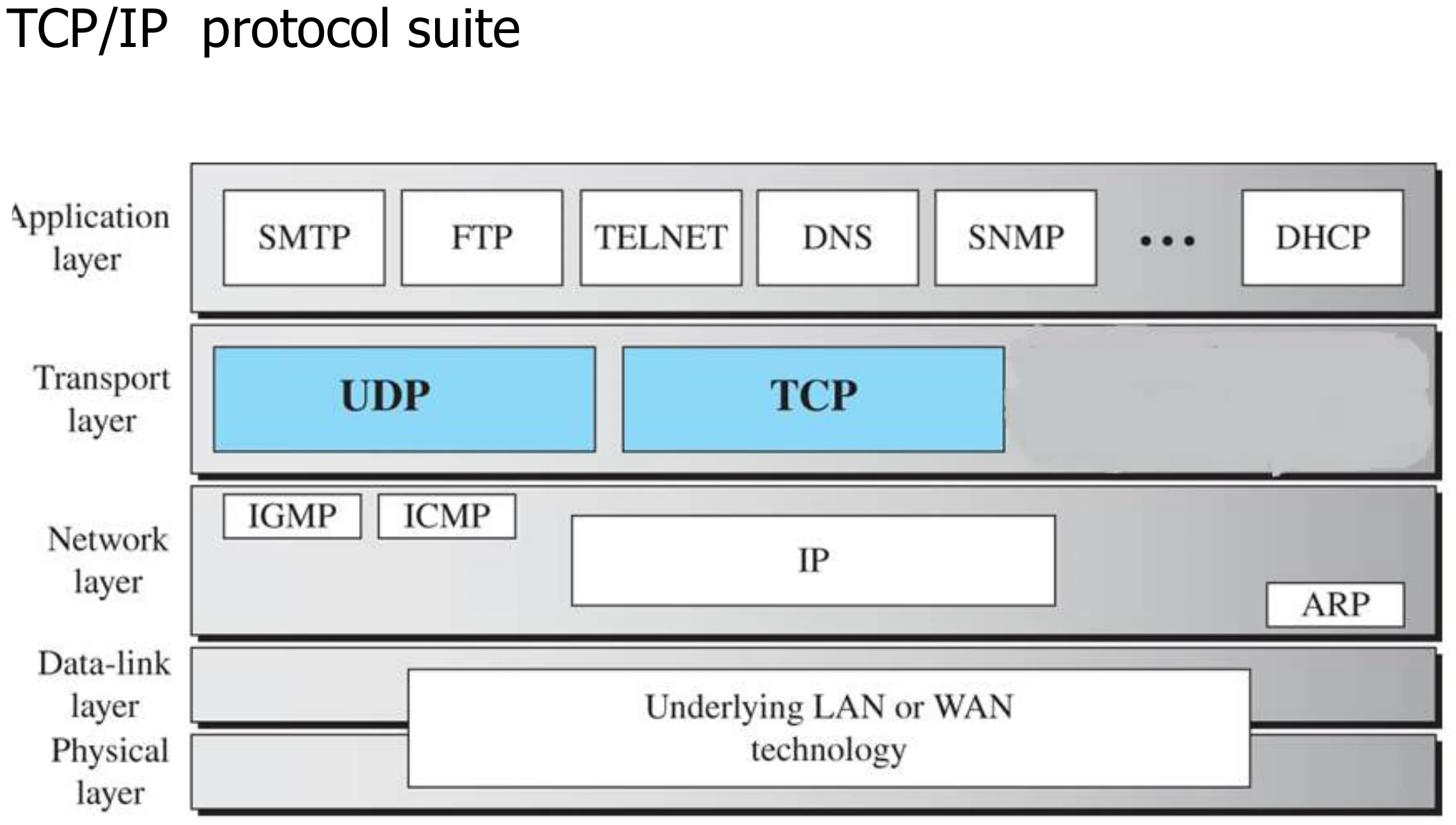
Position of transport-layer protocols in the TCP/IP protocol suite (Figure 9.17)

UDP and TCP between the application protocols (SMTP, FTP, TELNET, DNS, SNMP, DHCP) and IP
5
Exam weight Low
  1. Two transport protocols in the course: UDP and TCP.

Transport layer duties

  1. Process-to-process communication
  2. Addressing: port numbers identify the network application
  3. Encapsulation and decapsulation
  4. Multiplexing and demultiplexing
  5. Connection control: connection-oriented or connectionless services
  6. Reliability: flow control and error control
  7. Congestion control
6
Exam weight Medium
  1. Seven duties: process-to-process, addressing, encapsulation, mux/demux, connection control, reliability (flow + error), congestion control.
🎯 How this can come up · 1 question
MCQ

Which is NOT a transport-layer duty in the slides?

9.1.1 Process-to-Process Communication

  • The first duty of a transport-layer protocol is to provide process-to-process communication. A process is an application-layer entity (running program) that uses the services of the transport layer.① Before we discuss how process-to-process communication can be accomplished, we need to understand the difference between host-to-host communication and process-to-process communication.
7
Exam weight Low
  1. Process = a running application program that uses transport services.

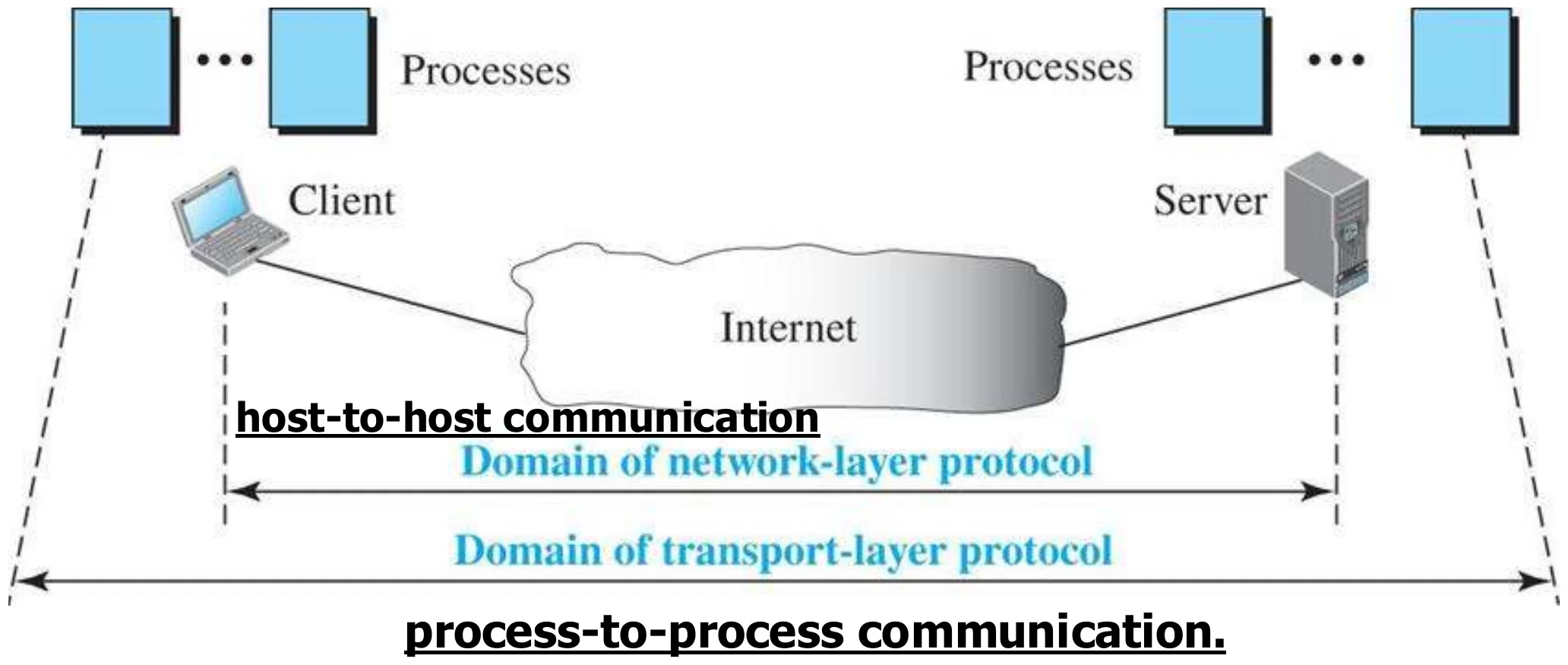
Network layer versus transport layer (Figure 9.2)

Network layer: host-to-host. Transport layer: process-to-process
8
Exam weight High
  1. Network layer = host to host. Transport layer = process to process.
🎯 How this can come up · 1 question
MCQ

Host-to-host delivery is the job of the ___ layer; process-to-process delivery is the job of the ___ layer.

PROCESS-TO-PROCESS Communication

  • Network layer is responsible for host-to-host communication. Network layer delivers the packet to the destination computer but not to specific process.
  • The transport layer is responsible for process-to-process delivery: the delivery of a segment, part of a message, from one process to another.
  • Process is an application layer entity (program in execution) that uses transport layer services
  • Processes on two hosts communicate with each other by sending and receiving messages
9
Exam weight Low
  1. Network layer gets the packet to the right COMPUTER; transport gets it to the right PROCESS on that computer.

Addressing – Port numbers

  • Each network process is assigned an address called a port number that is unique to the host①
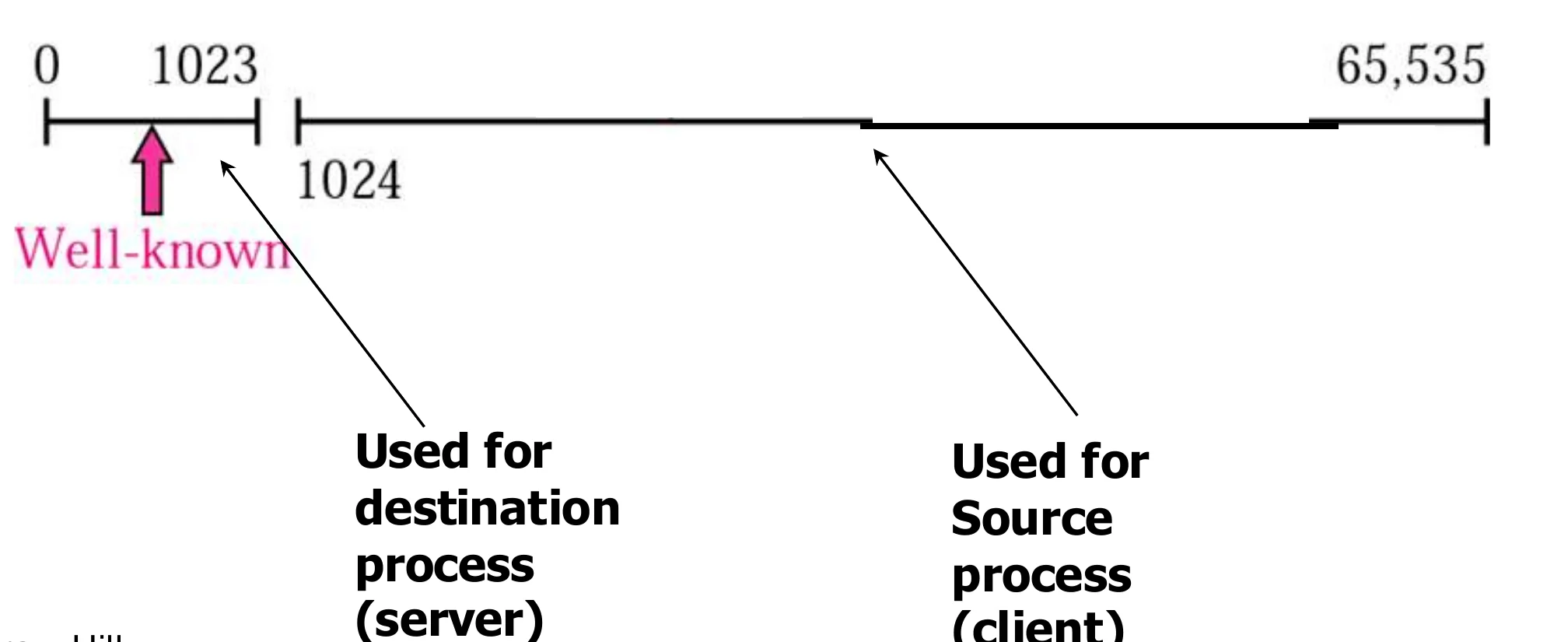
  • Port numbers are 16-bit integers between 0 and 65,535
    • Well-known ports (0–1023): assigned and controlled by IANA, e.g. FTP 20, 21 · TELNET 23 · SMTP 25 · HTTP 80②
    • Well-known ports are given only to the destination (server) process
    • Ports above 1023 are used for the source (client) process③
Port line 0–65,535: well-known 0–1023 for destination (server) processes, the rest for source (client) processes
10
Exam weight High
  1. Port = 16 bits (0–65,535). Well-known 0–1023 (IANA) → servers. Clients pick a random higher (ephemeral) port.
Memory trickPorts to know: FTP 20/21, Telnet 23, SMTP 25, DNS 53, DHCP 67, HTTP 80.
🎯 How this can come up · 3 questions
MCQ

Port numbers are:

MCQ

The well-known port of HTTP is:

True / False

A client normally uses a well-known port as its source port.

Some well-known ports used with UDP and TCP

  • 7 Echo · 9 Discard · 11 Users · 13 Daytime · 17 Quote · 19 Chargen (UDP, TCP)
  • 20, 21 FTP · 23 TELNET · 25 SMTP · 80 HTTP: TCP only①
  • 53 DNS · 67 DHCP · 69 TFTP · 111 RPC · 123 NTP: UDP (and TCP for DNS, DHCP, RPC, NTP)
  • 161 SNMP server · 162 SNMP client: UDP only②
11
Exam weight Medium
  1. FTP, TELNET, SMTP, HTTP need reliability → TCP only. SNMP → UDP only. DNS uses both (mostly UDP).
🎯 How this can come up · 2 questions
MCQ

Which application uses port 25?

MCQ

Which port does DNS use?

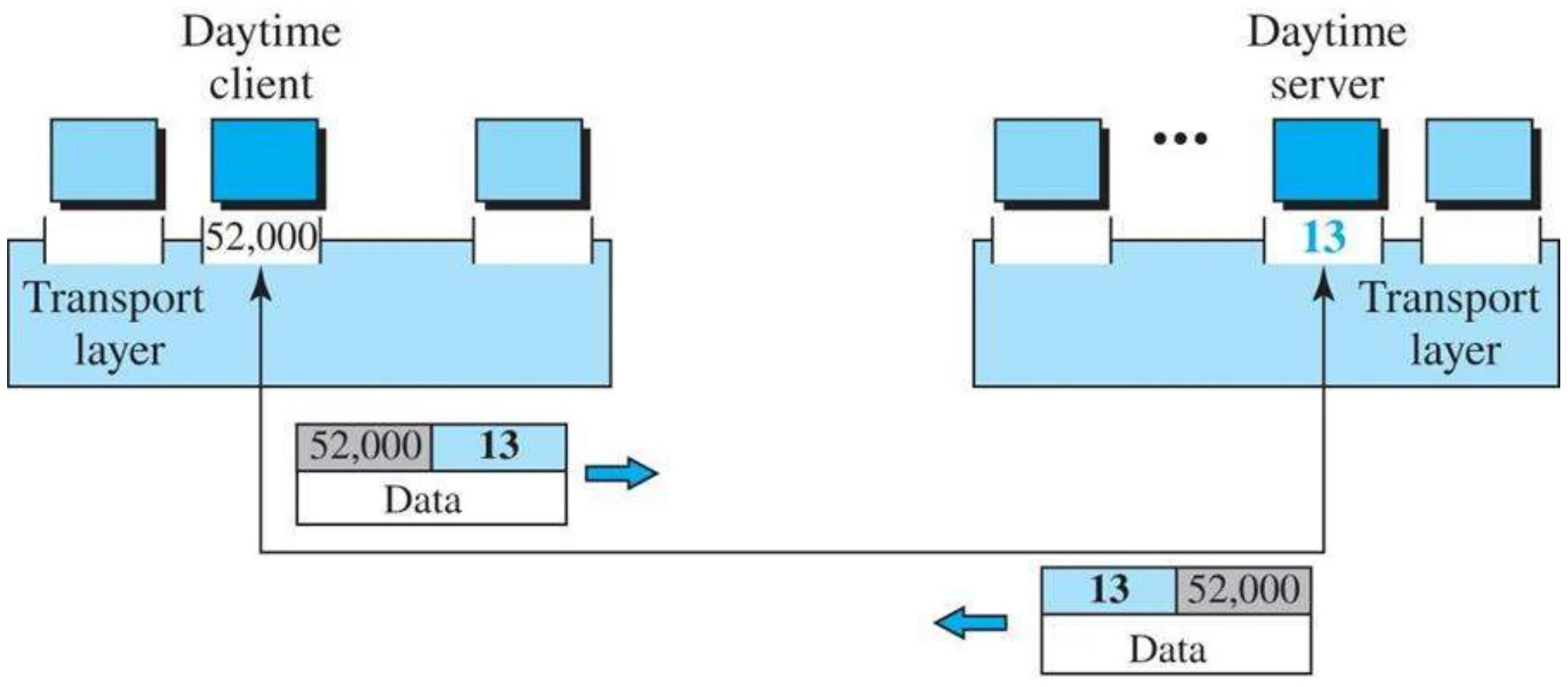
Port numbers

Daytime client on port 52,000 talks to the daytime server on port 13
12
Exam weight Low
  1. Request: source 52,000 → destination 13. Reply: the ports swap.

Addressing – Socket Address

  • Two processes communicate in a client/server relationship,
  • Local host process is called client and remote host process is called server
  • In multiuser and multiprogramming Client/Server environments four entities must be defined:①
  • Sending Node
    • Local Host IP
    • Local Process Port number②
  • Receiving Node
    • Remote host IP
    • Remote Process ID Port number
  • The process receives messages from, and sends messages into the network through its socket
  • A socket is the interface between the application layer and the transport layer within a host.③
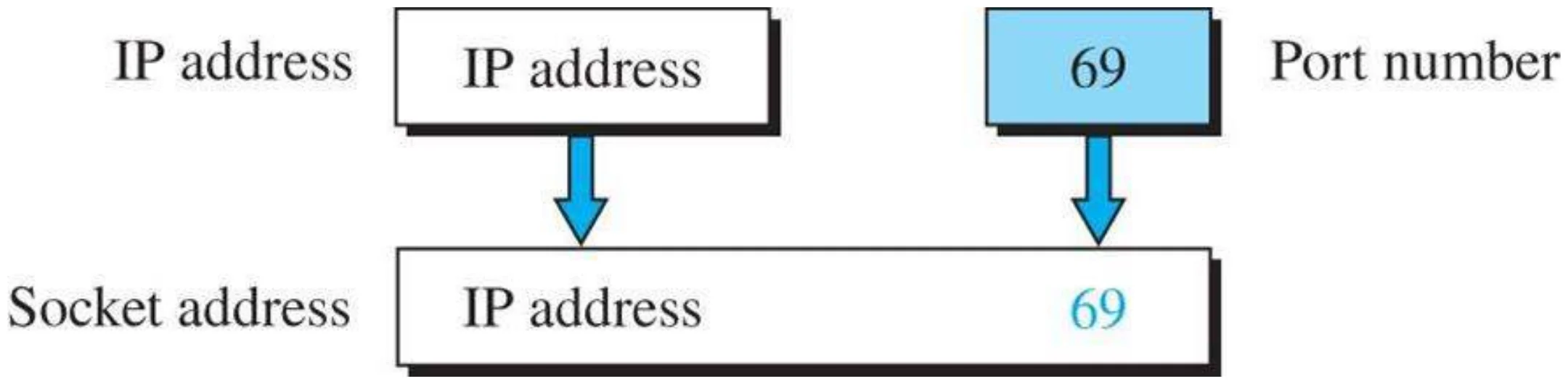
  • Socket Address is IP and Port Number④
13
Exam weight High
  1. A connection needs four things: local IP, local port, remote IP, remote port.
  2. Socket = the interface between application and transport. Socket address = IP + port.
Memory trickSocket address = WHERE (IP) + WHO (port).
🎯 How this can come up · 1 question
MCQ

A socket address is the combination of:

Socket address (Figure 9.6)

IP address + port number 69 = socket address
14
Exam weight Low

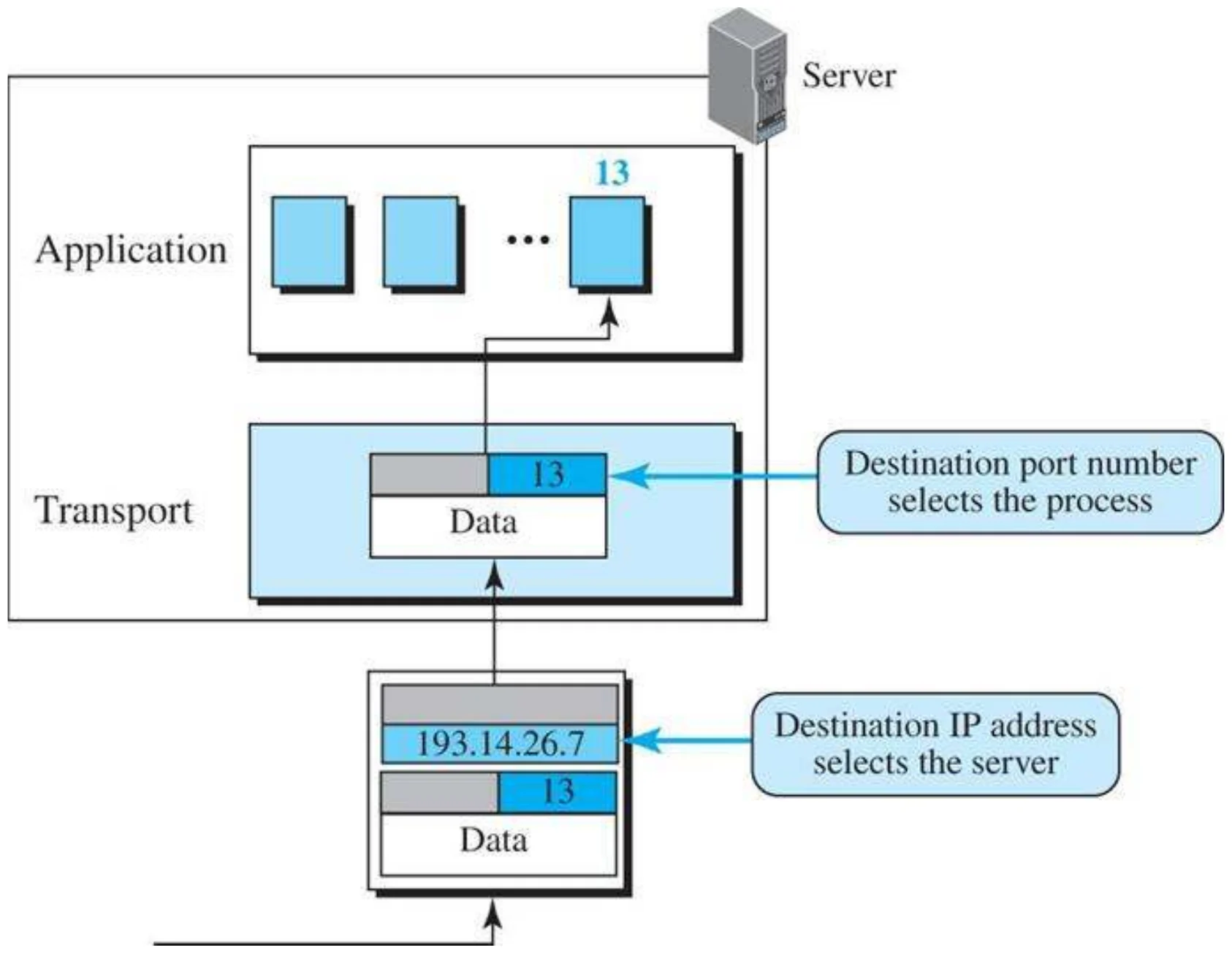
    IP addresses versus port numbers (Figure 9.4)

    The destination IP address selects the server; the destination port number selects the process
    15
    Exam weight High
    1. IP selects the HOST, port selects the PROCESS.
    🎯 How this can come up · 1 question
    MCQ

    At the receiving host, which field selects the application process?

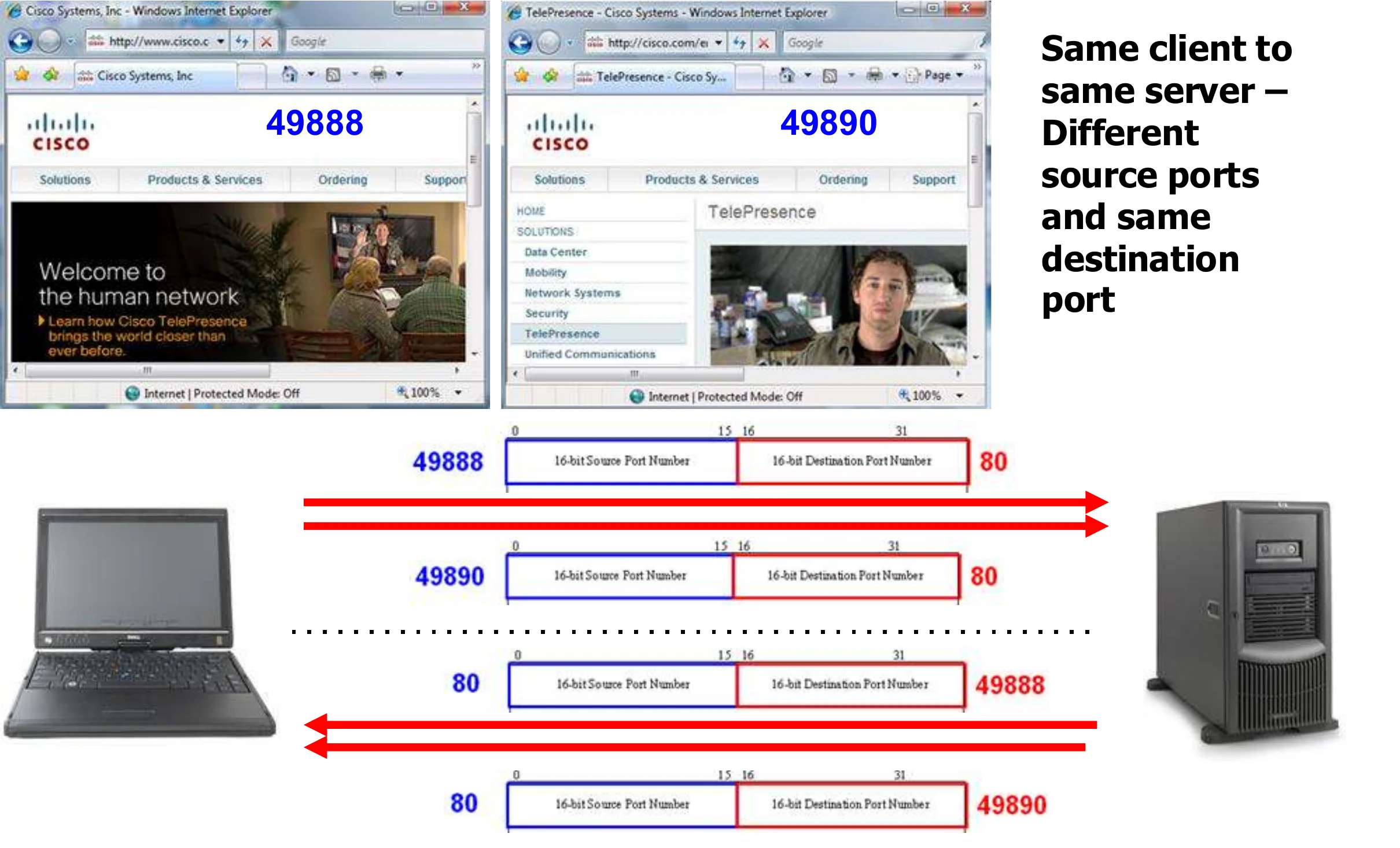
    Same client to same server: different source ports, same destination port

    • Same client to the same server: two different HTTP sessions
    • The client uses the same destination port (80)
    • The client uses different source ports (49888, 49890) to identify each web session uniquely
    Two browser windows to cisco.com use source ports 49888 and 49890, both to port 80
    16
    Exam weight Low
    1. Two tabs to the same site = same destination port 80, different source ports.

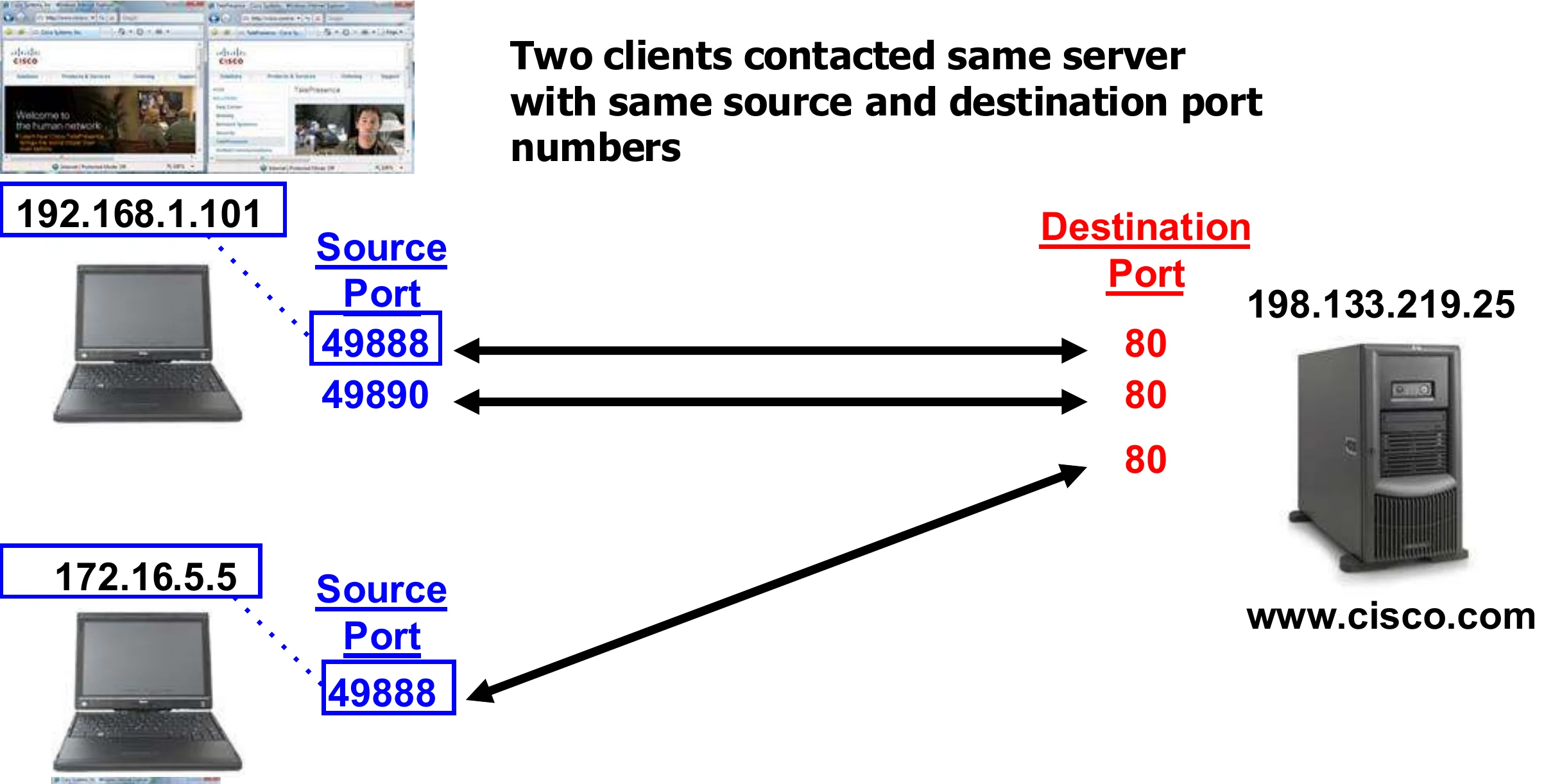
    Two clients contact the same server with the same port numbers

    • Clients 192.168.1.101 and 172.16.5.5 both use source port 49888 to reach 198.133.219.25:80.
    • What makes each connection unique? The pair of socket addresses:
      • Source IP address and source port (client → server)
      • Destination IP address and destination port (server → client)①
    • Different connections can use the same destination port on the server as long as the source ports or source IPs are different.②
    Two PCs with different IPs both use source port 49888 to the web server on port 80
    17
    Exam weight High
    1. A connection is identified by BOTH socket addresses. Same port 49888 is fine because the source IPs differ.
    🎯 How this can come up · 1 question
    Scenario

    Two laptops, 192.168.1.101 and 172.16.5.5, both open a connection from port 49888 to a web server on port 80. How does the server tell them apart?

    9.1.3 Encapsulation and Decapsulation

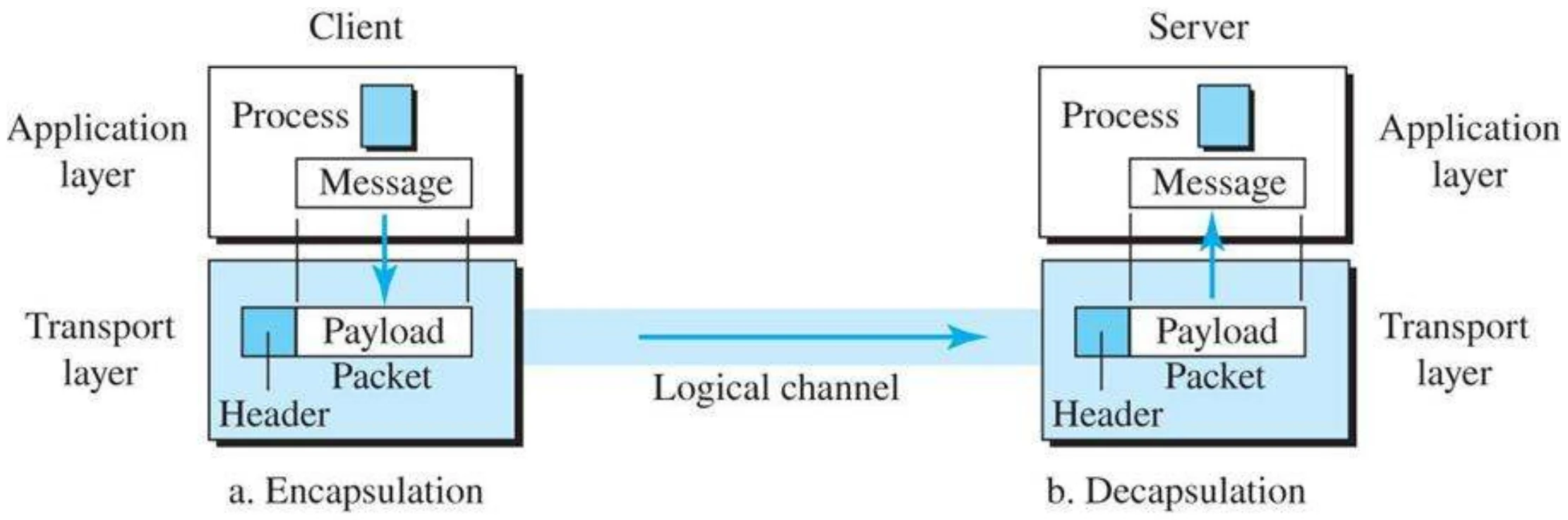
    • To send a message from one process to another, the transport-layer protocol encapsulates and decapsulates messages.
    • Encapsulation happens at the sender site.①
    • When a process has a message to send, it passes the message to the transport layer along with a pair of socket addresses (Source Port No. and Destination Port No.) and some other pieces of information, which depend on the transport-layer protocol.
    • The transport layer receives the data and adds the transport-layer header.②
    • Decapsulation happens at the receiver side
    • The transport layer receives the segment from the network layer, removes the headers, then passes the data to the process③
    18
    Exam weight Low
    1. Sender: add the transport header (with the ports). Receiver: strip it and hand the data to the process.

    Encapsulation and decapsulation (Figure 9.7)

    Client: message → packet with header. Server: header removed, message delivered to the process
    19
    Exam weight Low

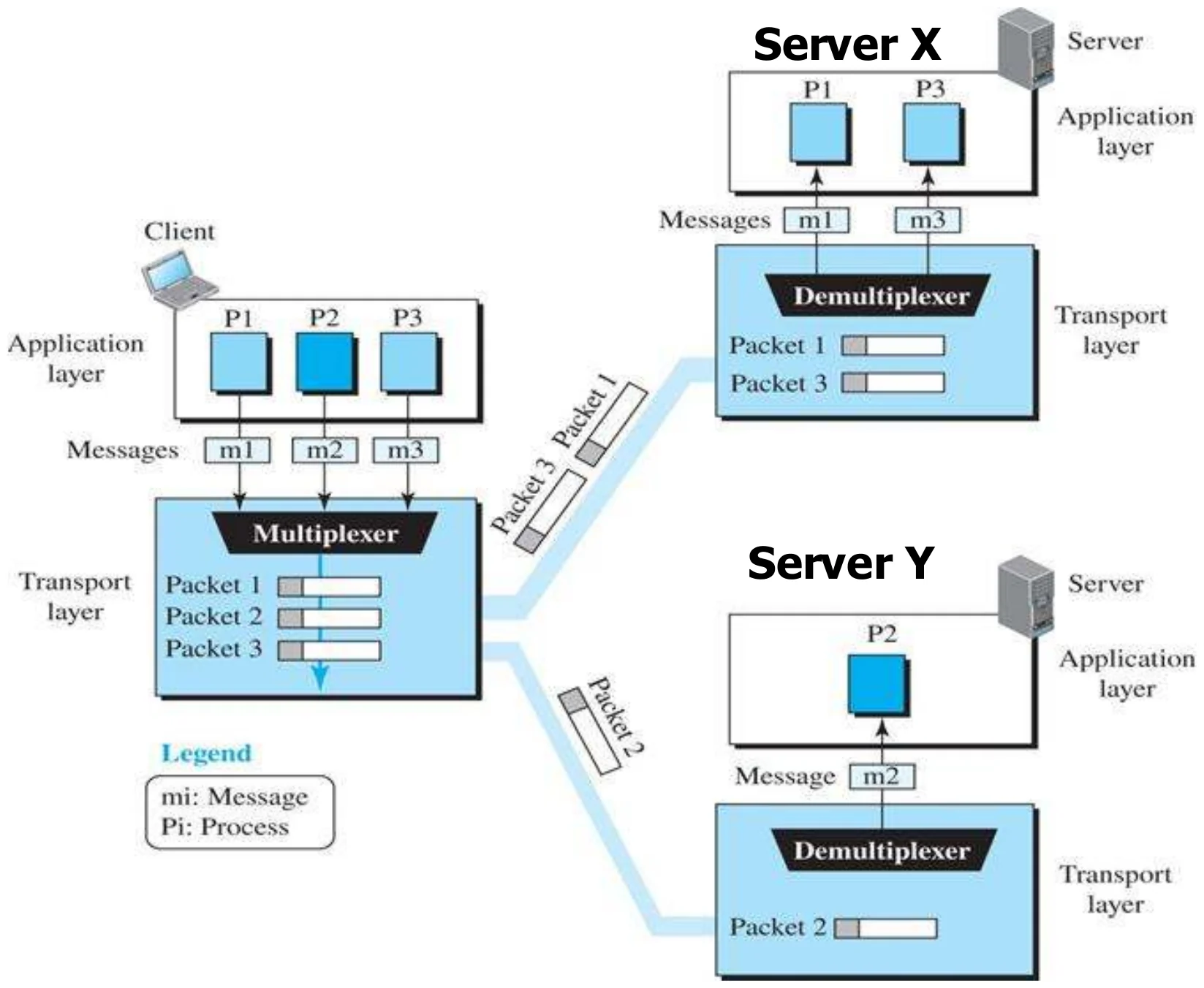
      9.1.4 Multiplexing and Demultiplexing

      • Whenever an entity accepts items from more than one source, this is referred to as multiplexing (many to one);①
      • Whenever an entity delivers items to more than one destination, this is referred to as demultiplexing (one to many).②
      • The transport layer at the source performs multiplexing which means it accepts messages from more than one application layer processes (many to one)
      • The transport layer at the destination performs demultiplexing which means it delivers segments to more than one application layer processes (one to many )③
      20
      Exam weight High
      1. Source transport: MULTIPLEXES many processes onto one network layer (many → one).
      2. Destination transport: DEMULTIPLEXES to the right process using the port (one → many).
      🎯 How this can come up · 1 question
      MCQ

      Demultiplexing at the transport layer happens at the:

      Multiplexing and demultiplexing (Figure 9.8)

      A client with processes P1–P3 multiplexes messages; servers X and Y demultiplex them to their processes
      21
      Exam weight Low

        Congestion Control

        • Congestion happens if the load on the network (number of segments sent to the network) is greater than the network Capacity (number of segments the network can handle).①
        • Congestion control are techniques that control the load so that it stays below the capacity.②
        22
        Exam weight High
        1. Congestion = load > network capacity. Congestion control keeps the load below capacity.
        Exam trapFlow control protects the RECEIVER; congestion control protects the NETWORK.
        🎯 How this can come up · 1 question
        MCQ

        Keeping the load on the network below its capacity is:

        Connection

        • A transport-layer protocol, like a network-layer protocol, can provide two types of services: connectionless and connection-oriented. The nature of these services at the transport layer,
        • However, is different from the ones at the network layer.
        • At the network layer, a connectionless service may mean different paths for different segments belonging to the same message.
        23
        Exam weight Low
        1. Connectionless/connection-oriented means something different at the transport layer than at the network layer.

        Connection

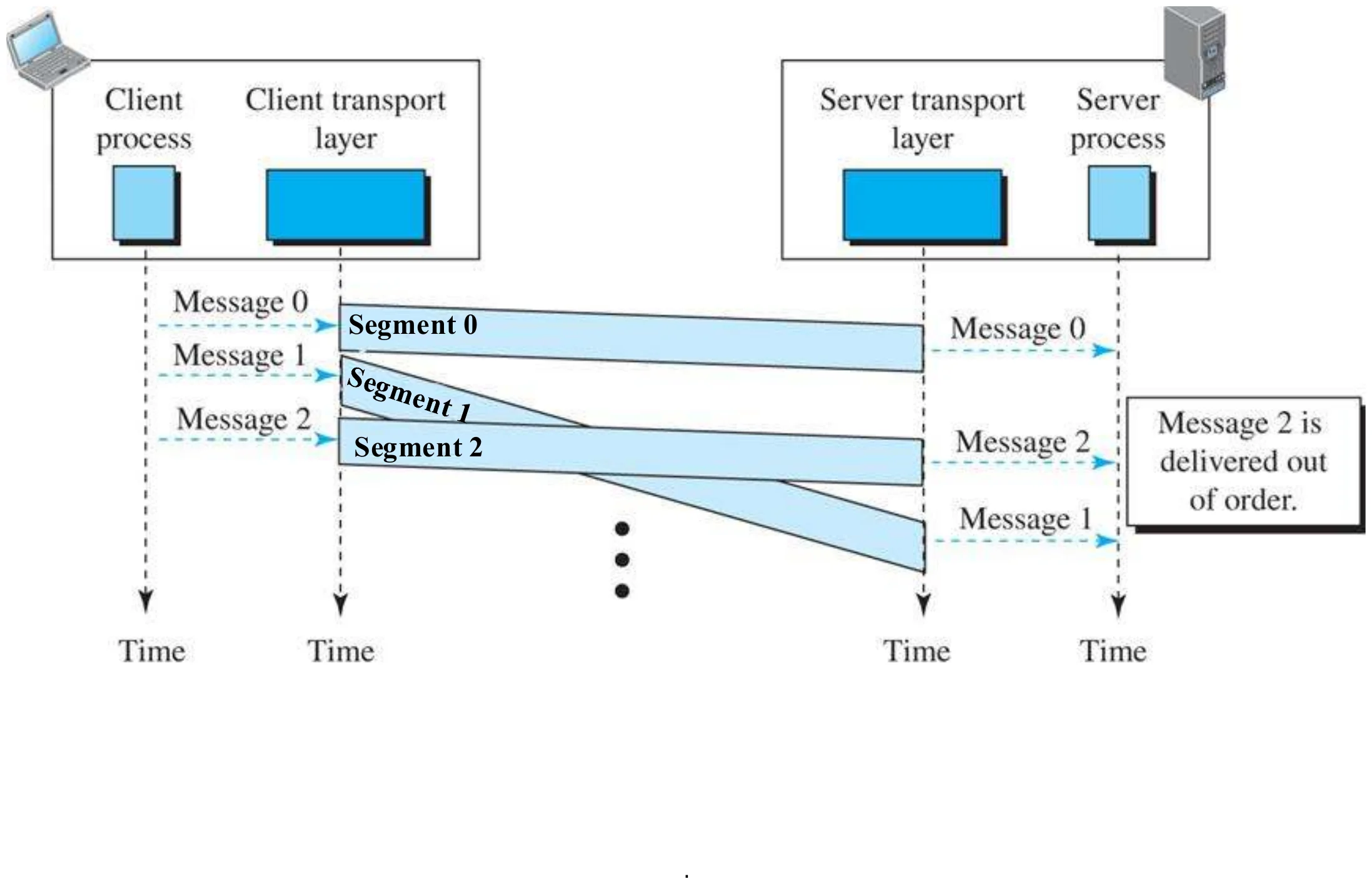
        • Connectionless service (UDP)
          • Means independency==== between segments
          • No flow and error control
          • No congestion control①
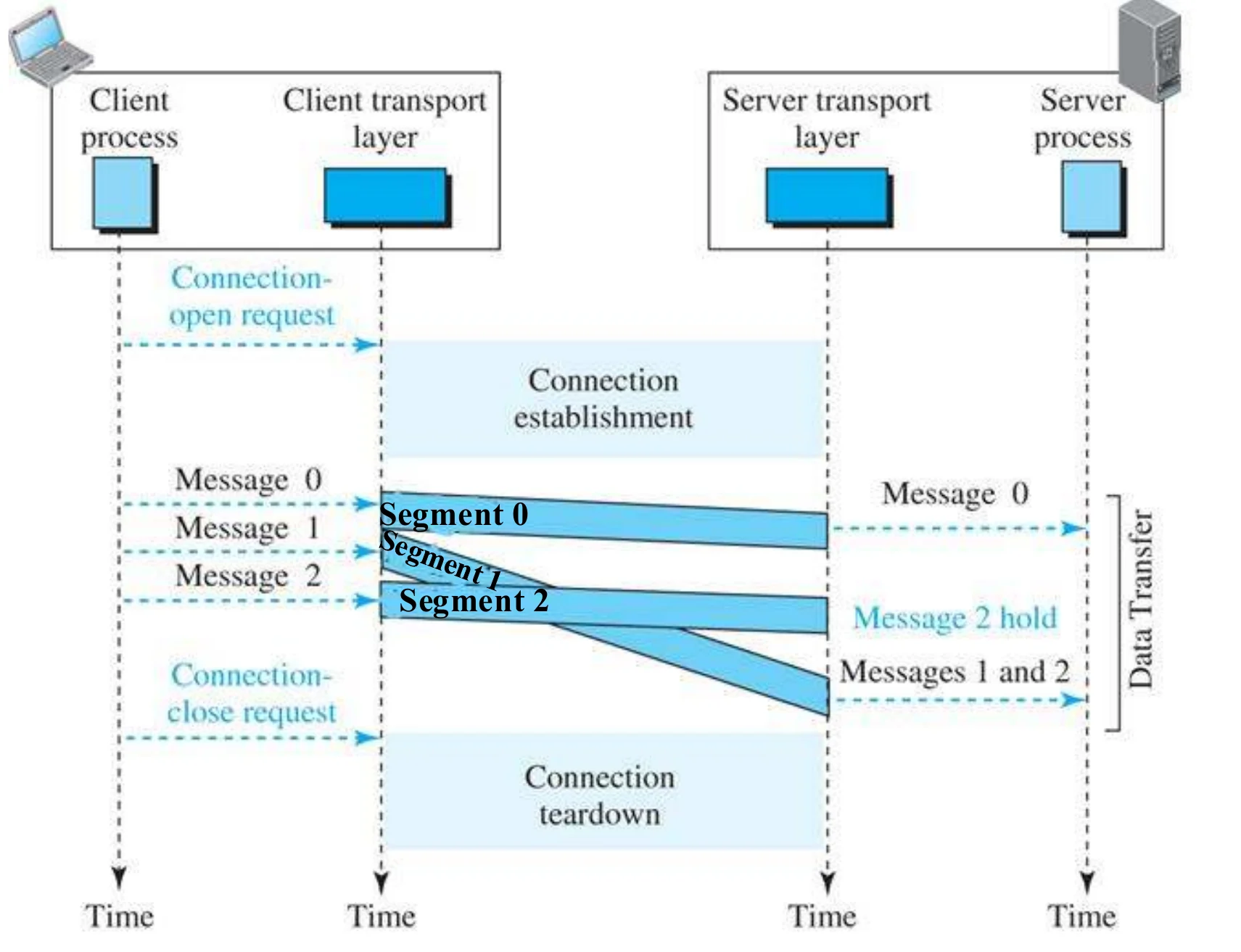
        • connection-oriented (TCP)
          • Means dependency between segments
          • Data can be transferred only after connection is established
          • Connection oriented means that a logical connection is established before any data is transferred.
          • Logical connection since Transport layer will make sure that segments are given to the receiver application in the same order as they were sent by the sender even if they travel through different physical paths
          • Both sides must initialize communication and get approval from the other side before any data transfer,②
          • Flow and error control is applied
          • Congestion control is applied
          • Connection should be terminated after data exchange③
        24
        Exam weight High
        1. UDP (connectionless): segments independent, no flow/error/congestion control.
        2. TCP (connection-oriented): set up first, both sides agree, in-order delivery, flow + error + congestion control, then close.
        🎯 How this can come up · 2 questions
        Written

        Compare connectionless (UDP) and connection-oriented (TCP) transport services.

        True / False

        UDP provides flow and congestion control.

        Connectionless service (Figure 9.14)

        Messages 0–2 sent as independent segments; message 2 is delivered out of order
        25
        Exam weight Low
        1. Connectionless: delivered out of order and nobody fixes it.

        Connection-oriented service (Figure 9.15)

        Connection open request, establishment, data transfer with message 2 held until 1 arrives, then teardown
        26
        Exam weight Low
        1. Connection-oriented: open → data (out-of-order segments held and reordered) → teardown.

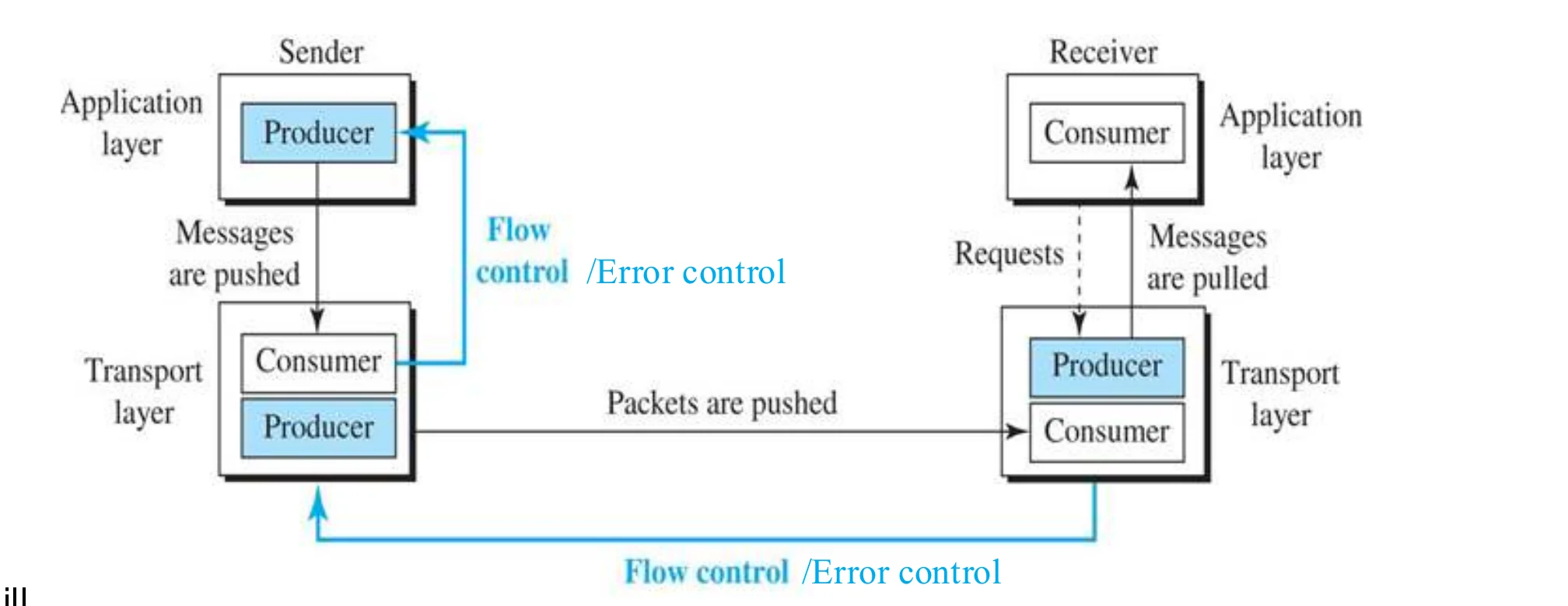
        Flow control and Error Protocols

        • Flow control (process-to-process): Transport layer makes sure that the sender process does not cause the receiver buffer to overflow①
        • Error control (process-to-process): entire message arrives at the receiving transport layer
          • without error,
          • without loss,
          • without duplication,
          • and in the same order they were sent,②
        Producer/consumer pushes and pulls between sender and receiver transport layers
        27
        Exam weight Medium
        1. Flow control: don’t overflow the receiver’s buffer.
        2. Error control: the whole message arrives without error, loss, duplication, in order.

        Position of transport-layer protocols in the TCP/IP protocol suite (Figure 9.17)

        UDP and TCP between the application protocols and IP
        28
        Exam weight Low
        1. Same figure as slide 5.

        Transmission Control Protocol (TCP)

        • Transmission Control Protocol properties:
          • Connection-oriented (establishment & termination)
          • Reliable
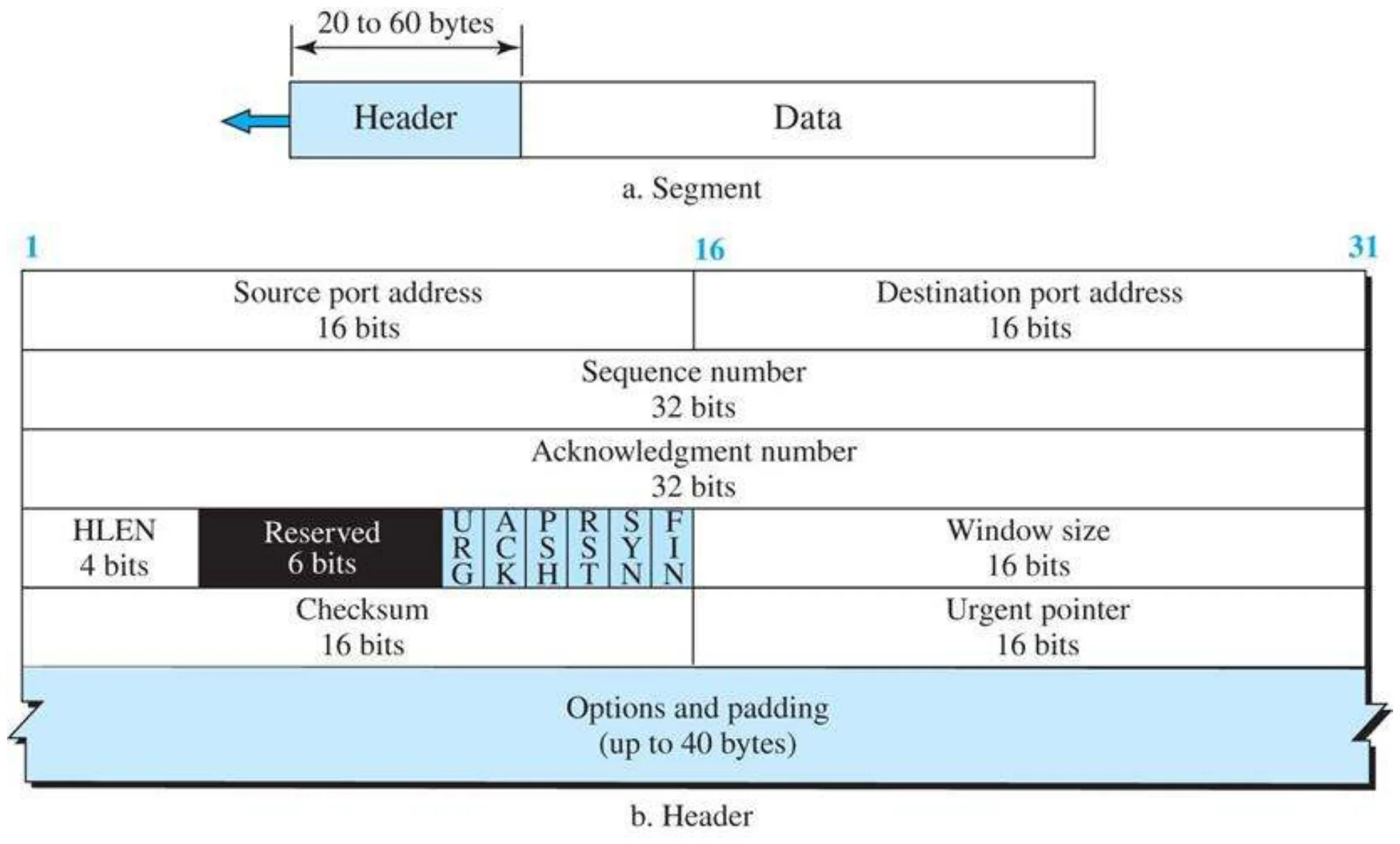
            • Each segment belongs to a message is given a unique sequence number needed for error control①
            • Performs error control and flow control and congestion control②
          • Header is 20 bytes by default and can be extended to 60 bytes with options.③
        29
        Exam weight High
        1. TCP: connection-oriented, reliable (sequence numbers, error + flow + congestion control). Header 20 bytes, up to 60.
        🎯 How this can come up · 1 question
        MCQ

        The default TCP header size is:

        TCP segment format (Figure 9.23)

        TCP header: source and destination ports, sequence number, acknowledgment number, HLEN, flags, window size, checksum, urgent pointer, options
        30
        Exam weight Low
        1. Ports (16 + 16), sequence (32), ACK number (32), HLEN, flags, window (16), checksum, urgent pointer, options.

        Control flags (Figure 9.24)

        Six flags: URG, ACK, PSH, RST, SYN, FIN
        31
        Exam weight High
        1. SYN = synchronize (open). ACK = acknowledgment valid. FIN = finish (close). RST = reset. PSH = push. URG = urgent.
        🎯 How this can come up · 2 questions
        MCQ

        Which TCP flag is used to open a connection?

        MCQ

        Which flag terminates a connection?

        TCP segments (Figure 9.22)

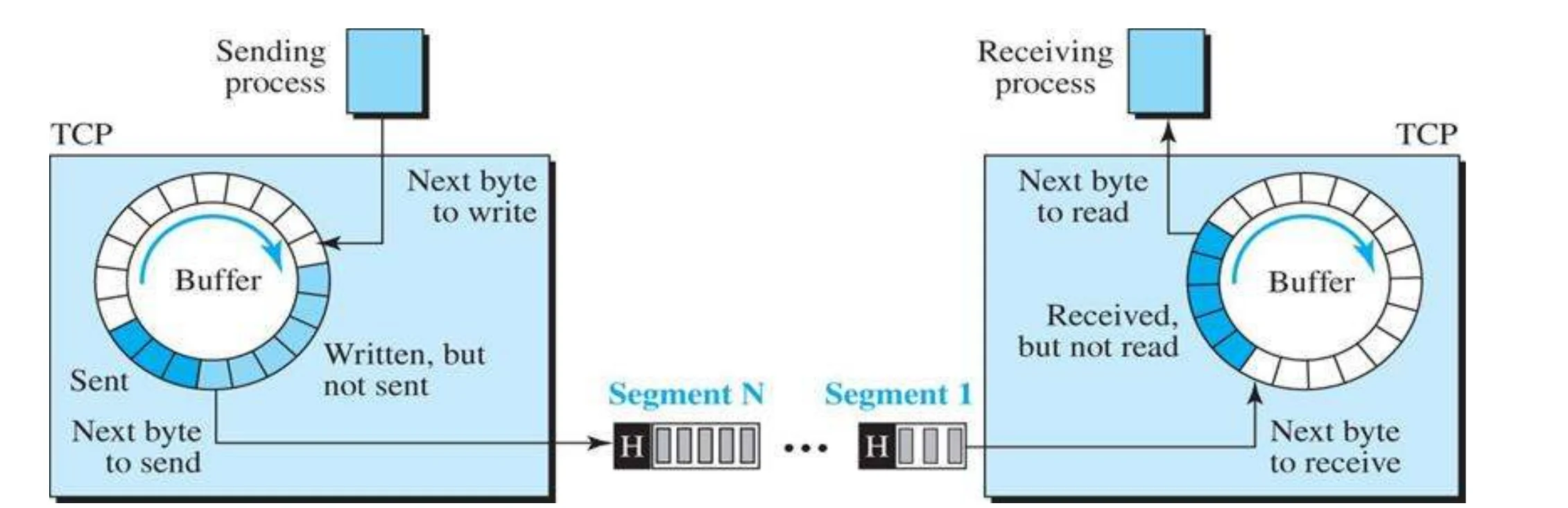
        • Sender and receiver process operates at different transfer rate.①
        • To handle different rates, buffers (storage) are used
        • There are two buffers at each side: sending buffer and receiving buffer
        • Buffers stores thousands of bytes
        • Transport layer groups a number of bytes into segment②
        Sending and receiving circular buffers; bytes grouped into segments
        32
        Exam weight Low
        1. Sender and receiver run at different speeds → buffers on both sides; TCP groups bytes into segments.

        TCP Sequence Number

        • Sequence Numbers are given to individual bytes①
        • When connection is established each side announces the initial sequence number for its data. This is a random number.
        • The sequence number of the first segment is the initial sequence number②
        • The sequence number of any other segment for the same message is: the sequence number of the previous segment + the number of bytes carried by the previous segment③
        • Sequence number is used in flow and error control and in segmenting and reassembling of segments.④
        33
        Exam weight High
        1. TCP numbers BYTES, not segments. The first number is random (ISN).
        2. Next segment’s sequence number = previous sequence number + bytes it carried.
        Exam trapSequence numbers count bytes, not segments.
        🎯 How this can come up · 2 questions
        MCQ

        A segment has sequence number 2,001 and carries 500 bytes. The next segment’s sequence number is:

        True / False

        TCP sequence numbers count segments.

        Example 9.8: sequence numbers

        A TCP connection transfers a file of 5,000 bytes; the first byte is numbered 10,001. What are the sequence numbers if the data is sent in five segments of 1,000 bytes?

        • Segment 1 → sequence number 10,001 (bytes 10,001 – 11,000)
        • Segment 2 → 11,001 (11,001 – 12,000)
        • Segment 3 → 12,001 (12,001 – 13,000)
        • Segment 4 → 13,001 (13,001 – 14,000)
        • Segment 5 → 14,001 (14,001 – 15,000)
        34
        Exam weight High
        1. Add 1,000 each time.
        🎯 How this can come up · 1 question
        MCQ

        A 6,000-byte file starts at byte 1,001 and is sent in 3 equal segments. The third segment’s sequence number is:

        TCP Connection

        • TCP is reliable because it has connection and session mechanisms.
        • When a host wants to communicate with another host using TCP, a connection must be established before data can be exchanged.
        • This is known as the Three-way Handshake①
        • After the communication is completed, the session is closed and the connection is terminated.②
        35
        Exam weight Low
        1. TCP opens with a three-way handshake and closes the session afterwards.

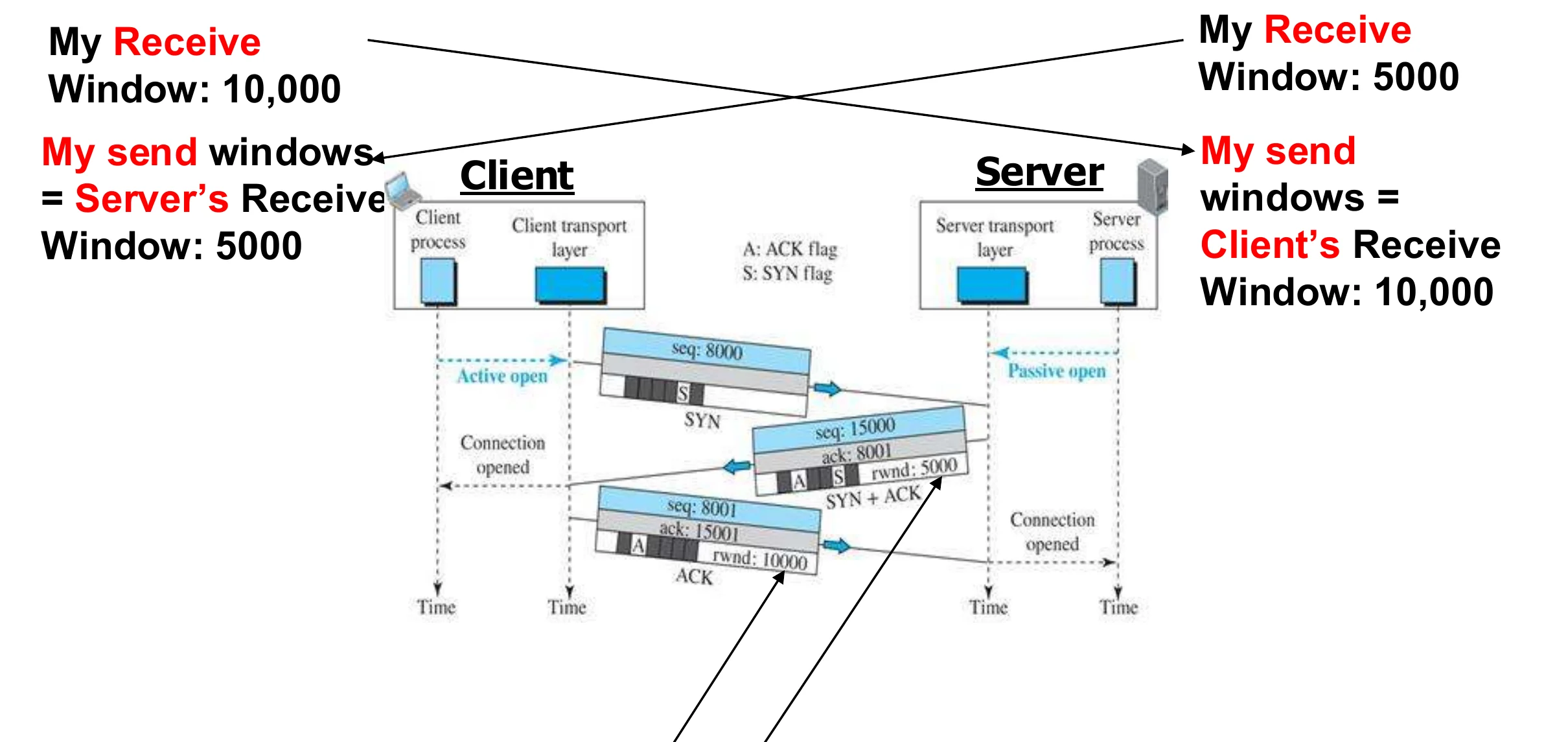
        Connection establishment using three-way handshaking (Figure 9.26)

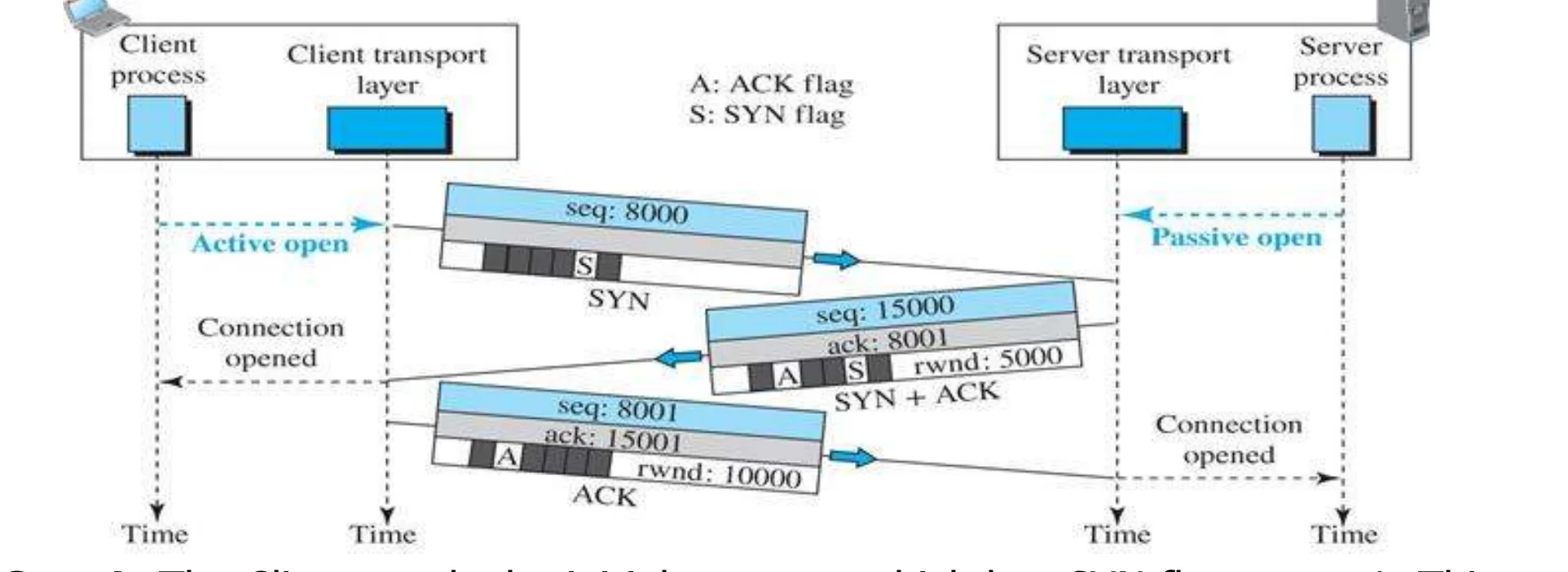
        • Step1: The Client sends the initial segment which has SYN flag set to 1. This segments has the initial sequence number selected randomly.①
        • Step 2: The server responds by sending SYN+ACK segment which has the SYN and the ACK flags set to 1. This segment acknowledges the SYN segment sent by the client. Also, it has the initial sequence number for the segments sent by the server. This segment also defines the number of bytes that the client can send without waiting for acknowledgement from the server side. This is called the server receive window.②
        • Step 3: The client send a segment that acknowledges receipt of the previous segment sent by the server. Also, it carries the number of bytes that the server can send without waiting for acknowledgement from the client side. This is called the client receive window.③
        Client SYN (seq 8000), server SYN + ACK (seq 15000, ack 8001, rwnd 5000), client ACK (seq 8000, ack 15001, rwnd 10000)
        36
        Exam weight High
        1. 1) Client → SYN with a random initial sequence number.
        2. 2) Server → SYN + ACK: acknowledges, gives its own ISN and its receive window.
        3. 3) Client → ACK, with its receive window.
        Memory trickSYN → SYN-ACK → ACK.
        🎯 How this can come up · 2 questions
        MCQ

        The second segment of the three-way handshake has which flags set?

        MCQ

        The client sends SYN with seq 8000. The server’s SYN+ACK carries ack =

        Reliable Delivery

        • After the connection is established, the client and server can send data to each other.①
        • Each segment must be acknowledged. The acknowledgment number should be the number of the last received bytes + 1.②
        • Acknowledgment are cumulative. This means that if a device receives acknowledgment segment with acknowledgment number X, then this means that all bytes up to byte number X-1 are received by the receiver and the receiver is ready for the next byte that has number X.③
        • The sender also starts a timer when it sends a segment, and it retransmits a segment if the timer expires before an acknowledgment arrives.④
        37
        Exam weight High
        1. ACK number = next byte expected = last byte received + 1. ACKs are cumulative (all bytes up to X - 1).
        2. A timer per segment: no ACK in time → retransmit.
        🎯 How this can come up · 2 questions
        MCQ

        A receiver got bytes up to 4,500. It sends ACK number:

        True / False

        An ACK number of X means bytes up to X - 1 were received.

        Data transfer example (See Next Slide for explanation)

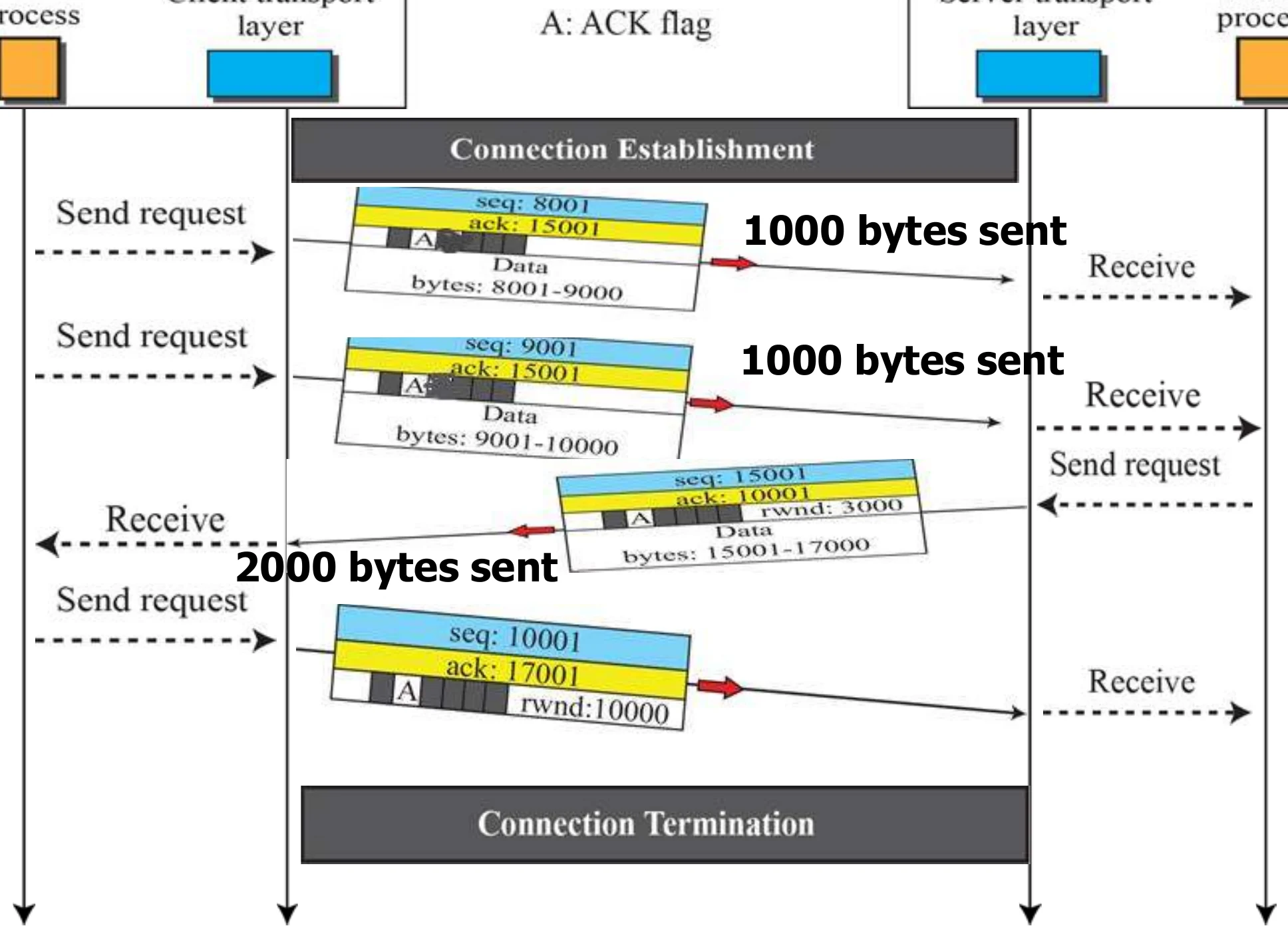
        Client sends 1000 bytes twice (seq 8001, 9001); server replies with 2000 bytes (seq 15001, ack 10001); client ACKs 17001
        38
        Exam weight Low
        1. Explained on the next slide. ACKs piggyback on data segments.

        Data transfer example

        • After the connection was established, the client sends two segments each carries 1000 bytes.①
        • The first segment has sequence number 8001 and carries bytes with sequence numbers 8001-9000.②
        • The second segment has sequence number 9001 carries bytes with sequence numbers 9001 - 10000③
        • The server sends a segment with sequence number 15001 that acknowledges the receipt of the 2000 bytes with acknowledgement number 10001 (this means client received all bytes up to byte number 10000 and is ready for byte number 10001 ).
        • The same segment carries 2000 bytes of data to the client with sequence numbers 15001- 17000.
        • The client sends a segment that carries acknowledgement only with sequence number 10001 that acknowledges the receipt of the 2000 bytes with acknowledgement number 17001 ( this means client received all bytes up to byte number 17000 and is ready for byte number 17001④ ).
        39
        Exam weight High
        1. 8001–9000, 9001–10000 → server ACKs 10001 and sends 15001–17000 → client ACKs 17001.
        🎯 How this can come up · 1 question
        Scenario

        Client sends seq 8001 (1000 bytes) and seq 9001 (1000 bytes). The server replies with 2000 bytes starting at 15001. Give the server’s ACK number and the client’s final ACK number.

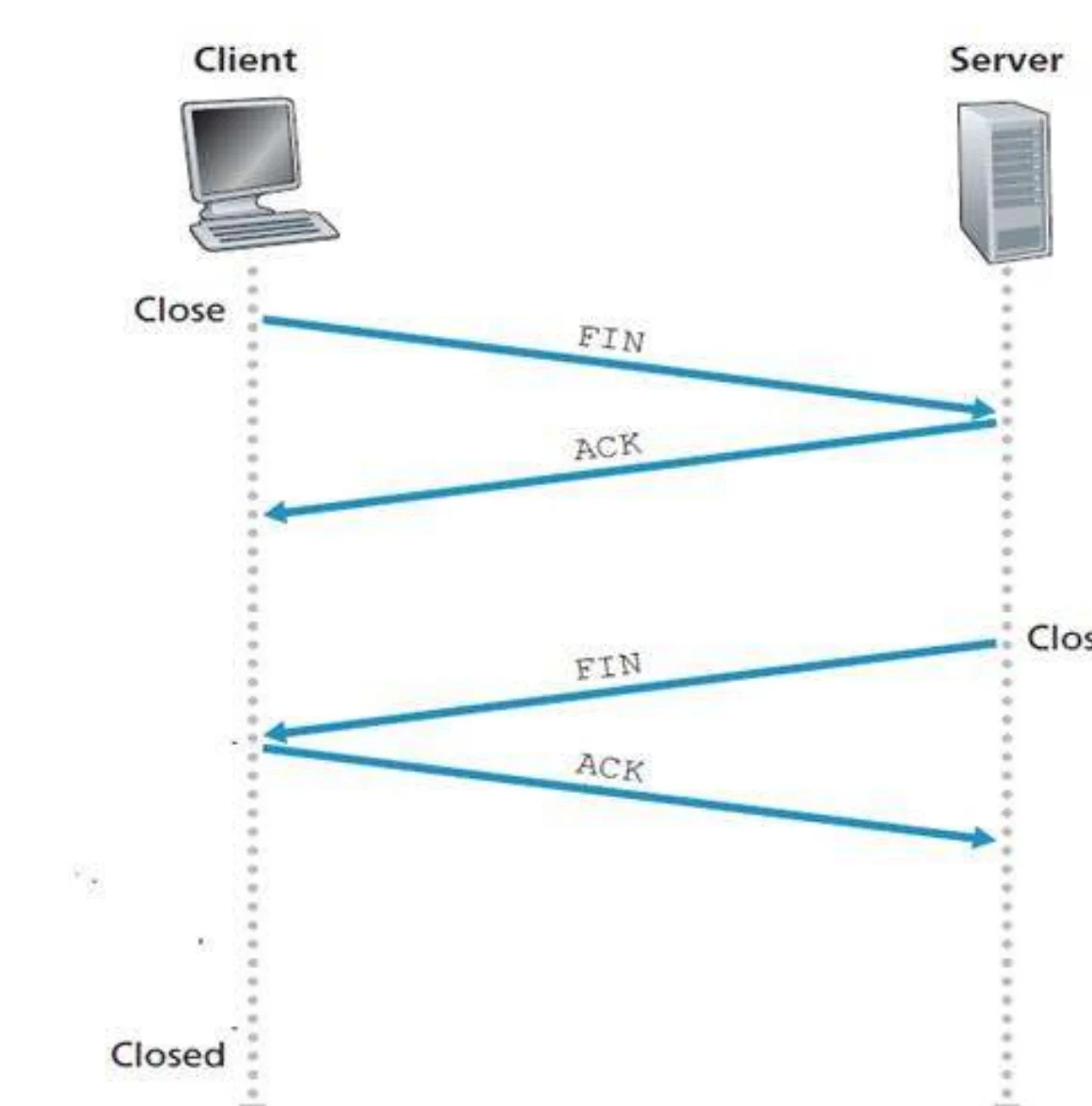
        Connection termination

        1. The first host sends a segment with the FIN bit set.①
        2. The second host replies with the ACK bit set.②
        3. The second host can continue sending data; the first host can only acknowledge but can’t send data. When the second host wants to terminate, it sends a segment with the FIN bit set.
        4. The first host replies with the ACK bit set.
        Client FIN, server ACK, server FIN, client ACK
        40
        Exam weight Medium
        1. Termination: FIN → ACK, then (when the other side is done) FIN → ACK. Half-close in between.
        🎯 How this can come up · 1 question
        MCQ

        After host 1 sends FIN and gets ACK, host 1 can:

        Flow Control

        • TCP Windows
          • Flow control uses windows to prevent a receiver from being overwhelmed by incoming data. Referred to as “sliding windows”①
          • A window size specifies the maximum number of segments the sender can forward without receiving an acknowledgment.
          • Window size is included in every TCP segment starting with three-way handshake.②
          • TCP implements flow control by increasing and decreasing window sizes as required.
          • TCP is a full duplex service. Both Client and server specify their own window sizes.
          • Each side has two windows: Send window and Receive Window③
          • Window sizes are variable during the lifetime of a connection④
          • Initial windows sizes are set at the connection establishment stage and then any side can change the size during the lifetime of a connection
        41
        Exam weight High
        1. Window = how much the sender may send before it must wait for an ACK.
        2. TCP grows and shrinks the window for flow control. Each side has a send window and a receive window.
        🎯 How this can come up · 1 question
        MCQ

        TCP flow control is done with:

        TCP windows (initial window sizes)

        • Client receive window = 10,000 bytes: the client tells the server it can send only 10,000 bytes before waiting for an ACK. This is the server send window.①
        • Server receive window = 5,000 bytes: the server tells the client it can send only 5,000 bytes before waiting for an ACK. This is the client send window.②
        Client receive window 10,000 = server send window; server receive window 5,000 = client send window
        42
        Exam weight High
        1. My SEND window = the other side’s RECEIVE window.
        Memory trickYou can only send as much as the other side can receive.
        🎯 How this can come up · 1 question
        MCQ

        The server advertises a receive window of 5,000 bytes. The client’s send window is:

        TCP Applications

        • Following applications require reliable data transfer through TCP:
          • WWW using HTTP
          • Electronic mail using SMTP
          • Telnet
          • File transfer using FTP
        43
        Exam weight Medium
        1. TCP for anything that must arrive complete: web (HTTP), email (SMTP), Telnet, file transfer (FTP).
        🎯 How this can come up · 1 question
        MCQ

        Which application needs TCP?

        User Datagram Protocol (UDP)

        • Connectionless
          • No handshaking between UDP sender, receiver
          • Each UDP segment handled independently of others①
        • A server application that uses UDP serves only ONE request at a time. All other requests are stored in a queue waiting for service.②
        • Unreliable protocol has no flow and error control
          • A UDP segment can be lost, arrive out of order, duplicated, or corrupted
          • Checksum field checks error in the entire UDP segment. It is Optional UDP does not do anything to recover from an error it simply discard the segment
          • Application accepts full responsibility for errors③
        • It uses port numbers to multiplex/demultiplex data from/to the application layer.④
        • Advantages: Simple, minimum overhead, no connection delay⑤
        • Services provided by UDP:
          • Process-to-Process delivery
          • Error checking (however, if there is an error UDP does NOT do anything to recover from error. It will just discard the message
        44
        Exam weight High
        1. UDP: connectionless, no handshake, unreliable (segments can be lost, reordered, duplicated, corrupted).
        2. Optional checksum over the whole segment; on error it just DISCARDS.
        3. Benefits: simple, small header, no setup delay.
        🎯 How this can come up · 2 questions
        True / False

        When UDP detects an error with its checksum, it asks the sender to retransmit.

        MCQ

        The UDP checksum is:

        UDP Applications

        • Used for applications that can tolerate small amount of packet loss:
          • Multimedia applications,
          • Internet telephony,
          • real-time-video conferencing
          • Domain Name System messages
          • Audio
          • Some Routing Protocols
        45
        Exam weight Low
        1. UDP for apps that tolerate a little loss and need speed: multimedia, internet telephony, video conferencing, DNS, audio, some routing protocols.

        UDP is suitable for applications that makes one request

        • A client-server application such as DNS uses the services of UDP because a client needs to send a short request to a server and to receive a quick response from it.①
        • The request and response can each fit in one user datagram.②
        • Since only one message is exchanged in each direction, the connectionless feature is not an issue; the client or server does not worry that messages are delivered out of order.③
        46
        Exam weight High
        1. One short request + one short reply (DNS) → UDP is perfect: nothing to reorder.
        🎯 How this can come up · 1 question
        MCQ

        Why does DNS use UDP?

        UDP is NOT suitable for applications that do not tolerate loss or errors or out of order arrival

        • A client-server application such as SMTP, which is used in electronic mail, cannot use the services of UDP because a user can send a long e-mail message, which may include multimedia (images, audio, or video). If the application uses UDP and the message does not fit in one single user datagram, the message must be split by the application into different user datagrams. Here the connectionless service may create problems. The user datagrams may arrive and be delivered to the receiver application out of order.① The receiver application may not be able to reorder the pieces. This means the connectionless service has a disadvantage for an application program that sends long messages.②
        47
        Exam weight Low
        1. Long messages (SMTP with attachments) split over many datagrams can arrive out of order → UDP is a bad fit.

        UDP is NOT suitable for applications that do not tolerate loss or errors out of order arrival

        • Assume we are downloading a very large text file from the Internet. We definitely need to use a transport layer that provides reliable service. We don’t want part of the file to be missing or corrupted when we open the file. The delay created between the deliveries of the parts is not a concern for us; we wait until the whole file is composed before looking at it. In this case, UDP is not a suitable transport layer.①
        48
        Exam weight Medium
        1. Big file download: completeness matters more than delay → TCP.
        🎯 How this can come up · 1 question
        Scenario

        You are downloading a very large text file. TCP or UDP? Why?

        UDP is suitable for real time applications

        • Assume we are using a real-time interactive application, such as Skype. Audio and video are divided into frames and sent one after another. If the transport layer is supposed to resend a corrupted or lost frame, the synchronizing of the whole transmission may be lost. The viewer suddenly sees a blank screen and needs to wait until the second transmission arrives. This is not tolerable.① However, if each small part of the screen is sent using one single user datagram, the receiving UDP can easily ignore the corrupted or lost packet and deliver the rest to the application program. That part of the screen is blank for a very short period of time, which most viewers do not even notice.②
        49
        Exam weight High
        1. Real-time (Skype): resending late frames is worse than skipping them → UDP.
        🎯 How this can come up · 1 question
        Scenario

        A video call app must choose between TCP and UDP. Which, and why?

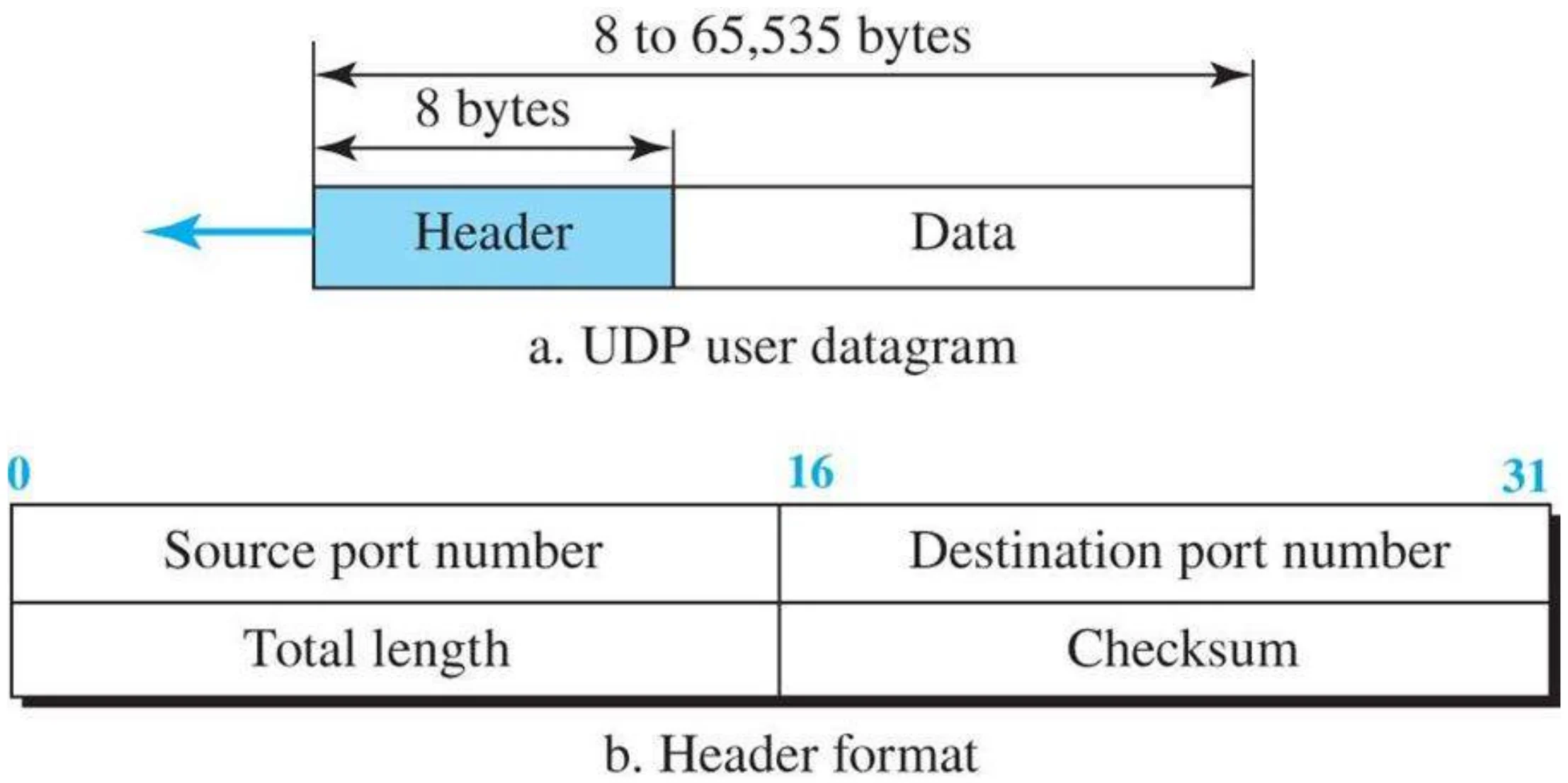
        User datagram packet format (Figure 9.18)

        UDP datagram: 8-byte header (source port, destination port, total length, checksum) + data, up to 65,535 bytes
        50
        Exam weight High
        1. UDP header = 8 bytes: source port, destination port, length, checksum. (TCP’s is 20.)
        🎯 How this can come up · 1 question
        MCQ

        The UDP header length is: