CYS401 · Annotated SlidesChapter 8 — Security Vulnerabilities, Threats and Countermeasures
Chapter 8 · Annotated slides

Security Vulnerabilities, Threats and Countermeasures

Vulnerabilities layer by layer: hardware (processors, protection rings, operating and process states), memory protection (MMU, paging, ASLR), storage, I/O, firmware, client and server systems, databases, the cloud (shared responsibility), IoT, web, mobile (BYOD) and OS protection mechanisms. Major 181 and Final 221 B asked about rings, states and emanations.

Slide text Study notes Highlight: key words Tips, tricks & traps Seen again elsewhere How it can come up

Security Vulnerabilities, Threats, and Countermeasures

CYS401 · Chapter 8
1

Assess and Mitigate Security Vulnerabilities

OUTLINE: Common Security issues across system layers

  • Hardware
    • Hardware Components
    • Protection Mechanisms
    • Memory Protection Mechanism
    • Input/Output Devices
    • Firmware
  • Protecting Client and Server Based Systems
  • Database Systems Security
  • Cloud Computing Security
  • Internet of Things (IoTs) Security
  • Web-Based Security
  • Mobile Device Security
  • Operating System Security
2
Exam weight Low
  1. Layers: hardware, memory, storage, I/O, firmware, client/server, database, cloud, IoT, web, mobile, OS.
Slide 3: Hardware Components
Exam weight Low
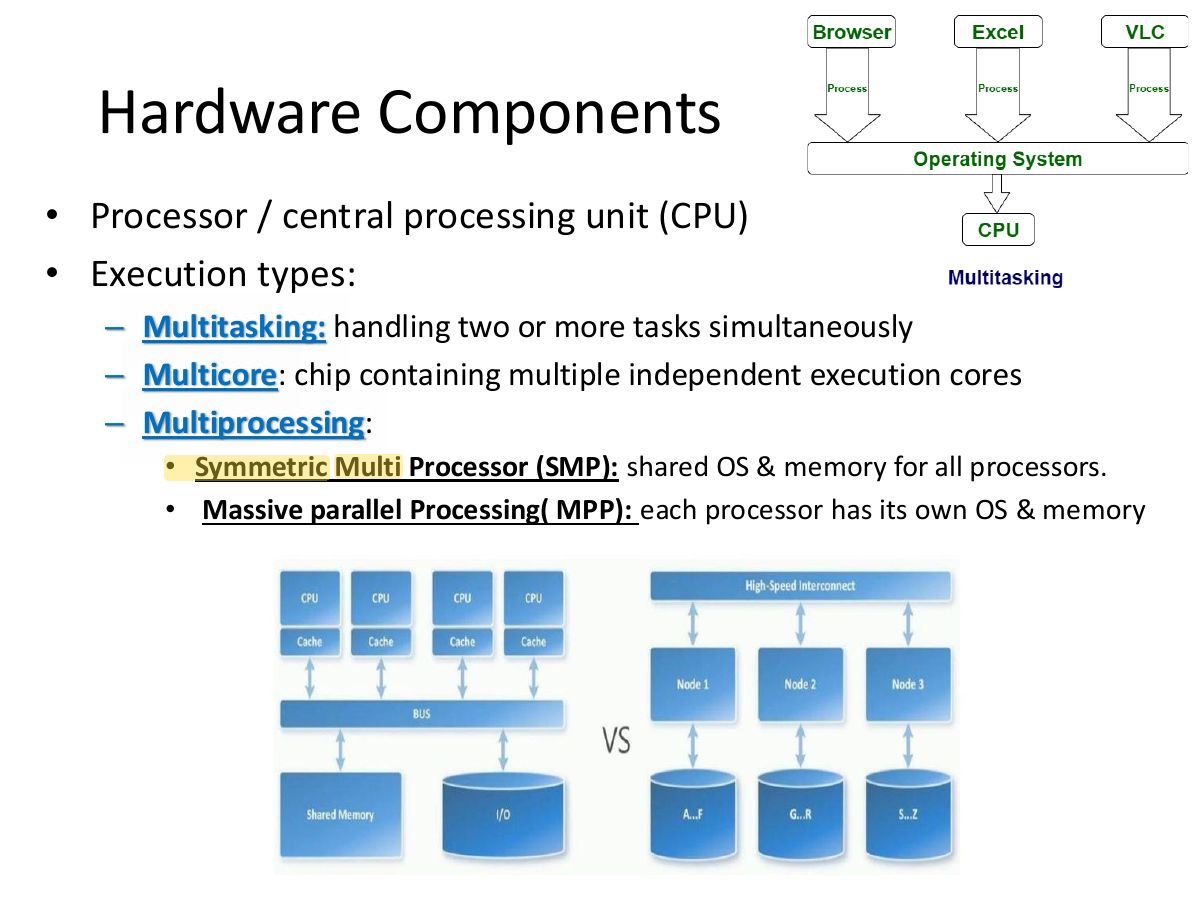
  1. CPU execution types: multitasking, multiprocessing, multiprogramming, multithreading.
Slide 4: Hardware Components
Exam weight Medium
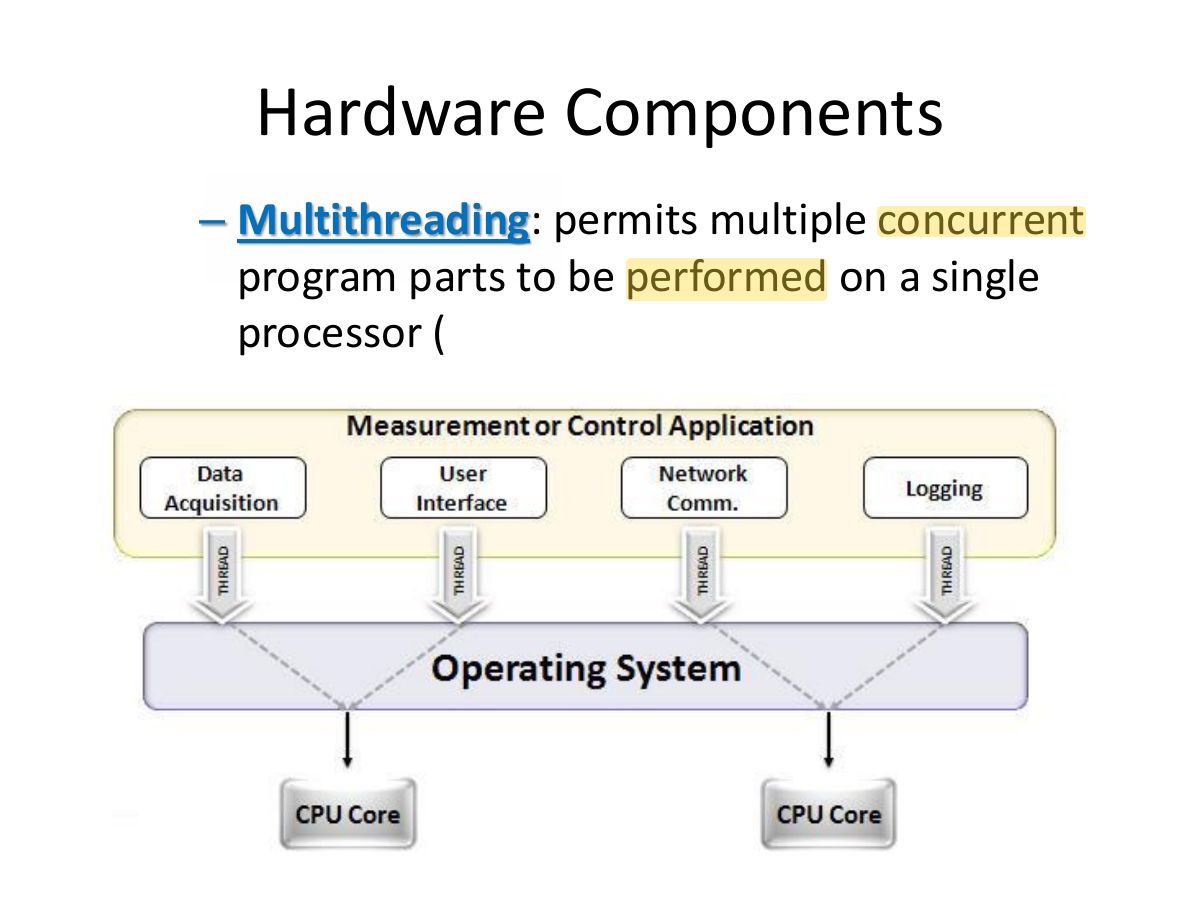
  1. Multithreading: several parts of a program run concurrently on one processor.
🎯 How this can come up · 1 question
MCQ

Running multiple concurrent parts of one program on a single processor is:

Protection Mechanisms

5
★ Past exam

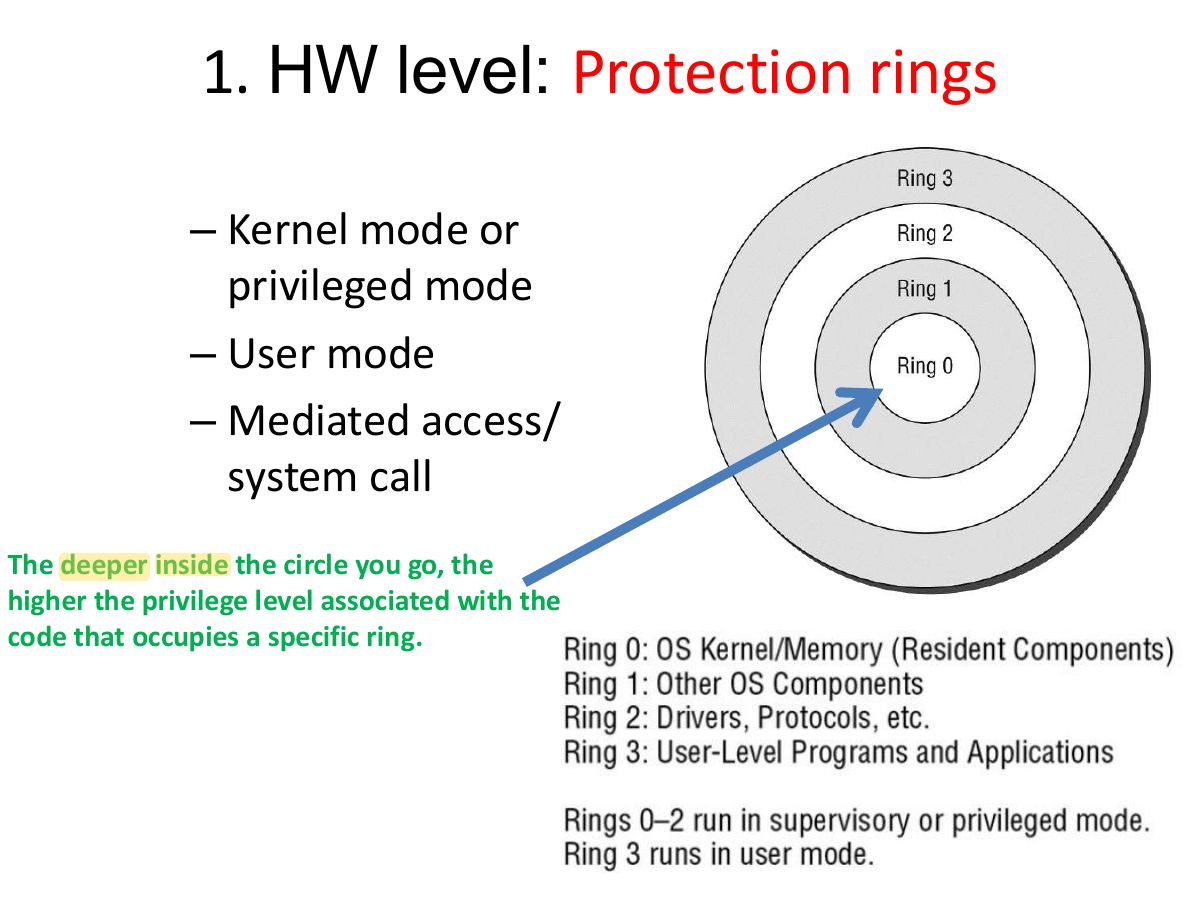
2. HW level: Operating states

Operating states

  • Supervisory state: privileged – all access mode
    • Can execute all machine instructions
    • Can reference all memory offsets
  • Operating/Problem state: User mode
    • Limited access and executions based on the authorization
    • In problem state: privileges are low and all access requests must be checked against credentials for authorization before they are granted or denied.
7
Exam weight High
  1. Operating states: supervisory (privileged, all access) vs. problem state (user mode, restricted).
🎯 How this can come up · 1 question
MCQ

The “problem state” of a processor is:

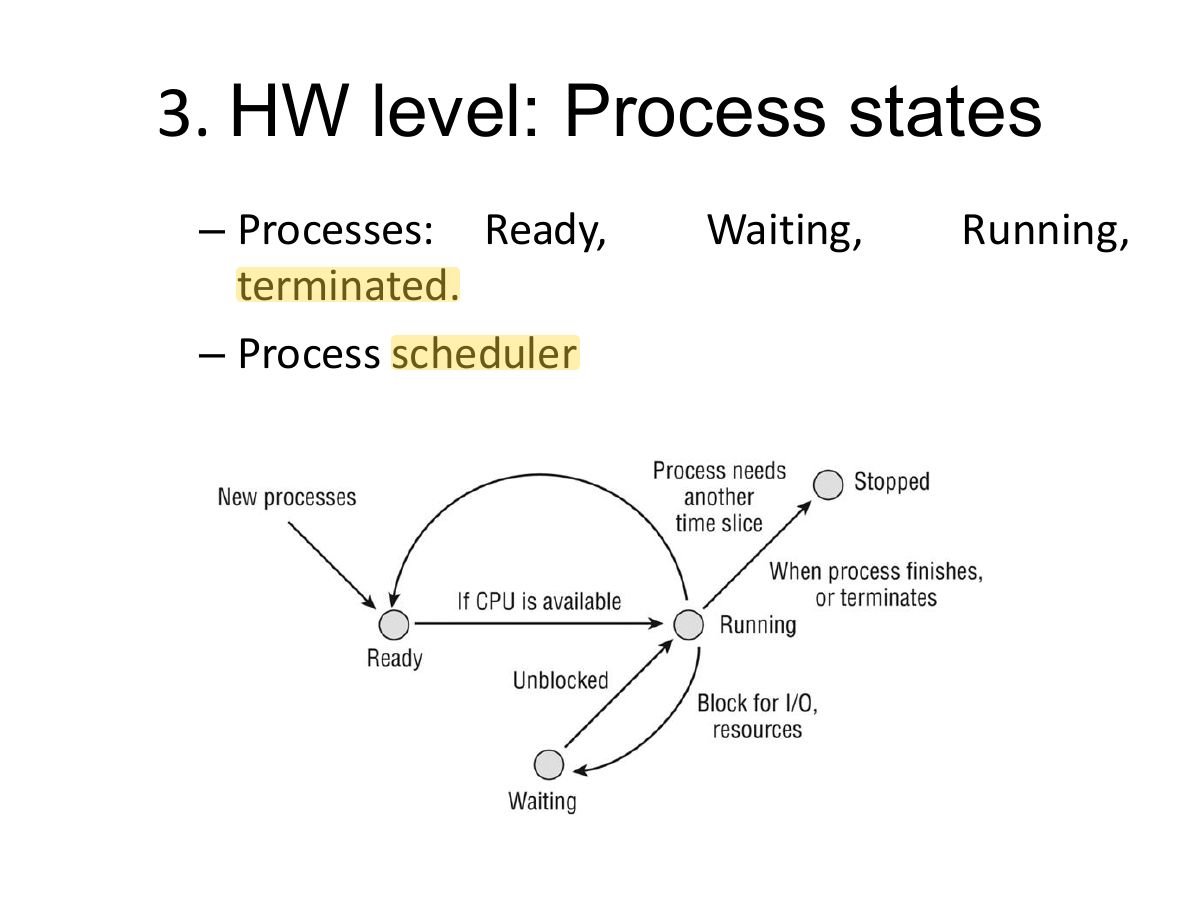
Slide 8: 3. HW level: Process states
Exam weight Low
  1. Process states: ready, waiting, running, terminated; the scheduler moves processes between them.

Memory Protection Mechanisms

9

Primary Memory (1/1)

Read only memory (ROM)

  • Programmable Read-Only Memory (PROM)
  • Erasable Programmable Read-Only Memory (EPROM)
  • Electronically Erasable Programmable Read-Only Memory (EEPROM)
  • Flash

Random access memory (RAM)

  • Real
  • Cache
  • Registers
10
Exam weight Low
  1. ROM types: ROM, PROM, EPROM, EEPROM, flash.

Memory Protection Mechanisms

  • Memory protection prevents one process from accessing the memory space of another.
  • By controlling access to memory, an OS can maintain a safe environment where processes can execute without interference, thus preserving data integrity and system reliability.
  • In modern computing, OS like Windows, Linux, and macOS rely heavily on memory protection to manage multiple processes running simultaneously.
  • Each program/ process, requires its own memory space to function properly. Memory protection ensures that these processes do not which could lead to data interfere with one another’s memory, corruption, system crashes, or unauthorized data access.
11
Exam weight Low
  1. Memory protection stops one process from reaching another’s memory.

Memory Protection Mechanisms

  • Memory protection is implemented through:
    • Hardware Mechanisms: Memory Management Unit (MMU) within the CPU translates virtual addresses to physical addresses and enforces access controls (checks access permissions in real-time)
    • Software Mechanisms: includes the OS kernel, which manages the allocation and protection of memory spaces.
12
Exam weight Low
  1. Implemented by the MMU (virtual → physical addresses, access checks) and the OS.

Memory Protection Mechanisms

  • Paging & Segmentation: Divides memory into chunks (pages or segments) with specific access rights (read, write, execute).
  • Address Space Layout Randomization (ASLR): Randomizes memory addresses for system and application processes, making it difficult for attackers to locate target code.
  • Data Execution Prevention (DEP): Marks memory regions as non-executable to prevent malware from running code there.
  • Protection Keys (MPK): Assigns a numeric key to memory blocks, allowing fast permission changes.
  • Process Isolation: Prevents one application from reading/writing the memory of another, preventing unauthorized data theft.
  • Kernel Protection: Protects the operating system's memory space from user-level malware.
  • Buffer Overflow Mitigation: Blocks attacks where malicious actors try to overwrite memory to change program flow.
13
Exam weight High
  1. Paging/segmentation with access rights; ASLR randomizes addresses; DEP/NX blocks executing data pages.
🎯 How this can come up · 1 question
MCQ

Randomizing the memory addresses of processes to make exploits harder is:

Secondary Memory 1/2

  • Secondary memory protection refers to the strategies, technologies, and practices designed to secure non-volatile storage devices (such as HDDs, SSDs, USB drives and cloud storage) against unauthorized access, data theft, malware, and tampering.
  • Secondary storage retains data when power is off, making it a prime target for long-term data exfiltration.
  • Secondary Memory Protection Mechanisms:
    • Encryption (At-Rest): Utilizing full-disk encryption or file-level encryption - if a device is lost, stolen, or accessed unauthorized, the data remains unreadable.
    • Immutable Backups & Object Locking: Use technologies that create "read-only" copies of data, which cannot be modified, encrypted, or deleted by ransomware.
    • Air-Gapping: Maintaining physical separation between secondary storage and the network to isolate backups from cyber-attacks.
    • Access Controls & Authentication: Restricting access to sensitive storage partitions using multi-user authentication (MUA) or strict permissions to prevent accidental or malicious deletion.
    • Physical Security: Locking down servers and removing removable media (USB drives).
14
Exam weight Low
  1. Secondary storage keeps data with power off → encrypt it, control access, sanitize before disposal.
★ Past exam

Input/Output Devices

  • Input: Keyboards, mice, scanners, microphones, cameras.
  • Output: Monitors, printers, projectors, speakers.
  • Storage/Peripherals: USB drives, external hard drives, IoT sensors.
  • Modems/Routers: Ubiquitous broadband and wireless connectivity is common nowadays Can these basic devices present security risks to a system?
15
Exam weight High
  1. I/O devices: keyboards, cameras, monitors, printers. Monitors leak emanations (TEMPEST).
🎯 How this can come up · 1 question
MCQ

Which device is most susceptible to monitoring of its electromagnetic emanations (TEMPEST)?

Input/Output Devices - Key Protection Strategies

Physical Security: Secure devices and cables to prevent tampering or unauthorized swapping. Use locks, surveillance, and access badges to limit physical access.

Port Control: Disable/ physically remove unused connection ports like USB, CD/DVD drives to prevent malware insertion or data theft.

Software Updates: Consistently update firmware on I/O devices and software drivers on computers to patch vulnerabilities.

Authentication & Access Control: Implement strong passwords or biometric authentication for accessing devices and systems.

Network Segmentation: Isolate IoT and peripheral devices on a separate network to prevent a compromised device from affecting the main network.

Encryption: Utilize secure communication protocols like TLS to encrypt data transmission between devices.

Input Validation: Implement input validation to ensure integrity and protect against malicious code

16
Exam weight Low
  1. I/O protection: physical security, port control (disable unused USB), device authentication, shielding.
Slide 17: Firmware
Exam weight Low
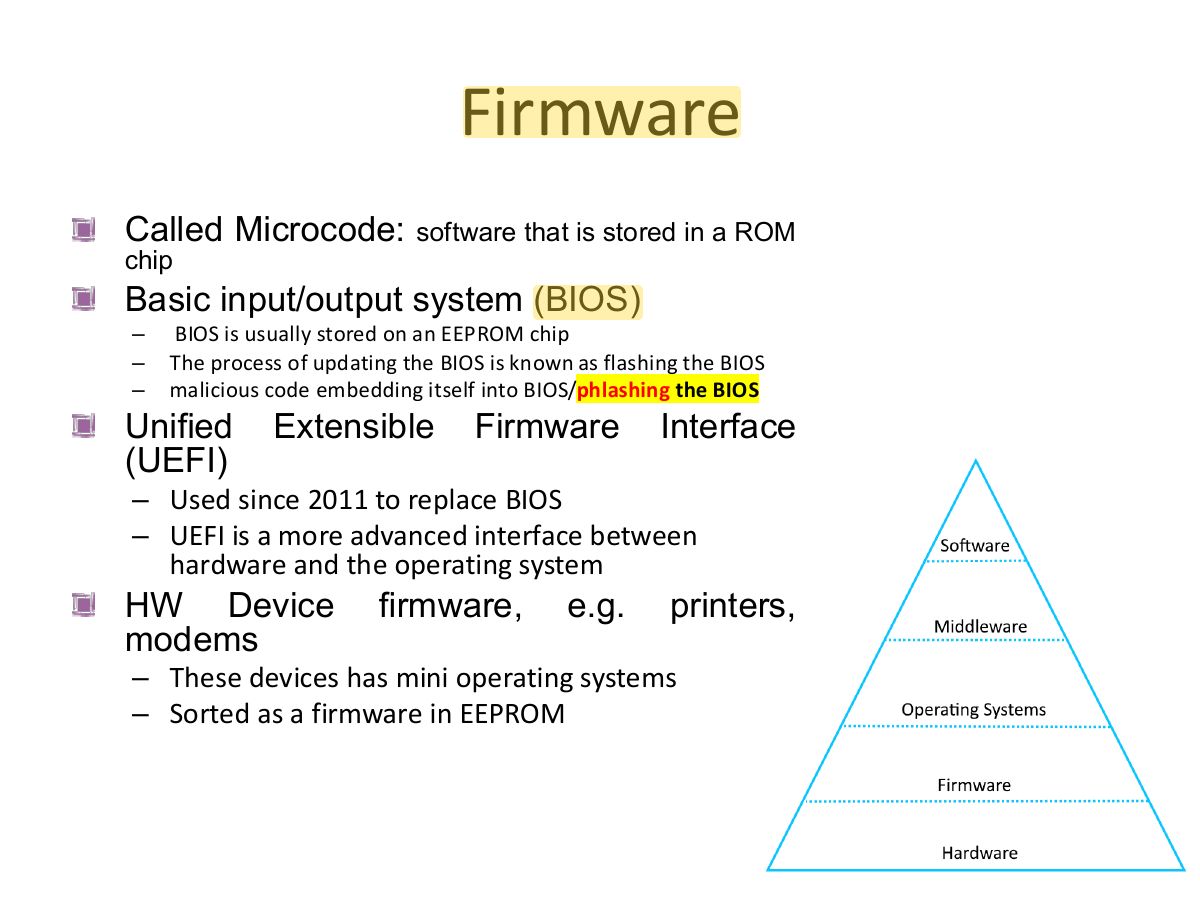
  1. Firmware (microcode) is software in ROM; firmware attacks survive reinstalls.

Protecting Client and Server Based Systems

18

Protecting Client-Based System

Client-side security secures the user endpoint from where they access the network A client-side attack is any attack that is able to harm a client e.g., A malicious website that transfers malicious code to a vulnerable browser running on the client.

19
Exam weight Medium
  1. Client-side attacks harm the user endpoint (malicious applets, drive-by downloads).

Client-Side Protection Measures

It focuses on

Endpoint Security: Installing antivirus and Endpoint Detection

securing

and Response (EDR) solutions to protect against malware.

end-user devices

Browser Security: Implementing Content Security Policies (CSP)

(laptops,

to block malicious scripts and using secure cookie attributes

mobile

(HttpOnly, Secure, SameSite).

devices) and

Input Sanitization: Validating all user inputs on both the client

browser-

and server side to prevent script injection.

based applications.

It includes: Code Obfuscation: Making client-side code (JavaScript) difficult

to understand to deter reverse engineering.

Patching and Updating: Ensuring browsers, operating systems, and installed software are updated to patch vulnerabilities.

20
Exam weight Low
  1. Client protection: endpoint security (antivirus, EDR), patching, browser hardening.

Protecting Server Based Systems

  • Server-side security protects data and applications
  • Main concern in such systems include:
    • Data flow control
    • Management between processes, devices, networks, or communication channels with minimal delay
    • Load balancing
    • Efficient transmission with minimal delays or latency
    • Reliable throughput using hashing and confidentiality protection with encryption
  • A denial-of-service & DDoS attacks can be a severe detriment to data flow control.
21
Exam weight Low
  1. Server-side security protects data and applications on servers.

Protecting Server Based Systems

Servers are often the primary target as they house sensitive data, making them critical points for attack. It Includes:

  • Firewalls & WAFs: Next-Generation Firewalls (NGFW) monitor network traffic and block dangerous traffic. Web Application Firewalls (WAF) protect against application-layer attacks like SQL injection and cross-site scripting (XSS).
  • Patch Management: Regular updates for operating systems and applications.
  • Access Control: Implementing Multi-Factor Authentication (MFA) and Role-Based Access Control (RBAC) to ensure only authorized personnel can access critical systems.
  • Encryption: Protecting sensitive information if physical drives are stolen.
  • Intrusion Detection/Prevention (IDS/IPS): Monitoring network traffic in real-time to identify and block suspicious activities.
  • Server Hardening: Disabling unnecessary services, closing unused ports, and using hardened OS configurations.
  • DDoS Mitigation: Tools and strategies to protect against DoS & DDoS attacks that aim to make services unavailable
22
Exam weight Low
  1. Server protection: NGFWs and WAFs, hardening, patching, monitoring, backups.

Database Systems Security

23

Database Systems Security

  • Database systems security protects databases from cyber threats, ensuring data confidentiality, integrity, and availability.
  • It involves securing the database management system (DBMS), applications, physical servers, and network infrastructure through access controls, encryption, and regular auditing.
  • Key practices include robust authentication, patch management, and monitoring for threats like SQL injection and unauthorized access
24
Exam weight Low
  1. Database security protects the DBMS, apps, servers and network.

Common Database Threats

  • SQL/NoSQL Injection Attacks: Attackers insert malicious code into queries to manipulate the database.
  • Insider Threats: Malicious or careless employees with legitimate access.
  • Misconfigured Databases: Improper settings, such as default passwords or open ports, leading to vulnerabilities.
  • Weak/Missing Encryption: Allowing sensitive data to be read if the system is breached.
  • Data Loss/Ransomware: Attackers encrypt or steal data, demanding ransom.
25
Exam weight High
  1. Threats: SQL/NoSQL injection, insiders, weak authentication, misconfiguration, unencrypted data.
🎯 How this can come up · 1 question
MCQ

Inserting malicious code into queries to manipulate a database is:

• Apply Least Privilege: Grant users only the minimum access necessary for their job

Best

roles.

  • Use Data Masking: Hide sensitive data in

Practices

non-production environments.

for

  • Secure Backups: Regularly back up data and encrypt the backups to ensure

Protecting

availability.

Database

  • Vulnerability Scanning: Frequently test for

Systems

vulnerabilities and perform penetration testing.

  • Ensure Physical Security: Secure the physical or virtual servers hosting the database
26
Exam weight Low
  1. Best practices: least privilege, encryption, parameterized queries, auditing, patching.

Cloud Computing

27

Cloud-Based Systems & Cloud Computing

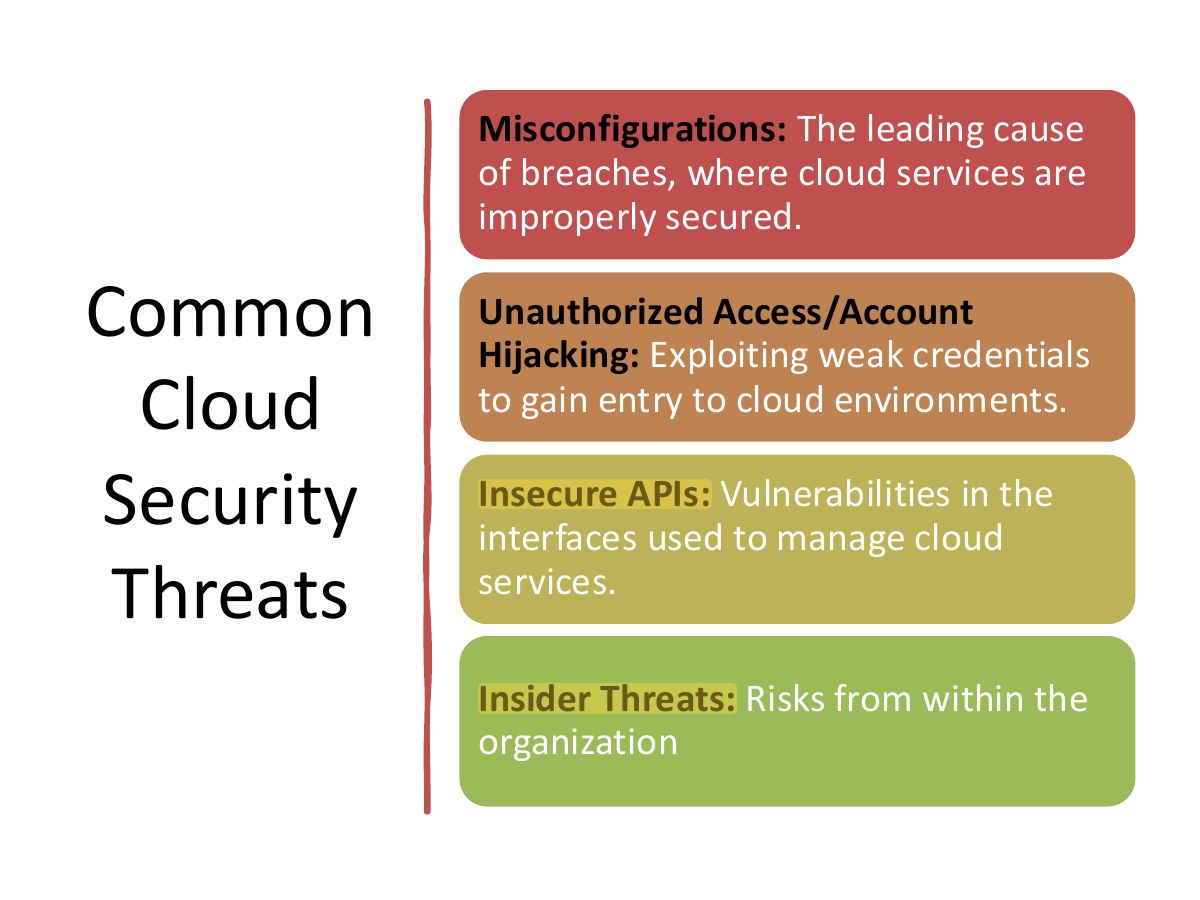
Cloud security involves protecting data, applications, and infrastructures in cloud environments (AWS, Azure, Google, Alibaba) from threats.

It uses tools like encryption, firewalls, and IAM to manage risks such as data breaches, misconfigurations, and API vulnerabilities.

Hypervisor, virtual machine monitor (VMM) Is the component of virtualization that creates, manages, and operates the virtual machines.

Elasticity: Flexibility of virtualization and cloud solutions to expand or contract based on need Cloud computing

  • PaaS
  • SaaS
  • IaaS
28
Exam weight Low
  1. Cloud security: encryption, firewalls, IAM against breaches, misconfiguration and API flaws.

Cloud Security Components & Strategies

Shared Responsibility Model: The Cloud Service Provider (CSP) secures the infrastructure ("of" the cloud), while the customer secures their data, applications, and access ("in" the cloud).

Identity and Access Management (IAM): Crucial for controlling user access to resources, often requiring Multi-Factor Authentication (MFA) to prevent account hijacking.

Data Protection: Involves encrypting data at rest and in transit, and ensuring secure backups.

Visibility and Compliance: Utilizing tools like Cloud Security Posture Management (CSPM) to monitor configurations and ensure regulatory compliance.

Cloud-Native Protection: Adopting platforms like CWPP (workload protection) and CNAPP (cloud-native application protection) for real-time monitoring and threat detection.

29
Exam weight High
  1. Shared responsibility: the provider secures the cloud itself; the customer secures what they put IN the cloud (data, IAM, configuration).
Memory trickProvider = security OF the cloud. Customer = security IN the cloud.
🎯 How this can come up · 1 question
MCQ

In the shared responsibility model, who secures the customer’s data and access settings?

Internet of Things (IoT)

31
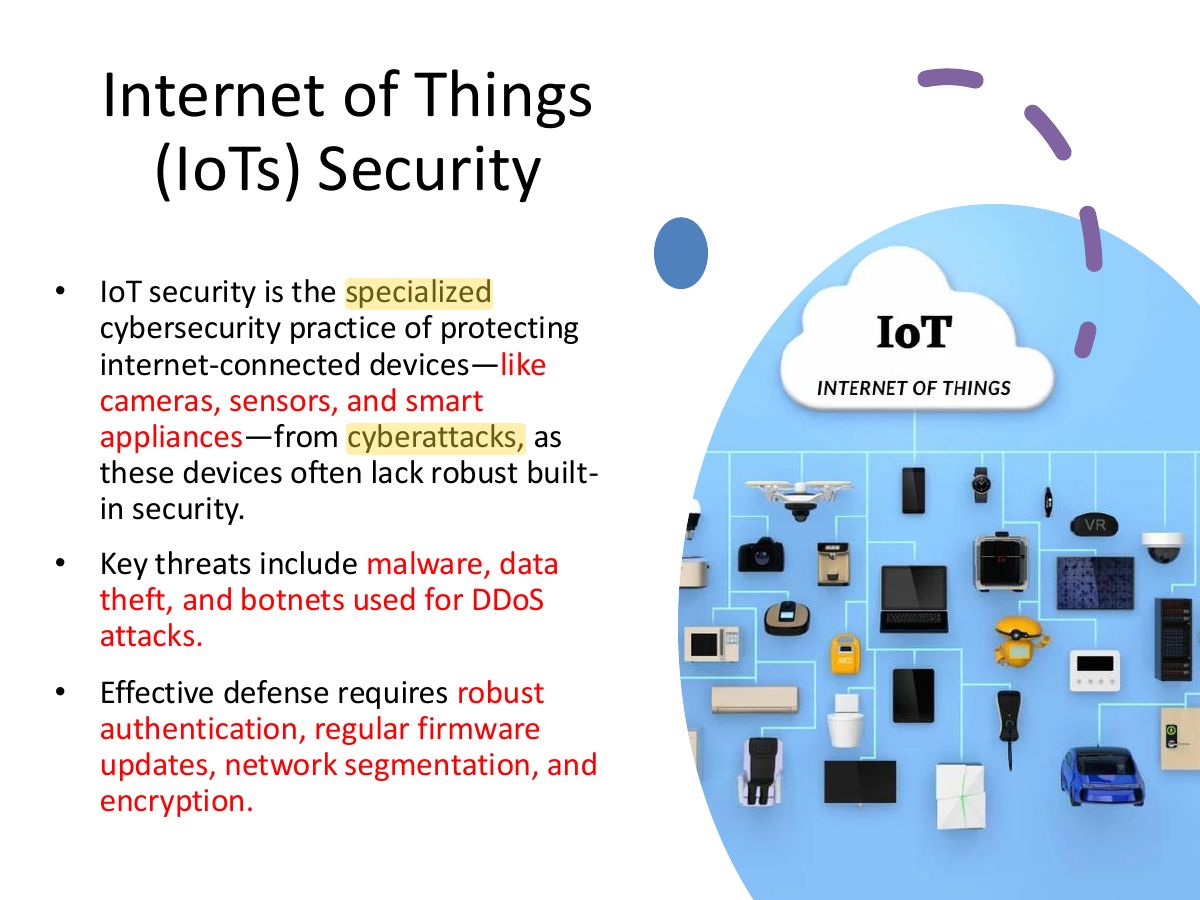
Slide 32: Internet of Things (IoTs) Security
Exam weight Low
  1. IoT security protects connected devices; threats include malware, data theft and botnets for DDoS.
Slide 33: Key IoT Security Challenges & Threats
Exam weight Low
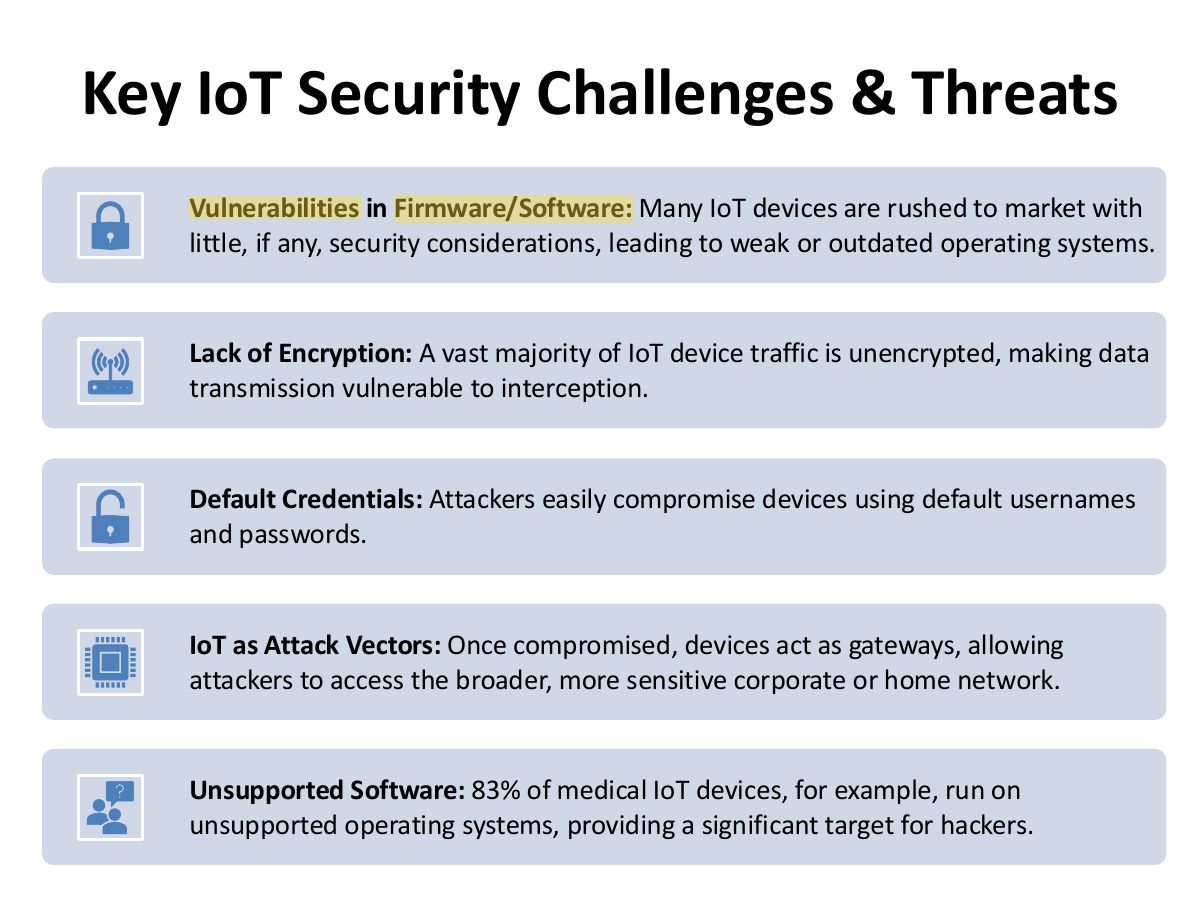
  1. Challenges: weak firmware, no encryption, default passwords, no updates.

• Change Default Passwords: Immediately set strong, unique passwords for every device.

Best

  • Update Firmware/Software: Regularly update device firmware to patch known vulnerabilities.

Practices

  • Network Segmentation: Isolate IoT devices on a separate network to prevent attackers for from accessing main computers, servers, or personal data.

Securing

  • Implement Zero Trust: Treat every device, user, and connection as a potential threat by requiring continuous authentication.

IoT

  • Disable Unused Features: Turn off unused features like Bluetooth, remote management

Devices

to reduce potential entry points.

  • Use Enhanced Authentication: Enable Multi-Factor Authentication (MFA) whenever available.
34
Exam weight Medium
  1. Best practices: change default passwords, update firmware, segment IoT networks.
🎯 How this can come up · 1 question
MCQ

The first thing to do with a new IoT camera is:

Web-Based Security

35

Assess and Mitigate Vulnerabilities in Web-Based Systems

Web-based cybersecurity involves protecting websites, web applications, and APIs from malicious attacks, preventing data

.

breaches, and ensuring service availability Key components of Web Security include:

Web Application Firewalls (WAF): Filter and monitor HTTP traffic between web apps and the internet to block threats.

Vulnerability Scanning: Automated tools that scan web applications for known weaknesses.

Secure Coding Practices: Developing code with security in mind to prevent common vulnerabilities, often aligned with OWASP Top 10 guidelines.

API Security: Protecting application programming interfaces from unauthorized access or data leaks

36
Exam weight Low
  1. Protect websites, web apps and APIs.

Planning a

  • View hosted web pages
  • Explore what automation technologies in use security
  • Look for information that should not have been evaluation or posted penetration
  • How files and backups are handled test of an
  • evaluating the site’s transmission security organization’s
    • Secure Sockets Layer (SSL)/Transport Layer web services Security (TLS)
  • Evaluate authentication and session includes: management
  • Evaluating the cryptography of the site and the methods used for data validation and sanitization
  • Other activities include: checking for DoS defences, evaluating risk responses, and testing error handling.
37
Exam weight Low
  1. Assessment: review hosted pages and technologies.

Assess and Mitigate Vulnerabilities in Web-Based Systems

Common Threats and Defense Techniques:

  • SQL Injection (SQLi): Attackers manipulate database queries.
    • Mitigation: Validating and sanitizing all user inputs.
  • Cross-Site Scripting (XSS): Injecting malicious scripts into trusted websites.
    • Mitigation: Escaping user-provided content.
  • DDoS Attacks: Flooding servers with traffic.
    • Mitigation: Utilizing DDoS mitigation services.
  • Broken Access Control: Unauthorized access to user accounts or data.
    • Mitigation: Implementing strict authentication mechanisms
38
Exam weight Medium
  1. Threats and defences: SQLi (parameterized queries), XSS (input validation, output encoding), CSRF (tokens)…

Mobile Devices Security

39

Assess and Mitigate Vulnerabilities in Mobile Systems

Device Security

  • The range of potential security options or features available for a mobile device which are useless if not activated

Application Security

  • Focuses on the security of applications and functions used on those devices

BYOD Concerns

  • Bring your own device (BYOD) is a policy that allows employees to bring their own personal mobile devices into work and use those devices to connect to (or through) the company network to business resources and/or the internet.
  • This may improve employee morale and job satisfaction
40
Exam weight Low
  1. Device security features are useless unless enabled.

Device Security

Be sure to consider the security options of a new device before you make a purchase decision.

  • Full device encryption
  • Remote wiping
  • Lockout
  • Screen locks
  • GPS
  • Application control
  • Storage segmentation
  • Disabling unused features
41
Exam weight Low
  1. Features: full device encryption, remote wipe, lockout, screen lock, GPS, application control.

Application Security

By default, No app can execute on the

device but those I give them the

Security concerns include:

privilege

  • Key management: Most of the failures of a cryptosystem are based on the key management rather than on the algorithms
  • Credential management: storage of credentials in a central location
  • Authentication: good authentication include: passwords and biometrics
  • Geotagging: can be used to determining when a person normally performs routine activities
  • Encryption: When this is available in the mobile device, it should be enabled
  • Application whitelisting: It is a security options prohibits unauthorized software from being able to execute (deny by default and allow by exception). It is the opposite of blacklisting: allow by default and deny by exception
42
Exam weight Low
  1. Application whitelisting: only approved apps run.
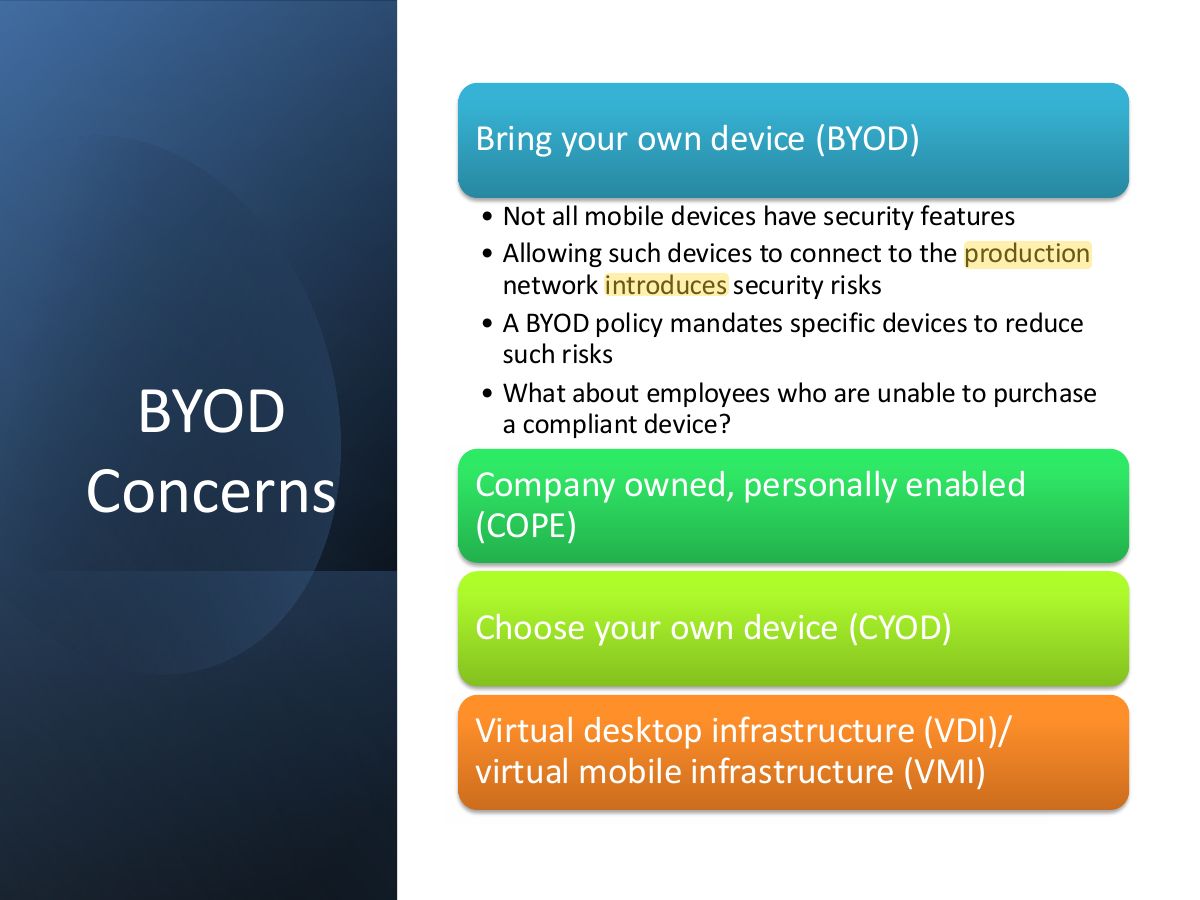
Slide 43: Slide 43
Exam weight Low
  1. BYOD risks: unmanaged devices on the production network.
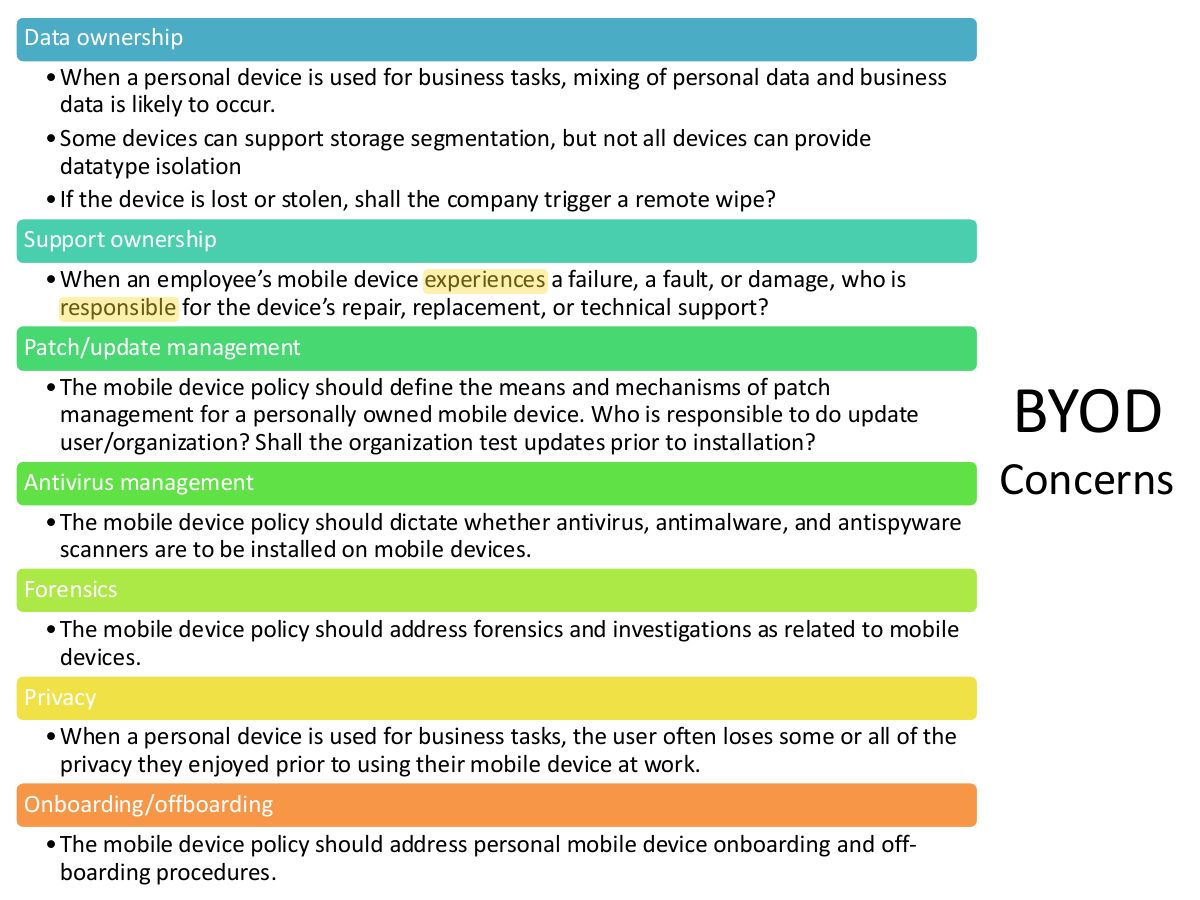
Slide 44: Data ownership
Exam weight Low
  1. Data ownership issues when personal and business data mix.

Operating System Security

45

Essential Security Protection Mechanisms

The OS must employ protection mechanisms to keep the computing environment stable and to keep processes isolated from each other.

Computer system designers should adhere to a number of common protection mechanisms when designing secure systems includes:

  • Technical Mechanisms
  • Policy Mechanisms overview
46
Exam weight Low
  1. OS protection mechanisms keep processes isolated and the environment stable.

Technical Mechanisms

  • Layering: Implement a structure similar to the ring model used for operating modes
  • Abstraction: access controls and operation rights are assigned to groups of objects
  • Data hiding: important characteristic in multilevel secure systems. data hiding relies on placing objects in security containers that are different from those that subjects occupy to hide object details from those with no need to know about them.
  • Process Isolation: requires that the operating system provide separate memory spaces for each process’s instructions and data.
  • Hardware segmentation: similar to process isolation. The main difference is that hardware segmentation enforces these requirements through the use of physical hardware controls rather than the logical process isolation controls imposed by an operating system.
47
Exam weight Low
  1. Technical: layering, abstraction, data hiding, process isolation, hardware segmentation.

Policy Mechanisms

The policy mechanisms are extensions of basic computer security policy, but the applications described in this section are specific to the field of computer architecture and design.

  • least privilege: minimal required privileges
  • Separation of duties: task should be assigned to more than one person
  • Accountability: Who do what? Recording activities that include administrators or other trusted individuals with high levels of privilege activities on the system
48
Exam weight Low
  1. Policy: least privilege, separation of privilege, accountability.
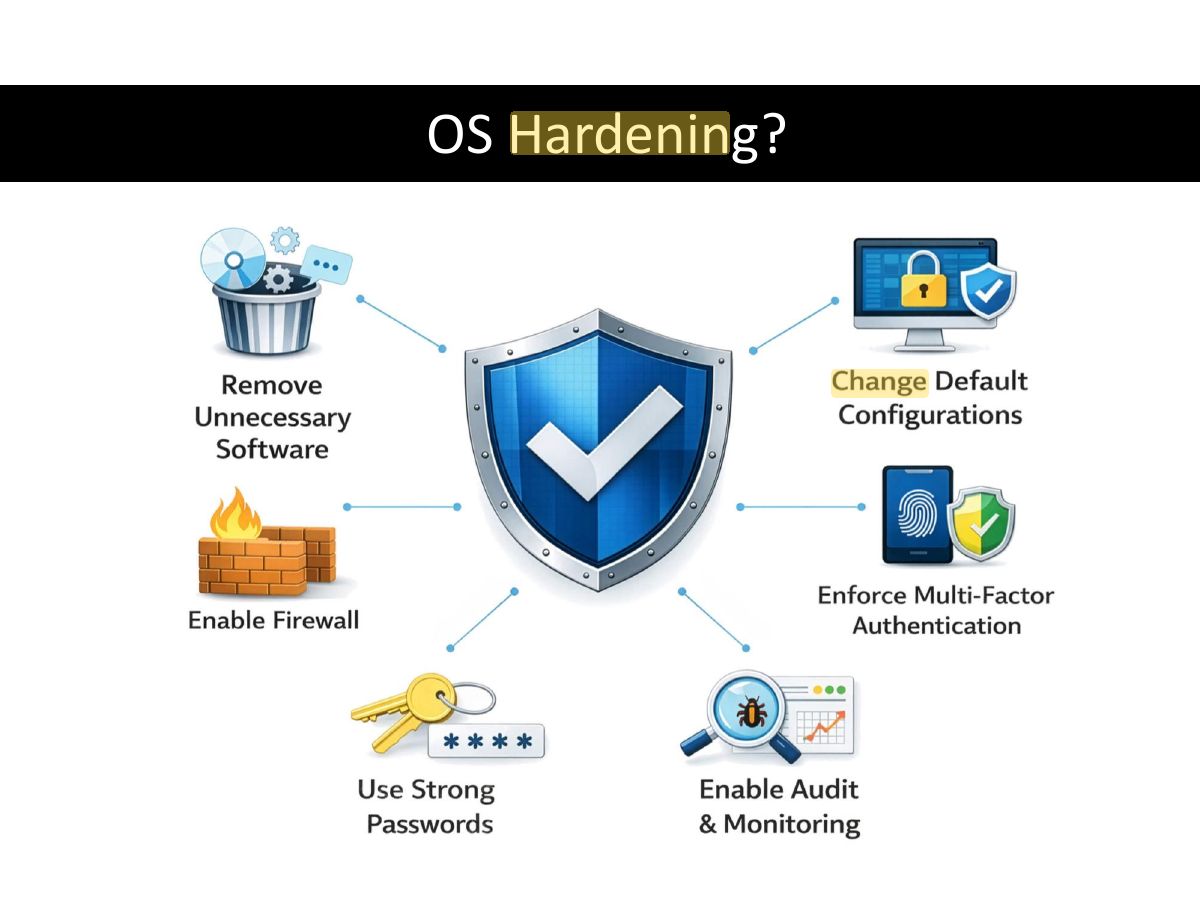
Slide 49: OS Hardening?
Exam weight Low
  1. OS hardening: remove unneeded services, patch, configure securely.

THE END...

50
Exam weight Low
  1. End.