SE371 · Annotated SlidesChapter 7 — Working with Databases
Chapter 7 · Annotated slides

Working with Databases

MVC for server applications, the role of databases in web development, SQL vs. NoSQL (key–value and document stores, MongoDB), how websites use databases, ORMs, and building a CRUD API with Sequelize: connection, models, routes, queries with WHERE operators, associations and validators.
Slide text Study notes Highlight: key words Tips, tricks & traps Seen again elsewhere How it can come up
Slide 1: Fundamentals of Web Development
Exam weight Low

    Technical notes

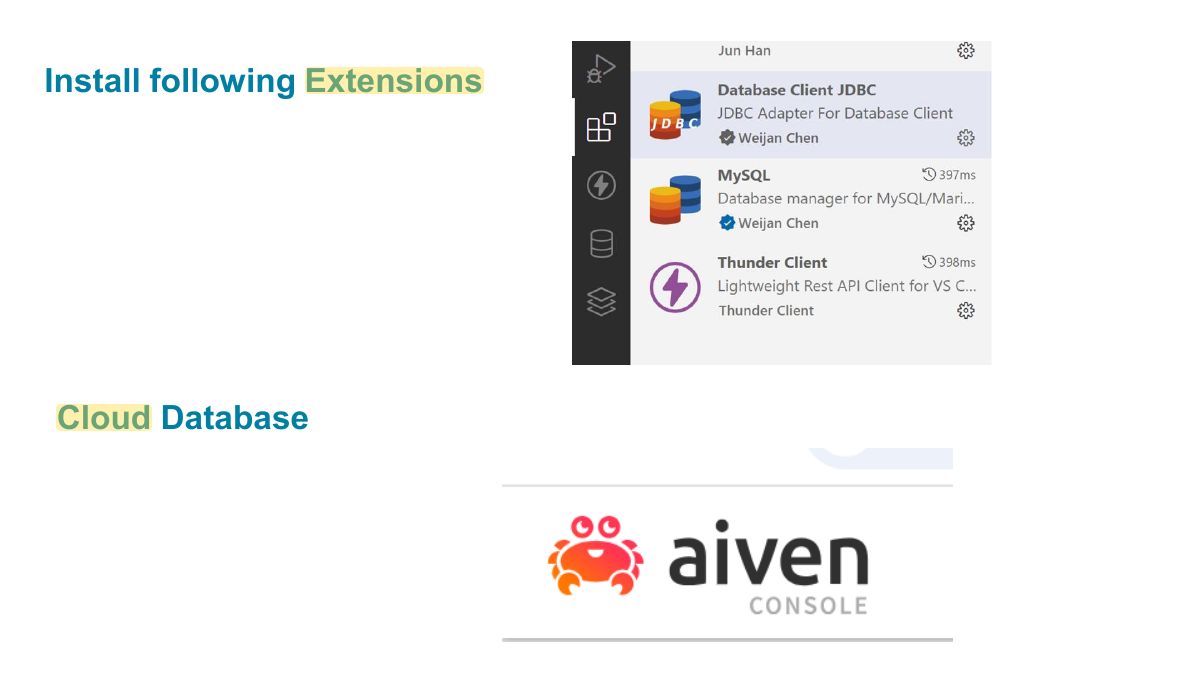
    In this chapter we can use a local MySQL server.

    Or use an online free MySQL service:

    https://aiven.io/

    2
    Exam weight Low
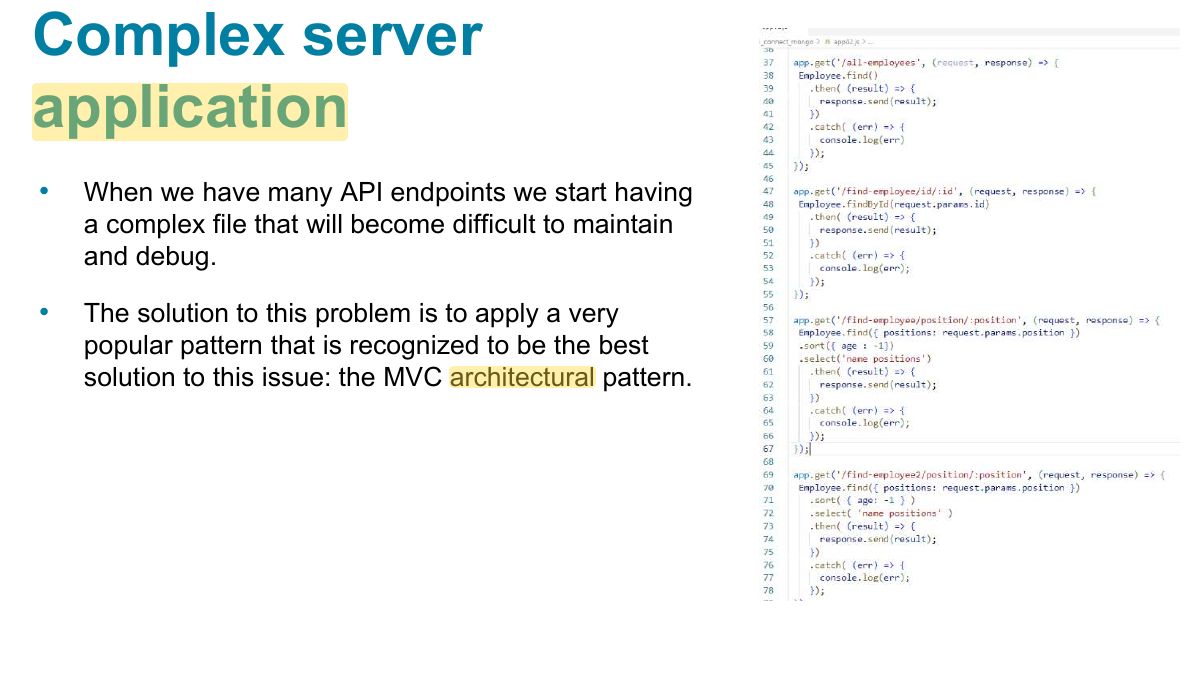
      Slide 3: Complex server application
      Exam weight Low
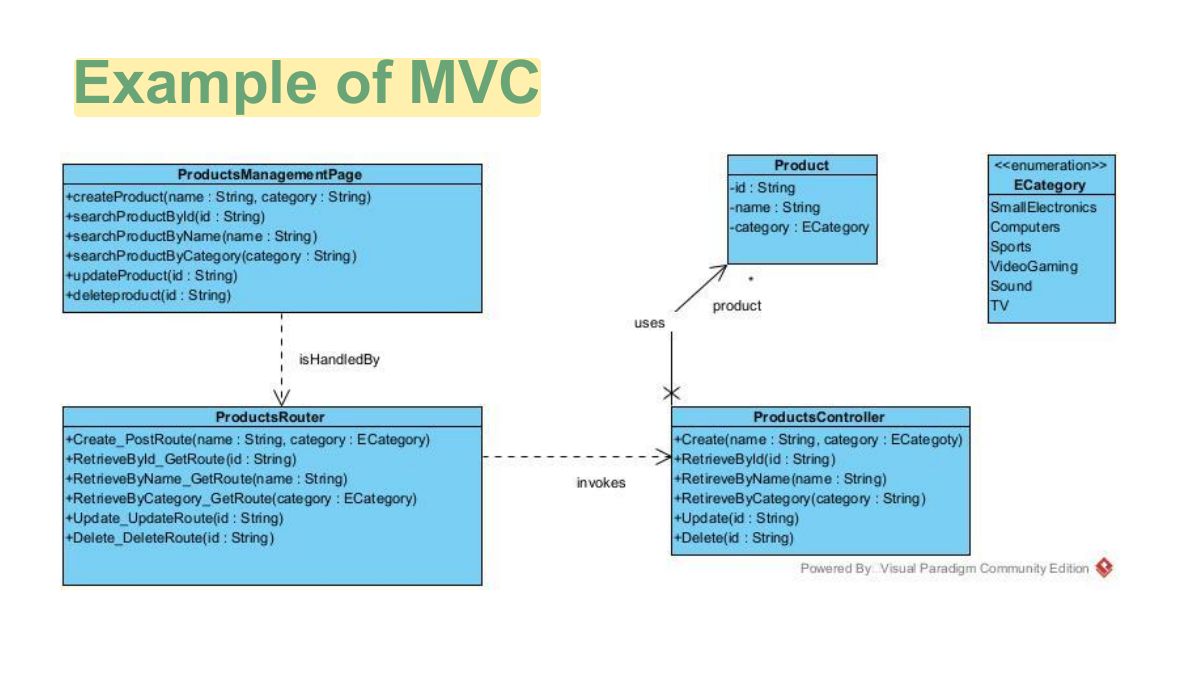
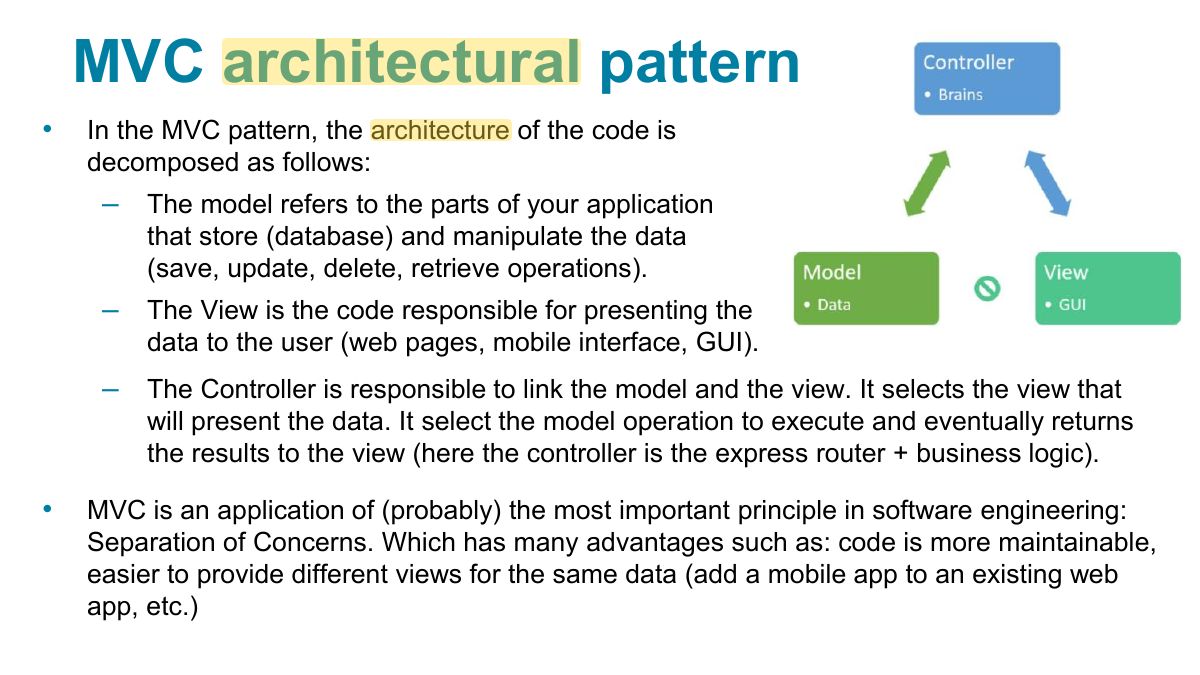
        Slide 5: Example of MVC
        Exam weight Low
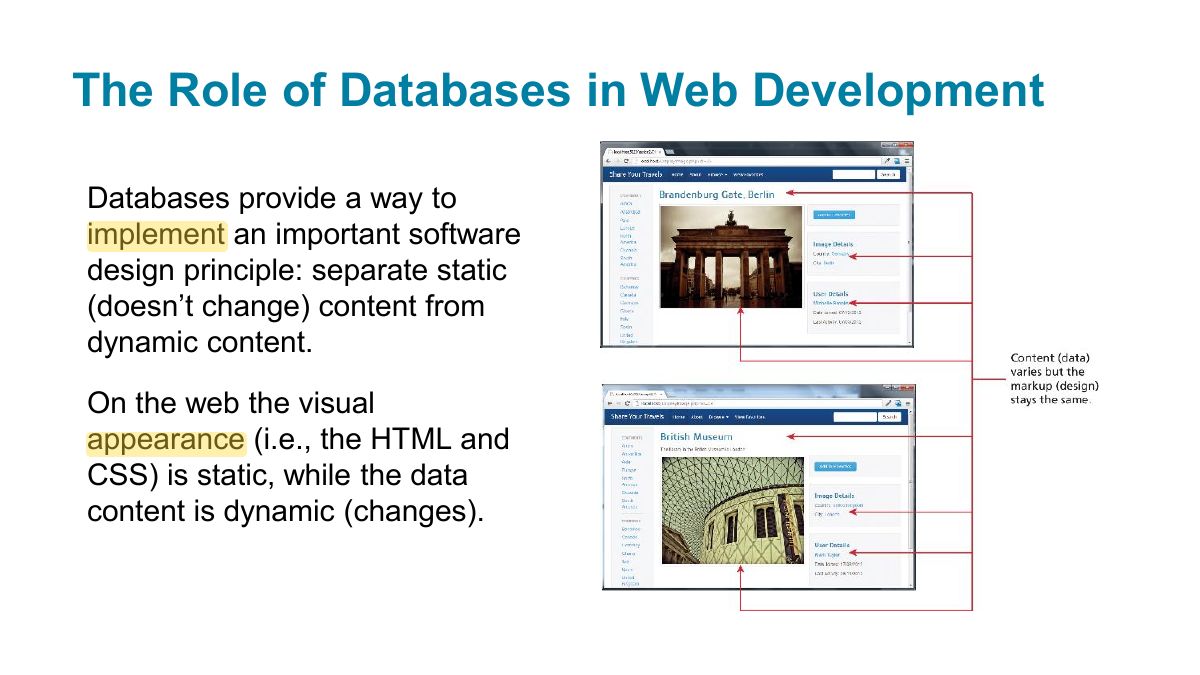
          Slide 6: The Role of Databases in Web Development
          Exam weight Low

            Databases and Web Development

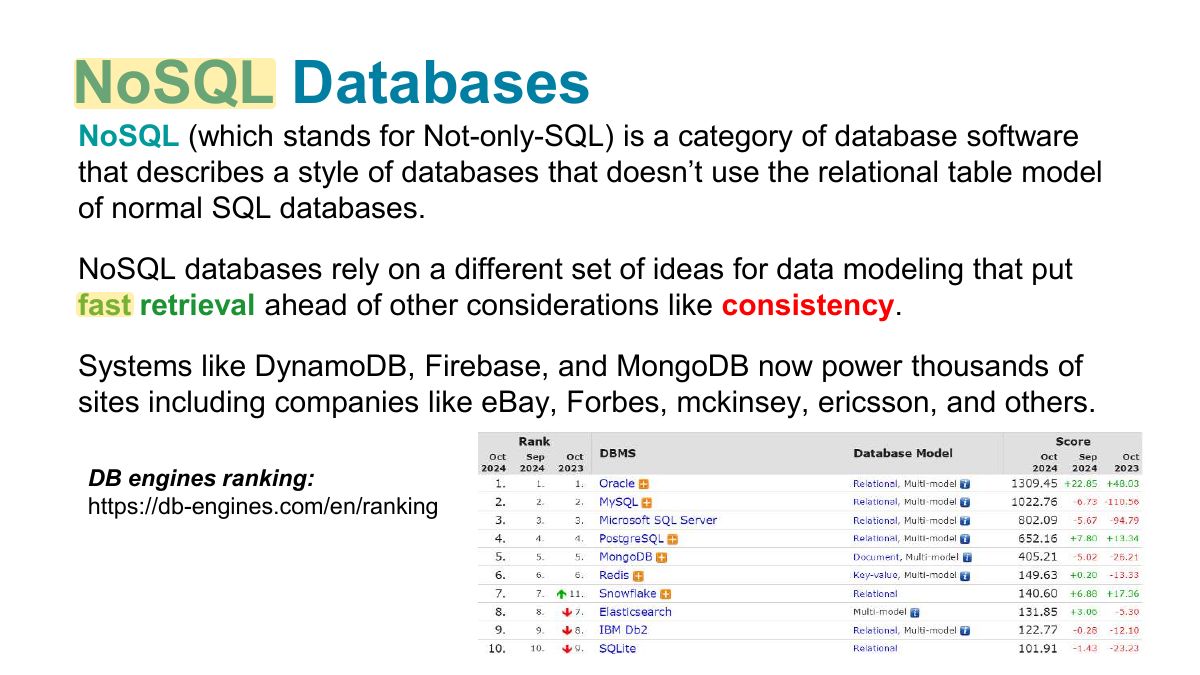
            To work with data, we can use different relational DBMS like SQLite or MySQL, PostgreSQL, Oracle Database, IBM DB2, and Microsoft SQL Server.

            In addition to relational database systems, there are non-relational models for database systems. These systems are usually categorized with the term NoSQL and includes systems such as Cassandra, Firebase and MongoDB.

            7
            Exam weight Low
              Slide 8: NoSQL Databases
              Exam weight Low
              1. NoSQL: key–value stores (Redis), document stores (MongoDB), column and graph databases. Flexible schema, horizontal scaling.

              Why (and Why Not) Choose NoSQL?

              NoSQL systems handle huge datasets better than relational systems. But they

              scenarios. SQL databases use schemas for a very

              aren‟t the best answer for all good reason: they ensure data integrity and data consistency.

              Definitions:

              Data integrity: The guarantee of all data constraints (primary and foreign keys, data types, etc...).

              Data consistency: The guarantee that database constraints are not violated when executing transactions.

              9
              Exam weight Low
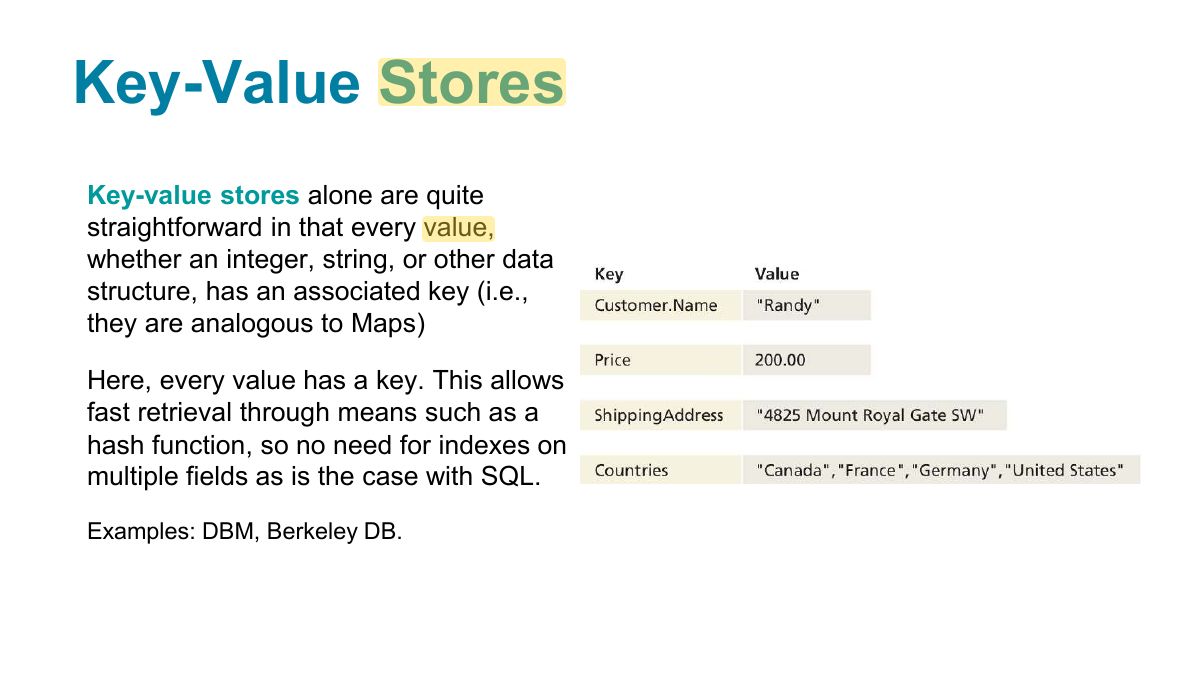
                Slide 10: Key-Value Stores
                Exam weight Low

                  Document Store

                  Document Stores (also called document-oriented databases) associate keys with values, but unlike key-value stores, they call that value a document.

                  • A document can be a binary file like a .doc or .pdf or a semi-structured XML or JSON document.
                  • Most NoSQL systems are of this type. MongoDB (ranking 5, 1 in no-SQL), AWS DynamoDB (16), Google FireBase (39), and Cloud Datastore (79) are popular examples.
                  11
                  Exam weight Low

                    MongoDB

                    MongoDB is an open-source, NoSQL, document-oriented database. It can be used with any backend technology (JEE, PHP, etc.), it is much more commonly used with Node You simply package your data as a JSON object, give it to MongoDB, and it stores this object or document as a binary JavaScript object (BSON).

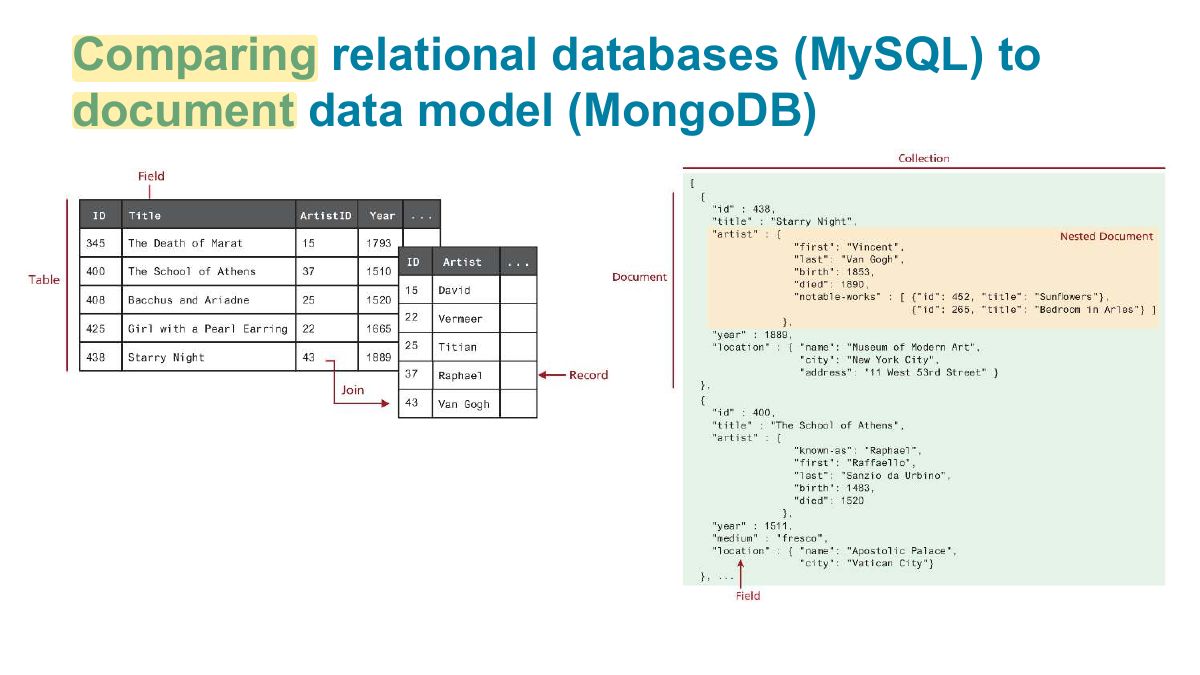
                    MongoDB does not support: transactions (from 4.0), joins (it uses nested documents instead).

                    The ability to run on multiple servers means MongoDB can handle large datasets: replication => redundancy + high availability

                    12
                    Exam weight Low
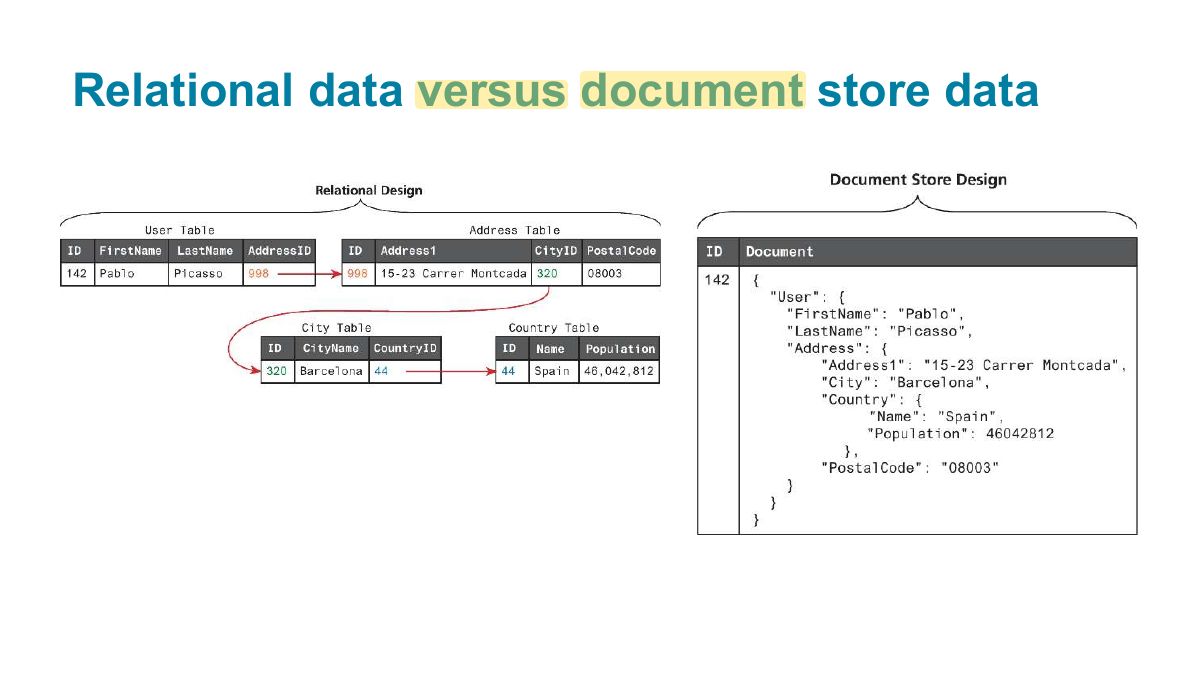
                      Slide 13: Relational data versus document store data
                      Exam weight High
                      1. Relational: tables, fixed schema, joins, SQL. Document: JSON-like documents that can embed related data.
                      🎯 How this can come up · 1 question
                      MCQ

                      MongoDB stores data as:

                      Slide 14: Comparing relational databases (MySQL) to document data model (MongoDB)
                      Exam weight Low
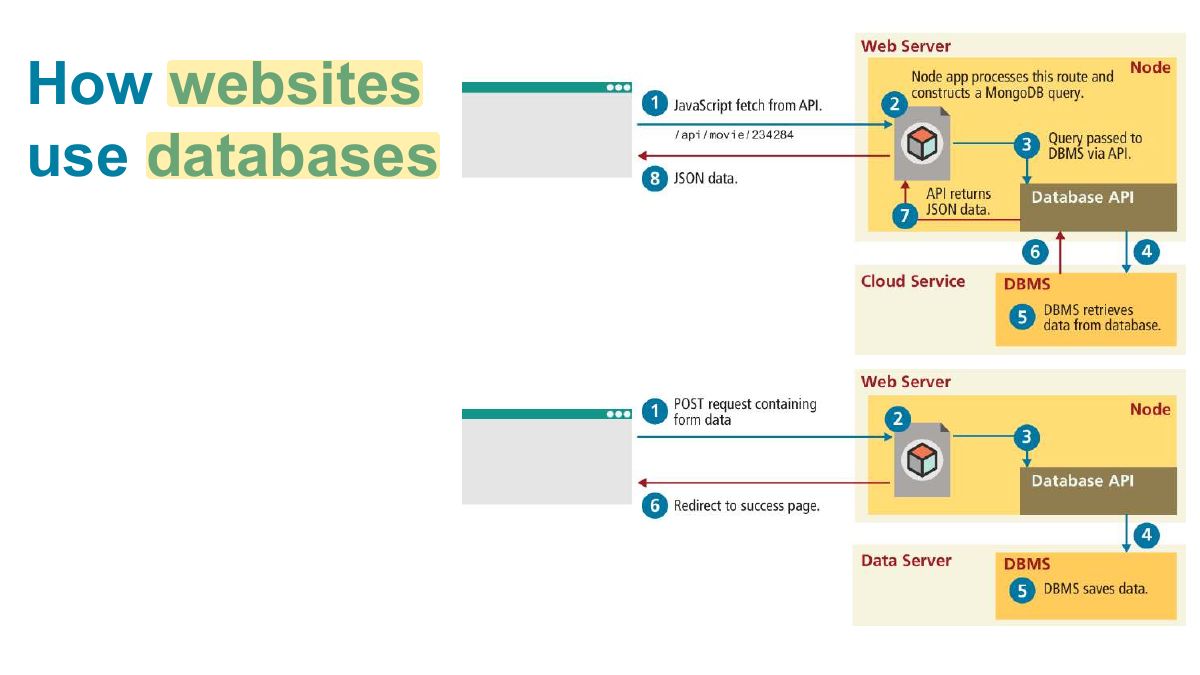
                        Slide 15: How websites use databases
                        Exam weight Low

                          Object Relational Mapping libraries

                          • Object Relational Mapping libraries (ORM) allow the use of an API to query databases without using database-specific queries.
                          • They offer a layer of abstraction that makes your code independent of the subsequent database system used.
                          • Advantages:
                            • Reduce security risks (SQL or non-SQL injections).
                            • Simplify database communication.
                            • Allow changing the database system without changing your code.
                          16
                          Exam weight High
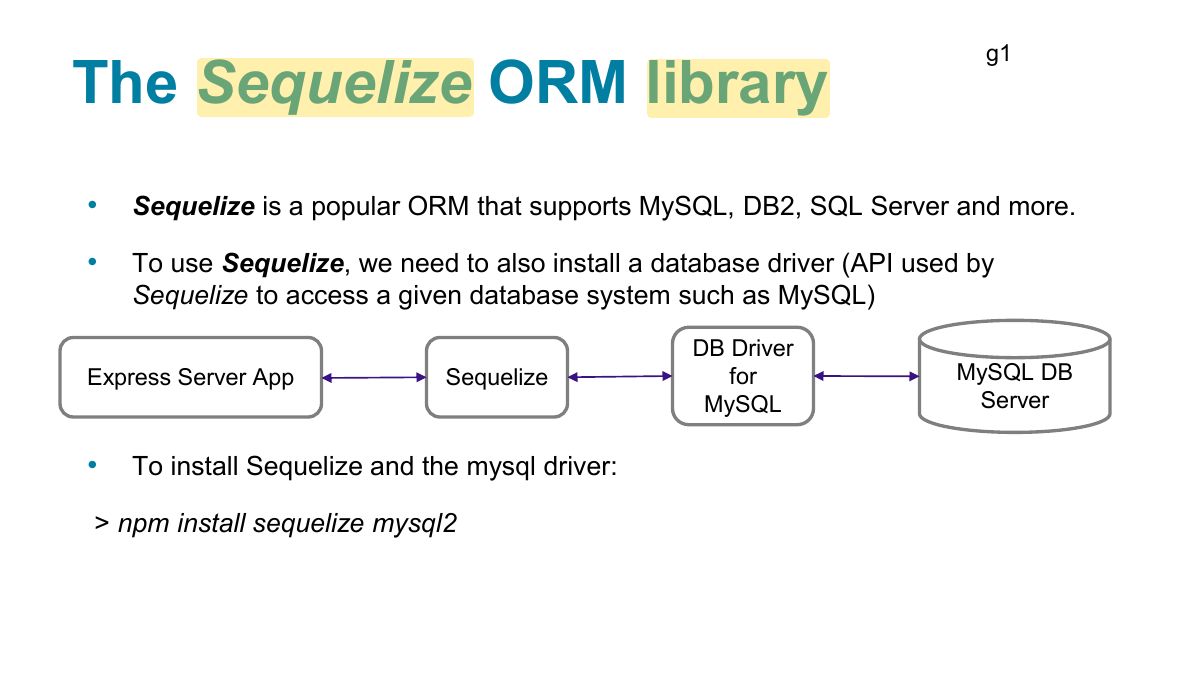
                          1. ORM (Object Relational Mapping, e.g. Sequelize): work with tables as JavaScript objects/classes instead of writing SQL.
                          🎯 How this can come up · 1 question
                          MCQ

                          Sequelize is a(n):

                          Slide 17: g1
                          Exam weight Low
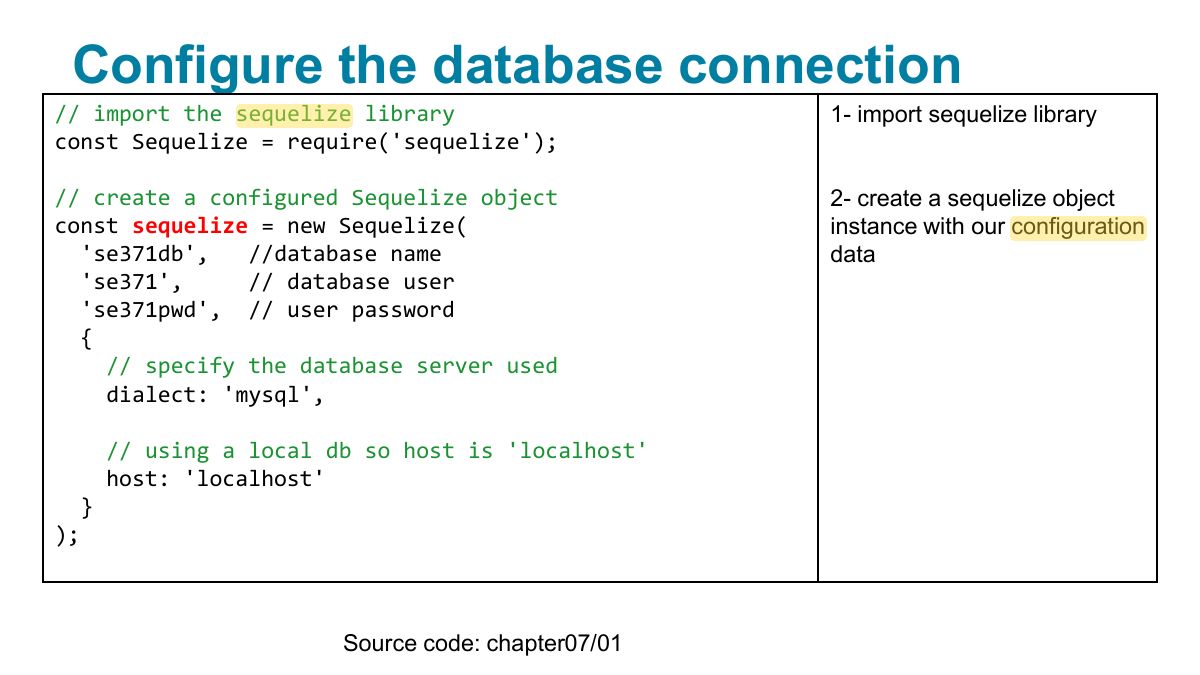
                            Slide 18: Configure the database connection
                            Exam weight Low

                              Connect to the database

                              const connectToDB = async => { try { await sequelize.authenticate; console.log(`Successfully connected to database server...`); } catch(error) { console.log(error); } } Note: here the sequelize object will connect to the database using the given configuration.

                              19
                              Exam weight Low
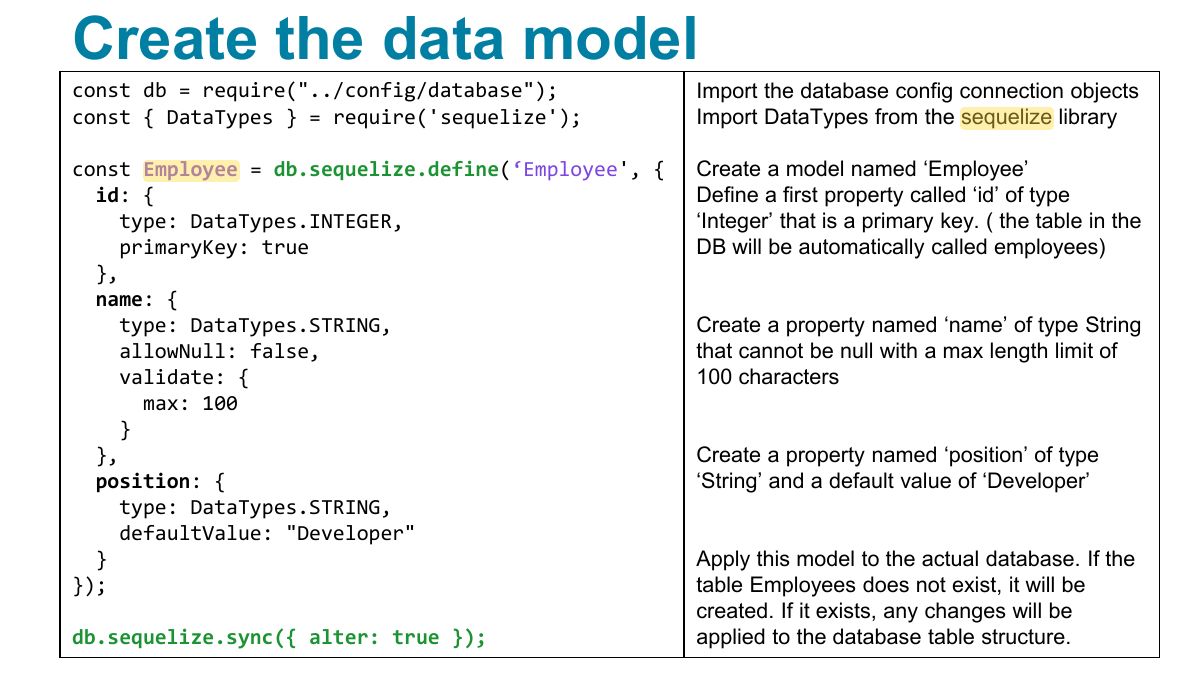
                                Slide 20: Create the data model
                                Exam weight Low
                                1. Define a model: sequelize.define("Employee", { name: DataTypes.STRING, … }).
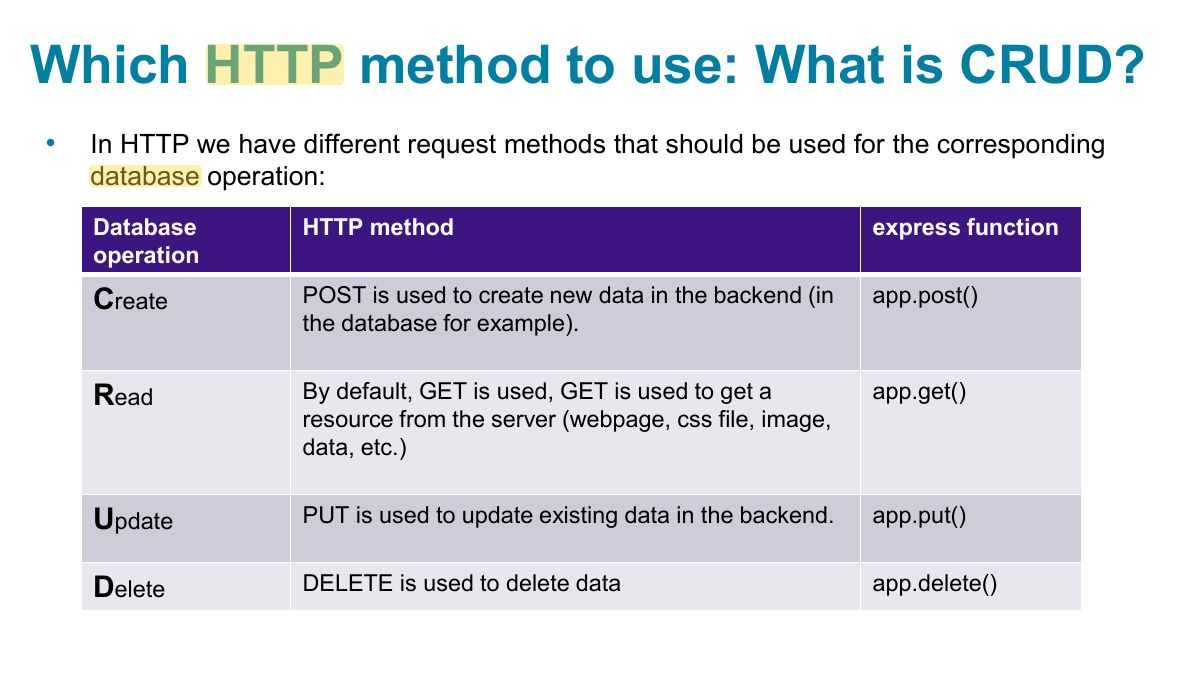
                                Slide 21: Which HTTP method to use: What is CRUD?
                                Exam weight High
                                1. CRUD ↔ HTTP: Create = POST, Read = GET, Update = PUT/PATCH, Delete = DELETE.
                                Memory trickPOST creates, GET reads, PUT/PATCH updates, DELETE deletes.
                                🎯 How this can come up · 1 question
                                MCQ

                                An API endpoint that updates an existing employee should use:

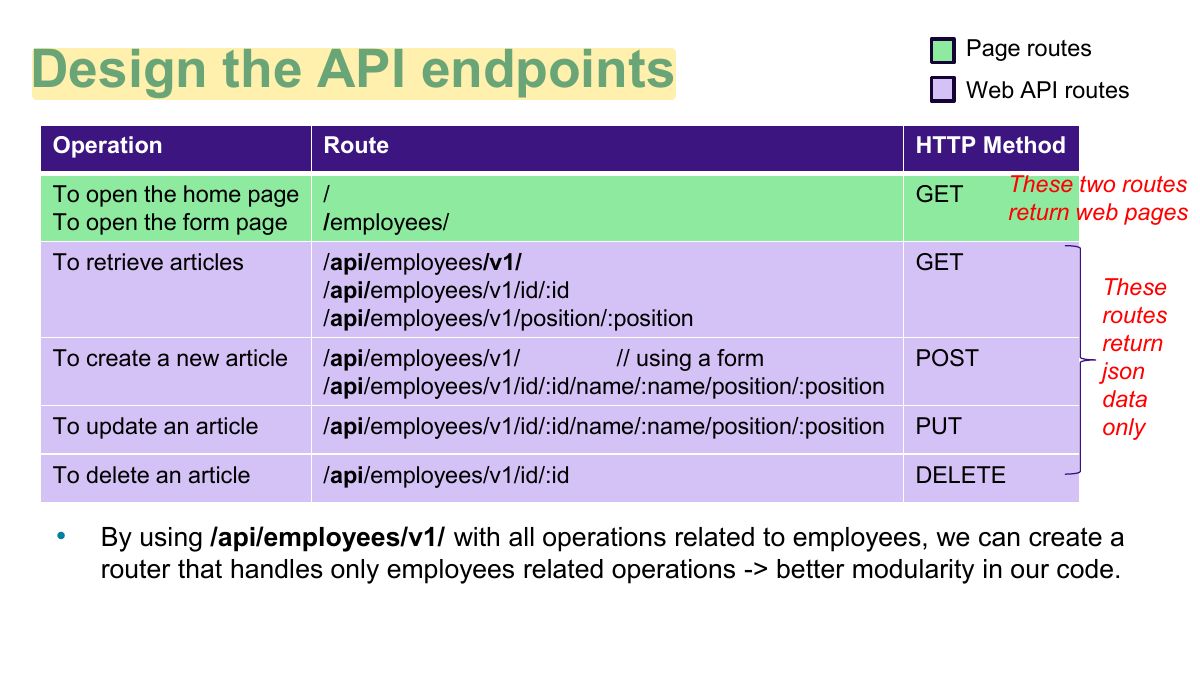
                                Slide 22: Page routes
                                Exam weight Low

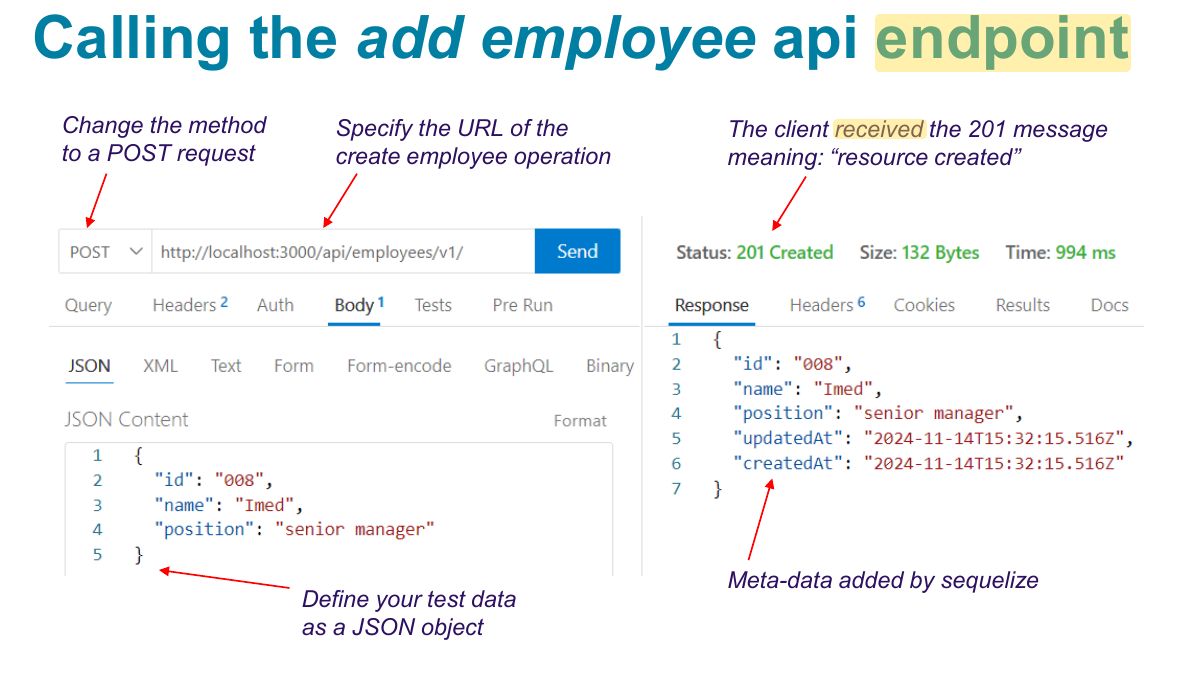
                                  Create a new element in the DB

                                  // Create app.post(api/employees/v1/', async (request, response) => {

                                  ‘/

                                  const { id, name, position } = request.body; const newEMployee = Employee.build({ "id": id, "name": name, "position": position }); try { await newEmployee.save; response.status(201).json(newEmployee); } catch(error) { response.json(error); } })

                                  23
                                  Exam weight Low
                                  1. Model.create({…}) inserts a row.
                                  Slide 24: Calling the add employee api endpoint
                                  Exam weight Low
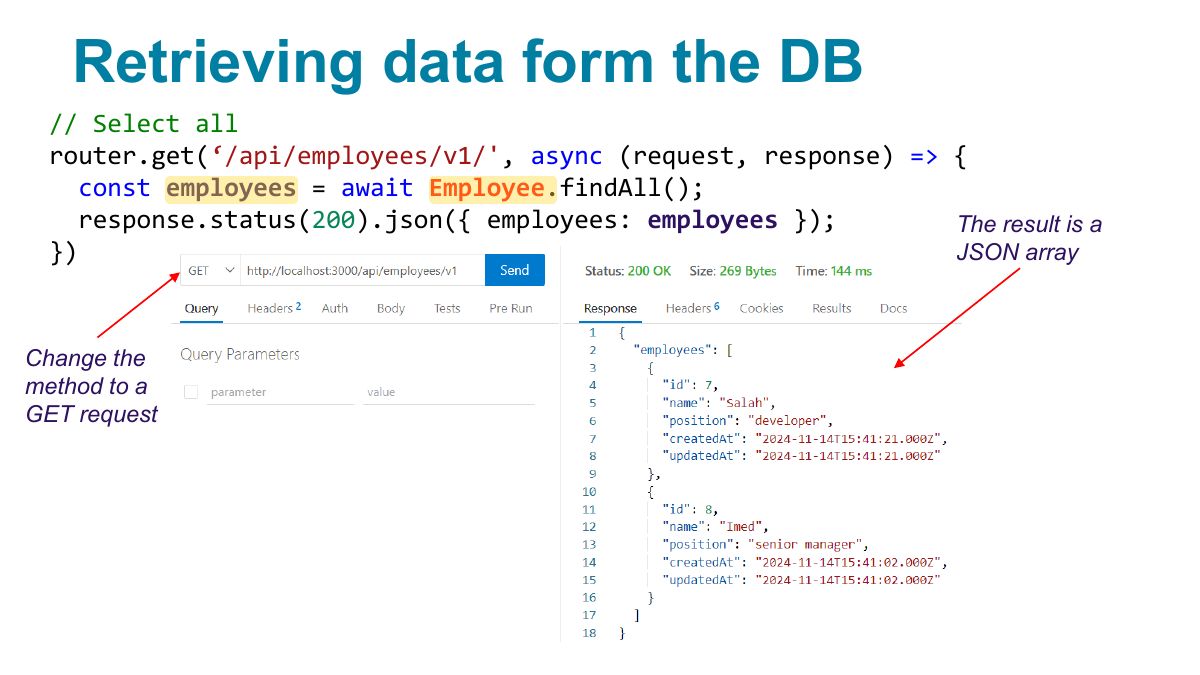
                                    Slide 25: Retrieving data form the DB
                                    Exam weight Low
                                    1. findAll(), findByPk(id), findOne({ where: {…} }).
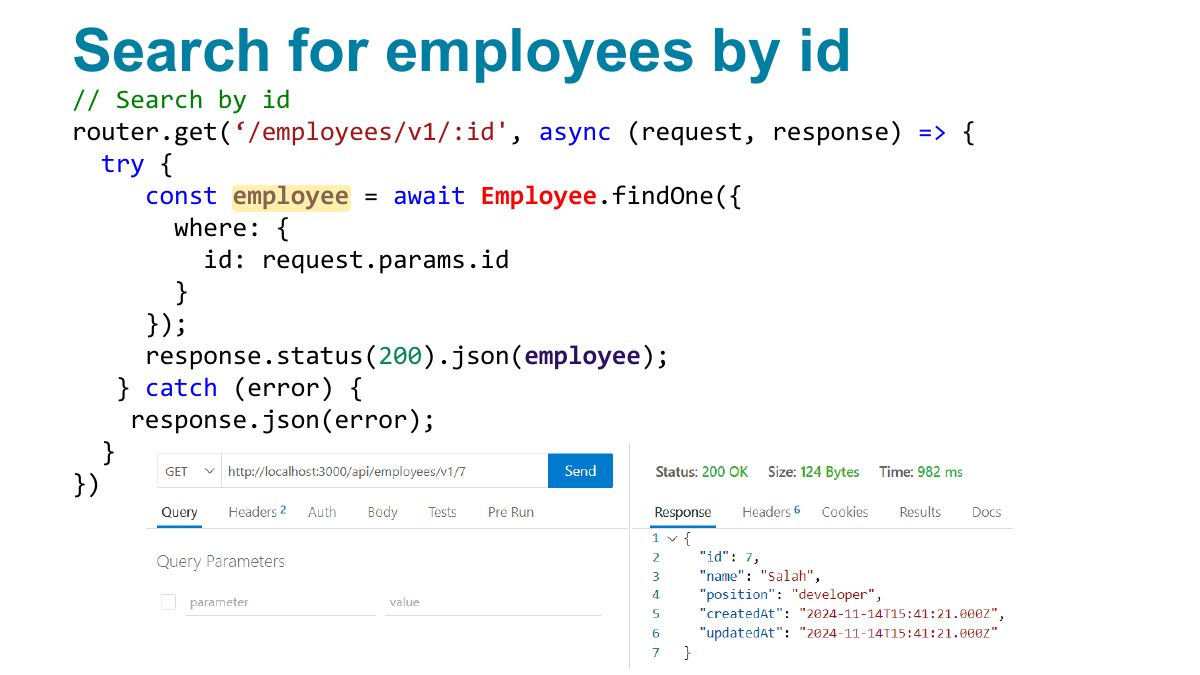
                                    Slide 26: Search for employees by id
                                    Exam weight Low

                                      Search for employees by criteria

                                      // Search by position router.get(employees/v1/position/:position', async (request, response) =>

                                      ‘/

                                      { try { const employee = await Employee.findAll({ where: { position: request.params.position } }); response.status(200).json(employee); } catch (error) { response.json(error); } })

                                      27
                                      Exam weight Low
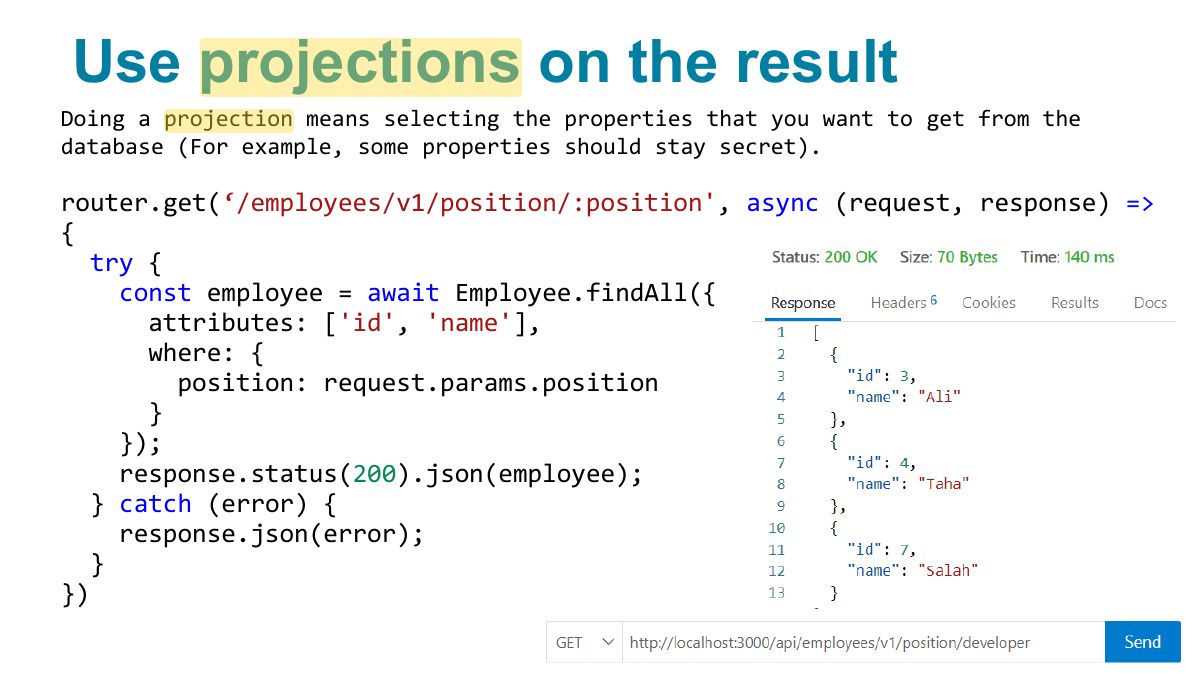
                                        Slide 28: Use projections on the result
                                        Exam weight Low
                                          Slide 29: Install following Extensions
                                          Exam weight Low
                                            Slide 30: Fundamentals of Web Development
                                            Exam weight Low
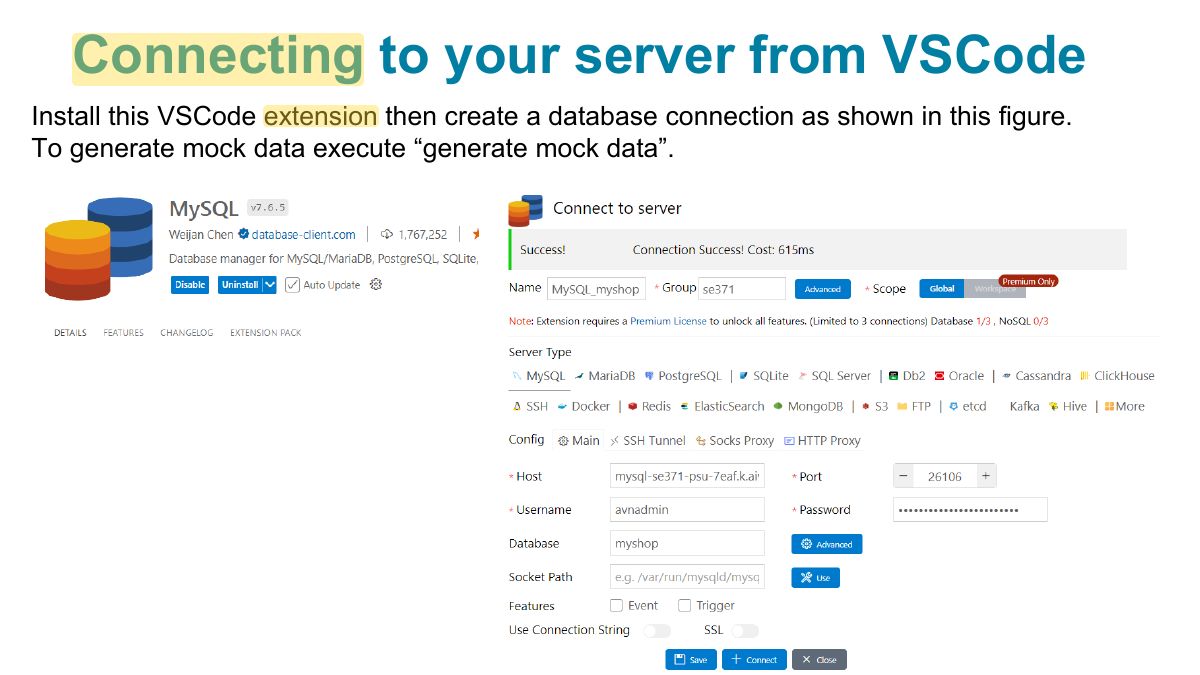
                                              Slide 31: Connecting to your server from VSCode
                                              Exam weight Low
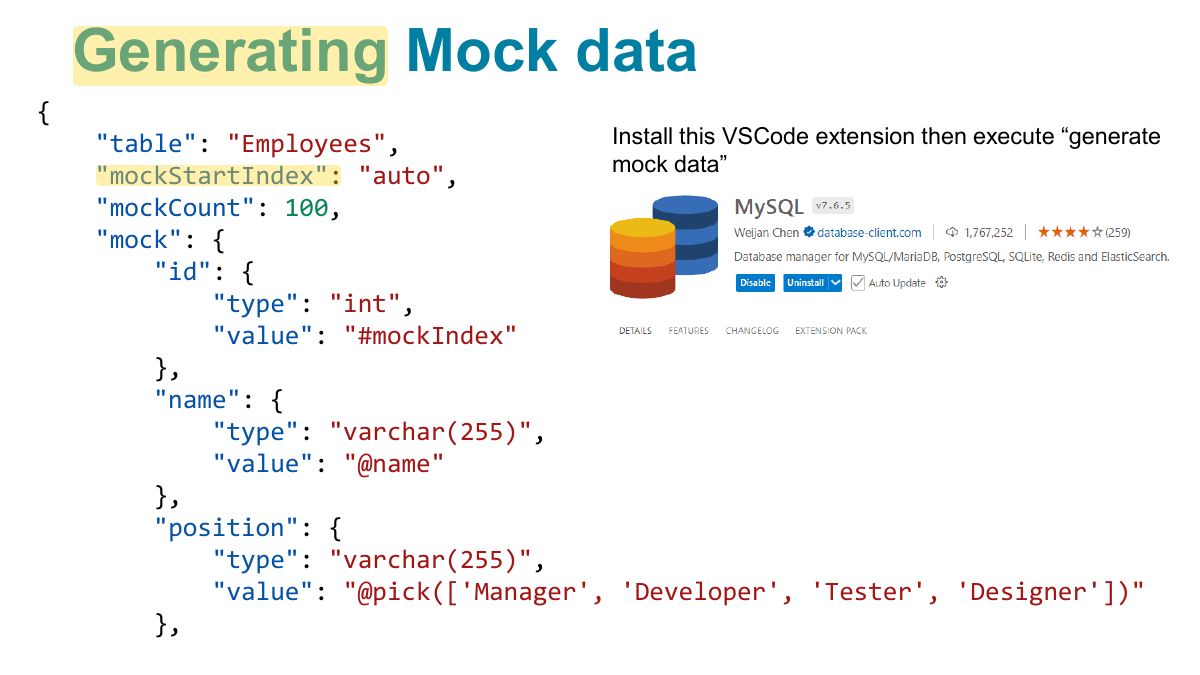
                                                Slide 32: Generating Mock data
                                                Exam weight Low
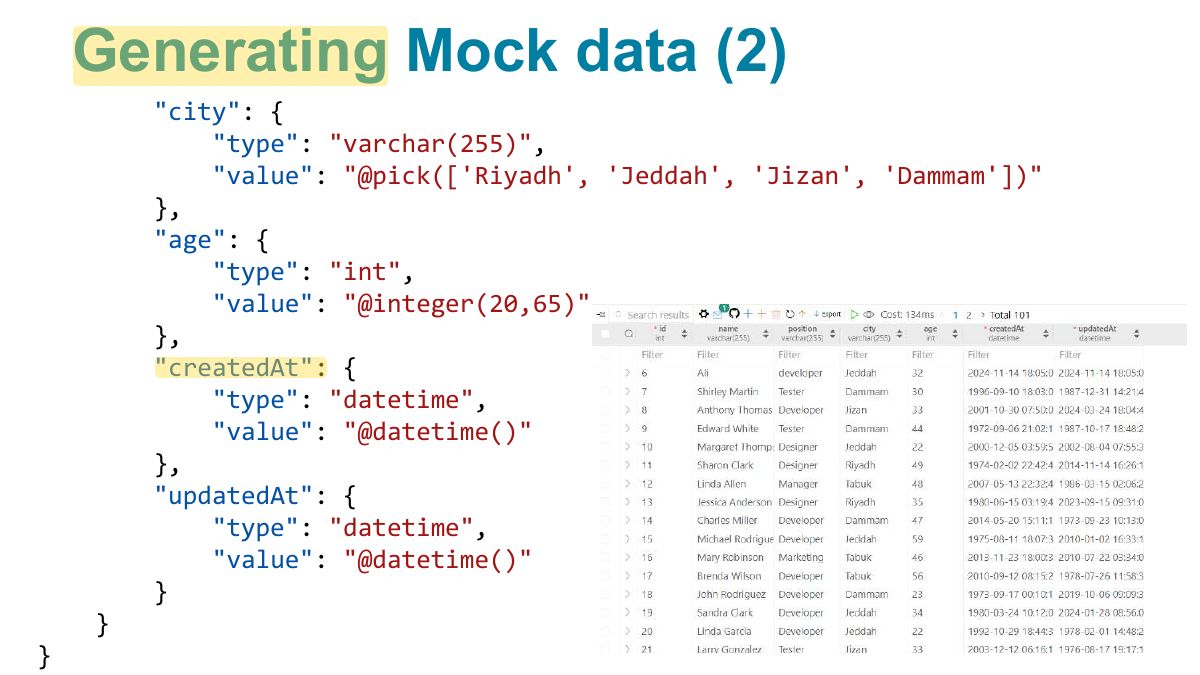
                                                  Slide 33: Generating Mock data (2)
                                                  Exam weight Low

                                                    More on WHERE clause: AND

                                                    // Search by position and city const { Op } = require('sequelize ); // Import Op obj, it defines operations

                                                    ’

                                                    router.get('/employees/v1/position/:position/city/:city', async (request, response) => { try { const employee = await Employee.findAll({ where: { [ Op.and ]: [ { city: request.params.city } , { position: request.params.position } ] } }); response.status(200).json(employee); } catch (error) { response.json(error); } })

                                                    34
                                                    Exam weight Low
                                                    1. Operators: { where: { [Op.and]: […] } }, Op.or, Op.ne, Op.gt, Op.lt.

                                                    More on WHERE clause: OR

                                                    // Search by position or city router.get('/employees/v1/or/position/:position/city/:city', async (request, response) => { try { const employee = await Employee.findAll({ where: { [ Op.or ]: [ { city: request.params.city } , { position: request.params.position } ] } }); response.status(200).json(employee); } catch (error) { response.json(error); } })

                                                    More on WHERE clause: OR
                                                    35
                                                    Exam weight Low

                                                      More on WHERE clause: Delete all

                                                      // Delete all employees from a given city router.delete('/employees/v1/city/:city', async (request, response) => { try { // delete record in a given city const employee = await Employee.destroy({ where: { city: request.params.city } }); // send response response.status(200).json(employee); } catch (error) { response.json(error); } })

                                                      36
                                                      Exam weight Low

                                                        More on WHERE clause: Not Equal

                                                        // Find all employees from outside a given city router.get('/employees/v1/ not /city/:city', async (request, response) => { try { const employee = await Employee.findAll({ where: { city: { [ Op.ne ]: request.params.city // ne stands for Not Equal } } }); // send response response.status(200).json(employee); } catch (error) { response.json(error); } })

                                                        37
                                                        Exam weight Low

                                                          More on WHERE clause: gt, lt

                                                          // Find all employees with age less than a number router.get('/employees/v1/ lt /age/:age', async (request, response) => { try { const employee = await Employee.findAll({ where: { age: { [ Op.lt ]: request.params.age } } }); // send response response.status(200).json(employee); } catch (error) { response.json(error); } })

                                                          38
                                                          Exam weight Low

                                                            Insert data in a table at creation

                                                            We can insert some data into a table using a bulk create. We need to re-execute these operation whenever our tables are deleted and recreated (altered):

                                                            db.sequelize.sync({ alter: true }) .then(async => { Country.count // counts the number of records .then(async (count) => { if(!count) { // if table empty await Country.bulkCreate([ // add these records { name: "KSA" }, { name: "Oman" }, { name: "Egypt" } ]); } }); });

                                                            39
                                                            Exam weight Low

                                                              Work with model associations

                                                              const Employee = db.sequelize.define('Employee', { ...

                                                              }); // Let’s add a Country table, every employee will be associated with 1 country const Country = db.sequelize.define(‘Country'

                                                              , {

                                                              name: { type: DataTypes.STRING, unique: true } }, { timestamps: false // no need to store timestamps, not critical data (static) }); Country.hasMany(Employee); // Employee will contain the foreign key to a country, it will be called ‚

                                                              CountryId ‛

                                                              Employee.belongsTo(Country); // Employee objects now have a getter .getCountry

                                                              40
                                                              Exam weight Low
                                                              1. Associations: hasMany / belongsTo / hasOne / belongsToMany; include them in queries.

                                                              Get an employee and his associated country

                                                              // Search by id and get the country name using the one-to-many association router.get(‘/employees/v1/:id'

                                                              , async (request, response) => {

                                                              try { const employee = await Employee.findOne({ where: { id: request.params.id } }); const country = await employee .getCountry; // enriched API response.status(200).json({employee, country}); } catch (error) { response.json(error); } })

                                                              41
                                                              Exam weight Low

                                                                Data validation and constraints

                                                                Validations are checks performed in the Sequelize level, in pure JavaScript. If a validation fails, no SQL query will be sent to the database at all. On the other hand, constraints are rules defined at SQL level. If a constraint check fails, an error will be thrown by the database.

                                                                const User = sequelize.define('user', { username: { type: DataTypes.STRING, allowNull: false, // not null constraint unique: true, // Unique constraint }, hashedPassword: { type: DataTypes.STRING(64), validate: { is: /^[0-9a-f]{64}$/i, // Validation enforced by Sequelize }, }, });

                                                                42
                                                                Exam weight Low

                                                                  Sequelize validators

                                                                  is: /^[a-z]+$/i, // matches this RegExp not: /^[a-z]+$/i, // does not match this RegExp isEmail: true, // checks for email format ([email protected]) isUrl: true, // checks for url format (https://foo.com) isIP: true, // checks for IPv4 (129.89.23.1) or IPv6 format isAlpha: true, // will only allow letters isAlphanumeric: true, // will only allow alphanumeric characters, so "_abc" will fail isNumeric: true, // will only allow numbers isInt: true, // checks for valid integers isFloat: true, // checks for valid floating point numbers isDecimal: true, // checks for any numbers isLowercase: true, // checks for lowercase isUppercase: true, // checks for uppercase notNull: true, // won't allow null isNull: true, // only allows null notEmpty: true, // don't allow empty strings

                                                                  43
                                                                  Exam weight Low
                                                                  1. Validators on fields: allowNull: false, validate: { isEmail: true, len: [2, 50] }.

                                                                  Sequelize validators (2)

                                                                  equals: 'specific value', // only allow a specific value contains: 'foo', // force specific substrings notIn: [['foo', 'bar']], // check the value is not one of these isIn: [['foo', 'bar']], // check the value is one of these notContains: 'bar', // don't allow specific substrings len: [2,10], // only allow values with length between 2 and 10 isDate: true, // only allow date strings isAfter: "2011-11-05", // only allow date strings after a specific date isBefore: "2011-11-05", // only allow date strings before a specific date max: 23, // only allow values <= 23 min: 23, // only allow values >= 23

                                                                  44
                                                                  Exam weight Low

                                                                    Sequelize validators: example

                                                                    const User = sequelize.define('user', {

                                                                    ...

                                                                    email: { type: DataTypes.STRING, validate: {

                                                                    isEmail: true

                                                                    } }, }); // Then in the controller:

                                                                    const user = User.build({ username: 'Salah', email: ' salah ' }); if(user.validate) { try { await user.save;

                                                                    45
                                                                    Exam weight Low

                                                                      Class Task

                                                                      • Create account in aiven.io
                                                                      • Create Database se371db
                                                                      • Install extensions: MySQL, Thunder Client
                                                                      • Connect to database
                                                                      • Try get, post, del, put
                                                                      46
                                                                      Exam weight Low

                                                                        END

                                                                        47
                                                                        Exam weight Low