SE371 · Annotated SlidesChapter 6 — Server-Side Node.js and Express
Chapter 6 · Annotated slides

Server-Side Node.js and Express

Node.js and JavaScript everywhere, modules (CommonJS and ES imports), core modules and a simple HTTP server, blocking vs. non-blocking architectures, asynchronous code with callbacks, promises, async/await and fetch, npm and package.json, CORS, Express routing and middleware, route parameters vs. query strings vs. forms, and EJS view engines.
Slide text Study notes Highlight: key words Tips, tricks & traps Seen again elsewhere How it can come up
Slide 1: Task [Chapter 5]
Exam weight Low
    Slide 2: Fundamentals of Web Development
    Exam weight Low

      Introducing Node.js

      Node can be used to build a server that generates HTML in response to HTTP requests, it uses JavaScript as its programming language.

      Node Advantages

      • JavaScript Everywhere
      • Push Architectures (pub/sub, webSockets)
      • Nonblocking Architectures
      • Rich Ecosystem of Tools and Code
      • Broad Adoption
      3
      Exam weight Low
      1. Node.js: JavaScript on the server, built on Chrome’s V8 engine; single-threaded, event-driven, non-blocking I/O.
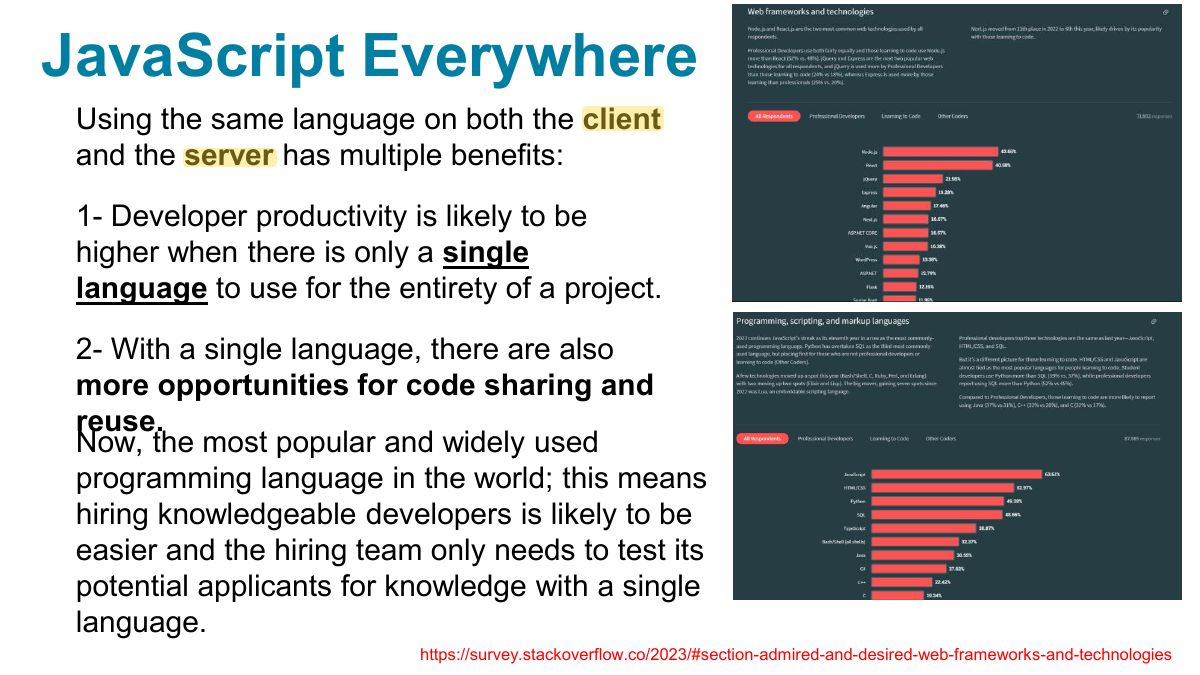
      Slide 4: JavaScript Everywhere
      Exam weight Low
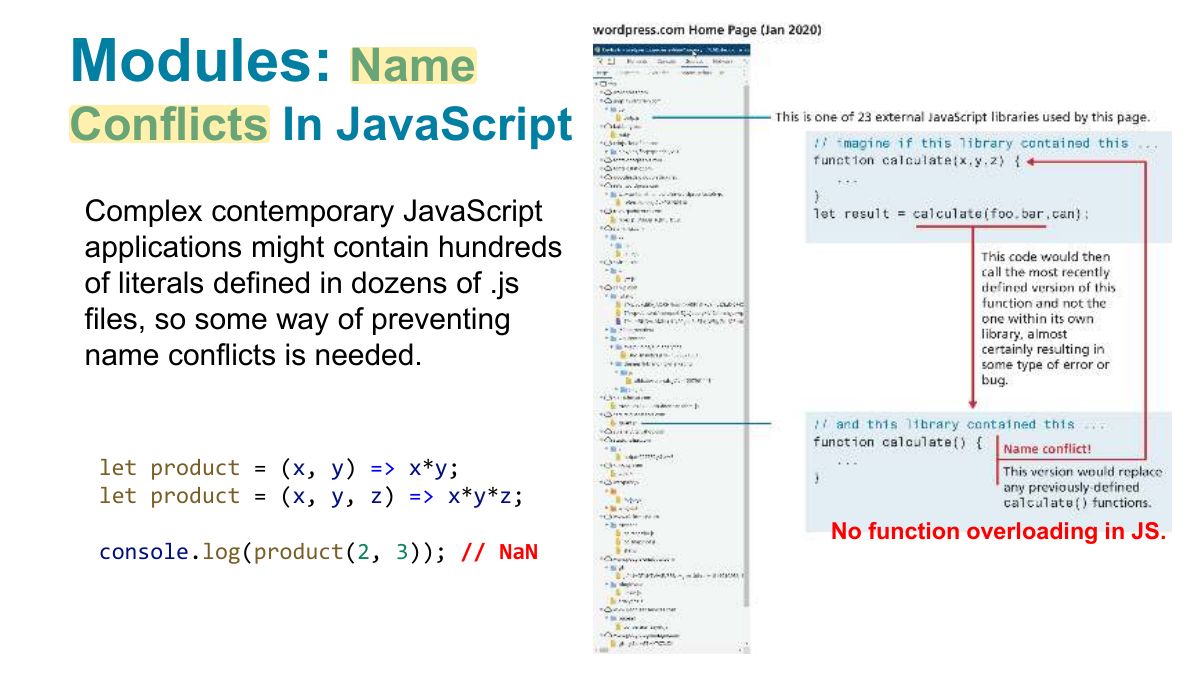
        Slide 5: Modules:
        Exam weight Low
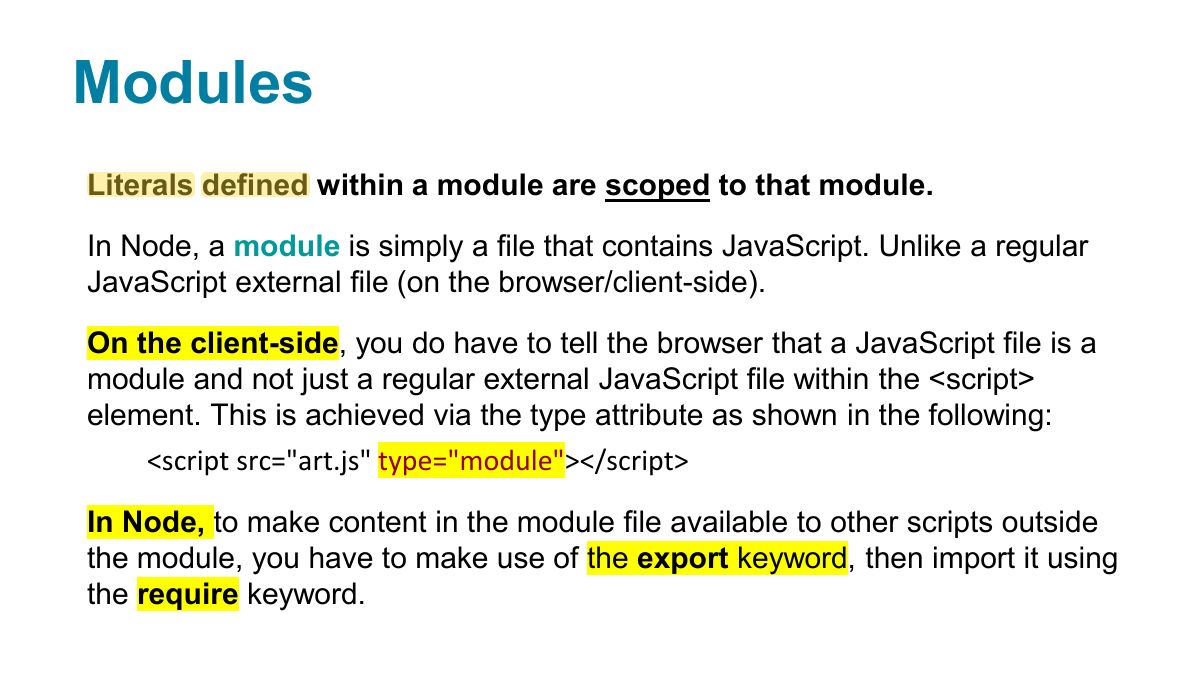
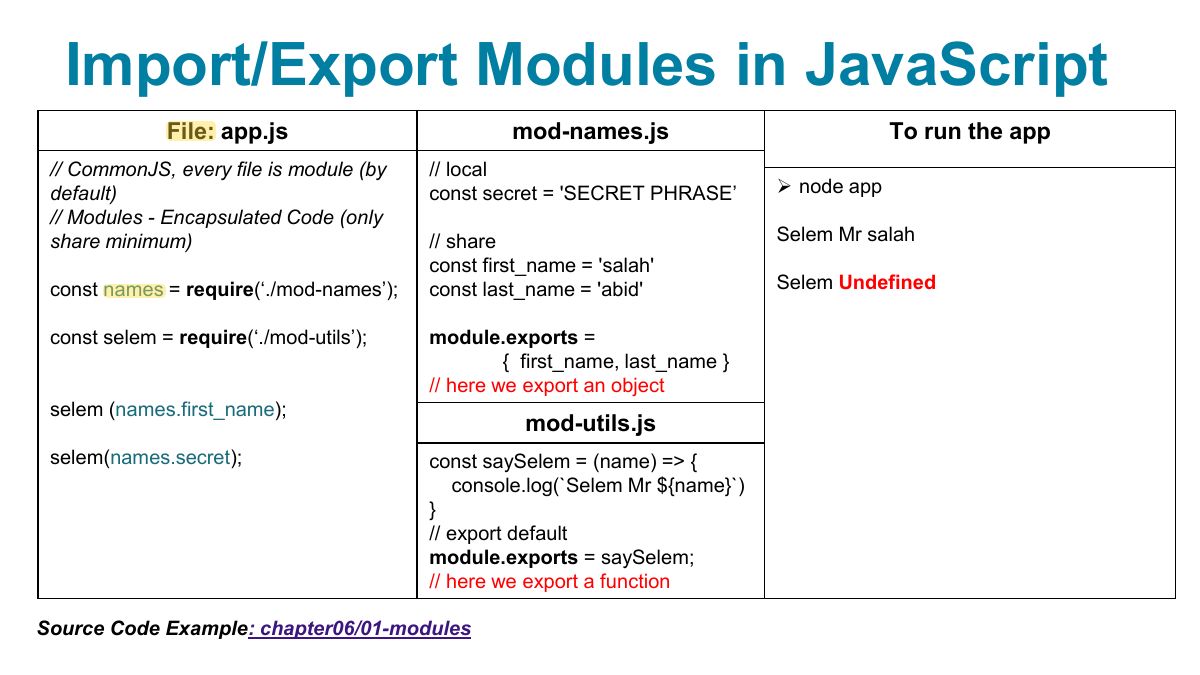
        1. Modules: require/module.exports (CommonJS) or import/export (ES modules).
        Slide 6: Modules
        Exam weight Low

          Running a node application

          If you have installed Node, you will need to open a command/terminal window, navigate to the folder of your application, and enter the following command:

          • node app.js

          You can also just type:

          • node app

          Then to stop it, type: ctrl-c Node.js version 22.x (The latest version: https://nodejs.org/en/download/package-manager/current)

          7
          Exam weight Low
            Slide 8: Import/Export Modules in JavaScript
            Exam weight Low
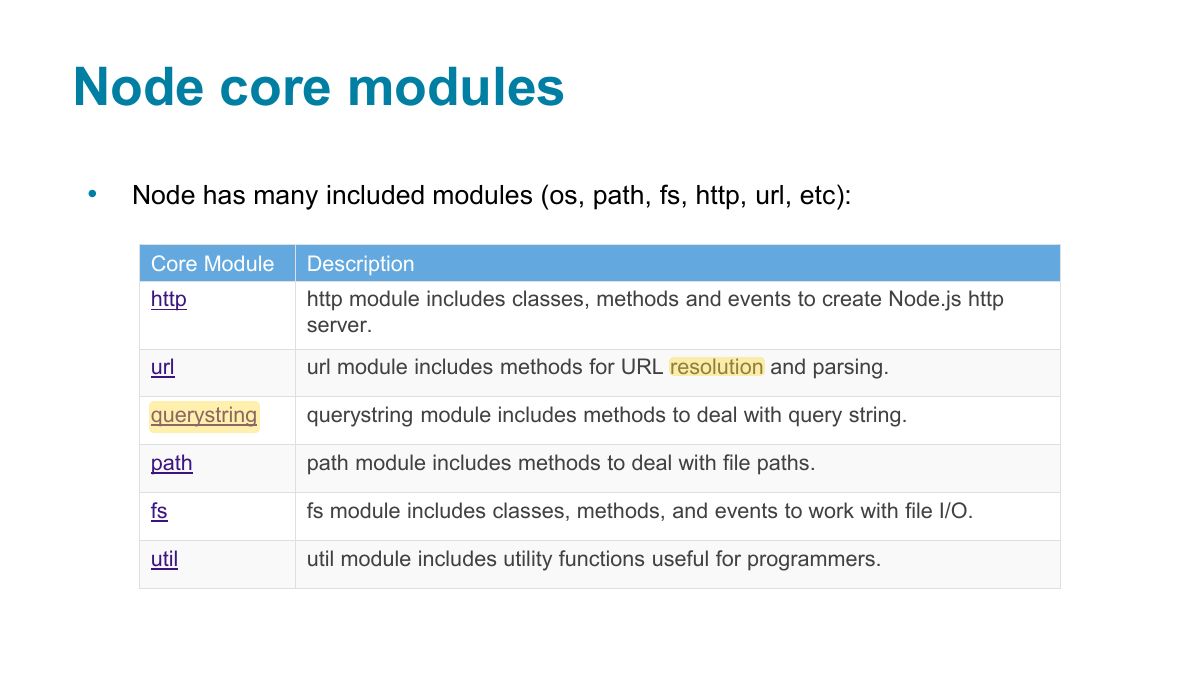
              Slide 9: Node core modules
              Exam weight Low
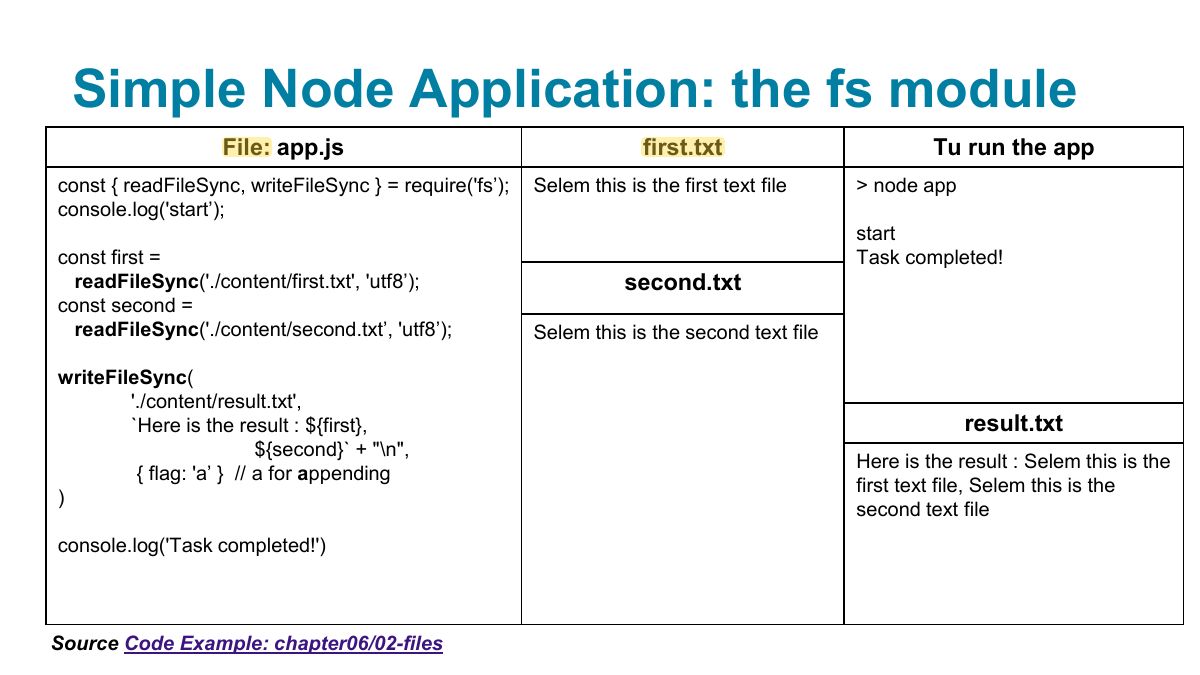
                Slide 10: Simple Node Application: the fs module
                Exam weight Low

                  Simple Node Application: the http module

                  // make use of the http module const http = require('http’); // configure HTTP server to respond with simple message to all requests const server = http.createServer(function (request, response) {

                  response.writeHead(200, {"Content-Type": "text/plain"}); response.write("Hello this is our first node.js HTTP server"); response.end;

                  }); // Listen on port 8080 on localhost const port = 8080; server.listen(port); // display a message on the terminal console.log("Server running at port=" + port);

                  11
                  Exam weight Low
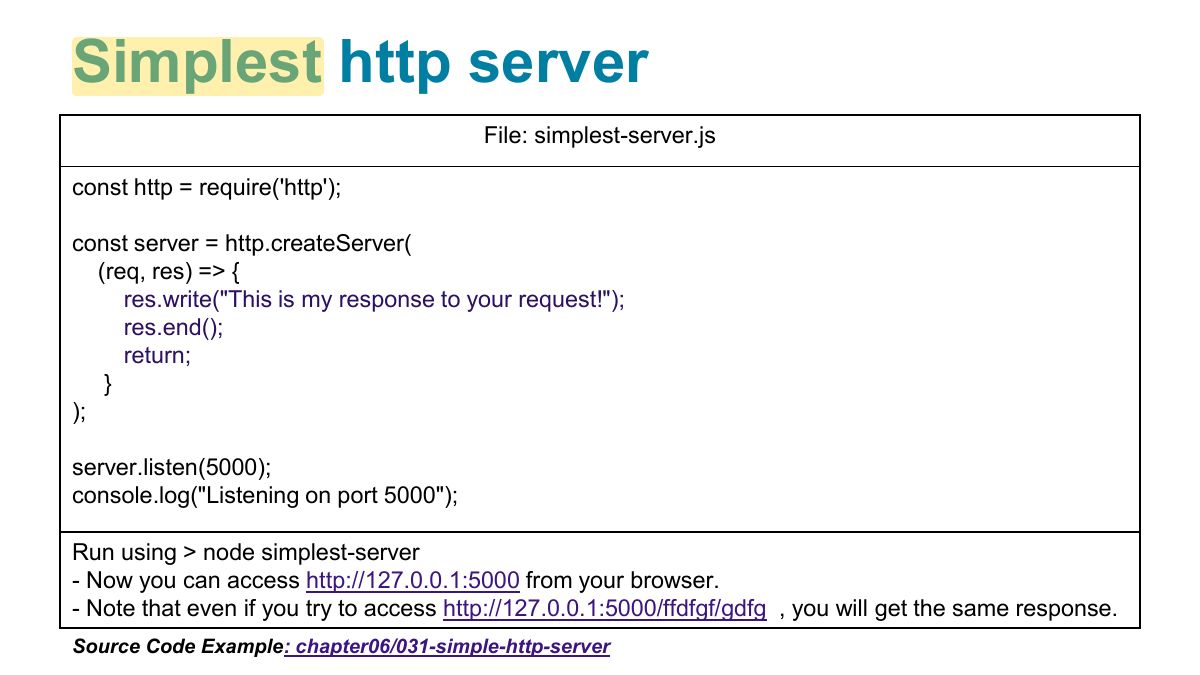
                    Slide 12: Simplest http server
                    Exam weight Low
                    1. http.createServer((req, res) => { res.writeHead(200, …); res.end(…); }).listen(3000);
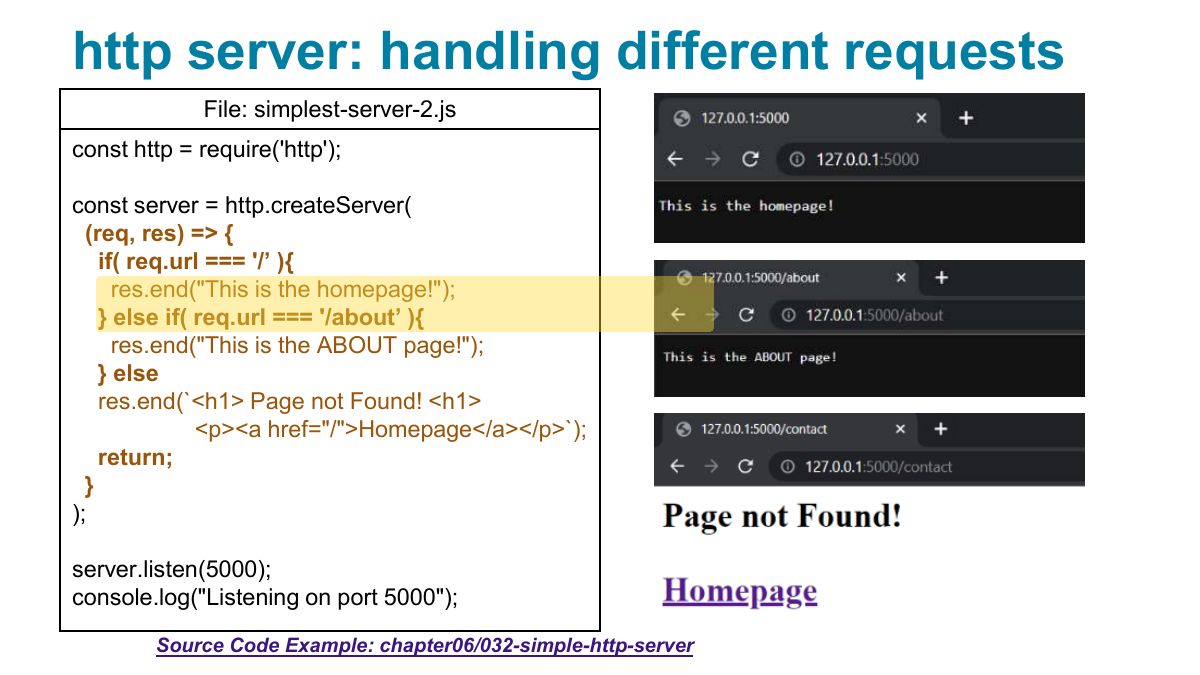
                    Slide 13: http server: handling different requests
                    Exam weight Low
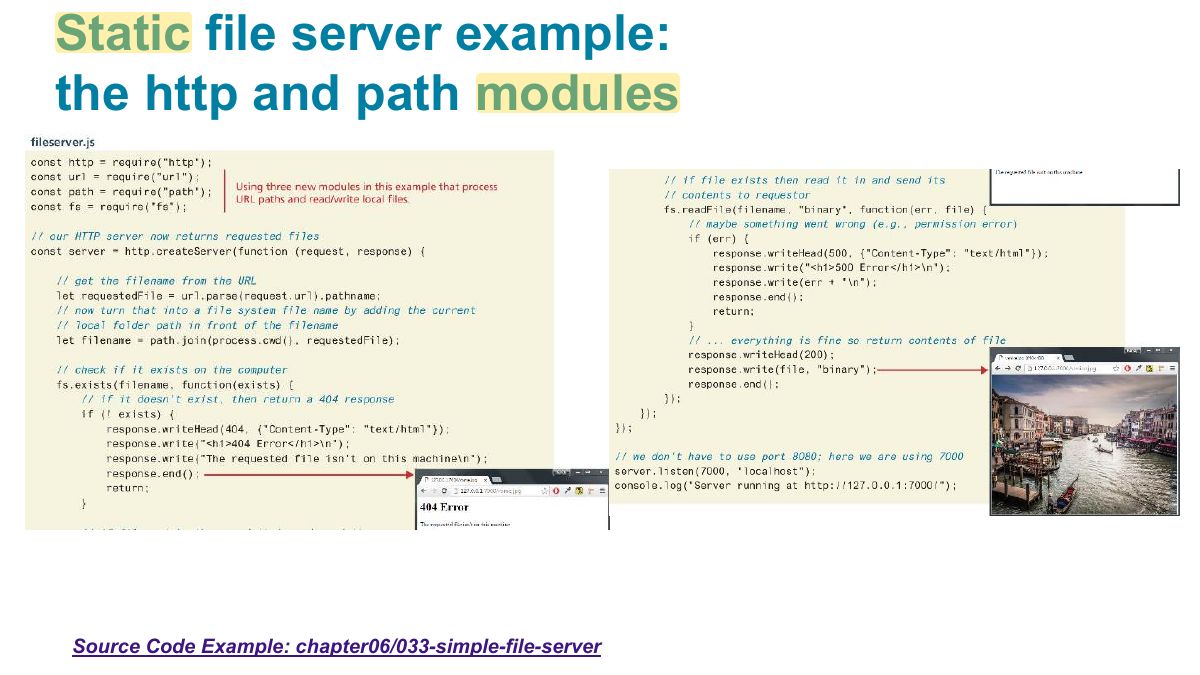
                      Slide 14: Static file server example: the http and path modules
                      Exam weight Low
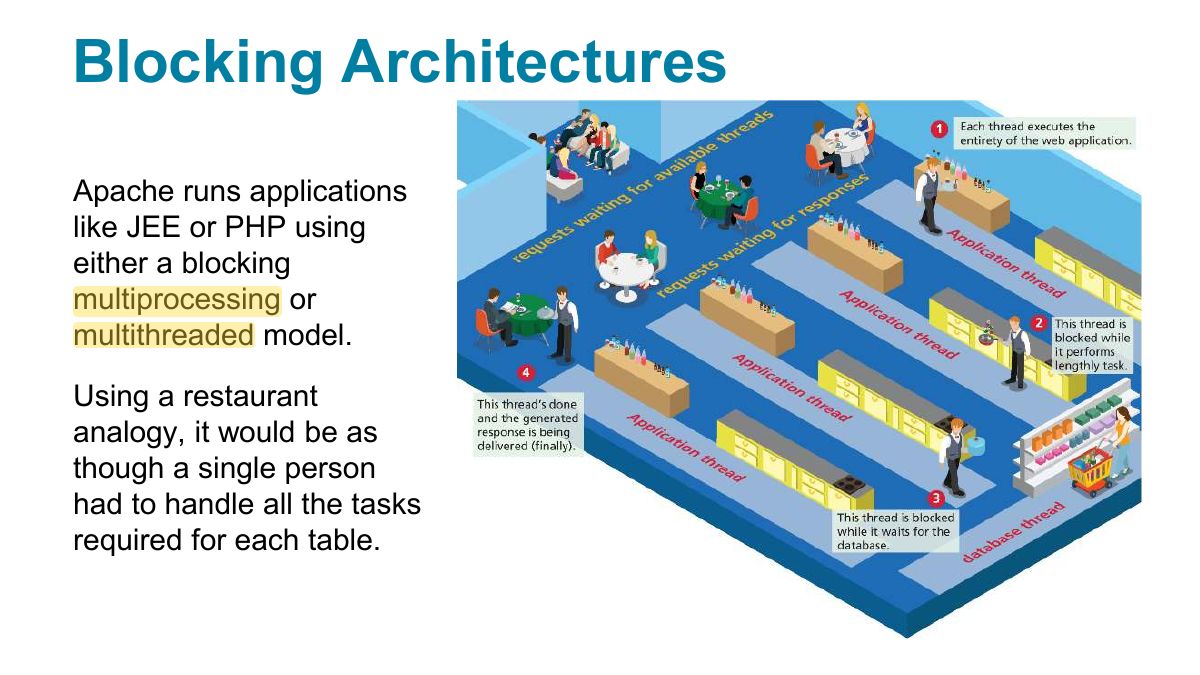
                        Slide 15: Blocking Architectures
                        Exam weight High
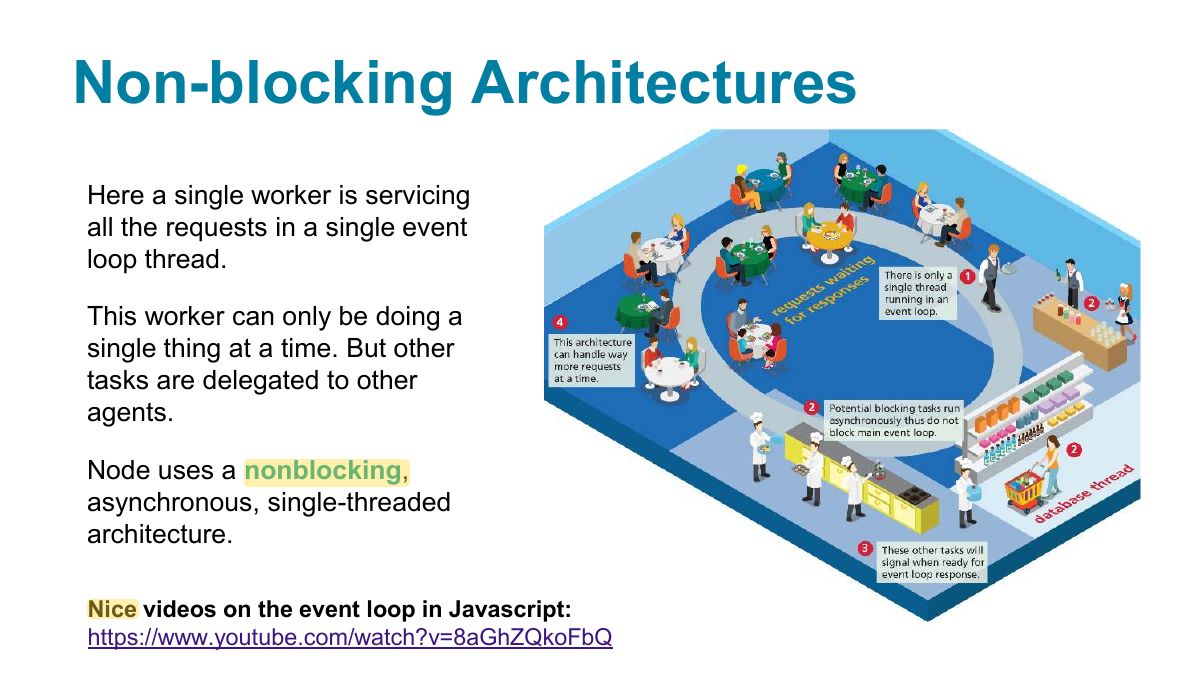
                        1. Blocking: each request ties up a thread while waiting for I/O. Non-blocking (Node): one thread hands I/O off and handles other requests meanwhile (event loop).
                        🎯 How this can come up · 1 question
                        MCQ

                        Node handles many concurrent connections efficiently because of:

                        Slide 16: Non-blocking Architectures
                        Exam weight Low
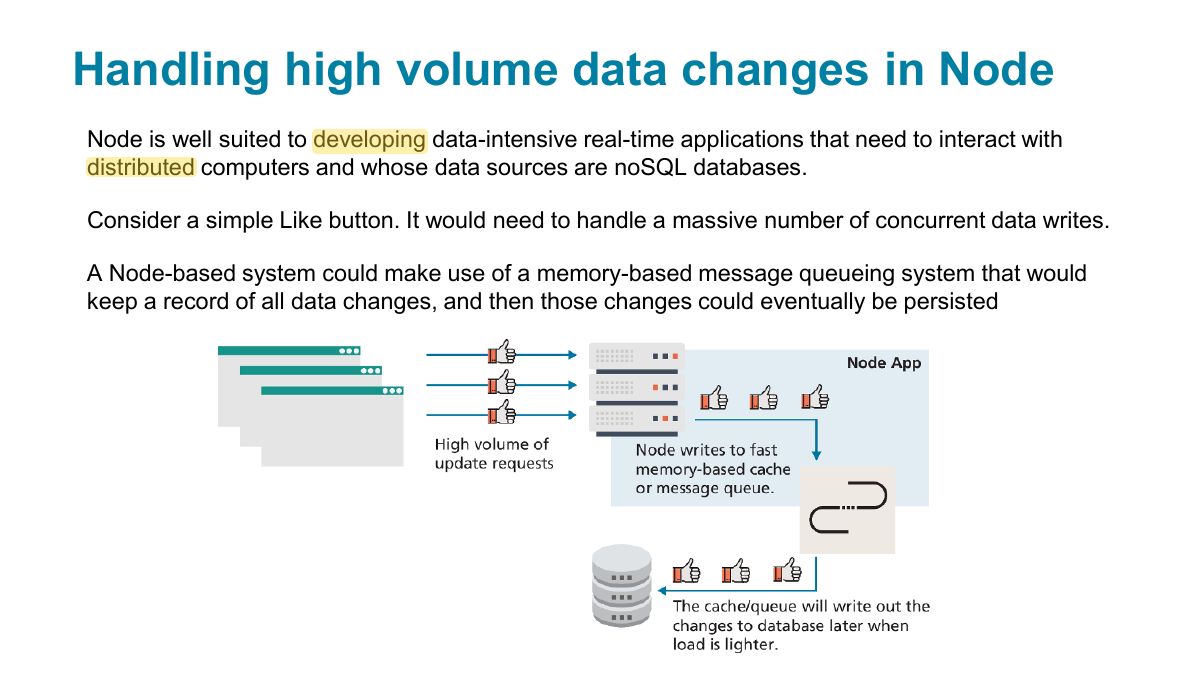
                          Slide 17: Handling high volume data changes in Node
                          Exam weight Low
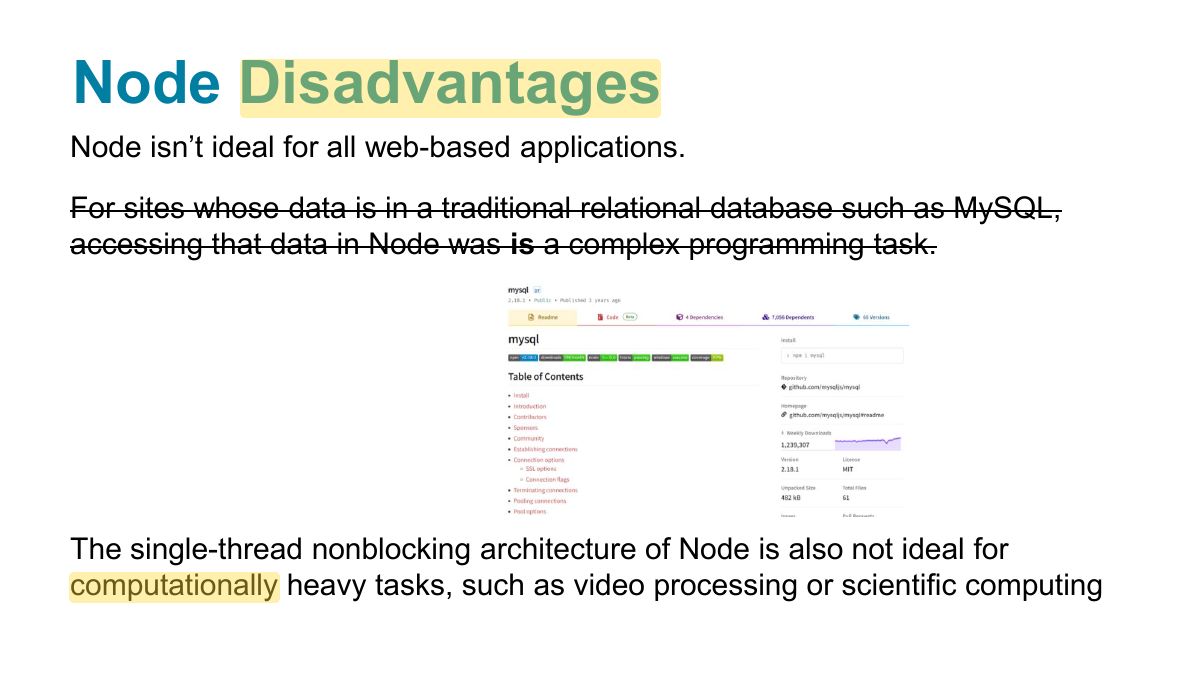
                            Slide 18: Node Disadvantages
                            Exam weight Low
                            1. Node is a poor fit for CPU-heavy work: one long computation blocks the single thread.

                            Asynchronous Coding with JavaScript

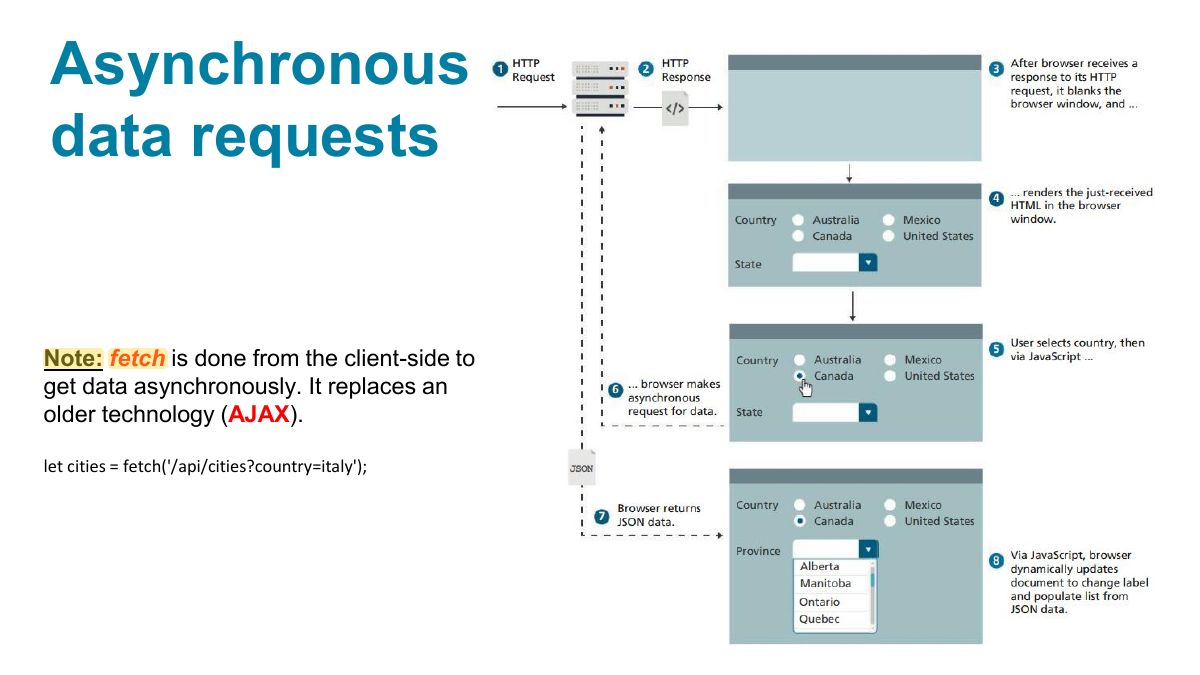
                            asynchronous code is code that is doing (or seemingly doing) multiple things at once. In multi-tasking operating systems, asynchronous execution is often achieved via threads: each thread can do only one task at a time, but the operating system switches between threads Many contemporary web sites make use of asynchronous JavaScript data requests of Web APIs, thereby allowing a page to be dynamically updated without requiring additional HTTP requests.

                            (A web API is simply a web resource that returns data instead of HTML, CSS, JavaScript, or images).

                            19
                            Exam weight Low
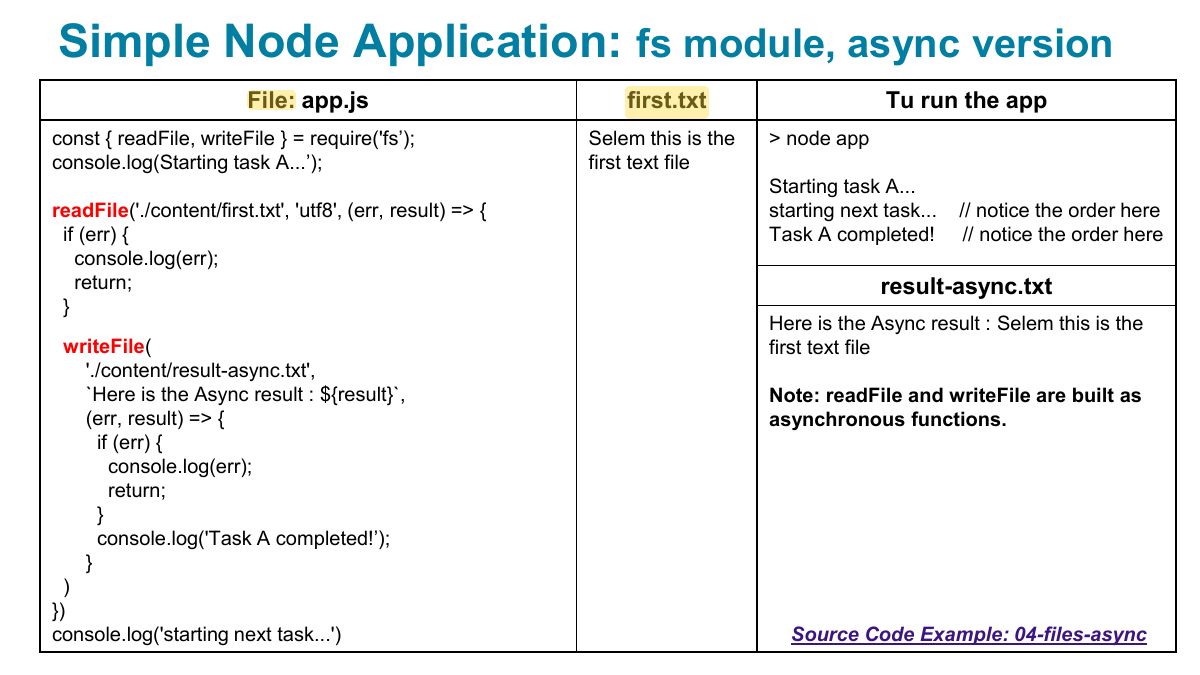
                              Slide 20: Simple Node Application: fs module, async version
                              Exam weight Low
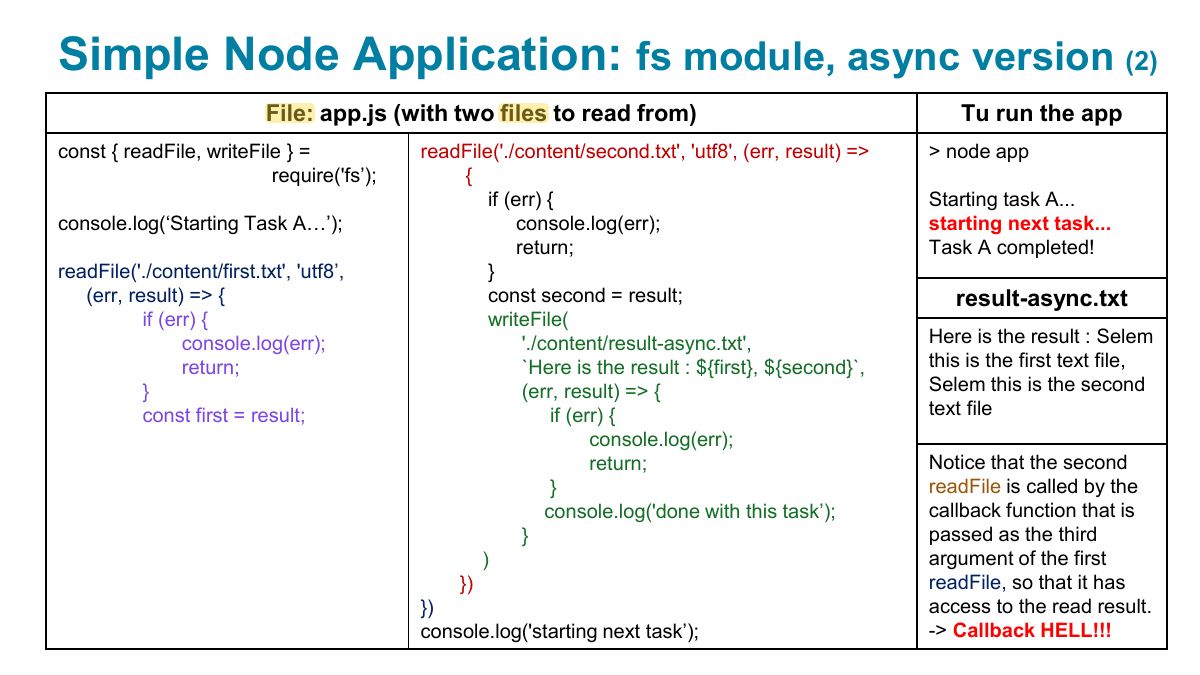
                                Slide 21: Simple Node Application: fs module, async version
                                Exam weight Low
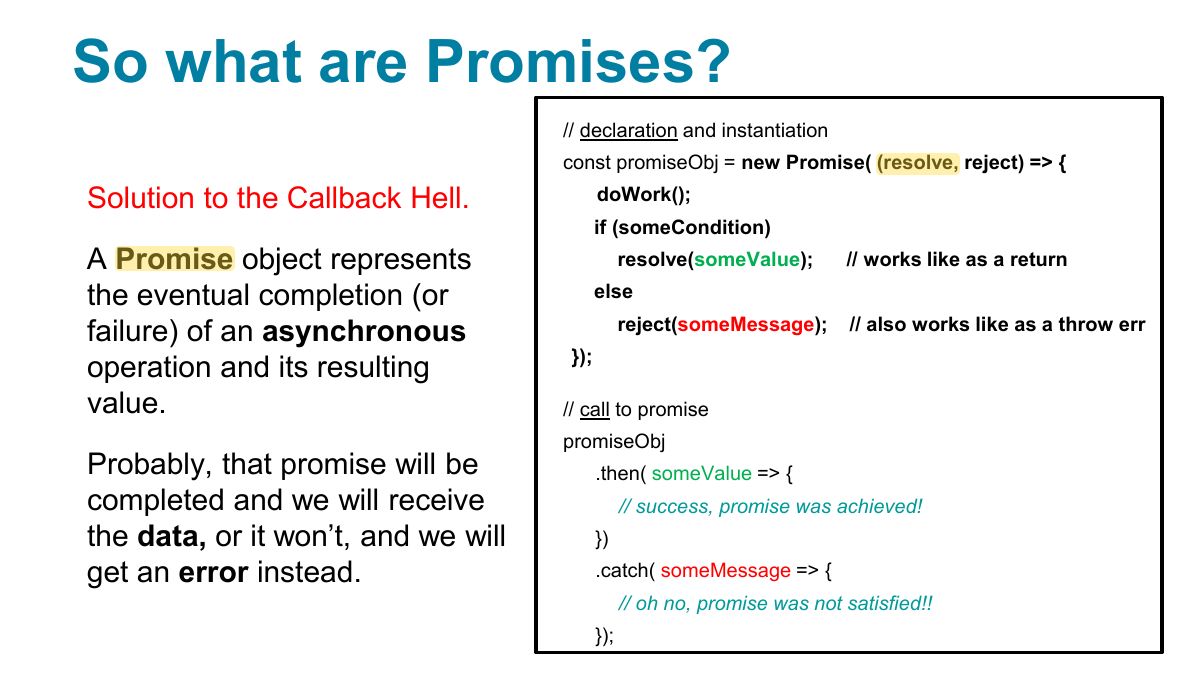
                                  Slide 22: So what are Promises?
                                  Exam weight High
                                  1. Promise: an object for a future value: pending → fulfilled or rejected; .then/.catch, or await inside an async function.
                                  🎯 How this can come up · 1 question
                                  MCQ

                                  await can be used directly inside:

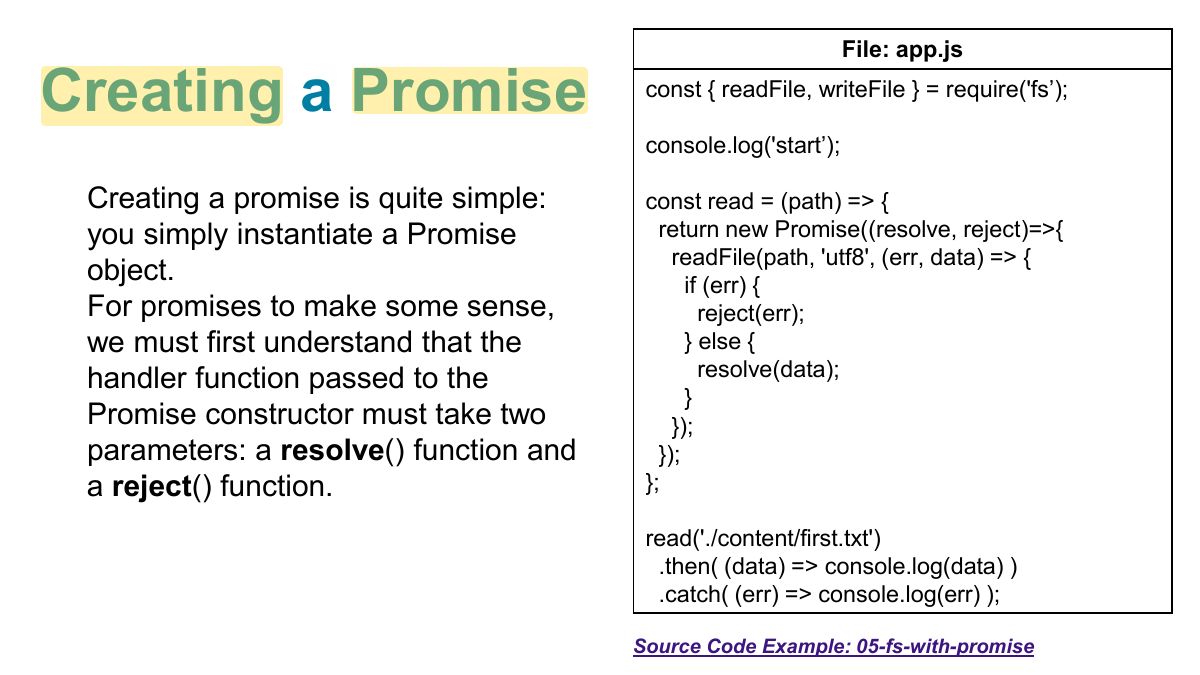
                                  Slide 23: File: app.js
                                  Exam weight Low
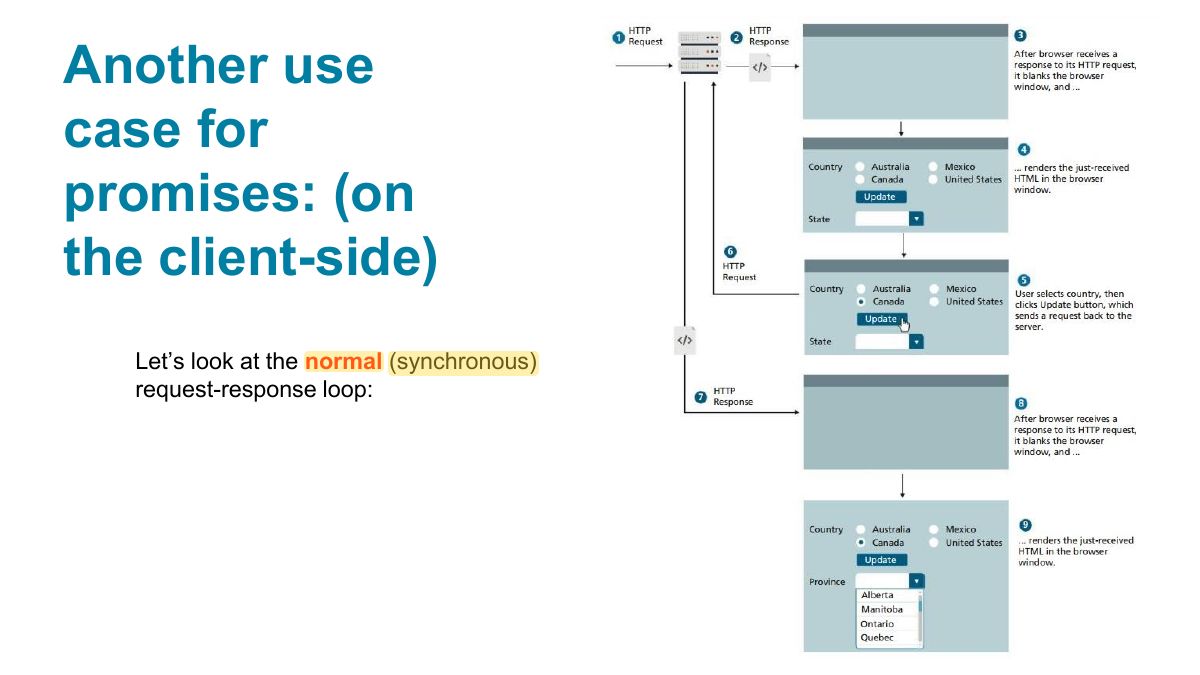
                                    Slide 24: Another use case for promises: (on the client-side)
                                    Exam weight Low
                                      Slide 25: Asynchronous data requests
                                      Exam weight Low
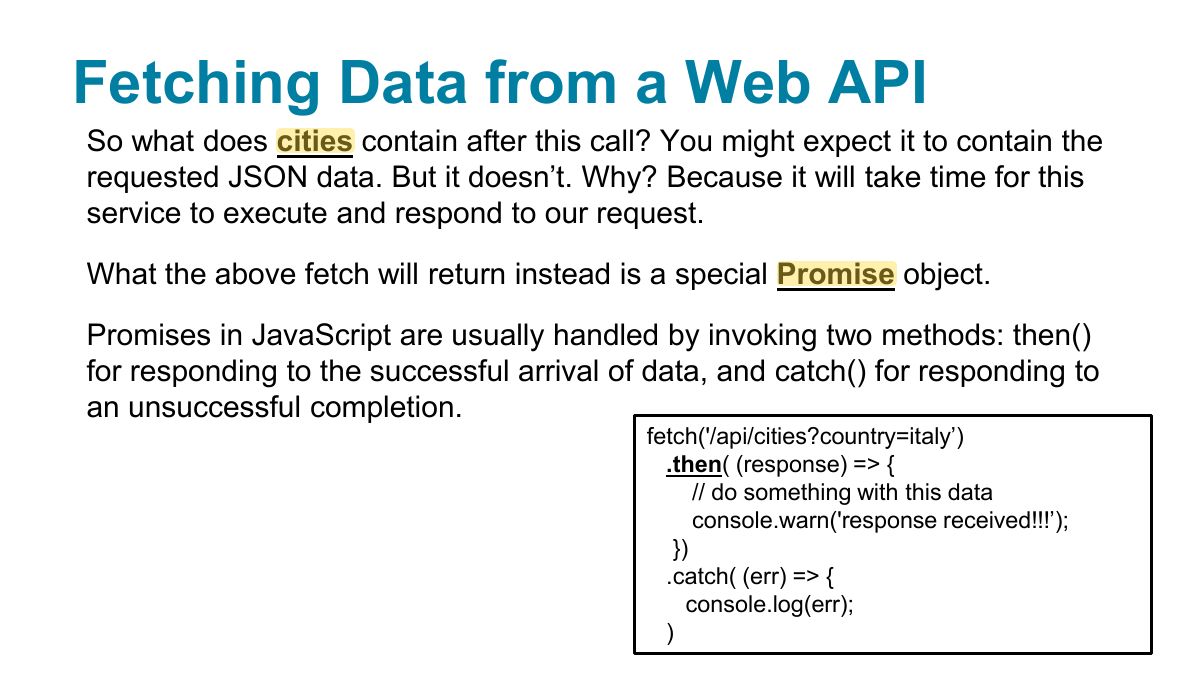
                                        Slide 26: Fetching Data from a Web API
                                        Exam weight High
                                        1. fetch(url) returns a promise of a Response; call response.json() (also a promise) to get the data.
                                        Exam trapfetch only rejects on network failure; a 404 still resolves, so check response.ok.

                                        Example of asynchronous request using fetch ... and promises

                                        How to run:

                                        npm install json-server

                                        1. npx json-server data.json
                                        2. run index.html
                                        27
                                        Exam weight Low
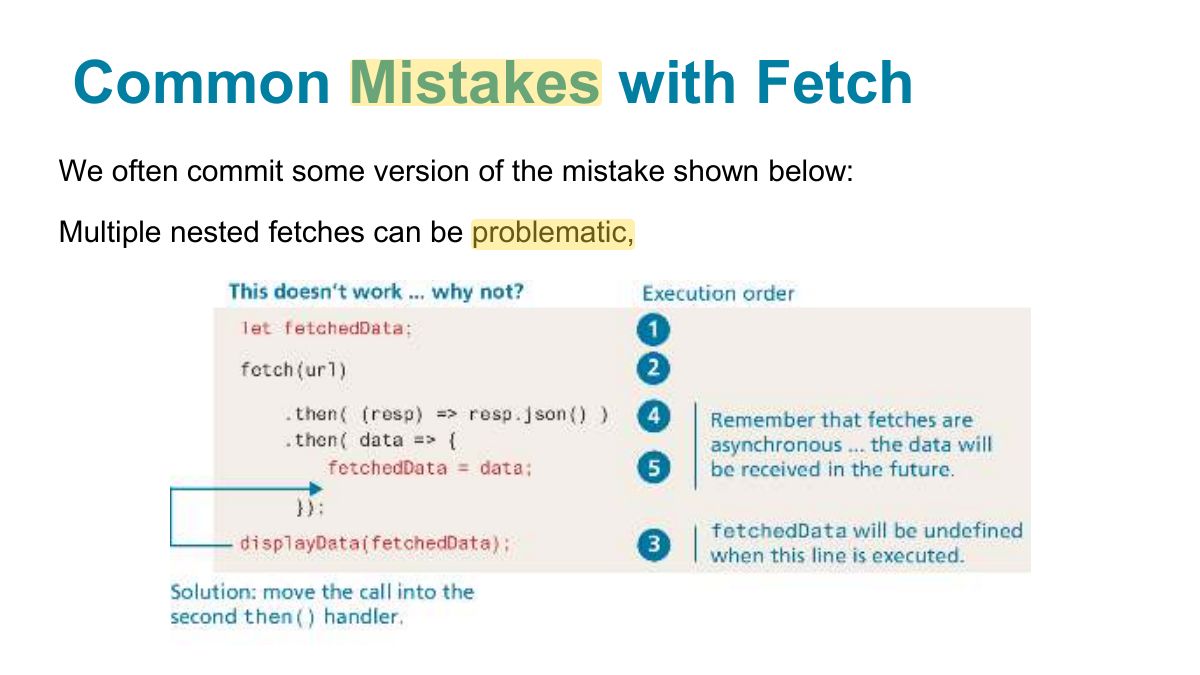
                                          Slide 28: Common Mistakes with Fetch
                                          Exam weight Low
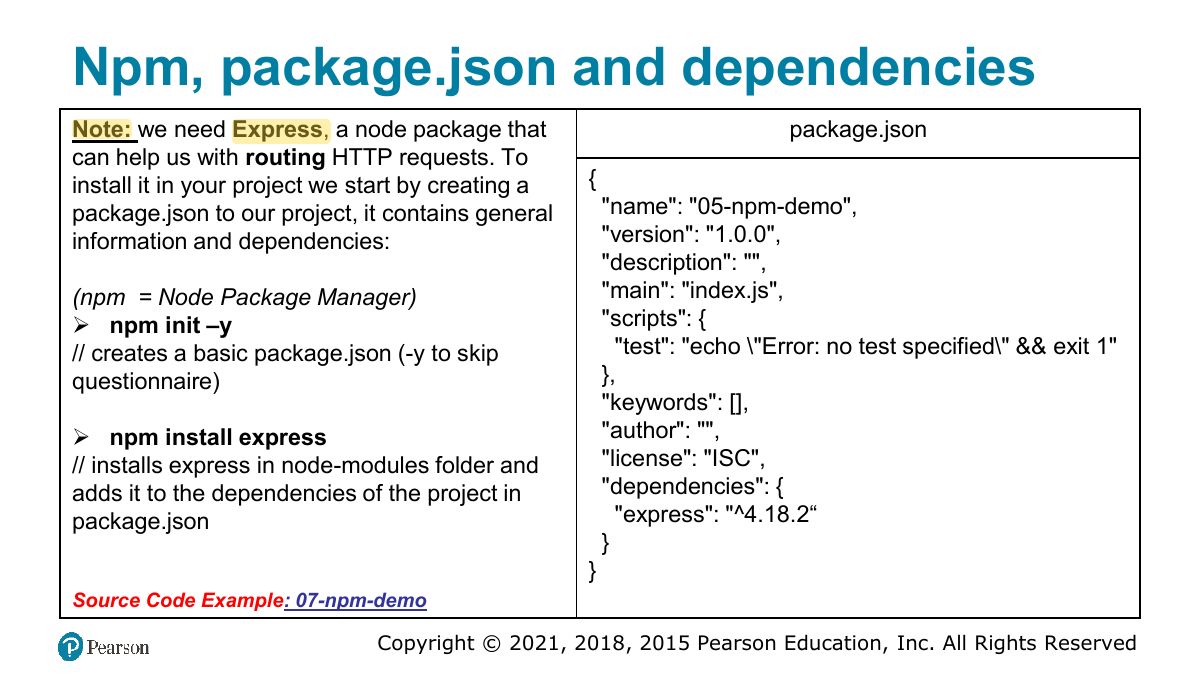
                                            Slide 29: Npm, package.json and dependencies
                                            Exam weight Low
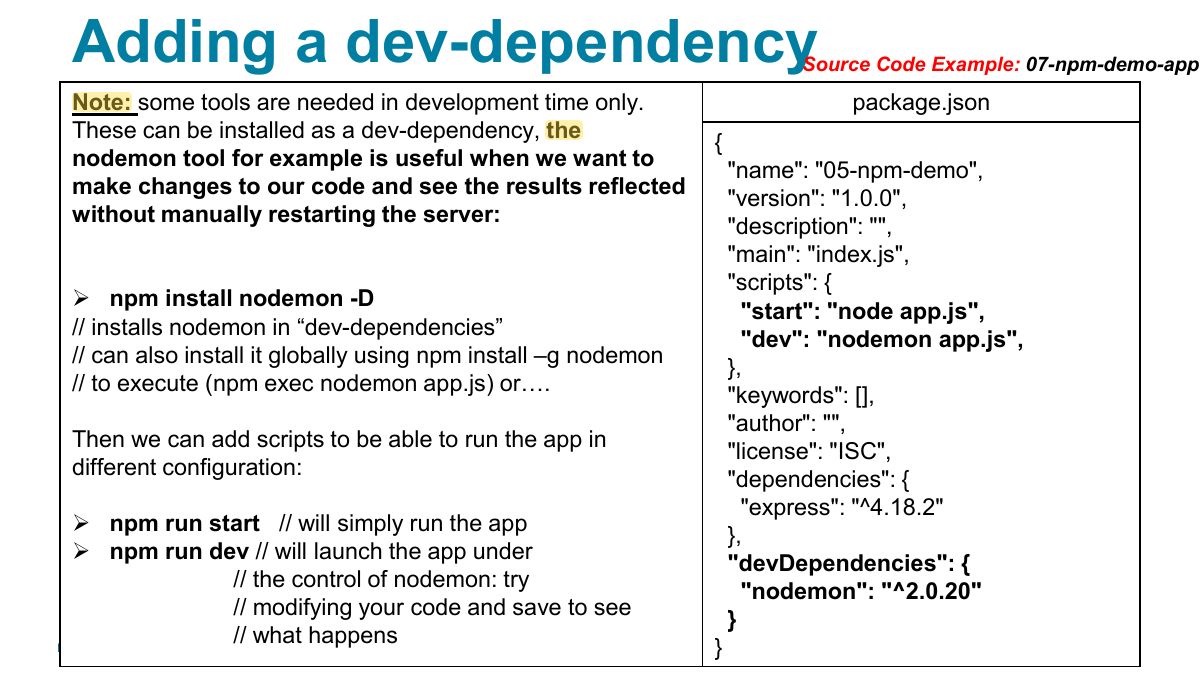
                                            1. npm installs packages; package.json lists dependencies and scripts; dev-dependencies are only for development (nodemon).

                                            Cross-Origin Resource Sharing

                                            Modern browsers prevent cross-origin requests by default, so sharing content legitimately between two domains becomes harder.

                                            Cross-origin resource sharing (CORS) is a mechanism that uses new HTTP headers in the HTML5 standard that allows a JavaScript application in one origin (i.e., a protocol, domain, and port) to access resources from a different origin. If an API site wants to allow any domain to access its content through JavaScript, it would add the following header to all of its responses:

                                            Access-Control-Allow-Origin: *

                                            In node: > npm install cors And then in your app.js:

                                            app.use(cors); // cors allows to access api through javascript;

                                            30
                                            Exam weight Low
                                            1. CORS: browsers block cross-origin requests unless the server sends Access-Control-Allow-Origin.

                                            "

                                            Versions: an Industry Standard Versions of the npm packages in package.json follow a standard: Semantic Versioning (SemVer):

                                            "package": "MAJOR.MINOR.PATCH" The MAJOR version should increment when you make incompatible API changes.

                                            The MINOR version should increment when you add functionality in a backwards-compatible manner.

                                            The PATCH version should increment when you make backwards-compatible bug fixes.

                                            This means that PATCHes are bug fixes and MINORs add new features but neither of them break what worked before.

                                            Finally, MAJORs add changes that won‟t work with earlier versions.

                                            Request npm install to automatically update to the latest minor version or patch:

                                            Update to the latest patch versions: "package": "~1.3.8" Update to latest MINOR version: package": "1.3.8"

                                            31
                                            Exam weight Low
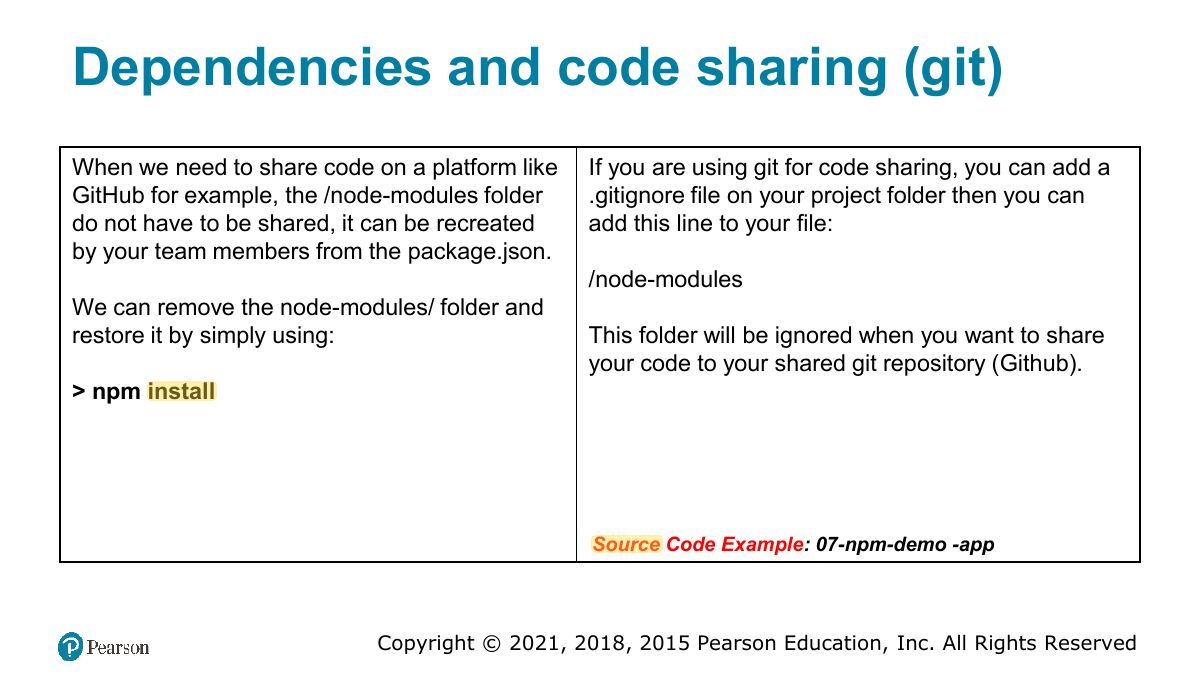
                                              Slide 32: Dependencies and code sharing (git)
                                              Exam weight Low
                                                Slide 33: Adding a dev-dependency
                                                Exam weight Low
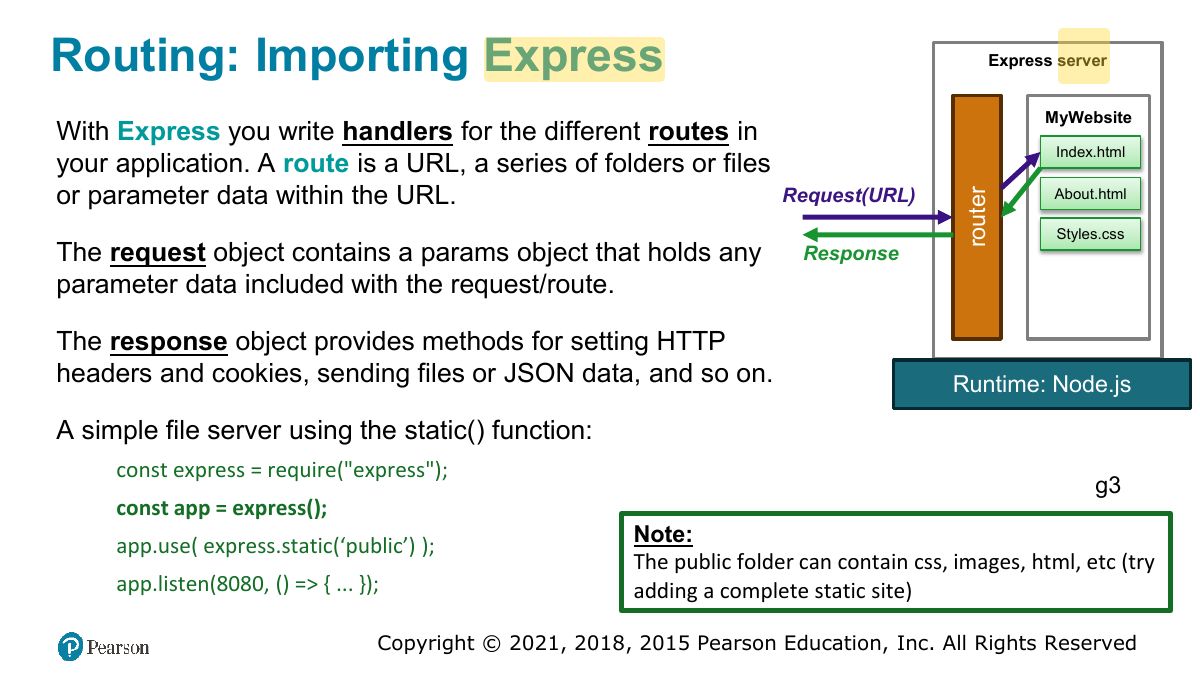
                                                  Slide 34: Routing: Importing Express
                                                  Exam weight Low
                                                  1. Express: app.get("/path", (req, res) => …); app.post; app.listen.
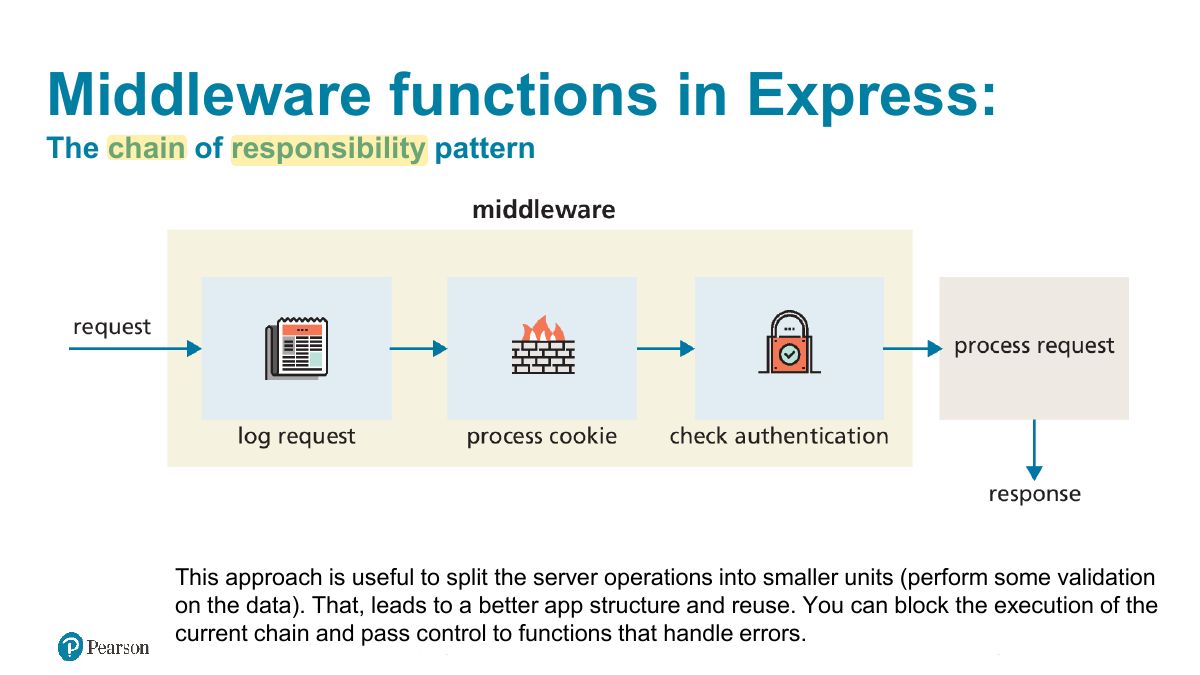
                                                  Slide 35: Middleware functions in Express:
                                                  Exam weight High
                                                  1. Middleware: functions (req, res, next) that run in order before route handlers (logging, parsing JSON: express.json(), static files).
                                                  🎯 How this can come up · 1 question
                                                  MCQ

                                                  An Express middleware function must call ___ to pass control to the next one:

                                                  Express: middleware functions

                                                  (Definition) Middleware: software that is a bridge between an application and the data.

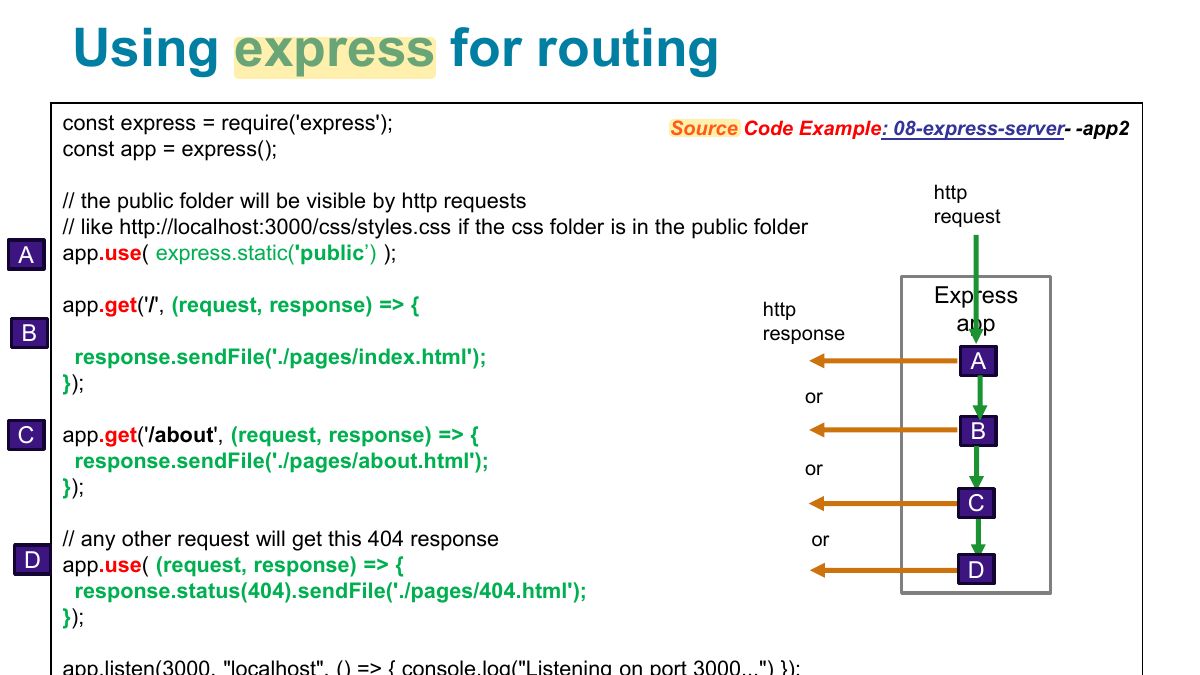
                                                  const express = require("express"); const app = express; app.use (express.static('public’

                                                  )); // static files like css files

                                                  app.listen(8080, => { ... });

                                                  The app.use function installs the provided middleware function on the chain of responsibility.

                                                  36
                                                  Exam weight Low
                                                    Slide 37: Using express for routing
                                                    Exam weight Low

                                                      Add middleware (chained operations)

                                                      // Middleware that logs all incoming requests (middleware at the root of the route).

                                                      app.use((req, res, next) => { console.log(`${req.method} ${req.path} - ${req.ip}` ); next; });

                                                      // Middleware can be mounted at a specific route using app.METHOD(path, middlewareFunction, callback):

                                                      app.get('/now' , function(req, res, next) { req.time = new Date.toString; next; }, function(req, res) { res.json({time: req.time}); });

                                                      38
                                                      Exam weight Low
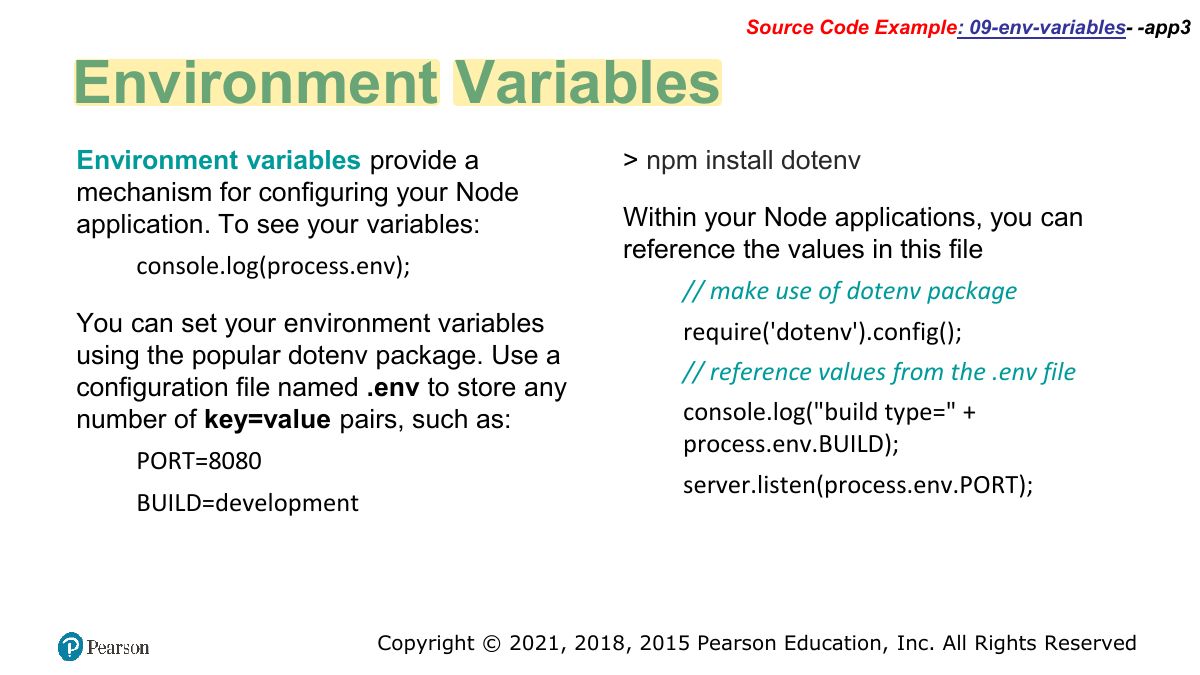
                                                        Slide 39: Source Code Example: 09-env-variables- -app3
                                                        Exam weight Low
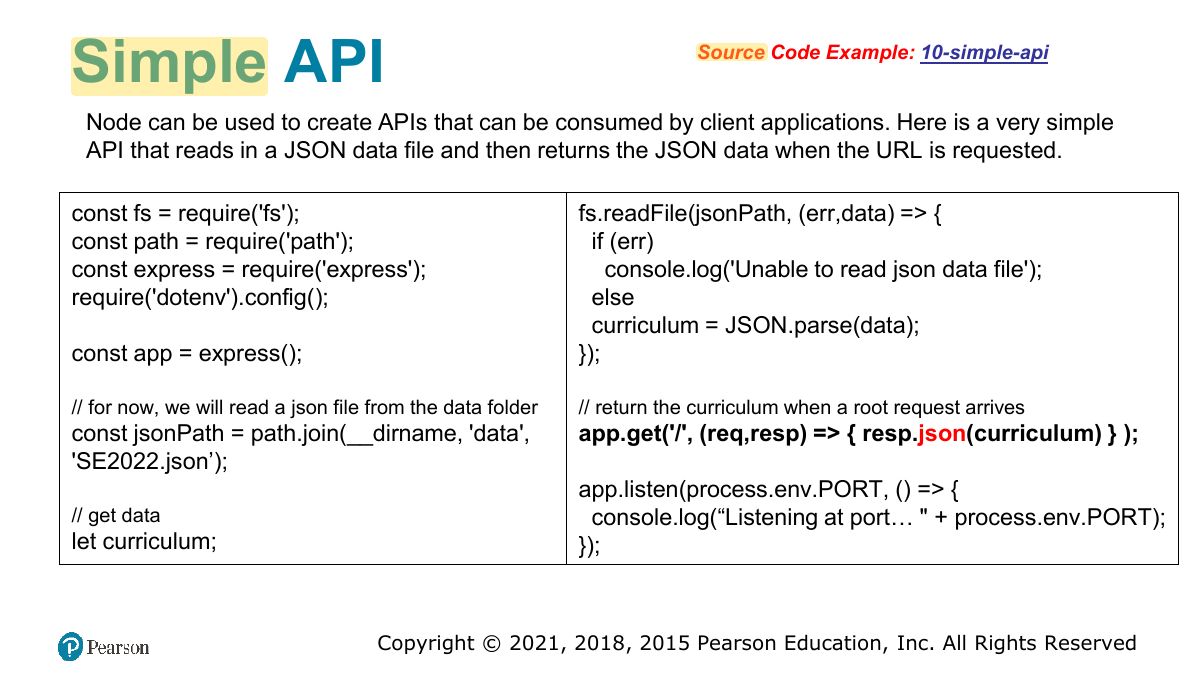
                                                          Slide 40: Simple API
                                                          Exam weight Low

                                                            Separating Functionality into Modules

                                                            What if we had five or six or more routes? In such case, our single Node file would start becoming too complex. A better approach would be to separate out the routing functionality into separate modules.

                                                            You could also place your route handler logic into a separate module.

                                                            41
                                                            Exam weight Low

                                                              Defining a module

                                                              const fs = require('fs'); const path = require('path'); const jsonPath = path.join(__dirname, 'data', 'SE2022.json'); let curriculum; fs.readFile(jsonPath, (err,data) => { if (err) console.log('Unable to read json data file'); else curriculum = JSON.parse(data); }); const getData = => { return curriculum; } module.exports = getData;

                                                              42
                                                              Exam weight Low

                                                                Send parameters in route:

                                                                (route params)

                                                                With the :param syntax you can send parameters to the api:

                                                                app.get('/echo/:word', (req, res) => { let param = req.params.word; res.json({ echo: param } ); //use the variable as needed });

                                                                By requesting: https://ip:port/echo/ hello

                                                                word variable (from req.params.word) then you can

                                                                „hello‟ will be assigned to the use this argument as you need.

                                                                43
                                                                Exam weight High
                                                                1. Route parameters: /users/:id → req.params.id. Query string: /search?q=x → req.query.q. Form POST body: req.body (needs a body parser).
                                                                🎯 How this can come up · 1 question
                                                                MCQ

                                                                For the route /books/:isbn, the value is read from:

                                                                Send parameters in query (2)

                                                                (query params)

                                                                We can also use URL encoded queries then access the query parameters using req.query.parameter: http://ip:port/employee?first=skander&last=turki

                                                                app. get ('/ employee’, (

                                                                req, res) => {

                                                                res.json({ employee: `${req.query.first} ${req.query.last}`});

                                                                }); app. post ('/ employee’, (

                                                                req, res) => {

                                                                res.json({employee: `${req.query.first} ${req.query.last}`});

                                                                });

                                                                Note: no need to install any library.

                                                                44
                                                                Exam weight Low

                                                                  Send parameters using forms (3)

                                                                  Using a form on the client side, we can send requests using forms:

                                                                  <form action="/name" method=" post "> <label>First Name :</label><input type="text" name=" first "><br>

                                                                  <label>Last Name :</label><input type="text" name=" last "><br> <input type="submit" value="Submit">

                                                                  </form>

                                                                  We need a middleware to parse parameters from request payload (POST, DELETE..):

                                                                  const bodyParser = require('body- parser’

                                                                  );

                                                                  app.use(bodyParser.urlencoded({ extended: false })) let p_first = req.body.first; // then access the req.body object

                                                                  45
                                                                  Exam weight Low
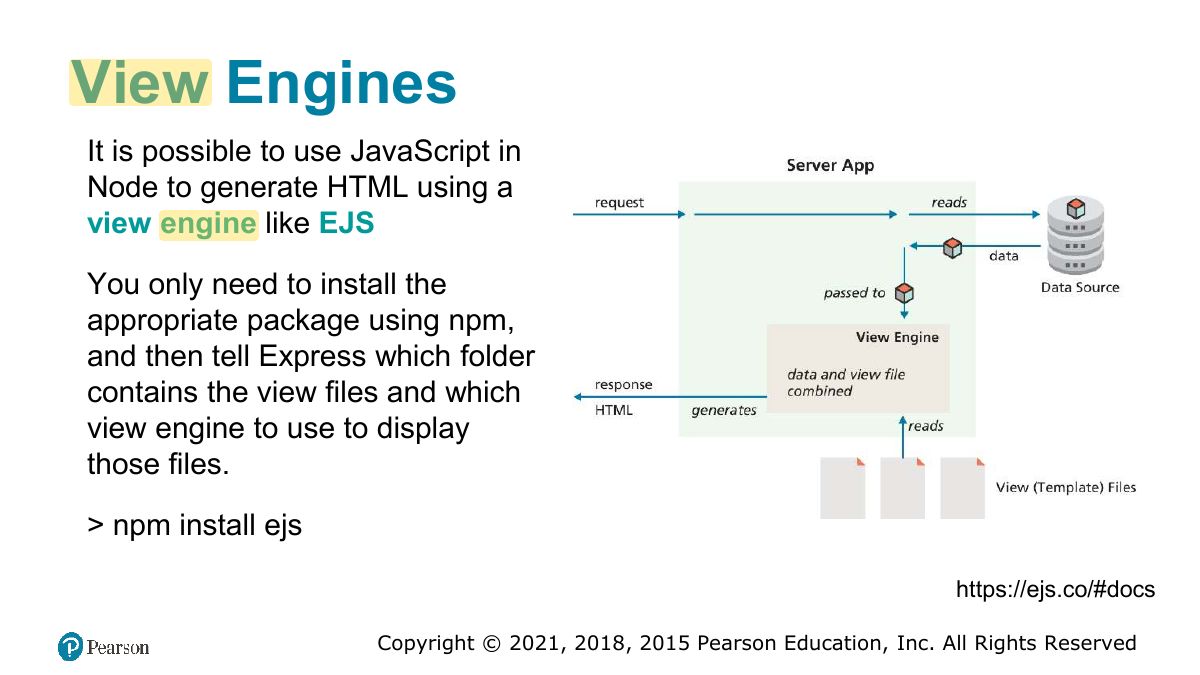
                                                                    Slide 46: View Engines
                                                                    Exam weight Low
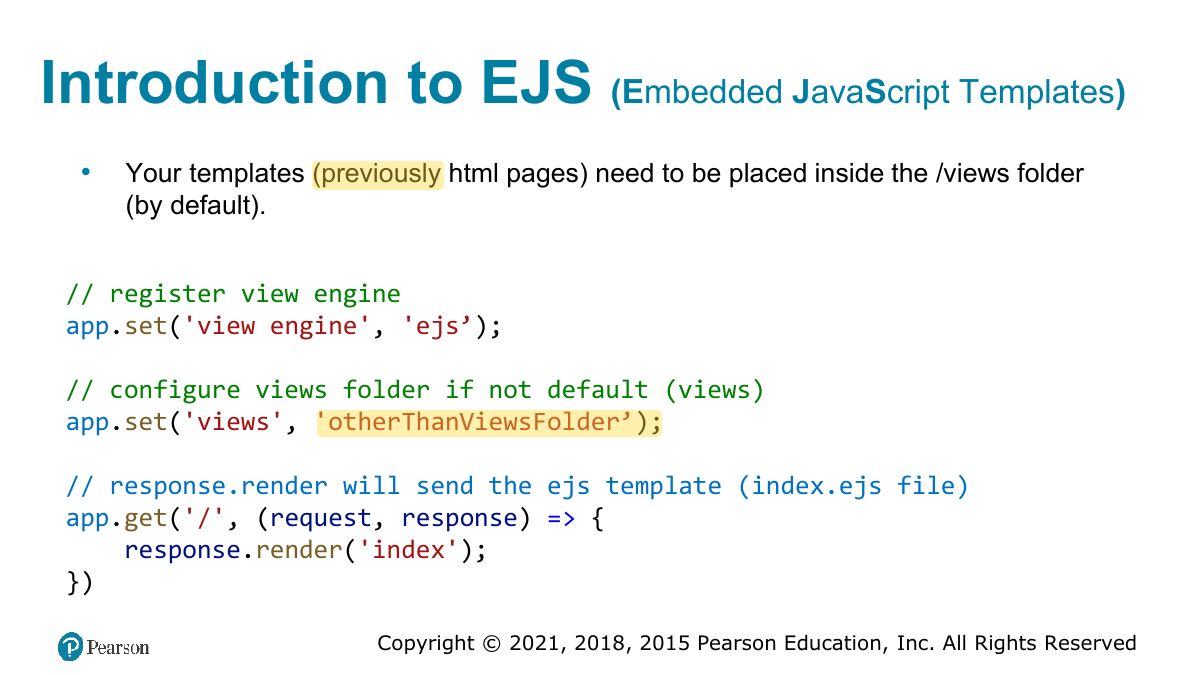
                                                                      Slide 47: Introduction to EJS
                                                                      Exam weight Low
                                                                      1. EJS: templates with <%= value %> (escaped output) and <% code %>; res.render("view", data).
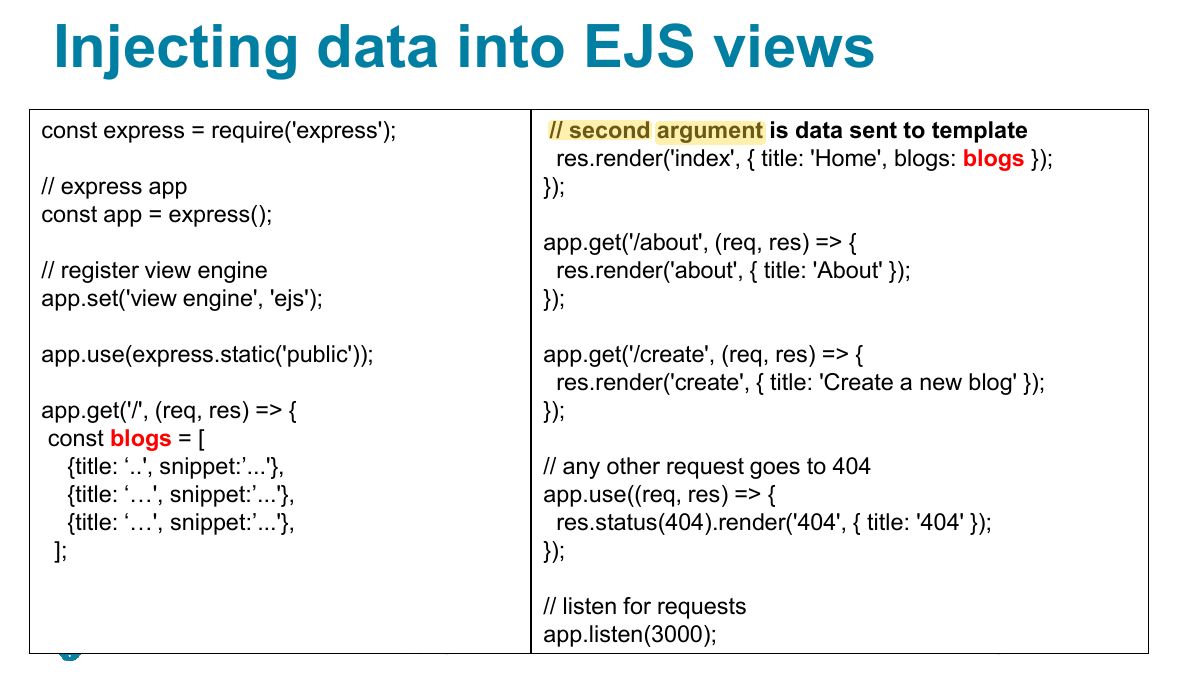
                                                                      Slide 48: Injecting data into EJS views
                                                                      Exam weight Low

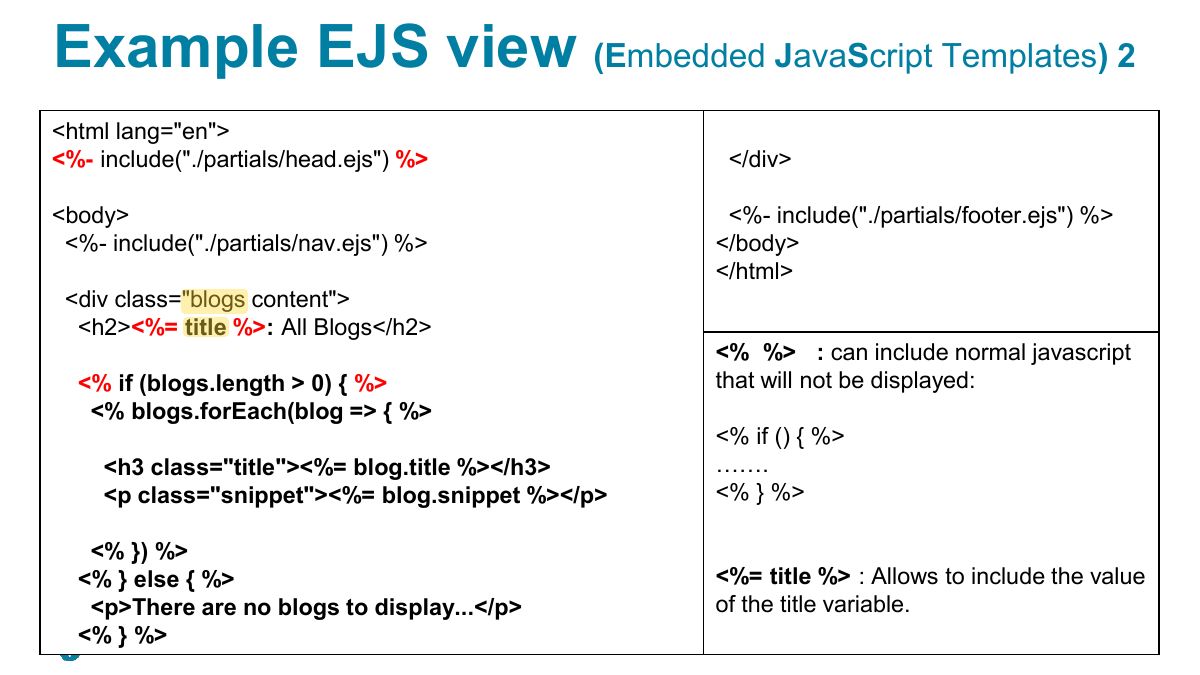
                                                                        Example EJS view

                                                                        (E mbedded J ava S cript Templates ) 2

                                                                        ejs file as part of another, so that parts of documents can be reused by

                                                                        EJS supports “partials” : include an different files.

                                                                        If the head is common to all our pages, we can create a head.ejs file containing the header then include the header as “partial” of all our pages with:

                                                                        The partial files can be organized inside a partials folder under the views folder:

                                                                        /views/partials/head.js /views/partials/header.js /views/partials/footer.js <%- include("./partials/head.ejs") %> <body> <%- include("./partials/header.ejs") %>

                                                                        ....

                                                                        <%- include("./partials/footer.ejs") %>

                                                                        </body> </html>

                                                                        LISTING 13.11 Example EJS view

                                                                        49
                                                                        Exam weight Low
                                                                          Slide 50: Example EJS view
                                                                          Exam weight Low

                                                                            Supporting material

                                                                            https://www.youtube.com/watch?v=yXEesONd_54&t=1309s Installation:

                                                                            -Node.js version 22.x (The latest version: https://nodejs.org/en/download/package-manager/current)

                                                                            51
                                                                            Exam weight Low