CS340 · Annotated SlidesChapter 1 — Introduction to Databases
Chapter 1 · Annotated slides

Introduction to Databases

What a database and a DBMS are, why a DBMS beats a file-based system, what a DBMS does, the steps for designing a database (conceptual, logical, optimization, querying, applications), and the main characteristics of the database approach.

Slide text Study notes Highlight: key words Tips, tricks & traps Seen again elsewhere How it can come up

Introduction to Databases

CS340 · Chapter 1
1

LEARNING GOALS

CLO1: Describe basic database concepts, architecture, and DBMS principles. Demonstrate knowledge of emerging topics in databases. (Knowledge & Understanding) Chapter objectives:

  • Define a database, and database management system
  • Explain why we need databases
2
Exam weight Low

    DEFINITIONS

    Database: An organized collection of related data, stored on disk, sometimes accessed by multiple people.

    Examples: University database contains data on courses, students, faculty, and other resources A movies database contains data on movies, genres, actors, and directors A database management system manages databases. It allows: accessing, modifying, backing up and recovering the database.

    Examples: Oracle, PostgreSQL, MySQL, and MongoDB

    3
    Exam weight Low
    1. Database: an organized collection of related data. DBMS: the software that defines, builds, manipulates and shares it (Oracle, PostgreSQL, MySQL, MongoDB).

    WHY USE A DATABASE MANAGEMENT SYSTEM

    • Databases store all the data that a system would need.
    • They do so reliably, in a way that is secure, can be shared, and with efficiency.
    • However, they need to be designed carefully.
    • Why “design” a database and use a management system? Why not just throw my data into a file and be done with it?
    4
    Exam weight Low
      ★ Past exam

      FILE BASED SYSTEM

      • Prior to DBMS, file system provided by OS was used to store information.
      • In a file-based system, we have collection of application programs that perform services for the end users. Each program defines and manages its own data.
      • How do the following things work in this system:
        • Security (unauthorized access).
        • Concurrent access (multiple people at once).
        • Recovery (Hard drive failure, power goes off, etc).
        • Performance (Can you guarantee access at certain speeds? Optimized look up?).
        • Redundancy (Data about a student and their courses, repeat the student name?).
      5
      Exam weight High
      1. File-based systems: each application owns its files → redundancy, inconsistency, hard access, no concurrency control, weak security.
      🎯 How this can come up · 1 question
      MCQ

      Storing the same data in many places is called:

      DBMS INSTEAD OF FILE SYSTEM

      A database management system would do all of that for you, and more.

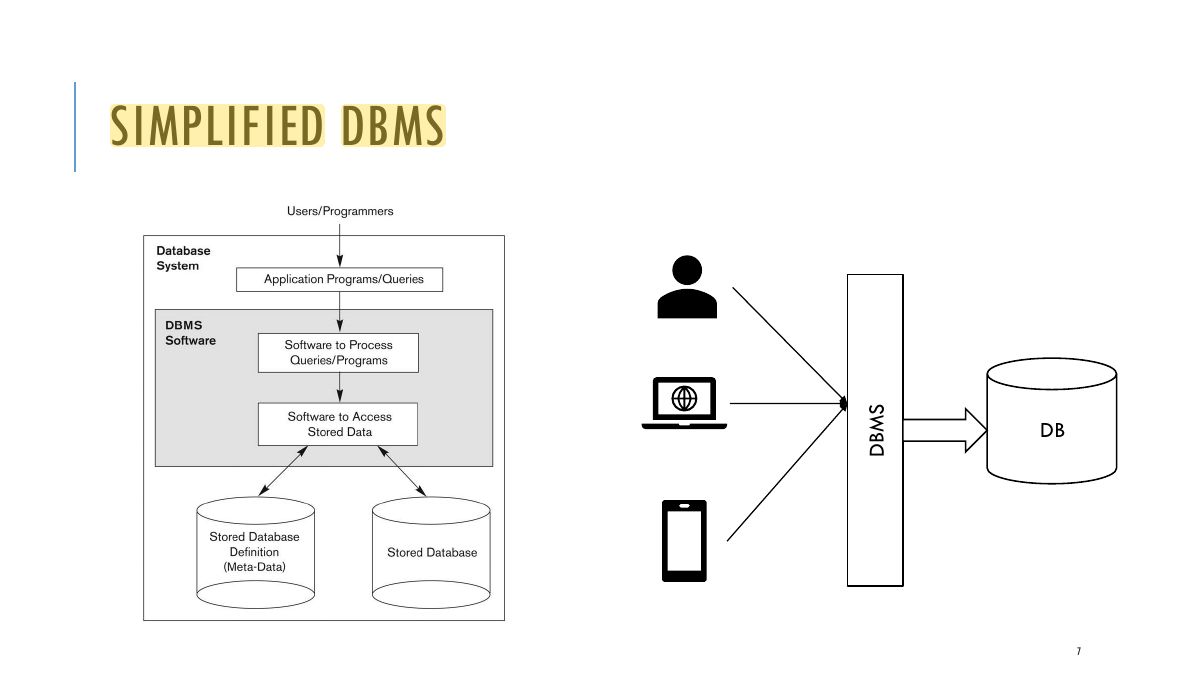
      A database is the data, the database management system is what manages that data.

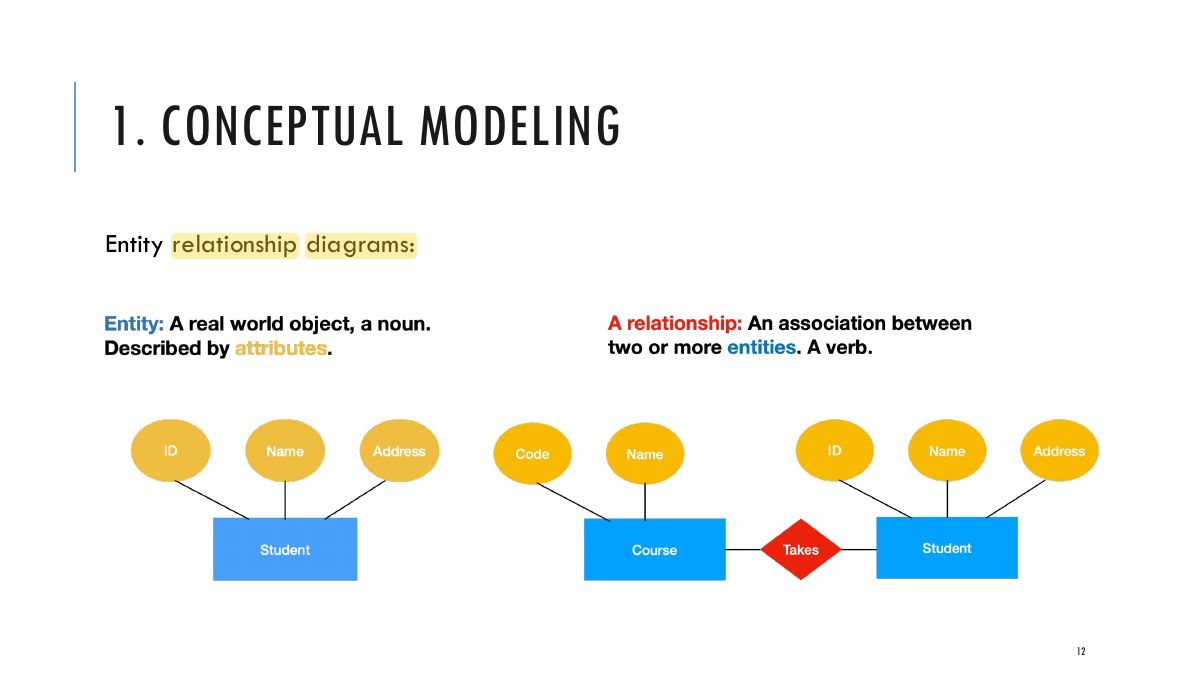
      Data is entities (student, course) and relationships (Student takes course)

      6
      Exam weight Low
      1. Database = the data; DBMS = what manages it. Data = entities + relationships.
      Slide 7: SIMPLIFIED DBMS
      Exam weight Low

        OTHER USEFUL FUNCTIONS OF A DBMS

        • Define a database: Structure, data types, and constraints of a database.
        • Manipulate the database:
          • Retrieve (query) data
          • Modify: Insert, update, or delete data
          • Manage access through applications
        • Handle concurrent access by multiple users
        • Handle security measures
        • Handle maintenance of the database over its lifetime
        • Applications issue two things to the database:
          • Queries: requests that generate a result based on the stored data
          • Transactions: Collections of requests
        8
        Exam weight Low
        1. DBMS functions: define (structure, types, constraints), construct, manipulate (query, update), share, protect, maintain.

        OBJECTIVES OF DBMS

        • Data Availability: Data are made available to wide variety of users in a meaningful format at reasonable cost so that the users can easily access the data.
        • Data Integrity: Data available in the database is a reliable/correct data.
        • Data Security: Only authorized users can access the data. Data security can be enforced by passwords.
        • Data Independence: DBMS allows the user to store, update, and retrieve data in an efficient manner. It hides certain details of how the data are stored and maintained.
        9
        Exam weight Low
        1. Objectives: data availability, integrity (correct data), security (authorized users only), independence.

        MAIN CHARACTERISTICS OF THE DATABASE APPROACH

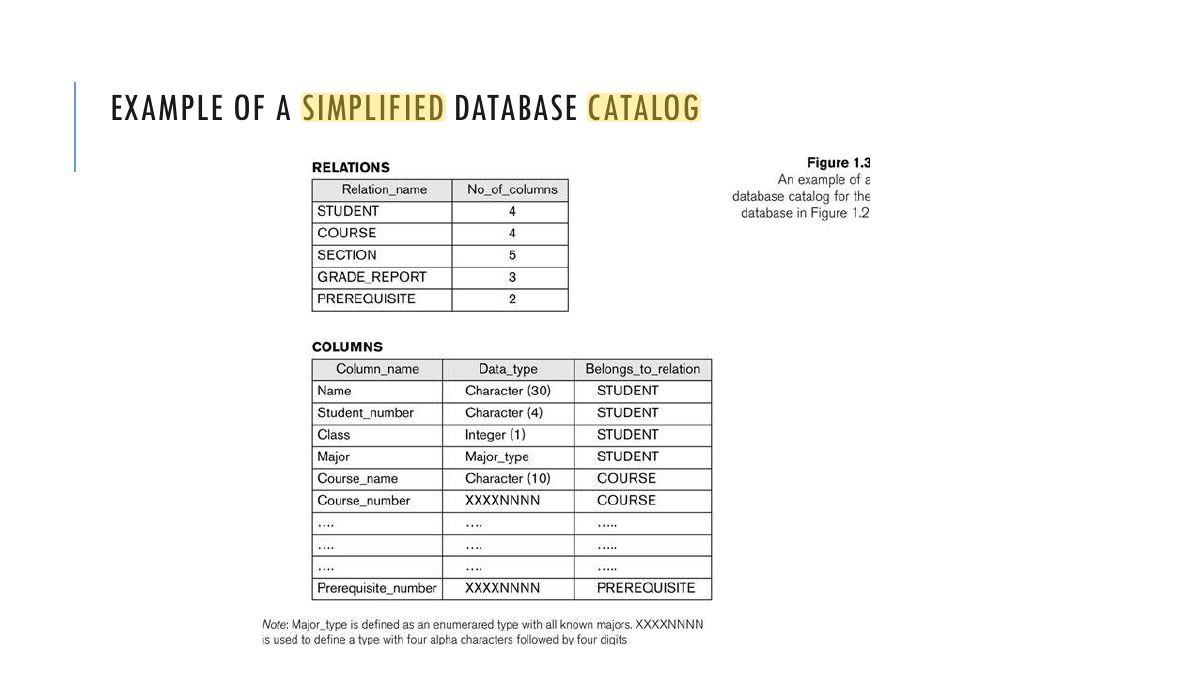
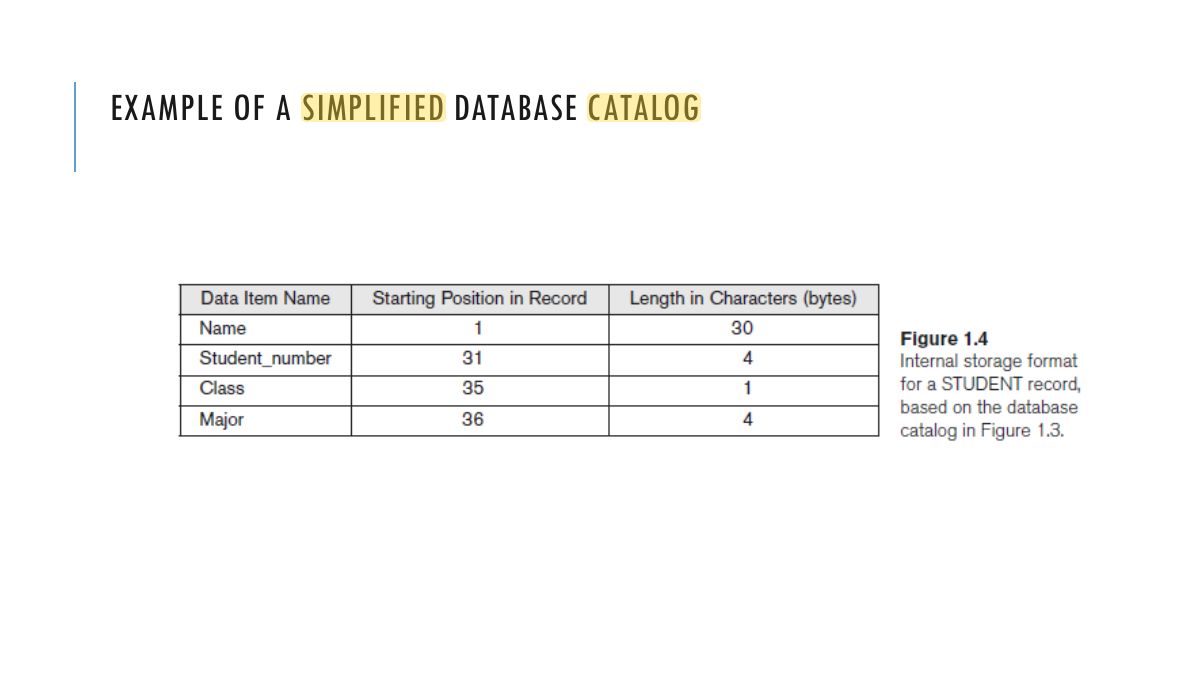
        • Self-describing nature of a database system: A database system stores not only the database but also a complete definition or  description of a particular database known as System Catalog (e.g. data structures, types, storage format of each data and constraints on the data). meta-data*. The description stored in the System Catalog is called  This allows the DBMS software to work with different database applications. 
        • Insulation between programs and data: program-data independence. Called  The structure of data files is stored in the DBMS catalog separately from  the access programs. DBMS a llows changing data structures and storage organization without having to change the DBMS access programs.
        10
        Exam weight High
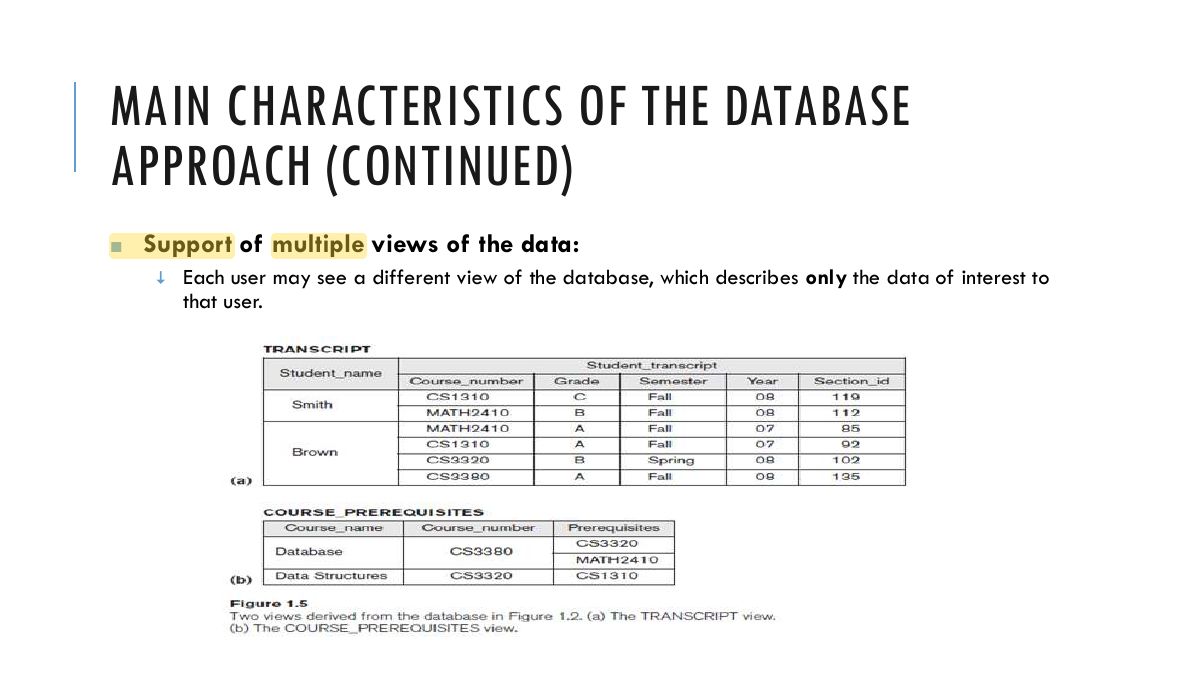
        1. Characteristics: self-describing (catalog / metadata), program–data independence, multiple views, sharing and multi-user transactions.
        🎯 How this can come up · 1 question
        MCQ

        A database is "self-describing" because it stores:

        ★ Past exam

        HOW DO I DESIGN AND IMPLEMENT A DATABASE?

        There are multiple steps and they align with the contents of this course:

        1. Conceptual modeling
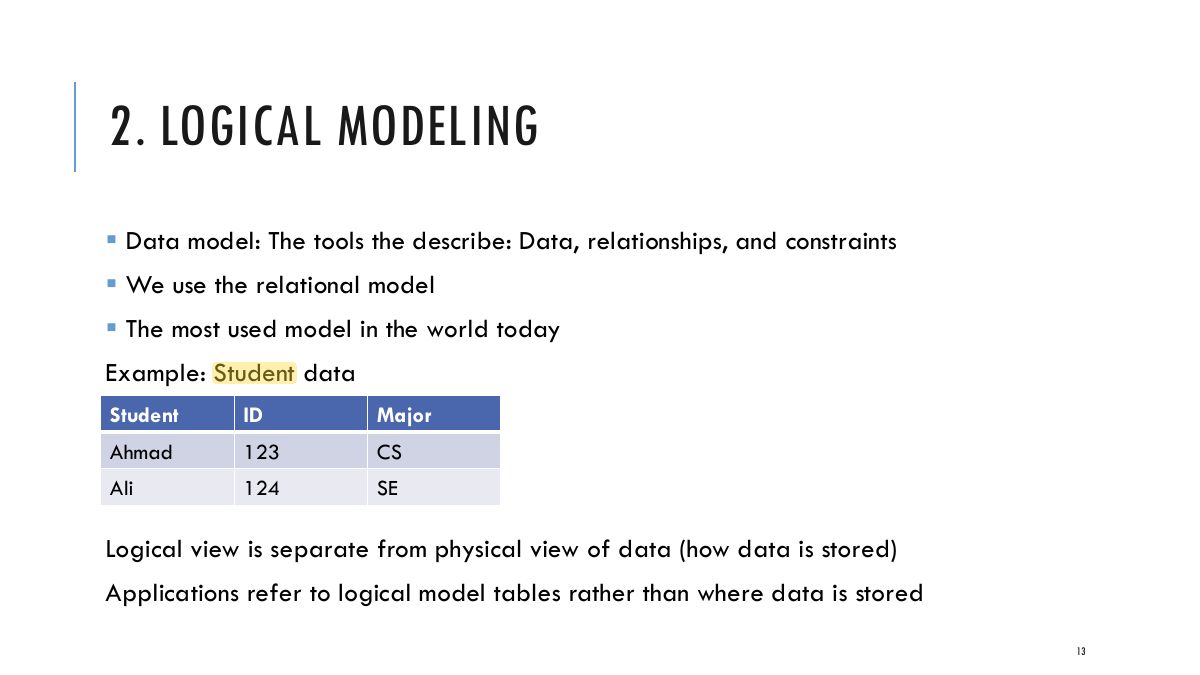
        2. Logical modeling
        3. Optimize the design
        4. Decide how to query
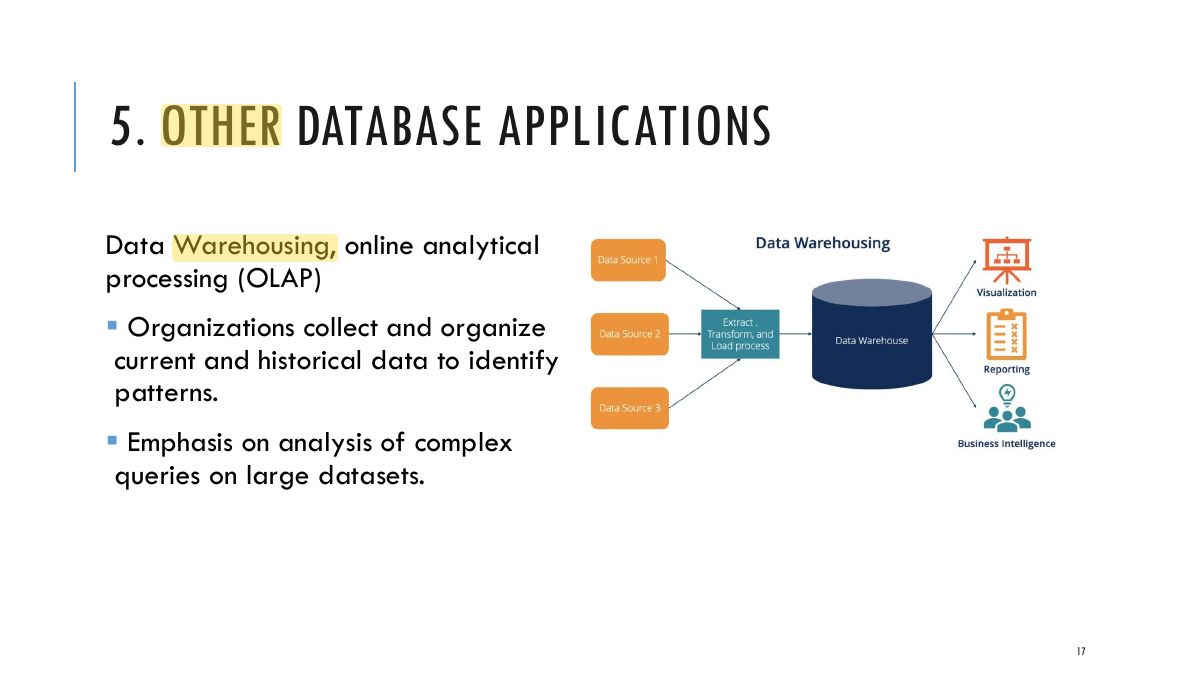
        5. Other database applications (Data warehouse, OLAP(Online analytical processing), Data Mining)
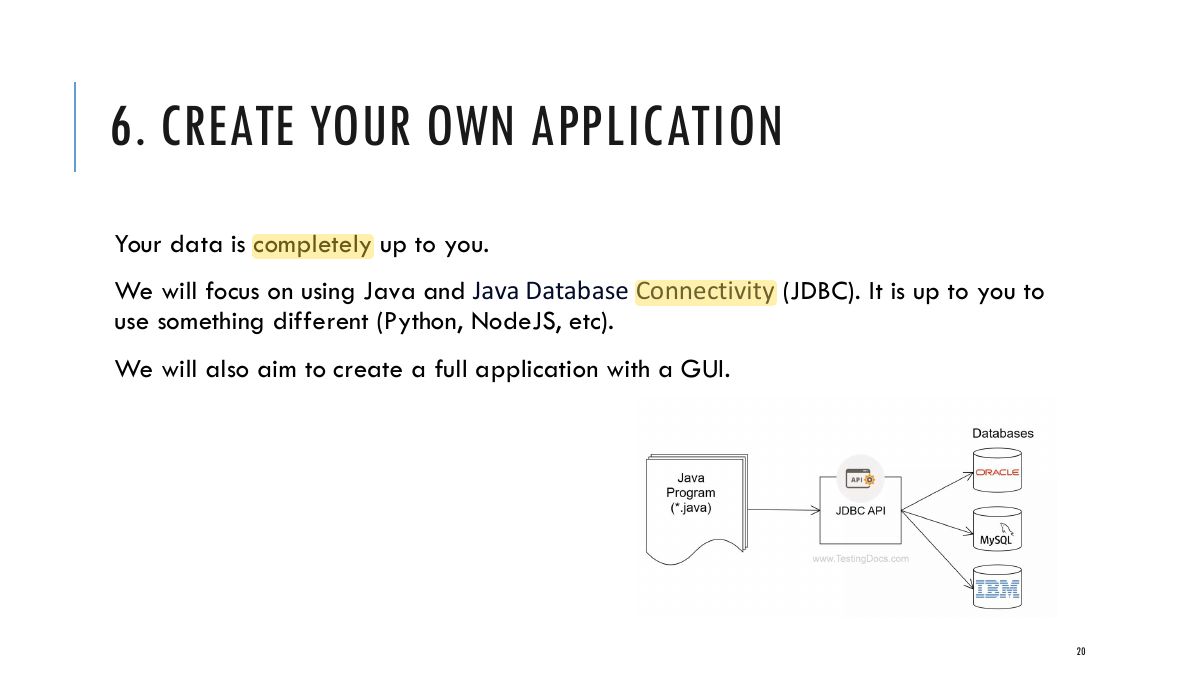
        6. Create your own application
        11
        Exam weight High
        1. Design steps in order: conceptual modeling → logical modeling → optimization → querying → build the application.
        🎯 How this can come up · 1 question
        MCQ

        Correct order for designing a database:

        Slide 12: 1. CONCEPTUAL MODELING
        Exam weight Low
        1. Conceptual modeling = ER diagrams.
        Slide 13: 2. LOGICAL MODELING
        Exam weight Low
        1. Logical modeling = the relational model (tables).

        3. OPTIMIZATION

        We need to carefully design our databases so that:

        • Capture all the information we need
        • Take up less space
        • It is easy to maintain

        We will look mainly at normalization, and different “Normal forms”

        14
        Exam weight Low
        1. Optimization = normalization: capture everything, take less space, avoid anomalies.

        4. QUERYING THE DATA

        Structured Query Language (SQL) to query the data.

        We will use Example:

        Plain English: Find all students who are majoring in CS SQL: SELECT s.name FROM Student s

        Declarative language means statements do not describe

        WHERE s.major = “CS”

        computations directly, but instead describe the desired result of some computation

        SQL is a declarative language We will also look at relational algebra, the original language for SQL

        15
        Exam weight Low
        1. Querying uses SQL.

        4. QUERYING THE DATA (CONTD)

        Users of the database can be divided into:

        • Database administrator (DBA): Handle authorizing access for users, monitor db use, control and manage efficiency of database.
        • Database designers: Define the content, structure, and constraints.
        • End-users: Can be application developers or application users. They issue queries, ask for reports, they can even update the content of the db.
        16
        Exam weight Low
          Slide 17: 5. OTHER DATABASE APPLICATIONS
          Exam weight Low

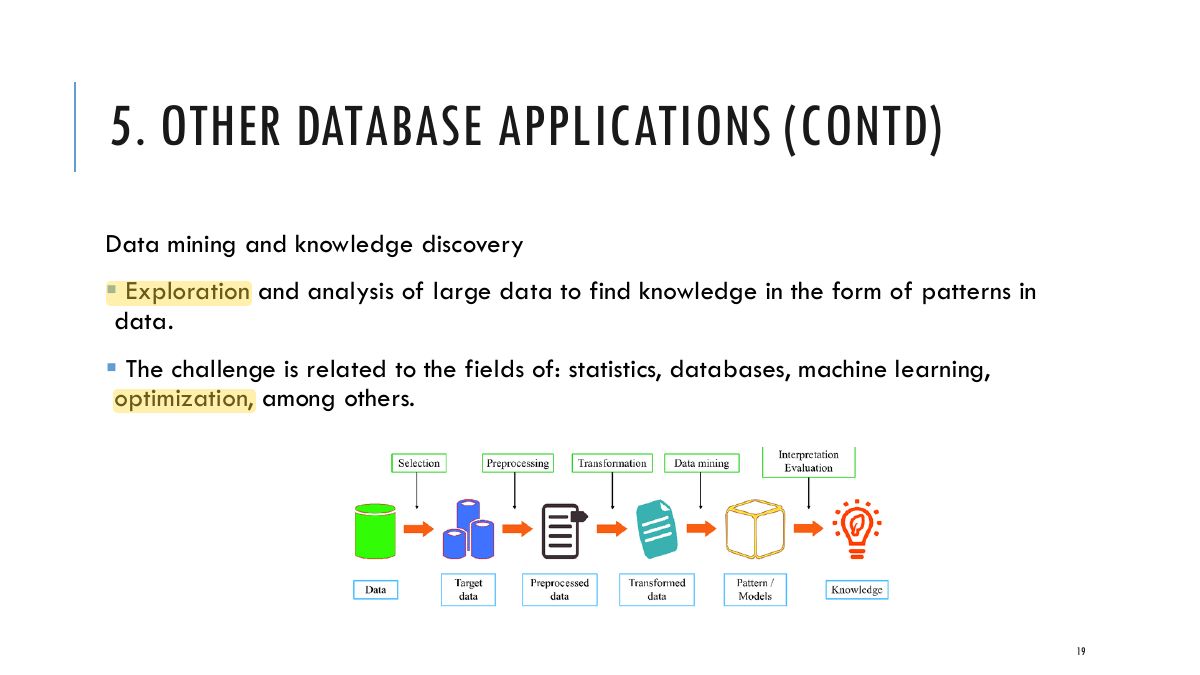
            5. OTHER DATABASE APPLICATIONS (CONTD)

            Online transaction processing (OLTP)

            • Transactions are groups or collection of requests to be executed as a single unit
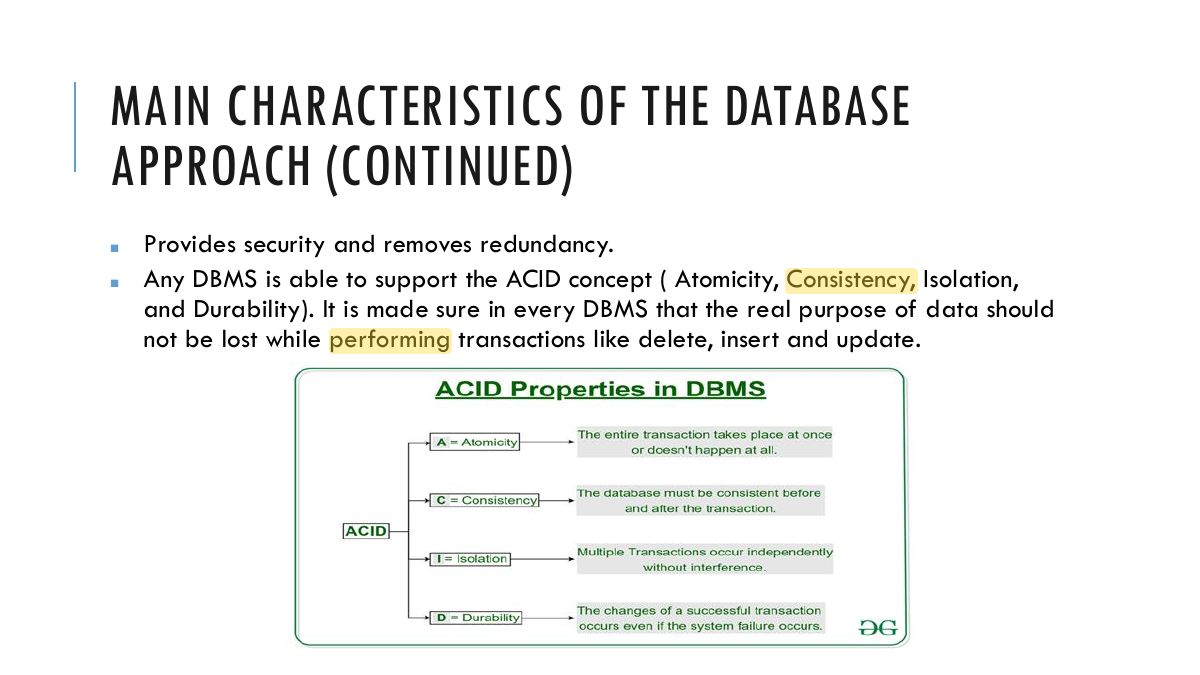
            • DBMS guarantees the ACID property:
              • A = Atomicity, every transaction is a single unit
              • C = Consistency, the state before and after a transaction is consistent (Data integrity constrains must be followed - Data is valid before and after, e.g. the amount can not be negative)
              • I = Isolation, Transactions executed concurrently don’t affect each other
              • D = Durability, Once committed a transaction is committed unaffected by failure (power off, crash, etc)
            18
            Exam weight Low
              Slide 19: 5. OTHER DATABASE APPLICATIONS (CONTD)
              Exam weight Low
                Slide 20: 6. CREATE YOUR OWN APPLICATION
                Exam weight Low

                  MAIN CHARACTERISTICS OF THE DATABASE APPROACH

                  • Self-describing nature of a database system: A database system stores not only the database but also a complete definition  or description of a particular database known as System Catalog (e.g. data structures, types, storage format of each data and constraints on the data). meta-data*. The description stored in the System Catalog is called  This allows the DBMS software to work with different database applications. 
                  • Insulation between programs and data: Called program-data independence.  The structure of data files is stored in the DBMS catalog separately from  the access programs. DBMS a llows changing data structures and storage organization without having to change the DBMS access programs.
                  21
                  Exam weight Low
                    Slide 22: EXAMPLE OF A SIMPLIFIED DATABASE CATALOG
                    Exam weight Low
                      Slide 23: EXAMPLE OF A SIMPLIFIED DATABASE CATALOG
                      Exam weight Low

                        MAIN CHARACTERISTICS OF THE DATABASE APPROACH (CONTINUED)

                        • Data Abstraction: The characteristic that allows program-data independence is called data abstraction.   A DBMS provides users with a conceptual representation of data that does not include many of the details of how the data is stored or how the operations are implemented. A data model is a type of data abstraction that is used to hide storage details and present the users with a conceptual view of the database. Programs refer to the data model constructs rather than data storage details 
                        24
                        Exam weight Low
                          Slide 25: MAIN CHARACTERISTICS OF THE DATABASE APPROACH (CONTINUED)
                          Exam weight Low

                            MAIN CHARACTERISTICS OF THE DATABASE APPROACH (CONTINUED)

                            • Sharing of data and multi-user transaction processing: Allowing a set of concurrent users to retrieve from and to update the  database. Concurrency control within the DBMS guarantees that each transaction is  correctly executed or aborted Recovery subsystem ensures each completed transaction has its effect  permanently recorded in the database OLTP (Online Transaction Processing) is a major part of database applications.  This allows hundreds of concurrent transactions to execute per second.
                            26
                            Exam weight Low
                              ★ Past exam
                              Slide 27: MAIN CHARACTERISTICS OF THE DATABASE APPROACH (CONTINUED)
                              Exam weight High
                              1. Transactions must be ACID: Atomicity, Consistency, Isolation, Durability.
                              Memory trickDurability = Doesn’t disappear after commit.
                              🎯 How this can come up · 2 questions
                              MCQ

                              Which ACID property ensures committed changes persist despite failures?

                              MCQ

                              All of a transaction’s operations happen or none do. This is:

                              DO I ALWAYS NEED A DATABASE?

                              Short answer: No.

                              Why? Designing a DBMS is a long process that incurs a lot of overhead.

                              When not to use a database:

                              • If your data is static, never changing.
                              • If you’re working with a lot of hardware limitations (embedded systems).
                              • No multiple user access.
                              28
                              Exam weight Low
                              1. You may not need a DBMS for small, simple, single-user, fixed data, or when the overhead isn’t worth it.

                              SUMMARY

                              In this chapter we looked at the database as a concept as well as the database management system and how they interact.

                              We explored the benefits of DBMS.

                              We also looked briefly at the process of designing a database application.

                              We will continue to look at all of those steps in detail starting next lecture with conceptual modeling, insha ’ Allah.

                              29
                              Exam weight Low