SE371 · Annotated SlidesChapter 5 — JavaScript in the Front End: DOM and Events
Chapter 5 · Annotated slides

JavaScript in the Front End: DOM and Events

The Document Object Model, nodes and NodeLists, selecting elements (getElementById, querySelector), changing styles and content (innerHTML vs. textContent), DOM manipulation methods, the dataset property, event handling with addEventListener, the event object, capture, bubbling and delegation, event types, and form validation with regular expressions.
Slide text Study notes Highlight: key words Tips, tricks & traps Seen again elsewhere How it can come up
Slide 1: Web Engineering SE371
Exam weight Low
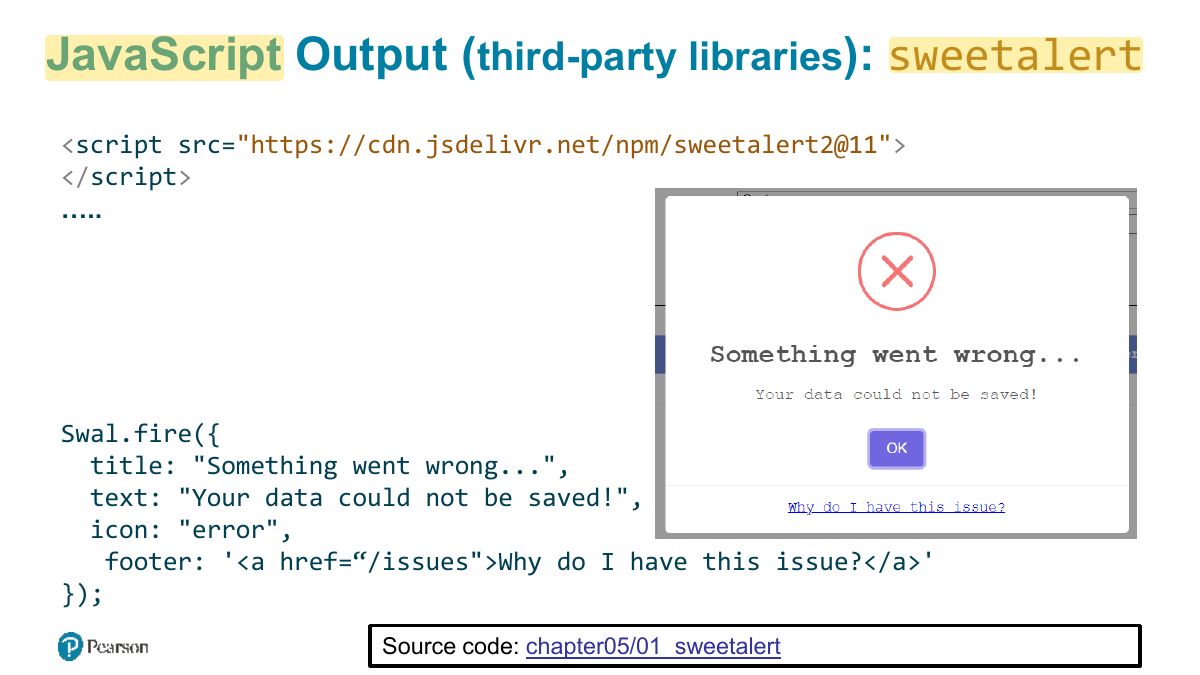
    Slide 2: JavaScript Output ( third-party libraries ): sweetalert
    Exam weight Low

      The Document Object Model (DOM)

      3
      Exam weight Low
      1. DOM: the browser’s tree of objects representing the page; JavaScript reads and changes it.

      Document Object

      The DOM document object is the root JavaScript object representing the entire HTML document. It is globally accessible via the document object reference.

      The properties of a document cover information about the page. Some are read-only, but others are modifiable. Like any JavaScript object, you can access its properties using dot notation

      // retrieve the URL of the current page let a = document.URL; // retrieve the page encoding, for example ISO-8859-1 let b = document.inputEncoding;

      4
      Exam weight Low
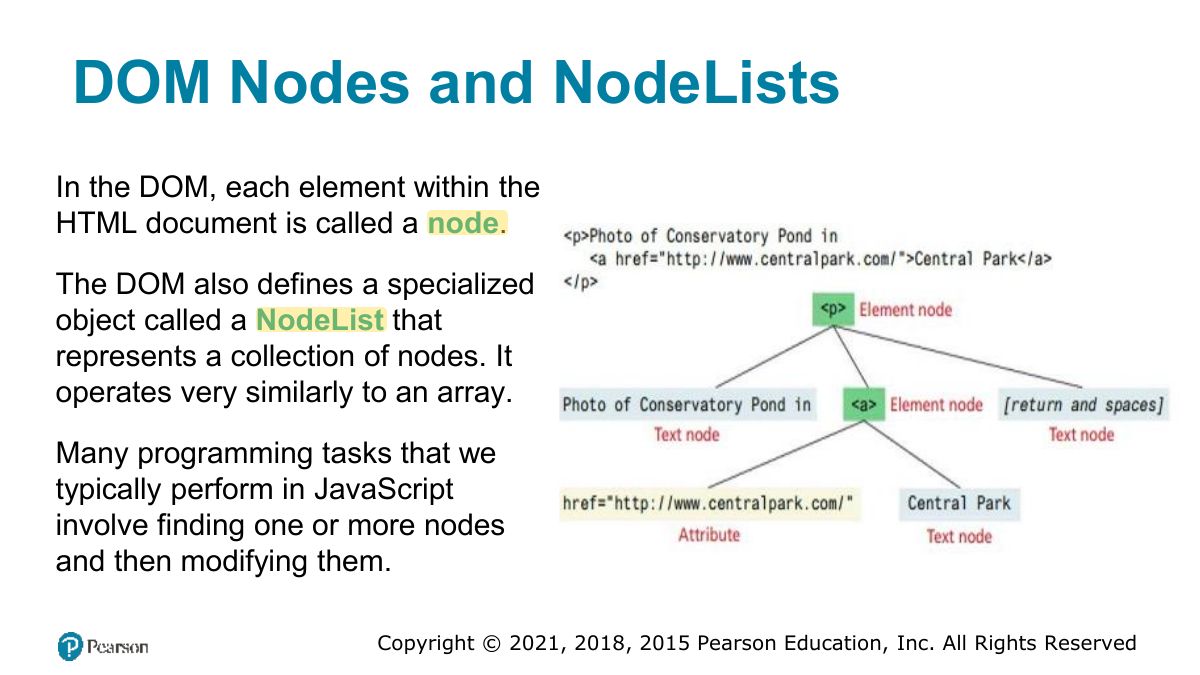
        Slide 5: DOM Nodes and NodeLists
        Exam weight Low
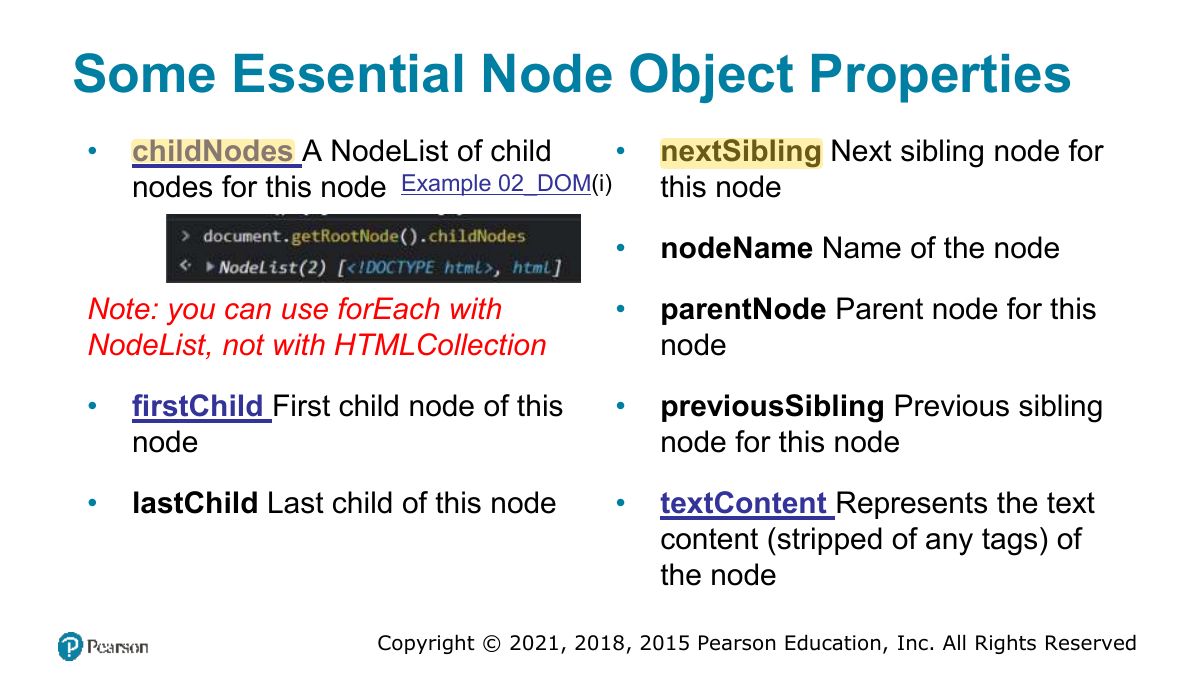
          Slide 6: Some Essential Node Object Properties
          Exam weight Low
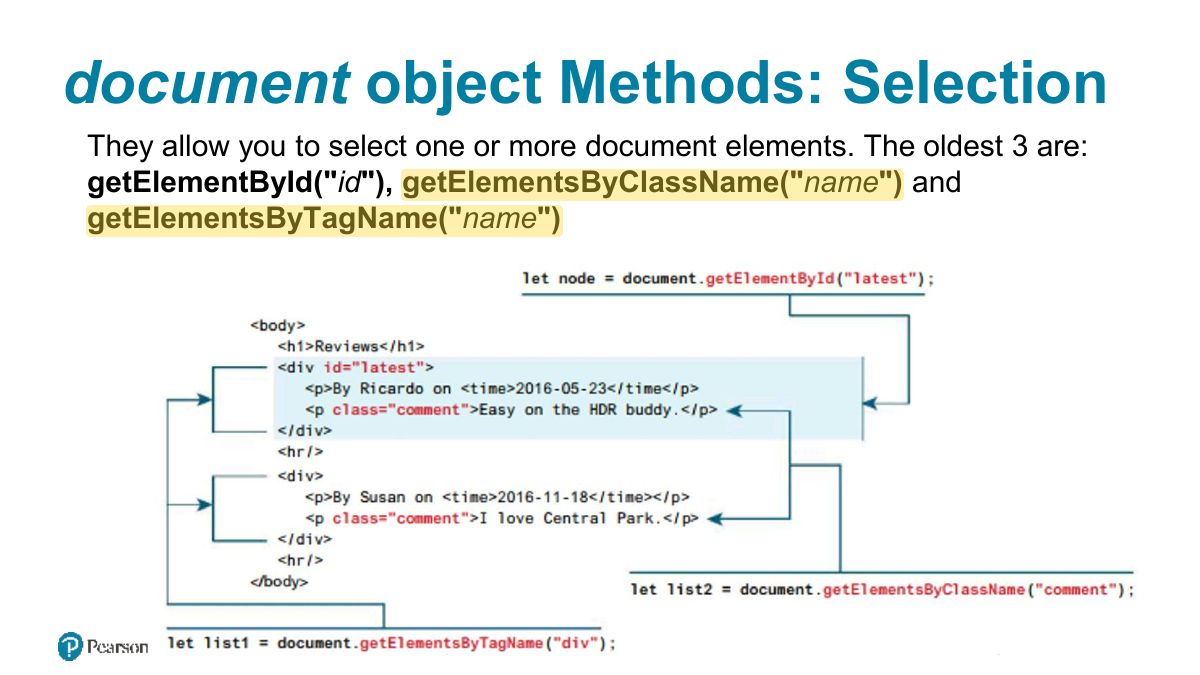
            Slide 7: document object Methods: Selection
            Exam weight High
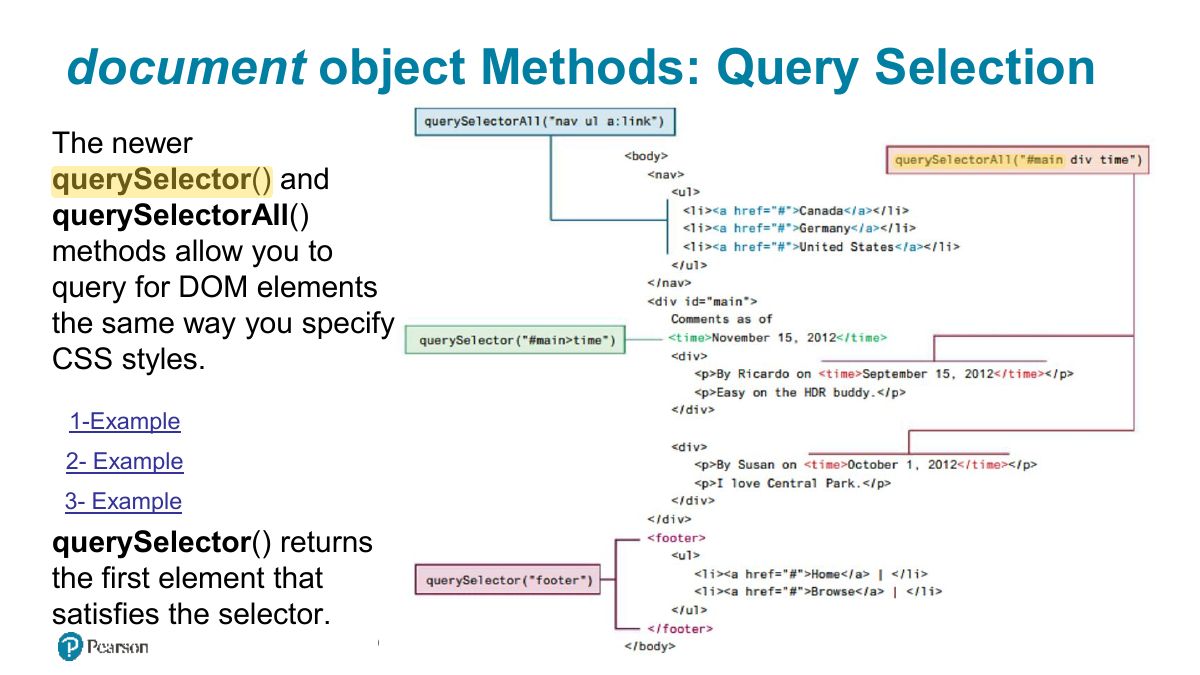
            1. Select: getElementById, getElementsByClassName, querySelector (first match), querySelectorAll (NodeList of all matches).
            🎯 How this can come up · 1 question
            MCQ

            document.querySelector(".item") returns:

            Slide 8: document object Methods: Query Selection
            Exam weight Low

              Element Node Object

              Element Node object represents an HTML element in the hierarchy, contained between the opening <> and closing </>.

              Every Element Node has also these properties:

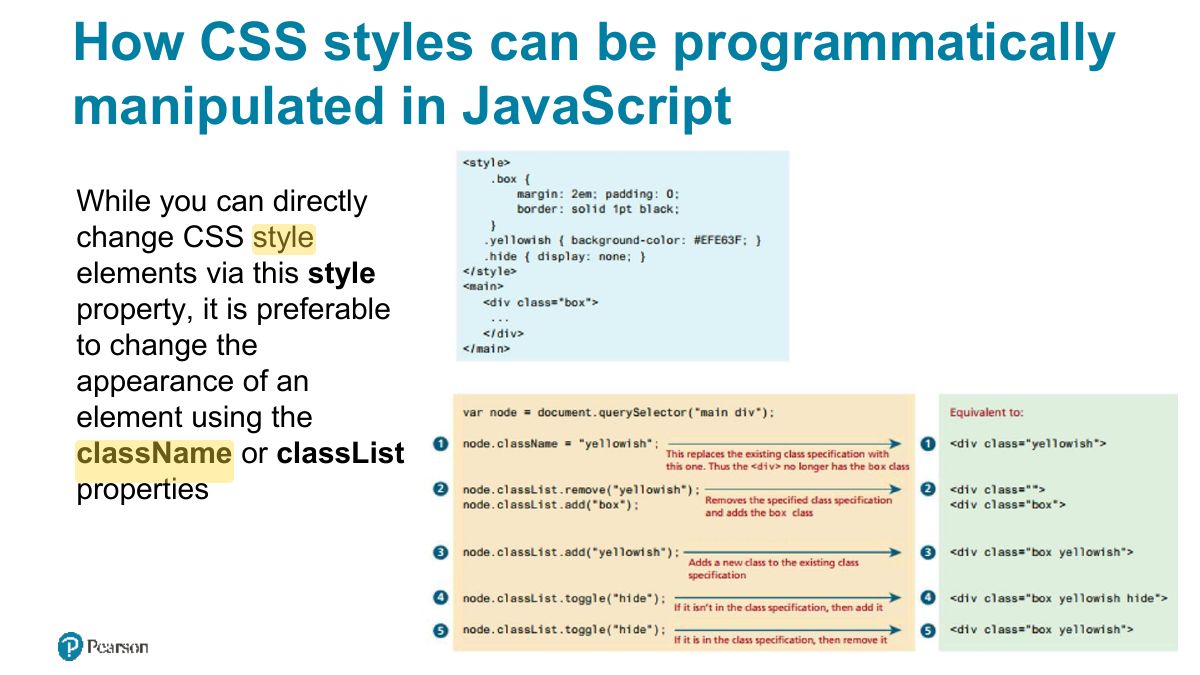
              • classList A read-only list of CSS classes assigned to this element. This list has a variety of helper methods for manipulating this list. Example Example 03_DOM(iii)
              • className The current value for the class attribute of this HTML element.
              • id The current value for the id of this element.
              • innerHTML Represents all the content (text and tags) of the element. (not secure ). Example 03_DOM(iv)
              • style The style attribute of an element. This returns a CSSStyleDeclaration object that contains sub-properties that correspond to the various CSS properties. Example
              • tagName The tag name for the element.
              9
              Exam weight Low
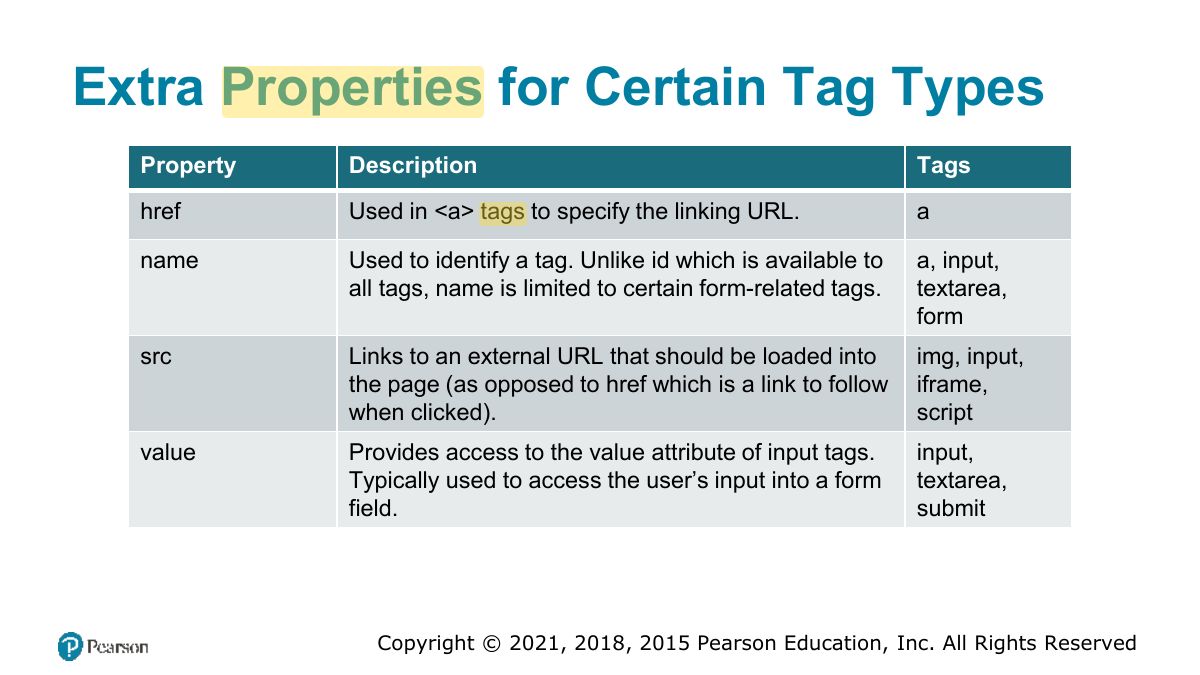
                Slide 10: Extra Properties for Certain Tag Types
                Exam weight Low
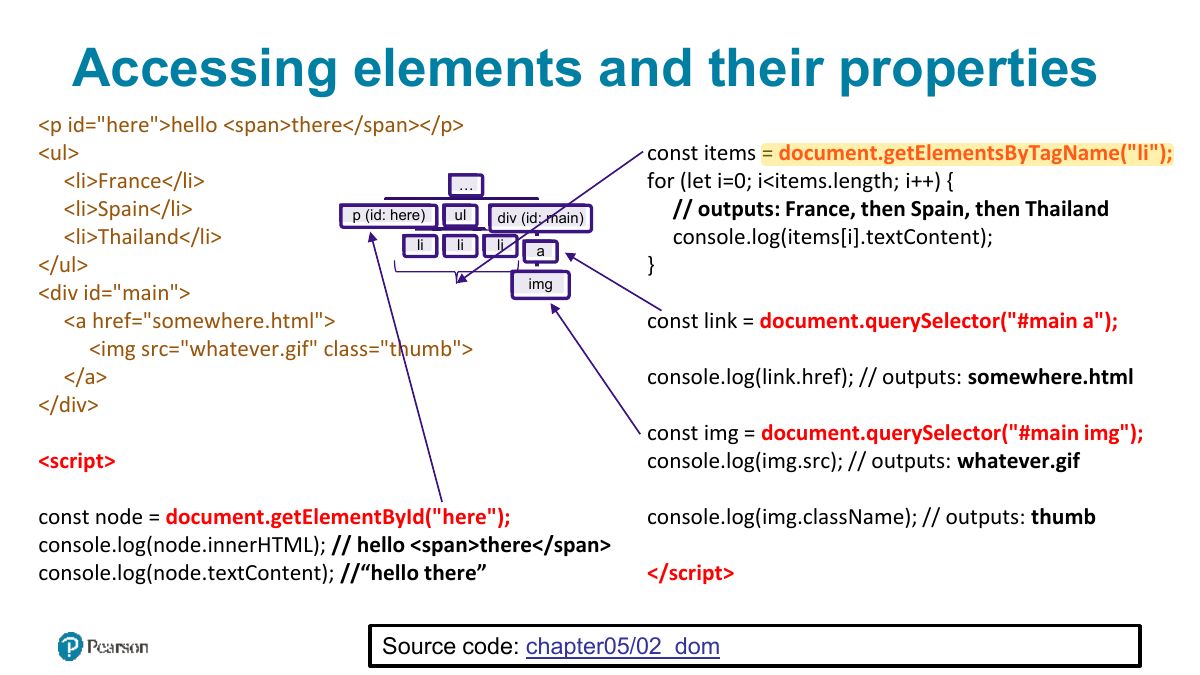
                  Slide 11: Accessing elements and their properties
                  Exam weight Low

                    Changing an Element‟s Style

                    To programmatically modify the styles associated with a particular element one can change the properties of the style property for that element For instance, to change an element‟s background color and add a three pixel border, we could use the following code:

                    const node = document.getElementById("someId"); node.style.backgroundColor = "#FFFF00"; node.style.borderWidth = "3px";

                    12
                    Exam weight Low
                    1. element.style.color = "red" sets inline style; better: element.classList.add/remove/toggle.
                    Slide 13: How CSS styles can be programmatically manipulated in JavaScript
                    Exam weight Low

                      InnerHTML vs textContent vs DOM Manipulation

                      You can programmatically access the content of an element node through its innerHTML or textContent property. These properties can also be used to modify the content of any given element.

                      For instance, you could change the content of the <div> using the following:

                      const div = document.querySelector("#main"); div. innerHTML = '<a href="#"><img src ="ab.gif"></a>’;

                      This replaces the existing content with the new content. But, every time innerHTML is set, the HTML has to be parsed, a DOM constructed, and inserted into the document. This takes time.

                      14
                      Exam weight High
                      1. innerHTML parses HTML (XSS risk with user input); textContent sets plain text safely.
                      Exam trapNever put user input into innerHTML: use textContent.
                      🎯 How this can come up · 1 question
                      MCQ

                      Which is safest for inserting user-typed text into the page?

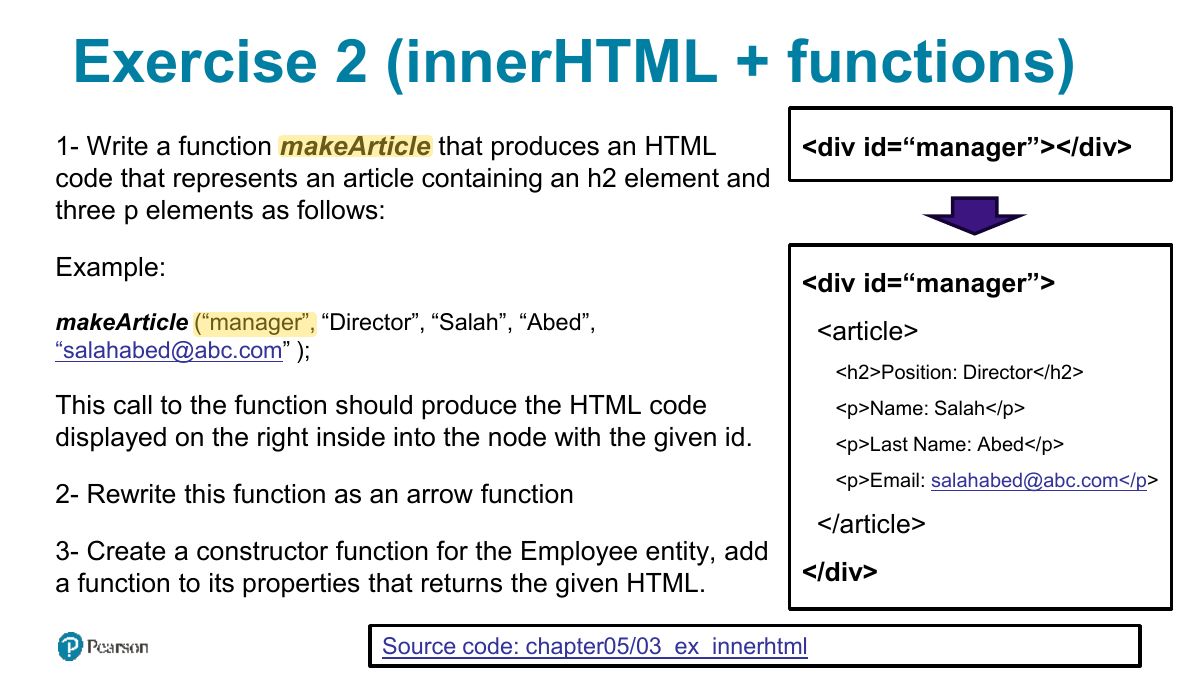
                      Slide 15: Exercise 2 (innerHTML + functions)
                      Exam weight Low
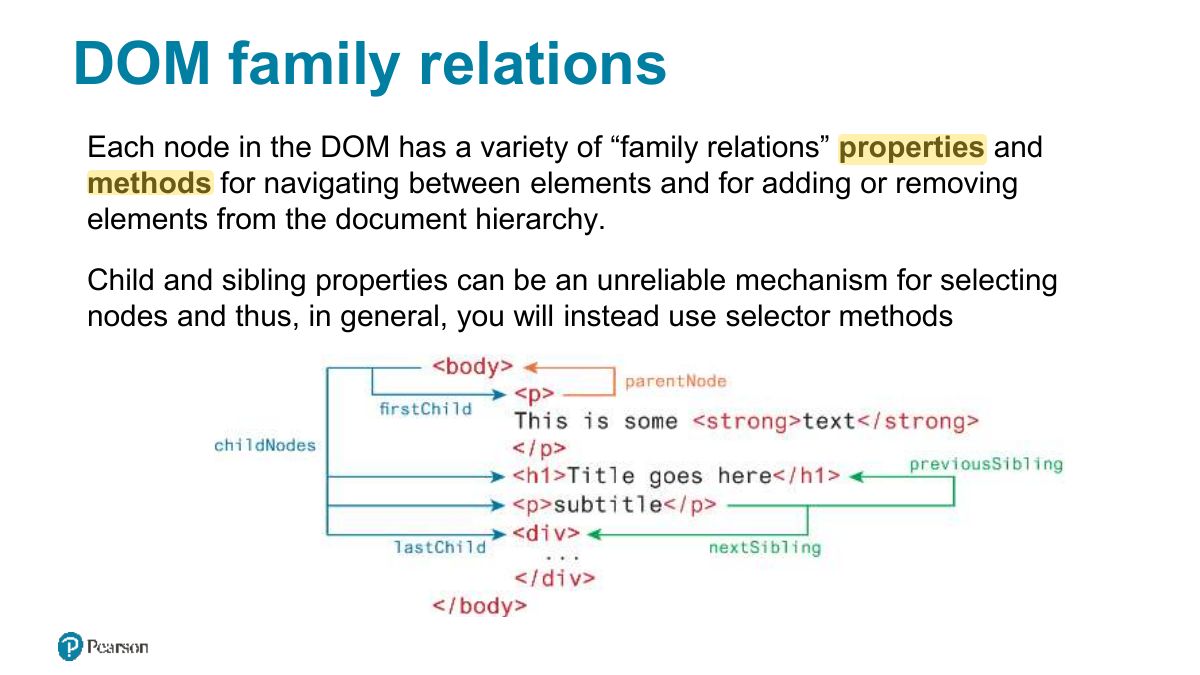
                        Slide 16: DOM family relations
                        Exam weight Low
                          Slide 17: DOM Manipulation Methods
                          Exam weight Low
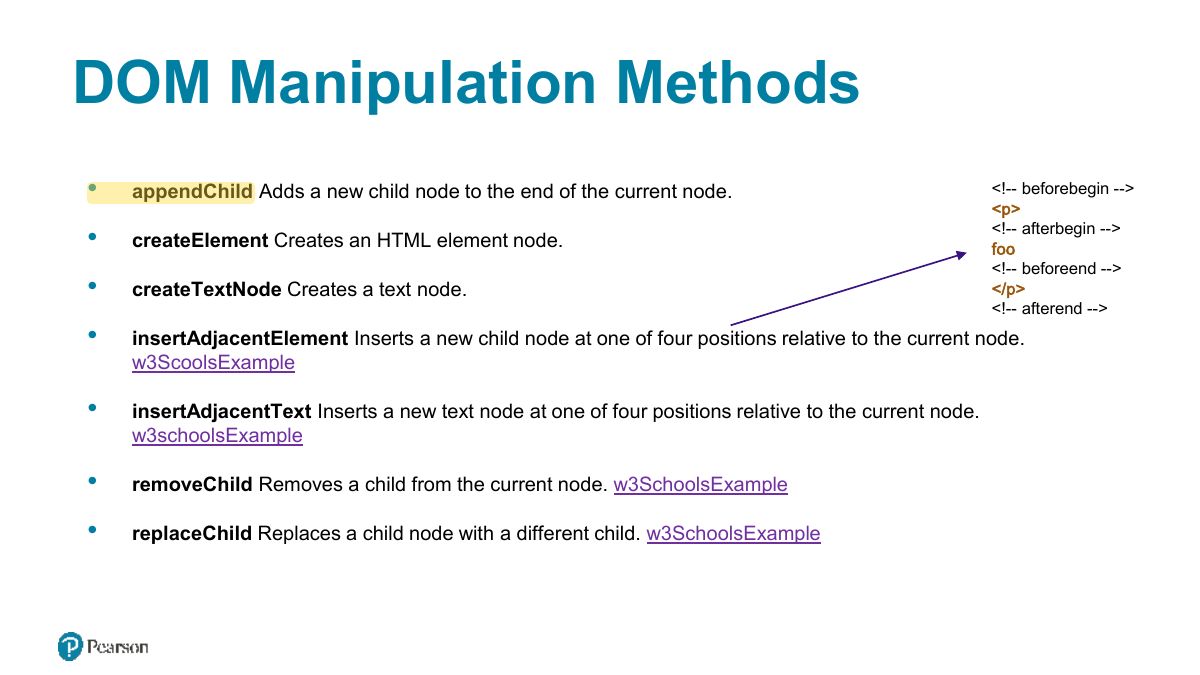
                          1. Manipulation: createElement, appendChild / append, insertBefore, removeChild / remove, replaceChild.
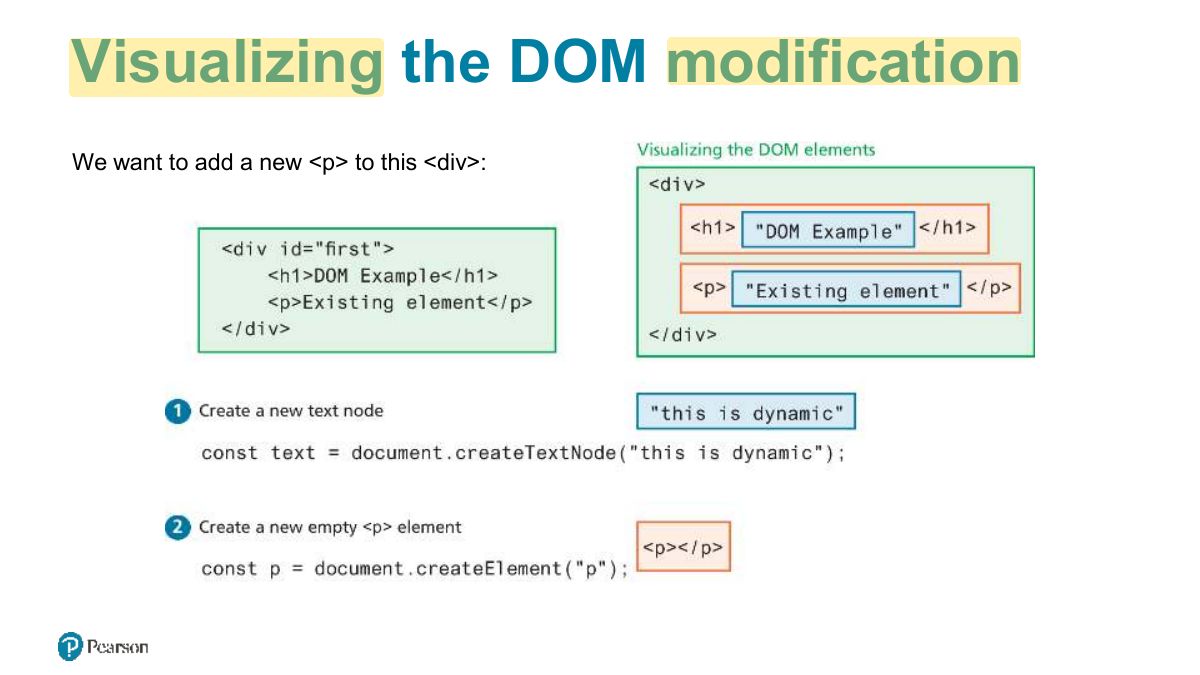
                          Slide 18: Visualizing the DOM modification
                          Exam weight Low
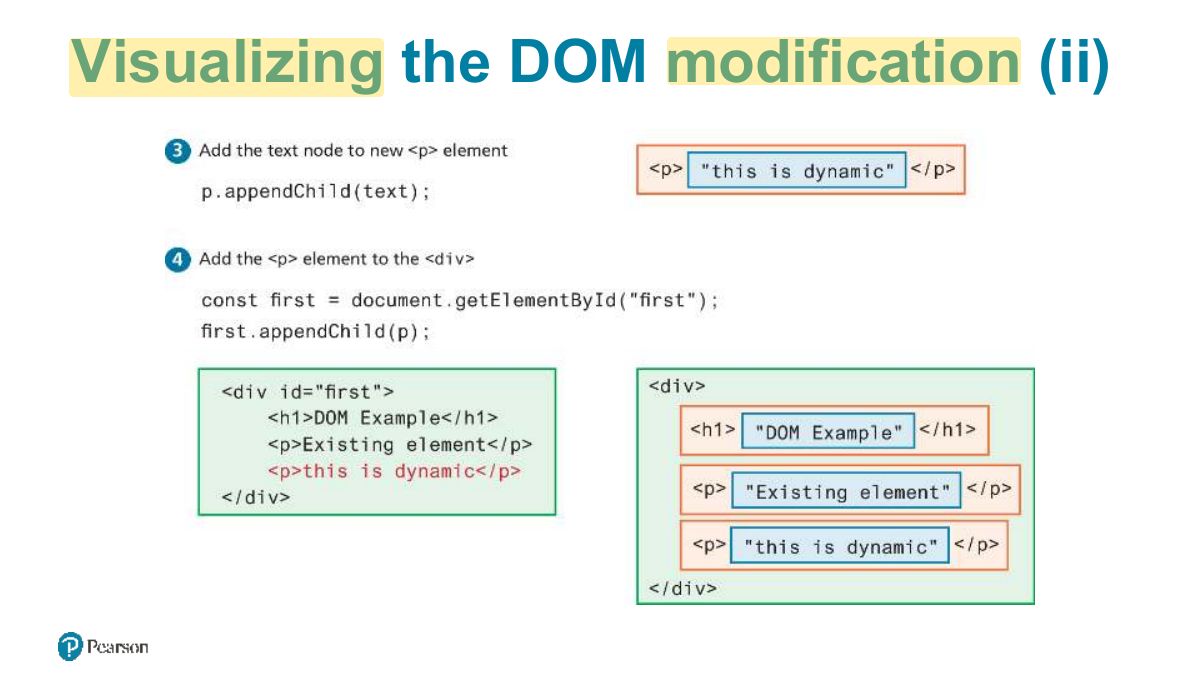
                            Slide 19: Visualizing the DOM modification (ii)
                            Exam weight Low
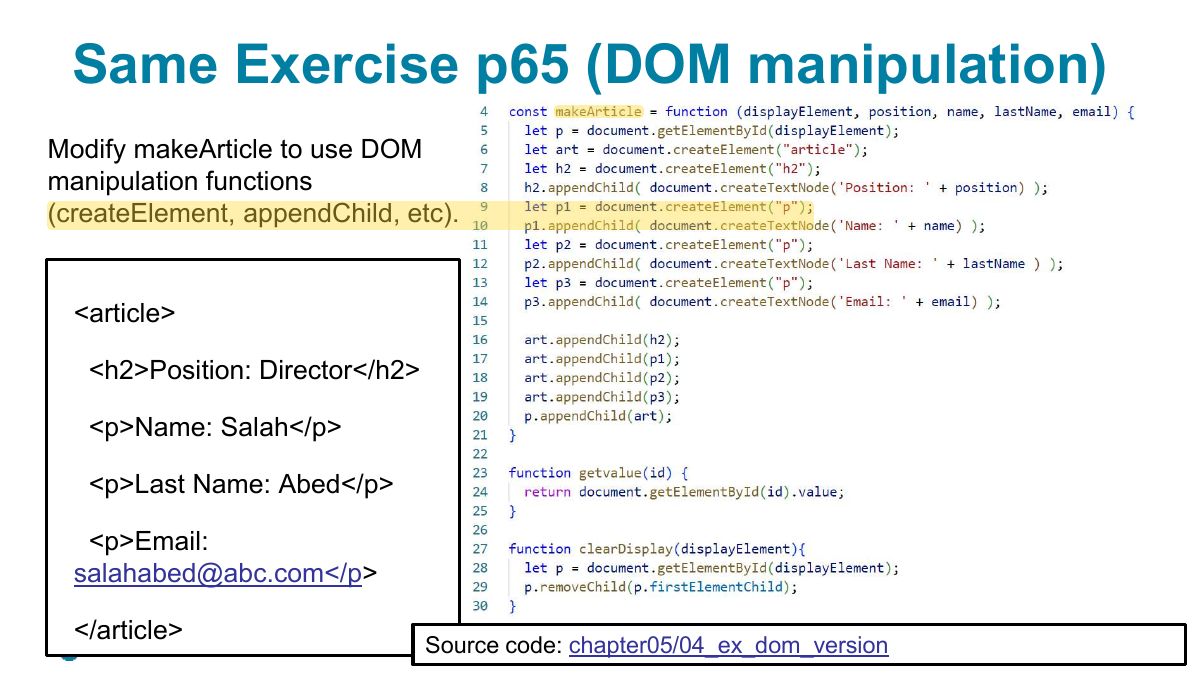
                              Slide 20: Same Exercise p65 (DOM manipulation)
                              Exam weight Low
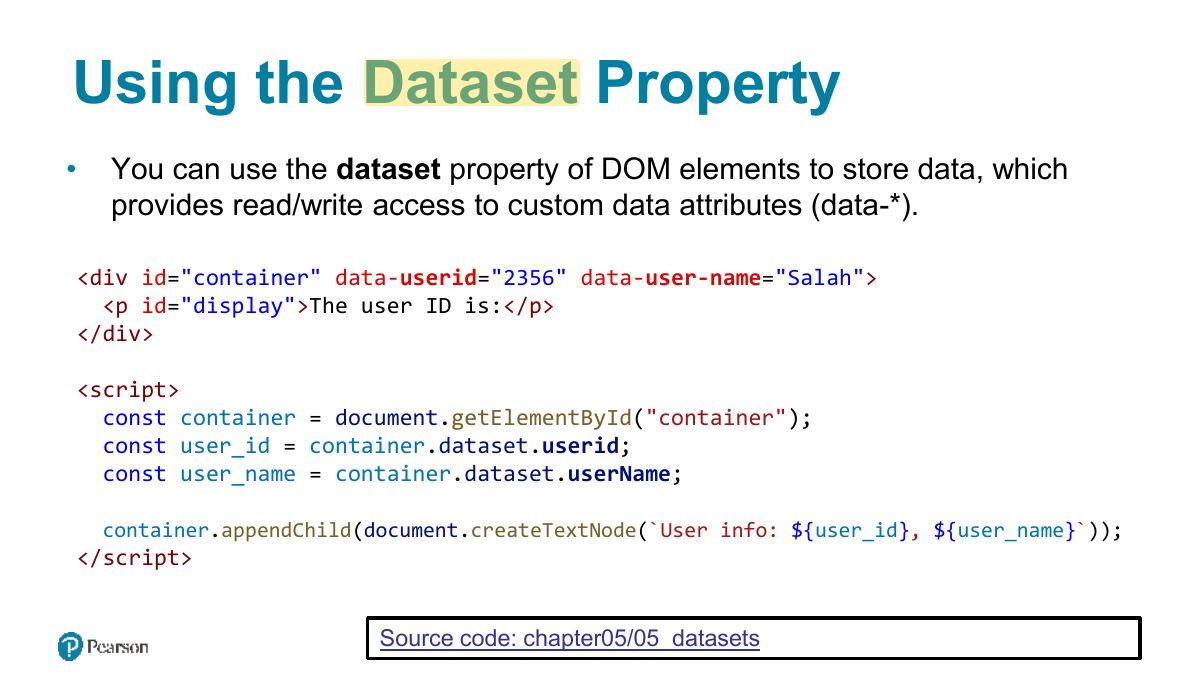
                                Slide 21: Using the Dataset Property
                                Exam weight Low
                                1. data-* attributes are read via element.dataset (data-user-id → dataset.userId).

                                Handling Events

                                News: Capacitor is a new runtime environment that allows you to run your web application on mobile (iOS or android) https://capacitorjs.com/ . Just like electron allows you to run your web application as a desktop application.

                                A full course for beginners can be found here: https://www.youtube.com/watch?v=K7ghUiXLef8

                                22
                                Exam weight Low

                                  DOM Timing

                                  Before finishing this section on using the DOM, it should be emphasized that the timing of any DOM code is very important.

                                  You cannot access or modify the DOM until it has been loaded. If the DOM programming is written after the markup that should ensure that the elements exist in the DOM before the code executes.

                                  To wait until we know for sure that the DOM has been loaded requires knowledge from our next section on event handling.

                                  23
                                  Exam weight Low
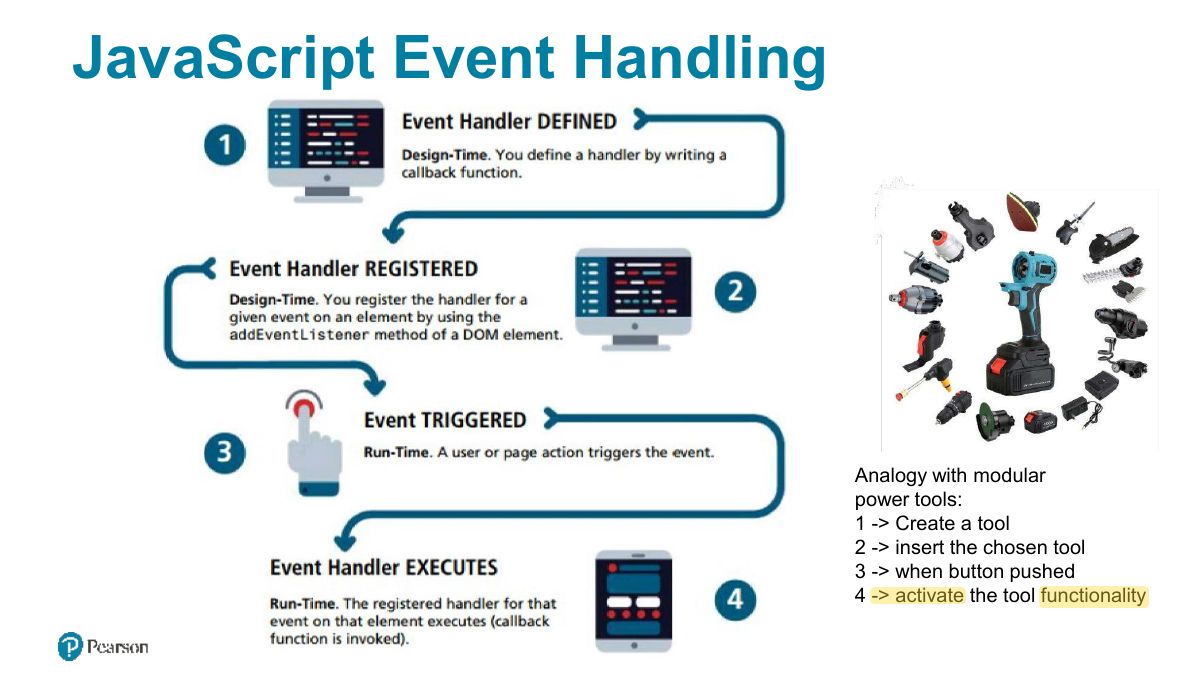
                                    Slide 24: JavaScript Event Handling
                                    Exam weight Low
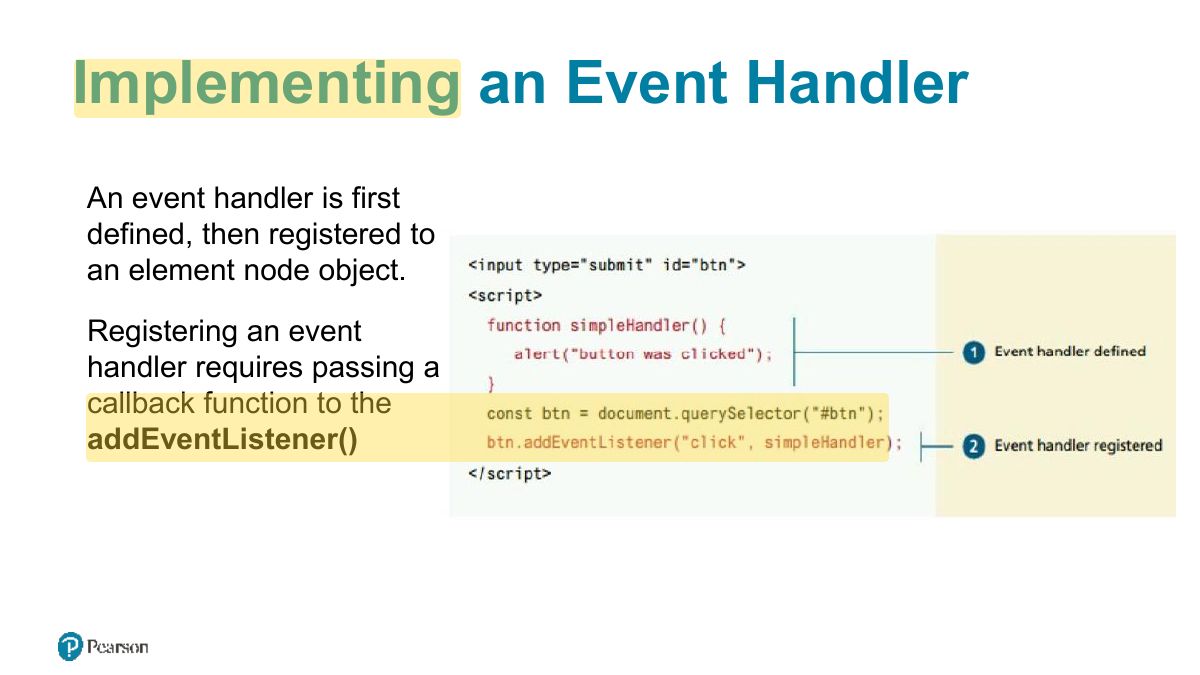
                                      Slide 25: Implementing an Event Handler
                                      Exam weight Low
                                      1. element.addEventListener("click", handler): many handlers per event, can be removed.

                                      Handling events with anonymous functions

                                      It is much more common to make use of an anonymous function passed to addEventListener

                                      const btn = document.getElementById("btn"); btn.addEventListener("click", function {

                                      alert("used an anonymous function");

                                      }); document.querySelector("#btn").addEventListener("click", function {

                                      alert("a different approach but same result");

                                      }); document.querySelector("#btn").addEventListener("click", => {

                                      alert("arrow syntax but same result");

                                      }); LISTING 9.3 Listening to an event with an anonymous function, three versions

                                      26
                                      Exam weight Low
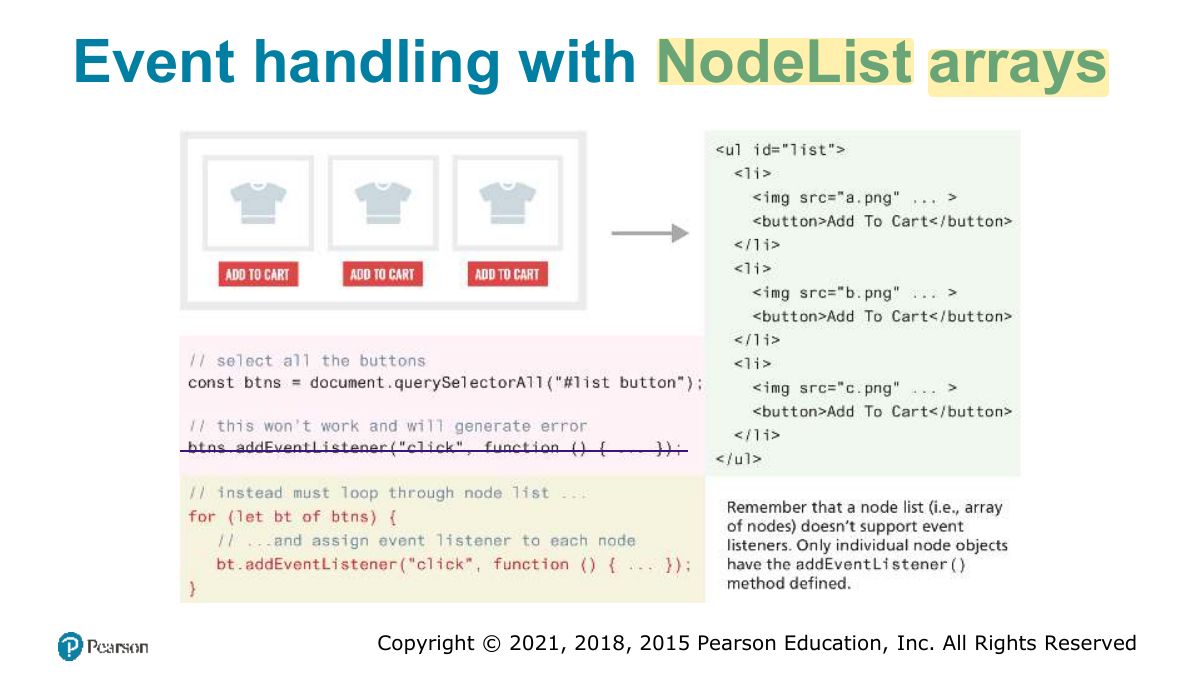
                                        Slide 27: Event handling with NodeList arrays
                                        Exam weight Low

                                          Page Loading and the DOM

                                          To ensure your DOM manipulation code executes after the page is loaded, use one of the following two different page load events.

                                          • window.load Fires when the entire page is loaded. This includes images and stylesheets, so on a slow connection or a page with a lot of images, the load event can take a long time to fire.
                                          • document.DOMContentLoaded Fires when the HTML document has been completely downloaded and parsed. Generally, this is the event you want to use.

                                          Using one of these, your DOM coding can now appear anywhere, including within the <head> element as long as you do not try to access the DOM.

                                          28
                                          Exam weight Low
                                          1. Run DOM code after the page loads: DOMContentLoaded, or place the script at the end / use defer.

                                          Wrapping DOM code within a DOMContentLoaded event handler

                                          document.addEventListener('DOMContentLoaded', function {

                                          const menu = document.querySelectorAll("#menu li"); for (let item of menu) {

                                          item.addEventListener("click", function {

                                          item.classList.toggle ('shadow’);

                                          });

                                          } const heading = document.querySelector("h3"); heading.addEventListener('click', function {

                                          heading.classList.toggle ('shadow’);

                                          });

                                          });

                                          29
                                          Exam weight Low
                                            Slide 30: Event Object
                                            Exam weight Low
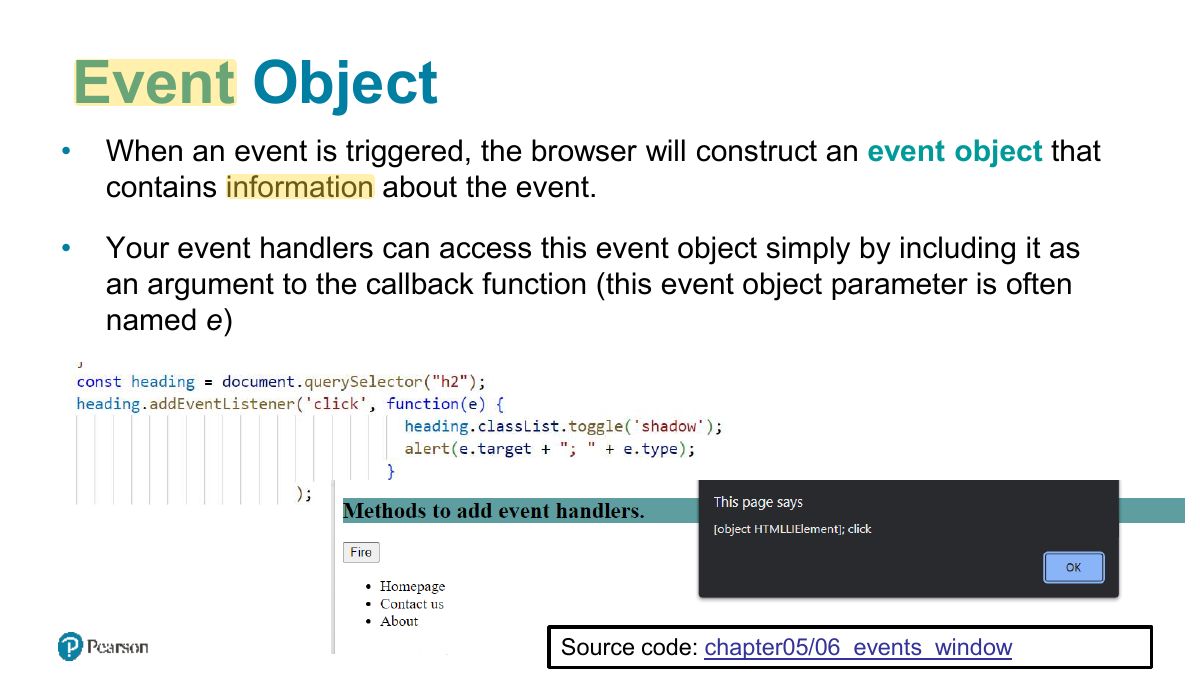
                                            1. The event object: e.target (the element clicked), e.type, e.preventDefault(), e.stopPropagation().

                                            Event Object Example

                                            31
                                            Exam weight Low

                                              Event Propagation

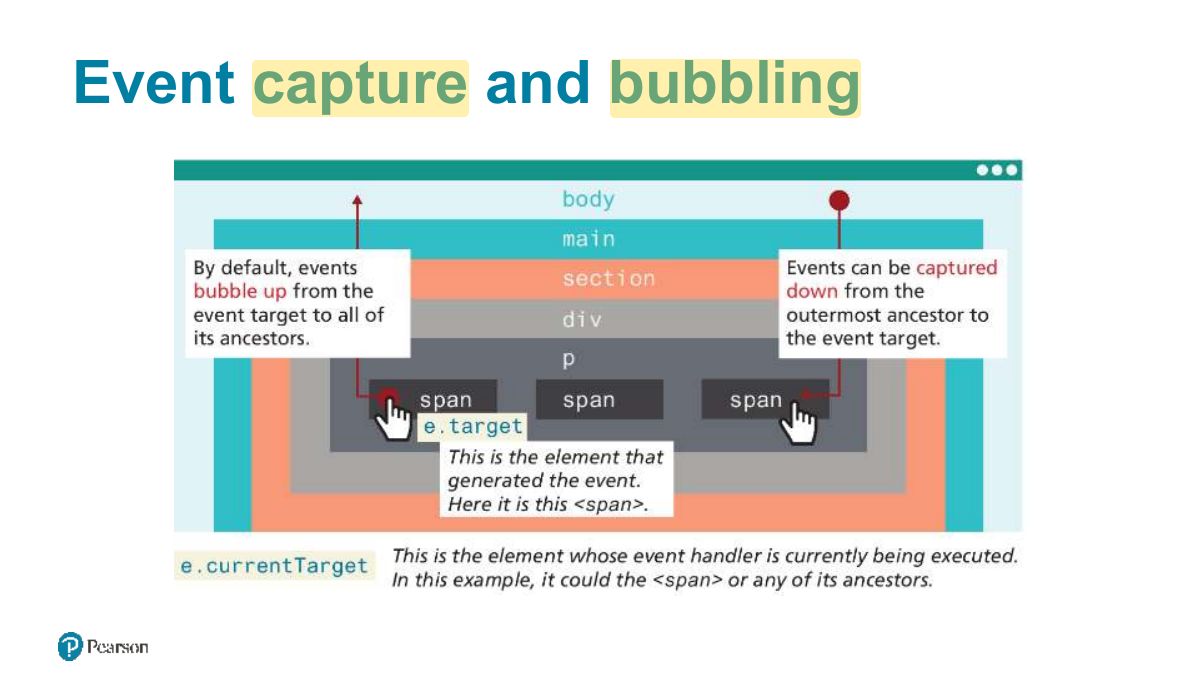
                                              When an event fires on an element that has ancestor elements, the event propagates to those ancestors. There are two distinct phases of propagation:

                                              • In the event capturing phase, the browser checks the outermost ancestor (the <html> element) to see if that element has an event handler registered for the triggered event, and if so, it is executed (if configured to fire at this phase, see code 08_event_propagation ). It then proceeds to the next ancestor and performs the same steps; this continues until it reaches the element that triggered the event (that is, the event target).
                                              • In the event bubbling phase, the opposite occurs. The browser checks if the element that triggered the event has an event handler registered for that event, and if so, it is executed.
                                              32
                                              Exam weight Low
                                                Slide 33: Event capture and bubbling
                                                Exam weight High
                                                1. Propagation: capture phase (down from the window) → target → bubbling phase (back up). Handlers run in the bubbling phase by default.
                                                🎯 How this can come up · 1 question
                                                MCQ

                                                By default, addEventListener handlers run during the:

                                                Slide 34: Problems with event propagation
                                                Exam weight Low
                                                  Slide 35: Stopping event propagation
                                                  Exam weight Low
                                                    Slide 36: g1
                                                    Exam weight High
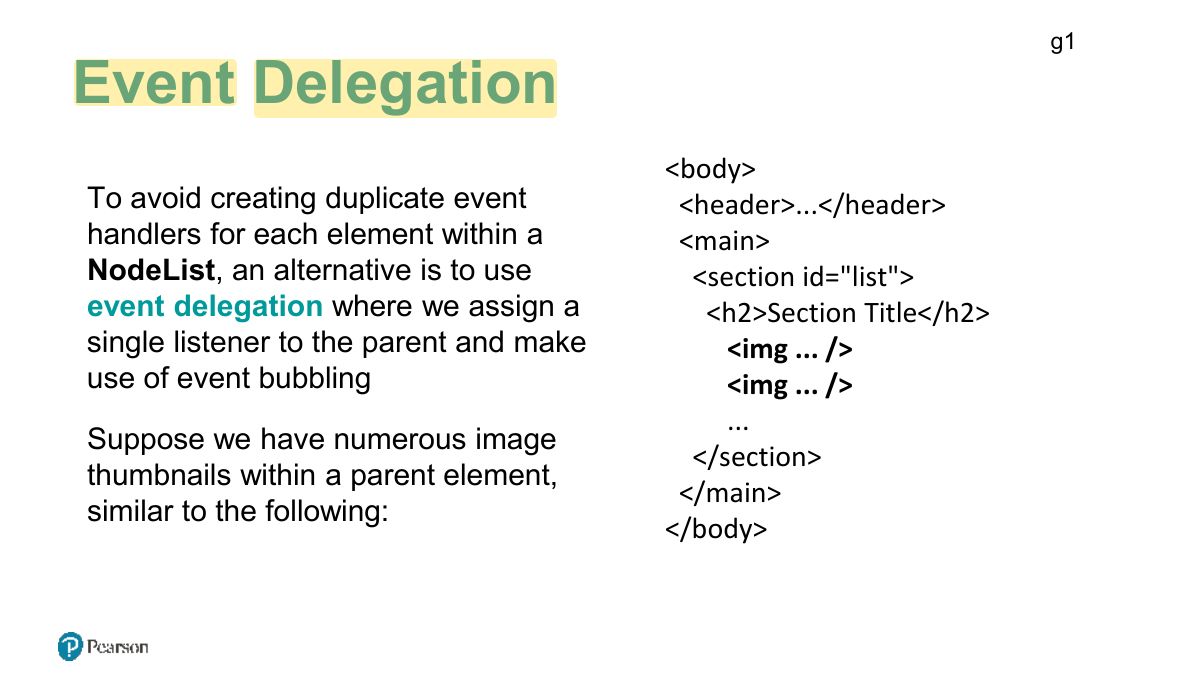
                                                    1. Event delegation: one listener on a parent handles events from many children (using e.target), including children added later.
                                                    🎯 How this can come up · 1 question
                                                    MCQ

                                                    Attaching one listener to a <ul> to handle clicks on all its <li> items is:

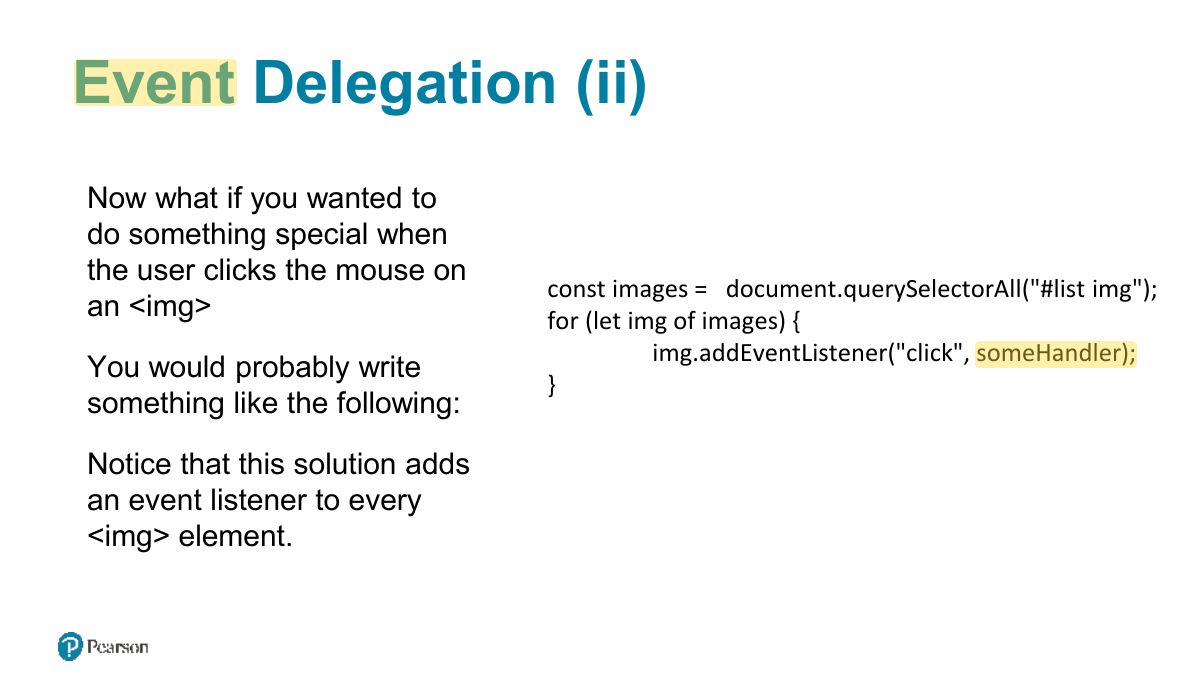
                                                    Slide 37: Event Delegation (ii)
                                                    Exam weight Low

                                                      Event Delegation (iii)

                                                      const parent = document.querySelector("#list");

                                                      Instead, we can add a single listener to the parent element,

                                                      parent.addEventListener("click", function (e) {

                                                      as shown in the following code

                                                      // e.target is the object that generated the event.

                                                      // to verify that e.target exists and that it is one of the

                                                      Since the user can click on any // <img> elements. Note: NodeName always returns element within the <section>

                                                      //upper case

                                                      element, the click event handler if (e.target && e.target.nodeName === "IMG") { needs to determine if the user

                                                      doSomething(e.target);

                                                      has clicked on one of the <img> } elements within it.

                                                      });

                                                      38
                                                      Exam weight Low
                                                        Slide 39: Event Types
                                                        Exam weight Low
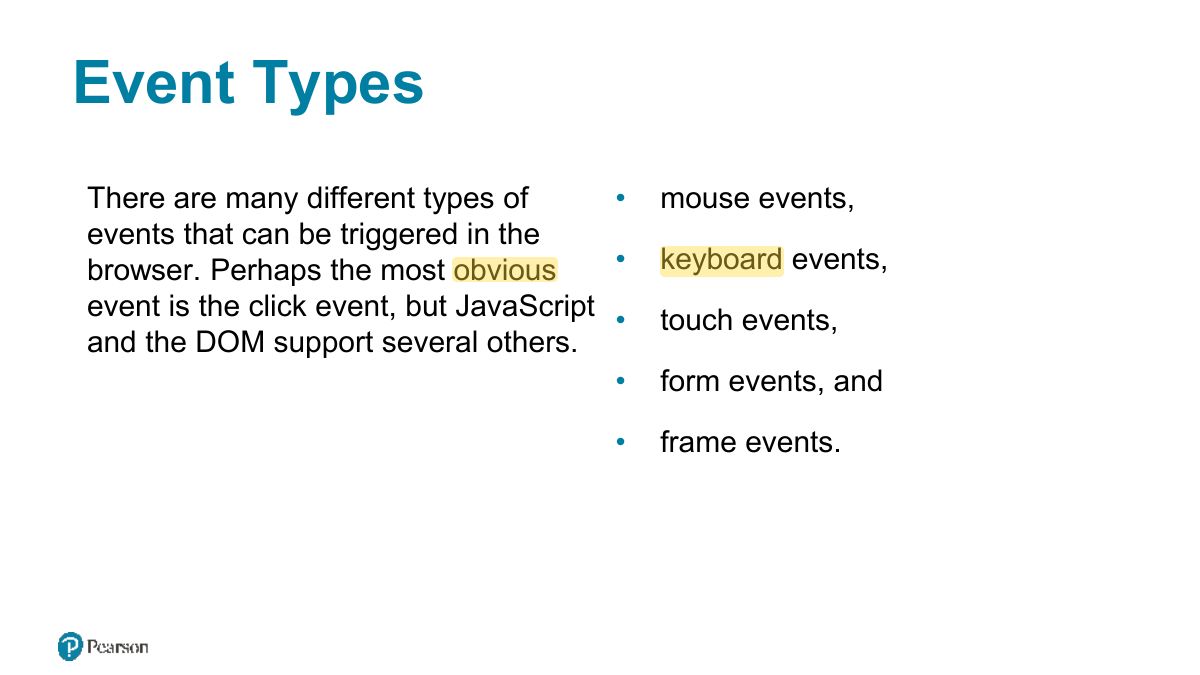
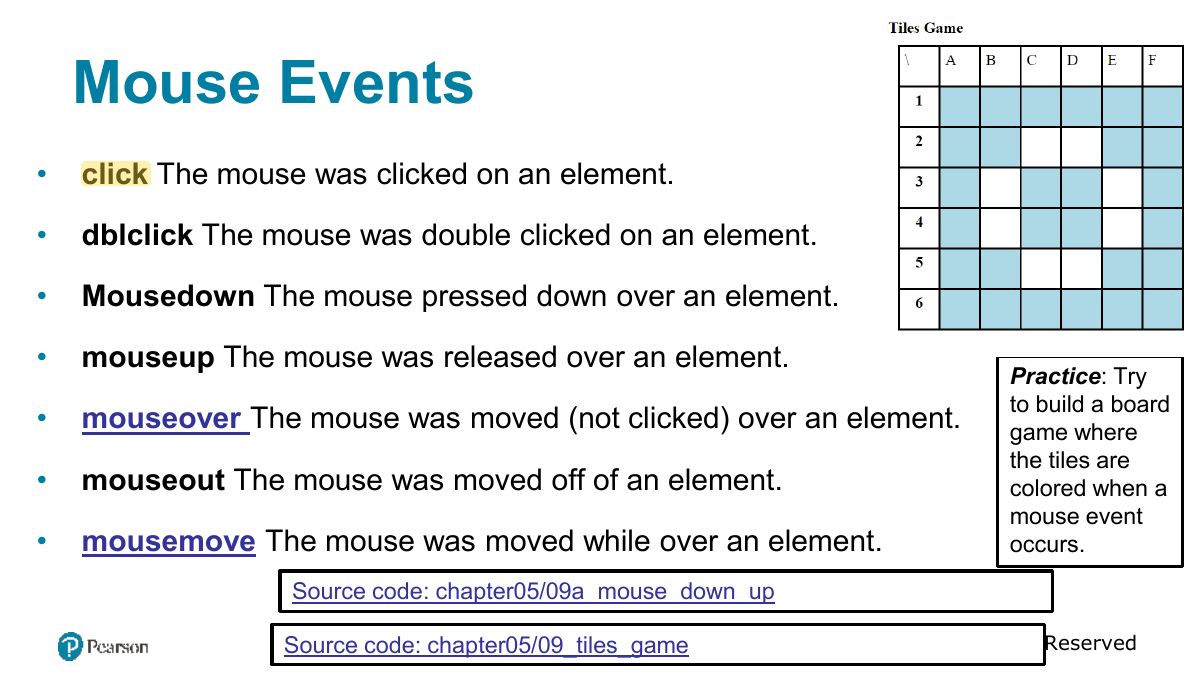
                                                        1. Types: mouse (click, mouseover), keyboard (keydown, keyup), form (submit, change, input, focus, blur), page (load, DOMContentLoaded).
                                                        Slide 40: Mouse Events
                                                        Exam weight Low

                                                          Keyboard Events

                                                          • Keydown The user is pressing a key (this happens first).
                                                          • keyup The user releases a key that was down (this happens last). document.getElementById("pagebody").addEventListener(" keydown ", function (e) { let keyPressed = e.key; alert("Key " + keyPressed + " was pressed"); });
                                                          41
                                                          Exam weight Low

                                                            Form Events

                                                            • blur Triggered when a form element has lost focus (i.e., control has moved to a different element), perhaps due to a click or Tab key press.
                                                            • change Some <input>, <textarea>, or <select> field had their value changed. This could mean the user typed something or selected a new choice.
                                                            • focus Complementing the blur event, this is triggered when an element gets focus (the user clicks in the field or tabs to it).
                                                            • reset HTML forms have the ability to be reset. This event is triggered when that happens.
                                                            • select When the user selects some text. This is often used to try and prevent copy/paste.
                                                            • submit When the form is submitted this event is triggered. We can do some prevalidation of the form in JavaScript before sending the data on to the server.
                                                            42
                                                            Exam weight Low

                                                              Handling the submit event

                                                              document.querySelector("#loginForm").addEventListener("submit", function(e) {

                                                              let pass = document.querySelector("#pw").value; if (pass == "") {

                                                              alert ("enter a password"); e.preventDefault; // prevents form submission

                                                              }

                                                              }); LISTING 9.8 Handling the submit event

                                                              Source code: chapter05/10_form_submit_event

                                                              43
                                                              Exam weight Low
                                                              1. Handle the form’s submit event; call e.preventDefault() to stop sending invalid data.

                                                              Forms in JavaScript

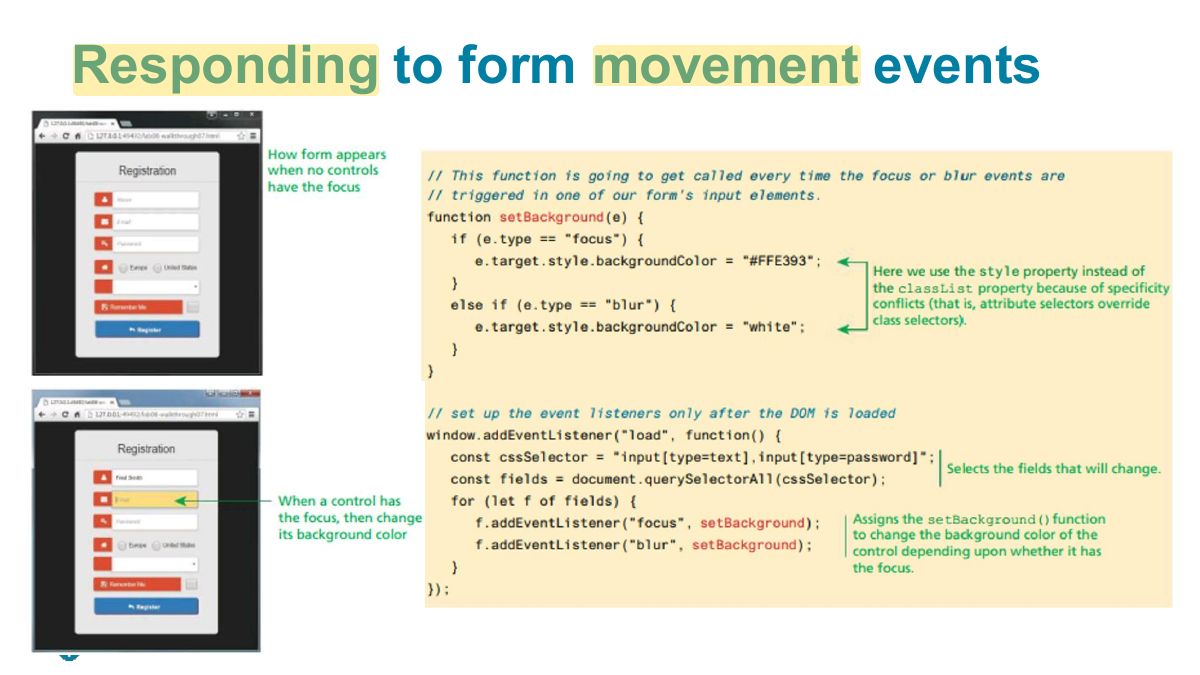
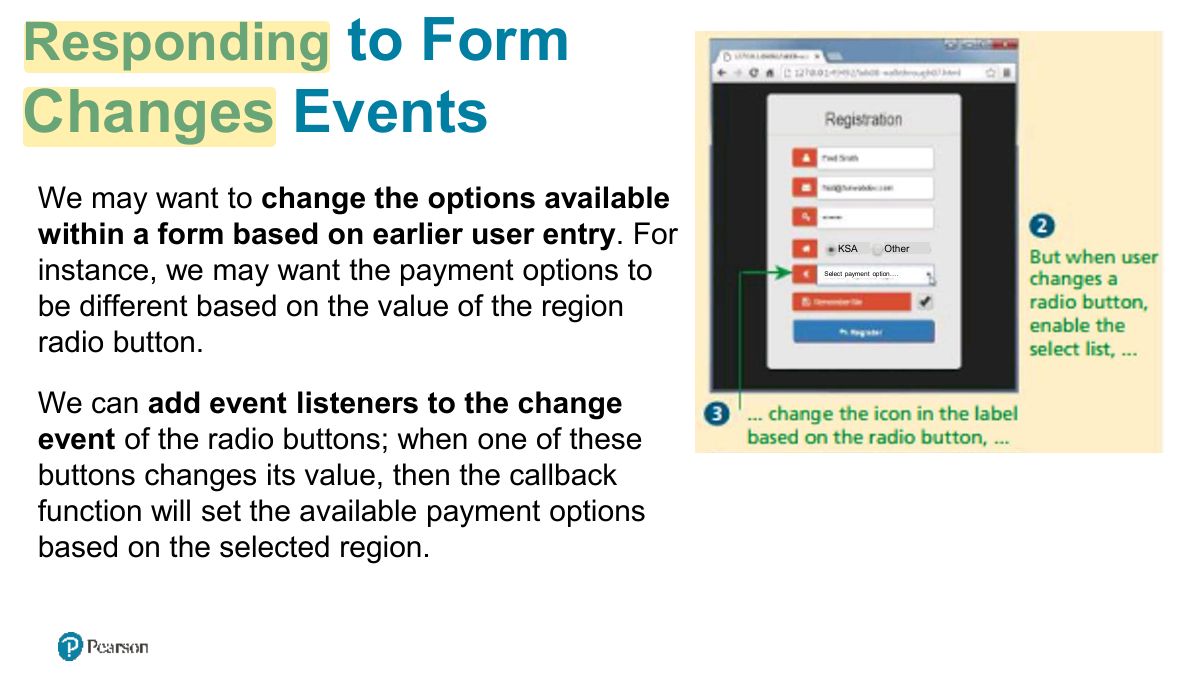
                                                              JavaScript within forms is more than just the client-side validation of form data; JavaScript is also used to improve the user experience of the typical browser-based form. As a result, when working with forms in JavaScript, we are typically interested in three types of events:

                                                              • movement between elements,
                                                              • data being changed within a form element, and
                                                              • the final submission of the form.
                                                              44
                                                              Exam weight Low
                                                                Slide 45: Responding to form movement events
                                                                Exam weight Low
                                                                  Slide 46: to Form
                                                                  Exam weight Low

                                                                    Validating a Submitted Form

                                                                    Form validation continues to be one of the most common applications of JavaScript.

                                                                    Checking user inputs to ensure that they follow expected rules must happen on the server side for security reasons (in case JavaScript was circumvented); checking those same inputs on the client side using JavaScript will reduce server load and increase the perceived speed and responsiveness of the form.

                                                                    Some of the more common validation activities include email validation, number validation, and data validation.

                                                                    In practice, regular expressions are used to concisely implement many of these validation checks.

                                                                    47
                                                                    Exam weight Low

                                                                      Empty Field Validation

                                                                      const form = document.querySelector("#loginForm"); form.addEventListener("submit", (e) => {

                                                                      const fieldValue = document.querySelector("#username").value; if (fieldValue null || fieldValue "") {

                                                                      // the field was empty. Stop form submission e.preventDefault; // Now tell the user something went wrong console.log("you must enter a username");

                                                                      }

                                                                      }); LISTING 9.10 A simple validation script to check for empty fields

                                                                      48
                                                                      Exam weight Low

                                                                        Determining which items in multiselect list are selected

                                                                        const multi = document.querySelector("#listbox"); // using the options technique loops through each option and check if it is selected for (let i=0; i < multi.options.length; i++) {

                                                                        if (multi.options[i].selected) {

                                                                        // this option was selected, do something with it ...

                                                                        console.log(multi.options[i].textContent);

                                                                        }

                                                                        } // the selectedOptions technique is simpler ... it only loops through the selected options for (let i=0; i < multi.selectedOptions.length; i++) {

                                                                        console.log(multi.selectedOptions[i].textContent);

                                                                        } LISTING 9.11 Determining which items in multiselect list are selected

                                                                        49
                                                                        Exam weight Low
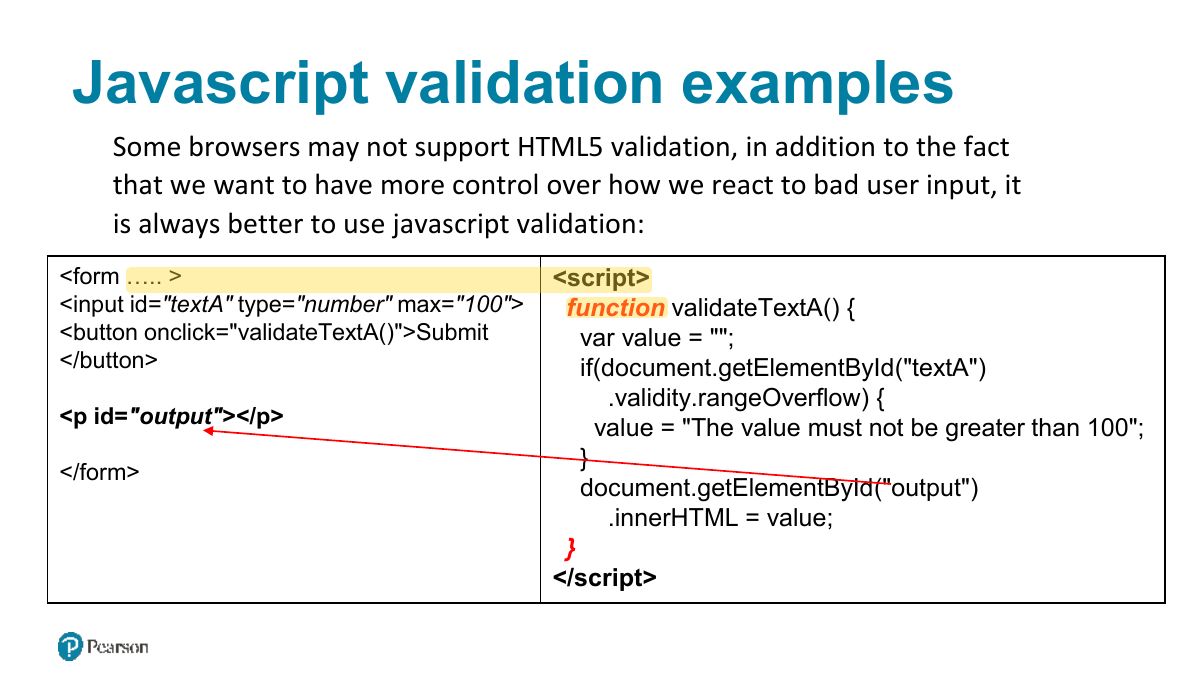
                                                                          Slide 50: Javascript validation examples
                                                                          Exam weight Low

                                                                            Number Validation

                                                                            Unfortunately, no simple functions exist for number validation. Using parseFloat, isNAN, and isFinite, you can write your own number validation function.

                                                                            Validating email, phone numbers, or social security numbers would include checking for blank fields and making use of isNumeric and/or regular expressions.

                                                                            function isNumeric(n) {

                                                                            return !isNaN(parseFloat(n)) && isFinite(n);

                                                                            } // you have to use both because 1/0 is considered a number

                                                                            51
                                                                            Exam weight Low

                                                                              Submitting Forms using JS

                                                                              To submit a form using JavaScript simply call the submit method:

                                                                              const formExample = document.getElementById("loginForm"); formExample.submit;

                                                                              This is often done in conjunction with calling preventDefault on the submit event.

                                                                              52
                                                                              Exam weight Low
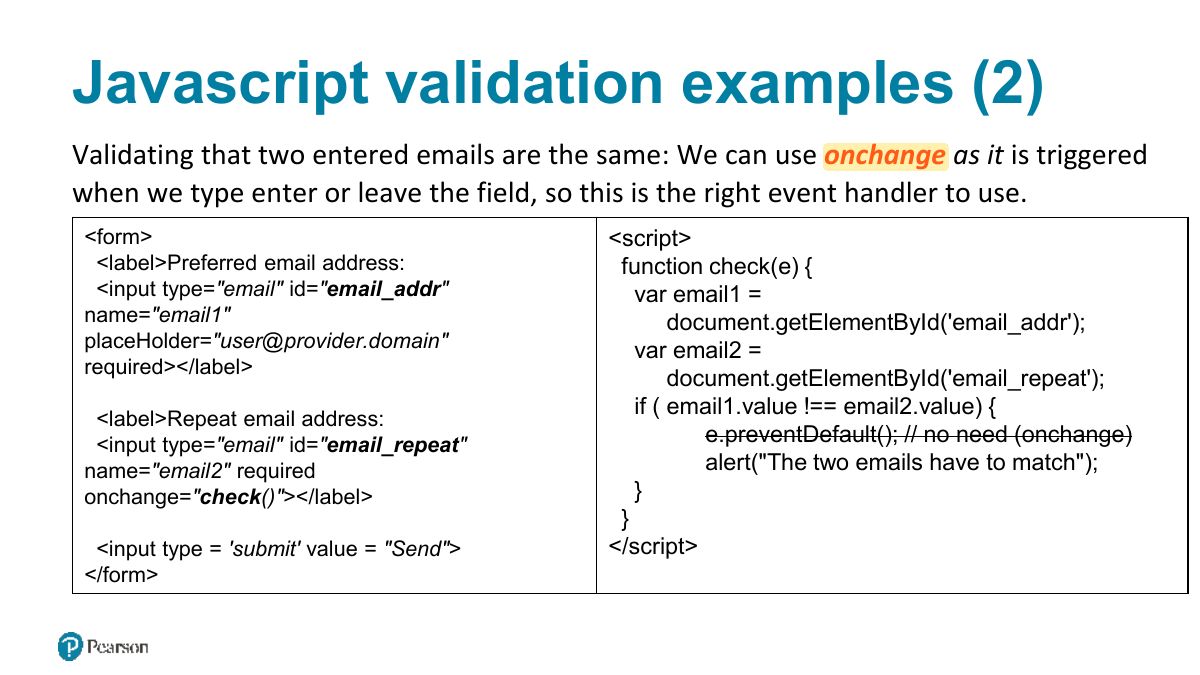
                                                                                Slide 53: Javascript validation examples (2)
                                                                                Exam weight Low
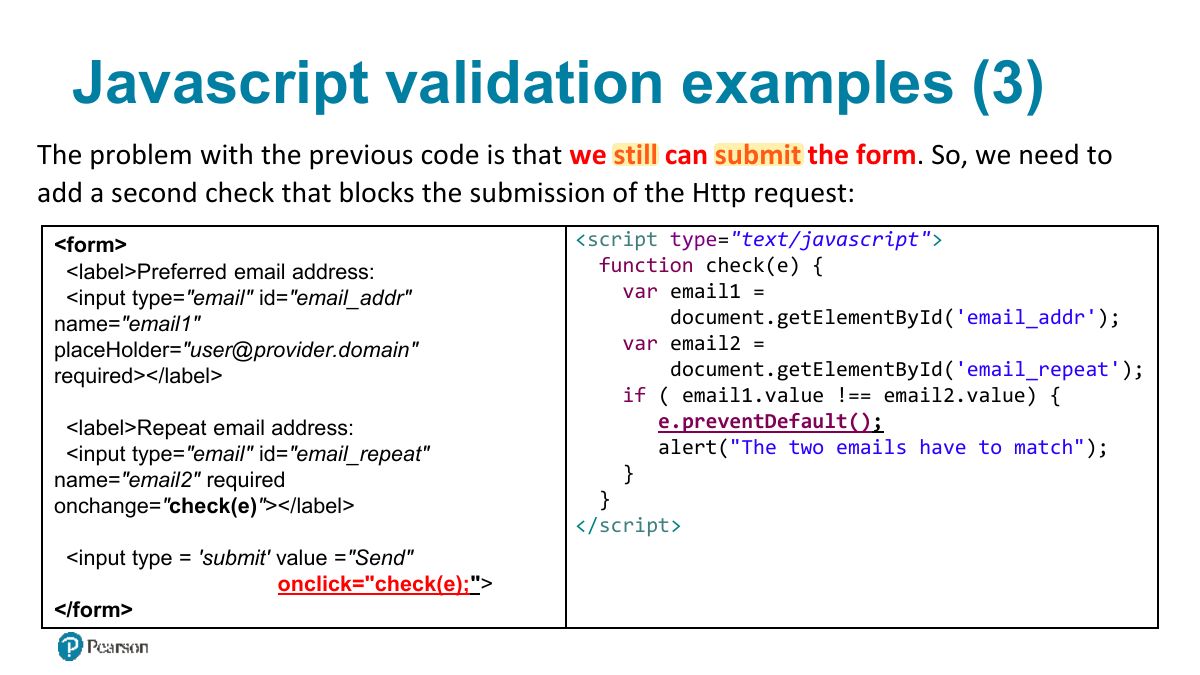
                                                                                  Slide 54: Javascript validation examples (3)
                                                                                  Exam weight Low

                                                                                    g1

                                                                                    Regular Expressions A regular expression is a set of special characters that define a pattern.

                                                                                    A regular expression consists of two types of characters: literals and metacharacters.

                                                                                    A literal is just a character you wish to match in the target (i.e., the text that you are searching within).

                                                                                    A metacharacter is a special symbol that acts as a command to the regular expression parser (there are 14, listed below).

                                                                                    . [ ] \ ^ $ | * ? { } +

                                                                                    Example for phone numbers: pattern="[+]?[0-9]{10,14}"

                                                                                    Source code: chapter05/10_form_submit_event

                                                                                    55
                                                                                    Exam weight Low

                                                                                      Regular Expression Syntax (ii)

                                                                                      In JavaScript, regular expressions are case sensitive and contained within forward slashes. For instance let pattern = /ala/; will find matches in these strings:

                                                                                      „S

                                                                                      alah Althobeiti ‟

                                                                                      malaz district'

                                                                                      „Al Note: The provided annex document gives more details about REGEX with javascript.

                                                                                      Althobeiti ".match(/ala/) , /ala/.test(“Salah

                                                                                      Althobeiti")

                                                                                      Examples: “Salah

                                                                                      56
                                                                                      Exam weight High
                                                                                      1. Regular expressions: /pattern/flags; ^ start, $ end, [a-z], \d digit, + one or more, * zero or more, {n} exactly n. regex.test(str).
                                                                                      🎯 How this can come up · 1 question
                                                                                      MCQ

                                                                                      /^\d{4}$/ matches:

                                                                                      Matches any string such that: Matches any string such that:

                                                                                      1. [a] ? : „a‟ occurs 0 or 1 times
                                                                                      2. [abc]
                                                                                      3. [a] + : „a‟ occurs 1 or more times
                                                                                      4. [abc]
                                                                                      5. [a] * : „a‟ occurs 0 or more times
                                                                                      6. [a-z]
                                                                                      7. [a] {n} : „a‟ occurs occurs n times
                                                                                      8. [A-Z]
                                                                                      9. [a] {n, } : „a‟ occurs n or more times
                                                                                      10. [a-zA-Z]
                                                                                      11. [a] {x,y} : „a‟ occurs atleast x times, at most y times
                                                                                      12. [0-9]
                                                                                      13. a: starts with a
                                                                                      14. a$ : ends with a
                                                                                      15. ?=ae: any string followed by “ae”
                                                                                      16. ?!=ae: any string not followed by “ae”
                                                                                      57
                                                                                      Exam weight Low

                                                                                        /pattern/modifier : /[a-z][0-9]/ ig

                                                                                        1. pattern.exec(input_text)  return matched text or null,
                                                                                        2. pattern.test(input_text)  return true or false
                                                                                        3. input_text.match(pattern)  return matched text or null, multiple times if pat= \sat\g
                                                                                        4. input_text.search(pattern)  return index
                                                                                        5. input_text.replace newvalue ”) (pattern, “
                                                                                        58
                                                                                        Exam weight Low