SE371 · Annotated SlidesChapter 4 — JavaScript
Chapter 4 · Annotated slides

JavaScript

What JavaScript is and where it goes, variables and data types (primitive vs. reference, let vs. const), conditionals, truthy and falsy, loops, try…catch, arrays and destructuring, objects and JSON, functions (expressions, default and rest parameters, hoisting, callbacks, arrow syntax), scope, and array functions (forEach, find, filter, map, reduce, sort).
Slide text Study notes Highlight: key words Tips, tricks & traps Seen again elsewhere How it can come up
Slide 1: Fundamentals of Web Development
Exam weight Low

    In this chapter you will learn . . .

    • About JavaScript‘s role in contemporary web development
    • How to add JavaScript code to your web pages
    • The main programming constructs of the language
    • The importance of objects and arrays in JavaScript
    • How to use functions in JavaScript
    2
    Exam weight Low
      Slide 3: What Is JavaScript and What Can It Do?
      Exam weight Low

        Client-Side Scripting: Advantages

        • Processing can be off-loaded from the server to client machines, thereby reducing the load on the server.
        • The browser can respond more rapidly to user events than a request to a remote server ever could, which improves the user experience.
        • JavaScript can interact with the downloaded HTML in a way that the server cannot, creating a user experience more like desktop software than simple HTML ever could.
        4
        Exam weight Low
        1. Client-side scripting: runs in the browser: responsive, less server load. Downsides: can be disabled, browser differences, code is visible.

        Client-Side Scripting: Disadvantages

        • There is no guarantee that the client has JavaScript enabled, meaning any required functionality must be implemented redundantly on the server.
        • JavaScript-heavy web applications can be complicated to debug and maintain.
        • JavaScript is not fault tolerant. Browsers are able to handle invalid HTML or CSS. But if your page has invalid JavaScript, it will simply stop execution at the invalid line.
        • While JavaScript is universally supported in all contemporary browsers, the language (and its APIs) is continually being expanded. As such, newer features of the language may not be supported in all browsers.
        5
        Exam weight Low
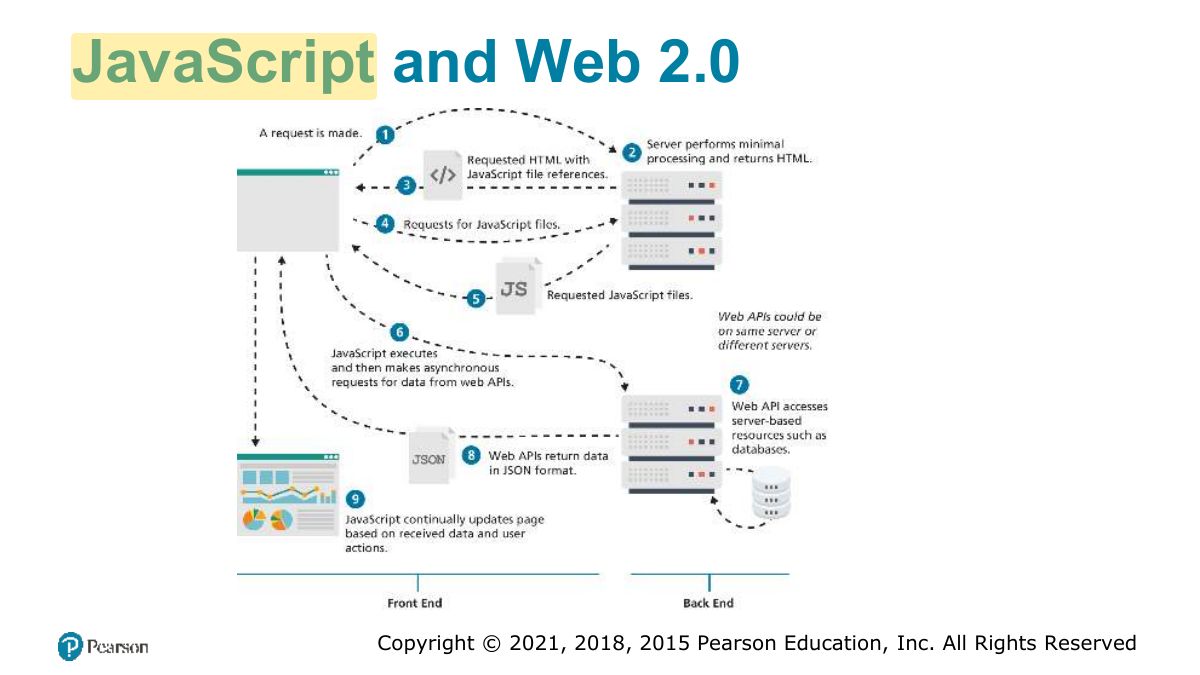
          Slide 6: JavaScript and Web 2.0
          Exam weight Low

            Where Does JavaScript Go?

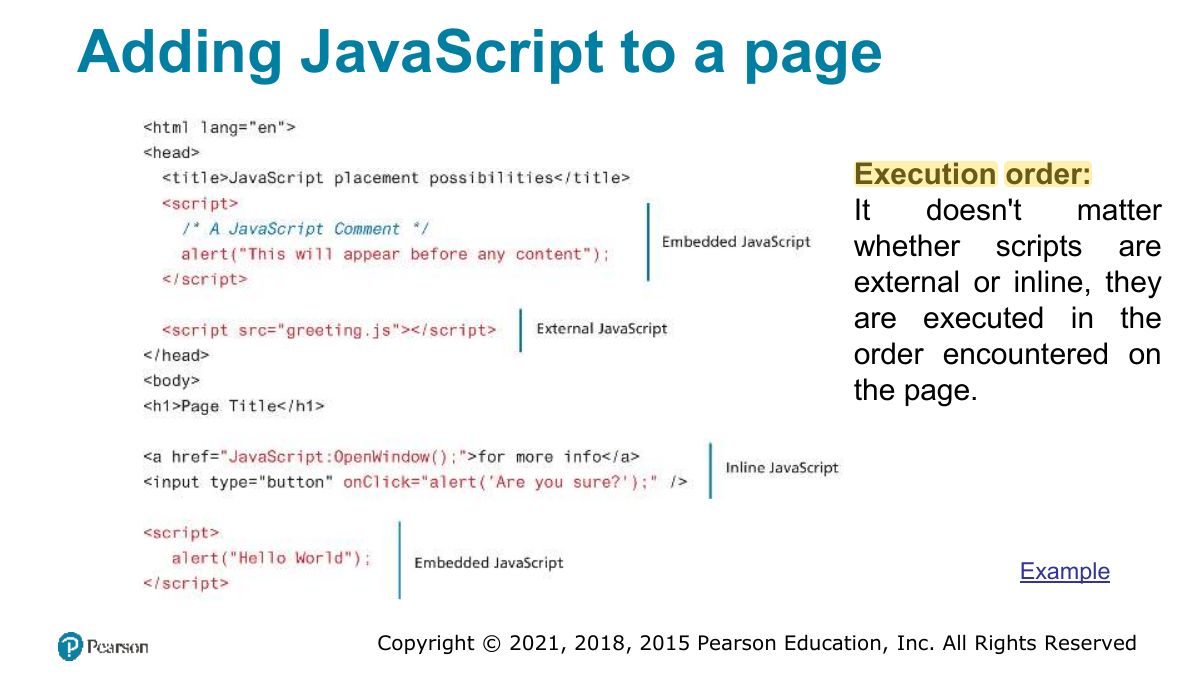
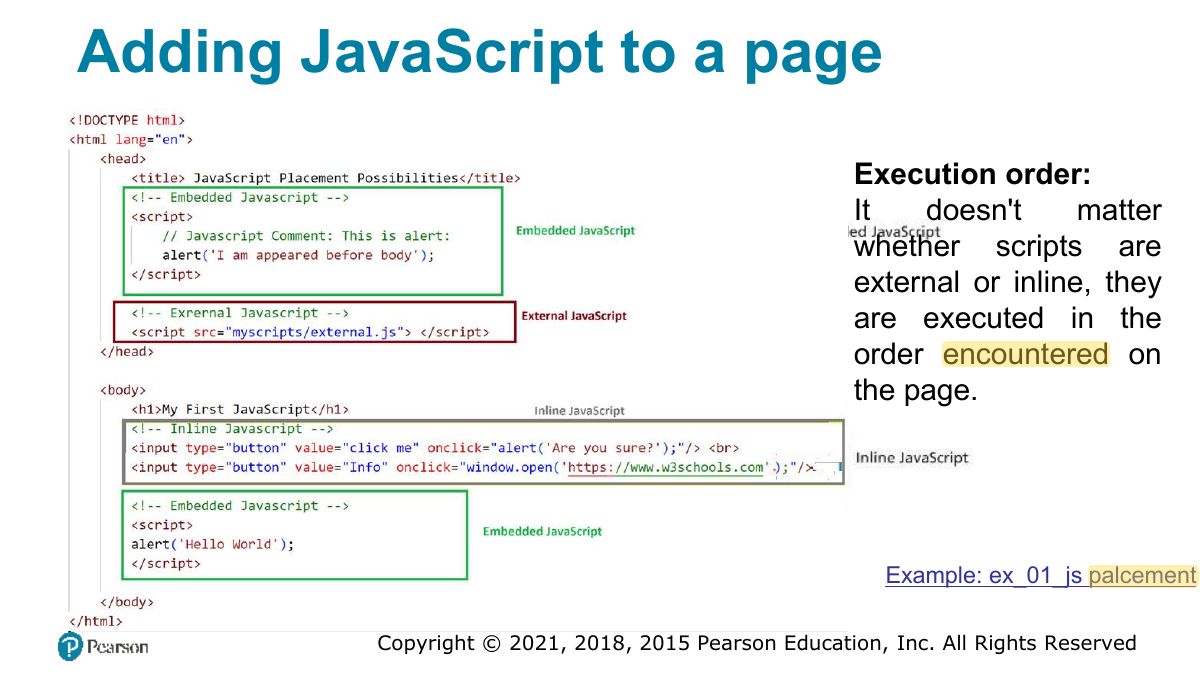
            Just as CSS styles can be inline, embedded, or external, JavaScript can be included in a number of ways.

            refers to the practice of including JavaScript code directly

            • Inline JavaScript within some HTML element attributes.
            • Embedded JavaScript refers to the practice of placing JavaScript code within a <script> element in the HTML document
            • The recommended way to use JavaScript is to place it in an external file. You import it via the <script> tag
            7
            Exam weight Low
              Slide 8: Adding JavaScript to a page
              Exam weight Low
              1. Add JS inline (attributes), embedded (<script>), or external (<script src>), usually at the end of body or with defer.
              Slide 9: Adding JavaScript to a page
              Exam weight Low
                Slide 10: Variables and Data Types
                Exam weight Low
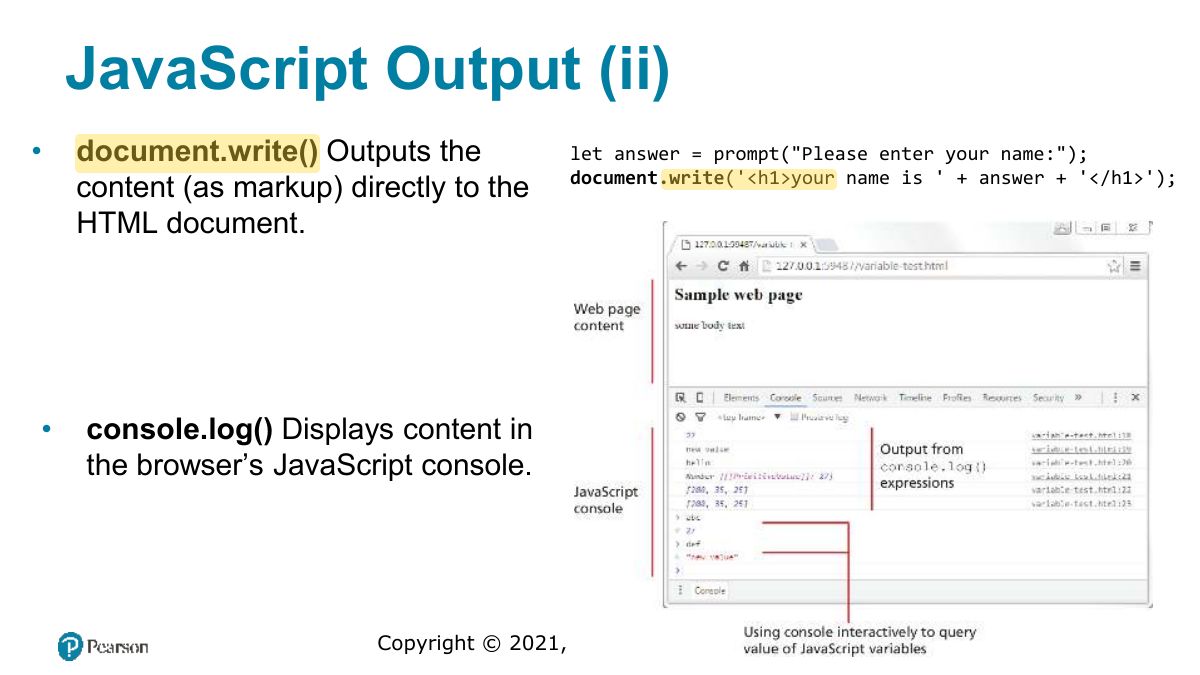
                  Slide 11: JavaScript Output
                  Exam weight Low
                    Slide 12: JavaScript Output (ii)
                    Exam weight Low

                      Data Types

                      JavaScript has two basic data types:

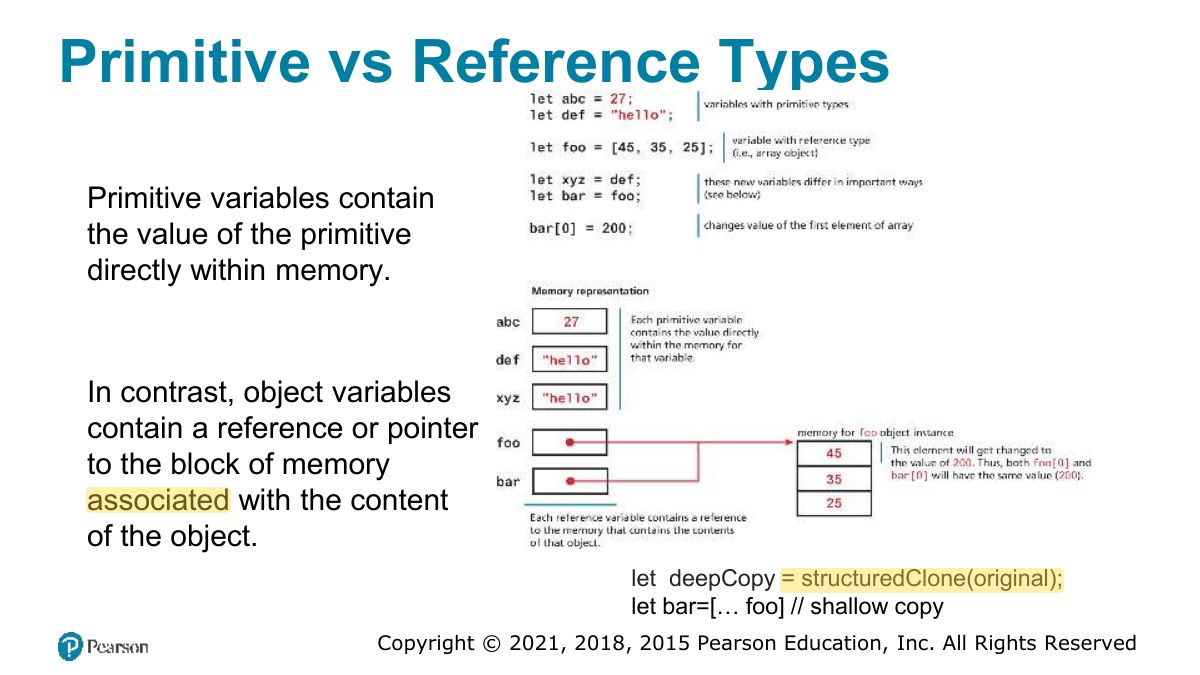
                      • reference types (usually referred to as objects)
                      • primitive types (i.e., non-object, simple types).
                      13
                      Exam weight Low

                        Primitive Types

                        • boolean True or false value.
                        • number Represents a number, a double precision 64-bit floating point value. 53)
                        • bigint Represents an integer that can be very large (> 2
                        • string Represents a sequence of characters delimited by either the single or double quote characters.
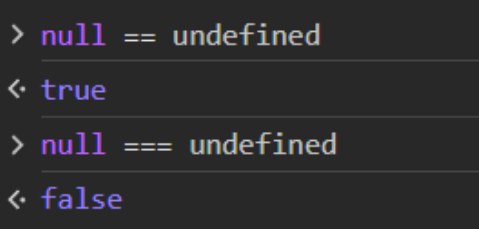
                        • null Has only one value: null.
                        • undefined Has only one value: undefined.

                        This value is assigned to variables that are not initialized. Undefined is different from null.

                        Primitive Types
                        14
                        Exam weight Low
                        1. Primitives: number, string, boolean, null, undefined, symbol, bigint. Objects (arrays, functions) are reference types.
                        Slide 15: Primitive vs Reference Types
                        Exam weight Low
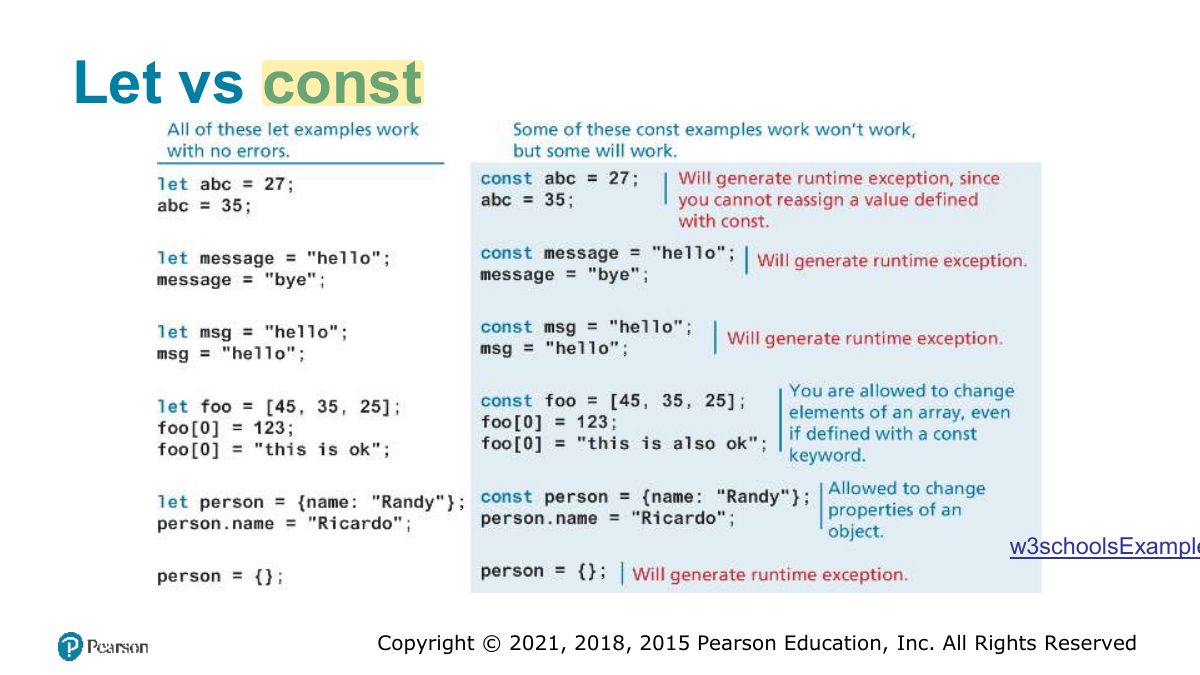
                          Slide 16: Let vs const
                          Exam weight High
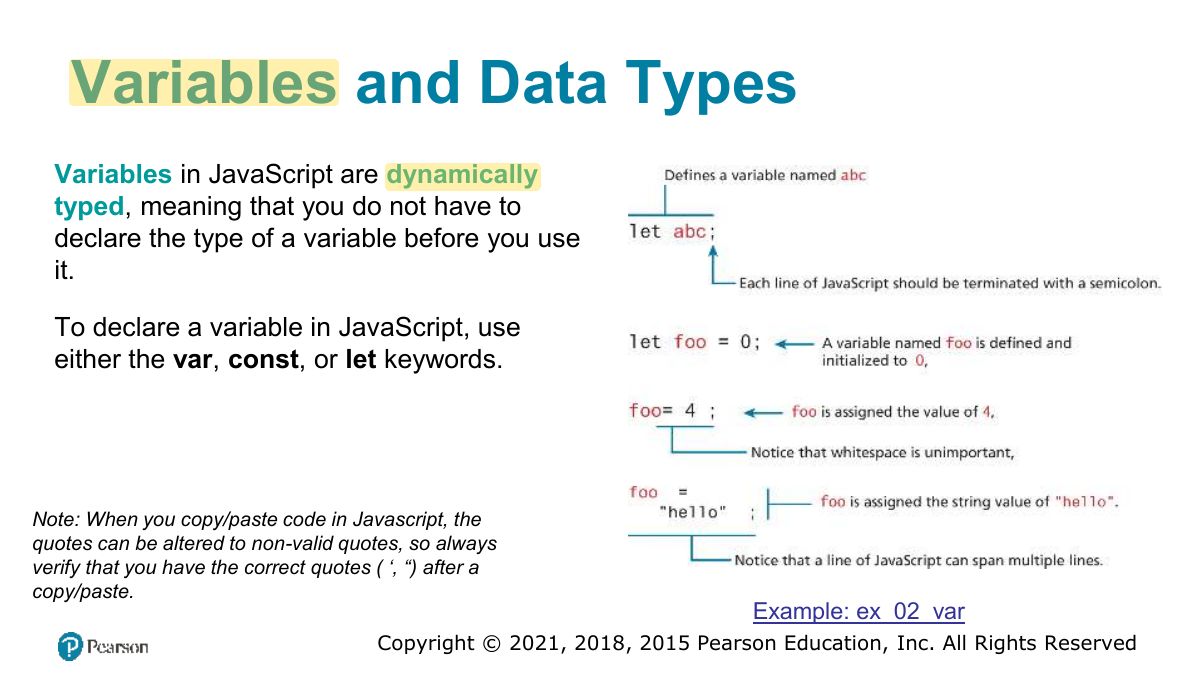
                          1. let: block-scoped, can be reassigned. const: block-scoped, can’t be reassigned (but a const object’s contents CAN change). Avoid var.
                          Exam trapconst arr = [1]; arr.push(2) is fine: the binding is constant, not the array.
                          🎯 How this can come up · 1 question
                          MCQ

                          const x = {a: 1}; x.a = 2; results in:

                          Built-In Objects

                          JavaScript has a variety of objects you can use at any time, such as arrays, functions, and the built-in objects.

                          Some of the most commonly used built-in objects include Object, Function, Boolean, Error, Number, Math, Date, String, and Regexp.

                          Other objects are only available in the browser. These include the document, console, navigator, and window objects.

                          let def = new Date; // sets the value of abc to a string containing the current date let abc = def.toString; // Get the geolocation of the current user (try it on the console) navigator.geolocation.getCurrentPosition((data) => { console.log(data); } )

                          17
                          Exam weight Low
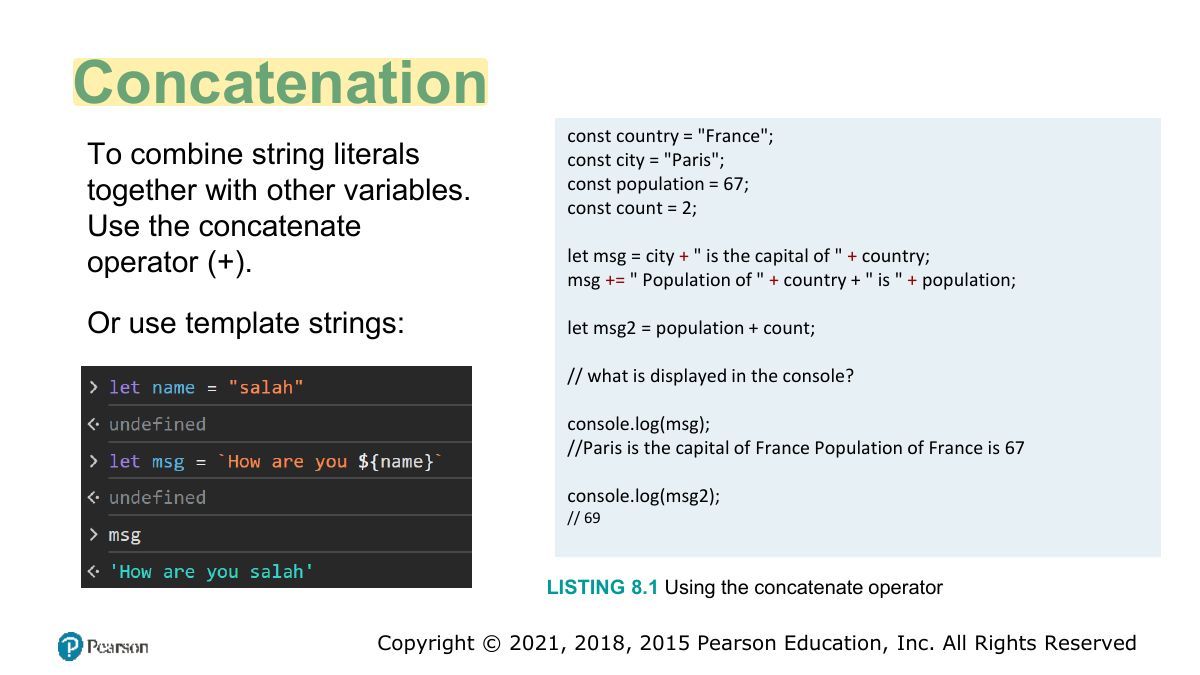
                            Slide 18: Concatenation
                            Exam weight Low
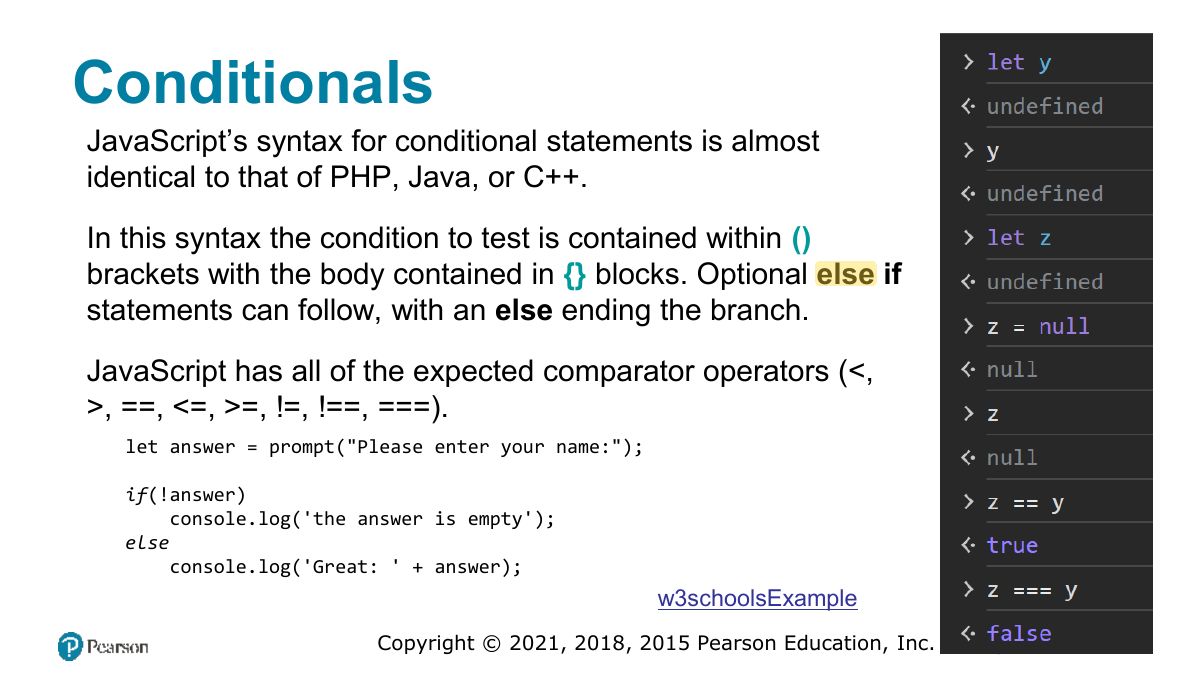
                              Slide 19: Conditionals
                              Exam weight High
                              1. converts types before comparing; = compares value AND type. "5" 5 is true, "5" = 5 is false.
                              🎯 How this can come up · 1 question
                              MCQ

                              "5" === 5 evaluates to:

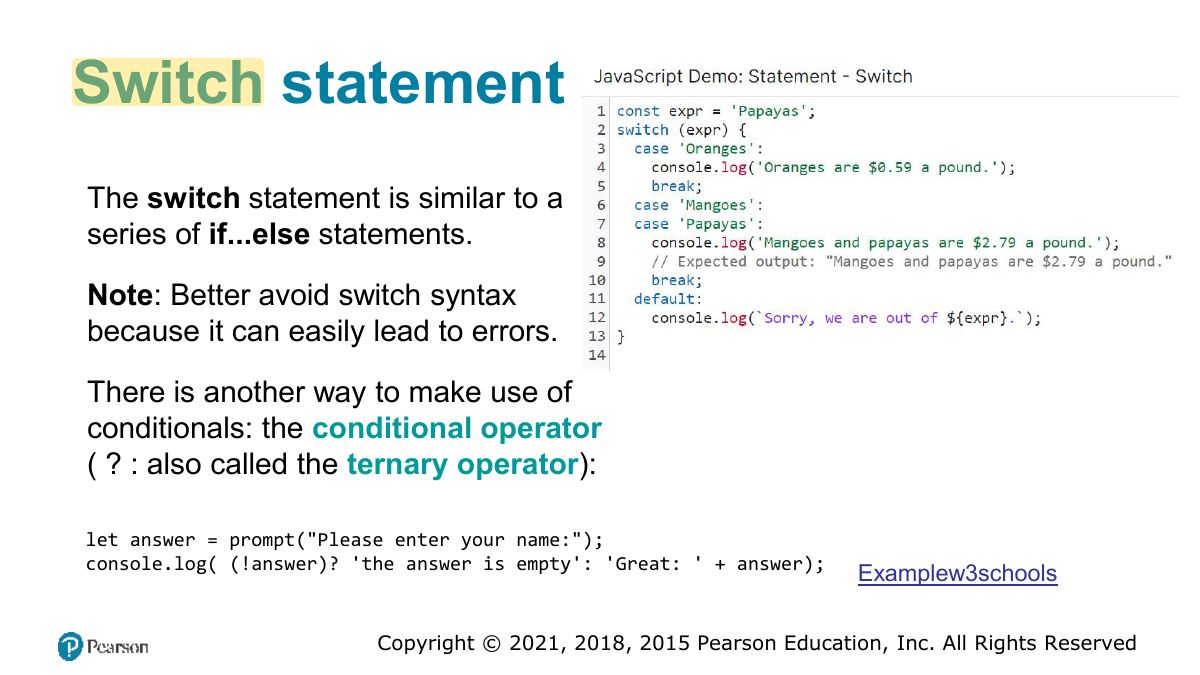
                              Slide 20: Switch statement
                              Exam weight Low

                                Truthy and Falsy

                                Everything in JavaScript has an inherent Boolean value.

                                In JavaScript, a value is said to be truthy if it translates to true, while a value is said to be falsy if it translates to false.

                                All values in JavaScript are truthy except false, null, "", '', 0, NaN

                                ,

                                (0/0, sqrt(-1))

                                and undefined Try:

                                let a = 2; let b; !!a; // true -> truthy !a; // false -> falsy !!b; // ??

                                21
                                Exam weight High
                                1. Falsy values: false, 0, "", null, undefined, NaN. Everything else is truthy ("0", [], {} included).
                                🎯 How this can come up · 1 question
                                MCQ

                                Which value is falsy?

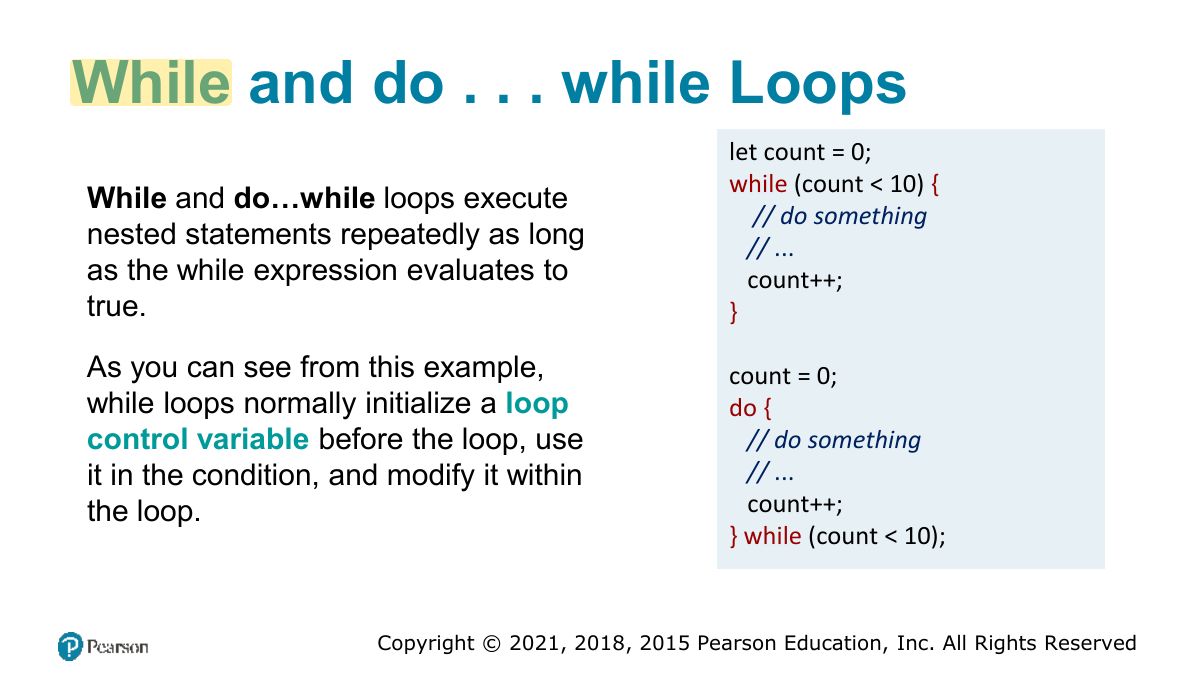
                                Slide 22: While and do . . . while Loops
                                Exam weight Low
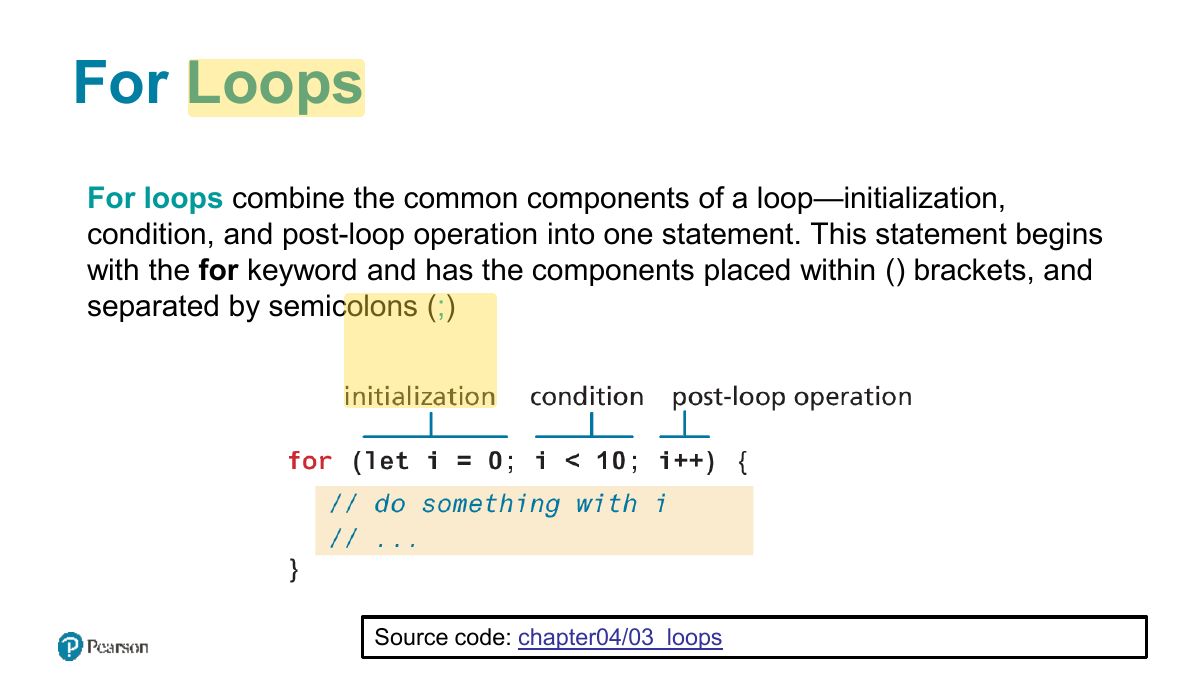
                                  Slide 23: For Loops
                                  Exam weight Low
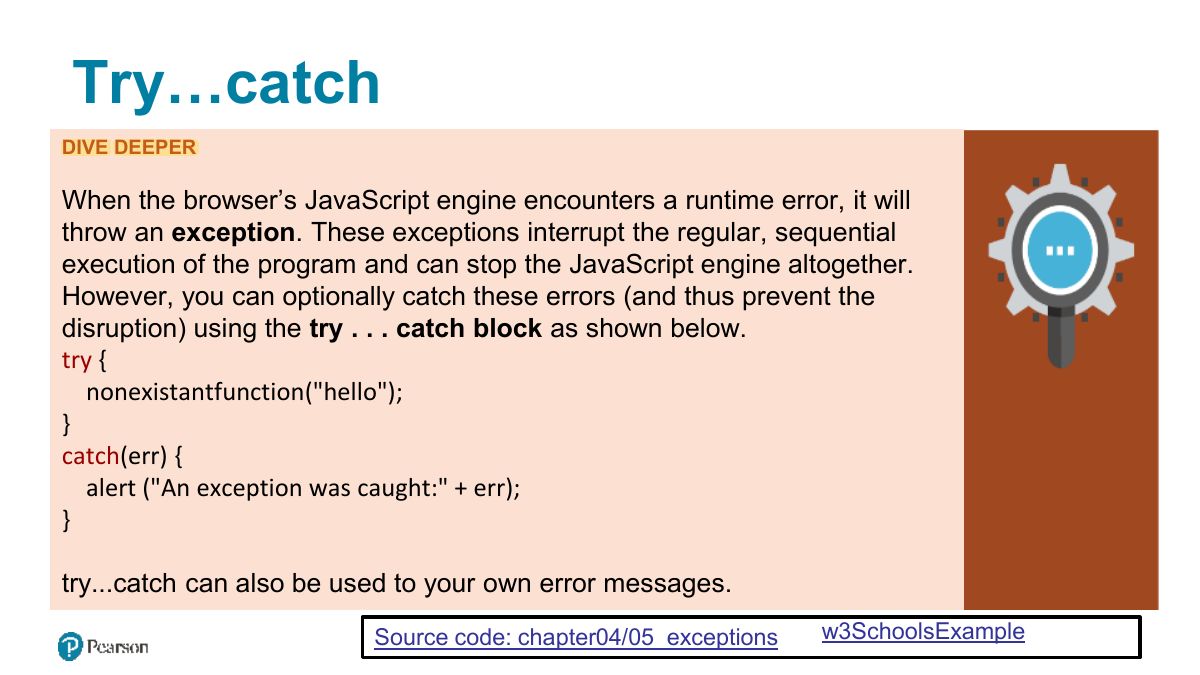
                                    Slide 24: Try...catch
                                    Exam weight Low

                                      Arrays

                                      Arrays are one of the most commonly used data structures in programming.

                                      JavaScript provides two main ways to define an array.

                                      First approach is Array literal notation, which has the following syntax:

                                      • const name = [ value1, value2, ... ];

                                      The second approach is to use the Array constructor:

                                      • const name = new Array(value1, value2, ... );
                                      25
                                      Exam weight Low

                                        Array example

                                        const years = [1855, 1648, 1420]; const myyear = [... years]; //makes a new array with the same elements const myear_2= years; // Both variables point to the same array in memory

                                        .

                                        const countries = [“KSA", “Italy", "Germany", "Nigeria", “Vietnam", “Mali"]; // arrays can also be multi-dimensional... notice the commas! const twoWeeks = [ ["Mon","Tue","Wed","Thu","Fri"], ["Mon","Tue","Wed","Thu","Fri"] ]; // JavaScript arrays can contain different data types const mess = [53, "Canada", true, 1420];

                                        26
                                        Exam weight Low
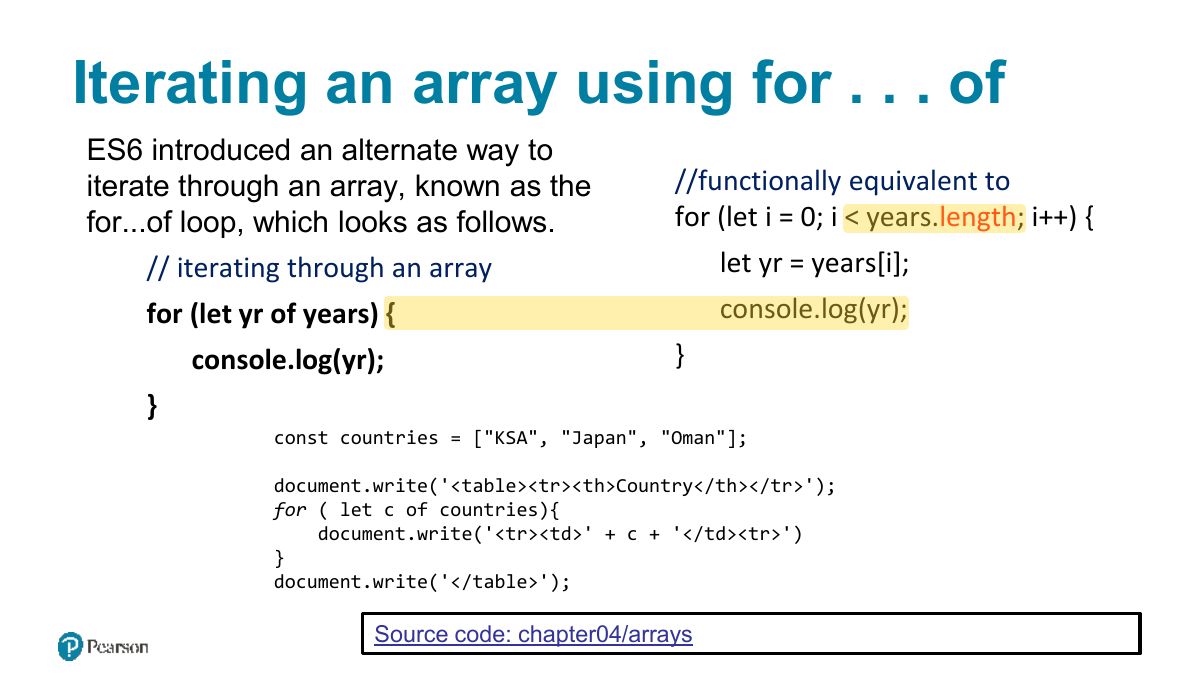
                                          Slide 27: Iterating an array using for . . . of
                                          Exam weight Low

                                            Array Destructuring

                                            L et‘s say you have the following array:

                                            const league = ["Liverpool", "Man City", "Arsenal", "Chelsea"];

                                            Now imagine that we want to extract the first three elements into their own variables.

                                            The ―old - fashioned‖ way to do this would look like the following:

                                            let first = league[0]; let second = league[1]; let third = league[2];

                                            By using array destructuring, we can create the equivalent code in just a single line:

                                            let [first,second,third] = league;

                                            28
                                            Exam weight Low
                                            1. Array destructuring: const [a, b] = [1, 2];
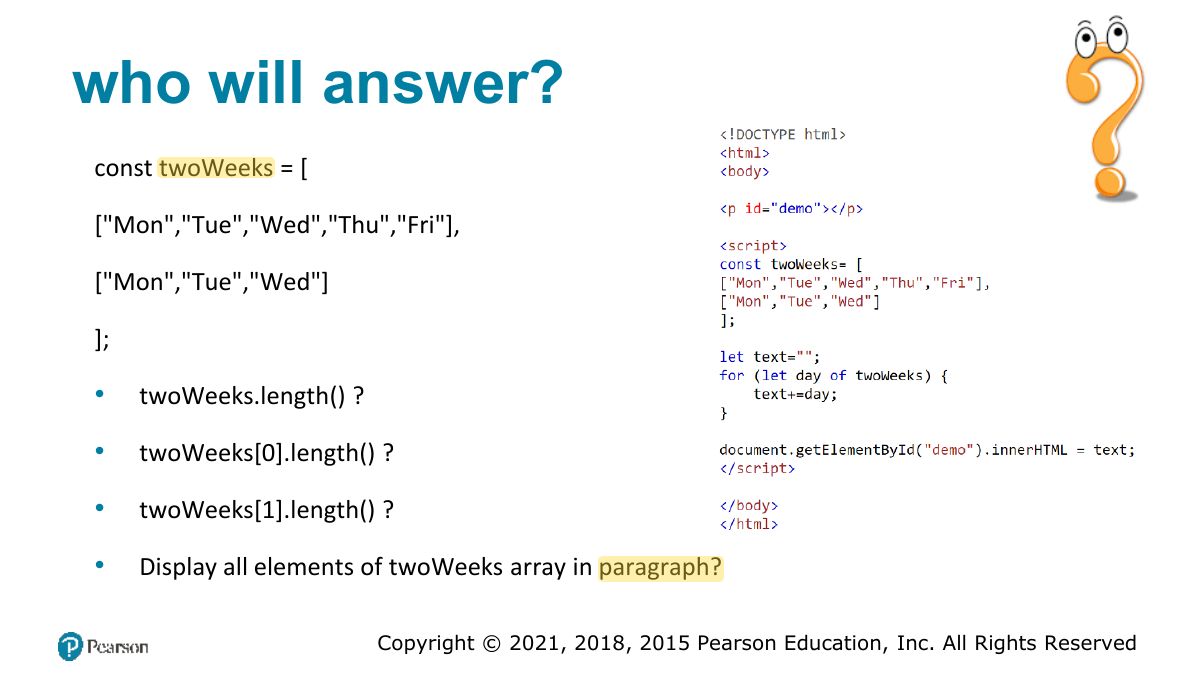
                                            Slide 29: who will answer?
                                            Exam weight Low

                                              Objects

                                              We have already encountered a few of the built-in objects in JavaScript, namely, arrays along with the Math, Date, and document objects.

                                              In this section, we will learn how to create our own objects and examine some of the unique features of objects within JavaScript.

                                              In JavaScript, objects are a collection of named values (which are called properties in JavaScript).

                                              Unlike languages such as C++ or Java, objects in JavaScript are not created from classes. JavaScript is a prototype based language, in that new objects are created from already existing prototype objects.

                                              30
                                              Exam weight Low
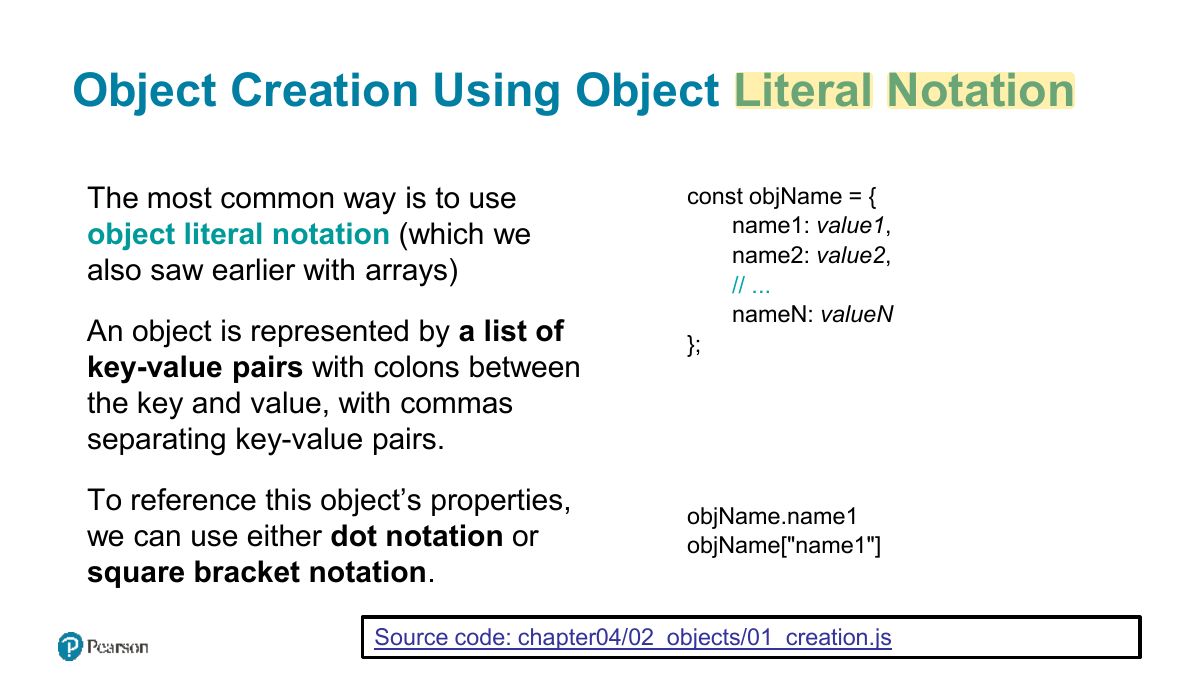
                                                Slide 31: Object Creation Using Object Literal Notation
                                                Exam weight Low
                                                1. Object literal: const p = {name: "Ali", age: 20}; access with p.name or p["name"].

                                                Object Creation Using Object Constructor

                                                Another way to create an instance of an object is to use the Object constructor, as shown in the following:

                                                // first create an empty object const objName = new Object; // then define properties for this object objName.name1 = value1; objName.name2 = value2;

                                                Generally speaking, object literal notation is preferred in JavaScript over the constructed form.

                                                32
                                                Exam weight Low
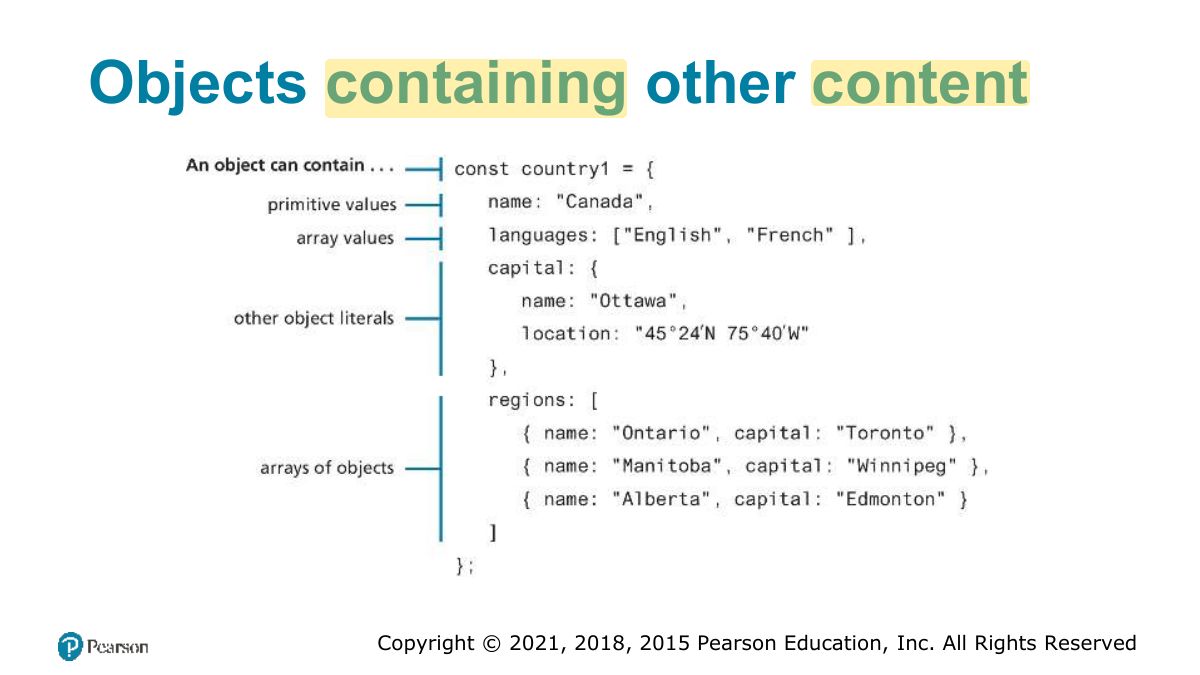
                                                  Slide 33: Objects containing other content
                                                  Exam weight Low

                                                    Exercise: (object creation)

                                                    • Create an object that represents KSA, you have to include an id (the phone country code), the name, and an object that represents its currency. The currency is characterized by a name, a value against the dollar, a list of available coins and a list of available banknotes. let ksa = { id: ̳966', name: 'KSA', currency: { name: 'riyal', valueAgaintDollar: 0.2666, coins: [ 0.01, 0.05, 0.1, 0.2, 0.5 ], banknotes: [ 1, 5, 10, 20, 50, 100, 200, 500] } }
                                                    34
                                                    Exam weight Low
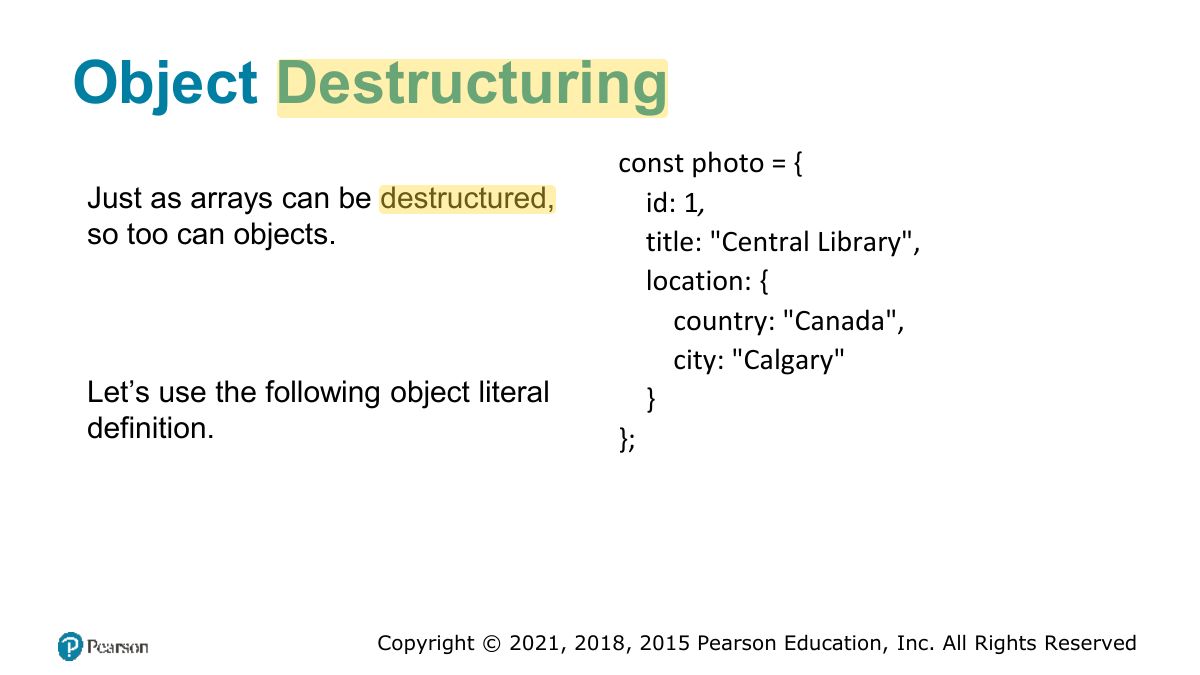
                                                      Slide 35: Object Destructuring
                                                      Exam weight Low
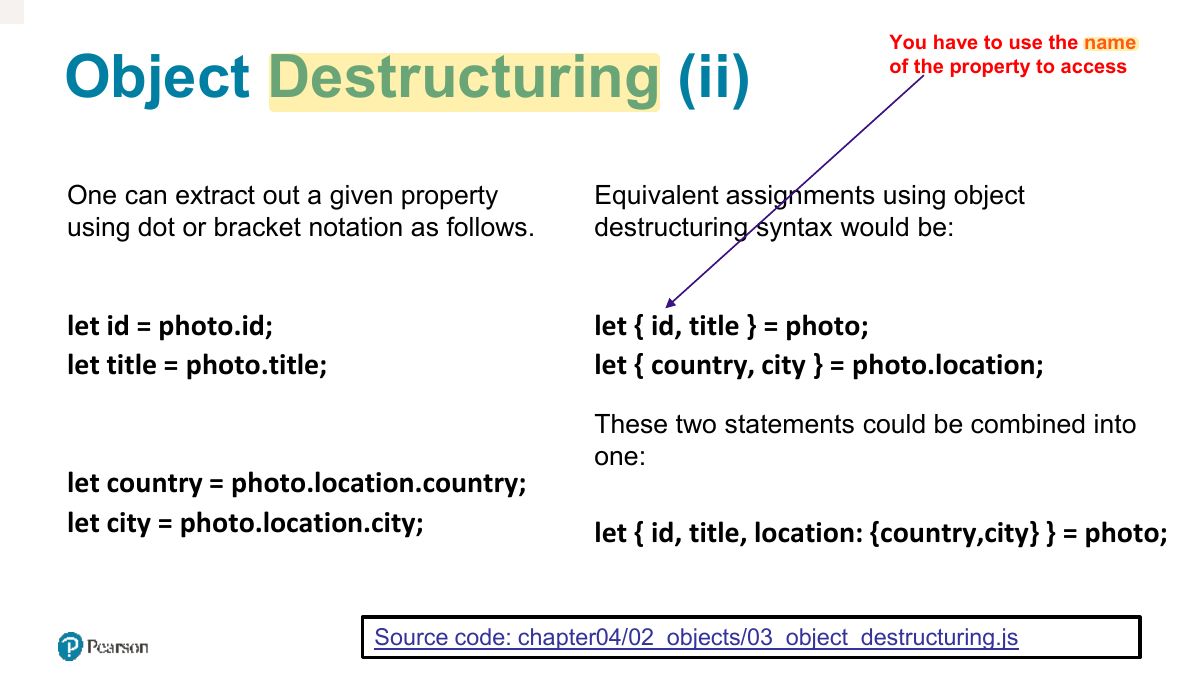
                                                      1. Object destructuring uses the property NAMES: const {name, age} = p;
                                                      Slide 36: You have to use the name
                                                      Exam weight Low

                                                        JSON

                                                        JavaScript Object Notation or JSON is used as a language-independent data interchange format analogous in use to XML.

                                                        The main difference between JSON and object literal notation is that property names are enclosed in quotes, as shown in the following example:

                                                        // this is just a string though it looks like an object literal const text = ' { "name1" : "value1", "name2" : "value2", "name3" : "value3" } ; ’ Try to access: https://mocki.io/v1/c8805938-cc32-4dab-87f2-0151dbf4b5df [ref: blog]

                                                        Source code: chapter04/04_json/index.html

                                                        37
                                                        Exam weight High
                                                        1. JSON: text format for data. JSON.stringify(obj) → string; JSON.parse(str) → object. Keys must be double-quoted.
                                                        🎯 How this can come up · 1 question
                                                        MCQ

                                                        Which converts a JSON string into a JavaScript object?

                                                        JSON object

                                                        The string literal on the last slide contains an object definition in JSON format (but is still just a string). To turn this string into an actual JavaScript object requires using the built-in JSON object.

                                                        const countries = ['{"id": "01", "name": "KSA"}',

                                                        // turn JSON string into an object '{"id": "02", "name": "Japan"}',

                                                        '{"id": "03", "name": "Oman"}'];

                                                        const anObj = JSON.parse(text); // displays "value1“

                                                        document.write('<table><tr><th>ID</th><th>Country</th></tr>') ;

                                                        console.log(anObj.name1);

                                                        for (let c of countries){ let co = JSON.parse(c); document.write ('<tr><td>' + co.id + '</td><td>’ + co.name + '</td><tr>') } document.write('</table>');

                                                        Source code: chapter04/04_json/index02.html

                                                        38
                                                        Exam weight Low

                                                          Functions

                                                          A function to calculate a subtotal as the price of a product multiplied by the quantity might be defined as follows:

                                                          function subtotal(price, quantity) {

                                                          return price * quantity;

                                                          }

                                                          The above is formally called a function declaration. Such a declared function can be called or invoked by using the operator.

                                                          let result = subtotal(10,2);

                                                          39
                                                          Exam weight Low

                                                            Function expressions

                                                            // defines a function using an anonymous function expression const calculateSubtotal = function (price,quantity) {

                                                            return price * quantity;

                                                            }; // invokes the function let result = calculateSubtotal(10,2); // define another function const warn = function (msg) { alert(msg); }; // now invoke that function warn("This doesn't return anything");

                                                            W3schools_example

                                                            40
                                                            Exam weight Low

                                                              Default Parameters

                                                              In the following code, what will happen (i.e., what will bar be equal to)?

                                                              function foo(a,b) {

                                                              return a+b;

                                                              } let bar = foo(3); // 3 + undefined -> NaN

                                                              The answer is NaN. However, there is a way to specify default parameters

                                                              function foo(a =10,b =0) { return a+b; }

                                                              Now bar in the above example will be equal to 3.

                                                              41
                                                              Exam weight Low
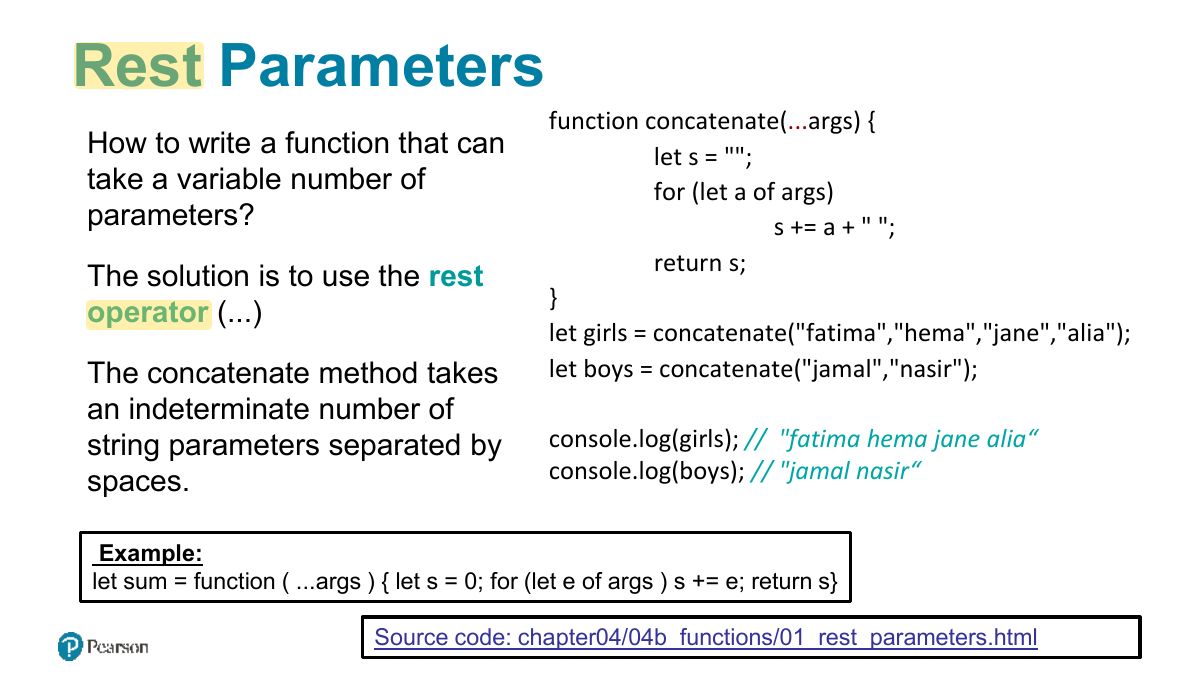
                                                                Slide 42: Rest Parameters
                                                                Exam weight Low
                                                                1. Rest parameters: function sum(...nums) collects remaining arguments into an array.

                                                                Home Task [ungraded]

                                                                • Create an external JavaScript file:
                                                                • Add Calculator function:
                                                                  • Calculator function take array and operation as argument. Possible operations:
                                                                    • ̳multiply‘ that multiplies all elements of any given array
                                                                    • ̳average‘ that averages all elements of any given array
                                                                    • ̳max‘ that searches for the max elements in any given array using loop.

                                                                Submit your personal work to the LMS on the assignment page.

                                                                43
                                                                Exam weight Low
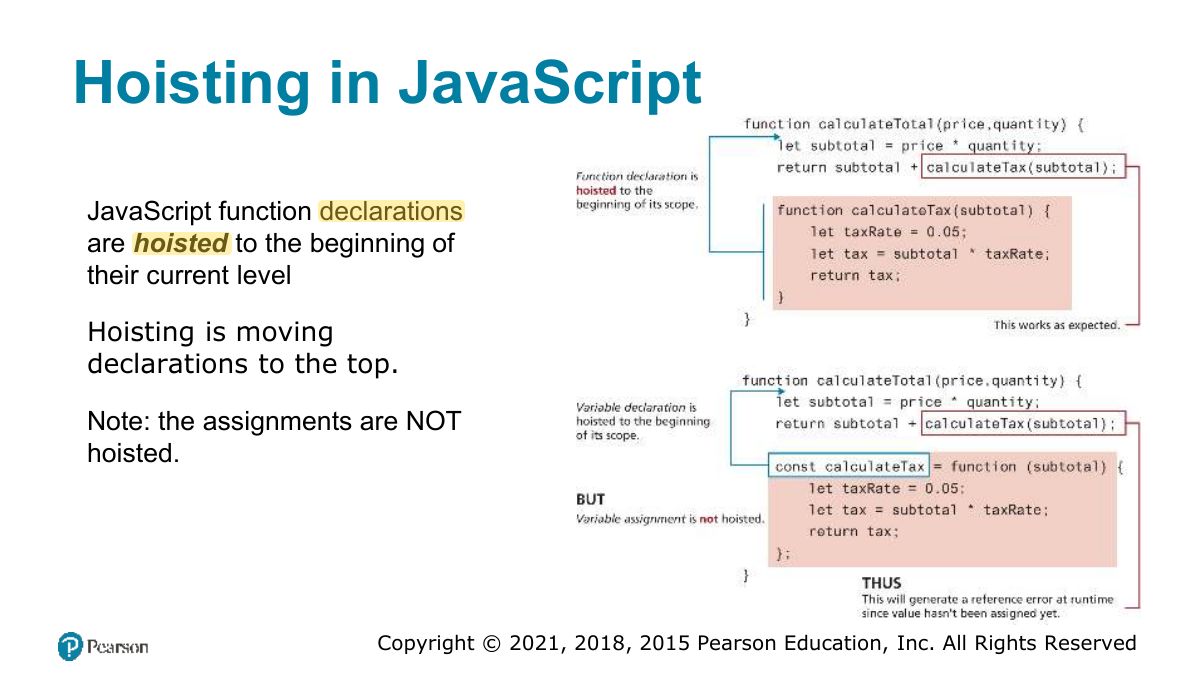
                                                                  Slide 44: Hoisting in JavaScript
                                                                  Exam weight Low
                                                                  1. Hoisting: function declarations are moved to the top (callable before definition); function expressions and let/const are not usable before their line.
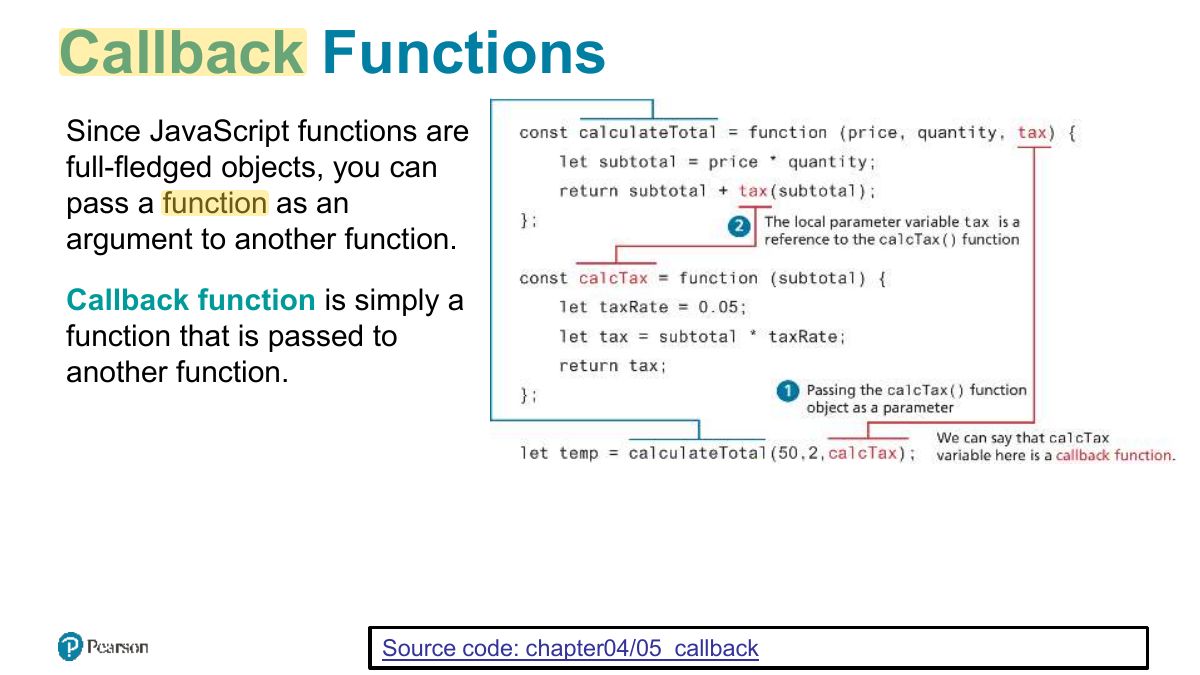
                                                                  Slide 45: Callback Functions
                                                                  Exam weight Low
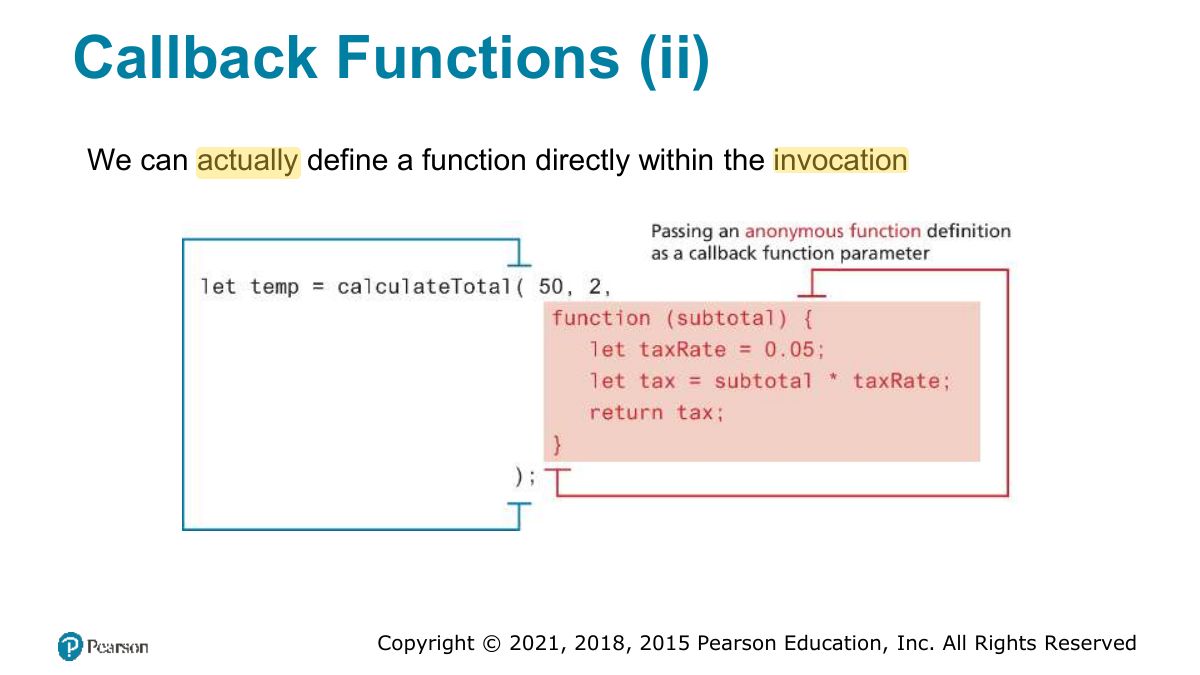
                                                                  1. Callback: a function passed to another function to be called later.
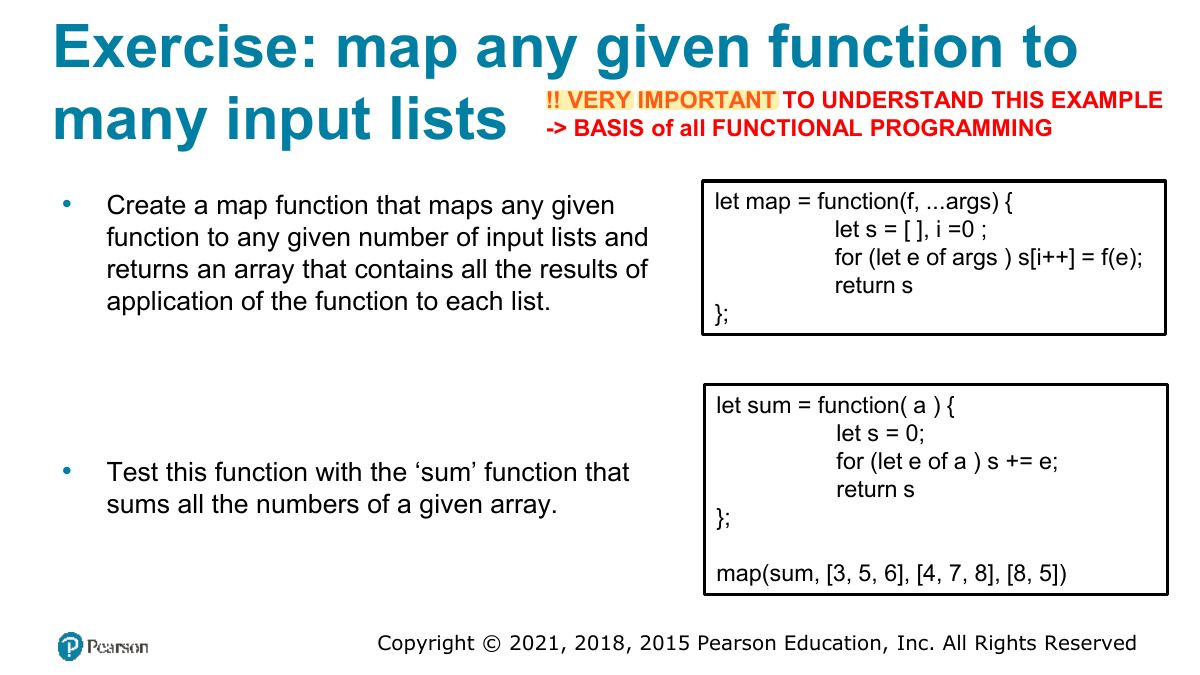
                                                                  Slide 46: Exercise: map any given function to
                                                                  Exam weight Low

                                                                    Home Task [ungraded]

                                                                    • Implement the map example from the slide 46.
                                                                    • Add other functions than ̳add‘ to be used with the map function:
                                                                      • ̳multiply‘ that multiplies all elements of any given array
                                                                      • ̳average‘ that averages all elements of any given array
                                                                      • ̳max‘ that searches for the max elements in any given array
                                                                    47
                                                                    Exam weight Low
                                                                      Slide 48: Callback Functions (ii)
                                                                      Exam weight Low
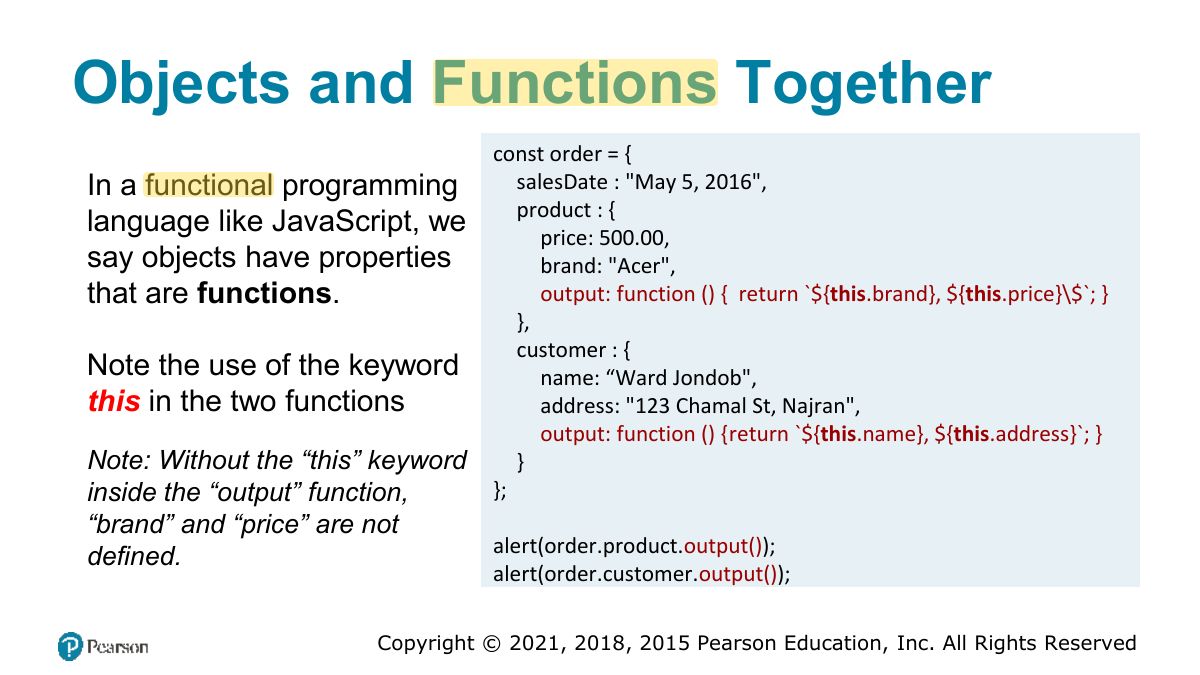
                                                                        Slide 49: Objects and Functions Together
                                                                        Exam weight Low
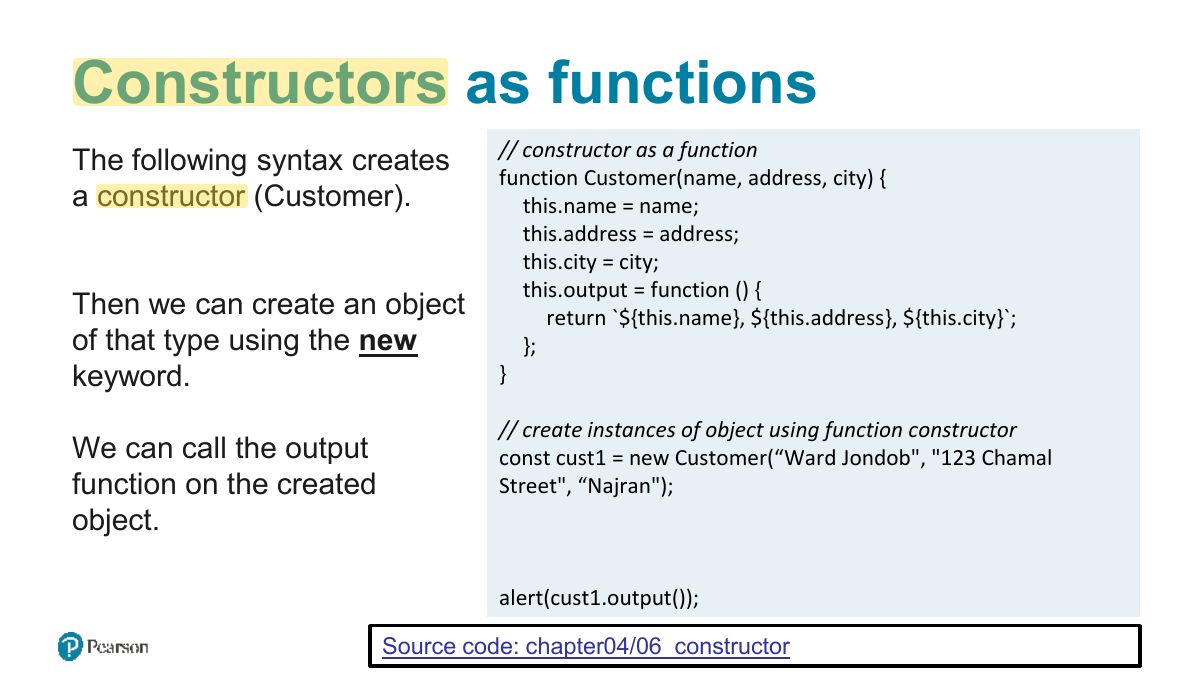
                                                                          Slide 50: Constructors as functions
                                                                          Exam weight Low

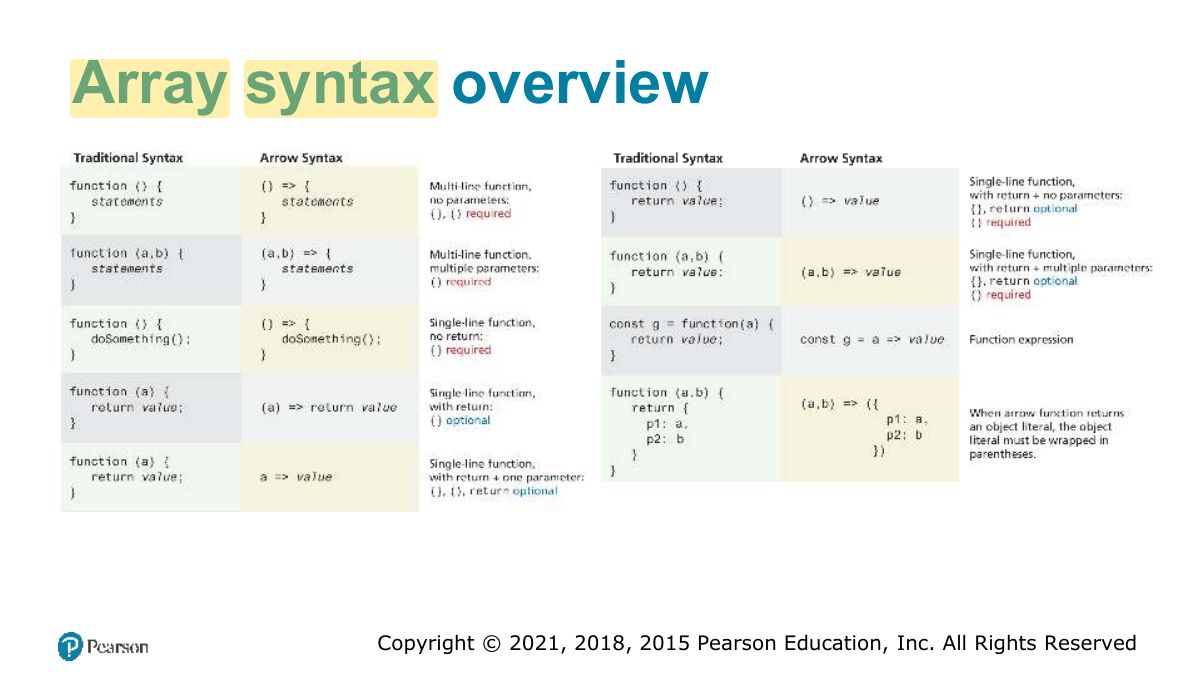
                                                                            Arrow Syntax

                                                                            (a, b) => {return a + b}

                                                                            Arrow syntax provide a more concise syntax for the definition of anonymous functions.

                                                                            const taxRate = function { return 0.05; };

                                                                            The arrow function version would look like the following:

                                                                            const taxRate = => 0.05; Note:

                                                                            Arrow functions cannot be used as constructors

                                                                            51
                                                                            Exam weight Low
                                                                            1. Arrow functions: (a, b) => a + b. Shorter; they don’t have their own this.
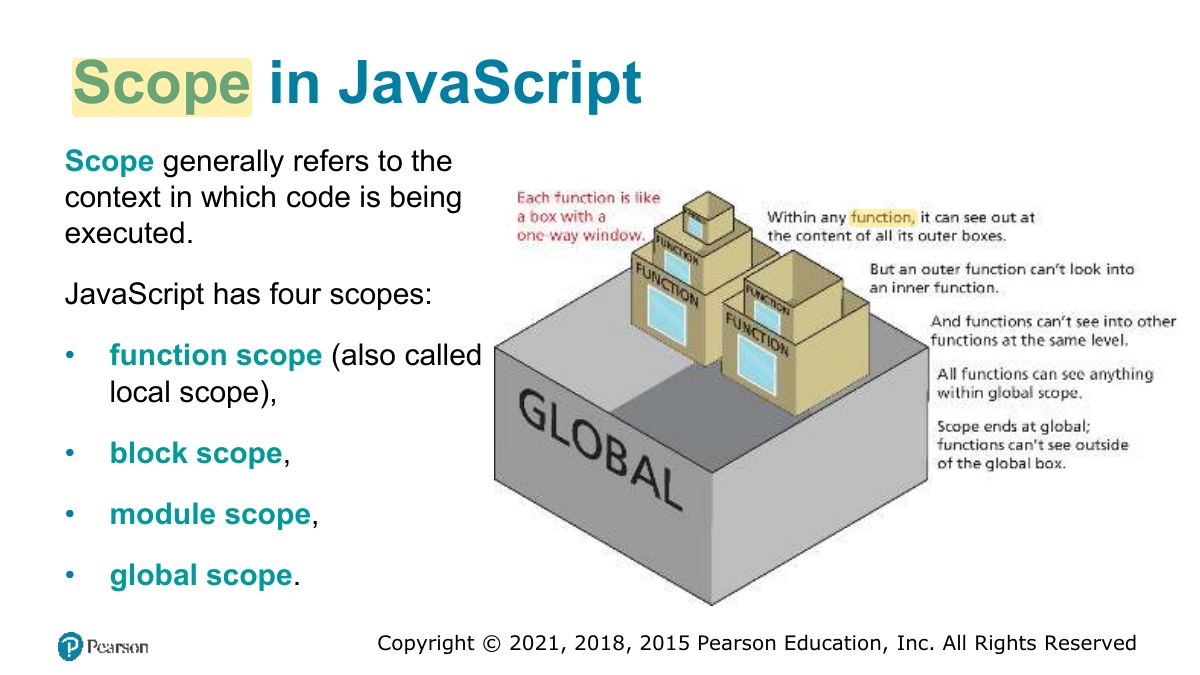
                                                                            Slide 52: Scope in JavaScript
                                                                            Exam weight Low
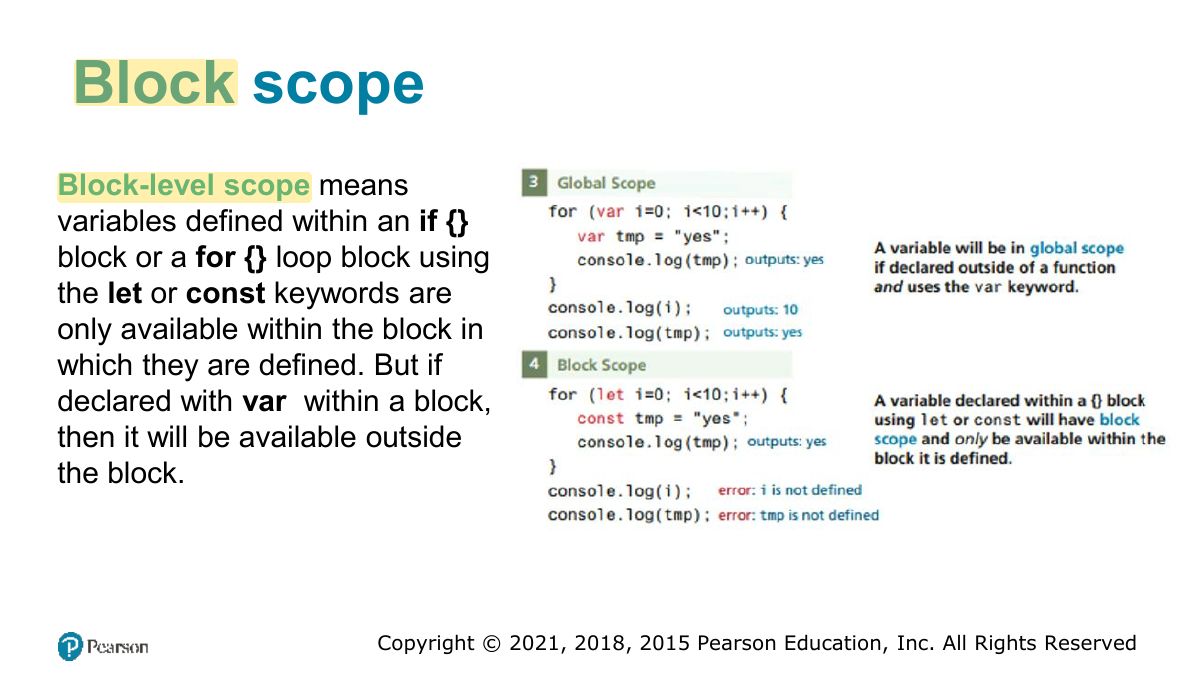
                                                                            1. Scope: global, function (local), block (let/const inside { }).
                                                                            Slide 53: Block scope
                                                                            Exam weight Low

                                                                              Function/Local Scope

                                                                              54
                                                                              Exam weight Low
                                                                                Slide 55: Fundamentals of Web Development
                                                                                Exam weight Low

                                                                                  Array Functions

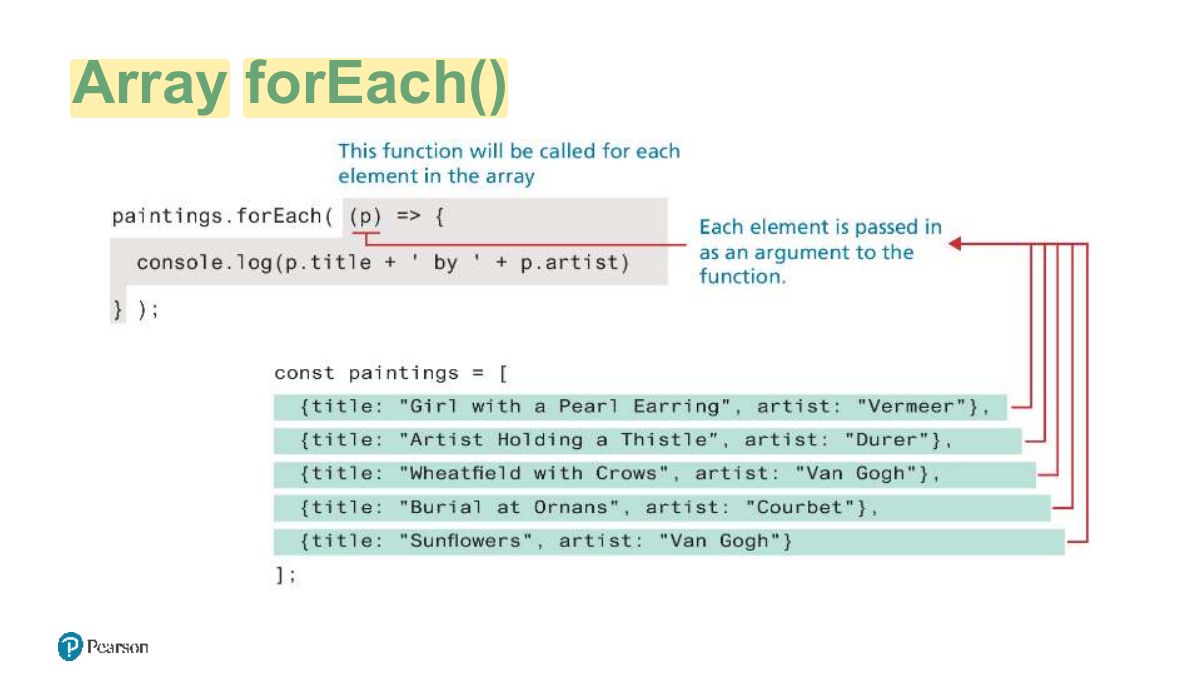
                                                                                  • forEach iterate through an array
                                                                                  • find find the first object whose property matches some condition
                                                                                  • filter find all matches whose property matches some condition
                                                                                  • map it creates a new array of the same size whose values have been transformed by the passed function
                                                                                  • reduce reduces an array into a single value
                                                                                  • sort sorts a one-dimensional array (by default converts to strings then sorts, you can provide your own comparator) Source code: chapter04/08_array_functions
                                                                                  56
                                                                                  Exam weight Low
                                                                                    Slide 57: Array forEach
                                                                                    Exam weight Low

                                                                                      Array find

                                                                                      One of the more common coding scenarios with an array of objects is to find the first object whose property matches some condition. This can be achieved via the find method of the array object, as shown below.

                                                                                      const courbet = paintings.find(p => p.artist === 'Courbet' ); console.log(courbet.title); // Burial at Ornans

                                                                                      Like the forEach method, the find method is passed a function; this function must return either true (if condition matches) or false (if condition does not match). In the example code above, it returns the results of the conditional check on the artist name.

                                                                                      58
                                                                                      Exam weight Low

                                                                                        Array filter, and map

                                                                                        If you were interested in finding all elements use the filter method.

                                                                                        The map function creates a new array of the same size but whose values have been transformed by the passed function.

                                                                                        const arr = ["hello", "selem", "ciao", "hallo", "gutentag"]; const pat = /el/; pat.test(arr[0]) // will return true pat.test(arr[2]) // will return false arr. map (o => pat.test(o)) // [true, true, false, false, false] arr. filter (o => pat.test(o)) // ['hello', 'selem']

                                                                                        59
                                                                                        Exam weight High
                                                                                        1. filter returns the elements that pass a test; map returns a new array of transformed elements; find returns the FIRST match.
                                                                                        🎯 How this can come up · 2 questions
                                                                                        MCQ

                                                                                        [1, 2, 3, 4].filter(n => n % 2 === 0) returns:

                                                                                        MCQ

                                                                                        [1, 2, 3].map(n => n * 2) returns:

                                                                                        Reduce

                                                                                        The reduce function is used to reduce an array into a single value.

                                                                                        The reduce function is passed a function that is invoked for each element in the array.

                                                                                        For instance, the following example illustrates how this function can be used to sum the value property of each painting object in our sample paintings array:

                                                                                        let initial = 0; const total = paintings. reduce ((prev, p) => prev + p.value, initial);

                                                                                        Example 2: const all = arr.reduce((prev, p) => prev + " " + p) // ’ hello selem ciao hallo gutentag'

                                                                                        60
                                                                                        Exam weight Low
                                                                                        1. reduce combines all elements into one value: [1, 2, 3].reduce((acc, n) => acc + n, 0) → 6.

                                                                                        Sort

                                                                                        sort function sorts in place and in ascending order (after converting to strings if necessary, use toSorted if you do not want to mutate the original array)

                                                                                        arr.sort // ['ciao', 'gutentag', 'hallo', 'hello', 'selem ’]

                                                                                        If you need to sort an array of objects based on one of the object properties, you will need to supply the sort method with a compare function that returns 0 if the two objects are considered equal, a positive value if the first object is greater than the second, or a negative value if the first value is less than the second.

                                                                                        Example:

                                                                                        const numberArray = [40, 5, 200, 1]; function compareNumbers(a, b) {

                                                                                        return a - b;

                                                                                        } numberArray.sort; // [1, 200, 40, 5] numberArray.sort(compareNumbers); // [1, 5, 40, 200]

                                                                                        61
                                                                                        Exam weight High
                                                                                        1. sort() sorts as STRINGS by default: [10, 9, 1].sort() → [1, 10, 9]. Use sort((a, b) => a − b) for numbers.
                                                                                        Exam trapDefault sort is lexicographic.

                                                                                        Examples

                                                                                        (reduce, sort array of objects)

                                                                                        let initial = 0; const paintings = [ {title: "Girl with a pearl earring", artist: "Vermeer", value: 10}, {title: "Artists Holding a Thristle", artist: "Durer", value: 7}, {title: "Wheat field with Crows", artist: "Van Gogh", value: 16}, {title: "Burial at Ornans", artist: "Courbet", value: 18}, {title: "Wheat field with Crows", artist: "Van Gogh", value: 9} ]; //Compute sum of all these paintings values const total = paintings.reduceprev, p) => prev + p.value, initial ); console.log(total ); // sort the array based on the value property of painting objects const compareFn = (a, b) => a.value - b.value; console.log(paintings.sort(compareFn;

                                                                                        62
                                                                                        Exam weight Low

                                                                                          Home Task [ungraded]

                                                                                          • Use Array functions
                                                                                            • to reduce array: result will be a multiplication of all elements of any given array
                                                                                          63
                                                                                          Exam weight Low
                                                                                            Slide 64: Array syntax overview
                                                                                            Exam weight Low