SE322 · Chapter 4 · Lecture 2 · Annotated SlidesData-Centered, Data-Flow and Distributed Patterns: Blackboard, Pipes-and-Filters, Client-Server, Broker
PDF
Overview

Data-Centered, Data-Flow and Distributed Patterns: Blackboard, Pipes-and-Filters, Client-Server, Broker

Four patterns for three system types. Data-centered systems revolve around shared data: in the blackboard pattern, independent knowledge sources (agents) improve a shared solution on the blackboard while a controller decides who works next. Data-flow systems move and transform a stream: pipes-and-filters chains independent filters with pipes from a data source to a data sink. Distributed systems spread work over the network: client–server is direct and tightly coupled, and the broker pattern puts a mediator (with client- and server-side proxies) between them to loosen that coupling.

Blackboard

Blackboard (shared data) + agents/knowledge sources (independent specialists) + controller (schedules them). Opportunistic: no fixed order of steps.

Pipes and filters

Data source → filter → pipe → filter → … → data sink. Filters are independent, so they can be added, reordered, reused and run in parallel.

Client–server

Clients request, a central server provides. Interoperable and easy to update centrally, but clients are tightly coupled to the server.

Broker

Client → client proxy → broker → server proxy → server. Clients need only the broker, so servers can move or change.

How the lecture is organized

  • Slides 2–5Data-centered systems: data manager, workers, integrity
  • Slides 6–23Blackboard: analogy, ER example, components, scheduling-system diagrams, speech-recognition exercise
  • Slides 24–36Data flow and pipes-and-filters: compiler and face-recognition examples, qualities
  • Slides 37–42Distributed systems and client–server
  • Slides 43–48Broker pattern and summary

Exam focus

Every pattern here has been examined. Midterm 252 Q5 (6 marks) was a whole blackboard problem (name the pattern, give each component’s role, build the component diagram, write an availability scenario) and Q6 (2 marks) a pipe-and-filter sequence diagram for the face-recognition system on slides 31–35. Final 252 Q4-2 asked for the pipe-and-filter diagram of a video-processing app, and Midterm 261 Q6 matched scenarios to blackboard, pipe-and-filter, broker and client-server.

How to read this page

Every original slide is shown unchanged. Yellow marks on a slide point to a numbered note: hover or tap a mark to jump to its note, and hover a note to see its marks. Questions tagged Past exam appeared on a real paper; Prediction questions are likely angles, not confirmed.

All 48 slides
  1. 1 Slide 1
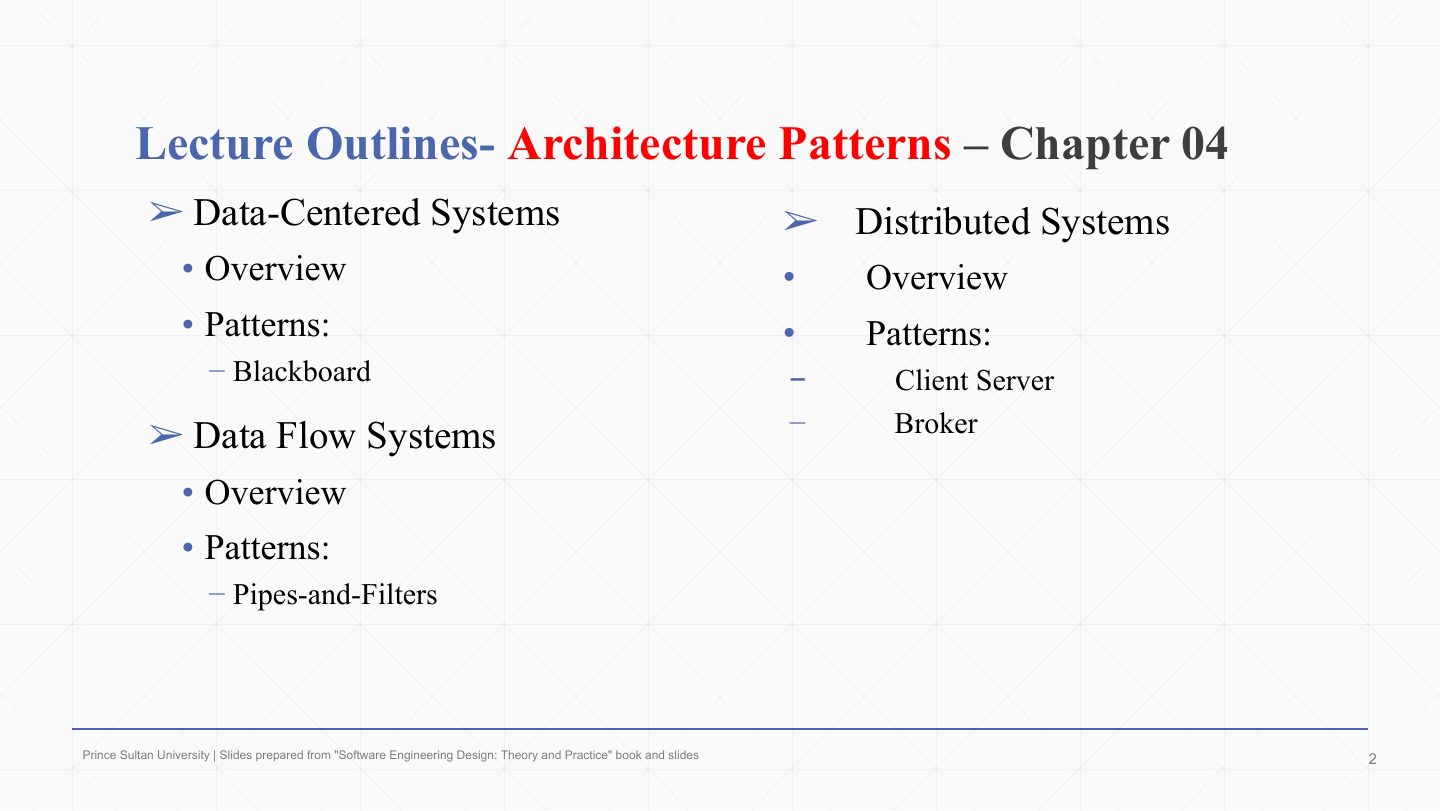
  2. 2 Lecture Outlines- Architecture Patterns Ð Chapter 04
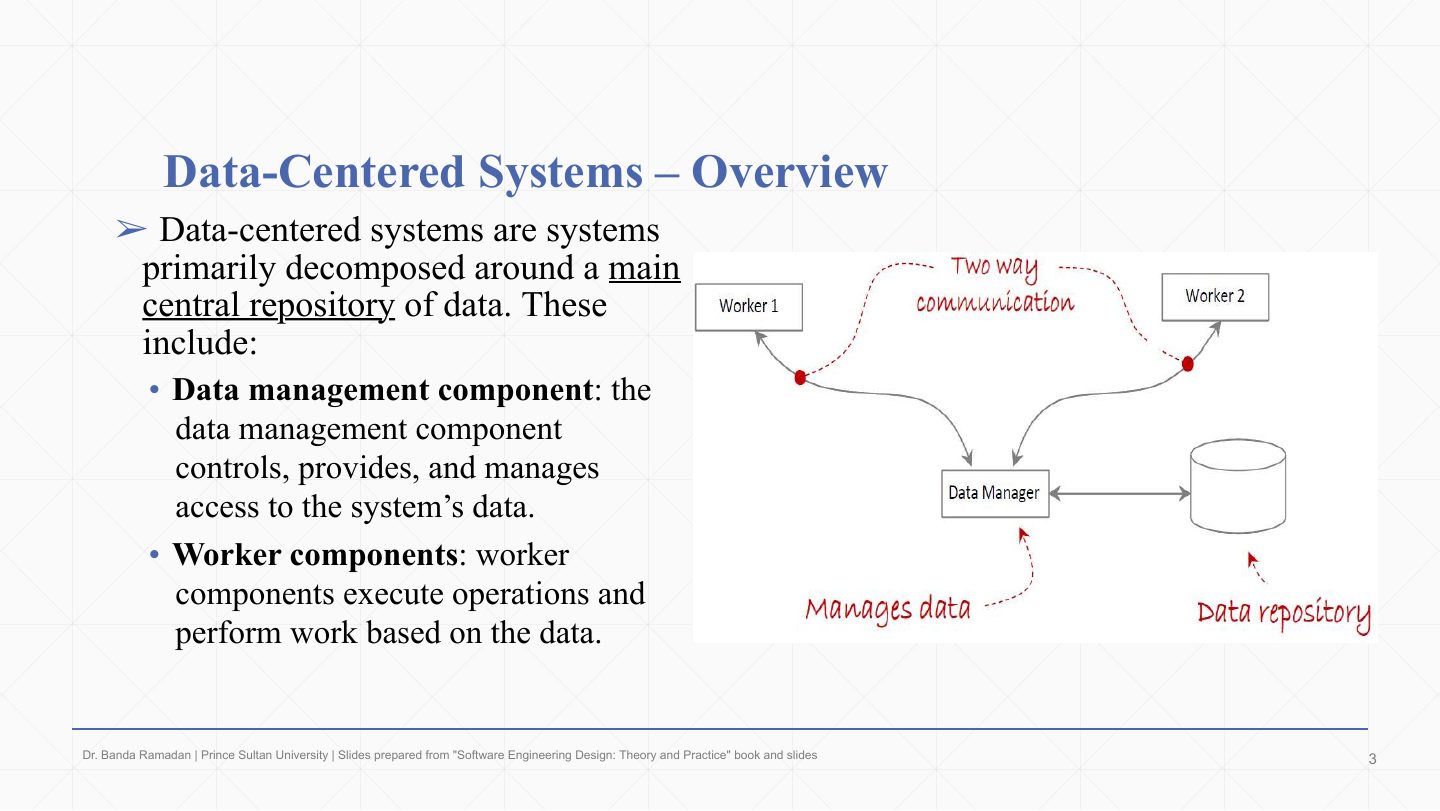
  3. 3 Data-Centered Systems Ð Overview
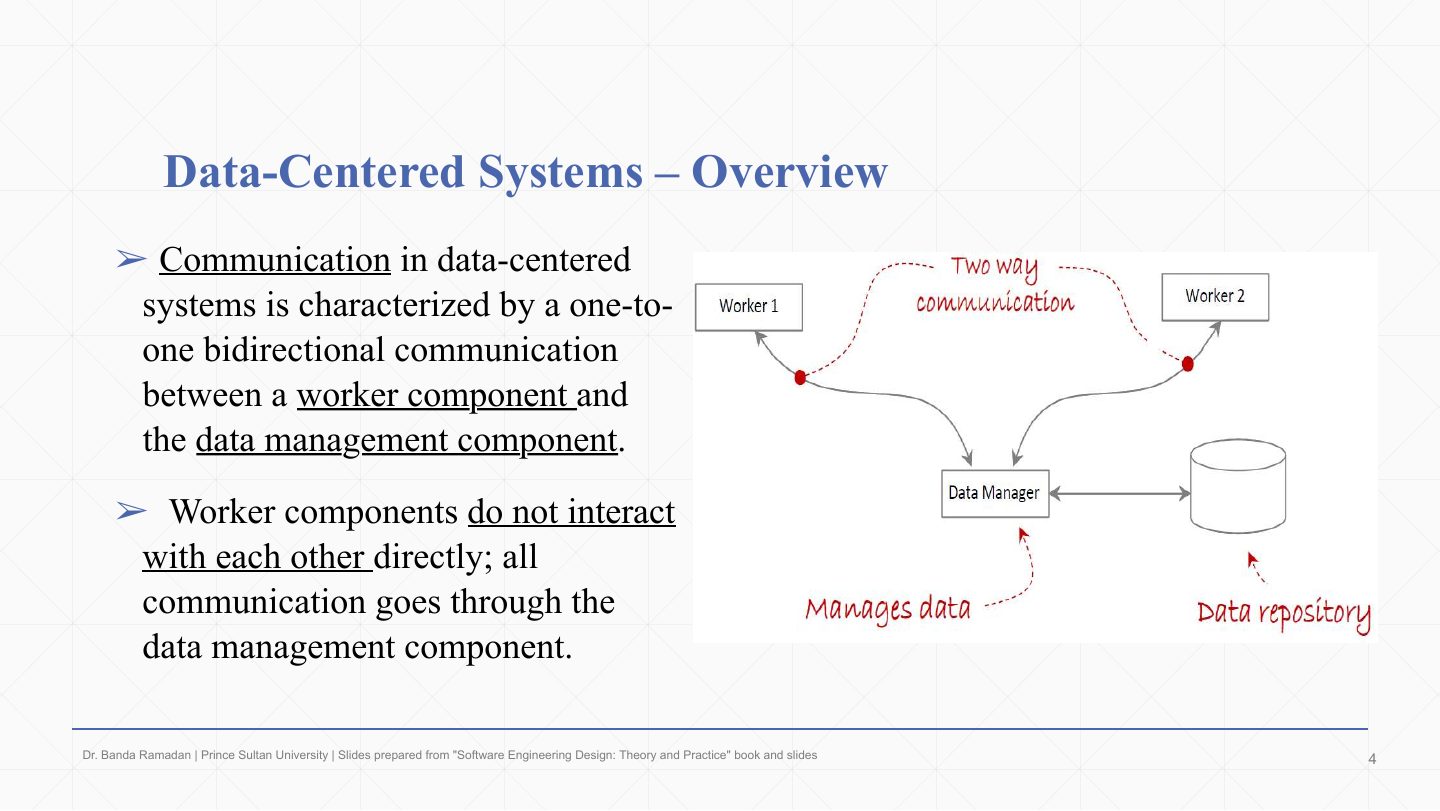
  4. 4 Data-Centered Systems Ð Overview
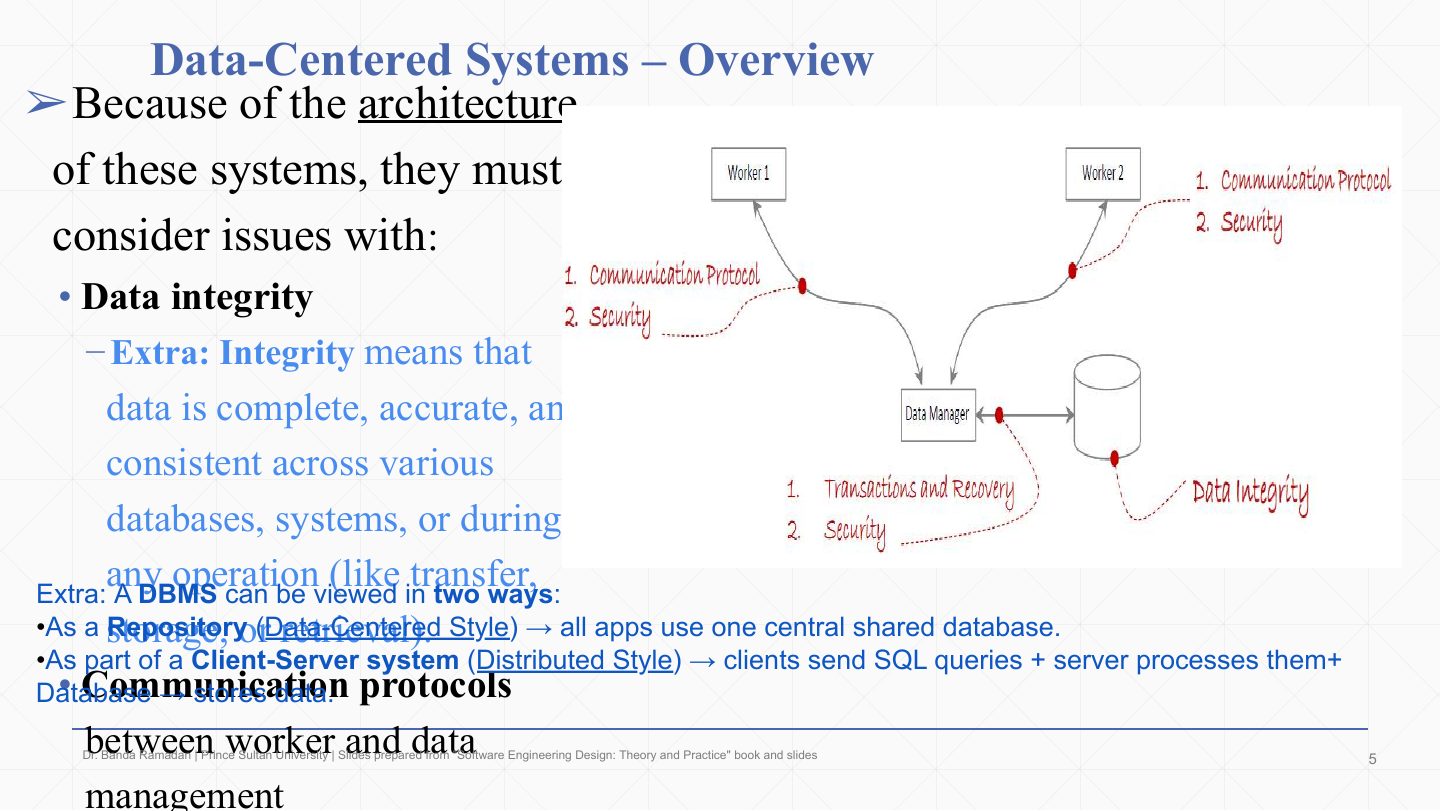
  5. 5 Data-Centered Systems Ð Overview
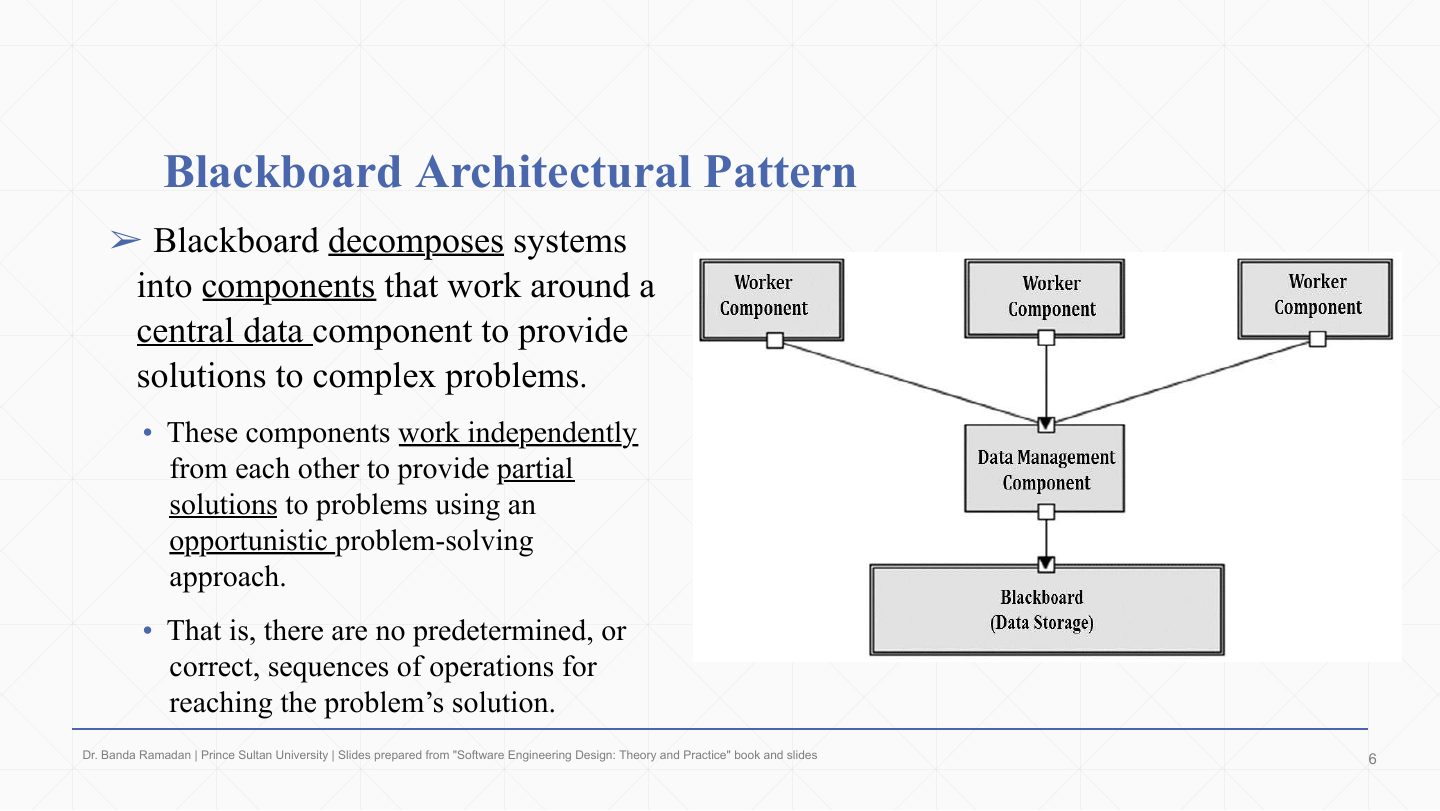
  6. 6 Blackboard Architectural Pattern
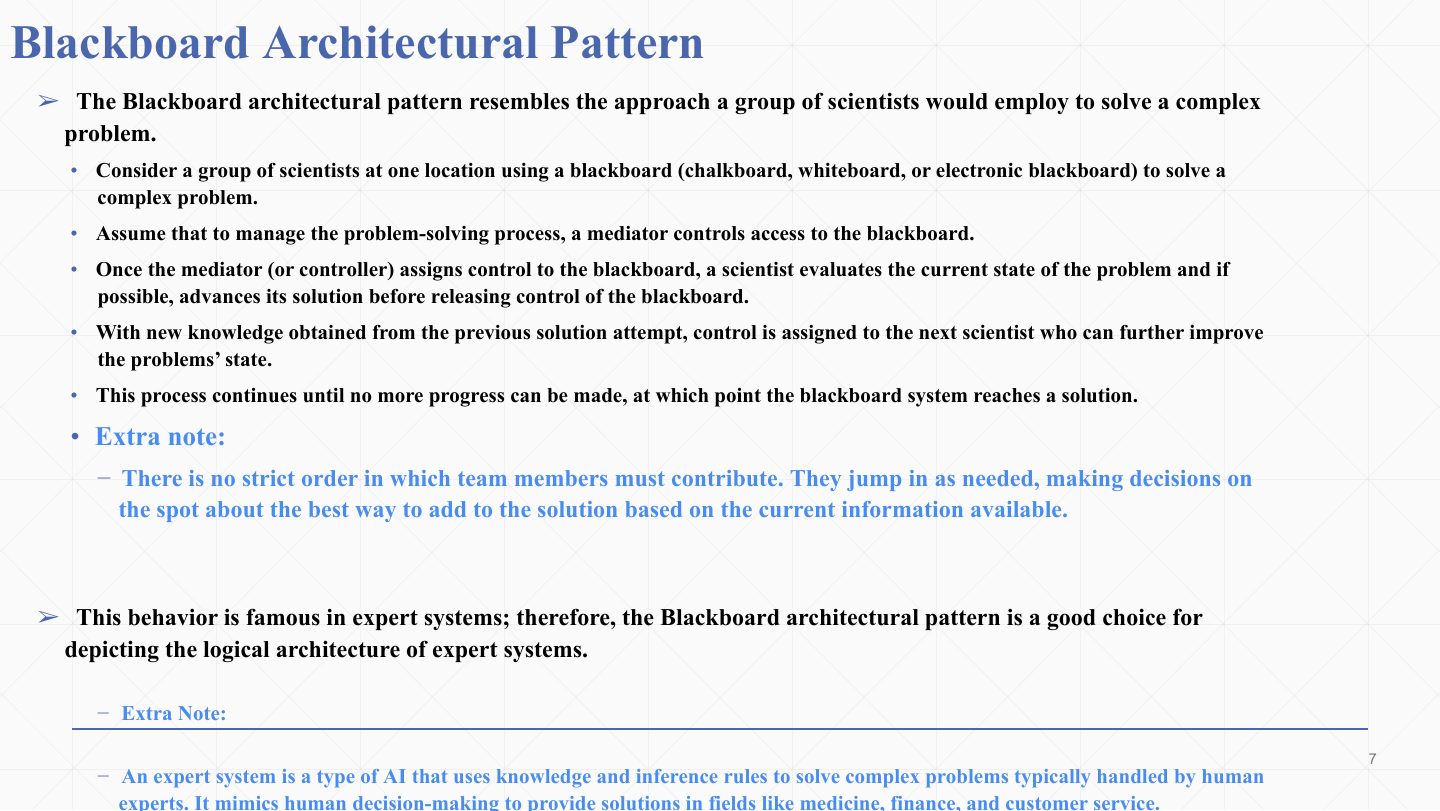
  7. 7 Blackboard Architectural Pattern
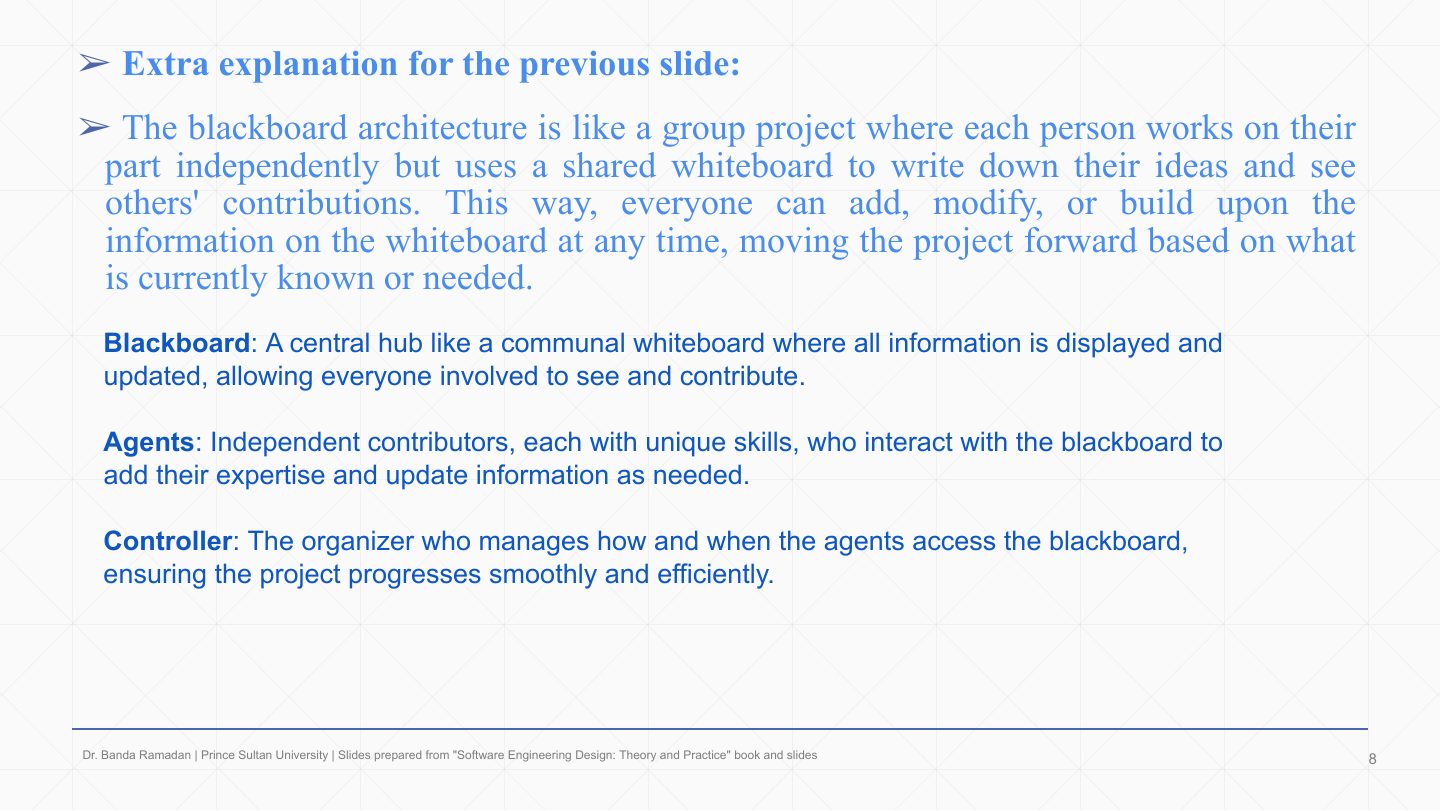
  8. 8 Extra: Blackboard as a group project
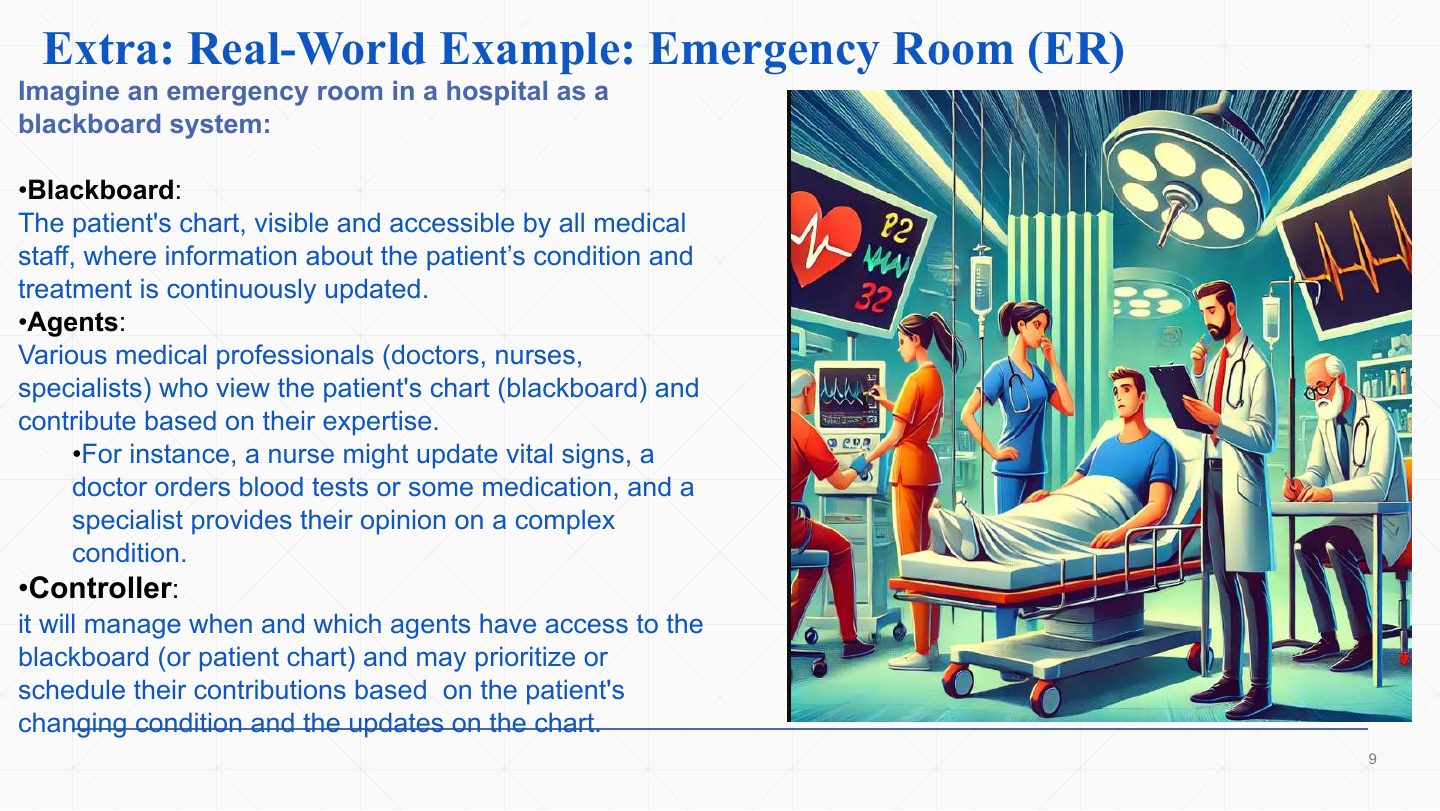
  9. 9 Extra: Real-World Example: Emergency Room (ER)
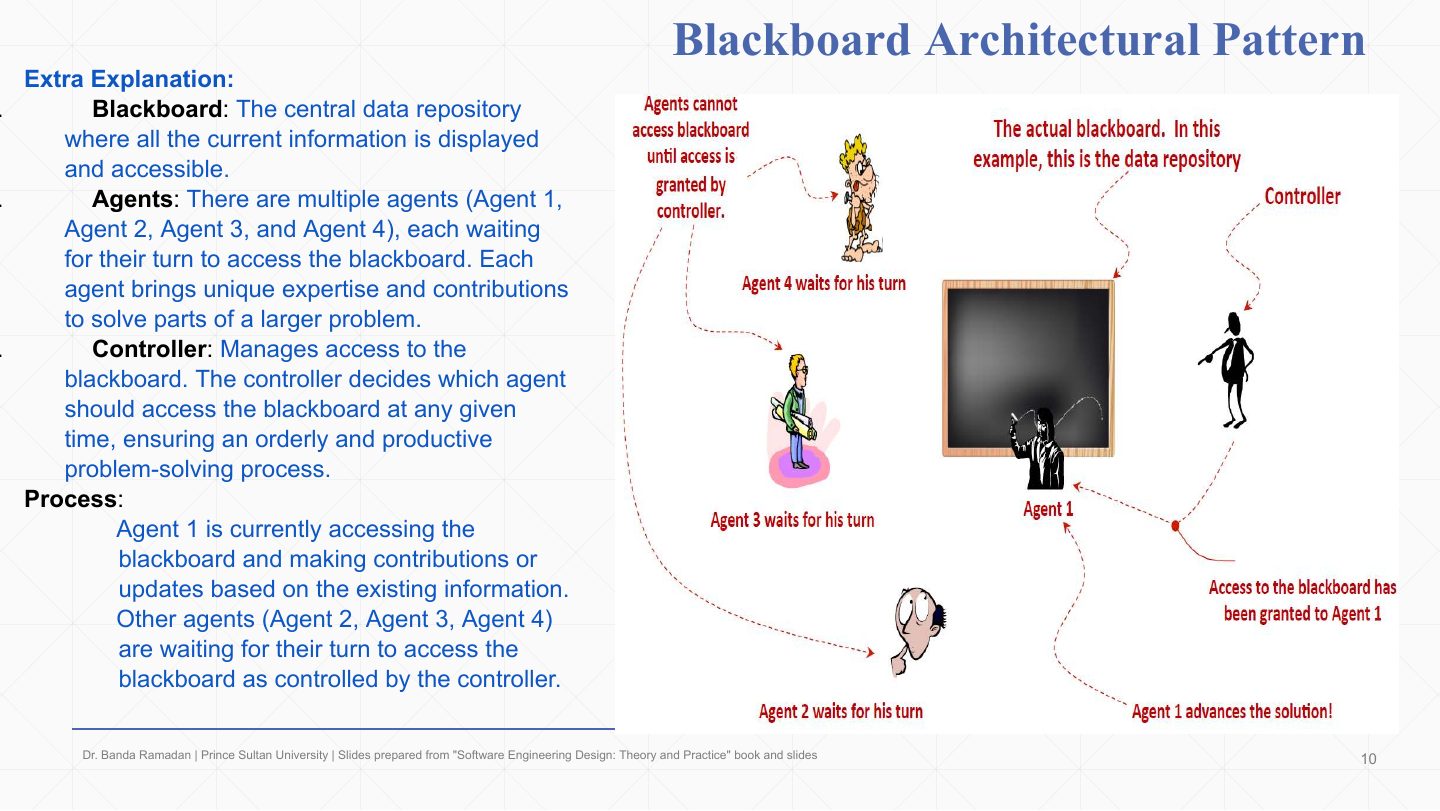
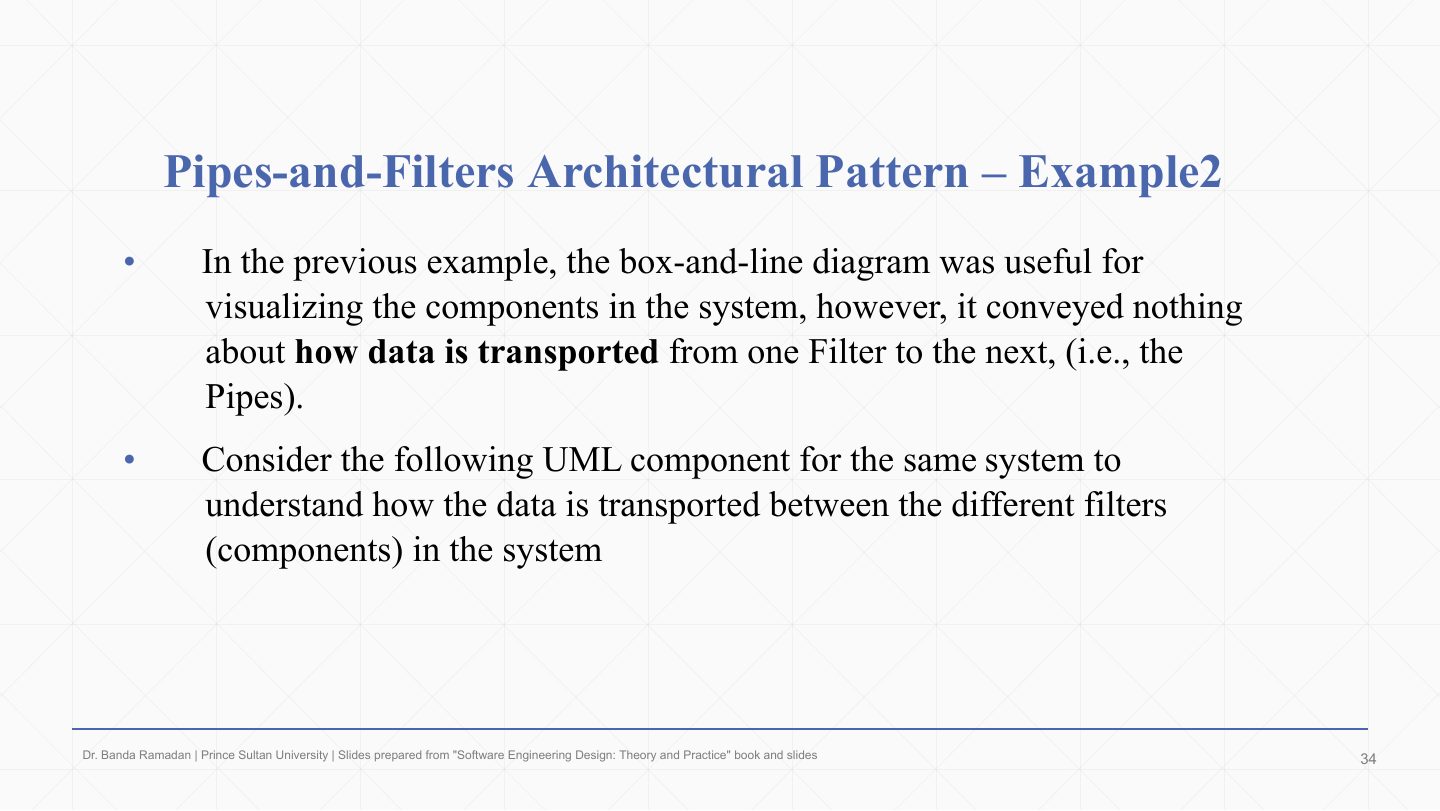
  10. 10 Blackboard Architectural Pattern
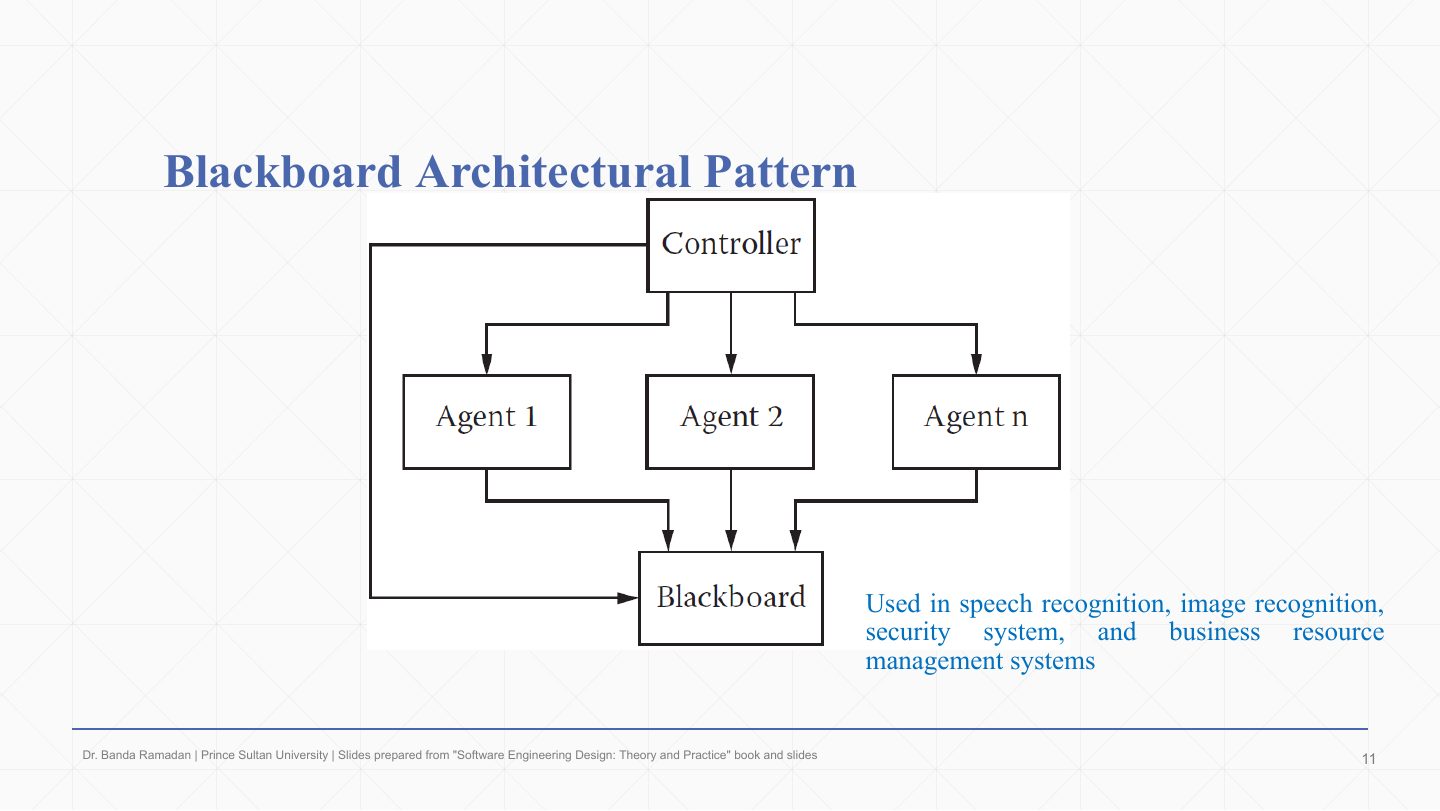
  11. 11 Blackboard Architectural Pattern
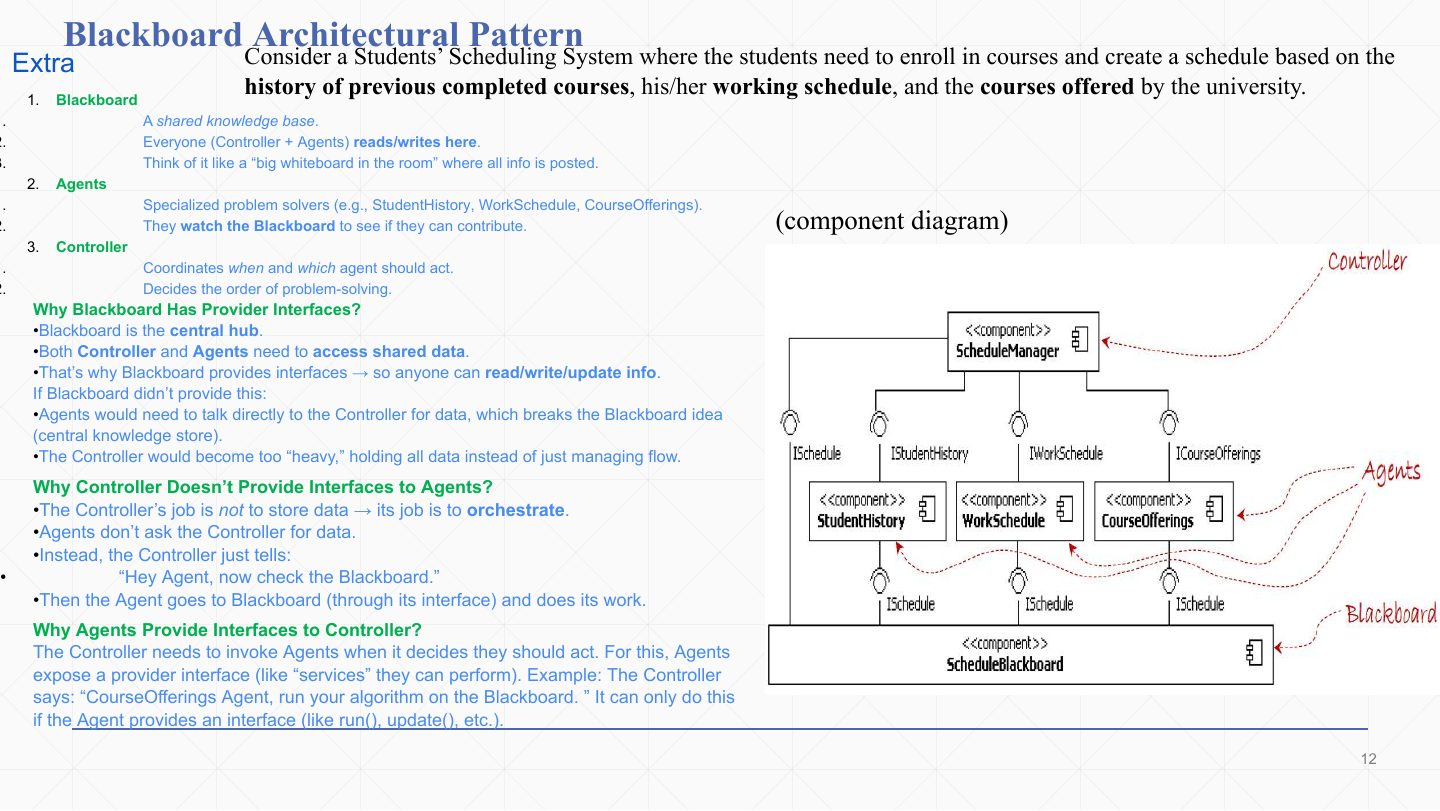
  12. 12 Blackboard: Students’ Scheduling System component diagram
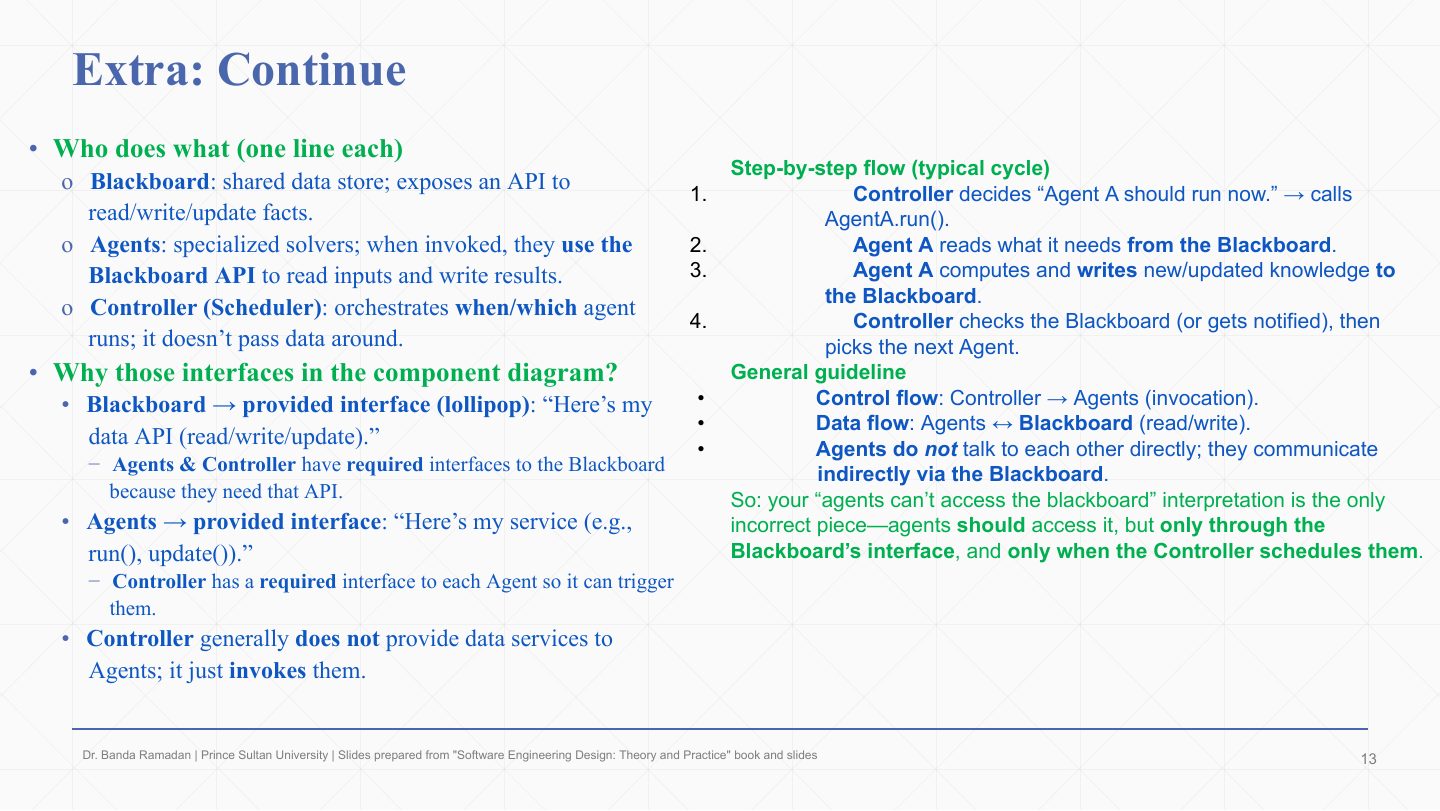
  13. 13 Extra: Blackboard roles and interfaces
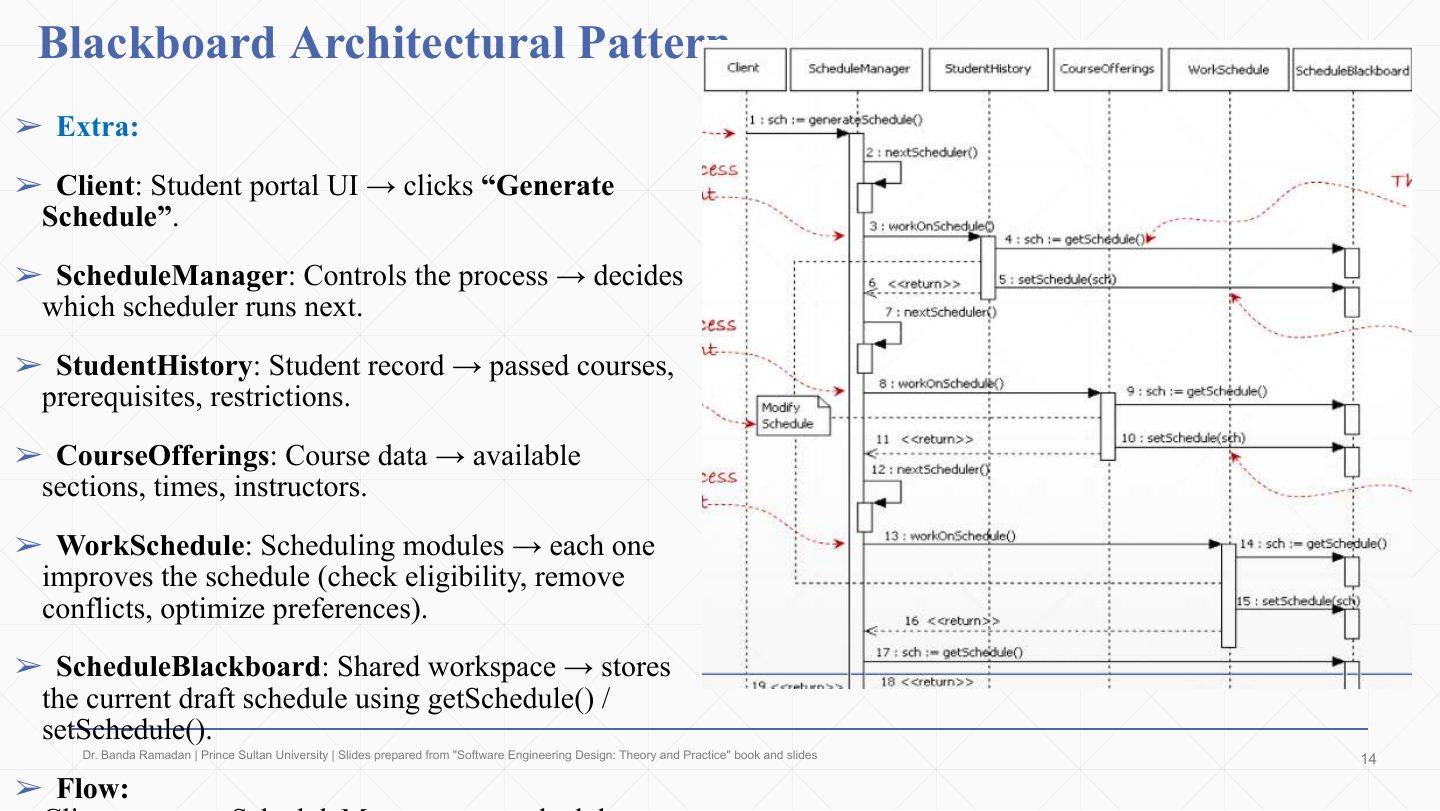
  14. 14 Blackboard: scheduling system sequence diagram
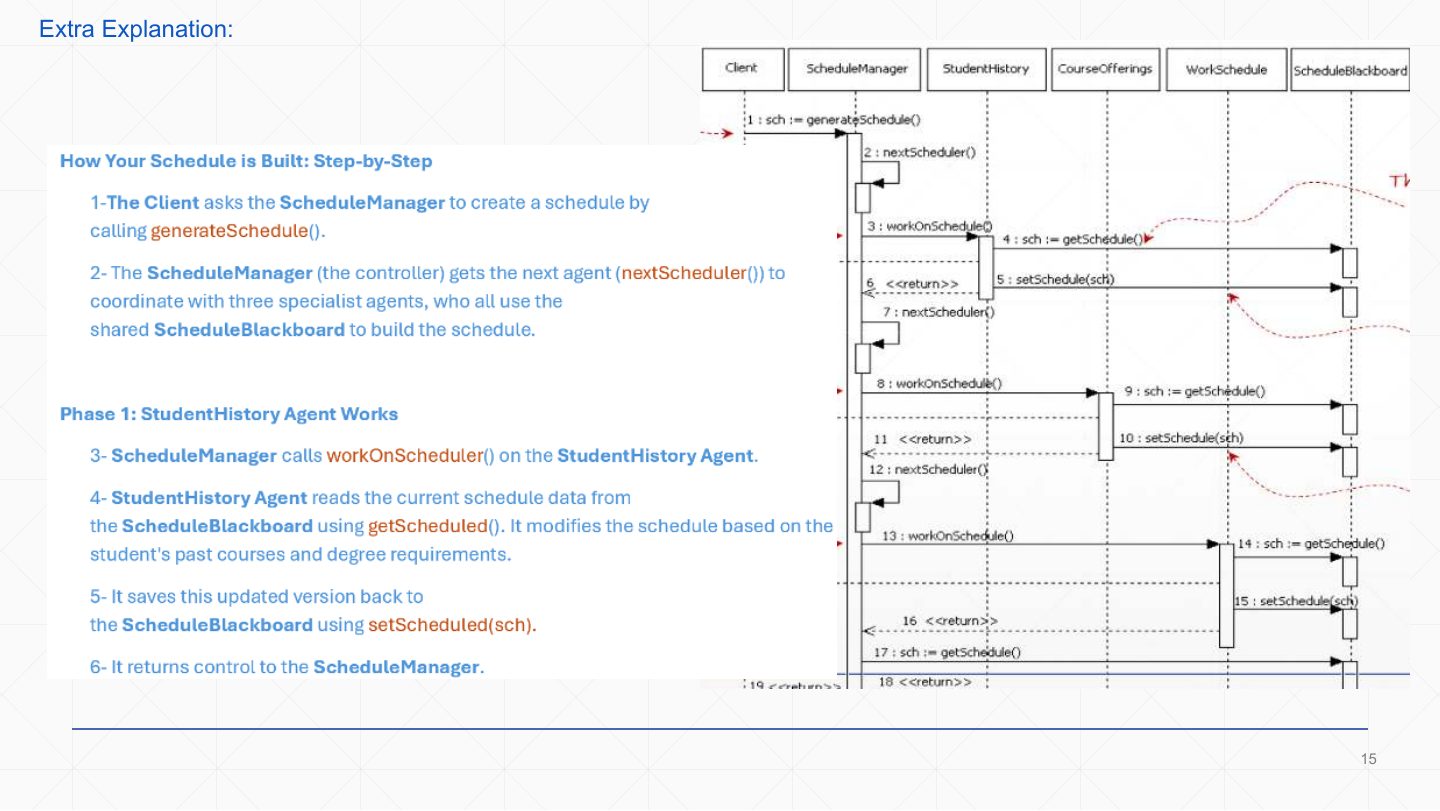
  15. 15 Extra: Blackboard sequence, phase 1
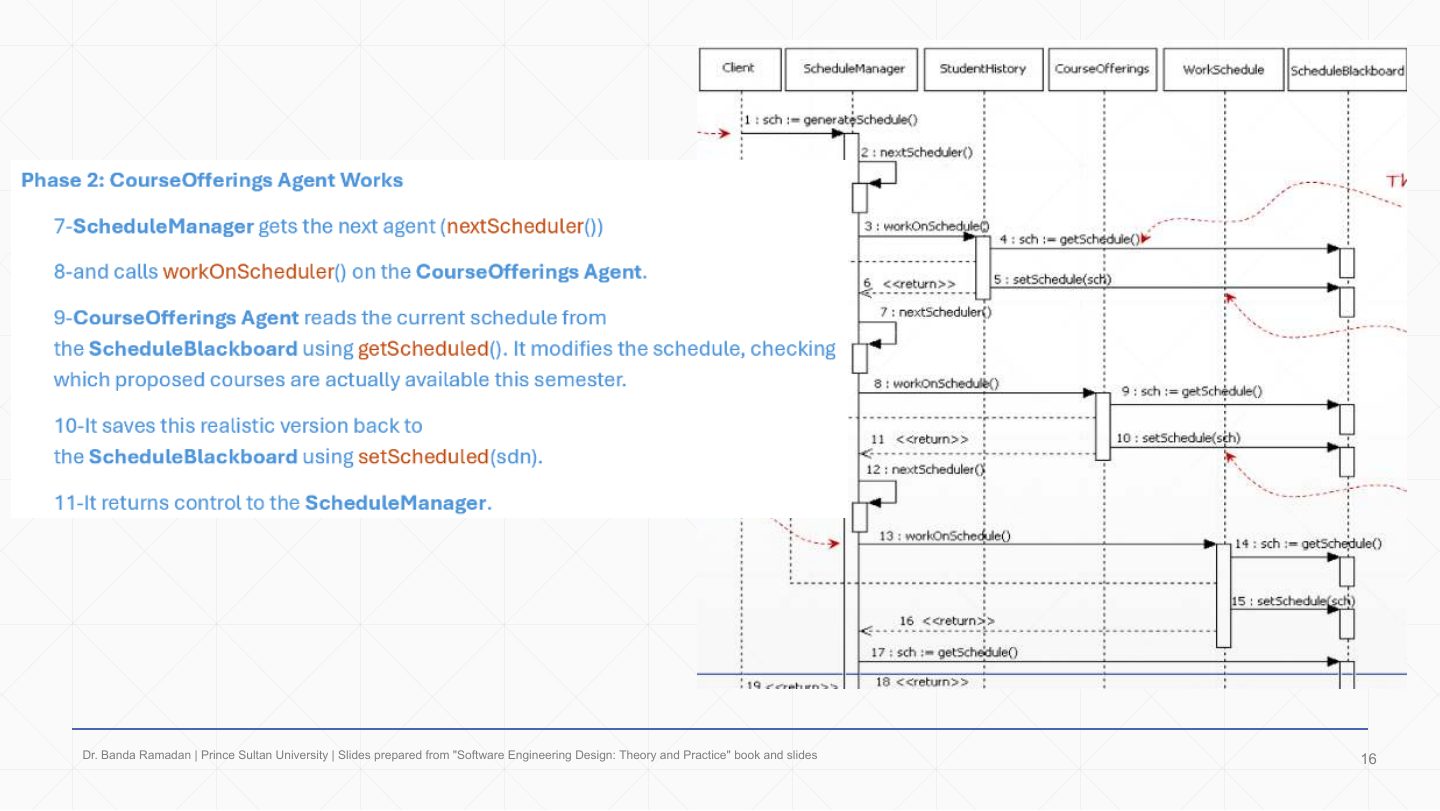
  16. 16 Extra: Blackboard sequence, phase 2
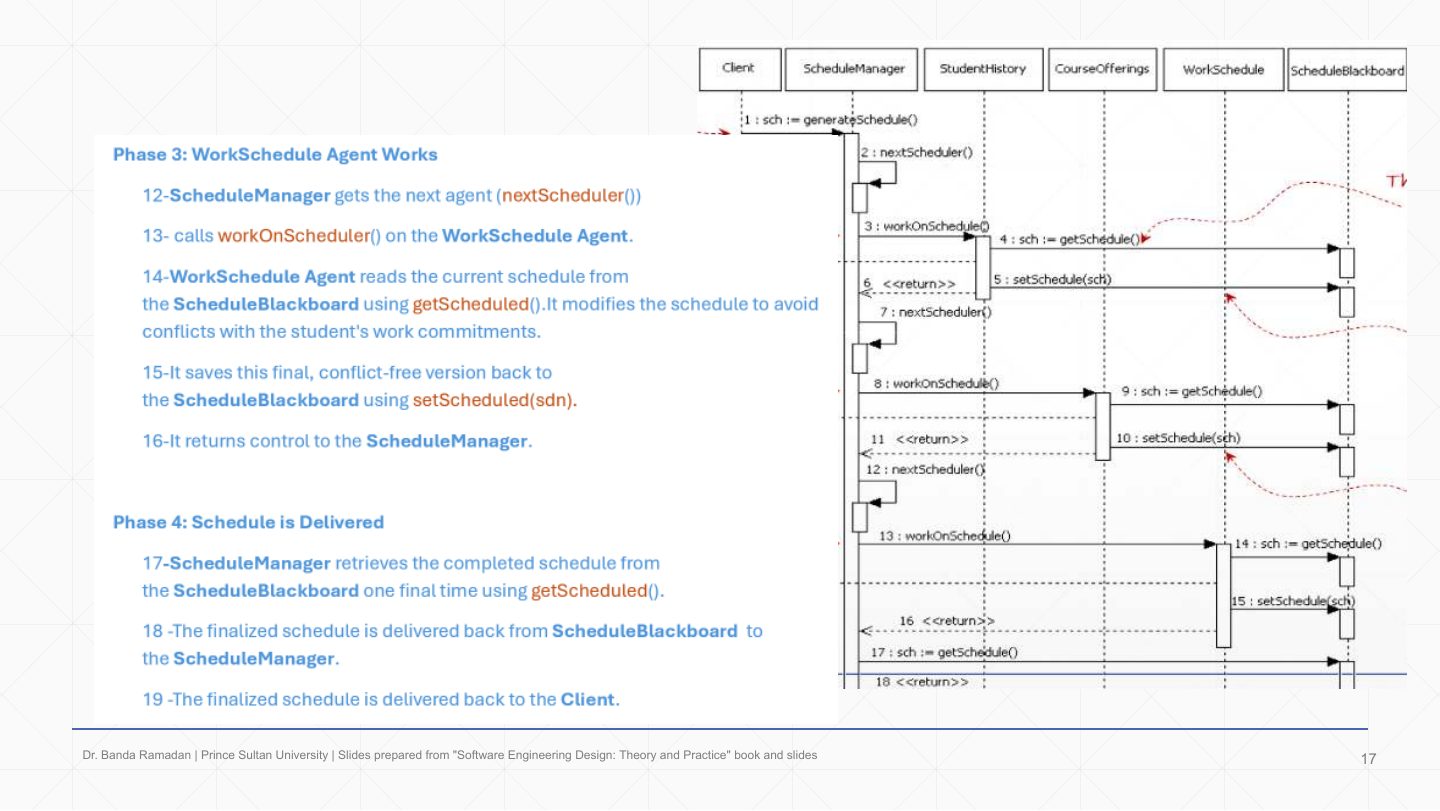
  17. 17 Extra: Blackboard sequence, phases 3–4
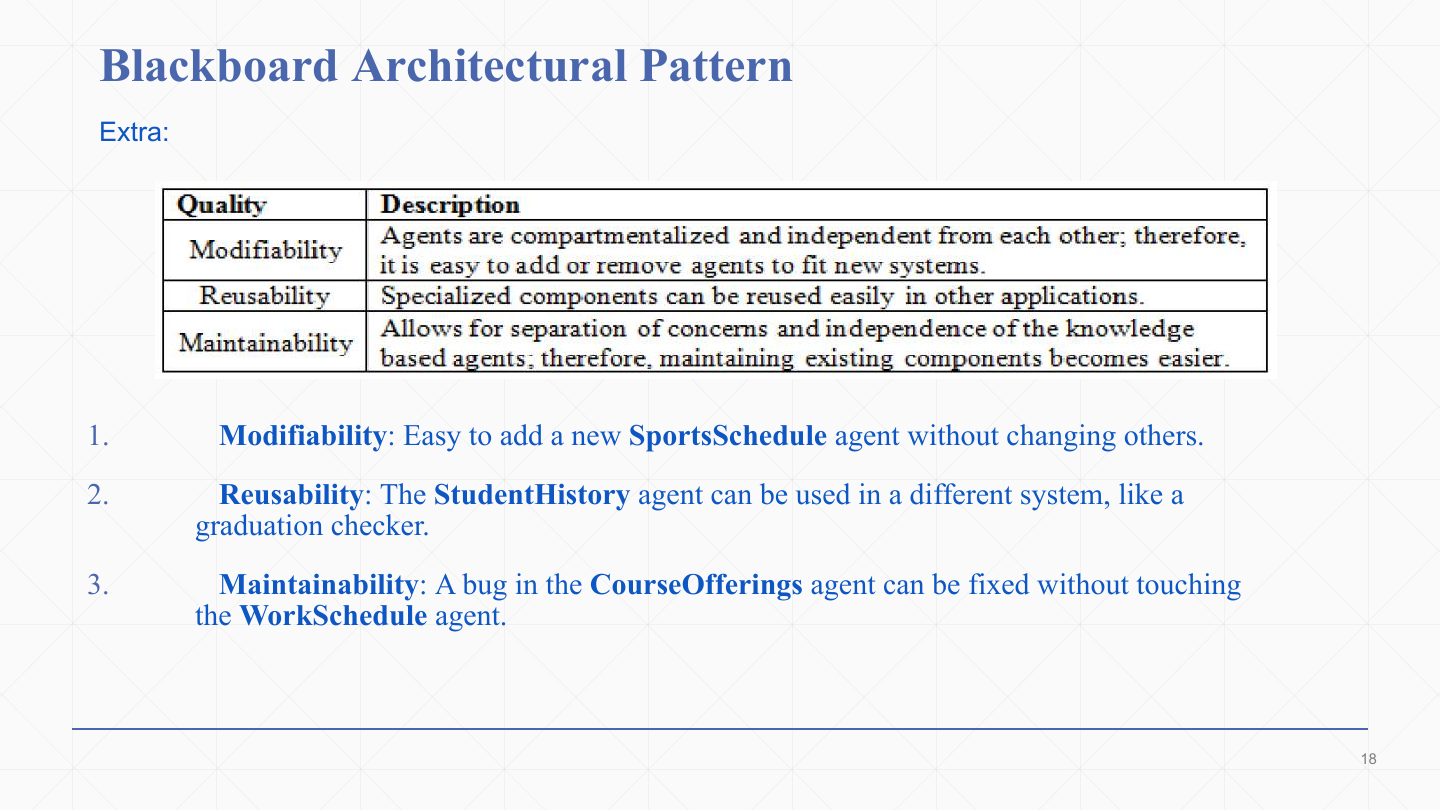
  18. 18 Blackboard Architectural Pattern
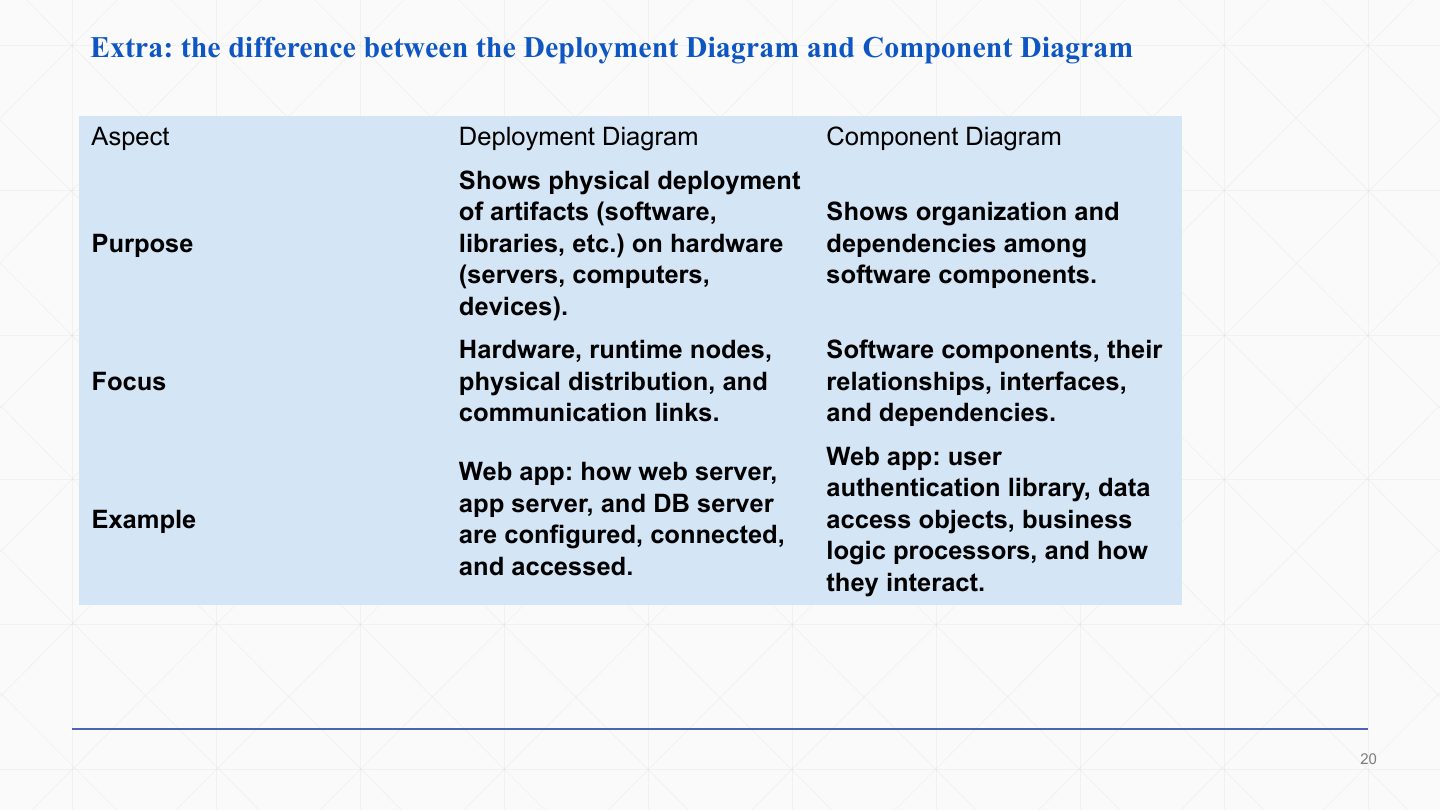
  19. 19 Extra: Deployment vs. Component Diagram
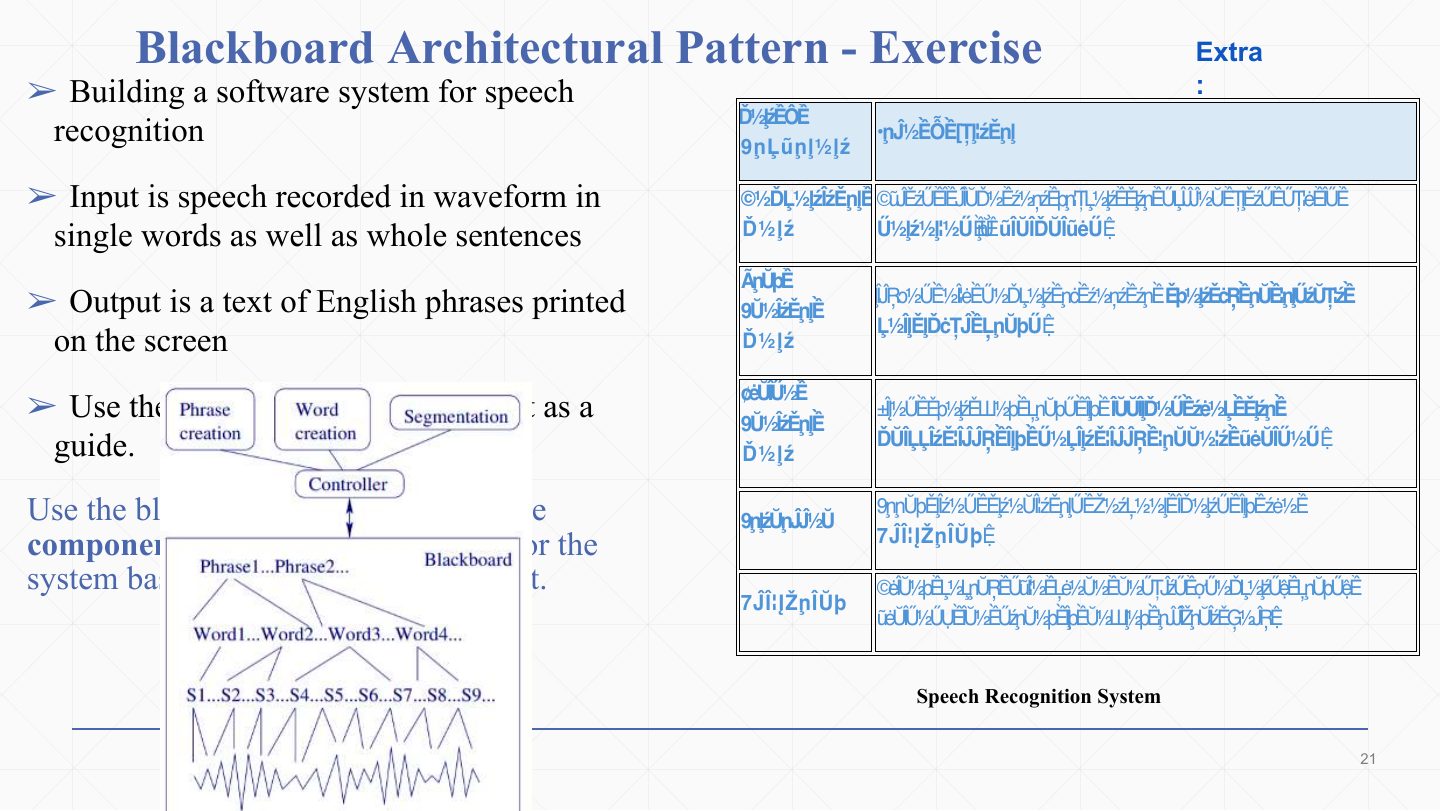
  20. 20 Blackboard Architectural Pattern - Exercise
  21. 21 Extra: Speech-recognition agents at work
  22. 22 Extra: Solution – component diagram
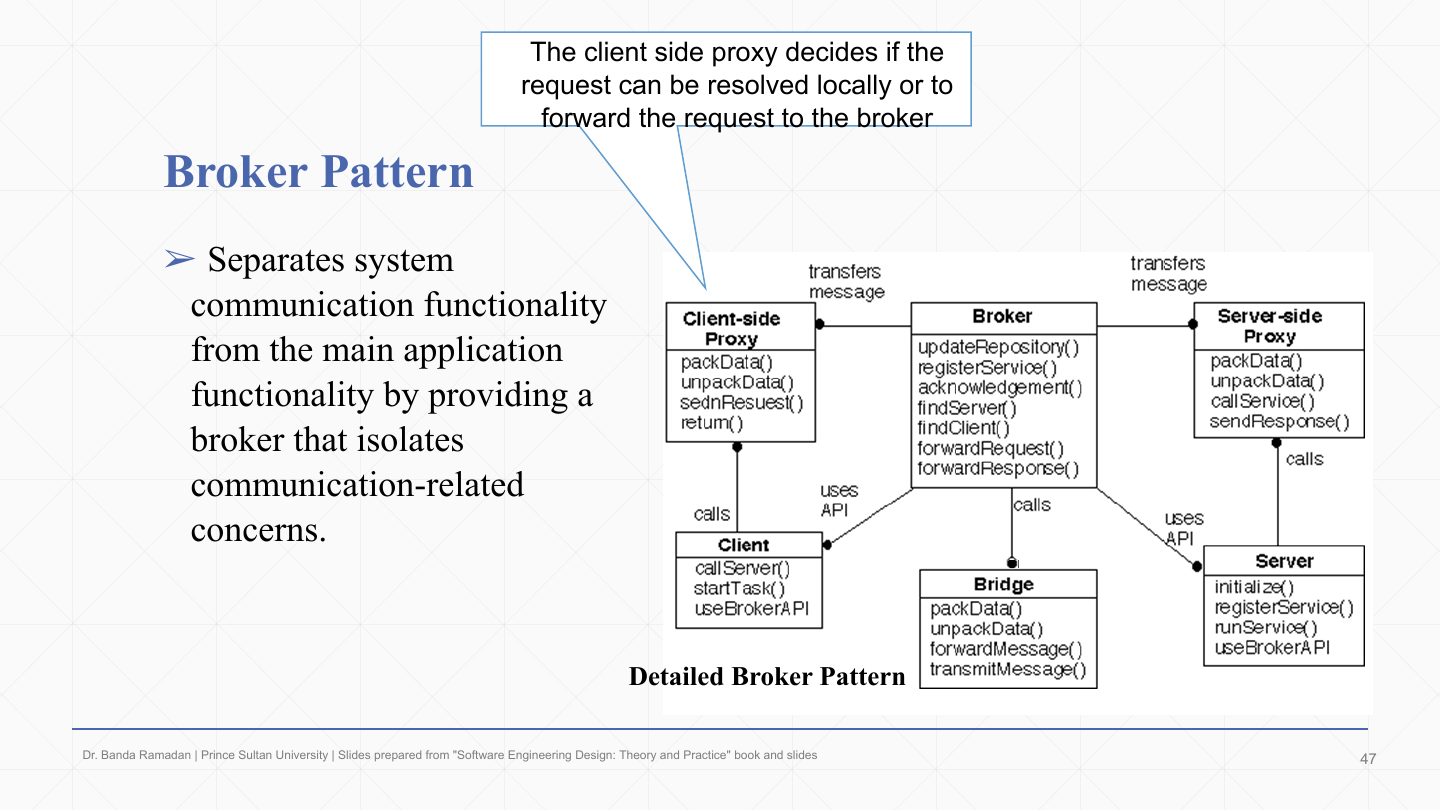
  23. 23 Extra: Solution – sequence diagram
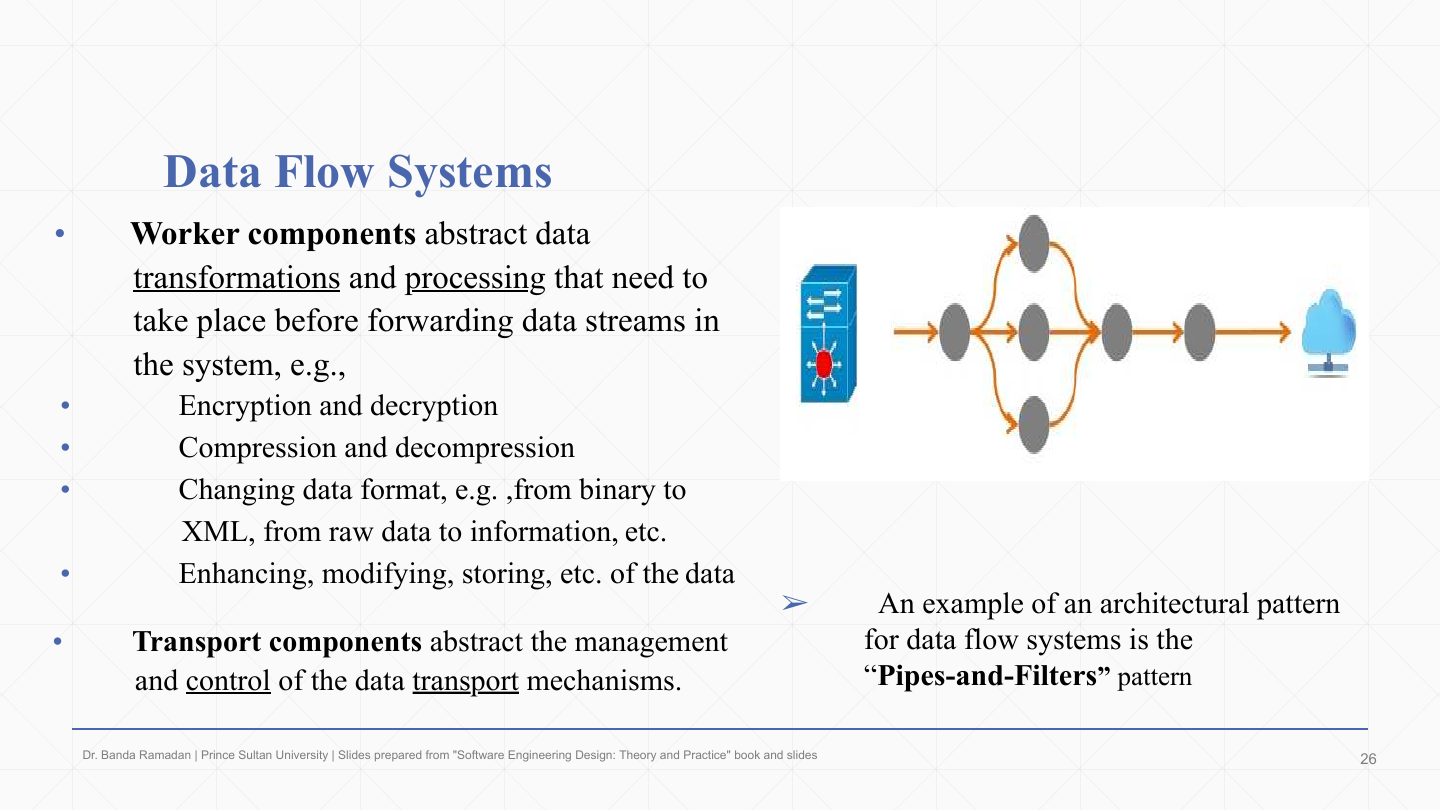
  24. 24 Data Flow Systems
  25. 25 Data Flow Systems
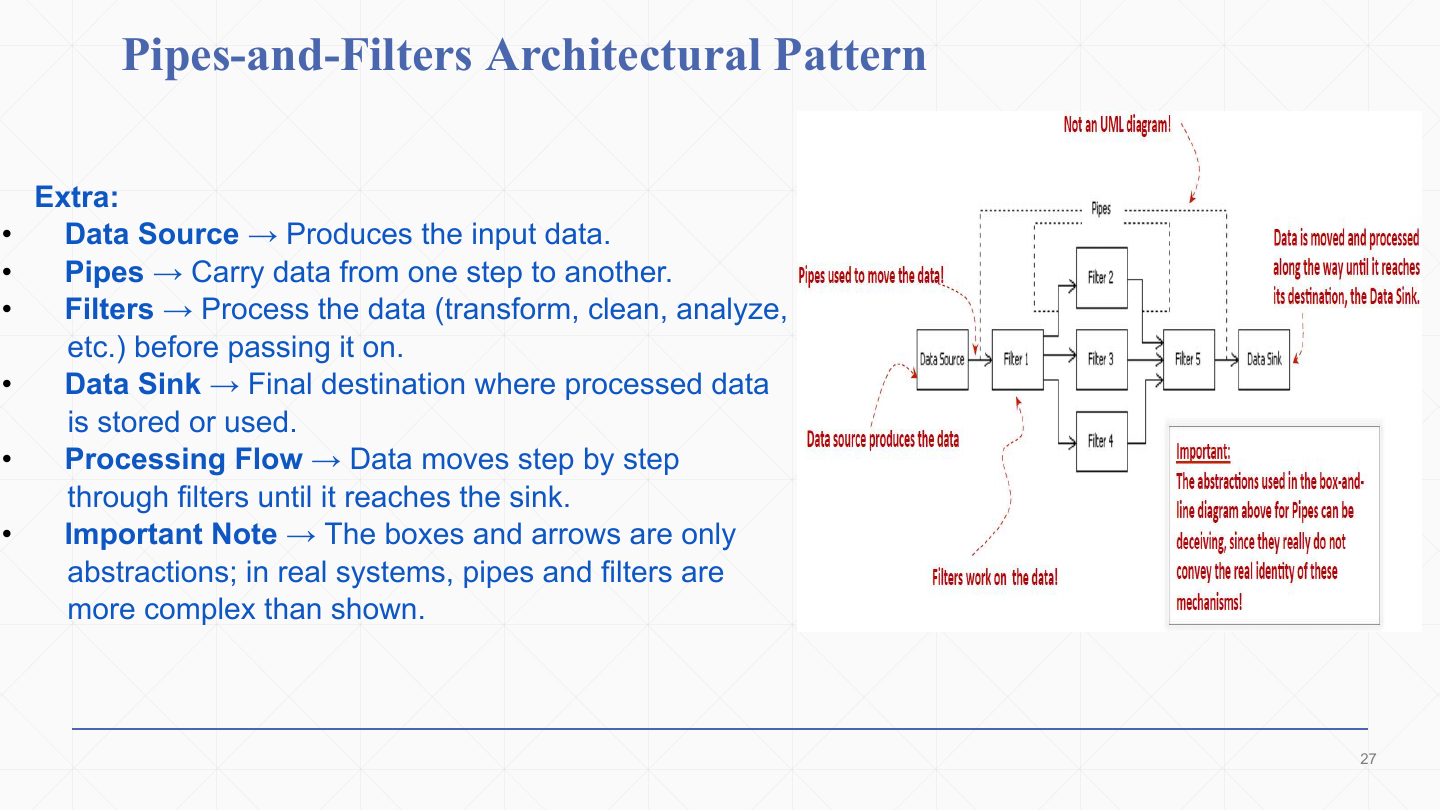
  26. 26 Pipes-and-Filters Architectural Pattern
  27. 27 Pipes-and-Filters Architectural Pattern
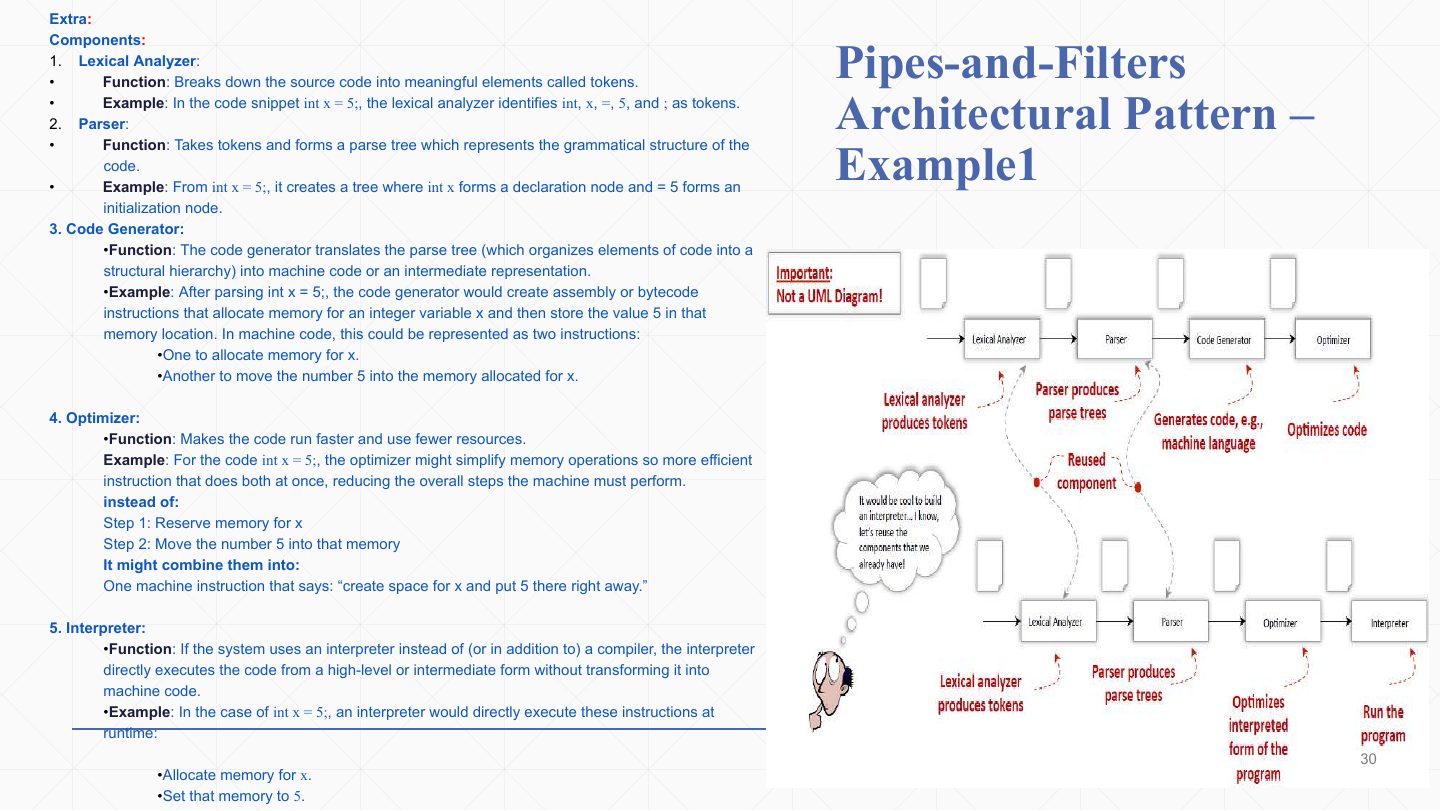
  28. 28 Pipes-and-Filters Architectural Pattern Ð Example1
  29. 29 Pipes-and-Filters – Example 1: language processor
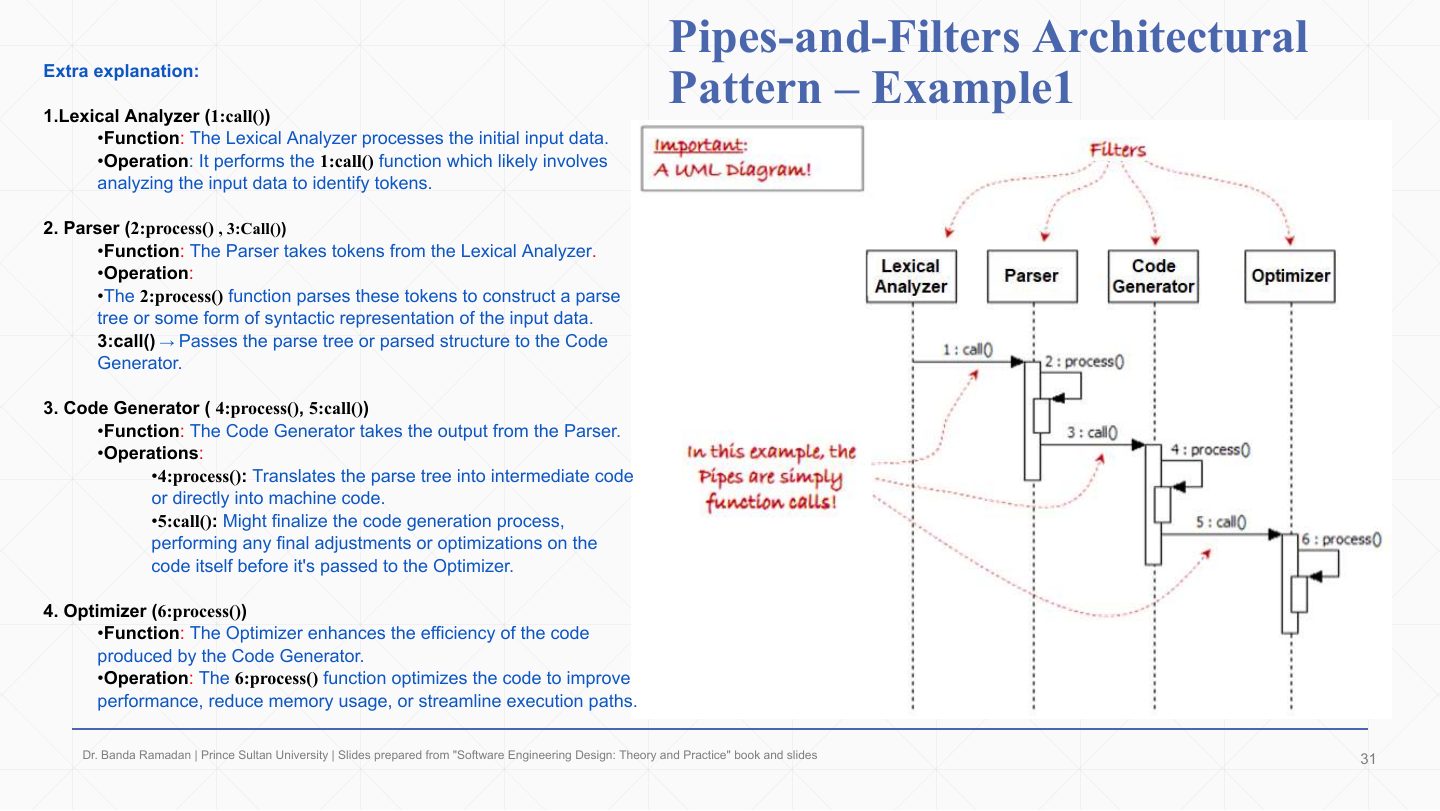
  30. 30 Pipes-and-Filters – Example 1 as UML
  31. 31 Pipes-and-Filters Architectural Pattern Ð Example2
  32. 32 Pipes-and-Filters Architectural Pattern Ð Example2
  33. 33 Pipes-and-Filters Architectural Pattern Ð Example2
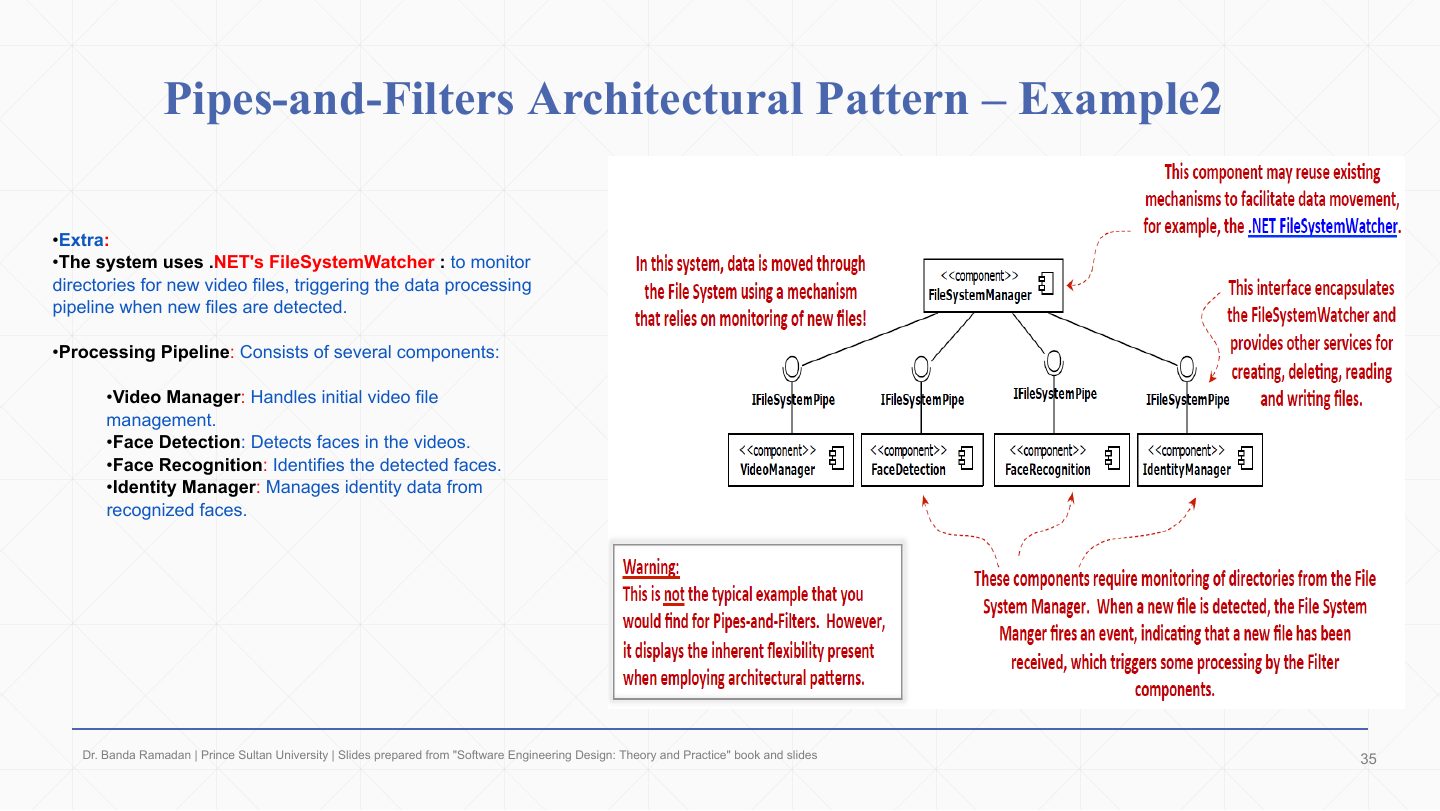
  34. 34 Pipes-and-Filters Architectural Pattern Ð Example2
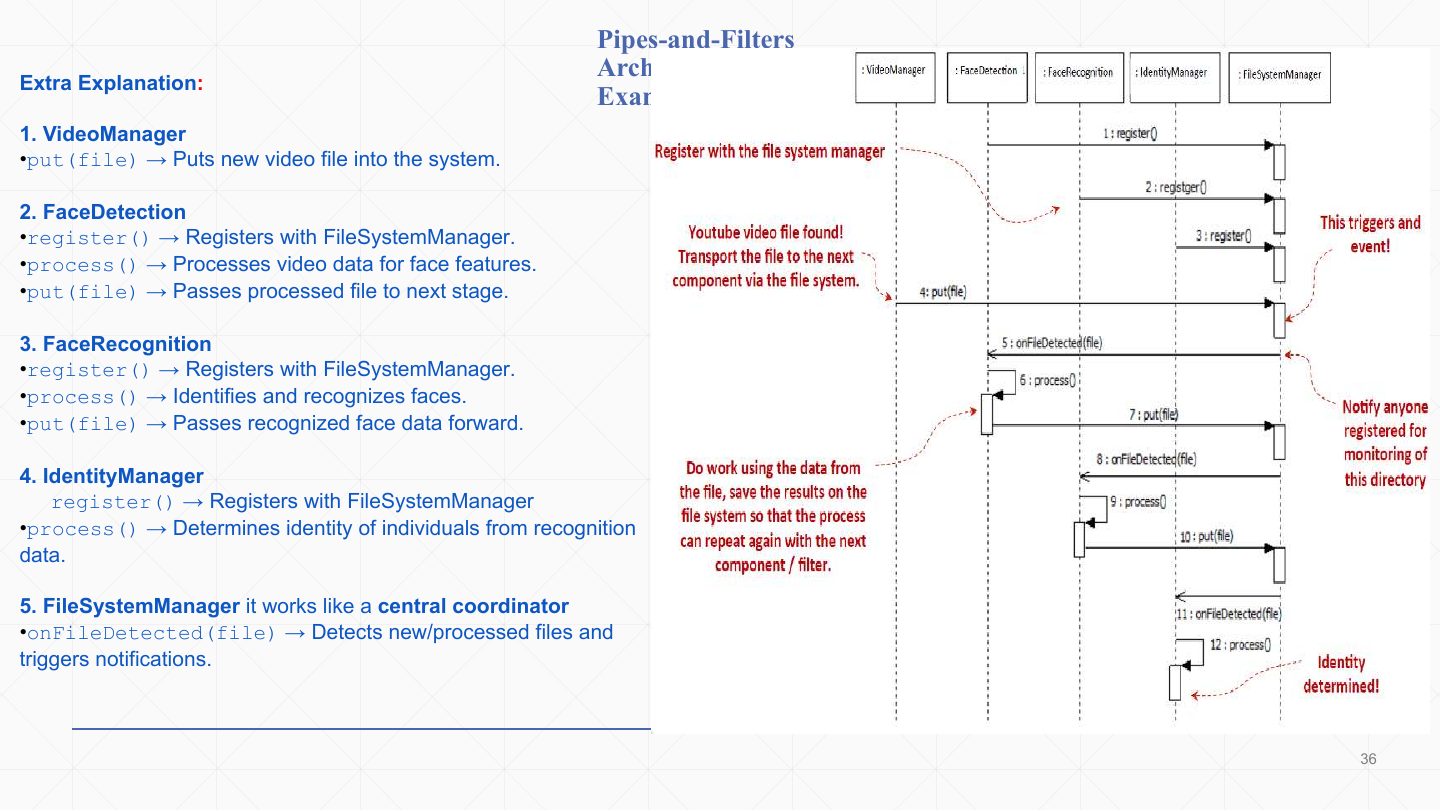
  35. 35 Pipes-and-Filters – Example 2 sequence diagram
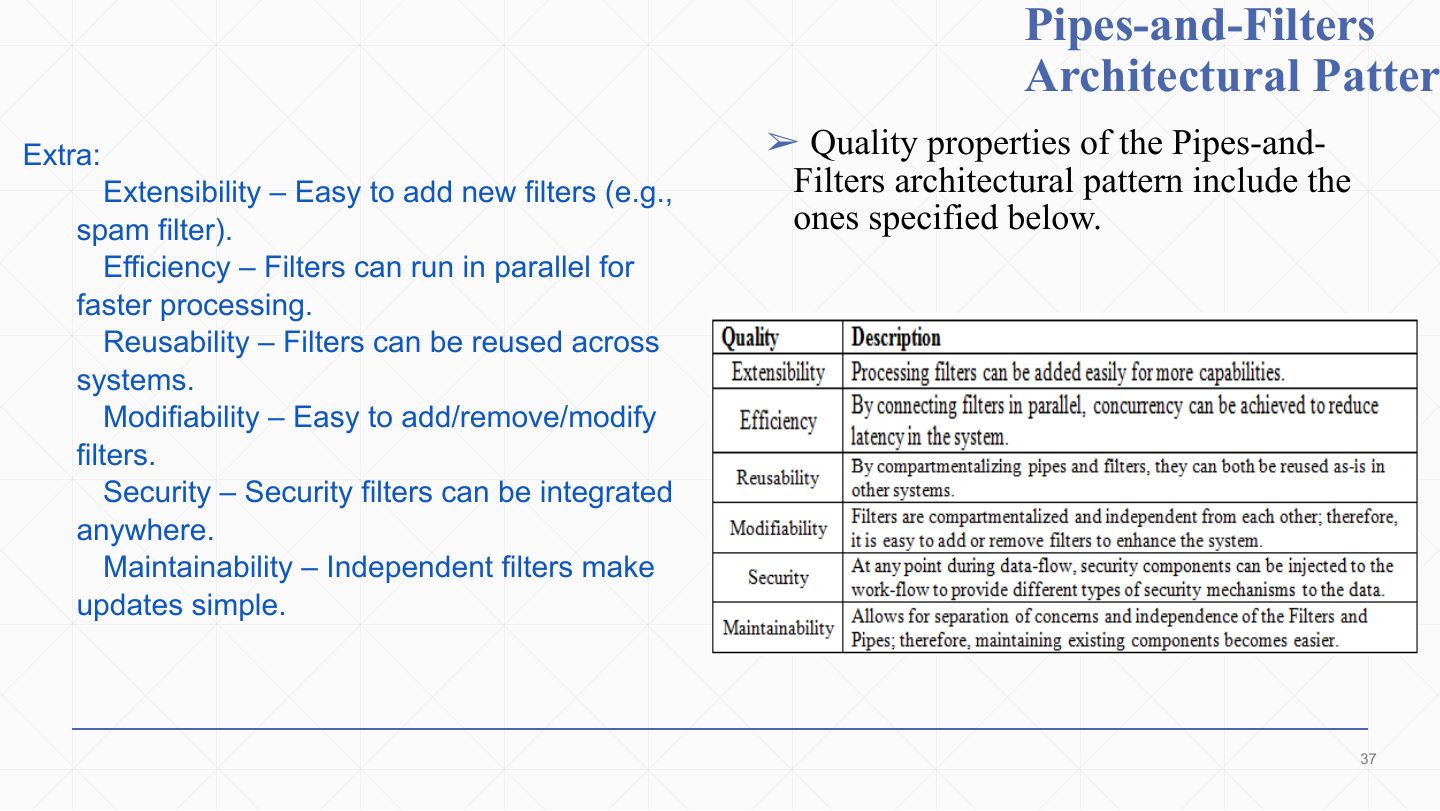
  36. 36 Pipes-and-Filters
  37. 37 Distributed Systems
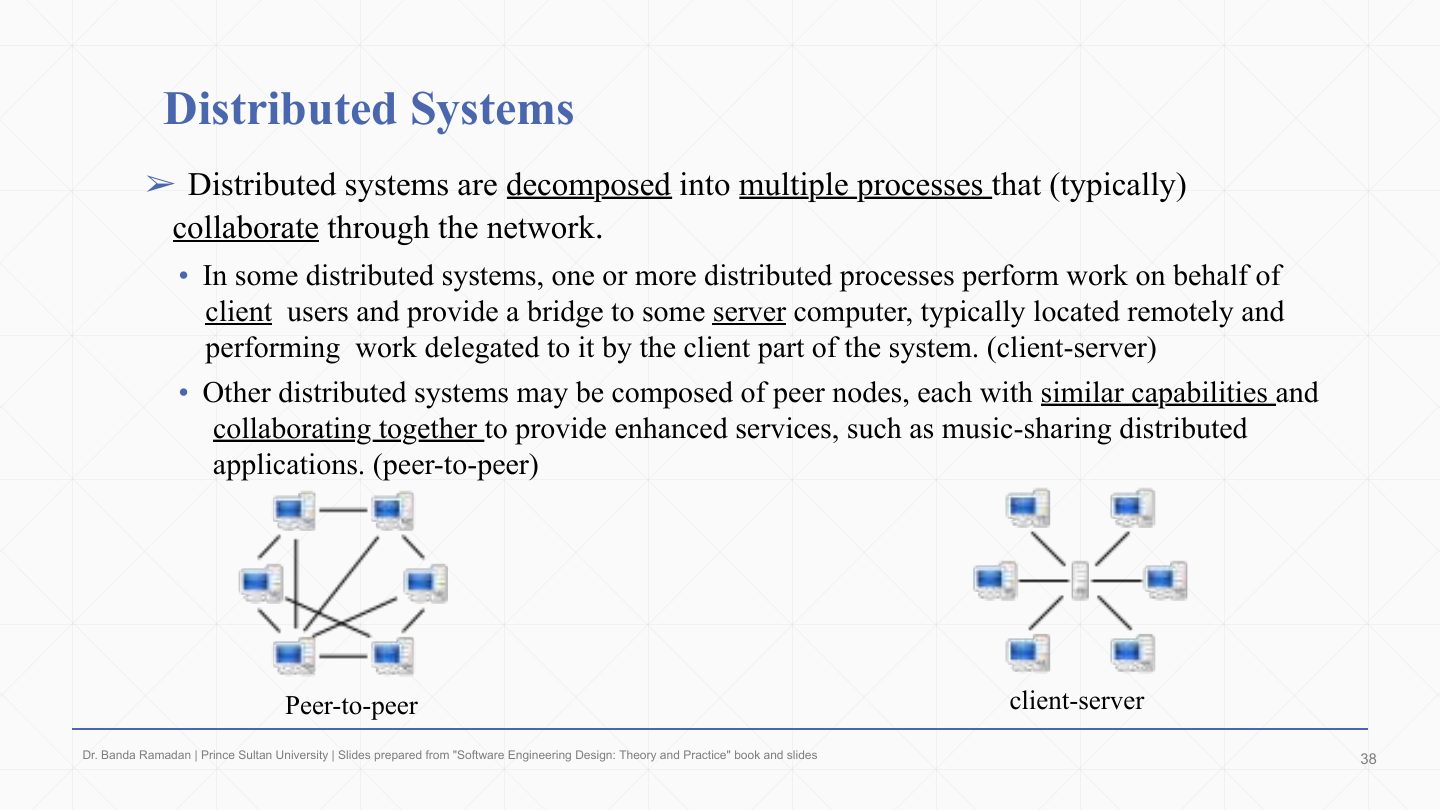
  38. 38 Distributed Systems
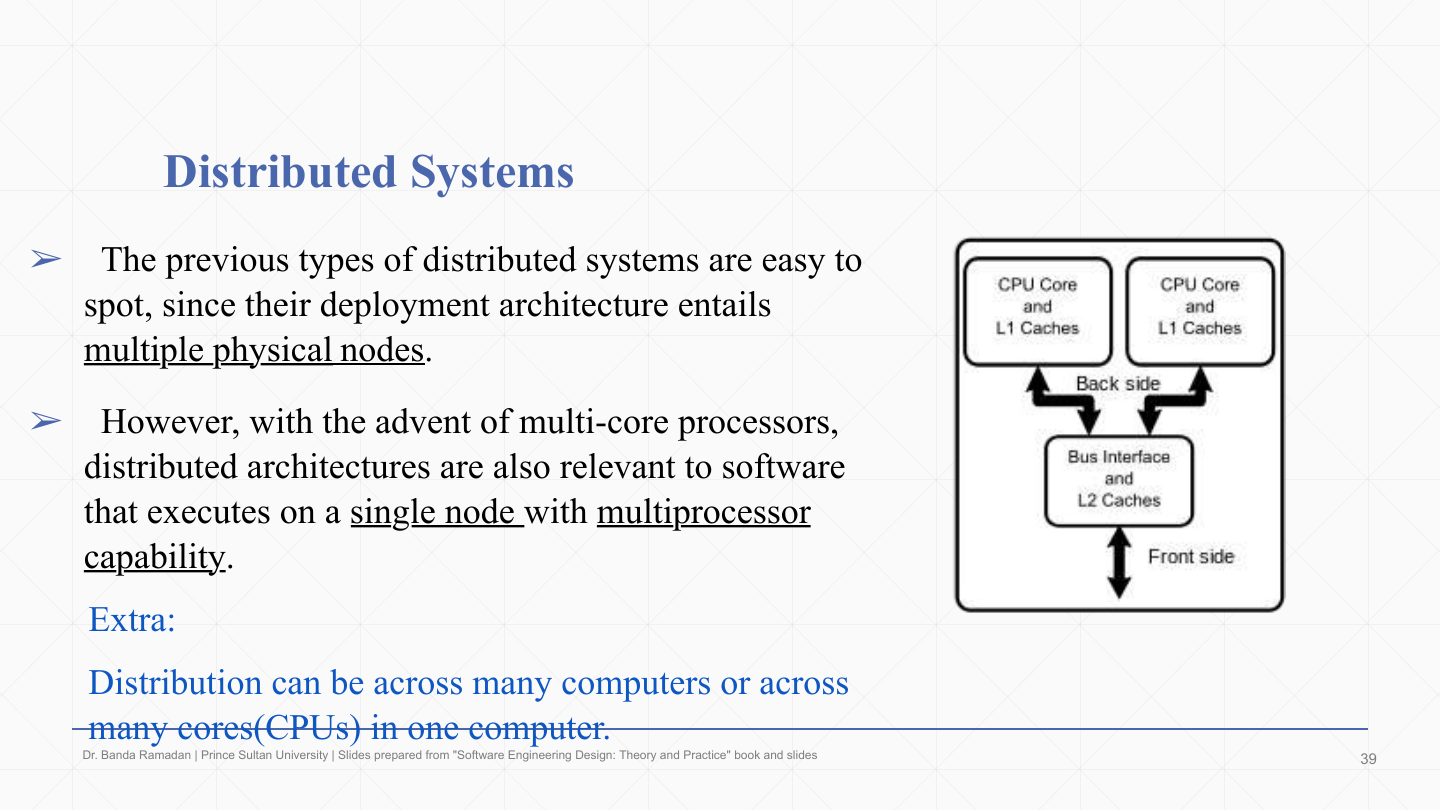
  39. 39 Distributed Systems
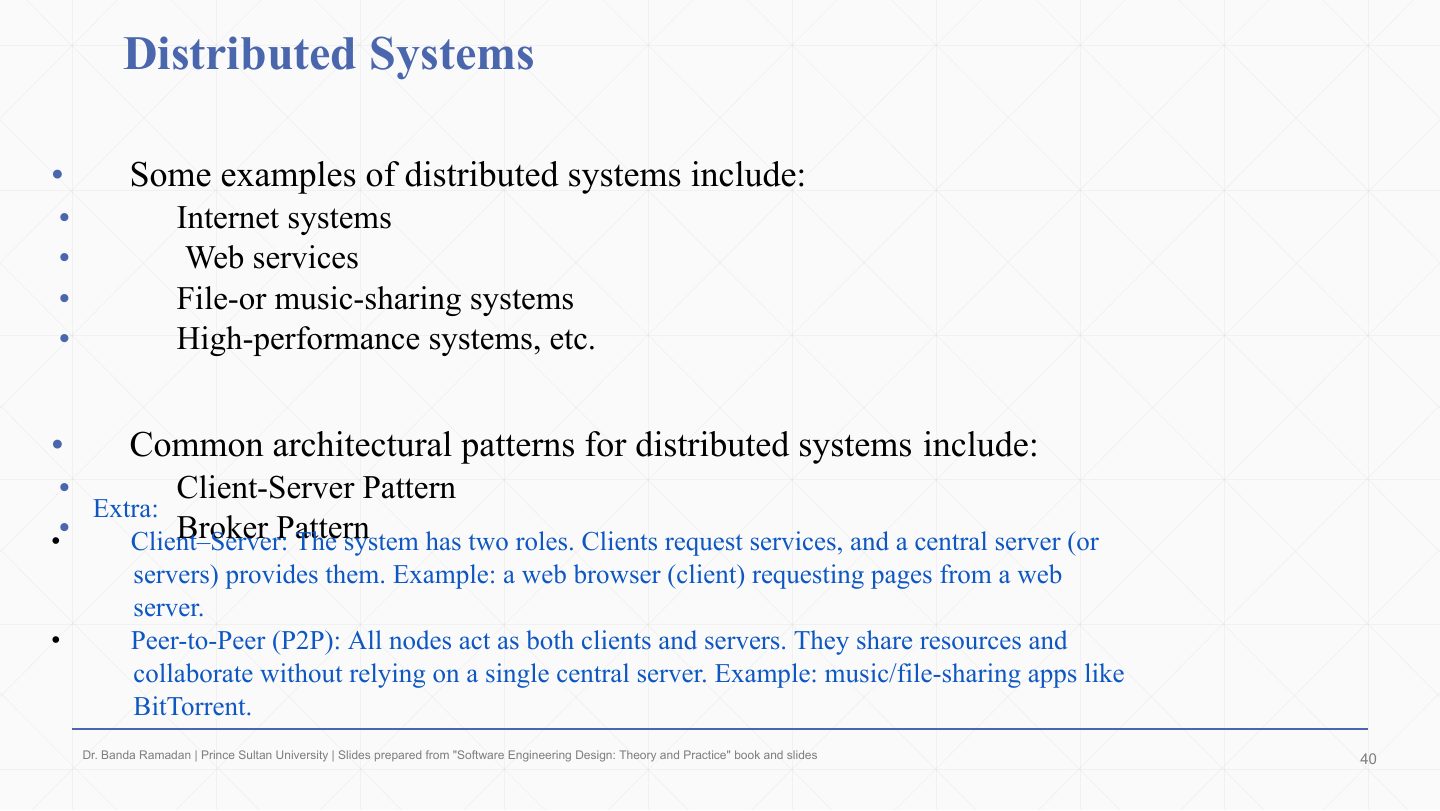
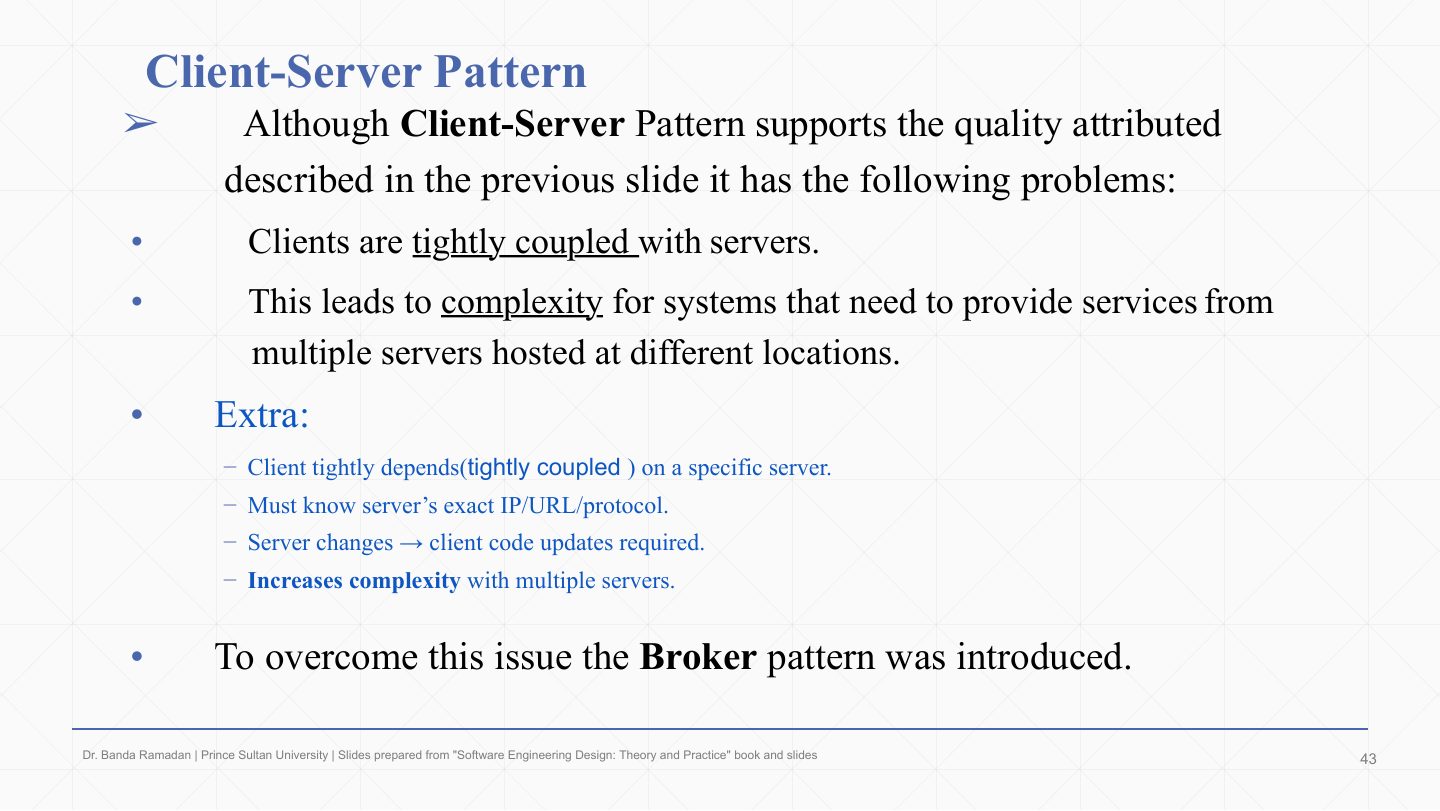
  40. 40 Client-Server Pattern
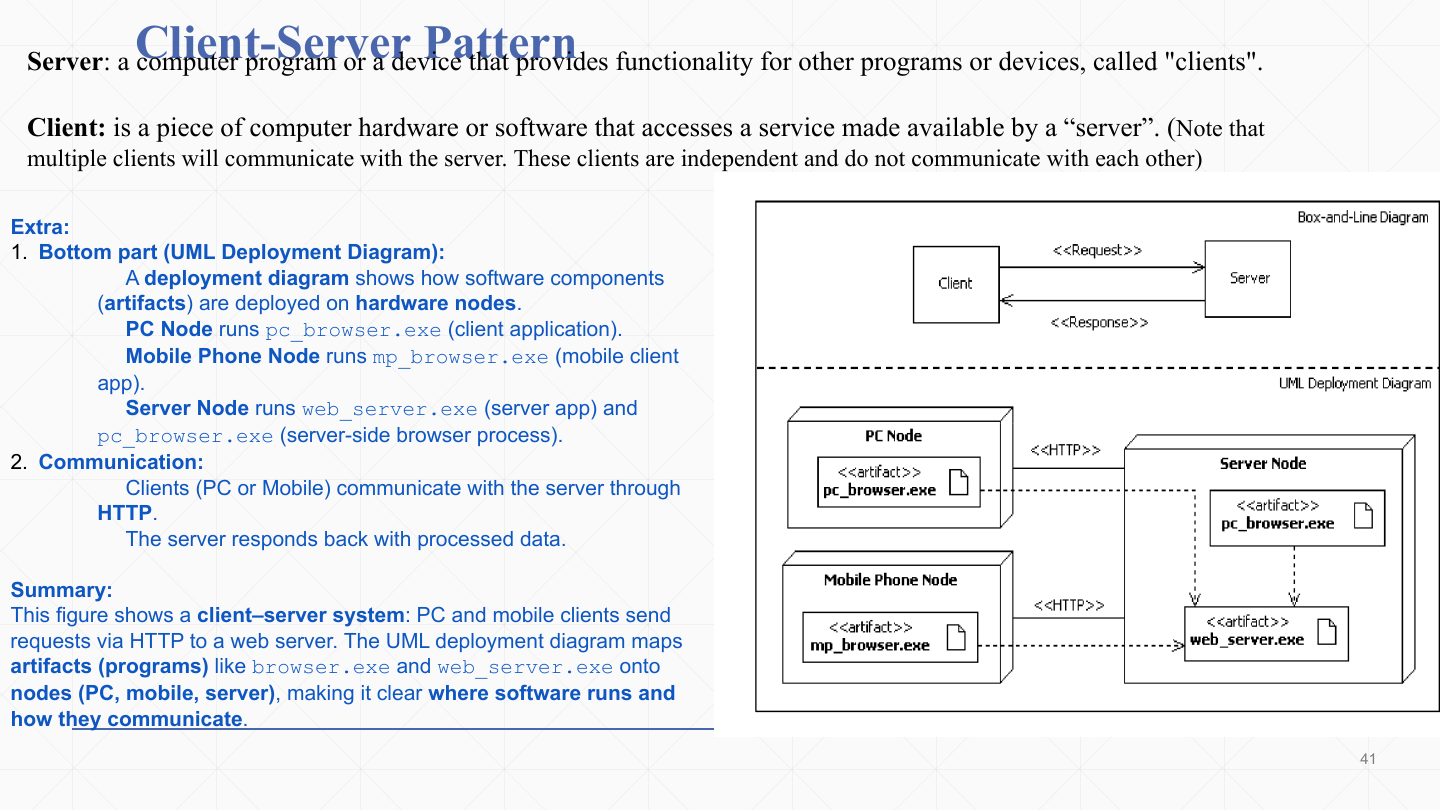
  41. 41 Client-Server Pattern
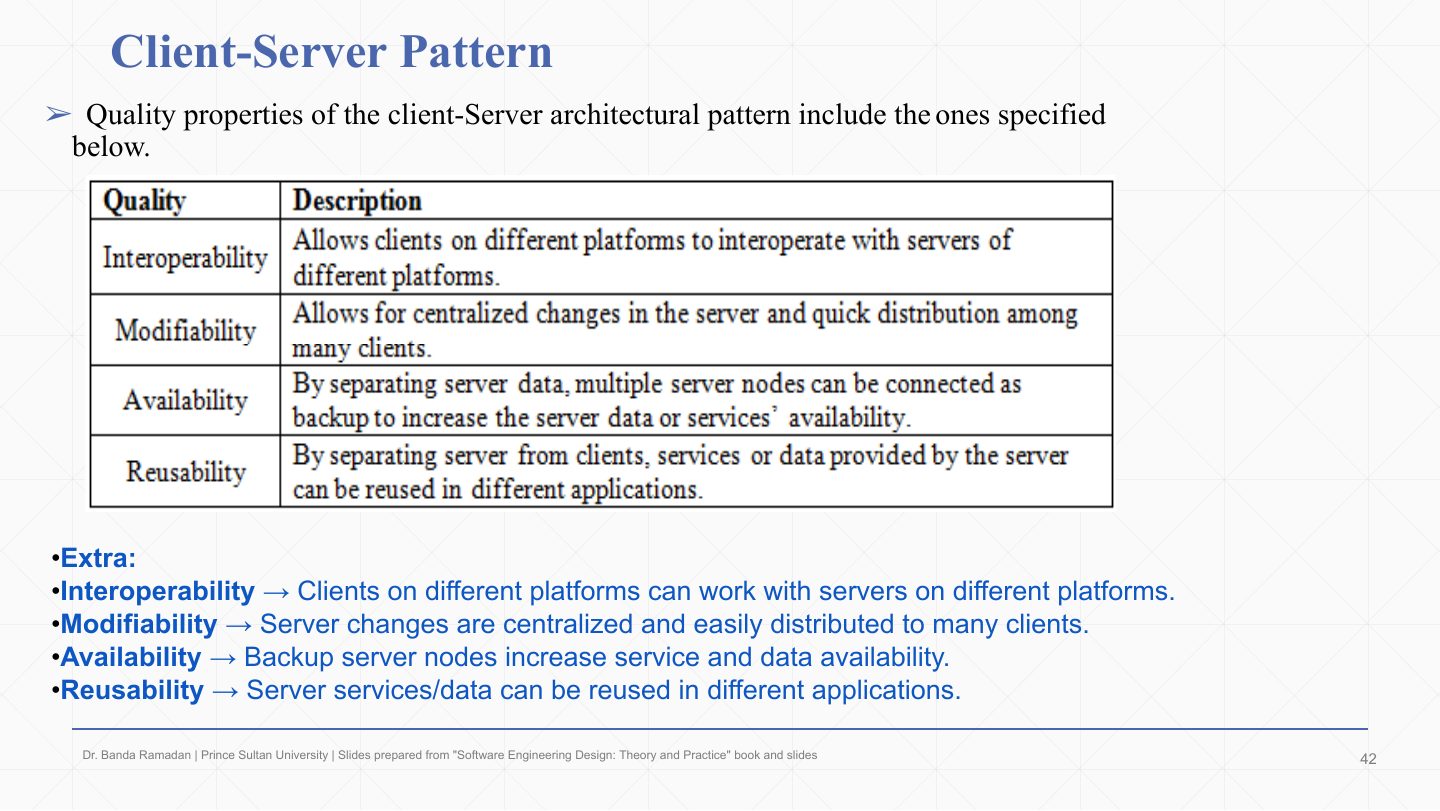
  42. 42 Client-Server Pattern
  43. 43 Broker Pattern
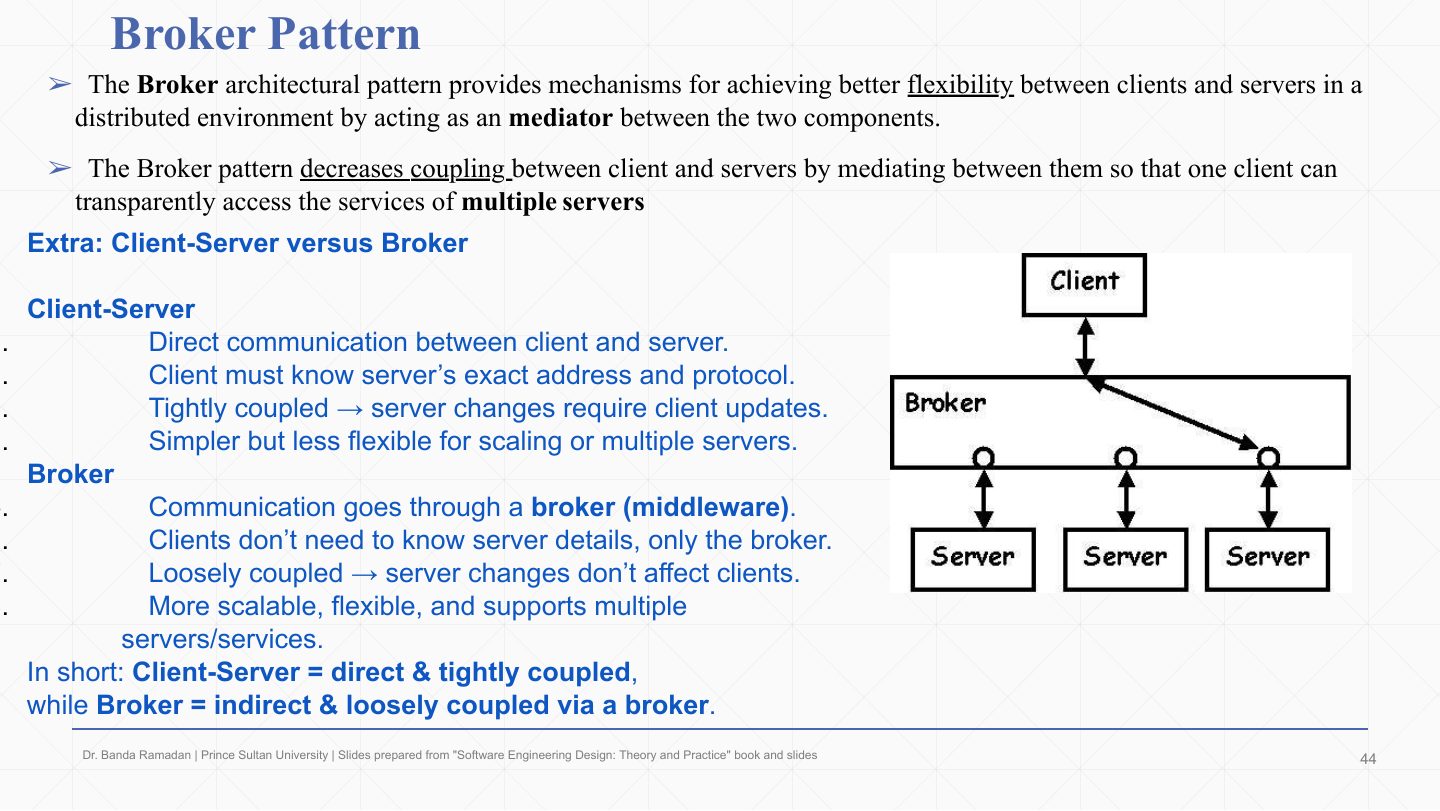
  44. 44 Broker Pattern
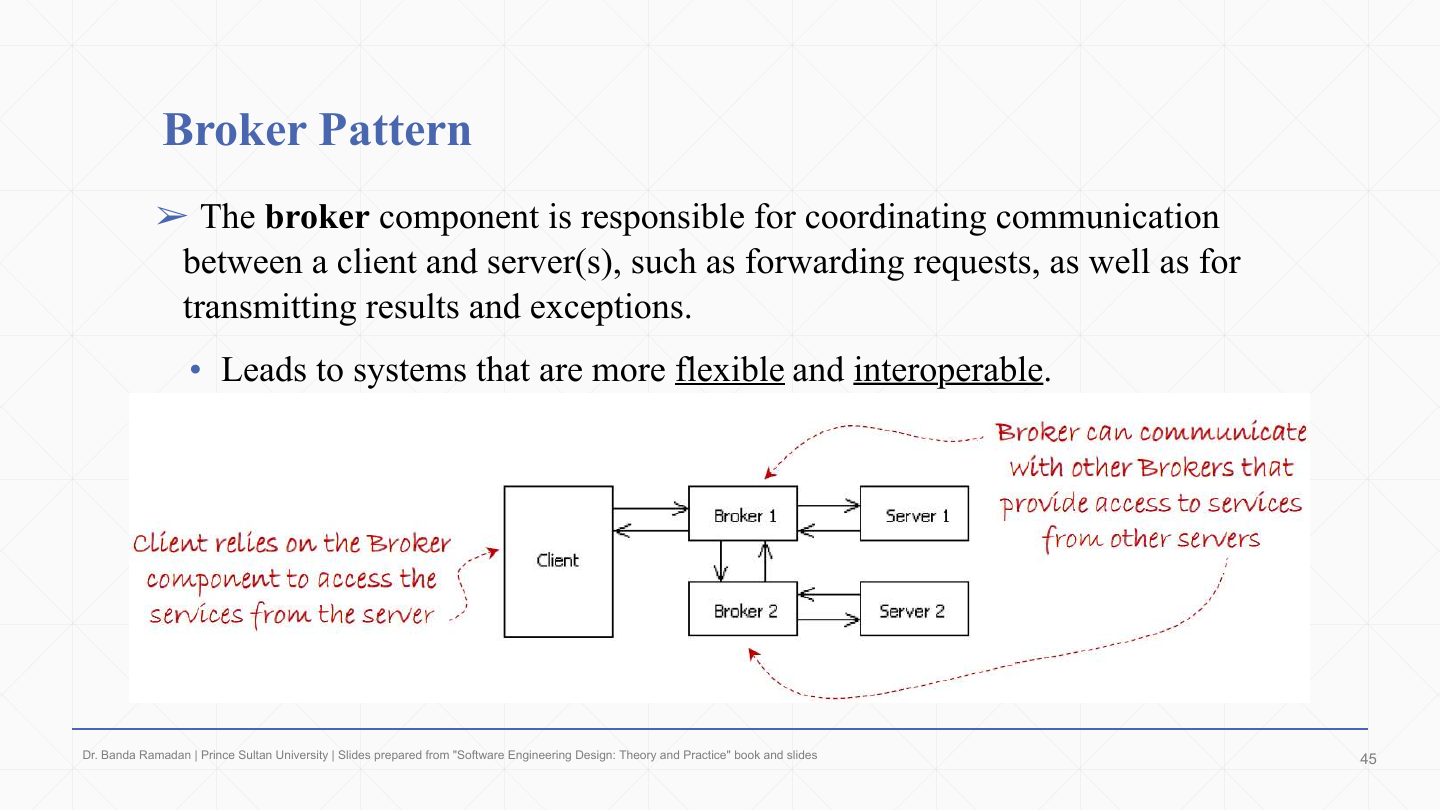
  45. 45 Broker Pattern components
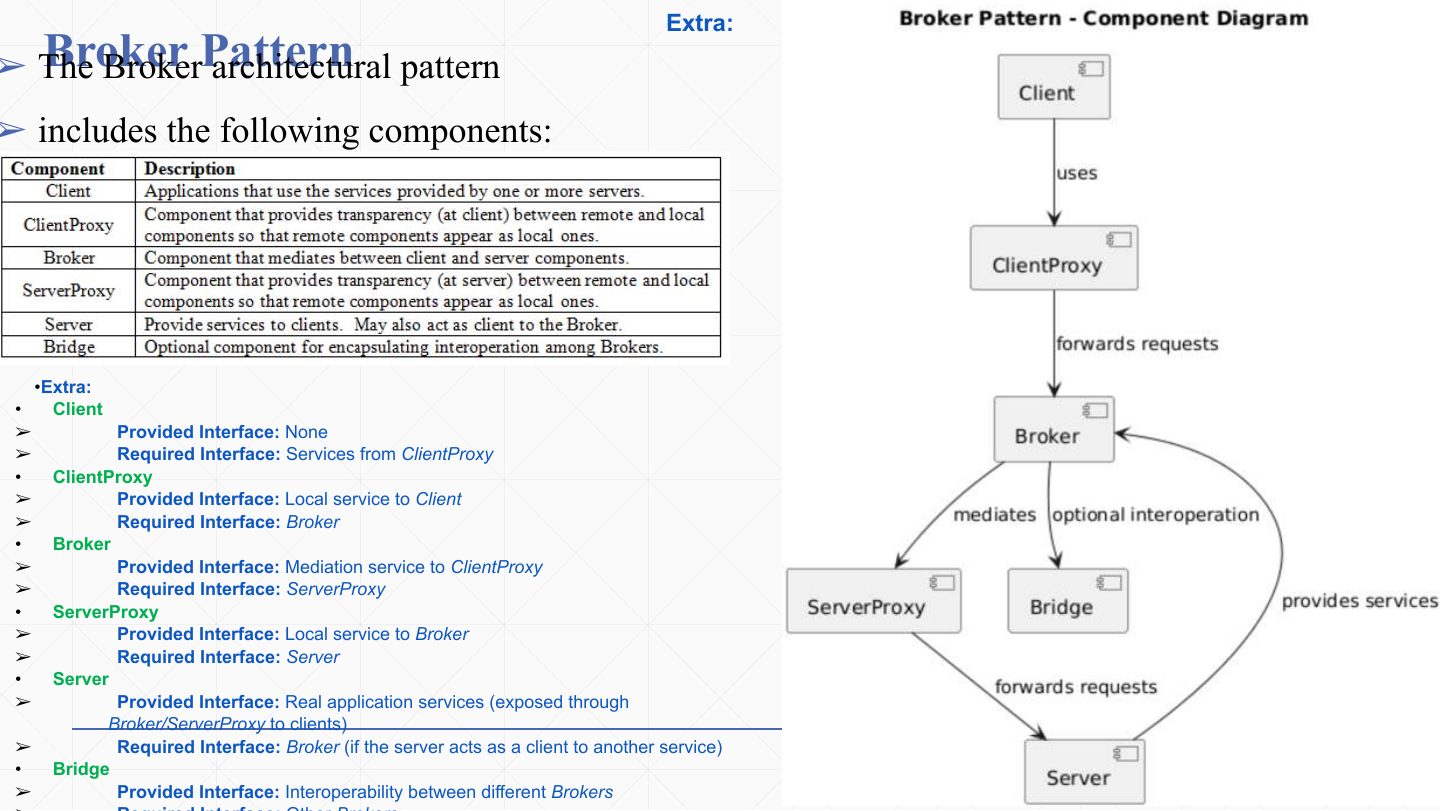
  46. 46 Broker Pattern
  47. 47 Broker Pattern
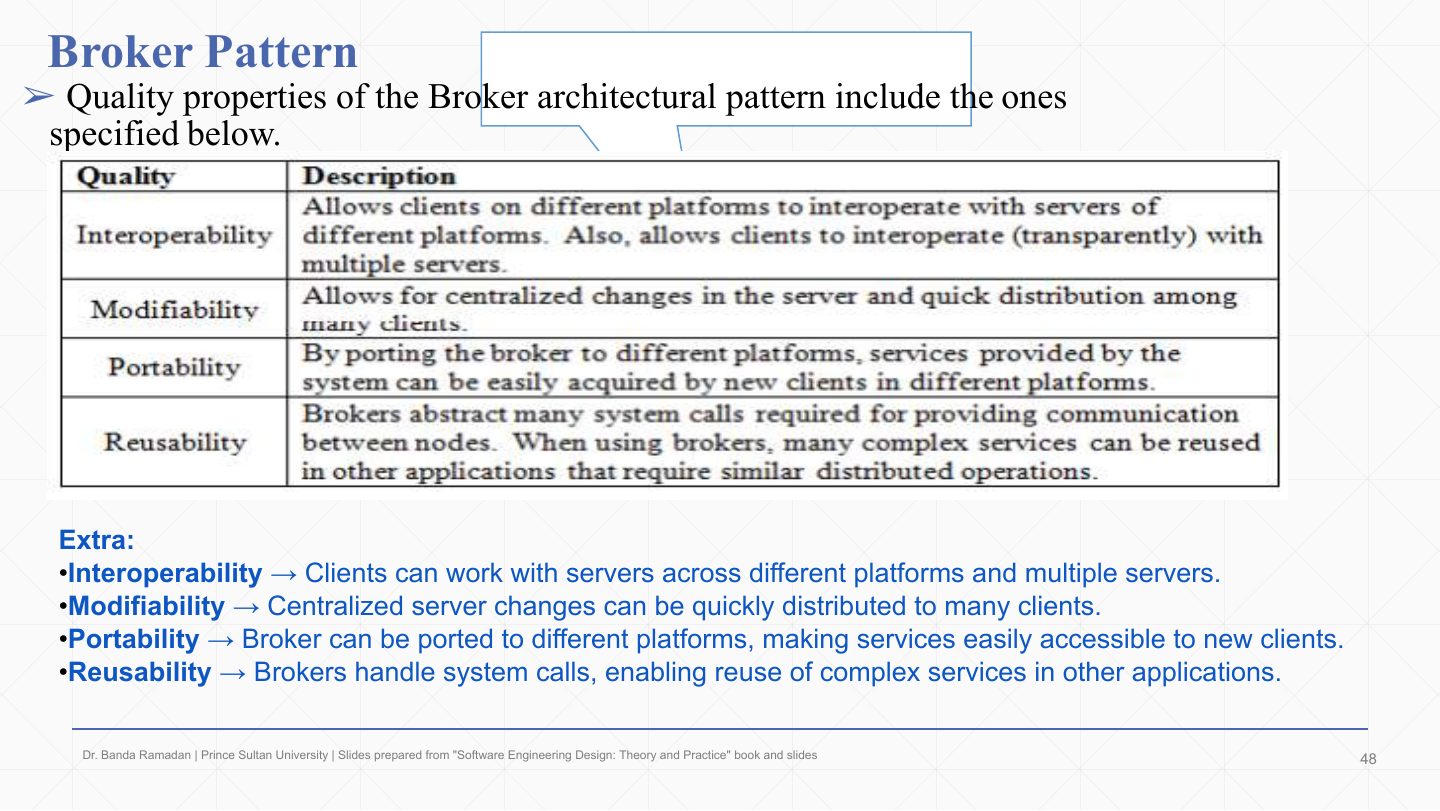
  48. 48 Summary
Slide 1 / 48

Slide 1

Slide 1: Slide 1

Notes

  1. Second patterns lecture: the patterns for the first three system types of Lecture 1. For each one learn its components (the roles you will be asked to name), how they communicate, and its quality properties.

Slide 2 / 48

Lecture Outlines- Architecture Patterns Ð Chapter 04

Slide 2: Lecture Outlines- Architecture Patterns Ð Chapter 04

Notes

  1. Data-centered → the blackboard pattern.

  2. Data flow → pipes and filters.

  3. Distributed → client–server and broker. Interactive and hierarchical systems come in Lecture 3.

Slide 3 / 48

Data-Centered Systems Ð Overview

Slide 3: Data-Centered Systems Ð Overview

Notes

  1. A data-centered system is decomposed around one central repository of data.

  2. The data management component (the “Data Manager” in the diagram) controls, provides and manages access to the system’s data.

  3. Worker components do the actual work, operating on that data.

Slide 4 / 48

Data-Centered Systems Ð Overview

Slide 4: Data-Centered Systems Ð Overview

Notes

  1. Communication is one-to-one and two-way between each worker and the data manager (the “two way communication” arrows).

  2. Workers do not interact with each other directly; everything goes through the data management component. That keeps workers independent, but makes the data manager critical: if it is slow or down, everyone is.

Slide 5 / 48

Data-Centered Systems Ð Overview

Slide 5: Data-Centered Systems Ð Overview

Notes

  1. Because everything depends on shared data, these systems must handle data integrity: data stays complete, accurate and consistent across operations, even when several workers update it (the diagram adds transactions and recovery, and security, at the data manager).

  2. They must also define the communication protocols (and security) between the workers and the data manager. The Extra box repeats Lecture 1: a DBMS can be seen as a repository or as the server in client–server.

Slide 6 / 48

Blackboard Architectural Pattern

Slide 6: Blackboard Architectural Pattern

Notes

  1. The blackboard pattern decomposes a system into components that work around a central data component to solve complex problems.

  2. The components work independently, each providing a partial solution, in an opportunistic way: whoever can contribute something useful given the current state does so.

  3. There is no predetermined sequence of operations that leads to the answer. That is the key difference from pipes and filters, whose order is fixed.

Exam angle

Past exam · Midterm 252 · Q5a · 1 markQ1

Best Flight Itinerary system (Midterm 252): a Passenger App sends a trip request to the Trip Planning Service, which creates an empty itinerary draft in the Draft Itinerary Record. The Route Builder lists possible routes, the Constraint Checker filters out routes that break the passenger’s or airline’s rules, and the Best Option Selector picks the best one; each step retrieves the current draft, improves it and saves it back, until the draft is stable and the service returns it to the app. Write the name of the most suitable architectural pattern for this system.

Show answer

Blackboard. Several independent components (Route Builder, Constraint Checker, Best Option Selector) repeatedly read and update one shared data store (the Draft Itinerary Record) until the solution is stable, and a controller (the Trip Planning Service) decides which one runs next. Pipe-and-filter is the tempting wrong answer: there, filters pass output directly to the next filter and no shared store is repeatedly updated.
Slide 7 / 48

Blackboard Architectural Pattern

Slide 7: Blackboard Architectural Pattern

Notes

  1. The pattern copies how a group of scientists would attack a hard problem together at one blackboard.

  2. A mediator (controller) controls access to the board. When it hands control to a scientist, that scientist looks at the current state and, if possible, advances the solution before releasing the board.

  3. With the new knowledge on the board, control goes to the next scientist who can improve it, and so on until no more progress can be made. There is no fixed order: each contributes when the current state makes their expertise useful.

  4. This is how expert systems work (AI that applies knowledge and inference rules like a human expert, in medicine or finance), so the blackboard pattern is a good fit for their logical architecture.

Slide 8 / 48

Extra: Blackboard as a group project

Slide 8: Extra: Blackboard as a group project

Notes

  1. Blackboard: the shared whiteboard in a group project, where all information is displayed and updated and everyone can see it.

  2. Agents: independent contributors with different skills who read the board and add their expertise.

  3. Controller: the organiser who manages when and how agents access the board, so the project progresses in an orderly way.

Slide 9 / 48

Extra: Real-World Example: Emergency Room (ER)

Slide 9: Extra: Real-World Example: Emergency Room (ER)

Notes

  1. An emergency room maps onto the pattern exactly.

  2. Blackboard: the patient’s chart, visible to all staff and continuously updated.
  3. Agents: doctors, nurses and specialists. A nurse updates vital signs, a doctor orders tests or medication, a specialist adds an opinion. Each reads the chart and contributes from their own expertise.

  4. Controller: decides who gets access to the chart and when, prioritising contributions as the patient’s condition changes.

Slide 10 / 48

Blackboard Architectural Pattern

Slide 10: Blackboard Architectural Pattern

Notes

  1. Blackboard: the central data repository where all current information is displayed and accessible.

  2. Agents (knowledge sources): Agent 1–4, each with unique expertise for part of the problem. In the cartoon, agents cannot touch the board until the controller grants access.

  3. Controller: decides which agent accesses the board at any time, keeping problem solving orderly.

  4. Process: Agent 1 currently has access and advances the solution; Agents 2–4 wait their turn.

Exam angle

Past exam · Midterm 252 · Q5b · 1 markQ1

Best Flight Itinerary system (Midterm 252): a Passenger App sends a trip request to the Trip Planning Service, which creates an empty itinerary draft in the Draft Itinerary Record. The Route Builder lists possible routes, the Constraint Checker filters out routes that break the passenger’s or airline’s rules, and the Best Option Selector picks the best one; each step retrieves the current draft, improves it and saves it back, until the draft is stable and the service returns it to the app. Based on the pattern you selected, identify the role of each component.

Show answer

Passenger App → client (sends the trip request, shows the result). Trip Planning Service → controller (manages the process and decides which component runs next). Draft Itinerary Record → blackboard (the shared data everyone reads and updates). Route Builder, Constraint Checker, Best Option Selector → workers / knowledge sources.

Slide 11 / 48

Blackboard Architectural Pattern

Slide 11: Blackboard Architectural Pattern

Notes

  1. Typical uses: speech recognition, image recognition, security systems, business resource management. All are problems where several kinds of knowledge must be combined with no fixed order.

  2. The structure diagram: the controller at the top connects to every agent (to invoke them) and to the blackboard; Agents 1…n each connect to the blackboard to read and write. Agents never connect to each other.

Slide 12 / 48

Blackboard: Students’ Scheduling System component diagram

Slide 12: Blackboard: Students’ Scheduling System component diagram

Notes

  1. Example: a students’ scheduling system that builds a schedule from completed courses, the student’s work schedule, and the courses offered.

  2. Blackboard (ScheduleBlackboard): the shared knowledge base that controller and agents read and write.

  3. Agents (StudentHistory, WorkSchedule, CourseOfferings): specialised problem solvers that contribute when they can.

  4. Controller (ScheduleManager): decides when and which agent acts, and the order of problem solving.

  5. Interfaces in the component diagram: the blackboard provides an interface (IStudentHistory, IWorkSchedule… read/write/update) because both the controller and the agents need its data. The controller provides nothing to the agents: it orchestrates, it doesn’t store data.

  6. The agents provide an interface (e.g. run(), workOnSchedule()) that the controller requires, so the controller can invoke them when it decides they should act.

Exam angle

Past exam · Midterm 252 · Q5c · 3 marksQ1

Best Flight Itinerary system (Midterm 252): a Passenger App sends a trip request to the Trip Planning Service, which creates an empty itinerary draft in the Draft Itinerary Record. The Route Builder lists possible routes, the Constraint Checker filters out routes that break the passenger’s or airline’s rules, and the Best Option Selector picks the best one; each step retrieves the current draft, improves it and saves it back, until the draft is stable and the service returns it to the app. Build the component diagram with the correct provided and required interfaces.

Show answer

Trip Planning Service provides ITripPlanningAPI and the Passenger App requires it (the client only talks to the controller). Draft Itinerary Record provides IItineraryStore; the Trip Planning Service and each worker (Route Builder, Constraint Checker, Best Option Selector) require it. The Trip Planning Service invokes the three workers. Wrong connections: Route Builder passing routes directly to the Constraint Checker (that is pipe-and-filter), the Passenger App using the store directly, the blackboard requiring an interface from the controller, a worker providing the API to the client.

Slide 13 / 48

Extra: Blackboard roles and interfaces

Slide 13: Extra: Blackboard roles and interfaces

Notes

  1. Who does what: the blackboard is the shared store with a read/write/update API; agents are specialised solvers that use that API when invoked; the controller (scheduler) orchestrates when and which agent runs, and does not pass data around.

  2. One cycle: (1) the controller decides “Agent A runs now” and calls AgentA.run(); (2) A reads what it needs from the blackboard; (3) A computes and writes its results back; (4) the controller checks the board (or is notified) and picks the next agent.

  3. Interfaces: the blackboard provides the data API (agents and controller require it); agents provide a service interface such as run() (the controller requires it); the controller generally provides nothing to agents.

  4. Guideline: control flows controller → agents (invocation); data flows agents ↔ blackboard (read/write). Agents never talk to each other; they communicate only through the blackboard, and only when scheduled.

Slide 14 / 48

Blackboard: scheduling system sequence diagram

Slide 14: Blackboard: scheduling system sequence diagram

Notes

  1. The sequence diagram for the scheduling system. Client: the student portal; the student clicks “Generate Schedule”, which calls generateSchedule().

  2. ScheduleManager (controller) runs the process and decides which scheduler goes next (nextScheduler()).

  3. StudentHistory, CourseOfferings, WorkSchedule: the agents. Each improves the draft: check eligibility from passed courses, keep only sections actually offered, remove conflicts with work hours.

  4. ScheduleBlackboard holds the current draft, accessed through getSchedule() and setSchedule(). Slides 15–17 walk through the 19 messages.

Slide 15 / 48

Extra: Blackboard sequence, phase 1

Slide 15: Extra: Blackboard sequence, phase 1

Notes

  1. Messages 1–2: the client calls generateSchedule() on the ScheduleManager, which calls nextScheduler() to choose the first agent.

  2. Phase 1 (messages 3–6): the manager calls workOnScheduler() on StudentHistory; StudentHistory reads the draft with getSchedule(), adjusts it for past courses and degree requirements, saves it with setSchedule(sch), and returns control to the manager.

Slide 16 / 48

Extra: Blackboard sequence, phase 2

Slide 16: Extra: Blackboard sequence, phase 2

Notes

  1. Phase 2 (messages 7–11): the manager picks the next agent (nextScheduler()) and calls workOnScheduler() on CourseOfferings. It reads the draft, keeps only courses actually offered this semester, saves the realistic version back, and returns control. Note the pattern repeating: manager invokes → agent reads → agent writes → control returns.

Slide 17 / 48

Extra: Blackboard sequence, phases 3–4

Slide 17: Extra: Blackboard sequence, phases 3–4

Notes

  1. Phase 3 (messages 12–16): WorkSchedule reads the draft, removes conflicts with the student’s work commitments, and saves the final conflict-free version.

  2. Phase 4 (messages 17–19): the manager retrieves the finished schedule from the blackboard with one last getSchedule() and returns it to the client.

Slide 18 / 48

Blackboard Architectural Pattern

Slide 18: Blackboard Architectural Pattern

Notes

  1. Modifiability: agents are independent, so adding or removing one is easy, e.g. a new SportsSchedule agent without touching the others.

  2. Reusability: specialised agents can be reused elsewhere, e.g. StudentHistory in a graduation checker.

  3. Maintainability: knowledge is separated, so fixing a bug in CourseOfferings doesn’t touch WorkSchedule. (The cost: the controller’s scheduling makes behaviour harder to predict and test.)

Exam angle

PredictionQ1

Give two quality properties of the blackboard pattern with a short justification.

Show answer

Modifiability: agents are independent, so new ones can be added without changing others. Reusability: specialised agents can be reused in other systems. Maintainability: knowledge sources are separated, so one can be fixed without touching the rest.

Slide 19 / 48

Extra: Deployment vs. Component Diagram

Slide 19: Extra: Deployment vs. Component Diagram

Notes

  1. A deployment diagram shows the physical deployment of artifacts (programs, libraries) onto hardware: servers, devices, run-time nodes and the communication links between them. Web-app example: how the web server, application server and database server are configured and connected.
  2. A component diagram shows how software components are organised and depend on each other through interfaces. Web-app example: the authentication library, data-access objects and business logic, and how they interact. Component = logical structure; deployment = where it runs.

Exam angle

PredictionQ1

Which diagram shows hardware nodes and the software deployed on them?

  1. Deployment diagram
  2. Component diagram
  3. Class diagram
  4. Sequence diagram
Show answer

A. Deployment diagram

Slide 20 / 48

Blackboard Architectural Pattern - Exercise

Slide 20: Blackboard Architectural Pattern - Exercise

Notes

  1. The exercise: a speech-recognition system. Input is speech as a waveform (single words or whole sentences); output is English text on the screen.

  2. Using the structure on the left (Segmentation, Word creation and Phrase creation agents around a controller and a blackboard holding segments S1…S9, words and phrases), draw the component and sequence diagrams with the blackboard pattern.

  3. (The table on the right is unreadable in the PDF because of a font problem; slides 21–23 give its content and the solution.) The controller coordinates the agents; the blackboard is the shared memory where segments, words and phrases are stored and refined.
Slide 21 / 48

Extra: Speech-recognition agents at work

Slide 21: Extra: Speech-recognition agents at work

Notes

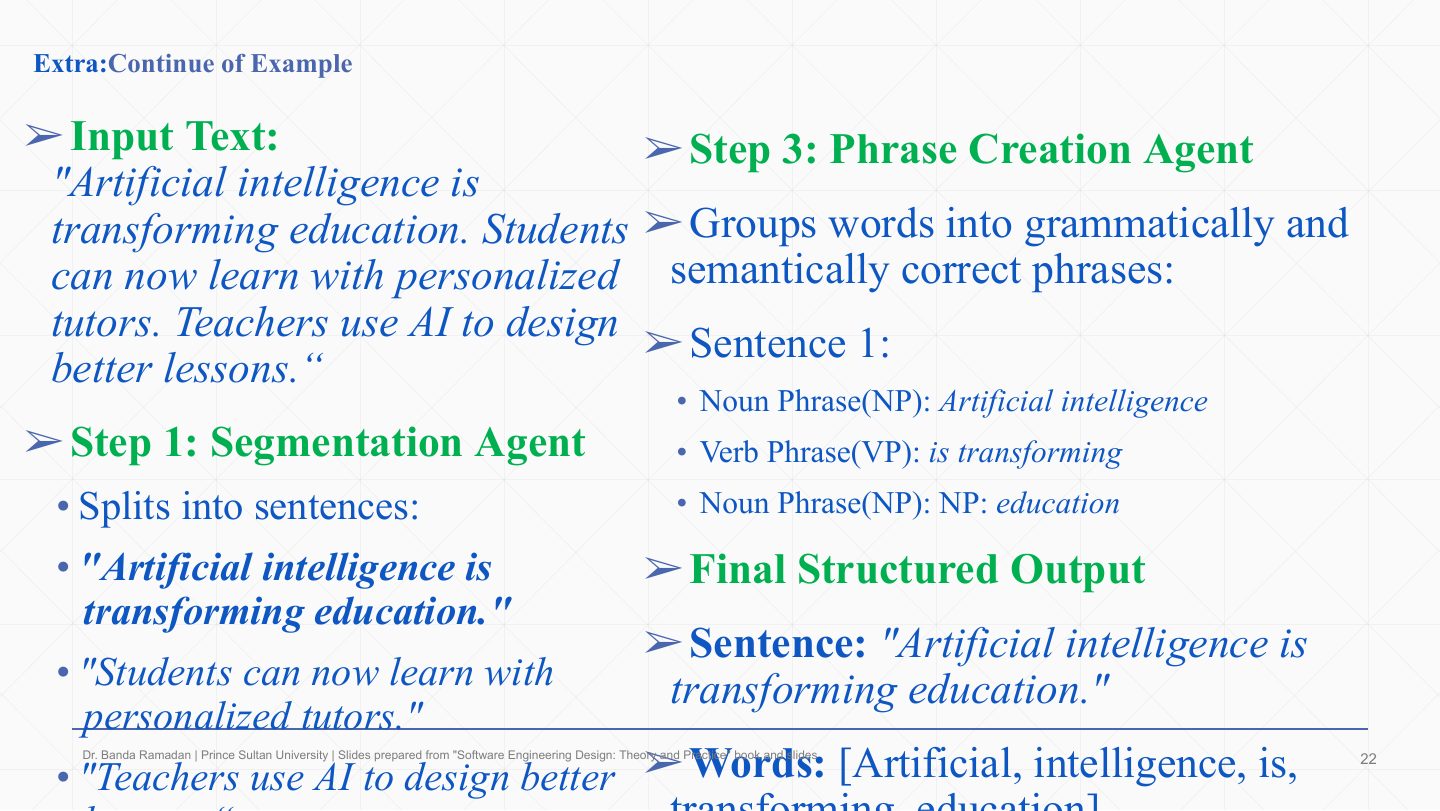
  1. A walk-through on sample text. Segmentation agent: splits the input into sentences (“Artificial intelligence is transforming education.” …).

  2. The word creation agent (between them) builds words from segments; the phrase creation agent groups words into grammatically correct phrases: NP “Artificial intelligence”, VP “is transforming”, NP “education”.

  3. The final structured output on the blackboard holds the sentence, its words and its phrases, each written by a different agent.

Slide 22 / 48

Extra: Solution – component diagram

Slide 22: Extra: Solution – component diagram

Notes

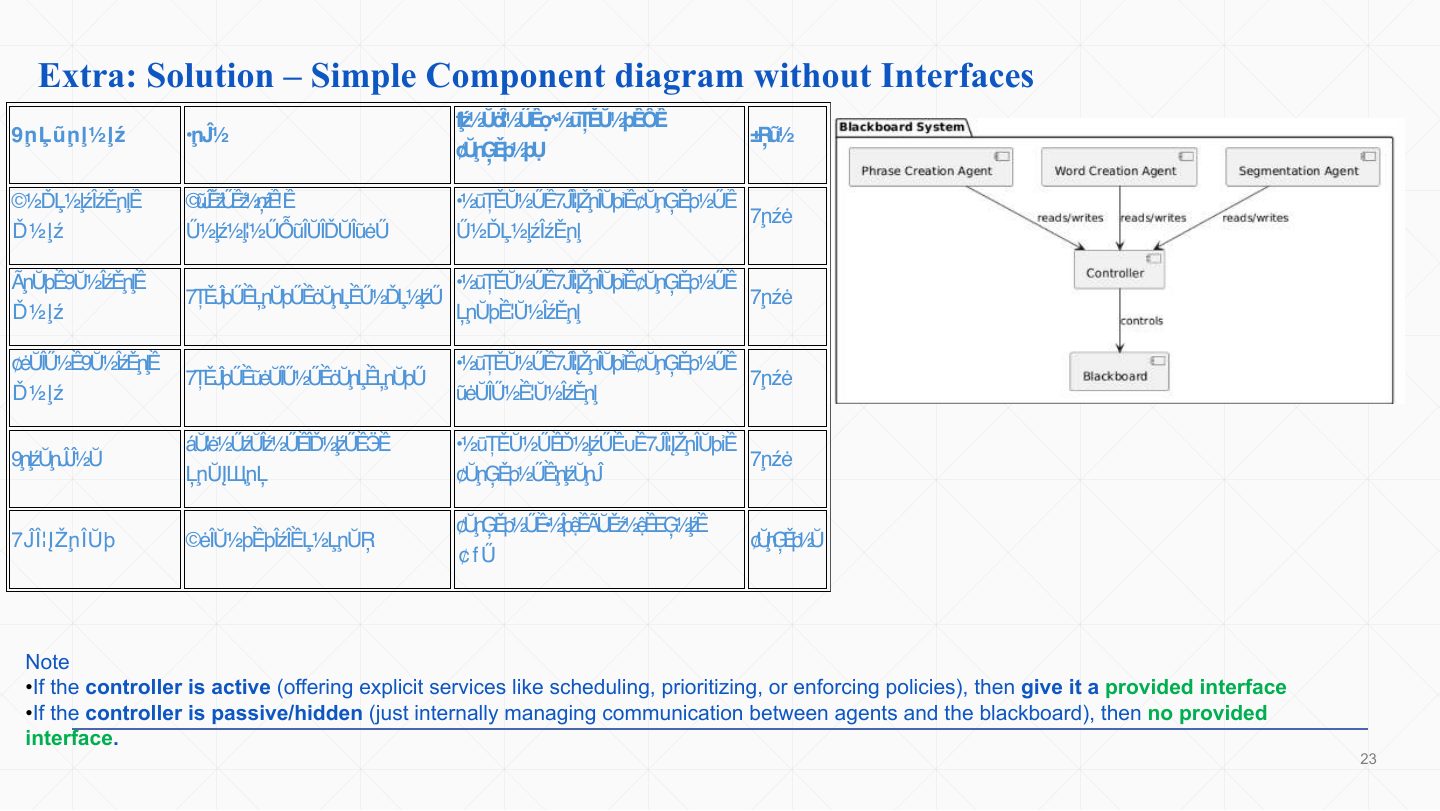
  1. The component solution: Segmentation, Word Creation and Phrase Creation agents each require the blackboard (reads/writes) and provide their own operation; the controller requires the agents and the blackboard and orchestrates them; the blackboard provides read/write and event services. (The table is garbled in the PDF; the diagram on the right shows the same structure.)

  2. The note answers a common doubt: give the controller a provided interface only if it is active (offers services such as scheduling or policies to others); if it just manages agents and the blackboard internally, it has none.

Slide 23 / 48

Extra: Solution – sequence diagram

Slide 23: Extra: Solution – sequence diagram

Notes

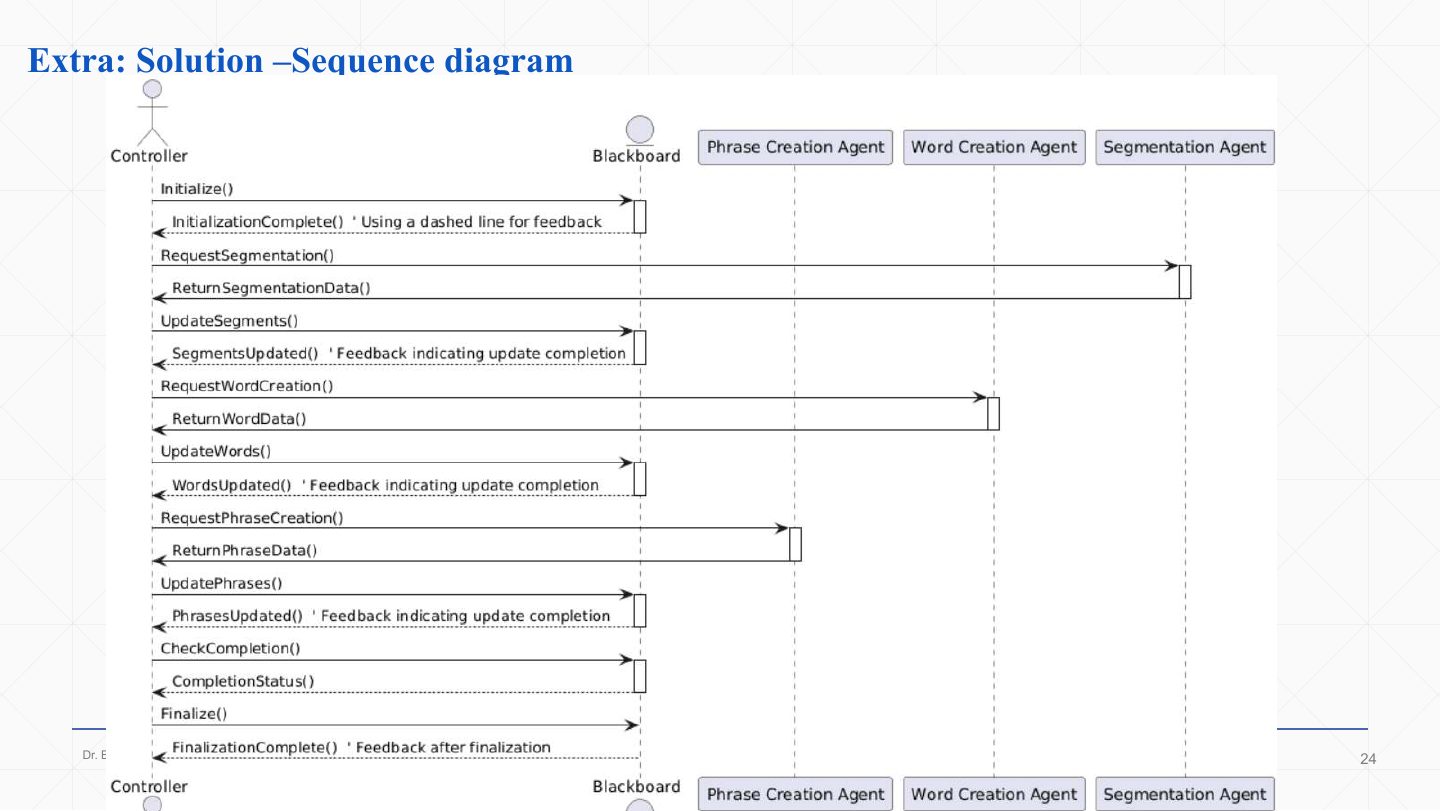
  1. The sequence solution, top to bottom: the controller initialises the blackboard, then repeats the same cycle for each agent: request (segmentation, word creation, phrase creation) → the agent returns its data → the controller updates the blackboard → the blackboard confirms (dashed feedback arrows).

  2. It ends with CheckCompletion() / CompletionStatus() and Finalize(). In this solution the controller writes to the blackboard on the agents’ behalf; in the scheduling example the agents wrote themselves. Both are accepted variants: what matters is that agents never call each other.

Slide 24 / 48

Data Flow Systems

Slide 24: Data Flow Systems

Notes

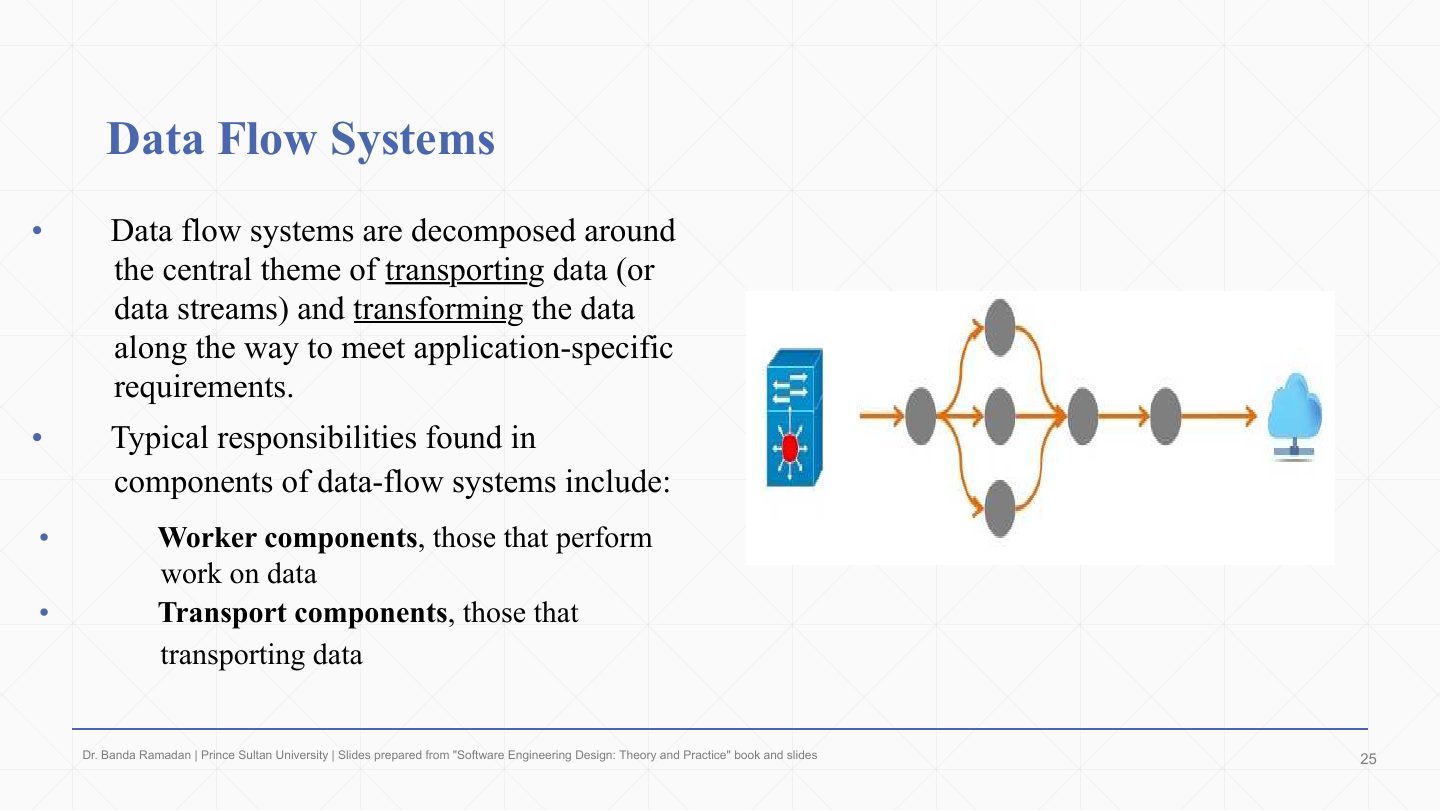
  1. Data flow systems are decomposed around transporting data streams and transforming them on the way to meet application needs.

  2. Worker components perform work on the data.

  3. Transport components move the data.

Slide 25 / 48

Data Flow Systems

Slide 25: Data Flow Systems

Notes

  1. Worker components abstract the transformations applied before data is forwarded: encryption/decryption, compression/decompression, changing format (binary to XML, raw data to information), enhancing, modifying or storing data.

  2. Transport components abstract how data is moved and controlled. The data-flow pattern studied here is pipes and filters: filters are the workers, pipes the transport.
Slide 26 / 48

Pipes-and-Filters Architectural Pattern

Slide 26: Pipes-and-Filters Architectural Pattern

Notes

  1. Data source: produces the input data.

  2. Pipes: carry data from one step to the next.

  3. Filters: process the data (transform, clean, analyse) and pass it on. In the diagram data branches: Filter 1 feeds Filters 2, 3 and 4, which rejoin at Filter 5.

  4. Data sink: the final destination where the processed data is stored or used.

  5. Important: the box-and-line diagram is not UML and hides how pipes really work; in real systems pipes can be function calls, files, queues or sockets.

Exam angle

Past exam · Final 252 · Q4-2 · 2.5 marksQ1

StreamFlow: a desktop app for broadcasters processes live video in real time. Frames are modified as they pass through the application before being sent to the streaming server, through transformations in a specific order: Noise Reduction, Color Grading, Watermarking and Compression. Identify the architecture pattern and draw its component diagram.

Show answer

Pipe-and-filter. Each transformation is an independent filter; frames flow between them through pipes in a fixed order, so filters can be replaced or reordered without touching the others: Live feed (source) → Noise Reduction → Color Grading → Watermarking → Compression → Streaming server (sink).

Slide 27 / 48

Pipes-and-Filters Architectural Pattern

Slide 27: Pipes-and-Filters Architectural Pattern

Notes

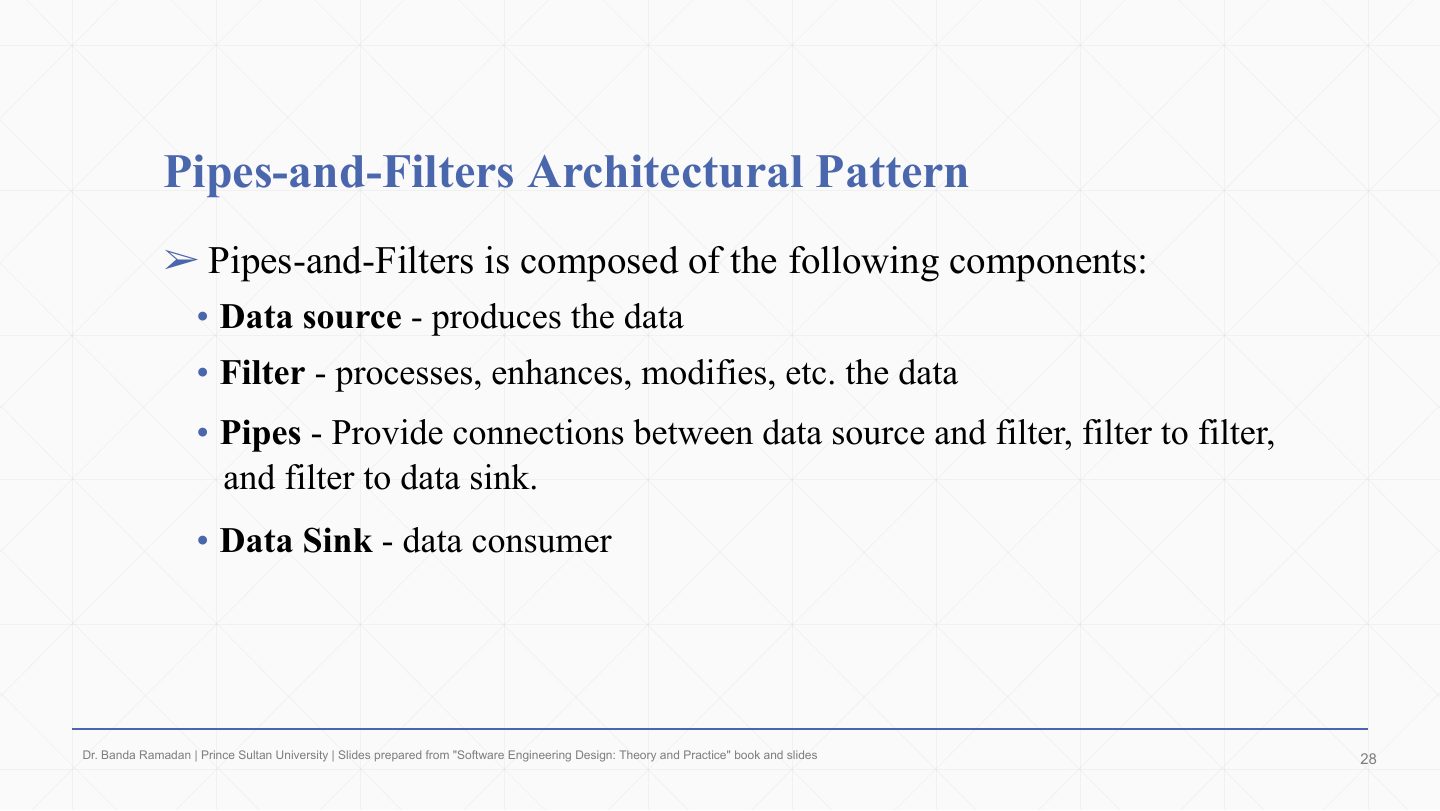
  1. The four components, formally. Data source: produces the data.

  2. Filter: processes, enhances or modifies the data.

  3. Pipe: connects source → filter, filter → filter, and filter → sink.

  4. Data sink: consumes the data.

Exam angle

PredictionQ1

In pipes and filters, which component transforms the data?

  1. Filter
  2. Pipe
  3. Data sink
  4. Data source
Show answer

A. Filter

Slide 28 / 48

Pipes-and-Filters Architectural Pattern Ð Example1

Slide 28: Pipes-and-Filters Architectural Pattern Ð Example1

Notes

  1. Example 1: a language processor (compiler or interpreter) is the classic pipes-and-filters system: source code flows through lexical analysis, parsing, code generation and optimisation.

Slide 29 / 48

Pipes-and-Filters – Example 1: language processor

Slide 29: Pipes-and-Filters – Example 1: language processor

Notes

  1. Lexical analyser (filter 1): breaks source code into tokens. int x = 5; becomes int, x, =, 5, ;.

  2. Parser: builds a parse tree from the tokens (a declaration node for int x, an initialisation node for = 5). Code generator: turns the tree into machine code or an intermediate form (allocate memory for x, move 5 into it).

  3. Optimizer: makes the code faster or smaller (e.g. one instruction that both reserves and initialises x). In an interpreter pipeline the last filter executes the intermediate form directly instead. The diagram shows that filters are reusable: the same lexer and parser serve both pipelines.

Slide 30 / 48

Pipes-and-Filters – Example 1 as UML

Slide 30: Pipes-and-Filters – Example 1 as UML

Notes

  1. The same pipeline as a UML sequence diagram (“Important: a UML diagram!”). 1: call() feeds input to the lexical analyser.

  2. The parser 2: process()es the tokens into a parse tree and 3: call()s the code generator.

  3. The code generator 4: process()es the tree into code and 5: call()s the optimizer.

  4. The optimizer 6: process()es the code. Here the pipes are simply function calls between filters.

Slide 31 / 48

Pipes-and-Filters Architectural Pattern Ð Example2

Slide 31: Pipes-and-Filters Architectural Pattern Ð Example2

Notes

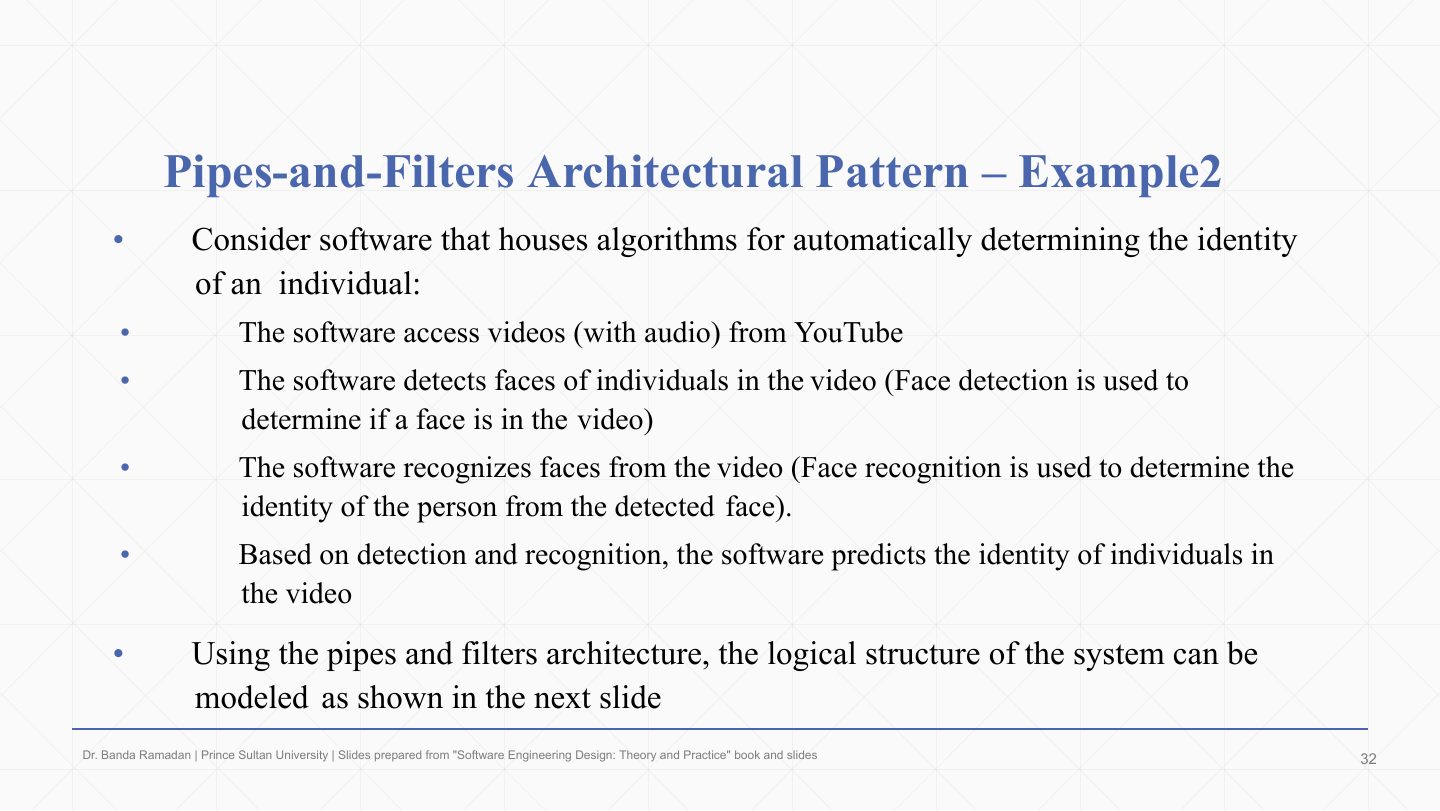
  1. Example 2: software that identifies people automatically. In order: it accesses videos (with audio) from YouTube, detects faces (is there a face?), recognises faces (whose face is it?), and predicts the identity of the individuals.

  2. Each step consumes the previous step’s output, which makes it a pipes-and-filters system; the next slides model it.

Exam angle

Past exam · Midterm 252 · Q6 · 2 marksQ1

A piece of software works out who a person is automatically with a pipe-and-filter architecture: it accesses videos (with audio) from YouTube, detects faces, recognizes faces, and predicts the identity. (1) Place the lifelines of the sequence diagram from left to right in the order the data flows. (2) Which statements about the correct diagram are true?

Show answer

Order: access videos → detects faces → recognizes faces → predicts the identity. True statements: “access videos” sends the video/audio stream (message 1) to “detects faces”; “detects faces” has a self-message (1.1) for its own processing before passing detected faces on (1.2); “recognizes faces” receives the detected faces and sends recognized faces (1.2.2) to “predicts the identity”; the flow ends with “predicts the identity” running its own prediction step (1.2.2.1), forwarding nothing (it is the sink).

Slide 32 / 48

Pipes-and-Filters Architectural Pattern Ð Example2

Slide 32: Pipes-and-Filters Architectural Pattern Ð Example2

Notes

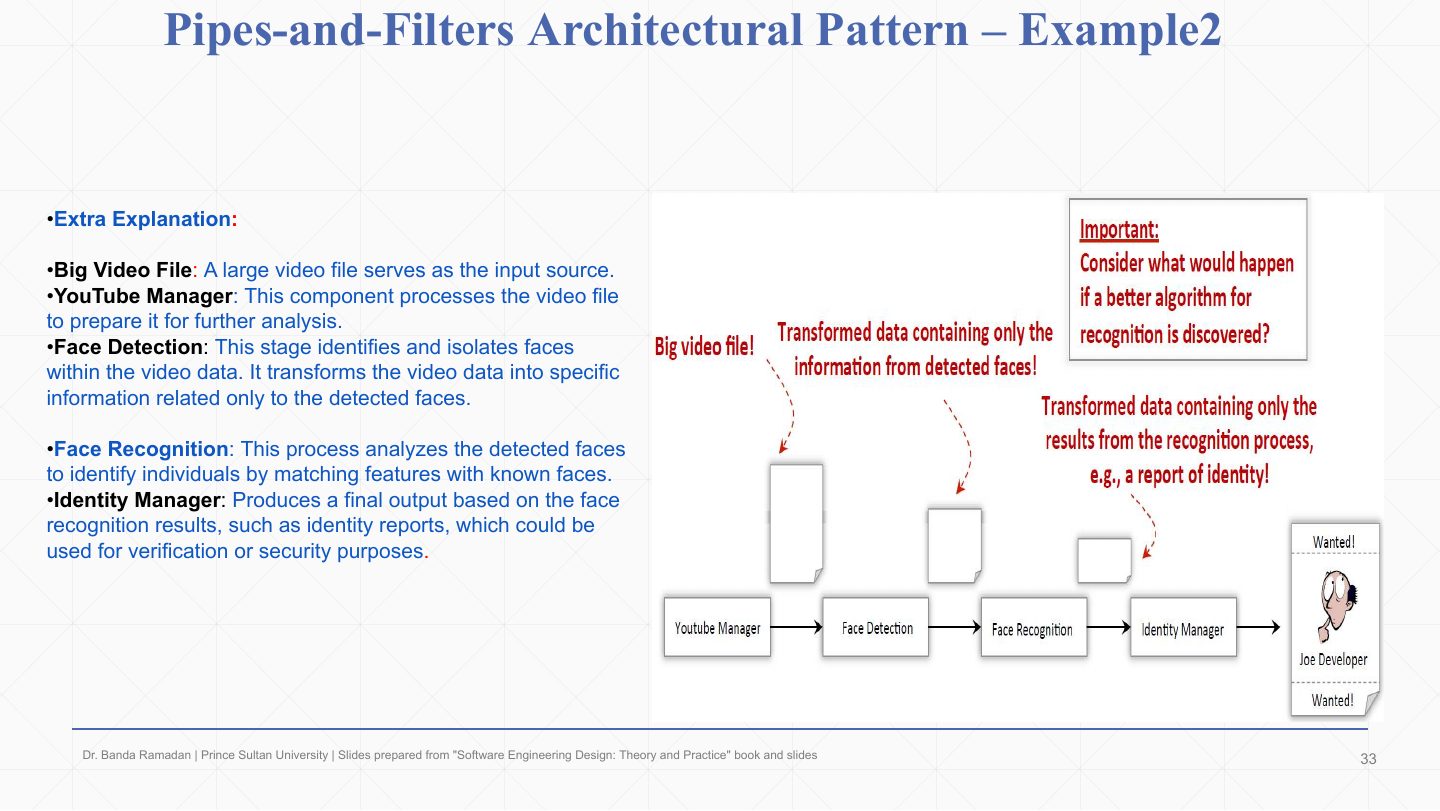
  1. The box-and-line view: a big video file enters the YouTube Manager, which prepares it.

  2. Face detection turns the video into data containing only the detected faces.

  3. Face recognition matches the detected faces against known ones.

  4. Identity manager produces the final output, such as an identity report (“Wanted: Joe Developer”). The callout asks the design question: if a better recognition algorithm appears, only that one filter changes.

Slide 33 / 48

Pipes-and-Filters Architectural Pattern Ð Example2

Slide 33: Pipes-and-Filters Architectural Pattern Ð Example2

Notes

  1. The box-and-line diagram shows the components but says nothing about how data is transported between filters, i.e. the pipes.

  2. A UML component diagram (next slide) makes the transport explicit.

Slide 34 / 48

Pipes-and-Filters Architectural Pattern Ð Example2

Slide 34: Pipes-and-Filters Architectural Pattern Ð Example2

Notes

  1. Here the pipe is the file system: a FileSystemManager component (built on .NET’s FileSystemWatcher) monitors directories and fires an event when a new file appears.

  2. The pipeline components (VideoManager, FaceDetection, FaceRecognition, IdentityManager) each require the IFileSystemPipe interface the manager provides. A filter writes its output as a file; the manager detects it and triggers the next filter. The warning notes this is not the typical pipes-and-filters example but shows how flexible the pattern is.

Slide 35 / 48

Pipes-and-Filters – Example 2 sequence diagram

Slide 35: Pipes-and-Filters – Example 2 sequence diagram

Notes

  1. VideoManager: put(file) places a new video file into the system (message 4).

  2. FaceDetection: register()s with the FileSystemManager at start-up, then, when notified, process()es the video for faces and put(file)s its result.

  3. FaceRecognition: registers, processes the detected faces when notified, and puts the recognised-face data forward.

  4. IdentityManager: registers and, when notified, processes the recognition data to determine identity (the last step: “identity determined!”).

  5. FileSystemManager: the coordinator. Its onFileDetected(file) notifies the registered filter whenever a new or processed file appears, which is what moves data along the pipeline.

Slide 36 / 48

Pipes-and-Filters

Slide 36: Pipes-and-Filters

Notes

  1. Extensibility: add new filters easily (a spam filter). Efficiency: filters can run in parallel. Reusability: filters are reused across systems. Modifiability: add, remove or change filters independently. Security: security filters can be inserted anywhere in the chain. Maintainability: independent filters make updates simple. Trade-off: every boundary needs agreed data formats, and the pattern suits batch-like flows, not interactive ones where the user steers the work midway.

Exam angle

PredictionQ1

List three quality properties of the pipes-and-filters pattern.

Show answer

Any three of: extensibility (new filters), efficiency (filters run concurrently), reusability, modifiability (add/remove/reorder filters), security (insert security filters), maintainability.

Slide 37 / 48

Distributed Systems

Slide 37: Distributed Systems

Notes

  1. Distributed systems are decomposed into multiple processes that usually collaborate over a network.

  2. Client–server: client-side processes work for users and act as a bridge to a remote server that does the work delegated to it.

  3. Peer-to-peer: peer nodes with similar capabilities collaborate as equals, e.g. music-sharing applications. The pictures contrast a mesh of peers with a star around one server.

Slide 38 / 48

Distributed Systems

Slide 38: Distributed Systems

Notes

  1. Those systems are easy to spot because they are deployed on multiple physical nodes.

  2. With multi-core processors, distributed architecture also applies inside a single machine: work is spread across cores instead of computers.

Slide 39 / 48

Distributed Systems

Slide 39: Distributed Systems

Notes

  1. Examples: Internet systems, web services, file- and music-sharing systems, high-performance computing.

  2. Common patterns: client–server (clients request, a central server provides, e.g. browser and web server) and broker.

  3. Peer-to-peer: every node is both client and server, sharing resources with no central server (BitTorrent).

Exam angle

PredictionQ1

How does peer-to-peer differ from client–server?

Show answer

In client–server, clients request services from a central server. In peer-to-peer every node acts as both client and server and they collaborate without relying on one central node, so the system keeps working when any single peer leaves.

Slide 40 / 48

Client-Server Pattern

Slide 40: Client-Server Pattern

Notes

  1. Server: a program or device that provides functionality to other programs or devices, its clients.

  2. Client: hardware or software that accesses a service the server makes available. Many independent clients talk to the server, and clients do not talk to each other.

  3. Deployment diagram (bottom): the PC node runs pc_browser.exe, the mobile node runs mp_browser.exe, and the server node runs web_server.exe (artifacts on nodes).

  4. Clients communicate with the server over HTTP; the server responds with processed data. The box-and-line diagram above shows the same thing as request/response arrows.

Slide 41 / 48

Client-Server Pattern

Slide 41: Client-Server Pattern

Notes

  1. Interoperability: clients on different platforms work with servers on different platforms (any browser, any OS).

  2. Modifiability: changes are made once at the server and reach all clients.

  3. Availability: backup server nodes keep the service and data available.

  4. Reusability: server services and data can be reused by different applications.

Exam angle

Past exam · Midterm 261 · Q6 (one of seven)Q1

A classroom response application allows hundreds of students to submit answers from their phones while an instructor watches the results on a dashboard. Scores and question status must come from one authoritative course session so that every participant sees consistent information. Which architectural style?

Show answer

Client-server: one authoritative central service that many clients use.

Slide 42 / 48

Client-Server Pattern

Slide 42: Client-Server Pattern

Notes

  1. The main problem: clients are tightly coupled to servers, which becomes complex when services come from many servers in different places.

  2. The client must know the server’s exact IP/URL/protocol, and any server change forces client code updates.

  3. The broker pattern was introduced to remove that coupling.

Exam angle

PredictionQ1

What is the main drawback of client–server that the broker pattern fixes?

  1. Clients are tightly coupled to specific servers
  2. It cannot store data
  3. It needs a blackboard
  4. Clients talk to each other
Show answer

A. Clients are tightly coupled to specific servers

Slide 43 / 48

Broker Pattern

Slide 43: Broker Pattern

Notes

  1. The broker pattern gives more flexibility between clients and servers in a distributed environment by acting as a mediator between them.

  2. It decreases coupling: one client can transparently use the services of many servers, knowing only the broker.

  3. Comparison: client–server is direct, the client must know the server’s address and protocol, server changes need client updates, simpler but less flexible. Broker goes through middleware, the client knows only the broker, server changes don’t affect clients, more scalable. In short: direct and tight vs. indirect and loose.

Exam angle

Past exam · Midterm 261 · Q6 (one of seven)Q1

A hospital application sends requests to several types of laboratory equipment supplied by different vendors. Equipment can be replaced or added over time, but the clinical application should continue using the same request format and should not need vendor-specific logic. Which architectural style?

Show answer

Broker: the broker hides vendor- and service-specific communication behind one request format.

Slide 44 / 48

Broker Pattern

Slide 44: Broker Pattern

Notes

  1. The broker coordinates communication between clients and servers: it forwards requests and transmits results and exceptions back.

  2. This makes systems more flexible and interoperable. In the diagram the client relies on Broker 1 for services from Server 1, and Broker 1 can talk to Broker 2 to reach Server 2’s services too.

Slide 45 / 48

Broker Pattern components

Slide 45: Broker Pattern components

Notes

  1. Client: uses services of one or more servers. Provides nothing; requires the client proxy.

  2. Client proxy: makes remote components look local to the client (transparency). Provides a local service to the client; requires the broker.

  3. Broker: mediates between client and server components. Provides mediation to the client proxy; requires the server proxy.

  4. Server proxy: makes remote components look local on the server side. Provides a local service to the broker; requires the server.

  5. Server: provides the real application services (it may also act as a client of the broker).

  6. Bridge (optional): connects different brokers so they can interoperate.

Exam angle

PredictionQ1

List the components of the broker pattern in the order a request passes through them.

Show answer

Client → client-side proxy → broker → server-side proxy → server (a bridge optionally connects brokers). The response returns the same way.

Slide 46 / 48

Broker Pattern

Slide 46: Broker Pattern

Notes

  1. The client-side proxy decides whether a request can be resolved locally or must be forwarded to the broker.

  2. The pattern separates communication functionality from application functionality: everything about networks and messages sits in the broker and proxies, so clients and servers contain only application logic.

  3. Reading the detailed class diagram:

    Client-side proxy
    packData(), unpackData(), sendRequest(), return(): marshals requests into messages and results back out.
    Broker
    registerService(), findServer(), findClient(), forwardRequest(), forwardResponse(): knows where services are and routes messages.
    Server-side proxy
    packData(), unpackData(), callService(), sendResponse(): calls the real service.
    Client / Server / Bridge
    The client calls callServer() via the broker API; the server registerService()s and runService()s; the bridge transmits messages between brokers.
Slide 47 / 48

Broker Pattern

Slide 47: Broker Pattern

Notes

  1. Interoperability: clients work with servers on different platforms, and with multiple servers.

  2. Modifiability: server changes are centralised and reach many clients quickly.

  3. Portability: the broker can be ported to new platforms, opening the services to new clients.

  4. Reusability: because brokers handle the system calls, complex services can be reused in other applications.

Exam angle

PredictionQ1

Which is a quality property of the broker pattern?

  1. Interoperability across platforms
  2. Tighter client–server coupling
  3. No need for middleware
  4. Guaranteed fastest performance
Show answer

A. Interoperability across platforms

Slide 48 / 48

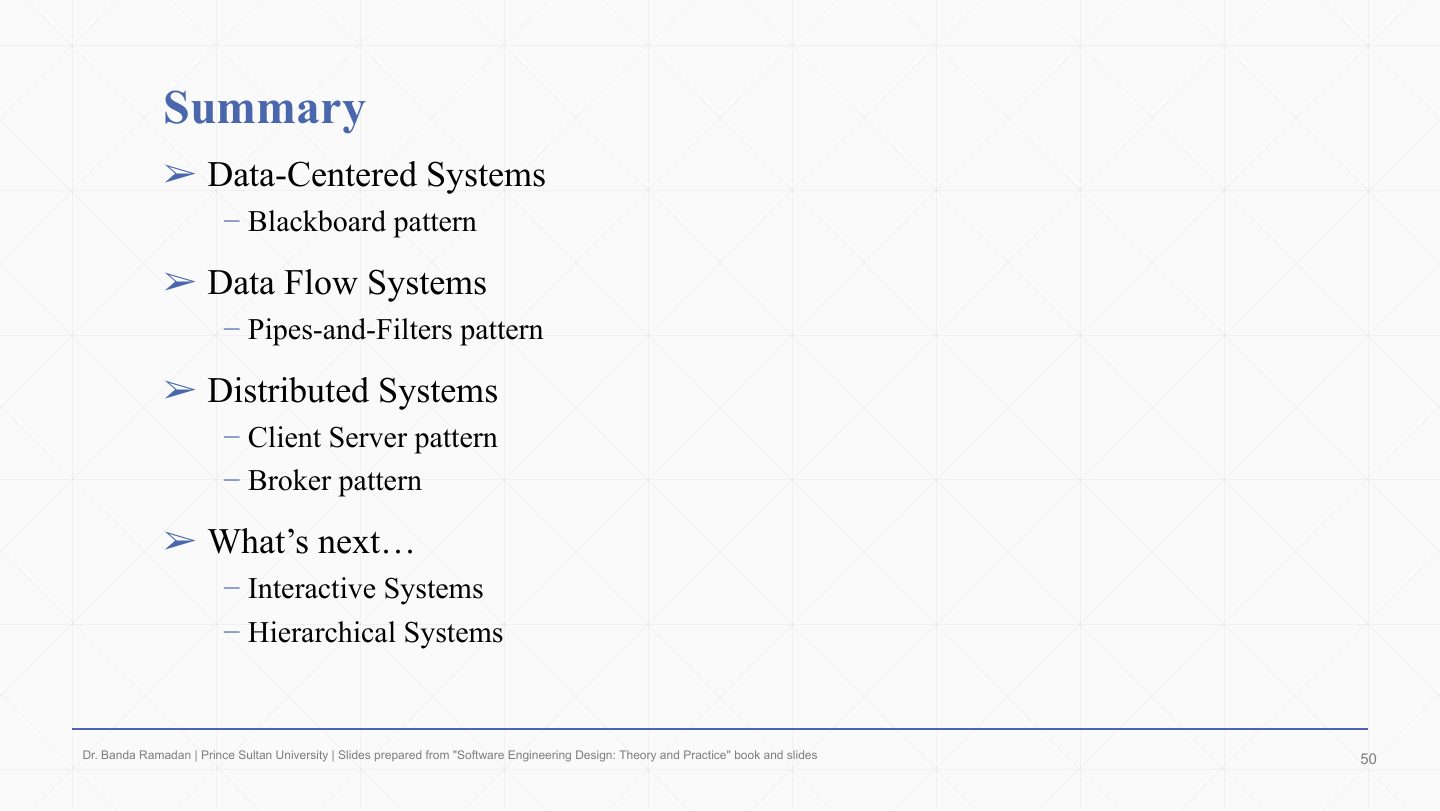
Summary

Slide 48: Summary

Notes

  1. Data-centered → blackboard.

  2. Data flow → pipes and filters.

  3. Distributed → client–server and broker.

  4. Next: interactive systems (MVC) and hierarchical systems (layered).