SE322 · Chapter 3 · Lecture 2 · Annotated SlidesMajor Quality Attributes: Definitions, Scenarios and Tactics
PDF
Overview

Major Quality Attributes: Definitions, Scenarios and Tactics

Six quality attributes, each in the same three steps: a definition, a general scenario (the possible values of the six scenario parts) with a concrete example, and a tree of tactics that achieve it. Availability is about failures and their duration, modifiability about the cost of change, performance about timeliness, security about resisting unauthorised access, testability about how easily faults can be revealed, and usability about how easily users accomplish tasks.

Availability

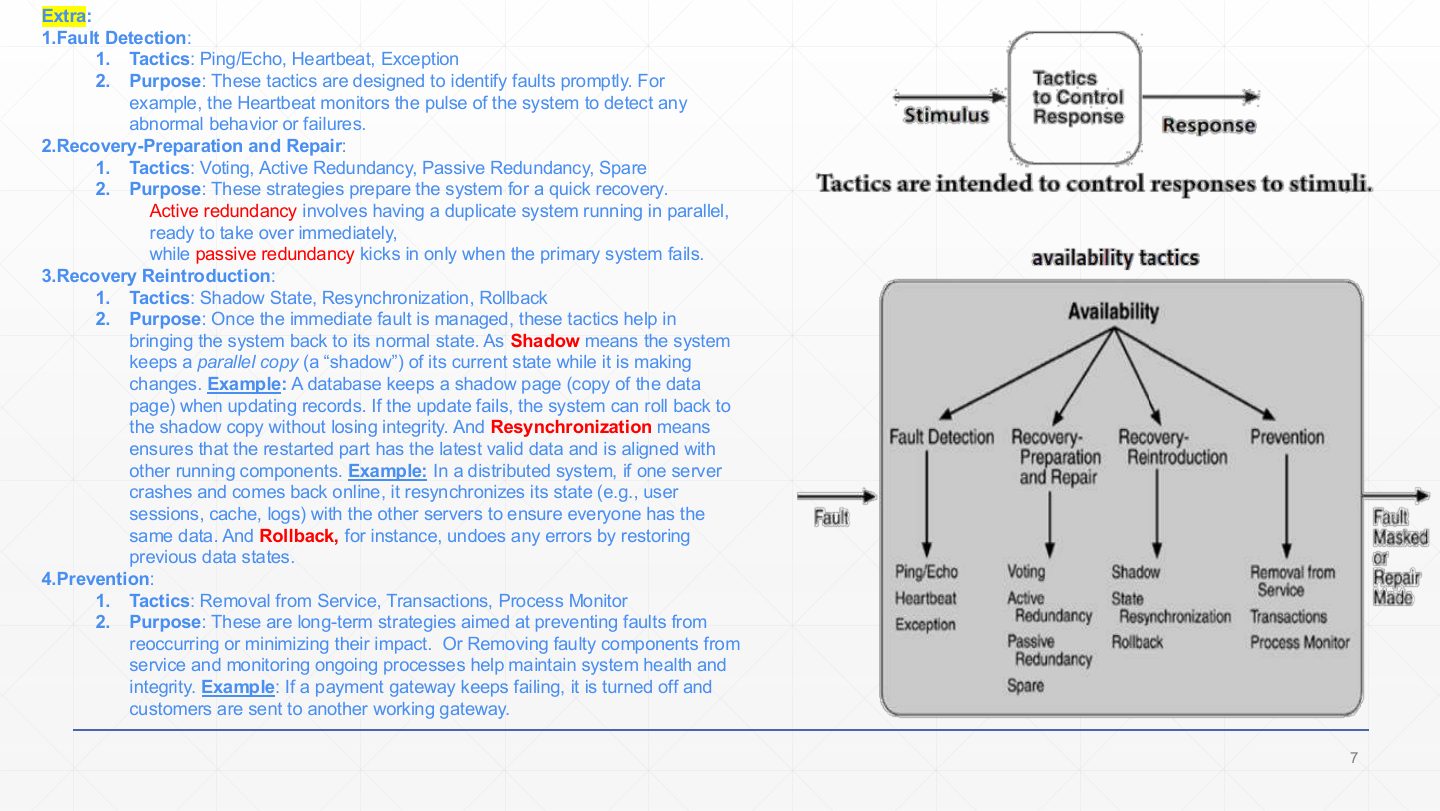
Detect faults (ping/echo, heartbeat, exceptions), prepare and repair (voting, redundancy, spare), reintroduce (shadow, resync, rollback), prevent (removal from service, transactions, process monitor).

Modifiability and performance

Modifiability: localise changes, prevent ripple effects, defer binding time. Performance: resource demand, management, arbitration.

Security and testability

Security: resist, detect, recover from attacks. Testability: manage input/output, internal monitoring.

Usability

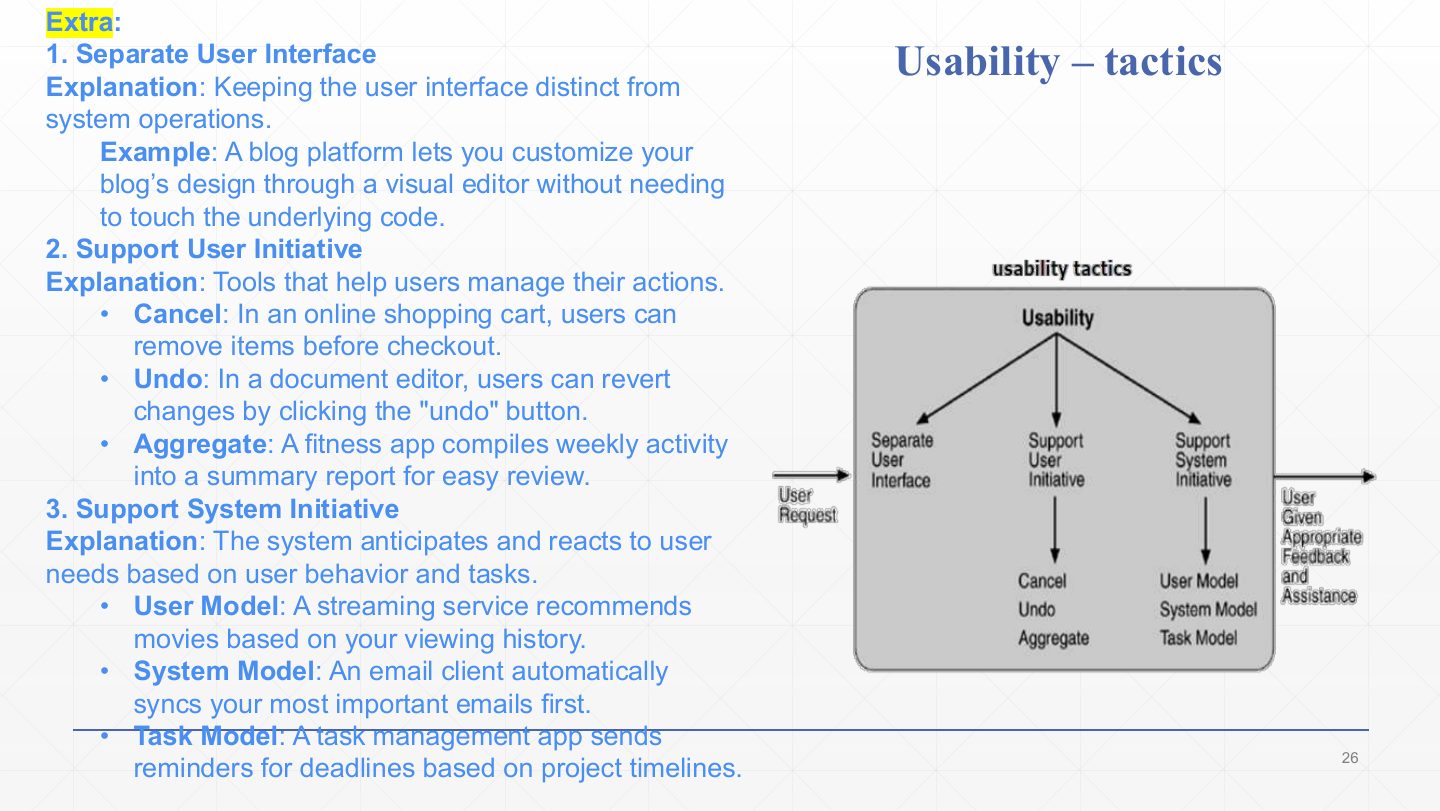
Separate the user interface, support user initiative (cancel, undo, aggregate), support system initiative (user, system, task models).

How the lecture is organized

Exam focus

Final 252 Q3 (5 marks) asked you to define three quality attributes and to construct a general availability scenario; Midterm 252 Q5 asked for an availability scenario; Midterm 261 Q5 asked whether heartbeat is a performance tactic (it is availability); Quiz 1 261 matched the parts of usability, testability and security scenarios.

How to read this page

Every original slide is shown unchanged. Yellow marks on a slide point to a numbered note: hover or tap a mark to jump to its note, and hover a note to see its marks. Questions tagged Past exam appeared on a real paper; Prediction questions are likely angles, not confirmed.

All 24 slides
  1. 1 Slide 1
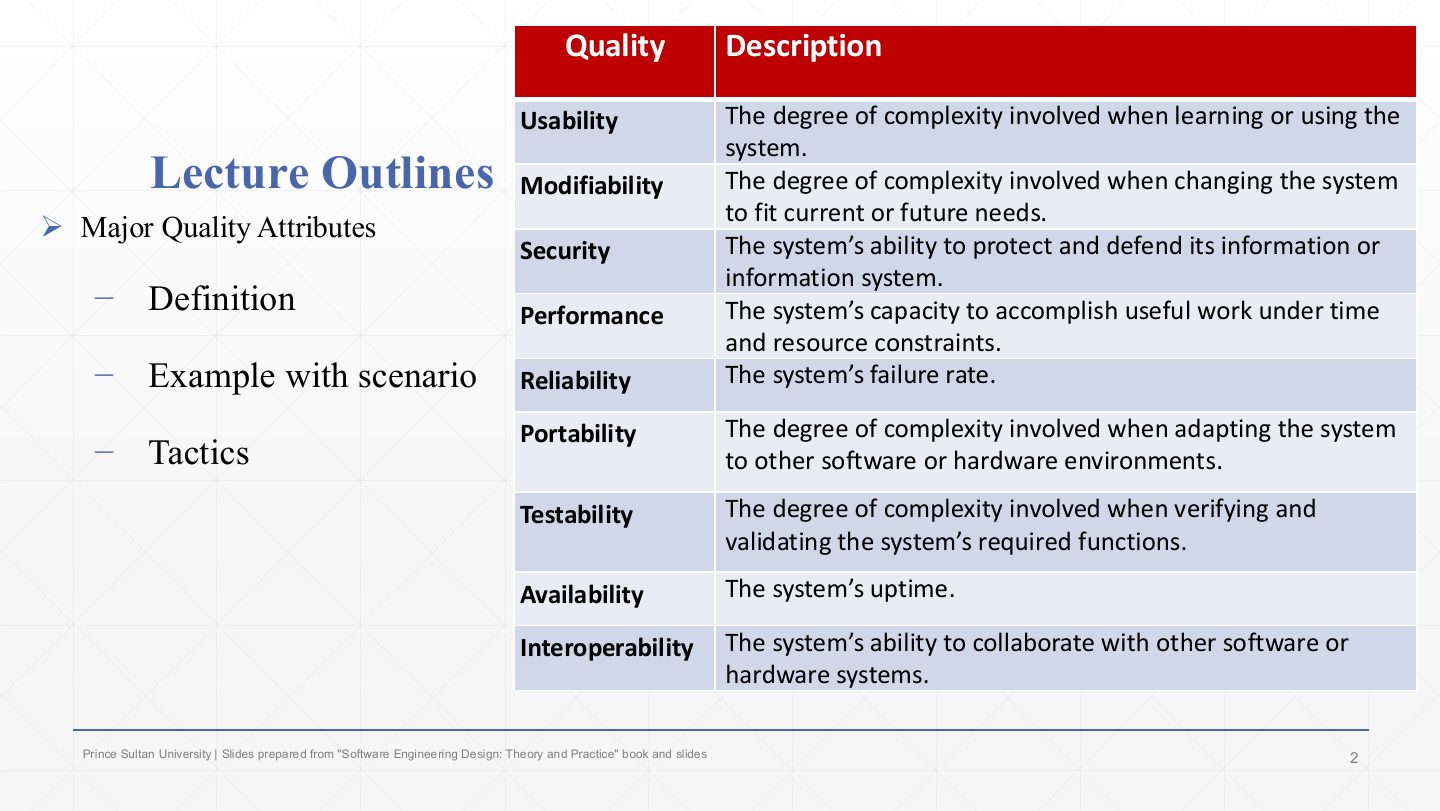
  2. 2 Lecture Outlines and quality definitions
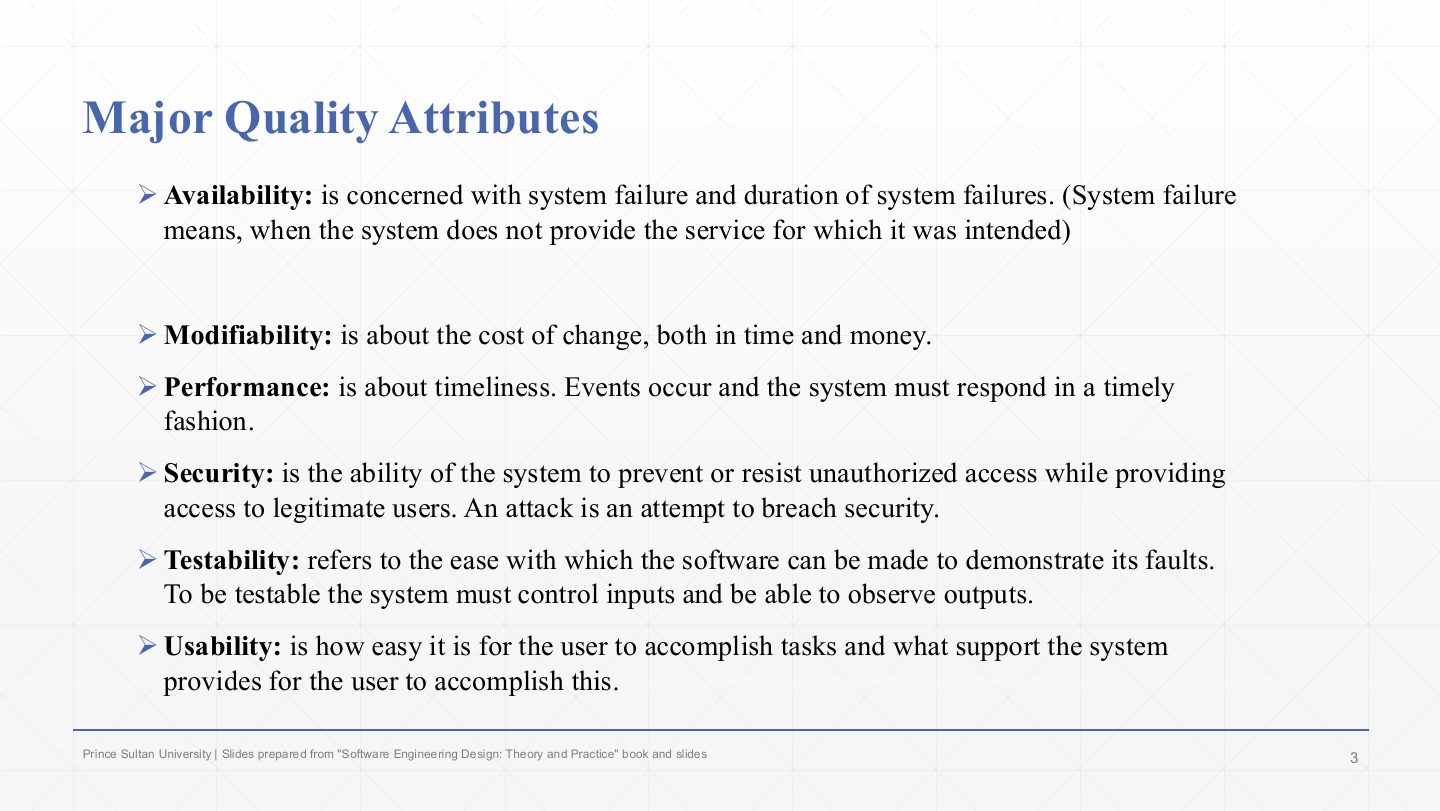
  3. 3 Major Quality Attributes
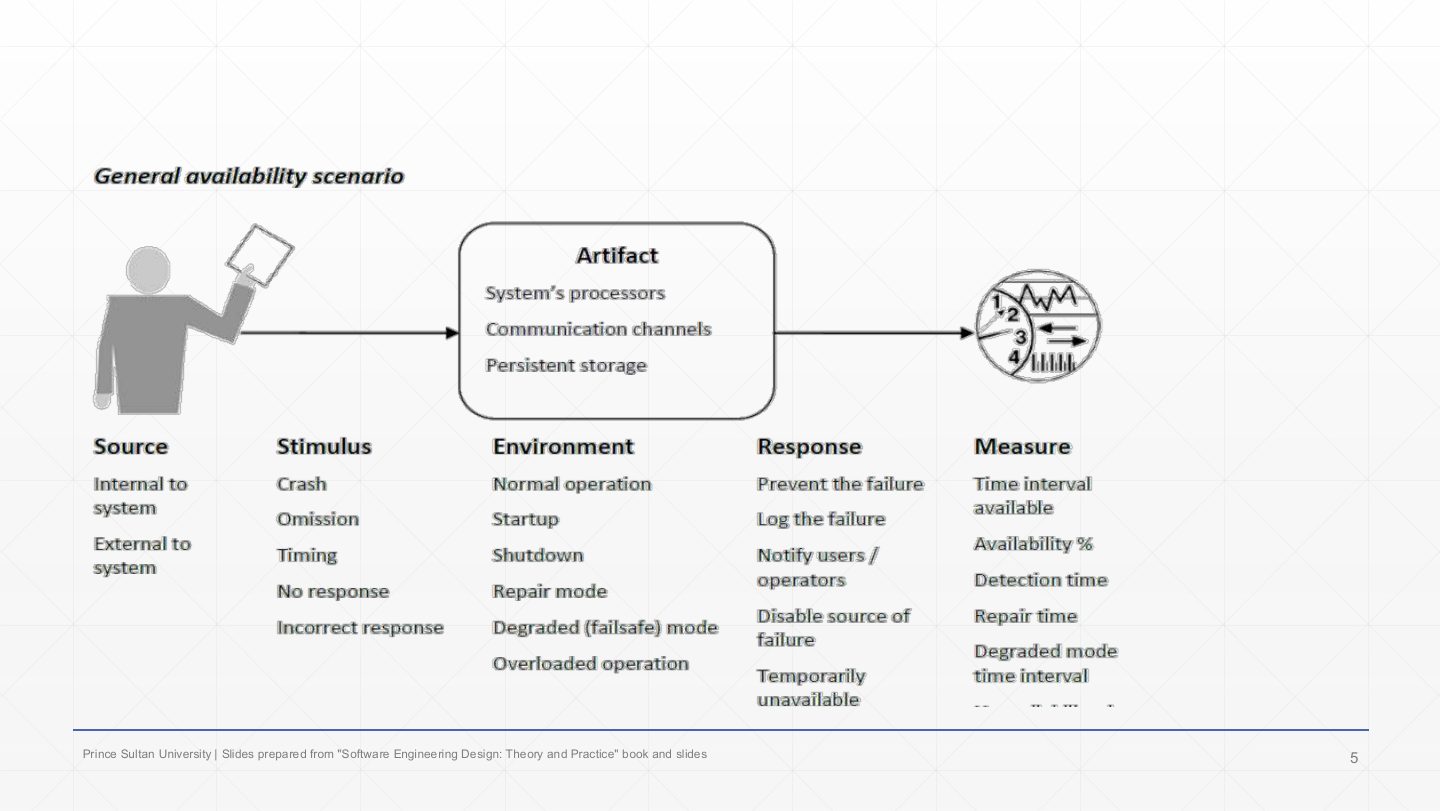
  4. 4 Availability: general scenario
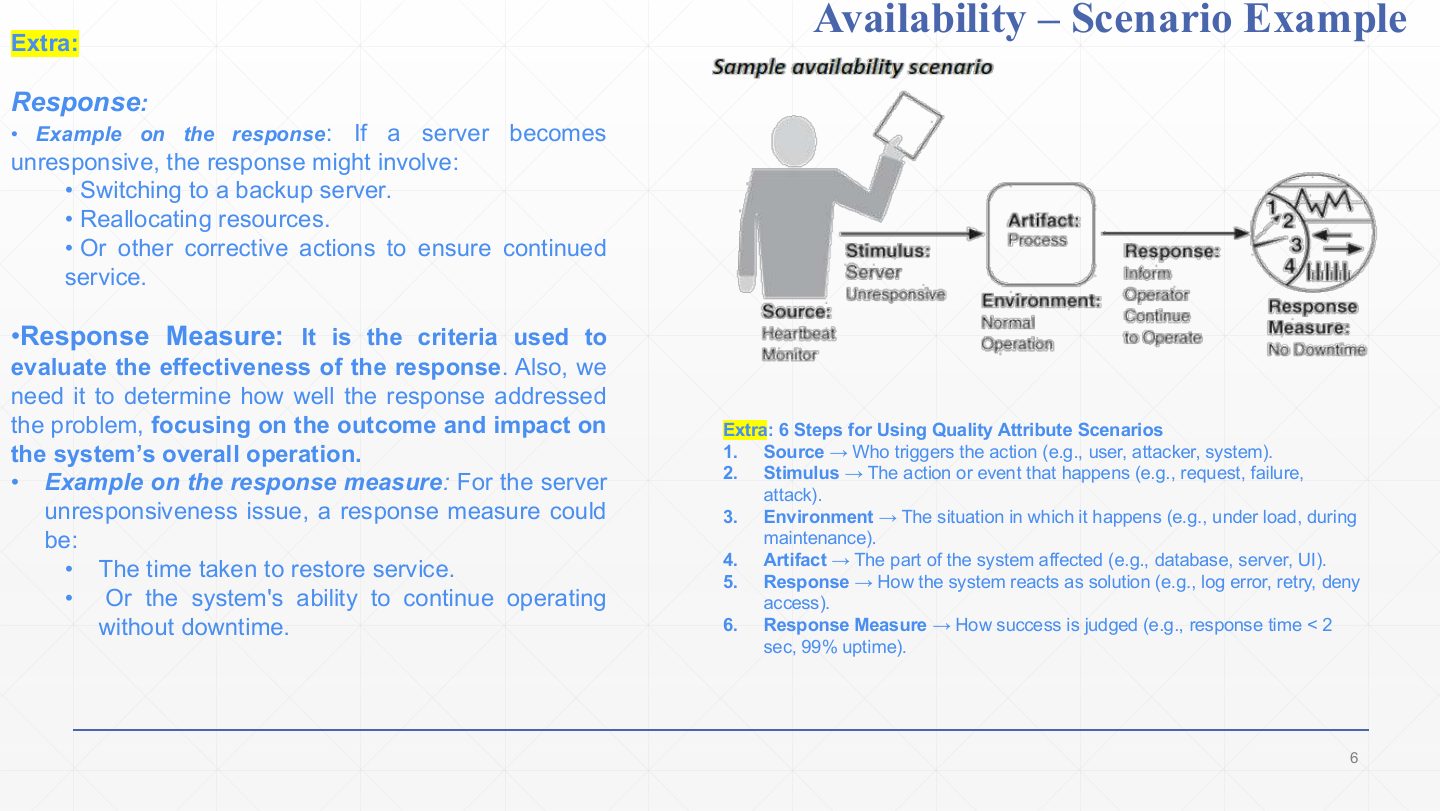
  5. 5 Availability Scenario Example
  6. 6 Availability – tactics
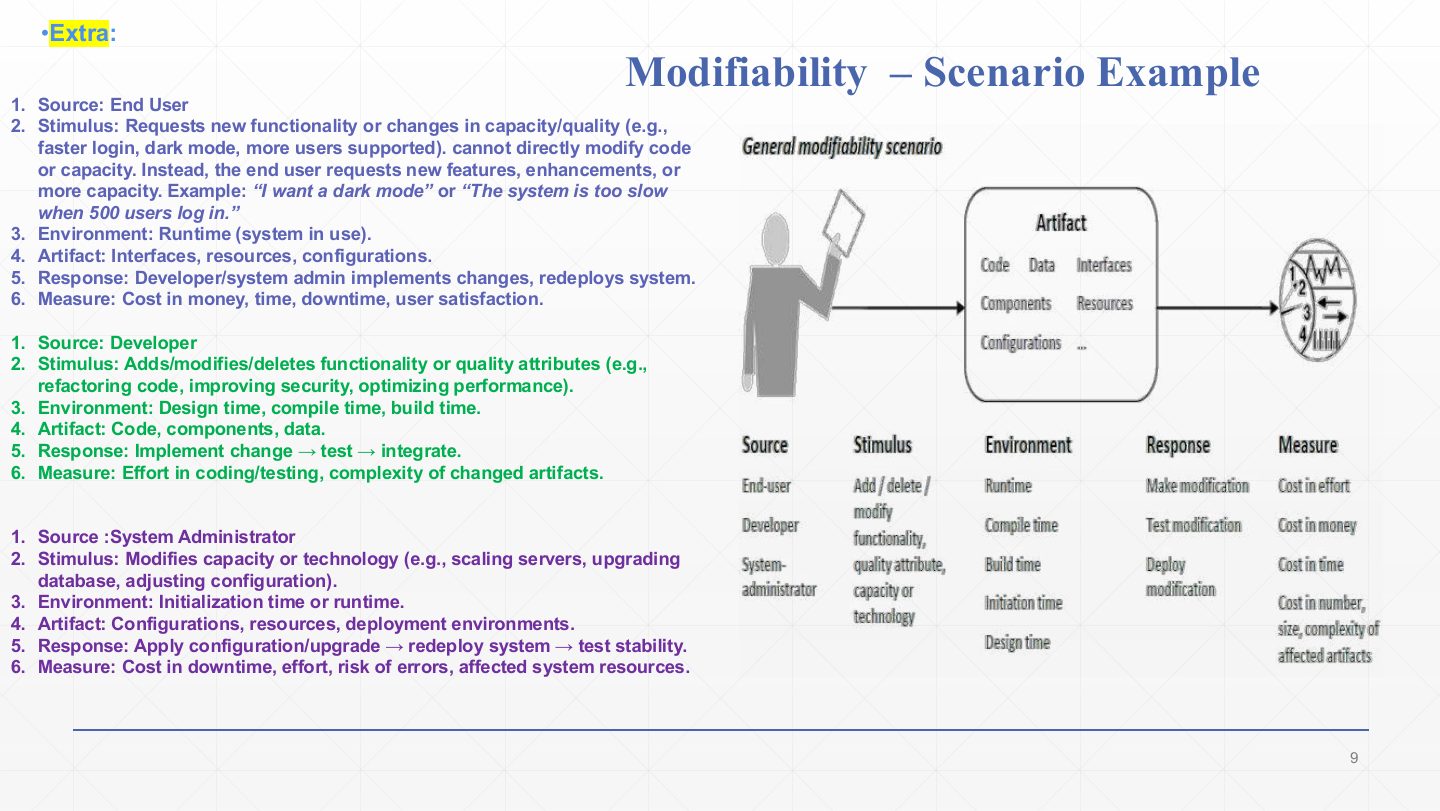
  7. 7 Extra: Modifiability – Scenario Example
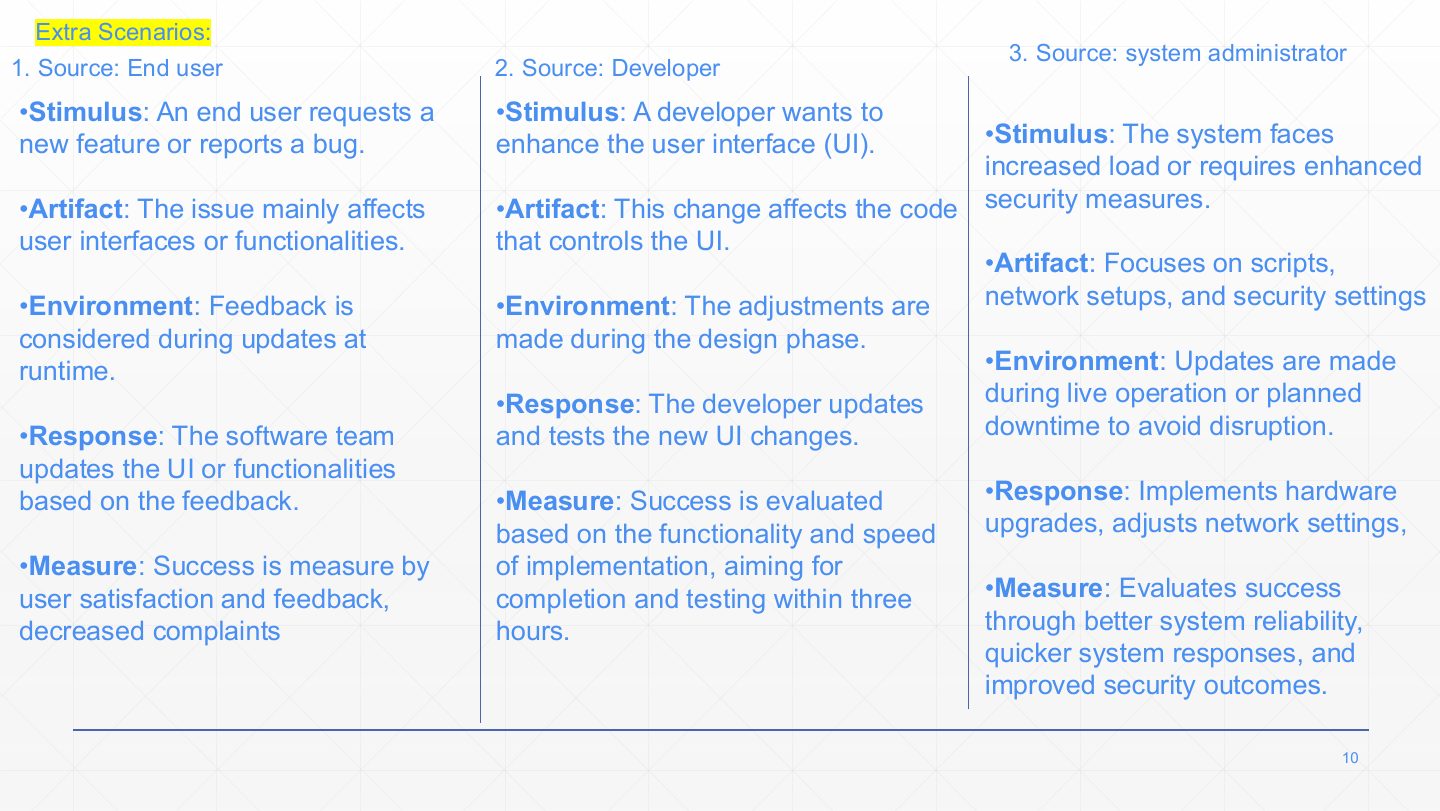
  8. 8 Extra: three modifiability scenarios
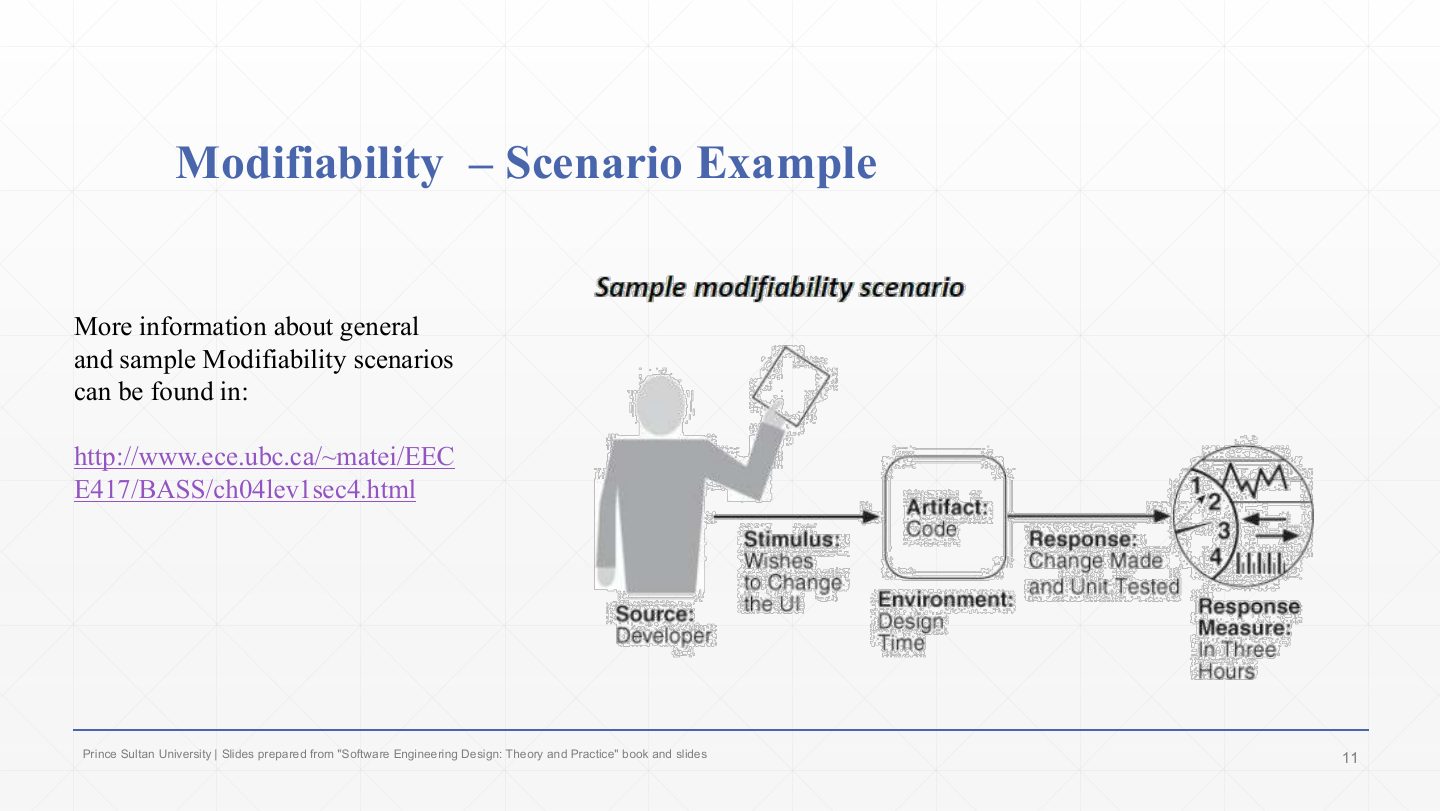
  9. 9 Modifiability Scenario Example
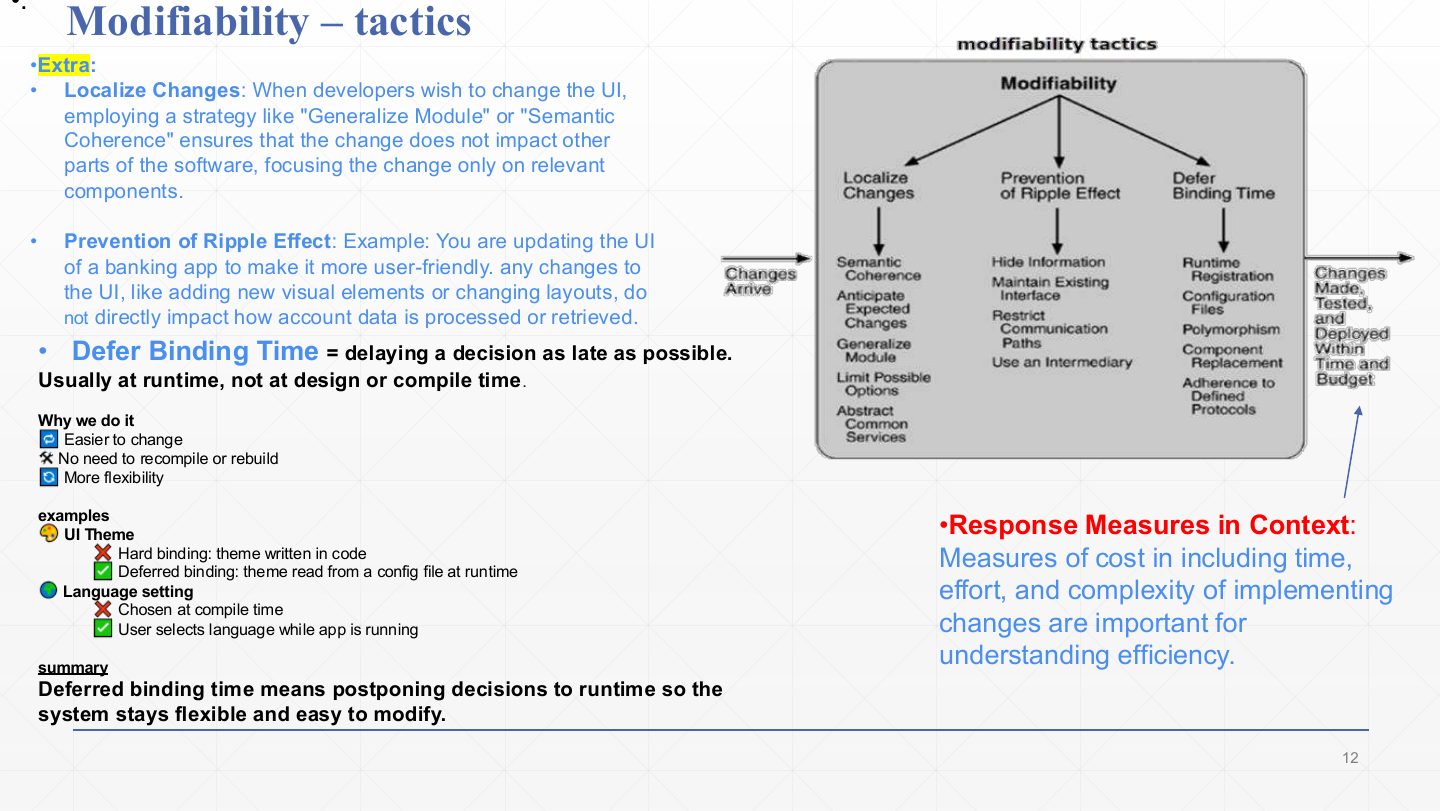
  10. 10 Modifiability tactics
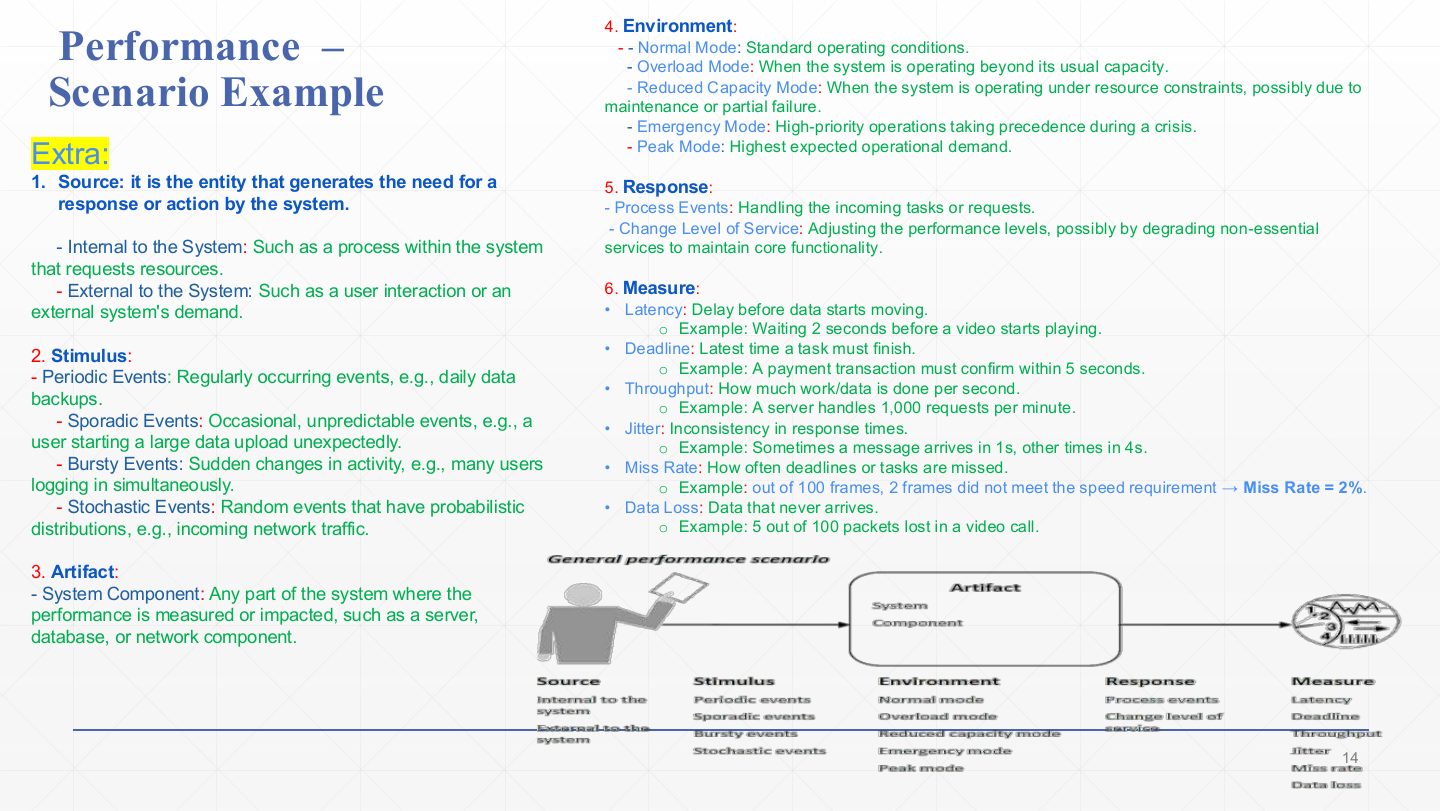
  11. 11 Performance – Scenario Example
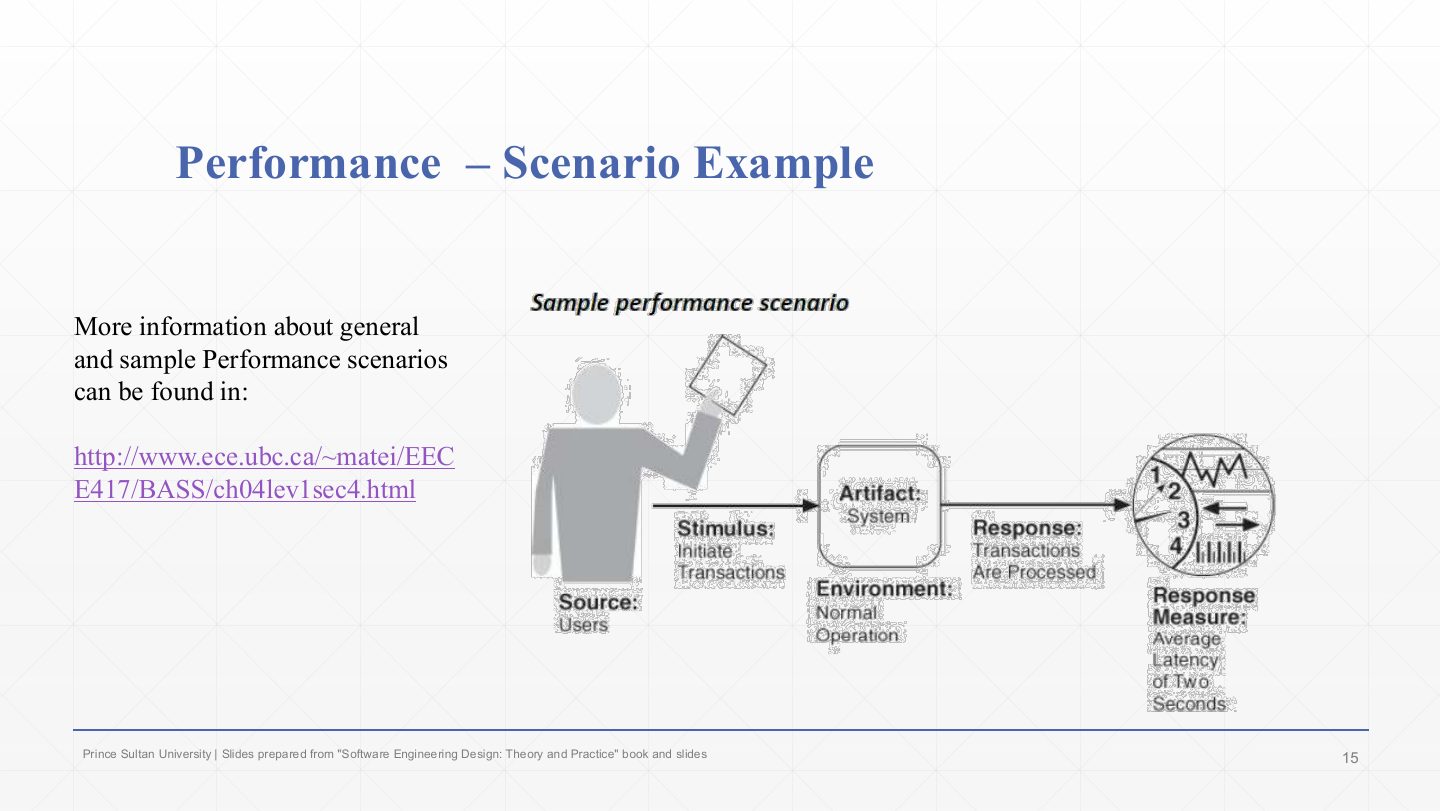
  12. 12 Performance Scenario Example
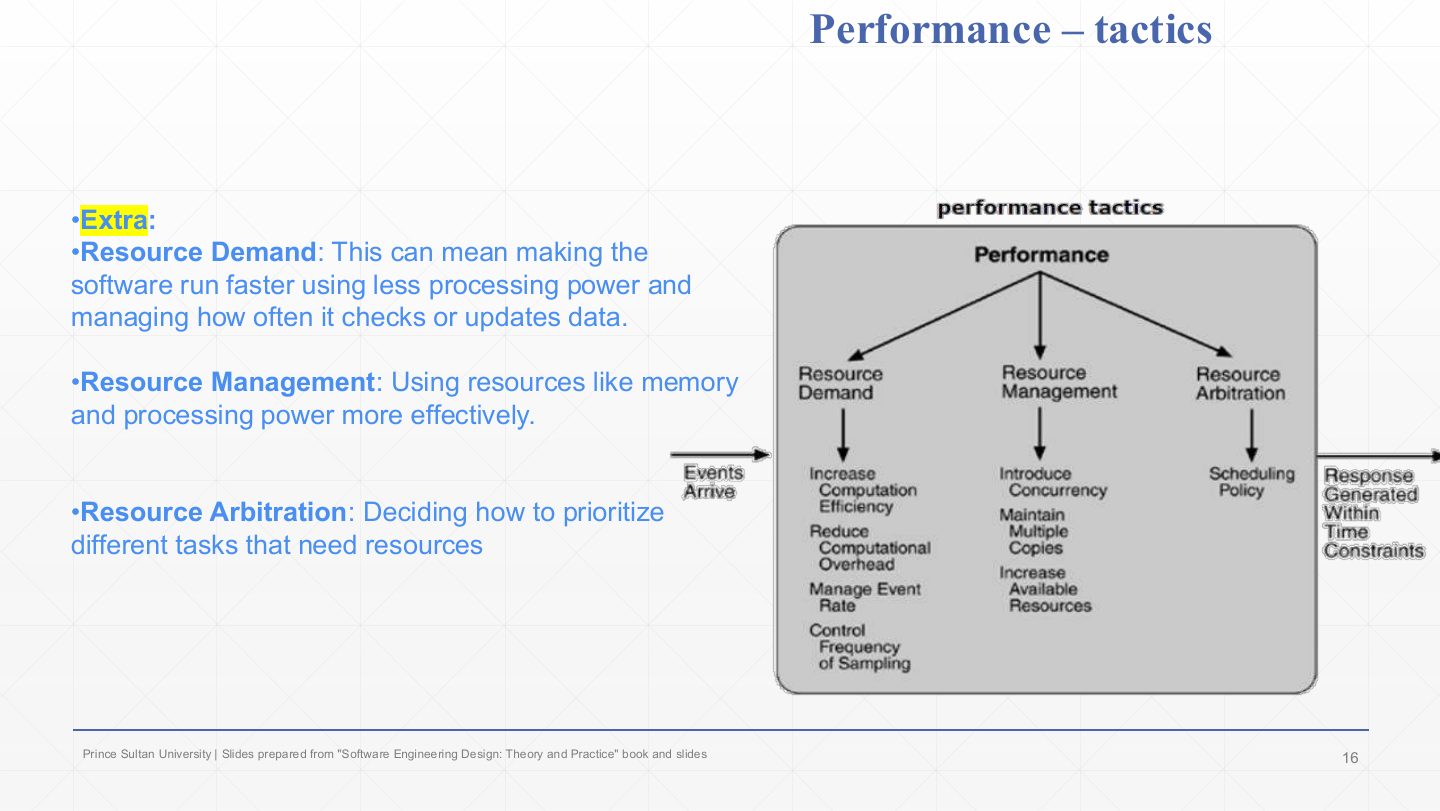
  13. 13 Performance tactics
  14. 14 Security Scenario Example
  15. 15 Extra: Security – Scenario Example
  16. 16 Security – tactics
  17. 17 Testability Scenario Example
  18. 18 Testability Scenario
  19. 19 Testability tactics
  20. 20 Usability Scenario Example
  21. 21 Usability Scenario Example
  22. 22 Usability – tactics
  23. 23 Summary
  24. 24 Extra: Question – one tactic per quality
Slide 1 / 24

Slide 1

Slide 1: Slide 1

Notes

  1. Second quality lecture. Lecture 1 gave the tools (scenarios and tactics); this one applies them to each major quality attribute in turn.

Slide 2 / 24

Lecture Outlines and quality definitions

Slide 2: Lecture Outlines and quality definitions

Notes

  1. Each quality gets a definition, an example scenario, and its tactics.

  2. The table repeats Chapter 2’s one-line descriptions: usability (complexity of learning or using), modifiability (complexity of changing), security (protecting information), performance (useful work under time and resource limits), reliability (failure rate), portability, testability, availability (uptime), interoperability.

Slide 3 / 24

Major Quality Attributes

Slide 3: Major Quality Attributes

Notes

  1. Availability is concerned with system failure and the duration of failures. A failure means the system does not provide the service it was intended for.

  2. Modifiability is about the cost of change, in time and money.

  3. Performance is about timeliness: events occur and the system must respond to them in time.

  4. Security is the ability to prevent or resist unauthorised access while still serving legitimate users. An attack is an attempt to breach security.

  5. Testability is how easily the software can be made to demonstrate its faults. To be testable, a system must let testers control its inputs and observe its outputs.

  6. Usability is how easy it is for users to accomplish tasks, and what support the system gives them to do so.

Exam angle

Past exam · Final 252 · Q3-1 · 3 marksQ1

List and define three of the major quality attributes of software architecture.

Show answer

Any three, one mark each: Availability: the system is ready to carry out its task when needed; concerned with failures and their duration. Performance: timeliness, how quickly the system responds to events (latency, throughput). Security: the ability to resist unauthorised access while still serving legitimate users. Modifiability: the cost in time and money of making a change. Usability: how easy the system is to learn and use. Testability: how easily the software can be made to show its faults through testing.
PredictionQ2

Which quality attribute is about the cost of change in time and money?

  1. Modifiability
  2. Performance
  3. Availability
  4. Usability
Show answer

A. Modifiability

Slide 4 / 24

Availability: general scenario

Slide 4: Availability: general scenario

Notes

  1. The general availability scenario lists every possible value of each part. Pick one value per column to write a concrete scenario.

  2. Source: internal or external to the system. Stimulus (the fault): crash, omission, timing, no response, incorrect response. Artifact: processors, communication channels, persistent storage.

  3. Environment: normal operation, start-up, shutdown, repair mode, degraded (fail-safe) mode, overloaded. Response: prevent the failure, log it, notify users or operators, disable the source, or be temporarily unavailable.

  4. Measure: time interval available, availability %, detection time, repair time, degraded-mode time interval, unavailability time.

Exam angle

Past exam · Midterm 252 · Q5d · 1 markQ1

Trip planning system (blackboard design): write an availability quality attribute scenario.

Show answer

Source: heartbeat monitor (internal to the system). Stimulus: the Trip Planning Service (or a worker) becomes unresponsive or crashes. Artifact: the Trip Planning Service process. Environment: normal operation. Response: detect the failure, inform the operator, fail over to a backup instance and continue to operate. Response measure: no downtime (or recovers within 5 seconds, 99.9% availability).

Slide 5 / 24

Availability Scenario Example

Slide 5: Availability Scenario Example

Notes

  1. A concrete availability response: if a server becomes unresponsive, switch to a backup server, reallocate resources, or take other corrective action to keep the service running.

  2. The response measure judges how well the response worked, focusing on its effect on the whole system: the time taken to restore service, or whether the system kept operating with no downtime.

  3. The right-hand box repeats the six parts with examples: source (user, attacker, system), stimulus (request, failure, attack), environment (under load, during maintenance), artifact (database, server, UI), response (log, retry, deny access), measure (under 2 s, 99% uptime).

Slide 6 / 24

Availability – tactics

Slide 6: Availability – tactics

Notes

  1. Fault detection: ping/echo (send a ping, expect an echo), heartbeat (a component sends a regular “I’m alive” signal; a missing beat means a fault), exceptions (catch the error when it happens). The goal is to find faults quickly.

  2. Recovery – preparation and repair: voting (several components compute the result and the majority wins), active redundancy (a duplicate runs in parallel, ready to take over instantly), passive redundancy (the backup starts only when the primary fails), spare (a standby that must be configured before use).

  3. Recovery – reintroduction brings a repaired part back: shadow (run it alongside the active one, or keep a shadow copy of the state, e.g. a database shadow page to fall back to), state resynchronisation (bring its data up to date with the others, e.g. sessions and caches after a server restarts), rollback (restore a previous good state).

  4. Prevention stops faults recurring: removal from service (take a failing component out, e.g. switch off a payment gateway that keeps failing and route customers to another), transactions (all-or-nothing updates), process monitor (watch processes and restart them). The diagram: a fault enters, tactics act, and the fault is masked or repaired.

Exam angle

Past exam · Midterm 261 · Q5 (true/false)Q1

Heartbeat is a performance tactic used to reduce response time.

Show answer

False — Heartbeat is an availability tactic for fault detection; it monitors whether a component is still functioning.

PredictionQ2

What is the difference between active and passive redundancy?

Show answer

In active redundancy the duplicate processes the same inputs in parallel and can take over immediately; in passive redundancy the backup only takes over (after being updated) when the primary fails, so recovery is slower but cheaper.

Slide 7 / 24

Extra: Modifiability – Scenario Example

Slide 7: Extra: Modifiability – Scenario Example

Notes

  1. Three modifiability scenarios, differing by who wants the change. End user: cannot change the code, so they request changes (“I want dark mode”, “it’s too slow with 500 users”). Environment: run time. Artifact: interfaces, resources, configuration. Response: developers or admins implement and redeploy. Measure: cost in money, time, downtime and user satisfaction.

  2. Developer: adds, modifies or deletes functionality or qualities (refactoring, improving security). Environment: design, compile or build time. Artifact: code, components, data. Response: implement → test → integrate. Measure: coding and testing effort, complexity of the changed artifacts.

  3. System administrator: changes capacity or technology (scale servers, upgrade the database, adjust configuration). Environment: initialisation or run time. Artifact: configurations, resources, deployment environments. Response: apply → redeploy → test stability. Measure: downtime, effort, risk of errors.

Slide 8 / 24

Extra: three modifiability scenarios

Slide 8: Extra: three modifiability scenarios

Notes

  1. End user version: a user requests a feature or reports a bug that affects the UI or a function; feedback is handled during updates at run time; the team updates the UI or function; success = user satisfaction and fewer complaints.

  2. Developer version: a developer wants to enhance the UI; the change affects the UI code; it is made at design time; the developer updates and tests it; success = done and tested within three hours (the classic sample scenario on slide 9).

  3. Administrator version: the system faces more load or needs stronger security; scripts, network setup and security settings change during live operation or planned downtime; success = better reliability, faster responses, improved security.

Slide 9 / 24

Modifiability Scenario Example

Slide 9: Modifiability Scenario Example

Notes

  1. The textbook’s sample modifiability scenario: source developer; stimulus wishes to change the UI; artifact code; environment design time; response change made and unit tested; response measure in three hours. Memorise this one as the model answer shape for a modifiability scenario.

Slide 10 / 24

Modifiability tactics

Slide 10: Modifiability tactics

Notes

  1. Localise changes: assign responsibilities so a likely change touches as few modules as possible. Tactics: semantic coherence (keep related responsibilities together), anticipate expected changes, generalise the module, limit possible options, abstract common services. Changing the UI should only touch UI components.

  2. Prevent ripple effects: stop a change in one module from forcing changes in others. Tactics: hide information, maintain existing interfaces, restrict communication paths, use an intermediary. Updating a banking app’s UI must not affect how account data is processed.

  3. Defer binding time: postpone decisions as late as possible, ideally to run time, so changes need no recompile. Tactics: runtime registration, configuration files, polymorphism, component replacement, adherence to defined protocols. Example: a UI theme read from a config file at run time instead of hard-coded; a language the user can switch while the app runs.

  4. The response measures for modifiability are costs: time, effort and complexity of implementing the change. The diagram’s output: changes made, tested and deployed within time and budget.

Exam angle

PredictionQ1

Name the three categories of modifiability tactics and give one tactic for each.

Show answer

Localise changes (semantic coherence, generalise module); prevent ripple effects (hide information, maintain existing interfaces, use an intermediary); defer binding time (configuration files, runtime registration, polymorphism).

Slide 11 / 24

Performance – Scenario Example

Slide 11: Performance – Scenario Example

Notes

  1. Environment for performance: normal mode, overload (beyond usual capacity), reduced capacity (maintenance or partial failure), emergency (high-priority work first), peak (highest expected demand). The same system may meet its target in one mode and fail in another.

  2. Stimulus = how events arrive: periodic (regular, e.g. daily backups), sporadic (occasional and unpredictable, e.g. a sudden large upload), bursty (sudden spikes, e.g. everyone logging in at once), stochastic (random with a probability distribution, e.g. network traffic). Source: internal (a process) or external (users, other systems). Artifact: the component whose performance matters (server, database, network). Response: process the events, or change the level of service (degrade non-essential services to protect core ones).

  3. Measures: latency (delay before work starts, e.g. 2 s before a video plays), deadline (latest finish time, e.g. payment confirmed within 5 s), throughput (work per unit time, e.g. 1,000 requests/minute), jitter (variation in response time), miss rate (share of deadlines missed, e.g. 2 of 100 frames = 2%), data loss (data that never arrives).

Exam angle

PredictionQ1

Define latency, throughput and jitter as performance response measures.

Show answer

Latency: the delay before a response (or before data starts moving). Throughput: the amount of work done per unit time. Jitter: the variation (inconsistency) in response times.

Slide 12 / 24

Performance Scenario Example

Slide 12: Performance Scenario Example

Notes

  1. The sample performance scenario: source users; stimulus initiate transactions; artifact system; environment normal operation; response transactions are processed; response measure average latency of two seconds. The same scenario as Lecture 1, slide 10.

Slide 13 / 24

Performance tactics

Slide 13: Performance tactics

Notes

  1. Resource demand: reduce the work that reaches the system. Tactics: increase computational efficiency (better algorithms), reduce computational overhead, manage the event rate, control the frequency of sampling.

  2. Resource management: make better use of the resources you have. Tactics: introduce concurrency (process requests in parallel), maintain multiple copies (of data or computations, e.g. caches and replicas), increase available resources (faster CPU, more memory).

  3. Resource arbitration: decide which task gets a contended resource first, through a scheduling policy (FIFO, priority, deadline-first). Events arrive, the tactics act, and the response is generated within time constraints.

Exam angle

PredictionQ1

Choosing which waiting request gets the CPU first is which category of performance tactic?

  1. Resource arbitration
  2. Resource demand
  3. Resource management
  4. Fault detection
Show answer

A. Resource arbitration

Slide 14 / 24

Security Scenario Example

Slide 14: Security Scenario Example

Notes

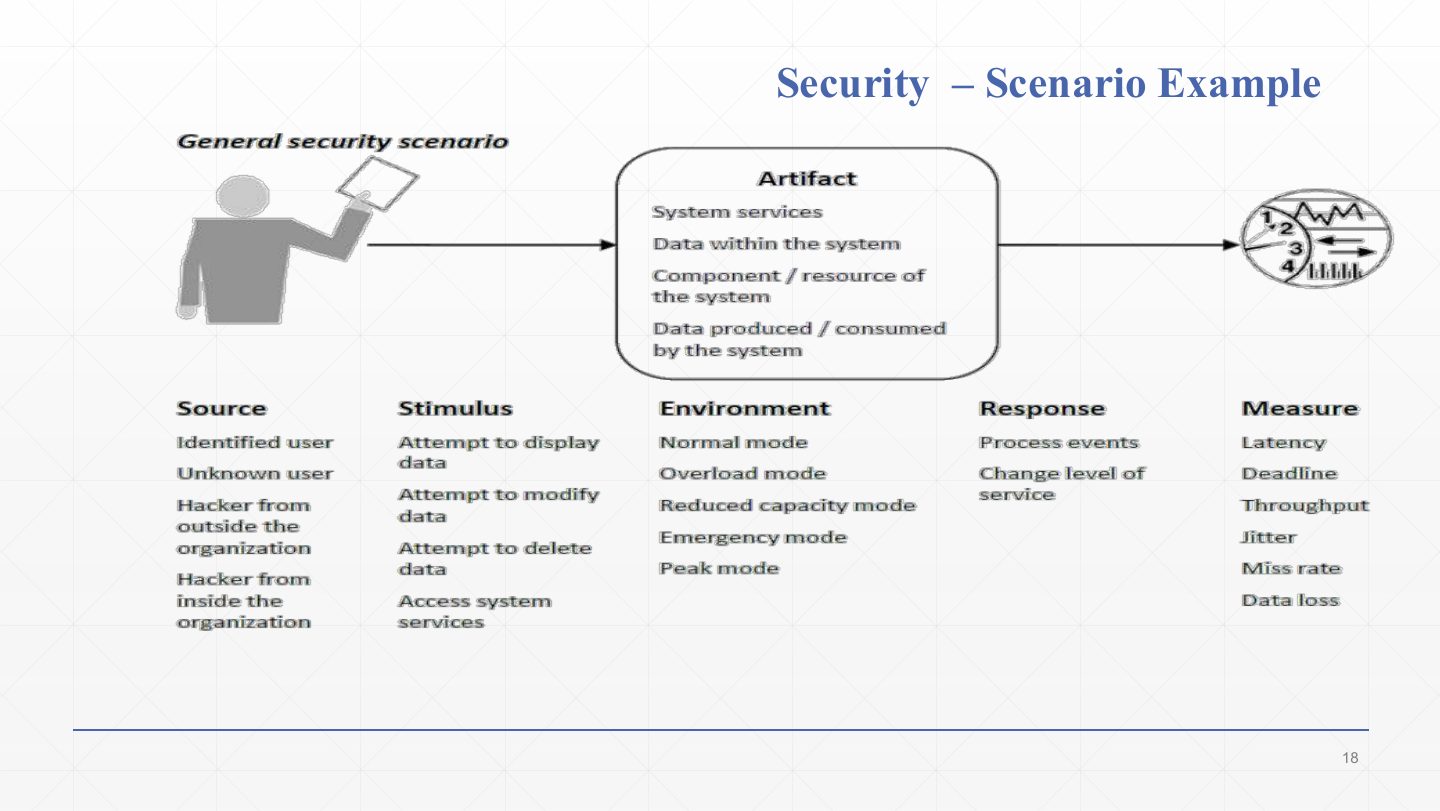
  1. The general security scenario. Read the first three columns: source an identified user, an unknown user, or a hacker from outside or inside the organisation.

  2. Stimulus: an attempt to display, modify or delete data, or to access system services. Artifact: system services, data within the system, a component or resource, data produced or consumed by the system.

  3. Careful: the Environment, Response and Measure columns on this slide (normal/overload/peak mode; process events; latency, throughput, jitter) are the performance scenario’s values, copied by mistake. For security, the textbook uses: environment online/offline, connected or not, behind a firewall or not; response authenticate, block access, encrypt, log and notify; measure time or effort to break in, probability of detecting the attack, how much data was exposed, time to restore. Use those in an exam.

Exam angle

PredictionQ1

Give a correct environment, response and response measure for a security scenario (the slide’s columns belong to performance).

Show answer

Environment: online, connected to the public Internet (or behind a firewall). Response: authenticate the user, block the access, log the attempt and notify an administrator. Response measure: attack detected within 1 minute; account locked after 5 failed attempts; no data exposed; data restored within 1 day.

Slide 15 / 24

Extra: Security – Scenario Example

Slide 15: Extra: Security – Scenario Example

Notes

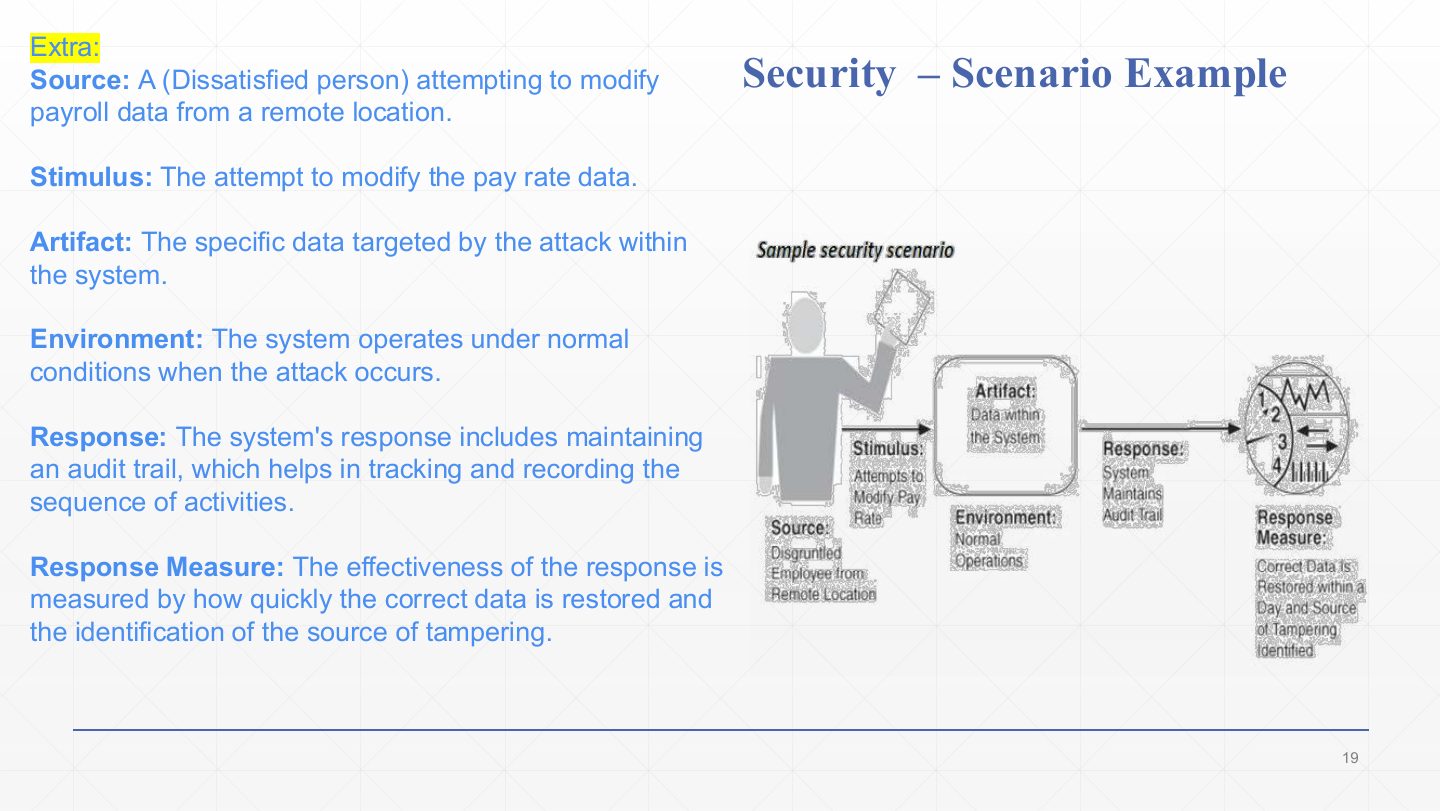
  1. A concrete security scenario. Source: a dissatisfied person (e.g. an employee) working from a remote location. Stimulus: the attempt to modify pay-rate data.

  2. Artifact: the targeted payroll data. Environment: normal operation.

  3. Response: the system maintains an audit trail, a record of who did what and when, so the change can be traced.

  4. Response measure: how quickly the correct data is restored and whether the source of tampering is identified (the textbook version: correct data restored within a day, source identified).

Exam angle

Past exam · Quiz 1 · 261 · Q27 (matching)Q1

Security scenario: “While the system is connected to the public Internet, an unauthorized external user repeatedly attempts to log in using incorrect credentials to an administrative account. The authentication service rejects the attempts, records the activity, and temporarily locks the account after repeated failures. The system must block the account after 5 failed attempts within 10 minutes and generate an audit record for every attempt.” Match the six elements.

Show answer

Source: unauthorized external user. Stimulus: repeatedly attempts to log in with incorrect credentials. Artifact: authentication service / administrative account. Environment: system connected to the public Internet. Response: rejects the attempts, records the activity, temporarily locks the account. Response measure: account blocked after 5 failed attempts within 10 minutes; an audit record for every attempt.

Slide 16 / 24

Security – tactics

Slide 16: Security – tactics

Notes

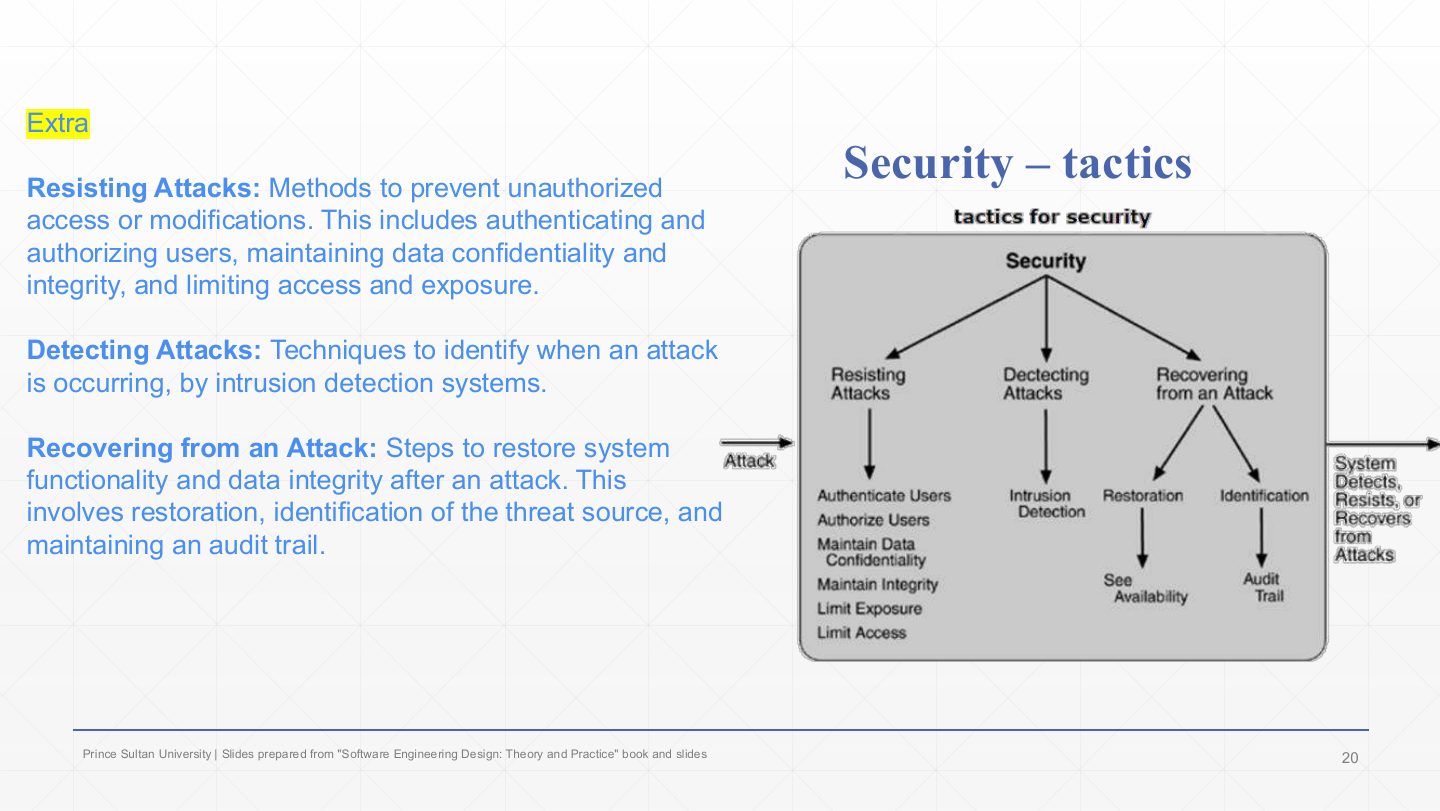
  1. Resisting attacks (keep them out): authenticate users (who are you?), authorise users (what may you do?), maintain data confidentiality (encryption), maintain integrity (checksums, hashes), limit exposure (fewer entry points), limit access (firewalls, need-to-know).

  2. Detecting attacks: intrusion detection, comparing traffic and behaviour against known attack patterns.

  3. Recovering from an attack: restoration (uses the availability tactics, “see availability” in the tree) and identification of the attacker through an audit trail. The output: the system detects, resists or recovers from attacks.

Exam angle

PredictionQ1

Authenticating and authorising users belong to which category of security tactics?

  1. Resisting attacks
  2. Detecting attacks
  3. Recovering from attacks
  4. Resource arbitration
Show answer

A. Resisting attacks

Slide 17 / 24

Testability Scenario Example

Slide 17: Testability Scenario Example

Notes

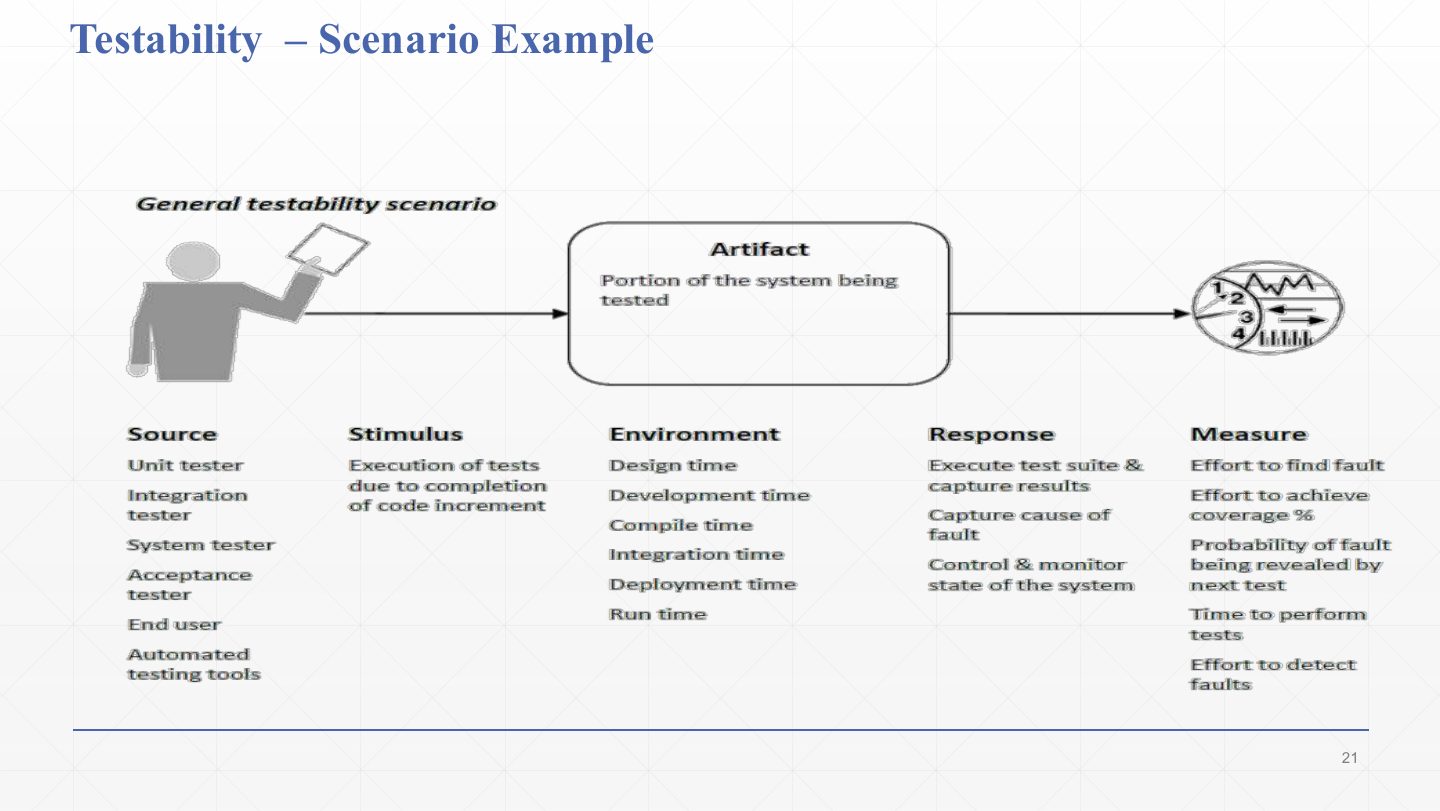
  1. The general testability scenario. Source: unit, integration, system or acceptance tester, an end user, or automated testing tools.

  2. Stimulus: tests are executed because a code increment is complete. Artifact: the portion of the system being tested. Environment: design, development, compile, integration, deployment or run time.

  3. Response: execute the test suite and capture results, capture the cause of a fault, control and monitor the system’s state. Measures: effort to find a fault, effort to reach a coverage %, probability that the next test reveals a fault, time to perform tests, effort to detect faults.

Slide 18 / 24

Testability Scenario

Slide 18: Testability Scenario

Notes

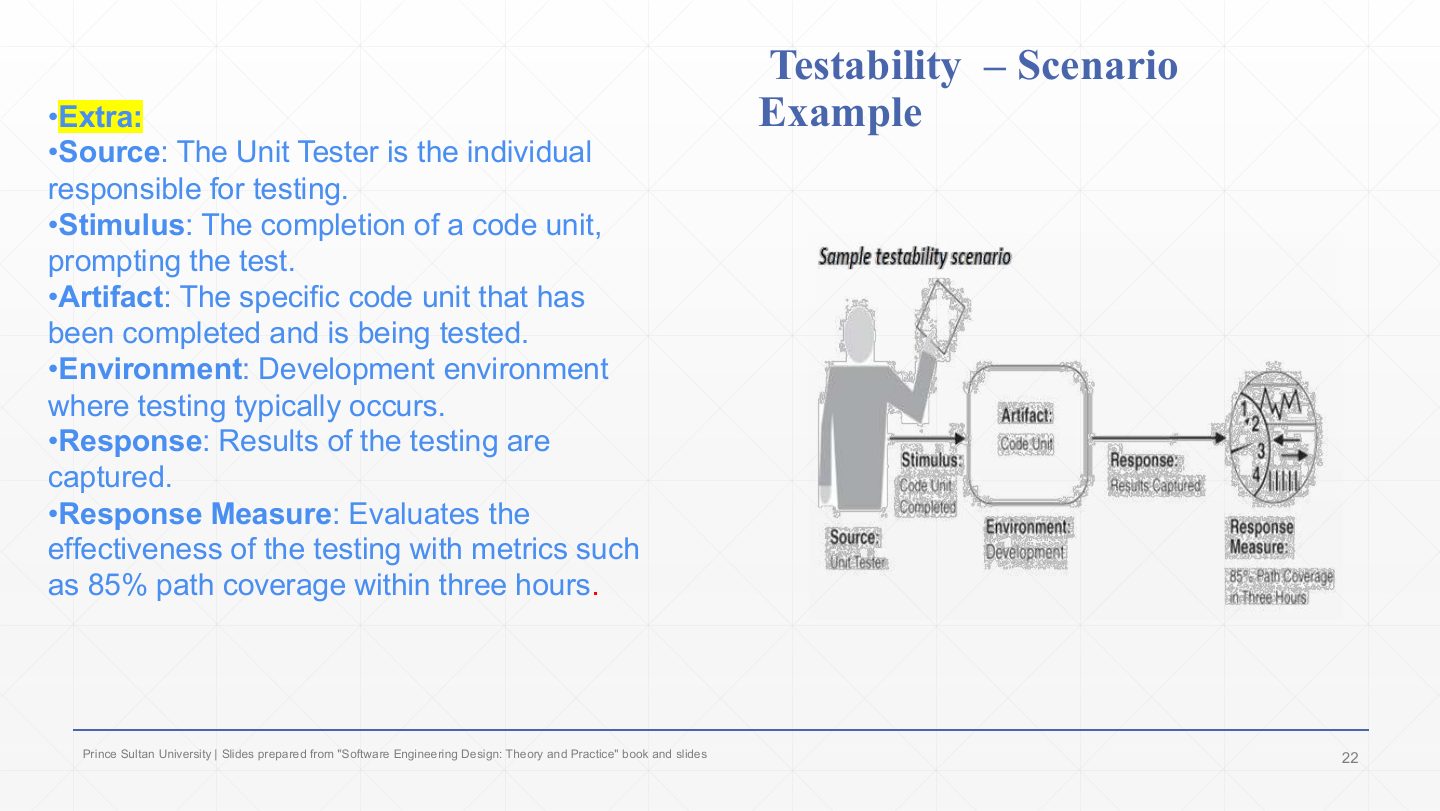
  1. A concrete testability scenario. Source: the unit tester. Stimulus: a code unit is completed. Artifact: that code unit.

  2. Environment: the development environment. Response: the test results are captured.

  3. Response measure: 85% path coverage within three hours. Coverage plus a time limit makes the testability goal checkable.

Exam angle

Past exam · Quiz 1 · 261 · Q26 (matching)Q1

Testability scenario: “During pre-release system testing, a QA engineer initiates an automated test suite to verify the order-processing component. The system exposes the required interfaces, records internal test results, and reports failed test cases. The complete test suite must finish within 15 minutes and identify the failing component in at least 95% of injected faults.” Match the six elements.

Show answer

Source: QA engineer. Stimulus: initiates an automated test suite. Artifact: order-processing component. Environment: pre-release system testing. Response: exposes test interfaces, records results and reports failed test cases. Response measure: suite finishes within 15 minutes and identifies the failing component in at least 95% of injected faults.

Slide 19 / 24

Testability tactics

Slide 19: Testability tactics

Notes

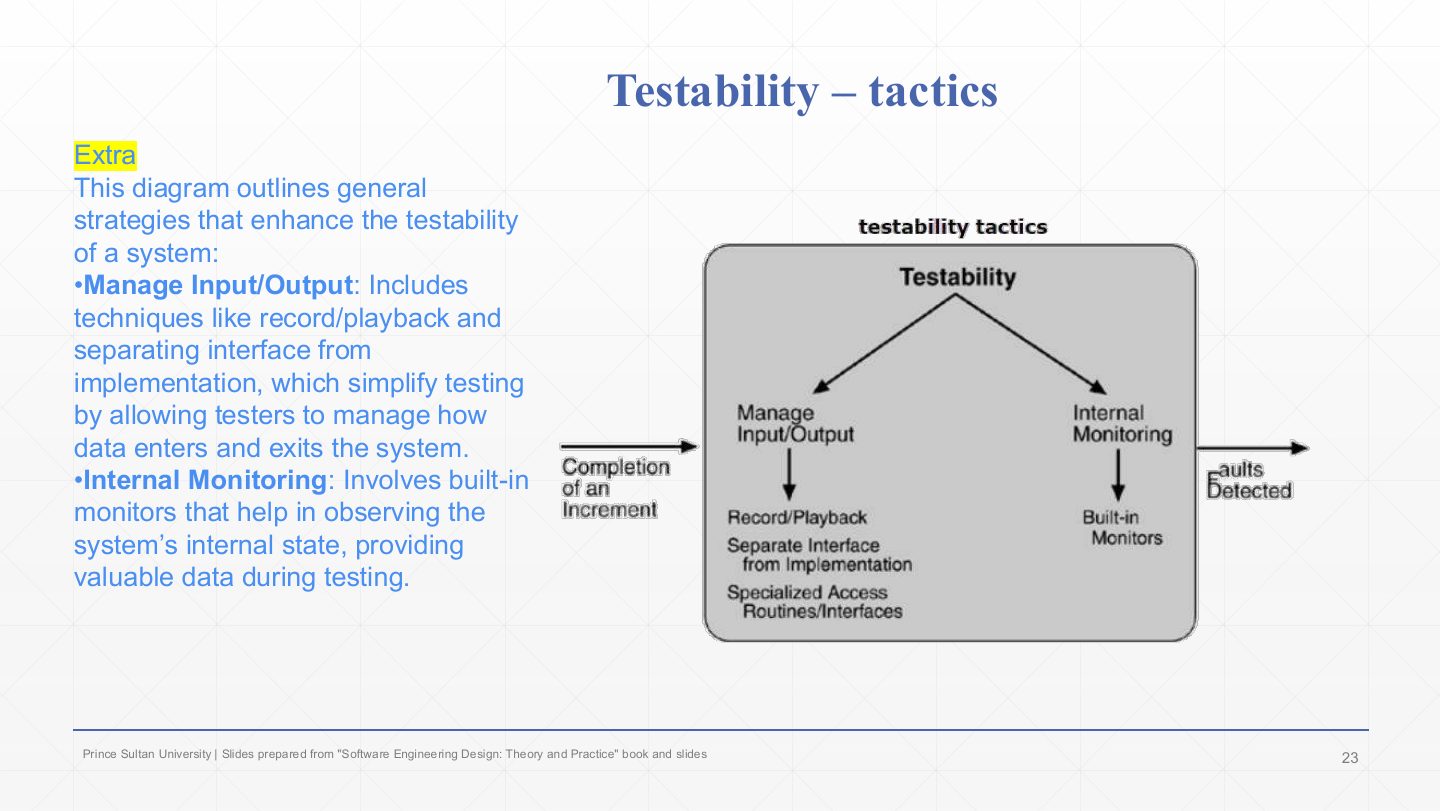
  1. Manage input/output: control what goes in and observe what comes out. Tactics: record/playback (capture real inputs and replay them to reproduce a failure), separate interface from implementation (swap in test doubles behind the interface), specialised access routines/interfaces (test-only hooks into a component).

  2. Internal monitoring: built-in monitors that expose the component’s internal state (counters, logs, performance data) during testing. The diagram: an increment is completed, the tactics act, and faults are detected.

Exam angle

PredictionQ1

Give two testability tactics.

Show answer

Record/playback and separating interface from implementation (manage input/output); built-in monitors (internal monitoring).

Slide 20 / 24

Usability Scenario Example

Slide 20: Usability Scenario Example

Notes

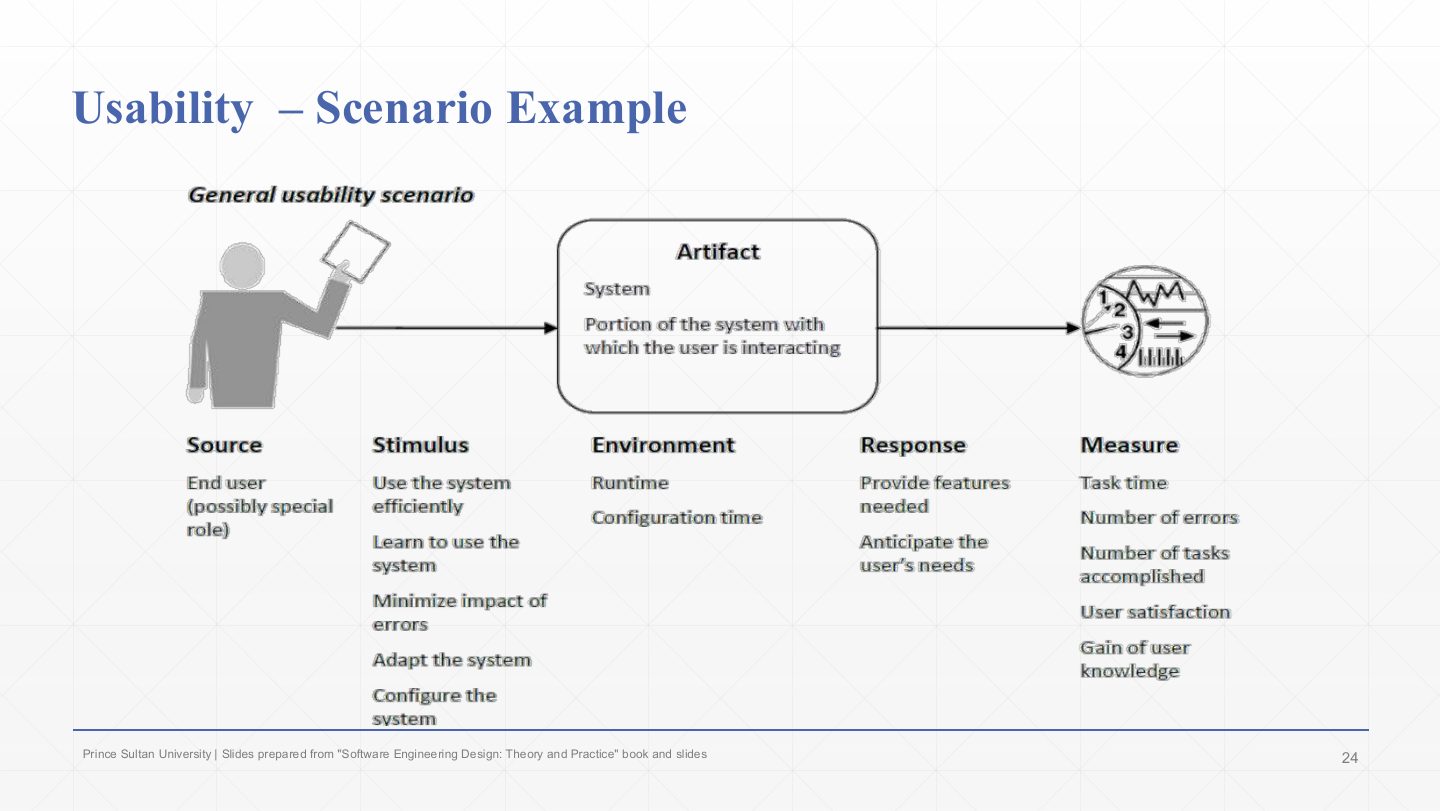
  1. The general usability scenario. Source: an end user, possibly in a special role. Stimulus: what the user wants: use the system efficiently, learn it, minimise the impact of errors, adapt it, configure it.

  2. Artifact: the system, or the part the user is interacting with. Environment: run time or configuration time. Response: provide the features needed and anticipate the user’s needs.

  3. Measures: task time, number of errors, number of tasks accomplished, user satisfaction, gain of user knowledge.

Slide 21 / 24

Usability Scenario Example

Slide 21: Usability Scenario Example

Notes

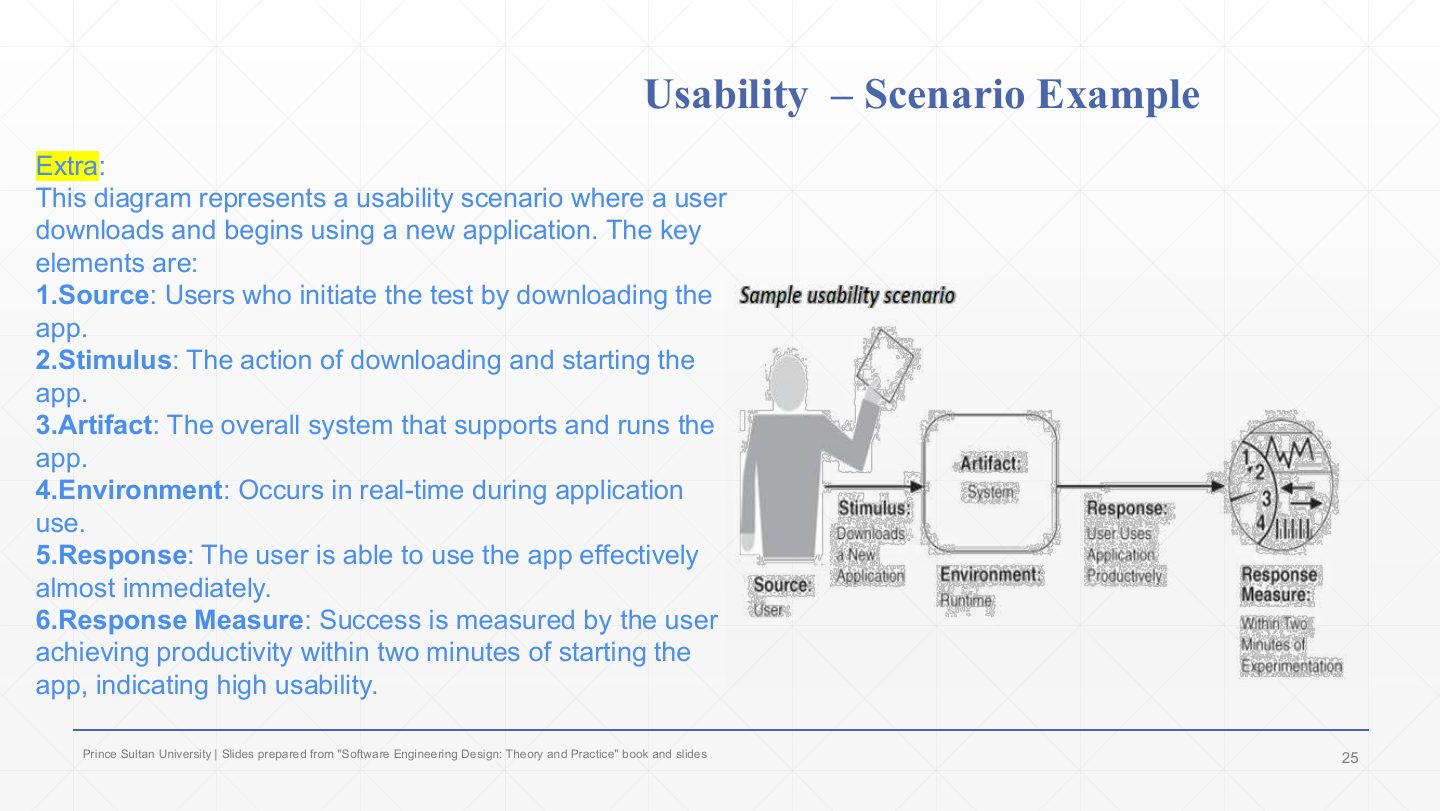
  1. A concrete usability scenario. Source: users. Stimulus: downloading and starting a new app. Artifact: the system that runs the app.

  2. Environment: at run time, while the app is used. Response: the user can use the app effectively almost immediately.

  3. Response measure: the user is productive within two minutes of starting the app. That number is what makes “easy to learn” testable.

Exam angle

Past exam · Quiz 1 · 261 · Q23 (matching)Q1

Usability scenario: “A first-time student user uses the university Learning Management System during normal operation and attempts to submit an assignment for the first time. The system provides clear instructions, guides the student through selecting and uploading the file, and displays a confirmation message after successful submission. The student should complete the task within 2 minutes, without external help, and with no more than one input error.” Match the six elements.

Show answer

Source: first-time student user. Stimulus: attempts to submit an assignment for the first time. Artifact: assignment submission interface / LMS. Environment: normal operation. Response: provides instructions, guides the file upload and confirms success. Response measure: task completed within 2 minutes, without help, with at most one input error.

Slide 22 / 24

Usability – tactics

Slide 22: Usability – tactics

Notes

  1. Separate the user interface from the system’s operations, so the UI can change on its own. Example: a blog platform’s visual editor changes the design without touching the code (MVC in Chapter 4 does exactly this).

  2. Support user initiative: give users tools to manage their own actions: cancel (remove items before checkout), undo (revert an edit), aggregate (combine many items into one, e.g. a weekly activity summary).

  3. Support system initiative: the system anticipates the user using models: a user model (recommendations from viewing history), a system model (sync the most important emails first), a task model (deadline reminders from the project timeline).

Exam angle

PredictionQ1

An “Undo” button supports which usability tactic?

  1. Support user initiative
  2. Support system initiative
  3. Separate the user interface
  4. Resource arbitration
Show answer

A. Support user initiative

Slide 23 / 24

Summary

Slide 23: Summary

Notes

  1. For each major quality you should be able to give the definition, write a general and a sample scenario, and name its tactics.

  2. Next chapter: architecture patterns, ready-made structures that bundle several of these tactics (e.g. MVC separates the UI, a broker hides locations).

Slide 24 / 24

Extra: Question – one tactic per quality

Slide 24: Extra: Question – one tactic per quality

Notes

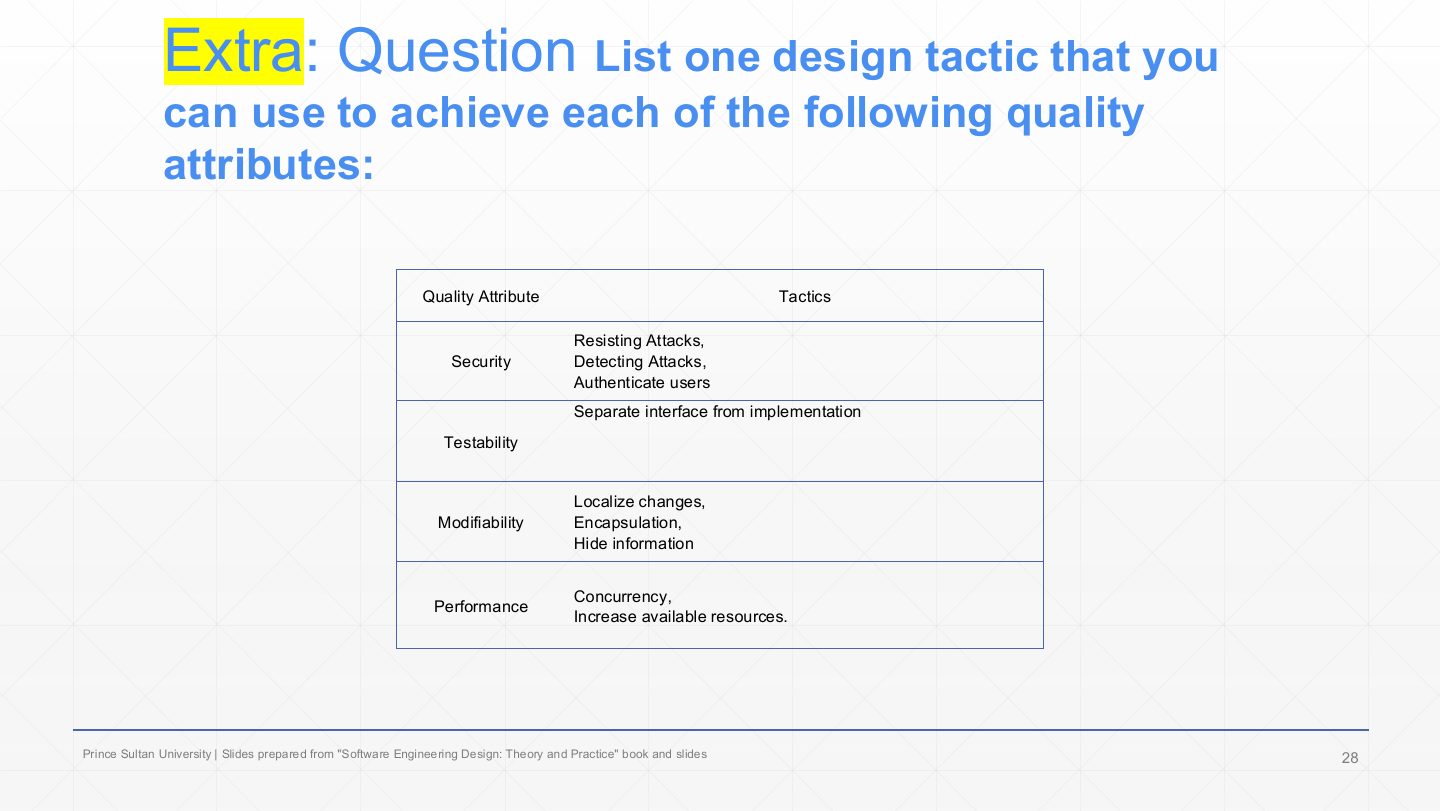
  1. The exercise: give one tactic per quality attribute. Name the tactic, not the quality again.

  2. Model answers from the slide: security resisting or detecting attacks, authenticate users; testability separate interface from implementation; modifiability localise changes, encapsulation, hide information; performance concurrency, increase available resources. Add availability: heartbeat or redundancy, and usability: undo or cancel.

Exam angle

PredictionQ1

List one design tactic for each of: security, testability, modifiability, performance, availability, usability.

Show answer

Security: authenticate users. Testability: record/playback or separate interface from implementation. Modifiability: localise changes (semantic coherence) or hide information. Performance: introduce concurrency or increase resources. Availability: heartbeat or active redundancy. Usability: undo/cancel.