CS340 · Annotated SlidesChapter 7 — Advanced SQL
Chapter 7 · Annotated slides

Advanced SQL

NULLs and three-valued logic, nested and correlated subqueries (IN, ANY/ALL, EXISTS, UNIQUE), joins (inner, natural, outer, multiway), aggregation, GROUP BY and HAVING, views, schema changes with DROP and ALTER, and running queries from Java with JDBC.
Slide text Study notes Highlight: key words Tips, tricks & traps Seen again elsewhere How it can come up

Advanced SQL

CS340 · Chapter 7
1

LEARNING GOALS

CLO1: Create a relational database schema in SQL that incorporates key, entity integrity, and referential integrity constraints and uses a declarative query language (SQL) to elicit information from a database.

(Skills) Chapter objectives:

  • Write complex SQL queries. Includes: outer-joins, aggregation, sub-queries, and other forms.
  • Write triggers and assertions.
  • Create views and use them.
  • Schema changing statements (DROP and ALTER).
2
Exam weight Low
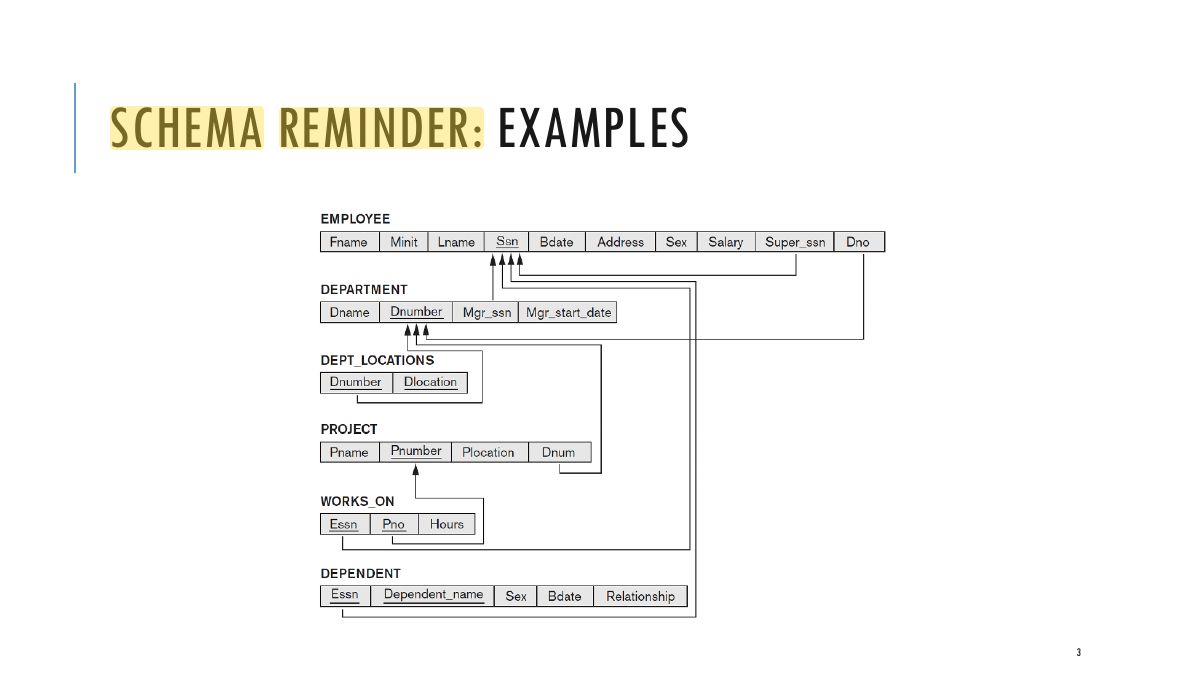
    Slide 3: SCHEMA REMINDER: EXAMPLES
    Exam weight Low
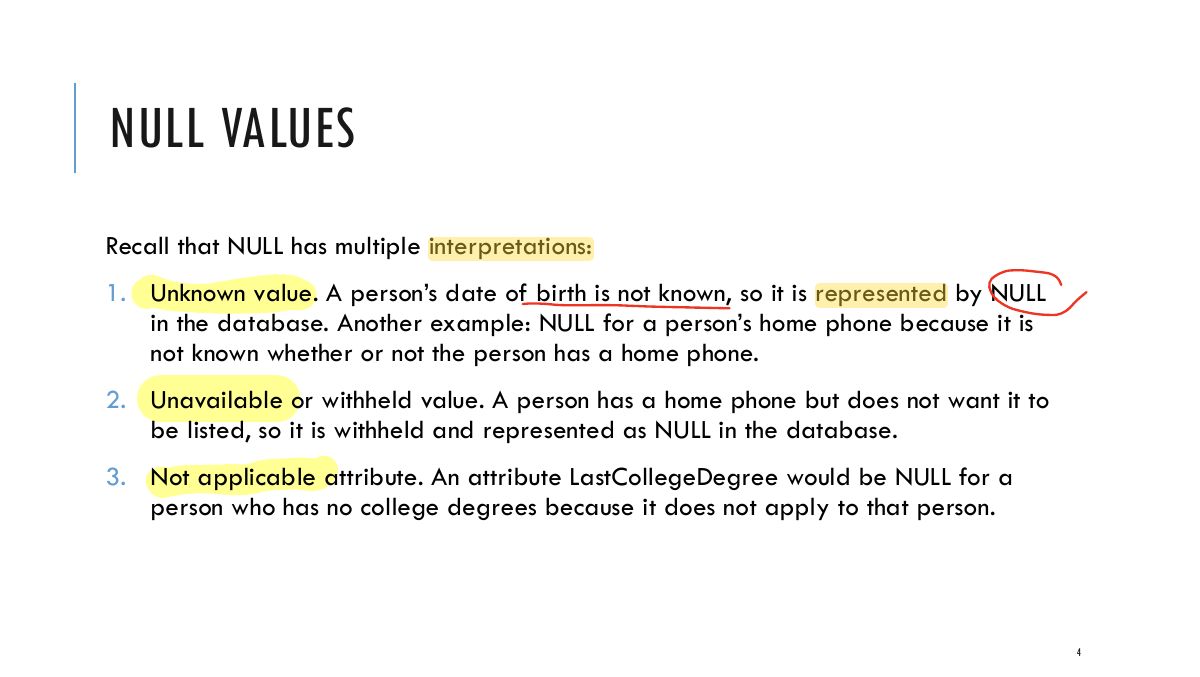
      Slide 4: NULL VALUES
      Exam weight High
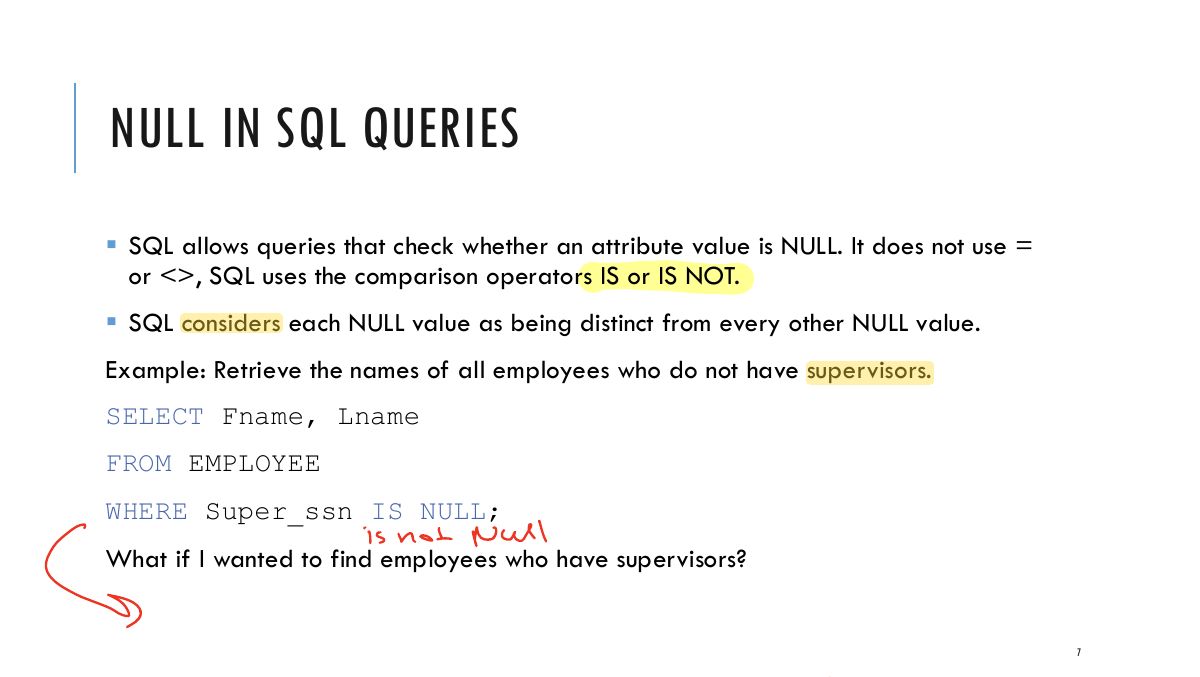
      1. NULL = unknown, unavailable or not applicable. Test with IS NULL / IS NOT NULL, never = NULL.
      Exam trapWHERE x = NULL is never true; write WHERE x IS NULL.
      🎯 How this can come up · 1 question
      MCQ

      Which finds employees with no supervisor?

      CREATE TABLE EVENT (ID INT NOT NULL, Name VARCHAR(150), StartingDate DATE NOT NULL, Confirmed BOOLEAN );

      5
      Exam weight Low
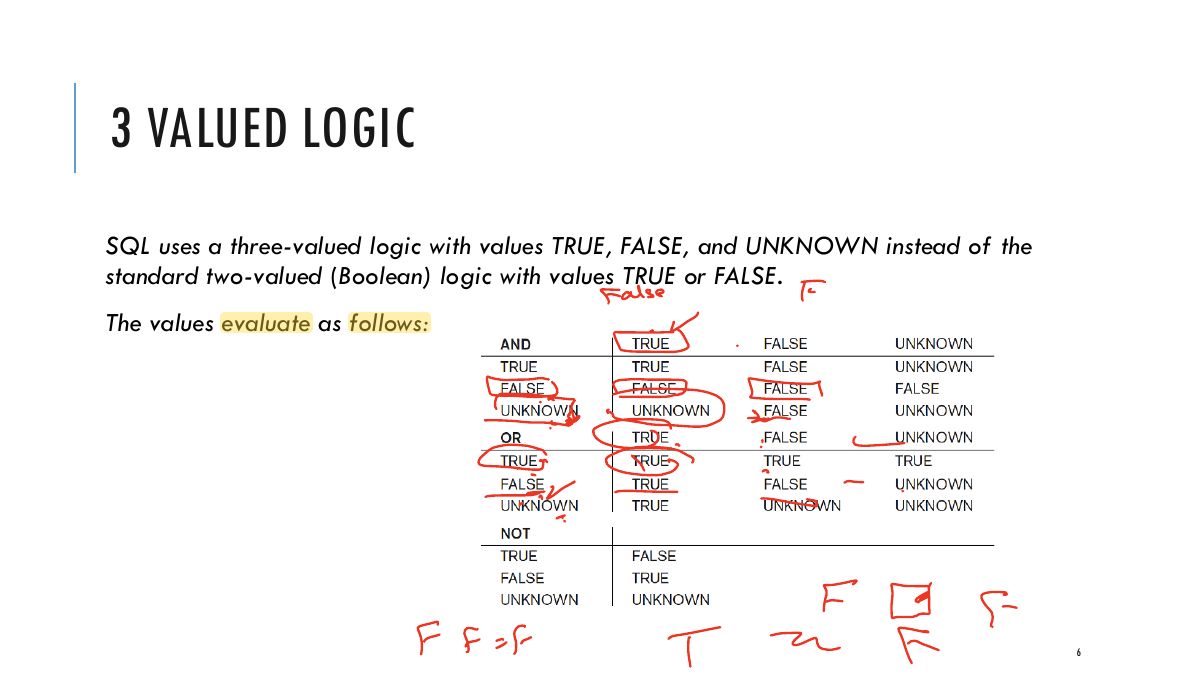
        Slide 6: 3 VALUED LOGIC
        Exam weight Low
        1. Three-valued logic: TRUE, FALSE, UNKNOWN. Any comparison with NULL is UNKNOWN; WHERE keeps only TRUE rows.
        Slide 7: NULL IN SQL QUERIES
        Exam weight Low
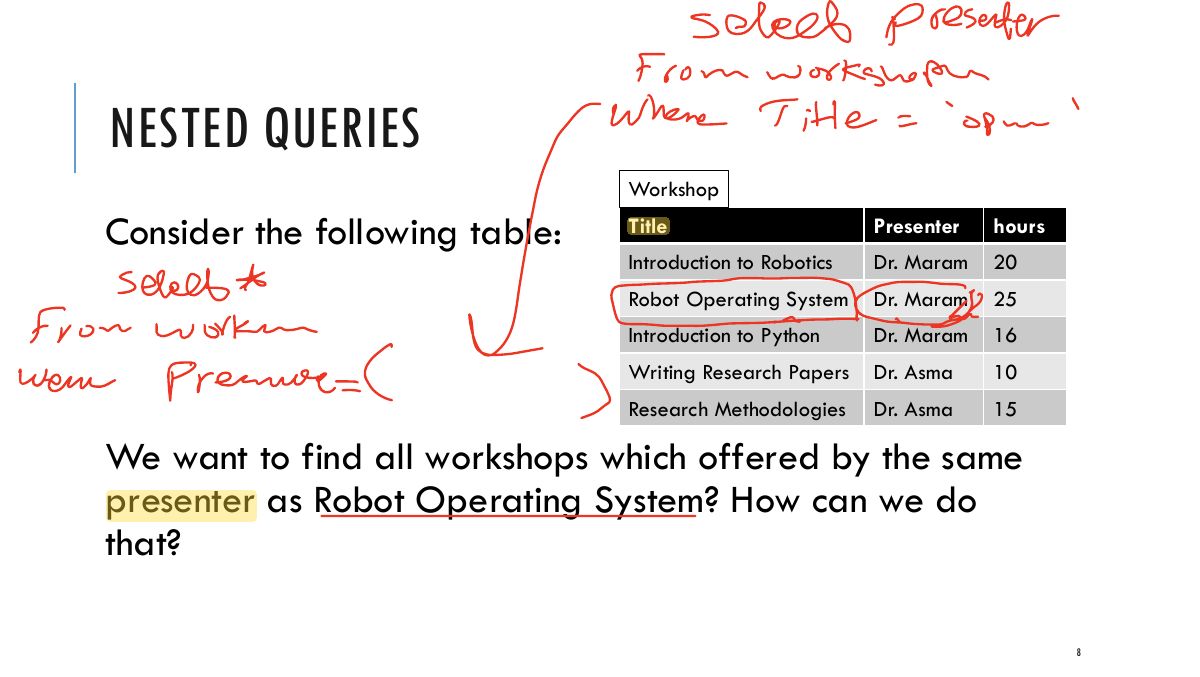
          Slide 8: select presenter
          Exam weight Low
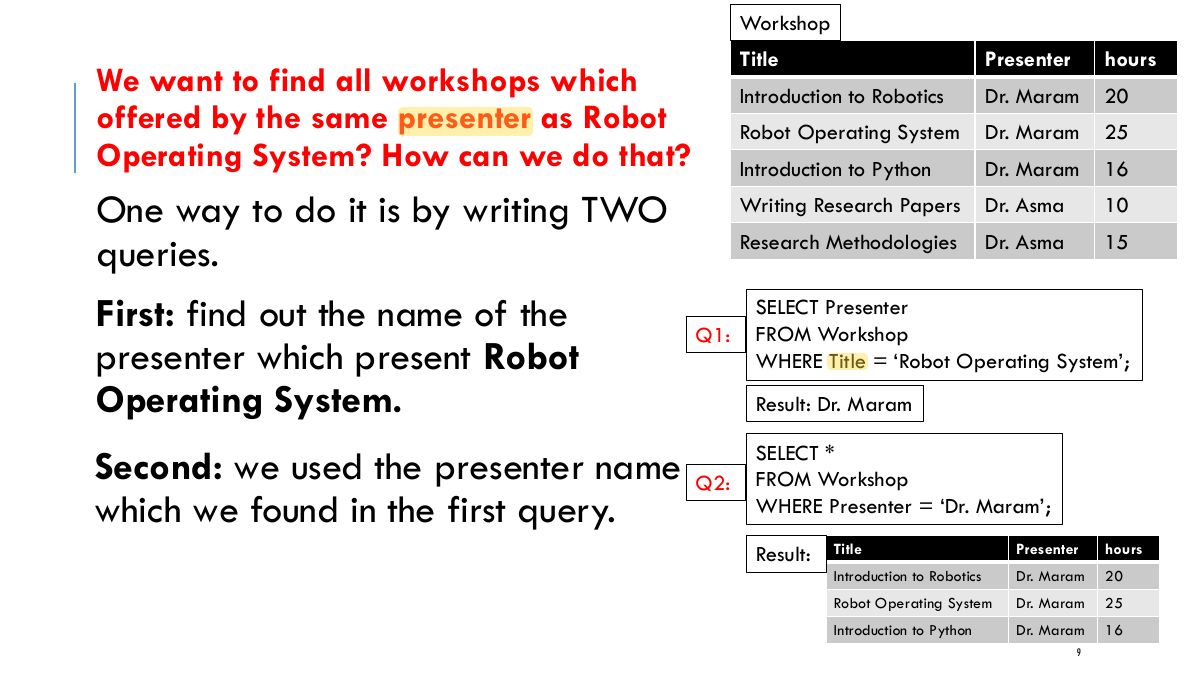
            Slide 9: Workshop
            Exam weight Low
              Slide 10: Workshop
              Exam weight Low

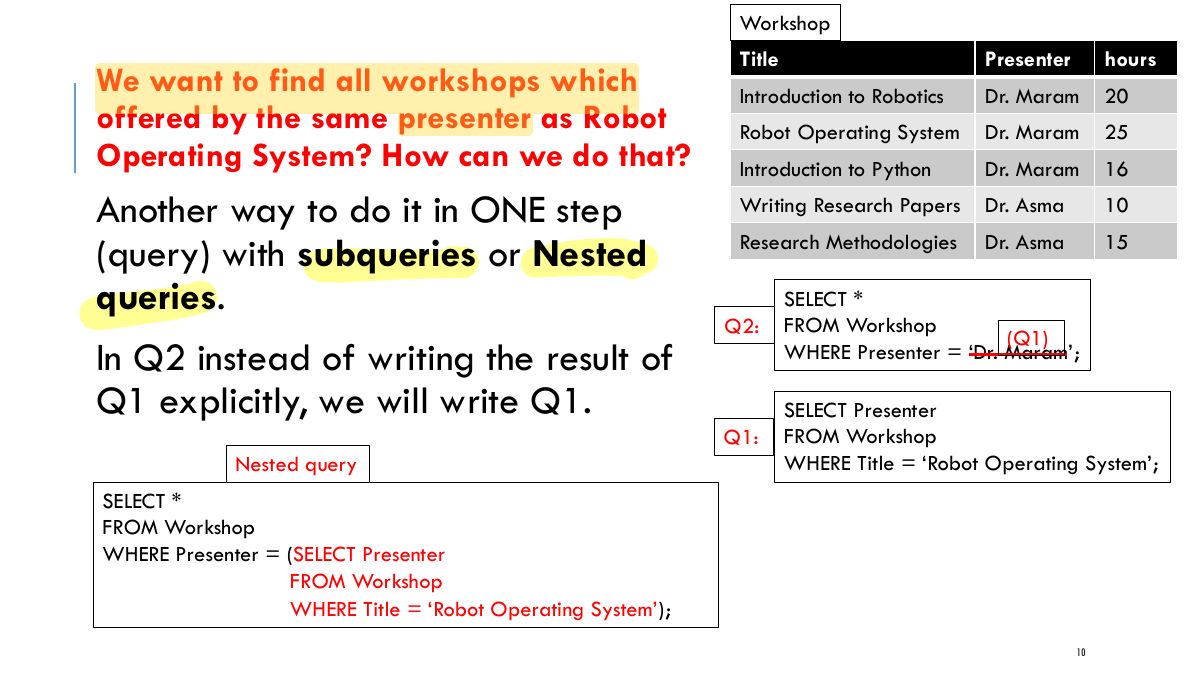
                Outer query SELECT *

                NESTED QUERIES

                FROM Workshop WHERE Presenter = (SELECT Presenter FROM Workshop

                WHERE Title = ‘Robot Operating System’

                );

                Some queries require that existing values in the database be fetched and then used in a comparison condition. Such

                Nested query

                queries can be conveniently formulated by using

                nested

                queries, which are complete select-from-where blocks within another SQL query.

                That other query is called the outer query. These nested queries can also appear in the WHERE clause or the FROM clause or the SELECT clause or other SQL clauses as needed.

                11
                Exam weight Low
                  Slide 12: NESTED QUERIES
                  Exam weight Low
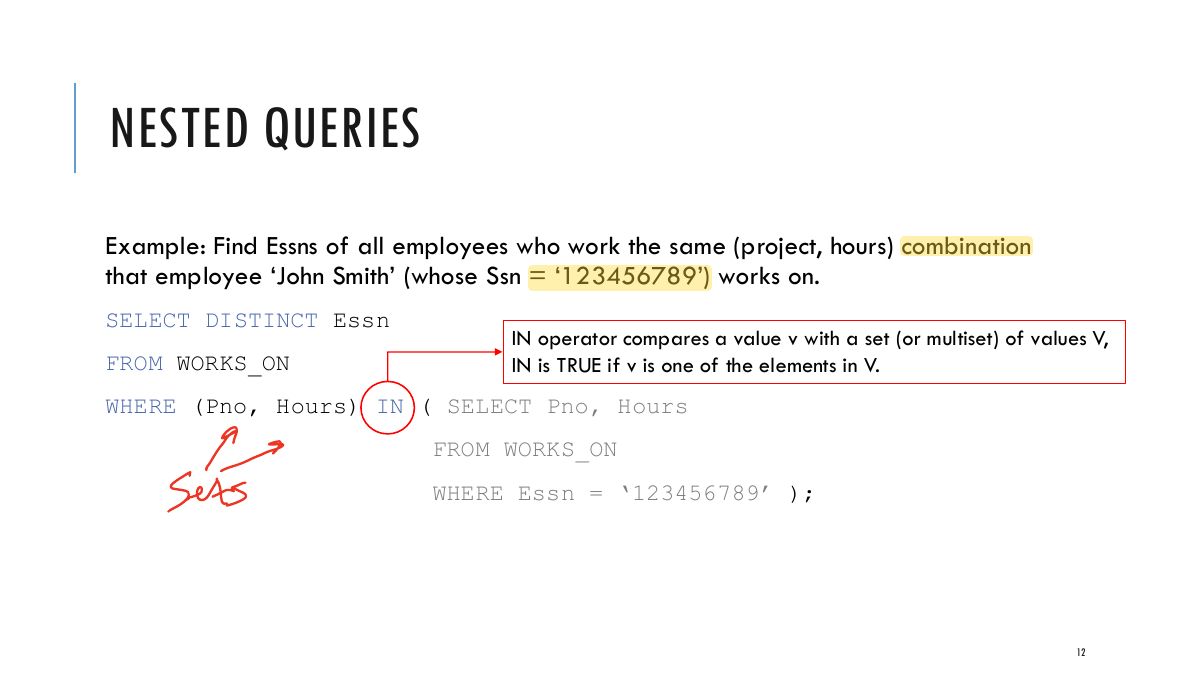
                  1. Nested query: a SELECT inside WHERE (… IN (SELECT …)).
                  Slide 13: COMPARISON OPERATORS FOR NESTED QUERIES
                  Exam weight High
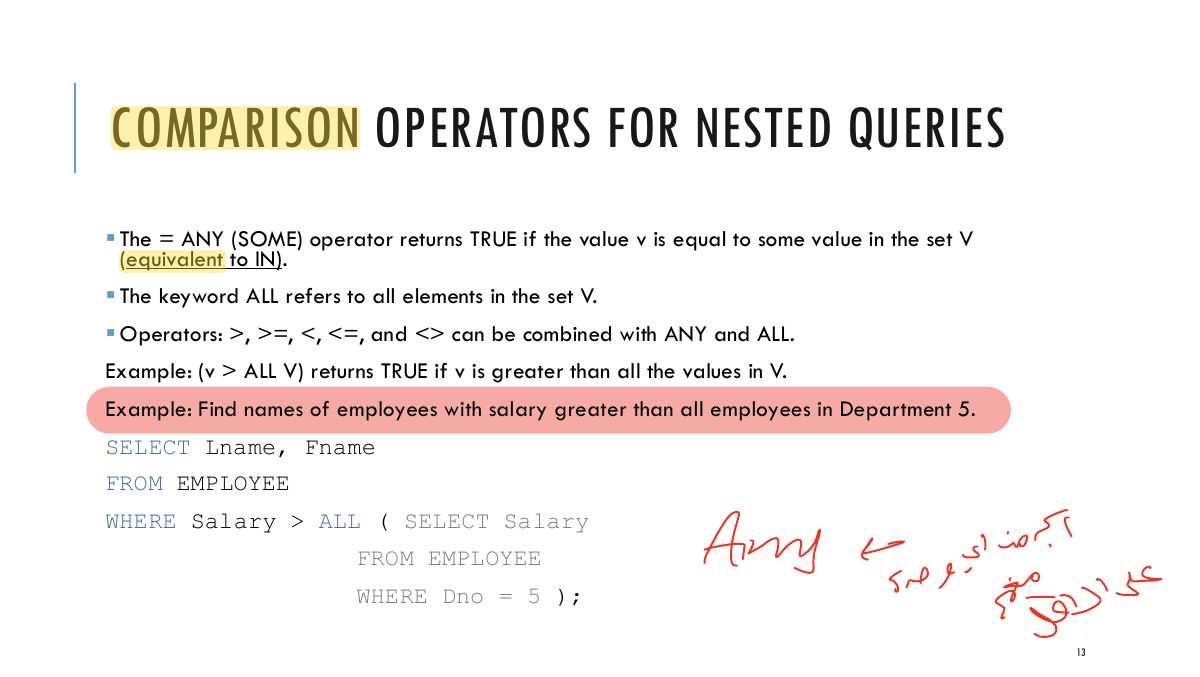
                  1. = ANY (SOME) is like IN; > ALL means greater than every value returned.
                  🎯 How this can come up · 1 question
                  MCQ

                  Salary > ALL (SELECT Salary FROM EMPLOYEE WHERE Dno = 5) finds employees who earn:

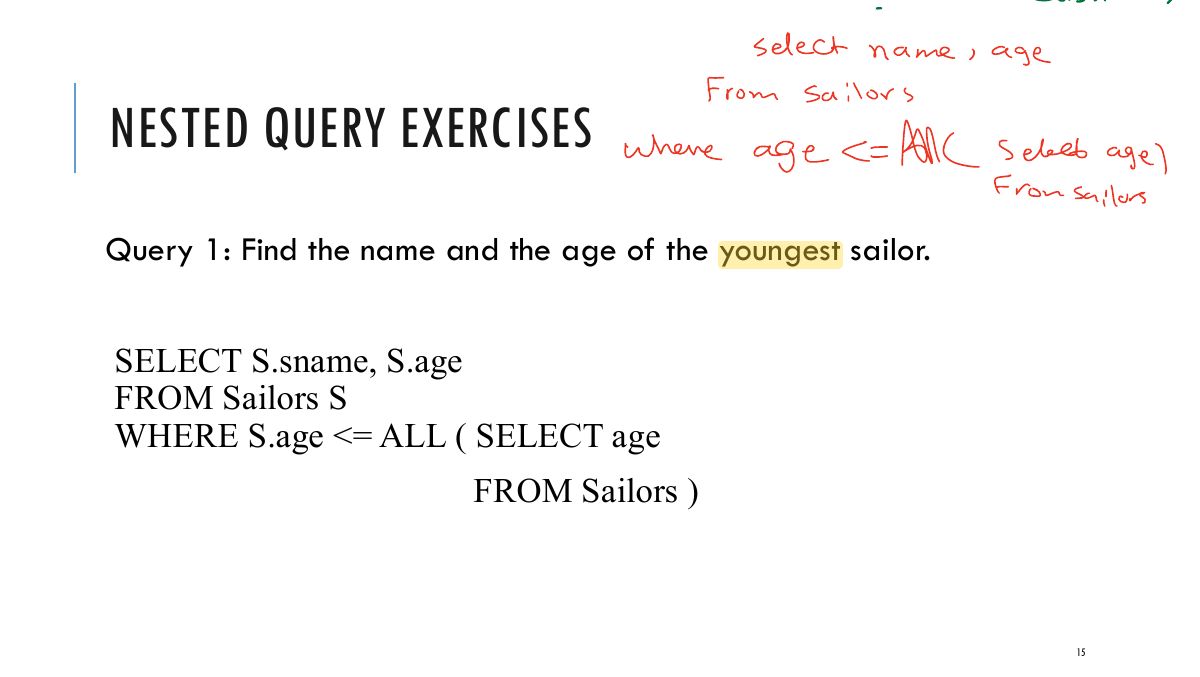
                  Slide 14: NESTED QUERY EXERCISES
                  Exam weight Low
                    Slide 15: Austin
                    Exam weight Low
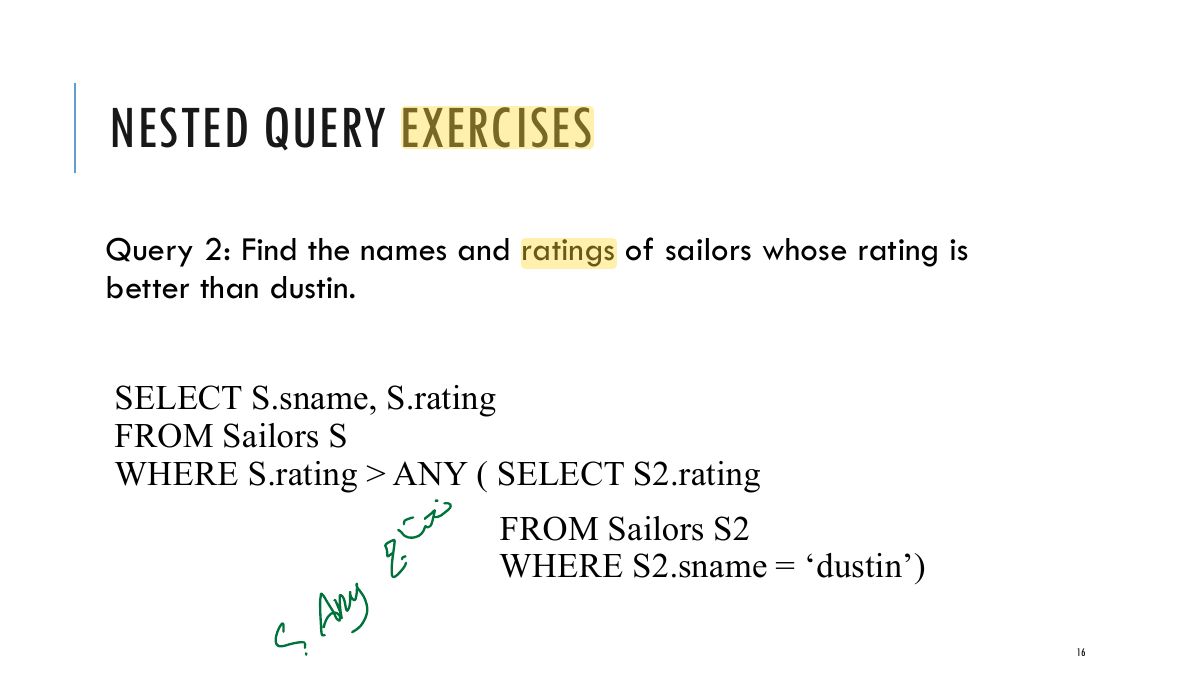
                      Slide 16: NESTED QUERY EXERCISES
                      Exam weight Low

                        SQL EXPLICIT SETS

                        Sets do not have to be the results of sub-queries. They can be explicitly stated.

                        Example: Find employees who work on projects 1, 2, and 3 SELECT DISTINCT Essn FROM WORKS_ON WHERE Pno IN (1, 2, 3);

                        17
                        Exam weight Low

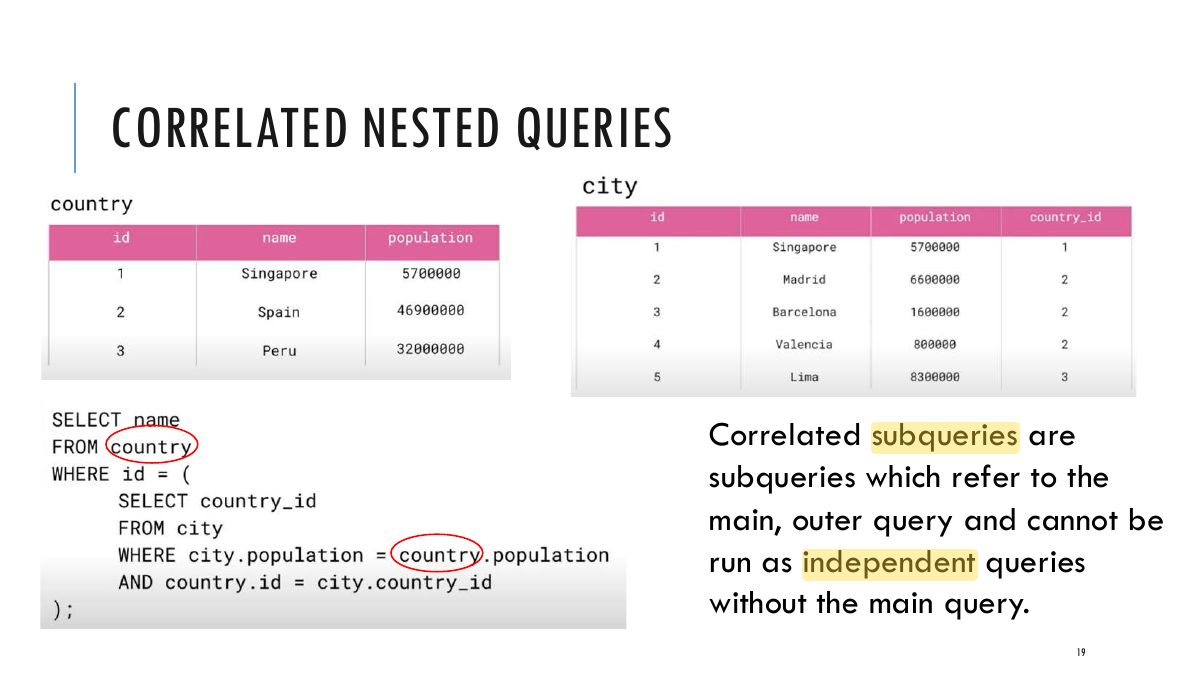
                          CORRELATED NESTED QUERIES

                          Correlated queries: When the WHERE clause of a nested query references some attribute of a relation

                          outer query, the two queries are

                          declared in the said to be correlated.

                          Go

                          18
                          Exam weight Low
                          1. Correlated subquery: refers to the outer query’s row, so it is re-evaluated for each outer row.
                          Slide 19: CORRELATED NESTED QUERIES
                          Exam weight Low

                            CORRELATED NESTED QUERIES

                            Example:

                            SELECT E.Fname, E.Lname FROM EMPLOYEE AS E WHERE E.Ssn IN (SELECT D.Essn

                            FROM DEPENDENT AS D WHERE E.Fname = D.Dependent_name AND E.Sex = D.Sex );

                            20
                            Exam weight Low

                              CORRELATED NESTED QUERY EVALUATION

                              Think about it like a loop:

                              For each employee, check the qualification by computing the subquery! if the Ssn value of the EMPLOYEE tuple is in the result of the nested query, then select that EMPLOYEE tuple

                              21
                              Exam weight Low

                                CORRELATED NESTED QUERIES

                                In general, a query written with nested select-from-where blocks and using the = or IN comparison operators can always be expressed as a single block query.

                                SELECT E.Fname, E.Lname FROM EMPLOYEE AS E, DEPENDENT AS D WHERE E.Ssn = D.Essn AND E.Sex = D.Sex AND E.Fname = D.Dependent_name;

                                22
                                Exam weight Low
                                  ★ Past exam

                                  EXISTS AND UNIQUE

                                  • EXISTS returns TRUE if the nested query result contains at least one tuple, or FALSE if the nested query result contains no tuples.
                                  • UNIQUE returns TRUE if there are no duplicate tuples in the result of query Q; otherwise, it returns FALSE.
                                  • EXISTS is used more often and is the focus here.

                                  Rewriting the same dependent query with EXISTS:

                                  SELECT E.Fname, E.Lname FROM EMPLOYEE AS E WHERE EXISTS (SELECT *

                                  FROM DEPENDENT AS D WHERE E.Ssn = D.Essn AND E.Sex = D.Sex AND E.Fname = D.Dependent_name);

                                  23
                                  Exam weight High
                                  1. EXISTS (subquery) is TRUE if it returns at least one row; NOT EXISTS if it returns none.
                                  🎯 How this can come up · 1 question
                                  Written

                                  Find employees who have no dependents.

                                  NOT EXISTS

                                  Example: Find employees who have no dependents SELECT Fname, Lname FROM EMPLOYEE WHERE NOT EXISTS (SELECT *

                                  FROM DEPENDENT WHERE Ssn = Essn );

                                  24
                                  Exam weight Low

                                    EXERCISES

                                    Exercise 1: Write nested sub-queries to determine the following:

                                    a) Find names of sailors who have reserved a boat?

                                    b) Find names of sailors who have never reserved a boat?

                                    c) Can you express a with a join? How about b?

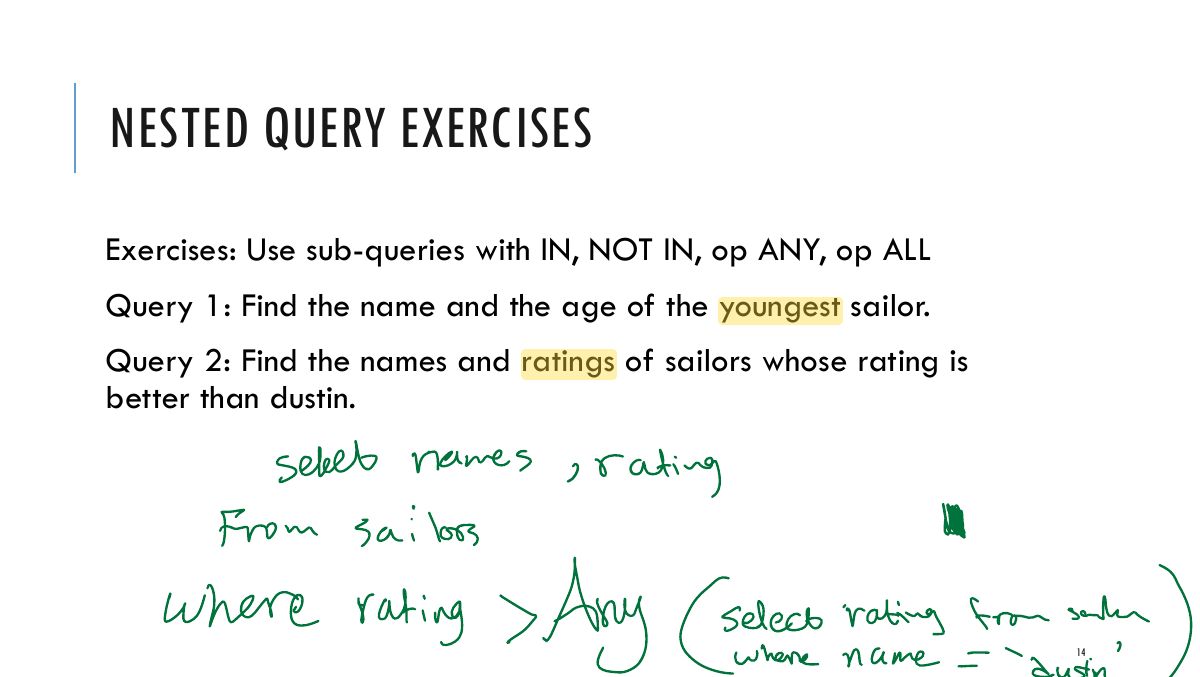
                                    Exercise 2: Can you write the query to find the youngest sailor as a correlated nested query? (Hint: use NOT EXISTS, compare age with every other sailor (loop logic))

                                    25
                                    Exam weight Low
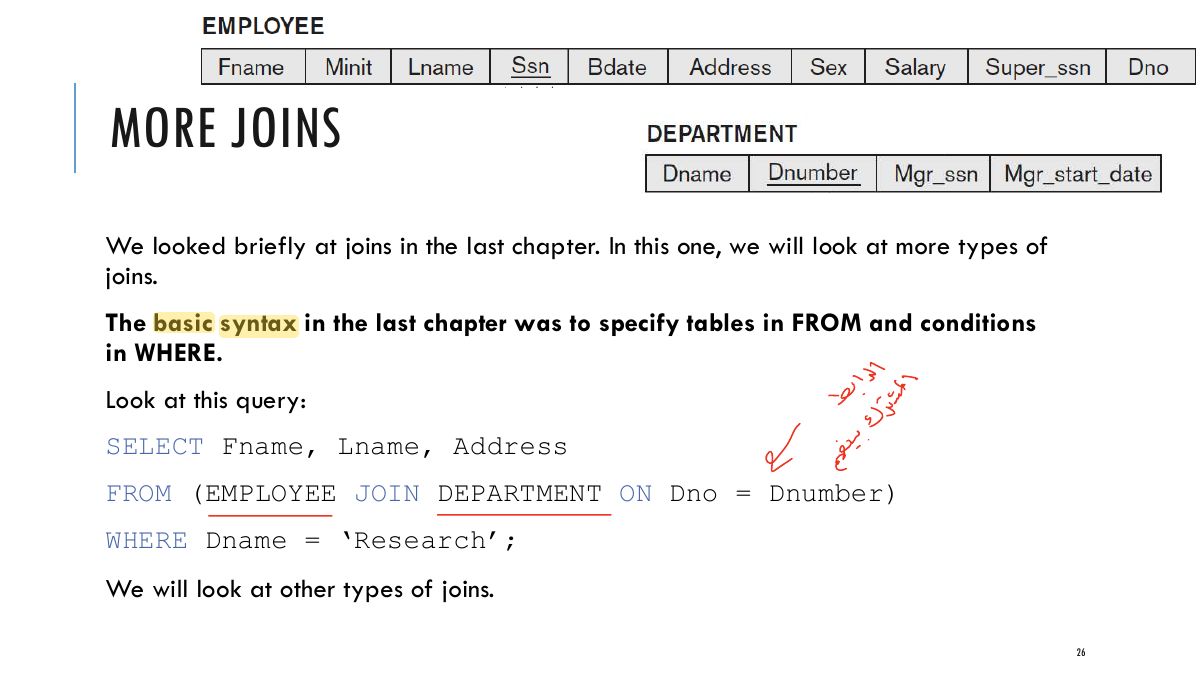
                                      Slide 26: MORE JOINS
                                      Exam weight Low
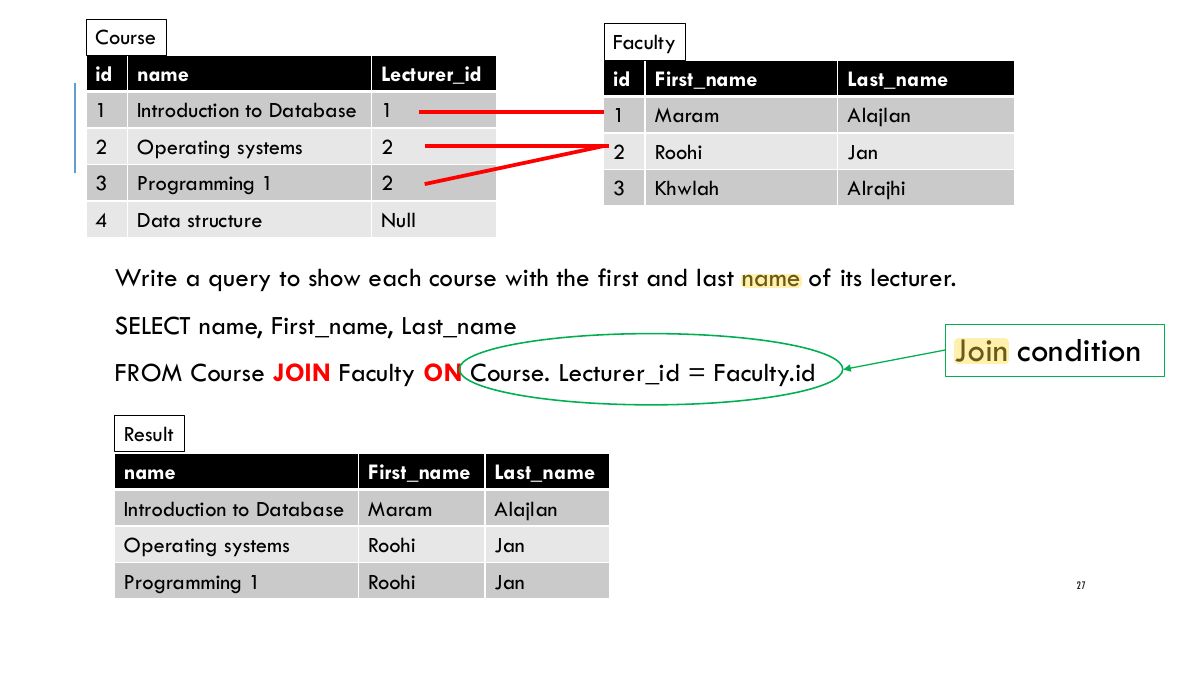
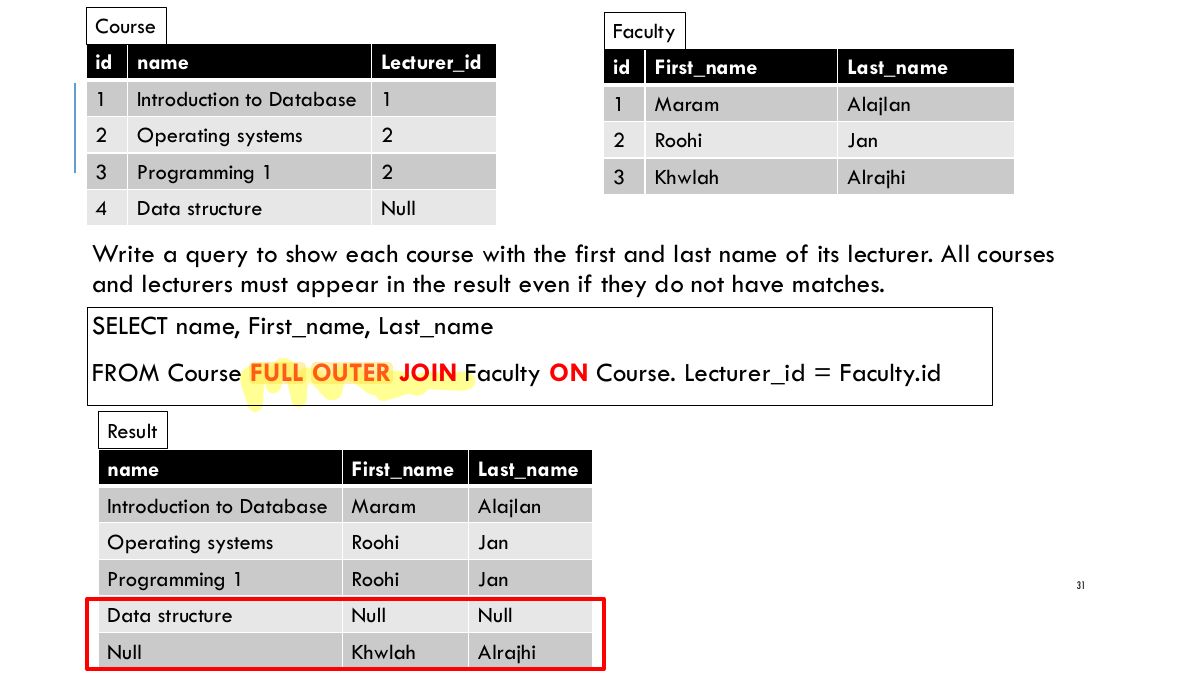
                                        Slide 27: Course Faculty id name Lecturer_id id First_name Last_name 1 Introduction to Database 1 1 Maram Alajlan 2 Operating systems 2 2 Roohi Jan 3 Programming 1 2 3 Khwlah Alrajhi 4 Data structure Null
                                        Exam weight Low
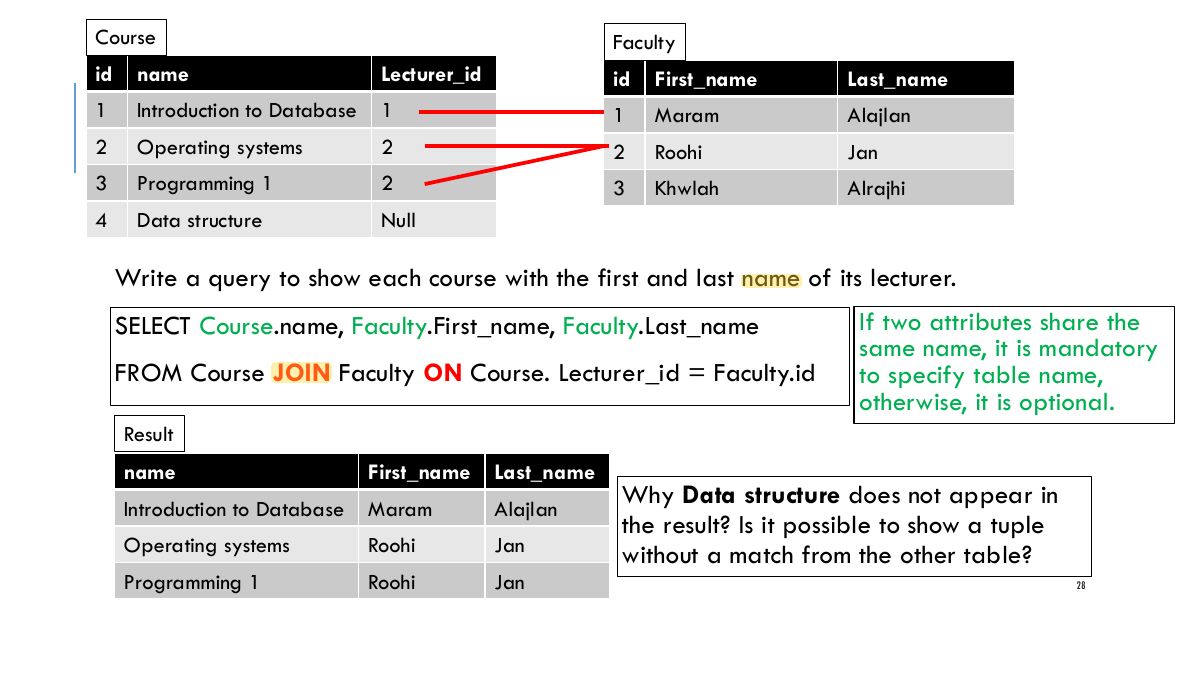
                                          Slide 28: Course Faculty id name Lecturer_id id First_name Last_name 1 Introduction to Database 1 1 Maram Alajlan 2 Operating systems 2 2 Roohi Jan 3 Programming 1 2 3 Khwlah Alrajhi 4 Data structure Null
                                          Exam weight Low
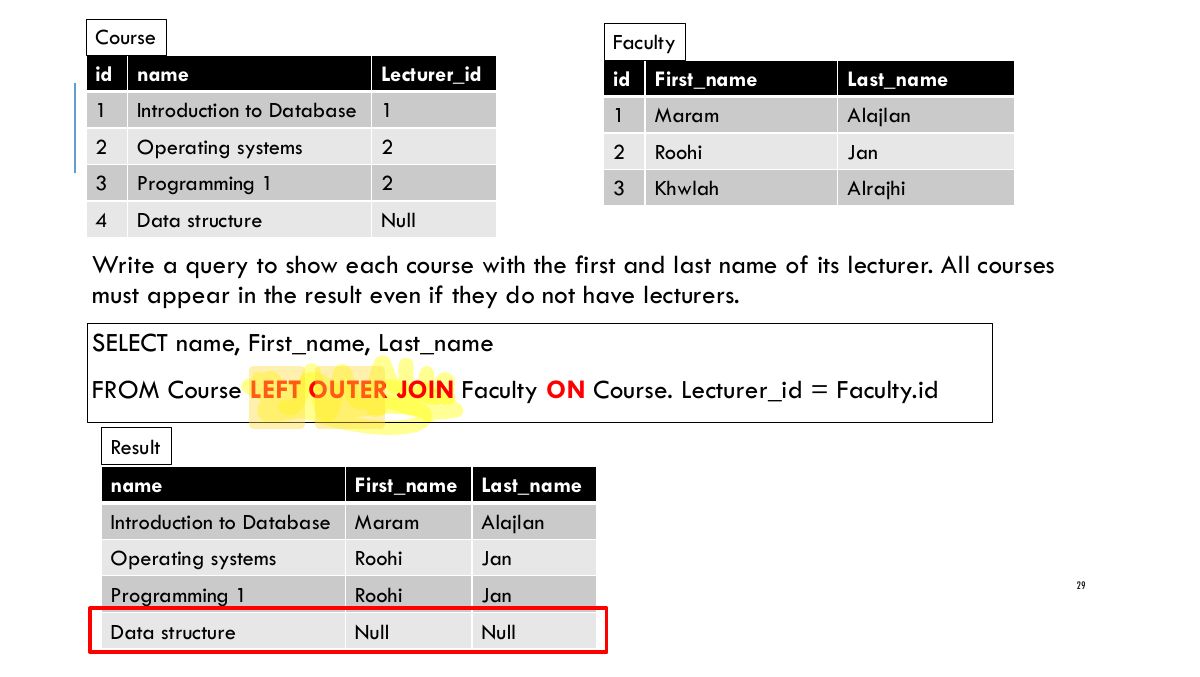
                                            Slide 29: Course Faculty id name Lecturer_id id First_name Last_name 1 Introduction to Database 1 1 Maram Alajlan 2 Operating systems 2 2 Roohi Jan 3 Programming 1 2 3 Khwlah Alrajhi 4 Data structure Null
                                            Exam weight Low
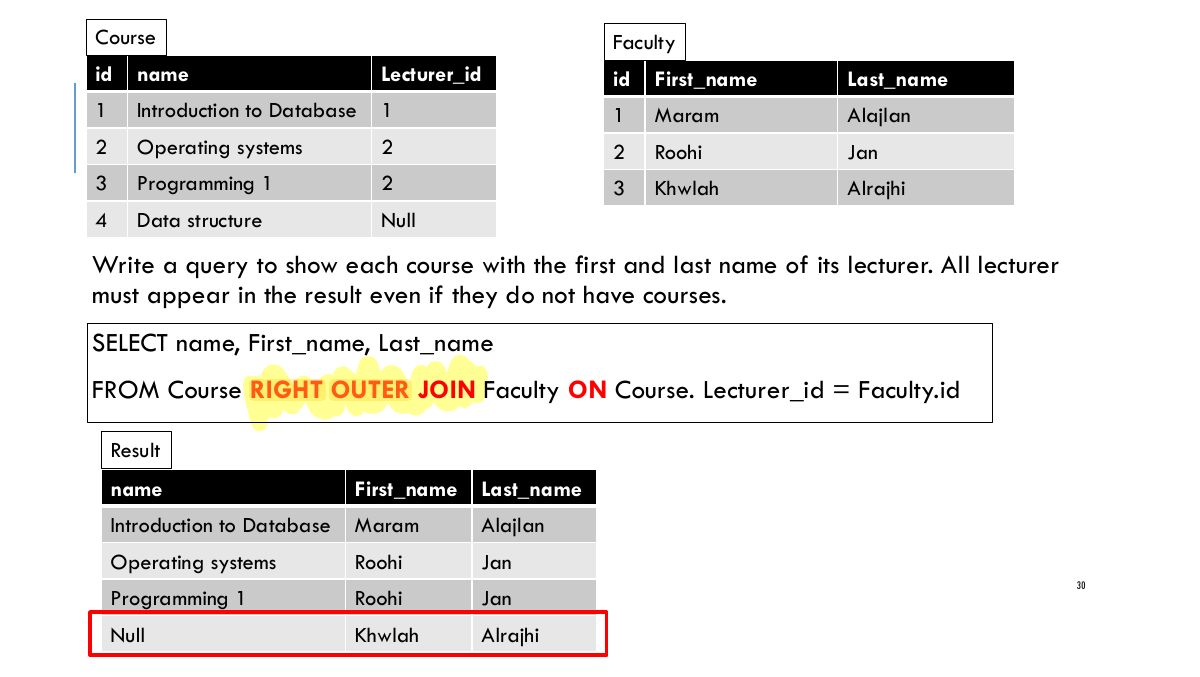
                                              Slide 30: Course Faculty id name Lecturer_id id First_name Last_name 1 Introduction to Database 1 1 Maram Alajlan 2 Operating systems 2 2 Roohi Jan 3 Programming 1 2 3 Khwlah Alrajhi 4 Data structure Null
                                              Exam weight Low
                                                Slide 31: Course Faculty id name Lecturer_id id First_name Last_name 1 Introduction to Database 1 1 Maram Alajlan 2 Operating systems 2 2 Roohi Jan 3 Programming 1 2 3 Khwlah Alrajhi 4 Data structure Null
                                                Exam weight Low
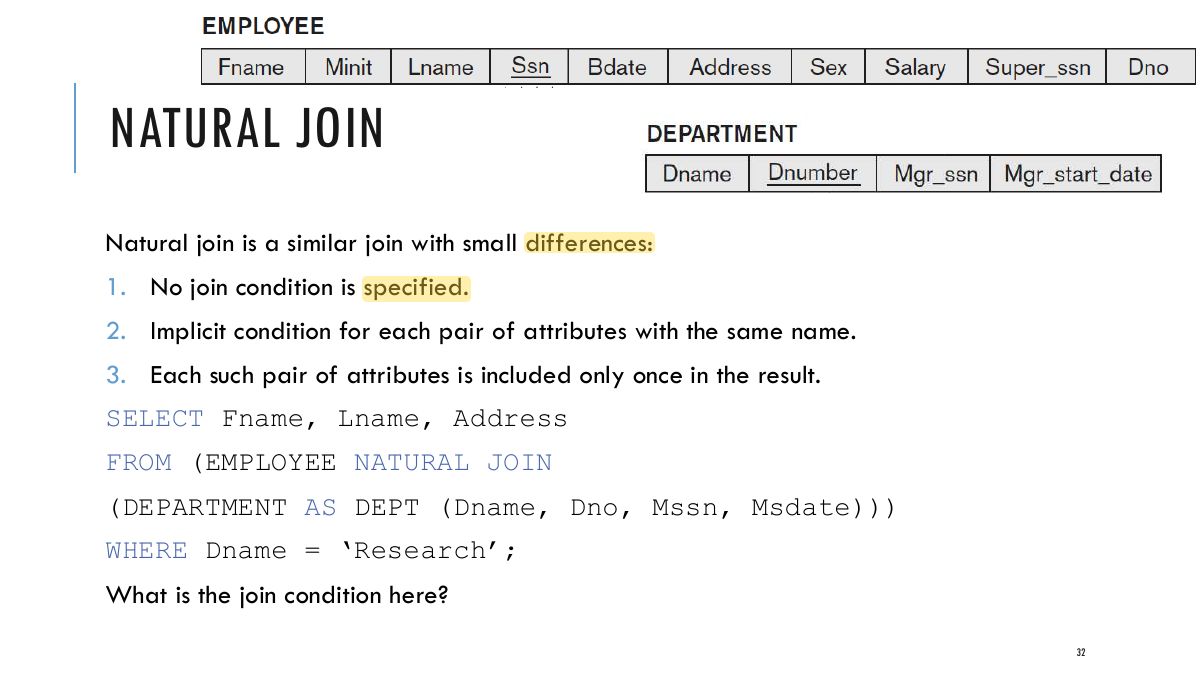
                                                  Slide 32: NATURAL JOIN
                                                  Exam weight Low
                                                  1. NATURAL JOIN joins on all same-named columns and keeps one copy of each.
                                                  Slide 33: INNER JOIN
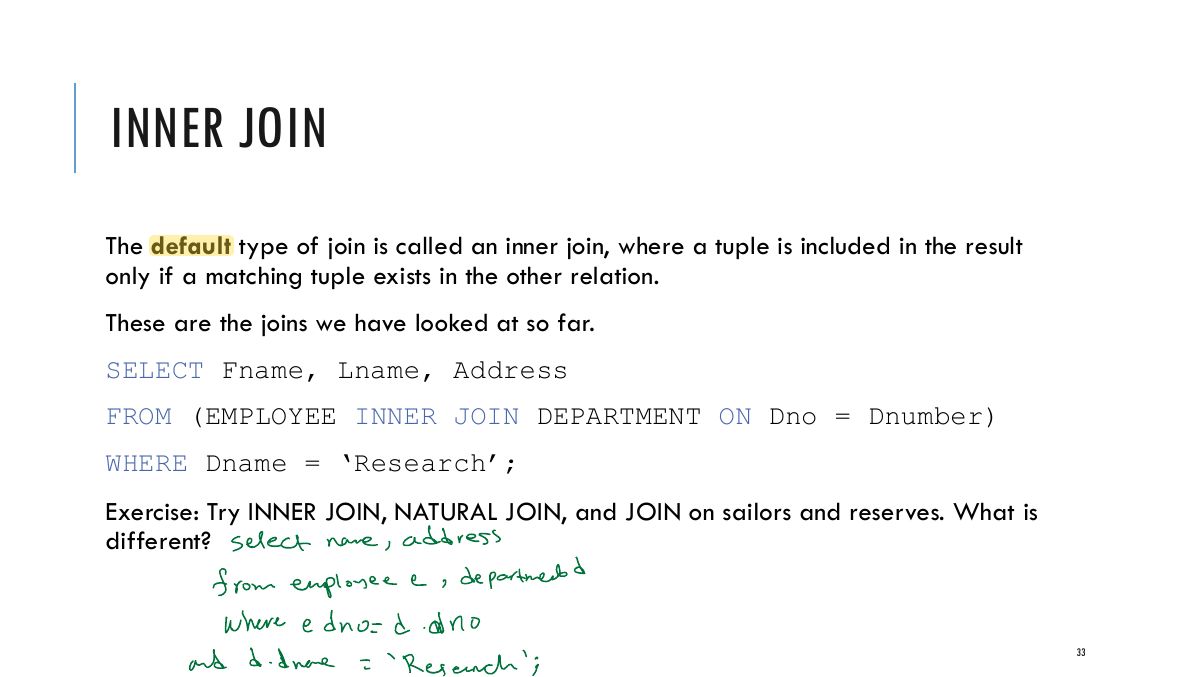
                                                  Exam weight Low
                                                  1. INNER JOIN (the default JOIN): only matching rows.

                                                  OUTER JOIN

                                                  SELECT E.Lname AS Employee_name, S.Lname AS Supervisor_name FROM (EMPLOYEE AS E LEFT OUTER JOIN EMPLOYEE AS S ON E.Super_ssn = S.Ssn); Types of outer join:

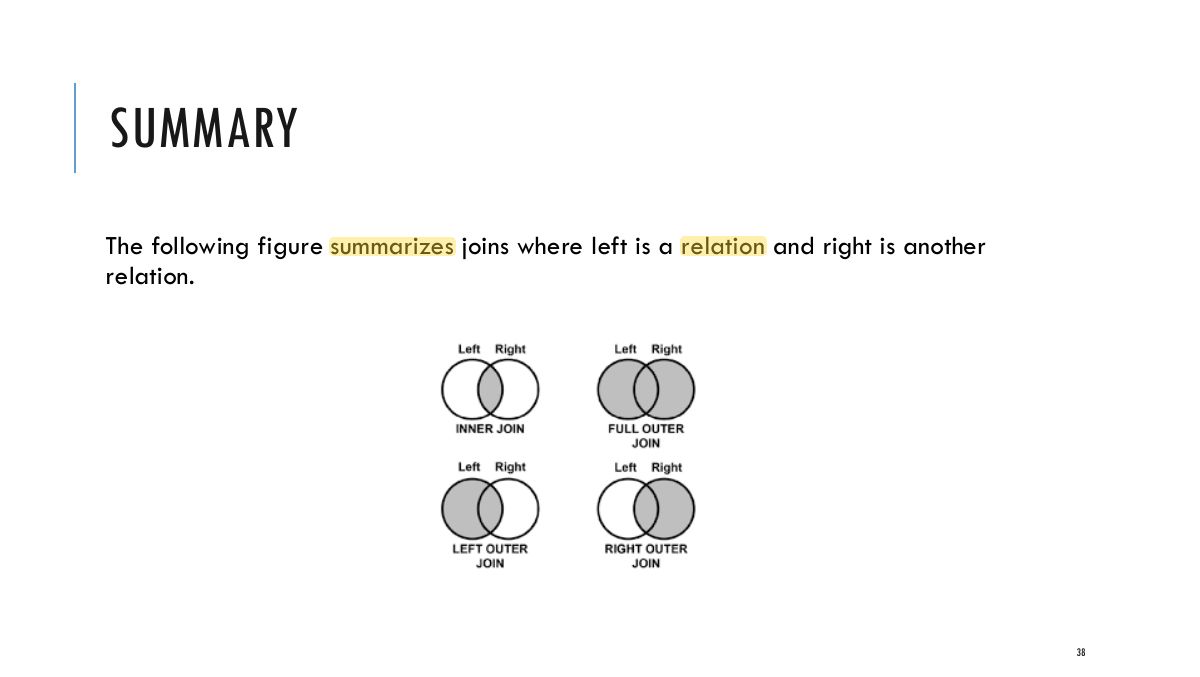
                                                  • LEFT OUTER JOIN: every tuple in the left table must appear in the result; if it does not have a matching tuple, it is padded with NULL values for the attributes of the right table.
                                                  • RIGHT OUTER JOIN: every tuple in the right table must appear in the result; if it does not have a matching tuple, it is padded with NULL values for the attributes of the left table.
                                                  • FULL OUTER JOIN.

                                                  In all three options, the keyword OUTER may be omitted.

                                                  34
                                                  Exam weight High
                                                  1. LEFT/RIGHT/FULL OUTER JOIN also keep unmatched rows from the left/right/both side, padded with NULLs.
                                                  🎯 How this can come up · 1 question
                                                  MCQ

                                                  List all employees, with their department name if they have one:

                                                  LIST OF IDENTICAL JOINS WITH DIFFERENT NAMES

                                                  There is redundancy in the syntax of joins. This means that the pairs of queries in each line below are identical:

                                                  LEFT JOIN and LEFT OUTER JOIN RIGHT JOIN and RIGHT OUTER JOIN FULL JOIN and FULL OUTER JOIN INNER JOIN and JOIN.

                                                  35
                                                  Exam weight Low

                                                    OTHER TYPES OF JOIN

                                                    If the join attributes have the same name, one can also specify the natural join variation of outer joins by using the keyword NATURAL before the operation (for example, NATURAL LEFT OUTER JOIN).

                                                    The keyword CROSS JOIN is used to specify the CARTESIAN PRODUCT operation. This one must be used carefully.

                                                    36
                                                    Exam weight Low

                                                      MULTIWAY JOIN

                                                      It is also possible to nest join specifications; that is, one of the tables in a join may itself be a joined table. This allows the specification of the join of three or more tables as a single joined table, which is called a multiway join.

                                                      Example:

                                                      SELECT Pnumber, Dnum, Lname, Address, Bdate FROM ((PROJECT JOIN DEPARTMENT ON Dnum = Dnumber) JOIN EMPLOYEE ON Mgr_ssn = Ssn) WHERE Plocation

                                                      = ‘Stafford’;

                                                      37
                                                      Exam weight Low
                                                        Slide 38: SUMMARY
                                                        Exam weight Low

                                                          JOIN EXERCISES

                                                          Exercise 1: Retrieve all sailors who have made reservations and sailors who haven’t.

                                                          This query will return all sailors, including those who have not made any reservations (in which case, r.bid will be NULL for those sailors).

                                                          Exercise 2: Retrieve all boats that have been reserved and boats that haven’t.

                                                          This query will return all boats, including those that have never been reserved (in which case, r.sid will be NULL for those boats).

                                                          Exercise 3: Retrieve all sailors and all boats, regardless of reservations.

                                                          This query will return all sailors and all boats, including sailors who have not made any reservations and boats that have not been reserved.

                                                          39
                                                          Exam weight Low

                                                            AGGREGATION

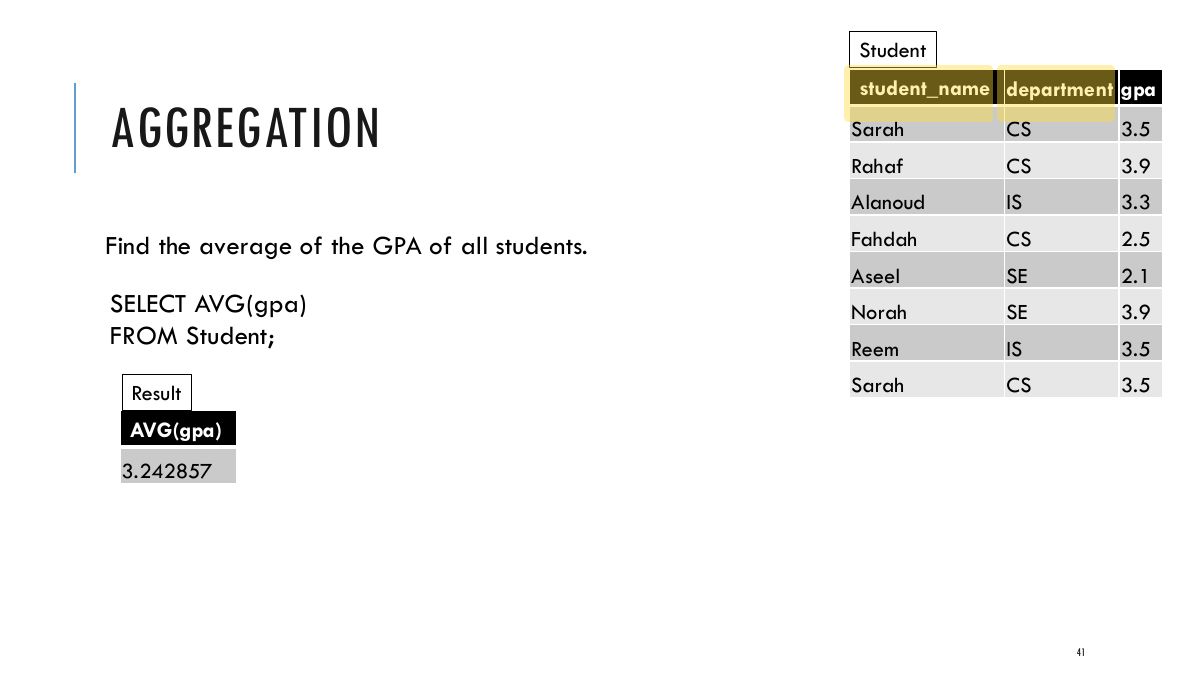
                                                            Aggregation functions:

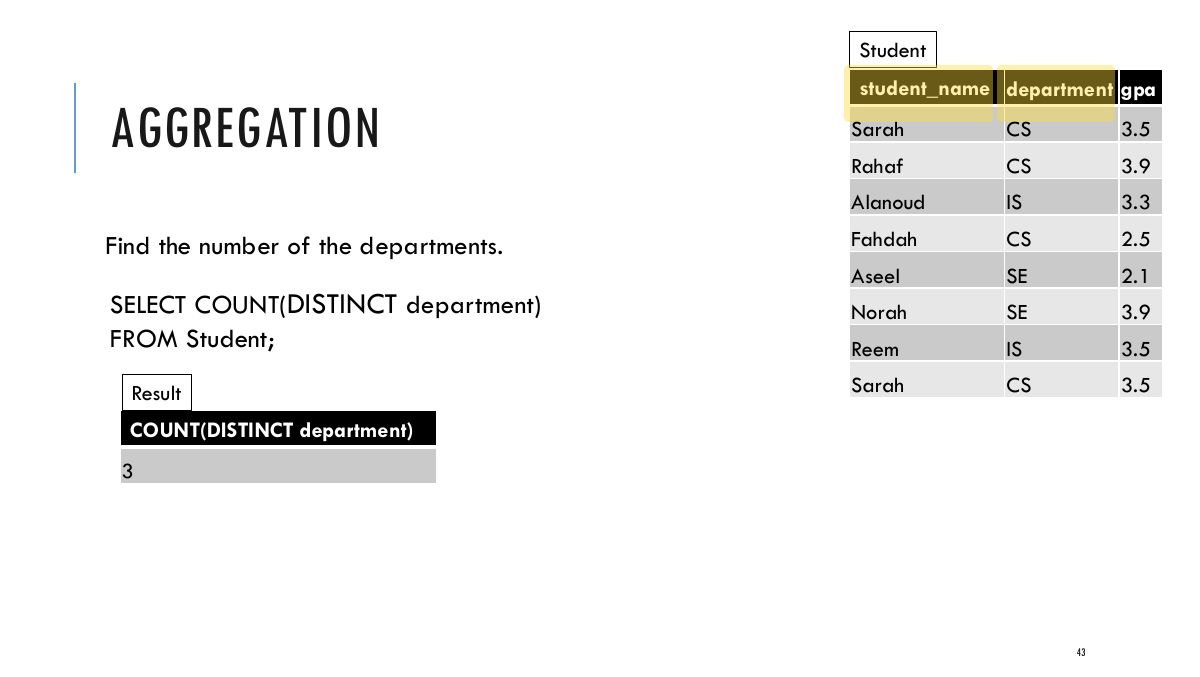
                                                            COUNT ([DISTINCT] A): The number of (unique) values in the A column.

                                                            SUM ([DISTINCT] A): The sum of all (unique) values in the A column.

                                                            AVG ([DISTINCT] A): The average of all (unique) values in the A column.

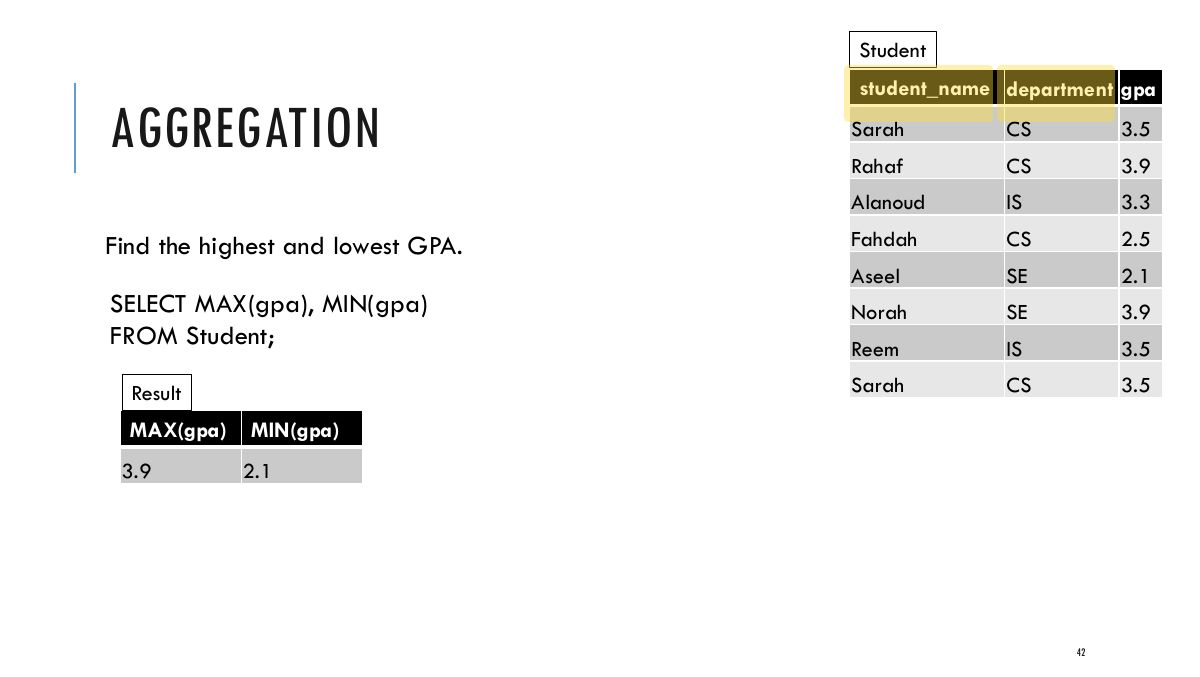
                                                            MAX (A): The maximum value in the A column.

                                                            MIN (A): The minimum value in the A column.

                                                            40
                                                            Exam weight High
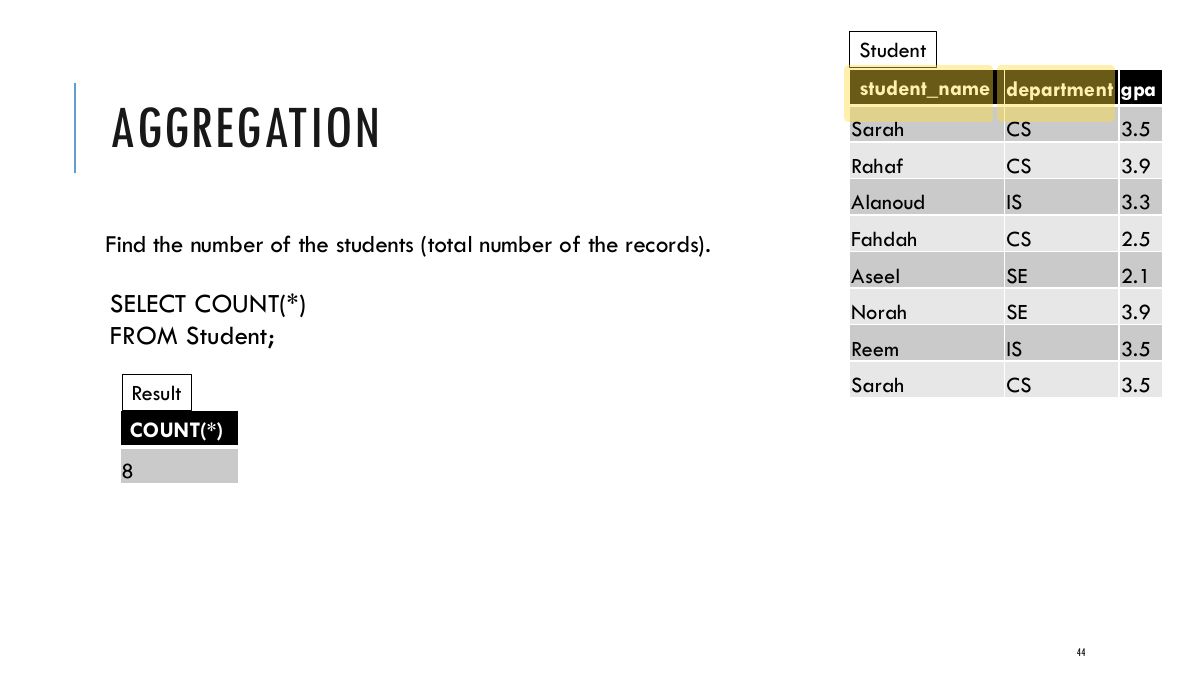
                                                            1. Aggregates: COUNT, SUM, MAX, MIN, AVG. COUNT(*) counts rows; COUNT(col) ignores NULLs.
                                                            🎯 How this can come up · 1 question
                                                            MCQ

                                                            COUNT(Super_ssn) on a table where 2 of 8 rows have NULL Super_ssn returns:

                                                            Slide 41: Student
                                                            Exam weight Low
                                                              Slide 42: Student
                                                              Exam weight Low
                                                                Slide 43: Student
                                                                Exam weight Low
                                                                  Slide 44: Student
                                                                  Exam weight Low
                                                                    Slide 45: AGGREGATION
                                                                    Exam weight Low

                                                                      d

                                                                      e

                                                                      d drone

                                                                      Research

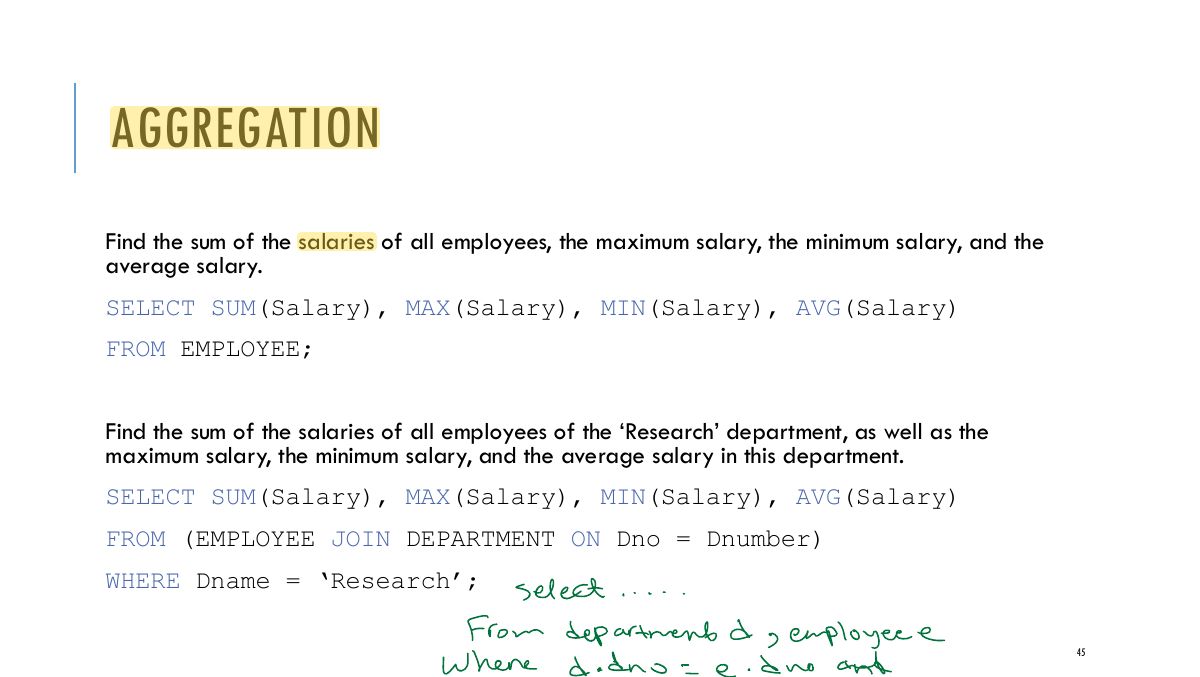
                                                                      AGGREGATION Find the total number of employees.

                                                                      SELECT COUNT (*) FROM EMPLOYEE; Find the total number of employees in the research department.

                                                                      SELECT COUNT (*) FROM EMPLOYEE, DEPARTMENT WHERE DNO = DNUMBER AND

                                                                      DNAME = ‘Research’;

                                                                      46
                                                                      Exam weight Low

                                                                        AGGREGATES IN NESTED QUERIES

                                                                        We can specify a correlated nested query with an aggregate function, and then use the nested query in the WHERE clause of an outer query.

                                                                        For example, to retrieve the names of all employees who have two or more dependents:

                                                                        SELECT Lname, Fname FROM EMPLOYEE WHERE (SELECT COUNT (*)

                                                                        FROM DEPENDENT WHERE Ssn = Essn) > = 2;

                                                                        47
                                                                        Exam weight Low

                                                                          EXERCISES

                                                                          Count the number of reservations made by ‘rusty’.

                                                                          Count the number of sailors.

                                                                          Calculate the average, max, and min of sailor ages.

                                                                          48
                                                                          Exam weight Low
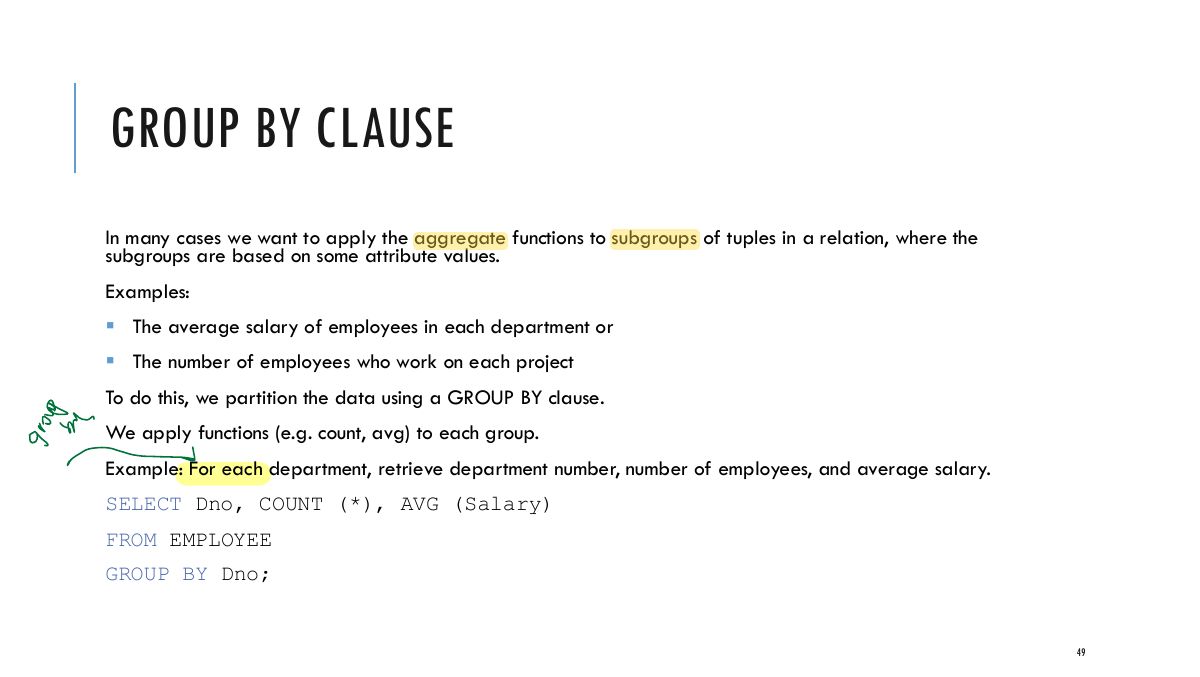
                                                                            Slide 49: GROUP BY CLAUSE
                                                                            Exam weight Low
                                                                            1. GROUP BY splits rows into groups; aggregates are computed per group. Every non-aggregated SELECT column must be in GROUP BY.
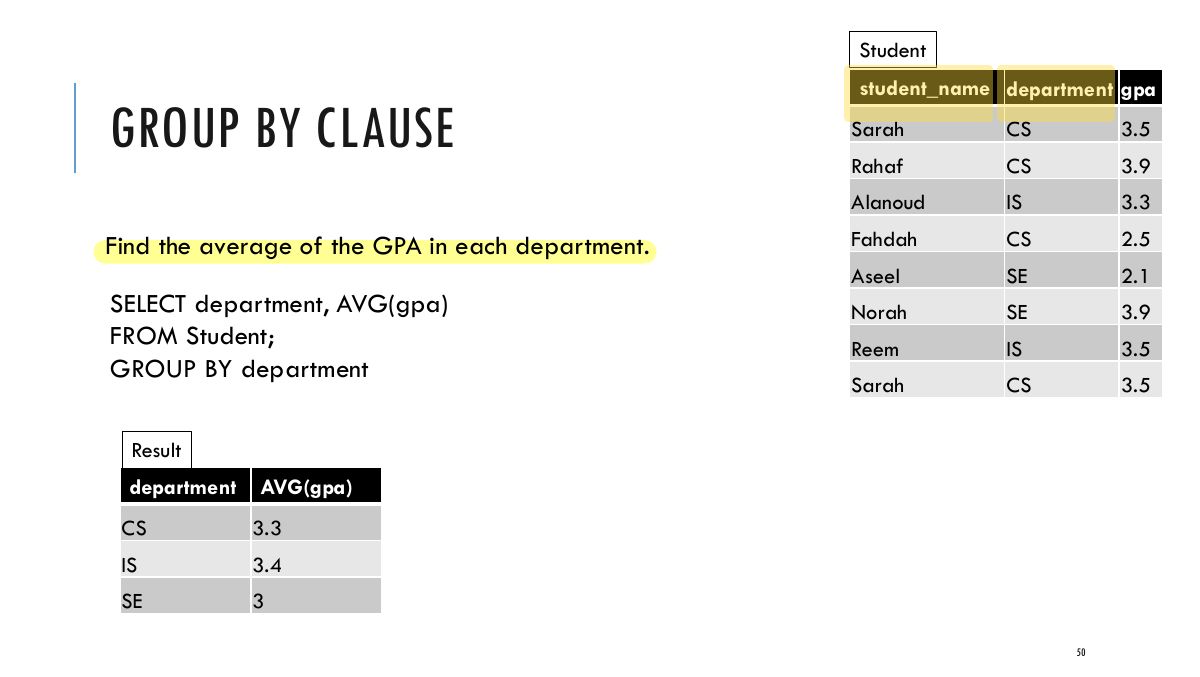
                                                                            Slide 50: Student
                                                                            Exam weight Low

                                                                              GROUP BY CLAUSE

                                                                              Aggregation queries have specific restrictions when writing queries. You can only SELECT attributes that are in the GROUP BY clause. You should also make sure your data contains feasible and sensible groupings.

                                                                              Grouping by multiple attributes will create sub-groups for each attribute.

                                                                              In class examples:

                                                                              Q1: SELECT count(*), colour FROM boats GROUP BY colour Q2: SELECT major, standing, count(*), avg(age) FROM student GROUP BY major, standing

                                                                              51
                                                                              Exam weight Low

                                                                                NULLS IN GROUPS

                                                                                If NULLs exist in the grouping attribute, then a separate group is created for all tuples with a NULL value in the grouping attribute. For example, if the EMPLOYEE table had some tuples that had NULL for the grouping attribute Dno, there would be a separate group for those tuples.

                                                                                Example: For each project, retrieve the project number, the project name, and the number of employees who work on that project.

                                                                                SELECT Pnumber, Pname, COUNT (*) FROM PROJECT, WORKS_ON WHERE Pnumber = Pno GROUP BY Pnumber, Pname; Example shows how we can use a join condition in conjunction with GROUP BY. In this case, the grouping and functions are applied after the joining of the two relations in the WHERE clause.

                                                                                52
                                                                                Exam weight Low
                                                                                  ★ Past exam
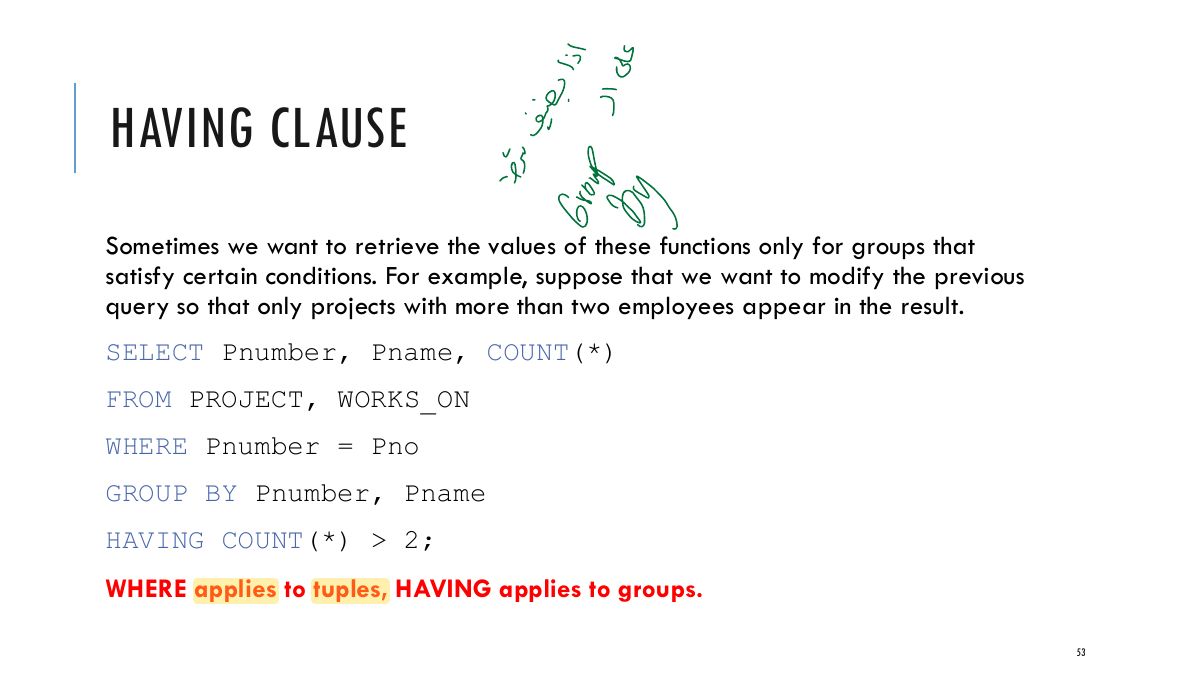
                                                                                  Slide 53: old
                                                                                  Exam weight High
                                                                                  1. HAVING filters GROUPS (after grouping); WHERE filters ROWS (before grouping).
                                                                                  Memory trickCondition on an aggregate (SUM, COUNT…) → HAVING.
                                                                                  🎯 How this can come up · 1 question
                                                                                  MCQ

                                                                                  Departments with more than 5 employees:

                                                                                  SUMMARY OF SQL (NOW THAT WE KNOW MORE)

                                                                                  SELECT <attribute and function list> FROM <table list> [ WHERE <condition> ] [ GROUP BY <grouping attribute(s)> ] [ HAVING <group condition> ] [ ORDER BY <attribute list> ];

                                                                                  54
                                                                                  Exam weight Low
                                                                                    ★ Past exam

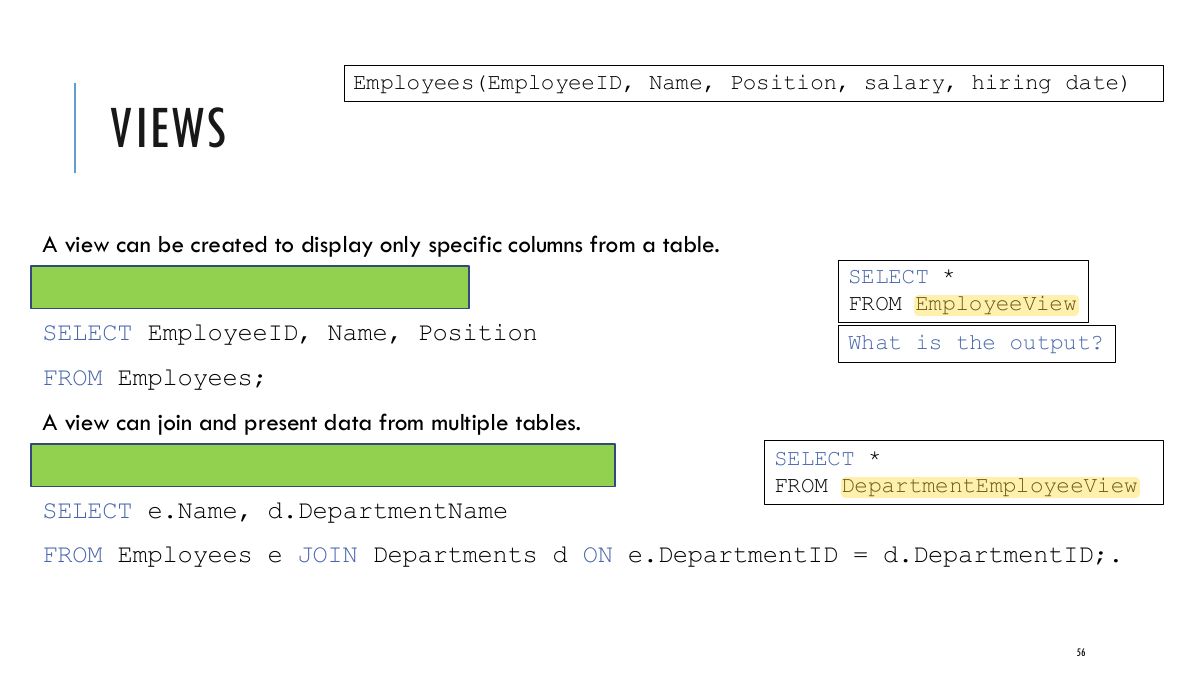
                                                                                    VIEWS

                                                                                    A view in a relational database is essentially a virtual table representing a subset of data from one or more tables.

                                                                                    Views are not physically stored data; they are queries that dynamically generate data when accessed.

                                                                                    Views can be used for various purposes, such as simplifying

                                                                                    data security by restricting access to

                                                                                    complex queries, ensuring specific data, or presenting data in a particular format.

                                                                                    55
                                                                                    Exam weight Medium
                                                                                    1. View: a virtual table defined by a query (CREATE VIEW v AS SELECT …).
                                                                                    Slide 56: Employees(EmployeeID, Name, Position, salary, hiring date)
                                                                                    Exam weight Low

                                                                                      MATERIALIZED VS NON-MATERIALIZED VIEWS

                                                                                      Non-Materialized Views: These are standard views that do not store their data physically.

                                                                                      They run the underlying SQL query every time they are accessed.

                                                                                      Suitable for data that changes frequently, ensuring that the view always presents the most current data.

                                                                                      Inefficient for views defined via complex queries that are time-consuming to execute.

                                                                                      Materialized Views: These views store the query result as a physical table.

                                                                                      They need to be refreshed periodically to reflect changes in the underlying data.

                                                                                      Useful for complex queries on large tables where performance is a concern, as they can significantly reduce query time.

                                                                                      57
                                                                                      Exam weight Low
                                                                                      1. Non-materialized views are recomputed on each use; materialized views store the result and must be refreshed.

                                                                                      VIEW FUNCTIONS

                                                                                      View Update Updating a view means updating the underlying base tables. However, not all views are updatable. For a view to be updatable, it generally needs to map directly to data in a base table without complex transformations, such as joins or aggregations.

                                                                                      Some databases have specific restrictions or capabilities regarding view updates.

                                                                                      Views as Access Control Mechanism Views can serve as a powerful access control mechanism. They allow database administrators to expose only certain parts of the database schema to certain users, enhancing both security and data integrity. For instance, a view can be created to show only non-sensitive columns from a table to a group of users, effectively hiding sensitive data from them.

                                                                                      58
                                                                                      Exam weight Low
                                                                                        ★ Past exam

                                                                                        SCHEMA CHANGES (DROP AND ALTER)

                                                                                        DROP Function in a DBMS: The DROP function in a Database Management System (DBMS) is used to remove database objects such as tables, views, indexes, or even the entire database itself from the system. When an object is dropped, it is permanently deleted and cannot be recovered.

                                                                                        Examples: 1. Dropping a Table: DROP TABLE tableName; - This command deletes the specified

                                                                                        table and all its data permanently.

                                                                                        2. Dropping a Database: DROP DATABASE databaseName; - This command deletes

                                                                                        the entire database, including all its tables and data.

                                                                                        59
                                                                                        Exam weight High
                                                                                        1. DROP TABLE removes a table (CASCADE / RESTRICT). ALTER TABLE adds/drops columns or constraints.
                                                                                        🎯 How this can come up · 1 question
                                                                                        MCQ

                                                                                        Remove the foreign-key constraint fk_publisher from BOOK:

                                                                                        SCHEMA CHANGES (DROP AND ALTER)

                                                                                        ALTER Function in a DBMS: The ALTER function is used to modify the structure of an existing database object, like a table. It can be used for a variety of changes such as adding, deleting, or modifying columns in a table, changing data types of columns, or modifying constraints.

                                                                                        Examples: 1. Adding an attribute: ALTER TABLE tableName ADD columnName dataType; 2. Modifying an attribute: ALTER TABLE tableName MODIFY COLUMN columnName

                                                                                        newDataType;

                                                                                        3. Dropping an attribute: ALTER TABLE tableName DROP COLUMN columnName; In summary, the DROP function is used for deleting database objects, while the ALTER function is used for modifying the structure of existing objects. Both are critical for database management, allowing for the evolution and maintenance of the database schema over time.

                                                                                        60
                                                                                        Exam weight Low

                                                                                          EXECUTING QUERIES IN CODE

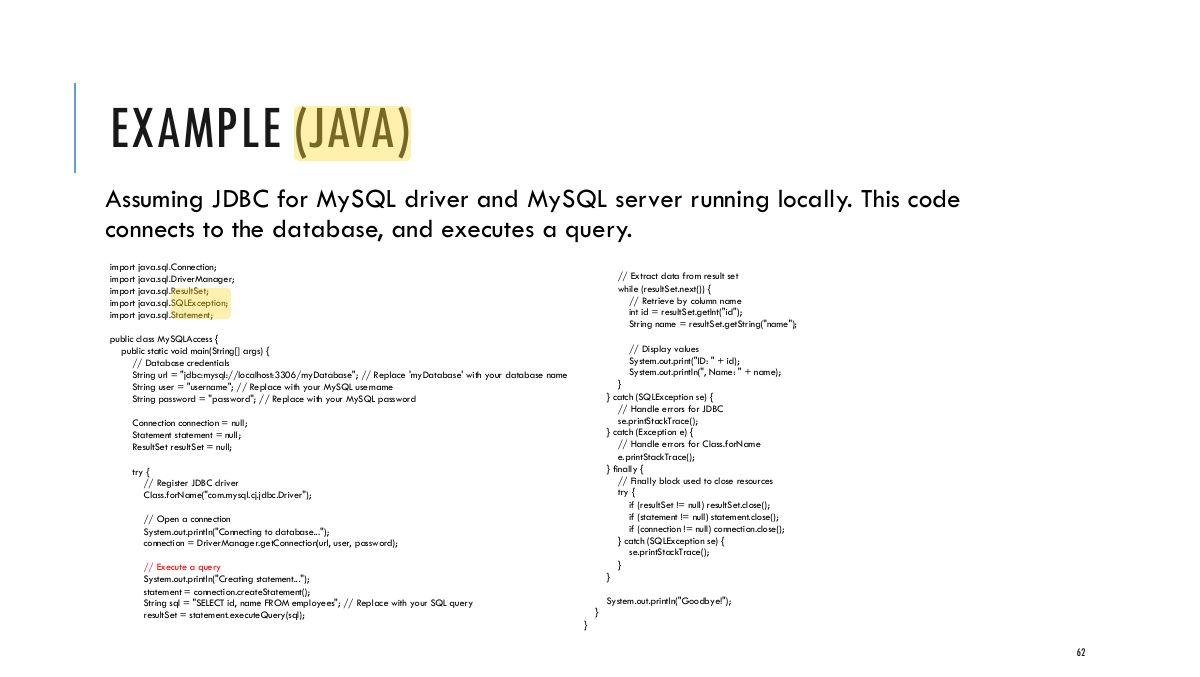
                                                                                          We will look at 2 APIs: JDBC for Java and DB-API for Python.

                                                                                          JDBC (Java Database Connectivity) is an application programming interface (API) for the Java programming language that defines how a client may access a database.

                                                                                          DB-API (Database Application Programming Interface). The Python DB-API provides a standard interface for Python applications to interact with relational databases. Each one needs its own DB-API compliant driver.

                                                                                          Each API allows Java/Python applications to connect to a database, execute SQL queries, retrieve results, handle transactions, and deal with exceptions.

                                                                                          61
                                                                                          Exam weight Low
                                                                                          1. From code: connect (JDBC), prepare a statement, execute, read the ResultSet.
                                                                                          Slide 62: EXAMPLE (JAVA)
                                                                                          Exam weight Low

                                                                                            PROJECT CODE

                                                                                            The expectation for the project is that you execute your data retrieval (SELECT)and data manipulation (UPDATE, DELETE or INSERT) queries in code and write some basic application logic. Example: Allow users to register, book sessions, inspect their data, and make changes.

                                                                                            If you fully implement a graphical user interface, you get max +1 to a quiz grade.

                                                                                            If you cannot implement a GUI, you can show me some advanced function related to:

                                                                                            • Database security
                                                                                            • Triggers or assertions
                                                                                            • Deployment
                                                                                            63
                                                                                            Exam weight Low

                                                                                              SUMMARY

                                                                                              We have looked at more advanced SQL code: Nested queries, joins, and aggregation.

                                                                                              Views are another way to perform multiple operations and allow for different types of authorized access.

                                                                                              We have also seen schema altering operations: Drop and alter.

                                                                                              With that, we are done with relational content for this course. Next NoSQL!

                                                                                              64
                                                                                              Exam weight Low