CS330 · Annotated SlidesChapter 11 — File-System Interface
Chapter 11 · Annotated slides

File-System Interface

The file concept and attributes, file operations and the open-file table, file types and structure, sequential, direct and indexed access, directory structures (single-level, two-level, tree, acyclic and general graph) and protection with access lists.
Slide text Study notes Highlight: key words Tips, tricks & traps Seen again elsewhere How it can come up
Slide 1: Slide 1
Exam weight Low

    Outline of this lecture

    In this lecture, we will discuss the following:

    • File Concept
    • Access Methods
    • Directory Structure
    • Protection
    2
    Exam weight Low

      File-System (FS) Structure

      • File system consists of:
        • A collection of files – storing related data
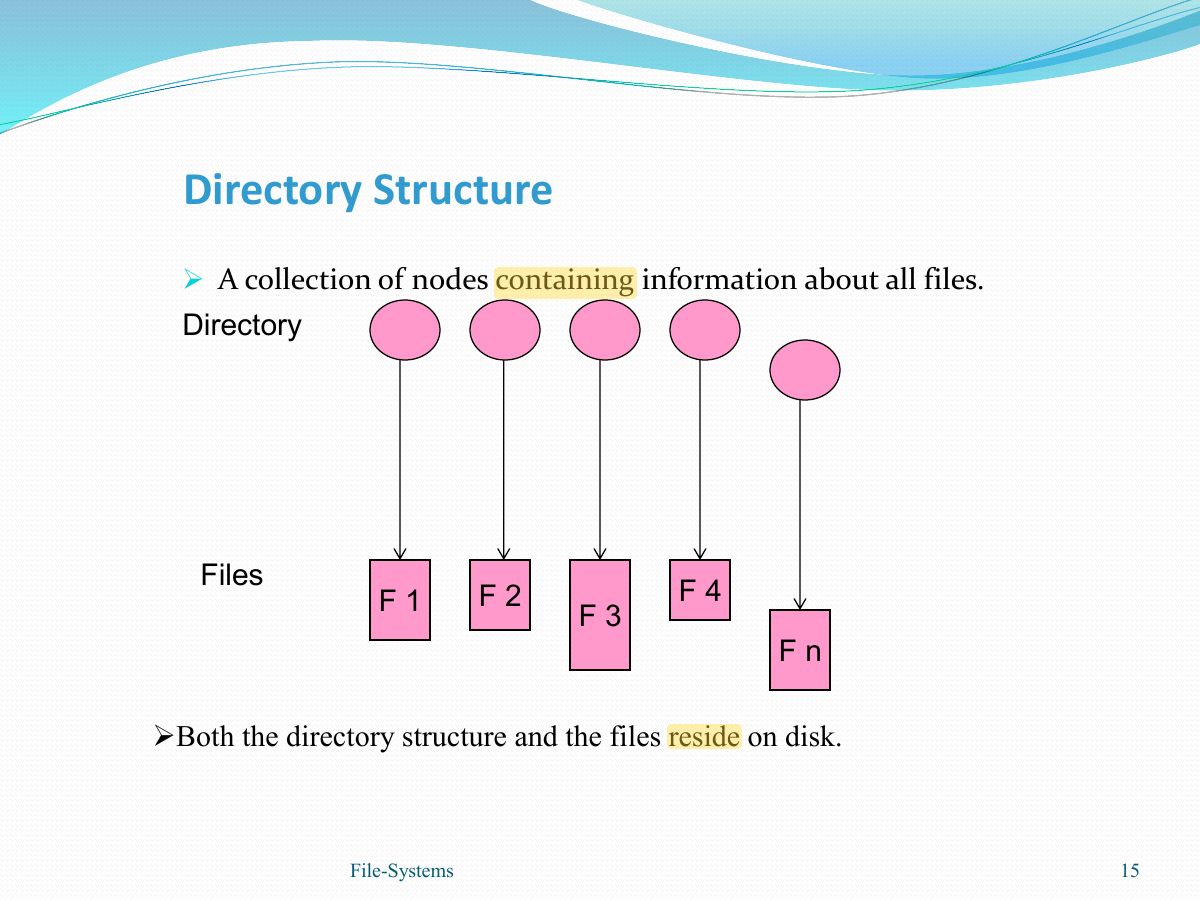
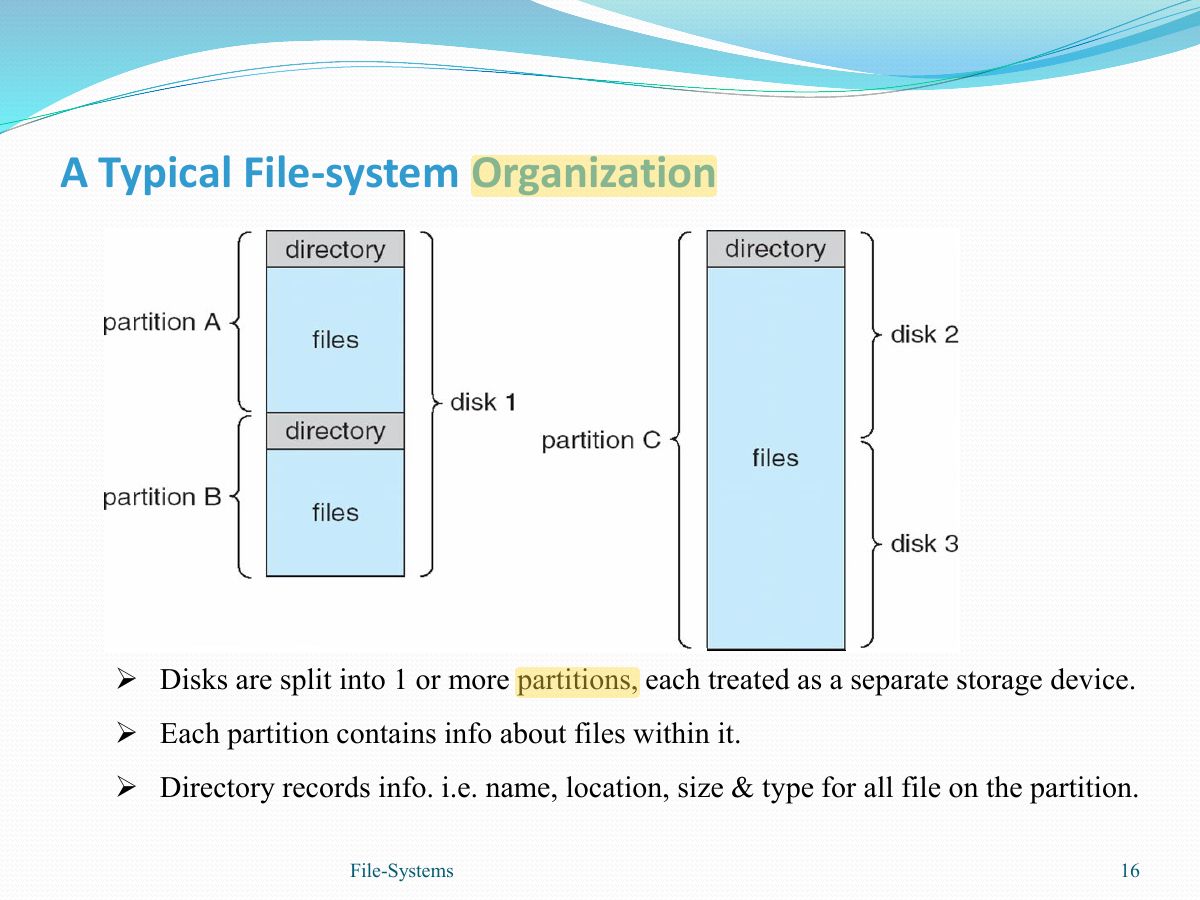
        • Directory structure- provides information about all the files in the system.
      • File system resides on secondary storage (disks).
      3
      Exam weight Low

        File Concept

        • A collection of data- normally is stored on a secondary storage device.
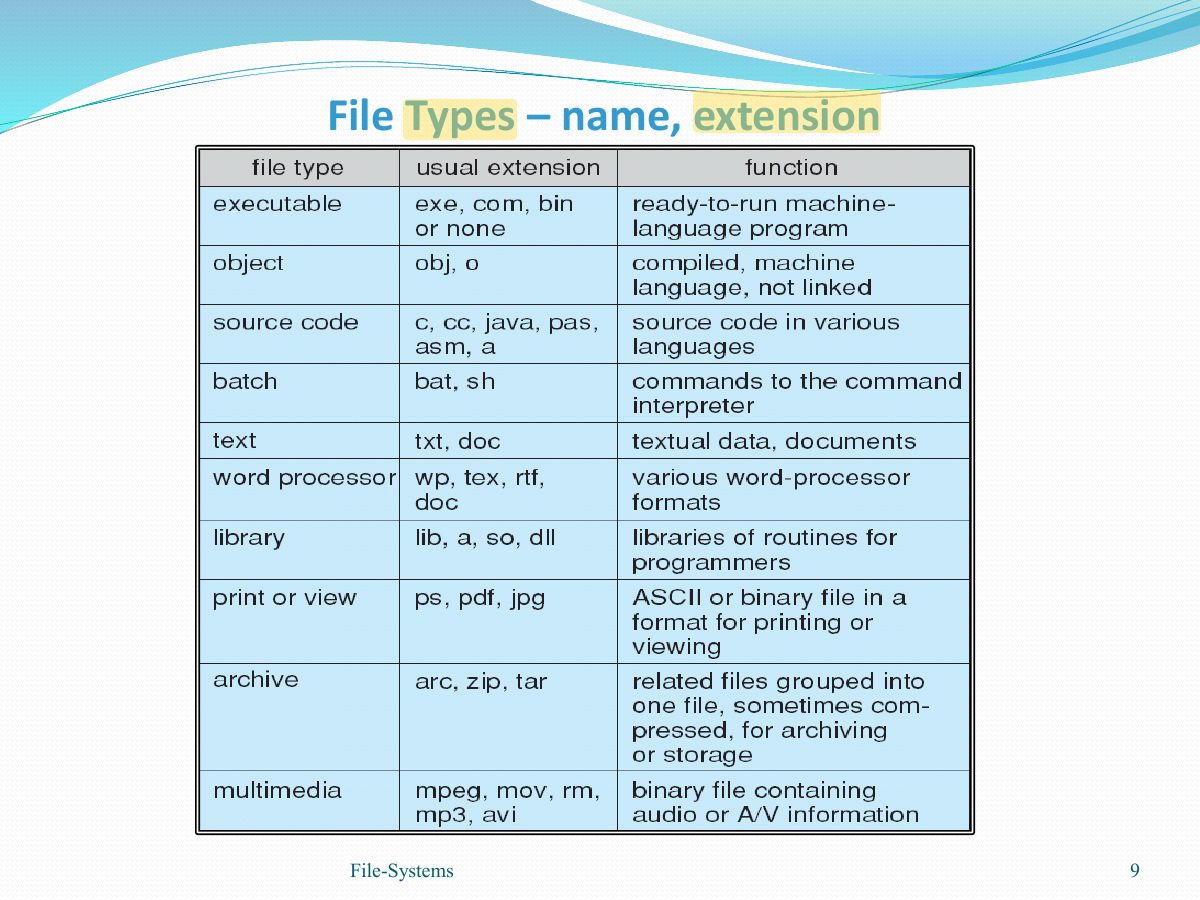
        • File types refer to classifying the content of the file, such as:

         Types:

        Data

        numeric

        character

        binary

        Program

         Contents defined by file ’ s creator

        Many types

        Consider text file, source file, executable file

        4
        Exam weight Low

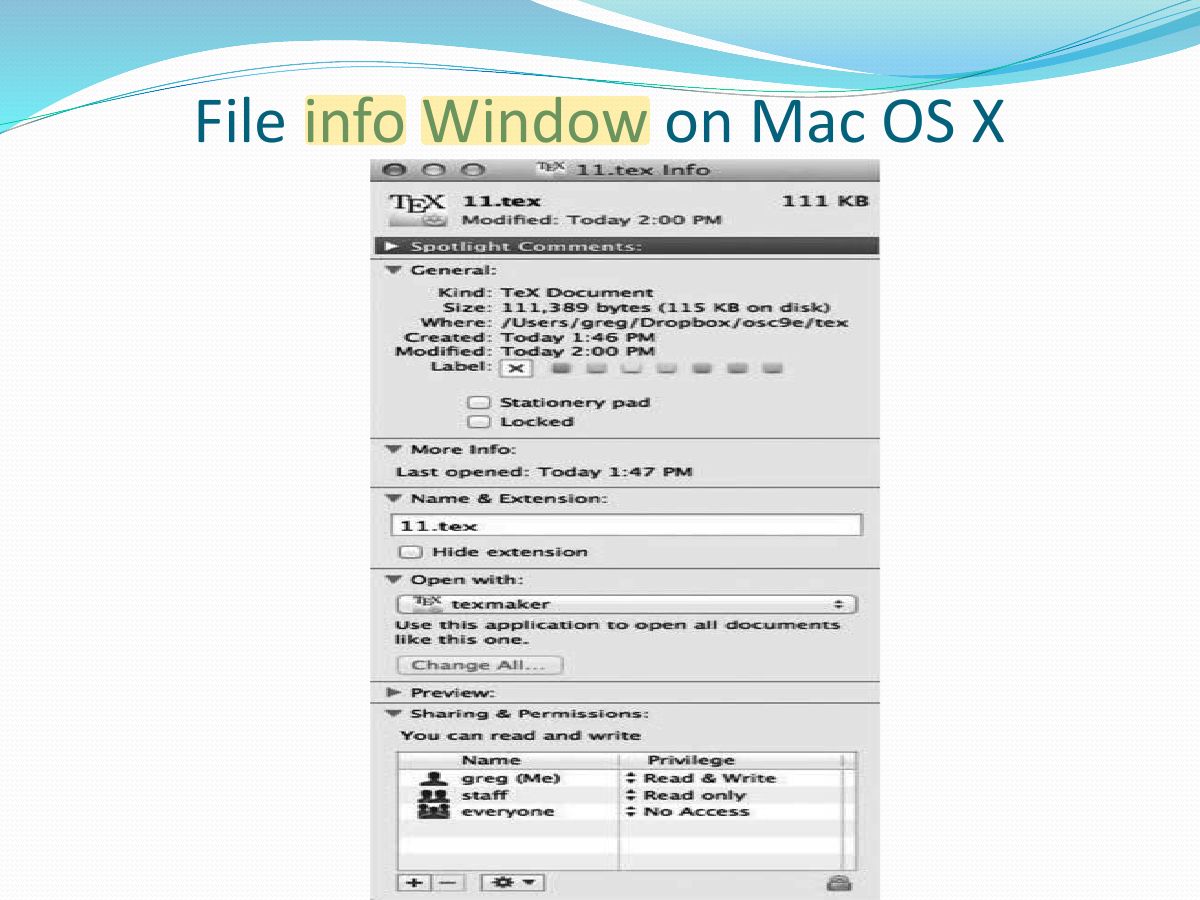
          File Attributes

          A file has several attribute- vary from one O/S to another but consist of these:

          • Name – only information kept in human-readable form.
          • Type – needed for systems that support different types.
          • Location – pointer to file location on device.
          • Size – current file size.
          • Protection – controls who can do reading, writing, executing.
          • Time, date, and user identification – this information can be useful for protection, security, and usage monitoring.
          • Information about files are kept in the directory structure, which is maintained on the disk.
          5
          Exam weight Low
          1. Attributes: name, identifier, type, location, size, protection, time/date/user.
          Slide 6: File info Window on Mac OS X
          Exam weight Low

            File Operations

            An OS must provide a number of operations associated with files so that users can safely store and retrieve data. Typical 6 basic operations are:

            • Create - find space in the file system & entry for new file must be made in dir.
            • Write - make system call specifying both the name of the file & inf to be written to it.
            • Read - use system call specifying the file’s name & where next block should be put.
            • Seek -repositioning within file (searching the directory for the appropriate entry).
            • Delete - search the directory for the named file, erase the directory entry.
            • Truncate - erase the contents of file but keep its attributes.
            • Open(F) – search the directory structure on disk for entry F, and move the content of i i entry to memory.
            • Close (F) – move the content of entry F in memory to directory structure on disk. i i
            7
            Exam weight Low
            1. Operations: create, write, read, reposition (seek), delete, truncate; open() and close().

            Open Files

            • Most of the file operations involve searching the directory for the entry associated with the named file. To avoid searching, the OS keeps a table
            • Several pieces of data are needed to manage open files:
              • Open-file table: contains info abt all open files
              • File pointer: pointer must track the last read/write location as a current file position pointer, per process that has the file open
              • File-open count: counter of number of times a file is open by many processes, when the open count reaches 0, the file is no longer in use, and the file’s entry is removed from the open file table
              • Disk location of the file: most file operations require the system to modify data within the file. The info needed to locate the file on a disk is kept in memory
              • Access rights: each process opens a file in an access mode. This info is stored on the per-process table so the OS can allow/deny I/O requests.
            8
            Exam weight Low
            1. Open-file table plus per-file data: file pointer, open count, disk location, access rights.
            Slide 9: File Types – name, extension
            Exam weight Low

              File Structure

              • Files must conforms to a required structure understood by the OS. i.e. OS requires that the exe file have a specific structure, so that it can determine where in memory to load the file & what the location of the 1 st instruction.
              • None - sequence of words, bytes
              • Simple record structure
                • Lines
                • Fixed length
                • Variable length
              • Complex Structures
                • Formatted document
                • Relocatable load file
              • Can simulate last two with first method by inserting appropriate control characters
              • Who decides:
                • Operating system
                • Program
              10
              Exam weight Low

                Access

                Methods

                Information stored in files must be accessed & read into memory.

                So how can this information be accessed?

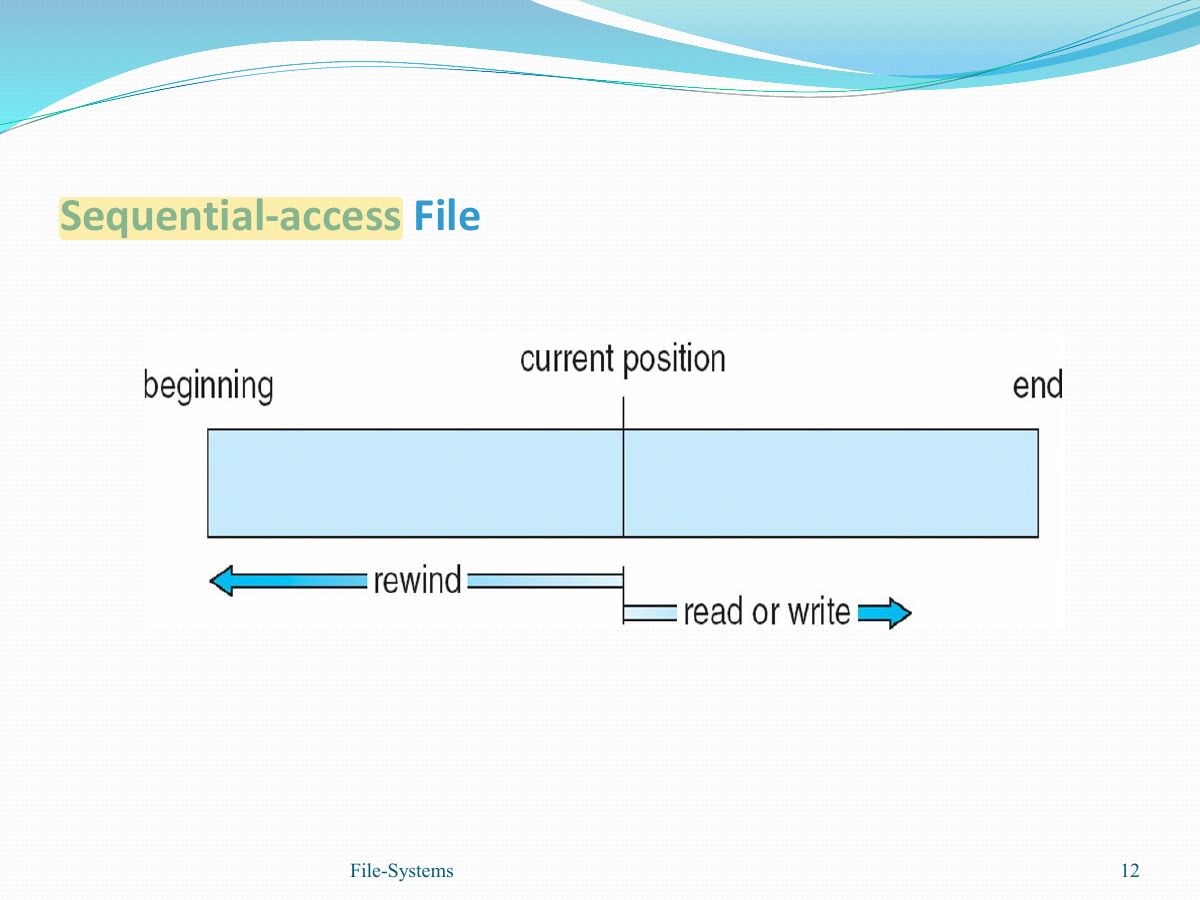
                • Sequential Access
                  • information in the file is processed in order- 1 record after another
                  • Most common, Editors & compilers access files in this fashion.
                • Direct Access / Relative Access
                  • File is made up of fixed-length logical records, allow programs to read/write records rapidly in no particular order.
                  • file is viewed as a numbered sequence of records.
                  • Records are organized in a manner that allows direct access to a particular record without having to read any of the preceding records.
                  • Allows blocks to be read or written in any order- no restriction on the order of reading/writing for a direct-access file.
                  • Useful for immediate access to large amounts of info (DB).
                11
                Exam weight High
                1. Sequential access: read next / write next (like a tape). Direct (relative) access: read block n in any order.
                🎯 How this can come up · 1 question
                MCQ

                Reading block n of a file without reading earlier blocks is:

                Slide 12: Slide 12
                Exam weight Low

                  Other Access Methods

                  • Can be built on top of direct Access
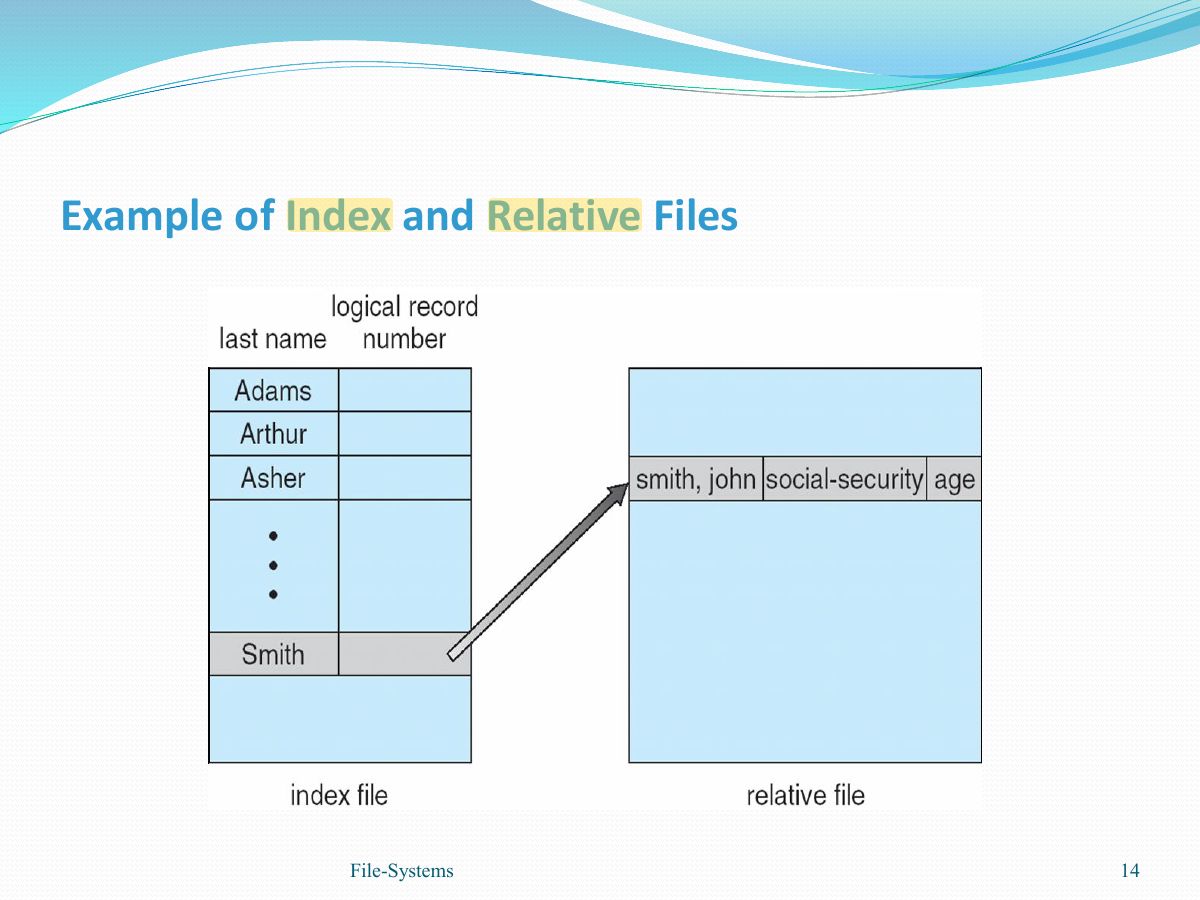
                  • General involve creation of an index for the file
                  • Index file - stores an index into another file
                  • With large files, the index file become too large -------- → solution
                  • Primary, secondary index file - primary index file contains pointers to the secondary one, which points to the actual data items.
                  • IBM indexed sequential-access method (ISAM)
                    • Small master index, points to disk blocks of secondary index
                    • File kept sorted on a defined key
                    • All done by the OS
                  • VMS operating system provides index and relative files as another example (see next slide)
                  13
                  Exam weight Low
                  1. Index access: an index of pointers to blocks; large files use a multi-level index.
                  Slide 14: Slide 14
                  Exam weight Low
                    Slide 15: Directory Structure
                    Exam weight Low
                      Slide 16: A Typical File-system Organization
                      Exam weight Low

                        Operations Performed on Directory

                        • Search for a file - be able to search a directory structure to find particular file
                        • Create a file - new files need to be created & added to the directory.
                        • Delete a file- be able to remove a file from the directory.
                        • List a directory- be able to list the files in a directory.
                        • Rename a file- be able to change the name of a file when the contents or use of the file changes.
                        • Traverse the file system- be able to access every directory & every file within a directory structure.
                        17
                        Exam weight Low

                          Directory Organization

                          • Efficiency – locating a file quickly.
                          • Naming – convenient to users.
                            • Two users can have same name for different files.
                            • The same file can have several different names.
                          • Grouping – logical grouping of files by properties, (e.g., all Java programs, all games, ...)
                          18
                          Exam weight Low
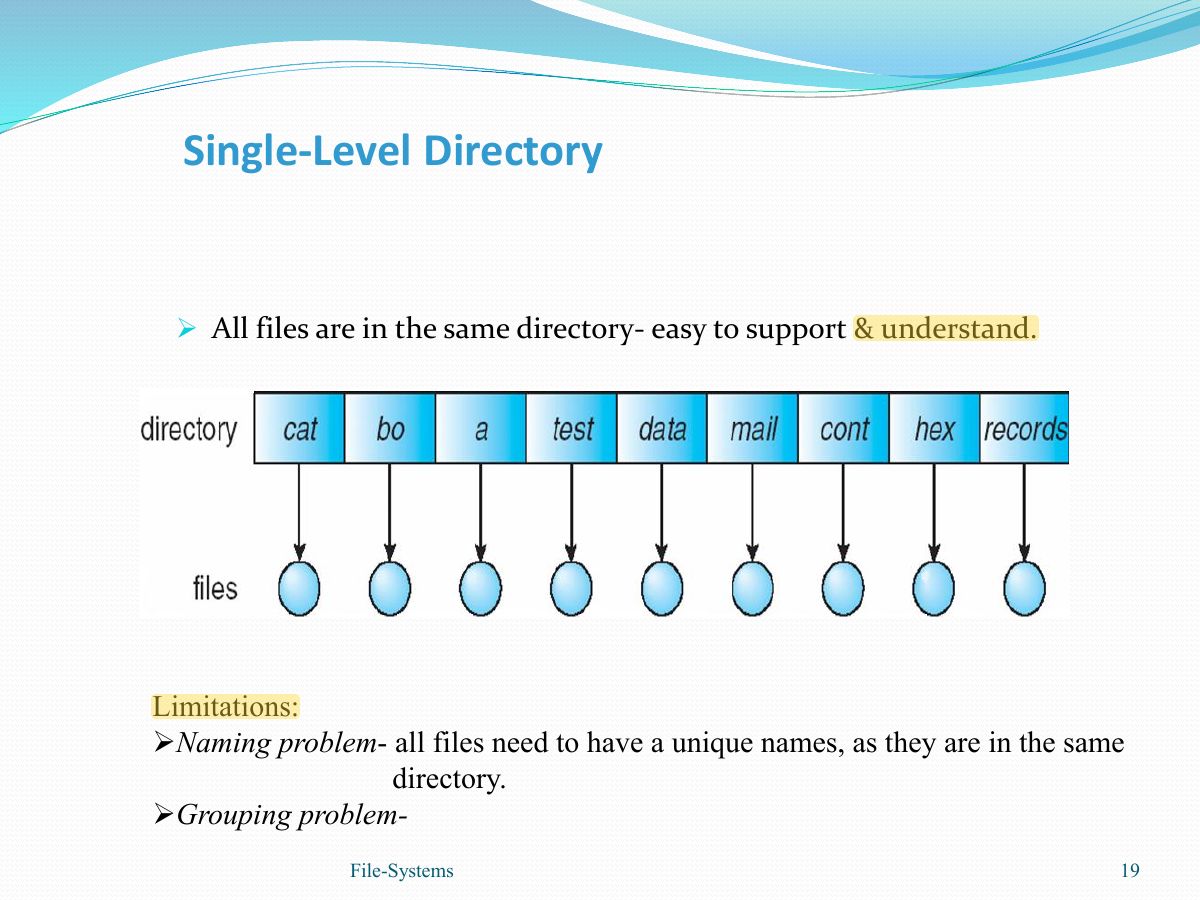
                            Slide 19: Single-Level Directory
                            Exam weight Low
                            1. Single-level directory: all files in one directory; naming and grouping problems.
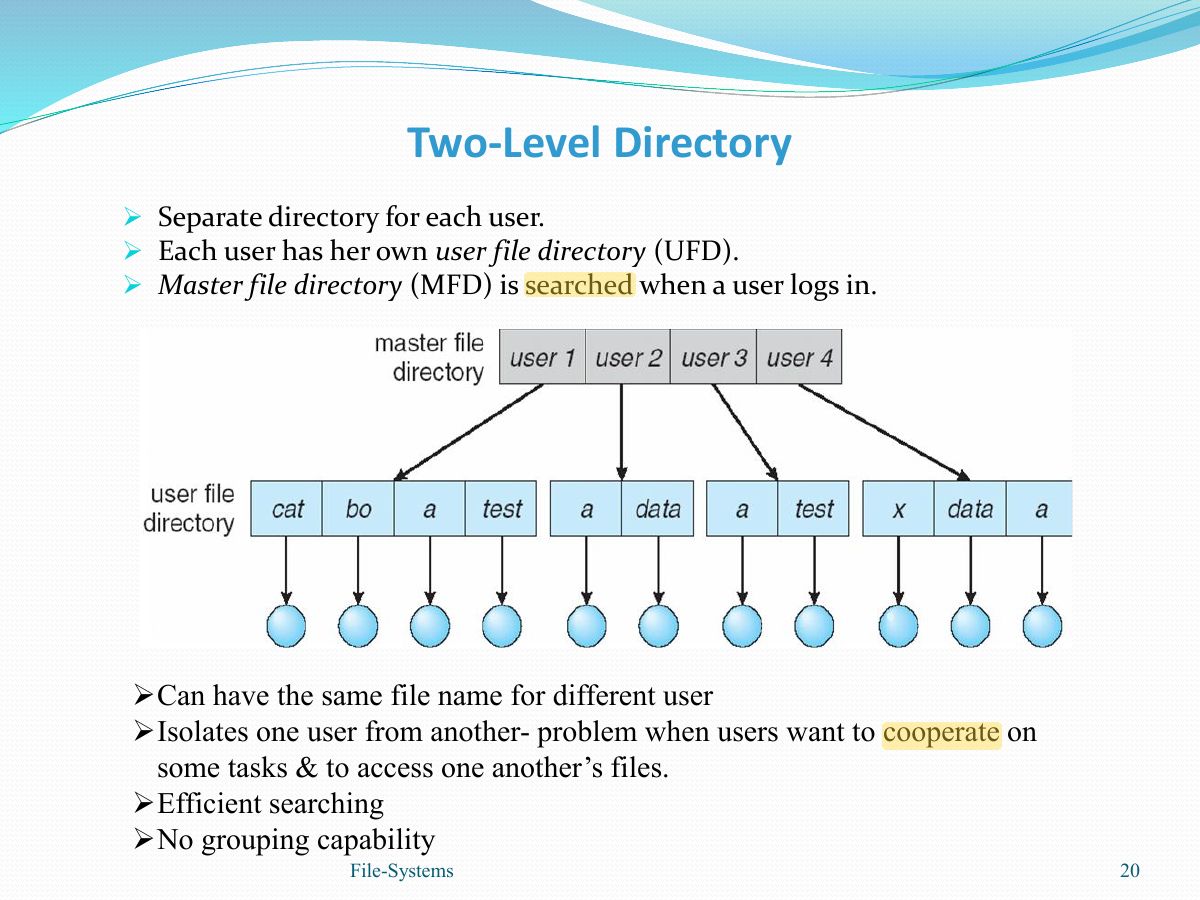
                            Slide 20: Two-Level Directory
                            Exam weight Low
                            1. Two-level: a separate directory per user; same file name for different users; no grouping.

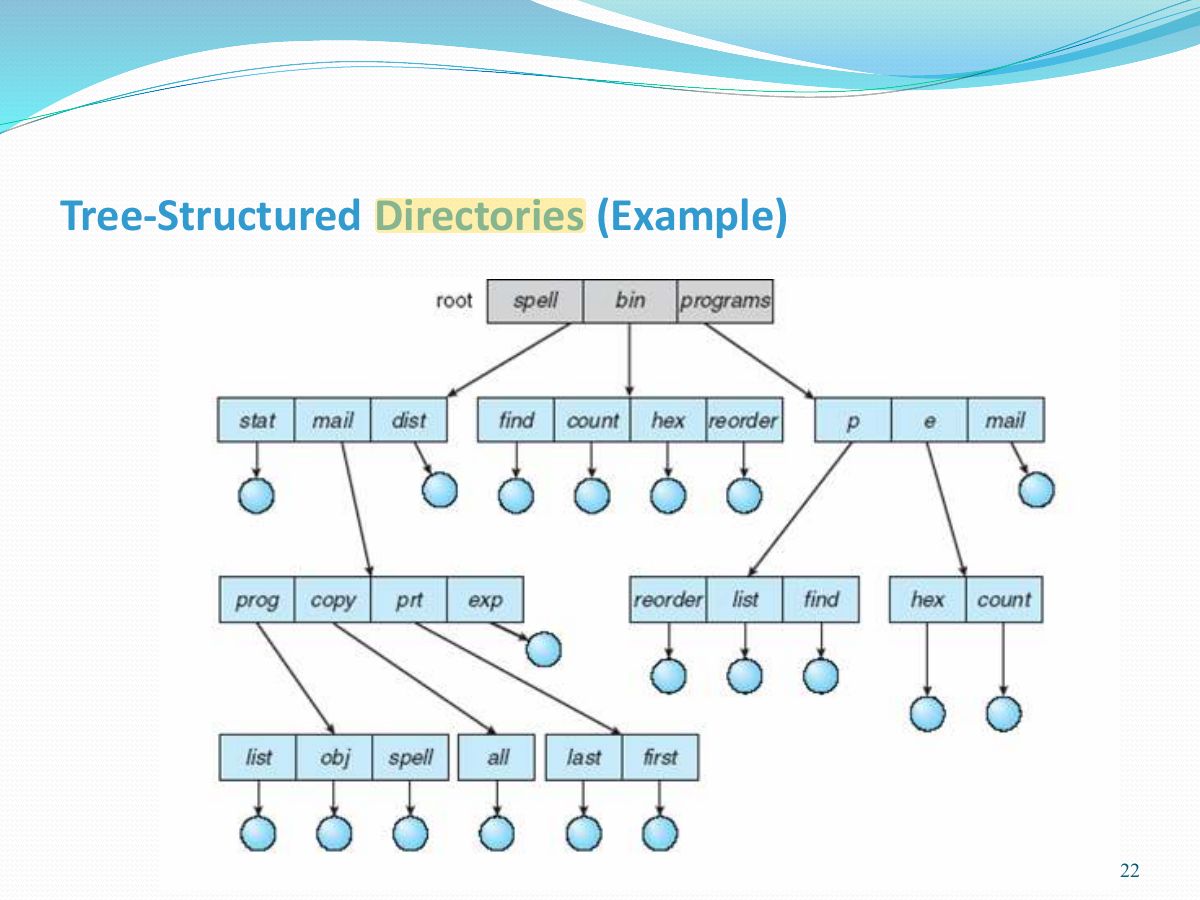
                            Tree-Structured Directories

                            • A tree has a root directory, & every file in the system has a unique path name.
                            • path name- root --- → subdirectories ---- specified file. →
                            • Efficient searching
                            • Grouping Capability: Each directory contains a set of files or Subdirectories.
                            • Current directory - contains most the files that are of current interest to the user.
                            • Absolute path name: begins at the root -- → a path down-- specified file. →
                            • Relative path name: defines path from the current directory.
                            • Deletion of a directory
                              • If empty- can be deleted.
                              • If not empty- some systems, will not delete a directory. e.g: MS-DOS. - other systems, remove the entire dir structure. e.g. UNIX rm <file-name>
                                • But, if the command is issued in error-→ large no of files & directories will need to be restored.
                            21
                            Exam weight Medium
                            1. Tree-structured: absolute vs. relative path names, current directory, efficient searching and grouping.
                            🎯 How this can come up · 1 question
                            MCQ

                            A path name that starts at the root is:

                            Slide 22: Slide 22
                            Exam weight Low
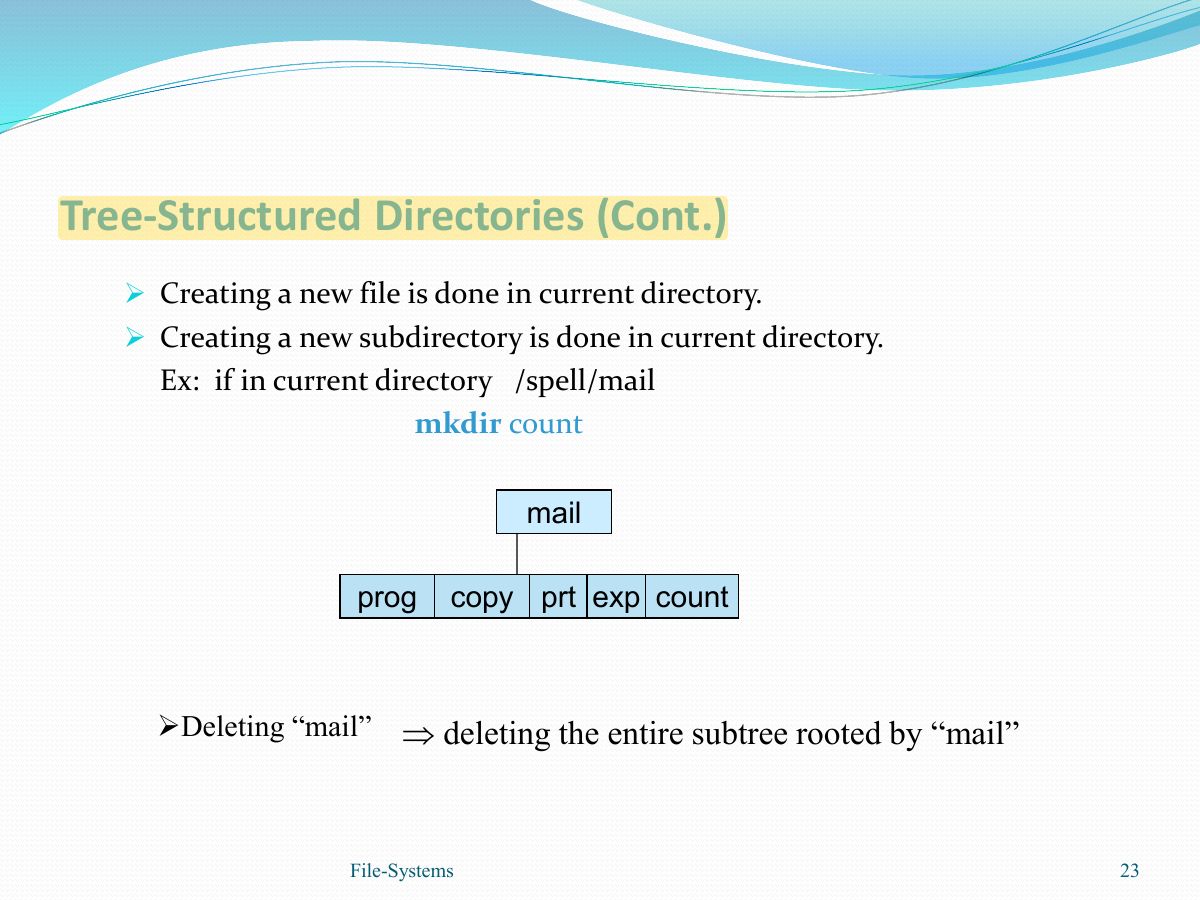
                              Slide 23: Slide 23
                              Exam weight Low
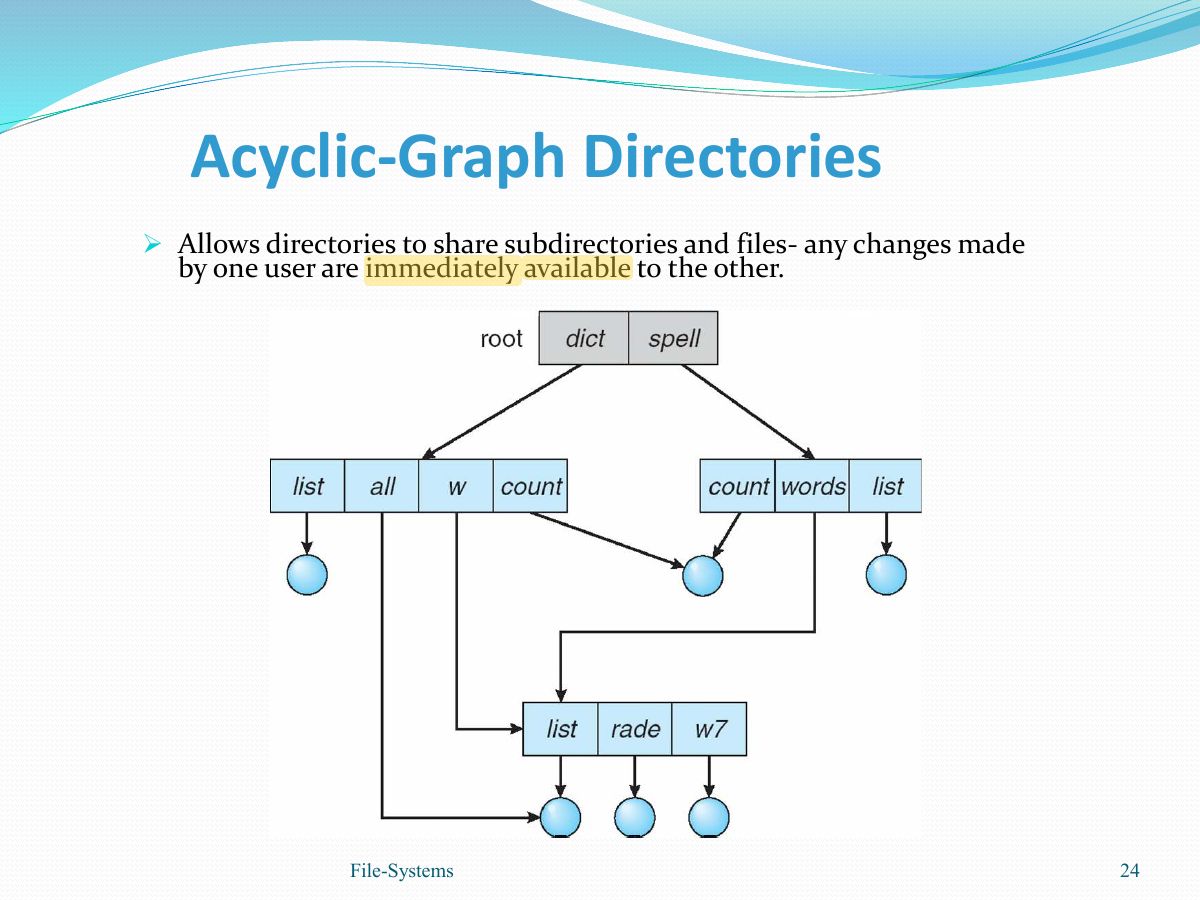
                                Slide 24: Acyclic-Graph Directories
                                Exam weight Low
                                1. Acyclic graph: shared subdirectories and files (links). Problems: aliasing, dangling pointers on deletion.

                                Acyclic-Graph Directories (Cont.)

                                • There are several ways to implement shared files and directories:
                                  • Link- pointer to another file or subdirectory (maybe implemented as relative/absolute path name).
                                  • Resolve the link – using path name to locate the real file
                                  • Duplicate File Information - Duplicating all information about the shared files in both sharing directories.
                                • Aliasing problem - A file can have multiple file absolute path names
                                • Deletion Problem: dangling pointers- remove the file whenever anyone deletes it
                                  • Solution
                                    • Delete only the link.
                                    • Preserve file until all references to it are deleted- when the file-reference list is empty, the file is deleted.
                                25
                                Exam weight Low
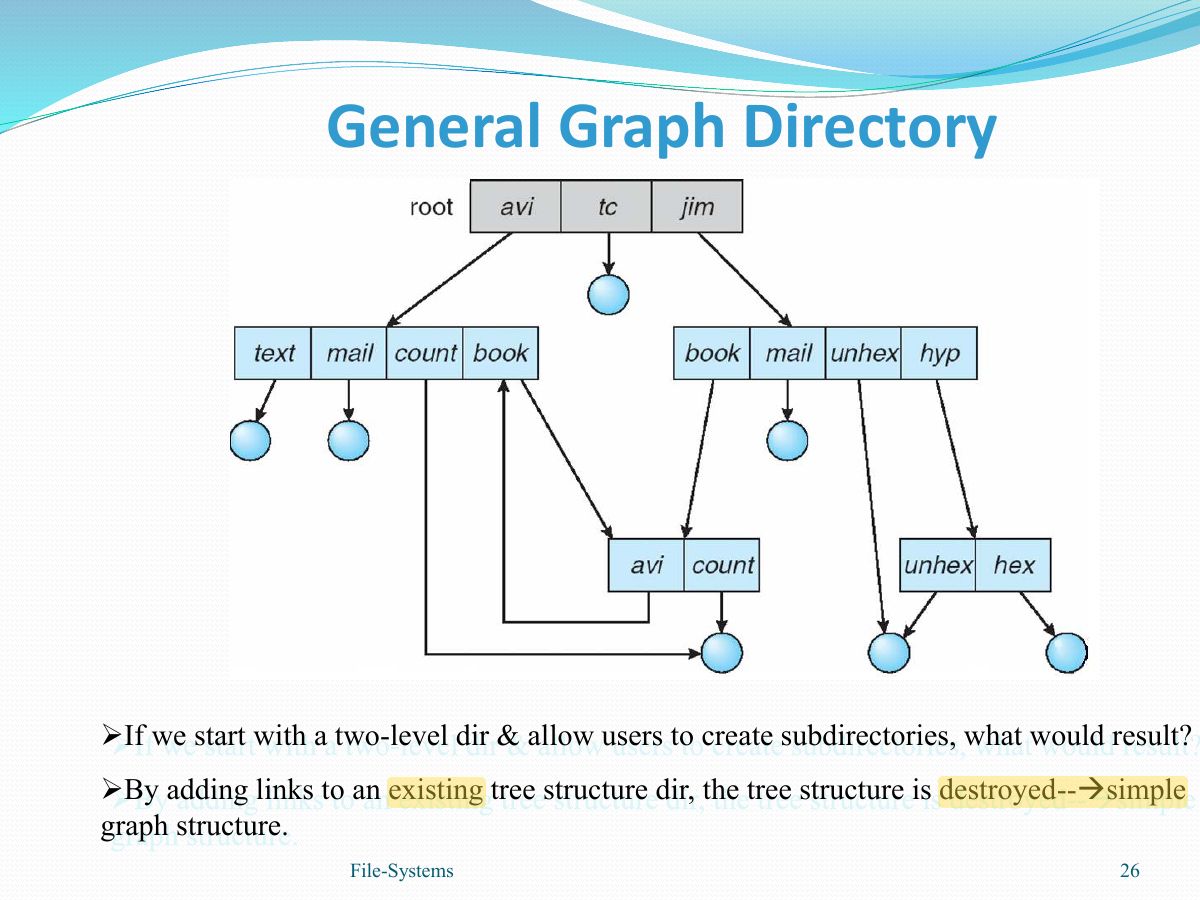
                                  Slide 26: General Graph Directory
                                  Exam weight Low
                                  1. General graph allows cycles; needs garbage collection or a cycle check when adding links.

                                  General Graph Directory (Cont.)

                                  • When a file can be deleted?
                                  • A value of 0 in the reference count → no reference → delete in acyclic graph
                                  • When cycles exist, reference count may not be 0 even when it is no longer possible to reference to a file/directory, due to self-referencing/ cycle in the directory
                                    • Allow only links to file not subdirectories.
                                    • Garbage collection to determine when the last reference has been deleted & the disk space can be reallocated.
                                    • Every time a new link is added use a cycle detection algorithm to determine whether it is OK. Will the new link complete a cycle or not?
                                  27
                                  Exam weight Low

                                    Protection

                                    • Protection is needed so that users do not accidentally/deliberately destroy someone else’s information.
                                    • Information is private & should not be read by other users.
                                    • OS must provide means to protect the info in the file system.
                                    • Many types of operations could be controlled:
                                      • Read
                                      • Write
                                      • Execute
                                      • Append
                                      • Delete
                                      • List
                                    28
                                    Exam weight Low
                                    1. Protection by type of access: read, write, execute, append, delete, list.
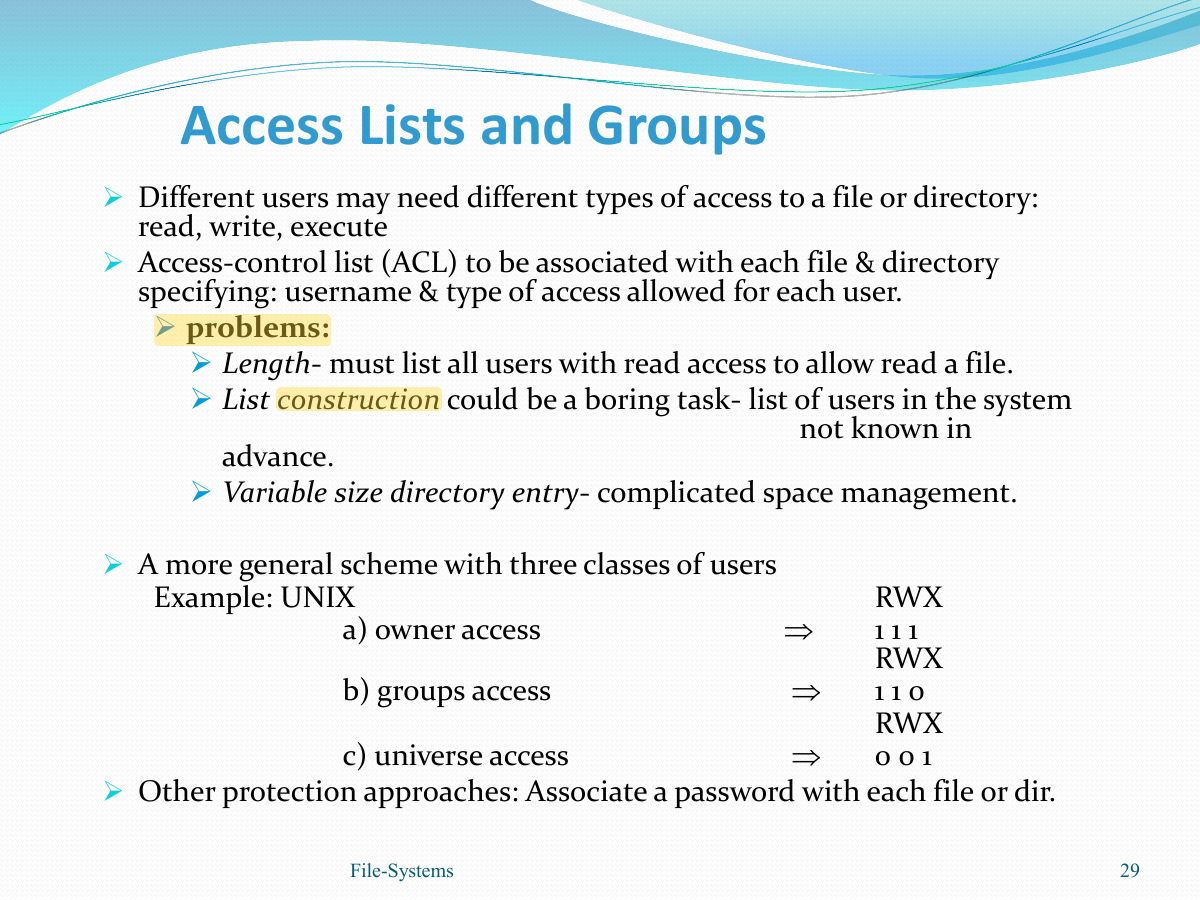
                                    Slide 29: Access Lists and Groups
                                    Exam weight High
                                    1. UNIX: owner, group, public, each with r w x bits (e.g. 761).
                                    🎯 How this can come up · 1 question
                                    MCQ

                                    UNIX mode 754 gives the group:

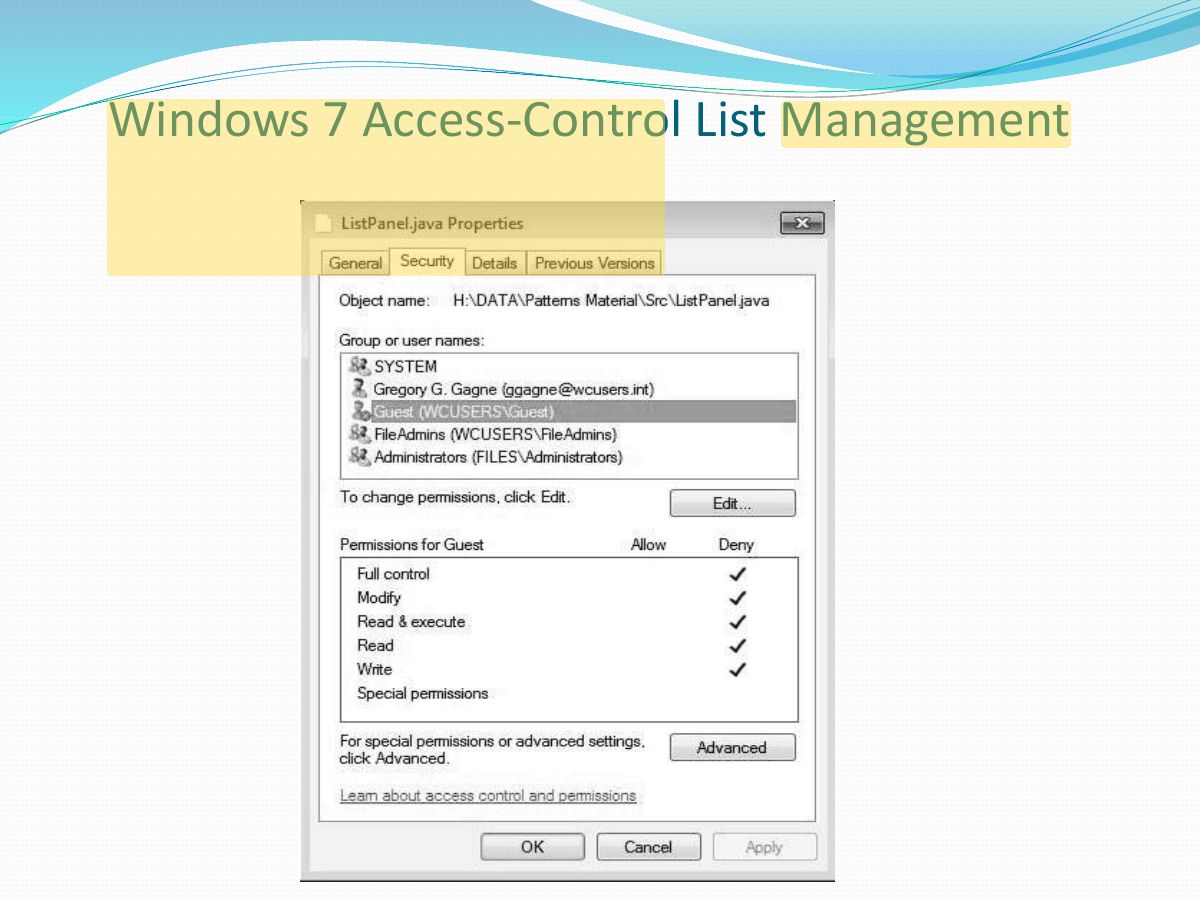
                                    Slide 30: Windows 7 Access-Control List Management
                                    Exam weight Low