CS330 · Annotated SlidesChapter 3 — Process Management
Chapter 3 · Annotated slides

Process Management

The process concept and its memory layout, process states and the PCB, scheduling queues and schedulers, context switches, process creation (fork/exec) and termination, and interprocess communication with shared memory (bounded buffer) and message passing.


Slide text Study notes Highlight: key words Tips, tricks & traps Seen again elsewhere How it can come up
Slide 1: Chapter 3: Processes
Exam weight Low

    Outline

    • Process Concept
    • Process Scheduling
    • Operations on Processes
    • Interprocess Communication
    • IPC in Shared-Memory Systems
    • IPC in Message-Passing Systems
    • Examples of IPC Systems
    • Communication in Client-Server Systems
    Outline
    2
    Exam weight Low

      Objectives

      • Identify the separate components of a process and illustrate how they are represented and scheduled in an operating system.
      • Describe how processes are created and terminated in an operating system, including developing programs using the appropriate system calls that perform these operations.
      • Describe and contrast interprocess communication using shared memory and message passing.
      • Design programs that uses pipes and POSIX shared memory to perform interprocess communication.
      • Describe client-server communication using sockets and remote procedure calls.
      • Design kernel modules that interact with the Linux operating system.
      Objectives
      3
      Exam weight Low

        Process Concept

        • An operating system executes a variety of programs that run as a process.
        • Process – a program in execution; process execution must progress in sequential fashion. No parallel execution of instructions of a single process
        • Multiple parts
          • The program code, also called text section
          • Current activity including program counter, processor registers
          • Stack containing temporary data Function parameters, return addresses, local variables 
          • Data section containing global variables
          • Heap containing memory dynamically allocated during run time
        Process Concept
        4
        Exam weight Low
        1. Process = program in execution. Parts: text (code), data (globals), heap (dynamic), stack (calls, locals), plus program counter and registers.

        Process Concept (Cont.)

        • Program is passive entity stored on disk (executable file); process is active
          • Program becomes process when an executable file is loaded into memory
        • Execution of program started via GUI mouse clicks, command line entry of its name, etc.
        • One program can be several processes
          • Consider multiple users executing the same program
        Process Concept (Cont.)
        5
        Exam weight Low
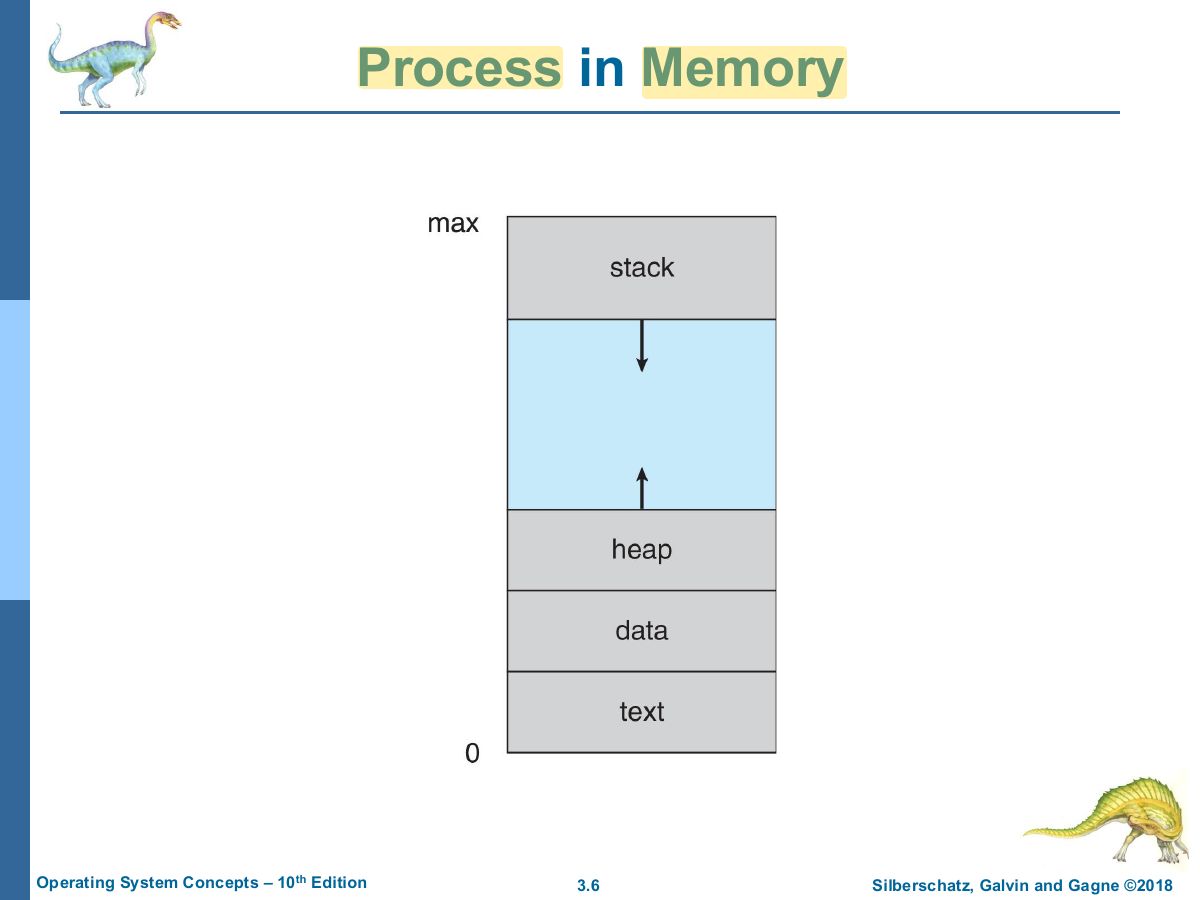
          Slide 6: Process in Memory
          Exam weight High
          1. Memory layout from low to high: text, data, heap (grows up) … stack (grows down).
          🎯 How this can come up · 1 question
          MCQ

          Local variables and return addresses are stored in the process’s:

          Process State

          • As a process executes, it changes state
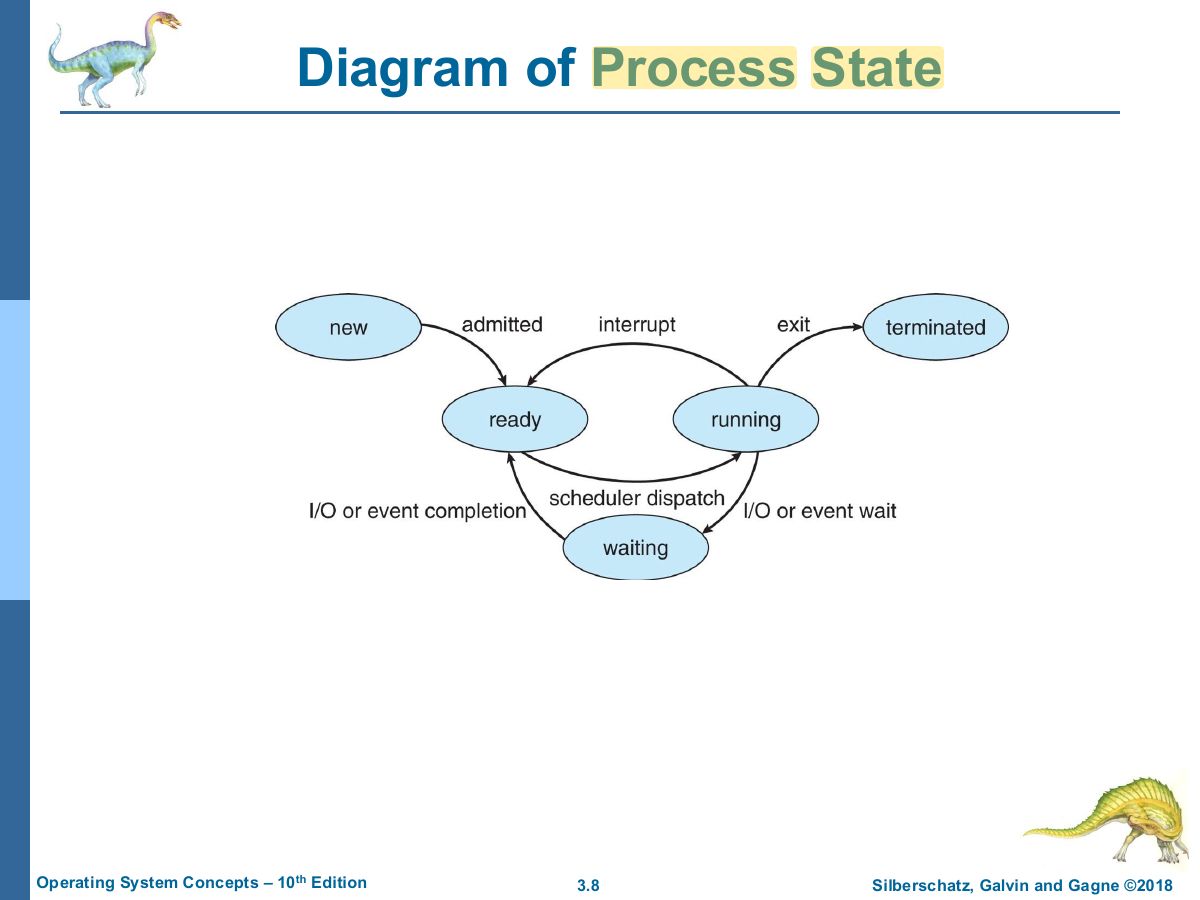
            • New: The process is being created
            • Running: Instructions are being executed
            • Waiting: The process is waiting for some event to occur
            • Ready: The process is waiting to be assigned to a processor
            • Terminated: The process has finished execution
          • Note: only 1 process can be running on any processor at any one time
          Process State
          7
          Exam weight Low
          1. States: new, ready, running, waiting, terminated.
          Slide 8: Diagram of Process State
          Exam weight High
          1. Transitions: ready → running (dispatch), running → ready (interrupt), running → waiting (I/O or event wait), waiting → ready (I/O done).
          Exam trapA waiting process goes to READY when its I/O completes, never straight to running.
          🎯 How this can come up · 1 question
          MCQ

          When a process’s I/O completes, it moves from waiting to:

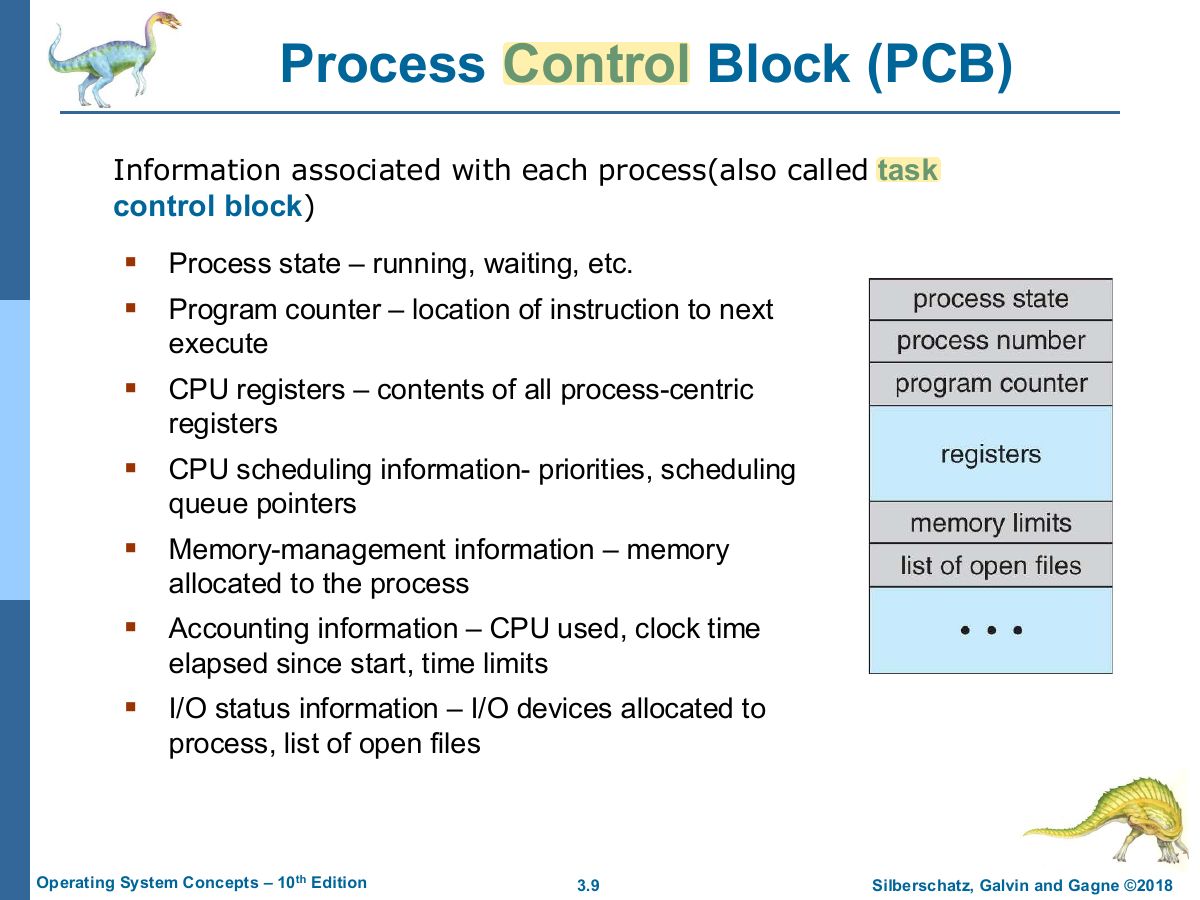
          Slide 9: Process Control Block (PCB)
          Exam weight High
          1. PCB (task control block) stores state, program counter, registers, scheduling, memory-management, accounting and I/O status info.
          🎯 How this can come up · 1 question
          MCQ

          Which is NOT stored in a PCB?

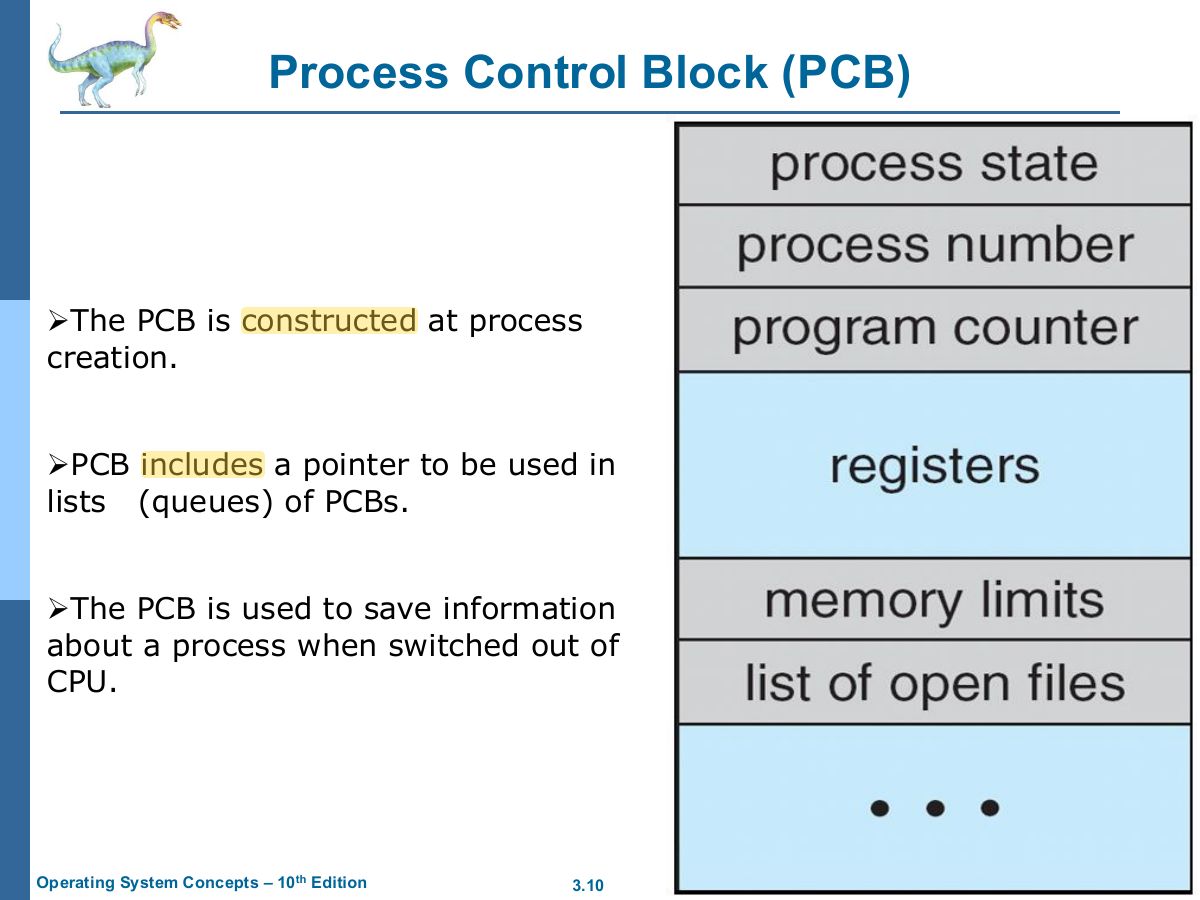
          Slide 10: Process Control Block (PCB)
          Exam weight Low

            Threads

            • So far, process has a single thread of execution
            • Consider having multiple program counters per process
              • Multiple locations can execute at once  Multiple threads of control -> threads
            • Must then have storage for thread details, multiple program counters in PCB
            • Explore in detail in Chapter 4
            Threads
            11
            Exam weight Low
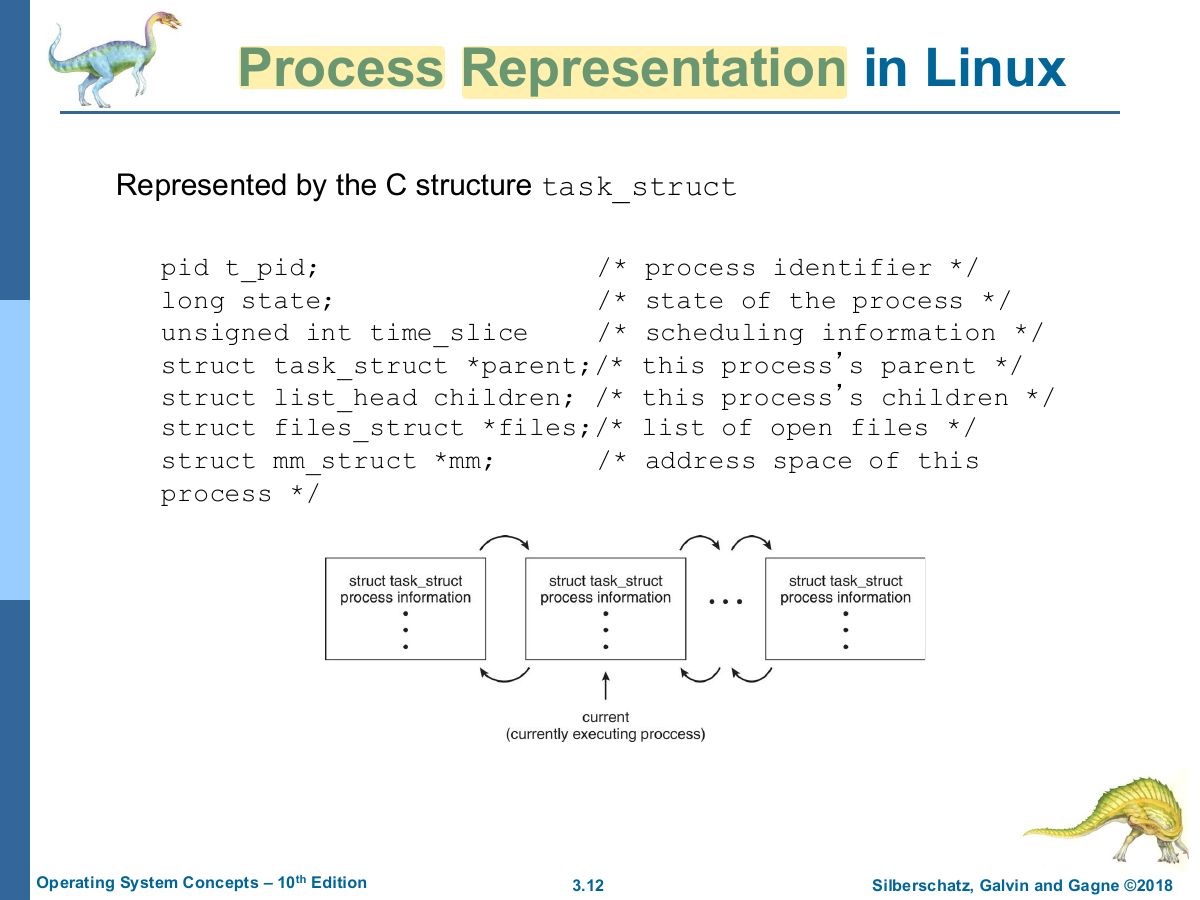
              Slide 12: Process Representation in Linux
              Exam weight Low

                Process Scheduling

                • Process scheduler selects among available processes for next execution on CPU core
                • Goal -- Maximize CPU use, quickly switch processes onto CPU core
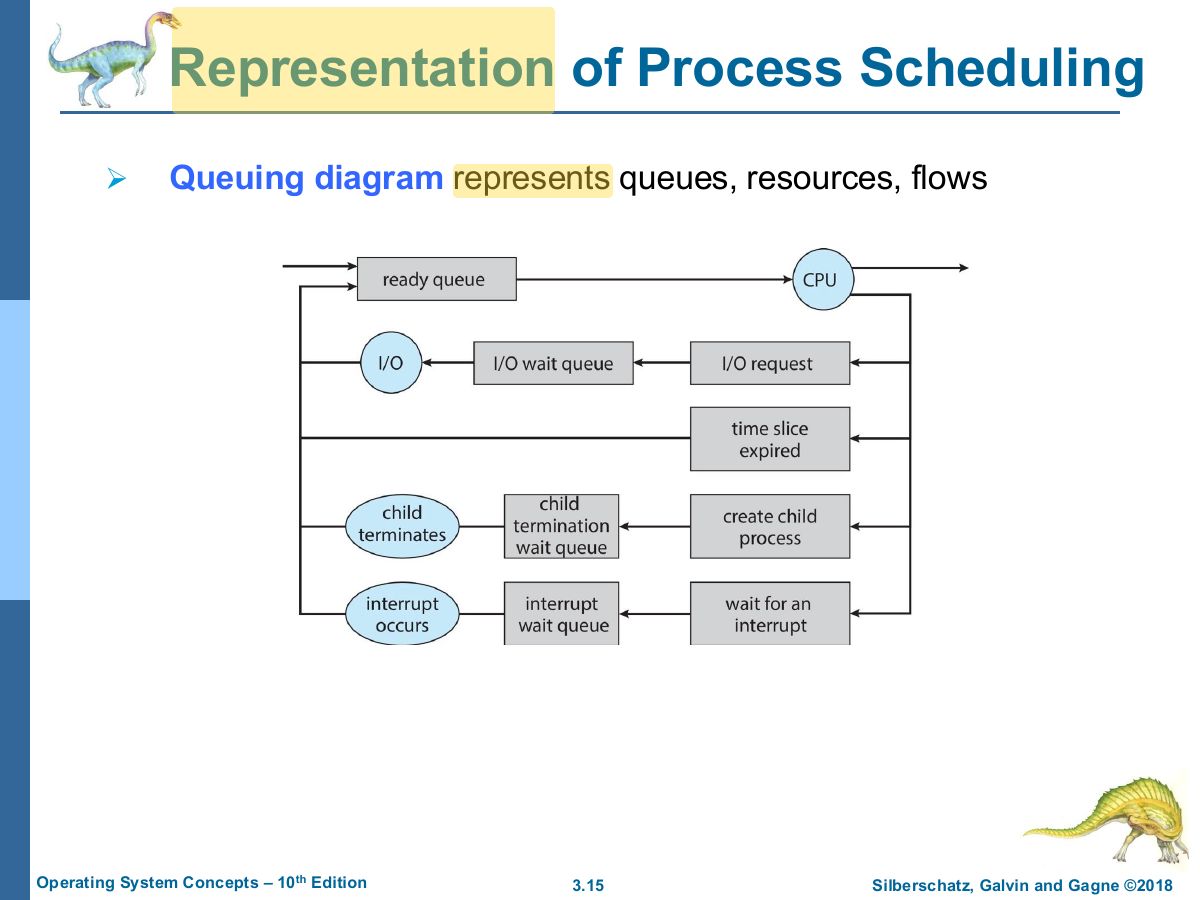
                • Maintains scheduling queues of processes
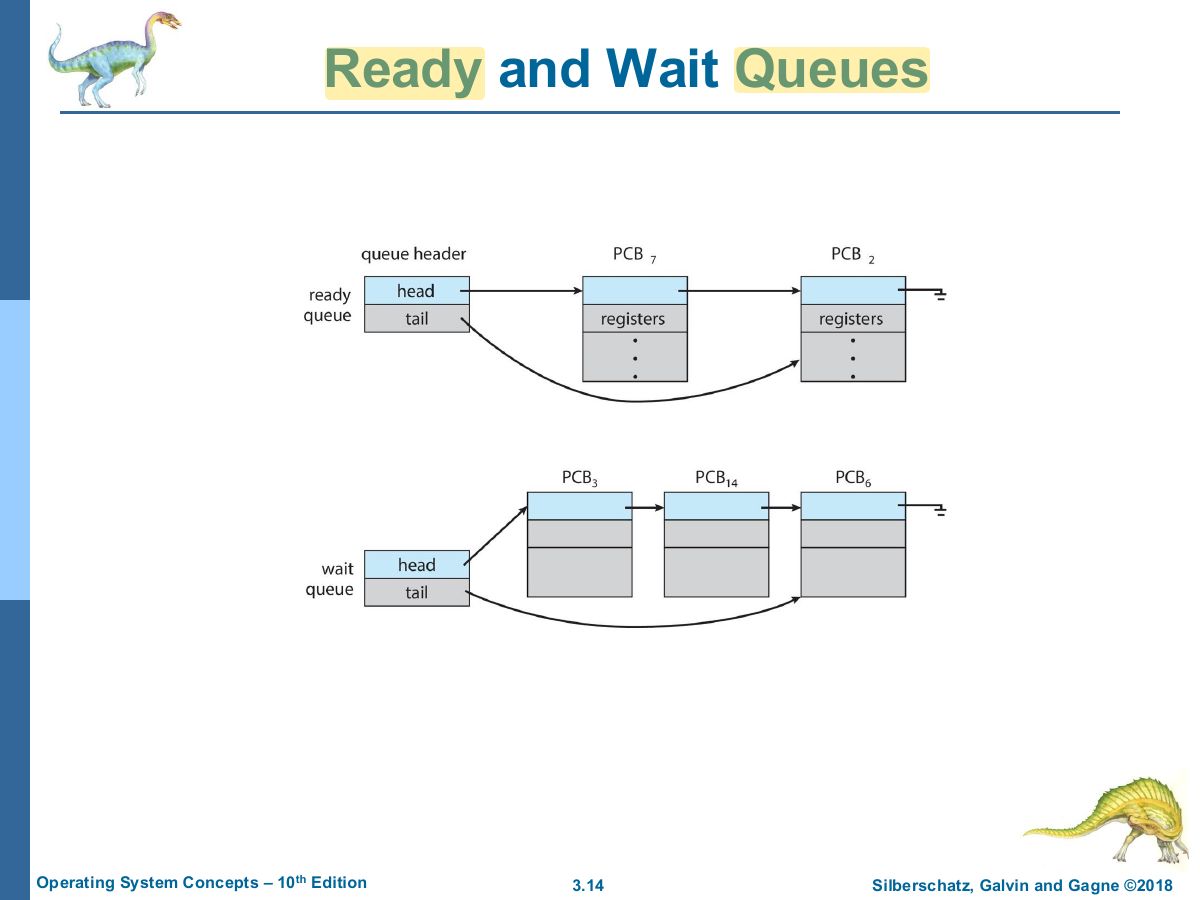
                  • Ready queue – set of all processes residing in main memory, ready and waiting to execute
                  • Wait queues – set of processes waiting for an event (i.e., I/O)
                  • Processes migrate among the various queues
                Process Scheduling
                13
                Exam weight Low
                  Slide 14: Ready and Wait Queues
                  Exam weight Low
                  1. Ready queue: processes in memory waiting for the CPU. Wait queues: waiting for an event or device.
                  Slide 15: Representation of Process Scheduling
                  Exam weight Low

                    Schedulers

                    O/S must select processes from various scheduling queues in some

                    ways- selection

                    is carried out by the appropriate scheduler.

                    • Long-term scheduler (or job scheduler) – selects which processes should be brought into the ready queue.
                      • Is necessary when there are more processes submitted than can be stored in memory.
                    • Short-term scheduler (or CPU scheduler) – selects from among the processes that are ready to be executed and allocates CPU to 1 of them.
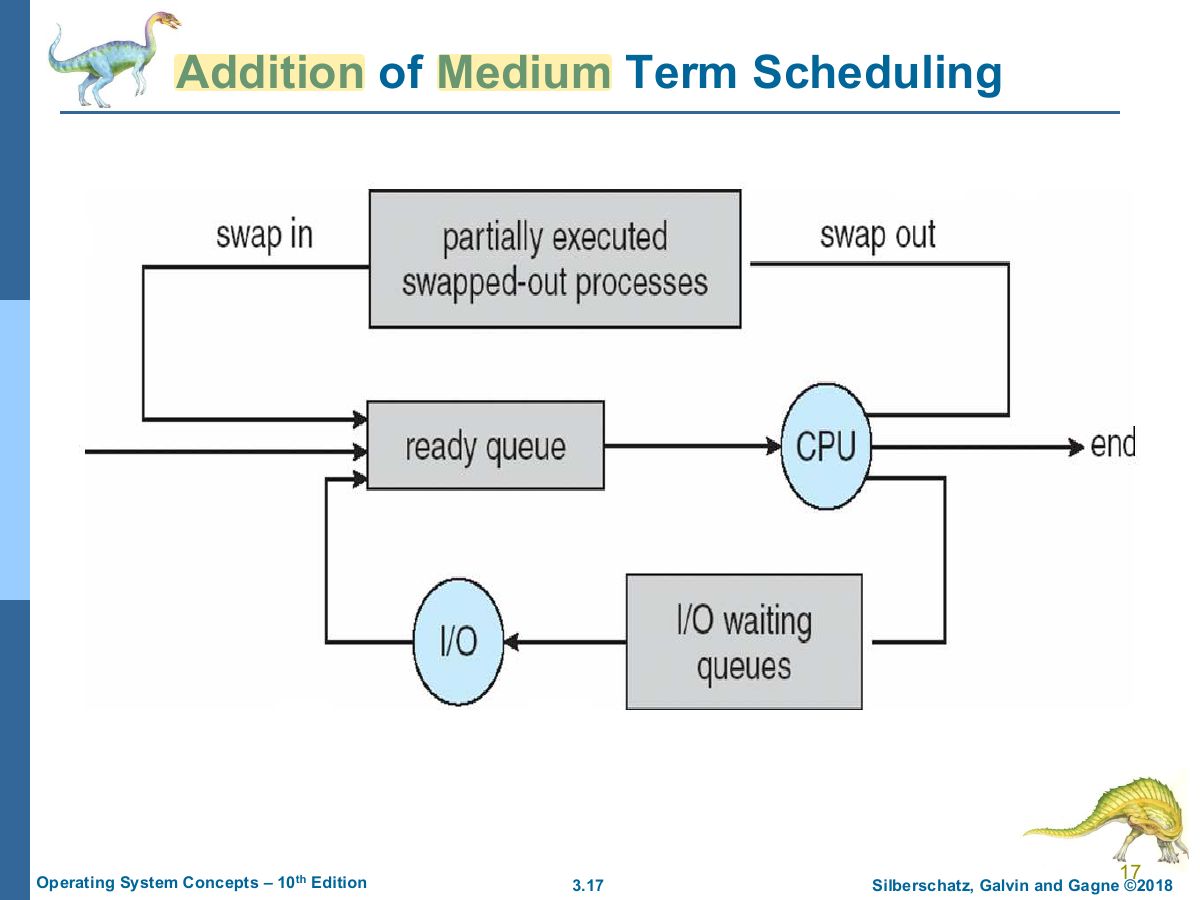
                    • Medium-term scheduler (swapper)
                      • Temporarily removes process from memory and stores it on disk.
                      • Later the process can be swapped back in.
                    Schedulers
                    16
                    Exam weight High
                    1. Short-term (CPU) scheduler: picks the next ready process, runs very often. Long-term (job) scheduler: controls the degree of multiprogramming.
                    🎯 How this can come up · 1 question
                    MCQ

                    The scheduler that controls the degree of multiprogramming is the:

                    Slide 17: Addition of Medium Term Scheduling
                    Exam weight Low
                    1. Medium-term scheduler: swaps processes out of memory and back in to reduce the degree of multiprogramming.

                    Schedulers (Cont.)

                    • Short-term scheduler select a new process for the CPU very frequently
                      • It execute every few milliseconds - must be fast.
                    • Long-term scheduler is invoked very infrequently (seconds, minutes) - may be slow.
                      • The long-term scheduler controls the degree of multiprogramming.
                    • Medium-term scheduler has an intermediate frequency of execution.
                    • Processes can be described as either:
                      • I/O-bound process – spends more time doing I/O than using the CPU.
                      • CPU-bound process – generates I/O requests infrequently & spends more time doing computations.
                    • Process Mix:
                      • Ideally we want a good balance between CPU & I/O bound processes to provide the system with best performance.
                      • What happens if all processes are I/O bound?
                      • What happens if all processes are CPU bound?
                    Schedulers (Cont.)
                    18
                    Exam weight Low
                    1. I/O-bound processes: many short CPU bursts. CPU-bound: few long bursts. A good mix keeps both CPU and devices busy.

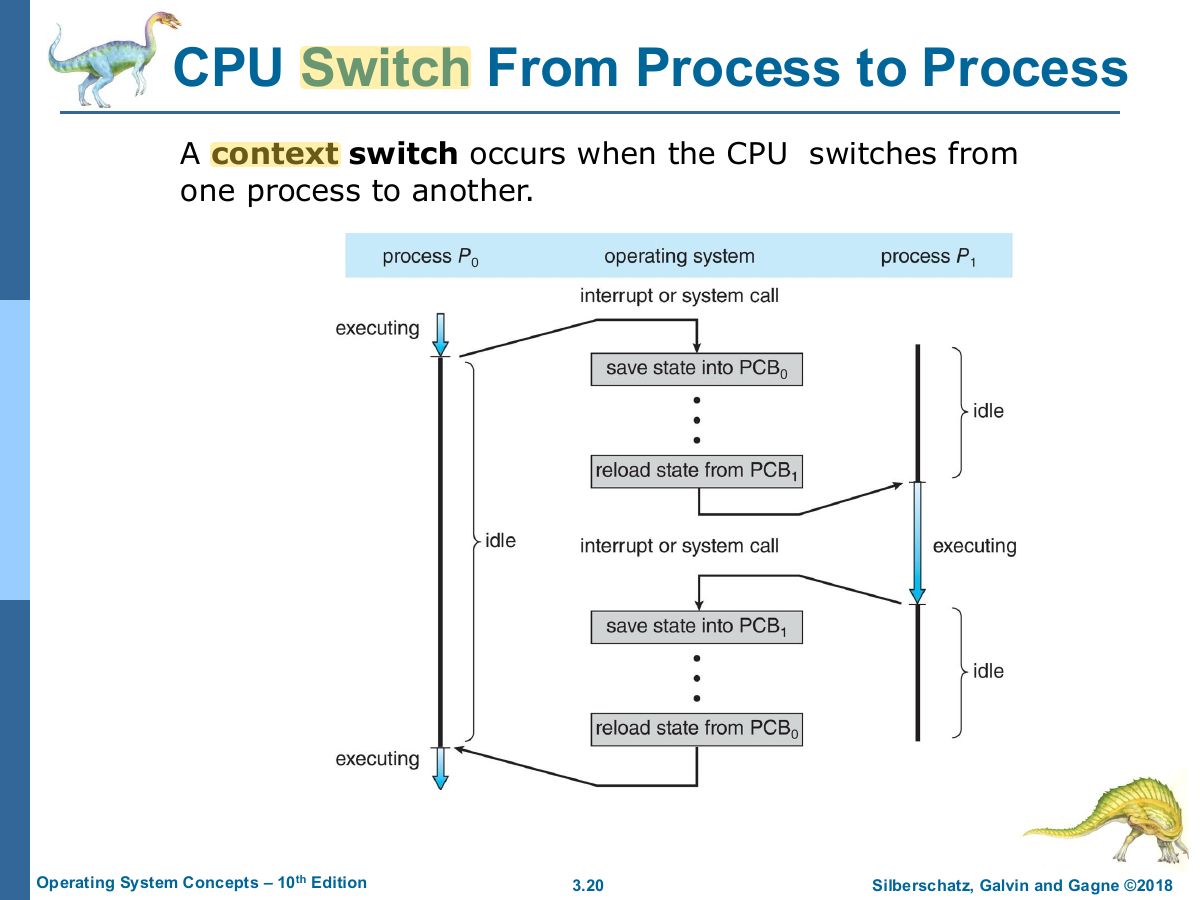
                    Context Switch

                    • When CPU switches to another process, the system must save the state of the old process and load the saved state for the new process via a context switch
                    • Context of a process represented in the PCB
                    • Context-switch time is pure overhead; the system does no useful work while switching
                      • The more complex the OS and the PCB ➔ the longer the context switch
                    • Time dependent on hardware support
                      • Some hardware provides multiple sets of registers per CPU ➔ multiple contexts loaded at once
                    Context Switch
                    19
                    Exam weight High
                    1. Context switch: save the old process’s state into its PCB and load the new one’s. Pure overhead: no useful work is done.
                    🎯 How this can come up · 1 question
                    True / False

                    During a context switch the system does useful work for the processes.

                    Slide 20: CPU Switch From Process to Process
                    Exam weight Low

                      Operations on Processes

                      • System must provide mechanisms for:
                        • Process creation
                        • Process termination
                      Operations on Processes
                      21
                      Exam weight Low

                        Process Creation

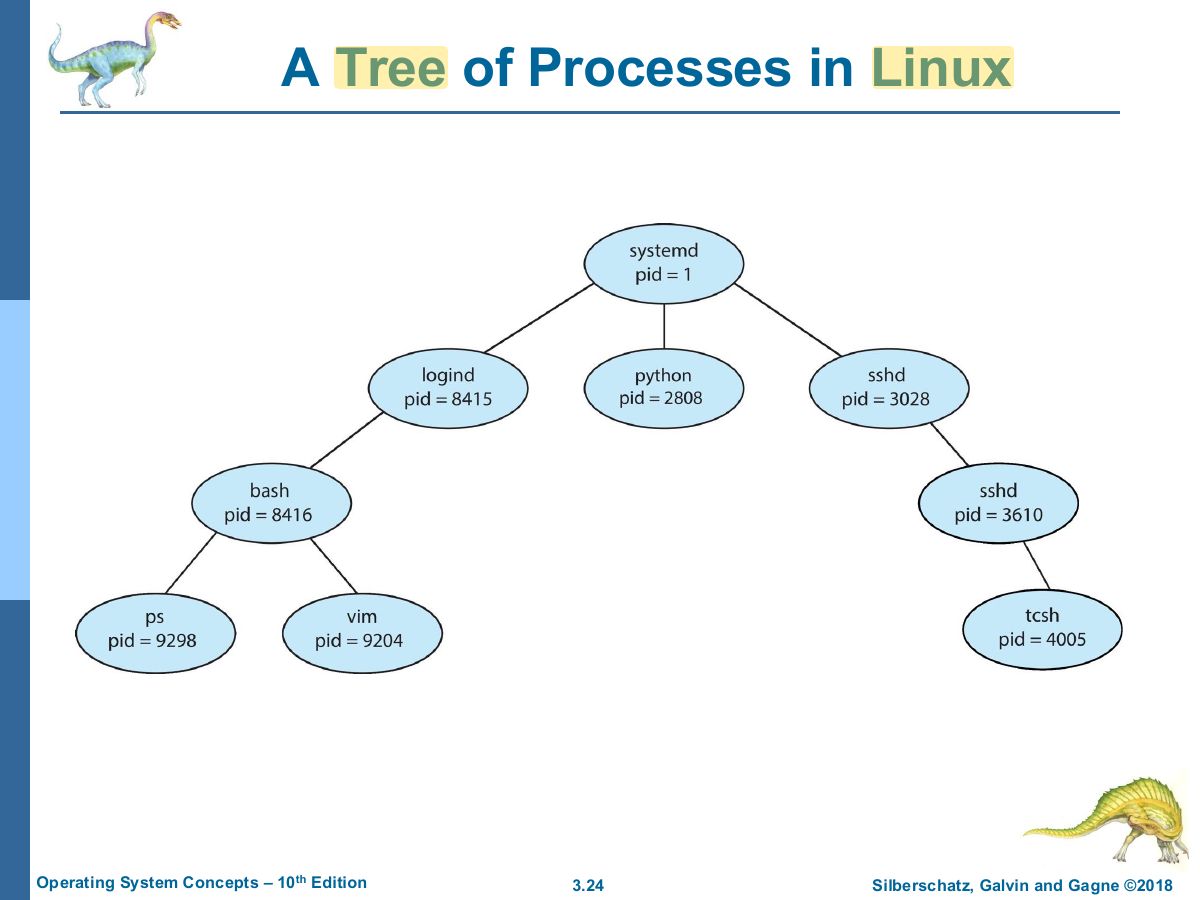
                        • Parent process create children processes, which, in turn create other processes, forming a tree of processes
                        • Generally, process identified and managed via a process identifier (pid)
                        • Resource sharing options
                          • Parent and children share all resources
                          • Children share subset of parent ’ s resources
                          • Parent and child share no resources
                        • They are 2 possibilities in terms of execution, When a process creates a new process
                          • Parent and children execute concurrently
                          • Parent waits until children terminate
                        Process Creation
                        22
                        Exam weight Low
                        1. Parent creates children → a tree of processes (identified by pid). Parent and child may share all, some or no resources; parent may wait or run concurrently.
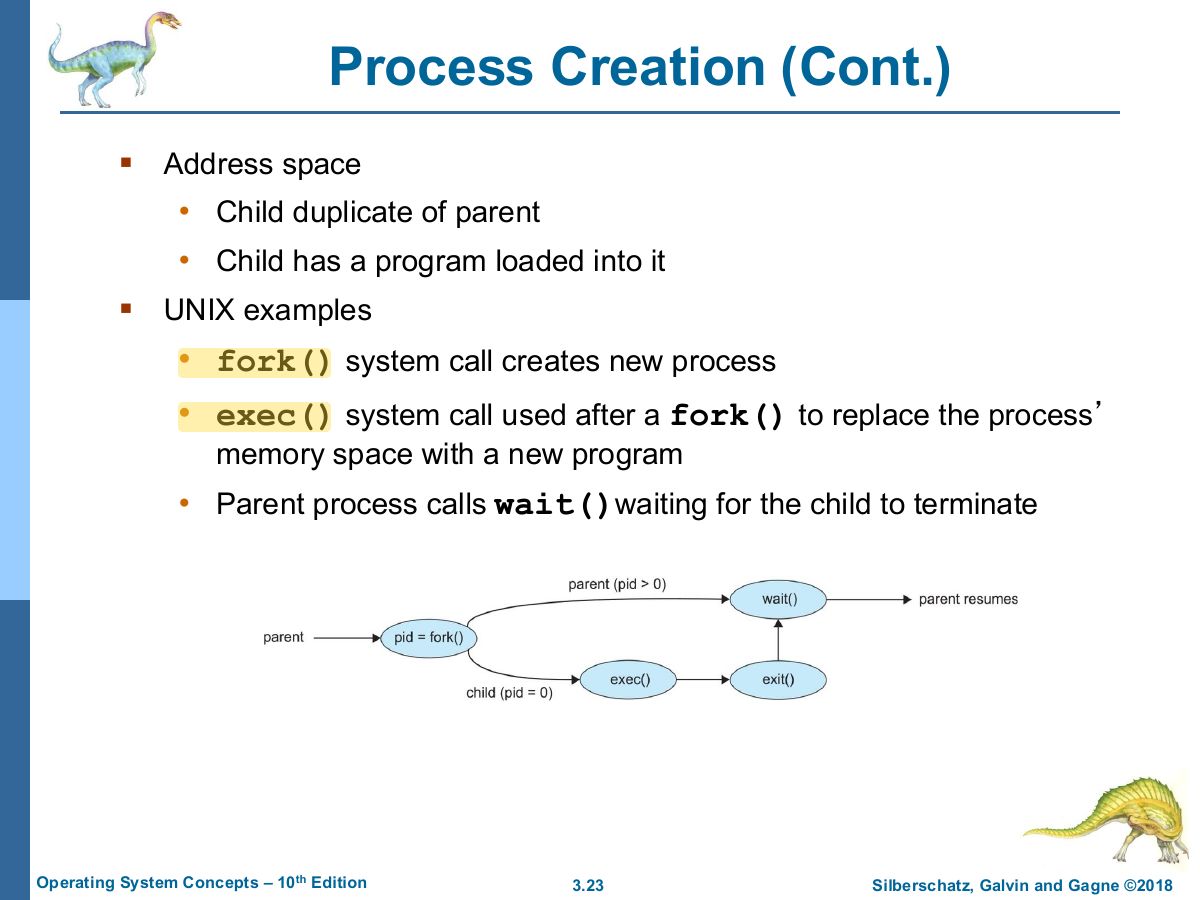
                        Slide 23: Process Creation (Cont.)
                        Exam weight High
                        1. UNIX: fork() makes a copy of the parent; exec() replaces the child’s memory with a new program; wait() lets the parent wait.
                        🎯 How this can come up · 1 question
                        MCQ

                        After fork(), the return value in the child process is:

                        Slide 24: A Tree of Processes in Linux
                        Exam weight Low
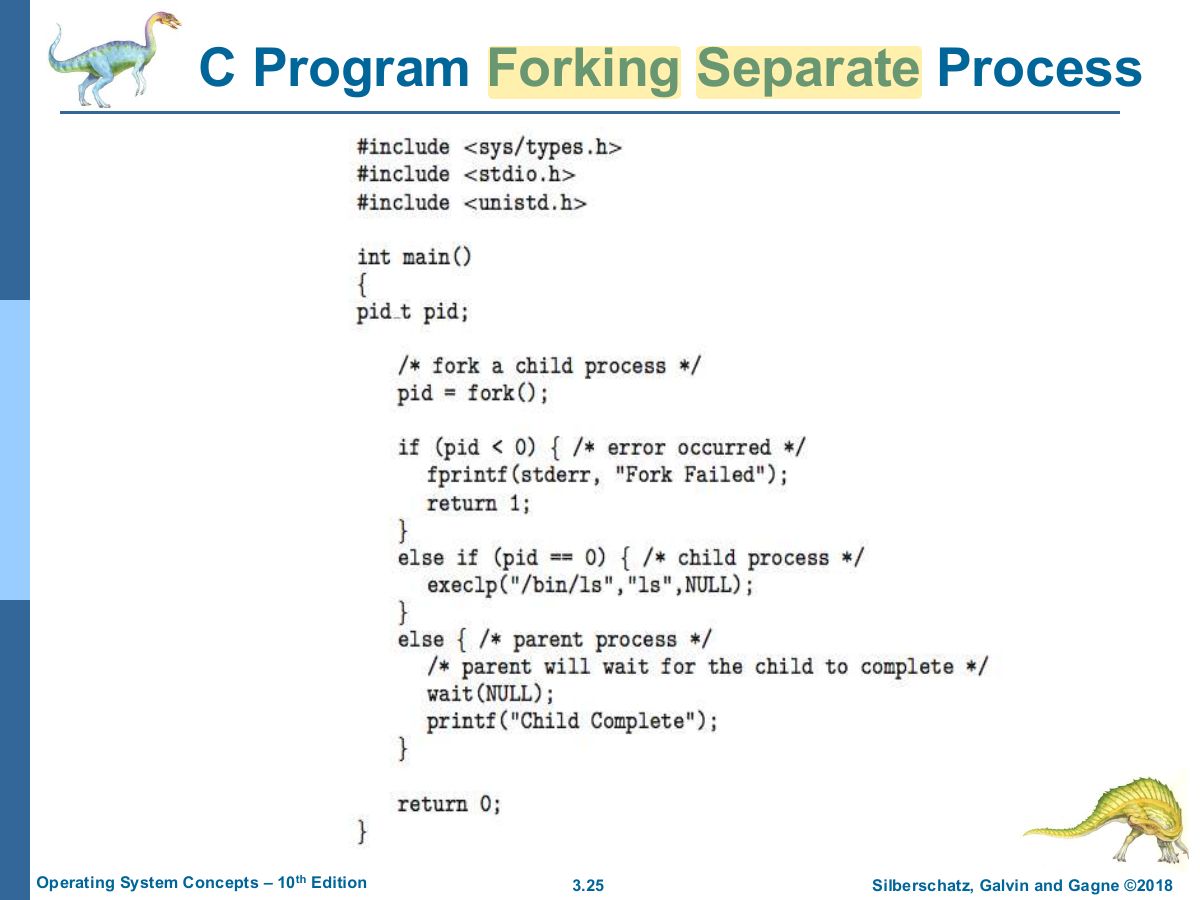
                          Slide 25: C Program Forking Separate Process
                          Exam weight Low
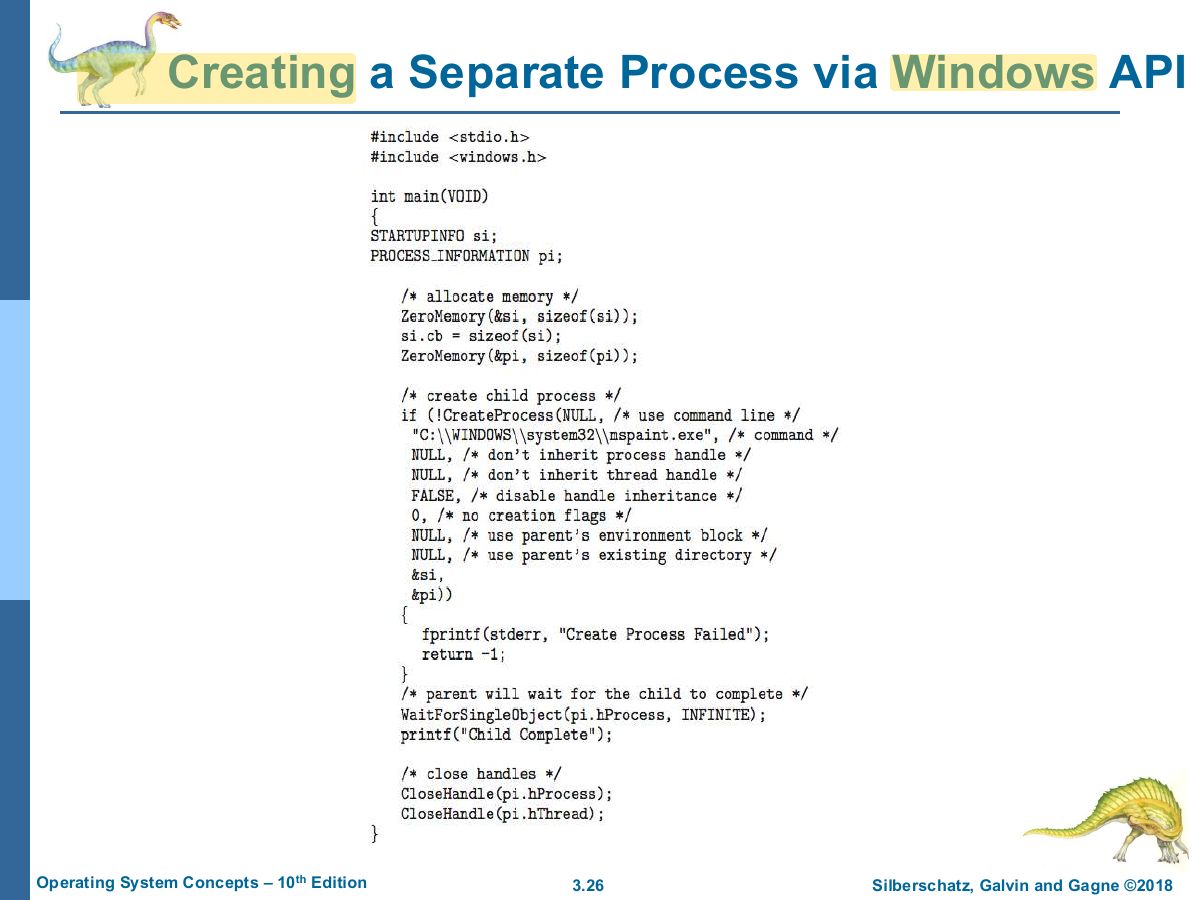
                            Slide 26: Creating a Separate Process via Windows API
                            Exam weight Low

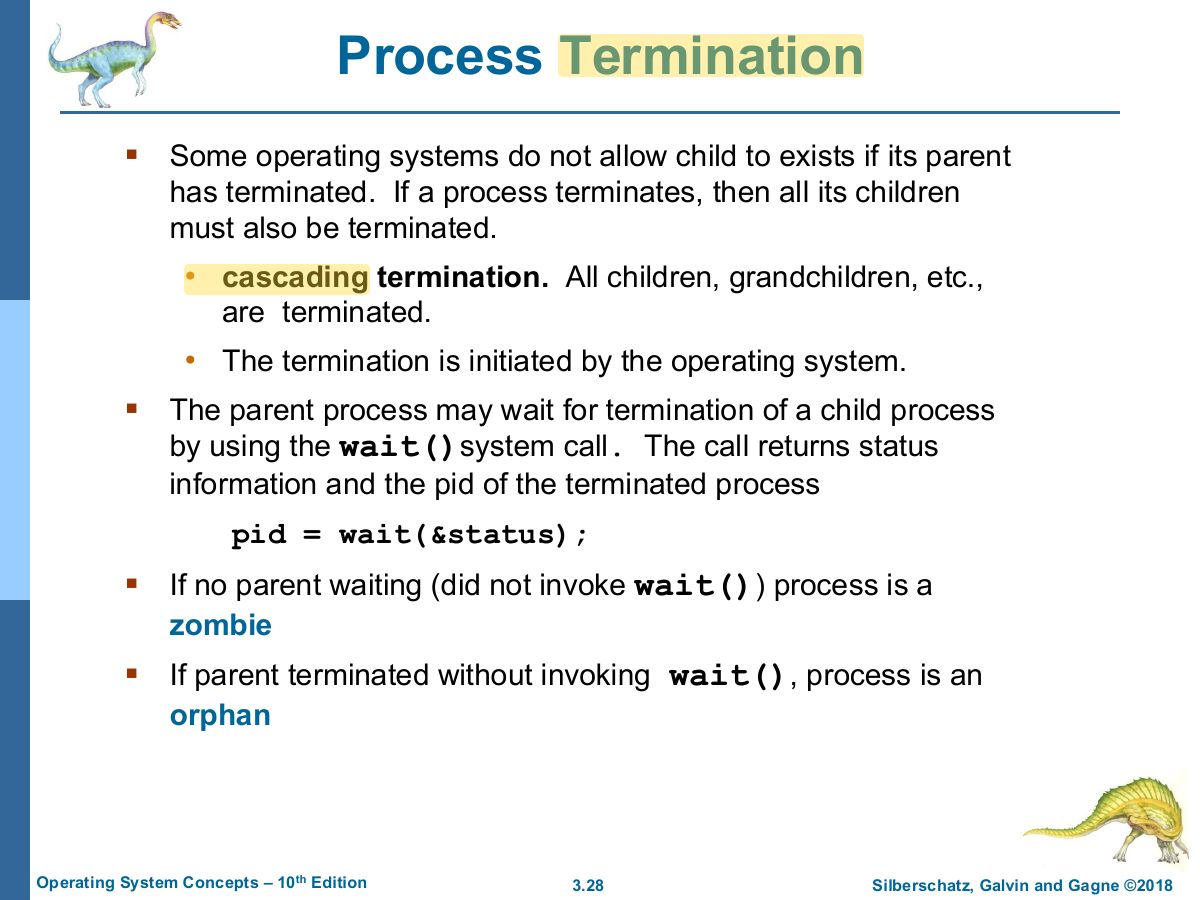
                              Process Termination

                              • Process executes last statement and then asks the operating system to delete it using the exit system call.
                                • Returns status data from child to parent (via wait)
                                • Process ’ resources are deallocated by operating system
                              • Parent may terminate the execution of children processes using the abort system call. Some reasons for doing so:
                                • Child has exceeded allocated resources
                                • Task assigned to child is no longer required
                                • The parent is exiting, and the operating systems does not allow a child to continue if its parent terminates
                              Process Termination
                              27
                              Exam weight High
                              1. exit() ends a process; the parent collects the status with wait(). Zombie: terminated but parent hasn’t called wait(). Orphan: parent ended without waiting.
                              🎯 How this can come up · 1 question
                              MCQ

                              A process that has terminated but whose parent has not yet called wait() is a:

                              Slide 28: Process Termination
                              Exam weight Low

                                Android Process Importance Hierarchy

                                • Mobile operating systems often have to terminate processes to reclaim system resources such as memory. From most to least important:
                                  • Foreground process
                                  • Visible process
                                  • Service process
                                  • Background process
                                  • Empty process
                                • Android will begin terminating processes that are least important.
                                Android Process Importance Hierarchy
                                29
                                Exam weight Low
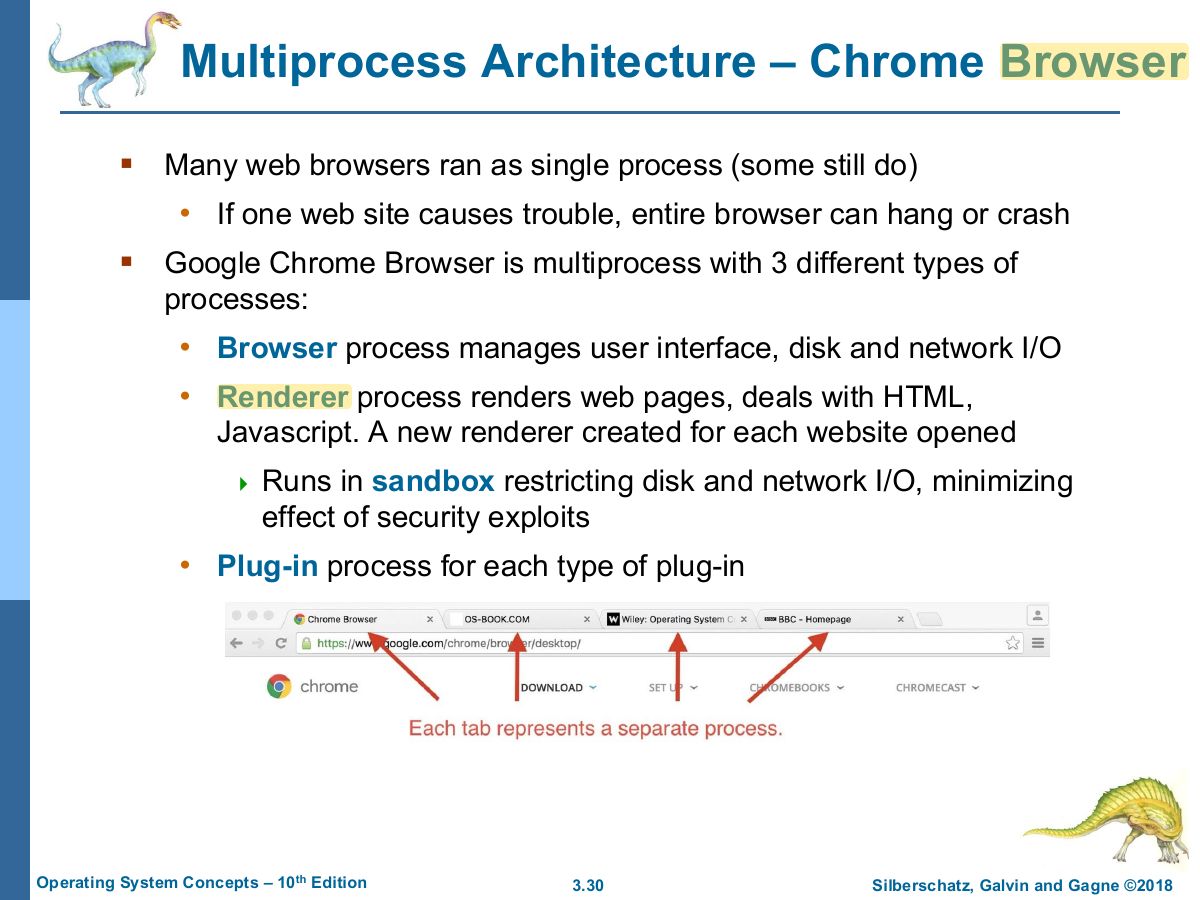
                                  Slide 30: Multiprocess Architecture – Chrome Browser
                                  Exam weight Low

                                    Interprocess Communication

                                    • Processes within a system may be independent or cooperating
                                    • Cooperating process can affect or be affected by other processes, including sharing data
                                    • Reasons for cooperating processes:
                                      • Information sharing
                                      • Computation speedup
                                      • Modularity
                                      • Convenience
                                    • Cooperating processes need interprocess communication (IPC)
                                    • Two models of IPC
                                      • Shared memory
                                      • Message passing
                                    Interprocess Communication
                                    31
                                    Exam weight Low
                                    1. Independent vs. cooperating processes. Cooperation reasons: information sharing, computation speed-up, modularity, convenience.
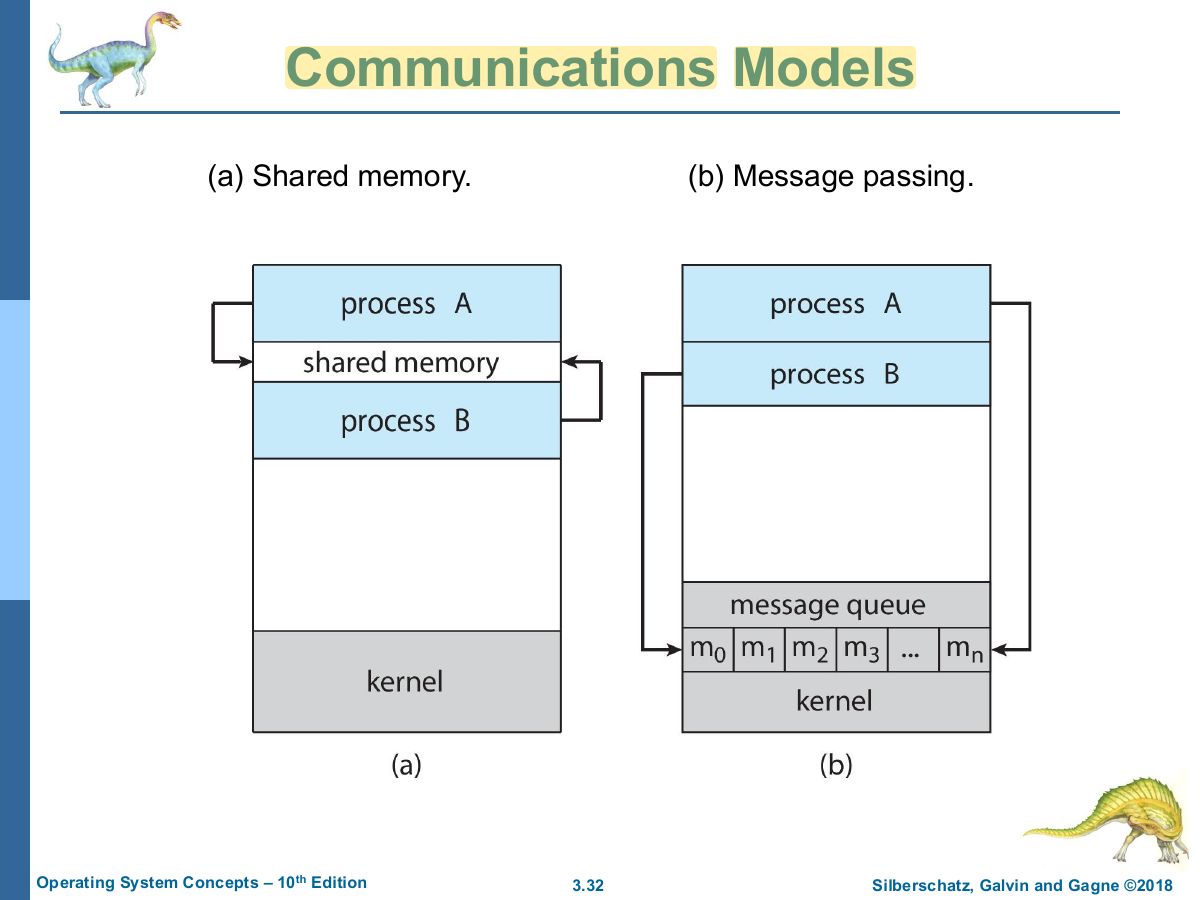
                                    Slide 32: Communications Models
                                    Exam weight High
                                    1. Two IPC models: shared memory (fast, processes synchronize themselves) and message passing (kernel involved, easier for small data and distributed systems).
                                    🎯 How this can come up · 1 question
                                    MCQ

                                    Which IPC model is usually faster once set up?

                                    Producer-Consumer Problem

                                    • Paradigm for cooperating processes:
                                      • producer process produces information that is consumed by a consumer process
                                    • Two variations:
                                      • unbounded-buffer places no practical limit on the size of the buffer:  Producer never waits Consumer waits if there is no buffer to consume 
                                      • bounded-buffer assumes that there is a fixed buffer size  Producer must wait if all buffers are full Consumer waits if there is no buffer to consume 
                                    Producer-Consumer Problem
                                    33
                                    Exam weight Low
                                    1. Producer–consumer: producer fills a buffer, consumer empties it. Unbounded vs. bounded buffer.

                                    IPC – Shared Memory

                                    • An area of memory shared among the processes that wish to communicate
                                    • The communication is under the control of the users processes not the operating system.
                                    • Major issues is to provide mechanism that will allow the user processes to synchronize their actions when they access shared memory.
                                    • Synchronization is discussed in great details in Chapters 6 & 7.
                                    IPC – Shared Memory
                                    34
                                    Exam weight Low

                                      Bounded-Buffer – Shared-Memory Solution

                                      • Shared data #define BUFFER_SIZE 10 typedef struct { . . . } item; item buffer[BUFFER_SIZE]; int in = 0; int out = 0;
                                      • Solution is correct, but can only use BUFFER_SIZE-1 elements
                                      Bounded-Buffer – Shared-Memory Solution
                                      35
                                      Exam weight High
                                      1. Circular bounded buffer: in = next free slot, out = first full slot. Empty when in out; full when (in + 1) % SIZE out, so only SIZE − 1 items fit.
                                      🎯 How this can come up · 1 question
                                      MCQ

                                      With the in/out bounded-buffer solution and BUFFER_SIZE = 10, at most how many items can be in the buffer?

                                      Producer Process – Shared Memory

                                      item next_produced; while (true) {

                                      /* produce an item in next produced */ while (((in + 1) % BUFFER_SIZE) == out)

                                      ; /* do nothing */

                                      buffer[in] = next_produced; in = (in + 1) % BUFFER_SIZE;

                                      }

                                      Producer Process – Shared Memory
                                      36
                                      Exam weight Low

                                        Consumer Process – Shared Memory

                                        item next_consumed; while (true) {

                                        while (in == out)

                                        ; /* do nothing */

                                        next_consumed = buffer[out]; out = (out + 1) % BUFFER_SIZE; /* consume the item in next consumed */

                                        }

                                        Consumer Process – Shared Memory
                                        37
                                        Exam weight Low

                                          What about Filling all the Buffers?

                                          • Suppose that we wanted to provide a solution to the consumer-producer problem that fills all the buffers.
                                          • We can do so by having an integer counter that keeps track of the number of full buffers.
                                          • Initially, counter is set to 0.
                                          • The integer counter is incremented by the producer after it produces a new buffer.
                                          • The integer counter is and is decremented by the consumer after it consumes a buffer.
                                          What about Filling all the Buffers?
                                          38
                                          Exam weight Low
                                          1. Adding a count variable lets all slots be used, but count++ / count-- then need synchronization (race condition → Ch 6).

                                          Producer

                                          while (true) {

                                          /* produce an item in next produced */ while (counter == BUFFER_SIZE)

                                          ; /* do nothing */

                                          buffer[in] = next_produced; in = (in + 1) % BUFFER_SIZE; counter++;

                                          }

                                          Producer
                                          39
                                          Exam weight Low

                                            Consumer

                                            while (true) {

                                            while (counter == 0)

                                            ; /* do nothing */

                                            next_consumed = buffer[out]; out = (out + 1) % BUFFER_SIZE;

                                            counter--;

                                            /* consume the item in next consumed */

                                            }

                                            Consumer
                                            40
                                            Exam weight Low

                                              IPC – Message Passing

                                              • Processes communicate with each other without resorting to shared variables
                                              • IPC facility provides two operations:
                                                • send (message)
                                                • receive (message)
                                              • The message size is either fixed or variable
                                              IPC – Message Passing
                                              41
                                              Exam weight Low
                                              1. Message passing: send(message) and receive(message) over a communication link.

                                              Message Passing (Cont.)

                                              • If processes P and Q wish to communicate, they need to:
                                                • Establish a communication link between them
                                                • Exchange messages via send/receive
                                              • Implementation issues:
                                                • How are links established?
                                                • Can a link be associated with more than two processes?
                                                • How many links can there be between every pair of communicating processes?
                                                • What is the capacity of a link?
                                                • Is the size of a message that the link can accommodate fixed or variable?
                                                • Is a link unidirectional or bi-directional?
                                              Message Passing (Cont.)
                                              42
                                              Exam weight Low

                                                Implementation of Communication Link

                                                • Physical:
                                                  • Shared memory
                                                  • Hardware bus
                                                  • Network
                                                • Logical:
                                                  • Direct or indirect
                                                  • Synchronous or asynchronous
                                                  • Automatic or explicit buffering
                                                Implementation of Communication Link
                                                43
                                                Exam weight Low

                                                  Direct Communication

                                                  • Processes must name each other explicitly: (P, message) – send a message to process P
                                                    • send (Q, message) – receive a message from process Q
                                                    • receive
                                                  • Properties of communication link
                                                    • Links are established automatically
                                                    • A link is associated with exactly one pair of communicating processes
                                                    • Between each pair there exists exactly one link
                                                    • The link may be unidirectional, but is usually bi-directional
                                                  Direct Communication
                                                  44
                                                  Exam weight Low
                                                  1. Direct communication: name the process explicitly (send(P, msg)); one link per pair.

                                                  Indirect Communication

                                                  • Messages are directed and received from mailboxes (also referred to as ports)
                                                    • Each mailbox has a unique id
                                                    • Processes can communicate only if they share a mailbox
                                                  • Properties of communication link
                                                    • Link established only if processes share a common mailbox
                                                    • A link may be associated with many processes
                                                    • Each pair of processes may share several communication links
                                                    • Link may be unidirectional or bi-directional
                                                  Indirect Communication
                                                  45
                                                  Exam weight Medium
                                                  1. Indirect communication: send to / receive from a mailbox (port); a link can join many processes.
                                                  🎯 How this can come up · 1 question
                                                  MCQ

                                                  In indirect communication, messages are sent to:

                                                  Indirect Communication (Cont.)

                                                  • Operations
                                                    • Create a new mailbox (port)
                                                    • Send and receive messages through mailbox
                                                    • Delete a mailbox
                                                  • Primitives are defined as: (A, message) – send a message to mailbox A
                                                    • send
                                                    • receive (A, message) – receive a message from mailbox A
                                                  Indirect Communication (Cont.)
                                                  46
                                                  Exam weight Low

                                                    Indirect Communication (Cont.)

                                                    • Mailbox sharing
                                                      • P, P, and P share mailbox A 1 2 3
                                                      • P, sends; P and P receive 1 2 3
                                                      • Who gets the message?
                                                    • Solutions
                                                      • Allow a link to be associated with at most two processes
                                                      • Allow only one process at a time to execute a receive operation
                                                      • Allow the system to select arbitrarily the receiver. Sender is notified who the receiver was.
                                                    Indirect Communication (Cont.)
                                                    47
                                                    Exam weight Low
                                                    1. Blocking (synchronous) vs. non-blocking (asynchronous) send and receive. Blocking send + blocking receive = rendezvous.
                                                    Slide 48: Slide 48
                                                    Exam weight Low