Chapter 3: Processes
CS330 - Operating Systems
Process Concept, Scheduling, IPC, and Management
3.1 Process Concept
A process is a program in execution. It is the unit of work in most systems. A process is more than just program code (text section); it includes current activity represented by program counter and processor registers.
Process vs Program
| Program | Process |
|---|---|
| Passive entity stored on disk | Active entity with program counter |
| Executable file (code) | Program loaded into memory |
| Static | Dynamic, has state |
| One program | Can have multiple processes |
Process in Memory
A process includes:
- Text Section: Program code
- Data Section: Global variables
- Heap: Memory dynamically allocated during runtime
- Stack: Temporary data (function parameters, return addresses, local variables)
⚠️ Important:
Text and data sections have fixed size, while heap and stack can grow dynamically. Stack and heap grow toward each other but must not overlap!
3.2 Process States
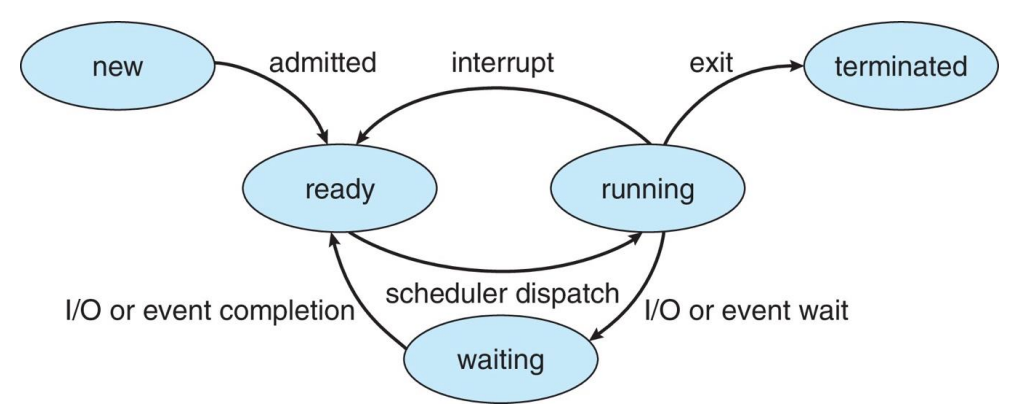
As a process executes, it changes state. A process may be in one of the following states:
Five-State Process Model
| State | Description |
|---|---|
| New | The process is being created |
| Ready | The process is waiting to be assigned to a processor |
| Running | Instructions are being executed |
| Waiting | The process is waiting for some event to occur (I/O completion or signal) |
| Terminated | The process has finished execution |
📝 Exam Question (From CS330 Final):
Q: A process that is currently in the 'Running' state can next go to which states?
Answer: A running process can go to:
- (i) Terminated state (process completes)
- (ii) Waiting state (I/O request)
- (iii) Ready state (interrupt/time slice expired)
3.3 Process Control Block (PCB)
Each process is represented in the OS by a Process Control Block (PCB), also called a Task Control Block (TCB). The PCB contains all information associated with a specific process.
PCB Information Details:
| Field | Contains |
|---|---|
| Process State | New, ready, running, waiting, terminated |
| Program Counter | Address of next instruction to execute |
| CPU Registers | Contents of all process-centric registers |
| CPU Scheduling Info | Priority, scheduling queue pointers |
| Memory Management | Page tables, memory limits, segment tables |
| Accounting Info | CPU used, clock time elapsed, time limits |
| I/O Status | List of I/O devices allocated, open files |
⚠️ Key Points:
- PCB is constructed at process creation
- PCB includes pointer for queue management
- PCB saves process information during context switch
3.4 Process Scheduling
The process scheduler selects among available processes for next execution on CPU core. The goal is to maximize CPU utilization and quickly switch processes onto CPU.
Scheduling Queues
Types of Scheduling Queues:
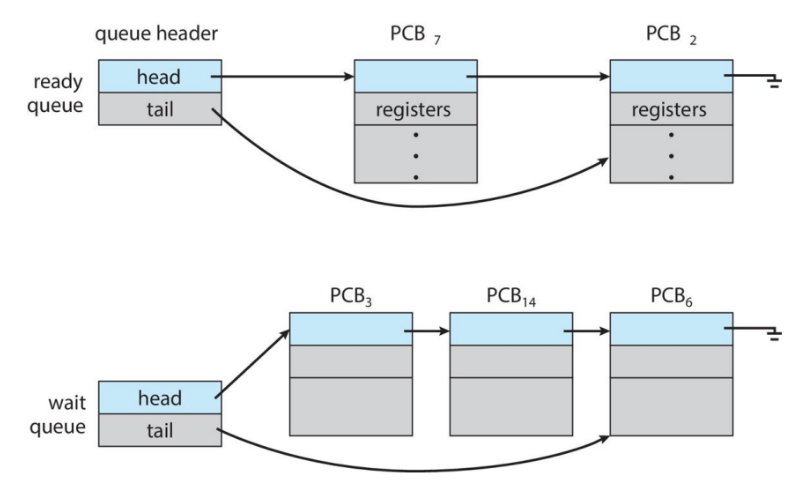
- Ready Queue: Set of all processes in main memory, ready and waiting to execute
- Wait Queues: Set of processes waiting for an event (e.g., I/O)
- Device Queues: Set of processes waiting for a particular I/O device
Processes migrate among the various queues during their lifetime.
Types of Schedulers
| Scheduler Type | Function | Frequency |
|---|---|---|
| Long-term | Selects processes from job pool to load into memory | Infrequent (seconds, minutes) |
| Short-term | Selects from ready queue to execute on CPU | Very frequent (milliseconds) |
| Medium-term | Swapping - removes process from memory temporarily | As needed |
📊 Representation of Process Scheduling
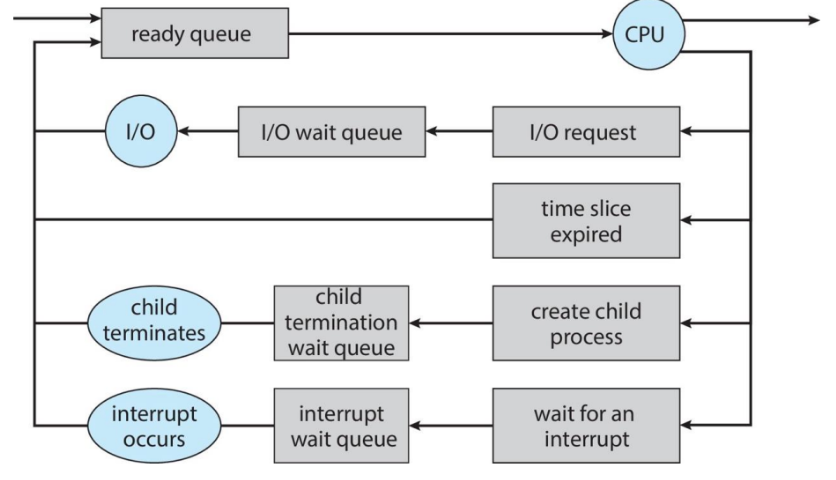
Shows flow between ready queue, CPU, and I/O queues
3.5 Context Switch
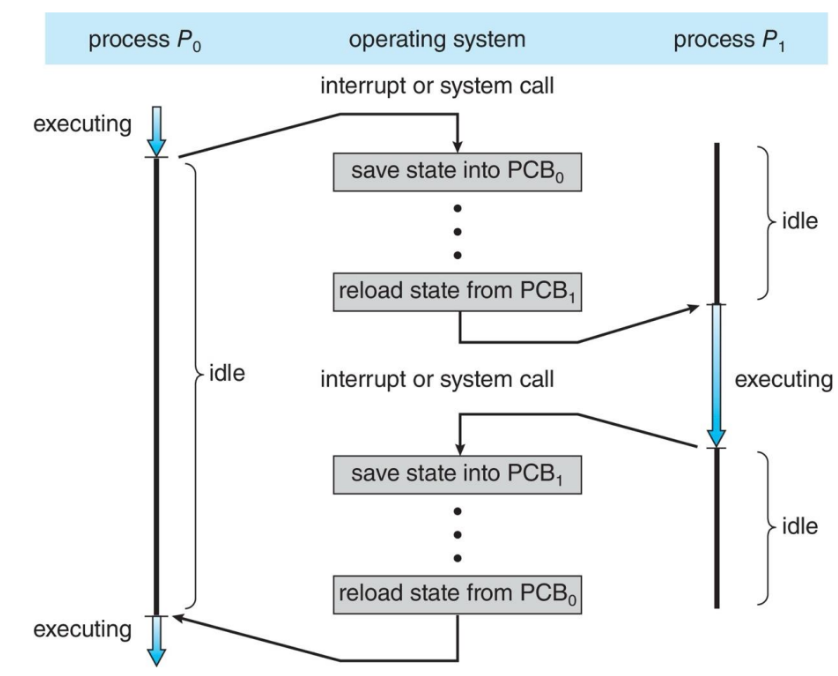
When CPU switches to another process, the system must save the state of the old process and load the saved state for the new process via a context switch.
executing
1. Save state to PCB₀
2. Reload state from PCB₁
executing
⚠️ Context Switch Overhead:
- Context-switch time is pure overhead - no useful work while switching
- Time depends on hardware support
- Typical times: < 10 microseconds
- More complex OS and PCB → longer context switch
- Some hardware provides multiple register sets to speed up switching
📝 Practice Question:
Q: Describe the actions taken by a kernel to context-switch between processes.
Answer:
- Save the context of current process (PC, SP, registers) in its PCB
- Update PCB state (running → ready/waiting)
- Move PCB to appropriate queue
- Select another process from ready queue
- Update new process PCB state (ready → running)
- Restore context from new process PCB into CPU
3.6 Operations on Processes
Process Creation
A process may create several new processes. The creating process is the parent, and new processes are children, forming a tree of processes.
Resource Sharing Options:
- Parent and children share all resources
- Children share subset of parent's resources
- Parent and child share no resources
Execution Options:
- Parent and children execute concurrently
- Parent waits until children terminate
Address Space Options:
- Child is duplicate of parent (same program and data)
- Child has new program loaded into it
UNIX Process Creation
📝 Exam Question (CS330 Assignment):
Q: What will be the output at lines A, B, C, and D? (Assume parent PID=2600, child PID=2603)
Answer:
- Line A: child: pid = 0
- Line B: child: pid1 = 2603
- Line C: parent: pid = 2603
- Line D: parent: pid1 = 2600
Process Termination
A process terminates when it finishes executing its final statement and calls exit()
system call.
Process may terminate due to:
- Normal exit (voluntary)
- Error exit (voluntary)
- Fatal error (involuntary)
- Killed by another process (involuntary)
Parent may terminate child because:
- Child has exceeded allocated resources
- Task assigned to child is no longer required
- Parent is exiting (cascading termination)
3.7 Interprocess Communication (IPC)
Processes may be independent or cooperating. Cooperating processes need IPC mechanisms to exchange data and information.
Reasons for Process Cooperation:
📊 Information Sharing
Several users may need same information
⚡ Computation Speedup
Break task into subtasks running in parallel
🧩 Modularity
Divide system functions into separate processes
🎯 Convenience
User may work on many tasks simultaneously
IPC Models
🔗 Shared Memory
- Processes share region of memory
- Fast - no kernel intervention after setup
- Requires synchronization
- Good for large amounts of data
Message Passing Implementation
| Aspect | Options |
|---|---|
| Naming |
• Direct: send(P, message), receive(Q, message) • Indirect: via mailboxes/ports |
| Synchronization |
• Blocking (synchronous) • Non-blocking (asynchronous) |
| Buffering |
• Zero capacity (no buffering) • Bounded capacity (finite buffer) • Unbounded capacity (infinite buffer) |
UNIX IPC: Pipes
⚠️ Pipe Limitations:
- Unidirectional - data flows in one direction
- Can only be used between related processes
- Exist only while processes are communicating
- For bidirectional, use two pipes
3.8 Communication in Client-Server Systems
Communication Methods:
🔌 Sockets
Endpoint for communication. Identified by IP address + port number.
📡 Remote Procedure Calls (RPC)
Allows calling procedures on remote systems as if they were local.
🚪 Remote Method Invocation (RMI)
Java mechanism similar to RPC for invoking methods on remote objects.
Socket Communication
3.9 Exam-Style Practice Questions
Multiple Choice Questions
Q1. Which of the following is NOT stored in the PCB?
Q2. The main objective of multiprogramming is to improve:
Q3. When a process creates a new process using fork(), which is shared?
Q4. Context switch time is:
Short Answer Questions
Q5. Explain the difference between long-term, medium-term, and short-term scheduling. (6 marks)
Answer:
- Long-term (Job Scheduler): Selects processes from job pool to load into memory. Controls degree of multiprogramming. Executes infrequently.
- Medium-term (Swapper): Removes processes from memory temporarily (swapping) to reduce multiprogramming degree. Can later reintroduce process.
- Short-term (CPU Scheduler): Selects from ready queue which process executes next on CPU. Executes very frequently (milliseconds).
Q6. How many processes are created by this program? (4 marks)
Answer:
2⁴ = 16 processes total (including the initial parent)
Each fork() doubles the number of processes.
Q7. What happens when a context switch occurs if the new context is already loaded in a register set? (3 marks)
Answer:
If hardware provides multiple register sets and the new context is already loaded, the context switch is much faster - just switch the pointer to the active register set. No need to save/restore register values to/from memory.
3.10 Key Terms and Definitions
| Term | Definition |
|---|---|
| Process | Program in execution; active entity with program counter |
| PCB | Process Control Block - data structure containing process information |
| Context Switch | Saving state of one process and loading state of another |
| fork() | System call that creates new process (child) in UNIX |
| exec() | System call that replaces process memory with new program |
| wait() | System call where parent waits for child to terminate |
| IPC | Interprocess Communication - mechanisms for process cooperation |
| Pipe | Unidirectional communication channel between processes |
| Ready Queue | List of processes ready and waiting to execute |
| Degree of Multiprogramming | Number of processes in memory |
3.11 Diagrams from Slides
📊 Process State Diagram
📊 Context Switch Timeline
📊 Ready and Wait Queue Structure