Chapter 2: Operating System Structures
CS330 - Operating Systems
Understanding OS Services, Interfaces, and Architecture
2.1 Operating System Services
Operating systems provide an environment for execution of programs and services to programs and users. Services are divided into those that are helpful to the user and those that ensure efficient operation of the system.
Services for Users:
🖥️ User Interface (UI)
Almost all operating systems have a user interface. Varies between Command-Line Interface (CLI), Graphical User Interface (GUI), or both.
📂 Program Execution
System capability to load a program into memory and run it. OS able to end execution either normally or abnormally.
💾 I/O Operations
Since user programs cannot execute I/O operations directly, the OS must provide means to perform I/O.
📁 File System Manipulation
Ability to read, write, create, open, close and delete files/directories.
🔗 Communications
Exchange of information between processes on the same computer or different systems via shared memory or message passing.
⚠️ Error Detection
Ensure correct computing by detecting errors in CPU, memory hardware, I/O devices, or user programs.
Services for System Efficiency:
- Resource Allocation: When multiple users or jobs run concurrently, resources must be allocated to each
- Accounting: Keep track of which users use how much and what kinds of resources
- Protection and Security:
- Protection - ensures all access to system resources is controlled
- Security - defends system from external and internal attacks
📊 A View of Operating System Services
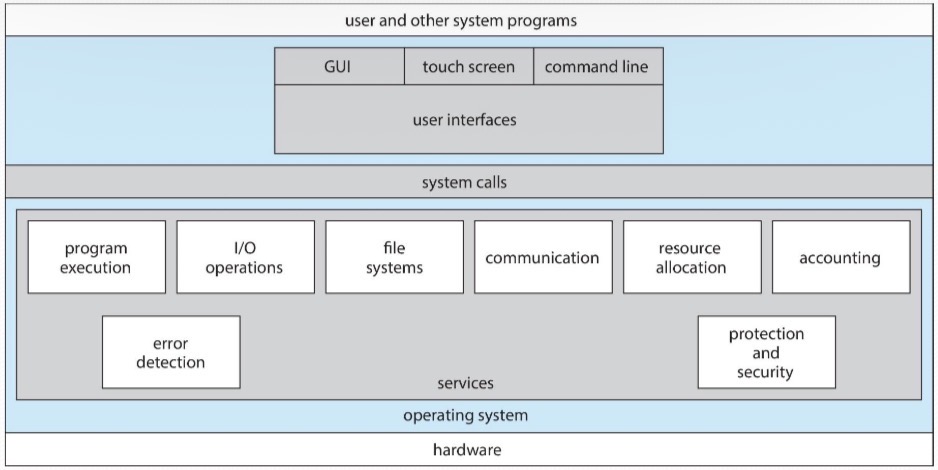
Shows the relationship between User, OS Services, and System
2.2 User Operating System Interface
Command Line Interface (CLI)
- Direct command entry
- Implemented in kernel or system program
- Multiple shells (bash, zsh, cmd)
- Commands can be built-in or program names
- Examples: Linux terminal, Windows cmd
Graphical User Interface (GUI)
- User-friendly desktop metaphor
- Mouse, keyboard, monitor interaction
- Icons, windows, menus
- Invented at Xerox PARC (1970s)
- Examples: Windows, macOS Aqua, GNOME
| Aspect | CLI | GUI |
|---|---|---|
| Speed | Faster for experienced users | Slower but more intuitive |
| Resource Usage | Low memory/CPU usage | Higher resource requirements |
| Learning Curve | Steep - must memorize commands | Gentle - visual and intuitive |
| Automation | Easy to script and automate | Harder to automate tasks |
| Precision | Very precise control | Less precise, more general |
Modern OS Examples:
- Windows: GUI with CLI "command" shell
- macOS: Aqua GUI with Unix kernel and shells available
- Linux: CLI with optional GUI (KDE, GNOME, XFCE)
2.3 System Calls
System calls provide an interface between a running program and the operating system. They are generally available as assembly language instructions and accessed through high-level language API.
System Call Mechanism:
📊 API - System Call - OS Relationship
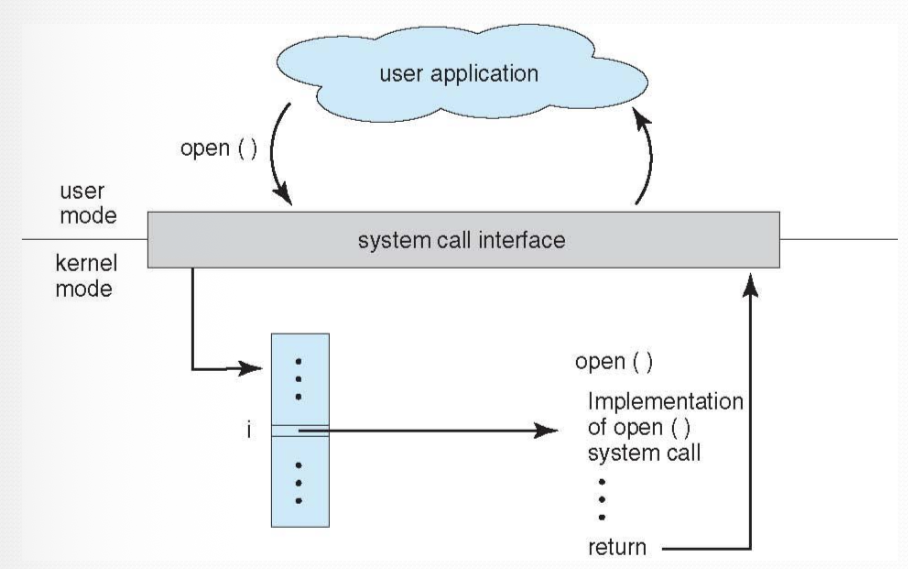
Shows transition from user mode to kernel mode
Types of System Calls:
| Category | Functions | Examples |
|---|---|---|
| Process Control | end, abort, load, execute, create/terminate process, get/set attributes, wait | fork(), exit(), wait(), exec() |
| File Management | create, delete, open, close, read, write, reposition, get/set attributes | open(), close(), read(), write(), lseek() |
| Device Management | request/release device, read, write, reposition, get/set attributes | ioctl(), read(), write() |
| Information Maintenance | get/set time or date, get/set system data, get/set process attributes | getpid(), alarm(), sleep() |
| Communications | create/delete connection, send/receive messages, transfer status | pipe(), shmget(), socket() |
| Protection | get/set permissions, allow/deny access | chmod(), umask(), chown() |
2.4 Dual-Mode Operation
Dual-mode operation allows OS to protect itself and other system components. The hardware provides a mode bit to distinguish between user code and kernel code execution.
User Mode (1)
- ✓ Executing user applications
- ✓ Limited CPU instructions
- ✗ No direct hardware access
- ✗ No privileged instructions
Kernel Mode (0)
- ✓ Executing OS code
- ✓ All CPU instructions
- ✓ Direct hardware access
- ✓ Privileged instructions
⚠️ Important for Exams:
- Mode bit: 0 = Kernel Mode, 1 = User Mode
- System call changes mode from user to kernel
- Return from system call resets to user mode
- Privileged instructions only executable in kernel mode
📝 Practice Question:
Q: What happens when a user program tries to execute a privileged instruction in user mode?
2.5 Operating System Structure
General-purpose OS is a very large program. Various ways exist to structure operating systems, each with advantages and disadvantages.
1. Simple Structure (Monolithic)
Example: MS-DOS, Original UNIX
- No well-defined structure
- Minimal layers
- Direct hardware access from applications
- Fast but not secure or reliable
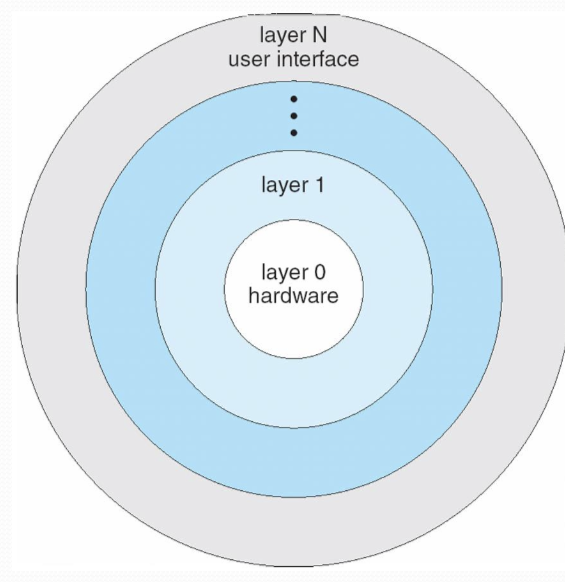
2. Layered Approach
Characteristics:
- OS divided into layers (levels)
- Each layer built on top of lower layers
- Layer 0 is hardware, Layer N is user interface
- Each layer uses only lower-level layer services
- Modularity with specific and limited functionality
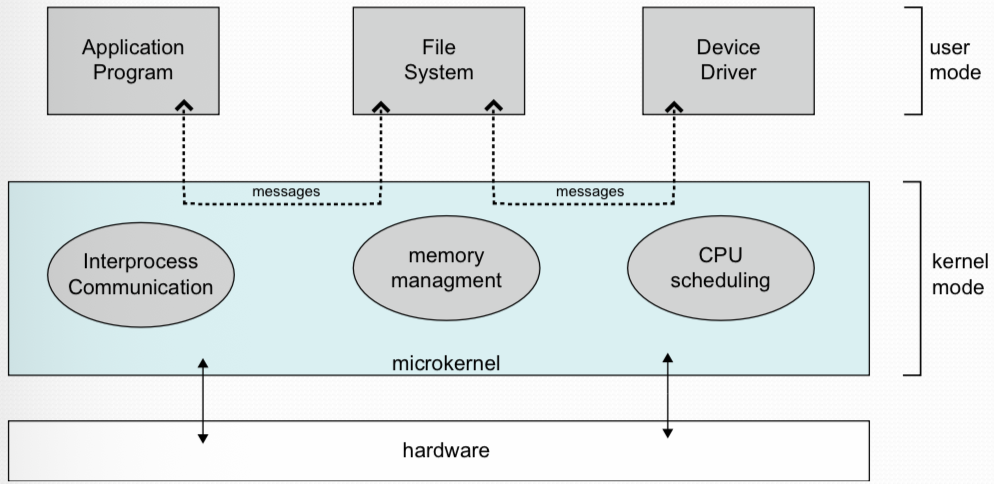
3. Microkernel System Structure
(IPC, Memory Mgmt, CPU Scheduling)
Microkernel Characteristics:
- Removes all nonessential components from kernel
- Implements removed components as user-level programs
- Communication via message passing
- Benefits:
- Easier to extend OS
- Easier to port to different hardware
- More reliable (less code in kernel mode)
- More secure (services run as user processes)
- Example: Mach, QNX
4. Modular Structure (Loadable Kernel Modules)
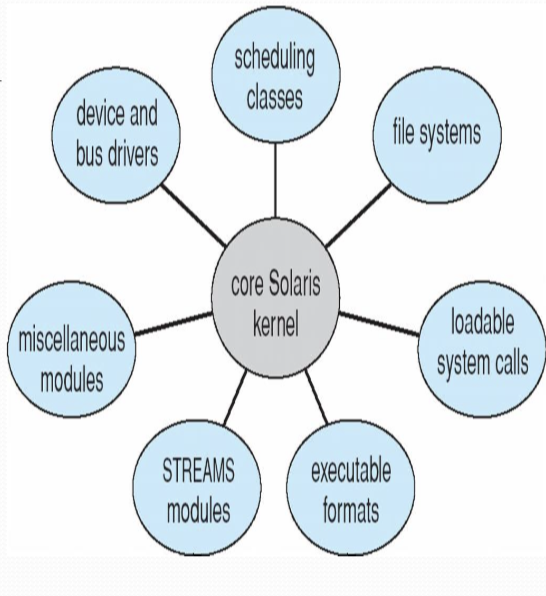
Modular OS structure with loadable kernel modules
Module System Features:
- Kernel has core components - Only essential services in base kernel
- Additional services via modules - Loaded at boot time or dynamically at runtime
- Object-oriented approach - Each component is separate and encapsulated
- Components communicate over known interfaces - Well-defined APIs between modules
- Loadable as needed within kernel - Can be added or removed without rebooting
- More flexible than layered structure - Any module can call any other module
- Examples: Linux, macOS, Solaris, Windows
5. Hybrid Systems
Most modern operating systems are not one pure model but combine multiple approaches:
- Linux: Monolithic plus modular design
- Windows: Mostly monolithic, plus microkernel for subsystems
- macOS: Hybrid with Mach microkernel + BSD subsystems
| Structure | Advantages | Disadvantages | Examples |
|---|---|---|---|
| Simple/Monolithic | Fast, efficient | Hard to maintain, not secure | MS-DOS, early UNIX |
| Layered | Modular, easy to debug | Performance overhead, hard to define layers | THE, OS/2 |
| Microkernel | Reliable, secure, portable | Performance overhead from messaging | Mach, QNX, Minix |
| Modular | Flexible, efficient, maintainable | Complexity in module interfaces | Linux, Solaris, Windows |
2.6 System Programs
System programs provide a convenient environment for program development and execution. They can be divided into several categories.
📁 File Management
Create, delete, copy, rename, print, dump, list files and directories
ℹ️ Status Information
Date, time, memory usage, disk space, number of users, performance
✏️ File Modification
Text editors to create and modify files, search contents
🔧 Programming Support
Compilers, assemblers, debuggers, interpreters
📚 Program Loading
Loaders, linkers, and execution utilities
💬 Communications
Email, web browsers, remote login, file transfer
2.7 System Boot
The process of starting a computer by loading the kernel is known as booting the system.
Boot Process Steps:
- Power-on: Execution starts at predefined memory location (ROM)
- Firmware (BIOS/UEFI):
- Initializes hardware
- Runs diagnostics (POST)
- Loads bootstrap loader
- Bootstrap Loader:
- Located in boot block/partition
- Loads kernel into memory
- May load secondary bootstrap (GRUB)
- Kernel Initialization:
- Initialize data structures
- Start system daemons
- Mount root file system
- System Ready: Login prompt or GUI appears
2.8 Exam-Style Practice Questions
Multiple Choice Questions
Q1. Which of the following is NOT a benefit of a microkernel architecture?
Q2. In a layered operating system structure, each layer can only use services of:
Q3. Which system call category would chmod() belong to?
Q4. When a user program makes a system call, the mode bit changes from:
Q5. Which of the following was invented at Xerox PARC?
Short Answer Questions
Q6. Explain the difference between user mode and kernel mode. Why is this distinction important? (5 marks)
Answer Key:
- User Mode: Restricted mode where user applications run. Limited access to system resources and cannot execute privileged instructions.
- Kernel Mode: Unrestricted mode where OS kernel runs. Full access to hardware and can execute all CPU instructions.
- Importance:
- Protection: Prevents user programs from damaging the system
- Security: Restricts access to critical resources
- Stability: Isolates user program crashes from system
Q7. Compare and contrast monolithic kernel and microkernel architectures. Give one advantage and disadvantage of each. (8 marks)
Answer Key:
| Aspect | Monolithic Kernel | Microkernel |
|---|---|---|
| Structure | All OS services in kernel space | Minimal kernel, services in user space |
| Advantage | Fast performance (no message passing) | More reliable and secure |
| Disadvantage | Hard to maintain, less secure | Performance overhead from IPC |
| Example | Linux, Unix | Mach, QNX |
Q8. List and briefly describe five types of system calls with one example each. (10 marks)
Answer Key:
- Process Control: Manage processes - Example: fork()
- File Management: Handle files - Example: open()
- Device Management: Control devices - Example: ioctl()
- Information Maintenance: Get/set system info - Example: getpid()
- Communications: IPC and networking - Example: socket()
2.9 Key Terms and Definitions
| Term | Definition |
|---|---|
| System Call | Interface between running program and OS kernel |
| API | Application Programming Interface - set of functions available to programmers |
| Shell | Command interpreter that provides user interface to OS |
| Kernel Module | Loadable kernel component that extends OS functionality |
| Mode Bit | Hardware bit distinguishing user mode (1) from kernel mode (0) |
| Privileged Instruction | CPU instruction only executable in kernel mode |
| Bootstrap Loader | Program that loads OS kernel during system boot |
| IPC | Inter-Process Communication - message passing between processes |
| System Program | Program that provides environment for program development/execution |
2.10 Diagrams from Slides
📊 Layered OS Structure Diagram
📊 Microkernel Architecture